Skip to content
  • Home
  • Recent
  • Tags
  • 0 Unread 0
  • Categories
  • Unreplied
  • Popular
  • GitHub
  • Docu
  • Hilfe
Skins
  • Light
  • Brite
  • Cerulean
  • Cosmo
  • Flatly
  • Journal
  • Litera
  • Lumen
  • Lux
  • Materia
  • Minty
  • Morph
  • Pulse
  • Sandstone
  • Simplex
  • Sketchy
  • Spacelab
  • United
  • Yeti
  • Zephyr
  • Dark
  • Cyborg
  • Darkly
  • Quartz
  • Slate
  • Solar
  • Superhero
  • Vapor

  • Default (No Skin)
  • No Skin
Collapse
ioBroker Logo

Community Forum

donate donate
  1. ioBroker Community Home
  2. English
  3. Visualization
  4. getting started with visualisations

NEWS

  • Weihnachtsangebot 2025! 🎄
    BluefoxB
    Bluefox
    23
    1
    1.3k

  • UPDATE 31.10.: Amazon Alexa - ioBroker Skill läuft aus ?
    apollon77A
    apollon77
    48
    3
    9.3k

  • Monatsrückblick – September 2025
    BluefoxB
    Bluefox
    14
    1
    2.5k

getting started with visualisations

Scheduled Pinned Locked Moved Visualization
vis
43 Posts 4 Posters 6.4k Views 4 Watching
  • Oldest to Newest
  • Newest to Oldest
  • Most Votes
Reply
  • Reply as topic
Log in to reply
This topic has been deleted. Only users with topic management privileges can see it.
  • T Offline
    T Offline
    Taragorm
    wrote on last edited by
    #3

    Thanks, I will do some more reading.

    What do you mean with custom editor? Custom editor of the parameter field, like color picker or OID Selector?

    Yes. Probably won't need it right away, but I like to know "how stuff works".

    -T

    BluefoxB 1 Reply Last reply
    0
    • T Taragorm

      Thanks, I will do some more reading.

      What do you mean with custom editor? Custom editor of the parameter field, like color picker or OID Selector?

      Yes. Probably won't need it right away, but I like to know "how stuff works".

      -T

      BluefoxB Offline
      BluefoxB Offline
      Bluefox
      wrote on last edited by Bluefox
      #4

      @Taragorm There is no easy possibility for that, but your callback will be called after the value set:
      if you define the attribute like attrName[defaultValue]/type/callbackName
      Example: https://github.com/ioBroker/ioBroker.vis-hqwidgets/blob/master/widgets/hqwidgets.html#L41

      So the callback must exists vis.binds.evohome.callbackName, like here:
      https://github.com/ioBroker/ioBroker.vis-hqwidgets/blob/master/widgets/hqwidgets/js/hqwidgets.js#L3069

      Of course you can overload the code and bind your own click handler on the button, but for that you must know, how vis editor works, and jquery.... and naming.

      1 Reply Last reply
      0
      • T Offline
        T Offline
        Taragorm
        wrote on last edited by
        #5

        Thanks. I'll leave that alone for now then. :)

        1 Reply Last reply
        0
        • T Offline
          T Offline
          Taragorm
          wrote on last edited by
          #6

          Another question - what is the best procedure for visualisation development?

          I have a local project (under home) that contains the development package; I can install that using the customURL function.

          So far, so good.

          After I've changed the package, and re-installed, nothing seems to change, so there must be more to it.

          BluefoxB 1 Reply Last reply
          0
          • T Taragorm

            Another question - what is the best procedure for visualisation development?

            I have a local project (under home) that contains the development package; I can install that using the customURL function.

            So far, so good.

            After I've changed the package, and re-installed, nothing seems to change, so there must be more to it.

            BluefoxB Offline
            BluefoxB Offline
            Bluefox
            wrote on last edited by
            #7

            @Taragorm Have you seen that? https://github.com/ioBroker/ioBroker/wiki/How-to-debug-vis-and-to-write-own-widget-set

            T S 2 Replies Last reply
            0
            • BluefoxB Bluefox

              @Taragorm Have you seen that? https://github.com/ioBroker/ioBroker/wiki/How-to-debug-vis-and-to-write-own-widget-set

              T Offline
              T Offline
              Taragorm
              wrote on last edited by
              #8

              @Bluefox I have, and I think I followed the instructions, but if I reinstall my adaptor using "from custom URL", nothing much seems to change, even if I restart iobroker.

              Clearly I'm doing something wrong?

              BluefoxB 1 Reply Last reply
              0
              • T Taragorm

                @Bluefox I have, and I think I followed the instructions, but if I reinstall my adaptor using "from custom URL", nothing much seems to change, even if I restart iobroker.

                Clearly I'm doing something wrong?

                BluefoxB Offline
                BluefoxB Offline
                Bluefox
                wrote on last edited by Bluefox
                #9

                @Taragorm I do it like this.

                My folder structure is like this one:

                /opt/iobroker
                        iobroker.my-new-adapter
                        node_modules
                               ...
                               iobroker.js-controle
                               iobroker.xxxx
                               ...
                

                Then I install my new adapter by writing npm i iobroker.my-new-adapter in /opt/iobroker.
                As result the npm creates a sym-link to my developer folder:

                /opt/iobroker
                        iobroker.my-new-adapter
                        node_modules
                               ...
                               iobroker.js-controle
                               iobroker.my-new-adapter (symlink)
                               iobroker.xxxx
                               ...
                

                after that I develop my adapter as usual in /opt/iobroker/iobroker.my-new-adapter even as a git repo.

                after every change I write iobroker r vis && iobroker u vis This should work 100%.

                Additionally I can write iobroker visdebug my-new-adapter and if I see the output
                Disable cache I restart the iobroker (only for the first time).

                After that I can directly modify the file /opt/iobroker/iobroker-data/files/vis/widgets/my-new-adapter.html and after every browser refresh it will be loaded anew from disk. So you can fast see your changes.

                But, the changes in /opt/iobroker/iobroker-data/files/vis/widgets/my-new-adapter.html must be copied to /opt/iobroker/iobroker.my-new-adapter/widgets/ manually and you may not call iobroker u vis till you do that, else they will be overwritten

                T 1 Reply Last reply
                0
                • T Offline
                  T Offline
                  Taragorm
                  wrote on last edited by
                  #10

                  Thanks - that's exactly what I needed to know

                  1 Reply Last reply
                  0
                  • T Offline
                    T Offline
                    Taragorm
                    wrote on last edited by
                    #11

                    Hmm.

                    The module is iobroker.vis-taragorm

                    iobroker@iobrokerdev /o/iobroker> iobroker visdebug vis-taragorm
                    
                    /opt/iobroker/node_modules/iobroker.js-controller/lib/setup/setupVisDebug.js:64
                                if (!adapterDir) throw 'Adapter not found. Tried: ' + adapterNames2Try.join(', ');
                                                 ^
                    Adapter not found. Tried: vis-vis-taragorm, vis-taragorm
                    iobroker@iobrokerdev /o/iobroker> 


                    however, vis-taragorm.html does exist in widgets, and there is an instance installed ok. I can't see my widget in the list though.

                    Possiby unrelated, I should also note that I got some errors installing (and many warnings, but I didn't include those):

                    unix_dgram.target.mk:101: recipe for target 'Release/obj.target/unix_dgram/src/unix_dgram.o' failed
                    make: *** [Release/obj.target/unix_dgram/src/unix_dgram.o] Error 1
                    make: Leaving directory '/opt/iobroker/node_modules/unix-dgram/build'
                    gyp ERR! build error 
                    gyp ERR! stack Error: `make` failed with exit code: 2
                    gyp ERR! stack     at ChildProcess.onExit (/usr/lib/node_modules/npm/node_modules/node-gyp/lib/build.js:262:23)
                    gyp ERR! stack     at ChildProcess.emit (events.js:197:13)
                    gyp ERR! stack     at Process.ChildProcess._handle.onexit (internal/child_process.js:254:12)
                    gyp ERR! System Linux 4.9.0-8-amd64
                    gyp ERR! command "/usr/bin/node" "/usr/lib/node_modules/npm/node_modules/node-gyp/bin/node-gyp.js" "rebuild"
                    gyp ERR! cwd /opt/iobroker/node_modules/unix-dgram
                    gyp ERR! node -v v11.10.1
                    gyp ERR! node-gyp -v v3.8.0
                    gyp ERR! not ok 
                    npm WARN optional SKIPPING OPTIONAL DEPENDENCY: unix-dgram@0.2.3 (node_modules/unix-dgram):
                    npm WARN optional SKIPPING OPTIONAL DEPENDENCY: unix-dgram@0.2.3 install: `node-gyp rebuild`
                    npm WARN optional SKIPPING OPTIONAL DEPENDENCY: Exit status 1


                    The last message implies this isn't fatal, but I'm new to NodeJS...

                    The dev env is Debian Stretch

                    iobroker@iobrokerdev ~/projects> uname -a
                    Linux iobrokerdev 4.9.0-8-amd64 #1 SMP Debian 4.9.130-2 (2018-10-27) x86_64 GNU/Linux
                    
                    
                    1 Reply Last reply
                    0
                    • BluefoxB Offline
                      BluefoxB Offline
                      Bluefox
                      wrote on last edited by
                      #12

                      Участник @Taragorm написал в getting started with visualisations:

                      /opt/iobroker/node_modules/iobroker.js-controller/

                      It would be easier, if I can see the repo on github.
                      Do you have file /opt/iobroker/node_modules/iobroker.vis-taragorm/widgets/taragorm.html ?

                      T 1 Reply Last reply
                      0
                      • BluefoxB Offline
                        BluefoxB Offline
                        Bluefox
                        wrote on last edited by
                        #13

                        BTW, you can deliver in your adapter https://github.com/Taragorm/ioBroker.evohome the widgets too. It is even better.

                        1 Reply Last reply
                        0
                        • T Offline
                          T Offline
                          Taragorm
                          wrote on last edited by
                          #14

                          Thanks for the quick response!

                          The repo is up at: https://github.com/Taragorm/ioBroker.vis-taragorm

                          It's mostly template right now.

                          This is intended for some generic visualisations (and to practice in) so I didn't include it in the evohome repo. I'll add some specific visualisations there once I know what I'm doing.

                          1 Reply Last reply
                          0
                          • BluefoxB Bluefox

                            Участник @Taragorm написал в getting started with visualisations:

                            /opt/iobroker/node_modules/iobroker.js-controller/

                            It would be easier, if I can see the repo on github.
                            Do you have file /opt/iobroker/node_modules/iobroker.vis-taragorm/widgets/taragorm.html ?

                            T Offline
                            T Offline
                            Taragorm
                            wrote on last edited by
                            #15

                            @Bluefox

                            iobroker@iobrokerdev ~/projects> ls -l /opt/iobroker/node_modules/iobroker.vis-taragorm/widgets
                            total 12
                            drwxrwxrwx+ 4 iobroker iobroker 4096 Mar  2 10:26 vis-taragorm/
                            -rw-r--r--+ 1 iobroker iobroker 6521 Mar  2 11:47 vis-taragorm.html


                            Seems to be there...

                            BluefoxB 1 Reply Last reply
                            0
                            • T Taragorm

                              @Bluefox

                              iobroker@iobrokerdev ~/projects> ls -l /opt/iobroker/node_modules/iobroker.vis-taragorm/widgets
                              total 12
                              drwxrwxrwx+ 4 iobroker iobroker 4096 Mar  2 10:26 vis-taragorm/
                              -rw-r--r--+ 1 iobroker iobroker 6521 Mar  2 11:47 vis-taragorm.html


                              Seems to be there...

                              BluefoxB Offline
                              BluefoxB Offline
                              Bluefox
                              wrote on last edited by
                              #16

                              @Taragorm No matter. With iobroker r vis && iobroker u vis it should work.
                              Not Fast, but work.

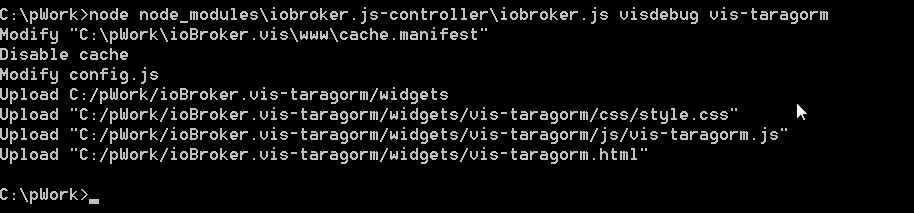
                              Just tried to execute (windows):
                              2797695c-1307-4c36-a736-32d4f35862c9-image.png
                              and cannot see any errors

                              T 1 Reply Last reply
                              0
                              • T Offline
                                T Offline
                                Taragorm
                                wrote on last edited by
                                #17

                                Something broken with my install, maybe?

                                I added a bit of logging to the empty catch block (line 24 here):

                                    this.enableDebug = function (widgetset) {
                                        console.log( "widgetset=" + widgetset );
                                
                                        if (widgetset) {
                                            // Try to find out the adapter directory out of a list of options
                                            var adapterDir;
                                            var adapterNames2Try = ['vis-' + widgetset, widgetset];
                                            if (adapterNames2Try[0] === adapterNames2Try[1]) adapterNames2Try.splice(1, 1);
                                            for (var i = 0; i < adapterNames2Try.length; i++) {
                                                try {
                                                    var adapterDir2Try = tools.getAdapterDir(adapterNames2Try[i]);
                                                    // Query the entry
                                                    var stats = fs.lstatSync(adapterDir2Try);
                                
                                                    console.log(stats.toString() );
                                
                                                    // Is it a directory?
                                                    if (stats.isDirectory()) {
                                                        //found it!
                                                        adapterDir = adapterDir2Try;
                                                        break;
                                                    }
                                                } catch (e) {
                                                    console.error(e);
                                                }
                                            }
                                
                                            if (!adapterDir) throw 'Adapter not found. Tried: ' + adapterNames2Try.join(', ');
                                        }


                                and got this:

                                obroker@iobrokerdev /o/iobroker> iobroker visdebug vis-taragorm
                                widgetset=vis-taragorm
                                TypeError [ERR_INVALID_ARG_TYPE]: The "path" argument must be one of type string, Buffer, or URL. Received type object
                                    at Object.lstatSync (fs.js:857:3)
                                    at VisDebug.enableDebug (/opt/iobroker/node_modules/iobroker.js-controller/lib/setup/setupVisDebug.js:52:36)
                                    at /opt/iobroker/node_modules/iobroker.js-controller/lib/setup.js:2464:30
                                    at Object.connected (/opt/iobroker/node_modules/iobroker.js-controller/lib/setup.js:3145:70)
                                    at Socket.<anonymous> (/opt/iobroker/node_modules/iobroker.js-controller/lib/states/statesInMemClient.js:87:68)
                                    at Socket.Emitter.emit (/opt/iobroker/node_modules/iobroker.js-controller/node_modules/component-emitter/index.js:133:20)
                                    at Socket.emit (/opt/iobroker/node_modules/iobroker.js-controller/node_modules/socket.io-client/lib/socket.js:138:10)
                                    at Socket.onconnect (/opt/iobroker/node_modules/iobroker.js-controller/node_modules/socket.io-client/lib/socket.js:335:8)
                                    at Socket.onpacket (/opt/iobroker/node_modules/iobroker.js-controller/node_modules/socket.io-client/lib/socket.js:232:12)
                                    at Manager.<anonymous> (/opt/iobroker/node_modules/component-bind/index.js:21:15)
                                [object Object]
                                
                                /opt/iobroker/node_modules/iobroker.js-controller/lib/setup/setupVisDebug.js:67
                                            if (!adapterDir) throw 'Adapter not found. Tried: ' + adapterNames2Try.join(', ');
                                                             ^
                                Adapter not found. Tried: vis-vis-taragorm, vis-taragorm
                                
                                
                                • T
                                BluefoxB 1 Reply Last reply
                                0
                                • T Taragorm

                                  Something broken with my install, maybe?

                                  I added a bit of logging to the empty catch block (line 24 here):

                                      this.enableDebug = function (widgetset) {
                                          console.log( "widgetset=" + widgetset );
                                  
                                          if (widgetset) {
                                              // Try to find out the adapter directory out of a list of options
                                              var adapterDir;
                                              var adapterNames2Try = ['vis-' + widgetset, widgetset];
                                              if (adapterNames2Try[0] === adapterNames2Try[1]) adapterNames2Try.splice(1, 1);
                                              for (var i = 0; i < adapterNames2Try.length; i++) {
                                                  try {
                                                      var adapterDir2Try = tools.getAdapterDir(adapterNames2Try[i]);
                                                      // Query the entry
                                                      var stats = fs.lstatSync(adapterDir2Try);
                                  
                                                      console.log(stats.toString() );
                                  
                                                      // Is it a directory?
                                                      if (stats.isDirectory()) {
                                                          //found it!
                                                          adapterDir = adapterDir2Try;
                                                          break;
                                                      }
                                                  } catch (e) {
                                                      console.error(e);
                                                  }
                                              }
                                  
                                              if (!adapterDir) throw 'Adapter not found. Tried: ' + adapterNames2Try.join(', ');
                                          }


                                  and got this:

                                  obroker@iobrokerdev /o/iobroker> iobroker visdebug vis-taragorm
                                  widgetset=vis-taragorm
                                  TypeError [ERR_INVALID_ARG_TYPE]: The "path" argument must be one of type string, Buffer, or URL. Received type object
                                      at Object.lstatSync (fs.js:857:3)
                                      at VisDebug.enableDebug (/opt/iobroker/node_modules/iobroker.js-controller/lib/setup/setupVisDebug.js:52:36)
                                      at /opt/iobroker/node_modules/iobroker.js-controller/lib/setup.js:2464:30
                                      at Object.connected (/opt/iobroker/node_modules/iobroker.js-controller/lib/setup.js:3145:70)
                                      at Socket.<anonymous> (/opt/iobroker/node_modules/iobroker.js-controller/lib/states/statesInMemClient.js:87:68)
                                      at Socket.Emitter.emit (/opt/iobroker/node_modules/iobroker.js-controller/node_modules/component-emitter/index.js:133:20)
                                      at Socket.emit (/opt/iobroker/node_modules/iobroker.js-controller/node_modules/socket.io-client/lib/socket.js:138:10)
                                      at Socket.onconnect (/opt/iobroker/node_modules/iobroker.js-controller/node_modules/socket.io-client/lib/socket.js:335:8)
                                      at Socket.onpacket (/opt/iobroker/node_modules/iobroker.js-controller/node_modules/socket.io-client/lib/socket.js:232:12)
                                      at Manager.<anonymous> (/opt/iobroker/node_modules/component-bind/index.js:21:15)
                                  [object Object]
                                  
                                  /opt/iobroker/node_modules/iobroker.js-controller/lib/setup/setupVisDebug.js:67
                                              if (!adapterDir) throw 'Adapter not found. Tried: ' + adapterNames2Try.join(', ');
                                                               ^
                                  Adapter not found. Tried: vis-vis-taragorm, vis-taragorm
                                  
                                  
                                  • T
                                  BluefoxB Offline
                                  BluefoxB Offline
                                  Bluefox
                                  wrote on last edited by
                                  #18

                                  @Taragorm Can it be, that you have js-controller 1.4.2? Please update to 1.5.7

                                  1 Reply Last reply
                                  0
                                  • T Offline
                                    T Offline
                                    Taragorm
                                    wrote on last edited by
                                    #19

                                    Certainly looks to be 1.4.2

                                    iobroker@iobrokerdev /o/iobroker> npm outdated
                                    Package                 Current  Wanted  Latest  Location
                                    iobroker.js-controller    1.4.2   1.4.2   1.5.7  iobroker.inst
                                    yargs                     7.1.0   7.1.0  13.2.2  iobroker.inst


                                    main iobroker package calls for "stable", rather than a particular rev - do I just alter the depend there and npm update - or is there a "proper" way to do it?

                                    BluefoxB 1 Reply Last reply
                                    0
                                    • T Taragorm

                                      Certainly looks to be 1.4.2

                                      iobroker@iobrokerdev /o/iobroker> npm outdated
                                      Package                 Current  Wanted  Latest  Location
                                      iobroker.js-controller    1.4.2   1.4.2   1.5.7  iobroker.inst
                                      yargs                     7.1.0   7.1.0  13.2.2  iobroker.inst


                                      main iobroker package calls for "stable", rather than a particular rev - do I just alter the depend there and npm update - or is there a "proper" way to do it?

                                      BluefoxB Offline
                                      BluefoxB Offline
                                      Bluefox
                                      wrote on last edited by
                                      #20

                                      @Taragorm via npm is ok. Just stop iob before update

                                      1 Reply Last reply
                                      0
                                      • T Offline
                                        T Offline
                                        Taragorm
                                        wrote on last edited by
                                        #21

                                        Update

                                        Reloaded iobroker from scratch, just to be sure
                                        Updated iob.js-controller to 1.5.7

                                        iobroker@iobrokerdev /o/iobroker> npm list iobroker.js-controller
                                        iobroker.inst@2.0.2 /opt/iobroker
                                        └── iobroker.js-controller@1.5.7 
                                        

                                        Same error on iob visdebug

                                        Also

                                        Lots of warnings caused by this:

                                        iobroker.inst@2.0.2 /opt/iobroker
                                        └─┬ iobroker.js-controller@1.5.7
                                          └─┬ winston-syslog@1.2.6
                                            └── UNMET OPTIONAL DEPENDENCY unix-dgram@~0.2.1


                                        Is there any way to suppress it? I hate clutter in the logfiles!

                                        Also2

                                        I can't see my widget in the vis builder. There's no obvious error in the log tho.

                                        1 Reply Last reply
                                        0
                                        • T Offline
                                          T Offline
                                          Taragorm
                                          wrote on last edited by
                                          #22

                                          done a bit more digging into the visdebug error, and it seems like the project folder isn't being recognised as a directory:

                                          Trying:/opt/iobroker/iobroker.vis-taragorm
                                          Got stats:{"dev":2049,"mode":41471,"nlink":1,"uid":1001,"gid":1001,"rdev":0,"blksize":4096,"ino":792374,"size":24,"blocks":0,"atimeMs":1552471012718.894,"mtimeMs":1552471012714.892,"ctimeMs":1552471012714.892,"birthtimeMs":1552471012714.892,"atime":"2019-03-13T09:56:52.719Z","mtime":"2019-03-13T09:56:52.715Z","ctime":"2019-03-13T09:56:52.715Z","birthtime":"2019-03-13T09:56:52.715Z"}  isDir=false


                                          trace code:

                                                              console.log("Trying:" + process.cwd() + "/" + adapterNames2Try[i]);
                                                              var adapterDir2Try = tools.getAdapterDir(adapterNames2Try[i]);
                                                              // Query the entry
                                                              var stats = fs.lstatSync(adapterDir2Try);
                                                              console.log("Got stats:" + JSON.stringify(stats) + "  isDir=" + stats.isDirectory());
                                          

                                          But it surely is a dir:

                                          iobroker@iobrokerdev /o/iobroker> ls -l
                                          total 248
                                          -rw-rwxr--+   1 iobroker iobroker   1474 Mar 13 09:40 CHANGELOG_INSTALLER_LINUX.md*
                                          drwxrwxr-x+   3 iobroker iobroker   4096 Mar 13 09:40 install/
                                          -rwxrwxrwx+   1 iobroker iobroker    169 Mar 13 09:41 INSTALLER_INFO.txt*
                                          lrwxrwxrwx    1 iobroker iobroker     22 Mar 13 09:41 iob -> /opt/iobroker/iobroker*
                                          -rwxrwxr-x+   1 iobroker iobroker    209 Mar 13 09:41 iobroker*
                                          drwxrwxrwx+   4 iobroker iobroker   4096 Mar 13 09:42 iobroker-data/
                                          drwxrwxrwx+   8 iobroker iobroker   4096 Mar 13 09:59 iobroker.vis-taragorm/
                                          -rw-rwxrw-+   1 iobroker iobroker     92 Mar 13 09:41 killall.sh*
                                          drwxrwxr-x+   2 iobroker iobroker   4096 Mar 13 09:40 lib/
                                          -rw-rwxr--+   1 iobroker iobroker   1137 Mar 13 09:40 LICENSE*
                                          drwxrwxrwx+   2 iobroker iobroker   4096 Mar 13 09:41 log/
                                          drwxrwxr-x+ 451 iobroker iobroker  20480 Mar 13 09:56 node_modules/
                                          -rw-rwxrw-+   1 iobroker iobroker    658 Mar 13 09:56 package.json*
                                          -rw-rwxrw-+   1 iobroker iobroker 166878 Mar 13 09:41 package-lock.json*
                                          -rw-rwxr--+   1 iobroker iobroker   6101 Mar 13 09:40 README.md*
                                          -rw-rw-rw-+   1 iobroker iobroker   5868 Mar 13 09:51 reinstall.js
                                          -rw-rwxrw-+   1 iobroker iobroker    709 Mar 13 09:41 reinstall.sh*


                                          it's as if fs is misbehaving?

                                          BluefoxB 1 Reply Last reply
                                          0
                                          Reply
                                          • Reply as topic
                                          Log in to reply
                                          • Oldest to Newest
                                          • Newest to Oldest
                                          • Most Votes


                                          Support us

                                          ioBroker
                                          Community Adapters
                                          Donate

                                          632

                                          Online

                                          32.5k

                                          Users

                                          81.7k

                                          Topics

                                          1.3m

                                          Posts
                                          Community
                                          Impressum | Datenschutz-Bestimmungen | Nutzungsbedingungen | Einwilligungseinstellungen
                                          ioBroker Community 2014-2025
                                          logo
                                          • Login

                                          • Don't have an account? Register

                                          • Login or register to search.
                                          • First post
                                            Last post
                                          0
                                          • Home
                                          • Recent
                                          • Tags
                                          • Unread 0
                                          • Categories
                                          • Unreplied
                                          • Popular
                                          • GitHub
                                          • Docu
                                          • Hilfe