




Iobroker web admin nicht mehr erreichbar HILFE

-
Hallo zusammen,
ich habe versucht den Radar Adapter über die Weboberfläche zu installieren, mittendrin war meine Internetverbindung weg, danach wurde Versucht die Instanz hinzuzufügen. Irgendwie hatte sich an der Stelle die Installation aufgehangen, zumindest schien es so.
Aus Not habe ich den Pi über Putty rebooten lassen. Nun komme ich gar nicht mehr auf die Weboberfläche. Ich vermute es das es mit der Abgebrochenen Installation von radar zu tun hatte und der Reboot vom Pi
Kann mir jemand helfen wieder auf die Weboberfläche zu kommen?
Habe das aus einem Beitrag versucht:
-
Redis läuft auch nicht. Starte das mal zuerst.
-
Hi, wie starte ich redis?
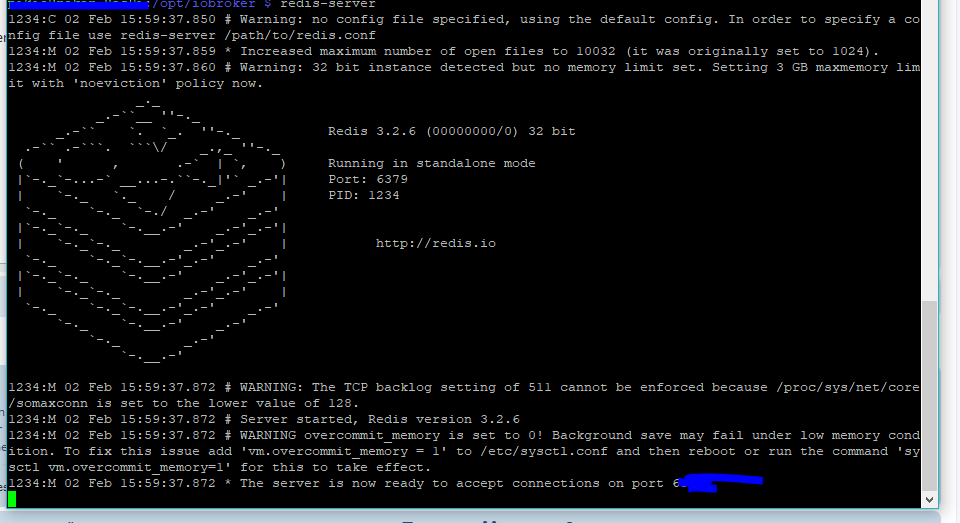
Edit: Habs mit redis-server probiert. Es wurde was gestartet aber iwi bleibt er hier hängen bzw es geht nicht mehr weiter:
18544_pi2.png -
Vielleicht helfen diese Infos weiter mein iobroker zu retten:
-
Wenn du das als Text eingestellt hättest, lönnte ich es dir auch markieren :(
ENOSPC
Kein Platz mehr
Gruß
Rainer
-
 node node_modules/iobroker.js-controller/controller.js --logs
2019-02-02 18:31:09.593  - info: host.ioBroker-RasPi iobroker.js-controller version 1.4.0 js-controller starting
2019-02-02 18:31:09.611  - info: host.ioBroker-RasPi Copyright (c) 2014-2018 bluefox, 2014 hobbyquaker
2019-02-02 18:31:09.614  - info: host.ioBroker-RasPi hostname: ioBroker-RasPi, node: v8.11.1
2019-02-02 18:31:09.628  - info: host.ioBroker-RasPi ip addresses: xxx.xxx.x.xxx 2003:ea:a700xxxx:exxxfe
2019-02-02 18:31:10.599  - info: host.ioBroker-RasPi  inMem-objects listening on port 9001
2019-02-02 18:31:10.690  - info: host.ioBroker-RasPi States connected to redis: 127.0.0.1:6379
2019-02-02 18:31:10.697  - info: host.ioBroker-RasPi InMemoryDB connected
2019-02-02 18:31:10.752  - info: host.ioBroker-RasPi 23 instances found
host.ioBroker-RasPi check instance "system.adapter.admin.0" for host "ioBroker-RasPi"
host.ioBroker-RasPi check instance "system.adapter.discovery.0" for host "ioBroker-RasPi"
host.ioBroker-RasPi check instance "system.adapter.hm-rpc.0" for host "ioBroker-RasPi"
host.ioBroker-RasPi check instance "system.adapter.hm-rega.0" for host "ioBroker-RasPi"
host.ioBroker-RasPi check instance "system.adapter.web.0" for host "ioBroker-RasPi"
host.ioBroker-RasPi check instance "system.adapter.rpi2.0" for host "ioBroker-RasPi"
host.ioBroker-RasPi check instance "system.adapter.socketio.0" for host "ioBroker-RasPi"
host.ioBroker-RasPi check instance "system.adapter.cloud.0" for host "ioBroker-RasPi"
host.ioBroker-RasPi check instance "system.adapter.vis.0" for host "ioBroker-RasPi"
host.ioBroker-RasPi check instance "system.adapter.history.0" for host "ioBroker-RasPi"
host.ioBroker-RasPi check instance "system.adapter.javascript.0" for host "ioBroker-RasPi"
host.ioBroker-RasPi check instance "system.adapter.mobile.0" for host "ioBroker-RasPi"
host.ioBroker-RasPi check instance "system.adapter.deconz.0" for host "ioBroker-RasPi"
host.ioBroker-RasPi check instance "system.adapter.hue.0" for host "ioBroker-RasPi"
host.ioBroker-RasPi check instance "system.adapter.vis-weather.0" for host "ioBroker-RasPi"
host.ioBroker-RasPi check instance "system.adapter.vis-timeandweather.0" for host "ioBroker-RasPi"
host.ioBroker-RasPi check instance "system.adapter.vis-hqwidgets.0" for host "ioBroker-RasPi"
host.ioBroker-RasPi check instance "system.adapter.cloud.1" for host "ioBroker-RasPi"
host.ioBroker-RasPi check instance "system.adapter.text2command.0" for host "ioBroker-RasPi"
host.ioBroker-RasPi check instance "system.adapter.telegram.0" for host "ioBroker-RasPi"
2019-02-02 18:31:10.818  - info: host.ioBroker-RasPi starting 15 instances
2019-02-02 18:31:10.954  - info: host.ioBroker-RasPi instance system.adapter.admin.0 started with pid 6663
2019-02-02 18:31:11.964  - error: uncaught exception: ENOSPC: no space left on device, write
2019-02-02 18:31:11.974  - error: Error: ENOSPC: no space left on device, write
    at Object.fs.writeSync (fs.js:735:20)
    at Object.fs.writeFileSync (fs.js:1309:24)
    at Timeout._onTimeout (/opt/iobroker/node_modules/iobroker.js-controller/controller.js:1779:16)
    at ontimeout (timers.js:482:11)
    at tryOnTimeout (timers.js:317:5)
    at Timer.listOnTimeout (timers.js:277:5)
2019-02-02 18:31:11.996  - info: iobroker _restart
2019-02-02 18:31:13.779  - info: iobroker Starting node restart.js
2019-02-02 18:31:13.857  - info: iobroker exit 0
ENOSPC: no space left on device, write
Error: ENOSPC: no space left on device, write
    at Object.fs.writeSync (fs.js:735:20)
    at Object.fs.writeFileSync (fs.js:1309:24)
    at Timeout.saveConfig [as _onTimeout] (/opt/iobroker/node_modules/iobroker.js-controller/lib/objects/objectsInMemSer                                                ver.js:1897:16)
    at ontimeout (timers.js:482:11)
    at tryOnTimeout (timers.js:317:5)
    at Timer.listOnTimeout (timers.js:277:5)
    at listOnTimeoutNT (timers.js:353:26)
    at _combinedTickCallback (internal/process/next_tick.js:135:11)
    at process._tickCallback (internal/process/next_tick.js:180:9)
Hab nochmal als Text. Kannst du mir bitte die stelle markieren?
-
Hi vielen Dank für den Hinweis! Ich hab mit df -h nachgeehen es sind tatsächlich 100% der SD Karte voll… Hab eine 16GB SD Karte drin, aber genutzt werden 1,8GB
Habe mir die iobroker image runtergeladen und nach der Installation anscheinend vergessen über raspi-config "expand filesystem auszuführen"
Kann ich dies noch nachträglich machen? Oder sind alle EInstellung die ich über die iobroker weboberfläche gemacht habe dann weg?
-
2019-02-02 18:31:11.964 - error: uncaught exception: ENOSPC: no space left on device, write
2019-02-02 18:31:11.974 - error: Error: ENOSPC: no space left on device, write `
im screenshot stand das mehrmals ;-)
Gruß
Rainer
-
Habe mir die iobroker image runtergeladen `
Welches?Kann ich dies noch nachträglich machen? Oder sind alle EInstellung die ich über die iobroker weboberfläche gemacht habe dann weg? `
Für die Erweiterung braucht das Betriebssystem ein wenig reserveplatz.Wenn jetzt wirklich nichts mehr frei ist wird es eng.
solltest du History-Daten haben. wären die mein erster Kandidat diese zu löschen, damit der Rest gerettet werden kann.
Gruß
Rainer
-
Hi habs über raspi-config probiert, leider klappt der expand Befehl nicht mehr da 0% Speicher verfügbar, was kann ich eventuell löschen um den expand filesystem Befehl auszuführen? Hat wer eine Idee wie ich das lösen kann um die vollen 16Gb zu nutzen ohne alles löschen zu müssen oder iobroker neu aufzussetzen?
sudo raspi-config Welcome to fdisk (util-linux 2.29.2). Changes will remain in memory only, until you decide to write them. Be careful before using the write command. Command (m for help): Disk /dev/mmcblk0: 14,9 GiB, 15931539456 bytes, 31116288 sectors Units: sectors of 1 * 512 = 512 bytes Sector size (logical/physical): 512 bytes / 512 bytes I/O size (minimum/optimal): 512 bytes / 512 bytes Disklabel type: dos Disk identifier: 0x9c63c4e6 Device Boot Start End Sectors Size Id Type /dev/mmcblk0p1 8192 93802 85611 41,8M c W95 FAT32 (LBA) /dev/mmcblk0p2 98304 3987455 3889152 1,9G 83 Linux Command (m for help): Partition number (1,2, default 2): Partition 2 has been deleted. Command (m for help): Partition type p primary (1 primary, 0 extended, 3 free) e extended (container for logical partitions) Select (default p): Partition number (2-4, default 2): First sector (2048-31116287, default 2048): Last sector, +sectors or +size{K,M,G,T,P} (98304-31116287, default 31116287): Created a new partition 2 of type 'Linux' and of size 14,8 GiB. Partition #2 contains a ext4 signature. Command (m for help): Disk /dev/mmcblk0: 14,9 GiB, 15931539456 bytes, 31116288 sectors Units: sectors of 1 * 512 = 512 bytes Sector size (logical/physical): 512 bytes / 512 bytes I/O size (minimum/optimal): 512 bytes / 512 bytes Disklabel type: dos Disk identifier: 0x9c63c4e6 Device Boot Start End Sectors Size Id Type /dev/mmcblk0p1 8192 93802 85611 41,8M c W95 FAT32 (LBA) /dev/mmcblk0p2 98304 31116287 31017984 14,8G 83 Linux Command (m for help): The partition table has been altered. Calling ioctl() to re-read partition table. Re-reading the partition table failed.: Das Gerät oder die Ressource ist belegt The kernel still uses the old table. The new table will be used at the next reboot or after you run partprobe(8) or kpartx(8). cat: Schreibfehler: Auf dem Gerät ist kein Speicherplatz mehr verfügbar pi@ioBroker-RasPi:~ $ sudo raspi-config pi@ioBroker-RasPi:~ $ sudo raspi-config Welcome to fdisk (util-linux 2.29.2). Changes will remain in memory only, until you decide to write them. Be careful before using the write command. Command (m for help): Disk /dev/mmcblk0: 14,9 GiB, 15931539456 bytes, 31116288 sectors Units: sectors of 1 * 512 = 512 bytes Sector size (logical/physical): 512 bytes / 512 bytes I/O size (minimum/optimal): 512 bytes / 512 bytes Disklabel type: dos Disk identifier: 0x9c63c4e6 Device Boot Start End Sectors Size Id Type /dev/mmcblk0p1 8192 93802 85611 41,8M c W95 FAT32 (LBA) /dev/mmcblk0p2 98304 3987455 3889152 1,9G 83 Linux Command (m for help): Partition number (1,2, default 2): Partition 2 has been deleted. Command (m for help): Partition type p primary (1 primary, 0 extended, 3 free) e extended (container for logical partitions) Select (default p): Partition number (2-4, default 2): First sector (2048-31116287, default 2048): Last sector, +sectors or +size{K,M,G,T,P} (98304-31116287, default 31116287): Created a new partition 2 of type 'Linux' and of size 14,8 GiB. Partition #2 contains a ext4 signature. Command (m for help): Disk /dev/mmcblk0: 14,9 GiB, 15931539456 bytes, 31116288 sectors Units: sectors of 1 * 512 = 512 bytes Sector size (logical/physical): 512 bytes / 512 bytes I/O size (minimum/optimal): 512 bytes / 512 bytes Disklabel type: dos Disk identifier: 0x9c63c4e6 Device Boot Start End Sectors Size Id Type /dev/mmcblk0p1 8192 93802 85611 41,8M c W95 FAT32 (LBA) /dev/mmcblk0p2 98304 31116287 31017984 14,8G 83 Linux Command (m for help): The partition table has been altered. Calling ioctl() to re-read partition table. Re-reading the partition table failed.: Das Gerät oder die Ressource ist belegt The kernel still uses the old table. The new table will be used at the next reboot or after you run partprobe(8) or kpartx(8). cat: Schreibfehler: Auf dem Gerät ist kein Speicherplatz mehr verfügbar -
Hab folgende image:
Kannst du mir sagen wie ich vorgehen muss um die Historie Daten falls vorhanden, zu löschen?
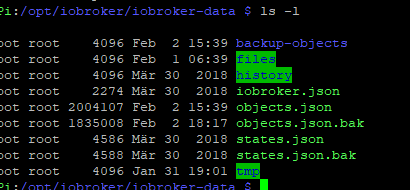
Unter /opt/iobroker/iobroker-data/ sind folgende Dateien, welche davon darf ich löschen?
18544_pi5.png
18544_pi6.png -
rechts steht "ReadMe"
Hast du da schon mal draufgeklickt?
Da steht alles wichtige drin, was beachtet werden muss.
Gruß
Rainer
-
rechts steht "ReadMe"
Hast du da schon mal draufgeklickt?
Da steht alles wichtige drin, was beachtet werden muss.
> die Historie Daten ****__falls vorhanden__****
Das kannst nur du mir sagen, ob du einen History-Adapter installiert hastGruß
Rainer
-
Hi ja habs installiert >> system.adapter.history.0
Hab bereits versucht bestimmte adapter über die Konsole zu löschen, leider klappt das nicht da nicht genug Speicher vorhanden ist…ärgerlich.
Die Readme habe ich mir durchgelesen, da ich in meinen Anfängen iwo ein Fehler hatte, hatte ich auf die schnelle beim zweiten mal erstellen der Image das expand vergessen
insgesamt 1996
drwxr-xr-x  2 root root    4096 Feb  2 15:39 backup-objects
drwxrwxrwx 29 root root    4096 Feb  2 19:58 files
drwxrwxrwx  2 root root    4096 Mär 30  2018 history
-rwxrwxrwx  1 root root    2274 Mär 30  2018 iobroker.json
-rwxrwxrwx  1 root root 2004107 Feb  2 15:39 objects.json
-rwxrwxrwx  1 root root       0 Feb  2 19:59 objects.json.bak
-rwxrwxrwx  1 root root    4586 Mär 30  2018 states.json
-rwxrwxrwx  1 root root    4588 Mär 30  2018 states.json.bak
drwxrwxrwx  3 root root    4096 Jan 31 19:01 tmp
Leider ist der history ordner leer…was kann ich nun versuchen zu löschen?
-
Hab bereits versucht bestimmte adapter über die Konsole zu löschen, `
Keine gute Idee.Hast du filezilla oder winscp?
Die history-Daten sind im Ordner History
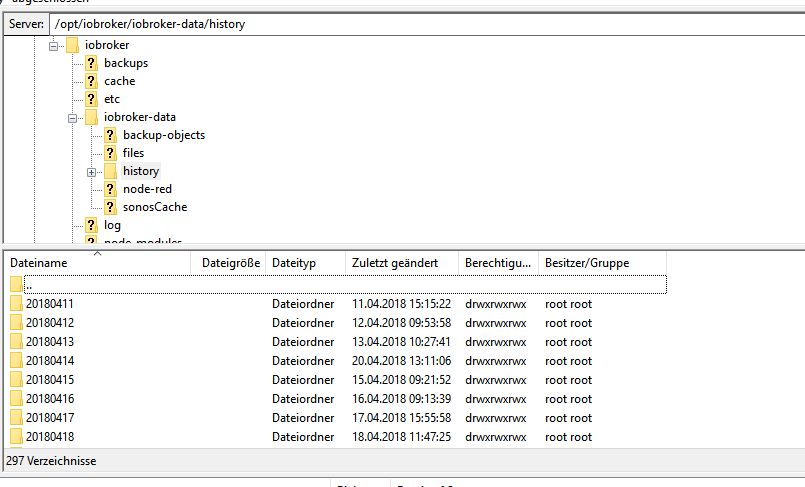
Darin befindet sich pro Tag ein weiteres Verzeichnis.
Ich würde das (die) älteste(n) Verzeichnis(se) löschen.
Danach über sudo raspi-config das expand filesystem versuchen
Wenn du da nichts drin hast,
-
hast du den Adapter aktiv?
-
hast du Datenpunkte zum loggen aktiviert
-
oder nutzst du einen anderen Adapter (influx, sql)??
Gruß
Rainer
-
-
Hi Rainer,
habs über filezilla gemacht. History Ordner ists leer…leider:
Ich meine ich habe in dem History Adapter auch nichts eingetellt oder aktiviert.
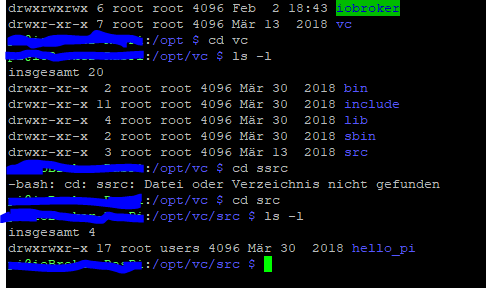
Ich habe nebem dem iobroker verzeichnis noch ein v verzeichnis gefunden (siehe Bild), brauche ich das?
Noch ne Idee was ich löschen könnte?
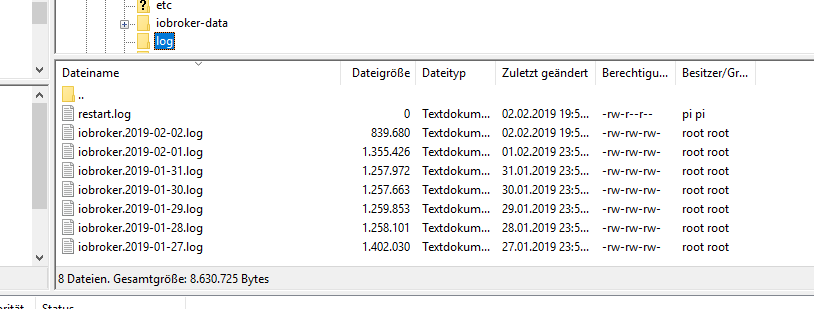
Was ist mit den logfiles? Können die getrost gelöscht werden?
18544_pi7.png
18544_logfile.png -
Muss das mal raussuchen mit dem Filesystem anpassen. Hatte das auch. 32GB Karte aber nur 1.8 GB wurden belegt.
Gab eine Anleitung im Netz wie man die 32GB ausreizt.
Poste den Link sobald ich den habe .
Gefunden. Bisschen tricky, aber wenn du dich genau an die Anleitung hälst , klappt das.
-
Bisschen tricky, `
Nicht notwendig!Einfach
sudo raspi-configaufrufen, den Menüpunkt "expand filesystem" raussuchen (ist nicht mehr auf der obersten Ebene-suchen!)
Anklicken und fertig.
Gruß
Rainer
-
Leider nicht Rainer. Wenn es so einfach wäre,hätte ich den Trick nicht gepostet.
Der Befehl gibt eine Fehlermeldung aus , wenn man über NOOBS installiert hat.
raspi-config -> expand Filesytem -> "your partition layout is not supported ….. you're probably using noobs........."




Hey! Du scheinst an dieser Unterhaltung interessiert zu sein, hast aber noch kein Konto.
Hast du es satt, bei jedem Besuch durch die gleichen Beiträge zu scrollen? Wenn du dich für ein Konto anmeldest, kommst du immer genau dorthin zurück, wo du zuvor warst, und kannst dich über neue Antworten benachrichtigen lassen (entweder per E-Mail oder Push-Benachrichtigung). Du kannst auch Lesezeichen speichern und Beiträge positiv bewerten, um anderen Community-Mitgliedern deine Wertschätzung zu zeigen.
Mit deinem Input könnte dieser Beitrag noch besser werden 💗
Registrieren Anmelden399
Online33.0k
Benutzer83.6k
Themen1.3m
Beiträge