Skip to content
  • Home
  • Recent
  • Tags
  • 0 Unread 0
  • Categories
  • Unreplied
  • Popular
  • GitHub
  • Docu
  • Hilfe
Skins
  • Light
  • Brite
  • Cerulean
  • Cosmo
  • Flatly
  • Journal
  • Litera
  • Lumen
  • Lux
  • Materia
  • Minty
  • Morph
  • Pulse
  • Sandstone
  • Simplex
  • Sketchy
  • Spacelab
  • United
  • Yeti
  • Zephyr
  • Dark
  • Cyborg
  • Darkly
  • Quartz
  • Slate
  • Solar
  • Superhero
  • Vapor

  • Default (No Skin)
  • No Skin
Collapse
ioBroker Logo

Community Forum

donate donate
  1. ioBroker Community Home
  2. Deutsch
  3. Hardware
  4. HM-MOD-RPI-PCB mit HMCON und ioBroker

NEWS

  • Monatsrückblick Januar/Februar 2026 ist online!
    BluefoxB
    Bluefox
    12
    1
    128

  • Jahresrückblick 2025 – unser neuer Blogbeitrag ist online! ✨
    BluefoxB
    Bluefox
    17
    1
    4.3k

  • Neuer Blogbeitrag: Monatsrückblick - Dezember 2025 🎄
    BluefoxB
    Bluefox
    13
    1
    1.2k

HM-MOD-RPI-PCB mit HMCON und ioBroker

Scheduled Pinned Locked Moved Hardware
31 Posts 5 Posters 8.4k Views
  • Oldest to Newest
  • Newest to Oldest
  • Most Votes
Reply
  • Reply as topic
Log in to reply
This topic has been deleted. Only users with topic management privileges can see it.
  • V Offline
    V Offline
    vegetto
    wrote on last edited by
    #20

    In RPC: 127.0.0.1 in beide Felder.

    Ich benutze nicht das HMM in ioBroker: stattdessen verwende ich das HMM von HMCOM.

    /opt/hmcon/etc/hm-manager.json

    {
        "webServerPort": 9081,
        "rpcListenIp": "127.0.0.1",
        "rpcListenPort": "2015",
        "rpcListenPortBin": "2016",
        "daemons": {
            "RF": {
                "type": "BidCos-RF",
                "ip": "127.0.0.1",
                "port": 2001,
                "protocol": "binrpc"
            }
        },
        "language": "de"
    }


    Dann kann ich mit http://<rapi>:9091 das HMM erreichen.</rapi>
    314_pic1.jpg

    1 Reply Last reply
    0
    • coyoteC Offline
      coyoteC Offline
      coyote
      Most Active
      wrote on last edited by
      #21

      Komme leider nicht weiter.

      Habe in der hm-manager.json die gleichen Einstellungen bis auf den Port, den hab ich auf 8085.

      Bekomme vom RPC Adapter folgenden Fehler im Log von ioBroker:

      host-cubietruck	2016-02-12 01:59:22	error	instance system.adapter.hm-rpc.2 terminated with code 6 (uncaught exception)
      hm-rpc-2	2016-02-12 01:59:22	info	binrpc -> 127.0.0.1:2001 init ["",""]
      Error:	2016-02-12 01:59:22	error	at TCPConnectWrap.afterConnect [as oncomplete] (net.js:1010:19)
      Error:	2016-02-12 01:59:22	error	at exports._errnoException (util.js:746:11)
      Error:	2016-02-12 01:59:22	error	connect ECONNREFUSED
      uncaught	2016-02-12 01:59:22	error	exception: connect ECONNREFUSED
      hm-rpc-2	2016-02-12 01:59:21	info	starting. Version 0.5.2 in /opt/iobroker/node_modules/iobroker.hm-rpc
      hm-rpc-2	2016-02-12 01:59:21	debug	statesDB connected
      hm-rpc-2	2016-02-12 01:59:21	debug	objectDB connected
      

      Habe in der RPC Instanz in beiden Felder jetzt Local 127.0.0.1 eingetragen, es will einfach nicht funktionieren.

      Hast du noch eine Idee?

      1 Reply Last reply
      0
      • V Offline
        V Offline
        vegetto
        wrote on last edited by
        #22

        Lauft das rfd service?

        pi@raspberrypi ~ $ service rfd status
        ● rfd.service - LSB: HomeMatic rfd
           Loaded: loaded (/etc/init.d/rfd)
           Active: active (running) since Sun 2016-02-07 22:37:39 CET; 4 days ago
          Process: 21654 ExecStart=/etc/init.d/rfd start (code=exited, status=0/SUCCESS)
           CGroup: /system.slice/rfd.service
                   └─21659 /opt/hmcon/bin/rfd -f /opt/hmcon/etc/rfd.conf -d


        Du solltest auch dem rfd log schauen: /opt/hmcon/var/log/rfd.log

        1 Reply Last reply
        0
        • coyoteC Offline
          coyoteC Offline
          coyote
          Most Active
          wrote on last edited by
          #23

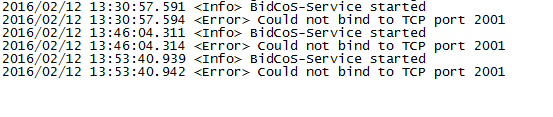
          Wie du schon vermutet hast, läuft der rfd service nicht.

          Kann ihn auch nicht starten, habe mal ein paar Screenshots angehängt.

          Das Config File ist aber vorhanden, Pfad sollte auch stimmen. Habe ich dir ja gestern schon gezeigt.

          Ich habe auch versucht nochmals über hmcon-setup.sh neu zu installieren, kommt aber der gleiche Fehler.

          Noch ne Idee?
          536_rfd.png
          536_rfd1.png
          536_rfdlog.png
          9054_heizung.png

          1 Reply Last reply
          0
          • V Offline
            V Offline
            vegetto
            wrote on last edited by
            #24

            Wie sieht das rdf log aus?

            /opt/hmcon/var/log/rfd.log

            1 Reply Last reply
            0
            • coyoteC Offline
              coyoteC Offline
              coyote
              Most Active
              wrote on last edited by
              #25

              Das ist das zweite Bild (rfdlog)

              Mehr ist nicht drin

              1 Reply Last reply
              0
              • V Offline
                V Offline
                vegetto
                wrote on last edited by
                #26

                Vermutlich andere APP belegt das 2001 port. Schau mal hier: http://www.cyberciti.biz/faq/what-proce … inux-port/

                1 Reply Last reply
                0
                • coyoteC Offline
                  coyoteC Offline
                  coyote
                  Most Active
                  wrote on last edited by
                  #27

                  Danke vegetto, bin wieder ein Schritt weiter. Klar das der Port 2001 belegt war, ich habe gestern noch die LXCCU installiert und dazu eine RPC Instanz :roll:

                  Jetzt sieht mein log so aus:

                  2016/02/12 23:53:32.222 <info> BidCoS-Service started
                  2016/02/12 23:53:32.224 <info> XmlRpc Server is listening on TCP port 2001
                  2016/02/12 23:53:34.258 <info> Found HomeMatic Lan Gateway with IP Address 192.168.XX.XX
                  2016/02/12 23:55:41.557 <error> UnifiedLanCommController::connect(): Unable to connect.
                  2016/02/12 23:55:41.558 <fatal error=""> CCU2LGWCommController::init(): Cannot connect to HomeMatic Lan Gateway with serial number KEQXXXX.
                  2016/02/12 23:55:41.559 <error> No BidCoS-Interface available
                  2016/02/12 23:55:41.559 <warning> Error initializing interfaces
                  2016/02/13 00:27:46.166 <info> BidCoS-Service started
                  2016/02/13 00:27:46.169 <info> XmlRpc Server is listening on TCP port 2001
                  2016/02/13 00:29:53.397 <error> UnifiedLanCommController::connect(): Unable to connect.
                  2016/02/13 00:29:53.398 <fatal error=""> CCU2LGWCommController::init(): Cannot connect to HomeMatic Lan Gateway with serial number KEQXXXX.
                  2016/02/13 00:29:53.399 <error> No BidCoS-Interface available
                  2016/02/13 00:29:53.400 <warning> Error initializing interfaces</warning></error></fatal></error></info></info></warning></error></fatal></error></info></info></info>
                  

                  Es kann jetzt natürlich sein, dass es nicht funktioniert, weil die LXCCU noch läuft, oder?

                  1 Reply Last reply
                  0
                  • V Offline
                    V Offline
                    vegetto
                    wrote on last edited by
                    #28

                    @coyote:

                    Es kann jetzt natürlich sein, dass es nicht funktioniert, weil die LXCCU noch läuft, oder? `

                    Das ist richtig: das Homematic LAN gateway kann nur mit einem rfd Instanz verbunden sein. So zu probieren brauchst Du dein LXCCU stoppen.

                    Andere Option wäre das HM-MOD-RPI-PCB Kaufen und in deinem Cubetrix installieren.

                    1 Reply Last reply
                    0
                    • paul53P Offline
                      paul53P Offline
                      paul53
                      wrote on last edited by
                      #29

                      @vegetto:

                      Mit Homegear geht es nocht nicht: `
                      Habe gerade gesehen, dass https://github.com/Homegear/Homegear-HomeMaticBidCoS/tree/master/src/PhysicalInterfaces offenbar seit Ende Februar auch den HM-MOD-RPI-PCB unterstützt.

                      Bitte verzichtet auf Chat-Nachrichten, denn die Handhabung ist grauenhaft !
                      Produktiv: RPi 2 mit S.USV, HM-MOD-RPI und SLC-USB-Stick mit root fs

                      1 Reply Last reply
                      0
                      • V Offline
                        V Offline
                        vegetto
                        wrote on last edited by
                        #30

                        @paul53:

                        Habe gerade gesehen, dass https://github.com/Homegear/Homegear-HomeMaticBidCoS/tree/master/src/PhysicalInterfaces offenbar seit Ende Februar auch den HM-MOD-RPI-PCB unterstützt. `

                        Das macht es eine interessante Alternativ zu hmcon&rfd. Schade das dieses https://forum.homegear.eu/viewtopic.php?t=219#p1641 noch nicht gibt. Ich würde ungern ca 70 eingebaute Homematic Geräten wieder einlernen…

                        1 Reply Last reply
                        0
                        • S Offline
                          S Offline
                          starfish
                          wrote on last edited by
                          #31

                          HM-MOD-RPI-PCB auf BananaPi

                          @starfish:

                          bin auch am überlegen - ungefähr dieselbe konstellation allerdings auf einem bananapi. hardwaremässig könnte es funktionieren. hmcon/HM-MOD-RPI-PCB hat wohl noch niemand ausserhalb von raspi versucht. `

                          Herr Frei hats offenbar geschafft: habe soeben folgenden Link gefunden

                          https://github.com/herrfrei/hm-mod-rpi-pcb-lxccu-bpi

                          allerdings noch mit lxccu und wheezy

                          1 Reply Last reply
                          0
                          Reply
                          • Reply as topic
                          Log in to reply
                          • Oldest to Newest
                          • Newest to Oldest
                          • Most Votes


                          Support us

                          ioBroker
                          Community Adapters
                          Donate

                          568

                          Online

                          32.7k

                          Users

                          82.4k

                          Topics

                          1.3m

                          Posts
                          Community
                          Impressum | Datenschutz-Bestimmungen | Nutzungsbedingungen | Einwilligungseinstellungen
                          ioBroker Community 2014-2025
                          logo
                          • Login

                          • Don't have an account? Register

                          • Login or register to search.
                          • First post
                            Last post
                          0
                          • Home
                          • Recent
                          • Tags
                          • Unread 0
                          • Categories
                          • Unreplied
                          • Popular
                          • GitHub
                          • Docu
                          • Hilfe