Skip to content
  • Home
  • Recent
  • Tags
  • 0 Unread 0
  • Categories
  • Unreplied
  • Popular
  • GitHub
  • Docu
  • Hilfe
Skins
  • Light
  • Brite
  • Cerulean
  • Cosmo
  • Flatly
  • Journal
  • Litera
  • Lumen
  • Lux
  • Materia
  • Minty
  • Morph
  • Pulse
  • Sandstone
  • Simplex
  • Sketchy
  • Spacelab
  • United
  • Yeti
  • Zephyr
  • Dark
  • Cyborg
  • Darkly
  • Quartz
  • Slate
  • Solar
  • Superhero
  • Vapor

  • Default (No Skin)
  • No Skin
Collapse
ioBroker Logo

Community Forum

donate donate
  1. ioBroker Community Home
  2. Deutsch
  3. ioBroker Allgemein
  4. INTEL NUC Kit NUC8i5BEK Proxmox+Debian VM kein Onboard BT

NEWS

  • Monatsrückblick Januar/Februar 2026 ist online!
    BluefoxB
    Bluefox
    17
    1
    378

  • Jahresrückblick 2025 – unser neuer Blogbeitrag ist online! ✨
    BluefoxB
    Bluefox
    17
    1
    4.9k

  • Neuer Blogbeitrag: Monatsrückblick - Dezember 2025 🎄
    BluefoxB
    Bluefox
    13
    1
    1.3k

INTEL NUC Kit NUC8i5BEK Proxmox+Debian VM kein Onboard BT

Scheduled Pinned Locked Moved ioBroker Allgemein
189 Posts 18 Posters 24.4k Views 10 Watching
  • Oldest to Newest
  • Newest to Oldest
  • Most Votes
Reply
  • Reply as topic
Log in to reply
This topic has been deleted. Only users with topic management privileges can see it.
  • J Offline
    J Offline
    jafloor
    wrote on last edited by
    #11

    @BuZZy:

    Das interne BT taucht beim NUC in Proxmox als USB Device auf..

    Dieses USB Device muss in den VM Einstellungen an die VM durchgereicht werden..

    Ich musste nur die Firmware Dateien kopieren -> NUC neustarten -> USB Device in Proxmox an die VM durchreichen.

    Danach konnte ich sofort das onboard BT in ioBroker nutzen..

    Gruß `

    Welche Firmware Dateien hast Du verwendet? Welchen NUC bzw. Chipsatz hast Du?

    1 Reply Last reply
    0
    • M Offline
      M Offline
      MasterG87
      wrote on last edited by
      #12

      Hast du das Durchreichen eigentlich mittlerweile hinbekommen? Stehe vor einem aehnlichen Problem. In Proxmox geht das Onboard Bluetooth, aber das durchreichen bereitet mir Probleme. Bei mir wird es naemlich nicht unter USB angezeigt.

      1 Reply Last reply
      0
      • A Offline
        A Offline
        aw1980
        wrote on last edited by
        #13

        Ich hatte das gleiche Problem und habs jetzt gelöst.

        Das Problem war, dass Debian (auch im aktuellen Image) nur den Kernel mit der Version 4.9.0 installiert.

        Dieser scheint den passenden Treiber für das 5.0 Bluetooth von einer NUC8… nicht mit im Kernel zu haben.

        Nach einem Update des Kernels auf eine aktuellere Version (in meinem Fall 4.19.0) findet er auch das Onboard Bluetooth nach dem durchreichen

        B 1 Reply Last reply
        0
        • lobomauL Offline
          lobomauL Offline
          lobomau
          wrote on last edited by
          #14

          @jafloor:

          Hallo Welt,

          ich komme seit Tagen einfach nicht mehr weiter und ich hoffe jemand von Euch kann mir helfen.

          Ich versuche seit ein paar Tagen das Onboard BT meines NUC´s zum leben zu erwecken. Leider ohne Erfolg.

          Ich bin dabei auf diesen Link gestoßen: viewtopic.php?f=8&t=16420&p=173483

          Ich habe alle Tips von dort versucht. Ich habe auch die Dateien:

          - iwlwifi-8265-21.ucode
          - iwlwifi-8265-27.ucode
          - iwlwifi-8265-31.ucode
          - iwlwifi-8265-34.ucode
          - iwlwifi-8265-36.ucode
          - iwlwifi-8265-22.ucode


          in das Verzeichnis der ProxMox Installation (/lib/firmware) kopiert. Nichts, in der GUI der Debian (9.5, Stretch) VM, die dann auch meine Iobroker installation fassen soll, taucht einfach kein Bluetooth auf. Im Bios ist BT aktiviert.

          Ich bin mit meinem Latein wirklich am Ende. kann mir dabei vllt. jemand helfen? `
          wie installiere ich die Dateien iwlwifi….? Ich habe mal beim proxmox host in /lib/firmware nachgeschaut. Ich habe da ganz viele, aber nur zwei beginnen mit "8":

          iwlwifi-8000c-34.ucode

          und

          iwlwifi-8265-34.ucode

          Ich habe dann auch schon bei der VM mal nachgeschaut unter zusätzliche USB-Geräte. Da kann ich ein USB Gerät hinzufügen. Aber ich habe keine Ahnung was es für ein Gerät ist. Steht nur USB 1.x.

          Vielleicht bin ich ja schon fertig damit.

          Host: NUC8i3 mit Proxmox:

          • ioBroker CT Debian 13, npm 10.9.4, nodejs 22.21.0
          • Slave: Pi4
          1 Reply Last reply
          0
          • BuZZyB Offline
            BuZZyB Offline
            BuZZy
            wrote on last edited by
            #15

            Einfach in den Ordner kopieren wie es da steht - fertig.

            Brauchst keine zusätzlichen Befehle oder so ausführen.

            Bei mir heißt das "Onboard Bluetooth USB Gerät" - 8087:0a2b - welches ich in Proxmox an die VM durchgereicht habe..

            Gruß

            1 Reply Last reply
            0
            • lobomauL Offline
              lobomauL Offline
              lobomau
              wrote on last edited by
              #16

              @BuZZy:

              Einfach in den Ordner kopieren wie es da steht - fertig.

              Brauchst keine zusätzlichen Befehle oder so ausführen.

              Bei mir heißt das "Onboard Bluetooth USB Gerät" - 8087:0a2b - welches ich in Proxmox an die VM durchgereicht habe..

              Gruß `
              Ja, wohin kopieren habe ich verstanden. Nur ist mir nicht klar woher ich diese Dateien bekomme?

              Bei mir gibt es unter USB-Geräte: 8087:07dc

              Edit: ich habe jetzt auf der VM ausgeführt````
              sudo apt install bluez

              Nun habe ich die iwlwifi-8265-XX.ucode Dateien. Also diese soll man von der VM auf den host laden, nehme ich an?
              
              Edit2: läuft noch nicht. VM ist bei mir ubuntu. Ist das vielleicht das Problem?

              Host: NUC8i3 mit Proxmox:

              • ioBroker CT Debian 13, npm 10.9.4, nodejs 22.21.0
              • Slave: Pi4
              1 Reply Last reply
              0
              • BuZZyB Offline
                BuZZyB Offline
                BuZZy
                wrote on last edited by
                #17

                Hast du nach dem Kopieren der Daten den Host bzw NUC komplett neu gestartet?

                Die Dateien kannst du dir z. B. auch hier besorgen: https://github.com/wkennington/linux-firmware

                Wenn du die entsprechenden Dateien auf den Proxmox Host geschoben hast - Proxmox komplett neu starten und dann nochmal bei den USB Geräten gucken.

                Gruß

                1 Reply Last reply
                0
                • lobomauL Offline
                  lobomauL Offline
                  lobomau
                  wrote on last edited by
                  #18

                  Es scheint grundsätzlich zu laufen (siehe unten).

                  Jetzt muss ich es nur schaffen einen ioBroker-Adapter damit zum Laufen zu bekommen.

                  iobroker@iobroker-ubuntu:/$ sudo service bluetooth status
                  ● bluetooth.service - Bluetooth service
                     Loaded: loaded (/lib/systemd/system/bluetooth.service; enabled; vendor preset
                     Active: active (running) since Thu 2019-02-07 18:09:56 CET; 3h 19min ago
                       Docs: man:bluetoothd(8)
                   Main PID: 785 (bluetoothd)
                     Status: "Running"
                      Tasks: 1 (limit: 4546)
                     CGroup: /system.slice/bluetooth.service
                             └─785 /usr/lib/bluetooth/bluetoothd
                  
                  Feb 07 18:09:56 iobroker-ubuntu systemd[1]: Starting Bluetooth service...
                  Feb 07 18:09:56 iobroker-ubuntu bluetoothd[785]: Bluetooth daemon 5.48
                  Feb 07 18:09:56 iobroker-ubuntu bluetoothd[785]: Starting SDP server
                  Feb 07 18:09:56 iobroker-ubuntu bluetoothd[785]: Bluetooth management interface
                  Feb 07 18:09:56 iobroker-ubuntu systemd[1]: Started Bluetooth service.
                  

                  Edit: läuft tatsächlich, nur sehr schlecht, deswegen dachte ich schon es geht nicht. Entweder irgendwas noch falsch oder der brix gigabyte hat so ein schlechtes BT installiert. gTag liegt 1m entfernt und häufiger false als true.

                  Host: NUC8i3 mit Proxmox:

                  • ioBroker CT Debian 13, npm 10.9.4, nodejs 22.21.0
                  • Slave: Pi4
                  Z 1 Reply Last reply
                  0
                  • 4Josh4 Offline
                    4Josh4 Offline
                    4Josh
                    wrote on last edited by
                    #19

                    Bekomme auch seit tagen das BT mit dem BLE adapter nicht zum laufen.
                    Weitere Infos:
                    -Proxmox mit Debian VM
                    -ucode Dateien wurden Kopiert
                    -Onboard Bluetooth USB Gerät 8087:0a2b wurde weitergegeben
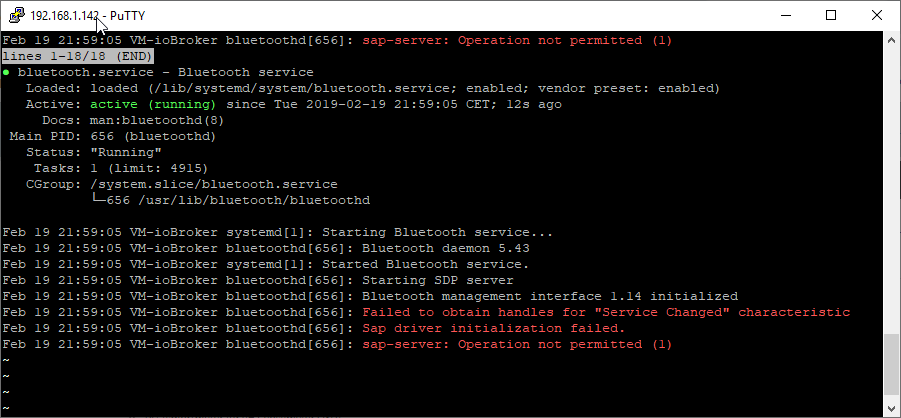

                    19-02-_2019_22-04-28.png

                    19-02-_2019_22-08-43.png

                    Kann wer unterstütze?

                    Gruß 4Josh

                    Intel NUC8i3 / Samsung 960 Evo M.2, Proxmox 6.1.5 --> Debian 9 in VM

                    lobomauL 1 Reply Last reply
                    0
                    • TheDukeT Offline
                      TheDukeT Offline
                      TheDuke
                      wrote on last edited by
                      #20

                      Ich glaube man muss Bluetooth erst durchreichen von der NUC zur VM .
                      Weiß aber noch nicht wie .

                      Direkt auf der NUC finde ich mein Handy. Nur auf der VM nicht.

                      root@pve:~# sudo service bluetooth start
                      root@pve:~# sudo service bluetooth status
                      ��� bluetooth.service - Bluetooth service
                         Loaded: loaded (/lib/systemd/system/bluetooth.service; enabled; vendor preset: enabled)
                         Active: active (running) since Tue 2019-02-19 23:35:05 CET; 2s ago
                           Docs: man:bluetoothd(8)
                       Main PID: 11230 (bluetoothd)
                         Status: "Running"
                          Tasks: 1 (limit: 4915)
                         Memory: 708.0K
                            CPU: 15ms
                         CGroup: /system.slice/bluetooth.service
                                 ������11230 /usr/lib/bluetooth/bluetoothd
                      
                      Feb 19 23:35:05 pve systemd[1]: Starting Bluetooth service...
                      Feb 19 23:35:05 pve bluetoothd[11230]: Bluetooth daemon 5.43
                      Feb 19 23:35:05 pve systemd[1]: Started Bluetooth service.
                      Feb 19 23:35:05 pve bluetoothd[11230]: Starting SDP server
                      Feb 19 23:35:05 pve bluetoothd[11230]: Bluetooth management interface 1.14 initialized
                      Feb 19 23:35:05 pve bluetoothd[11230]: Failed to obtain handles for "Service Changed" characteristic
                      Feb 19 23:35:05 pve bluetoothd[11230]: Sap driver initialization failed.
                      Feb 19 23:35:05 pve bluetoothd[11230]: sap-server: Operation not permitted (1)
                      root@pve:~# sudo l2ping -i hci0 -c1 88:75:98:91:99:2F
                      Ping: 88:75:98:91:99:2F from 18:56:80:8F:A7:40 (data size 44) ...
                      44 bytes from 88:75:98:91:99:2F id 0 time 11.38ms
                      1 sent, 1 received, 0% loss
                      root@pve:~# 


                      schöne Grüße TheDuke ;)

                      SegwayS 1 Reply Last reply
                      0
                      • TheDukeT TheDuke

                        Ich glaube man muss Bluetooth erst durchreichen von der NUC zur VM .
                        Weiß aber noch nicht wie .

                        Direkt auf der NUC finde ich mein Handy. Nur auf der VM nicht.

                        root@pve:~# sudo service bluetooth start
                        root@pve:~# sudo service bluetooth status
                        ��� bluetooth.service - Bluetooth service
                           Loaded: loaded (/lib/systemd/system/bluetooth.service; enabled; vendor preset: enabled)
                           Active: active (running) since Tue 2019-02-19 23:35:05 CET; 2s ago
                             Docs: man:bluetoothd(8)
                         Main PID: 11230 (bluetoothd)
                           Status: "Running"
                            Tasks: 1 (limit: 4915)
                           Memory: 708.0K
                              CPU: 15ms
                           CGroup: /system.slice/bluetooth.service
                                   ������11230 /usr/lib/bluetooth/bluetoothd
                        
                        Feb 19 23:35:05 pve systemd[1]: Starting Bluetooth service...
                        Feb 19 23:35:05 pve bluetoothd[11230]: Bluetooth daemon 5.43
                        Feb 19 23:35:05 pve systemd[1]: Started Bluetooth service.
                        Feb 19 23:35:05 pve bluetoothd[11230]: Starting SDP server
                        Feb 19 23:35:05 pve bluetoothd[11230]: Bluetooth management interface 1.14 initialized
                        Feb 19 23:35:05 pve bluetoothd[11230]: Failed to obtain handles for "Service Changed" characteristic
                        Feb 19 23:35:05 pve bluetoothd[11230]: Sap driver initialization failed.
                        Feb 19 23:35:05 pve bluetoothd[11230]: sap-server: Operation not permitted (1)
                        root@pve:~# sudo l2ping -i hci0 -c1 88:75:98:91:99:2F
                        Ping: 88:75:98:91:99:2F from 18:56:80:8F:A7:40 (data size 44) ...
                        44 bytes from 88:75:98:91:99:2F id 0 time 11.38ms
                        1 sent, 1 received, 0% loss
                        root@pve:~# 
                        
                        
                        SegwayS Offline
                        SegwayS Offline
                        Segway
                        wrote on last edited by Segway
                        #21

                        @TheDuke
                        Schau mal hier zB

                        Gruß Dirk
                        Intel Proxmox Cluster (3x NUC) mit Debian & Proxmox / IoB als VM unter Debian / 60+ Adapter installiert

                        TheDukeT 1 Reply Last reply
                        1
                        • SegwayS Segway

                          @TheDuke
                          Schau mal hier zB

                          TheDukeT Offline
                          TheDukeT Offline
                          TheDuke
                          wrote on last edited by
                          #22

                          @Segway sagte in INTEL NUC Kit NUC8i5BEK Proxmox+Debian VM kein Onboard BT:

                          @TheDuke
                          Schau mal hier zB

                          Da ist der Abend ja gerettet :-)

                          Danke.

                          schöne Grüße TheDuke ;)

                          1 Reply Last reply
                          0
                          • 4Josh4 4Josh

                            Bekomme auch seit tagen das BT mit dem BLE adapter nicht zum laufen.
                            Weitere Infos:
                            -Proxmox mit Debian VM
                            -ucode Dateien wurden Kopiert
                            -Onboard Bluetooth USB Gerät 8087:0a2b wurde weitergegeben

                            19-02-_2019_22-04-28.png

                            19-02-_2019_22-08-43.png

                            Kann wer unterstütze?

                            Gruß 4Josh

                            lobomauL Offline
                            lobomauL Offline
                            lobomau
                            wrote on last edited by lobomau
                            #23

                            @4Josh bei dir ist ja noch driverState "unauthorized". Hast du in der Beschreibung vom BLE-Adapter gelesen was zu tun ist? ->

                            sudo setcap cap_net_raw+eip $(eval readlink -f `which node`)
                            

                            Ich hatte das Problem am Pi3 (slave). Da hatte es dann geholfen.

                            Host: NUC8i3 mit Proxmox:

                            • ioBroker CT Debian 13, npm 10.9.4, nodejs 22.21.0
                            • Slave: Pi4
                            4Josh4 1 Reply Last reply
                            0
                            • lobomauL lobomau

                              @4Josh bei dir ist ja noch driverState "unauthorized". Hast du in der Beschreibung vom BLE-Adapter gelesen was zu tun ist? ->

                              sudo setcap cap_net_raw+eip $(eval readlink -f `which node`)
                              

                              Ich hatte das Problem am Pi3 (slave). Da hatte es dann geholfen.

                              4Josh4 Offline
                              4Josh4 Offline
                              4Josh
                              wrote on last edited by
                              #24

                              @lobomau

                              sry hab viel gelesen aber das nicht... Es hat aber funktioniert :relaxed:

                              Vielen Dank!!!

                              Intel NUC8i3 / Samsung 960 Evo M.2, Proxmox 6.1.5 --> Debian 9 in VM

                              1 Reply Last reply
                              0
                              • L Offline
                                L Offline
                                ltsalvatore
                                wrote on last edited by ltsalvatore
                                #25

                                hi zusammen
                                nachdem ich diverse threads und beiträge mir angeschaut habe, bin ich jetzt doch im richtigen tread gelandet.
                                auch ich habe einen NUC8i5BEK auf dem proxmox läuft. auf diesem habe iobroker auf eine debian VM mit kernel 4.9 inst.

                                irgendwie bekomme ich es immer noch nicht hin, dass der BT adapter in iobroker bzw. debian erkannt wird.
                                ich habe das gefühl, dass das BT gerät einfach noch nicht durchgereicht wird.

                                normalerweise sollte es doch reichen, wenn man in der VM unter hardware das passende usb device hinzufügt.

                                root@ltserver:/etc/pve/qemu-server# lsusb -t
                                /:  Bus 02.Port 1: Dev 1, Class=root_hub, Driver=xhci_hcd/6p, 10000M
                                    |__ Port 2: Dev 2, If 0, Class=Mass Storage, Driver=usb-storage, 5000M
                                /:  Bus 01.Port 1: Dev 1, Class=root_hub, Driver=xhci_hcd/12p, 480M
                                    |__ Port 10: Dev 3, If 0, Class=Wireless, Driver=usbfs, 12M
                                    |__ Port 10: Dev 3, If 1, Class=Wireless, Driver=usbfs, 12M


                                das wäre bei mir dann host 1-10
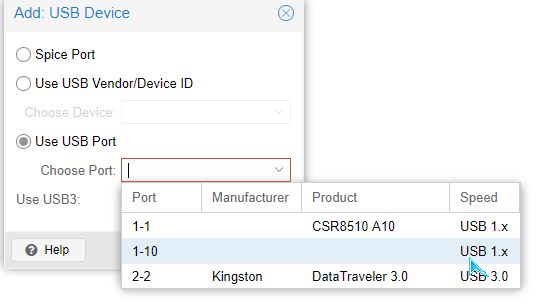
                                2019-02-22 00_49_47-ltserver - Proxmox Virtual Environment.jpg

                                auf der VM sieht es dann folgendermaßen aus:

                                iobroker@shsrv:~$ sudo service bluetooth start
                                iobroker@shsrv:~$ sudo service bluetooth status
                                ● bluetooth.service - Bluetooth service
                                   Loaded: loaded (/lib/systemd/system/bluetooth.service; enabled; vendor preset: enabled)
                                   Active: active (running) since Thu 2019-02-21 21:51:54 CET; 1s ago
                                     Docs: man:bluetoothd(8)
                                 Main PID: 1799 (bluetoothd)
                                   Status: "Running"
                                    Tasks: 1 (limit: 4915)
                                   CGroup: /system.slice/bluetooth.service
                                           └─1799 /usr/lib/bluetooth/bluetoothd
                                
                                Feb 21 21:51:54 shsrv systemd[1]: Starting Bluetooth service...
                                Feb 21 21:51:54 shsrv bluetoothd[1799]: Bluetooth daemon 5.43
                                Feb 21 21:51:54 shsrv systemd[1]: Started Bluetooth service.
                                Feb 21 21:51:54 shsrv bluetoothd[1799]: Starting SDP server
                                Feb 21 21:51:54 shsrv bluetoothd[1799]: Bluetooth management interface 1.14 initialized
                                

                                führe ich jetzt einen ping auf eine meiner geräte aus bekomme ich folgende fehlermeldung

                                iobroker@shsrv:~$ sudo l2ping -i hci0 -c1 AC:CF:5C:5B:E5:A2
                                Can't connect: No route to host
                                

                                ein lsusb -t auf der iobroker VM zeigt folgendes

                                iobroker@shsrv:~$ lsusb -t
                                /:  Bus 05.Port 1: Dev 1, Class=root_hub, Driver=uhci_hcd/2p, 12M
                                /:  Bus 04.Port 1: Dev 1, Class=root_hub, Driver=uhci_hcd/2p, 12M
                                /:  Bus 03.Port 1: Dev 1, Class=root_hub, Driver=uhci_hcd/2p, 12M
                                    |__ Port 1: Dev 2, If 0, Class=Wireless, Driver=, 12M
                                    |__ Port 1: Dev 2, If 1, Class=Wireless, Driver=, 12M
                                

                                bei einem hciconfig -a wird jedoch nichts angezeigt.

                                testweise habe ich einen usb BT dongle an die NUC angeschlossen und mit dieser hat es anstandslos funktioniert.
                                der ble adapter im iobroker konnte den BT dongle direkt ansprechen.

                                für jede hilfe bin ich euch sehr dankbar

                                SegwayS 1 Reply Last reply
                                0
                                • L ltsalvatore

                                  hi zusammen
                                  nachdem ich diverse threads und beiträge mir angeschaut habe, bin ich jetzt doch im richtigen tread gelandet.
                                  auch ich habe einen NUC8i5BEK auf dem proxmox läuft. auf diesem habe iobroker auf eine debian VM mit kernel 4.9 inst.

                                  irgendwie bekomme ich es immer noch nicht hin, dass der BT adapter in iobroker bzw. debian erkannt wird.
                                  ich habe das gefühl, dass das BT gerät einfach noch nicht durchgereicht wird.

                                  normalerweise sollte es doch reichen, wenn man in der VM unter hardware das passende usb device hinzufügt.

                                  root@ltserver:/etc/pve/qemu-server# lsusb -t
                                  /:  Bus 02.Port 1: Dev 1, Class=root_hub, Driver=xhci_hcd/6p, 10000M
                                      |__ Port 2: Dev 2, If 0, Class=Mass Storage, Driver=usb-storage, 5000M
                                  /:  Bus 01.Port 1: Dev 1, Class=root_hub, Driver=xhci_hcd/12p, 480M
                                      |__ Port 10: Dev 3, If 0, Class=Wireless, Driver=usbfs, 12M
                                      |__ Port 10: Dev 3, If 1, Class=Wireless, Driver=usbfs, 12M


                                  das wäre bei mir dann host 1-10

                                  2019-02-22 00_49_47-ltserver - Proxmox Virtual Environment.jpg

                                  auf der VM sieht es dann folgendermaßen aus:

                                  iobroker@shsrv:~$ sudo service bluetooth start
                                  iobroker@shsrv:~$ sudo service bluetooth status
                                  ● bluetooth.service - Bluetooth service
                                     Loaded: loaded (/lib/systemd/system/bluetooth.service; enabled; vendor preset: enabled)
                                     Active: active (running) since Thu 2019-02-21 21:51:54 CET; 1s ago
                                       Docs: man:bluetoothd(8)
                                   Main PID: 1799 (bluetoothd)
                                     Status: "Running"
                                      Tasks: 1 (limit: 4915)
                                     CGroup: /system.slice/bluetooth.service
                                             └─1799 /usr/lib/bluetooth/bluetoothd
                                  
                                  Feb 21 21:51:54 shsrv systemd[1]: Starting Bluetooth service...
                                  Feb 21 21:51:54 shsrv bluetoothd[1799]: Bluetooth daemon 5.43
                                  Feb 21 21:51:54 shsrv systemd[1]: Started Bluetooth service.
                                  Feb 21 21:51:54 shsrv bluetoothd[1799]: Starting SDP server
                                  Feb 21 21:51:54 shsrv bluetoothd[1799]: Bluetooth management interface 1.14 initialized
                                  

                                  führe ich jetzt einen ping auf eine meiner geräte aus bekomme ich folgende fehlermeldung

                                  iobroker@shsrv:~$ sudo l2ping -i hci0 -c1 AC:CF:5C:5B:E5:A2
                                  Can't connect: No route to host
                                  

                                  ein lsusb -t auf der iobroker VM zeigt folgendes

                                  iobroker@shsrv:~$ lsusb -t
                                  /:  Bus 05.Port 1: Dev 1, Class=root_hub, Driver=uhci_hcd/2p, 12M
                                  /:  Bus 04.Port 1: Dev 1, Class=root_hub, Driver=uhci_hcd/2p, 12M
                                  /:  Bus 03.Port 1: Dev 1, Class=root_hub, Driver=uhci_hcd/2p, 12M
                                      |__ Port 1: Dev 2, If 0, Class=Wireless, Driver=, 12M
                                      |__ Port 1: Dev 2, If 1, Class=Wireless, Driver=, 12M
                                  

                                  bei einem hciconfig -a wird jedoch nichts angezeigt.

                                  testweise habe ich einen usb BT dongle an die NUC angeschlossen und mit dieser hat es anstandslos funktioniert.
                                  der ble adapter im iobroker konnte den BT dongle direkt ansprechen.

                                  für jede hilfe bin ich euch sehr dankbar

                                  SegwayS Offline
                                  SegwayS Offline
                                  Segway
                                  wrote on last edited by
                                  #26

                                  @ltsalvatore
                                  Hilft dir das hier weiter

                                  Gruß Dirk
                                  Intel Proxmox Cluster (3x NUC) mit Debian & Proxmox / IoB als VM unter Debian / 60+ Adapter installiert

                                  L 1 Reply Last reply
                                  0
                                  • SegwayS Segway

                                    @ltsalvatore
                                    Hilft dir das hier weiter

                                    L Offline
                                    L Offline
                                    ltsalvatore
                                    wrote on last edited by
                                    #27

                                    @Segway sagte in INTEL NUC Kit NUC8i5BEK Proxmox+Debian VM kein Onboard BT:

                                    @ltsalvatore
                                    Hilft dir das hier weiter

                                    hi segway,

                                    leider nein..
                                    hab mir den thread schon ein paar mal durchgelesen und diverses ausprobiert.. aber ohne erfolg.

                                    L 1 Reply Last reply
                                    0
                                    • lobomauL lobomau

                                      Es scheint grundsätzlich zu laufen (siehe unten).

                                      Jetzt muss ich es nur schaffen einen ioBroker-Adapter damit zum Laufen zu bekommen.

                                      iobroker@iobroker-ubuntu:/$ sudo service bluetooth status
                                      ● bluetooth.service - Bluetooth service
                                         Loaded: loaded (/lib/systemd/system/bluetooth.service; enabled; vendor preset
                                         Active: active (running) since Thu 2019-02-07 18:09:56 CET; 3h 19min ago
                                           Docs: man:bluetoothd(8)
                                       Main PID: 785 (bluetoothd)
                                         Status: "Running"
                                          Tasks: 1 (limit: 4546)
                                         CGroup: /system.slice/bluetooth.service
                                                 └─785 /usr/lib/bluetooth/bluetoothd
                                      
                                      Feb 07 18:09:56 iobroker-ubuntu systemd[1]: Starting Bluetooth service...
                                      Feb 07 18:09:56 iobroker-ubuntu bluetoothd[785]: Bluetooth daemon 5.48
                                      Feb 07 18:09:56 iobroker-ubuntu bluetoothd[785]: Starting SDP server
                                      Feb 07 18:09:56 iobroker-ubuntu bluetoothd[785]: Bluetooth management interface
                                      Feb 07 18:09:56 iobroker-ubuntu systemd[1]: Started Bluetooth service.
                                      

                                      Edit: läuft tatsächlich, nur sehr schlecht, deswegen dachte ich schon es geht nicht. Entweder irgendwas noch falsch oder der brix gigabyte hat so ein schlechtes BT installiert. gTag liegt 1m entfernt und häufiger false als true.

                                      Z Offline
                                      Z Offline
                                      Zipkart
                                      wrote on last edited by
                                      #28

                                      @lobomau sagte in INTEL NUC Kit NUC8i5BEK Proxmox+Debian VM kein Onboard BT:

                                      der brix gigabyte

                                      Wie ich gesehen habe nutzt du einen Gigabyte BRIXX als NUC.

                                      Ist es zufällig ein BACE 3150?
                                      Den habe ich nämlich und finde kein Blietooth ist device zum durchreichen.
                                      Wie hast du es denn bei Proxmox in die VM eingebunden?

                                      Gruß
                                      Stefan

                                      Produktiv Proxmox / NUC / IOBroker / RFLInk / Mysensor / Raspimatic / Keymatic / HUE / MiHome / Tradfri / Shelly / SOnOff / Alexa / Sonos / Wandtablet / iPad

                                      Testsystem…
                                      immer mal wieder unterschiedlich

                                      lobomauL 1 Reply Last reply
                                      0
                                      • L ltsalvatore

                                        @Segway sagte in INTEL NUC Kit NUC8i5BEK Proxmox+Debian VM kein Onboard BT:

                                        @ltsalvatore
                                        Hilft dir das hier weiter

                                        hi segway,

                                        leider nein..
                                        hab mir den thread schon ein paar mal durchgelesen und diverses ausprobiert.. aber ohne erfolg.

                                        L Offline
                                        L Offline
                                        ltsalvatore
                                        wrote on last edited by
                                        #29

                                        @ltsalvatore sagte in INTEL NUC Kit NUC8i5BEK Proxmox+Debian VM kein Onboard BT:

                                        @Segway sagte in INTEL NUC Kit NUC8i5BEK Proxmox+Debian VM kein Onboard BT:

                                        @ltsalvatore
                                        Hilft dir das hier weiter

                                        hi segway,

                                        leider nein..
                                        hab mir den thread schon ein paar mal durchgelesen und diverses ausprobiert.. aber ohne erfolg.

                                        EDIT:
                                        ich habe zum testen mal eine vm mit Ubuntu 18.04.1 LTS aufgesetzt und dort funktioniert der on board BT tadellos. :thinking_face:

                                        1 Reply Last reply
                                        0
                                        • Z Zipkart

                                          @lobomau sagte in INTEL NUC Kit NUC8i5BEK Proxmox+Debian VM kein Onboard BT:

                                          der brix gigabyte

                                          Wie ich gesehen habe nutzt du einen Gigabyte BRIXX als NUC.

                                          Ist es zufällig ein BACE 3150?
                                          Den habe ich nämlich und finde kein Blietooth ist device zum durchreichen.
                                          Wie hast du es denn bei Proxmox in die VM eingebunden?

                                          Gruß
                                          Stefan

                                          lobomauL Offline
                                          lobomauL Offline
                                          lobomau
                                          wrote on last edited by lobomau
                                          #30

                                          @Zipkart sagte in INTEL NUC Kit NUC8i5BEK Proxmox+Debian VM kein Onboard BT:

                                          @lobomau sagte in INTEL NUC Kit NUC8i5BEK Proxmox+Debian VM kein Onboard BT:

                                          der brix gigabyte

                                          Wie ich gesehen habe nutzt du einen Gigabyte BRIXX als NUC.

                                          Ist es zufällig ein BACE 3150?
                                          Den habe ich nämlich und finde kein Blietooth ist device zum durchreichen.
                                          Wie hast du es denn bei Proxmox in die VM eingebunden?

                                          Gruß
                                          Stefan

                                          Ja, genau den habe ich.
                                          Ich habe die Benutzung des BT wieder verworfen, weil der Empfang so schlecht war. Wäre interessant zu wissen ob ich was falsch gemacht habe oder es wirklich ein schlechtes Modul verbaut ist. Wie ich es hinbekommen habe, steht weiter vorne in diesem thread.

                                          Edit: bei mir läuft 18.04. LTS Ubuntu Server

                                          Host: NUC8i3 mit Proxmox:

                                          • ioBroker CT Debian 13, npm 10.9.4, nodejs 22.21.0
                                          • Slave: Pi4
                                          1 Reply Last reply
                                          0
                                          Reply
                                          • Reply as topic
                                          Log in to reply
                                          • Oldest to Newest
                                          • Newest to Oldest
                                          • Most Votes


                                          Support us

                                          ioBroker
                                          Community Adapters
                                          Donate
                                          FAQ Cloud / IOT
                                          HowTo: Node.js-Update
                                          HowTo: Backup/Restore
                                          Downloads
                                          BLOG

                                          519

                                          Online

                                          32.7k

                                          Users

                                          82.5k

                                          Topics

                                          1.3m

                                          Posts
                                          Community
                                          Impressum | Datenschutz-Bestimmungen | Nutzungsbedingungen | Einwilligungseinstellungen
                                          ioBroker Community 2014-2025
                                          logo
                                          • Login

                                          • Don't have an account? Register

                                          • Login or register to search.
                                          • First post
                                            Last post
                                          0
                                          • Home
                                          • Recent
                                          • Tags
                                          • Unread 0
                                          • Categories
                                          • Unreplied
                                          • Popular
                                          • GitHub
                                          • Docu
                                          • Hilfe