
NEWS




[Gelöst] devolo Home Control ?
-
Juchuuuu!!
Das war es!
platforms": [
  {
    "platform" : "Devolo",
    "name" : "Devolo",
    "host" : "x.x.x.x",
    "email" : "mail@host.com",
    "password" : "topsecret123",
    "uuid": "04XXXXXX-CXXX-4XXX-8XXX-FDXXXXXXXXXX",
    "gateway": "140XXXXXXXXXXXXX",
    "passkey": "568e5fXXXXXXXXXXXXXXXXXXXXXXXXXX"
  }
]
HAM auf Debug starten und die werte uuid, gateway, passkey übernehmen die angezeigt werden!
Vielen Dank an die grossartige Community :-)
Malc
-
Update:
Ich habe das nun mal genauer betrachtet und muss sagen dass das Devolo System durchaus smart ist, die direkte Anbindung, eben ohne pollen wie bei Hue ist echt stabil und superschnell.
Umsteigen werde ich nicht doch ist Devolo da schon echt smart.
Malc
-
Hallo zusammen, bin noch etwas auf dem Schlauch, ich habe iObroker laufen und auch Homebridge./ Homebridge funktioniert super mit Devolo Home control. Nur wie bekomme ich nun ioBroker dazu auch Devolo home Control zu unterstützen.
Vielen Dank für Eure Hilfe
OliTheo
-
Hallo zusammen,
kann mir wer helfen?
Soweit habe ich das ganze eingerichtet. Hab nuin einen Wandschalter eingefügt. Nun zu meinem Problem. Unter Objekte wird ein Befehl gesendet, nur bleibt der Wert immer bei 0, egal welchen der 4 Knöpfe ich tätige. Im Log unter "Debug" allerdings gibt er weitere Befehle aus. Siehe Fotos
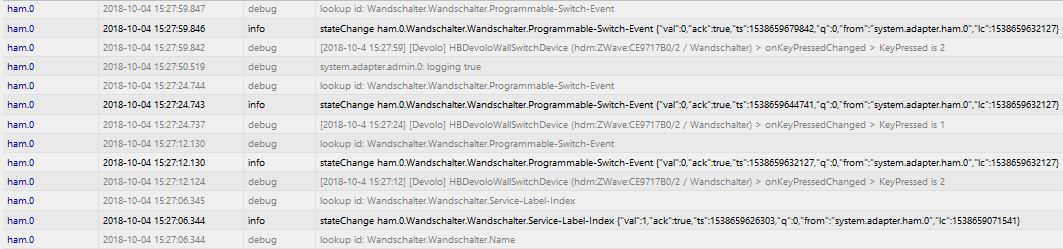

Gruß
ben
-
Hallo,
ich hatte es bisher auch über HAM realisiert, bin mittlerweile aber auf einen ZWave-USB-Stick umgestiegen und habe die Devolo-Komponenten alle darauf angelernt und jetzt die Devolo-Zentrale rausgeworfen.
Leider funktioniert der Schalter momentan leider per direktem ZWave noch nicht :-(
Bei dem Schalter hatte ich es früher so, dass ich eine Szene direkt über Devolo gesteuert habe. Mit der Szene konnte ich dann problemlos in ioBroker weiterarbeiten.
Gruss Ralf
-
Juchuuuu!!
Das war es!
platforms": [
  {
    "platform" : "Devolo",
    "name" : "Devolo",
    "host" : "x.x.x.x",
    "email" : "mail@host.com",
    "password" : "topsecret123",
    "uuid": "04XXXXXX-CXXX-4XXX-8XXX-FDXXXXXXXXXX",
    "gateway": "140XXXXXXXXXXXXX",
    "passkey": "568e5fXXXXXXXXXXXXXXXXXXXXXXXXXX"
  }
]
HAM auf Debug starten und die werte uuid, gateway, passkey übernehmen die angezeigt werden!
Vielen Dank an die grossartige Community :-)
Malc `
Hallo zusammen!
Kann mir hir nochmal jemad helfen.
Ich habe HAM auf iobroker als Instanz laufen und habe unter dem Punkt Konfigurationsdatei" das oben aufgeführte mit meiner IP und meinen Zugangsdaten eingetragen.
Zuvor habe ich das gemacht und den Pi auch schon mehrmals durchgebootet:
Install homebridge: npm install -g homebridge
Install homebridge-devolo plugin: npm install -g homebridge-devolo
Wenn ich nun Debug einschakte, sehe ich aber keine UUID usw.
Ich sehe nur:
cleaned everything up…
und
starting. Version 1.0.0 in /opt/iobroker/node_modules/iobroker.ham, node: v8.15.0
-
Müsste das nicht normalerweise hier zu finden sein?
root@raspberrypi:~# cd /opt/iobroker/node_modules/
Dort ist aber kein homebridge-devolo zu sehen:
drwxr-xr-x 6 root root 4096 Jan 8 18:40 homebridge
drwxr-xr-x 6 iobroker iobroker 4096 Jan 8 17:57 homebridge-plugin-wrapper
drwxr-xr-x 4 iobroker iobroker 4096 Jan 4 12:47 homematic-xmlrpc
drwxr-xr-x 2 iobroker iobroker 4096 Jan 4 12:36 hosted-git-info
Installiert ist es aber scheinbar:
root@raspberrypi:/opt/iobroker# npm install -g homebridge-devolo
- homebridge-devolo@0.1.12
updated 1 package in 7.966s
-
Hallo zusammen!
Kann mir hier jemand nochmal Unterstützung oder einen Tipp geben.
UUID usw. habe ich mittlerweile, ABER dann bekomme ich in der Konfigurationsdatei immer Fehler beim speichern. Ich verstehe nicht warum?
Wenn ich das so speichere, dann ist alle ok (Daten natürlich abgeändert):
{
"description": "Add configuration for your accessories or platforms according to the docs of the plugins.",
"accessories": [],
"platforms": [
{
"platform": "Devolo",
"name": "Devolo",
"host": "192.168.xxx.xx",
"email": "blabla@blabla.de",
"password": "blablub"
}
]
}
Packe ich aber die UUID usw. dabei kommt folgender Fehler:
SyntaxError: JSON.parse: expected ',' or '}' after property value in object at line 11 column 7 of the JSON data
{
"description": "Add configuration for your accessories or platforms according to the docs of the plugins.",
"accessories": [],
"platforms": [
{
"platform": "Devolo",
"name": "Devolo",
"host": "192.168.126.41",
"email": "blabla@blabla.de",
"password": "blablub"
"uuid": "x2x6x22X-2E0D-4E20-B57F-6E27CA1CC92F",
"gateway": "3446626400004507",
"passkey": "78J94YTUNHS3A334"
}
]
}
Zeile 11 ist die uuid-Zeile, Column 7 dann nach dem Doppelpunkt.
Was muss ich ändern????
-
Hallo zusammen!
Kann mir hier jemand nochmal Unterstützung oder einen Tipp geben.
UUID usw. habe ich mittlerweile, ABER dann bekomme ich in der Konfigurationsdatei immer Fehler beim speichern. Ich verstehe nicht warum?
Wenn ich das so speichere, dann ist alle ok (Daten natürlich abgeändert):
{
"description": "Add configuration for your accessories or platforms according to the docs of the plugins.",
"accessories": [],
"platforms": [
{
"platform": "Devolo",
"name": "Devolo",
"host": "192.168.xxx.xx",
"email": "blabla@blabla.de",
"password": "blablub"
}
]
}
Packe ich aber die UUID usw. dabei kommt folgender Fehler:
SyntaxError: JSON.parse: expected ',' or '}' after property value in object at line 11 column 7 of the JSON data
{
"description": "Add configuration for your accessories or platforms according to the docs of the plugins.",
"accessories": [],
"platforms": [
{
"platform": "Devolo",
"name": "Devolo",
"host": "192.168.126.41",
"email": "blabla@blabla.de",
"password": "blablub"
"uuid": "x2x6x22X-2E0D-4E20-B57F-6E27CA1CC92F",
"gateway": "3446626400004507",
"passkey": "78J94YTUNHS3A334"
}
]
}
Zeile 11 ist die uuid-Zeile, Column 7 dann nach dem Doppelpunkt.
Was muss ich ändern????
ich habe den homebridge Adapter 1.1.2 hinzugefügt und den Wrappermodus eingestellt.
als zusätzliches Modul: "homebridge-devolo" eingetragen
Die Konfigurationsdatei wie folgt ergänzt:
[
{
"platform": "Devolo",
"name": "Devolo",
"host": "192.168.178.74",
"email": "meinedevolomailadresse@xxx.de",
"password": "meindevolopassword",
"uuid": "25Fxxx-CxxF-4xxx-9xx2-82xxxEE15xxxx",
"gateway": "1703xxxxxxxxxxxx",
"passkey": "CXxxxxxxxxxxqQ"
}
]
}Leider komme ich an der Stelle nicht weiter.
Die Log-Datei verrät mir einge Fehler, mit denen ich nichts anfangen kann:host.raspberrypi 2020-04-15 10:46:24.540 info instance system.adapter.ham.0 terminated with code 156 (156)
host.raspberrypi 2020-04-15 10:46:24.540 error Caught by controller[1]: }
host.raspberrypi 2020-04-15 10:46:24.540 error Caught by controller[1]: code: 'ECONNRESET'
host.raspberrypi 2020-04-15 10:46:24.539 error Caught by controller[1]: at TCP.<anonymous> (net.js:672:12) {
host.raspberrypi 2020-04-15 10:46:24.539 error Caught by controller[1]: at Socket.emit (events.js:322:22)
host.raspberrypi 2020-04-15 10:46:24.539 error Caught by controller[1]: at Socket.socketCloseListener (_http_client.js:400:25)
host.raspberrypi 2020-04-15 10:46:24.539 error Caught by controller[1]: at connResetException (internal/errors.js:608:14)
host.raspberrypi 2020-04-15 10:46:24.539 error Caught by controller[1]: Error: socket hang up
host.raspberrypi 2020-04-15 10:46:24.538 error Caught by controller[0]: [2020-4-15 10:46:12] Plugin /opt/iobroker/node_modules/homebridge-plugin-wrapper package.json does not contain the keyword 'homebridge-plugin'.
ham.0 2020-04-15 10:46:24.047 warn (31970) Exception: Error: socket hang up
ham.0 2020-04-15 10:46:24.046 error at TCP.<anonymous> (net.js:672:12)
ham.0 2020-04-15 10:46:24.046 error at Socket.emit (events.js:322:22)
ham.0 2020-04-15 10:46:24.046 error at Socket.socketCloseListener (_http_client.js:400:25)
ham.0 2020-04-15 10:46:24.046 error at connResetException (internal/errors.js:608:14)
ham.0 2020-04-15 10:46:24.046 error (31970) Error: socket hang up
ham.0 2020-04-15 10:46:24.046 error (31970) uncaught exception: socket hang up
ham.0 2020-04-15 10:46:24.016 info (31970) Terminated (START_IMMEDIATELY_AFTER_STOP): Without reason
ham.0 2020-04-15 10:46:24.014 info (31970) terminating
ham.0 2020-04-15 10:46:24.002 info (31970) cleaned everything up...
host.raspberrypi 2020-04-15 10:46:23.995 info stopInstance system.adapter.ham.0 send kill signal
ham.0 2020-04-15 10:46:24.000 info (31970) Got terminate signal TERMINATE_YOURSELF
host.raspberrypi 2020-04-15 10:46:23.994 info stopInstance system.adapter.ham.0 (force=false, process=true)
host.raspberrypi 2020-04-15 10:46:23.993 info "system.adapter.ham.0" disabled
ham.0 2020-04-15 10:46:13.037 debug (31970) [2020-4-15 10:46:13] [Devolo] HBDevoloPlatform > Central Unit found.
ham.0 2020-04-15 10:46:13.033 debug (31970) Websocket open
ham.0 2020-04-15 10:46:12.916 debug (31970) Trying to connect to socket.
ham.0 2020-04-15 10:46:12.844 debug (31970) [2020-4-15 10:46:12] Loading 0 accessories...
ham.0 2020-04-15 10:46:12.825 debug (31970) [2020-4-15 10:46:12] [Devolo] HBDevoloPlatform > Searching for Devolo Central Unit.
ham.0 2020-04-15 10:46:12.819 debug (31970) [2020-4-15 10:46:12] [Devolo] Initializing Devolo platform...
ham.0 2020-04-15 10:46:12.818 debug (31970) [2020-4-15 10:46:12] Loading 1 platforms...
ham.0 2020-04-15 10:46:12.810 debug (31970) [2020-4-15 10:46:12] ---
ham.0 2020-04-15 10:46:12.809 debug (31970) [2020-4-15 10:46:12] Registering platform 'homebridge-devolo.Devolo'
ham.0 2020-04-15 10:46:12.807 debug (31970) [2020-4-15 10:46:12] Loaded plugin: homebridge-devolo
ham.0 2020-04-15 10:46:11.648 info (31970) All Libraries installed/updated
ham.0 2020-04-15 10:46:11.647 info (31970) Install/Update homebridge-devolo
ham.0 2020-04-15 10:46:11.646 info (31970) Install/Update the following Libraries: homebridge-devolo
ham.0 2020-04-15 10:46:11.619 info (31970) starting. Version 1.1.2 in /opt/iobroker/node_modules/iobroker.ham, node: v12.16.2
ham.0 2020-04-15 10:46:11.386 debug (31970) statesDB connected
ham.0 2020-04-15 10:46:11.385 debug (31970) States connected to redis: 127.0.0.1:9000
ham.0 2020-04-15 10:46:11.377 debug (31970) States create System PubSub Client
ham.0 2020-04-15 10:46:11.374 debug (31970) States create User PubSub Client
ham.0 2020-04-15 10:46:11.369 debug (31970) Redis States: Use Redis connection: 127.0.0.1:9000
ham.0 2020-04-15 10:46:11.366 debug (31970) objectDB connected
ham.0 2020-04-15 10:46:11.361 debug (31970) Objects connected to redis: 127.0.0.1:9001
ham.0 2020-04-15 10:46:11.348 debug (31970) Objects client initialize lua scripts
ham.0 2020-04-15 10:46:11.347 debug (31970) Objects create User PubSub Client
ham.0 2020-04-15 10:46:11.346 debug (31970) Objects create System PubSub Client
ham.0 2020-04-15 10:46:11.342 debug (31970) Objects client ready ... initialize now
ham.0 2020-04-15 10:46:11.312 debug (31970) Redis Objects: Use Redis connection: 127.0.0.1:9001
host.raspberrypi 2020-04-15 10:46:10.595 info instance system.adapter.ham.0 started with pid 31970Kann mir jemand sagen, was korrigieren muss?
Danke und LG
-
ich habe den homebridge Adapter 1.1.2 hinzugefügt und den Wrappermodus eingestellt.
als zusätzliches Modul: "homebridge-devolo" eingetragen
Die Konfigurationsdatei wie folgt ergänzt:
[
{
"platform": "Devolo",
"name": "Devolo",
"host": "192.168.178.74",
"email": "meinedevolomailadresse@xxx.de",
"password": "meindevolopassword",
"uuid": "25Fxxx-CxxF-4xxx-9xx2-82xxxEE15xxxx",
"gateway": "1703xxxxxxxxxxxx",
"passkey": "CXxxxxxxxxxxqQ"
}
]
}Leider komme ich an der Stelle nicht weiter.
Die Log-Datei verrät mir einge Fehler, mit denen ich nichts anfangen kann:host.raspberrypi 2020-04-15 10:46:24.540 info instance system.adapter.ham.0 terminated with code 156 (156)
host.raspberrypi 2020-04-15 10:46:24.540 error Caught by controller[1]: }
host.raspberrypi 2020-04-15 10:46:24.540 error Caught by controller[1]: code: 'ECONNRESET'
host.raspberrypi 2020-04-15 10:46:24.539 error Caught by controller[1]: at TCP.<anonymous> (net.js:672:12) {
host.raspberrypi 2020-04-15 10:46:24.539 error Caught by controller[1]: at Socket.emit (events.js:322:22)
host.raspberrypi 2020-04-15 10:46:24.539 error Caught by controller[1]: at Socket.socketCloseListener (_http_client.js:400:25)
host.raspberrypi 2020-04-15 10:46:24.539 error Caught by controller[1]: at connResetException (internal/errors.js:608:14)
host.raspberrypi 2020-04-15 10:46:24.539 error Caught by controller[1]: Error: socket hang up
host.raspberrypi 2020-04-15 10:46:24.538 error Caught by controller[0]: [2020-4-15 10:46:12] Plugin /opt/iobroker/node_modules/homebridge-plugin-wrapper package.json does not contain the keyword 'homebridge-plugin'.
ham.0 2020-04-15 10:46:24.047 warn (31970) Exception: Error: socket hang up
ham.0 2020-04-15 10:46:24.046 error at TCP.<anonymous> (net.js:672:12)
ham.0 2020-04-15 10:46:24.046 error at Socket.emit (events.js:322:22)
ham.0 2020-04-15 10:46:24.046 error at Socket.socketCloseListener (_http_client.js:400:25)
ham.0 2020-04-15 10:46:24.046 error at connResetException (internal/errors.js:608:14)
ham.0 2020-04-15 10:46:24.046 error (31970) Error: socket hang up
ham.0 2020-04-15 10:46:24.046 error (31970) uncaught exception: socket hang up
ham.0 2020-04-15 10:46:24.016 info (31970) Terminated (START_IMMEDIATELY_AFTER_STOP): Without reason
ham.0 2020-04-15 10:46:24.014 info (31970) terminating
ham.0 2020-04-15 10:46:24.002 info (31970) cleaned everything up...
host.raspberrypi 2020-04-15 10:46:23.995 info stopInstance system.adapter.ham.0 send kill signal
ham.0 2020-04-15 10:46:24.000 info (31970) Got terminate signal TERMINATE_YOURSELF
host.raspberrypi 2020-04-15 10:46:23.994 info stopInstance system.adapter.ham.0 (force=false, process=true)
host.raspberrypi 2020-04-15 10:46:23.993 info "system.adapter.ham.0" disabled
ham.0 2020-04-15 10:46:13.037 debug (31970) [2020-4-15 10:46:13] [Devolo] HBDevoloPlatform > Central Unit found.
ham.0 2020-04-15 10:46:13.033 debug (31970) Websocket open
ham.0 2020-04-15 10:46:12.916 debug (31970) Trying to connect to socket.
ham.0 2020-04-15 10:46:12.844 debug (31970) [2020-4-15 10:46:12] Loading 0 accessories...
ham.0 2020-04-15 10:46:12.825 debug (31970) [2020-4-15 10:46:12] [Devolo] HBDevoloPlatform > Searching for Devolo Central Unit.
ham.0 2020-04-15 10:46:12.819 debug (31970) [2020-4-15 10:46:12] [Devolo] Initializing Devolo platform...
ham.0 2020-04-15 10:46:12.818 debug (31970) [2020-4-15 10:46:12] Loading 1 platforms...
ham.0 2020-04-15 10:46:12.810 debug (31970) [2020-4-15 10:46:12] ---
ham.0 2020-04-15 10:46:12.809 debug (31970) [2020-4-15 10:46:12] Registering platform 'homebridge-devolo.Devolo'
ham.0 2020-04-15 10:46:12.807 debug (31970) [2020-4-15 10:46:12] Loaded plugin: homebridge-devolo
ham.0 2020-04-15 10:46:11.648 info (31970) All Libraries installed/updated
ham.0 2020-04-15 10:46:11.647 info (31970) Install/Update homebridge-devolo
ham.0 2020-04-15 10:46:11.646 info (31970) Install/Update the following Libraries: homebridge-devolo
ham.0 2020-04-15 10:46:11.619 info (31970) starting. Version 1.1.2 in /opt/iobroker/node_modules/iobroker.ham, node: v12.16.2
ham.0 2020-04-15 10:46:11.386 debug (31970) statesDB connected
ham.0 2020-04-15 10:46:11.385 debug (31970) States connected to redis: 127.0.0.1:9000
ham.0 2020-04-15 10:46:11.377 debug (31970) States create System PubSub Client
ham.0 2020-04-15 10:46:11.374 debug (31970) States create User PubSub Client
ham.0 2020-04-15 10:46:11.369 debug (31970) Redis States: Use Redis connection: 127.0.0.1:9000
ham.0 2020-04-15 10:46:11.366 debug (31970) objectDB connected
ham.0 2020-04-15 10:46:11.361 debug (31970) Objects connected to redis: 127.0.0.1:9001
ham.0 2020-04-15 10:46:11.348 debug (31970) Objects client initialize lua scripts
ham.0 2020-04-15 10:46:11.347 debug (31970) Objects create User PubSub Client
ham.0 2020-04-15 10:46:11.346 debug (31970) Objects create System PubSub Client
ham.0 2020-04-15 10:46:11.342 debug (31970) Objects client ready ... initialize now
ham.0 2020-04-15 10:46:11.312 debug (31970) Redis Objects: Use Redis connection: 127.0.0.1:9001
host.raspberrypi 2020-04-15 10:46:10.595 info instance system.adapter.ham.0 started with pid 31970Kann mir jemand sagen, was korrigieren muss?
Danke und LG
Hallo,
ist zwar schon etwas her allerdings stand ich vor dem selben Problem und
habe bei den unten angegebenen Einstellungen alles ans Laufen bekommen und sämtliche Aktoren wurden direkt hinzugefügt und geben alle notwendigen Zustände sowie Werte wieder. Vielleicht für alle weiteren Sucher eine Hilfe ?Grüße
{
"description": "Add configuration for your accessories or platforms according to the docs of the plugins.",
"accessories": [],
"platforms": [
{
"platform": "Devolo",
"name": "Devolo",
"host": "XXXXXXXXXXXXXX",
"email": "XXXXXXXXXXXXX",
"password": "XXXXXX",
"uuid": "XXXXXXXXXXXXXXXXXXXXXX",
"gateway": "XXXXXXXXXXXXXXXXXXX",
"passkey": "XXXXXXXXXXXXXXXXXXX"
}
]
}
616
Online32.4k
Users81.5k
Topics1.3m
Posts