Skip to content
  • Home
  • Recent
  • Tags
  • 0 Unread 0
  • Categories
  • Unreplied
  • Popular
  • GitHub
  • Docu
  • Hilfe
Skins
  • Light
  • Brite
  • Cerulean
  • Cosmo
  • Flatly
  • Journal
  • Litera
  • Lumen
  • Lux
  • Materia
  • Minty
  • Morph
  • Pulse
  • Sandstone
  • Simplex
  • Sketchy
  • Spacelab
  • United
  • Yeti
  • Zephyr
  • Dark
  • Cyborg
  • Darkly
  • Quartz
  • Slate
  • Solar
  • Superhero
  • Vapor

  • Default (No Skin)
  • No Skin
Collapse
ioBroker Logo

Community Forum

donate donate
  1. ioBroker Community Home
  2. Deutsch
  3. ioBroker Allgemein
  4. [Problem] Dream btw. Enigma2 Adapter
NEWS

  • Jahresrückblick 2025 – unser neuer Blogbeitrag ist online! ✨
    BluefoxB
    Bluefox
    17
    1
    3.8k

  • Neuer Blogbeitrag: Monatsrückblick - Dezember 2025 🎄
    BluefoxB
    Bluefox
    13
    1
    1.2k

  • Weihnachtsangebot 2025! 🎄
    BluefoxB
    Bluefox
    25
    1
    2.5k

[Problem] Dream btw. Enigma2 Adapter
Scheduled Pinned Locked Moved ioBroker Allgemein
739 Posts 82 Posters 218.8k Views 15 Watching
  • Oldest to Newest
  • Newest to Oldest
  • Most Votes
Reply
  • Reply as topic
Log in to reply
This topic has been deleted. Only users with topic management privileges can see it.
  • BBTownB Offline
    BBTownB Offline
    BBTown
    wrote on last edited by
    #227

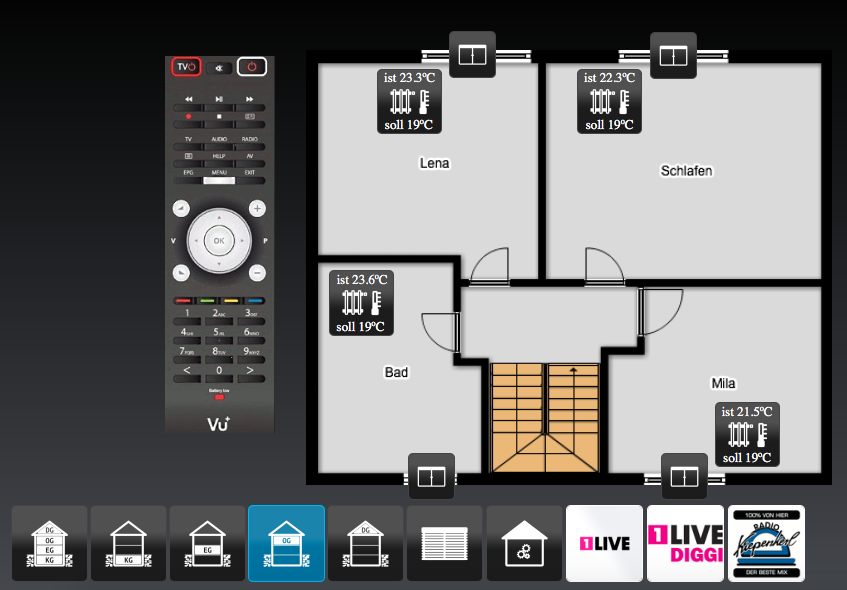
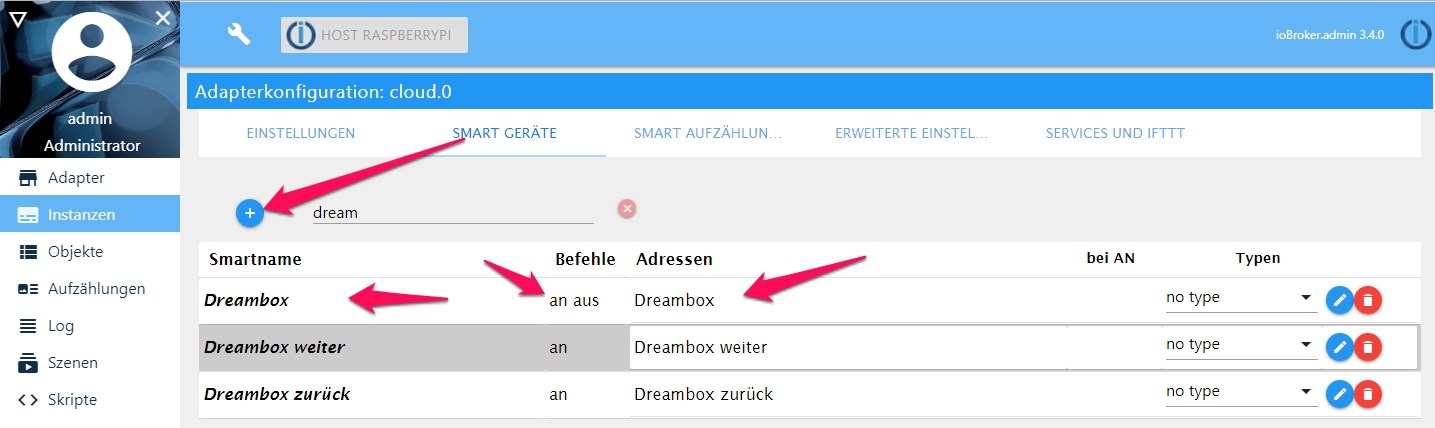
    Folgendemaßen schalte ich meine Dreambox:

    1. einen Datenpunkt anlegen (ich habe den "Dreambox" genannt)

    2. ein script anlegen, welches diesen neuen Datenpunkt überwacht (true/false) und dann das entsprechende Kommando für ein/aus an die Dreambox sendet

    3. Den Datenpunkt als Smart Gerät im Cloud-Adapter anlegen (den habe ich ebenfalls "Dreambox" genannt)

    4. In der Alexa App nach Geräten suchen lassen, der neue Datenpunkt "Dreambox" sollte nun dort auftauchen

    "Alexa, schalte die Dreambox ein" - setzt also den Datenpunkt "Dreambox" auf "true" und das Kommando im Script für "wahr" wird gesendet

    "Alexa, schalte die Dreambox aus" - setzt also den Datenpunkt "Drambox" auf "false" und das Kommando im Script für "sonst" wird ausgeführt
    1917_dreambox_4.jpg
    1917_dreambox_3.jpg
    1917_dreambox_2.jpg
    1917_dreambox_1.jpg

    ioBroker auf NUC (VM debian v13 (Trixie ), node v22.21.0 npm v10.9.4, js-controller v7.1.0 jsonl/jsonl / HomeMatic CCU-2 (Wired und Funk) / Philips HUE / echo.DOT / Broadlink RM pro / SONOS

    1 Reply Last reply
    0
    • Ralla66R Offline
      Ralla66R Offline
      Ralla66
      Most Active
      wrote on last edited by
      #228

      Habe das auch wie BBTown.

      Bis auf wurde geändert.

      Dort steht wurde aktuallisiert.

      Hat den Vorteil wenn mal eine Schaltung per FB geschieht wird nicht

      nur auf True / False wechsel reagiert.

      @dslraser,

      was wird denn verändert bei Alexa Lautstärke auf x %.

      Der Wert wird verändert ?

      1 Reply Last reply
      0
      • dslraserD Offline
        dslraserD Offline
        dslraser
        Forum Testing Most Active
        wrote on last edited by
        #229

        ja, der Wert wird auf den Wert verändert was Du ansagst.

        (Volume)

        1 Reply Last reply
        0
        • Ralla66R Offline
          Ralla66R Offline
          Ralla66
          Most Active
          wrote on last edited by
          #230

          Wie steuert den dann der veränderte Wert die Dream oder Vu an ?

          Per http Request im Adapter ?

          1 Reply Last reply
          0
          • dslraserD Offline
            dslraserD Offline
            dslraser
            Forum Testing Most Active
            wrote on last edited by
            #231

            einfach im Cloudadapter den Datenpunkt auswählen und einen passenden/gewünschten Namen vergeben (bei mir z.B. Laustärke im Wohnzimmer. Nur Lautstärke ging nicht, weil die Echos dann meinen sie selbst sind gemeint)

            Danach noch Alexa nach neuen Geräten suchen lassen.

            1 Reply Last reply
            0
            • Ralla66R Offline
              Ralla66R Offline
              Ralla66
              Most Active
              wrote on last edited by
              #232

              Soweit ja klar,

              wie wird das gesteuert aus dem Adatpter heraus.

              Die Dream oder VU muß ja einen Befehl erhalten.

              Zumindest bei Standby true / false geht das nicht.

              Das kann ja nur im Adapter selbst sein.

              Volume geht bei dir in beiden Adaptern ?

              Ralla

              1 Reply Last reply
              0
              • dslraserD Offline
                dslraserD Offline
                dslraser
                Forum Testing Most Active
                wrote on last edited by
                #233

                @Ralla66:

                Soweit ja klar,

                wie wird das gesteuert aus dem Adatpter heraus.

                Die Dream oder VU muß ja einen Befehl erhalten.

                Zumindest bei Standby true / false geht das nicht.

                Das kann ja nur im Adapter selbst sein.

                Volume geht bei dir in beiden Adaptern ?

                Ralla `

                ich nutze nur den VU Adapter, da geht es bei mir, also direkt.

                Nachtrag:

                Bei Alexa, Lautstärke im Wohnzimmer an geht es auf den eingestellten Wert im Cloudadapter. Bei aus auf 0, oder eben man sagt an wieviel Prozent eingestellt werden soll..

                Der Datenpunkt ist ja ein level.volume~~![](</s><URL url=)<link_text text="https://uploads.tapatalk-cdn.com/201804 ... 108b61.jpg">https://uploads.tapatalk-cdn.com/20180427/ace2da7e345e371e46d038947e108b61.jpg</link_text>" />

                ![](</s><URL url=)<link_text text="https://uploads.tapatalk-cdn.com/201804 ... 783bcd.jpg">https://uploads.tapatalk-cdn.com/20180427/38fc071180ad2e0db9f3f35ab4783bcd.jpg</link_text>" />~~

                1 Reply Last reply
                0
                • Ralla66R Offline
                  Ralla66R Offline
                  Ralla66
                  Most Active
                  wrote on last edited by
                  #234

                  Soweit ja klar,

                  wie wird das gesteuert aus dem Adatpter heraus.

                  Per http oder wie ?

                  1 Reply Last reply
                  0
                  • dslraserD Offline
                    dslraserD Offline
                    dslraser
                    Forum Testing Most Active
                    wrote on last edited by
                    #235

                    @Ralla66:

                    Soweit ja klar,

                    wie wird das gesteuert aus dem Adatpter heraus.

                    Per http oder wie ? ` irgendwie reden wir aneinander vorbei ?

                    Direkt aus dem Adapter heraus. Oder vielleicht verstehe ich Deine Frage auch nicht.

                    Cloudadapter

                    neues Smartgerät

                    Volume in den Objekten vom VU Adapter auswählen

                    Namen vergeben

                    neue Geräte suchen lassen.

                    Das wars.

                    1 Reply Last reply
                    0
                    • Ralla66R Offline
                      Ralla66R Offline
                      Ralla66
                      Most Active
                      wrote on last edited by
                      #236

                      Irgendwie reden wir aneinander vorbei !

                      Wie ist der Adapter geproggt das er bei Änderung der Volume ( Wert )

                      was zur Box sendet ?

                      1 Reply Last reply
                      0
                      • dslraserD Offline
                        dslraserD Offline
                        dslraser
                        Forum Testing Most Active
                        wrote on last edited by
                        #237

                        @Ralla66:

                        Irgendwie reden wir aneinander vorbei !

                        Wie ist der Adapter geproggt das er bei Änderung der Volume ( Wert )

                        was zur Box sendet ? ` ähm, das weiß ich nicht, ich habe noch nie einen Adapter geschrieben.

                        Kannst Ihn ja runter laden und anschauen.

                        https://github.com/vader722/ioBroker.vuplus

                        1 Reply Last reply
                        0
                        • Matten MattenM Offline
                          Matten MattenM Offline
                          Matten Matten
                          wrote on last edited by
                          #238

                          @0018:

                          Gibt es eine Möglichkeit die Tasten "Programm plus" und "Programm minus" zu implementieren? `

                          Ich hab da mal was am Adapter gebastelt und ein JAVA Skript erstellt

                          bei interesse:

                          auf enigma2 V0.2.2 updaten und neu starten. Dann sollten schonmal die Button usw erscheinen.

                          Neues Java Script erstellen

                          und folgendes Script hinein kopieren

                          > [https://github.com/Matten-Matten/ioBrok … in/COMMAND](https://github.com/Matten-Matten/ioBroker.enigma2/blob/master/admin/COMMAND)

                          im Script bei IP und PORT und Instanz die Anpassungen vornehmen

                          DIE IP UND DEN PORT VOM RECEIVER EINTRAGEN!

                          Jetzt das Script starten und schon ist der Receiver auch steuerbar.

                          ioBroker auf Beelink mit WIN10 home|CCU3 (Raspberrymatic)|Neato BotVac D3|HYPERION Ambilight auf RPI3 und RPI ZeroW|HA-Bridge|Milight LED|Nodered&Redmatic|VU Duo2 & Solo se V2

                          1 Reply Last reply
                          0
                          • Matten MattenM Offline
                            Matten MattenM Offline
                            Matten Matten
                            wrote on last edited by
                            #239

                            ACH JA DAS IST NUR FÜR enigma2.0 also Instanz 0

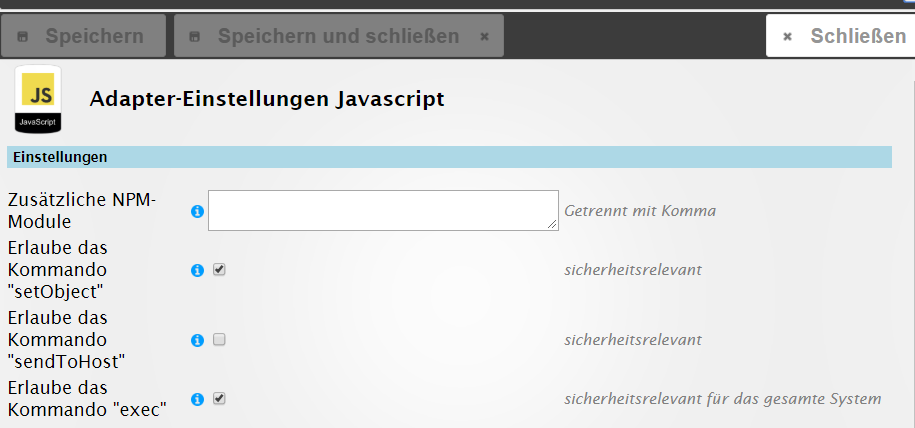
                            UND BEI DER JAVA INSTANZ MUSS <u>Erlaube das Kommando "exec"</u> aktiviert sein
                            3476_iobroker.admin-12.05.2018_01_37_19.png

                            ioBroker auf Beelink mit WIN10 home|CCU3 (Raspberrymatic)|Neato BotVac D3|HYPERION Ambilight auf RPI3 und RPI ZeroW|HA-Bridge|Milight LED|Nodered&Redmatic|VU Duo2 & Solo se V2

                            1 Reply Last reply
                            0
                            • Ralla66R Offline
                              Ralla66R Offline
                              Ralla66
                              Most Active
                              wrote on last edited by
                              #240

                              Frage als Beginner,

                              wie greift den der Button klick unter Objekte auf das Script zu ?

                              Anders, wo muß das Script liegen ?

                              Danke Ralla
                              5230_enigma2.3_v1.jpg

                              1 Reply Last reply
                              0
                              • Matten MattenM Offline
                                Matten MattenM Offline
                                Matten Matten
                                wrote on last edited by
                                #241

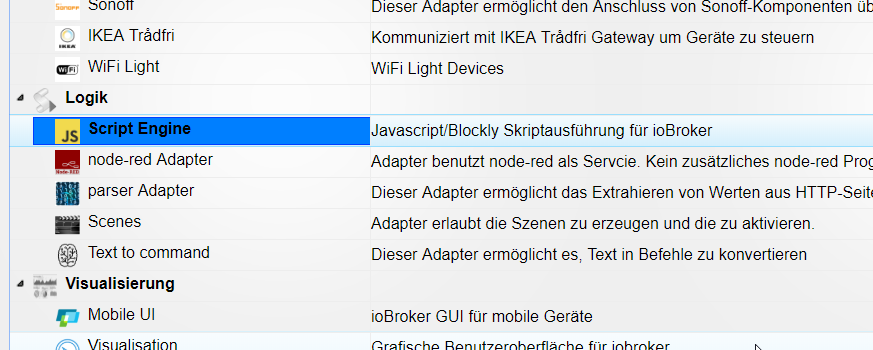
                                Du brauchst folgenden Adapter wenn dieser installiert und gestartet ist
                                3476_iobroker.admin-12.05.2018_20_47_00.png

                                gehst du auf den Reiter Scripte (links) und legst ein neues JAVA Script an.

                                der Button reagiert nicht, sondern das Skript wird durch den Button angetriggert

                                und führt dann ein request aus.

                                ioBroker auf Beelink mit WIN10 home|CCU3 (Raspberrymatic)|Neato BotVac D3|HYPERION Ambilight auf RPI3 und RPI ZeroW|HA-Bridge|Milight LED|Nodered&Redmatic|VU Duo2 & Solo se V2

                                1 Reply Last reply
                                0
                                • Matten MattenM Offline
                                  Matten MattenM Offline
                                  Matten Matten
                                  wrote on last edited by
                                  #242

                                  @Ralla66:

                                  Frage als Beginner,

                                  wie greift den der Button klick unter Objekte auf das Script zu ?

                                  Anders, wo muß das Script liegen ?

                                  Danke Ralla `

                                  https://github.com/Matten-Matten/ioBrok … in/COMMAND

                                  ioBroker auf Beelink mit WIN10 home|CCU3 (Raspberrymatic)|Neato BotVac D3|HYPERION Ambilight auf RPI3 und RPI ZeroW|HA-Bridge|Milight LED|Nodered&Redmatic|VU Duo2 & Solo se V2

                                  1 Reply Last reply
                                  0
                                  • Matten MattenM Offline
                                    Matten MattenM Offline
                                    Matten Matten
                                    wrote on last edited by
                                    #243

                                    :idea: Ich werde in den nächsten Tagen das Script noch erweitern (Zahlen usw.) Und überarbeiten.

                                    Ich melde mich dahingehend dann nochmal.

                                    ioBroker auf Beelink mit WIN10 home|CCU3 (Raspberrymatic)|Neato BotVac D3|HYPERION Ambilight auf RPI3 und RPI ZeroW|HA-Bridge|Milight LED|Nodered&Redmatic|VU Duo2 & Solo se V2

                                    1 Reply Last reply
                                    0
                                    • Matten MattenM Offline
                                      Matten MattenM Offline
                                      Matten Matten
                                      wrote on last edited by
                                      #244

                                      Ich konnte es nicht lassen und habe das Script neu gebastelt. :roll:

                                      Das Script bitte als Java Script anlegen und enigma2.X benennen, folgendes kopieren und im angelegten Script einfügen.

                                      //########### ENIGMA 2 BUTTON SCRIPT ############
                                      //
                                      // -> https://github.com/Matten-Matten/ioBroker.enigma2/blob/master/admin/COMMAND
                                      //
                                      var STATE, IP, PORT, ADAPTER, VOL;
                                      //
                                      //
                                      //####### WERTE IN DEN KLAMMERN ANPASSEN #########
                                      //                                              ##
                                      // Hier die IP ADRESSE der e2 Box eintragen     ##
                                      IP = '192.168.0.1';//                           ##
                                      //                                              ##
                                      // Hier den PORT der e2 Box eintragen           ##
                                      PORT = '80';//                                  ##
                                      //                                              ##
                                      // Hier die Adapter Instanz festlegen           ##
                                      var ADAPTER_INSTANZ = 'enigma2.0';//            ##
                                      //                                              ##
                                      //################################################
                                      //
                                      //
                                      //### AB HIER NIX VERÄNDERN ###########################################################################################
                                      //
                                      //
                                      // Schaltzustand der e2 Box
                                      on({id: ADAPTER_INSTANZ + ".command.STANDBY_TOGGLE"/*command.STANDBY_TOGGLE*/, change: "any"}, function (obj) {
                                        var value = obj.state.val;
                                        var oldValue = obj.oldState.val;
                                        STATE = (obj.state ? obj.state.val : "");
                                      });
                                      
                                      // Adapterzustand
                                      on({id: "system.adapter." + ADAPTER_INSTANZ + ".alive"/*ADAPTER_INSTANZ + .alive*/, change: "any"}, function (obj) {
                                        var value = obj.state.val;
                                        var oldValue = obj.oldState.val;
                                        if ((obj.state ? obj.state.val : "") == true) {
                                          ADAPTER = true;
                                        } else {
                                          ADAPTER = false;
                                        }
                                      });
                                      // Box Standby
                                      on({id: ADAPTER_INSTANZ + ".command.STANDBY_TOGGLE"/*command.STANDBY_TOGGLE*/, change: "any"}, function (obj) {
                                        var value = obj.state.val;
                                        var oldValue = obj.oldState.val;
                                        if (ADAPTER == true) {
                                          try {
                                            require("request")((['http://',IP,':',PORT,'/web/remotecontrol?command=',116].join(''))).on("error", function (e) {console.error(e);});
                                          } catch (e) { console.error(e); }
                                        }
                                      });
                                      // VOLUME
                                      on({id: ADAPTER_INSTANZ + ".command.SET_VOLUME"/*command.SET_VOLUME*/, change: "ne"}, function (obj) {
                                        var value = obj.state.val;
                                        var oldValue = obj.oldState.val;
                                        if (ADAPTER == true) {
                                          VOL = getState(ADAPTER_INSTANZ + ".command.SET_VOLUME").val;
                                          try {
                                            require("request")((['http://',IP,':',PORT,'/web/vol?set=set',Math.round(VOL)].join(''))).on("error", function (e) {console.error(e);});
                                          } catch (e) { console.error(e); }
                                        }
                                      });
                                      // MUTE
                                      on({id: ADAPTER_INSTANZ + ".command.MUTE_TOGGLE"/*command.MUTE_TOGGLE*/, change: "any"}, function (obj) {
                                        var value = obj.state.val;
                                        var oldValue = obj.oldState.val;
                                        if (ADAPTER == true) {
                                          try {
                                            require("request")((['http://',IP,':',PORT,'/web/remotecontrol?command=',113].join(''))).on("error", function (e) {console.error(e);});
                                          } catch (e) { console.error(e); }
                                        }
                                      });
                                      // CHANNEL_UP
                                      on({id: ADAPTER_INSTANZ + ".command.CHANNEL_UP"/*command.CHANNEL_UP*/, change: "any"}, function (obj) {
                                        var value = obj.state.val;
                                        var oldValue = obj.oldState.val;
                                        if (ADAPTER == true) {
                                          try {
                                            require("request")((['http://',IP,':',PORT,'/web/remotecontrol?command=',402].join(''))).on("error", function (e) {console.error(e);});
                                          } catch (e) { console.error(e); }
                                        }
                                      });
                                      // CHANNEL_DOWN
                                      on({id: ADAPTER_INSTANZ + ".command.CHANNEL_DOWN"/*command.CHANNEL_DOWN*/, change: "any"}, function (obj) {
                                        var value = obj.state.val;
                                        var oldValue = obj.oldState.val;
                                        if (ADAPTER == true) {
                                          try {
                                            require("request")((['http://',IP,':',PORT,'/web/remotecontrol?command=',403].join(''))).on("error", function (e) {console.error(e);});
                                          } catch (e) { console.error(e); }
                                        }
                                      });
                                      // OK
                                      on({id: ADAPTER_INSTANZ + ".command.OK"/*command.OK*/, change: "any"}, function (obj) {
                                        var value = obj.state.val;
                                        var oldValue = obj.oldState.val;
                                        if (ADAPTER == true) {
                                          try {
                                            require("request")((['http://',IP,':',PORT,'/web/remotecontrol?command=',352].join(''))).on("error", function (e) {console.error(e);});
                                          } catch (e) { console.error(e); }
                                        }
                                      });
                                      // DOWN
                                      on({id: ADAPTER_INSTANZ + ".command.DOWN"/*command.DOWN*/, change: "any"}, function (obj) {
                                        var value = obj.state.val;
                                        var oldValue = obj.oldState.val;
                                        if (ADAPTER == true) {
                                          try {
                                            require("request")((['http://',IP,':',PORT,'/web/remotecontrol?command=',108].join(''))).on("error", function (e) {console.error(e);});
                                          } catch (e) { console.error(e); }
                                        }
                                      });
                                      // EPG
                                      on({id: ADAPTER_INSTANZ + ".command.EPG"/*command.EPG*/, change: "any"}, function (obj) {
                                        var value = obj.state.val;
                                        var oldValue = obj.oldState.val;
                                        if (ADAPTER == true) {
                                          try {
                                            require("request")((['http://',IP,':',PORT,'/web/remotecontrol?command=',358].join(''))).on("error", function (e) {console.error(e);});
                                          } catch (e) { console.error(e); }
                                        }
                                      });
                                      // EXIT
                                      on({id: ADAPTER_INSTANZ + ".command.EXIT"/*command.EXIT*/, change: "any"}, function (obj) {
                                        var value = obj.state.val;
                                        var oldValue = obj.oldState.val;
                                        if (ADAPTER == true) {
                                          try {
                                            require("request")((['http://',IP,':',PORT,'/web/remotecontrol?command=',174].join(''))).on("error", function (e) {console.error(e);});
                                          } catch (e) { console.error(e); }
                                        }
                                      });
                                      // LEFT
                                      on({id: ADAPTER_INSTANZ + ".command.LEFT"/*command.LEFT*/, change: "any"}, function (obj) {
                                        var value = obj.state.val;
                                        var oldValue = obj.oldState.val;
                                        if (ADAPTER == true) {
                                          try {
                                            require("request")((['http://',IP,':',PORT,'/web/remotecontrol?command=',105].join(''))).on("error", function (e) {console.error(e);});
                                          } catch (e) { console.error(e); }
                                        }
                                      });
                                      // MENU
                                      on({id: ADAPTER_INSTANZ + ".command.MENU"/*command.MENU*/, change: "any"}, function (obj) {
                                        var value = obj.state.val;
                                        var oldValue = obj.oldState.val;
                                        if (ADAPTER == true) {
                                          try {
                                            require("request")((['http://',IP,':',PORT,'/web/remotecontrol?command=',139].join(''))).on("error", function (e) {console.error(e);});
                                          } catch (e) { console.error(e); }
                                        }
                                      });
                                      // PAUSE
                                      on({id: ADAPTER_INSTANZ + ".command.PAUSE"/*command.PAUSE*/, change: "any"}, function (obj) {
                                        var value = obj.state.val;
                                        var oldValue = obj.oldState.val;
                                        if (ADAPTER == true) {
                                          try {
                                            require("request")((['http://',IP,':',PORT,'/web/remotecontrol?command=',119].join(''))).on("error", function (e) {console.error(e);});
                                          } catch (e) { console.error(e); }
                                        }
                                      });
                                      // PLAY
                                      on({id: ADAPTER_INSTANZ + ".command.PLAY"/*command.PLAY*/, change: "any"}, function (obj) {
                                        var value = obj.state.val;
                                        var oldValue = obj.oldState.val;
                                        if (ADAPTER == true) {
                                          try {
                                            require("request")((['http://',IP,':',PORT,'/web/remotecontrol?command=',207].join(''))).on("error", function (e) {console.error(e);});
                                          } catch (e) { console.error(e); }
                                        }
                                      });
                                      // RADIO
                                      on({id: ADAPTER_INSTANZ + ".command.RADIO"/*command.RADIO*/, change: "any"}, function (obj) {
                                        var value = obj.state.val;
                                        var oldValue = obj.oldState.val;
                                        if (ADAPTER == true) {
                                          try {
                                            require("request")((['http://',IP,':',PORT,'/web/remotecontrol?command=',385].join(''))).on("error", function (e) {console.error(e);});
                                          } catch (e) { console.error(e); }
                                        }
                                      });
                                      // REC
                                      on({id: ADAPTER_INSTANZ + ".command.REC"/*command.REC*/, change: "any"}, function (obj) {
                                        var value = obj.state.val;
                                        var oldValue = obj.oldState.val;
                                        if (ADAPTER == true) {
                                          try {
                                            require("request")((['http://',IP,':',PORT,'/web/remotecontrol?command=',167].join(''))).on("error", function (e) {console.error(e);});
                                          } catch (e) { console.error(e); }
                                        }
                                      });
                                      // RIGHT
                                      on({id: ADAPTER_INSTANZ + ".command.RIGHT"/*command.RIGHT*/, change: "any"}, function (obj) {
                                        var value = obj.state.val;
                                        var oldValue = obj.oldState.val;
                                        if (ADAPTER == true) {
                                          try {
                                            require("request")((['http://',IP,':',PORT,'/web/remotecontrol?command=',106].join(''))).on("error", function (e) {console.error(e);});
                                          } catch (e) { console.error(e); }
                                        }
                                      });
                                      // STOP
                                      on({id: ADAPTER_INSTANZ + ".command.STOP"/*command.STOP*/, change: "any"}, function (obj) {
                                        var value = obj.state.val;
                                        var oldValue = obj.oldState.val;
                                        if (ADAPTER == true) {
                                          try {
                                            require("request")((['http://',IP,':',PORT,'/web/remotecontrol?command=',128].join(''))).on("error", function (e) {console.error(e);});
                                          } catch (e) { console.error(e); }
                                        }
                                      });
                                      // TV
                                      on({id: ADAPTER_INSTANZ + ".command.TV"/*command.TV*/, change: "any"}, function (obj) {
                                        var value = obj.state.val;
                                        var oldValue = obj.oldState.val;
                                        if (ADAPTER == true) {
                                          try {
                                            require("request")((['http://',IP,':',PORT,'/web/remotecontrol?command=',377].join(''))).on("error", function (e) {console.error(e);});
                                          } catch (e) { console.error(e); }
                                        }
                                      });
                                      // UP
                                      on({id: ADAPTER_INSTANZ + ".command.UP"/*command.UP*/, change: "any"}, function (obj) {
                                        var value = obj.state.val;
                                        var oldValue = obj.oldState.val;
                                        if (ADAPTER == true && ADAPTER == true) {
                                          try {
                                            require("request")((['http://',IP,':',PORT,'/web/remotecontrol?command=',103].join(''))).on("error", function (e) {console.error(e);});
                                          } catch (e) { console.error(e); }
                                        }
                                      });
                                      

                                      Im Oberen bereich des Scriptes die IP Adresse , den Port und die enigma2 instanz anpassen,

                                      speichern und starten.

                                      für jede weitere enigma2 Instanz einfach das Script duplizieren.

                                      ioBroker auf Beelink mit WIN10 home|CCU3 (Raspberrymatic)|Neato BotVac D3|HYPERION Ambilight auf RPI3 und RPI ZeroW|HA-Bridge|Milight LED|Nodered&Redmatic|VU Duo2 & Solo se V2

                                      1 Reply Last reply
                                      0
                                      • Ralla66R Offline
                                        Ralla66R Offline
                                        Ralla66
                                        Most Active
                                        wrote on last edited by
                                        #245

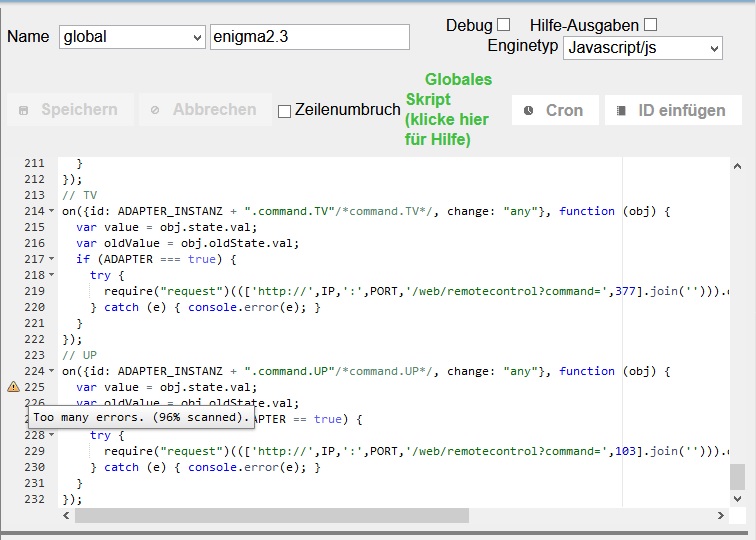
                                        Habe heute probiert.

                                        Im Script kommt immer das Achtung Symbol.

                                        Siehe Bild.

                                        Wenn ich aus == dieses mache === läuft das Script aber..

                                        Sind die Commands für die VU ?

                                        Beispiel Exit ist bei mir ok.

                                        ['http://',IP,':',PORT,'/web/remotecontrol?command=',174]

                                        Diese scheinen für meine Dream7020 etwas anders zu sein.

                                        Zeile 225 bleibt das Achtung Symbol.

                                        Was ist hier nicht ok ?
                                        5230_achtung.jpg
                                        5230_achtung_v2.jpg

                                        1 Reply Last reply
                                        0
                                        • Matten MattenM Offline
                                          Matten MattenM Offline
                                          Matten Matten
                                          wrote on last edited by
                                          #246

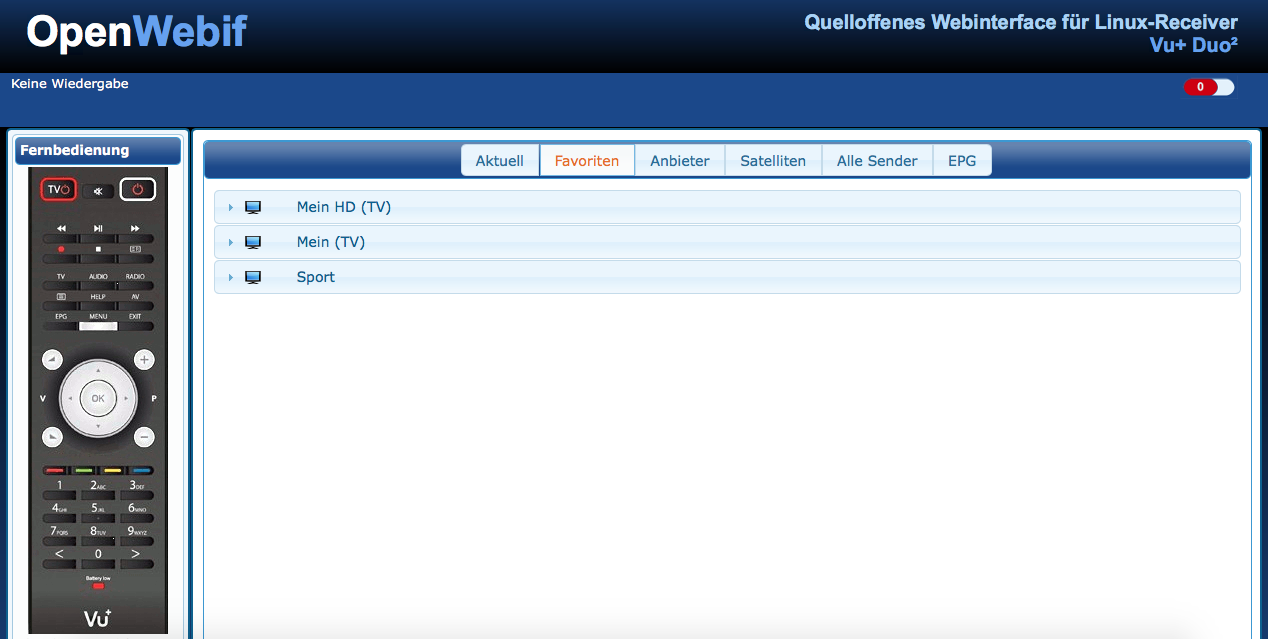
                                          Mach doch das Open web Interface auf deine Dreambox statt das Standard web if.

                                          Ansonsten kann Ich ja mal schauen ob ich das so programiere, dass man VU oder Dreambox vorher einstellt, bzw er das automatisch erkennt und dann die Kommandos entsprechend abändert.


                                          ioBroker auf Beelink mit WIN10 home|CCU3 (Raspberrymatic)|Neato BotVac D3|HYPERION Ambilight auf RPI3 und RPI ZeroW|HA-Bridge|Milight LED|Nodered&Redmatic|VU Duo2 & Solo se V2

                                          1 Reply Last reply
                                          0
                                          Reply
                                          • Reply as topic
                                          Log in to reply
                                          • Oldest to Newest
                                          • Newest to Oldest
                                          • Most Votes


                                          Support us

                                          ioBroker
                                          Community Adapters
                                          Donate
                                          FAQ Cloud / IOT
                                          HowTo: Node.js-Update
                                          HowTo: Backup/Restore
                                          Downloads
                                          BLOG

                                          291

                                          Online

                                          32.7k

                                          Users

                                          82.4k

                                          Topics

                                          1.3m

                                          Posts
                                          Community
                                          Impressum | Datenschutz-Bestimmungen | Nutzungsbedingungen | Einwilligungseinstellungen
                                          ioBroker Community 2014-2025
                                          logo
                                          • Login

                                          • Don't have an account? Register

                                          • Login or register to search.
                                          • First post
                                            Last post
                                          0
                                          • Home
                                          • Recent
                                          • Tags
                                          • Unread 0
                                          • Categories
                                          • Unreplied
                                          • Popular
                                          • GitHub
                                          • Docu
                                          • Hilfe