




Adapter: iobroker.backitup (stable Release)
-
so, ich habe nun die v0.3.2 inst. und leider die gleichen probleme wie bei der v0.3.0 version.
wie gesagt, bei der v0.2.7 hatte ich null probleme mit CCU und NAS backup
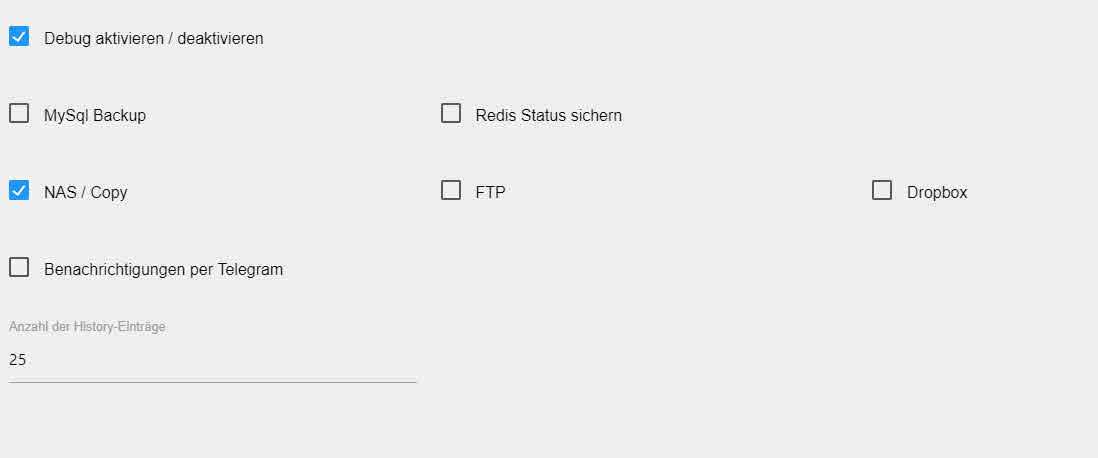
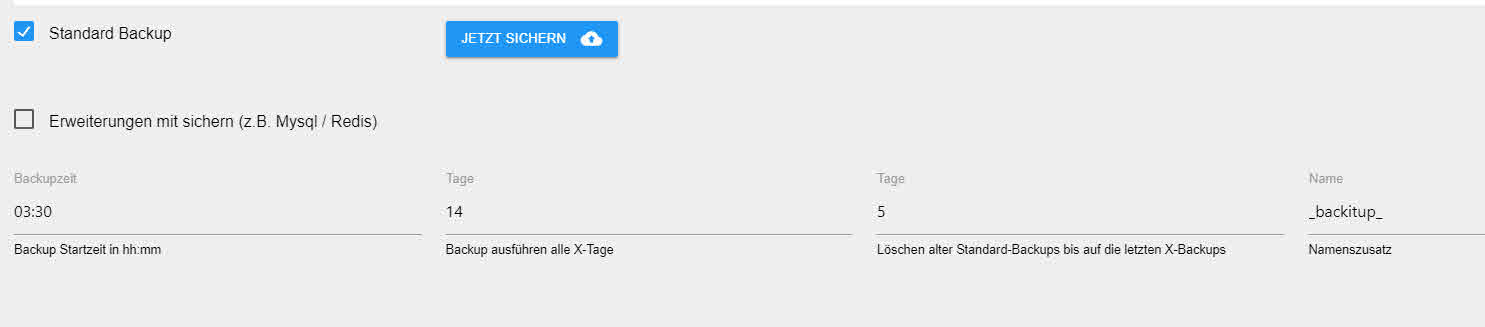
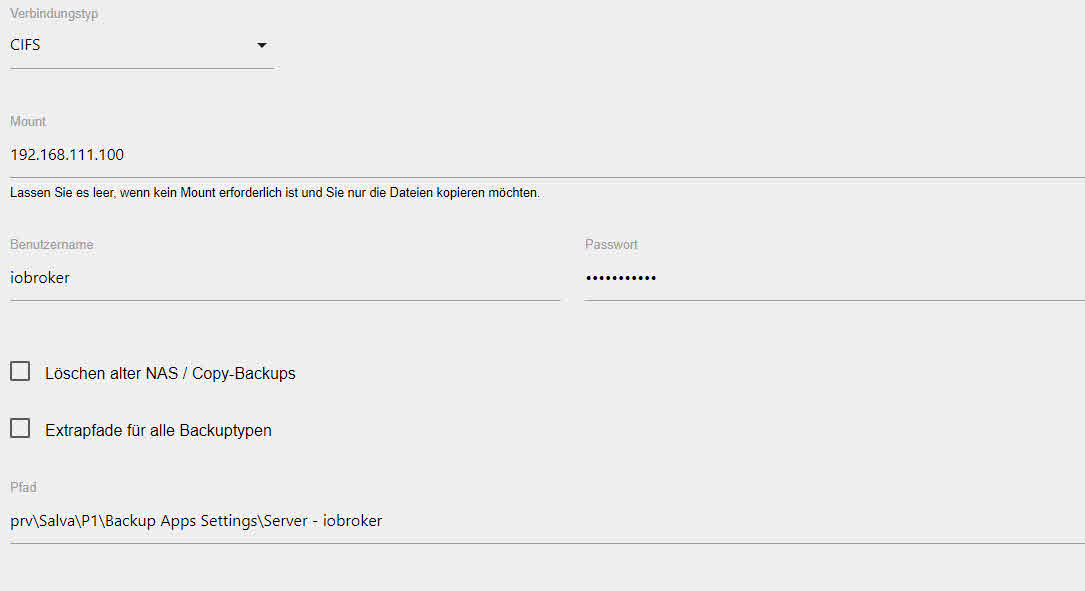
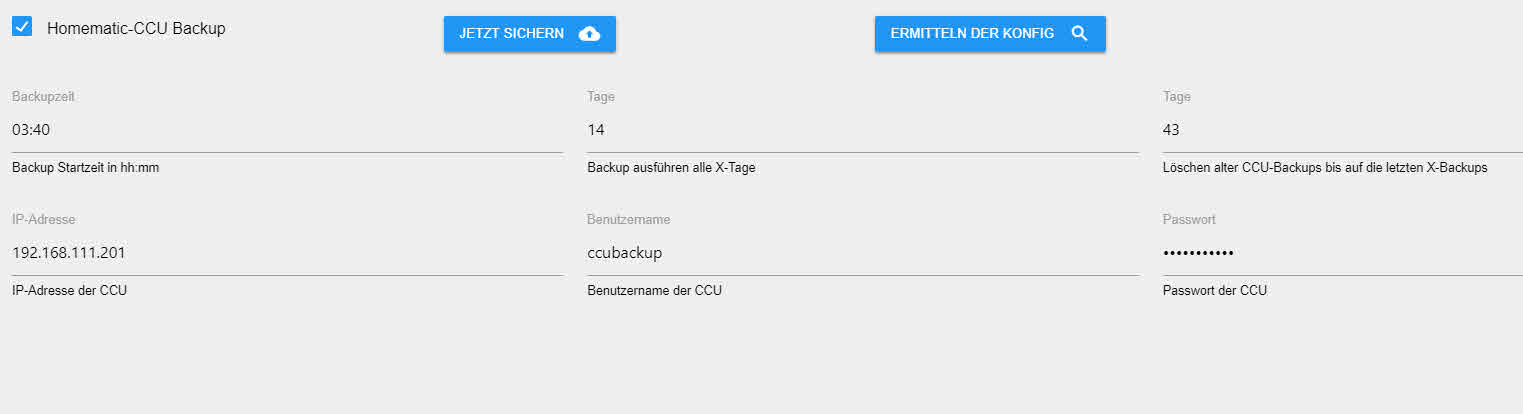
das logfile spuckt folgendes aus
backitup.0 2018-09-26 22:47:57.468 debug system.adapter.admin.0: logging true backitup.0 2018-09-26 22:47:56.366 debug [ccu/ccu] Requesting backup from CCU backitup.0 2018-09-26 22:47:56.363 debug [ccu/ccu] CCU Version: 2.35.16 backitup.0 2018-09-26 22:47:55.597 debug [ccu/mount] For more details see mount(8). backitup.0 2018-09-26 22:47:55.597 debug [ccu/mount] --make-runbindable recursively mark a whole subtree as unbindable backitup.0 2018-09-26 22:47:55.597 debug [ccu/mount] --make-rprivate recursively mark a whole subtree as private backitup.0 2018-09-26 22:47:55.597 debug [ccu/mount] --make-rslave recursively mark a whole subtree as slave backitup.0 2018-09-26 22:47:55.596 debug [ccu/mount] --make-rshared recursively mark a whole subtree as shared backitup.0 2018-09-26 22:47:55.596 debug [ccu/mount] --make-unbindable mark a subtree as unbindable backitup.0 2018-09-26 22:47:55.596 debug [ccu/mount] --make-private mark a subtree as private backitup.0 2018-09-26 22:47:55.595 debug [ccu/mount] --make-slave mark a subtree as slave backitup.0 2018-09-26 22:47:55.595 debug [ccu/mount] --make-shared mark a subtree as shared backitup.0 2018-09-26 22:47:55.595 debug [ccu/mount] -R, --rbind mount a subtree and all submounts somewhere else backitup.0 2018-09-26 22:47:55.594 debug [ccu/mount] -M, --move move a subtree to some other place backitup.0 2018-09-26 22:47:55.594 debug [ccu/mount] -B, --bind mount a subtree somewhere else (same as -o bind) backitup.0 2018-09-26 22:47:55.594 debug [ccu/mount] Operations: backitup.0 2018-09-26 22:47:55.594 debug [ccu/mount] <file>regular file for loopdev setup backitup.0 2018-09-26 22:47:55.593 debug [ccu/mount] <directory>mountpoint for bind mounts (see --bind/rbind) backitup.0 2018-09-26 22:47:55.593 debug [ccu/mount] <device>specifies device by path backitup.0 2018-09-26 22:47:55.593 debug [ccu/mount] PARTUUID= <uuid>specifies device by partition UUID backitup.0 2018-09-26 22:47:55.593 debug [ccu/mount] PARTLABEL= <label>specifies device by partition label backitup.0 2018-09-26 22:47:55.592 debug [ccu/mount] UUID= <uuid>specifies device by filesystem UUID backitup.0 2018-09-26 22:47:55.592 debug [ccu/mount] LABEL= <label>specifies device by filesystem label backitup.0 2018-09-26 22:47:55.592 debug [ccu/mount] -U, --uuid <uuid>synonym for UUID= <uuid>backitup.0 2018-09-26 22:47:55.592 debug [ccu/mount] -L, --label <label>synonym for LABEL= <label>backitup.0 2018-09-26 22:47:55.591 debug [ccu/mount] Source: backitup.0 2018-09-26 22:47:55.591 debug [ccu/mount] -V, --version output version information and exit backitup.0 2018-09-26 22:47:55.590 debug [ccu/mount] -h, --help display this help and exit backitup.0 2018-09-26 22:47:55.590 debug [ccu/mount] -w, --rw, --read-write mount the filesystem read-write (default) backitup.0 2018-09-26 22:47:55.590 debug [ccu/mount] -v, --verbose say what is being done backitup.0 2018-09-26 22:47:55.590 debug [ccu/mount] --target <target>explicitly specifies mountpoint backitup.0 2018-09-26 22:47:55.589 debug [ccu/mount] --source <src>explicitly specifies source (path, label, uuid) backitup.0 2018-09-26 22:47:55.589 debug [ccu/mount] -t, --types limit the set of filesystem types backitup.0 2018-09-26 22:47:55.589 debug [ccu/mount] -r, --read-only mount the filesystem read-only (same as -o ro) backitup.0 2018-09-26 22:47:55.589 debug [ccu/mount] -O, --test-opts limit the set of filesystems (use with -a) backitup.0 2018-09-26 22:47:55.589 debug [ccu/mount] -o, --options comma-separated list of mount options backitup.0 2018-09-26 22:47:55.588 debug [ccu/mount] -n, --no-mtab don't write to /etc/mtab backitup.0 2018-09-26 22:47:55.588 debug [ccu/mount] -l, --show-labels show also filesystem labels backitup.0 2018-09-26 22:47:55.588 debug [ccu/mount] -i, --internal-only don't call the mount. <type>helpers backitup.0 2018-09-26 22:47:55.588 debug [ccu/mount] -T, --fstab <path>alternative file to /etc/fstab backitup.0 2018-09-26 22:47:55.587 debug [ccu/mount] -F, --fork fork off for each device (use with -a) backitup.0 2018-09-26 22:47:55.587 debug [ccu/mount] -f, --fake dry run; skip the mount(2) syscall backitup.0 2018-09-26 22:47:55.586 debug [ccu/mount] -c, --no-canonicalize don't canonicalize paths backitup.0 2018-09-26 22:47:55.586 debug [ccu/mount] -a, --all mount all filesystems mentioned in fstab backitup.0 2018-09-26 22:47:55.585 debug [ccu/mount] Options: backitup.0 2018-09-26 22:47:55.585 debug [ccu/mount] Mount a filesystem. backitup.0 2018-09-26 22:47:55.584 debug [ccu/mount] mount <operation><mountpoint>[<target>] backitup.0 2018-09-26 22:47:55.584 debug [ccu/mount] mount [options] <source> <directory>backitup.0 2018-09-26 22:47:55.583 debug [ccu/mount] mount [options] [--source] <source> | [--target] <directory>backitup.0 2018-09-26 22:47:55.582 debug [ccu/mount] mount -a [options] backitup.0 2018-09-26 22:47:55.582 debug [ccu/mount] mount [-lhV] backitup.0 2018-09-26 22:47:55.582 debug [ccu/mount] Usage: backitup.0 2018-09-26 22:47:55.581 debug [ccu/mount] [IGNORED] Error: Command failed: mount -t cifs -o user=iobroker,password=passwort,rw,file_mode=0777,dir_mode=0777 //192.168.111.100/prv\Salva\P1\Backup Apps Settings\Server - iobroker backitup.0 2018-09-26 22:47:55.574 debug [ccu/mount] For more details see mount(8). backitup.0 2018-09-26 22:47:55.574 debug [ccu/mount] --make-runbindable recursively mark a whole subtree as unbindable backitup.0 2018-09-26 22:47:55.574 debug [ccu/mount] --make-rprivate recursively mark a whole subtree as private backitup.0 2018-09-26 22:47:55.573 debug [ccu/mount] --make-rslave recursively mark a whole subtree as slave backitup.0 2018-09-26 22:47:55.573 debug [ccu/mount] --make-rshared recursively mark a whole subtree as shared backitup.0 2018-09-26 22:47:55.573 debug [ccu/mount] --make-unbindable mark a subtree as unbindable backitup.0 2018-09-26 22:47:55.573 debug [ccu/mount] --make-private mark a subtree as private backitup.0 2018-09-26 22:47:55.572 debug [ccu/mount] --make-slave mark a subtree as slave backitup.0 2018-09-26 22:47:55.572 debug [ccu/mount] --make-shared mark a subtree as shared backitup.0 2018-09-26 22:47:55.571 debug [ccu/mount] -R, --rbind mount a subtree and all submounts somewhere else backitup.0 2018-09-26 22:47:55.570 debug [ccu/mount] -M, --move move a subtree to some other place backitup.0 2018-09-26 22:47:55.569 debug [ccu/mount] -B, --bind mount a subtree somewhere else (same as -o bind) backitup.0 2018-09-26 22:47:55.568 debug [ccu/mount] Operations: backitup.0 2018-09-26 22:47:55.562 debug [ccu/mount] <file>regular file for loopdev setup backitup.0 2018-09-26 22:47:55.561 debug [ccu/mount] <directory>mountpoint for bind mounts (see --bind/rbind) backitup.0 2018-09-26 22:47:55.560 debug [ccu/mount] <device>specifies device by path backitup.0 2018-09-26 22:47:55.560 debug [ccu/mount] PARTUUID= <uuid>specifies device by partition UUID backitup.0 2018-09-26 22:47:55.560 debug [ccu/mount] PARTLABEL= <label>specifies device by partition label backitup.0 2018-09-26 22:47:55.560 debug [ccu/mount] UUID= <uuid>specifies device by filesystem UUID backitup.0 2018-09-26 22:47:55.559 debug [ccu/mount] LABEL= <label>specifies device by filesystem label backitup.0 2018-09-26 22:47:55.559 debug [ccu/mount] -U, --uuid <uuid>synonym for UUID= <uuid>backitup.0 2018-09-26 22:47:55.558 debug [ccu/mount] -L, --label <label>synonym for LABEL= <label>backitup.0 2018-09-26 22:47:55.558 debug [ccu/mount] Source: backitup.0 2018-09-26 22:47:55.556 debug [ccu/mount] -V, --version output version information and exit backitup.0 2018-09-26 22:47:55.556 debug [ccu/mount] -h, --help display this help and exit backitup.0 2018-09-26 22:47:55.556 debug [ccu/mount] -w, --rw, --read-write mount the filesystem read-write (default) backitup.0 2018-09-26 22:47:55.556 debug [ccu/mount] -v, --verbose say what is being done backitup.0 2018-09-26 22:47:55.555 debug [ccu/mount] --target <target>explicitly specifies mountpoint backitup.0 2018-09-26 22:47:55.555 debug [ccu/mount] --source <src>explicitly specifies source (path, label, uuid) backitup.0 2018-09-26 22:47:55.555 debug [ccu/mount] -t, --types limit the set of filesystem types backitup.0 2018-09-26 22:47:55.554 debug [ccu/mount] -r, --read-only mount the filesystem read-only (same as -o ro) backitup.0 2018-09-26 22:47:55.554 debug [ccu/mount] -O, --test-opts limit the set of filesystems (use with -a) backitup.0 2018-09-26 22:47:55.553 debug [ccu/mount] -o, --options comma-separated list of mount options backitup.0 2018-09-26 22:47:55.553 debug [ccu/mount] -n, --no-mtab don't write to /etc/mtab backitup.0 2018-09-26 22:47:55.553 debug [ccu/mount] -l, --show-labels show also filesystem labels backitup.0 2018-09-26 22:47:55.553 debug [ccu/mount] -i, --internal-only don't call the mount. <type>helpers backitup.0 2018-09-26 22:47:55.552 debug [ccu/mount] -T, --fstab <path>alternative file to /etc/fstab backitup.0 2018-09-26 22:47:55.552 debug [ccu/mount] -F, --fork fork off for each device (use with -a) backitup.0 2018-09-26 22:47:55.552 debug [ccu/mount] -f, --fake dry run; skip the mount(2) syscall backitup.0 2018-09-26 22:47:55.552 debug [ccu/mount] -c, --no-canonicalize don't canonicalize paths backitup.0 2018-09-26 22:47:55.551 debug [ccu/mount] -a, --all mount all filesystems mentioned in fstab backitup.0 2018-09-26 22:47:55.551 debug [ccu/mount] Options: backitup.0 2018-09-26 22:47:55.550 debug [ccu/mount] Mount a filesystem. backitup.0 2018-09-26 22:47:55.549 debug [ccu/mount] mount <operation><mountpoint>[<target>] backitup.0 2018-09-26 22:47:55.549 debug [ccu/mount] mount [options] <source> <directory>backitup.0 2018-09-26 22:47:55.548 debug [ccu/mount] mount [options] [--source] <source> | [--target] <directory>backitup.0 2018-09-26 22:47:55.547 debug [ccu/mount] mount -a [options] backitup.0 2018-09-26 22:47:55.546 debug [ccu/mount] mount [-lhV] backitup.0 2018-09-26 22:47:55.546 debug [ccu/mount] Usage: backitup.0 2018-09-26 22:47:55.545 debug [ccu/mount] [undefined</directory></directory></target></mountpoint></operation></path></type></src></target></label></label></uuid></uuid></label></uuid></label></uuid></device></directory></file></directory></directory></target></mountpoint></operation></path></type></src></target></label></label></uuid></uuid></label></uuid></label></uuid></device></directory></file> -
Also beim cifs Problem würde ich auf die Lerrzeichen in der Pfadangabe tippen.
Ändere mal den Pfad in was vernünftiges
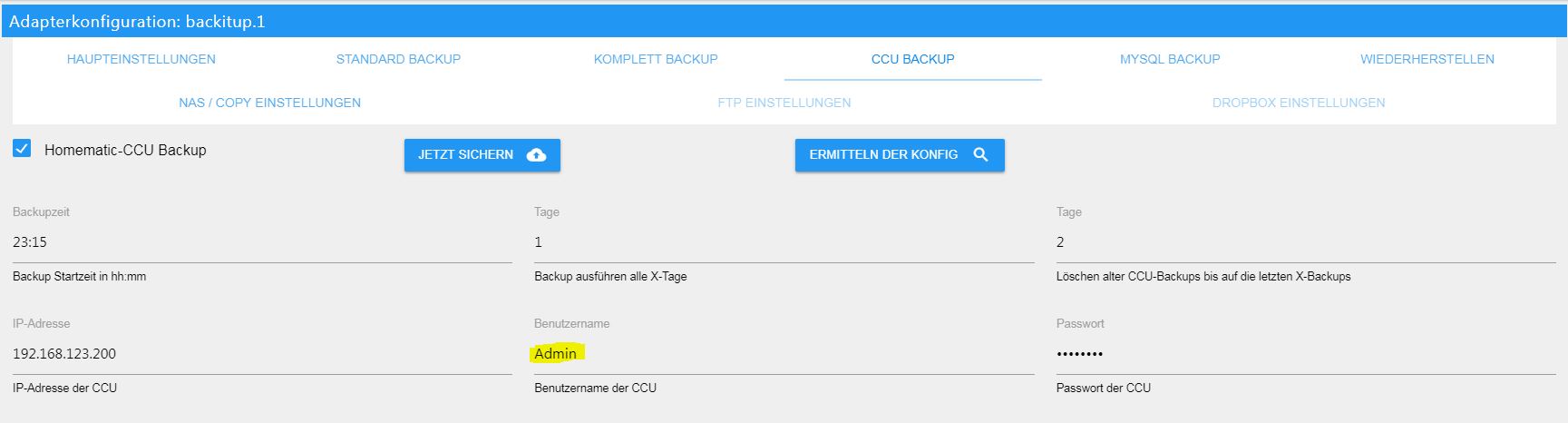
Beim ccu backup prüfe bitte deine Benutzerdaten.
Du brauchst als Logindaten die Daten Des Weblogins.
Und da ist der Benutzername definitiv „Admin“
Gesendet von iPhone mit Tapatalk
-
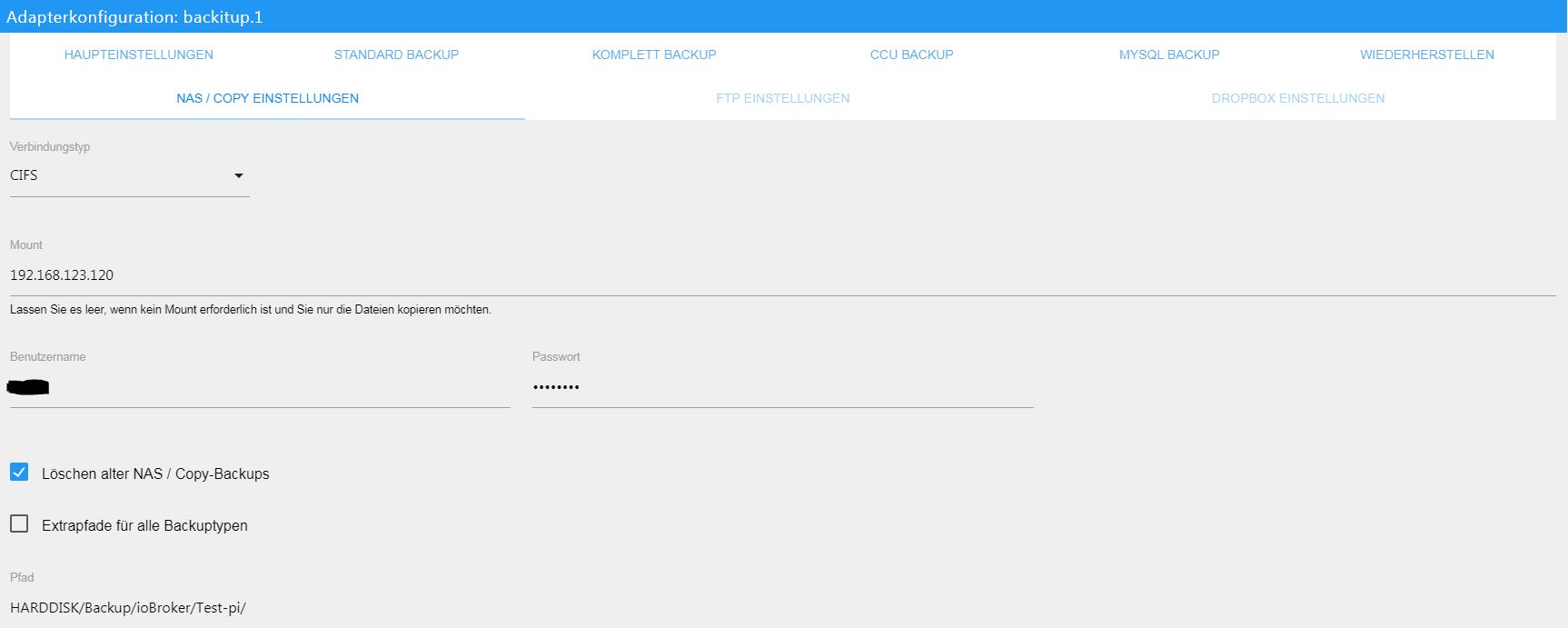
Hier mal noch die Einstellungen, wie es eigentlich aussehen sollte.
Deine Backslashs in dem Pfad wundern mich ehrlich gesagt auch.
Hast du mal mit diesen Einstellungen probiert einen manuellen mount zumachen?
Sprich über Konsole …
backitup.1 2018-09-27 08:57:38.498 debug [ccu] exec: done backitup.1 2018-09-27 08:57:38.496 debug [ccu/umount] done backitup.1 2018-09-27 08:57:28.267 debug [ccu/history] done backitup.1 2018-09-27 08:57:28.210 debug [ccu/telegram] done backitup.1 2018-09-27 08:57:28.210 debug sendTo "send" to system.adapter.telegram.0 from system.adapter.backitup.1 backitup.1 2018-09-27 08:57:28.209 debug [ccu/telegram] [ccu] used Telegram-Instance: telegram.0 backitup.1 2018-09-27 08:57:28.183 debug [ccu/clean] done backitup.1 2018-09-27 08:57:28.152 debug [ccu/ccu] done backitup.1 2018-09-27 08:57:12.444 debug [ccu/ccu] Requesting backup from CCU backitup.1 2018-09-27 08:57:12.444 debug [ccu/ccu] CCU Version: 2.31.25 backitup.1 2018-09-27 08:57:12.223 debug [ccu/mount] done -
Ich vermute auch dass das die weboberflächen Login-Daten sind.
Die Daten der Ccu-Weboberfläche hast du ganz zu Anfang Mal festgelegt und ich persönlich habe die seit dem nie mehr benötigt `
Also beim cifs Problem würde ich auf die Lerrzeichen in der Pfadangabe tippen.
Ändere mal den Pfad in was vernünftiges
Beim ccu backup prüfe bitte deine Benutzerdaten.
Du brauchst als Logindaten die Daten Des Weblogins.
Und da ist der Benutzername definitiv „Admin“
Gesendet von iPhone mit Tapatalk `
ich habe für die CCU extra einen account mit administrativen rechten angelegt.
hätte natürlich auch den admin account nehmen können, aber ich wollte für das backup einen extra account benutzen.
und selbst mit dem admin account funktioniert das backup nicht.
ich find es seltsam, dass wenn ich zurück auf die v0.2.7 gehe, das sichern anstandslos funktioniert. sowohl für die CCU als auch für die iobroker sicherung
und bei der v0.2.7 habe ich bez. der pfadangaben, leerzeichen und backslashes drin.
die bilder, die ich weiter oben gepostet hatte sind von der v0.2.7; und bei den einstellungen funktioniert, wie gesagt, alles prima. :?
-
Probiere mal keine Backslash zu verwenden und die Leerzeichen in deinem Pfad zu entfernen. Leerzeichen sind in Pfaden und Dateinamen nie gut.
Es kann sein, dass shell bei der 0.2.7 damit weniger ein Problem hat.
Der Adapter macht aber nun alles über Java und da sollten die Angaben schon richtig sauber sein.
Schaue dir mal meine Screenshots an.
Verwende statt Leerzeichen lieber Unterstriche.
Natürlich müssen die Ordner und Unterordner auch auf deinem NAS umbenannt werden.
Gesendet von iPhone mit Tapatalk
-
Probiere mal keine Backslash zu verwenden und die Leerzeichen in deinem Pfad zu entfernen. Leerzeichen sind in Pfaden und Dateinamen nie gut.
Es kann sein, dass shell bei der 0.2.7 damit weniger ein Problem hat.
Der Adapter macht aber nun alles über Java und da sollten die Angaben schon richtig sauber sein.
Schaue dir mal meine Screenshots an.
Verwende statt Leerzeichen lieber Unterstriche.
Natürlich müssen die Ordner und Unterordner auch auf deinem NAS umbenannt werden.
Gesendet von iPhone mit Tapatalk `
ich habe nun festgestellt, dass wenn ich den pfad einfach in anführungszeichen setze, das backup problemlos funktioniert.
die dateien sind auch auf meiner nas existent und inhaltlich OK.
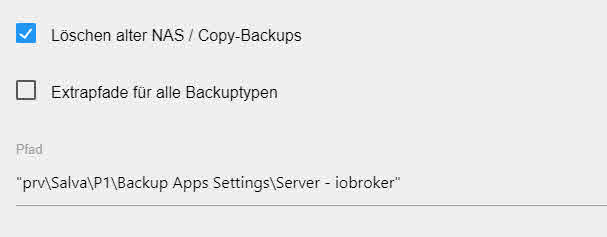
das logfile, wenn ich es richtig verstehe, gibt mir dennoch zu bedenken.
Gestartet... [DEBUG] [mount] start with {"mountType":"CIFS","type":"storage","source":"Local","mount":"192.168.111.100","deleteOldBackup":true,"dir":"\"prv\\Salva\\P1\\Backup Apps Settings\\Server - iobroker\"","user":"iobroker","pass":"****"} [DEBUG] [mount] - done [DEBUG] [minimal] start with {"type":"creator","time":"03:30","debugging":false,"everyXDays":"14","nameSuffix":"_backitup_","deleteBackupAfter":0,"extensionsEnabled":false,"cifs":{"enabled":true,"mountType":"CIFS","type":"storage","source":"Local","mount":"//192.168.111.100","deleteOldBackup":true,"dir":"\"prv\\Salva\\P1\\Backup Apps Settings\\Server - iobroker\"","user":"iobroker","pass":"****","context":{"fileNames":[],"errors":{},"done":["mount"],"types":[]},"adapter":null},"dir":"/opt/iobroker","redis":{"enabled":false,"type":"creator","ftp":{"enabled":false,"type":"storage","source":"Local","host":"192.168.111.100","deleteOldBackup":false,"dir":"prv\\Salva\\P1\\Backup Apps Settings\\Server - iobroker","user":"iobroker","pass":"passwort","port":"21"},"cifs":{"enabled":true,"mountType":"CIFS","type":"storage","source":"Local","mount":"192.168.111.100","deleteOldBackup":true,"dir":"\"prv\\Salva\\P1\\Backup Apps Settings\\Server - iobroker\"","user":"iobroker","pass":"passwort"},"dropbox":{"enabled":false,"type":"storage","source":"Local","deleteOldBackup":false,"accessToken":""},"path":"/var/lib/redis/dump.rdb"},"history":{"enabled":true,"type":"message","entriesNumber":"25","systemLang":"de"},"backupDir":"/opt/iobroker/backups"} [DEBUG] [minimal] - Backup created: /opt/iobroker/backups/minimal__backitup__2018_09_27-12_41_08_backupiobroker.tar.gz [DEBUG] [minimal] - done [DEBUG] [cifs] start with {"mountType":"CIFS","type":"storage","source":"Local","mount":"//192.168.111.100","deleteOldBackup":true,"dir":"\"prv\\Salva\\P1\\Backup Apps Settings\\Server - iobroker\"","user":"iobroker","pass":"****","backupDir":"/opt/iobroker/backups","deleteBackupAfter":0} [ERROR] [cifs] - [IGNORED] Path ""prv\Salva\P1\Backup Apps Settings\Server - iobroker"" not found [DEBUG] [clean] start with {"deleteBackupAfter":0} [DEBUG] [clean] - done [DEBUG] [history] start with {"type":"creator","time":"03:30","debugging":false,"everyXDays":"14","nameSuffix":"_backitup_","deleteBackupAfter":0,"extensionsEnabled":false,"cifs":{"enabled":true,"mountType":"CIFS","type":"storage","source":"Local","mount":"//192.168.111.100","deleteOldBackup":true,"dir":"\"prv\\Salva\\P1\\Backup Apps Settings\\Server - iobroker\"","user":"iobroker","pass":"****","context":{"fileNames":["/opt/iobroker/backups/minimal__backitup__2018_09_27-12_41_08_backupiobroker.tar.gz"],"errors":{},"done":["mount","minimal"],"types":["minimal"]},"adapter":null},"dir":"/opt/iobroker","redis":{"enabled":false,"type":"creator","ftp":{"enabled":false,"type":"storage","source":"Local","host":"192.168.111.100","deleteOldBackup":false,"dir":"prv\\Salva\\P1\\Backup Apps Settings\\Server - iobroker","user":"iobroker","pass":"passwort","port":"21"},"cifs":{"enabled":true,"mountType":"CIFS","type":"storage","source":"Local","mount":"192.168.111.100","deleteOldBackup":true,"dir":"\"prv\\Salva\\P1\\Backup Apps Settings\\Server - iobroker\"","user":"iobroker","pass":"passwort"},"dropbox":{"enabled":false,"type":"storage","source":"Local","deleteOldBackup":false,"accessToken":""},"path":"/var/lib/redis/dump.rdb"},"history":{"enabled":true,"type":"message","entriesNumber":"25","systemLang":"de","time":"27 September 2018 um 12:41 Uhr"},"backupDir":"/opt/iobroker/backups"} [DEBUG] [history] - backitup.0.history.html [DEBUG] [umount] start with {"mountType":"CIFS","type":"storage","source":"Local","mount":"//192.168.111.100","deleteOldBackup":true,"dir":"\"prv\\Salva\\P1\\Backup Apps Settings\\Server - iobroker\"","user":"iobroker","pass":"****","backupDir":"/opt/iobroker/backups"} [DEBUG] [umount] - done [EXIT] 0 -
Nein das kannst du ignorieren.
Das ist aktuell nur eine reine debug Ausgabe für uns zum testen.
Ich werde das mit den Anführungszeichen mal mit in der Doku aufnehmen.
Eventuell musst du es durch die Leerzeichen in Anführungszeichen schreiben, damit es im bash auch als Pfad erkannt wird.
-
Nein das kannst du ignorieren.
Das ist aktuell nur eine reine debug Ausgabe für uns zum testen.
Ich werde das mit den Anführungszeichen mal mit in der Doku aufnehmen.
Eventuell musst du es durch die Leerzeichen in Anführungszeichen schreiben, damit es im bash auch als Pfad erkannt wird. `
ah ok.. dann funktioniert es bei mir jetzt auch :-D
bin halt kein freund von ordnernamen, wo underscore oder bindestrich verwedet werden :D
und das mit den anführungszeichen, wenn leerzeichen benutzt werden, das kannte ich noch aus msdos zeiten :-D
-
Hmm .. irgendwie fehlt mir bei CIFS das Feld für die HOST-IP. Soll die nun an den Pfad mit rangedengelt werden? OK .. IP unter Mount eintragen .. verstanden. ABER .. bei mir wird noch immer nur Vis.0 gesichert .. ick dreh durch! War beim 2er genauso .. ist auch beim /opt/iobroker/backup so :-(
-
Da kommen nur noch die Pfade. Um Missverständnisse zu vermeiden: Bei 2.x hieß das Feld in das man die IP des NAS eintragen musste Host .. hier offenbar Mount .. funktioniert aber genau so. Nur um dieses Feld ging es .. bei den Pfaden ist alles wie gewohnt.
-
bin halt kein freund von ordnernamen, wo underscore oder bindestrich verwedet werden :D
und das mit den anführungszeichen, wenn leerzeichen benutzt werden, das kannte ich noch aus msdos zeiten :-D `
Ich möchte das gerne nochmal aufgreifen, generell sind Ordner/Dateinamen mit Leerzeichen immer eine schlechte / unprofessionelle Wahl die an und für sich beim Durchschnittsuser nie zu Problemen führen sollte aber es wird problematisch wenn der Pfad als URI benötigt wird, denn muss man den String erst entsprechend als URI kodiert werden. Wenn nun irgendwann unser Backitup - Adapter oder irgendein Anderer mit einer Funktion ausgestattet werden sollte die soetwas nutzt wirst du dann bestimmt Schwierigkeiten bekommen.
Deshalb empfehle ich dir deine Ordner / Dateinamen lieber regelkonform zu benennen, das soll jedoch wirklich nur eine Empfehlung sein und ich hoffe du kriegst das nicht in den falschen Hals.
-
Da kommen nur noch die Pfade. Um Missverständnisse zu vermeiden: Bei 2.x hieß das Feld in das man die IP des NAS eintragen musste Host .. hier offenbar Mount .. funktioniert aber genau so. Nur um dieses Feld ging es .. bei den Pfaden ist alles wie gewohnt. `
Du musst bei mount die IP oder dein host eintragen.
Gesendet von iPhone mit Tapatalk
-
Hallo
ich habe den Adapter auf die aktuelle Version angehoben.
Leider sind alle CIFS Einstellungen verschwunden. Das habe ich jetzt aber wieder hin bekommen. Und das funktioniert auch.
Ist es richtig, das nach einem komplett backup von ioBroker alle Instanzen die eingerichtet sind neu gestartet werden? Deshalb habe ich erst mal nur das Minimale backup eingeschaltet.
Nun unterstützt mein NAS auch NFS. Also wollte ich das mal testen. Die Verbindung kommt aber nicht zu stande.
Kann mir jemand einen Screenshot mit Beispieldaten (Pfade) hier rein stellen? Für Extrapfade für alle backups? Ich habe alle möglichen mount Pfade mit und ohne "/" getestet.
Bei mir kommt nicht mal der mount zu stande :(
-
common-nfs ist auf dem RasPi installiert.
-
auf dem NAS ist für den Zugriff "Auth_sys" eingetragen. Wie funktioniert das mit der Authentifizierung?
-
-
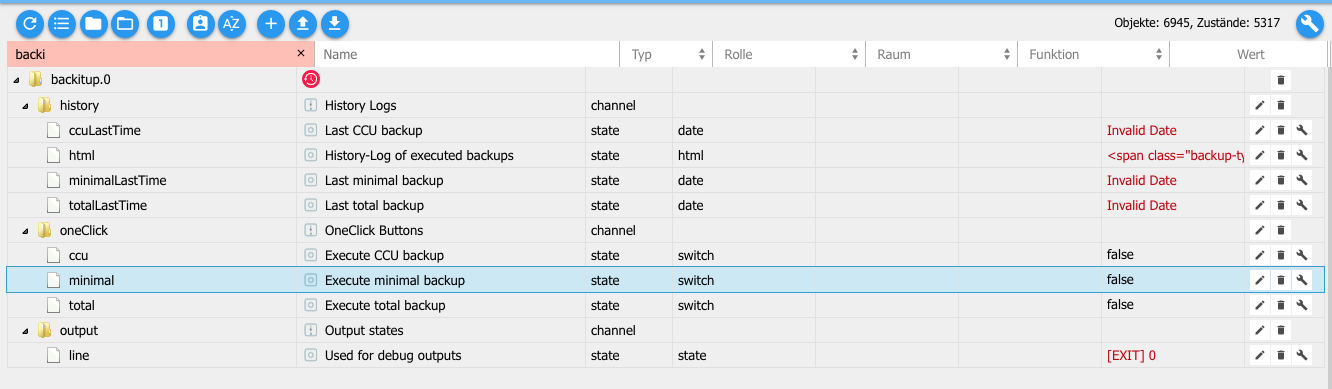
Lösche mal die Objekte und starte backitup neu.
Das sind noch dir alten Objekte und die müssen neu angelegt werden.
Das cifs Einstellungen neu eingetragen werden müssen, hatten wir geschrieben.
NFS mount findest du in der Doku beschrieben.
Was bei deinem NAS beachtet werden muss, kann ich leider nicht beantworten.
Da muss aber sicher dein iobroker auch freigegeben werden.
Bei mir funktioniert nfs ohne Probleme mit dem Tinker Board, pi3 ubd auf einem debian.
Gesendet von iPhone mit Tapatalk




574
Online32.7k
Users82.4k
Topics1.3m
Posts