Skip to content
  • Home
  • Recent
  • Tags
  • 0 Unread 0
  • Categories
  • Unreplied
  • Popular
  • GitHub
  • Docu
  • Hilfe
Skins
  • Light
  • Brite
  • Cerulean
  • Cosmo
  • Flatly
  • Journal
  • Litera
  • Lumen
  • Lux
  • Materia
  • Minty
  • Morph
  • Pulse
  • Sandstone
  • Simplex
  • Sketchy
  • Spacelab
  • United
  • Yeti
  • Zephyr
  • Dark
  • Cyborg
  • Darkly
  • Quartz
  • Slate
  • Solar
  • Superhero
  • Vapor

  • Default (No Skin)
  • No Skin
Collapse
ioBroker Logo

Community Forum

donate donate
  1. ioBroker Community Home
  2. Deutsch
  3. ioBroker Allgemein
  4. Adapter: iobroker.backitup (stable Release)

NEWS

  • Monatsrückblick Januar/Februar 2026 ist online!
    BluefoxB
    Bluefox
    16
    1
    248

  • Jahresrückblick 2025 – unser neuer Blogbeitrag ist online! ✨
    BluefoxB
    Bluefox
    17
    1
    4.6k

  • Neuer Blogbeitrag: Monatsrückblick - Dezember 2025 🎄
    BluefoxB
    Bluefox
    13
    1
    1.3k

Adapter: iobroker.backitup (stable Release)

Scheduled Pinned Locked Moved ioBroker Allgemein
adapterbackitupiobroker backupbackupiobroker.backitup
2.3k Posts 185 Posters 1.2m Views 50 Watching
  • Oldest to Newest
  • Newest to Oldest
  • Most Votes
Reply
  • Reply as topic
Log in to reply
This topic has been deleted. Only users with topic management privileges can see it.
  • C Offline
    C Offline
    Conquest
    wrote on last edited by
    #1513

    Nein kam glaub ich kein Kreis.

    Gesendet von meinem MHA-L29 mit Tapatalk

    1 Reply Last reply
    0
    • simatecS Offline
      simatecS Offline
      simatec
      Developer Most Active
      wrote on last edited by
      #1514

      @spoerl.torsten:

      Nein kam glaub ich kein Kreis.

      Gesendet von meinem MHA-L29 mit Tapatalk `

      Schließe mal das Fenster und aktualisiere deinen Browser.

      Sollte kein Restore erfolgt sein, liegt das an dem aktuellen problemen mit dem neuen Installer.

      Dann bitte backitup auf Version 1.0.6 updaten und folgendes in der Konsole ausführen:

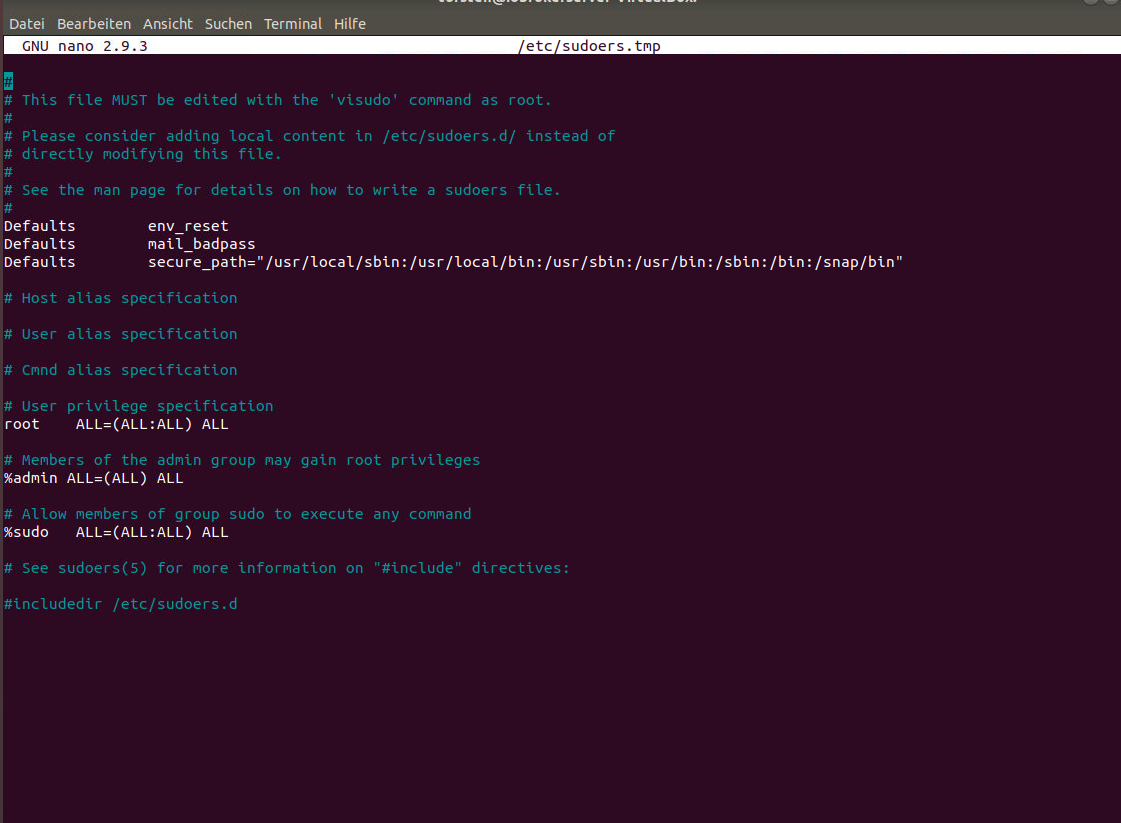
      sudo visudo
      

      In der Datei am Ende folgende Zeile einfügen:

      iobroker ALL=(ALL) NOPASSWD: /bin/mount, /bin/umount, /bin/systemctl
      

      Dann mit STR+o speichern, mit Enter bestätigen und im Anschluss mit STR+x schließen.

      Danach empfehle ich einen reboot … Dies ist aber System abhängig.

      • Besuche meine Github Seite
      • Beitrag hat geholfen oder willst du mich unterstützen
      • HowTo Restore ioBroker
      1 Reply Last reply
      0
      • C Offline
        C Offline
        Conquest
        wrote on last edited by
        #1515

        @simatec:

        @spoerl.torsten:

        Nein kam glaub ich kein Kreis.

        Gesendet von meinem MHA-L29 mit Tapatalk `

        Schließe mal das Fenster und aktualisiere deinen Browser.

        Sollte kein Restore erfolgt sein, liegt das an dem aktuellen problemen mit dem neuen Installer.

        Dann bitte backitup auf Version 1.0.6 updaten und folgendes in der Konsole ausführen:

        sudo visudo
        

        In der Datei am Ende folgende Zeile einfügen:

        iobroker ALL=(ALL) NOPASSWD: ALL
        

        Dann mit STR+o speichern, mit Enter bestätigen und im Anschluss mit STR+x schließen.

        Danach empfehle ich einen reboot … Dies ist aber System abhängig. `

        Wurde kein Restore gemacht. Hab jetzt das Update auf 1.0.6 gemacht.
        470_01_16_19_1.png

        1 Reply Last reply
        0
        • simatecS Offline
          simatecS Offline
          simatec
          Developer Most Active
          wrote on last edited by
          #1516

          Am Ende der Datei ist OK.

          • Besuche meine Github Seite
          • Beitrag hat geholfen oder willst du mich unterstützen
          • HowTo Restore ioBroker
          1 Reply Last reply
          0
          • P Offline
            P Offline
            paul.honka
            wrote on last edited by
            #1517

            Hallo simatec, auf 1.0.6 upgedatet, immer noch das gleiche Problem.

            sudo visudo und iobroker ALL=(ALL) NOPASSWD: ALL eingefügt, reboot.

            Was meinst du mit
            ` > Gehe in den Pfad /opt/iobroker/node_modules/iobroker.backitup/lib/

            Dort liegen 4 shell Dateien (*.sh) für start und stop bei backup und restore.

            Setze mal bitte bei allen 4 Dateien vor systemctl stop iobroker und systemctl start iobrober ein „sudo“ davor. `
            Ich finde da die start_b_IOB.sh startIOB.sh stopIOB.sh stop_r_IOB.sh. Wie sudo davor setzen, umbenennen oder?

            Beste Grüsse paul

            1 Reply Last reply
            0
            • simatecS Offline
              simatecS Offline
              simatec
              Developer Most Active
              wrote on last edited by
              #1518

              Hast du die Änderungen an der visudo auch richtig gespeichert? (Strg-o >>>> Enter >>>> Strg-x)

              Die shell Dateien habe ich in Version 1.0.6 bereits geändert.

              Poste mal bitte die Ausgabe von "systemctl status iobroker"

              • Besuche meine Github Seite
              • Beitrag hat geholfen oder willst du mich unterstützen
              • HowTo Restore ioBroker
              1 Reply Last reply
              0
              • P Offline
                P Offline
                paul.honka
                wrote on last edited by
                #1519

                Hallo simatec, anbei die Ausgabe von "systemctl status iobroker"

                ! tinker@ioBroker-Sted1:/opt/iobroker$ systemctl status iobroker
                ! ● iobroker.service - ioBroker Server
                ! Loaded: loaded (/lib/systemd/system/iobroker.service; enabled; vendor preset:
                ! Active: active (running) since Wed 2019-01-16 17:10:26 CET; 17min ago
                ! Docs: http://iobroker.net
                ! Main PID: 1556 (iobroker.js-con)
                ! Tasks: 40 (limit: 4915)
                ! CGroup: /system.slice/iobroker.service
                ! ├─1556 iobroker.js-controller
                ! ├─1566 io.admin.0
                ! ├─1576 io.discovery.0
                ! └─1586 io.backitup.0
                ! Jan 16 17:10:26 ioBroker-Sted1 systemd[1]: Started ioBroker Server.
                ! Jan 16 17:10:27 ioBroker-Sted1 node[1556]: host.ioBroker-Sted1 check instance "s
                ! Jan 16 17:10:27 ioBroker-Sted1 node[1556]: host.ioBroker-Sted1 check instance "s
                ! Jan 16 17:10:27 ioBroker-Sted1 node[1556]: host.ioBroker-Sted1 check instance "s
                ! Jan 16 17:10:30 ioBroker-Sted1 node[1556]: Send diag info: {"uuid":"9e9e5144-81c
                ! Jan 16 17:10:33 ioBroker-Sted1 node[1556]: Send diag info: {"uuid":"9e9e5144-81c
                ! Jan 16 17:10:33 ioBroker-Sted1 node[1556]: Send diag info: {"uuid":"9e9e5144-81c
                ! lines 1-19/19 (END)
                Beste Grüsse paul

                1 Reply Last reply
                0
                • C Offline
                  C Offline
                  Conquest
                  wrote on last edited by
                  #1520

                  Bei mir funktioniert es auch nicht.

                  Iobroker wird nicht gestoppt.

                  Ich schau morgen nochmal.

                  Gruß Torsten

                  Gesendet von meinem MHA-L29 mit Tapatalk

                  1 Reply Last reply
                  0
                  • simatecS Offline
                    simatecS Offline
                    simatec
                    Developer Most Active
                    wrote on last edited by
                    #1521

                    @paul.honka:

                    Hallo simatec, anbei die Ausgabe von "systemctl status iobroker"

                    ! tinker@ioBroker-Sted1:/opt/iobroker$ systemctl status iobroker
                    ! ● iobroker.service - ioBroker Server
                    ! Loaded: loaded (/lib/systemd/system/iobroker.service; enabled; vendor preset:
                    ! Active: active (running) since Wed 2019-01-16 17:10:26 CET; 17min ago
                    ! Docs: http://iobroker.net
                    ! Main PID: 1556 (iobroker.js-con)
                    ! Tasks: 40 (limit: 4915)
                    ! CGroup: /system.slice/iobroker.service
                    ! ├─1556 iobroker.js-controller
                    ! ├─1566 io.admin.0
                    ! ├─1576 io.discovery.0
                    ! └─1586 io.backitup.0
                    ! Jan 16 17:10:26 ioBroker-Sted1 systemd[1]: Started ioBroker Server.
                    ! Jan 16 17:10:27 ioBroker-Sted1 node[1556]: host.ioBroker-Sted1 check instance "s
                    ! Jan 16 17:10:27 ioBroker-Sted1 node[1556]: host.ioBroker-Sted1 check instance "s
                    ! Jan 16 17:10:27 ioBroker-Sted1 node[1556]: host.ioBroker-Sted1 check instance "s
                    ! Jan 16 17:10:30 ioBroker-Sted1 node[1556]: Send diag info: {"uuid":"9e9e5144-81c
                    ! Jan 16 17:10:33 ioBroker-Sted1 node[1556]: Send diag info: {"uuid":"9e9e5144-81c
                    ! Jan 16 17:10:33 ioBroker-Sted1 node[1556]: Send diag info: {"uuid":"9e9e5144-81c
                    ! lines 1-19/19 (END)
                    Beste Grüsse paul `

                    Dann teste mal, ob du mit "sudo systemctl stop iobroker" ohne Passwortabfrage stoppen kannst.

                    • Besuche meine Github Seite
                    • Beitrag hat geholfen oder willst du mich unterstützen
                    • HowTo Restore ioBroker
                    1 Reply Last reply
                    0
                    • P Offline
                      P Offline
                      paul.honka
                      wrote on last edited by
                      #1522

                      Hallo simatec, ich bin mit dem User tinker und Passwort angemeldet.

                      Dort mus ich bei "sudo systemctl stop iobroker" ein Passwort eingeben.

                      Ist ja auch in der visuodo nicht eingetragen. Ich trage den mal nach.

                      Der neue User iobroker hat welches Passwort oder muss ich eines vergeben?

                      Beste Grüsse paul

                      1 Reply Last reply
                      0
                      • P Offline
                        P Offline
                        paul.honka
                        wrote on last edited by
                        #1523

                        Hallo simatec,

                        habe den User tinker in die visuodo eingetragen.

                        Bei der Eingabe von "systemctl status iobroker"

                        wir kein Passwort verlangt. Es erfolgt gleich die Ausgabe.

                        "sudo systemctl stop iobroker" ohne Passwortabfrage funktioniert auch,

                        "sudo systemctl start iobroker" dto.

                        Beste Grüsse paul

                        1 Reply Last reply
                        0
                        • simatecS Offline
                          simatecS Offline
                          simatec
                          Developer Most Active
                          wrote on last edited by
                          #1524

                          Dann funktioniert alles in backitup.

                          Ist denn der User iobroker richtig in der visudo drin?

                          Habe gerade die stop_r_IOB.sh nochmal manuell getestet.

                          Poste doch hier nochmal den Inhalt der stop_r_IOB.sh.

                          • Besuche meine Github Seite
                          • Beitrag hat geholfen oder willst du mich unterstützen
                          • HowTo Restore ioBroker
                          1 Reply Last reply
                          0
                          • P Offline
                            P Offline
                            paul.honka
                            wrote on last edited by
                            #1525

                            Hallo simatec,

                            hier der Inhalt der stop_r_IOB.sh

                            cd "/opt/iobroker"

                            if systemctl status iobroker | grep -q "Active: inactive"; then

                            bash iobroker stop;

                            touch /opt/iobroker/node_modules/iobroker.backitup/lib/.start.info;

                            else

                            sudo systemctl stop iobroker;

                            touch /opt/iobroker/node_modules/iobroker.backitup/lib/.startctl.info;

                            fi

                            cd "/opt/iobroker/node_modules/iobroker.backitup/lib"

                            node restore.js

                            Beste Grüsse paul

                            1 Reply Last reply
                            0
                            • simatecS Offline
                              simatecS Offline
                              simatec
                              Developer Most Active
                              wrote on last edited by
                              #1526

                              Bist du dir sicher? Das ist eine start.sh aber nicht die stop.sh!!

                              • Besuche meine Github Seite
                              • Beitrag hat geholfen oder willst du mich unterstützen
                              • HowTo Restore ioBroker
                              1 Reply Last reply
                              0
                              • P Offline
                                P Offline
                                paul.honka
                                wrote on last edited by
                                #1527

                                Nein, oben korrigiert.

                                Sorry paul

                                1 Reply Last reply
                                0
                                • simatecS Offline
                                  simatecS Offline
                                  simatec
                                  Developer Most Active
                                  wrote on last edited by
                                  #1528

                                  OK da ist defintiv alles richtig.

                                  Führe die stop_r_IOB.sh mal manuell aus

                                  bash /opt/iobroker/node_modules/iobroker.backitup/lib/stop_r_IOB.sh
                                  

                                  Was gibt dir die Konsole aus? Führe das auch am besten mit dem User iobroker aus

                                  • Besuche meine Github Seite
                                  • Beitrag hat geholfen oder willst du mich unterstützen
                                  • HowTo Restore ioBroker
                                  1 Reply Last reply
                                  0
                                  • P Offline
                                    P Offline
                                    paul.honka
                                    wrote on last edited by
                                    #1529

                                    Hallo simatec,

                                    habe dem User iobroker ein Passwort vergeben, dann mit

                                    Putty User iobroker und Passwort Eingabe schliesst sich Putty sofort, wieso das denn???

                                    Hier die Ausgabe in Putty für user tinker

                                    ! tinker@ioBroker-Sted1:~$ bash /opt/iobroker/node_modules/iobroker.backitup/lib/s top_r_IOB.sh
                                    ! touch: '/opt/iobroker/node_modules/iobroker.backitup/lib/.startctl.info' kann ni cht berührt werden: Keine Berechtigung
                                    ! [DEBUG] [minimal] iobroker controller daemon is not running
                                    ! [DEBUG] [minimal] host.ioBroker-Sted1 OK.
                                    ! [DEBUG] [minimal] host.ioBroker-Sted1 Clear all objects and states…
                                    ! [DEBUG] [minimal] clean 81 objects…
                                    ! [DEBUG] [minimal] clean 51 states…
                                    ! [DEBUG] [minimal] host.ioBroker-Sted1 done.
                                    ! [DEBUG] [minimal] host.ioBroker-Sted1 Processed 0/0 states
                                    ! [DEBUG] [minimal] 0 states restored.
                                    ! [DEBUG] [minimal] host.ioBroker-Sted1 Processed 0/3280 objects
                                    ! [DEBUG] [minimal] host.ioBroker-Sted1 Processed 200/3280 objects
                                    ! [DEBUG] [minimal] host.ioBroker-Sted1 Processed 400/3280 objects
                                    ! [DEBUG] [minimal] host.ioBroker-Sted1 Processed 600/3280 objects
                                    ! [DEBUG] [minimal] host.ioBroker-Sted1 Processed 800/3280 objects
                                    ! [DEBUG] [minimal] host.ioBroker-Sted1 Processed 1000/3280 objects
                                    ! [DEBUG] [minimal] host.ioBroker-Sted1 Processed 1200/3280 objects
                                    ! [DEBUG] [minimal] host.ioBroker-Sted1 Processed 1400/3280 objects
                                    ! [DEBUG] [minimal] host.ioBroker-Sted1 Processed 1600/3280 objects
                                    ! [DEBUG] [minimal] host.ioBroker-Sted1 Processed 1800/3280 objects
                                    ! [DEBUG] [minimal] host.ioBroker-Sted1 Processed 2000/3280 objects
                                    ! [DEBUG] [minimal] host.ioBroker-Sted1 Processed 2200/3280 objects
                                    ! [DEBUG] [minimal] host.ioBroker-Sted1 Processed 2400/3280 objects
                                    ! [DEBUG] [minimal] host.ioBroker-Sted1 Processed 2600/3280 objects
                                    ! [DEBUG] [minimal] host.ioBroker-Sted1 Processed 2800/3280 objects
                                    ! [DEBUG] [minimal] host.ioBroker-Sted1 Processed 3000/3280 objects
                                    ! [DEBUG] [minimal] host.ioBroker-Sted1 Processed 3200/3280 objects
                                    ! [DEBUG] [minimal] 3280 objects restored.
                                    ! [DEBUG] [minimal] host.ioBroker-Sted1 Upload user file "vis.0/Meines/vis-views.json
                                    ! [DEBUG] [minimal] host.ioBroker-Sted1 Upload user file "vis.0/main/vis-views.json
                                    ! [DEBUG] [minimal] host.ioBroker-Sted1 Upload user file "vis.0/main1/vis-views.json
                                    ! [DEBUG] [minimal] got /opt/iobroker/node_modules/iobroker.admin/admin
                                    ! [DEBUG] [minimal] upload [3] iobroker.admin.admin /opt/iobroker/node_modules/iobroker.admin/admin/words.js words.js application/javascript
                                    Der IOBroker ist auch im stop

                                    Beste Grüsse paul

                                    1 Reply Last reply
                                    0
                                    • simatecS Offline
                                      simatecS Offline
                                      simatec
                                      Developer Most Active
                                      wrote on last edited by
                                      #1530

                                      OK das zeigt, dass der restore funktioniert aber irgendwas mit deinen Berechtigungen nicht stimmt.

                                      Wenn du jetzt den iobroker mit sudo systemctl start iobroker startest, sollte der Restore aber durch sein.

                                      Bitte noch geduld haben, da alle Adapter erst installiert werden … Das passiert im Hintergrund.

                                      • Besuche meine Github Seite
                                      • Beitrag hat geholfen oder willst du mich unterstützen
                                      • HowTo Restore ioBroker
                                      1 Reply Last reply
                                      0
                                      • D Offline
                                        D Offline
                                        daNick
                                        wrote on last edited by
                                        #1531

                                        VERSION 1.0.5

                                        Ich speichere meine Backups auf ein FTP (funktioniert, Backups kommen dort an).

                                        Problem:

                                        Backups liegen auch noch in /opt/iobroker/backups und werden nicht gelöscht… mir lief davon schon die SD Karte voll.

                                        Lässt sich das abstellen/ändern/mache ich einen Fehler - übersehe ich eine Option?

                                        Danke!

                                        daNick

                                        1 Reply Last reply
                                        0
                                        • simatecS Offline
                                          simatecS Offline
                                          simatec
                                          Developer Most Active
                                          wrote on last edited by
                                          #1532

                                          Nein bei der Auswahl von FTP wird nur eine Kopie auf dem FTP Server angelegt.

                                          Du musst die Anzahl der maximalen Backups dementsprechend einstellen und auch unter FTP das löschen alter Backups aktivieren.

                                          Gesendet von iPhone mit Tapatalk

                                          • Besuche meine Github Seite
                                          • Beitrag hat geholfen oder willst du mich unterstützen
                                          • HowTo Restore ioBroker
                                          1 Reply Last reply
                                          0
                                          Reply
                                          • Reply as topic
                                          Log in to reply
                                          • Oldest to Newest
                                          • Newest to Oldest
                                          • Most Votes


                                          Support us

                                          ioBroker
                                          Community Adapters
                                          Donate
                                          FAQ Cloud / IOT
                                          HowTo: Node.js-Update
                                          HowTo: Backup/Restore
                                          Downloads
                                          BLOG

                                          256

                                          Online

                                          32.7k

                                          Users

                                          82.5k

                                          Topics

                                          1.3m

                                          Posts
                                          Community
                                          Impressum | Datenschutz-Bestimmungen | Nutzungsbedingungen | Einwilligungseinstellungen
                                          ioBroker Community 2014-2025
                                          logo
                                          • Login

                                          • Don't have an account? Register

                                          • Login or register to search.
                                          • First post
                                            Last post
                                          0
                                          • Home
                                          • Recent
                                          • Tags
                                          • Unread 0
                                          • Categories
                                          • Unreplied
                                          • Popular
                                          • GitHub
                                          • Docu
                                          • Hilfe