Skip to content
  • Home
  • Recent
  • Tags
  • 0 Unread 0
  • Categories
  • Unreplied
  • Popular
  • GitHub
  • Docu
  • Hilfe
Skins
  • Light
  • Brite
  • Cerulean
  • Cosmo
  • Flatly
  • Journal
  • Litera
  • Lumen
  • Lux
  • Materia
  • Minty
  • Morph
  • Pulse
  • Sandstone
  • Simplex
  • Sketchy
  • Spacelab
  • United
  • Yeti
  • Zephyr
  • Dark
  • Cyborg
  • Darkly
  • Quartz
  • Slate
  • Solar
  • Superhero
  • Vapor

  • Default (No Skin)
  • No Skin
Collapse
ioBroker Logo

Community Forum

donate donate
  1. ioBroker Community Home
  2. Deutsch
  3. Skripten / Logik
  4. [Vorlage] Backitup nun in der 3ten Version

NEWS

  • Monatsrückblick Januar/Februar 2026 ist online!
    BluefoxB
    Bluefox
    16
    1
    277

  • Jahresrückblick 2025 – unser neuer Blogbeitrag ist online! ✨
    BluefoxB
    Bluefox
    17
    1
    4.6k

  • Neuer Blogbeitrag: Monatsrückblick - Dezember 2025 🎄
    BluefoxB
    Bluefox
    13
    1
    1.3k

[Vorlage] Backitup nun in der 3ten Version

Scheduled Pinned Locked Moved Skripten / Logik
124 Posts 20 Posters 18.5k Views 4 Watching
  • Oldest to Newest
  • Newest to Oldest
  • Most Votes
Reply
  • Reply as topic
Log in to reply
This topic has been deleted. Only users with topic management privileges can see it.
  • 0 Offline
    0 Offline
    0018
    wrote on last edited by
    #85

    @peoples:

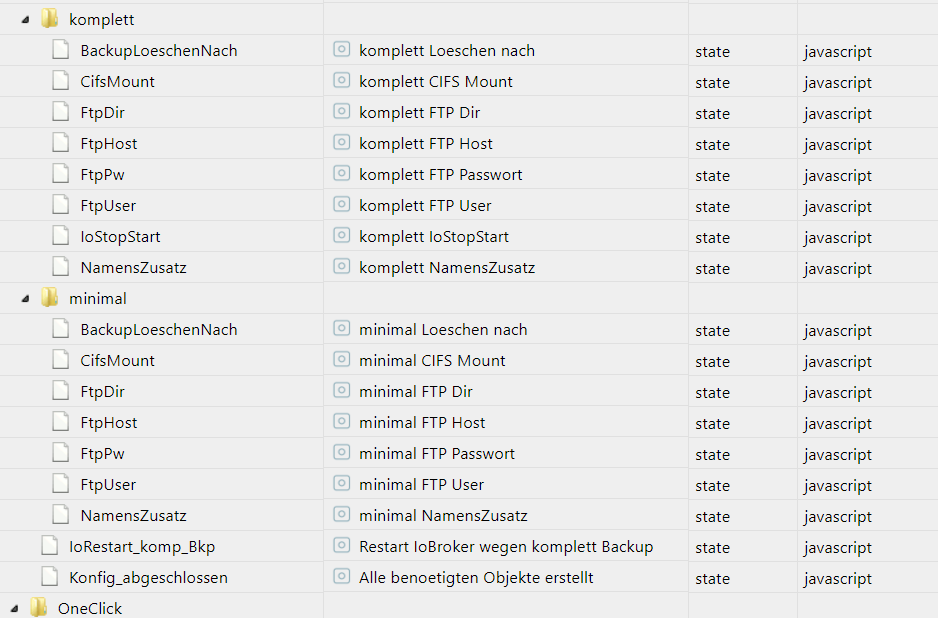
    In den Datenpunkten unter Konfiguration `

    Kannst du mir sagen um welche Datenpunkte es sich handelt? Kann bei mir keinen finden der was mit CIFS User oder Passwort zu tun hätte.
    1620_cifs.png

    Mfg
    0018

    1 Reply Last reply
    0
    • simatecS Offline
      simatecS Offline
      simatec
      Developer Most Active
      wrote on last edited by
      #86

      Alle Datenpunkte mit FTP und dann cifsmount auf true

      Gesendet von iPhone mit Tapatalk

      • Besuche meine Github Seite
      • Beitrag hat geholfen oder willst du mich unterstützen
      • HowTo Restore ioBroker
      1 Reply Last reply
      0
      • 0 Offline
        0 Offline
        0018
        wrote on last edited by
        #87

        Danke. Kannst du vielleicht das mit in die Anleitung aufnehmen und die Datenpunktbeschreibung ggf umbenennen auf FTP/ CIFS User etc… Dann ist es gleich für jeden verständlich [emoji3]

        Gesendet von meinem SM-G920F mit Tapatalk

        Mfg
        0018

        1 Reply Last reply
        0
        • PeoplesP Offline
          PeoplesP Offline
          Peoples
          wrote on last edited by
          #88

          Die Idee ist gut!

          Die Frage ist nur ob sich das noch rentiert, da wir haben den Adapter fast fertig haben, das macht es dann auch viel einfacher und übersichtlicher.

          Sind nur noch paar Kleinigkeiten die noch fehlen.

          Ich beantworte keine Fragen zu Themen via PN

          1 Reply Last reply
          0
          • A Offline
            A Offline
            adarof
            wrote on last edited by
            #89

            Hallo

            Wenn ich das CCU-Backup nachts fahre, beendet sich ioBroker dabei. Das backup scheint aber geklappt zu haben:

            -rw-rw-rw- 1 root root 6396416 Jul  4 02:03 Homematic-Backup-2.35.15-2018_07_04-02_00_10.tar.sbk


            Hier der Log dazu - irgendwo kommt ein SIGTERM her - aber woher?

            Hat da jemand eine Idee?

            Gruss -

            2018-07-04 02:00:21.714  - ESC[32minfoESC[39m: host.raspberrypi3 received SIGTERM
            2018-07-04 02:00:21.721  - ESC[32minfoESC[39m: host.raspberrypi3 stopInstance system.adapter.admin.0
            2018-07-04 02:00:21.721  - ESC[32minfoESC[39m: host.raspberrypi3 stopInstance system.adapter.admin.0 killing pid 3399
            2018-07-04 02:00:21.723  - ESC[32minfoESC[39m: host.raspberrypi3 stopInstance system.adapter.discovery.0
            2018-07-04 02:00:21.723  - ESC[32minfoESC[39m: host.raspberrypi3 stopInstance system.adapter.discovery.0 killing pid 3412
            2018-07-04 02:00:21.724  - ESC[32minfoESC[39m: host.raspberrypi3 stopInstance system.adapter.tr-064.0
            2018-07-04 02:00:21.725  - ESC[32minfoESC[39m: host.raspberrypi3 stopInstance system.adapter.tr-064.0 killing pid 3422
            2018-07-04 02:00:21.725  - ESC[32minfoESC[39m: host.raspberrypi3 stopInstance system.adapter.hm-rpc.0
            2018-07-04 02:00:21.729  - ESC[32minfoESC[39m: host.raspberrypi3 stopInstance system.adapter.hm-rpc.1
            2018-07-04 02:00:21.732  - ESC[32minfoESC[39m: host.raspberrypi3 stopInstance system.adapter.hm-rega.0
            2018-07-04 02:00:21.733  - ESC[32minfoESC[39m: host.raspberrypi3 stopInstance system.adapter.hm-rega.0 killing pid 3460
            2018-07-04 02:00:21.734  - ESC[32minfoESC[39m: host.raspberrypi3 stopInstance system.adapter.web.0
            2018-07-04 02:00:21.735  - ESC[32minfoESC[39m: host.raspberrypi3 stopInstance system.adapter.web.0 killing pid 3472
            2018-07-04 02:00:21.735  - ESC[32minfoESC[39m: host.raspberrypi3 stopInstance system.adapter.history.0
            2018-07-04 02:00:21.738  - ESC[32minfoESC[39m: host.raspberrypi3 stopInstance system.adapter.javascript.0
            2018-07-04 02:00:21.739  - ESC[32minfoESC[39m: host.raspberrypi3 stopInstance system.adapter.javascript.0 killing pid 3512
            2018-07-04 02:00:21.740  - ESC[32minfoESC[39m: host.raspberrypi3 stopInstance system.adapter.mobile.0
            2018-07-04 02:00:21.748  - ESC[32minfoESC[39m: host.raspberrypi3 stopInstance system.adapter.vis.0
            2018-07-04 02:00:21.749  - ESC[32minfoESC[39m: host.raspberrypi3 stopInstance system.adapter.dwd.0
            2018-07-04 02:00:21.751  - ESC[32minfoESC[39m: host.raspberrypi3 stopInstance canceled schedule system.adapter.dwd.0
            2018-07-04 02:00:21.753  - ESC[32minfoESC[39m: host.raspberrypi3 stopInstance system.adapter.vis-timeandweather.0
            2018-07-04 02:00:21.754  - ESC[32minfoESC[39m: host.raspberrypi3 stopInstance system.adapter.vis-fancyswitch.0
            2018-07-04 02:00:21.756  - ESC[32minfoESC[39m: host.raspberrypi3 stopInstance system.adapter.vis-hqwidgets.0
            2018-07-04 02:00:21.758  - ESC[32minfoESC[39m: host.raspberrypi3 stopInstance system.adapter.vis-metro.0
            2018-07-04 02:00:21.759  - ESC[32minfoESC[39m: host.raspberrypi3 stopInstance system.adapter.vis-colorpicker.0
            2018-07-04 02:00:21.760  - ESC[32minfoESC[39m: host.raspberrypi3 stopInstance system.adapter.amazon-dash.0
            2018-07-04 02:00:21.760  - ESC[32minfoESC[39m: host.raspberrypi3 stopInstance system.adapter.amazon-dash.0 killing pid 3542
            2018-07-04 02:00:21.761  - ESC[32minfoESC[39m: host.raspberrypi3 stopInstance system.adapter.vis-jqui-mfd.0
            2018-07-04 02:00:21.761  - ESC[32minfoESC[39m: host.raspberrypi3 stopInstance system.adapter.email.0
            2018-07-04 02:00:21.762  - ESC[32minfoESC[39m: host.raspberrypi3 stopInstance system.adapter.email.0 killing pid 3556
            2018-07-04 02:00:21.766  - ESC[32minfoESC[39m: host.raspberrypi3 stopInstance system.adapter.vis-history.0
            2018-07-04 02:00:21.767  - ESC[32minfoESC[39m: host.raspberrypi3 stopInstance system.adapter.sql.0
            2018-07-04 02:00:21.769  - ESC[32minfoESC[39m: host.raspberrypi3 stopInstance system.adapter.rpi2.0
            2018-07-04 02:00:21.770  - ESC[32minfoESC[39m: host.raspberrypi3 stopInstance system.adapter.rpi2.0 killing pid 3575
            2018-07-04 02:00:21.770  - ESC[32minfoESC[39m: host.raspberrypi3 stopInstance system.adapter.i2c.0
            2018-07-04 02:00:21.771  - ESC[32minfoESC[39m: host.raspberrypi3 stopInstance system.adapter.i2c.0 killing pid 3581
            2018-07-04 02:00:21.772  - ESC[32minfoESC[39m: host.raspberrypi3 stopInstance system.adapter.ical.0
            2018-07-04 02:00:21.773  - ESC[32minfoESC[39m: host.raspberrypi3 stopInstance canceled schedule system.adapter.ical.0
            2018-07-04 02:00:21.774  - ESC[32minfoESC[39m: host.raspberrypi3 stopInstance system.adapter.ble.0
            2018-07-04 02:00:21.775  - ESC[32minfoESC[39m: host.raspberrypi3 stopInstance system.adapter.ble.0 killing pid 5997
            2018-07-04 02:00:21.775  - ESC[32minfoESC[39m: host.raspberrypi3 stopInstance system.adapter.vis-bars.0
            2018-07-04 02:00:21.776  - ESC[32minfoESC[39m: host.raspberrypi3 stopInstance system.adapter.unifi.0
            2018-07-04 02:00:21.777  - ESC[32minfoESC[39m: host.raspberrypi3 stopInstance system.adapter.unifi.0 killing pid 3613
            2018-07-04 02:00:21.778  - ESC[32minfoESC[39m: host.raspberrypi3 stopInstance system.adapter.telegram.0
            2018-07-04 02:00:21.779  - ESC[32minfoESC[39m: host.raspberrypi3 stopInstance system.adapter.telegram.0 killing pid 32020
            2018-07-04 02:00:21.815  - ESC[32minfoESC[39m: javascript.0 terminating
            2018-07-04 02:00:21.755  - ESC[32minfoESC[39m: admin.0 terminating http server on port 8081
            2018-07-04 02:00:21.749  - ESC[32minfoESC[39m: web.0 terminating http server on port 8082
            2018-07-04 02:00:21.801  - ESC[32minfoESC[39m: web.0 terminated http server on port 8082
            2018-07-04 02:00:21.856  - ESC[32minfoESC[39m: admin.0 terminating
            2018-07-04 02:00:21.815  - ESC[32minfoESC[39m: ble.0 stopping scan
            2018-07-04 02:00:21.975  - ESC[32minfoESC[39m: web.0 terminating
            2018-07-04 02:00:21.990  - ESC[32minfoESC[39m: ble.0 terminating
            2018-07-04 02:00:22.179  - ESC[32minfoESC[39m: host.raspberrypi3 instance system.adapter.admin.0 terminated with code 0 (OK)
            2018-07-04 02:00:22.187  - ESC[32minfoESC[39m: telegram.0 system.adapter.admin.0: logging false
            2018-07-04 02:00:22.209  - ESC[32minfoESC[39m: hm-rpc.0 system.adapter.admin.0: logging false
            2018-07-04 02:00:22.214  - ESC[32minfoESC[39m: sql.0 system.adapter.admin.0: logging false
            2018-07-04 02:00:22.589  - ESC[32minfoESC[39m: telegram.0 terminating
            2018-07-04 02:00:22.245  - ESC[32minfoESC[39m: hm-rpc.1 system.adapter.admin.0: logging false
            2018-07-04 02:00:22.215  - ESC[32minfoESC[39m: host.raspberrypi3 instance system.adapter.tr-064.0 terminated with code 0 (OK)
            2018-07-04 02:00:22.245  - ESC[32minfoESC[39m: host.raspberrypi3 instance system.adapter.hm-rega.0 terminated with code 0 (OK)
            2018-07-04 02:00:22.275  - ESC[32minfoESC[39m: host.raspberrypi3 instance system.adapter.web.0 terminated with code 0 (OK)
            2018-07-04 02:00:22.309  - ESC[32minfoESC[39m: host.raspberrypi3 instance system.adapter.javascript.0 terminated with code 0 (OK)
            2018-07-04 02:00:22.344  - ESC[32minfoESC[39m: host.raspberrypi3 instance system.adapter.unifi.0 terminated with code 0 (OK)
            2018-07-04 02:00:22.380  - ESC[32minfoESC[39m: host.raspberrypi3 instance system.adapter.ble.0 terminated with code 0 (OK)
            2018-07-04 02:00:22.419  - ESC[32minfoESC[39m: host.raspberrypi3 instance system.adapter.rpi2.0 terminated with code 0 (OK)
            2018-07-04 02:00:22.655  - ESC[32minfoESC[39m: host.raspberrypi3 instance system.adapter.telegram.0 terminated with code 0 (OK)
            2018-07-04 02:00:22.729  - ESC[32minfoESC[39m: host.raspberrypi3 stopInstance timeout "1000 system.adapter.hm-rpc.0 killing pid  3429
            2018-07-04 02:00:22.733  - ESC[32minfoESC[39m: host.raspberrypi3 stopInstance timeout "1000 system.adapter.hm-rpc.1 killing pid  3443
            2018-07-04 02:00:22.755  - ESC[32minfoESC[39m: hm-rpc.1 binrpc -> 192.168.66.111:2001 init ["xmlrpc_bin://192.168.66.47:12001",""]
            2018-07-04 02:00:22.773  - ESC[32minfoESC[39m: hm-rpc.1 Disconnected
            2018-07-04 02:00:22.780  - ESC[32minfoESC[39m: hm-rpc.0 binrpc -> 192.168.66.111:8701 init ["xmlrpc_bin://192.168.66.47:18701",""]
            2018-07-04 02:00:22.797  - ESC[32minfoESC[39m: hm-rpc.1 terminating
            2018-07-04 02:00:22.808  - ESC[32minfoESC[39m: hm-rpc.0 Disconnected
            2018-07-04 02:00:22.824  - ESC[32minfoESC[39m: hm-rpc.0 terminating
            2018-07-04 02:00:22.980  - ESC[32minfoESC[39m: host.raspberrypi3 instance system.adapter.hm-rpc.1 terminated with code 0 (OK)
            2018-07-04 02:00:23.039  - ESC[32minfoESC[39m: host.raspberrypi3 instance system.adapter.hm-rpc.0 terminated with code 0 (OK)
            2018-07-04 02:00:23.115  - ESC[32minfoESC[39m: host.raspberrypi3 instance system.adapter.history.0 terminated with code 0 (OK)
            2018-07-04 02:00:23.547  - ESC[32minfoESC[39m: host.raspberrypi3 instance system.adapter.discovery.0 terminated with code 0 (OK)
            2018-07-04 02:00:23.647  - ESC[32minfoESC[39m: host.raspberrypi3 instance system.adapter.amazon-dash.0 terminated with code 0 (OK)
            2018-07-04 02:00:23.130  - ESC[32minfoESC[39m: email.0 system.adapter.admin.0: logging false
            2018-07-04 02:00:22.771  - ESC[34mdebugESC[39m: i2c.0 MCP23017 32: Stopping
            2018-07-04 02:00:23.513  - ESC[34mdebugESC[39m: i2c.0 PCF8574 36: Stopping
            2018-07-04 02:00:23.526  - ESC[34mdebugESC[39m: i2c.0 PCF8574 60: Stopping
            2018-07-04 02:00:23.667  - ESC[32minfoESC[39m: i2c.0 system.adapter.admin.0: logging false
            2018-07-04 02:00:23.774  - ESC[32minfoESC[39m: host.raspberrypi3 instance system.adapter.email.0 terminated with code 0 (OK)
            2018-07-04 02:00:23.775  - ESC[32minfoESC[39m: host.raspberrypi3 stopInstance timeout "2000 system.adapter.sql.0 killing pid  3568
            2018-07-04 02:00:23.782  - ESC[32minfoESC[39m: i2c.0 terminating
            2018-07-04 02:00:23.837  - ESC[32minfoESC[39m: host.raspberrypi3 instance system.adapter.i2c.0 terminated with code 0 (OK)
            2018-07-04 02:00:23.838  - ESC[32minfoESC[39m: host.raspberrypi3 All instances are stopped.
            2018-07-04 02:00:23.985  - ESC[32minfoESC[39m: host.raspberrypi3 terminated
            2018-07-04 02:00:25.375  - ESC[32minfoESC[39m: sql.0 terminating with timeout
            
            
            1 Reply Last reply
            0
            • smartboartS Offline
              smartboartS Offline
              smartboart
              wrote on last edited by
              #90

              Wollte mal die Gelegnheit nutzen und mich bedanken…

              Hatte bereits die V1 am Laufen...funktionierte schon prima...

              Auf V3 hab ich dann gewartet wegen des CCU Backup und deshalb V2 übersprungen...

              Tolle Arbeit!!!

              1 Reply Last reply
              0
              • simatecS Offline
                simatecS Offline
                simatec
                Developer Most Active
                wrote on last edited by
                #91

                Dankeschön…. das hört man sehr gerne

                Gesendet von iPhone mit Tapatalk

                • Besuche meine Github Seite
                • Beitrag hat geholfen oder willst du mich unterstützen
                • HowTo Restore ioBroker
                1 Reply Last reply
                0
                • simatecS Offline
                  simatecS Offline
                  simatec
                  Developer Most Active
                  wrote on last edited by
                  #92

                  @adarof:

                  Hallo

                  Wenn ich das CCU-Backup nachts fahre, beendet sich ioBroker dabei. Das backup scheint aber geklappt zu haben:

                  -rw-rw-rw- 1 root root 6396416 Jul  4 02:03 Homematic-Backup-2.35.15-2018_07_04-02_00_10.tar.sbk


                  Hier der Log dazu - irgendwo kommt ein SIGTERM her - aber woher?

                  Hat da jemand eine Idee?

                  Gruss - `

                  Hmmm das scheint wohl ein Problem zu sein, was nicht am Script liegen kann.

                  Das CCU Backup wird über shell ausgeführt.

                  Eigentlich greift es dadurch nicht in iobroker ein.

                  Gesendet von iPhone mit Tapatalk

                  • Besuche meine Github Seite
                  • Beitrag hat geholfen oder willst du mich unterstützen
                  • HowTo Restore ioBroker
                  1 Reply Last reply
                  0
                  • sigi234S Online
                    sigi234S Online
                    sigi234
                    Forum Testing Most Active
                    wrote on last edited by
                    #93

                    Hallo,

                    gibt es schon eine Windows Lösung?

                    Bitte benutzt das Voting rechts unten im Beitrag wenn er euch geholfen hat.
                    Immer Daten sichern!

                    1 Reply Last reply
                    0
                    • PeoplesP Offline
                      PeoplesP Offline
                      Peoples
                      wrote on last edited by
                      #94

                      @sigi234:

                      Hallo,

                      gibt es schon eine Windows Lösung? `

                      Nein keine die funktioniert, das Problem ist nach wie vor das Ausführen der shell.

                      Ich beantworte keine Fragen zu Themen via PN

                      1 Reply Last reply
                      0
                      • PeoplesP Offline
                        PeoplesP Offline
                        Peoples
                        wrote on last edited by
                        #95

                        Hier noch eine kleine Neuerung für die "Versuchsfreudigen" unter euch.

                        Simatec und ich haben das Ganze als Adapter erstellt und in einer (Bei Uns) sehr gut funktionierenden Version auf Github hochgeladen. Wer nun möchte kann diesen gerne ausprobieren.

                        Hier der Link zum Beitrag: viewtopic.php?f=23&t=15256#p159468

                        Ich beantworte keine Fragen zu Themen via PN

                        1 Reply Last reply
                        0
                        • A Offline
                          A Offline
                          adarof
                          wrote on last edited by
                          #96

                          @simatec:

                          @adarof:

                          Hallo

                          Wenn ich das CCU-Backup nachts fahre, beendet sich ioBroker dabei. Das backup scheint aber geklappt zu haben:

                          -rw-rw-rw- 1 root root 6396416 Jul  4 02:03 Homematic-Backup-2.35.15-2018_07_04-02_00_10.tar.sbk


                          Hier der Log dazu - irgendwo kommt ein SIGTERM her - aber woher?

                          Hat da jemand eine Idee?

                          Gruss - `

                          Hmmm das scheint wohl ein Problem zu sein, was nicht am Script liegen kann.

                          Das CCU Backup wird über shell ausgeführt.

                          Eigentlich greift es dadurch nicht in iobroker ein.

                          Gesendet von iPhone mit Tapatalk `

                          Hallo

                          ICh hab nun auf den Adpater geupdated - und das gleiche verhalten; auch beim Komplett-Backup.

                          2018-07-10 03:00:10.087  - ESC[32minfoESC[39m: backitup.0 Telegram Message ist aktiv
                          2018-07-10 03:00:21.358  - ESC[32minfoESC[39m: host.raspberrypi3 received SIGTERM
                          2018-07-10 03:00:21.387  - ESC[32minfoESC[39m: web.0 terminating http server on port 8082
                          2018-07-10 03:00:21.395  - ESC[32minfoESC[39m: web.0 terminated http server on port 8082


                          Ist das da immernoch über das extern Script, was man in /opt/iobroker legt? Nein, oder?

                          Woher kann das kommten?

                          Hab extra die Uhrzeit von 2 auf 3 gestellt um damit klarzubekommen, dass irgendwo am backitup liegen muss

                          1 Reply Last reply
                          0
                          • PeoplesP Offline
                            PeoplesP Offline
                            Peoples
                            wrote on last edited by
                            #97

                            @adarof:

                            Hallo

                            ICh hab nun auf den Adpater geupdated - und das gleiche verhalten; auch beim Komplett-Backup.

                            2018-07-10 03:00:10.087  - ESC[32minfoESC[39m: backitup.0 Telegram Message ist aktiv
                            2018-07-10 03:00:21.358  - ESC[32minfoESC[39m: host.raspberrypi3 received SIGTERM
                            2018-07-10 03:00:21.387  - ESC[32minfoESC[39m: web.0 terminating http server on port 8082
                            2018-07-10 03:00:21.395  - ESC[32minfoESC[39m: web.0 terminated http server on port 8082


                            Ist das da immernoch über das extern Script, was man in /opt/iobroker legt? Nein, oder?

                            Woher kann das kommten?

                            Hab extra die Uhrzeit von 2 auf 3 gestellt um damit klarzubekommen, dass irgendwo am backitup liegen muss `

                            Also du solltest ja vorher alles gelöscht haben (backitup.sh, das Javascript und auch die enum.funktions) dass du "clean" bist. Der Adapter verwendet auch eine backitup.sh da es anders ja nicht möglich ist, jedoch in einer neueren Version.

                            Ich kann mir nicht vorstellen dass dieser Sigterm von dem Backup kommt. Bist du mit deiner IoBroker installation aktuell (Versionen der Adapter, node usw.)

                            Ich beantworte keine Fragen zu Themen via PN

                            1 Reply Last reply
                            0
                            • M Offline
                              M Offline
                              MyMeyer
                              wrote on last edited by
                              #98

                              Hallo zusammen,

                              Sorry leider bekomme ich jetzt keinen Download von Git Server.

                              Log:

                              ! $ ./iobroker url "https://github.com/peoples0815/backitup.git"
                              ! install https://github.com/peoples0815/backitup/tarball/master
                              ! npm install https://github.com/peoples0815/backitup/tarball/master –production --save --prefix "/opt/iobroker" (System call)
                              ! npm
                              ! ERR! code ENOPACKAGEJSON
                              ! npm ERR! package.json Non-registry package missing package.json: https://github.com/peoples0815/backitup ... master.npm ERR! package.json
                              ! npm can't find a package.json file in your current directory.
                              ! npm ERR! A complete log of this run can be found in:npm ERR! /root/.npm/_logs/2018-07-22T18_40_23_180Z-debug.log
                              ! process exited with code 0

                              Wat ist das jetzt ?

                              MyMeyer

                              >>> Hardware: Intel I5 mit ****Debian ProxMox OS: Debian **** <<< >>> Network with UniFi <<<
                              >>> HomeMatic CCU-2 (Wired und Funk) / Philips HUE / Echo.DOT / Echo.SHOW / Xiaomi Smart-Home / Xiaomi Robot Vacuum Cleaner / Synology DS 918+ / Shelly 1&2 <<<

                              1 Reply Last reply
                              0
                              • simatecS Offline
                                simatecS Offline
                                simatec
                                Developer Most Active
                                wrote on last edited by
                                #99

                                So kannst du das nicht installieren.

                                Da hier auch nicht mehr an dieser Stelle weiter entwickelt wird, nimm bitte den Adapter hier.

                                https://github.com/simatec/ioBroker.backitup

                                Gesendet von iPhone mit Tapatalk

                                • Besuche meine Github Seite
                                • Beitrag hat geholfen oder willst du mich unterstützen
                                • HowTo Restore ioBroker
                                1 Reply Last reply
                                0
                                • M Offline
                                  M Offline
                                  MyMeyer
                                  wrote on last edited by
                                  #100

                                  Hi zusammen, so der Adapter läuft jetzt soweit. Nun möchte ich gerne das Log im VIS darstellen, aber ich finde kein passendes Widget was das HTML Log sauber darstellt. Der Umbruch passt einfach nicht.Aktuell nutze ich das Widget "hm_val - String (unescaped)" aber ich bekomme den Umbruch nicht hin.

                                  Könnt Ihr mir was empfehlen ?

                                  MyMeyer

                                  >>> Hardware: Intel I5 mit ****Debian ProxMox OS: Debian **** <<< >>> Network with UniFi <<<
                                  >>> HomeMatic CCU-2 (Wired und Funk) / Philips HUE / Echo.DOT / Echo.SHOW / Xiaomi Smart-Home / Xiaomi Robot Vacuum Cleaner / Synology DS 918+ / Shelly 1&2 <<<

                                  1 Reply Last reply
                                  0
                                  • PeoplesP Offline
                                    PeoplesP Offline
                                    Peoples
                                    wrote on last edited by
                                    #101

                                    @MyMeyer:

                                    Hi zusammen, so der Adapter läuft jetzt soweit. Nun möchte ich gerne das Log im VIS darstellen, aber ich finde kein passendes Widget was das HTML Log sauber darstellt. Der Umbruch passt einfach nicht.Aktuell nutze ich das Widget "hm_val - String (unescaped)" aber ich bekomme den Umbruch nicht hin.

                                    Könnt Ihr mir was empfehlen ? `

                                    Da du wie du sagst den Adapter nutzt dich hier jedoch im "Script in Version 3 Thread " befindest bist du falsch :mrgreen: aber ich helfe dir gerne auch hier!

                                    Hier mein widget - export:

                                    [{"tpl":"tplHtml","data":{"g_fixed":false,"g_visibility":false,"g_css_font_text":false,"g_css_background":false,"g_css_shadow_padding":false,"g_css_border":false,"g_gestures":false,"g_signals":false,"g_last_change":false,"visibility-cond":"==","visibility-val":1,"visibility-groups-action":"hide","refreshInterval":"0","signals-cond-0":"==","signals-val-0":true,"signals-icon-0":"/vis/signals/lowbattery.png","signals-icon-size-0":0,"signals-blink-0":false,"signals-horz-0":0,"signals-vert-0":0,"signals-hide-edit-0":false,"signals-cond-1":"==","signals-val-1":true,"signals-icon-1":"/vis/signals/lowbattery.png","signals-icon-size-1":0,"signals-blink-1":false,"signals-horz-1":0,"signals-vert-1":0,"signals-hide-edit-1":false,"signals-cond-2":"==","signals-val-2":true,"signals-icon-2":"/vis/signals/lowbattery.png","signals-icon-size-2":0,"signals-blink-2":false,"signals-horz-2":0,"signals-vert-2":0,"signals-hide-edit-2":false,"lc-type":"last-change","lc-is-interval":true,"lc-is-moment":false,"lc-format":"","lc-position-vert":"top","lc-position-horz":"right","lc-offset-vert":0,"lc-offset-horz":0,"lc-font-size":"12px","lc-font-family":"","lc-font-style":"","lc-bkg-color":"","lc-color":"","lc-border-width":"0","lc-border-style":"","lc-border-color":"","lc-border-radius":10,"lc-zindex":0,"html":"
                                    
                                    <fieldset style="\&quot;height:95%;width:95%\&quot;">\n    <legend style="\&quot;color:white;font-size:20px;\&quot;">Backup History:</legend>\n    \n</fieldset>
                                    
                                    "},"style":{"left":"381px","top":"68px","width":"696px","height":"660px","z-index":"1"},"widgetSet":"basic"}]
                                    

                                    Dazu am besten noch die CSS-Angaben in Vis einfügen:

                                    .backup-html{
                                        display:block;
                                        width:100%;
                                    /*    overflow-y:scroll; */
                                    }
                                    .backup-type-minimal
                                        {
                                            float:left;
                                            color:white;
                                            font-size:18px;
                                        }
                                    .backup-type-total
                                        {
                                            float:left;
                                            color:yellow;
                                            font-size:18px;
                                        }
                                    .backup-type-ccu
                                        {
                                            float:left;
                                            color:red;
                                            font-size:18px;
                                        }
                                    

                                    dann sollte das passen.

                                    Hier noch der link zum Adapter Thread: viewtopic.php?f=23&t=15256

                                    Ich beantworte keine Fragen zu Themen via PN

                                    1 Reply Last reply
                                    0
                                    • sigi234S Online
                                      sigi234S Online
                                      sigi234
                                      Forum Testing Most Active
                                      wrote on last edited by
                                      #102

                                      viewtopic.php?f=23&t=15256&start=500#p167532

                                      Bitte benutzt das Voting rechts unten im Beitrag wenn er euch geholfen hat.
                                      Immer Daten sichern!

                                      1 Reply Last reply
                                      0
                                      • M Offline
                                        M Offline
                                        MyMeyer
                                        wrote on last edited by
                                        #103

                                        Danke nun läuft es. :)

                                        MyMeyer

                                        >>> Hardware: Intel I5 mit ****Debian ProxMox OS: Debian **** <<< >>> Network with UniFi <<<
                                        >>> HomeMatic CCU-2 (Wired und Funk) / Philips HUE / Echo.DOT / Echo.SHOW / Xiaomi Smart-Home / Xiaomi Robot Vacuum Cleaner / Synology DS 918+ / Shelly 1&2 <<<

                                        1 Reply Last reply
                                        0
                                        • G Offline
                                          G Offline
                                          GeosShark
                                          wrote on last edited by
                                          #104

                                          Hallo zusammen,

                                          wie bekomme ich den Adapter installiert?

                                          Beim Versuch ihn über GitHub zu installieren, bekomme ich folgende Fehlermeldung:

                                          $ ./iobroker url "https://github.com/peoples0815/backitup"
                                          install https://github.com/peoples0815/backitup/tarball/master
                                          npm install https://github.com/peoples0815/backitup/tarball/master --production --save --prefix "/opt/iobroker" (System call)
                                          npm
                                           ERR! path /tmp/npm-26127-99aa3339/unpack-ebe8bd60/package.jsonnpm ERR! code ENOENT
                                          npm ERR! errno -2
                                          npm ERR! syscall open
                                          
                                          npm ERR! enoent ENOENT: no such file or directory, open '/tmp/npm-26127-99aa3339/unpack-ebe8bd60/package.json'npm ERR! enoent This is most likely not a problem with npm itself
                                          npm ERR! enoent and is related to npm not being able to find a file.
                                          
                                          npm ERR! enoent 
                                          
                                          npm ERR! A complete log of this run can be found in:npm ERR!     /root/.npm/_logs/2018-08-22T07_03_29_333Z-debug.log
                                          
                                          ERROR: host.pi Cannot install https://github.com/peoples0815/backitup/tarball/master: 254
                                          ERROR: process exited with code 25
                                          

                                          Hat jemand einen Tipp?
                                          Gruß

                                          Frank


                                          CCU2, Raspberry3+

                                          1 Reply Last reply
                                          0
                                          Reply
                                          • Reply as topic
                                          Log in to reply
                                          • Oldest to Newest
                                          • Newest to Oldest
                                          • Most Votes


                                          Support us

                                          ioBroker
                                          Community Adapters
                                          Donate

                                          270

                                          Online

                                          32.7k

                                          Users

                                          82.5k

                                          Topics

                                          1.3m

                                          Posts
                                          Community
                                          Impressum | Datenschutz-Bestimmungen | Nutzungsbedingungen | Einwilligungseinstellungen
                                          ioBroker Community 2014-2025
                                          logo
                                          • Login

                                          • Don't have an account? Register

                                          • Login or register to search.
                                          • First post
                                            Last post
                                          0
                                          • Home
                                          • Recent
                                          • Tags
                                          • Unread 0
                                          • Categories
                                          • Unreplied
                                          • Popular
                                          • GitHub
                                          • Docu
                                          • Hilfe