




[gelöst] Windows 7 Fehler bei Installation von YAHKA
-
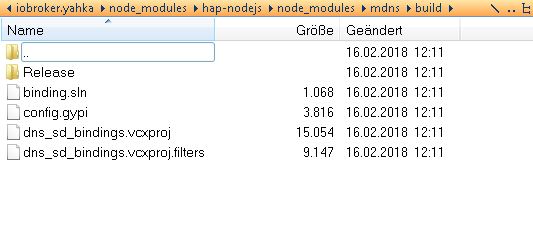
Bonjour hatte ich schon drauf.
Der Punkt war dieser hier:
Danke für den Tipp. Nun scheint es zu laufen.
@apollon77:-
DownloadFile https://www.samuelattard.com/files/bonjoursdksetup.exe
-
bonjoursdksetup.exe /quiet
-
del bonjoursdksetup.exe
-
set BONJOUR_SDK_HOME=C:\Program Files\Bonjour SDK `
Könnte man das mit in die Installationanleitung unter http://www.iobroker.net/docu/?page_id=2291&lang=de mit aufnehmen? ;)
-
-
Hallo,
habe mir heute iobroker mal auf eine Windows 7 x64 kiste installiert.
Konnte schon einige adapter problemlos installieren, nur halt nicht yahka.
installiert ist:
node.js v6.11.1
npm 3.10.10
js-controller 1.4.2
bekomme diesen Fehler:
$ ./iobroker add yahka
NPM version: 3.10.10
npm install iobroker.yahka --production --save --prefix "C:/ioBroker" (System call)
gyp

ERR! configure error gyp ERR! stack Error: Can't find Python executable "python", you can set the PYTHON env variable.
gyp ERR! stack     at failNoPython (C:\Program Files\nodejs\node_modules\npm\node_modules\node-gyp\lib\configure.js:449:14)
gyp ERR! stack     at C:\Program Files\nodejs\node_modules\npm\node_modules\node-gyp\lib\configure.js:404:11
gyp ERR! stack     at C:\Program Files\nodejs\node_modules\npm\node_modules\graceful-fs\polyfills.js:264:29
gyp ERR! stack     at FSReqWrap.oncomplete (fs.js:123:15)
gyp ERR! System Windows_NT 6.1.7601
gyp
ERR! command "C:\\Program Files\\nodejs\\node.exe" "C:\\Program Files\\nodejs\\node_modules\\npm\\node_modules\\node-gyp\\bin\\node-gyp.js" "rebuild"gyp ERR! cwd C:\ioBroker\node_modules\iobroker.yahka\node_modules\curve25519-n
gyp ERR! node -v v6.11.1

gyp ERR! node-gyp -v v3.4.0gyp ERR! not ok

npm
 ERR! Windows_NT 6.1.7601npm ERR!
argv "C:\\Program Files\\nodejs\\node.exe" "C:\\Program Files\\nodejs\\node_modules\\npm\\bin\\npm-cli.js" "install" "iobroker.yahka" "--production" "--save" "--prefix" "C:/ioBroker"npm ERR! node v6.11.1
npm ERR! npm
 v3.10.10npm ERR! code ELIFECYCLE

npm ERR! curve25519-n@1.4.0 install: `node-gyp rebuild`npm ERR! Exit status 1
npm ERR!
npm ERR! Failed at the curve25519-n@1.4.0 install script 'node-gyp rebuild'.
npm ERR! Make sure you have the latest version of node.js and npm installed.
npm ERR! If you do, this is most likely a problem with the curve25519-n package,
npm ERR! not with npm itself.
npm ERR! Tell the author that this fails on your system:
npm ERR!     node-gyp rebuild
npm ERR! You can get information on how to open an issue for this project with:
npm ERR!     npm bugs curve25519-n
npm ERR! Or if that isn't available, you can get their info via:

npm ERR!     npm owner ls curve25519-nnpm ERR!
 There is likely additional logging output above.

npm ERR! Please include the following file with any support request:npm ERR!     C:\ioBroker\node_modules\iobroker\npm-debug.log
npm
 ERR! code 1
host.iobroker-PC install adapter yahka
NPM version: 3.10.10npm install iobroker.yahka --production --save --prefix "C:/ioBroker" (System call)

gyp
 ERR! configure error
gyp ERR! stack Error: Can't find Python executable "python", you can set the PYTHON env variable.gyp ERR! stack     at failNoPython (C:\Program Files\nodejs\node_modules\npm\node_modules\node-gyp\lib\configure.js:449:14)
gyp ERR! stack     at C:\Program Files\nodejs\node_modules\npm\node_modules\node-gyp\lib\configure.js:404:11
gyp ERR! stack     at C:\Program Files\nodejs\node_modules\npm\node_modules\graceful-fs\polyfills.js:264:29
gyp ERR! stack     at FSReqWrap.oncomplete (fs.js:123:15)

gyp ERR! System Windows_NT 6.1.7601
gyp ERR! command "C:\\Program Files\\nodejs\\node.exe" "C:\\Program Files\\nodejs\\node_modules\\npm\\node_modules\\node-gyp\\bin\\node-gyp.js" "rebuild"
gyp ERR! cwd C:\ioBroker\node_modules\iobroker.yahka\node_modules\curve25519-n
gyp ERR! node -v v6.11.1gyp
ERR! node-gyp -v v3.4.0gyp ERR! not ok

npm
 ERR!
 Windows_NT 6.1.7601
npm ERR! argv "C:\\Program Files\\nodejs\\node.exe" "C:\\Program Files\\nodejs\\node_modules\\npm\\bin\\npm-cli.js" "install" "iobroker.yahka" "--production" "--save" "--prefix" "C:/ioBroker"npm ERR! node v6.11.1
npm ERR! npm  v3.10.10

npm ERR! code ELIFECYCLE

npm ERR! curve25519-n@1.4.0 install: `node-gyp rebuild`npm ERR! Exit status 1
npm ERR!
npm ERR! Failed at the curve25519-n@1.4.0 install script 'node-gyp rebuild'.
npm ERR! Make sure you have the latest version of node.js and npm installed.
npm ERR! If you do, this is most likely a problem with the curve25519-n package,
npm ERR! not with npm itself.
npm ERR! Tell the author that this fails on your system:
npm ERR!     node-gyp rebuild
npm ERR! You can get information on how to open an issue for this project with:
npm ERR!     npm bugs curve25519-n
npm ERR! Or if that isn't available, you can get their info via:
npm ERR!     npm owner ls curve25519-n
npm ERR!
 There is likely additional logging output above.

npm ERR! Please include the following file with any support request:npm ERR!     C:\ioBroker\node_modules\iobroker\npm-debug.log
npm ERR! code 1

host.iobroker-PC install adapter yahka
NPM version: 3.10.10
npm install iobroker.yahka --production --save --prefix "C:/ioBroker" (System call)
gyp

ERR! configure error gyp ERR! stack Error: Can't find Python executable "python", you can set the PYTHON env variable.
gyp ERR! stack     at failNoPython (C:\Program Files\nodejs\node_modules\npm\node_modules\node-gyp\lib\configure.js:449:14)
gyp ERR! stack     at C:\Program Files\nodejs\node_modules\npm\node_modules\node-gyp\lib\configure.js:404:11
gyp ERR! stack
     at C:\Program Files\nodejs\node_modules\npm\node_modules\graceful-fs\polyfills.js:264:29gyp ERR! stack     at FSReqWrap.oncomplete (fs.js:123:15)
gyp ERR! System Windows_NT 6.1.7601

gyp ERR! command "C:\\Program Files\\nodejs\\node.exe" "C:\\Program Files\\nodejs\\node_modules\\npm\\node_modules\\node-gyp\\bin\\node-gyp.js" "rebuild"gyp ERR! cwd C:\ioBroker\node_modules\iobroker.yahka\node_modules\curve25519-n
gyp ERR! node -v v6.11.1
gyp ERR! node-gyp -v v3.4.0
gyp ERR! not ok

npm ERR! Windows_NT 6.1.7601npm ERR! argv "C:\\Program Files\\nodejs\\node.exe" "C:\\Program Files\\nodejs\\node_modules\\npm\\bin\\npm-cli.js" "install" "iobroker.yahka" "--production" "--save" "--prefix" "C:/ioBroker"
npm ERR! node v6.11.1
npm ERR! npm  v3.10.10
npm ERR! code ELIFECYCLE

npm ERR! curve25519-n@1.4.0 install: `node-gyp rebuild`
npm ERR! Exit status 1
npm ERR!
npm ERR! Failed at the curve25519-n@1.4.0 install script 'node-gyp rebuild'.
npm ERR! Make sure you have the latest version of node.js and npm installed.
npm ERR! If you do, this is most likely a problem with the curve25519-n package,
npm ERR! not with npm itself.
npm ERR! Tell the author that this fails on your system:
npm ERR!     node-gyp rebuild
npm ERR! You can get information on how to open an issue for this project with:
npm ERR!     npm bugs curve25519-n
npm ERR! Or if that isn't available, you can get their info via:
npm ERR!     npm owner ls curve25519-n
npm ERR! There is likely additional logging output above.

npm ERR! Please include the following file with any support request:
npm ERR!     C:\ioBroker\node_modules\iobroker\npm-debug.log
npm ERR! code 1

host.iobroker-PC install adapter yahka
ERROR: host.iobroker-PC Cannot install yahka
ERROR: process exited with code 13
Vlt. kann mir da wer weiterhelfen!?
LG
Jürgen
-
Moin,
leider hänge ich auch bei der Installation und komme nicht weiter…
also habe ich das runtergeladen:
https://www.samuelattard.com/files/bonjourcore2.msi
dann installiert und die Datei wieder gelöscht
war das so gemeint?
dann habe ich diesen runtergeladen, installiert und die Datei wieder gelöscht:
https://www.samuelattard.com/files/bonjoursdksetup.exe
Hiermit kann ich leider gar nichts anfangen:
- set BONJOUR_SDK_HOME=C:\Program Files\Bonjour SDK
muss ich das über das terminal ausführen? Und was soll bei dem Code rein?
Ich habe immer folgenden Fehler:
Fertig mit Fehler: host.DESKTOP-SK00CCS Cannot install yahka
es scheint irgendwie an den Ports zu liegen,
das steht im Log:
host.DESKTOP-SK00CCS 2019-01-29 15:46:56.981 info Restart adapter system.adapter.terminal.1 because enabled
host.DESKTOP-SK00CCS 2019-01-29 15:46:56.981 error instance system.adapter.terminal.1 terminated with code 1 ()
terminal.1 2019-01-29 15:46:56.828 info starting. Version 0.1.2 in C:/iobroker/node_modules/iobroker.terminal, node: v6.9.1
host.DESKTOP-SK00CCS 2019-01-29 15:46:56.268 info instance system.adapter.terminal.1 started with pid 33664
host.DESKTOP-SK00CCS 2019-01-29 15:46:26.260 info Restart adapter system.adapter.terminal.1 because enabled
host.DESKTOP-SK00CCS 2019-01-29 15:46:26.259 error instance system.adapter.terminal.1 terminated with code 1 ()
terminal.1 2019-01-29 15:46:26.225 error port 8088 already in use
terminal.1 2019-01-29 15:46:26.057 info starting. Version 0.1.2 in C:/iobroker/node_modules/iobroker.terminal, node: v6.9.1
host.DESKTOP-SK00CCS 2019-01-29 15:46:25.486 info instance system.adapter.terminal.1 started with pid 33028
-
Danke erst mal für die Antwort!
:D
Ich habe das alles also noch mal ausgeführt…
Viel weitergebracht hat mich das nicht, aber jetzt läuft die Installation des adapters wenigstens an und ich bekomme auch einen anständigen Fehlercode angezeigt.
Wer ist eigentlich diese Python?
Fehler Bericht:
$ ./iobroker add yahka --host DESKTOP-SK00CCS NPM version: 3.10.8 npm install iobroker.yahka --production --save --prefix "C:/iobroker" (System call) gyp ERR! configure error gyp ERR! stack Error: Can't find Python executable "python", you can set the PYTHON env variable. gyp ERR! stack at failNoPython (C:\Program Files\nodejs\node_modules\npm\node_modules\node-gyp\lib\configure.js:449:14) gyp ERR! stack at C:\Program Files\nodejs\node_modules\npm\node_modules\node-gyp\lib\configure.js:404:11 gyp ERR! stack at FSReqWrap.oncomplete (fs.js:123:15) gyp ERR! System Windows_NT 10.0.17763gyp ERR! command "C:\\Program Files\\nodejs\\node.exe" "C:\\Program Files\\nodejs\\node_modules\\npm\\node_modules\\node-gyp\\bin\\node-gyp.js" "rebuild" gyp ERR! cwd C:\iobroker\node_modules\iobroker.yahka\node_modules\curve25519-n gyp ERR! node -v v6.9.1 gyp ERR! node-gyp -v v3.4.0gyp ERR! not ok npm ERR! Windows_NT 10.0.17763 npm ERR! argv "C:\\Program Files\\nodejs\\node.exe" "C:\\Program Files\\nodejs\\node_modules\\npm\\bin\\npm-cli.js" "install" "iobroker.yahka" "--production" "--save" "--prefix" "C:/iobroker"npm ERR! node v6.9.1 npm ERR! npm v3.10.8 npm ERR! code ELIFECYCLE npm ERR! curve25519-n@1.4.0 install: `node-gyp rebuild`npm ERR! Exit status 1 npm ERR! npm ERR! Failed at the curve25519-n@1.4.0 install script 'node-gyp rebuild'. npm ERR! Make sure you have the latest version of node.js and npm installed.npm ERR! If you do, this is most likely a problem with the curve25519-n package, npm ERR! not with npm itself. npm ERR! Tell the author that this fails on your system: npm ERR! node-gyp rebuild npm ERR! You can get information on how to open an issue for this project with: npm ERR! npm bugs curve25519-n npm ERR! Or if that isn't available, you can get their info via: npm ERR! npm owner ls curve25519-n npm ERR! There is likely additional logging output above. npm ERR! Please include the following file with any support request:npm ERR! C:\iobroker\node_modules\iobroker\npm-debug.log npm ERR! code 1 host.DESKTOP-SK00CCS install adapter yahka NPM version: 3.10.8 npm install iobroker.yahka --production --save --prefix "C:/iobroker" (System call) gyp ERR! configure error gyp ERR! stack Error: Can't find Python executable "python", you can set the PYTHON env variable.gyp ERR! stack at failNoPython (C:\Program Files\nodejs\node_modules\npm\node_modules\node-gyp\lib\configure.js:449:14) gyp ERR! stack at C:\Program Files\nodejs\node_modules\npm\node_modules\node-gyp\lib\configure.js:404:11 gyp ERR! stack at FSReqWrap.oncomplete (fs.js:123:15) gyp ERR! System Windows_NT 10.0.17763gyp ERR! command "C:\\Program Files\\nodejs\\node.exe" "C:\\Program Files\\nodejs\\node_modules\\npm\\node_modules\\node-gyp\\bin\\node-gyp.js" "rebuild" gyp ERR! cwd C:\iobroker\node_modules\iobroker.yahka\node_modules\curve25519-n gyp ERR! node -v v6.9.1 gyp ERR! node-gyp -v v3.4.0 gyp ERR! not ok npm ERR! Windows_NT 10.0.17763npm ERR! argv "C:\\Program Files\\nodejs\\node.exe" "C:\\Program Files\\nodejs\\node_modules\\npm\\bin\\npm-cli.js" "install" "iobroker.yahka" "--production" "--save" "--prefix" "C:/iobroker" npm ERR! node v6.9.1 npm ERR! npm v3.10.8 npm ERR! code ELIFECYCLE npm ERR! curve25519-n@1.4.0 install: `node-gyp rebuild`npm ERR! Exit status 1 npm ERR! npm ERR! Failed at the curve25519-n@1.4.0 install script 'node-gyp rebuild'. npm ERR! Make sure you have the latest version of node.js and npm installed. npm ERR! If you do, this is most likely a problem with the curve25519-n package, npm ERR! not with npm itself. npm ERR! Tell the author that this fails on your system: npm ERR! node-gyp rebuildnpm ERR! You can get information on how to open an issue for this project with: npm ERR! npm bugs curve25519-n npm ERR! Or if that isn't available, you can get their info via: npm ERR! npm owner ls curve25519-n npm ERR! There is likely additional logging output above. npm ERR! Please include the following file with any support request:npm ERR! C:\iobroker\node_modules\iobroker\npm-debug.log npm ERR! code 1 host.DESKTOP-SK00CCS install adapter yahka NPM version: 3.10.8 npm install iobroker.yahka --production --save --prefix "C:/iobroker" (System call) gyp ERR! configure error gyp ERR! stack Error: Can't find Python executable "python", you can set the PYTHON env variable.gyp ERR! stack at failNoPython (C:\Program Files\nodejs\node_modules\npm\node_modules\node-gyp\lib\configure.js:449:14) gyp ERR! stack at C:\Program Files\nodejs\node_modules\npm\node_modules\node-gyp\lib\configure.js:404:11 gyp ERR! stack at FSReqWrap.oncomplete (fs.js:123:15)gyp ERR! System Windows_NT 10.0.17763 gyp ERR! command "C:\\Program Files\\nodejs\\node.exe" "C:\\Program Files\\nodejs\\node_modules\\npm\\node_modules\\node-gyp\\bin\\node-gyp.js" "rebuild"gyp ERR! cwd C:\iobroker\node_modules\iobroker.yahka\node_modules\curve25519-n gyp ERR! node -v v6.9.1 gyp ERR! node-gyp -v v3.4.0 gyp ERR! not ok npm ERR! Windows_NT 10.0.17763npm ERR! argv "C:\\Program Files\\nodejs\\node.exe" "C:\\Program Files\\nodejs\\node_modules\\npm\\bin\\npm-cli.js" "install" "iobroker.yahka" "--production" "--save" "--prefix" "C:/iobroker" npm ERR! node v6.9.1 npm ERR! npm v3.10.8 npm ERR! code ELIFECYCLE npm ERR! curve25519-n@1.4.0 install: `node-gyp rebuild`npm ERR! Exit status 1 npm ERR! npm ERR! Failed at the curve25519-n@1.4.0 install script 'node-gyp rebuild'. npm ERR! Make sure you have the latest version of node.js and npm installed. npm ERR! If you do, this is most likely a problem with the curve25519-n package, npm ERR! not with npm itself. npm ERR! Tell the author that this fails on your system: npm ERR! node-gyp rebuild npm ERR! You can get information on how to open an issue for this project with: npm ERR! npm bugs curve25519-n npm ERR! Or if that isn't available, you can get their info via: npm ERR! npm owner ls curve25519-n npm ERR! There is likely additional logging output above. npm ERR! Please include the following file with any support request:npm ERR! C:\iobroker\node_modules\iobroker\npm-debug.log npm ERR! code 1 host.DESKTOP-SK00CCS install adapter yahka ERROR: host.DESKTOP-SK00CCS Cannot install yahka -
ich komme damit einfach nicht weiter…
habt ihr noch ein Tipp für mich?
mein System:
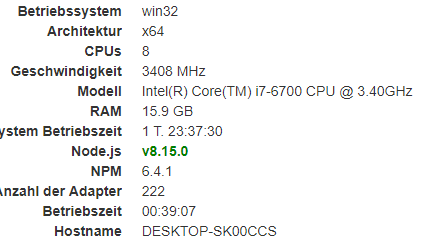
dann habe ich erst mal das nodejs auf die von dem Infoadapter empfohlene Version gebracht
im Fehler stand was von Python, habe ich versucht das mal zu aktualisieren…
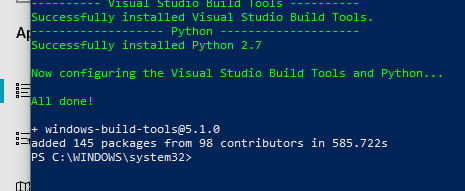
Hiermit habe ich natürlich auch experimentiert
das ist mir aber auch nicht ganz klar…
über die links kann ich die Set-up Dateien runterladen und installieren...
aber ist mit den execute und remove Befehlen nur das installieren der links und löschen der Set-up Dateien im Anschluss gemeint?
Wenn ich die Befehle über cmd eingebe, funktioniert das nicht...
der aktuelle Fehlerbericht vom installieren:
$ ./iobroker add yahka --host DESKTOP-SK00CCS NPM version: 6.4.1 npm install iobroker.yahka --production --save --prefix "C:/iobroker" (System call) gyp ERR! configure error gyp ERR! stack Error: Can't find Python executable "python", you can set the PYTHON env variable. gyp ERR! stack at PythonFinder.failNoPython (C:\Program Files\nodejs\node_modules\npm\node_modules\node-gyp\lib\configure.js:484:19) gyp ERR! stack at PythonFinder. <anonymous>(C:\Program Files\nodejs\node_modules\npm\node_modules\node-gyp\lib\configure.js:509:16)gyp ERR! stack at C:\Program Files\nodejs\node_modules\npm\node_modules\graceful-fs\polyfills.js:284:29gyp ERR! stack at FSReqWrap.oncomplete (fs.js:152:21) gyp ERR! System Windows_NT 10.0.17763gyp ERR! command "C:\\Program Files\\nodejs\\node.exe" "C:\\Program Files\\nodejs\\node_modules\\npm\\node_modules\\node-gyp\\bin\\node-gyp.js" "rebuild" [attachment=1]2.PNG[/attachment]gyp ERR! cwd C:\iobroker\node_modules\iobroker.yahka\node_modules\curve25519-ngyp ERR! node -v v8.15.0 gyp ERR! node-gyp -v v3.8.0 gyp ERR! not ok npm ERR! code ELIFECYCLEnpm ERR! errno 1npm ERR! curve25519-n@1.4.0 install: `node-gyp rebuild` npm ERR! Exit status 1npm ERR! npm ERR! Failed at the curve25519-n@1.4.0 install script. npm ERR! This is probably not a problem with npm. There is likely additional logging output above. npm ERR! A complete log of this run can be found in:npm ERR! C:\WINDOWS\system32\config\systemprofile\AppData\Roaming\npm-cache\_logs\2019-02-01T19_33_30_303Z-debug.log host.DESKTOP-SK00CCS install adapter yahka NPM version: 6.4.1 npm install iobroker.yahka --production --save --prefix "C:/iobroker" (System call) gyp ERR! configure error gyp ERR! stack Error: Can't find Python executable "python", you can set the PYTHON env variable. gyp ERR! stack at PythonFinder.failNoPython (C:\Program Files\nodejs\node_modules\npm\node_modules\node-gyp\lib\configure.js:484:19)gyp ERR! stack at PythonFinder. <anonymous>(C:\Program Files\nodejs\node_modules\npm\node_modules\node-gyp\lib\configure.js:509:16) gyp ERR! stack at C:\Program Files\nodejs\node_modules\npm\node_modules\graceful-fs\polyfills.js:284:29 gyp ERR! stack at FSReqWrap.oncomplete (fs.js:152:21) gyp ERR! System Windows_NT 10.0.17763gyp ERR! command "C:\\Program Files\\nodejs\\node.exe" "C:\\Program Files\\nodejs\\node_modules\\npm\\node_modules\\node-gyp\\bin\\node-gyp.js" "rebuild"gyp ERR! cwd C:\iobroker\node_modules\iobroker.yahka\node_modules\curve25519-n gyp ERR! node -v v8.15.0 gyp ERR! node-gyp -v v3.8.0gyp ERR! not ok npm ERR! code ELIFECYCLEnpm ERR! errno 1 npm ERR! curve25519-n@1.4.0 install: `node-gyp rebuild`npm ERR! Exit status 1 npm ERR! npm ERR! Failed at the curve25519-n@1.4.0 install script.npm ERR! This is probably not a problem with npm. There is likely additional logging output above. npm ERR! A complete log of this run can be found in:npm ERR! C:\WINDOWS\system32\config\systemprofile\AppData\Roaming\npm-cache\_logs\2019-02-01T19_33_37_892Z-debug.log host.DESKTOP-SK00CCS install adapter yahka NPM version: 6.4.1 npm install iobroker.yahka --production --save --prefix "C:/iobroker" (System call) gyp ERR! configure error gyp ERR! stack Error: Can't find Python executable "python", you can set the PYTHON env variable.gyp ERR! stack at PythonFinder.failNoPython (C:\Program Files\nodejs\node_modules\npm\node_modules\node-gyp\lib\configure.js:484:19) gyp ERR! stack at PythonFinder. <anonymous>(C:\Program Files\nodejs\node_modules\npm\node_modules\node-gyp\lib\configure.js:509:16) gyp ERR! stack at C:\Program Files\nodejs\node_modules\npm\node_modules\graceful-fs\polyfills.js:284:29 gyp ERR! stack at FSReqWrap.oncomplete (fs.js:152:21)gyp ERR! System Windows_NT 10.0.17763 gyp ERR! command "C:\\Program Files\\nodejs\\node.exe" "C:\\Program Files\\nodejs\\node_modules\\npm\\node_modules\\node-gyp\\bin\\node-gyp.js" "rebuild"gyp ERR! cwd C:\iobroker\node_modules\iobroker.yahka\node_modules\curve25519-n gyp ERR! node -v v8.15.0 gyp ERR! node-gyp -v v3.8.0 gyp ERR! not ok npm ERR! code ELIFECYCLEnpm ERR! errno 1 npm ERR! curve25519-n@1.4.0 install: `node-gyp rebuild`npm ERR! Exit status 1 npm ERR! npm ERR! Failed at the curve25519-n@1.4.0 install script.npm ERR! This is probably not a problem with npm. There is likely additional logging output above. npm ERR! A complete log of this run can be found in:npm ERR! C:\WINDOWS\system32\config\systemprofile\AppData\Roaming\npm-cache\_logs\2019-02-01T19_33_45_471Z-debug.log host.DESKTOP-SK00CCS install adapter yahka ERROR: host.DESKTOP-SK00CCS Cannot install yahka ERROR: process exited with code 13</anonymous></anonymous></anonymous> -
Die PYTHON-Umgebungsvariable wird von den Windows-Build-Tools hinzugefügt. Wenn sie bei Dir fehlt, hast Du entweder Deinen Rechner nach der Installation der Build-Tools nicht neu gestartet oder es ist etwas bei der Installation evtl. schiefgelaufen. Hattest Du eine administrative Kommabdozeile zur Installation genutzt?
Mache zum Test dann einfach eine neue Kommandozeile auf und gib den Befehl SET ein. In dessen Aisgabe muss irgendwo PYTHON stehen. Wenn ja, dann mit einem neu gestarteten ioBroker die Installation von yahka noch einmal versuchen.
-
Moin und erst mal danke für Deine Antwort.
Ja, ich habe das damals als Administrator installiert…
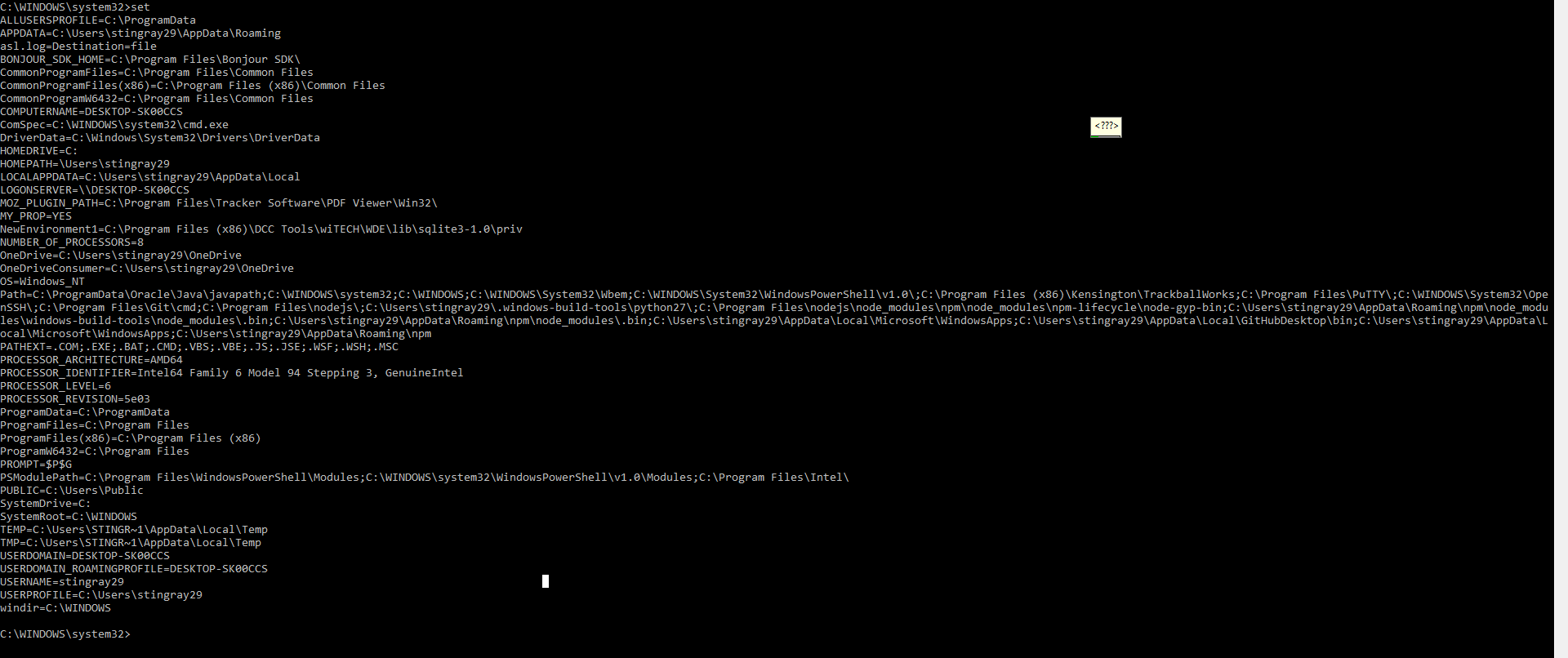
auch jetzt habe ich cmd als Administrator geöffnet und set eingegeben.
Irgendwo in der Mitte steht was von Python 27
hier ein Screenshot:
Dann habe ich jetzt den Rechner zum x-ten Mal neu gestartet und zum x-ten Mal installiert
und bekam wieder folgenden Fehler:
$ ./iobroker add yahka --host DESKTOP-SK00CCS NPM version: 6.4.1 npm install iobroker.yahka --production --save --prefix "C:/iobroker" (System call) gyp ERR! configure error gyp ERR! stack Error: Can't find Python executable "python", you can set the PYTHON env variable.gyp ERR! stack at PythonFinder.failNoPython (C:\Program Files\nodejs\node_modules\npm\node_modules\node-gyp\lib\configure.js:484:19) gyp ERR! stack at PythonFinder. <anonymous>(C:\Program Files\nodejs\node_modules\npm\node_modules\node-gyp\lib\configure.js:509:16) gyp ERR! stack at C:\Program Files\nodejs\node_modules\npm\node_modules\graceful-fs\polyfills.js:284:29 gyp ERR! stack at FSReqWrap.oncomplete (fs.js:152:21) gyp ERR! System Windows_NT 10.0.17763gyp ERR! command "C:\\Program Files\\nodejs\\node.exe" "C:\\Program Files\\nodejs\\node_modules\\npm\\node_modules\\node-gyp\\bin\\node-gyp.js" "rebuild"gyp ERR! cwd C:\iobroker\node_modules\iobroker.yahka\node_modules\curve25519-n gyp ERR! node -v v8.15.0 gyp ERR! node-gyp -v v3.8.0 gyp ERR! not ok npm ERR! code ELIFECYCLEnpm ERR! errno 1 npm ERR! curve25519-n@1.4.0 install: `node-gyp rebuild`npm ERR! Exit status 1 npm ERR! npm ERR! Failed at the curve25519-n@1.4.0 install script. npm ERR! This is probably not a problem with npm. There is likely additional logging output above. npm ERR! A complete log of this run can be found in:npm ERR! C:\WINDOWS\system32\config\systemprofile\AppData\Roaming\npm-cache\_logs\2019-02-04T10_24_29_493Z-debug.log host.DESKTOP-SK00CCS install adapter yahka NPM version: 6.4.1 npm install iobroker.yahka --production --save --prefix "C:/iobroker" (System call) gyp ERR! configure error gyp ERR! stack Error: Can't find Python executable "python", you can set the PYTHON env variable.gyp ERR! stack at PythonFinder.failNoPython (C:\Program Files\nodejs\node_modules\npm\node_modules\node-gyp\lib\configure.js:484:19) gyp ERR! stack at PythonFinder. <anonymous>(C:\Program Files\nodejs\node_modules\npm\node_modules\node-gyp\lib\configure.js:509:16) gyp ERR! stack at C:\Program Files\nodejs\node_modules\npm\node_modules\graceful-fs\polyfills.js:284:29 gyp ERR! stack at FSReqWrap.oncomplete (fs.js:152:21) gyp ERR! System Windows_NT 10.0.17763gyp ERR! command "C:\\Program Files\\nodejs\\node.exe" "C:\\Program Files\\nodejs\\node_modules\\npm\\node_modules\\node-gyp\\bin\\node-gyp.js" "rebuild" gyp ERR! cwd C:\iobroker\node_modules\iobroker.yahka\node_modules\curve25519-n gyp ERR! node -v v8.15.0gyp ERR! node-gyp -v v3.8.0 gyp ERR! not ok npm ERR! code ELIFECYCLEnpm ERR! errno 1 npm ERR! curve25519-n@1.4.0 install: `node-gyp rebuild`npm ERR! Exit status 1 npm ERR! npm ERR! Failed at the curve25519-n@1.4.0 install script.npm ERR! This is probably not a problem with npm. There is likely additional logging output above. npm ERR! A complete log of this run can be found in:npm ERR! C:\WINDOWS\system32\config\systemprofile\AppData\Roaming\npm-cache\_logs\2019-02-04T10_24_37_199Z-debug.log host.DESKTOP-SK00CCS install adapter yahka NPM version: 6.4.1 npm install iobroker.yahka --production --save --prefix "C:/iobroker" (System call) gyp ERR! configure error gyp ERR! stack Error: Can't find Python executable "python", you can set the PYTHON env variable. gyp ERR! stack at PythonFinder.failNoPython (C:\Program Files\nodejs\node_modules\npm\node_modules\node-gyp\lib\configure.js:484:19) gyp ERR! stack at PythonFinder. <anonymous>(C:\Program Files\nodejs\node_modules\npm\node_modules\node-gyp\lib\configure.js:509:16) gyp ERR! stack at C:\Program Files\nodejs\node_modules\npm\node_modules\graceful-fs\polyfills.js:284:29gyp ERR! stack at FSReqWrap.oncomplete (fs.js:152:21) gyp ERR! System Windows_NT 10.0.17763 gyp ERR! command "C:\\Program Files\\nodejs\\node.exe" "C:\\Program Files\\nodejs\\node_modules\\npm\\node_modules\\node-gyp\\bin\\node-gyp.js" "rebuild" gyp ERR! cwd C:\iobroker\node_modules\iobroker.yahka\node_modules\curve25519-ngyp ERR! node -v v8.15.0 gyp ERR! node-gyp -v v3.8.0 gyp ERR! not ok npm ERR! code ELIFECYCLEnpm ERR! errno 1 npm ERR! curve25519-n@1.4.0 install: `node-gyp rebuild`npm ERR! Exit status 1 npm ERR! npm ERR! Failed at the curve25519-n@1.4.0 install script. npm ERR! This is probably not a problem with npm. There is likely additional logging output above. npm ERR! A complete log of this run can be found in:npm ERR! C:\WINDOWS\system32\config\systemprofile\AppData\Roaming\npm-cache\_logs\2019-02-04T10_24_44_781Z-debug.log host.DESKTOP-SK00CCS install adapter yahka ERROR: host.DESKTOP-SK00CCS Cannot install yahka ERROR: process exited with code 13</anonymous></anonymous></anonymous> -
Es fehlt die PYTHON-Umgebungsvariable mi dem exakten Pfad zu Python.exe
Google das mal.
-
Oder teste damit (als Admin ausführen):
npm --add-python-to-path='true' --debug install --global windows-build-tools -
o. k., über die Computer Einstellung… Umgebungsvariablen habe ich jetzt den Python path herausgefunden und schon mal kopiert,
aber wo muss ich den jetzt eingeben??
-
In der Kommandozeile
set PYTHON=hier/der/Pfad/inkl./der/EXE
-
also das lief problemlos durch, hat aber beim Installieren von dem Adapter keinen Fortschritt gebracht
npm –add-python-to-path='true' --debug install --global windows-build-tools
dann habe ich versucht Deinen Befehl (set PYTHON=hier/der/Pfad/inkl./der/EXE) mit dem Path zusammenzubringen, aber ich denke da mache ich was falsch. Wenn ich das ausführe kommt eigentlich keine Reaktion...
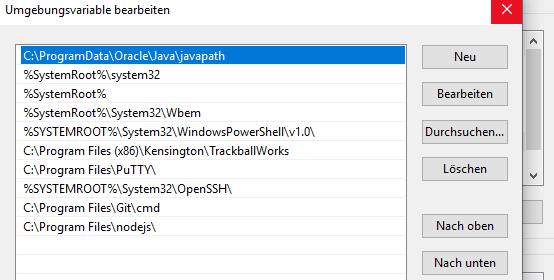
muss ich mir den Path von den Benutzervariablen holen
C:\Users\stingray29.windows-build-tools\python27\
oder von den Systemvariablen holen?
-
Weder noch. Du schaust mit dem Explorer, wo die python.exe liegt und gibst in der administrativen Kommandozeile den entsprechenden set-Befehl ein. Inkl. exe. Und der set Befehl hat (fast) nichts mit der Path-Variablen zu tun.




Hey! Du scheinst an dieser Unterhaltung interessiert zu sein, hast aber noch kein Konto.
Hast du es satt, bei jedem Besuch durch die gleichen Beiträge zu scrollen? Wenn du dich für ein Konto anmeldest, kommst du immer genau dorthin zurück, wo du zuvor warst, und kannst dich über neue Antworten benachrichtigen lassen (entweder per E-Mail oder Push-Benachrichtigung). Du kannst auch Lesezeichen speichern und Beiträge positiv bewerten, um anderen Community-Mitgliedern deine Wertschätzung zu zeigen.
Mit deinem Input könnte dieser Beitrag noch besser werden 💗
Registrieren Anmelden256
Online33.0k
Benutzer83.7k
Themen1.3m
Beiträge