




[Blockly] Sonnenaufgang mit Tradfri
-
Ich hätte das Blockly Skript immer noch gerne ;)
-
Wenn das so ist komme ich dem gerne nach.
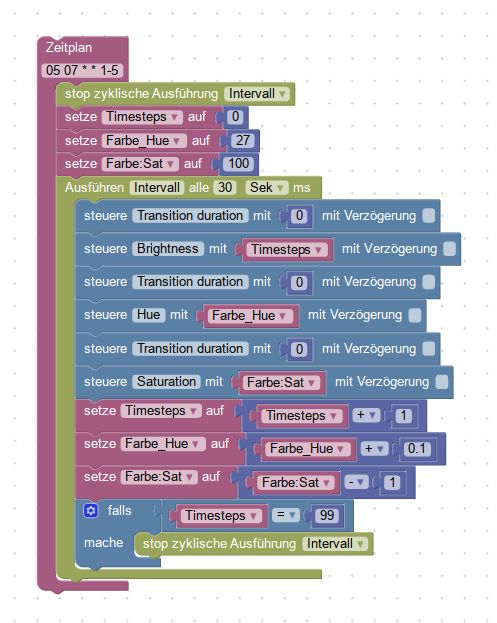
Und hier der Export:
! ````
<xml xmlns="http://www.w3.org/1999/xhtml"><block type="schedule" id="mI!1MxMMqfmAkYTPMJX-" x="87" y="-137"><field name="SCHEDULE">05 07 * * 1-5</field>
<statement name="STATEMENT"><block type="timeouts_clearinterval" id="icH=6OkVId1/.haYArX-"><field name="NAME">Intervall</field>
<next><block type="variables_set" id="fVqkEb48.%t[:LcLpje"><field name="VAR">Timesteps</field> <value name="VALUE"><block type="math_number" id="pSw*~!|l[%.t]7;Ywu|s"><field name="NUM">0</field></block></value> <next><block type="variables_set" id=",-(_MP:7b]f(|D7OFM"><field name="VAR">Farbe_Hue</field> <value name="VALUE"><block type="math_number" id="1:[z]B%MWNE}N!hRhmEy"><field name="NUM">27</field></block></value> <next><block type="variables_set" id="MQL8QGsHpuw%:IIz?,Ip"><field name="VAR">Farbe:Sat</field> <value name="VALUE"><block type="math_number" id="]AXkCF,taTjWXz4(%-eN"><field name="NUM">100</field></block></value> <next><block type="timeouts_setinterval" id="aYso6.30KZpiU!ixQ9T"><field name="NAME">Intervall</field>
<field name="INTERVAL">30</field>
<field name="UNIT">sec</field>
<statement name="STATEMENT"><block type="control" id="_/oy-UPQ|OpAe#8j6]z"><mutation delay_input="false"></mutation>
<field name="OID">tradfri.0.L-65539.lightbulb.transitionDuration</field>
<field name="WITH_DELAY">FALSE</field>
<value name="VALUE"><block type="math_number" id="LXPUqCPxF_5,=yaCm]Mh"><field name="NUM">0</field></block></value>
<next><block type="control" id="EL#h3qPd3;k/WtxadMHp"><mutation delay_input="false"></mutation>
<field name="OID">tradfri.0.L-65539.lightbulb.brightness</field>
<field name="WITH_DELAY">FALSE</field>
<value name="VALUE"><block type="variables_get" id="}iroE9Nn~^%nw0Uv40@z"><field name="VAR">Timesteps</field></block></value>
<next><block type="control" id="S~awpiu+e#,,o?~L3J("><mutation delay_input="false"></mutation> <field name="OID">tradfri.0.L-65539.lightbulb.transitionDuration</field> <field name="WITH_DELAY">FALSE</field> <value name="VALUE"><block type="math_number" id="H~d*_yP{Bc!T;|]H@zX%"><field name="NUM">0</field></block></value> <next><block type="control" id="th!vt7:0Tk0^Yv2@xlO^"><mutation delay_input="false"></mutation> <field name="OID">tradfri.0.L-65539.lightbulb.hue</field> <field name="WITH_DELAY">FALSE</field> <value name="VALUE"><block type="variables_get" id="Pb6Yl!1+i!-fvuexZ.3i"><field name="VAR">Farbe_Hue</field></block></value> <next><block type="control" id="wU3N,FaRZ77wx,:i7G}@"><mutation delay_input="false"></mutation> <field name="OID">tradfri.0.L-65539.lightbulb.transitionDuration</field> <field name="WITH_DELAY">FALSE</field> <value name="VALUE"><block type="math_number" id="87hw*u;(lW]E)_[Va*eO"><field name="NUM">0</field></block></value> <next><block type="control" id="gE7}sOpkMH?!.Y7PNtpz"><mutation delay_input="false"></mutation> <field name="OID">tradfri.0.L-65539.lightbulb.saturation</field> <field name="WITH_DELAY">FALSE</field> <value name="VALUE"><block type="variables_get" id="0%C^b;Y9b#OQ)/.tO[Qt"><field name="VAR">Farbe:Sat</field></block></value> <next><block type="variables_set" id="q|w6}P/MqM^Z]Q9c@lZp"><field name="VAR">Timesteps</field> <value name="VALUE"><block type="math_arithmetic" id="7^AS:+9p^Egv)f[6)?/"><field name="OP">ADD</field>
<value name="A"><shadow type="math_number" id=",3Ix@FLr[leEH.PZxCTj"><field name="NUM">1</field></shadow>
<block type="variables_get" id="6R+dE9AjkDe@_Q26AQE-"><field name="VAR">Timesteps</field></block></value>
<value name="B"><shadow type="math_number" id="+/F]U2:je(yC3}oU@,LU"><field name="NUM">1</field></shadow>
<block type="math_number" id="XC2hP/tC}UqITEOk)db"><field name="NUM">1</field></block></value></block></value>
<next><block type="variables_set" id="3u{v{:UzTA,tfbeouyOC"><field name="VAR">Farbe_Hue</field>
<value name="VALUE"><block type="math_arithmetic" id="1XiOvP|W[8jo=rRSg2%-"><field name="OP">ADD</field>
<value name="A"><shadow type="math_number" id=",3Ix@FLr[leEH.PZxCTj"><field name="NUM">1</field></shadow>
<block type="variables_get" id=",/@dMc_8K~rAi,=]DA{"><field name="VAR">Farbe_Hue</field></block></value> <value name="B"><shadow type="math_number" id="+/F]U2:je(yC3}oU@,LU"><field name="NUM">1</field></shadow> <block type="math_number" id="^2OM=4%4!ojW;=R8BPa0"><field name="NUM">0.1</field></block></value></block></value> <next><block type="variables_set" id="OJtc]JN(wj0Mc*}^B(mS"><field name="VAR">Farbe:Sat</field> <value name="VALUE"><block type="math_arithmetic" id="pBsazw6;9z2l@JujGePr"><field name="OP">MINUS</field> <value name="A"><shadow type="math_number" id=",3Ix@FLr[leEH.PZxCTj"><field name="NUM">1</field></shadow> <block type="variables_get" id="C+d5~VJ/h;oGJDLn47dc"><field name="VAR">Farbe:Sat</field></block></value> <value name="B"><shadow type="math_number" id="+/F]U2:je(yC3}oU@,LU"><field name="NUM">1</field></shadow> <block type="math_number" id="]l~mrti-7j^?,i05z@ZC"><field name="NUM">1</field></block></value></block></value> <next><block type="controls_if" id="c9d^cx}En)QJ^5LBl_.e"><value name="IF0"><block type="logic_compare" id="6S_vBdKEEXwB9y7dS+5Q"><field name="OP">EQ</field> <value name="A"><block type="variables_get" id="x=8)h:X3ni1O#OwO/;-"><field name="VAR">Timesteps</field></block></value>
<value name="B"><block type="math_number" id="/eH;_D[-f!B,_d{.kQ#S"><field name="NUM">99</field></block></value></block></value>
<statement name="DO0"><block type="timeouts_clearinterval" id="YwJUV,R/}uU_PI:V7VXG"><field name="NAME">Intervall</field></block></statement></block></next></block></next></block></next></block></next></block></next></block></next></block></next></block></next></block></next></block></statement></block></next></block></next></block></next></block></next></block></statement></block></xml>Gruß Rainer -
Super! Vielen Dank. Werd mich die Tage mal durcharbeiten, ob ich verstehe wie das Skipt funktioniert.
Aktuell stell ich mir z.B. die Frage, woher das Objekt transition duration kommt.
-
woher das Objekt transition duration kommt. `
Wird vom Tradfri Adapter erstellt.Gruß Rainer
-
Ok. Das ist schonmal schlecht. Den gibt es bei den Yeelight nicht :(
-
Dann bitte anderen Thread aufmachen, hier geht es um Tradfri.
Gruß

Rainer
-
Kannst du Gedanken lesen?
Das wollte ich heute testen.
Bevor ich die anderen Sachen teste, frage ich dannlieber auch gleich:
Wie sieht es denn aus wenn ich bei 30 Sek. Intervall die TT auf 25 setzen wollte?
Oder eventuell eine bestimmte Reihenfolge der 3 Befehle wählen (Hell, Hue. SAT) und die beiden ersten mit TT=0 und den letzten, bei dem immer noch eine erkennbare Stufe auftritt mit TT=25?
Das Endziel wäre das ganze auf wenige Befehle zu reduzieren.
Gruß
Rainer
-
-
Hallo Rainer,
was ich hier habe ist zwar nicht ganz das was du suchst, aber lässt sich wohl einfach anpassen.
Ich steuere hier bei eintritt der Dämmerung einen Hue Lightstrip in Abhängigkeit von der Aussenhelligkeit.
2018-01-26.png
Hier der Export dazu:
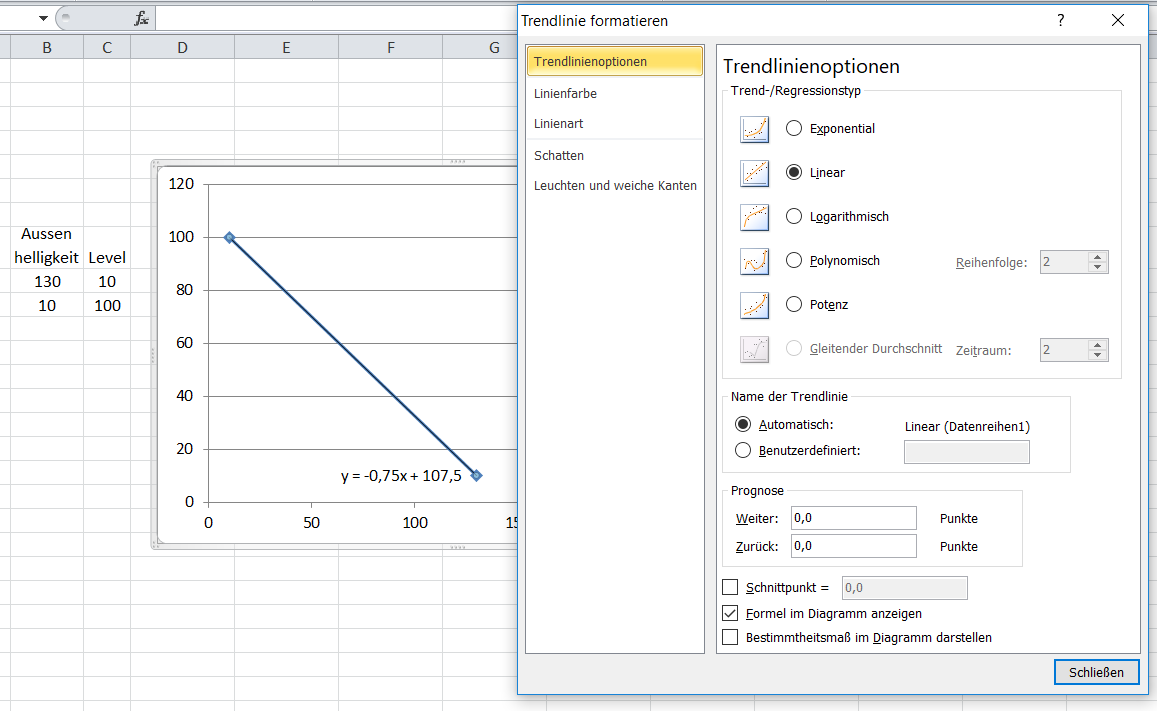
Die Lineare Gleichung für den Level basiert auf:
Aussenhelligleit = 130 - Hue Level =10
Aussenhelligkeit = 10 - Hue Level =100
Zu den Werten für die Gleichung kommt man am schnellsten so:
-
die 4 Werte von oben in Excel klimpern.
-
Daraus ein Punktediagramm erzeugen
-
in das Diagramm eine lineare Trendlinie einfügen mit der Option Formel anzeigen. `
Guten Morgen,
könntest du das bitte etwas genauer erklären?
Ich komme nicht ganz damit zurecht, wie du den Wert "Level" berechnest.
Das mit der Gleichung und Excel habe ich gemacht, auch mit der Trendlinie. Aber was kann ich damit jetzt anfangen?
Also mit dem Excel Sheet.
Schon einmal vielen Dank für deine Hilfe,
Gruß Sven
-
-
Hallo Sven,
Hab leider vergessen zu erwähnen das du noch "Trendline formatieren" wählen musst und dort "Formel im Diagramm anzeigen" merkieren musst. Dann siehst du die Faktoren die in das Blockly rein müssen.

Hello! It looks like you're interested in this conversation, but you don't have an account yet.
Getting fed up of having to scroll through the same posts each visit? When you register for an account, you'll always come back to exactly where you were before, and choose to be notified of new replies (either via email, or push notification). You'll also be able to save bookmarks and upvote posts to show your appreciation to other community members.
With your input, this post could be even better 💗
Register LoginSupport us
454
Online32.8k
Users82.8k
Topics1.3m
Posts