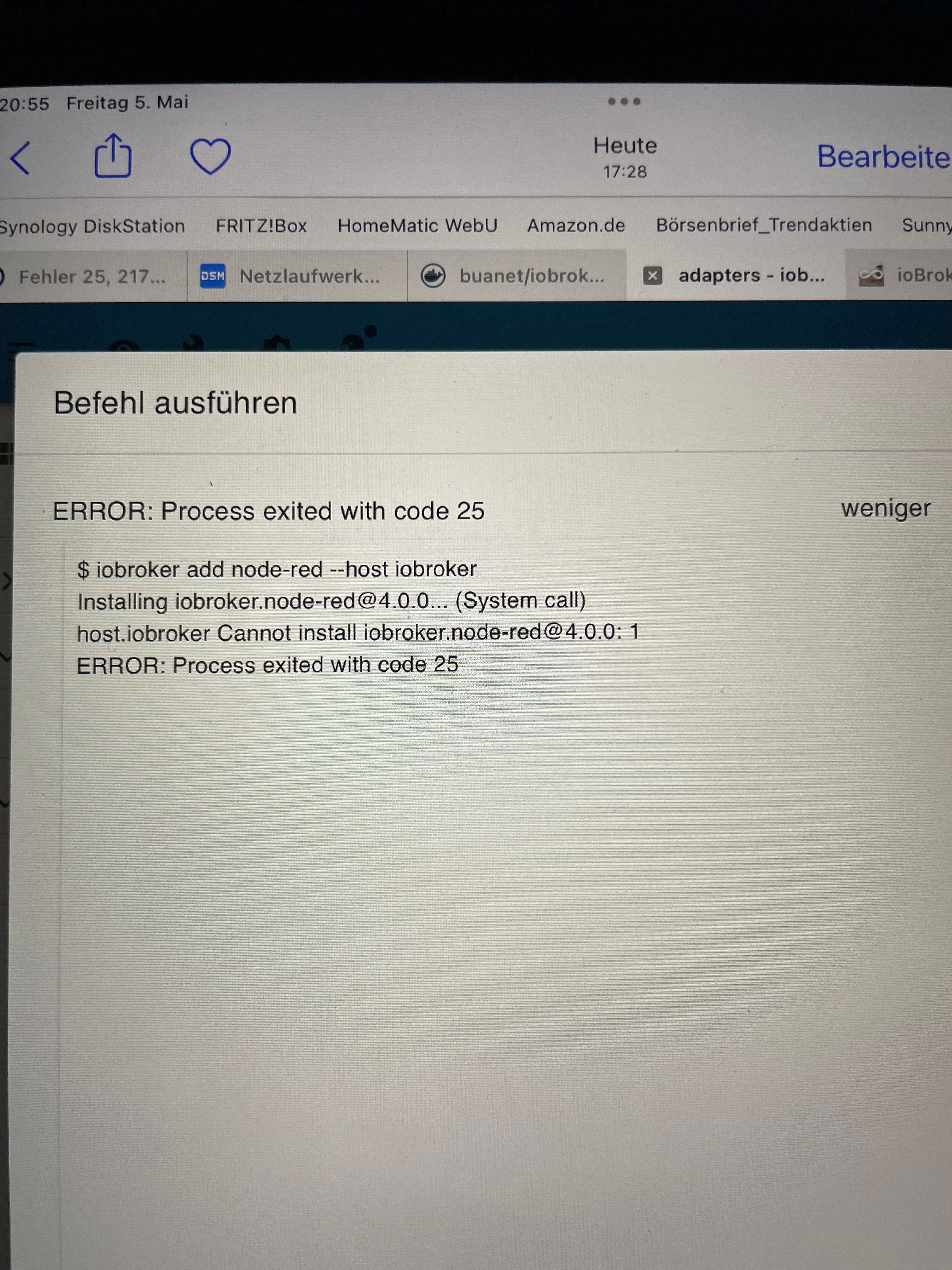
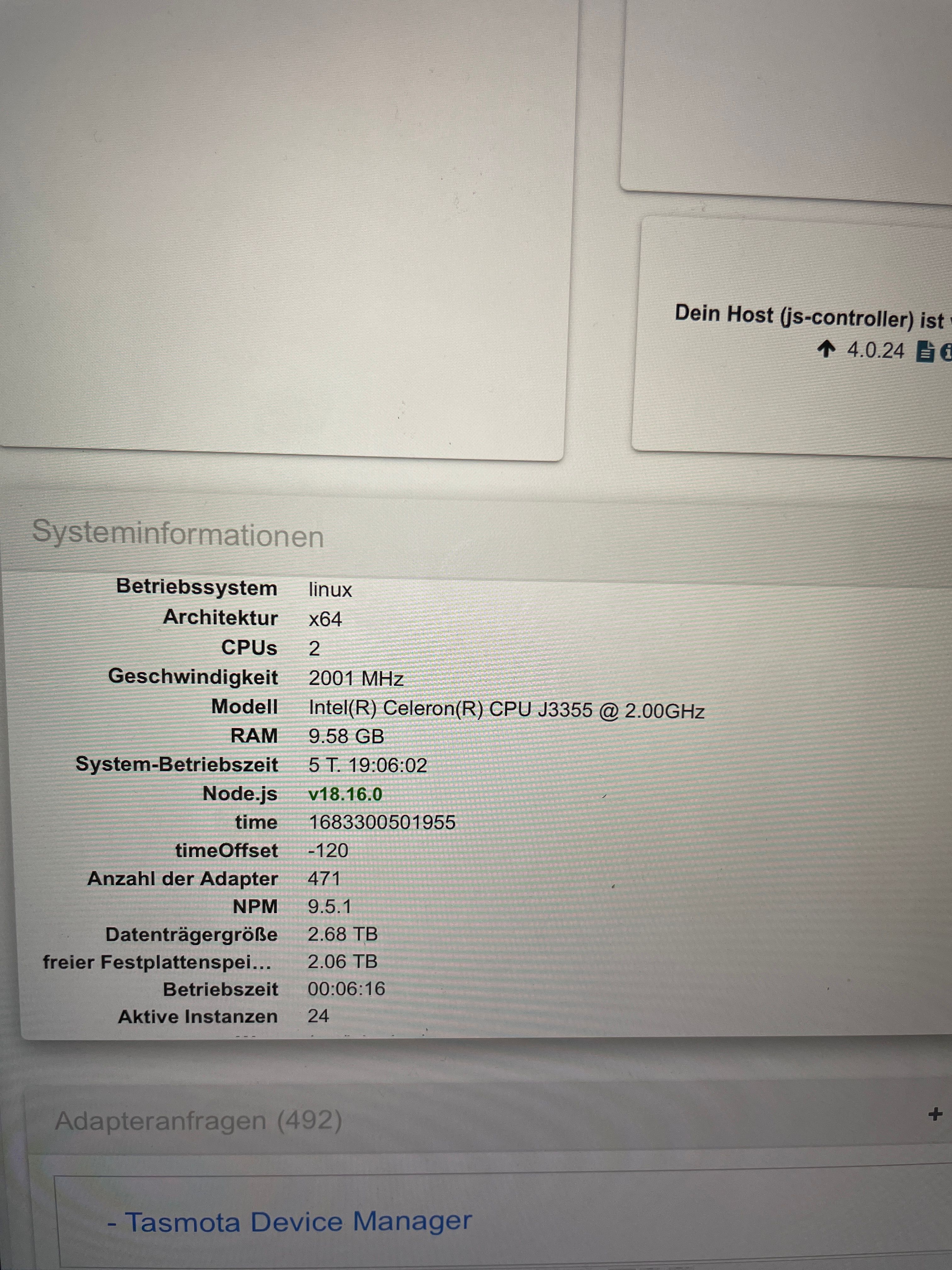
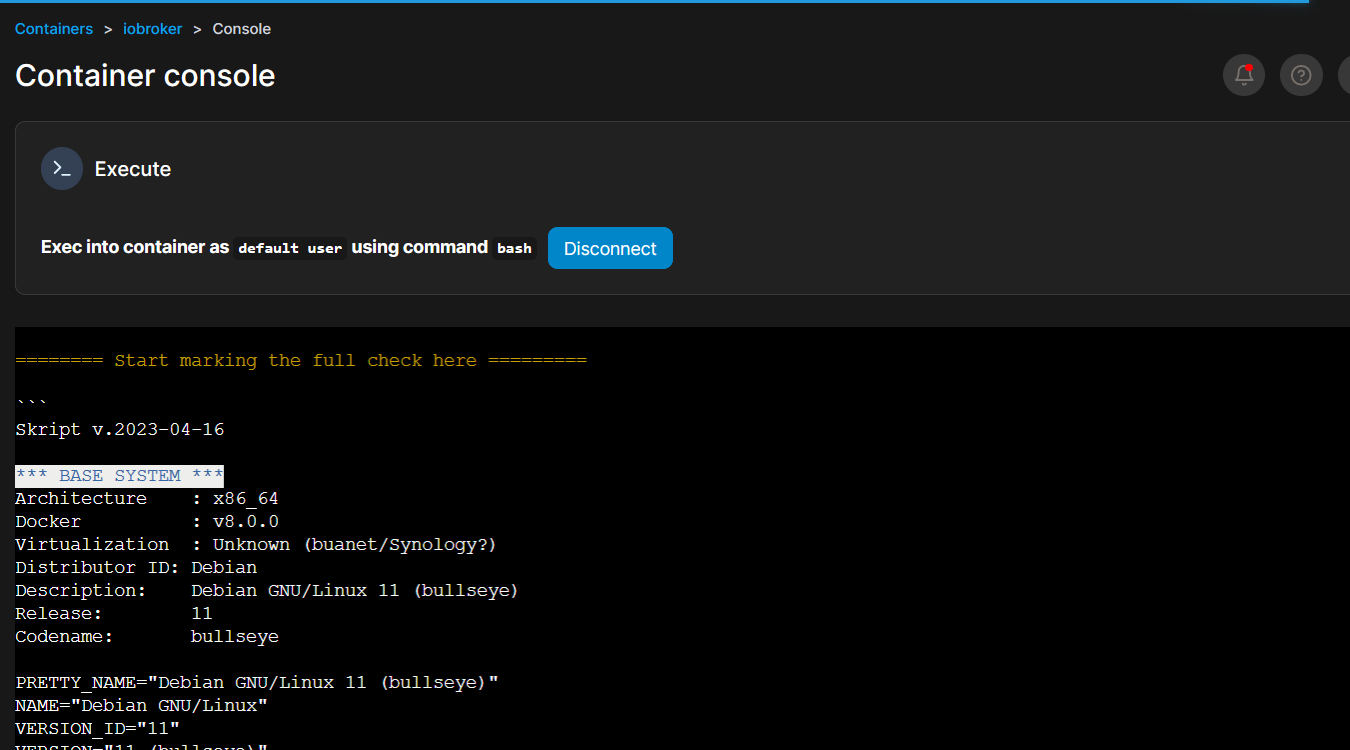
Skip to content
  • Home
  • Aktuell
  • Tags
  • 0 Ungelesen 0
  • Kategorien
  • Unreplied
  • Beliebt
  • GitHub
  • Docu
  • Hilfe
Skins
  • Light
  • Brite
  • Cerulean
  • Cosmo
  • Flatly
  • Journal
  • Litera
  • Lumen
  • Lux
  • Materia
  • Minty
  • Morph
  • Pulse
  • Sandstone
  • Simplex
  • Sketchy
  • Spacelab
  • United
  • Yeti
  • Zephyr
  • Dark
  • Cyborg
  • Darkly
  • Quartz
  • Slate
  • Solar
  • Superhero
  • Vapor

  • Standard: (Kein Skin)
  • Kein Skin
Einklappen
ioBroker Logo

Community Forum

donate donate
  1. ioBroker Community Home
  2. Deutsch
  3. ioBroker Allgemein
  4. Adapter Installation und Update nicht möglich
NEWS

  • Weihnachtsangebot 2025! 🎄
    BluefoxB
    Bluefox
    22
    1
    1.3k

  • UPDATE 31.10.: Amazon Alexa - ioBroker Skill läuft aus ?
    apollon77A
    apollon77
    48
    3
    9.2k

  • Monatsrückblick – September 2025
    BluefoxB
    Bluefox
    14
    1
    2.5k

Adapter Installation und Update nicht möglich
Geplant Angeheftet Gesperrt Verschoben ioBroker Allgemein
installationupdate
61 Beiträge 4 Kommentatoren 6.5k Aufrufe 2 Watching
  • Älteste zuerst
  • Neuste zuerst
  • Meiste Stimmen
Antworten
  • In einem neuen Thema antworten
Anmelden zum Antworten
Dieses Thema wurde gelöscht. Nur Nutzer mit entsprechenden Rechten können es sehen.
  • S SvenH75

    @glasfaser okay, sorry, das hat leider nicht funktioniert oder ich hab etwas falsch gemacht…..

    GlasfaserG Offline
    GlasfaserG Offline
    Glasfaser
    schrieb am zuletzt editiert von
    #5

    @svenh75 sagte in Adapter Installation und Update nicht möglich:

    @glasfaser okay, sorry, das hat leider nicht funktioniert oder ich hab etwas falsch gemacht…..

    Keine Ahnung ... sitze nicht bei dir und kann auch nicht helsehen !

    Was geht nicht !

    Synology 918+ 16GB - ioBroker in Docker v9 , VISO auf Trekstor Primebook C13 13,3" , Hikvision Domkameras mit Surveillance Station .. CCU RaspberryMatic in Synology VM .. Zigbee CC2538+CC2592 .. Sonoff .. KNX .. Modbus ..

    GlasfaserG 1 Antwort Letzte Antwort
    0
    • GlasfaserG Glasfaser

      @svenh75

      und

      wie kommst du auf sudo , vor einem iobroker Befehl !?
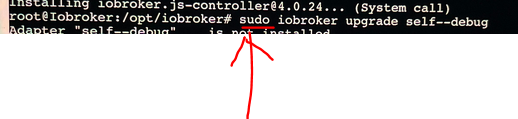
      2391e7fd-9729-4cdc-b992-9b296cba31a7-grafik.png

      bitte dann ein

      iob fix
      

      durchführen

      S Offline
      S Offline
      SvenH75
      schrieb am zuletzt editiert von Homoran
      #6

      @glasfaser den Befehl iOS fix hatte ich schon mal laufen lassen. Hier mal die Ausgabe, kann da leider nicht ganz soviel mit anfangen……

      
      root@Iobroker: /opt/iobroker# pkill iob root@Iobroker:/opt/iobroker# iob fix library: loaded
      Library version=2022-12-09
      Welcome to the loBroker installation fixer!
      Script version: 2023-04-02
      ーーーーーーーーーーーーーーーーーーーーーーーーーーーーーー
      Installing prerequisites (1/5)
      Get: 1
      http://deb.debian.org/debian bullseye InRelease (116 kB]
      Get: 2 http: //deb.debian.org/debian-security bullseye-security InRelease [48,4 k
      B1
      Get:3 http: //deb.debian.org/debian bullseye-updates InRelease [44,1 kB]
      Get:4 https: //deb.nodesource.com/node 18.× bullseye InRelease [4.586 B]
      Get: 5 http: //deb.debian.org/debian builseye/main amd64 Packages [8.183 kBj
      Get: 6
      https://deb.nodesource.com/node_18. bullseye/main amd64 Packages [776 B]
      Get: 7 http: //deb.debian.org/debian-security bullseye-security/main amd64 Packag es [239 kB]
      
      Get: 8 http: / /deb.debian.org/debian bullseye-updates /main amd64 Packages [14,6 k
      B]
      Fetched 8.650 kB in 3s (2.861 kB/s)
      Reading package lists..
      Done
      Installed gcc-c++
      Failed to set capabilities on file
      */usr/bin/node' (Operation not supported)
      The value of the capability argument is not permitted for a file.
      Or the file i
      s
      not
      a regular
      (non-symlink) file
      Docker detected!
      If you have any adapters that
      need the CAP_ NET_ ADMIN capability,
      you need
      to
      start the docker container with
      the option
      --cap-add=NET_ADMIN
      and
      manually
      add
      that
      capability to node
      ーーーーーーーーーーーーーーーーーーーーーーーーーーーーーーーーーーーーーーーーーーーーーーーーーーーーーーーーーー
      Checking loBroker user and directory permissions (2/5)
      Created /etc/sudoers.d/iobroker
      Fixing directory permissions...
      This
      system
      does
      not
      support
      setting default permissions.
      DO
      not use npm to manually install adapters
      unless you know what you are doing!
      ーーーーーーーーーーーーーーーーーーーーーーーーーーーーーーーーーーーーーーーーーーーーーーーーーーーーー
      Check and cleanup npm temporary directories (3/5)
      Done
      Database maintenance (4/5)
      
      Checking for uncompressed JSONL databases.
      Compressing /opt/iobroker/iobroker-data/states.json1
      Compressing /opt/iobroker/iobroker-data/objects.jsonl
      Compressed 2 JSONL files.
      Done
      This might take a while
      Checking autostart (5/5)
      Unsupported init system, cannot enable autostart!
      Your installation was fixed successfully
      Run iobroker start to start ioBroker again!
      
      
      GlasfaserG 1 Antwort Letzte Antwort
      0
      • S SvenH75

        @glasfaser den Befehl iOS fix hatte ich schon mal laufen lassen. Hier mal die Ausgabe, kann da leider nicht ganz soviel mit anfangen……

        
        root@Iobroker: /opt/iobroker# pkill iob root@Iobroker:/opt/iobroker# iob fix library: loaded
        Library version=2022-12-09
        Welcome to the loBroker installation fixer!
        Script version: 2023-04-02
        ーーーーーーーーーーーーーーーーーーーーーーーーーーーーーー
        Installing prerequisites (1/5)
        Get: 1
        http://deb.debian.org/debian bullseye InRelease (116 kB]
        Get: 2 http: //deb.debian.org/debian-security bullseye-security InRelease [48,4 k
        B1
        Get:3 http: //deb.debian.org/debian bullseye-updates InRelease [44,1 kB]
        Get:4 https: //deb.nodesource.com/node 18.× bullseye InRelease [4.586 B]
        Get: 5 http: //deb.debian.org/debian builseye/main amd64 Packages [8.183 kBj
        Get: 6
        https://deb.nodesource.com/node_18. bullseye/main amd64 Packages [776 B]
        Get: 7 http: //deb.debian.org/debian-security bullseye-security/main amd64 Packag es [239 kB]
        
        Get: 8 http: / /deb.debian.org/debian bullseye-updates /main amd64 Packages [14,6 k
        B]
        Fetched 8.650 kB in 3s (2.861 kB/s)
        Reading package lists..
        Done
        Installed gcc-c++
        Failed to set capabilities on file
        */usr/bin/node' (Operation not supported)
        The value of the capability argument is not permitted for a file.
        Or the file i
        s
        not
        a regular
        (non-symlink) file
        Docker detected!
        If you have any adapters that
        need the CAP_ NET_ ADMIN capability,
        you need
        to
        start the docker container with
        the option
        --cap-add=NET_ADMIN
        and
        manually
        add
        that
        capability to node
        ーーーーーーーーーーーーーーーーーーーーーーーーーーーーーーーーーーーーーーーーーーーーーーーーーーーーーーーーーー
        Checking loBroker user and directory permissions (2/5)
        Created /etc/sudoers.d/iobroker
        Fixing directory permissions...
        This
        system
        does
        not
        support
        setting default permissions.
        DO
        not use npm to manually install adapters
        unless you know what you are doing!
        ーーーーーーーーーーーーーーーーーーーーーーーーーーーーーーーーーーーーーーーーーーーーーーーーーーーーー
        Check and cleanup npm temporary directories (3/5)
        Done
        Database maintenance (4/5)
        
        Checking for uncompressed JSONL databases.
        Compressing /opt/iobroker/iobroker-data/states.json1
        Compressing /opt/iobroker/iobroker-data/objects.jsonl
        Compressed 2 JSONL files.
        Done
        This might take a while
        Checking autostart (5/5)
        Unsupported init system, cannot enable autostart!
        Your installation was fixed successfully
        Run iobroker start to start ioBroker again!
        
        
        GlasfaserG Offline
        GlasfaserG Offline
        Glasfaser
        schrieb am zuletzt editiert von
        #7

        @svenh75 sagte in Adapter Installation und Update nicht möglich:

        @glasfaser den Befehl iOS fix hatte ich schon mal laufen lassen.

        der sollte deine eingreifen ... mit
        sudo ( ich weiß ja nicht was du noch gemacht hast )
        wieder richten .. mehr nicht .

        Synology 918+ 16GB - ioBroker in Docker v9 , VISO auf Trekstor Primebook C13 13,3" , Hikvision Domkameras mit Surveillance Station .. CCU RaspberryMatic in Synology VM .. Zigbee CC2538+CC2592 .. Sonoff .. KNX .. Modbus ..

        S 1 Antwort Letzte Antwort
        0
        • GlasfaserG Glasfaser

          @svenh75 sagte in Adapter Installation und Update nicht möglich:

          @glasfaser okay, sorry, das hat leider nicht funktioniert oder ich hab etwas falsch gemacht…..

          Keine Ahnung ... sitze nicht bei dir und kann auch nicht helsehen !

          Was geht nicht !

          GlasfaserG Offline
          GlasfaserG Offline
          Glasfaser
          schrieb am zuletzt editiert von
          #8

          @SvenH75

          @glasfaser sagte in Adapter Installation und Update nicht möglich:
          Was geht nicht !

          Synology 918+ 16GB - ioBroker in Docker v9 , VISO auf Trekstor Primebook C13 13,3" , Hikvision Domkameras mit Surveillance Station .. CCU RaspberryMatic in Synology VM .. Zigbee CC2538+CC2592 .. Sonoff .. KNX .. Modbus ..

          1 Antwort Letzte Antwort
          0
          • GlasfaserG Glasfaser

            @svenh75

            und

            wie kommst du auf sudo , vor einem iobroker Befehl !?

            2391e7fd-9729-4cdc-b992-9b296cba31a7-grafik.png

            bitte dann ein

            iob fix
            

            durchführen

            HomoranH Nicht stören
            HomoranH Nicht stören
            Homoran
            Global Moderator Administrators
            schrieb am zuletzt editiert von
            #9

            @glasfaser sagte in Adapter Installation und Update nicht möglich:

            wie kommst du auf sudo , vor einem iobroker Befehl !?

            weil er root ist :joy:

            kein Support per PN! - Fragen im Forum stellen - es gibt fast nichts, was nicht auch für andere interessant ist.

            Benutzt das Voting rechts unten im Beitrag wenn er euch geholfen hat.

            der Installationsfixer: curl -fsL https://iobroker.net/fix.sh | bash -

            S 1 Antwort Letzte Antwort
            0
            • GlasfaserG Glasfaser

              @svenh75 sagte in Adapter Installation und Update nicht möglich:

              @glasfaser den Befehl iOS fix hatte ich schon mal laufen lassen.

              der sollte deine eingreifen ... mit
              sudo ( ich weiß ja nicht was du noch gemacht hast )
              wieder richten .. mehr nicht .

              S Offline
              S Offline
              SvenH75
              schrieb am zuletzt editiert von
              #10

              @glasfaser okay, irgendwann ging das updaten auch nicht, und mit Sudo hat es dann funktioniert…… dann lasse ich das zukünftig mal lieber weg.

              Ist dann was in den iobroker datenordner kaputt? Den Container iobroker selber ,habe ich heute bereits komplett neu aufgesetzt.

              GlasfaserG 1 Antwort Letzte Antwort
              0
              • S SvenH75

                @glasfaser okay, irgendwann ging das updaten auch nicht, und mit Sudo hat es dann funktioniert…… dann lasse ich das zukünftig mal lieber weg.

                Ist dann was in den iobroker datenordner kaputt? Den Container iobroker selber ,habe ich heute bereits komplett neu aufgesetzt.

                GlasfaserG Offline
                GlasfaserG Offline
                Glasfaser
                schrieb am zuletzt editiert von
                #11

                @svenh75 sagte in Adapter Installation und Update nicht möglich:

                @glasfaser okay, irgendwann ging das updaten auch nicht, und mit Sudo hat es dann funktioniert…… dann lasse ich das zukünftig mal lieber weg.

                Ist dann was in den iobroker datenordner kaputt? Den Container iobroker selber ,habe ich heute bereits komplett neu aufgesetzt.

                Ich habe bei deinen Angaben ein Großes ?

                Zeige mal bitte die Ausgabe von

                cat /opt/scripts/.docker_config/.thisisdocker
                

                und

                iob diag
                

                Synology 918+ 16GB - ioBroker in Docker v9 , VISO auf Trekstor Primebook C13 13,3" , Hikvision Domkameras mit Surveillance Station .. CCU RaspberryMatic in Synology VM .. Zigbee CC2538+CC2592 .. Sonoff .. KNX .. Modbus ..

                S 1 Antwort Letzte Antwort
                0
                • HomoranH Homoran

                  @glasfaser sagte in Adapter Installation und Update nicht möglich:

                  wie kommst du auf sudo , vor einem iobroker Befehl !?

                  weil er root ist :joy:

                  S Offline
                  S Offline
                  SvenH75
                  schrieb am zuletzt editiert von
                  #12

                  @homoran hallo, ja glaube, hab mich vor Jahren da mal eingelesen und den iobroker aufgestzt (Synology)…… passt das so nicht?

                  GlasfaserG 1 Antwort Letzte Antwort
                  0
                  • S SvenH75

                    @homoran hallo, ja glaube, hab mich vor Jahren da mal eingelesen und den iobroker aufgestzt (Synology)…… passt das so nicht?

                    GlasfaserG Offline
                    GlasfaserG Offline
                    Glasfaser
                    schrieb am zuletzt editiert von
                    #13

                    @svenh75 sagte in Adapter Installation und Update nicht möglich:

                    @homoran hallo, ja glaube, hab mich vor Jahren da mal eingelesen und den iobroker aufgestzt (Synology)…… passt das so nicht?

                    Alles gut !!
                    Nix verändern !

                    Synology 918+ 16GB - ioBroker in Docker v9 , VISO auf Trekstor Primebook C13 13,3" , Hikvision Domkameras mit Surveillance Station .. CCU RaspberryMatic in Synology VM .. Zigbee CC2538+CC2592 .. Sonoff .. KNX .. Modbus ..

                    1 Antwort Letzte Antwort
                    0
                    • GlasfaserG Glasfaser

                      @svenh75 sagte in Adapter Installation und Update nicht möglich:

                      @glasfaser okay, irgendwann ging das updaten auch nicht, und mit Sudo hat es dann funktioniert…… dann lasse ich das zukünftig mal lieber weg.

                      Ist dann was in den iobroker datenordner kaputt? Den Container iobroker selber ,habe ich heute bereits komplett neu aufgesetzt.

                      Ich habe bei deinen Angaben ein Großes ?

                      Zeige mal bitte die Ausgabe von

                      cat /opt/scripts/.docker_config/.thisisdocker
                      

                      und

                      iob diag
                      
                      S Offline
                      S Offline
                      SvenH75
                      schrieb am zuletzt editiert von SvenH75
                      #14

                      @glasfaser root@Iobroker:/opt/iobroker# cat /opt/scripts/ .docker config/.thisisdocker
                      v8.0.1
                      root@Iobroker:/opt/ iobroker#

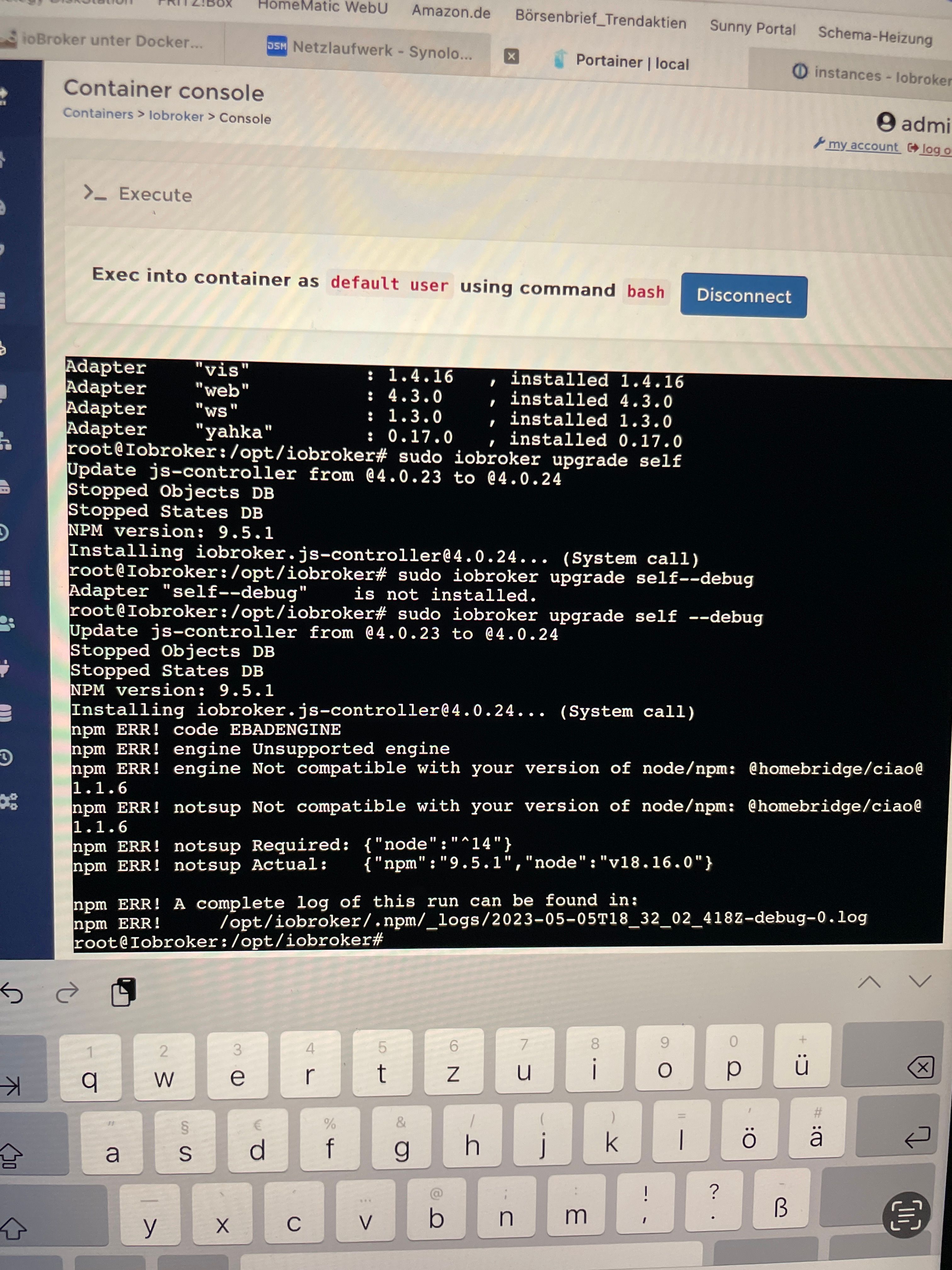
                      Ich bin per Konsole über Portainer verbunden

                      Derzweite Befehl bringt das:

                      
                      *** loBroker Diagnosis ***
                      Please stretch the window of your terminal programm (puTTY) as wide as possible or switch to full s
                      creen
                      The following checks may give hints to potential malconfigurations or errors, please post them in o ur forum:
                      https://forum.iobroker.net
                      Just copy and paste the Summary Page, including the It helps us to help you!
                      characters at start and end
                      Press any key to continue
                      
                      
                      GlasfaserG 1 Antwort Letzte Antwort
                      0
                      • S SvenH75

                        @glasfaser root@Iobroker:/opt/iobroker# cat /opt/scripts/ .docker config/.thisisdocker
                        v8.0.1
                        root@Iobroker:/opt/ iobroker#

                        Ich bin per Konsole über Portainer verbunden

                        Derzweite Befehl bringt das:

                        
                        *** loBroker Diagnosis ***
                        Please stretch the window of your terminal programm (puTTY) as wide as possible or switch to full s
                        creen
                        The following checks may give hints to potential malconfigurations or errors, please post them in o ur forum:
                        https://forum.iobroker.net
                        Just copy and paste the Summary Page, including the It helps us to help you!
                        characters at start and end
                        Press any key to continue
                        
                        
                        GlasfaserG Offline
                        GlasfaserG Offline
                        Glasfaser
                        schrieb am zuletzt editiert von
                        #15

                        @svenh75 sagte in Adapter Installation und Update nicht möglich:

                        Ich bin per Konsole über Portainer verbunden

                        Ja ... und was wollst du damit sagen !?

                        und bitte die Ausgaben in Code-Tags </> setzen

                        lese mal hier ... wie es geht :
                        https://forum.iobroker.net/topic/51555/hinweise-für-gute-forenbeiträge

                        Synology 918+ 16GB - ioBroker in Docker v9 , VISO auf Trekstor Primebook C13 13,3" , Hikvision Domkameras mit Surveillance Station .. CCU RaspberryMatic in Synology VM .. Zigbee CC2538+CC2592 .. Sonoff .. KNX .. Modbus ..

                        S 1 Antwort Letzte Antwort
                        0
                        • GlasfaserG Glasfaser

                          @svenh75 sagte in Adapter Installation und Update nicht möglich:

                          Ich bin per Konsole über Portainer verbunden

                          Ja ... und was wollst du damit sagen !?

                          und bitte die Ausgaben in Code-Tags </> setzen

                          lese mal hier ... wie es geht :
                          https://forum.iobroker.net/topic/51555/hinweise-für-gute-forenbeiträge

                          S Offline
                          S Offline
                          SvenH75
                          schrieb am zuletzt editiert von
                          #16

                          @glasfaser

                          Nur nicht das dadurch eventuell etwas verändert wird…… passt also?

                          Sorry, denke jetzt an </>

                          GlasfaserG 1 Antwort Letzte Antwort
                          0
                          • S SvenH75

                            @glasfaser

                            Nur nicht das dadurch eventuell etwas verändert wird…… passt also?

                            Sorry, denke jetzt an </>

                            GlasfaserG Offline
                            GlasfaserG Offline
                            Glasfaser
                            schrieb am zuletzt editiert von
                            #17

                            @svenh75 sagte in Adapter Installation und Update nicht möglich:

                            Nur nicht das dadurch eventuell etwas verändert wird…… passt also?

                            Was soll sich da verändern ....

                            Ich frage nur Informationen bei dir ab !

                            Synology 918+ 16GB - ioBroker in Docker v9 , VISO auf Trekstor Primebook C13 13,3" , Hikvision Domkameras mit Surveillance Station .. CCU RaspberryMatic in Synology VM .. Zigbee CC2538+CC2592 .. Sonoff .. KNX .. Modbus ..

                            S 1 Antwort Letzte Antwort
                            0
                            • GlasfaserG Glasfaser

                              @svenh75 sagte in Adapter Installation und Update nicht möglich:

                              Nur nicht das dadurch eventuell etwas verändert wird…… passt also?

                              Was soll sich da verändern ....

                              Ich frage nur Informationen bei dir ab !

                              S Offline
                              S Offline
                              SvenH75
                              schrieb am zuletzt editiert von
                              #18

                              @glasfaser Nein, nicht das sich die Info für dich dadurch verändert

                              GlasfaserG 1 Antwort Letzte Antwort
                              0
                              • S SvenH75

                                @glasfaser Nein, nicht das sich die Info für dich dadurch verändert

                                GlasfaserG Offline
                                GlasfaserG Offline
                                Glasfaser
                                schrieb am zuletzt editiert von
                                #19

                                @svenh75

                                Bitte die Full Ausgabe davon hier posten !

                                Synology 918+ 16GB - ioBroker in Docker v9 , VISO auf Trekstor Primebook C13 13,3" , Hikvision Domkameras mit Surveillance Station .. CCU RaspberryMatic in Synology VM .. Zigbee CC2538+CC2592 .. Sonoff .. KNX .. Modbus ..

                                S 1 Antwort Letzte Antwort
                                0
                                • GlasfaserG Glasfaser

                                  @svenh75

                                  Bitte die Full Ausgabe davon hier posten !

                                  S Offline
                                  S Offline
                                  SvenH75
                                  schrieb am zuletzt editiert von
                                  #20

                                  @glasfaser von was?

                                  GlasfaserG 1 Antwort Letzte Antwort
                                  0
                                  • S SvenH75

                                    @glasfaser von was?

                                    GlasfaserG Offline
                                    GlasfaserG Offline
                                    Glasfaser
                                    schrieb am zuletzt editiert von
                                    #21

                                    @svenh75 sagte in Adapter Installation und Update nicht möglich:

                                    @glasfaser von was?

                                    siehe hier ... wie die Ausgabe von

                                    iob diag
                                    

                                    aussieht

                                    https://forum.iobroker.net/post/986813

                                    Synology 918+ 16GB - ioBroker in Docker v9 , VISO auf Trekstor Primebook C13 13,3" , Hikvision Domkameras mit Surveillance Station .. CCU RaspberryMatic in Synology VM .. Zigbee CC2538+CC2592 .. Sonoff .. KNX .. Modbus ..

                                    S 1 Antwort Letzte Antwort
                                    0
                                    • GlasfaserG Glasfaser

                                      @svenh75 sagte in Adapter Installation und Update nicht möglich:

                                      @glasfaser von was?

                                      siehe hier ... wie die Ausgabe von

                                      iob diag
                                      

                                      aussieht

                                      https://forum.iobroker.net/post/986813

                                      S Offline
                                      S Offline
                                      SvenH75
                                      schrieb am zuletzt editiert von
                                      #22

                                      @glasfaser es kommt leider wieder nur der Hinweis

                                      
                                      *** loBroker Diagnosis ***
                                      Please stretch the window of your terminal programm (puTTY) as wide as possible or switch to full s
                                      creen
                                      The following checks may give hints to potential malconfigurations or errors, please post them in o ur forum:
                                      https://forum.iobroker.net
                                      Just copy and paste the Summary Page, including the It helps us to help you!
                                      characters at start and end
                                      Press any key to continue```
                                      GlasfaserG 2 Antworten Letzte Antwort
                                      0
                                      • S SvenH75

                                        @glasfaser es kommt leider wieder nur der Hinweis

                                        
                                        *** loBroker Diagnosis ***
                                        Please stretch the window of your terminal programm (puTTY) as wide as possible or switch to full s
                                        creen
                                        The following checks may give hints to potential malconfigurations or errors, please post them in o ur forum:
                                        https://forum.iobroker.net
                                        Just copy and paste the Summary Page, including the It helps us to help you!
                                        characters at start and end
                                        Press any key to continue```
                                        GlasfaserG Offline
                                        GlasfaserG Offline
                                        Glasfaser
                                        schrieb am zuletzt editiert von
                                        #23

                                        @svenh75

                                        Nutze kein Portainer ... eher Putty ( Kitty )

                                        Bei Portainer kommt bei mir:

                                        1f7a8d85-0759-4a63-8d23-104842394802-grafik.png .

                                        Nimm mal die Docker Konsole von Synology

                                        Synology 918+ 16GB - ioBroker in Docker v9 , VISO auf Trekstor Primebook C13 13,3" , Hikvision Domkameras mit Surveillance Station .. CCU RaspberryMatic in Synology VM .. Zigbee CC2538+CC2592 .. Sonoff .. KNX .. Modbus ..

                                        1 Antwort Letzte Antwort
                                        0
                                        • S SvenH75

                                          @glasfaser es kommt leider wieder nur der Hinweis

                                          
                                          *** loBroker Diagnosis ***
                                          Please stretch the window of your terminal programm (puTTY) as wide as possible or switch to full s
                                          creen
                                          The following checks may give hints to potential malconfigurations or errors, please post them in o ur forum:
                                          https://forum.iobroker.net
                                          Just copy and paste the Summary Page, including the It helps us to help you!
                                          characters at start and end
                                          Press any key to continue```
                                          GlasfaserG Offline
                                          GlasfaserG Offline
                                          Glasfaser
                                          schrieb am zuletzt editiert von
                                          #24

                                          @svenh75 sagte in Adapter Installation und Update nicht möglich:

                                          Press any key to continue```

                                          Machst du das auch .. Taste drücken !?

                                          siehe hier ... dort geht es :
                                          https://forum.iobroker.net/post/952867

                                          Synology 918+ 16GB - ioBroker in Docker v9 , VISO auf Trekstor Primebook C13 13,3" , Hikvision Domkameras mit Surveillance Station .. CCU RaspberryMatic in Synology VM .. Zigbee CC2538+CC2592 .. Sonoff .. KNX .. Modbus ..

                                          S 1 Antwort Letzte Antwort
                                          0
                                          Antworten
                                          • In einem neuen Thema antworten
                                          Anmelden zum Antworten
                                          • Älteste zuerst
                                          • Neuste zuerst
                                          • Meiste Stimmen


                                          Support us

                                          ioBroker
                                          Community Adapters
                                          Donate
                                          FAQ Cloud / IOT
                                          HowTo: Node.js-Update
                                          HowTo: Backup/Restore
                                          Downloads
                                          BLOG

                                          777

                                          Online

                                          32.5k

                                          Benutzer

                                          81.7k

                                          Themen

                                          1.3m

                                          Beiträge
                                          Community
                                          Impressum | Datenschutz-Bestimmungen | Nutzungsbedingungen | Einwilligungseinstellungen
                                          ioBroker Community 2014-2025
                                          logo
                                          • Anmelden

                                          • Du hast noch kein Konto? Registrieren

                                          • Anmelden oder registrieren, um zu suchen
                                          • Erster Beitrag
                                            Letzter Beitrag
                                          0
                                          • Home
                                          • Aktuell
                                          • Tags
                                          • Ungelesen 0
                                          • Kategorien
                                          • Unreplied
                                          • Beliebt
                                          • GitHub
                                          • Docu
                                          • Hilfe