



Skip to content
  • Home
  • Aktuell
  • Tags
  • 0 Ungelesen 0
  • Kategorien
  • Unreplied
  • Beliebt
  • GitHub
  • Docu
  • Hilfe
Skins
  • Light
  • Brite
  • Cerulean
  • Cosmo
  • Flatly
  • Journal
  • Litera
  • Lumen
  • Lux
  • Materia
  • Minty
  • Morph
  • Pulse
  • Sandstone
  • Simplex
  • Sketchy
  • Spacelab
  • United
  • Yeti
  • Zephyr
  • Dark
  • Cyborg
  • Darkly
  • Quartz
  • Slate
  • Solar
  • Superhero
  • Vapor

  • Standard: (Kein Skin)
  • Kein Skin
Einklappen
ioBroker Logo

Community Forum

donate donate
  1. ioBroker Community Home
  2. Deutsch
  3. Einsteigerfragen
  4. Installation
  5. iobroker lässt sich nicht mehr starten
NEWS

  • Jahresrückblick 2025 – unser neuer Blogbeitrag ist online! ✨
    BluefoxB
    Bluefox
    16
    1
    1.9k

  • Neuer Blogbeitrag: Monatsrückblick - Dezember 2025 🎄
    BluefoxB
    Bluefox
    13
    1
    917

  • Weihnachtsangebot 2025! 🎄
    BluefoxB
    Bluefox
    25
    1
    2.2k

iobroker lässt sich nicht mehr starten

Geplant Angeheftet Gesperrt Verschoben Installation
106 Beiträge 4 Kommentatoren 8.7k Aufrufe 3 Watching
  • Älteste zuerst
  • Neuste zuerst
  • Meiste Stimmen
Antworten
  • In einem neuen Thema antworten
Anmelden zum Antworten
Dieses Thema wurde gelöscht. Nur Nutzer mit entsprechenden Rechten können es sehen.
  • B balu67

    @thomas-braun
    5ef8f530-5604-41db-a360-24662fb1aba3-image.png
    das Verzeichnis gibt es scheinbar nicht
    es gibt direkt unter "apt" einen Ordnenr mit dem Namen influxdb und darin ist eine Datei "influxdb.conf"

    Thomas BraunT Online
    Thomas BraunT Online
    Thomas Braun
    Most Active
    schrieb am zuletzt editiert von
    #18

    @balu67

    grep -rnw '/etc/apt/' -e 'stretch'
    

    Linux-Werkzeugkasten:
    https://forum.iobroker.net/topic/42952/der-kleine-iobroker-linux-werkzeugkasten
    NodeJS Fixer Skript:
    https://forum.iobroker.net/topic/68035/iob-node-fix-skript
    iob_diag: curl -sLf -o diag.sh https://iobroker.net/diag.sh && bash diag.sh

    B 1 Antwort Letzte Antwort
    0
    • B balu67

      @thomas-braun
      5ef8f530-5604-41db-a360-24662fb1aba3-image.png
      das Verzeichnis gibt es scheinbar nicht
      es gibt direkt unter "apt" einen Ordnenr mit dem Namen influxdb und darin ist eine Datei "influxdb.conf"

      Thomas BraunT Online
      Thomas BraunT Online
      Thomas Braun
      Most Active
      schrieb am zuletzt editiert von Thomas Braun
      #19

      @balu67 sagte in iobroker lässt sich nicht mehr starten:

      es gibt direkt unter "apt" einen Ordnenr mit dem Namen influxdb und darin ist eine Datei "influxdb.conf"

      Das ist auch falsch. Eine influxdb.conf hat in /etc/apt nix zu suchen.

      Linux-Werkzeugkasten:
      https://forum.iobroker.net/topic/42952/der-kleine-iobroker-linux-werkzeugkasten
      NodeJS Fixer Skript:
      https://forum.iobroker.net/topic/68035/iob-node-fix-skript
      iob_diag: curl -sLf -o diag.sh https://iobroker.net/diag.sh && bash diag.sh

      B 1 Antwort Letzte Antwort
      0
      • Thomas BraunT Thomas Braun

        @balu67

        grep -rnw '/etc/apt/' -e 'stretch'
        
        B Offline
        B Offline
        balu67
        schrieb am zuletzt editiert von
        #20

        @thomas-braun said in iobroker lässt sich nicht mehr starten:

        @balu67

        grep -rnw '/etc/apt/' -e 'stretch'
        
        grep -rnw '/etc/apt/' -e 'stretch'
        grep: /etc/apt/trusted.gpg.d/debian-archive-stretch-security-automatic.gpg: Übereinstimmungen in Binärdatei
        grep: /etc/apt/trusted.gpg.d/debian-archive-stretch-automatic.gpg: Übereinstimmungen in Binärdatei
        grep: /etc/apt/trusted.gpg.d/debian-archive-stretch-stable.gpg: Übereinstimmungen in Binärdatei
        
        
        1 Antwort Letzte Antwort
        0
        • Thomas BraunT Thomas Braun

          @balu67 sagte in iobroker lässt sich nicht mehr starten:

          es gibt direkt unter "apt" einen Ordnenr mit dem Namen influxdb und darin ist eine Datei "influxdb.conf"

          Das ist auch falsch. Eine influxdb.conf hat in /etc/apt nix zu suchen.

          B Offline
          B Offline
          balu67
          schrieb am zuletzt editiert von
          #21

          @thomas-braun said in iobroker lässt sich nicht mehr starten:

          Das ist auch falsch. Eine influxdb.conf hat in /etc/apt nix zu suchen.

          ich hab da nichts gemacht, wurde so bei der Installation abgelegt

          Thomas BraunT 1 Antwort Letzte Antwort
          0
          • B balu67

            @thomas-braun said in iobroker lässt sich nicht mehr starten:

            Das ist auch falsch. Eine influxdb.conf hat in /etc/apt nix zu suchen.

            ich hab da nichts gemacht, wurde so bei der Installation abgelegt

            Thomas BraunT Online
            Thomas BraunT Online
            Thomas Braun
            Most Active
            schrieb am zuletzt editiert von
            #22

            @balu67

            sudo apt update
            wget -q https://repos.influxdata.com/influxdata-archive_compat.key
            
            echo '393e8779c89ac8d958f81f942f9ad7fb82a25e133faddaf92e15b16e6ac9ce4c influxdata-archive_compat.key' | sha256sum -c && cat influxdata-archive_compat.key | gpg --dearmor | sudo tee /usr/share/keyrings/influxdata-archive_compat.gpg > /dev/null
            
            echo 'deb [signed-by=/usr/share/keyrings/influxdata-archive_compat.gpg] https://repos.influxdata.com/debian stable main' | sudo tee /etc/apt/sources.list.d/influxdata.list
            sudo apt update
            apt policy influxdb*
            

            Linux-Werkzeugkasten:
            https://forum.iobroker.net/topic/42952/der-kleine-iobroker-linux-werkzeugkasten
            NodeJS Fixer Skript:
            https://forum.iobroker.net/topic/68035/iob-node-fix-skript
            iob_diag: curl -sLf -o diag.sh https://iobroker.net/diag.sh && bash diag.sh

            B 1 Antwort Letzte Antwort
            0
            • Thomas BraunT Thomas Braun

              @balu67

              sudo apt update
              wget -q https://repos.influxdata.com/influxdata-archive_compat.key
              
              echo '393e8779c89ac8d958f81f942f9ad7fb82a25e133faddaf92e15b16e6ac9ce4c influxdata-archive_compat.key' | sha256sum -c && cat influxdata-archive_compat.key | gpg --dearmor | sudo tee /usr/share/keyrings/influxdata-archive_compat.gpg > /dev/null
              
              echo 'deb [signed-by=/usr/share/keyrings/influxdata-archive_compat.gpg] https://repos.influxdata.com/debian stable main' | sudo tee /etc/apt/sources.list.d/influxdata.list
              sudo apt update
              apt policy influxdb*
              
              B Offline
              B Offline
              balu67
              schrieb am zuletzt editiert von
              #23

              @thomas-braun

              al@Raspberry:~ $ sudo apt update
              OK:1 http://deb.debian.org/debian bullseye InRelease
              OK:2 http://deb.debian.org/debian bullseye-updates InRelease                   
              OK:3 http://security.debian.org/debian-security bullseye-security InRelease    
              OK:4 http://archive.raspberrypi.org/debian bullseye InRelease                  
              OK:5 https://packages.grafana.com/oss/deb stable InRelease                     
              OK:6 https://deb.nodesource.com/node_16.x bullseye InRelease                   
              Paketlisten werden gelesen... Fertig                               
              Abhängigkeitsbaum wird aufgebaut... Fertig
              Statusinformationen werden eingelesen... Fertig
              Aktualisierung für 40 Pakete verfügbar. Führen Sie »apt list --upgradable« aus, um sie anzuzeigen.
              al@Raspberry:~ $ wget -q https://repos.influxdata.com/influxdata-archive_compat.key
              al@Raspberry:~ $ sudo apt update
              OK:1 http://archive.raspberrypi.org/debian bullseye InRelease
              OK:2 https://deb.nodesource.com/node_16.x bullseye InRelease                                    
              OK:3 http://deb.debian.org/debian bullseye InRelease                                            
              OK:4 http://deb.debian.org/debian bullseye-updates InRelease                                    
              OK:5 https://packages.grafana.com/oss/deb stable InRelease                                      
              OK:6 http://security.debian.org/debian-security bullseye-security InRelease                     
              Paketlisten werden gelesen... Fertig
              Abhängigkeitsbaum wird aufgebaut... Fertig
              Statusinformationen werden eingelesen... Fertig
              Aktualisierung für 40 Pakete verfügbar. Führen Sie »apt list --upgradable« aus, um sie anzuzeigen.
              al@Raspberry:~ $ apt policy influxdb*
              influxdb-client:
                Installiert:           (keine)
                Installationskandidat: 1.6.7~rc0-1+b5
                Versionstabelle:
                   1.6.7~rc0-1+b5 500
                      500 http://deb.debian.org/debian bullseye/main arm64 Packages
              influxdb-dev:
                Installiert:           (keine)
                Installationskandidat: (keine)
                Versionstabelle:
              influxdb:
                Installiert:           1.6.7~rc0-1+b5
                Installationskandidat: 1.6.7~rc0-1+b5
                Versionstabelle:
               *** 1.6.7~rc0-1+b5 500
                      500 http://deb.debian.org/debian bullseye/main arm64 Packages
                      100 /var/lib/dpkg/status
              
              
              Thomas BraunT 1 Antwort Letzte Antwort
              0
              • B balu67

                @thomas-braun

                al@Raspberry:~ $ sudo apt update
                OK:1 http://deb.debian.org/debian bullseye InRelease
                OK:2 http://deb.debian.org/debian bullseye-updates InRelease                   
                OK:3 http://security.debian.org/debian-security bullseye-security InRelease    
                OK:4 http://archive.raspberrypi.org/debian bullseye InRelease                  
                OK:5 https://packages.grafana.com/oss/deb stable InRelease                     
                OK:6 https://deb.nodesource.com/node_16.x bullseye InRelease                   
                Paketlisten werden gelesen... Fertig                               
                Abhängigkeitsbaum wird aufgebaut... Fertig
                Statusinformationen werden eingelesen... Fertig
                Aktualisierung für 40 Pakete verfügbar. Führen Sie »apt list --upgradable« aus, um sie anzuzeigen.
                al@Raspberry:~ $ wget -q https://repos.influxdata.com/influxdata-archive_compat.key
                al@Raspberry:~ $ sudo apt update
                OK:1 http://archive.raspberrypi.org/debian bullseye InRelease
                OK:2 https://deb.nodesource.com/node_16.x bullseye InRelease                                    
                OK:3 http://deb.debian.org/debian bullseye InRelease                                            
                OK:4 http://deb.debian.org/debian bullseye-updates InRelease                                    
                OK:5 https://packages.grafana.com/oss/deb stable InRelease                                      
                OK:6 http://security.debian.org/debian-security bullseye-security InRelease                     
                Paketlisten werden gelesen... Fertig
                Abhängigkeitsbaum wird aufgebaut... Fertig
                Statusinformationen werden eingelesen... Fertig
                Aktualisierung für 40 Pakete verfügbar. Führen Sie »apt list --upgradable« aus, um sie anzuzeigen.
                al@Raspberry:~ $ apt policy influxdb*
                influxdb-client:
                  Installiert:           (keine)
                  Installationskandidat: 1.6.7~rc0-1+b5
                  Versionstabelle:
                     1.6.7~rc0-1+b5 500
                        500 http://deb.debian.org/debian bullseye/main arm64 Packages
                influxdb-dev:
                  Installiert:           (keine)
                  Installationskandidat: (keine)
                  Versionstabelle:
                influxdb:
                  Installiert:           1.6.7~rc0-1+b5
                  Installationskandidat: 1.6.7~rc0-1+b5
                  Versionstabelle:
                 *** 1.6.7~rc0-1+b5 500
                        500 http://deb.debian.org/debian bullseye/main arm64 Packages
                        100 /var/lib/dpkg/status
                
                
                Thomas BraunT Online
                Thomas BraunT Online
                Thomas Braun
                Most Active
                schrieb am zuletzt editiert von Thomas Braun
                #24

                @balu67

                Und warum hast du jetzt

                echo '393e8779c89ac8d958f81f942f9ad7fb82a25e133faddaf92e15b16e6ac9ce4c influxdata-archive_compat.key' | sha256sum -c && cat influxdata-archive_compat.key | gpg --dearmor | sudo tee /usr/share/keyrings/influxdata-archive_compat.gpg > /dev/null


                echo 'deb [signed-by=/usr/share/keyrings/influxdata-archive_compat.gpg] https://repos.influxdata.com/debian stable main' | sudo tee /etc/apt/sources.list.d/influxdata.list
                

                ausgelassen?
                Danach

                sudo apt update
                apt policy influxdb*
                

                Linux-Werkzeugkasten:
                https://forum.iobroker.net/topic/42952/der-kleine-iobroker-linux-werkzeugkasten
                NodeJS Fixer Skript:
                https://forum.iobroker.net/topic/68035/iob-node-fix-skript
                iob_diag: curl -sLf -o diag.sh https://iobroker.net/diag.sh && bash diag.sh

                B 1 Antwort Letzte Antwort
                0
                • Thomas BraunT Thomas Braun

                  @balu67

                  Und warum hast du jetzt

                  echo '393e8779c89ac8d958f81f942f9ad7fb82a25e133faddaf92e15b16e6ac9ce4c influxdata-archive_compat.key' | sha256sum -c && cat influxdata-archive_compat.key | gpg --dearmor | sudo tee /usr/share/keyrings/influxdata-archive_compat.gpg > /dev/null


                  echo 'deb [signed-by=/usr/share/keyrings/influxdata-archive_compat.gpg] https://repos.influxdata.com/debian stable main' | sudo tee /etc/apt/sources.list.d/influxdata.list
                  

                  ausgelassen?
                  Danach

                  sudo apt update
                  apt policy influxdb*
                  
                  B Offline
                  B Offline
                  balu67
                  schrieb am zuletzt editiert von
                  #25

                  @thomas-braun
                  hab ich gemacht

                  Thomas BraunT 1 Antwort Letzte Antwort
                  0
                  • B balu67

                    @thomas-braun
                    hab ich gemacht

                    Thomas BraunT Online
                    Thomas BraunT Online
                    Thomas Braun
                    Most Active
                    schrieb am zuletzt editiert von
                    #26

                    @balu67 sagte in iobroker lässt sich nicht mehr starten:

                    hab ich gemacht

                    Ich seh nix.

                    Linux-Werkzeugkasten:
                    https://forum.iobroker.net/topic/42952/der-kleine-iobroker-linux-werkzeugkasten
                    NodeJS Fixer Skript:
                    https://forum.iobroker.net/topic/68035/iob-node-fix-skript
                    iob_diag: curl -sLf -o diag.sh https://iobroker.net/diag.sh && bash diag.sh

                    B 1 Antwort Letzte Antwort
                    1
                    • Thomas BraunT Thomas Braun

                      @balu67 sagte in iobroker lässt sich nicht mehr starten:

                      hab ich gemacht

                      Ich seh nix.

                      B Offline
                      B Offline
                      balu67
                      schrieb am zuletzt editiert von
                      #27

                      @thomas-braun

                      al@Raspberry:~ $ wget -q https://repos.influxdata.com/influxdata-archive_compat.key
                       
                      echo '393e8779c89ac8d958f81f942f9ad7fb82a25e133faddaf92e15b16e6ac9ce4c influxdata-archive_compat.key' | sha256sum -c && cat influxdata-archive_compat.key | gpg --dearmor | sudo tee /usr/share/keyrings/influxdata-archive_compat.gpg > /dev/null
                       
                      echo 'deb [signed-by=/usr/share/keyrings/influxdata-archive_compat.gpg] https://repos.influxdata.com/debian stable main' | sudo tee /etc/apt/sources.list.d/influxdata.list
                      sudo apt update
                      apt policy influxdb*
                      influxdata-archive_compat.key: OK
                      deb [signed-by=/usr/share/keyrings/influxdata-archive_compat.gpg] https://repos.influxdata.com/debian stable main
                      OK:1 http://archive.raspberrypi.org/debian bullseye InRelease
                      OK:2 http://deb.debian.org/debian bullseye InRelease                                            
                      OK:3 http://deb.debian.org/debian bullseye-updates InRelease                                    
                      OK:4 http://security.debian.org/debian-security bullseye-security InRelease                     
                      OK:5 https://repos.influxdata.com/debian stable InRelease                                       
                      OK:6 https://deb.nodesource.com/node_16.x bullseye InRelease                                    
                      OK:7 https://packages.grafana.com/oss/deb stable InRelease                                      
                      Paketlisten werden gelesen... Fertig                       
                      Abhängigkeitsbaum wird aufgebaut... Fertig
                      Statusinformationen werden eingelesen... Fertig
                      Aktualisierung für 41 Pakete verfügbar. Führen Sie »apt list --upgradable« aus, um sie anzuzeigen.
                      influxdb2-cli:
                        Installiert:           (keine)
                        Installationskandidat: 2.7.1-2
                        Versionstabelle:
                           2.7.1-2 500
                              500 https://repos.influxdata.com/debian stable/main arm64 Packages
                           2.6.1 500
                              500 https://repos.influxdata.com/debian stable/main arm64 Packages
                           2.6.0 500
                              500 https://repos.influxdata.com/debian stable/main arm64 Packages
                           2.5.0 500
                              500 https://repos.influxdata.com/debian stable/main arm64 Packages
                           2.4.0 500
                              500 https://repos.influxdata.com/debian stable/main arm64 Packages
                           2.3.0 500
                              500 https://repos.influxdata.com/debian stable/main arm64 Packages
                      influxdb-client:
                        Installiert:           (keine)
                        Installationskandidat: 1.6.7~rc0-1+b5
                        Versionstabelle:
                           1.6.7~rc0-1+b5 500
                              500 http://deb.debian.org/debian bullseye/main arm64 Packages
                      influxdb-dev:
                        Installiert:           (keine)
                        Installationskandidat: (keine)
                        Versionstabelle:
                      influxdb2-client:
                        Installiert:           (keine)
                        Installationskandidat: 2.7.1-1
                        Versionstabelle:
                           2.7.1-1 500
                              500 https://repos.influxdata.com/debian stable/main arm64 Packages
                      influxdb:
                        Installiert:           1.6.7~rc0-1+b5
                        Installationskandidat: 1.8.10-1
                        Versionstabelle:
                           1.8.10-1 500
                              500 https://repos.influxdata.com/debian stable/main arm64 Packages
                       *** 1.6.7~rc0-1+b5 500
                              500 http://deb.debian.org/debian bullseye/main arm64 Packages
                              100 /var/lib/dpkg/status
                      influxdb2:
                        Installiert:           (keine)
                        Installationskandidat: 2.7.0-1
                        Versionstabelle:
                           2.7.0-1 500
                              500 https://repos.influxdata.com/debian stable/main arm64 Packages
                           2.6.1-1 500
                              500 https://repos.influxdata.com/debian stable/main arm64 Packages
                           2.6.0-1 500
                              500 https://repos.influxdata.com/debian stable/main arm64 Packages
                           2.5.1-1 500
                              500 https://repos.influxdata.com/debian stable/main arm64 Packages
                           2.4.0-1 500
                              500 https://repos.influxdata.com/debian stable/main arm64 Packages
                           2.3.0-1 500
                              500 https://repos.influxdata.com/debian stable/main arm64 Packages
                           2.2.0 500
                              500 https://repos.influxdata.com/debian stable/main arm64 Packages
                      al@Raspberry:~ $ sudo apt update
                      OK:1 http://archive.raspberrypi.org/debian bullseye InRelease
                      OK:2 http://deb.debian.org/debian bullseye InRelease                                            
                      OK:3 http://deb.debian.org/debian bullseye-updates InRelease                                    
                      OK:4 https://repos.influxdata.com/debian stable InRelease                                       
                      OK:5 http://security.debian.org/debian-security bullseye-security InRelease                     
                      OK:6 https://packages.grafana.com/oss/deb stable InRelease                                      
                      OK:7 https://deb.nodesource.com/node_16.x bullseye InRelease                               
                      Paketlisten werden gelesen... Fertig                               
                      Abhängigkeitsbaum wird aufgebaut... Fertig
                      Statusinformationen werden eingelesen... Fertig
                      Aktualisierung für 41 Pakete verfügbar. Führen Sie »apt list --upgradable« aus, um sie anzuzeigen.
                      al@Raspberry:~ $ apt policy influxdb*
                      influxdb2-cli:
                        Installiert:           (keine)
                        Installationskandidat: 2.7.1-2
                        Versionstabelle:
                           2.7.1-2 500
                              500 https://repos.influxdata.com/debian stable/main arm64 Packages
                           2.6.1 500
                              500 https://repos.influxdata.com/debian stable/main arm64 Packages
                           2.6.0 500
                              500 https://repos.influxdata.com/debian stable/main arm64 Packages
                           2.5.0 500
                              500 https://repos.influxdata.com/debian stable/main arm64 Packages
                           2.4.0 500
                              500 https://repos.influxdata.com/debian stable/main arm64 Packages
                           2.3.0 500
                              500 https://repos.influxdata.com/debian stable/main arm64 Packages
                      influxdb-client:
                        Installiert:           (keine)
                        Installationskandidat: 1.6.7~rc0-1+b5
                        Versionstabelle:
                           1.6.7~rc0-1+b5 500
                              500 http://deb.debian.org/debian bullseye/main arm64 Packages
                      influxdb-dev:
                        Installiert:           (keine)
                        Installationskandidat: (keine)
                        Versionstabelle:
                      influxdb2-client:
                        Installiert:           (keine)
                        Installationskandidat: 2.7.1-1
                        Versionstabelle:
                           2.7.1-1 500
                              500 https://repos.influxdata.com/debian stable/main arm64 Packages
                      influxdb:
                        Installiert:           1.6.7~rc0-1+b5
                        Installationskandidat: 1.8.10-1
                        Versionstabelle:
                           1.8.10-1 500
                              500 https://repos.influxdata.com/debian stable/main arm64 Packages
                       *** 1.6.7~rc0-1+b5 500
                              500 http://deb.debian.org/debian bullseye/main arm64 Packages
                              100 /var/lib/dpkg/status
                      influxdb2:
                        Installiert:           (keine)
                        Installationskandidat: 2.7.0-1
                        Versionstabelle:
                           2.7.0-1 500
                              500 https://repos.influxdata.com/debian stable/main arm64 Packages
                           2.6.1-1 500
                              500 https://repos.influxdata.com/debian stable/main arm64 Packages
                           2.6.0-1 500
                              500 https://repos.influxdata.com/debian stable/main arm64 Packages
                           2.5.1-1 500
                              500 https://repos.influxdata.com/debian stable/main arm64 Packages
                           2.4.0-1 500
                              500 https://repos.influxdata.com/debian stable/main arm64 Packages
                           2.3.0-1 500
                              500 https://repos.influxdata.com/debian stable/main arm64 Packages
                           2.2.0 500
                              500 https://repos.influxdata.com/debian stable/main arm64 Packages
                      
                      
                      Thomas BraunT 1 Antwort Letzte Antwort
                      0
                      • B balu67

                        @thomas-braun

                        al@Raspberry:~ $ wget -q https://repos.influxdata.com/influxdata-archive_compat.key
                         
                        echo '393e8779c89ac8d958f81f942f9ad7fb82a25e133faddaf92e15b16e6ac9ce4c influxdata-archive_compat.key' | sha256sum -c && cat influxdata-archive_compat.key | gpg --dearmor | sudo tee /usr/share/keyrings/influxdata-archive_compat.gpg > /dev/null
                         
                        echo 'deb [signed-by=/usr/share/keyrings/influxdata-archive_compat.gpg] https://repos.influxdata.com/debian stable main' | sudo tee /etc/apt/sources.list.d/influxdata.list
                        sudo apt update
                        apt policy influxdb*
                        influxdata-archive_compat.key: OK
                        deb [signed-by=/usr/share/keyrings/influxdata-archive_compat.gpg] https://repos.influxdata.com/debian stable main
                        OK:1 http://archive.raspberrypi.org/debian bullseye InRelease
                        OK:2 http://deb.debian.org/debian bullseye InRelease                                            
                        OK:3 http://deb.debian.org/debian bullseye-updates InRelease                                    
                        OK:4 http://security.debian.org/debian-security bullseye-security InRelease                     
                        OK:5 https://repos.influxdata.com/debian stable InRelease                                       
                        OK:6 https://deb.nodesource.com/node_16.x bullseye InRelease                                    
                        OK:7 https://packages.grafana.com/oss/deb stable InRelease                                      
                        Paketlisten werden gelesen... Fertig                       
                        Abhängigkeitsbaum wird aufgebaut... Fertig
                        Statusinformationen werden eingelesen... Fertig
                        Aktualisierung für 41 Pakete verfügbar. Führen Sie »apt list --upgradable« aus, um sie anzuzeigen.
                        influxdb2-cli:
                          Installiert:           (keine)
                          Installationskandidat: 2.7.1-2
                          Versionstabelle:
                             2.7.1-2 500
                                500 https://repos.influxdata.com/debian stable/main arm64 Packages
                             2.6.1 500
                                500 https://repos.influxdata.com/debian stable/main arm64 Packages
                             2.6.0 500
                                500 https://repos.influxdata.com/debian stable/main arm64 Packages
                             2.5.0 500
                                500 https://repos.influxdata.com/debian stable/main arm64 Packages
                             2.4.0 500
                                500 https://repos.influxdata.com/debian stable/main arm64 Packages
                             2.3.0 500
                                500 https://repos.influxdata.com/debian stable/main arm64 Packages
                        influxdb-client:
                          Installiert:           (keine)
                          Installationskandidat: 1.6.7~rc0-1+b5
                          Versionstabelle:
                             1.6.7~rc0-1+b5 500
                                500 http://deb.debian.org/debian bullseye/main arm64 Packages
                        influxdb-dev:
                          Installiert:           (keine)
                          Installationskandidat: (keine)
                          Versionstabelle:
                        influxdb2-client:
                          Installiert:           (keine)
                          Installationskandidat: 2.7.1-1
                          Versionstabelle:
                             2.7.1-1 500
                                500 https://repos.influxdata.com/debian stable/main arm64 Packages
                        influxdb:
                          Installiert:           1.6.7~rc0-1+b5
                          Installationskandidat: 1.8.10-1
                          Versionstabelle:
                             1.8.10-1 500
                                500 https://repos.influxdata.com/debian stable/main arm64 Packages
                         *** 1.6.7~rc0-1+b5 500
                                500 http://deb.debian.org/debian bullseye/main arm64 Packages
                                100 /var/lib/dpkg/status
                        influxdb2:
                          Installiert:           (keine)
                          Installationskandidat: 2.7.0-1
                          Versionstabelle:
                             2.7.0-1 500
                                500 https://repos.influxdata.com/debian stable/main arm64 Packages
                             2.6.1-1 500
                                500 https://repos.influxdata.com/debian stable/main arm64 Packages
                             2.6.0-1 500
                                500 https://repos.influxdata.com/debian stable/main arm64 Packages
                             2.5.1-1 500
                                500 https://repos.influxdata.com/debian stable/main arm64 Packages
                             2.4.0-1 500
                                500 https://repos.influxdata.com/debian stable/main arm64 Packages
                             2.3.0-1 500
                                500 https://repos.influxdata.com/debian stable/main arm64 Packages
                             2.2.0 500
                                500 https://repos.influxdata.com/debian stable/main arm64 Packages
                        al@Raspberry:~ $ sudo apt update
                        OK:1 http://archive.raspberrypi.org/debian bullseye InRelease
                        OK:2 http://deb.debian.org/debian bullseye InRelease                                            
                        OK:3 http://deb.debian.org/debian bullseye-updates InRelease                                    
                        OK:4 https://repos.influxdata.com/debian stable InRelease                                       
                        OK:5 http://security.debian.org/debian-security bullseye-security InRelease                     
                        OK:6 https://packages.grafana.com/oss/deb stable InRelease                                      
                        OK:7 https://deb.nodesource.com/node_16.x bullseye InRelease                               
                        Paketlisten werden gelesen... Fertig                               
                        Abhängigkeitsbaum wird aufgebaut... Fertig
                        Statusinformationen werden eingelesen... Fertig
                        Aktualisierung für 41 Pakete verfügbar. Führen Sie »apt list --upgradable« aus, um sie anzuzeigen.
                        al@Raspberry:~ $ apt policy influxdb*
                        influxdb2-cli:
                          Installiert:           (keine)
                          Installationskandidat: 2.7.1-2
                          Versionstabelle:
                             2.7.1-2 500
                                500 https://repos.influxdata.com/debian stable/main arm64 Packages
                             2.6.1 500
                                500 https://repos.influxdata.com/debian stable/main arm64 Packages
                             2.6.0 500
                                500 https://repos.influxdata.com/debian stable/main arm64 Packages
                             2.5.0 500
                                500 https://repos.influxdata.com/debian stable/main arm64 Packages
                             2.4.0 500
                                500 https://repos.influxdata.com/debian stable/main arm64 Packages
                             2.3.0 500
                                500 https://repos.influxdata.com/debian stable/main arm64 Packages
                        influxdb-client:
                          Installiert:           (keine)
                          Installationskandidat: 1.6.7~rc0-1+b5
                          Versionstabelle:
                             1.6.7~rc0-1+b5 500
                                500 http://deb.debian.org/debian bullseye/main arm64 Packages
                        influxdb-dev:
                          Installiert:           (keine)
                          Installationskandidat: (keine)
                          Versionstabelle:
                        influxdb2-client:
                          Installiert:           (keine)
                          Installationskandidat: 2.7.1-1
                          Versionstabelle:
                             2.7.1-1 500
                                500 https://repos.influxdata.com/debian stable/main arm64 Packages
                        influxdb:
                          Installiert:           1.6.7~rc0-1+b5
                          Installationskandidat: 1.8.10-1
                          Versionstabelle:
                             1.8.10-1 500
                                500 https://repos.influxdata.com/debian stable/main arm64 Packages
                         *** 1.6.7~rc0-1+b5 500
                                500 http://deb.debian.org/debian bullseye/main arm64 Packages
                                100 /var/lib/dpkg/status
                        influxdb2:
                          Installiert:           (keine)
                          Installationskandidat: 2.7.0-1
                          Versionstabelle:
                             2.7.0-1 500
                                500 https://repos.influxdata.com/debian stable/main arm64 Packages
                             2.6.1-1 500
                                500 https://repos.influxdata.com/debian stable/main arm64 Packages
                             2.6.0-1 500
                                500 https://repos.influxdata.com/debian stable/main arm64 Packages
                             2.5.1-1 500
                                500 https://repos.influxdata.com/debian stable/main arm64 Packages
                             2.4.0-1 500
                                500 https://repos.influxdata.com/debian stable/main arm64 Packages
                             2.3.0-1 500
                                500 https://repos.influxdata.com/debian stable/main arm64 Packages
                             2.2.0 500
                                500 https://repos.influxdata.com/debian stable/main arm64 Packages
                        
                        
                        Thomas BraunT Online
                        Thomas BraunT Online
                        Thomas Braun
                        Most Active
                        schrieb am zuletzt editiert von
                        #28

                        @balu67 sagte in iobroker lässt sich nicht mehr starten:

                        Dann jetzt die /etc/apt/sources.list.d/nodesource.list
                        auf nodejs18 ändern und

                        Aktualisierung für 41 Pakete verfügbar.

                        die dann 42 Pakete einspielen.

                        Linux-Werkzeugkasten:
                        https://forum.iobroker.net/topic/42952/der-kleine-iobroker-linux-werkzeugkasten
                        NodeJS Fixer Skript:
                        https://forum.iobroker.net/topic/68035/iob-node-fix-skript
                        iob_diag: curl -sLf -o diag.sh https://iobroker.net/diag.sh && bash diag.sh

                        B 1 Antwort Letzte Antwort
                        0
                        • Thomas BraunT Thomas Braun

                          @balu67 sagte in iobroker lässt sich nicht mehr starten:

                          Dann jetzt die /etc/apt/sources.list.d/nodesource.list
                          auf nodejs18 ändern und

                          Aktualisierung für 41 Pakete verfügbar.

                          die dann 42 Pakete einspielen.

                          B Offline
                          B Offline
                          balu67
                          schrieb am zuletzt editiert von balu67
                          #29

                          @thomas-braun said in iobroker lässt sich nicht mehr starten:

                          Dann jetzt die /etc/apt/sources.list.d/nodesource.list
                          auf nodejs18 ändern und

                          geht das nach der Anleitung?
                          https://forum.iobroker.net/topic/64032/update-nodejs-best-practise-supported-14-16-und-18

                          1 Antwort Letzte Antwort
                          0
                          • Thomas BraunT Online
                            Thomas BraunT Online
                            Thomas Braun
                            Most Active
                            schrieb am zuletzt editiert von Thomas Braun
                            #30

                            @balu67

                            Ja.
                            Ich mach es aber danach:

                            https://forum.iobroker.net/topic/35090/howto-nodejs-installation-und-upgrades-unter-debian

                            Teil 1.1 Node-Upgrade/ Wechsel der nodejs-Version

                            Linux-Werkzeugkasten:
                            https://forum.iobroker.net/topic/42952/der-kleine-iobroker-linux-werkzeugkasten
                            NodeJS Fixer Skript:
                            https://forum.iobroker.net/topic/68035/iob-node-fix-skript
                            iob_diag: curl -sLf -o diag.sh https://iobroker.net/diag.sh && bash diag.sh

                            B 1 Antwort Letzte Antwort
                            0
                            • Thomas BraunT Thomas Braun

                              @balu67

                              Ja.
                              Ich mach es aber danach:

                              https://forum.iobroker.net/topic/35090/howto-nodejs-installation-und-upgrades-unter-debian

                              Teil 1.1 Node-Upgrade/ Wechsel der nodejs-Version

                              B Offline
                              B Offline
                              balu67
                              schrieb am zuletzt editiert von balu67
                              #31

                              @thomas-braun
                              ganz am Anfang deiner Anleitung heisst es "Ein Upgrade von Vorversionen auf die Version 16 / npm 8 (oder höhere Versionen) erfordert im Vorfeld einen sauberen 'npm tree'!!!."
                              meiner sieht so aus:

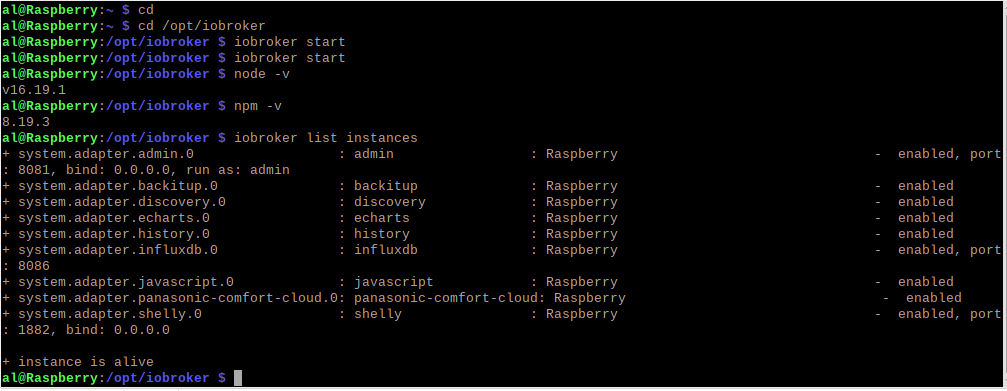
                              al@Raspberry:/opt/iobroker $ npm ls
                              iobroker.inst@3.0.0 /opt/iobroker
                              +-- @types/caseless@0.12.2 extraneous
                              +-- @types/request@2.48.8 extraneous
                              +-- @types/tough-cookie@4.0.2 extraneous
                              +-- coffeescript@1.12.7 extraneous
                              +-- define-properties@1.2.0 extraneous
                              +-- has-property-descriptors@1.0.0 extraneous
                              +-- iobroker.admin@6.3.5
                              +-- iobroker.backitup@2.5.12
                              +-- iobroker.discovery@3.1.0
                              +-- iobroker.echarts@1.0.12
                              +-- iobroker.history@2.2.4
                              +-- iobroker.influxdb@3.2.0
                              +-- iobroker.javascript@6.1.4
                              +-- iobroker.js-controller@4.0.24
                              +-- iobroker.panasonic-comfort-cloud@2.1.0
                              +-- iobroker.shelly@6.3.1
                              +-- is-nan@1.3.2 extraneous
                              +-- jsonata@1.8.6 extraneous
                              +-- minimist@1.2.8 extraneous
                              +-- node-inspect@2.0.0 extraneous
                              +-- object-keys@1.1.1 extraneous
                              +-- picocolors@1.0.0 extraneous
                              +-- suncalc2@1.8.1 extraneous
                              +-- typescript@4.7.4 extraneous
                              +-- virtual-tsc@0.6.2 extraneous
                              `-- wake_on_lan@1.0.0 extraneous
                              

                              oder kann ich das alles überspringen und bei 1.1 einsteigen?

                              Thomas BraunT 1 Antwort Letzte Antwort
                              0
                              • B balu67

                                @thomas-braun
                                ganz am Anfang deiner Anleitung heisst es "Ein Upgrade von Vorversionen auf die Version 16 / npm 8 (oder höhere Versionen) erfordert im Vorfeld einen sauberen 'npm tree'!!!."
                                meiner sieht so aus:

                                al@Raspberry:/opt/iobroker $ npm ls
                                iobroker.inst@3.0.0 /opt/iobroker
                                +-- @types/caseless@0.12.2 extraneous
                                +-- @types/request@2.48.8 extraneous
                                +-- @types/tough-cookie@4.0.2 extraneous
                                +-- coffeescript@1.12.7 extraneous
                                +-- define-properties@1.2.0 extraneous
                                +-- has-property-descriptors@1.0.0 extraneous
                                +-- iobroker.admin@6.3.5
                                +-- iobroker.backitup@2.5.12
                                +-- iobroker.discovery@3.1.0
                                +-- iobroker.echarts@1.0.12
                                +-- iobroker.history@2.2.4
                                +-- iobroker.influxdb@3.2.0
                                +-- iobroker.javascript@6.1.4
                                +-- iobroker.js-controller@4.0.24
                                +-- iobroker.panasonic-comfort-cloud@2.1.0
                                +-- iobroker.shelly@6.3.1
                                +-- is-nan@1.3.2 extraneous
                                +-- jsonata@1.8.6 extraneous
                                +-- minimist@1.2.8 extraneous
                                +-- node-inspect@2.0.0 extraneous
                                +-- object-keys@1.1.1 extraneous
                                +-- picocolors@1.0.0 extraneous
                                +-- suncalc2@1.8.1 extraneous
                                +-- typescript@4.7.4 extraneous
                                +-- virtual-tsc@0.6.2 extraneous
                                `-- wake_on_lan@1.0.0 extraneous
                                

                                oder kann ich das alles überspringen und bei 1.1 einsteigen?

                                Thomas BraunT Online
                                Thomas BraunT Online
                                Thomas Braun
                                Most Active
                                schrieb am zuletzt editiert von
                                #32

                                @balu67 sagte in iobroker lässt sich nicht mehr starten:

                                oder kann ich das alles überspringen und bei 1.1 einsteigen?

                                Ja.

                                Linux-Werkzeugkasten:
                                https://forum.iobroker.net/topic/42952/der-kleine-iobroker-linux-werkzeugkasten
                                NodeJS Fixer Skript:
                                https://forum.iobroker.net/topic/68035/iob-node-fix-skript
                                iob_diag: curl -sLf -o diag.sh https://iobroker.net/diag.sh && bash diag.sh

                                B 1 Antwort Letzte Antwort
                                0
                                • Thomas BraunT Thomas Braun

                                  @balu67 sagte in iobroker lässt sich nicht mehr starten:

                                  oder kann ich das alles überspringen und bei 1.1 einsteigen?

                                  Ja.

                                  B Offline
                                  B Offline
                                  balu67
                                  schrieb am zuletzt editiert von
                                  #33

                                  @thomas-braun

                                  am Ende steht da was von ungültigen Dateinamen!?

                                  al@Raspberry:~ $ apt policy nodejs
                                  nodejs:
                                    Installiert:           16.20.0-deb-1nodesource1
                                    Installationskandidat: 16.20.0-deb-1nodesource1
                                    Versionstabelle:
                                   *** 16.20.0-deb-1nodesource1 500
                                          500 https://deb.nodesource.com/node_16.x bullseye/main arm64 Packages
                                          100 /var/lib/dpkg/status
                                       12.22.12~dfsg-1~deb11u3 500
                                          500 http://security.debian.org/debian-security bullseye-security/main arm64 Packages
                                       12.22.5~dfsg-2~11u1 500
                                          500 http://deb.debian.org/debian bullseye/main arm64 Packages
                                  N: Datei »nodesource.list.save.1« in Verzeichnis »/etc/apt/sources.list.d/« wird ignoriert, da sie eine ungültige Dateinamen-Erweiterung hat.
                                  
                                  
                                  Thomas BraunT 2 Antworten Letzte Antwort
                                  0
                                  • B balu67

                                    @thomas-braun

                                    am Ende steht da was von ungültigen Dateinamen!?

                                    al@Raspberry:~ $ apt policy nodejs
                                    nodejs:
                                      Installiert:           16.20.0-deb-1nodesource1
                                      Installationskandidat: 16.20.0-deb-1nodesource1
                                      Versionstabelle:
                                     *** 16.20.0-deb-1nodesource1 500
                                            500 https://deb.nodesource.com/node_16.x bullseye/main arm64 Packages
                                            100 /var/lib/dpkg/status
                                         12.22.12~dfsg-1~deb11u3 500
                                            500 http://security.debian.org/debian-security bullseye-security/main arm64 Packages
                                         12.22.5~dfsg-2~11u1 500
                                            500 http://deb.debian.org/debian bullseye/main arm64 Packages
                                    N: Datei »nodesource.list.save.1« in Verzeichnis »/etc/apt/sources.list.d/« wird ignoriert, da sie eine ungültige Dateinamen-Erweiterung hat.
                                    
                                    
                                    Thomas BraunT Online
                                    Thomas BraunT Online
                                    Thomas Braun
                                    Most Active
                                    schrieb am zuletzt editiert von
                                    #34

                                    @balu67

                                    Die Quellen müssen auf .list enden. Alles andere ist ungültig.

                                    Linux-Werkzeugkasten:
                                    https://forum.iobroker.net/topic/42952/der-kleine-iobroker-linux-werkzeugkasten
                                    NodeJS Fixer Skript:
                                    https://forum.iobroker.net/topic/68035/iob-node-fix-skript
                                    iob_diag: curl -sLf -o diag.sh https://iobroker.net/diag.sh && bash diag.sh

                                    1 Antwort Letzte Antwort
                                    0
                                    • B balu67

                                      @thomas-braun

                                      am Ende steht da was von ungültigen Dateinamen!?

                                      al@Raspberry:~ $ apt policy nodejs
                                      nodejs:
                                        Installiert:           16.20.0-deb-1nodesource1
                                        Installationskandidat: 16.20.0-deb-1nodesource1
                                        Versionstabelle:
                                       *** 16.20.0-deb-1nodesource1 500
                                              500 https://deb.nodesource.com/node_16.x bullseye/main arm64 Packages
                                              100 /var/lib/dpkg/status
                                           12.22.12~dfsg-1~deb11u3 500
                                              500 http://security.debian.org/debian-security bullseye-security/main arm64 Packages
                                           12.22.5~dfsg-2~11u1 500
                                              500 http://deb.debian.org/debian bullseye/main arm64 Packages
                                      N: Datei »nodesource.list.save.1« in Verzeichnis »/etc/apt/sources.list.d/« wird ignoriert, da sie eine ungültige Dateinamen-Erweiterung hat.
                                      
                                      
                                      Thomas BraunT Online
                                      Thomas BraunT Online
                                      Thomas Braun
                                      Most Active
                                      schrieb am zuletzt editiert von Thomas Braun
                                      #35

                                      @balu67

                                      sudo mv /etc/apt/sources.list.d/nodesource.list.save.1 /etc/apt/sources.list.d/nodesource.list
                                      

                                      Linux-Werkzeugkasten:
                                      https://forum.iobroker.net/topic/42952/der-kleine-iobroker-linux-werkzeugkasten
                                      NodeJS Fixer Skript:
                                      https://forum.iobroker.net/topic/68035/iob-node-fix-skript
                                      iob_diag: curl -sLf -o diag.sh https://iobroker.net/diag.sh && bash diag.sh

                                      B 1 Antwort Letzte Antwort
                                      0
                                      • Thomas BraunT Thomas Braun

                                        @balu67

                                        sudo mv /etc/apt/sources.list.d/nodesource.list.save.1 /etc/apt/sources.list.d/nodesource.list
                                        
                                        B Offline
                                        B Offline
                                        balu67
                                        schrieb am zuletzt editiert von
                                        #36

                                        @thomas-braun
                                        ok, hab ich gemacht.

                                        al@Raspberry:~ $ sudo mv /etc/apt/sources.list.d/nodesource.list.save.1 /etc/apt/sources.list.d/nodesource.list
                                        

                                        wo muss ich dann weiter machen?

                                        Thomas BraunT 1 Antwort Letzte Antwort
                                        0
                                        • B balu67

                                          @thomas-braun
                                          ok, hab ich gemacht.

                                          al@Raspberry:~ $ sudo mv /etc/apt/sources.list.d/nodesource.list.save.1 /etc/apt/sources.list.d/nodesource.list
                                          

                                          wo muss ich dann weiter machen?

                                          Thomas BraunT Online
                                          Thomas BraunT Online
                                          Thomas Braun
                                          Most Active
                                          schrieb am zuletzt editiert von
                                          #37

                                          @balu67 Ist das jetzt alles passend?

                                          sudo apt update
                                          

                                          Dann

                                          sudo apt full-upgrade
                                          sudo reboot
                                          

                                          Linux-Werkzeugkasten:
                                          https://forum.iobroker.net/topic/42952/der-kleine-iobroker-linux-werkzeugkasten
                                          NodeJS Fixer Skript:
                                          https://forum.iobroker.net/topic/68035/iob-node-fix-skript
                                          iob_diag: curl -sLf -o diag.sh https://iobroker.net/diag.sh && bash diag.sh

                                          B 1 Antwort Letzte Antwort
                                          0
                                          Antworten
                                          • In einem neuen Thema antworten
                                          Anmelden zum Antworten
                                          • Älteste zuerst
                                          • Neuste zuerst
                                          • Meiste Stimmen


                                          Support us

                                          ioBroker
                                          Community Adapters
                                          Donate

                                          584

                                          Online

                                          32.6k

                                          Benutzer

                                          82.2k

                                          Themen

                                          1.3m

                                          Beiträge
                                          Community
                                          Impressum | Datenschutz-Bestimmungen | Nutzungsbedingungen | Einwilligungseinstellungen
                                          ioBroker Community 2014-2025
                                          logo
                                          • Anmelden

                                          • Du hast noch kein Konto? Registrieren

                                          • Anmelden oder registrieren, um zu suchen
                                          • Erster Beitrag
                                            Letzter Beitrag
                                          0
                                          • Home
                                          • Aktuell
                                          • Tags
                                          • Ungelesen 0
                                          • Kategorien
                                          • Unreplied
                                          • Beliebt
                                          • GitHub
                                          • Docu
                                          • Hilfe
