




{"errno":-111,"code":"ECONNREFUSED","...
-
@duffy sagte in {"errno":-111,"code":"ECONNREFUSED","...:
Hast du da noch eine idee?
Nöö .. ohne Infos !
z.B . Wo ist dein ioBroker installiert / wo ist Influxdb installiert.
Docker ... oder ..Die Meldung sagt aus , ... Nicht erreichbar .
Firewall aktiv oder ...
Sorry, liefere ich gerne nach.
Der iob läuft auf einem Rasperrypi 4 mit 4 GB. Auf dem selben Raspberry ist auch influxdb installiert.
Beim Backup Adapter habe ich nichts weiter verstellt, also Standardinstallation bis auf die Aktivierung für Backup von ifluxdb.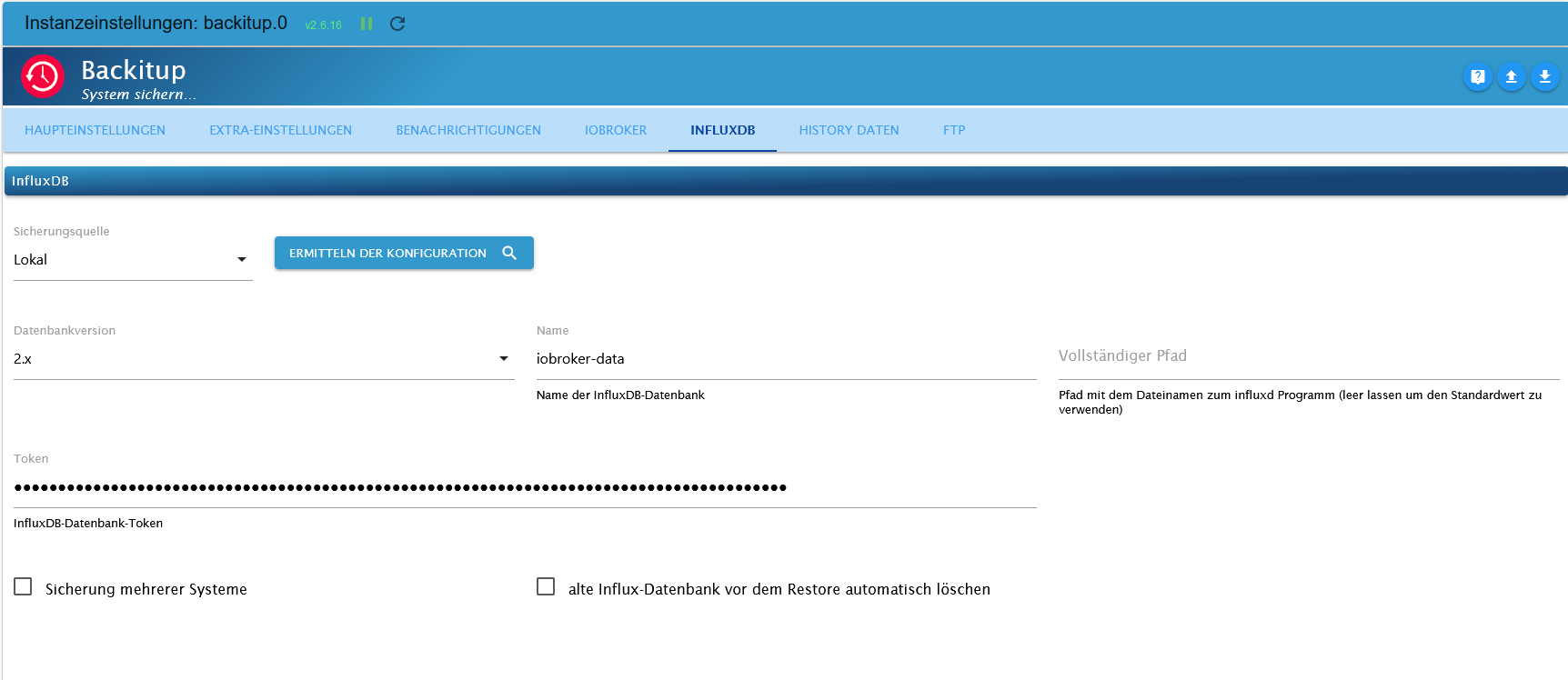
Gesichert wird das ganze per FTP auf einem USB Stick an der Fritzbox.
Wenn noch wichtige Informationen fehlen sollten bitte Bescheid geben.
Einen schönen Abend wünscht Duffy
Nix besonderes; iob auf Respberry pi 4 (8GB) mit 32 GB SSD
Node.js: v22.23.1
NPM: 10.9.4
js-controller 7.1.2
Linux: Trixie -
Sorry, liefere ich gerne nach.
Der iob läuft auf einem Rasperrypi 4 mit 4 GB. Auf dem selben Raspberry ist auch influxdb installiert.
Beim Backup Adapter habe ich nichts weiter verstellt, also Standardinstallation bis auf die Aktivierung für Backup von ifluxdb.Gesichert wird das ganze per FTP auf einem USB Stick an der Fritzbox.
Wenn noch wichtige Informationen fehlen sollten bitte Bescheid geben.
Einen schönen Abend wünscht Duffy
@duffy sagte in {"errno":-111,"code":"ECONNREFUSED","...:
Wenn noch wichtige Informationen fehlen sollten bitte Bescheid geben.
Ausgabe von :
sudo apt update
apt policy influxdb*
und die Full Ausgabe von :
iob diagAlle Ausgaben in Code-Tags >/< gesetzt !
-
Guten Abend glasfaser, anbei die Antworten auf die Fragen; ich hoffe es enspricht den Anforderungen:
pi@raspberrypi:~ $ sudo apt update
Get:1 http://security.debian.org/debian-security bullseye-security InRelease [48.4 kB]
Hit:2 http://deb.debian.org/debian bullseye InRelease
Get:3 http://deb.debian.org/debian bullseye-updates InRelease [44.1 kB]
Hit:4 https://repos.influxdata.com/debian bullseye InRelease
Hit:5 http://archive.raspberrypi.org/debian bullseye InRelease
Hit:6 https://deb.nodesource.com/node_18.x bullseye InRelease
Get:7 http://security.debian.org/debian-security bullseye-security/main armhf Packages [233 kB]
Fetched 233 kB in 2s (109 kB/s)
Reading package lists... Done
Building dependency tree... Done
Reading state information... Done
All packages are up to date.
pi@raspberrypi:~ $
+++++++++++++++++++++++++++++++++
pi@raspberrypi:~ $ apt policy influxdb*
influxdb2-cli:
  Installed: 2.7.1-2
  Candidate: 2.7.1-2
  Version table:
 *** 2.7.1-2 500
        500 https://repos.influxdata.com/debian bullseye/stable arm64 Packages
        100 /var/lib/dpkg/status
     2.6.1 500
        500 https://repos.influxdata.com/debian bullseye/stable arm64 Packages
     2.6.0 500
        500 https://repos.influxdata.com/debian bullseye/stable arm64 Packages
     2.5.0 500
        500 https://repos.influxdata.com/debian bullseye/stable arm64 Packages
     2.4.0 500
        500 https://repos.influxdata.com/debian bullseye/stable arm64 Packages
     2.3.0 500
        500 https://repos.influxdata.com/debian bullseye/stable arm64 Packages
influxdb-client:
  Installed: (none)
  Candidate: 1.6.7~rc0-1+b5
  Version table:
     1.6.7~rc0-1+b5 500
        500 http://deb.debian.org/debian bullseye/main arm64 Packages
influxdb-dev:
  Installed: (none)
  Candidate: (none)
  Version table:
influxdb2-client:
  Installed: (none)
  Candidate: 2.7.1-1
  Version table:
     2.7.1-1 500
        500 https://repos.influxdata.com/debian bullseye/stable arm64 Packages
influxdb:
  Installed: (none)
  Candidate: 1.8.10-1
  Version table:
     1.8.10-1 500
        500 https://repos.influxdata.com/debian bullseye/stable arm64 Packages
     1.6.7~rc0-1+b5 500
        500 http://deb.debian.org/debian bullseye/main arm64 Packages
influxdb2:
  Installed: 2.7.0-1
  Candidate: 2.7.0-1
  Version table:
 *** 2.7.0-1 500
        500 https://repos.influxdata.com/debian bullseye/stable arm64 Packages
        100 /var/lib/dpkg/status
     2.6.1-1 500
        500 https://repos.influxdata.com/debian bullseye/stable arm64 Packages
     2.6.0-1 500
        500 https://repos.influxdata.com/debian bullseye/stable arm64 Packages
     2.5.1-1 500
        500 https://repos.influxdata.com/debian bullseye/stable arm64 Packages
     2.4.0-1 500
        500 https://repos.influxdata.com/debian bullseye/stable arm64 Packages
     2.3.0-1 500
        500 https://repos.influxdata.com/debian bullseye/stable arm64 Packages
     2.2.0 500
        500 https://repos.influxdata.com/debian bullseye/stable arm64 Packages
pi@raspberrypi:~ $
+++++++++++++++++++++++++++++++++++++++
Skript v.2023-04-16

*** BASE SYSTEM ***
Model           : Raspberry Pi 4 Model B Rev 1.5
Architecture    : aarch64
Docker          : false
Virtualization  : none
Distributor ID: Debian
Description:    Debian GNU/Linux 11 (bullseye)
Release:        11
Codename:       bullseye

PRETTY_NAME="Debian GNU/Linux 11 (bullseye)"
NAME="Debian GNU/Linux"
VERSION_ID="11"
VERSION="11 (bullseye)"
VERSION_CODENAME=bullseye
ID=debian
HOME_URL="https://www.debian.org/"
SUPPORT_URL="https://www.debian.org/support"
BUG_REPORT_URL="https://bugs.debian.org/"

Systemuptime and Load:
 18:15:49 up 9 min,  3 users,  load average: 0.27, 0.80, 0.57
CPU threads: 4

Raspberry only:
throttled=0x0
Other values than 0x0 hint to temperature/voltage problems
temp=39.4'C
volt=0.9360V

*** Time and Time Zones ***
               Local time: Mon 2023-04-17 18:15:49 CEST
           Universal time: Mon 2023-04-17 16:15:49 UTC
                 RTC time: n/a
                Time zone: Europe/Berlin (CEST, +0200)
System clock synchronized: yes
              NTP service: active
          RTC in local TZ: no

*** User and Groups ***
pi
/home/pi
pi adm dialout cdrom sudo audio video plugdev games users input render netdev lpadmin gpio i2c spi iobroker

*** X-Server-Setup ***
X-Server:       true
Desktop:
Terminal:       tty
Boot Target:    graphical.target

*** MEMORY ***
               total        used        free      shared  buff/cache   available
Mem:            3.8G        1.8G        1.1G         21M        893M        1.9G
Swap:            99M          0B         99M
Total:          3.9G        1.8G        1.2G

         3794 M total memory
         1817 M used memory
         2060 M active memory
          449 M inactive memory
         1082 M free memory
           72 M buffer memory
          821 M swap cache
           99 M total swap
            0 M used swap
           99 M free swap

Raspberry only:
oom events: 0
lifetime oom required: 0 Mbytes
total time in oom handler: 0 ms
max time spent in oom handler: 0 ms

*** FILESYSTEM ***
Filesystem     Type      Size  Used Avail Use% Mounted on
/dev/root      ext4       59G  5.7G   51G  11% /
devtmpfs       devtmpfs  1.7G     0  1.7G   0% /dev
tmpfs          tmpfs     1.9G     0  1.9G   0% /dev/shm
tmpfs          tmpfs     759M  1.2M  758M   1% /run
tmpfs          tmpfs     5.0M  4.0K  5.0M   1% /run/lock
/dev/mmcblk0p1 vfat      255M   31M  225M  13% /boot
tmpfs          tmpfs     380M   20K  380M   1% /run/user/1000

Messages concerning ext4 filesystem in dmesg:
[Mon Apr 17 18:06:37 2023] Kernel command line: coherent_pool=1M 8250.nr_uarts=0 snd_bcm2835.enable_headphones=0 snd_bcm2835.enable_headphones=1 snd_bcm2835.enable_hdmi=1 snd_bcm2835.enable_hdmi=0  smsc95xx.macaddr=E4:5F:01:B3:1A:9B vc_mem.mem_base=0x3ec00000 vc_mem.mem_size=0x40000000  console=ttyS0,115200 console=tty1 root=PARTUUID=e938ada4-02 rootfstype=ext4 fsck.repair=yes rootwait quiet splash plymouth.ignore-serial-consoles
[Mon Apr 17 18:06:38 2023] EXT4-fs (mmcblk0p2): mounted filesystem with ordered data mode. Quota mode: none.
[Mon Apr 17 18:06:38 2023] VFS: Mounted root (ext4 filesystem) readonly on device 179:2.
[Mon Apr 17 18:06:40 2023] EXT4-fs (mmcblk0p2): re-mounted. Quota mode: none.

Show mounted filesystems (real ones only):
TARGET  SOURCE         FSTYPE OPTIONS
/       /dev/mmcblk0p2 ext4   rw,noatime
`-/boot /dev/mmcblk0p1 vfat   rw,relatime,fmask=0022,dmask=0022,codepage=437,iocharset=ascii,shortname=mixed,errors=remount-ro

Files in neuralgic directories:

/var:
521M    /var/
179M    /var/lib
161M    /var/cache
154M    /var/cache/apt
122M    /var/lib/apt/lists

Archived and active journals take up 80.0M in the file system.

/opt/iobroker/backups:
12M     /opt/iobroker/backups/

/opt/iobroker/iobroker-data:
304M    /opt/iobroker/iobroker-data/
264M    /opt/iobroker/iobroker-data/files
51M     /opt/iobroker/iobroker-data/files/javascript.admin
48M     /opt/iobroker/iobroker-data/files/telegram.admin
32M     /opt/iobroker/iobroker-data/files/javascript.admin/static/js

The five largest files in iobroker-data are:
21M     /opt/iobroker/iobroker-data/objects.jsonl
19M     /opt/iobroker/iobroker-data/files/iot.admin/static/js/main.904d455f.js.map
15M     /opt/iobroker/iobroker-data/files/telegram.admin/rules/static/js/vendors-node_modules_iobroker_adapter-react-v5_assets_devices_parseNames_d_ts-node_modules_io-1d9f06.44fe4a3f.chunk.js.map
9.7M    /opt/iobroker/iobroker-data/files/text2command.admin/static/js/main.bbfeb1bf.js.map
9.1M    /opt/iobroker/iobroker-data/files/echarts.admin/static/js/2.bbf74d5f.chunk.js.map

*** NodeJS-Installation ***

/usr/bin/nodejs         v18.16.0
/usr/bin/node           v18.16.0
/usr/bin/npm            9.5.1
/usr/bin/npx            9.5.1


nodejs:
  Installed: 18.16.0-deb-1nodesource1
  Candidate: 18.16.0-deb-1nodesource1
  Version table:
 *** 18.16.0-deb-1nodesource1 500
        500 https://deb.nodesource.com/node_18.x bullseye/main arm64 Packages
        100 /var/lib/dpkg/status
     12.22.12~dfsg-1~deb11u3 500
        500 http://security.debian.org/debian-security bullseye-security/main arm64 Packages
     12.22.5~dfsg-2~11u1 500
        500 http://deb.debian.org/debian bullseye/main arm64 Packages

Temp directories causing npm8 problem: 0
No problems detected

*** ioBroker-Installation ***

ioBroker Status
iobroker is running on this host.


Objects type: jsonl
States  type: jsonl

MULTIHOSTSERVICE/enabled: false

Core adapters versions
js-controller:  4.0.24
admin:          6.3.5
javascript:     6.1.4

Adapters from github:   3

Adapter State
+ system.adapter.admin.0                  : admin                 : raspberrypi                              -  enabled, port: 8081, bind: 0.0.0.0, run as: admin
+ system.adapter.alexa2.0                 : alexa2                : raspberrypi                              -  enabled
+ system.adapter.backitup.0               : backitup              : raspberrypi                              -  enabled
  system.adapter.deconz.0                 : deconz                : raspberrypi                              - disabled, port: 80
+ system.adapter.device-reminder.0        : device-reminder       : raspberrypi                              -  enabled
+ system.adapter.discovery.0              : discovery             : raspberrypi                              -  enabled
+ system.adapter.echarts.0                : echarts               : raspberrypi                              -  enabled
+ system.adapter.energiefluss.0           : energiefluss          : raspberrypi                              -  enabled
  system.adapter.feiertage.0              : feiertage             : raspberrypi                              -  enabled
  system.adapter.flot.0                   : flot                  : raspberrypi                              - disabled
+ system.adapter.fritzdect.0              : fritzdect             : raspberrypi                              -  enabled
+ system.adapter.history.0                : history               : raspberrypi                              -  enabled
  system.adapter.icons-addictive-flavour-png.0: icons-addictive-flavour-png: raspberrypi                              - disabled
  system.adapter.icons-mfd-png.0          : icons-mfd-png         : raspberrypi                              - disabled
  system.adapter.influxdb.0               : influxdb              : raspberrypi                              - disabled, port: 8086
+ system.adapter.info.0                   : info                  : raspberrypi                              -  enabled
+ system.adapter.iot.0                    : iot                   : raspberrypi                              -  enabled
+ system.adapter.javascript.0             : javascript            : raspberrypi                              -  enabled
+ system.adapter.mqtt.0                   : mqtt                  : raspberrypi                              -  enabled, port: 1884, bind: 0.0.0.0
+ system.adapter.mystrom.0                : mystrom               : raspberrypi                              -  enabled
+ system.adapter.net-tools.0              : net-tools             : raspberrypi                              -  enabled
+ system.adapter.opendtu.0                : opendtu               : raspberrypi                              -  enabled
+ system.adapter.pvforecast.0             : pvforecast            : raspberrypi                              -  enabled
+ system.adapter.smartcontrol.0           : smartcontrol          : raspberrypi                              -  enabled
+ system.adapter.sonoff.0                 : sonoff                : raspberrypi                              -  enabled, port: 1883, bind: 0.0.0.0
+ system.adapter.sourceanalytix.0         : sourceanalytix        : raspberrypi                              -  enabled
+ system.adapter.statistics.0             : statistics            : raspberrypi                              -  enabled
+ system.adapter.switchbot-hub.0          : switchbot-hub         : raspberrypi                              -  enabled
+ system.adapter.tankerkoenig.0           : tankerkoenig          : raspberrypi                              -  enabled
+ system.adapter.telegram.0               : telegram              : raspberrypi                              -  enabled, port: 8443, bind: 0.0.0.0
+ system.adapter.text2command.0           : text2command          : raspberrypi                              -  enabled
  system.adapter.vis-colorpicker.0        : vis-colorpicker       : raspberrypi                              - disabled
  system.adapter.vis-hqwidgets.0          : vis-hqwidgets         : raspberrypi                              - disabled
+ system.adapter.vis-inventwo.0           : vis-inventwo          : raspberrypi                              -  enabled
  system.adapter.vis-metro.0              : vis-metro             : raspberrypi                              - disabled
  system.adapter.vis-timeandweather.0     : vis-timeandweather    : raspberrypi                              - disabled
  system.adapter.vis-weather.0            : vis-weather           : raspberrypi                              - disabled
  system.adapter.vis.0                    : vis                   : raspberrypi                              -  enabled
+ system.adapter.web.0                    : web                   : raspberrypi                              -  enabled, port: 8082, bind: 0.0.0.0, run as: admin
  system.adapter.whatsapp-cmb.0           : whatsapp-cmb          : raspberrypi                              - disabled
+ system.adapter.zigbee.0                 : zigbee                : raspberrypi                              -  enabled, port: /dev/serial/by-id/usb-Silicon_Labs_Sonoff_Zigbee_3.0_USB_Dongle_Plus_0001-if00-port0

+ instance is alive

Enabled adapters with bindings
+ system.adapter.admin.0                  : admin                 : raspberrypi                              -  enabled, port: 8081, bind: 0.0.0.0, run as: admin
+ system.adapter.mqtt.0                   : mqtt                  : raspberrypi                              -  enabled, port: 1884, bind: 0.0.0.0
+ system.adapter.sonoff.0                 : sonoff                : raspberrypi                              -  enabled, port: 1883, bind: 0.0.0.0
+ system.adapter.telegram.0               : telegram              : raspberrypi                              -  enabled, port: 8443, bind: 0.0.0.0
+ system.adapter.web.0                    : web                   : raspberrypi                              -  enabled, port: 8082, bind: 0.0.0.0, run as: admin
+ system.adapter.zigbee.0                 : zigbee                : raspberrypi                              -  enabled, port: /dev/serial/by-id/usb-Silicon_Labs_Sonoff_Zigbee_3.0_USB_Dongle_Plus_0001-if00-port0

ioBroker-Repositories
stable        : http://download.iobroker.net/sources-dist.json
beta          : http://download.iobroker.net/sources-dist-latest.json

Active repo(s): stable

Installed ioBroker-Instances
Used repository: stable
Adapter    "admin"        : 6.3.5    , installed 6.3.5
Adapter    "alexa2"       : 3.23.2   , installed 3.23.2
Adapter    "backitup"     : 2.6.16   , installed 2.6.16
Adapter    "deconz"       : 1.3.21   , installed 1.3.21
Adapter    "device-reminder": 1.2.9  , installed 1.2.9
Adapter    "discovery"    : 3.1.0    , installed 3.1.0
Adapter    "echarts"      : 1.0.12   , installed 1.0.12
Adapter    "feiertage"    : 1.1.0    , installed 1.1.0
Adapter    "flot"         : 1.11.0   , installed 1.11.0
Adapter    "fritzdect"    : 2.2.6    , installed 2.2.6
Adapter    "history"      : 2.2.4    , installed 2.2.4
Adapter    "icons-addictive-flavour-png": 0.1.0, installed 0.1.0
Adapter    "icons-mfd-png": 1.1.0    , installed 1.1.0
Adapter    "influxdb"     : 3.2.0    , installed 3.2.0
Adapter    "info"         : 1.9.19   , installed 1.9.19
Adapter    "iot"          : 1.14.2   , installed 1.14.2
Adapter    "javascript"   : 6.1.4    , installed 6.1.4
Controller "js-controller": 4.0.24   , installed 4.0.24
Adapter    "mqtt"         : 4.0.7    , installed 4.0.7
Adapter    "mystrom"      : 0.0.14   , installed 0.0.14
Adapter    "net-tools"    : 0.2.0    , installed 0.2.0
Adapter    "pvforecast"   : 2.3.0    , installed 2.3.0
Adapter    "simple-api"   : 2.7.2    , installed 2.7.2
Adapter    "smartcontrol" : 1.3.2    , installed 1.3.2
Adapter    "socketio"     : 4.2.0    , installed 4.2.0
Adapter    "sonoff"       : 2.5.1    , installed 2.5.1
Adapter    "statistics"   : 2.3.0    , installed 2.3.0
Adapter    "tankerkoenig" : 3.3.7    , installed 3.3.7
Adapter    "telegram"     : 1.15.2   , installed 1.15.2
Adapter    "text2command" : 2.3.0    , installed 2.3.0
Adapter    "vis"          : 1.4.16   , installed 1.4.16
Adapter    "vis-colorpicker": 1.2.0  , installed 1.2.0
Adapter    "vis-hqwidgets": 1.3.0    , installed 1.3.0
Adapter    "vis-inventwo" : 3.3.1    , installed 3.3.1
Adapter    "vis-metro"    : 1.2.0    , installed 1.2.0
Adapter    "vis-timeandweather": 1.2.2, installed 1.2.2
Adapter    "vis-weather"  : 2.5.6    , installed 2.5.6
Adapter    "web"          : 4.3.0    , installed 4.3.0
Adapter    "whatsapp-cmb" : 0.2.3    , installed 0.2.3
Adapter    "ws"           : 1.3.0    , installed 1.3.0
Adapter    "zigbee"       : 1.8.10   , installed 1.8.10

Objects and States
Please stand by - This may take a while
Objects:        6147
States:         5432

*** OS-Repositories and Updates ***
Hit:1 http://security.debian.org/debian-security bullseye-security InRelease
Hit:2 http://deb.debian.org/debian bullseye InRelease
Hit:3 http://deb.debian.org/debian bullseye-updates InRelease
Hit:4 http://archive.raspberrypi.org/debian bullseye InRelease
Hit:5 https://repos.influxdata.com/debian bullseye InRelease
Hit:6 https://deb.nodesource.com/node_18.x bullseye InRelease
Reading package lists...
Pending Updates: 0

*** Listening Ports ***
Active Internet connections (only servers)
Proto Recv-Q Send-Q Local Address           Foreign Address         State       User       Inode      PID/Program name

tcp        0      0 0.0.0.0:22              0.0.0.0:*               LISTEN      0          14751      580/sshd: /usr/sbin
tcp        0      0 127.0.0.1:9000          0.0.0.0:*               LISTEN      1001       16754      672/iobroker.js-con
tcp        0      0 127.0.0.1:9001          0.0.0.0:*               LISTEN      1001       15217      672/iobroker.js-con
tcp        0      0 127.0.0.1:631           0.0.0.0:*               LISTEN      0          18751      1621/cupsd

tcp        0      0 0.0.0.0:5900            0.0.0.0:*               LISTEN      0          12060      566/vncserver-x11-c
tcp        0      0 0.0.0.0:1884            0.0.0.0:*               LISTEN      1001       16235      1652/io.mqtt.0

tcp        0      0 0.0.0.0:1883            0.0.0.0:*               LISTEN      1001       18813      1667/io.sonoff.0

tcp6       0      0 :::22                   :::*                    LISTEN      0          14753      580/sshd: /usr/sbin
tcp6       0      0 ::1:631                 :::*                    LISTEN      0          18750      1621/cupsd

tcp6       0      0 :::8086                 :::*                    LISTEN      999        12145      441/influxd

tcp6       0      0 :::8082                 :::*                    LISTEN      1001       22270      3020/io.web.0

tcp6       0      0 :::8081                 :::*                    LISTEN      1001       18708      1225/io.admin.0

tcp6       0      0 :::5900                 :::*                    LISTEN      0          12059      566/vncserver-x11-c
udp        0      0 0.0.0.0:68              0.0.0.0:*                           0          14877      484/dhcpcd

udp        0      0 0.0.0.0:45475           0.0.0.0:*                           108        1911       407/avahi-daemon: r
udp        0      0 0.0.0.0:631             0.0.0.0:*                           0          18404      1622/cups-browsed

udp        0      0 0.0.0.0:5353            0.0.0.0:*                           108        1909       407/avahi-daemon: r
udp6       0      0 :::56432                :::*                                108        1912       407/avahi-daemon: r
udp6       0      0 :::5353                 :::*                                108        1910       407/avahi-daemon: r

*** Log File - Last 25 Lines ***

2023-04-17 18:08:44.507  - info: switchbot-hub.0 (2940) All devices and values loaded, adapter ready
2023-04-17 18:08:44.631  - info: tankerkoenig.0 (2956) starting. Version 3.3.7 in /opt/iobroker/node_modules/iobroker.tankerkoenig, node: v18.16.0, js-controller: 4.0.24
2023-04-17 18:08:44.743  - info: tankerkoenig.0 (2956) Adapter is already in daemon mode
2023-04-17 18:08:44.744  - info: tankerkoenig.0 (2956) Sync time set to 10 minutes or 600000 ms
2023-04-17 18:08:45.100  - info: host.raspberrypi instance system.adapter.text2command.0 started with pid 2975
2023-04-17 18:08:49.197  - info: host.raspberrypi instance system.adapter.vis-inventwo.0 started with pid 2986
2023-04-17 18:08:49.422  - info: text2command.0 (2975) starting. Version 2.3.0 in /opt/iobroker/node_modules/iobroker.text2command, node: v18.16.0, js-controller: 4.0.24
2023-04-17 18:08:53.000  - info: vis-inventwo.0 (2986) starting. Version 3.3.1 in /opt/iobroker/node_modules/iobroker.vis-inventwo, node: v18.16.0, js-controller: 4.0.24
2023-04-17 18:08:57.140  - info: vis.0 (3005) starting. Version 1.4.16 in /opt/iobroker/node_modules/iobroker.vis, node: v18.16.0, js-controller: 4.0.24
2023-04-17 18:08:57.248  - info: host.raspberrypi instance system.adapter.web.0 started with pid 3020
2023-04-17 18:08:57.734  - info: vis.0 (3005) vis license is OK.
2023-04-17 18:09:01.894  - info: vis.0 (3005) Terminated (NO_ERROR): Without reason
2023-04-17 18:09:02.091  - info: alexa2.0 (1676) Subscribing to states...
2023-04-17 18:09:02.524  - info: host.raspberrypi instance system.adapter.vis.0 terminated while should be started once
2023-04-17 18:09:02.733  - info: web.0 (3020) starting. Version 4.3.0 in /opt/iobroker/node_modules/iobroker.web, node: v18.16.0, js-controller: 4.0.24
2023-04-17 18:09:03.236  - info: web.0 (3020) socket.io server listening on port 8082
2023-04-17 18:09:03.246  - info: web.0 (3020) http server listening on port 8082
2023-04-17 18:09:04.333  - info: alexa2.0 (1676) Alexa-Push-Connection (macDms = true) established. Disable Polling
2023-04-17 18:09:06.164  - info: tankerkoenig.0 (2956) Start first request
2023-04-17 18:09:30.583  - info: alexa2.0 (1676) Initialization Done ...
2023-04-17 18:09:41.318  - info: admin.0 (1225) ==> Connected system.user.admin from ::ffff:192.168.178.116
2023-04-17 18:09:47.656  - info: admin.0 (1225) ==> Connected system.user.admin from ::ffff:192.168.178.116
2023-04-17 18:13:14.233  - info: fritzdect.0 (1808) DECT ID: 130770143150-1 identified for command (state) : false
2023-04-17 18:13:14.274  - info: fritzdect.0 (1808) DECT ID: 130770137317-1 identified for command (state) : false
2023-04-17 18:13:14.280  - info: fritzdect.0 (1808) DECT ID: 130770151284-1 identified for command (state) : false
+++++++++++++++++++++++++++++++++++++++
======================= SUMMARY =======================
                     v.2023-04-16


Operatingsystem:        Debian GNU/Linux 11 (bullseye)
Kernel:                 6.1.21-v8+
Installation:           Native
Timezone:               Europe/Berlin (CEST, +0200)
User-ID:                1000
X-Server:               true
Boot Target:            graphical.target

Pending OS-Updates:     0
Pending iob updates:    0

Nodejs-Installation:    /usr/bin/nodejs         v18.16.0
                        /usr/bin/node           v18.16.0
                        /usr/bin/npm            9.5.1
                        /usr/bin/npx            9.5.1

Recommended versions are nodejs 18.x.y and npm 9.x.y
Your nodejs installation is correct

MEMORY:
               total        used        free      shared  buff/cache   available
Mem:            3.8G        1.9G        1.0G         21M        896M        1.8G
Swap:            99M          0B         99M
Total:          3.9G        1.9G        1.1G

Active iob-Instances:   29
Active repo(s): stable

ioBroker Core:          js-controller           4.0.24
                        admin                   6.3.5

ioBroker Status:        iobroker is running on this host.


Objects type: jsonl
States  type: jsonl

Status admin and web instance:
+ system.adapter.admin.0                  : admin                 : raspberrypi                              -  enabled, port: 8081, bind: 0.0.0.0, run as: admin
+ system.adapter.web.0                    : web                   : raspberrypi                              -  enabled, port: 8082, bind: 0.0.0.0, run as: admin

Objects:                6147
States:                 5432

Size of iob-Database:

21M     /opt/iobroker/iobroker-data/objects.jsonl
8.0M    /opt/iobroker/iobroker-data/states.jsonl


=================== END OF SUMMARY ====================
So das sollte es gewesen sein. Ich hoffe es hift der Fehlerfindung weiter.
Noch 1 Screenshots der vielleicht noch was helfen kann.
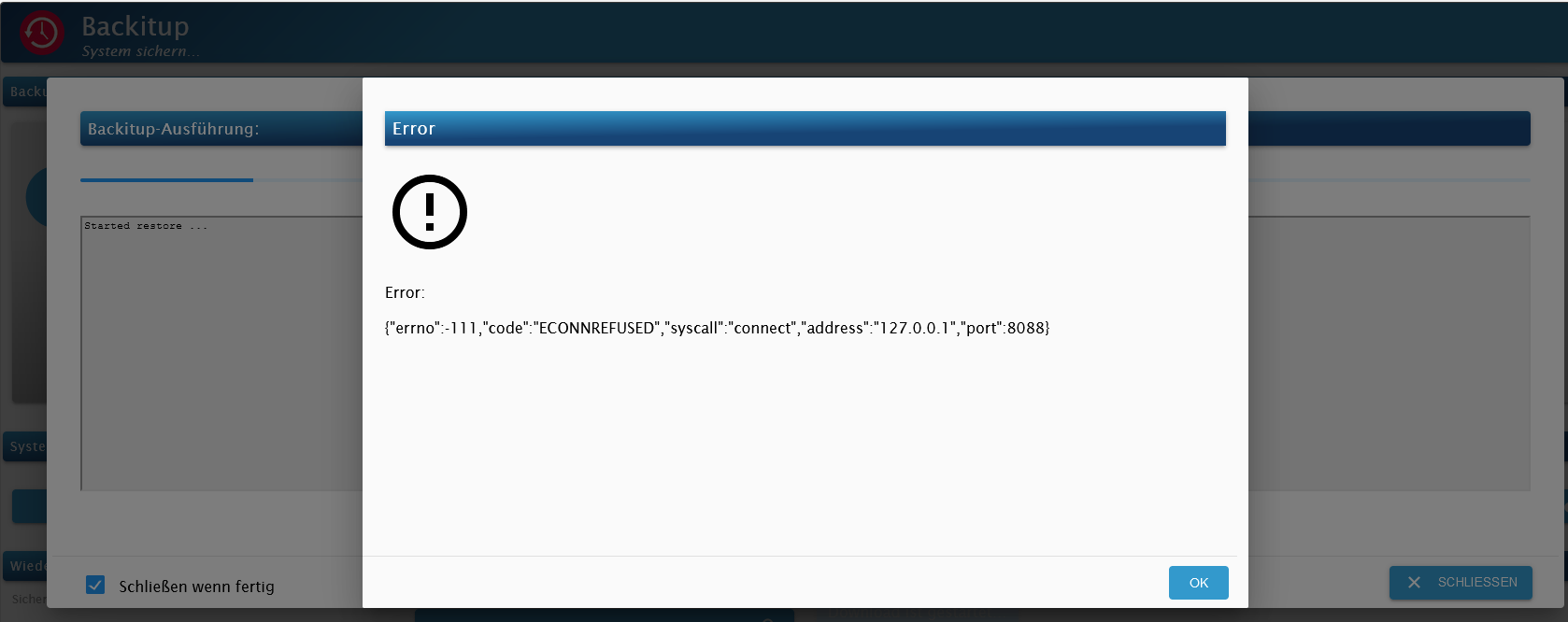
Vielen Grüße Duffy
Nix besonderes; iob auf Respberry pi 4 (8GB) mit 32 GB SSD
Node.js: v22.23.1
NPM: 10.9.4
js-controller 7.1.2
Linux: Trixie -
Guten Abend glasfaser, anbei die Antworten auf die Fragen; ich hoffe es enspricht den Anforderungen:
pi@raspberrypi:~ $ sudo apt update
Get:1 http://security.debian.org/debian-security bullseye-security InRelease [48.4 kB]
Hit:2 http://deb.debian.org/debian bullseye InRelease
Get:3 http://deb.debian.org/debian bullseye-updates InRelease [44.1 kB]
Hit:4 https://repos.influxdata.com/debian bullseye InRelease
Hit:5 http://archive.raspberrypi.org/debian bullseye InRelease
Hit:6 https://deb.nodesource.com/node_18.x bullseye InRelease
Get:7 http://security.debian.org/debian-security bullseye-security/main armhf Packages [233 kB]
Fetched 233 kB in 2s (109 kB/s)
Reading package lists... Done
Building dependency tree... Done
Reading state information... Done
All packages are up to date.
pi@raspberrypi:~ $
+++++++++++++++++++++++++++++++++
pi@raspberrypi:~ $ apt policy influxdb*
influxdb2-cli:
  Installed: 2.7.1-2
  Candidate: 2.7.1-2
  Version table:
 *** 2.7.1-2 500
        500 https://repos.influxdata.com/debian bullseye/stable arm64 Packages
        100 /var/lib/dpkg/status
     2.6.1 500
        500 https://repos.influxdata.com/debian bullseye/stable arm64 Packages
     2.6.0 500
        500 https://repos.influxdata.com/debian bullseye/stable arm64 Packages
     2.5.0 500
        500 https://repos.influxdata.com/debian bullseye/stable arm64 Packages
     2.4.0 500
        500 https://repos.influxdata.com/debian bullseye/stable arm64 Packages
     2.3.0 500
        500 https://repos.influxdata.com/debian bullseye/stable arm64 Packages
influxdb-client:
  Installed: (none)
  Candidate: 1.6.7~rc0-1+b5
  Version table:
     1.6.7~rc0-1+b5 500
        500 http://deb.debian.org/debian bullseye/main arm64 Packages
influxdb-dev:
  Installed: (none)
  Candidate: (none)
  Version table:
influxdb2-client:
  Installed: (none)
  Candidate: 2.7.1-1
  Version table:
     2.7.1-1 500
        500 https://repos.influxdata.com/debian bullseye/stable arm64 Packages
influxdb:
  Installed: (none)
  Candidate: 1.8.10-1
  Version table:
     1.8.10-1 500
        500 https://repos.influxdata.com/debian bullseye/stable arm64 Packages
     1.6.7~rc0-1+b5 500
        500 http://deb.debian.org/debian bullseye/main arm64 Packages
influxdb2:
  Installed: 2.7.0-1
  Candidate: 2.7.0-1
  Version table:
 *** 2.7.0-1 500
        500 https://repos.influxdata.com/debian bullseye/stable arm64 Packages
        100 /var/lib/dpkg/status
     2.6.1-1 500
        500 https://repos.influxdata.com/debian bullseye/stable arm64 Packages
     2.6.0-1 500
        500 https://repos.influxdata.com/debian bullseye/stable arm64 Packages
     2.5.1-1 500
        500 https://repos.influxdata.com/debian bullseye/stable arm64 Packages
     2.4.0-1 500
        500 https://repos.influxdata.com/debian bullseye/stable arm64 Packages
     2.3.0-1 500
        500 https://repos.influxdata.com/debian bullseye/stable arm64 Packages
     2.2.0 500
        500 https://repos.influxdata.com/debian bullseye/stable arm64 Packages
pi@raspberrypi:~ $
+++++++++++++++++++++++++++++++++++++++
Skript v.2023-04-16

*** BASE SYSTEM ***
Model           : Raspberry Pi 4 Model B Rev 1.5
Architecture    : aarch64
Docker          : false
Virtualization  : none
Distributor ID: Debian
Description:    Debian GNU/Linux 11 (bullseye)
Release:        11
Codename:       bullseye

PRETTY_NAME="Debian GNU/Linux 11 (bullseye)"
NAME="Debian GNU/Linux"
VERSION_ID="11"
VERSION="11 (bullseye)"
VERSION_CODENAME=bullseye
ID=debian
HOME_URL="https://www.debian.org/"
SUPPORT_URL="https://www.debian.org/support"
BUG_REPORT_URL="https://bugs.debian.org/"

Systemuptime and Load:
 18:15:49 up 9 min,  3 users,  load average: 0.27, 0.80, 0.57
CPU threads: 4

Raspberry only:
throttled=0x0
Other values than 0x0 hint to temperature/voltage problems
temp=39.4'C
volt=0.9360V

*** Time and Time Zones ***
               Local time: Mon 2023-04-17 18:15:49 CEST
           Universal time: Mon 2023-04-17 16:15:49 UTC
                 RTC time: n/a
                Time zone: Europe/Berlin (CEST, +0200)
System clock synchronized: yes
              NTP service: active
          RTC in local TZ: no

*** User and Groups ***
pi
/home/pi
pi adm dialout cdrom sudo audio video plugdev games users input render netdev lpadmin gpio i2c spi iobroker

*** X-Server-Setup ***
X-Server:       true
Desktop:
Terminal:       tty
Boot Target:    graphical.target

*** MEMORY ***
               total        used        free      shared  buff/cache   available
Mem:            3.8G        1.8G        1.1G         21M        893M        1.9G
Swap:            99M          0B         99M
Total:          3.9G        1.8G        1.2G

         3794 M total memory
         1817 M used memory
         2060 M active memory
          449 M inactive memory
         1082 M free memory
           72 M buffer memory
          821 M swap cache
           99 M total swap
            0 M used swap
           99 M free swap

Raspberry only:
oom events: 0
lifetime oom required: 0 Mbytes
total time in oom handler: 0 ms
max time spent in oom handler: 0 ms

*** FILESYSTEM ***
Filesystem     Type      Size  Used Avail Use% Mounted on
/dev/root      ext4       59G  5.7G   51G  11% /
devtmpfs       devtmpfs  1.7G     0  1.7G   0% /dev
tmpfs          tmpfs     1.9G     0  1.9G   0% /dev/shm
tmpfs          tmpfs     759M  1.2M  758M   1% /run
tmpfs          tmpfs     5.0M  4.0K  5.0M   1% /run/lock
/dev/mmcblk0p1 vfat      255M   31M  225M  13% /boot
tmpfs          tmpfs     380M   20K  380M   1% /run/user/1000

Messages concerning ext4 filesystem in dmesg:
[Mon Apr 17 18:06:37 2023] Kernel command line: coherent_pool=1M 8250.nr_uarts=0 snd_bcm2835.enable_headphones=0 snd_bcm2835.enable_headphones=1 snd_bcm2835.enable_hdmi=1 snd_bcm2835.enable_hdmi=0  smsc95xx.macaddr=E4:5F:01:B3:1A:9B vc_mem.mem_base=0x3ec00000 vc_mem.mem_size=0x40000000  console=ttyS0,115200 console=tty1 root=PARTUUID=e938ada4-02 rootfstype=ext4 fsck.repair=yes rootwait quiet splash plymouth.ignore-serial-consoles
[Mon Apr 17 18:06:38 2023] EXT4-fs (mmcblk0p2): mounted filesystem with ordered data mode. Quota mode: none.
[Mon Apr 17 18:06:38 2023] VFS: Mounted root (ext4 filesystem) readonly on device 179:2.
[Mon Apr 17 18:06:40 2023] EXT4-fs (mmcblk0p2): re-mounted. Quota mode: none.

Show mounted filesystems (real ones only):
TARGET  SOURCE         FSTYPE OPTIONS
/       /dev/mmcblk0p2 ext4   rw,noatime
`-/boot /dev/mmcblk0p1 vfat   rw,relatime,fmask=0022,dmask=0022,codepage=437,iocharset=ascii,shortname=mixed,errors=remount-ro

Files in neuralgic directories:

/var:
521M    /var/
179M    /var/lib
161M    /var/cache
154M    /var/cache/apt
122M    /var/lib/apt/lists

Archived and active journals take up 80.0M in the file system.

/opt/iobroker/backups:
12M     /opt/iobroker/backups/

/opt/iobroker/iobroker-data:
304M    /opt/iobroker/iobroker-data/
264M    /opt/iobroker/iobroker-data/files
51M     /opt/iobroker/iobroker-data/files/javascript.admin
48M     /opt/iobroker/iobroker-data/files/telegram.admin
32M     /opt/iobroker/iobroker-data/files/javascript.admin/static/js

The five largest files in iobroker-data are:
21M     /opt/iobroker/iobroker-data/objects.jsonl
19M     /opt/iobroker/iobroker-data/files/iot.admin/static/js/main.904d455f.js.map
15M     /opt/iobroker/iobroker-data/files/telegram.admin/rules/static/js/vendors-node_modules_iobroker_adapter-react-v5_assets_devices_parseNames_d_ts-node_modules_io-1d9f06.44fe4a3f.chunk.js.map
9.7M    /opt/iobroker/iobroker-data/files/text2command.admin/static/js/main.bbfeb1bf.js.map
9.1M    /opt/iobroker/iobroker-data/files/echarts.admin/static/js/2.bbf74d5f.chunk.js.map

*** NodeJS-Installation ***

/usr/bin/nodejs         v18.16.0
/usr/bin/node           v18.16.0
/usr/bin/npm            9.5.1
/usr/bin/npx            9.5.1


nodejs:
  Installed: 18.16.0-deb-1nodesource1
  Candidate: 18.16.0-deb-1nodesource1
  Version table:
 *** 18.16.0-deb-1nodesource1 500
        500 https://deb.nodesource.com/node_18.x bullseye/main arm64 Packages
        100 /var/lib/dpkg/status
     12.22.12~dfsg-1~deb11u3 500
        500 http://security.debian.org/debian-security bullseye-security/main arm64 Packages
     12.22.5~dfsg-2~11u1 500
        500 http://deb.debian.org/debian bullseye/main arm64 Packages

Temp directories causing npm8 problem: 0
No problems detected

*** ioBroker-Installation ***

ioBroker Status
iobroker is running on this host.


Objects type: jsonl
States  type: jsonl

MULTIHOSTSERVICE/enabled: false

Core adapters versions
js-controller:  4.0.24
admin:          6.3.5
javascript:     6.1.4

Adapters from github:   3

Adapter State
+ system.adapter.admin.0                  : admin                 : raspberrypi                              -  enabled, port: 8081, bind: 0.0.0.0, run as: admin
+ system.adapter.alexa2.0                 : alexa2                : raspberrypi                              -  enabled
+ system.adapter.backitup.0               : backitup              : raspberrypi                              -  enabled
  system.adapter.deconz.0                 : deconz                : raspberrypi                              - disabled, port: 80
+ system.adapter.device-reminder.0        : device-reminder       : raspberrypi                              -  enabled
+ system.adapter.discovery.0              : discovery             : raspberrypi                              -  enabled
+ system.adapter.echarts.0                : echarts               : raspberrypi                              -  enabled
+ system.adapter.energiefluss.0           : energiefluss          : raspberrypi                              -  enabled
  system.adapter.feiertage.0              : feiertage             : raspberrypi                              -  enabled
  system.adapter.flot.0                   : flot                  : raspberrypi                              - disabled
+ system.adapter.fritzdect.0              : fritzdect             : raspberrypi                              -  enabled
+ system.adapter.history.0                : history               : raspberrypi                              -  enabled
  system.adapter.icons-addictive-flavour-png.0: icons-addictive-flavour-png: raspberrypi                              - disabled
  system.adapter.icons-mfd-png.0          : icons-mfd-png         : raspberrypi                              - disabled
  system.adapter.influxdb.0               : influxdb              : raspberrypi                              - disabled, port: 8086
+ system.adapter.info.0                   : info                  : raspberrypi                              -  enabled
+ system.adapter.iot.0                    : iot                   : raspberrypi                              -  enabled
+ system.adapter.javascript.0             : javascript            : raspberrypi                              -  enabled
+ system.adapter.mqtt.0                   : mqtt                  : raspberrypi                              -  enabled, port: 1884, bind: 0.0.0.0
+ system.adapter.mystrom.0                : mystrom               : raspberrypi                              -  enabled
+ system.adapter.net-tools.0              : net-tools             : raspberrypi                              -  enabled
+ system.adapter.opendtu.0                : opendtu               : raspberrypi                              -  enabled
+ system.adapter.pvforecast.0             : pvforecast            : raspberrypi                              -  enabled
+ system.adapter.smartcontrol.0           : smartcontrol          : raspberrypi                              -  enabled
+ system.adapter.sonoff.0                 : sonoff                : raspberrypi                              -  enabled, port: 1883, bind: 0.0.0.0
+ system.adapter.sourceanalytix.0         : sourceanalytix        : raspberrypi                              -  enabled
+ system.adapter.statistics.0             : statistics            : raspberrypi                              -  enabled
+ system.adapter.switchbot-hub.0          : switchbot-hub         : raspberrypi                              -  enabled
+ system.adapter.tankerkoenig.0           : tankerkoenig          : raspberrypi                              -  enabled
+ system.adapter.telegram.0               : telegram              : raspberrypi                              -  enabled, port: 8443, bind: 0.0.0.0
+ system.adapter.text2command.0           : text2command          : raspberrypi                              -  enabled
  system.adapter.vis-colorpicker.0        : vis-colorpicker       : raspberrypi                              - disabled
  system.adapter.vis-hqwidgets.0          : vis-hqwidgets         : raspberrypi                              - disabled
+ system.adapter.vis-inventwo.0           : vis-inventwo          : raspberrypi                              -  enabled
  system.adapter.vis-metro.0              : vis-metro             : raspberrypi                              - disabled
  system.adapter.vis-timeandweather.0     : vis-timeandweather    : raspberrypi                              - disabled
  system.adapter.vis-weather.0            : vis-weather           : raspberrypi                              - disabled
  system.adapter.vis.0                    : vis                   : raspberrypi                              -  enabled
+ system.adapter.web.0                    : web                   : raspberrypi                              -  enabled, port: 8082, bind: 0.0.0.0, run as: admin
  system.adapter.whatsapp-cmb.0           : whatsapp-cmb          : raspberrypi                              - disabled
+ system.adapter.zigbee.0                 : zigbee                : raspberrypi                              -  enabled, port: /dev/serial/by-id/usb-Silicon_Labs_Sonoff_Zigbee_3.0_USB_Dongle_Plus_0001-if00-port0

+ instance is alive

Enabled adapters with bindings
+ system.adapter.admin.0                  : admin                 : raspberrypi                              -  enabled, port: 8081, bind: 0.0.0.0, run as: admin
+ system.adapter.mqtt.0                   : mqtt                  : raspberrypi                              -  enabled, port: 1884, bind: 0.0.0.0
+ system.adapter.sonoff.0                 : sonoff                : raspberrypi                              -  enabled, port: 1883, bind: 0.0.0.0
+ system.adapter.telegram.0               : telegram              : raspberrypi                              -  enabled, port: 8443, bind: 0.0.0.0
+ system.adapter.web.0                    : web                   : raspberrypi                              -  enabled, port: 8082, bind: 0.0.0.0, run as: admin
+ system.adapter.zigbee.0                 : zigbee                : raspberrypi                              -  enabled, port: /dev/serial/by-id/usb-Silicon_Labs_Sonoff_Zigbee_3.0_USB_Dongle_Plus_0001-if00-port0

ioBroker-Repositories
stable        : http://download.iobroker.net/sources-dist.json
beta          : http://download.iobroker.net/sources-dist-latest.json

Active repo(s): stable

Installed ioBroker-Instances
Used repository: stable
Adapter    "admin"        : 6.3.5    , installed 6.3.5
Adapter    "alexa2"       : 3.23.2   , installed 3.23.2
Adapter    "backitup"     : 2.6.16   , installed 2.6.16
Adapter    "deconz"       : 1.3.21   , installed 1.3.21
Adapter    "device-reminder": 1.2.9  , installed 1.2.9
Adapter    "discovery"    : 3.1.0    , installed 3.1.0
Adapter    "echarts"      : 1.0.12   , installed 1.0.12
Adapter    "feiertage"    : 1.1.0    , installed 1.1.0
Adapter    "flot"         : 1.11.0   , installed 1.11.0
Adapter    "fritzdect"    : 2.2.6    , installed 2.2.6
Adapter    "history"      : 2.2.4    , installed 2.2.4
Adapter    "icons-addictive-flavour-png": 0.1.0, installed 0.1.0
Adapter    "icons-mfd-png": 1.1.0    , installed 1.1.0
Adapter    "influxdb"     : 3.2.0    , installed 3.2.0
Adapter    "info"         : 1.9.19   , installed 1.9.19
Adapter    "iot"          : 1.14.2   , installed 1.14.2
Adapter    "javascript"   : 6.1.4    , installed 6.1.4
Controller "js-controller": 4.0.24   , installed 4.0.24
Adapter    "mqtt"         : 4.0.7    , installed 4.0.7
Adapter    "mystrom"      : 0.0.14   , installed 0.0.14
Adapter    "net-tools"    : 0.2.0    , installed 0.2.0
Adapter    "pvforecast"   : 2.3.0    , installed 2.3.0
Adapter    "simple-api"   : 2.7.2    , installed 2.7.2
Adapter    "smartcontrol" : 1.3.2    , installed 1.3.2
Adapter    "socketio"     : 4.2.0    , installed 4.2.0
Adapter    "sonoff"       : 2.5.1    , installed 2.5.1
Adapter    "statistics"   : 2.3.0    , installed 2.3.0
Adapter    "tankerkoenig" : 3.3.7    , installed 3.3.7
Adapter    "telegram"     : 1.15.2   , installed 1.15.2
Adapter    "text2command" : 2.3.0    , installed 2.3.0
Adapter    "vis"          : 1.4.16   , installed 1.4.16
Adapter    "vis-colorpicker": 1.2.0  , installed 1.2.0
Adapter    "vis-hqwidgets": 1.3.0    , installed 1.3.0
Adapter    "vis-inventwo" : 3.3.1    , installed 3.3.1
Adapter    "vis-metro"    : 1.2.0    , installed 1.2.0
Adapter    "vis-timeandweather": 1.2.2, installed 1.2.2
Adapter    "vis-weather"  : 2.5.6    , installed 2.5.6
Adapter    "web"          : 4.3.0    , installed 4.3.0
Adapter    "whatsapp-cmb" : 0.2.3    , installed 0.2.3
Adapter    "ws"           : 1.3.0    , installed 1.3.0
Adapter    "zigbee"       : 1.8.10   , installed 1.8.10

Objects and States
Please stand by - This may take a while
Objects:        6147
States:         5432

*** OS-Repositories and Updates ***
Hit:1 http://security.debian.org/debian-security bullseye-security InRelease
Hit:2 http://deb.debian.org/debian bullseye InRelease
Hit:3 http://deb.debian.org/debian bullseye-updates InRelease
Hit:4 http://archive.raspberrypi.org/debian bullseye InRelease
Hit:5 https://repos.influxdata.com/debian bullseye InRelease
Hit:6 https://deb.nodesource.com/node_18.x bullseye InRelease
Reading package lists...
Pending Updates: 0

*** Listening Ports ***
Active Internet connections (only servers)
Proto Recv-Q Send-Q Local Address           Foreign Address         State       User       Inode      PID/Program name

tcp        0      0 0.0.0.0:22              0.0.0.0:*               LISTEN      0          14751      580/sshd: /usr/sbin
tcp        0      0 127.0.0.1:9000          0.0.0.0:*               LISTEN      1001       16754      672/iobroker.js-con
tcp        0      0 127.0.0.1:9001          0.0.0.0:*               LISTEN      1001       15217      672/iobroker.js-con
tcp        0      0 127.0.0.1:631           0.0.0.0:*               LISTEN      0          18751      1621/cupsd

tcp        0      0 0.0.0.0:5900            0.0.0.0:*               LISTEN      0          12060      566/vncserver-x11-c
tcp        0      0 0.0.0.0:1884            0.0.0.0:*               LISTEN      1001       16235      1652/io.mqtt.0

tcp        0      0 0.0.0.0:1883            0.0.0.0:*               LISTEN      1001       18813      1667/io.sonoff.0

tcp6       0      0 :::22                   :::*                    LISTEN      0          14753      580/sshd: /usr/sbin
tcp6       0      0 ::1:631                 :::*                    LISTEN      0          18750      1621/cupsd

tcp6       0      0 :::8086                 :::*                    LISTEN      999        12145      441/influxd

tcp6       0      0 :::8082                 :::*                    LISTEN      1001       22270      3020/io.web.0

tcp6       0      0 :::8081                 :::*                    LISTEN      1001       18708      1225/io.admin.0

tcp6       0      0 :::5900                 :::*                    LISTEN      0          12059      566/vncserver-x11-c
udp        0      0 0.0.0.0:68              0.0.0.0:*                           0          14877      484/dhcpcd

udp        0      0 0.0.0.0:45475           0.0.0.0:*                           108        1911       407/avahi-daemon: r
udp        0      0 0.0.0.0:631             0.0.0.0:*                           0          18404      1622/cups-browsed

udp        0      0 0.0.0.0:5353            0.0.0.0:*                           108        1909       407/avahi-daemon: r
udp6       0      0 :::56432                :::*                                108        1912       407/avahi-daemon: r
udp6       0      0 :::5353                 :::*                                108        1910       407/avahi-daemon: r

*** Log File - Last 25 Lines ***

2023-04-17 18:08:44.507  - info: switchbot-hub.0 (2940) All devices and values loaded, adapter ready
2023-04-17 18:08:44.631  - info: tankerkoenig.0 (2956) starting. Version 3.3.7 in /opt/iobroker/node_modules/iobroker.tankerkoenig, node: v18.16.0, js-controller: 4.0.24
2023-04-17 18:08:44.743  - info: tankerkoenig.0 (2956) Adapter is already in daemon mode
2023-04-17 18:08:44.744  - info: tankerkoenig.0 (2956) Sync time set to 10 minutes or 600000 ms
2023-04-17 18:08:45.100  - info: host.raspberrypi instance system.adapter.text2command.0 started with pid 2975
2023-04-17 18:08:49.197  - info: host.raspberrypi instance system.adapter.vis-inventwo.0 started with pid 2986
2023-04-17 18:08:49.422  - info: text2command.0 (2975) starting. Version 2.3.0 in /opt/iobroker/node_modules/iobroker.text2command, node: v18.16.0, js-controller: 4.0.24
2023-04-17 18:08:53.000  - info: vis-inventwo.0 (2986) starting. Version 3.3.1 in /opt/iobroker/node_modules/iobroker.vis-inventwo, node: v18.16.0, js-controller: 4.0.24
2023-04-17 18:08:57.140  - info: vis.0 (3005) starting. Version 1.4.16 in /opt/iobroker/node_modules/iobroker.vis, node: v18.16.0, js-controller: 4.0.24
2023-04-17 18:08:57.248  - info: host.raspberrypi instance system.adapter.web.0 started with pid 3020
2023-04-17 18:08:57.734  - info: vis.0 (3005) vis license is OK.
2023-04-17 18:09:01.894  - info: vis.0 (3005) Terminated (NO_ERROR): Without reason
2023-04-17 18:09:02.091  - info: alexa2.0 (1676) Subscribing to states...
2023-04-17 18:09:02.524  - info: host.raspberrypi instance system.adapter.vis.0 terminated while should be started once
2023-04-17 18:09:02.733  - info: web.0 (3020) starting. Version 4.3.0 in /opt/iobroker/node_modules/iobroker.web, node: v18.16.0, js-controller: 4.0.24
2023-04-17 18:09:03.236  - info: web.0 (3020) socket.io server listening on port 8082
2023-04-17 18:09:03.246  - info: web.0 (3020) http server listening on port 8082
2023-04-17 18:09:04.333  - info: alexa2.0 (1676) Alexa-Push-Connection (macDms = true) established. Disable Polling
2023-04-17 18:09:06.164  - info: tankerkoenig.0 (2956) Start first request
2023-04-17 18:09:30.583  - info: alexa2.0 (1676) Initialization Done ...
2023-04-17 18:09:41.318  - info: admin.0 (1225) ==> Connected system.user.admin from ::ffff:192.168.178.116
2023-04-17 18:09:47.656  - info: admin.0 (1225) ==> Connected system.user.admin from ::ffff:192.168.178.116
2023-04-17 18:13:14.233  - info: fritzdect.0 (1808) DECT ID: 130770143150-1 identified for command (state) : false
2023-04-17 18:13:14.274  - info: fritzdect.0 (1808) DECT ID: 130770137317-1 identified for command (state) : false
2023-04-17 18:13:14.280  - info: fritzdect.0 (1808) DECT ID: 130770151284-1 identified for command (state) : false
+++++++++++++++++++++++++++++++++++++++
======================= SUMMARY =======================
                     v.2023-04-16


Operatingsystem:        Debian GNU/Linux 11 (bullseye)
Kernel:                 6.1.21-v8+
Installation:           Native
Timezone:               Europe/Berlin (CEST, +0200)
User-ID:                1000
X-Server:               true
Boot Target:            graphical.target

Pending OS-Updates:     0
Pending iob updates:    0

Nodejs-Installation:    /usr/bin/nodejs         v18.16.0
                        /usr/bin/node           v18.16.0
                        /usr/bin/npm            9.5.1
                        /usr/bin/npx            9.5.1

Recommended versions are nodejs 18.x.y and npm 9.x.y
Your nodejs installation is correct

MEMORY:
               total        used        free      shared  buff/cache   available
Mem:            3.8G        1.9G        1.0G         21M        896M        1.8G
Swap:            99M          0B         99M
Total:          3.9G        1.9G        1.1G

Active iob-Instances:   29
Active repo(s): stable

ioBroker Core:          js-controller           4.0.24
                        admin                   6.3.5

ioBroker Status:        iobroker is running on this host.


Objects type: jsonl
States  type: jsonl

Status admin and web instance:
+ system.adapter.admin.0                  : admin                 : raspberrypi                              -  enabled, port: 8081, bind: 0.0.0.0, run as: admin
+ system.adapter.web.0                    : web                   : raspberrypi                              -  enabled, port: 8082, bind: 0.0.0.0, run as: admin

Objects:                6147
States:                 5432

Size of iob-Database:

21M     /opt/iobroker/iobroker-data/objects.jsonl
8.0M    /opt/iobroker/iobroker-data/states.jsonl


=================== END OF SUMMARY ====================
So das sollte es gewesen sein. Ich hoffe es hift der Fehlerfindung weiter.
Noch 1 Screenshots der vielleicht noch was helfen kann.
Vielen Grüße Duffy
Den influxdb2-client musst du noch nachinstallieren.
Und den Desktop würde ich auch ausknipsen.
-
Den influxdb2-client musst du noch nachinstallieren.
Und den Desktop würde ich auch ausknipsen.
Hallo thomas-braun,
"Den influxdb2-client musst du noch nachinstallieren."
Wie geht das? ich habe influxDB so installiert wie es im ioBrokerkurs gezeigt wurde, sowohl bei der Erstinstallation von der auch die Backups kommen als auch bei der Neuinstallation.
Aber wenn du mir sagst wie das geht würde ich das gerne mal nachholen.
"Und den Desktop würde ich auch ausknipsen."
du meinst über Sudo raspi-config?
Den Desktop hatte ich eigentlich nur installiert um Wlan und Bluetooth abzuschalten
Viele Grüße Duffy
Nix besonderes; iob auf Respberry pi 4 (8GB) mit 32 GB SSD
Node.js: v22.23.1
NPM: 10.9.4
js-controller 7.1.2
Linux: Trixie -
Hallo thomas-braun,
"Den influxdb2-client musst du noch nachinstallieren."
Wie geht das? ich habe influxDB so installiert wie es im ioBrokerkurs gezeigt wurde, sowohl bei der Erstinstallation von der auch die Backups kommen als auch bei der Neuinstallation.
Aber wenn du mir sagst wie das geht würde ich das gerne mal nachholen.
"Und den Desktop würde ich auch ausknipsen."
du meinst über Sudo raspi-config?
Den Desktop hatte ich eigentlich nur installiert um Wlan und Bluetooth abzuschalten
Viele Grüße Duffy
Ich glaube ich hab das was verwechselt.
influxdb2-cli ist ja installiert.
Haben die das bei influx jetzt anders gepackt?
Was ist der Unterschied zwischen influxdb2-cli und influxdb2-client? Ich meine bislang wäre das nur ein Zusatz-Paket gewesen. -
Hallo thomas-braun,
"Den influxdb2-client musst du noch nachinstallieren."
Wie geht das? ich habe influxDB so installiert wie es im ioBrokerkurs gezeigt wurde, sowohl bei der Erstinstallation von der auch die Backups kommen als auch bei der Neuinstallation.
Aber wenn du mir sagst wie das geht würde ich das gerne mal nachholen.
"Und den Desktop würde ich auch ausknipsen."
du meinst über Sudo raspi-config?
Den Desktop hatte ich eigentlich nur installiert um Wlan und Bluetooth abzuschalten
Viele Grüße Duffy
@duffy sagte in {"errno":-111,"code":"ECONNREFUSED","...:
"Und den Desktop würde ich auch ausknipsen."
du meinst über Sudo raspi-config?
Den Desktop hatte ich eigentlich nur installiert um Wlan und Bluetooth abzuschaltenKann man alles in raspi-config machen. Natürlich auch ohne Desktop. Wäre ja widersinnig, wenn das nicht auch per Kommandozeile ginge.
-
Ich glaube ich hab das was verwechselt.
influxdb2-cli ist ja installiert.
Haben die das bei influx jetzt anders gepackt?
Was ist der Unterschied zwischen influxdb2-cli und influxdb2-client? Ich meine bislang wäre das nur ein Zusatz-Paket gewesen.Ich kann da gar nichts zu sagen, ich tippe (kopiere) einfach nur die Befehle.
Aber die waren so:wget -qO- https://repos.influxdata.com/influxdata-archive_compat.key | gpg --dearmor | sudo tee /usr/share/keyrings/influxdata-archive_compat.gpg > /dev/null echo "deb [signed-by=/usr/share/keyrings/influxdata-archive_compat.gpg] https://repos.influxdata.com/debian $(lsb_release -cs) stable" | sudo tee /etc/apt/sources.list.d/influxdb.list > /dev/null sudo apt update sudo apt full-upgrade sudo apt install influxdb2 sudo service influxdb startVielleicht hilft dir das bei der Antwort zu deiner Fage.
Gruß Duffy
-
@duffy sagte in {"errno":-111,"code":"ECONNREFUSED","...:
"Und den Desktop würde ich auch ausknipsen."
du meinst über Sudo raspi-config?
Den Desktop hatte ich eigentlich nur installiert um Wlan und Bluetooth abzuschaltenKann man alles in raspi-config machen. Natürlich auch ohne Desktop. Wäre ja widersinnig, wenn das nicht auch per Kommandozeile ginge.
"Kann man alles in raspi-config machen. Natürlich auch ohne Desktop. Wäre ja widersinnig, wenn das nicht auch per Kommandozeile ginge."
Wie vermutlich unschwer zu erkennen ist bin ich blutiger Pi Anfänger und da hat man mir das so geraten.
Es wäre fast nicht möglich ohne Desktopoberfläche Wlan und Bluetooth auszuschalten.
Auch hatte ich im Netz gelesen das beim Pi das Wlan nie wirklich richtig aus ist.Wo hätte ich das den in der config oder über Komandozeile einstellen müssen, mit welchen Befehlen?
Gruß Duffy
Nix besonderes; iob auf Respberry pi 4 (8GB) mit 32 GB SSD
Node.js: v22.23.1
NPM: 10.9.4
js-controller 7.1.2
Linux: Trixie -
"Kann man alles in raspi-config machen. Natürlich auch ohne Desktop. Wäre ja widersinnig, wenn das nicht auch per Kommandozeile ginge."
Wie vermutlich unschwer zu erkennen ist bin ich blutiger Pi Anfänger und da hat man mir das so geraten.
Es wäre fast nicht möglich ohne Desktopoberfläche Wlan und Bluetooth auszuschalten.
Auch hatte ich im Netz gelesen das beim Pi das Wlan nie wirklich richtig aus ist.Wo hätte ich das den in der config oder über Komandozeile einstellen müssen, mit welchen Befehlen?
Gruß Duffy
@duffy sagte in {"errno":-111,"code":"ECONNREFUSED","...:
Auch hatte ich im Netz gelesen das beim Pi das Wlan nie wirklich richtig aus ist.
Das ist richtig, da liegt immer Spannung an und der funkt da lustig leer durch die Gegend.
Ich meinte unter Interfaces kann man Bluetooth ausknipsen. WLAN einfach nicht konfigurieren.
-
@thomas-braun sagte in {"errno":-111,"code":"ECONNREFUSED","...:
Was ist der Unterschied zwischen influxdb2-cli und influxdb2-client? Ich meine bislang wäre das nur ein Zusatz-Paket gewesen.
"influxdb2-client" kenne ich nur in Verbindung mit Python und hat meines Wissens nichts mit der CLI zu tun. influxdb2-cli ist das, was man hier benötigt
NUC10I3+Ubuntu+Docker+ioBroker+influxDB2+Node Red+EMQX+Grafana
Pi-hole, Traefik, Checkmk, Conbee II+Zigbee2MQTT, ESPSomfy-RTS, LoRaWAN
Benutzt das Voting im Beitrag, wenn er euch geholfen hat.
-
@thomas-braun sagte in {"errno":-111,"code":"ECONNREFUSED","...:
Was ist der Unterschied zwischen influxdb2-cli und influxdb2-client? Ich meine bislang wäre das nur ein Zusatz-Paket gewesen.
"influxdb2-client" kenne ich nur in Verbindung mit Python und hat meines Wissens nichts mit der CLI zu tun. influxdb2-cli ist das, was man hier benötigt
Hallo marc-berg,
„influxdb2-cli ist das, was man hier benötigt“
Soll das heissen das das bei mir fehlt? Ich bin etwas verwirrt.
Viele Grüße
Nix besonderes; iob auf Respberry pi 4 (8GB) mit 32 GB SSD
Node.js: v22.23.1
NPM: 10.9.4
js-controller 7.1.2
Linux: Trixie -
Hallo marc-berg,
„influxdb2-cli ist das, was man hier benötigt“
Soll das heissen das das bei mir fehlt? Ich bin etwas verwirrt.
Viele Grüße
@duffy sagte in {"errno":-111,"code":"ECONNREFUSED","...:
Hallo marc-berg,
„influxdb2-cli ist das, was man hier benötigt“
Soll das heissen das das bei mir fehlt? Ich bin etwas verwirrt.
Viele Grüße
Hast Du doch drauf. Alles gut (von DER Seite)
NUC10I3+Ubuntu+Docker+ioBroker+influxDB2+Node Red+EMQX+Grafana
Pi-hole, Traefik, Checkmk, Conbee II+Zigbee2MQTT, ESPSomfy-RTS, LoRaWAN
Benutzt das Voting im Beitrag, wenn er euch geholfen hat.
-
@duffy sagte in {"errno":-111,"code":"ECONNREFUSED","...:
Hallo marc-berg,
„influxdb2-cli ist das, was man hier benötigt“
Soll das heissen das das bei mir fehlt? Ich bin etwas verwirrt.
Viele Grüße
Hast Du doch drauf. Alles gut (von DER Seite)
Nix besonderes; iob auf Respberry pi 4 (8GB) mit 32 GB SSD
Node.js: v22.23.1
NPM: 10.9.4
js-controller 7.1.2
Linux: Trixie -
@duffy
Was ist jetzt eigentlich aus deinem Problem geworden?NUC10I3+Ubuntu+Docker+ioBroker+influxDB2+Node Red+EMQX+Grafana
Pi-hole, Traefik, Checkmk, Conbee II+Zigbee2MQTT, ESPSomfy-RTS, LoRaWAN
Benutzt das Voting im Beitrag, wenn er euch geholfen hat.
-
@duffy sagte in {"errno":-111,"code":"ECONNREFUSED","...:
Leider noch nichts.
Viele Grüße
Das ist sehr seltsam. Wenn du influxdb V2 auswählst, dürfte niemals Port 8088 angemeckert werden. Die V2 kommuniziert ausschließlich via 8086. Da ist irgendwas schief. Mein erster Versuch wäre, einfach nochmal die Auswahlfelder für die DB Version von 2.x auf 1.x und zurück zu ändern, zwischendurch mal speichern. Try and error, aber was soll's...
NUC10I3+Ubuntu+Docker+ioBroker+influxDB2+Node Red+EMQX+Grafana
Pi-hole, Traefik, Checkmk, Conbee II+Zigbee2MQTT, ESPSomfy-RTS, LoRaWAN
Benutzt das Voting im Beitrag, wenn er euch geholfen hat.
-
@duffy Erstmal würde ich das Backup lokal ablegen und dann aus der lokalen Quelle wiederherstellen.
FTP ist da nicht optimal
Dann gibt es in der Doku von Backitup eine Anleitung zum Restore von Influx 2.x
-
@duffy sagte in {"errno":-111,"code":"ECONNREFUSED","...:
Leider noch nichts.
Viele Grüße
Das ist sehr seltsam. Wenn du influxdb V2 auswählst, dürfte niemals Port 8088 angemeckert werden. Die V2 kommuniziert ausschließlich via 8086. Da ist irgendwas schief. Mein erster Versuch wäre, einfach nochmal die Auswahlfelder für die DB Version von 2.x auf 1.x und zurück zu ändern, zwischendurch mal speichern. Try and error, aber was soll's...
Hast du den Backup Adapter im Einsatz für influxdb2?
Nix besonderes; iob auf Respberry pi 4 (8GB) mit 32 GB SSD
Node.js: v22.23.1
NPM: 10.9.4
js-controller 7.1.2
Linux: Trixie -
Hast du den Backup Adapter im Einsatz für influxdb2?





Hey! Du scheinst an dieser Unterhaltung interessiert zu sein, hast aber noch kein Konto.
Hast du es satt, bei jedem Besuch durch die gleichen Beiträge zu scrollen? Wenn du dich für ein Konto anmeldest, kommst du immer genau dorthin zurück, wo du zuvor warst, und kannst dich über neue Antworten benachrichtigen lassen (entweder per E-Mail oder Push-Benachrichtigung). Du kannst auch Lesezeichen speichern und Beiträge positiv bewerten, um anderen Community-Mitgliedern deine Wertschätzung zu zeigen.
Mit deinem Input könnte dieser Beitrag noch besser werden 💗
Registrieren Anmelden459
Online33.0k
Benutzer83.5k
Themen1.3m
Beiträge