



Skip to content
  • Home
  • Aktuell
  • Tags
  • 0 Ungelesen 0
  • Kategorien
  • Unreplied
  • Beliebt
  • GitHub
  • Docu
  • Hilfe
Skins
  • Light
  • Brite
  • Cerulean
  • Cosmo
  • Flatly
  • Journal
  • Litera
  • Lumen
  • Lux
  • Materia
  • Minty
  • Morph
  • Pulse
  • Sandstone
  • Simplex
  • Sketchy
  • Spacelab
  • United
  • Yeti
  • Zephyr
  • Dark
  • Cyborg
  • Darkly
  • Quartz
  • Slate
  • Solar
  • Superhero
  • Vapor

  • Standard: (Kein Skin)
  • Kein Skin
Einklappen
ioBroker Logo

Community Forum

donate donate
  1. ioBroker Community Home
  2. Deutsch
  3. ioBroker Allgemein
  4. 2 Fehler beim Backitup Restore
NEWS

  • UPDATE 31.10.: Amazon Alexa - ioBroker Skill läuft aus ?
    apollon77A
    apollon77
    48
    3
    8.8k

  • Monatsrückblick – September 2025
    BluefoxB
    Bluefox
    13
    1
    2.2k

  • Neues Video "KI im Smart Home" - ioBroker plus n8n
    BluefoxB
    Bluefox
    16
    1
    3.2k

2 Fehler beim Backitup Restore

Geplant Angeheftet Gesperrt Verschoben ioBroker Allgemein
92 Beiträge 8 Kommentatoren 10.3k Aufrufe 8 Watching
  • Älteste zuerst
  • Neuste zuerst
  • Meiste Stimmen
Antworten
  • In einem neuen Thema antworten
Anmelden zum Antworten
Dieses Thema wurde gelöscht. Nur Nutzer mit entsprechenden Rechten können es sehen.
  • DJMarc75D DJMarc75

    @cbrocker Welche Version vom Backitup ist installiert?

    C Offline
    C Offline
    cbrocker
    schrieb am zuletzt editiert von
    #14

    @djmarc75 die v2.6.16.

    aber ich glaube, mit dem Adapter hat es nichts zu tun. Der schickt die Befehle ja nur in die CLI.
    Ich denke eher, ein Rechteproblem..

    Ich bin gerade mal mit FileZilla in den Ordner /opt/iobroker/backups. Die Dateien dort haben die Rechte 755. Wenn ich die Dateien mit 777 ändern möchte, kommt im Filezilla "Permisson denied".

    Kann das der Grund sein?

    Proxmox Cluster mit ioBroker, Wireguard, HomeAssistant (Testsystem), paperlessNGX, MariaDB, PiHole, Grafana, InfluxDB, 1 x BKW 600 Wp, 2 x BKW 400 Wp, 2 x SolarFlow 800 Pro mit 11,52 kWh Akku und 3,48 kWp, OpenDTU, AhoyDTU, HmIP, Shellys, AVM LAN/WLAN

    Thomas BraunT DJMarc75D 2 Antworten Letzte Antwort
    0
    • C cbrocker

      @djmarc75 die v2.6.16.

      aber ich glaube, mit dem Adapter hat es nichts zu tun. Der schickt die Befehle ja nur in die CLI.
      Ich denke eher, ein Rechteproblem..

      Ich bin gerade mal mit FileZilla in den Ordner /opt/iobroker/backups. Die Dateien dort haben die Rechte 755. Wenn ich die Dateien mit 777 ändern möchte, kommt im Filezilla "Permisson denied".

      Kann das der Grund sein?

      Thomas BraunT Online
      Thomas BraunT Online
      Thomas Braun
      Most Active
      schrieb am zuletzt editiert von Thomas Braun
      #15

      @cbrocker sagte in 2 Fehler beim Backitup Restore:

      Die Dateien dort haben die Rechte 755. Wenn ich die Dateien mit 777 ändern möchte, kommt im Filezilla "Permisson denied".

      Man fummelt da nicht herum.
      Mountest du ein Dateisystem dorthin?

      Jag den Fixer über das System.

      Linux-Werkzeugkasten:
      https://forum.iobroker.net/topic/42952/der-kleine-iobroker-linux-werkzeugkasten
      NodeJS Fixer Skript:
      https://forum.iobroker.net/topic/68035/iob-node-fix-skript
      iob_diag: curl -sLf -o diag.sh https://iobroker.net/diag.sh && bash diag.sh

      C 2 Antworten Letzte Antwort
      0
      • Thomas BraunT Thomas Braun

        @cbrocker sagte in 2 Fehler beim Backitup Restore:

        Die Dateien dort haben die Rechte 755. Wenn ich die Dateien mit 777 ändern möchte, kommt im Filezilla "Permisson denied".

        Man fummelt da nicht herum.
        Mountest du ein Dateisystem dorthin?

        Jag den Fixer über das System.

        C Offline
        C Offline
        cbrocker
        schrieb am zuletzt editiert von
        #16

        @thomas-braun nur das Mounting des Adapters. Im Adapter habe ich "mit sudo" aktiviert

        Proxmox Cluster mit ioBroker, Wireguard, HomeAssistant (Testsystem), paperlessNGX, MariaDB, PiHole, Grafana, InfluxDB, 1 x BKW 600 Wp, 2 x BKW 400 Wp, 2 x SolarFlow 800 Pro mit 11,52 kWh Akku und 3,48 kWp, OpenDTU, AhoyDTU, HmIP, Shellys, AVM LAN/WLAN

        Thomas BraunT 1 Antwort Letzte Antwort
        0
        • C cbrocker

          @thomas-braun nur das Mounting des Adapters. Im Adapter habe ich "mit sudo" aktiviert

          Thomas BraunT Online
          Thomas BraunT Online
          Thomas Braun
          Most Active
          schrieb am zuletzt editiert von Thomas Braun
          #17

          @cbrocker

          Also fungiert das Verzeichnis als Mountpunkt? NFS? CIFS/SMB?
          Eigentlich mountet der Adapter da mit den korrekten Rechten und Eigentümern.

          Linux-Werkzeugkasten:
          https://forum.iobroker.net/topic/42952/der-kleine-iobroker-linux-werkzeugkasten
          NodeJS Fixer Skript:
          https://forum.iobroker.net/topic/68035/iob-node-fix-skript
          iob_diag: curl -sLf -o diag.sh https://iobroker.net/diag.sh && bash diag.sh

          C 1 Antwort Letzte Antwort
          0
          • Thomas BraunT Thomas Braun

            @cbrocker sagte in 2 Fehler beim Backitup Restore:

            Die Dateien dort haben die Rechte 755. Wenn ich die Dateien mit 777 ändern möchte, kommt im Filezilla "Permisson denied".

            Man fummelt da nicht herum.
            Mountest du ein Dateisystem dorthin?

            Jag den Fixer über das System.

            C Offline
            C Offline
            cbrocker
            schrieb am zuletzt editiert von
            #18

            @thomas-braun

            Your installation was fixed successfully
                Run iobroker start to start ioBroker again!


            Proxmox Cluster mit ioBroker, Wireguard, HomeAssistant (Testsystem), paperlessNGX, MariaDB, PiHole, Grafana, InfluxDB, 1 x BKW 600 Wp, 2 x BKW 400 Wp, 2 x SolarFlow 800 Pro mit 11,52 kWh Akku und 3,48 kWp, OpenDTU, AhoyDTU, HmIP, Shellys, AVM LAN/WLAN

            1 Antwort Letzte Antwort
            0
            • C cbrocker

              @djmarc75 die v2.6.16.

              aber ich glaube, mit dem Adapter hat es nichts zu tun. Der schickt die Befehle ja nur in die CLI.
              Ich denke eher, ein Rechteproblem..

              Ich bin gerade mal mit FileZilla in den Ordner /opt/iobroker/backups. Die Dateien dort haben die Rechte 755. Wenn ich die Dateien mit 777 ändern möchte, kommt im Filezilla "Permisson denied".

              Kann das der Grund sein?

              DJMarc75D Offline
              DJMarc75D Offline
              DJMarc75
              schrieb am zuletzt editiert von
              #19

              @cbrocker sagte in 2 Fehler beim Backitup Restore:

              Ich denke eher, ein Rechteproblem..

              rein so prinzipiell: im Filezilla ändert man ja auch nix, wenn dann über die Konsole - aber auch das ist fragwürdig.

              Zeig doch mal die Ausgabe von

              iob diag
              

              also vom Container natürlich.

              Lehrling seit 1975 !!!
              Beitrag geholfen ? dann gerne ein upvote rechts unten im Beitrag klicken ;)
              https://forum.iobroker.net/topic/51555/hinweise-f%C3%BCr-gute-forenbeitr%C3%A4ge

              C 1 Antwort Letzte Antwort
              0
              • Thomas BraunT Thomas Braun

                @cbrocker

                Also fungiert das Verzeichnis als Mountpunkt? NFS? CIFS/SMB?
                Eigentlich mountet der Adapter da mit den korrekten Rechten und Eigentümern.

                C Offline
                C Offline
                cbrocker
                schrieb am zuletzt editiert von
                #20

                @thomas-braun said in 2 Fehler beim Backitup Restore:

                Also fungiert das Verzeichnis als Mountpunkt? NFS? CIFS/SMB?

                mit CIFS. Aber den Zugriff auf die NAS habe ich im Moment mal zurückgestellt wg. den Einstellungen Proxmox Container.

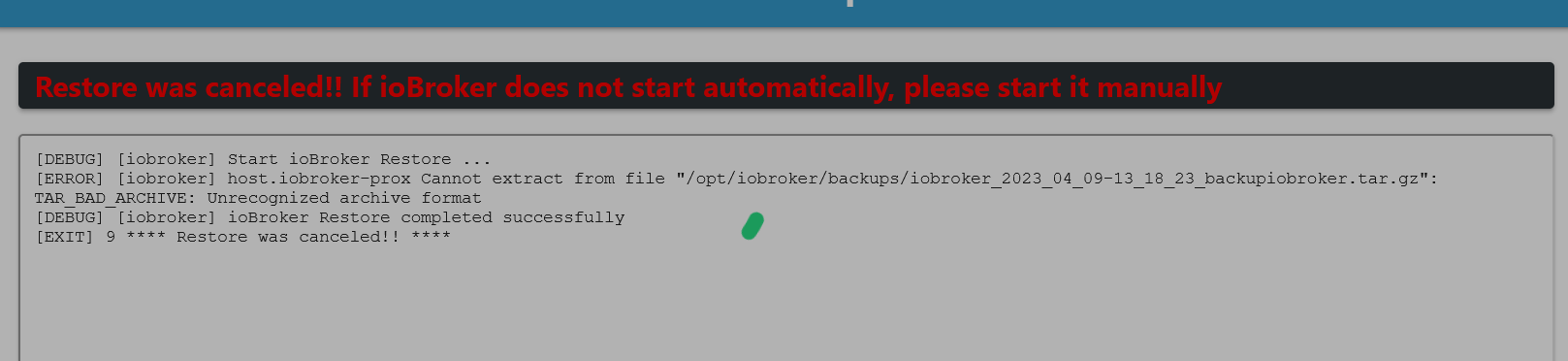
                Aber über meine OneDrive habe ich ja Zugriff, aber es kommt unrecognized archive format

                Proxmox Cluster mit ioBroker, Wireguard, HomeAssistant (Testsystem), paperlessNGX, MariaDB, PiHole, Grafana, InfluxDB, 1 x BKW 600 Wp, 2 x BKW 400 Wp, 2 x SolarFlow 800 Pro mit 11,52 kWh Akku und 3,48 kWp, OpenDTU, AhoyDTU, HmIP, Shellys, AVM LAN/WLAN

                1 Antwort Letzte Antwort
                0
                • DJMarc75D DJMarc75

                  @cbrocker sagte in 2 Fehler beim Backitup Restore:

                  Ich denke eher, ein Rechteproblem..

                  rein so prinzipiell: im Filezilla ändert man ja auch nix, wenn dann über die Konsole - aber auch das ist fragwürdig.

                  Zeig doch mal die Ausgabe von

                  iob diag
                  

                  also vom Container natürlich.

                  C Offline
                  C Offline
                  cbrocker
                  schrieb am zuletzt editiert von Homoran
                  #21

                  @djmarc75

                  vom Proxmox-container:

                  ======== Start marking the full check here =========

                  Skript v.2023-04-02
                  
                  *** BASE SYSTEM ***
                  Architecture    : x86_64
                  Docker          : false
                  Virtualization  : lxc
                  Distributor ID: Debian
                  Description:    Debian GNU/Linux 11 (bullseye)
                  Release:        11
                  Codename:       bullseye
                  
                  PRETTY_NAME="Debian GNU/Linux 11 (bullseye)"
                  NAME="Debian GNU/Linux"
                  VERSION_ID="11"
                  VERSION="11 (bullseye)"
                  VERSION_CODENAME=bullseye
                  ID=debian
                  HOME_URL="https://www.debian.org/"
                  SUPPORT_URL="https://www.debian.org/support"
                  BUG_REPORT_URL="https://bugs.debian.org/"
                  
                  Systemuptime and Load:
                   20:20:02 up  2:04,  1 user,  load average: 0.05, 0.01, 0.00
                  CPU threads: 2
                  
                  *** Time and Time Zones ***
                                 Local time: Sun 2023-04-09 20:20:02 CEST
                             Universal time: Sun 2023-04-09 18:20:02 UTC
                                   RTC time: n/a
                                  Time zone: Europe/Berlin (CEST, +0200)
                  System clock synchronized: yes
                                NTP service: inactive
                            RTC in local TZ: no
                  
                  *** User and Groups ***
                  root
                  /root
                  root
                  
                  *** X-Server-Setup ***
                  X-Server:       false
                  Desktop: 
                  Terminal: 
                  Boot Target:    graphical.target
                  
                  *** MEMORY ***
                                 total        used        free      shared  buff/cache   available
                  Mem:            8.2G         54M        7.8G        0.0K        318M        8.1G
                  Swap:           512M          0B        512M
                  Total:          8.7G         54M        8.3G
                  
                           8192 M total memory
                             54 M used memory
                            114 M active memory
                            221 M inactive memory
                           7818 M free memory
                              0 M buffer memory
                            318 M swap cache
                            512 M total swap
                              0 M used swap
                            512 M free swap
                  
                  *** FILESYSTEM ***
                  Filesystem                       Type   Size  Used Avail Use% Mounted on
                  /dev/mapper/pve-vm--100--disk--0 ext4    16G  2.2G   13G  15% /
                  none                             tmpfs  492K  4.0K  488K   1% /dev
                  tmpfs                            tmpfs  7.8G     0  7.8G   0% /dev/shm
                  tmpfs                            tmpfs  3.2G   92K  3.2G   1% /run
                  tmpfs                            tmpfs  5.0M     0  5.0M   0% /run/lock
                  
                  Messages concerning ext4 filesystem in dmesg:
                  [Sun Apr  9 10:44:40 2023] EXT4-fs (dm-1): mounted filesystem with ordered data mode. Opts: (null). Quota mode: none.
                  [Sun Apr  9 10:44:40 2023] EXT4-fs (dm-1): re-mounted. Opts: errors=remount-ro. Quota mode: none.
                  [Sun Apr  9 12:56:38 2023] EXT4-fs (dm-6): mounted filesystem with ordered data mode. Opts: (null). Quota mode: none.
                  [Sun Apr  9 14:04:42 2023] EXT4-fs (dm-6): mounted filesystem with ordered data mode. Opts: (null). Quota mode: none.
                  [Sun Apr  9 14:16:29 2023] EXT4-fs (dm-6): mounted filesystem with ordered data mode. Opts: (null). Quota mode: none.
                  [Sun Apr  9 15:29:25 2023] EXT4-fs (dm-6): mounted filesystem with ordered data mode. Opts: (null). Quota mode: none.
                  [Sun Apr  9 15:45:23 2023] EXT4-fs (dm-10): mounted filesystem with ordered data mode. Opts: (null). Quota mode: none.
                  [Sun Apr  9 15:46:50 2023] EXT4-fs (dm-10): mounted filesystem with ordered data mode. Opts: (null). Quota mode: none.
                  [Sun Apr  9 16:00:33 2023] EXT4-fs (dm-10): mounted filesystem with ordered data mode. Opts: (null). Quota mode: none.
                  [Sun Apr  9 18:15:40 2023] EXT4-fs (dm-10): mounted filesystem with ordered data mode. Opts: (null). Quota mode: none.
                  
                  Show mounted filesystems (real ones only):
                  TARGET SOURCE                           FSTYPE OPTIONS
                  /      /dev/mapper/pve-vm--100--disk--0 ext4   rw,relatime,stripe=16
                  
                  Files in neuralgic directories:
                  
                  /var:
                  448M    /var/
                  259M    /var/cache
                  254M    /var/cache/apt
                  187M    /var/cache/apt/archives
                  140M    /var/lib
                  
                  /opt/iobroker/backups:
                  4.0K    /opt/iobroker/backups/
                  
                  /opt/iobroker/iobroker-data:
                  25M     /opt/iobroker/iobroker-data/
                  17M     /opt/iobroker/iobroker-data/files
                  13M     /opt/iobroker/iobroker-data/files/admin.admin/custom/static/js
                  13M     /opt/iobroker/iobroker-data/files/admin.admin/custom/static
                  13M     /opt/iobroker/iobroker-data/files/admin.admin/custom
                  
                  The five largest files in iobroker-data are:
                  6.3M    /opt/iobroker/iobroker-data/files/admin.admin/custom/static/js/vendors-node_modules_iobroker_adapter-react-v5_assets_devices_parseNames_js-node_modules_iobr-99c23e.847b8ad9.chunk.js.map
                  3.4M    /opt/iobroker/iobroker-data/objects.jsonl
                  2.8M    /opt/iobroker/iobroker-data/files/admin.admin/custom/static/js/vendors-node_modules_iobroker_adapter-react-v5_assets_devices_parseNames_js-node_modules_iobr-99c23e.847b8ad9.chunk.js
                  1.6M    /opt/iobroker/iobroker-data/files/admin.admin/custom/static/js/vendors-node_modules_mui_material_Accordion_index_js-node_modules_mui_material_AccordionDetai-57e02d.0886b730.chunk.js.map
                  1.1M    /opt/iobroker/iobroker-data/backup-objects/2023-04-08_11-19_objects.jsonl.gz
                  
                  *** NodeJS-Installation ***
                  
                  /usr/bin/nodejs         v18.15.0
                  /usr/bin/node           v18.15.0
                  /usr/bin/npm            9.5.0
                  /usr/bin/npx            9.5.0
                  
                  nodejs:
                    Installed: 18.15.0-deb-1nodesource1
                    Candidate: 18.15.0-deb-1nodesource1
                    Version table:
                   *** 18.15.0-deb-1nodesource1 500
                          500 https://deb.nodesource.com/node_18.x bullseye/main amd64 Packages
                          100 /var/lib/dpkg/status
                       12.22.12~dfsg-1~deb11u3 500
                          500 http://security.debian.org bullseye-security/main amd64 Packages
                       12.22.5~dfsg-2~11u1 500
                          500 http://ftp.debian.org/debian bullseye/main amd64 Packages
                  
                  Temp directories causing npm8 problem: 0
                  No problems detected
                  
                  *** ioBroker-Installation ***
                  
                  ioBroker Status
                  iobroker is not running on this host.
                  
                  
                  Objects type: jsonl
                  States  type: jsonl
                  
                  Core adapters versions
                  js-controller:  4.0.24
                  admin:          6.3.5
                  javascript:     "javascript" not found
                  
                  Adapters from github:   0
                  
                  Adapter State
                    system.adapter.admin.0                  : admin                 : iobroker-prox                            -  enabled, port: 8081, bind: 0.0.0.0, run as: admin
                    system.adapter.backitup.0               : backitup              : iobroker-prox                            -  enabled
                    system.adapter.discovery.0              : discovery             : iobroker-prox                            -  enabled
                    system.adapter.info.0                   : info                  : iobroker-prox                            -  enabled
                  
                  + instance is alive
                  
                  Enabled adapters with bindings


                  Proxmox Cluster mit ioBroker, Wireguard, HomeAssistant (Testsystem), paperlessNGX, MariaDB, PiHole, Grafana, InfluxDB, 1 x BKW 600 Wp, 2 x BKW 400 Wp, 2 x SolarFlow 800 Pro mit 11,52 kWh Akku und 3,48 kWp, OpenDTU, AhoyDTU, HmIP, Shellys, AVM LAN/WLAN

                  DJMarc75D 1 Antwort Letzte Antwort
                  0
                  • C cbrocker

                    @djmarc75

                    vom Proxmox-container:

                    ======== Start marking the full check here =========

                    Skript v.2023-04-02
                    
                    *** BASE SYSTEM ***
                    Architecture    : x86_64
                    Docker          : false
                    Virtualization  : lxc
                    Distributor ID: Debian
                    Description:    Debian GNU/Linux 11 (bullseye)
                    Release:        11
                    Codename:       bullseye
                    
                    PRETTY_NAME="Debian GNU/Linux 11 (bullseye)"
                    NAME="Debian GNU/Linux"
                    VERSION_ID="11"
                    VERSION="11 (bullseye)"
                    VERSION_CODENAME=bullseye
                    ID=debian
                    HOME_URL="https://www.debian.org/"
                    SUPPORT_URL="https://www.debian.org/support"
                    BUG_REPORT_URL="https://bugs.debian.org/"
                    
                    Systemuptime and Load:
                     20:20:02 up  2:04,  1 user,  load average: 0.05, 0.01, 0.00
                    CPU threads: 2
                    
                    *** Time and Time Zones ***
                                   Local time: Sun 2023-04-09 20:20:02 CEST
                               Universal time: Sun 2023-04-09 18:20:02 UTC
                                     RTC time: n/a
                                    Time zone: Europe/Berlin (CEST, +0200)
                    System clock synchronized: yes
                                  NTP service: inactive
                              RTC in local TZ: no
                    
                    *** User and Groups ***
                    root
                    /root
                    root
                    
                    *** X-Server-Setup ***
                    X-Server:       false
                    Desktop: 
                    Terminal: 
                    Boot Target:    graphical.target
                    
                    *** MEMORY ***
                                   total        used        free      shared  buff/cache   available
                    Mem:            8.2G         54M        7.8G        0.0K        318M        8.1G
                    Swap:           512M          0B        512M
                    Total:          8.7G         54M        8.3G
                    
                             8192 M total memory
                               54 M used memory
                              114 M active memory
                              221 M inactive memory
                             7818 M free memory
                                0 M buffer memory
                              318 M swap cache
                              512 M total swap
                                0 M used swap
                              512 M free swap
                    
                    *** FILESYSTEM ***
                    Filesystem                       Type   Size  Used Avail Use% Mounted on
                    /dev/mapper/pve-vm--100--disk--0 ext4    16G  2.2G   13G  15% /
                    none                             tmpfs  492K  4.0K  488K   1% /dev
                    tmpfs                            tmpfs  7.8G     0  7.8G   0% /dev/shm
                    tmpfs                            tmpfs  3.2G   92K  3.2G   1% /run
                    tmpfs                            tmpfs  5.0M     0  5.0M   0% /run/lock
                    
                    Messages concerning ext4 filesystem in dmesg:
                    [Sun Apr  9 10:44:40 2023] EXT4-fs (dm-1): mounted filesystem with ordered data mode. Opts: (null). Quota mode: none.
                    [Sun Apr  9 10:44:40 2023] EXT4-fs (dm-1): re-mounted. Opts: errors=remount-ro. Quota mode: none.
                    [Sun Apr  9 12:56:38 2023] EXT4-fs (dm-6): mounted filesystem with ordered data mode. Opts: (null). Quota mode: none.
                    [Sun Apr  9 14:04:42 2023] EXT4-fs (dm-6): mounted filesystem with ordered data mode. Opts: (null). Quota mode: none.
                    [Sun Apr  9 14:16:29 2023] EXT4-fs (dm-6): mounted filesystem with ordered data mode. Opts: (null). Quota mode: none.
                    [Sun Apr  9 15:29:25 2023] EXT4-fs (dm-6): mounted filesystem with ordered data mode. Opts: (null). Quota mode: none.
                    [Sun Apr  9 15:45:23 2023] EXT4-fs (dm-10): mounted filesystem with ordered data mode. Opts: (null). Quota mode: none.
                    [Sun Apr  9 15:46:50 2023] EXT4-fs (dm-10): mounted filesystem with ordered data mode. Opts: (null). Quota mode: none.
                    [Sun Apr  9 16:00:33 2023] EXT4-fs (dm-10): mounted filesystem with ordered data mode. Opts: (null). Quota mode: none.
                    [Sun Apr  9 18:15:40 2023] EXT4-fs (dm-10): mounted filesystem with ordered data mode. Opts: (null). Quota mode: none.
                    
                    Show mounted filesystems (real ones only):
                    TARGET SOURCE                           FSTYPE OPTIONS
                    /      /dev/mapper/pve-vm--100--disk--0 ext4   rw,relatime,stripe=16
                    
                    Files in neuralgic directories:
                    
                    /var:
                    448M    /var/
                    259M    /var/cache
                    254M    /var/cache/apt
                    187M    /var/cache/apt/archives
                    140M    /var/lib
                    
                    /opt/iobroker/backups:
                    4.0K    /opt/iobroker/backups/
                    
                    /opt/iobroker/iobroker-data:
                    25M     /opt/iobroker/iobroker-data/
                    17M     /opt/iobroker/iobroker-data/files
                    13M     /opt/iobroker/iobroker-data/files/admin.admin/custom/static/js
                    13M     /opt/iobroker/iobroker-data/files/admin.admin/custom/static
                    13M     /opt/iobroker/iobroker-data/files/admin.admin/custom
                    
                    The five largest files in iobroker-data are:
                    6.3M    /opt/iobroker/iobroker-data/files/admin.admin/custom/static/js/vendors-node_modules_iobroker_adapter-react-v5_assets_devices_parseNames_js-node_modules_iobr-99c23e.847b8ad9.chunk.js.map
                    3.4M    /opt/iobroker/iobroker-data/objects.jsonl
                    2.8M    /opt/iobroker/iobroker-data/files/admin.admin/custom/static/js/vendors-node_modules_iobroker_adapter-react-v5_assets_devices_parseNames_js-node_modules_iobr-99c23e.847b8ad9.chunk.js
                    1.6M    /opt/iobroker/iobroker-data/files/admin.admin/custom/static/js/vendors-node_modules_mui_material_Accordion_index_js-node_modules_mui_material_AccordionDetai-57e02d.0886b730.chunk.js.map
                    1.1M    /opt/iobroker/iobroker-data/backup-objects/2023-04-08_11-19_objects.jsonl.gz
                    
                    *** NodeJS-Installation ***
                    
                    /usr/bin/nodejs         v18.15.0
                    /usr/bin/node           v18.15.0
                    /usr/bin/npm            9.5.0
                    /usr/bin/npx            9.5.0
                    
                    nodejs:
                      Installed: 18.15.0-deb-1nodesource1
                      Candidate: 18.15.0-deb-1nodesource1
                      Version table:
                     *** 18.15.0-deb-1nodesource1 500
                            500 https://deb.nodesource.com/node_18.x bullseye/main amd64 Packages
                            100 /var/lib/dpkg/status
                         12.22.12~dfsg-1~deb11u3 500
                            500 http://security.debian.org bullseye-security/main amd64 Packages
                         12.22.5~dfsg-2~11u1 500
                            500 http://ftp.debian.org/debian bullseye/main amd64 Packages
                    
                    Temp directories causing npm8 problem: 0
                    No problems detected
                    
                    *** ioBroker-Installation ***
                    
                    ioBroker Status
                    iobroker is not running on this host.
                    
                    
                    Objects type: jsonl
                    States  type: jsonl
                    
                    Core adapters versions
                    js-controller:  4.0.24
                    admin:          6.3.5
                    javascript:     "javascript" not found
                    
                    Adapters from github:   0
                    
                    Adapter State
                      system.adapter.admin.0                  : admin                 : iobroker-prox                            -  enabled, port: 8081, bind: 0.0.0.0, run as: admin
                      system.adapter.backitup.0               : backitup              : iobroker-prox                            -  enabled
                      system.adapter.discovery.0              : discovery             : iobroker-prox                            -  enabled
                      system.adapter.info.0                   : info                  : iobroker-prox                            -  enabled
                    
                    + instance is alive
                    
                    Enabled adapters with bindings
                    
                    
                    DJMarc75D Offline
                    DJMarc75D Offline
                    DJMarc75
                    schrieb am zuletzt editiert von
                    #22

                    @cbrocker bitte alles in Codetags posten, aber warum hast Du Dir im Container nicht einen normalen User gegönnt? Root ist halt suboptimal (untertrieben)

                    Lehrling seit 1975 !!!
                    Beitrag geholfen ? dann gerne ein upvote rechts unten im Beitrag klicken ;)
                    https://forum.iobroker.net/topic/51555/hinweise-f%C3%BCr-gute-forenbeitr%C3%A4ge

                    C 1 Antwort Letzte Antwort
                    0
                    • E Einstein67

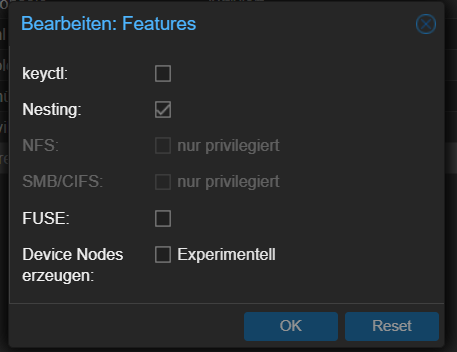
                      @crunchip said in 2 Fehler beim Backitup Restore:

                      @einstein67 NFS funktioniert doch in unprivilegierten LXC
                      Screenshot 2023-04-09 192527.png

                      Bei mir nicht.

                      NFS SMB nur privilegiert .... komisch.

                      crunchipC Abwesend
                      crunchipC Abwesend
                      crunchip
                      Forum Testing Most Active
                      schrieb am zuletzt editiert von
                      #23

                      @einstein67 https://drozmotix.github.io/languages/de/BasicSetup/03.ProxmoxLXC.html#_5-externes-laufwerk-einbinden-z-b-nas

                      umgestiegen von Proxmox auf Unraid

                      1 Antwort Letzte Antwort
                      0
                      • DJMarc75D DJMarc75

                        @cbrocker bitte alles in Codetags posten, aber warum hast Du Dir im Container nicht einen normalen User gegönnt? Root ist halt suboptimal (untertrieben)

                        C Offline
                        C Offline
                        cbrocker
                        schrieb am zuletzt editiert von Homoran
                        #24

                        @djmarc75
                        sorry, ich war zu schnell. Rest kommt gleich

                        einen normalen User wollte ich noch anlegen

                        Copy text starting here:

                        ======================= SUMMARY =======================
                                             v.2023-04-02
                        
                        
                        Operatingsystem:        Debian GNU/Linux 11 (bullseye)
                        Kernel:                 5.15.85-1-pve
                        Installation:           lxc
                        Timezone:               Europe/Berlin (CEST, +0200)
                        User-ID:                0
                        X-Server:               false
                        Boot Target:            graphical.target
                        
                        Pending OS-Updates:     0
                         Pending iob updates:   0
                        
                        Nodejs-Installation:    /usr/bin/nodejs         v18.15.0
                                                /usr/bin/node           v18.15.0
                                                /usr/bin/npm            9.5.0
                                                /usr/bin/npx            9.5.0
                        
                        Recommended versions are nodejs 18.x.y and npm 9.x.y
                        
                        MEMORY: 
                                       total        used        free      shared  buff/cache   available
                        Mem:            8.2G         58M        7.8G        0.0K        321M        8.1G
                        Swap:           512M          0B        512M
                        Total:          8.7G         58M        8.3G
                        
                        Active iob-Instances:   1
                        Active repo(s): stable
                        
                        ioBroker Core:          js-controller           4.0.24
                                                admin                   6.3.5
                        
                        ioBroker Status:        iobroker is not running on this host.
                        
                        
                        Objects type: jsonl
                        States  type: jsonl
                        
                        Status admin and web instance:
                          system.adapter.admin.0                  : admin                 : iobroker-prox                            -  enabled, port: 8081, bind: 0.0.0.0, run as: admin
                        
                        Objects:                500
                        States:                 393
                        
                        Size of iob-Database:
                        
                        3.4M    /opt/iobroker/iobroker-data/objects.jsonl
                        396K    /opt/iobroker/iobroker-data/states.jsonl


                        =================== END OF SUMMARY ====================
                        

                        Proxmox Cluster mit ioBroker, Wireguard, HomeAssistant (Testsystem), paperlessNGX, MariaDB, PiHole, Grafana, InfluxDB, 1 x BKW 600 Wp, 2 x BKW 400 Wp, 2 x SolarFlow 800 Pro mit 11,52 kWh Akku und 3,48 kWp, OpenDTU, AhoyDTU, HmIP, Shellys, AVM LAN/WLAN

                        Thomas BraunT DJMarc75D 2 Antworten Letzte Antwort
                        0
                        • C cbrocker

                          @djmarc75
                          sorry, ich war zu schnell. Rest kommt gleich

                          einen normalen User wollte ich noch anlegen

                          Copy text starting here:

                          ======================= SUMMARY =======================
                                               v.2023-04-02
                          
                          
                          Operatingsystem:        Debian GNU/Linux 11 (bullseye)
                          Kernel:                 5.15.85-1-pve
                          Installation:           lxc
                          Timezone:               Europe/Berlin (CEST, +0200)
                          User-ID:                0
                          X-Server:               false
                          Boot Target:            graphical.target
                          
                          Pending OS-Updates:     0
                           Pending iob updates:   0
                          
                          Nodejs-Installation:    /usr/bin/nodejs         v18.15.0
                                                  /usr/bin/node           v18.15.0
                                                  /usr/bin/npm            9.5.0
                                                  /usr/bin/npx            9.5.0
                          
                          Recommended versions are nodejs 18.x.y and npm 9.x.y
                          
                          MEMORY: 
                                         total        used        free      shared  buff/cache   available
                          Mem:            8.2G         58M        7.8G        0.0K        321M        8.1G
                          Swap:           512M          0B        512M
                          Total:          8.7G         58M        8.3G
                          
                          Active iob-Instances:   1
                          Active repo(s): stable
                          
                          ioBroker Core:          js-controller           4.0.24
                                                  admin                   6.3.5
                          
                          ioBroker Status:        iobroker is not running on this host.
                          
                          
                          Objects type: jsonl
                          States  type: jsonl
                          
                          Status admin and web instance:
                            system.adapter.admin.0                  : admin                 : iobroker-prox                            -  enabled, port: 8081, bind: 0.0.0.0, run as: admin
                          
                          Objects:                500
                          States:                 393
                          
                          Size of iob-Database:
                          
                          3.4M    /opt/iobroker/iobroker-data/objects.jsonl
                          396K    /opt/iobroker/iobroker-data/states.jsonl


                          =================== END OF SUMMARY ====================
                          
                          Thomas BraunT Online
                          Thomas BraunT Online
                          Thomas Braun
                          Most Active
                          schrieb am zuletzt editiert von
                          #25

                          @cbrocker sagte in 2 Fehler beim Backitup Restore:

                          einen normalen User wollte ich noch anlegen

                          Ist die erste Aktion in einem frisch bezogenen Container.

                          Linux-Werkzeugkasten:
                          https://forum.iobroker.net/topic/42952/der-kleine-iobroker-linux-werkzeugkasten
                          NodeJS Fixer Skript:
                          https://forum.iobroker.net/topic/68035/iob-node-fix-skript
                          iob_diag: curl -sLf -o diag.sh https://iobroker.net/diag.sh && bash diag.sh

                          1 Antwort Letzte Antwort
                          1
                          • C cbrocker

                            @djmarc75
                            sorry, ich war zu schnell. Rest kommt gleich

                            einen normalen User wollte ich noch anlegen

                            Copy text starting here:

                            ======================= SUMMARY =======================
                                                 v.2023-04-02
                            
                            
                            Operatingsystem:        Debian GNU/Linux 11 (bullseye)
                            Kernel:                 5.15.85-1-pve
                            Installation:           lxc
                            Timezone:               Europe/Berlin (CEST, +0200)
                            User-ID:                0
                            X-Server:               false
                            Boot Target:            graphical.target
                            
                            Pending OS-Updates:     0
                             Pending iob updates:   0
                            
                            Nodejs-Installation:    /usr/bin/nodejs         v18.15.0
                                                    /usr/bin/node           v18.15.0
                                                    /usr/bin/npm            9.5.0
                                                    /usr/bin/npx            9.5.0
                            
                            Recommended versions are nodejs 18.x.y and npm 9.x.y
                            
                            MEMORY: 
                                           total        used        free      shared  buff/cache   available
                            Mem:            8.2G         58M        7.8G        0.0K        321M        8.1G
                            Swap:           512M          0B        512M
                            Total:          8.7G         58M        8.3G
                            
                            Active iob-Instances:   1
                            Active repo(s): stable
                            
                            ioBroker Core:          js-controller           4.0.24
                                                    admin                   6.3.5
                            
                            ioBroker Status:        iobroker is not running on this host.
                            
                            
                            Objects type: jsonl
                            States  type: jsonl
                            
                            Status admin and web instance:
                              system.adapter.admin.0                  : admin                 : iobroker-prox                            -  enabled, port: 8081, bind: 0.0.0.0, run as: admin
                            
                            Objects:                500
                            States:                 393
                            
                            Size of iob-Database:
                            
                            3.4M    /opt/iobroker/iobroker-data/objects.jsonl
                            396K    /opt/iobroker/iobroker-data/states.jsonl


                            =================== END OF SUMMARY ====================
                            
                            DJMarc75D Offline
                            DJMarc75D Offline
                            DJMarc75
                            schrieb am zuletzt editiert von
                            #26

                            @cbrocker sagte in 2 Fehler beim Backitup Restore:

                            iobroker is not running on this host

                            hmpf... warum nicht ?

                            Lehrling seit 1975 !!!
                            Beitrag geholfen ? dann gerne ein upvote rechts unten im Beitrag klicken ;)
                            https://forum.iobroker.net/topic/51555/hinweise-f%C3%BCr-gute-forenbeitr%C3%A4ge

                            C 1 Antwort Letzte Antwort
                            0
                            • DJMarc75D DJMarc75

                              @cbrocker sagte in 2 Fehler beim Backitup Restore:

                              iobroker is not running on this host

                              hmpf... warum nicht ?

                              C Offline
                              C Offline
                              cbrocker
                              schrieb am zuletzt editiert von
                              #27

                              @djmarc75 weil ich gerade gefixt habe und deswegen noch nicht gestartet

                              Proxmox Cluster mit ioBroker, Wireguard, HomeAssistant (Testsystem), paperlessNGX, MariaDB, PiHole, Grafana, InfluxDB, 1 x BKW 600 Wp, 2 x BKW 400 Wp, 2 x SolarFlow 800 Pro mit 11,52 kWh Akku und 3,48 kWp, OpenDTU, AhoyDTU, HmIP, Shellys, AVM LAN/WLAN

                              Thomas BraunT 1 Antwort Letzte Antwort
                              0
                              • C cbrocker

                                @djmarc75 weil ich gerade gefixt habe und deswegen noch nicht gestartet

                                Thomas BraunT Online
                                Thomas BraunT Online
                                Thomas Braun
                                Most Active
                                schrieb am zuletzt editiert von
                                #28

                                @cbrocker

                                mount | sort
                                ls -lAh /opt/iobroker/backups
                                

                                sagt?

                                Linux-Werkzeugkasten:
                                https://forum.iobroker.net/topic/42952/der-kleine-iobroker-linux-werkzeugkasten
                                NodeJS Fixer Skript:
                                https://forum.iobroker.net/topic/68035/iob-node-fix-skript
                                iob_diag: curl -sLf -o diag.sh https://iobroker.net/diag.sh && bash diag.sh

                                C 2 Antworten Letzte Antwort
                                0
                                • Thomas BraunT Thomas Braun

                                  @cbrocker

                                  mount | sort
                                  ls -lAh /opt/iobroker/backups
                                  

                                  sagt?

                                  C Offline
                                  C Offline
                                  cbrocker
                                  schrieb am zuletzt editiert von
                                  #29

                                  @thomas-braun

                                  root@iobroker-prox:~# mount | sort
                                  /dev/mapper/pve-vm--100--disk--0 on / type ext4 (rw,relatime,stripe=16)
                                  devpts on /dev/console type devpts (rw,nosuid,noexec,relatime,gid=5,mode=620,ptmxmode=666,max=1026)
                                  devpts on /dev/ptmx type devpts (rw,nosuid,noexec,relatime,gid=5,mode=620,ptmxmode=666,max=1026)
                                  devpts on /dev/pts type devpts (rw,nosuid,noexec,relatime,gid=5,mode=620,ptmxmode=666,max=1026)
                                  devpts on /dev/tty1 type devpts (rw,nosuid,noexec,relatime,gid=5,mode=620,ptmxmode=666,max=1026)
                                  devpts on /dev/tty2 type devpts (rw,nosuid,noexec,relatime,gid=5,mode=620,ptmxmode=666,max=1026)
                                  fusectl on /sys/fs/fuse/connections type fusectl (rw,nosuid,nodev,noexec,relatime)
                                  hugetlbfs on /dev/hugepages type hugetlbfs (rw,relatime,pagesize=2M)
                                  lxcfs on /proc/cpuinfo type fuse.lxcfs (rw,nosuid,nodev,relatime,user_id=0,group_id=0,allow_other)
                                  lxcfs on /proc/diskstats type fuse.lxcfs (rw,nosuid,nodev,relatime,user_id=0,group_id=0,allow_other)
                                  lxcfs on /proc/loadavg type fuse.lxcfs (rw,nosuid,nodev,relatime,user_id=0,group_id=0,allow_other)
                                  lxcfs on /proc/meminfo type fuse.lxcfs (rw,nosuid,nodev,relatime,user_id=0,group_id=0,allow_other)
                                  lxcfs on /proc/slabinfo type fuse.lxcfs (rw,nosuid,nodev,relatime,user_id=0,group_id=0,allow_other)
                                  lxcfs on /proc/stat type fuse.lxcfs (rw,nosuid,nodev,relatime,user_id=0,group_id=0,allow_other)
                                  lxcfs on /proc/swaps type fuse.lxcfs (rw,nosuid,nodev,relatime,user_id=0,group_id=0,allow_other)
                                  lxcfs on /proc/uptime type fuse.lxcfs (rw,nosuid,nodev,relatime,user_id=0,group_id=0,allow_other)
                                  lxcfs on /sys/devices/system/cpu type fuse.lxcfs (rw,nosuid,nodev,relatime,user_id=0,group_id=0,allow_other)
                                  mqueue on /dev/mqueue type mqueue (rw,nosuid,nodev,noexec,relatime)
                                  none on /dev type tmpfs (rw,relatime,size=492k,mode=755,inode64)
                                  none on /proc/sys/kernel/random/boot_id type tmpfs (ro,nosuid,nodev,noexec,relatime,size=492k,mode=755,inode64)
                                  none on /sys/fs/cgroup type cgroup2 (rw,nosuid,nodev,noexec,relatime)
                                  proc on /dev/.lxc/proc type proc (rw,relatime)
                                  proc on /proc type proc (rw,nosuid,nodev,noexec,relatime)
                                  proc on /proc/sys type proc (ro,relatime)
                                  proc on /proc/sys/net type proc (rw,nosuid,nodev,noexec,relatime)
                                  proc on /proc/sysrq-trigger type proc (ro,relatime)
                                  sunrpc on /run/rpc_pipefs type rpc_pipefs (rw,relatime)
                                  sys on /dev/.lxc/sys type sysfs (rw,relatime)
                                  sysfs on /sys type sysfs (ro,nosuid,nodev,noexec,relatime)
                                  sysfs on /sys/devices/virtual/net type sysfs (rw,nosuid,nodev,noexec,relatime)
                                  tmpfs on /dev/shm type tmpfs (rw,nosuid,nodev,inode64)
                                  tmpfs on /run type tmpfs (rw,nosuid,nodev,size=3255460k,nr_inodes=819200,mode=755,inode64)
                                  tmpfs on /run/lock type tmpfs (rw,nosuid,nodev,noexec,relatime,size=5120k,inode64)
                                  root@iobroker-prox:~# 
                                  

                                  Proxmox Cluster mit ioBroker, Wireguard, HomeAssistant (Testsystem), paperlessNGX, MariaDB, PiHole, Grafana, InfluxDB, 1 x BKW 600 Wp, 2 x BKW 400 Wp, 2 x SolarFlow 800 Pro mit 11,52 kWh Akku und 3,48 kWp, OpenDTU, AhoyDTU, HmIP, Shellys, AVM LAN/WLAN

                                  Thomas BraunT 1 Antwort Letzte Antwort
                                  0
                                  • Thomas BraunT Thomas Braun

                                    @cbrocker

                                    mount | sort
                                    ls -lAh /opt/iobroker/backups
                                    

                                    sagt?

                                    C Offline
                                    C Offline
                                    cbrocker
                                    schrieb am zuletzt editiert von
                                    #30

                                    @thomas-braun

                                    root@iobroker-prox:~# ls -lAh /opt/iobroker/backups
                                    total 0
                                    -rw-rwxr--+ 1 iobroker iobroker 0 Apr  9 16:57 iobroker_2023_04_09-16_51_21_backupiobroker.tar.gz
                                    -rw-rwxr--+ 1 iobroker iobroker 0 Apr  9 18:16 iobroker_2023_04_09-18_09_27_backupiobroker.tar.gz
                                    root@iobroker-prox:~# 
                                    

                                    Proxmox Cluster mit ioBroker, Wireguard, HomeAssistant (Testsystem), paperlessNGX, MariaDB, PiHole, Grafana, InfluxDB, 1 x BKW 600 Wp, 2 x BKW 400 Wp, 2 x SolarFlow 800 Pro mit 11,52 kWh Akku und 3,48 kWp, OpenDTU, AhoyDTU, HmIP, Shellys, AVM LAN/WLAN

                                    1 Antwort Letzte Antwort
                                    0
                                    • C cbrocker

                                      @thomas-braun

                                      root@iobroker-prox:~# mount | sort
                                      /dev/mapper/pve-vm--100--disk--0 on / type ext4 (rw,relatime,stripe=16)
                                      devpts on /dev/console type devpts (rw,nosuid,noexec,relatime,gid=5,mode=620,ptmxmode=666,max=1026)
                                      devpts on /dev/ptmx type devpts (rw,nosuid,noexec,relatime,gid=5,mode=620,ptmxmode=666,max=1026)
                                      devpts on /dev/pts type devpts (rw,nosuid,noexec,relatime,gid=5,mode=620,ptmxmode=666,max=1026)
                                      devpts on /dev/tty1 type devpts (rw,nosuid,noexec,relatime,gid=5,mode=620,ptmxmode=666,max=1026)
                                      devpts on /dev/tty2 type devpts (rw,nosuid,noexec,relatime,gid=5,mode=620,ptmxmode=666,max=1026)
                                      fusectl on /sys/fs/fuse/connections type fusectl (rw,nosuid,nodev,noexec,relatime)
                                      hugetlbfs on /dev/hugepages type hugetlbfs (rw,relatime,pagesize=2M)
                                      lxcfs on /proc/cpuinfo type fuse.lxcfs (rw,nosuid,nodev,relatime,user_id=0,group_id=0,allow_other)
                                      lxcfs on /proc/diskstats type fuse.lxcfs (rw,nosuid,nodev,relatime,user_id=0,group_id=0,allow_other)
                                      lxcfs on /proc/loadavg type fuse.lxcfs (rw,nosuid,nodev,relatime,user_id=0,group_id=0,allow_other)
                                      lxcfs on /proc/meminfo type fuse.lxcfs (rw,nosuid,nodev,relatime,user_id=0,group_id=0,allow_other)
                                      lxcfs on /proc/slabinfo type fuse.lxcfs (rw,nosuid,nodev,relatime,user_id=0,group_id=0,allow_other)
                                      lxcfs on /proc/stat type fuse.lxcfs (rw,nosuid,nodev,relatime,user_id=0,group_id=0,allow_other)
                                      lxcfs on /proc/swaps type fuse.lxcfs (rw,nosuid,nodev,relatime,user_id=0,group_id=0,allow_other)
                                      lxcfs on /proc/uptime type fuse.lxcfs (rw,nosuid,nodev,relatime,user_id=0,group_id=0,allow_other)
                                      lxcfs on /sys/devices/system/cpu type fuse.lxcfs (rw,nosuid,nodev,relatime,user_id=0,group_id=0,allow_other)
                                      mqueue on /dev/mqueue type mqueue (rw,nosuid,nodev,noexec,relatime)
                                      none on /dev type tmpfs (rw,relatime,size=492k,mode=755,inode64)
                                      none on /proc/sys/kernel/random/boot_id type tmpfs (ro,nosuid,nodev,noexec,relatime,size=492k,mode=755,inode64)
                                      none on /sys/fs/cgroup type cgroup2 (rw,nosuid,nodev,noexec,relatime)
                                      proc on /dev/.lxc/proc type proc (rw,relatime)
                                      proc on /proc type proc (rw,nosuid,nodev,noexec,relatime)
                                      proc on /proc/sys type proc (ro,relatime)
                                      proc on /proc/sys/net type proc (rw,nosuid,nodev,noexec,relatime)
                                      proc on /proc/sysrq-trigger type proc (ro,relatime)
                                      sunrpc on /run/rpc_pipefs type rpc_pipefs (rw,relatime)
                                      sys on /dev/.lxc/sys type sysfs (rw,relatime)
                                      sysfs on /sys type sysfs (ro,nosuid,nodev,noexec,relatime)
                                      sysfs on /sys/devices/virtual/net type sysfs (rw,nosuid,nodev,noexec,relatime)
                                      tmpfs on /dev/shm type tmpfs (rw,nosuid,nodev,inode64)
                                      tmpfs on /run type tmpfs (rw,nosuid,nodev,size=3255460k,nr_inodes=819200,mode=755,inode64)
                                      tmpfs on /run/lock type tmpfs (rw,nosuid,nodev,noexec,relatime,size=5120k,inode64)
                                      root@iobroker-prox:~# 
                                      
                                      Thomas BraunT Online
                                      Thomas BraunT Online
                                      Thomas Braun
                                      Most Active
                                      schrieb am zuletzt editiert von
                                      #31

                                      @cbrocker sagte in 2 Fehler beim Backitup Restore:

                                      root

                                      Hausaufgabe "User anlegen" erledigen!

                                      Linux-Werkzeugkasten:
                                      https://forum.iobroker.net/topic/42952/der-kleine-iobroker-linux-werkzeugkasten
                                      NodeJS Fixer Skript:
                                      https://forum.iobroker.net/topic/68035/iob-node-fix-skript
                                      iob_diag: curl -sLf -o diag.sh https://iobroker.net/diag.sh && bash diag.sh

                                      C 1 Antwort Letzte Antwort
                                      0
                                      • Thomas BraunT Thomas Braun

                                        @cbrocker sagte in 2 Fehler beim Backitup Restore:

                                        root

                                        Hausaufgabe "User anlegen" erledigen!

                                        C Offline
                                        C Offline
                                        cbrocker
                                        schrieb am zuletzt editiert von
                                        #32

                                        @thomas-braun said in 2 Fehler beim Backitup Restore:

                                        Hausaufgabe "User anlegen" erledigen!

                                        ja, mache ich :-)

                                        Proxmox Cluster mit ioBroker, Wireguard, HomeAssistant (Testsystem), paperlessNGX, MariaDB, PiHole, Grafana, InfluxDB, 1 x BKW 600 Wp, 2 x BKW 400 Wp, 2 x SolarFlow 800 Pro mit 11,52 kWh Akku und 3,48 kWp, OpenDTU, AhoyDTU, HmIP, Shellys, AVM LAN/WLAN

                                        Thomas BraunT 1 Antwort Letzte Antwort
                                        0
                                        • C cbrocker

                                          @thomas-braun said in 2 Fehler beim Backitup Restore:

                                          Hausaufgabe "User anlegen" erledigen!

                                          ja, mache ich :-)

                                          Thomas BraunT Online
                                          Thomas BraunT Online
                                          Thomas Braun
                                          Most Active
                                          schrieb am zuletzt editiert von
                                          #33

                                          @cbrocker

                                          /opt/iobroker/backups
                                          muss leer sein, wenn das Verzeichnis als Mountpunkt dient und das Dateisystem gerade nicht eingehängt ist.

                                          Zu Container spezifischen Besonderheiten kann ich nix sagen.

                                          Linux-Werkzeugkasten:
                                          https://forum.iobroker.net/topic/42952/der-kleine-iobroker-linux-werkzeugkasten
                                          NodeJS Fixer Skript:
                                          https://forum.iobroker.net/topic/68035/iob-node-fix-skript
                                          iob_diag: curl -sLf -o diag.sh https://iobroker.net/diag.sh && bash diag.sh

                                          C 1 Antwort Letzte Antwort
                                          0
                                          Antworten
                                          • In einem neuen Thema antworten
                                          Anmelden zum Antworten
                                          • Älteste zuerst
                                          • Neuste zuerst
                                          • Meiste Stimmen


                                          Support us

                                          ioBroker
                                          Community Adapters
                                          Donate
                                          FAQ Cloud / IOT
                                          HowTo: Node.js-Update
                                          HowTo: Backup/Restore
                                          Downloads
                                          BLOG

                                          598

                                          Online

                                          32.4k

                                          Benutzer

                                          81.5k

                                          Themen

                                          1.3m

                                          Beiträge
                                          Community
                                          Impressum | Datenschutz-Bestimmungen | Nutzungsbedingungen | Einwilligungseinstellungen
                                          ioBroker Community 2014-2025
                                          logo
                                          • Anmelden

                                          • Du hast noch kein Konto? Registrieren

                                          • Anmelden oder registrieren, um zu suchen
                                          • Erster Beitrag
                                            Letzter Beitrag
                                          0
                                          • Home
                                          • Aktuell
                                          • Tags
                                          • Ungelesen 0
                                          • Kategorien
                                          • Unreplied
                                          • Beliebt
                                          • GitHub
                                          • Docu
                                          • Hilfe
