




backitup bricht bei sicherung zigbee2mqtt ab
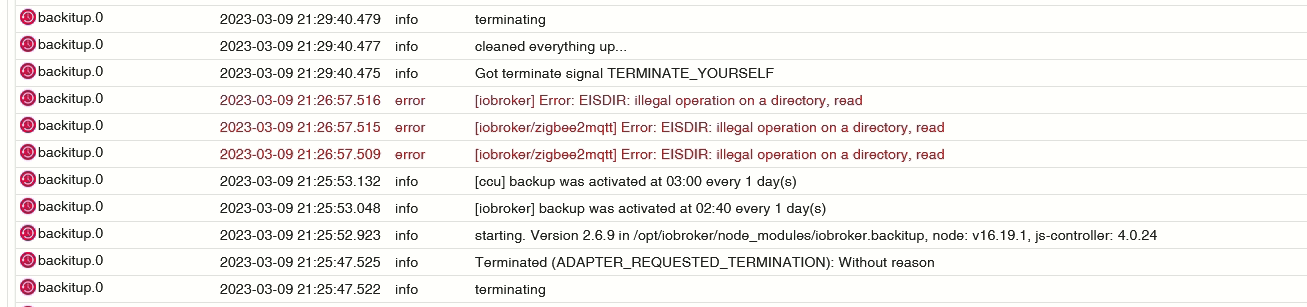
-
@simatec Danke für Deine Mühe:
backitup.0 2023-03-10 21:13:45.931 error [iobroker] Error: EISDIR: illegal operation on a directory, read backitup.0 2023-03-10 21:13:45.930 error [iobroker/zigbee2mqtt] Error: EISDIR: illegal operation on a directory, read backitup.0 2023-03-10 21:13:45.930 error [iobroker/zigbee2mqtt] Error: EISDIR: illegal operation on a directory, read backitup.0 2023-03-10 21:13:45.905 debug [iobroker/zigbee2mqtt] detected Zigbee2MQTT file: state.json backitup.0 2023-03-10 21:13:45.904 debug [iobroker/zigbee2mqtt] detected Zigbee2MQTT file: log backitup.0 2023-03-10 21:13:45.903 debug [iobroker/zigbee2mqtt] detected Zigbee2MQTT file: database.db backitup.0 2023-03-10 21:13:45.903 debug [iobroker/zigbee2mqtt] detected Zigbee2MQTT file: coordinator_backup.json backitup.0 2023-03-10 21:13:45.901 debug [iobroker/zigbee2mqtt] detected Zigbee2MQTT file: configuration.yaml backitup.0 2023-03-10 21:13:45.901 debug [iobroker/zigbee2mqtt] compress from Zigbee2MQTT started ... backitup.0 2023-03-10 21:13:45.900 debug [iobroker/zigbee2mqtt] Created new zigbee2mqtt_tmp directory backitup.0 2023-03-10 21:13:45.886 debug [iobroker/zigbee2mqtt] old zigbee2mqtt_tmp directory "/opt/iobroker/backups/zigbee2mqtt_tmp" successfully deleted backitup.0 2023-03-10 21:13:45.258 debug [iobroker/zigbee2mqtt] Try deleting the old zigbee2mqtt_tmp directory: "/opt/iobroker/backups/zigbee2mqtt_tmp" backitup.0 2023-03-10 21:13:44.588 debug [iobroker/zigbee] done backitup.0 2023-03-10 21:13:44.587 debug [iobroker/zigbee] found zigbee database: zigbee.0 backitup.0 2023-03-10 21:13:44.432 debug [iobroker/historyDB] done backitup.0 2023-03-10 21:13:44.430 debug [iobroker/historyDB] Backup created: /opt/iobroker/backups/historyDB_2023_03_10-21_13_26_backupiobroker.tar.gz backitup.0 2023-03-10 21:13:36.003 debug [iobroker/historyDB] Packed 6MB so far... backitup.0 2023-03-10 21:13:26.000 debug [iobroker/historyDB] compress from historyDB started ... backitup.0 2023-03-10 21:13:25.096 debug [iobroker/iobroker] done backitup.0 2023-03-10 21:13:23.365 debug [iobroker/iobroker] Backup created: /opt/iobroker/backups/iobroker_2023_03_10-21_13_02_backupiobroker.tar.gz backitup.0 2023-03-10 21:13:11.478 debug [iobroker/iobroker] host.ioBroker 13660 objects saved backitup.0 2023-03-10 21:13:06.234 debug [iobroker/iobroker] host.ioBroker 10614 states saved backitup.0 2023-03-10 21:13:01.880 debug [iobroker/mount] done backitup.0 2023-03-10 21:13:01.876 debug [iobroker/mount] mount successfully completed backitup.0 2023-03-10 21:13:01.584 debug [iobroker/mount] cifs-mount command: "sudo mount -t cifs -o username=IoBroker,password=****,domain=SynologyDS218j,rw,uid=iobroker,gid=iobroker,file_mode=0777,dir_mode=0777,vers=3.0 //192.168.16.9/IoBroker_Backup/ /opt/iobroker/backups" backitup.0 2023-03-10 21:13:01.582 debug [iobroker/mount] noserverino option: false backitup.0 2023-03-10 21:12:51.579 debug Backup has started ... backitup.0 2023-03-10 21:12:51.508 debug The local storage check was completed successfully. On the host "ioBroker" are currently 47995 MB free space available! backitup.0 2023-03-10 21:12:47.670 debug The local storage check was completed successfully. On the host "ioBroker" are currently 47995 MB free space available! -
@simatec sagte in backitup bricht bei sicherung zigbee2mqtt ab:
ls -l /opt/zigbee2mqtt/data
pi@ioBroker:~ $ ls -l /opt/zigbee2mqtt/data insgesamt 60 -rw-r--r-- 1 pi pi 3559 10. Mär 10:13 configuration.yaml -rw-r--r-- 1 pi pi 7546 10. Mär 10:24 coordinator_backup.json -rw-r--r-- 1 pi pi 35566 10. Mär 20:35 database.db drwxr-xr-x 12 pi pi 4096 10. Mär 10:25 log -rw-r--r-- 1 pi pi 7019 10. Mär 21:20 state.json pi@ioBroker:~ $ -
@simatec sagte in backitup bricht bei sicherung zigbee2mqtt ab:
ls -l /opt/zigbee2mqtt/data
pi@ioBroker:~ $ ls -l /opt/zigbee2mqtt/data insgesamt 60 -rw-r--r-- 1 pi pi 3559 10. Mär 10:13 configuration.yaml -rw-r--r-- 1 pi pi 7546 10. Mär 10:24 coordinator_backup.json -rw-r--r-- 1 pi pi 35566 10. Mär 20:35 database.db drwxr-xr-x 12 pi pi 4096 10. Mär 10:25 log -rw-r--r-- 1 pi pi 7019 10. Mär 21:20 state.json pi@ioBroker:~ $ -
@simatec jo genau alles was im data liegt ausser log.. da sind aber noch mehr dateien.. kommt auf die konfiguration an ...
also würde ich nur den log ausschliessen..zigbee hab ich, zwave auch, nuc's genauso und HA auch
-
@simatec jo genau alles was im data liegt ausser log.. da sind aber noch mehr dateien.. kommt auf die konfiguration an ...
also würde ich nur den log ausschliessen..@arteck hab ich erstmal so angepasst und läuft auch. Müsste ich aber in der Doku aufnehmen, wie der Pfad aussehen müsste.
Oder habt ihr den Pfad im zigbee2mqtt Adapter irgendwo definiert, wo Backitup sich den direkt aus der Config holen kann?
Hintergrund ist, dass es im Docker ja etwas anders vom Pfad ausschaut. Da liegt das Volume ja direkt auf dem data Pfad.
Restore ist gerade zwecks Dateirechten noch tricky. Muss ich heute mal schauen.
-
@Thomas-Braun Hast du als Linux Guru ne sinnvolle Idee, wie man den Config Ordner für den User iobroker sinnvoll Schreibberechtigungen geben kann?
Will es halt Userfreundlich machen und nicht die einzelnen Dateirechte anpassen
Meine Idee war ähnlich wie bei redis zu arbeiten.
sudo usermod -a -G <was-auch-immer-für-eine-User-Gruppe> iobroker -
@Thomas-Braun Hast du als Linux Guru ne sinnvolle Idee, wie man den Config Ordner für den User iobroker sinnvoll Schreibberechtigungen geben kann?
Will es halt Userfreundlich machen und nicht die einzelnen Dateirechte anpassen
Meine Idee war ähnlich wie bei redis zu arbeiten.
sudo usermod -a -G <was-auch-immer-für-eine-User-Gruppe> iobrokerGibt es keine Gruppe dafür? Hab mit mqtt2zigbee noch nie herumgespielt und kenne die default-Rechte da nicht.
-
Gibt es keine Gruppe dafür? Hab mit mqtt2zigbee noch nie herumgespielt und kenne die default-Rechte da nicht.
@thomas-braun So wie ich das sehe, gibt es die nicht.
Läuft wohl wie im Beispiel hier unter pi:pi -
@thomas-braun So wie ich das sehe, gibt es die nicht.
Läuft wohl wie im Beispiel hier unter pi:piIch würde dann glaube ich auf meinem System eine Gruppe 'mqtt2zigbee' anlegen und die Rechte entsprechend vergeben. Dann würde ein Backup über die Gruppenrechte ermöglicht.
-
@simatec Ich habe in der v2.6.11 Anpassungen für das Zigbee2MQTT Backup gemacht.
Wichtig ist die richtige Pfadangabe zu den Config Files./opt/zigbee2mqtt/dataDes Weiteren muss der User "iobroker" Zugriff auf die Gruppe pi haben, damit er in deinem Fall an die Daten kommt ud sie auch lesen und schreiben darf.
sudo usermod -a -G pi iobroker
sudo reboot
Die v.2.6.11 wird gerade gepusht
-
@simatec Ich habe in der v2.6.11 Anpassungen für das Zigbee2MQTT Backup gemacht.
Wichtig ist die richtige Pfadangabe zu den Config Files./opt/zigbee2mqtt/dataDes Weiteren muss der User "iobroker" Zugriff auf die Gruppe pi haben, damit er in deinem Fall an die Daten kommt ud sie auch lesen und schreiben darf.
sudo usermod -a -G pi iobroker
sudo reboot
Die v.2.6.11 wird gerade gepusht
@simatec Herausragend! Vielen Dank!
backitup.0 2023-03-11 17:33:14.292 debug [iobroker] exec: done backitup.0 2023-03-11 17:33:14.141 debug [iobroker/umount] done backitup.0 2023-03-11 17:33:14.139 debug [iobroker/umount] umount successfully completed backitup.0 2023-03-11 17:33:09.076 debug [iobroker/umount] mount activ, umount is started ... backitup.0 2023-03-11 17:33:08.876 debug [iobroker/historyJSON] done backitup.0 2023-03-11 17:33:08.876 debug [iobroker/historyJSON] new history json values created backitup.0 2023-03-11 17:33:08.709 debug [iobroker/historyHTML] done backitup.0 2023-03-11 17:33:08.708 debug [iobroker/historyHTML] new history html values created backitup.0 2023-03-11 17:33:07.605 debug [iobroker/clean] done backitup.0 2023-03-11 17:33:07.603 debug [iobroker/clean] No older backup files are deleted, because this backup was started manually backitup.0 2023-03-11 17:33:07.000 debug [iobroker/cifs] done backitup.0 2023-03-11 17:33:06.999 debug [iobroker/cifs] used copy path: /IoBroker_Backup/ backitup.0 2023-03-11 17:33:05.644 debug [iobroker/zigbee2mqtt] done backitup.0 2023-03-11 17:33:05.499 debug [iobroker/zigbee2mqtt] Try deleting the old zigbee2mqtt tmp directory: "/opt/iobroker/backups/zigbee2mqtt_tmp" backitup.0 2023-03-11 17:33:05.498 debug [iobroker/zigbee2mqtt] Backup created: /opt/iobroker/backups/zigbee2mqtt_2023_03_11-17_33_04_backupiobroker.tar.gz backitup.0 2023-03-11 17:33:05.496 debug [iobroker/zigbee2mqtt] Backup created: /opt/iobroker/backups/zigbee2mqtt_2023_03_11-17_33_04_backupiobroker.tar.gz backitup.0 2023-03-11 17:33:05.391 debug [iobroker/zigbee2mqtt] Zigbee2MQTT tmp copy finish backitup.0 2023-03-11 17:33:05.337 debug [iobroker/zigbee2mqtt] compress from Zigbee2MQTT started ... backitup.0 2023-03-11 17:33:05.337 debug [iobroker/zigbee2mqtt] Created noderedtmp directory backitup.0 2023-03-11 17:33:03.979 debug [iobroker/zigbee] done backitup.0 2023-03-11 17:33:03.979 debug [iobroker/zigbee] found zigbee database: zigbee.0 backitup.0 2023-03-11 17:33:03.824 debug [iobroker/historyDB] done backitup.0 2023-03-11 17:33:03.822 debug [iobroker/historyDB] Backup created: /opt/iobroker/backups/historyDB_2023_03_11-17_32_48_backupiobroker.tar.gz backitup.0 2023-03-11 17:32:59.012 debug [iobroker/historyDB] Packed 8MB so far... backitup.0 2023-03-11 17:32:48.997 debug [iobroker/historyDB] compress from historyDB started ... backitup.0 2023-03-11 17:32:48.092 debug [iobroker/iobroker] done backitup.0 2023-03-11 17:32:46.575 debug [iobroker/iobroker] Backup created: /opt/iobroker/backups/iobroker_2023_03_11-17_32_25_backupiobroker.tar.gz backitup.0 2023-03-11 17:32:34.232 debug [iobroker/iobroker] host.ioBroker 13667 objects saved backitup.0 2023-03-11 17:32:29.720 debug [iobroker/iobroker] host.ioBroker 10660 states saved backitup.0 2023-03-11 17:32:25.450 debug [iobroker/mount] done backitup.0 2023-03-11 17:32:25.449 debug [iobroker/mount] mount successfully completed backitup.0 2023-03-11 17:32:24.758 debug [iobroker/mount] cifs-mount command: "sudo mount -t cifs -o username=IoBroker,password=****,domain=SynologyDS218j,rw,uid=iobroker,gid=iobroker,file_mode=0777,dir_mode=0777,vers=3.0 //192.168.16.9/IoBroker_Backup/ /opt/iobroker/backups" backitup.0 2023-03-11 17:32:24.758 debug [iobroker/mount] noserverino option: false backitup.0 2023-03-11 17:32:14.757 debug Backup has started ... backitup.0 2023-03-11 17:32:14.702 debug The local storage check was completed successfully. On the host "ioBroker" are currently 46262 MB free space available! backitup.0 2023-03-11 17:32:10.843 debug The local storage check was completed successfully. On the host "ioBroker" are currently 46262 MB free space available! backitup.0 2023-03-11 17:31:49.827 debug umount successfully completed backitup.0 2023-03-11 17:31:47.785 debug mount activ... umount in 2 Seconds!! backitup.0 2023-03-11 17:31:40.658 debug detect last backup file: iobroker_2023_03_11-17_30_07_backupiobroker.tar.gz backitup.0 2023-03-11 17:31:40.657 debug detect backup file 51 from NAS: iobroker_2023_03_11-17_30_07_backupiobroker.tar.gz backitup.0 2023-03-11 17:31:40.656 debug detect backup file 50 from NAS: iobroker_2023_03_11-02_40_20_backupiobroker.tar.gz backitup.0 2023-03-11 17:31:40.656 debug detect backup file 49 from NAS: iobroker_2023_03_10-21_13_02_backupiobroker.tar.gz backitup.0 2023-03-11 17:31:40.656 debug detect backup file 48 from NAS: iobroker_2023_03_10-02_40_21_backupiobroker.tar.gz backitup.0 2023-03-11 17:31:40.656 debug detect backup file 47 from NAS: iobroker_2023_03_10-00_15_34_backupiobroker.tar.gz backitup.0 2023-03-11 17:31:40.655 debug detect backup file 46 from NAS: iobroker_2023_03_10-00_10_34_backupiobroker.tar.gz backitup.0 2023-03-11 17:31:40.655 debug detect backup file 45 from NAS: iobroker_2023_03_09-21_26_17_backupiobroker.tar.gz backitup.0 2023-03-11 17:31:40.655 debug detect backup file 44 from NAS: iobroker_2023_03_09-21_13_59_backupiobroker.tar.gz backitup.0 2023-03-11 17:31:40.655 debug detect backup file 43 from NAS: iobroker_2023_03_09-02_40_21_backupiobroker.tar.gz backitup.0 2023-03-11 17:31:40.655 debug detect backup file 42 from NAS: iobroker_2023_03_08-02_40_21_backupiobroker.tar.gz backitup.0 2023-03-11 17:31:40.654 debug detect backup file 41 from NAS: iobroker_2023_03_07-02_40_21_backupiobroker.tar.gz backitup.0 2023-03-11 17:31:40.654 debug detect backup file 40 from NAS: iobroker_2023_03_06-02_40_21_backupiobroker.tar.gz backitup.0 2023-03-11 17:31:40.654 debug detect backup file 39 from NAS: iobroker_2023_03_05-02_40_21_backupiobroker.tar.gz backitup.0 2023-03-11 17:31:40.654 debug detect backup file 38 from NAS: iobroker_2023_03_04-02_40_21_backupiobroker.tar.gz backitup.0 2023-03-11 17:31:40.653 debug detect backup file 37 from NAS: iobroker_2023_03_03-02_40_21_backupiobroker.tar.gz backitup.0 2023-03-11 17:31:40.653 debug detect backup file 36 from NAS: iobroker_2023_03_02-02_40_21_backupiobroker.tar.gz backitup.0 2023-03-11 17:31:40.653 debug detect backup file 35 from NAS: iobroker_2023_03_01-02_40_21_backupiobroker.tar.gz backitup.0 2023-03-11 17:31:40.653 debug detect backup file 34 from NAS: iobroker_2023_02_28-02_40_21_backupiobroker.tar.gz backitup.0 2023-03-11 17:31:40.652 debug detect backup file 33 from NAS: iobroker_2023_02_27-02_40_21_backupiobroker.tar.gz backitup.0 2023-03-11 17:31:40.652 debug detect backup file 32 from NAS: iobroker_2023_02_26-02_40_21_backupiobroker.tar.gz backitup.0 2023-03-11 17:31:40.652 debug detect backup file 31 from NAS: iobroker_2023_02_25-02_40_21_backupiobroker.tar.gz backitup.0 2023-03-11 17:31:40.652 debug detect backup file 30 from NAS: iobroker_2023_02_24-02_40_21_backupiobroker.tar.gz backitup.0 2023-03-11 17:31:40.651 debug detect backup file 29 from NAS: iobroker_2023_02_23-02_40_21_backupiobroker.tar.gz backitup.0 2023-03-11 17:31:40.651 debug detect backup file 28 from NAS: iobroker_2023_02_22-02_40_20_backupiobroker.tar.gz backitup.0 2023-03-11 17:31:40.651 debug detect backup file 27 from NAS: iobroker_2023_02_21-02_40_21_backupiobroker.tar.gz backitup.0 2023-03-11 17:31:40.651 debug detect backup file 26 from NAS: iobroker_2023_02_20-02_40_21_backupiobroker.tar.gz backitup.0 2023-03-11 17:31:40.650 debug detect backup file 25 from NAS: iobroker_2023_02_19-02_40_21_backupiobroker.tar.gz backitup.0 2023-03-11 17:31:40.649 debug detect backup file 24 from NAS: iobroker_2023_02_18-02_40_21_backupiobroker.tar.gz backitup.0 2023-03-11 17:31:40.649 debug detect backup file 23 from NAS: iobroker_2023_02_17-02_40_21_backupiobroker.tar.gz backitup.0 2023-03-11 17:31:40.649 debug detect backup file 22 from NAS: iobroker_2023_02_16-02_40_21_backupiobroker.tar.gz backitup.0 2023-03-11 17:31:40.649 debug detect backup file 21 from NAS: iobroker_2023_02_15-02_40_21_backupiobroker.tar.gz backitup.0 2023-03-11 17:31:40.648 debug detect backup file 20 from NAS: iobroker_2023_02_14-02_40_21_backupiobroker.tar.gz backitup.0 2023-03-11 17:31:40.648 debug detect backup file 19 from NAS: iobroker_2023_02_13-02_40_21_backupiobroker.tar.gz backitup.0 2023-03-11 17:31:40.648 debug detect backup file 18 from NAS: iobroker_2023_02_12-02_40_21_backupiobroker.tar.gz backitup.0 2023-03-11 17:31:40.648 debug detect backup file 17 from NAS: iobroker_2023_02_11-02_40_21_backupiobroker.tar.gz backitup.0 2023-03-11 17:31:40.647 debug detect backup file 16 from NAS: iobroker_2023_02_10-02_40_20_backupiobroker.tar.gz backitup.0 2023-03-11 17:31:40.647 debug detect backup file 15 from NAS: iobroker_2023_02_09-02_40_21_backupiobroker.tar.gz backitup.0 2023-03-11 17:31:40.647 debug detect backup file 14 from NAS: iobroker_2023_02_08-02_40_21_backupiobroker.tar.gz backitup.0 2023-03-11 17:31:40.646 debug detect backup file 13 from NAS: iobroker_2023_02_07-02_40_21_backupiobroker.tar.gz backitup.0 2023-03-11 17:31:40.646 debug detect backup file 12 from NAS: iobroker_2023_02_06-02_40_21_backupiobroker.tar.gz backitup.0 2023-03-11 17:31:40.646 debug detect backup file 11 from NAS: iobroker_2023_02_05-02_40_21_backupiobroker.tar.gz backitup.0 2023-03-11 17:31:40.645 debug detect backup file 10 from NAS: iobroker_2023_02_04-02_40_21_backupiobroker.tar.gz backitup.0 2023-03-11 17:31:40.645 debug detect backup file 9 from NAS: iobroker_2023_02_03-02_40_21_backupiobroker.tar.gz backitup.0 2023-03-11 17:31:40.644 debug detect backup file 8 from NAS: iobroker_2023_02_02-02_40_20_backupiobroker.tar.gz backitup.0 2023-03-11 17:31:40.644 debug detect backup file 7 from NAS: iobroker_2023_02_01-02_40_21_backupiobroker.tar.gz backitup.0 2023-03-11 17:31:40.644 debug detect backup file 6 from NAS: iobroker_2023_01_31-02_40_21_backupiobroker.tar.gz backitup.0 2023-03-11 17:31:40.643 debug detect backup file 5 from NAS: iobroker_2023_01_30-02_40_21_backupiobroker.tar.gz backitup.0 2023-03-11 17:31:40.643 debug detect backup file 4 from NAS: iobroker_2023_01_29-02_40_21_backupiobroker.tar.gz backitup.0 2023-03-11 17:31:40.642 debug detect backup file 3 from NAS: iobroker_2023_01_28-02_40_21_backupiobroker.tar.gz backitup.0 2023-03-11 17:31:40.642 debug detect backup file 2 from NAS: iobroker_2023_01_27-02_40_21_backupiobroker.tar.gz backitup.0 2023-03-11 17:31:40.641 debug detect backup file 1 from NAS: iobroker_2023_01_26-02_40_21_backupiobroker.tar.gz backitup.0 2023-03-11 17:31:38.607 debug mount successfully completed backitup.0 2023-03-11 17:31:37.878 debug cifs-mount command: "sudo mount -t cifs -o username=IoBroker,password=****,domain=SynologyDS218j,rw,uid=iobroker,gid=iobroker,file_mode=0777,dir_mode=0777,vers=3.0 //192.168.16.9IoBroker_Backup/ /opt/iobroker/backups" backitup.0 2023-03-11 17:31:37.878 debug noserverino option: false backitup.0 2023-03-11 17:31:37.862 info [ccu] backup was activated at 03:00 every 1 day(s) backitup.0 2023-03-11 17:31:37.787 info [iobroker] backup was activated at 02:40 every 1 day(s) backitup.0 2023-03-11 17:31:37.713 debug Backitup has recognized a linux system backitup.0 2023-03-11 17:31:37.660 info starting. Version 2.6.11 (non-npm: simatec/ioBroker.backitup#2831644ef6a5b9b3489d8b436e1df6a0c344e1cd) in /opt/iobroker/node_modules/iobroker.backitup, node: v16.19.1, js-controller: 4.0.24 backitup.0 2023-03-11 17:31:37.322 debug Plugin sentry destroyed because not initialized correctly backitup.0 2023-03-11 17:31:37.271 debug Plugin sentry Do not initialize Plugin (enabled=false) backitup.0 2023-03-11 17:31:37.099 debug States connected to redis: 127.0.0.1:9000 backitup.0 2023-03-11 17:31:36.993 debug States create User PubSub Client backitup.0 2023-03-11 17:31:36.991 debug States create System PubSub Client backitup.0 2023-03-11 17:31:36.958 debug Redis States: Use Redis connection: 127.0.0.1:9000 backitup.0 2023-03-11 17:31:36.892 debug Objects connected to redis: 127.0.0.1:9001 backitup.0 2023-03-11 17:31:36.884 debug Objects client initialize lua scripts backitup.0 2023-03-11 17:31:36.757 debug Objects create User PubSub Client backitup.0 2023-03-11 17:31:36.755 debug Objects create System PubSub Client backitup.0 2023-03-11 17:31:36.752 debug Objects client ready ... initialize now backitup.0 2023-03-11 17:31:36.657 debug Redis Objects: Use Redis connection: 127.0.0.1:9001 backitup.0 2023-03-11 17:31:32.200 info Terminated (ADAPTER_REQUESTED_TERMINATION): Without reason backitup.0 2023-03-11 17:31:32.199 info terminating backitup.0 2023-03-11 17:31:32.198 info cleaned everything up... backitup.0 2023-03-11 17:31:32.194 info Got terminate signal TERMINATE_YOURSELF -
@simatec Herausragend! Vielen Dank!
backitup.0 2023-03-11 17:33:14.292 debug [iobroker] exec: done backitup.0 2023-03-11 17:33:14.141 debug [iobroker/umount] done backitup.0 2023-03-11 17:33:14.139 debug [iobroker/umount] umount successfully completed backitup.0 2023-03-11 17:33:09.076 debug [iobroker/umount] mount activ, umount is started ... backitup.0 2023-03-11 17:33:08.876 debug [iobroker/historyJSON] done backitup.0 2023-03-11 17:33:08.876 debug [iobroker/historyJSON] new history json values created backitup.0 2023-03-11 17:33:08.709 debug [iobroker/historyHTML] done backitup.0 2023-03-11 17:33:08.708 debug [iobroker/historyHTML] new history html values created backitup.0 2023-03-11 17:33:07.605 debug [iobroker/clean] done backitup.0 2023-03-11 17:33:07.603 debug [iobroker/clean] No older backup files are deleted, because this backup was started manually backitup.0 2023-03-11 17:33:07.000 debug [iobroker/cifs] done backitup.0 2023-03-11 17:33:06.999 debug [iobroker/cifs] used copy path: /IoBroker_Backup/ backitup.0 2023-03-11 17:33:05.644 debug [iobroker/zigbee2mqtt] done backitup.0 2023-03-11 17:33:05.499 debug [iobroker/zigbee2mqtt] Try deleting the old zigbee2mqtt tmp directory: "/opt/iobroker/backups/zigbee2mqtt_tmp" backitup.0 2023-03-11 17:33:05.498 debug [iobroker/zigbee2mqtt] Backup created: /opt/iobroker/backups/zigbee2mqtt_2023_03_11-17_33_04_backupiobroker.tar.gz backitup.0 2023-03-11 17:33:05.496 debug [iobroker/zigbee2mqtt] Backup created: /opt/iobroker/backups/zigbee2mqtt_2023_03_11-17_33_04_backupiobroker.tar.gz backitup.0 2023-03-11 17:33:05.391 debug [iobroker/zigbee2mqtt] Zigbee2MQTT tmp copy finish backitup.0 2023-03-11 17:33:05.337 debug [iobroker/zigbee2mqtt] compress from Zigbee2MQTT started ... backitup.0 2023-03-11 17:33:05.337 debug [iobroker/zigbee2mqtt] Created noderedtmp directory backitup.0 2023-03-11 17:33:03.979 debug [iobroker/zigbee] done backitup.0 2023-03-11 17:33:03.979 debug [iobroker/zigbee] found zigbee database: zigbee.0 backitup.0 2023-03-11 17:33:03.824 debug [iobroker/historyDB] done backitup.0 2023-03-11 17:33:03.822 debug [iobroker/historyDB] Backup created: /opt/iobroker/backups/historyDB_2023_03_11-17_32_48_backupiobroker.tar.gz backitup.0 2023-03-11 17:32:59.012 debug [iobroker/historyDB] Packed 8MB so far... backitup.0 2023-03-11 17:32:48.997 debug [iobroker/historyDB] compress from historyDB started ... backitup.0 2023-03-11 17:32:48.092 debug [iobroker/iobroker] done backitup.0 2023-03-11 17:32:46.575 debug [iobroker/iobroker] Backup created: /opt/iobroker/backups/iobroker_2023_03_11-17_32_25_backupiobroker.tar.gz backitup.0 2023-03-11 17:32:34.232 debug [iobroker/iobroker] host.ioBroker 13667 objects saved backitup.0 2023-03-11 17:32:29.720 debug [iobroker/iobroker] host.ioBroker 10660 states saved backitup.0 2023-03-11 17:32:25.450 debug [iobroker/mount] done backitup.0 2023-03-11 17:32:25.449 debug [iobroker/mount] mount successfully completed backitup.0 2023-03-11 17:32:24.758 debug [iobroker/mount] cifs-mount command: "sudo mount -t cifs -o username=IoBroker,password=****,domain=SynologyDS218j,rw,uid=iobroker,gid=iobroker,file_mode=0777,dir_mode=0777,vers=3.0 //192.168.16.9/IoBroker_Backup/ /opt/iobroker/backups" backitup.0 2023-03-11 17:32:24.758 debug [iobroker/mount] noserverino option: false backitup.0 2023-03-11 17:32:14.757 debug Backup has started ... backitup.0 2023-03-11 17:32:14.702 debug The local storage check was completed successfully. On the host "ioBroker" are currently 46262 MB free space available! backitup.0 2023-03-11 17:32:10.843 debug The local storage check was completed successfully. On the host "ioBroker" are currently 46262 MB free space available! backitup.0 2023-03-11 17:31:49.827 debug umount successfully completed backitup.0 2023-03-11 17:31:47.785 debug mount activ... umount in 2 Seconds!! backitup.0 2023-03-11 17:31:40.658 debug detect last backup file: iobroker_2023_03_11-17_30_07_backupiobroker.tar.gz backitup.0 2023-03-11 17:31:40.657 debug detect backup file 51 from NAS: iobroker_2023_03_11-17_30_07_backupiobroker.tar.gz backitup.0 2023-03-11 17:31:40.656 debug detect backup file 50 from NAS: iobroker_2023_03_11-02_40_20_backupiobroker.tar.gz backitup.0 2023-03-11 17:31:40.656 debug detect backup file 49 from NAS: iobroker_2023_03_10-21_13_02_backupiobroker.tar.gz backitup.0 2023-03-11 17:31:40.656 debug detect backup file 48 from NAS: iobroker_2023_03_10-02_40_21_backupiobroker.tar.gz backitup.0 2023-03-11 17:31:40.656 debug detect backup file 47 from NAS: iobroker_2023_03_10-00_15_34_backupiobroker.tar.gz backitup.0 2023-03-11 17:31:40.655 debug detect backup file 46 from NAS: iobroker_2023_03_10-00_10_34_backupiobroker.tar.gz backitup.0 2023-03-11 17:31:40.655 debug detect backup file 45 from NAS: iobroker_2023_03_09-21_26_17_backupiobroker.tar.gz backitup.0 2023-03-11 17:31:40.655 debug detect backup file 44 from NAS: iobroker_2023_03_09-21_13_59_backupiobroker.tar.gz backitup.0 2023-03-11 17:31:40.655 debug detect backup file 43 from NAS: iobroker_2023_03_09-02_40_21_backupiobroker.tar.gz backitup.0 2023-03-11 17:31:40.655 debug detect backup file 42 from NAS: iobroker_2023_03_08-02_40_21_backupiobroker.tar.gz backitup.0 2023-03-11 17:31:40.654 debug detect backup file 41 from NAS: iobroker_2023_03_07-02_40_21_backupiobroker.tar.gz backitup.0 2023-03-11 17:31:40.654 debug detect backup file 40 from NAS: iobroker_2023_03_06-02_40_21_backupiobroker.tar.gz backitup.0 2023-03-11 17:31:40.654 debug detect backup file 39 from NAS: iobroker_2023_03_05-02_40_21_backupiobroker.tar.gz backitup.0 2023-03-11 17:31:40.654 debug detect backup file 38 from NAS: iobroker_2023_03_04-02_40_21_backupiobroker.tar.gz backitup.0 2023-03-11 17:31:40.653 debug detect backup file 37 from NAS: iobroker_2023_03_03-02_40_21_backupiobroker.tar.gz backitup.0 2023-03-11 17:31:40.653 debug detect backup file 36 from NAS: iobroker_2023_03_02-02_40_21_backupiobroker.tar.gz backitup.0 2023-03-11 17:31:40.653 debug detect backup file 35 from NAS: iobroker_2023_03_01-02_40_21_backupiobroker.tar.gz backitup.0 2023-03-11 17:31:40.653 debug detect backup file 34 from NAS: iobroker_2023_02_28-02_40_21_backupiobroker.tar.gz backitup.0 2023-03-11 17:31:40.652 debug detect backup file 33 from NAS: iobroker_2023_02_27-02_40_21_backupiobroker.tar.gz backitup.0 2023-03-11 17:31:40.652 debug detect backup file 32 from NAS: iobroker_2023_02_26-02_40_21_backupiobroker.tar.gz backitup.0 2023-03-11 17:31:40.652 debug detect backup file 31 from NAS: iobroker_2023_02_25-02_40_21_backupiobroker.tar.gz backitup.0 2023-03-11 17:31:40.652 debug detect backup file 30 from NAS: iobroker_2023_02_24-02_40_21_backupiobroker.tar.gz backitup.0 2023-03-11 17:31:40.651 debug detect backup file 29 from NAS: iobroker_2023_02_23-02_40_21_backupiobroker.tar.gz backitup.0 2023-03-11 17:31:40.651 debug detect backup file 28 from NAS: iobroker_2023_02_22-02_40_20_backupiobroker.tar.gz backitup.0 2023-03-11 17:31:40.651 debug detect backup file 27 from NAS: iobroker_2023_02_21-02_40_21_backupiobroker.tar.gz backitup.0 2023-03-11 17:31:40.651 debug detect backup file 26 from NAS: iobroker_2023_02_20-02_40_21_backupiobroker.tar.gz backitup.0 2023-03-11 17:31:40.650 debug detect backup file 25 from NAS: iobroker_2023_02_19-02_40_21_backupiobroker.tar.gz backitup.0 2023-03-11 17:31:40.649 debug detect backup file 24 from NAS: iobroker_2023_02_18-02_40_21_backupiobroker.tar.gz backitup.0 2023-03-11 17:31:40.649 debug detect backup file 23 from NAS: iobroker_2023_02_17-02_40_21_backupiobroker.tar.gz backitup.0 2023-03-11 17:31:40.649 debug detect backup file 22 from NAS: iobroker_2023_02_16-02_40_21_backupiobroker.tar.gz backitup.0 2023-03-11 17:31:40.649 debug detect backup file 21 from NAS: iobroker_2023_02_15-02_40_21_backupiobroker.tar.gz backitup.0 2023-03-11 17:31:40.648 debug detect backup file 20 from NAS: iobroker_2023_02_14-02_40_21_backupiobroker.tar.gz backitup.0 2023-03-11 17:31:40.648 debug detect backup file 19 from NAS: iobroker_2023_02_13-02_40_21_backupiobroker.tar.gz backitup.0 2023-03-11 17:31:40.648 debug detect backup file 18 from NAS: iobroker_2023_02_12-02_40_21_backupiobroker.tar.gz backitup.0 2023-03-11 17:31:40.648 debug detect backup file 17 from NAS: iobroker_2023_02_11-02_40_21_backupiobroker.tar.gz backitup.0 2023-03-11 17:31:40.647 debug detect backup file 16 from NAS: iobroker_2023_02_10-02_40_20_backupiobroker.tar.gz backitup.0 2023-03-11 17:31:40.647 debug detect backup file 15 from NAS: iobroker_2023_02_09-02_40_21_backupiobroker.tar.gz backitup.0 2023-03-11 17:31:40.647 debug detect backup file 14 from NAS: iobroker_2023_02_08-02_40_21_backupiobroker.tar.gz backitup.0 2023-03-11 17:31:40.646 debug detect backup file 13 from NAS: iobroker_2023_02_07-02_40_21_backupiobroker.tar.gz backitup.0 2023-03-11 17:31:40.646 debug detect backup file 12 from NAS: iobroker_2023_02_06-02_40_21_backupiobroker.tar.gz backitup.0 2023-03-11 17:31:40.646 debug detect backup file 11 from NAS: iobroker_2023_02_05-02_40_21_backupiobroker.tar.gz backitup.0 2023-03-11 17:31:40.645 debug detect backup file 10 from NAS: iobroker_2023_02_04-02_40_21_backupiobroker.tar.gz backitup.0 2023-03-11 17:31:40.645 debug detect backup file 9 from NAS: iobroker_2023_02_03-02_40_21_backupiobroker.tar.gz backitup.0 2023-03-11 17:31:40.644 debug detect backup file 8 from NAS: iobroker_2023_02_02-02_40_20_backupiobroker.tar.gz backitup.0 2023-03-11 17:31:40.644 debug detect backup file 7 from NAS: iobroker_2023_02_01-02_40_21_backupiobroker.tar.gz backitup.0 2023-03-11 17:31:40.644 debug detect backup file 6 from NAS: iobroker_2023_01_31-02_40_21_backupiobroker.tar.gz backitup.0 2023-03-11 17:31:40.643 debug detect backup file 5 from NAS: iobroker_2023_01_30-02_40_21_backupiobroker.tar.gz backitup.0 2023-03-11 17:31:40.643 debug detect backup file 4 from NAS: iobroker_2023_01_29-02_40_21_backupiobroker.tar.gz backitup.0 2023-03-11 17:31:40.642 debug detect backup file 3 from NAS: iobroker_2023_01_28-02_40_21_backupiobroker.tar.gz backitup.0 2023-03-11 17:31:40.642 debug detect backup file 2 from NAS: iobroker_2023_01_27-02_40_21_backupiobroker.tar.gz backitup.0 2023-03-11 17:31:40.641 debug detect backup file 1 from NAS: iobroker_2023_01_26-02_40_21_backupiobroker.tar.gz backitup.0 2023-03-11 17:31:38.607 debug mount successfully completed backitup.0 2023-03-11 17:31:37.878 debug cifs-mount command: "sudo mount -t cifs -o username=IoBroker,password=****,domain=SynologyDS218j,rw,uid=iobroker,gid=iobroker,file_mode=0777,dir_mode=0777,vers=3.0 //192.168.16.9IoBroker_Backup/ /opt/iobroker/backups" backitup.0 2023-03-11 17:31:37.878 debug noserverino option: false backitup.0 2023-03-11 17:31:37.862 info [ccu] backup was activated at 03:00 every 1 day(s) backitup.0 2023-03-11 17:31:37.787 info [iobroker] backup was activated at 02:40 every 1 day(s) backitup.0 2023-03-11 17:31:37.713 debug Backitup has recognized a linux system backitup.0 2023-03-11 17:31:37.660 info starting. Version 2.6.11 (non-npm: simatec/ioBroker.backitup#2831644ef6a5b9b3489d8b436e1df6a0c344e1cd) in /opt/iobroker/node_modules/iobroker.backitup, node: v16.19.1, js-controller: 4.0.24 backitup.0 2023-03-11 17:31:37.322 debug Plugin sentry destroyed because not initialized correctly backitup.0 2023-03-11 17:31:37.271 debug Plugin sentry Do not initialize Plugin (enabled=false) backitup.0 2023-03-11 17:31:37.099 debug States connected to redis: 127.0.0.1:9000 backitup.0 2023-03-11 17:31:36.993 debug States create User PubSub Client backitup.0 2023-03-11 17:31:36.991 debug States create System PubSub Client backitup.0 2023-03-11 17:31:36.958 debug Redis States: Use Redis connection: 127.0.0.1:9000 backitup.0 2023-03-11 17:31:36.892 debug Objects connected to redis: 127.0.0.1:9001 backitup.0 2023-03-11 17:31:36.884 debug Objects client initialize lua scripts backitup.0 2023-03-11 17:31:36.757 debug Objects create User PubSub Client backitup.0 2023-03-11 17:31:36.755 debug Objects create System PubSub Client backitup.0 2023-03-11 17:31:36.752 debug Objects client ready ... initialize now backitup.0 2023-03-11 17:31:36.657 debug Redis Objects: Use Redis connection: 127.0.0.1:9001 backitup.0 2023-03-11 17:31:32.200 info Terminated (ADAPTER_REQUESTED_TERMINATION): Without reason backitup.0 2023-03-11 17:31:32.199 info terminating backitup.0 2023-03-11 17:31:32.198 info cleaned everything up... backitup.0 2023-03-11 17:31:32.194 info Got terminate signal TERMINATE_YOURSELF -
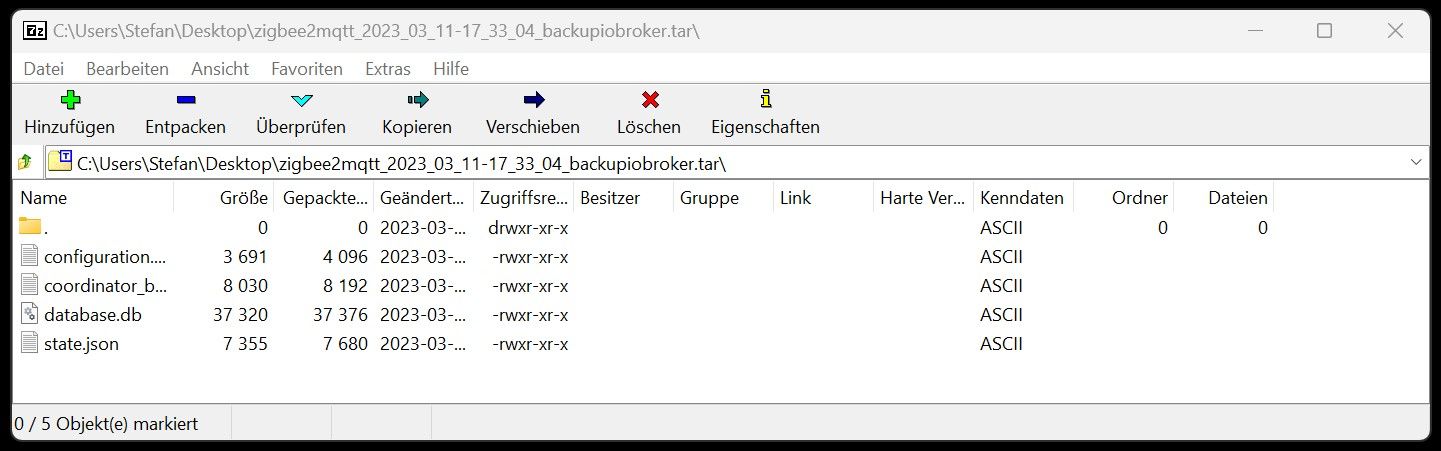
@rotamint Kontrolliere mal bitte den Inhalt des Backups. Sind die 2x erstellt wurden oder hab ich nur einen Log doppelt drin.
Zeige mal bitte den Inhalt des zigbee2mqtt Backups





Hey! Du scheinst an dieser Unterhaltung interessiert zu sein, hast aber noch kein Konto.
Hast du es satt, bei jedem Besuch durch die gleichen Beiträge zu scrollen? Wenn du dich für ein Konto anmeldest, kommst du immer genau dorthin zurück, wo du zuvor warst, und kannst dich über neue Antworten benachrichtigen lassen (entweder per E-Mail oder Push-Benachrichtigung). Du kannst auch Lesezeichen speichern und Beiträge positiv bewerten, um anderen Community-Mitgliedern deine Wertschätzung zu zeigen.
Mit deinem Input könnte dieser Beitrag noch besser werden 💗
Registrieren Anmelden432
Online33.0k
Benutzer83.5k
Themen1.3m
Beiträge