Skip to content
  • Home
  • Aktuell
  • Tags
  • 0 Ungelesen 0
  • Kategorien
  • Unreplied
  • Beliebt
  • GitHub
  • Docu
  • Hilfe
Skins
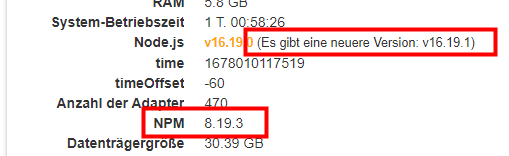
  • Light
  • Brite
  • Cerulean
  • Cosmo
  • Flatly
  • Journal
  • Litera
  • Lumen
  • Lux
  • Materia
  • Minty
  • Morph
  • Pulse
  • Sandstone
  • Simplex
  • Sketchy
  • Spacelab
  • United
  • Yeti
  • Zephyr
  • Dark
  • Cyborg
  • Darkly
  • Quartz
  • Slate
  • Solar
  • Superhero
  • Vapor

  • Standard: (Kein Skin)
  • Kein Skin
Einklappen
ioBroker Logo

Community Forum

donate donate
  1. ioBroker Community Home
  2. Deutsch
  3. Error/Bug
  4. javascript bleibt rot bei iob Neustart

NEWS

  • Jahresrückblick 2025 – unser neuer Blogbeitrag ist online! ✨
    BluefoxB
    Bluefox
    17
    1
    3.5k

  • Neuer Blogbeitrag: Monatsrückblick - Dezember 2025 🎄
    BluefoxB
    Bluefox
    13
    1
    1.1k

  • Weihnachtsangebot 2025! 🎄
    BluefoxB
    Bluefox
    25
    1
    2.5k

javascript bleibt rot bei iob Neustart

Geplant Angeheftet Gesperrt Verschoben Error/Bug
javascriptiob neutstart
30 Beiträge 4 Kommentatoren 803 Aufrufe 3 Watching
  • Älteste zuerst
  • Neuste zuerst
  • Meiste Stimmen
Antworten
  • In einem neuen Thema antworten
Anmelden zum Antworten
Dieses Thema wurde gelöscht. Nur Nutzer mit entsprechenden Rechten können es sehen.
  • bahnuhrB Online
    bahnuhrB Online
    bahnuhr
    Forum Testing Most Active
    schrieb am zuletzt editiert von
    #1

    Hallo,
    wenn ich iob komplett neu starten, wird die Instanz von javascript nicht grün. Die Folge ist, dass meine ganzen Scripte nicht starten.
    Im log steht folgendes:

    host.iobroker
    2023-03-04 08:36:54.584	info	Rebuild for adapter system.adapter.javascript.0 not successful in 3 tries. Adapter will not be restarted again. Please execute "npm install --production" in adapter directory manually.
    host.iobroker
    2023-03-04 08:36:54.584	error	instance system.adapter.javascript.0 terminated with code 1 (JS_CONTROLLER_STOPPED)
    host.iobroker
    2023-03-04 08:36:54.584	error	Caught by controller[0]: }
    host.iobroker
    2023-03-04 08:36:54.584	error	Caught by controller[0]: ]
    host.iobroker
    2023-03-04 08:36:54.584	error	Caught by controller[0]: '/opt/iobroker/node_modules/iobroker.javascript/main.js'
    host.iobroker
    2023-03-04 08:36:54.583	error	Caught by controller[0]: '/opt/iobroker/node_modules/iobroker.javascript/node_modules/coffeescript/lib/coffee-script/coffee-script.js',
    host.iobroker
    2023-03-04 08:36:54.583	error	Caught by controller[0]: requireStack: [
    host.iobroker
    2023-03-04 08:36:54.583	error	Caught by controller[0]: code: 'MODULE_NOT_FOUND',
    host.iobroker
    2023-03-04 08:36:54.583	error	Caught by controller[0]: at Function.Module._load (node:internal/modules/cjs/loader:878:12) {
    host.iobroker
    2023-03-04 08:36:54.582	error	Caught by controller[0]: at Module.load (node:internal/modules/cjs/loader:1043:32)
    host.iobroker
    2023-03-04 08:36:54.582	error	Caught by controller[0]: at Object.Module._extensions..js (node:internal/modules/cjs/loader:1219:10)
    host.iobroker
    2023-03-04 08:36:54.582	error	Caught by controller[0]: at Module._compile (node:internal/modules/cjs/loader:1165:14)
    host.iobroker
    2023-03-04 08:36:54.582	error	Caught by controller[0]: at Object.<anonymous> (/opt/iobroker/node_modules/iobroker.javascript/node_modules/coffeescript/lib/coffee-script/coffee-script.js:426:4)
    host.iobroker
    2023-03-04 08:36:54.582	error	Caught by controller[0]: at Object.<anonymous> (/opt/iobroker/node_modules/iobroker.javascript/node_modules/coffeescript/lib/coffee-script/coffee-script.js:18:15)
    host.iobroker
    2023-03-04 08:36:54.581	error	Caught by controller[0]: at require (node:internal/modules/cjs/helpers:103:18)
    host.iobroker
    2023-03-04 08:36:54.581	error	Caught by controller[0]: at Module.require (node:internal/modules/cjs/loader:1067:19)
    host.iobroker
    2023-03-04 08:36:54.581	error	Caught by controller[0]: at Function.Module._load (node:internal/modules/cjs/loader:841:27)
    host.iobroker
    2023-03-04 08:36:54.581	error	Caught by controller[0]: at Function.Module._resolveFilename (node:internal/modules/cjs/loader:995:15)
    host.iobroker
    2023-03-04 08:36:54.581	error	Caught by controller[0]: - /opt/iobroker/node_modules/iobroker.javascript/main.js
    host.iobroker
    2023-03-04 08:36:54.580	error	Caught by controller[0]: - /opt/iobroker/node_modules/iobroker.javascript/node_modules/coffeescript/lib/coffee-script/coffee-script.js
    host.iobroker
    2023-03-04 08:36:54.580	error	Caught by controller[0]: Require stack:
    host.iobroker
    2023-03-04 08:36:54.580	error	Caught by controller[0]: Error: Cannot find module './sourcemap'
    host.iobroker
    2023-03-04 08:36:54.580	error	Caught by controller[0]: ^
    host.iobroker
    2023-03-04 08:36:54.579	error	Caught by controller[0]: throw err;
    host.iobroker
    2023-03-04 08:36:54.579	error	Caught by controller[0]: node:internal/modules/cjs/loader:998
    host.iobroker
    2023-03-04 08:36:54.221	info	instance system.adapter.javascript.0 started with pid 13204
    

    Dort steht zum Schluss dann:

    Please execute "npm install --production" in adapter directory manually.
    

    Also in putty ausgeführt:

    cd /opt/iobroker/
    npm install javascript --production
    

    Danach die Intanz wieder neu gestartet und alles läuft wieder.

    Frage:
    Warum ist das so?
    und warum wird die Instanz nicht bei einem iob Neustart gleich grün ?

    Und: Wie kann ich dies beheben.

    Achja: überall auf stable; mit 1 oder 2 Ausnahmen (web, ws) wg. dort ws problem. Dort bin ich auf beta.

    mfg
    Dieter


    Wenn ich helfen konnte, dann Daumen hoch (Pfeil nach oben)!
    Danke.
    gute Forenbeiträge: https://forum.iobroker.net/topic/51555/hinweise-f%C3%BCr-gute-forenbeitr%C3%A4ge
    ScreenToGif :https://www.screentogif.com/downloads.html

    HomoranH bahnuhrB 3 Antworten Letzte Antwort
    0
    • bahnuhrB bahnuhr

      Hallo,
      wenn ich iob komplett neu starten, wird die Instanz von javascript nicht grün. Die Folge ist, dass meine ganzen Scripte nicht starten.
      Im log steht folgendes:

      host.iobroker
      2023-03-04 08:36:54.584	info	Rebuild for adapter system.adapter.javascript.0 not successful in 3 tries. Adapter will not be restarted again. Please execute "npm install --production" in adapter directory manually.
      host.iobroker
      2023-03-04 08:36:54.584	error	instance system.adapter.javascript.0 terminated with code 1 (JS_CONTROLLER_STOPPED)
      host.iobroker
      2023-03-04 08:36:54.584	error	Caught by controller[0]: }
      host.iobroker
      2023-03-04 08:36:54.584	error	Caught by controller[0]: ]
      host.iobroker
      2023-03-04 08:36:54.584	error	Caught by controller[0]: '/opt/iobroker/node_modules/iobroker.javascript/main.js'
      host.iobroker
      2023-03-04 08:36:54.583	error	Caught by controller[0]: '/opt/iobroker/node_modules/iobroker.javascript/node_modules/coffeescript/lib/coffee-script/coffee-script.js',
      host.iobroker
      2023-03-04 08:36:54.583	error	Caught by controller[0]: requireStack: [
      host.iobroker
      2023-03-04 08:36:54.583	error	Caught by controller[0]: code: 'MODULE_NOT_FOUND',
      host.iobroker
      2023-03-04 08:36:54.583	error	Caught by controller[0]: at Function.Module._load (node:internal/modules/cjs/loader:878:12) {
      host.iobroker
      2023-03-04 08:36:54.582	error	Caught by controller[0]: at Module.load (node:internal/modules/cjs/loader:1043:32)
      host.iobroker
      2023-03-04 08:36:54.582	error	Caught by controller[0]: at Object.Module._extensions..js (node:internal/modules/cjs/loader:1219:10)
      host.iobroker
      2023-03-04 08:36:54.582	error	Caught by controller[0]: at Module._compile (node:internal/modules/cjs/loader:1165:14)
      host.iobroker
      2023-03-04 08:36:54.582	error	Caught by controller[0]: at Object.<anonymous> (/opt/iobroker/node_modules/iobroker.javascript/node_modules/coffeescript/lib/coffee-script/coffee-script.js:426:4)
      host.iobroker
      2023-03-04 08:36:54.582	error	Caught by controller[0]: at Object.<anonymous> (/opt/iobroker/node_modules/iobroker.javascript/node_modules/coffeescript/lib/coffee-script/coffee-script.js:18:15)
      host.iobroker
      2023-03-04 08:36:54.581	error	Caught by controller[0]: at require (node:internal/modules/cjs/helpers:103:18)
      host.iobroker
      2023-03-04 08:36:54.581	error	Caught by controller[0]: at Module.require (node:internal/modules/cjs/loader:1067:19)
      host.iobroker
      2023-03-04 08:36:54.581	error	Caught by controller[0]: at Function.Module._load (node:internal/modules/cjs/loader:841:27)
      host.iobroker
      2023-03-04 08:36:54.581	error	Caught by controller[0]: at Function.Module._resolveFilename (node:internal/modules/cjs/loader:995:15)
      host.iobroker
      2023-03-04 08:36:54.581	error	Caught by controller[0]: - /opt/iobroker/node_modules/iobroker.javascript/main.js
      host.iobroker
      2023-03-04 08:36:54.580	error	Caught by controller[0]: - /opt/iobroker/node_modules/iobroker.javascript/node_modules/coffeescript/lib/coffee-script/coffee-script.js
      host.iobroker
      2023-03-04 08:36:54.580	error	Caught by controller[0]: Require stack:
      host.iobroker
      2023-03-04 08:36:54.580	error	Caught by controller[0]: Error: Cannot find module './sourcemap'
      host.iobroker
      2023-03-04 08:36:54.580	error	Caught by controller[0]: ^
      host.iobroker
      2023-03-04 08:36:54.579	error	Caught by controller[0]: throw err;
      host.iobroker
      2023-03-04 08:36:54.579	error	Caught by controller[0]: node:internal/modules/cjs/loader:998
      host.iobroker
      2023-03-04 08:36:54.221	info	instance system.adapter.javascript.0 started with pid 13204
      

      Dort steht zum Schluss dann:

      Please execute "npm install --production" in adapter directory manually.
      

      Also in putty ausgeführt:

      cd /opt/iobroker/
      npm install javascript --production
      

      Danach die Intanz wieder neu gestartet und alles läuft wieder.

      Frage:
      Warum ist das so?
      und warum wird die Instanz nicht bei einem iob Neustart gleich grün ?

      Und: Wie kann ich dies beheben.

      Achja: überall auf stable; mit 1 oder 2 Ausnahmen (web, ws) wg. dort ws problem. Dort bin ich auf beta.

      mfg
      Dieter

      HomoranH Nicht stören
      HomoranH Nicht stören
      Homoran
      Global Moderator Administrators
      schrieb am zuletzt editiert von
      #2

      @bahnuhr sagte in javascript bleibt rot bei iob Neustart:

      Also in putty ausgeführt:

      ich bin jetzt nicht ganz sicher, ob du damit das

      @bahnuhr sagte in javascript bleibt rot bei iob Neustart:

      Please execute "npm install --production" in adapter directory manually.

      wirklich umgesetzt hast.
      ich verstehe das so, dass du noch tiefer in die Struktur bis zum js-Adapter musst, und dort nicht

      @bahnuhr sagte in javascript bleibt rot bei iob Neustart:

      npm install javascript --production

      eingeben sollst

      kein Support per PN! - Fragen im Forum stellen - es gibt fast nichts, was nicht auch für andere interessant ist.

      Benutzt das Voting rechts unten im Beitrag wenn er euch geholfen hat.

      der Installationsfixer: curl -fsL https://iobroker.net/fix.sh | bash -

      1 Antwort Letzte Antwort
      1
      • bahnuhrB bahnuhr

        Hallo,
        wenn ich iob komplett neu starten, wird die Instanz von javascript nicht grün. Die Folge ist, dass meine ganzen Scripte nicht starten.
        Im log steht folgendes:

        host.iobroker
        2023-03-04 08:36:54.584	info	Rebuild for adapter system.adapter.javascript.0 not successful in 3 tries. Adapter will not be restarted again. Please execute "npm install --production" in adapter directory manually.
        host.iobroker
        2023-03-04 08:36:54.584	error	instance system.adapter.javascript.0 terminated with code 1 (JS_CONTROLLER_STOPPED)
        host.iobroker
        2023-03-04 08:36:54.584	error	Caught by controller[0]: }
        host.iobroker
        2023-03-04 08:36:54.584	error	Caught by controller[0]: ]
        host.iobroker
        2023-03-04 08:36:54.584	error	Caught by controller[0]: '/opt/iobroker/node_modules/iobroker.javascript/main.js'
        host.iobroker
        2023-03-04 08:36:54.583	error	Caught by controller[0]: '/opt/iobroker/node_modules/iobroker.javascript/node_modules/coffeescript/lib/coffee-script/coffee-script.js',
        host.iobroker
        2023-03-04 08:36:54.583	error	Caught by controller[0]: requireStack: [
        host.iobroker
        2023-03-04 08:36:54.583	error	Caught by controller[0]: code: 'MODULE_NOT_FOUND',
        host.iobroker
        2023-03-04 08:36:54.583	error	Caught by controller[0]: at Function.Module._load (node:internal/modules/cjs/loader:878:12) {
        host.iobroker
        2023-03-04 08:36:54.582	error	Caught by controller[0]: at Module.load (node:internal/modules/cjs/loader:1043:32)
        host.iobroker
        2023-03-04 08:36:54.582	error	Caught by controller[0]: at Object.Module._extensions..js (node:internal/modules/cjs/loader:1219:10)
        host.iobroker
        2023-03-04 08:36:54.582	error	Caught by controller[0]: at Module._compile (node:internal/modules/cjs/loader:1165:14)
        host.iobroker
        2023-03-04 08:36:54.582	error	Caught by controller[0]: at Object.<anonymous> (/opt/iobroker/node_modules/iobroker.javascript/node_modules/coffeescript/lib/coffee-script/coffee-script.js:426:4)
        host.iobroker
        2023-03-04 08:36:54.582	error	Caught by controller[0]: at Object.<anonymous> (/opt/iobroker/node_modules/iobroker.javascript/node_modules/coffeescript/lib/coffee-script/coffee-script.js:18:15)
        host.iobroker
        2023-03-04 08:36:54.581	error	Caught by controller[0]: at require (node:internal/modules/cjs/helpers:103:18)
        host.iobroker
        2023-03-04 08:36:54.581	error	Caught by controller[0]: at Module.require (node:internal/modules/cjs/loader:1067:19)
        host.iobroker
        2023-03-04 08:36:54.581	error	Caught by controller[0]: at Function.Module._load (node:internal/modules/cjs/loader:841:27)
        host.iobroker
        2023-03-04 08:36:54.581	error	Caught by controller[0]: at Function.Module._resolveFilename (node:internal/modules/cjs/loader:995:15)
        host.iobroker
        2023-03-04 08:36:54.581	error	Caught by controller[0]: - /opt/iobroker/node_modules/iobroker.javascript/main.js
        host.iobroker
        2023-03-04 08:36:54.580	error	Caught by controller[0]: - /opt/iobroker/node_modules/iobroker.javascript/node_modules/coffeescript/lib/coffee-script/coffee-script.js
        host.iobroker
        2023-03-04 08:36:54.580	error	Caught by controller[0]: Require stack:
        host.iobroker
        2023-03-04 08:36:54.580	error	Caught by controller[0]: Error: Cannot find module './sourcemap'
        host.iobroker
        2023-03-04 08:36:54.580	error	Caught by controller[0]: ^
        host.iobroker
        2023-03-04 08:36:54.579	error	Caught by controller[0]: throw err;
        host.iobroker
        2023-03-04 08:36:54.579	error	Caught by controller[0]: node:internal/modules/cjs/loader:998
        host.iobroker
        2023-03-04 08:36:54.221	info	instance system.adapter.javascript.0 started with pid 13204
        

        Dort steht zum Schluss dann:

        Please execute "npm install --production" in adapter directory manually.
        

        Also in putty ausgeführt:

        cd /opt/iobroker/
        npm install javascript --production
        

        Danach die Intanz wieder neu gestartet und alles läuft wieder.

        Frage:
        Warum ist das so?
        und warum wird die Instanz nicht bei einem iob Neustart gleich grün ?

        Und: Wie kann ich dies beheben.

        Achja: überall auf stable; mit 1 oder 2 Ausnahmen (web, ws) wg. dort ws problem. Dort bin ich auf beta.

        mfg
        Dieter

        HomoranH Nicht stören
        HomoranH Nicht stören
        Homoran
        Global Moderator Administrators
        schrieb am zuletzt editiert von
        #3

        @bahnuhr sagte in javascript bleibt rot bei iob Neustart:

        warum wird die Instanz nicht bei einem iob Neustart gleich grün ?

        hattest du ein node Update gemacht?

        @bahnuhr sagte in javascript bleibt rot bei iob Neustart:

        Rebuild for adapter system.adapter.javascript.0 not successful in 3 tries

        wird eigentlich nach einer node Änderung angestoßen.

        kein Support per PN! - Fragen im Forum stellen - es gibt fast nichts, was nicht auch für andere interessant ist.

        Benutzt das Voting rechts unten im Beitrag wenn er euch geholfen hat.

        der Installationsfixer: curl -fsL https://iobroker.net/fix.sh | bash -

        bahnuhrB 1 Antwort Letzte Antwort
        0
        • HomoranH Homoran

          @bahnuhr sagte in javascript bleibt rot bei iob Neustart:

          warum wird die Instanz nicht bei einem iob Neustart gleich grün ?

          hattest du ein node Update gemacht?

          @bahnuhr sagte in javascript bleibt rot bei iob Neustart:

          Rebuild for adapter system.adapter.javascript.0 not successful in 3 tries

          wird eigentlich nach einer node Änderung angestoßen.

          bahnuhrB Online
          bahnuhrB Online
          bahnuhr
          Forum Testing Most Active
          schrieb am zuletzt editiert von
          #4

          @homoran sagte in javascript bleibt rot bei iob Neustart:

          hattest du ein node Update gemacht?

          Ne, das ist mir schon öfters passiert mit dem js adapter
          heute nacht um 03:00 iob neu getartet und dann ging nichts mehr

          nach
          npm install javascript --production
          ging es ja wieder (kann doch dann nicht ganz falsch gewesen sein)


          Wenn ich helfen konnte, dann Daumen hoch (Pfeil nach oben)!
          Danke.
          gute Forenbeiträge: https://forum.iobroker.net/topic/51555/hinweise-f%C3%BCr-gute-forenbeitr%C3%A4ge
          ScreenToGif :https://www.screentogif.com/downloads.html

          HomoranH 1 Antwort Letzte Antwort
          0
          • bahnuhrB bahnuhr

            @homoran sagte in javascript bleibt rot bei iob Neustart:

            hattest du ein node Update gemacht?

            Ne, das ist mir schon öfters passiert mit dem js adapter
            heute nacht um 03:00 iob neu getartet und dann ging nichts mehr

            nach
            npm install javascript --production
            ging es ja wieder (kann doch dann nicht ganz falsch gewesen sein)

            HomoranH Nicht stören
            HomoranH Nicht stören
            Homoran
            Global Moderator Administrators
            schrieb am zuletzt editiert von
            #5

            @bahnuhr sagte in javascript bleibt rot bei iob Neustart:

            kann doch dann nicht ganz falsch gewesen sein

            vielleicht sogar besser, und der Adapter hat es auf dem "richtigen" Weg nicht geschafft :joy:

            kein Support per PN! - Fragen im Forum stellen - es gibt fast nichts, was nicht auch für andere interessant ist.

            Benutzt das Voting rechts unten im Beitrag wenn er euch geholfen hat.

            der Installationsfixer: curl -fsL https://iobroker.net/fix.sh | bash -

            bahnuhrB 1 Antwort Letzte Antwort
            0
            • HomoranH Homoran

              @bahnuhr sagte in javascript bleibt rot bei iob Neustart:

              kann doch dann nicht ganz falsch gewesen sein

              vielleicht sogar besser, und der Adapter hat es auf dem "richtigen" Weg nicht geschafft :joy:

              bahnuhrB Online
              bahnuhrB Online
              bahnuhr
              Forum Testing Most Active
              schrieb am zuletzt editiert von
              #6

              @homoran

              so, hab jetzt mal
              npm install --production

              im Ordner: node-modules/iobroker.javascript
              ausgeführt und danach iob komplett neu gestartet.

              Jetzt ist auch JS sofort grün.

              Komisch; aber scheint nun korrekt zu laufen.
              Danke @Homoran für den Schubser in die offensichtlich richtige Richtung.


              Wenn ich helfen konnte, dann Daumen hoch (Pfeil nach oben)!
              Danke.
              gute Forenbeiträge: https://forum.iobroker.net/topic/51555/hinweise-f%C3%BCr-gute-forenbeitr%C3%A4ge
              ScreenToGif :https://www.screentogif.com/downloads.html

              GarganoG Thomas BraunT 2 Antworten Letzte Antwort
              0
              • bahnuhrB bahnuhr

                @homoran

                so, hab jetzt mal
                npm install --production

                im Ordner: node-modules/iobroker.javascript
                ausgeführt und danach iob komplett neu gestartet.

                Jetzt ist auch JS sofort grün.

                Komisch; aber scheint nun korrekt zu laufen.
                Danke @Homoran für den Schubser in die offensichtlich richtige Richtung.

                GarganoG Offline
                GarganoG Offline
                Gargano
                schrieb am zuletzt editiert von
                #7

                @bahnuhr sagte in javascript bleibt rot bei iob Neustart:

                npm install --production

                @homoran
                Danke, hatte das gleiche Problem mit der 7.01

                1 Antwort Letzte Antwort
                0
                • bahnuhrB bahnuhr

                  @homoran

                  so, hab jetzt mal
                  npm install --production

                  im Ordner: node-modules/iobroker.javascript
                  ausgeführt und danach iob komplett neu gestartet.

                  Jetzt ist auch JS sofort grün.

                  Komisch; aber scheint nun korrekt zu laufen.
                  Danke @Homoran für den Schubser in die offensichtlich richtige Richtung.

                  Thomas BraunT Online
                  Thomas BraunT Online
                  Thomas Braun
                  Most Active
                  schrieb am zuletzt editiert von
                  #8

                  @bahnuhr sagte in javascript bleibt rot bei iob Neustart:

                  npm install --production

                  Ist obsolet mit aktuellen npm Versionen.
                  Es soll nun

                  npm install --omit=dev
                  

                  verwendet werden.

                  Linux-Werkzeugkasten:
                  https://forum.iobroker.net/topic/42952/der-kleine-iobroker-linux-werkzeugkasten
                  NodeJS Fixer Skript:
                  https://forum.iobroker.net/topic/68035/iob-node-fix-skript
                  iob_diag: curl -sLf -o diag.sh https://iobroker.net/diag.sh && bash diag.sh

                  bahnuhrB GarganoG 2 Antworten Letzte Antwort
                  0
                  • Thomas BraunT Thomas Braun

                    @bahnuhr sagte in javascript bleibt rot bei iob Neustart:

                    npm install --production

                    Ist obsolet mit aktuellen npm Versionen.
                    Es soll nun

                    npm install --omit=dev
                    

                    verwendet werden.

                    bahnuhrB Online
                    bahnuhrB Online
                    bahnuhr
                    Forum Testing Most Active
                    schrieb am zuletzt editiert von bahnuhr
                    #9

                    @thomas-braun
                    Das kann man aber nicht wissen.
                    Zumal im log ja was anderes stand.

                    Aber Danke für die Info.
                    Muss ich mir mal aufschreiben.


                    Wenn ich helfen konnte, dann Daumen hoch (Pfeil nach oben)!
                    Danke.
                    gute Forenbeiträge: https://forum.iobroker.net/topic/51555/hinweise-f%C3%BCr-gute-forenbeitr%C3%A4ge
                    ScreenToGif :https://www.screentogif.com/downloads.html

                    Thomas BraunT 1 Antwort Letzte Antwort
                    0
                    • bahnuhrB bahnuhr

                      @thomas-braun
                      Das kann man aber nicht wissen.
                      Zumal im log ja was anderes stand.

                      Aber Danke für die Info.
                      Muss ich mir mal aufschreiben.

                      Thomas BraunT Online
                      Thomas BraunT Online
                      Thomas Braun
                      Most Active
                      schrieb am zuletzt editiert von Thomas Braun
                      #10

                      @bahnuhr sagte in javascript bleibt rot bei iob Neustart:

                      Zumal im log ja was anderes stand.

                      Im Log steht eigentlich genau das drin, wenn man --production verwendet.

                      Linux-Werkzeugkasten:
                      https://forum.iobroker.net/topic/42952/der-kleine-iobroker-linux-werkzeugkasten
                      NodeJS Fixer Skript:
                      https://forum.iobroker.net/topic/68035/iob-node-fix-skript
                      iob_diag: curl -sLf -o diag.sh https://iobroker.net/diag.sh && bash diag.sh

                      1 Antwort Letzte Antwort
                      0
                      • bahnuhrB bahnuhr

                        Hallo,
                        wenn ich iob komplett neu starten, wird die Instanz von javascript nicht grün. Die Folge ist, dass meine ganzen Scripte nicht starten.
                        Im log steht folgendes:

                        host.iobroker
                        2023-03-04 08:36:54.584	info	Rebuild for adapter system.adapter.javascript.0 not successful in 3 tries. Adapter will not be restarted again. Please execute "npm install --production" in adapter directory manually.
                        host.iobroker
                        2023-03-04 08:36:54.584	error	instance system.adapter.javascript.0 terminated with code 1 (JS_CONTROLLER_STOPPED)
                        host.iobroker
                        2023-03-04 08:36:54.584	error	Caught by controller[0]: }
                        host.iobroker
                        2023-03-04 08:36:54.584	error	Caught by controller[0]: ]
                        host.iobroker
                        2023-03-04 08:36:54.584	error	Caught by controller[0]: '/opt/iobroker/node_modules/iobroker.javascript/main.js'
                        host.iobroker
                        2023-03-04 08:36:54.583	error	Caught by controller[0]: '/opt/iobroker/node_modules/iobroker.javascript/node_modules/coffeescript/lib/coffee-script/coffee-script.js',
                        host.iobroker
                        2023-03-04 08:36:54.583	error	Caught by controller[0]: requireStack: [
                        host.iobroker
                        2023-03-04 08:36:54.583	error	Caught by controller[0]: code: 'MODULE_NOT_FOUND',
                        host.iobroker
                        2023-03-04 08:36:54.583	error	Caught by controller[0]: at Function.Module._load (node:internal/modules/cjs/loader:878:12) {
                        host.iobroker
                        2023-03-04 08:36:54.582	error	Caught by controller[0]: at Module.load (node:internal/modules/cjs/loader:1043:32)
                        host.iobroker
                        2023-03-04 08:36:54.582	error	Caught by controller[0]: at Object.Module._extensions..js (node:internal/modules/cjs/loader:1219:10)
                        host.iobroker
                        2023-03-04 08:36:54.582	error	Caught by controller[0]: at Module._compile (node:internal/modules/cjs/loader:1165:14)
                        host.iobroker
                        2023-03-04 08:36:54.582	error	Caught by controller[0]: at Object.<anonymous> (/opt/iobroker/node_modules/iobroker.javascript/node_modules/coffeescript/lib/coffee-script/coffee-script.js:426:4)
                        host.iobroker
                        2023-03-04 08:36:54.582	error	Caught by controller[0]: at Object.<anonymous> (/opt/iobroker/node_modules/iobroker.javascript/node_modules/coffeescript/lib/coffee-script/coffee-script.js:18:15)
                        host.iobroker
                        2023-03-04 08:36:54.581	error	Caught by controller[0]: at require (node:internal/modules/cjs/helpers:103:18)
                        host.iobroker
                        2023-03-04 08:36:54.581	error	Caught by controller[0]: at Module.require (node:internal/modules/cjs/loader:1067:19)
                        host.iobroker
                        2023-03-04 08:36:54.581	error	Caught by controller[0]: at Function.Module._load (node:internal/modules/cjs/loader:841:27)
                        host.iobroker
                        2023-03-04 08:36:54.581	error	Caught by controller[0]: at Function.Module._resolveFilename (node:internal/modules/cjs/loader:995:15)
                        host.iobroker
                        2023-03-04 08:36:54.581	error	Caught by controller[0]: - /opt/iobroker/node_modules/iobroker.javascript/main.js
                        host.iobroker
                        2023-03-04 08:36:54.580	error	Caught by controller[0]: - /opt/iobroker/node_modules/iobroker.javascript/node_modules/coffeescript/lib/coffee-script/coffee-script.js
                        host.iobroker
                        2023-03-04 08:36:54.580	error	Caught by controller[0]: Require stack:
                        host.iobroker
                        2023-03-04 08:36:54.580	error	Caught by controller[0]: Error: Cannot find module './sourcemap'
                        host.iobroker
                        2023-03-04 08:36:54.580	error	Caught by controller[0]: ^
                        host.iobroker
                        2023-03-04 08:36:54.579	error	Caught by controller[0]: throw err;
                        host.iobroker
                        2023-03-04 08:36:54.579	error	Caught by controller[0]: node:internal/modules/cjs/loader:998
                        host.iobroker
                        2023-03-04 08:36:54.221	info	instance system.adapter.javascript.0 started with pid 13204
                        

                        Dort steht zum Schluss dann:

                        Please execute "npm install --production" in adapter directory manually.
                        

                        Also in putty ausgeführt:

                        cd /opt/iobroker/
                        npm install javascript --production
                        

                        Danach die Intanz wieder neu gestartet und alles läuft wieder.

                        Frage:
                        Warum ist das so?
                        und warum wird die Instanz nicht bei einem iob Neustart gleich grün ?

                        Und: Wie kann ich dies beheben.

                        Achja: überall auf stable; mit 1 oder 2 Ausnahmen (web, ws) wg. dort ws problem. Dort bin ich auf beta.

                        mfg
                        Dieter

                        bahnuhrB Online
                        bahnuhrB Online
                        bahnuhr
                        Forum Testing Most Active
                        schrieb am zuletzt editiert von
                        #11

                        @Thomas-Braun
                        das stand im log

                        @bahnuhr sagte in javascript bleibt rot bei iob Neustart:

                        Dort steht zum Schluss dann:
                        Please execute "npm install --production" in adapter directory manually.


                        Wenn ich helfen konnte, dann Daumen hoch (Pfeil nach oben)!
                        Danke.
                        gute Forenbeiträge: https://forum.iobroker.net/topic/51555/hinweise-f%C3%BCr-gute-forenbeitr%C3%A4ge
                        ScreenToGif :https://www.screentogif.com/downloads.html

                        1 Antwort Letzte Antwort
                        0
                        • Thomas BraunT Thomas Braun

                          @bahnuhr sagte in javascript bleibt rot bei iob Neustart:

                          npm install --production

                          Ist obsolet mit aktuellen npm Versionen.
                          Es soll nun

                          npm install --omit=dev
                          

                          verwendet werden.

                          GarganoG Offline
                          GarganoG Offline
                          Gargano
                          schrieb am zuletzt editiert von
                          #12

                          @thomas-braun
                          Was ist die empfohlene npm und nodejs Version aktuell ?
                          Ist das irgendwo immer aktuell beshrieben ? Hab leider nichts gefunden

                          bahnuhrB Thomas BraunT 2 Antworten Letzte Antwort
                          0
                          • GarganoG Gargano

                            @thomas-braun
                            Was ist die empfohlene npm und nodejs Version aktuell ?
                            Ist das irgendwo immer aktuell beshrieben ? Hab leider nichts gefunden

                            bahnuhrB Online
                            bahnuhrB Online
                            bahnuhr
                            Forum Testing Most Active
                            schrieb am zuletzt editiert von
                            #13

                            @gargano sagte in javascript bleibt rot bei iob Neustart:

                            @thomas-braun
                            Was ist die empfohlene npm und nodejs Version aktuell ?
                            Ist das irgendwo immer aktuell beshrieben ? Hab leider nichts gefunden

                            steht doch bei Info drin:
                            37636a29-a405-4236-bf1b-a4d00057d8ce-image.png


                            Wenn ich helfen konnte, dann Daumen hoch (Pfeil nach oben)!
                            Danke.
                            gute Forenbeiträge: https://forum.iobroker.net/topic/51555/hinweise-f%C3%BCr-gute-forenbeitr%C3%A4ge
                            ScreenToGif :https://www.screentogif.com/downloads.html

                            1 Antwort Letzte Antwort
                            0
                            • GarganoG Gargano

                              @thomas-braun
                              Was ist die empfohlene npm und nodejs Version aktuell ?
                              Ist das irgendwo immer aktuell beshrieben ? Hab leider nichts gefunden

                              Thomas BraunT Online
                              Thomas BraunT Online
                              Thomas Braun
                              Most Active
                              schrieb am zuletzt editiert von
                              #14

                              @gargano

                              Nodejs@16, die bringt die passende npm@8 gleich richtig mit.
                              Wenn nodejs denn richtig installiert wurde.

                              Linux-Werkzeugkasten:
                              https://forum.iobroker.net/topic/42952/der-kleine-iobroker-linux-werkzeugkasten
                              NodeJS Fixer Skript:
                              https://forum.iobroker.net/topic/68035/iob-node-fix-skript
                              iob_diag: curl -sLf -o diag.sh https://iobroker.net/diag.sh && bash diag.sh

                              GarganoG 1 Antwort Letzte Antwort
                              0
                              • Thomas BraunT Thomas Braun

                                @gargano

                                Nodejs@16, die bringt die passende npm@8 gleich richtig mit.
                                Wenn nodejs denn richtig installiert wurde.

                                GarganoG Offline
                                GarganoG Offline
                                Gargano
                                schrieb am zuletzt editiert von
                                #15

                                @thomas-braun
                                @bahnuhr
                                Danke , dann habe ich die aktuellste

                                Manchmal sieht man halt den Wald vor lauter Bäumen nicht. :face_with_rolling_eyes:

                                Thomas BraunT 1 Antwort Letzte Antwort
                                0
                                • GarganoG Gargano

                                  @thomas-braun
                                  @bahnuhr
                                  Danke , dann habe ich die aktuellste

                                  Manchmal sieht man halt den Wald vor lauter Bäumen nicht. :face_with_rolling_eyes:

                                  Thomas BraunT Online
                                  Thomas BraunT Online
                                  Thomas Braun
                                  Most Active
                                  schrieb am zuletzt editiert von
                                  #16

                                  @gargano

                                  iob diag
                                  

                                  sagt? Die Summary reicht.

                                  Linux-Werkzeugkasten:
                                  https://forum.iobroker.net/topic/42952/der-kleine-iobroker-linux-werkzeugkasten
                                  NodeJS Fixer Skript:
                                  https://forum.iobroker.net/topic/68035/iob-node-fix-skript
                                  iob_diag: curl -sLf -o diag.sh https://iobroker.net/diag.sh && bash diag.sh

                                  GarganoG 1 Antwort Letzte Antwort
                                  0
                                  • Thomas BraunT Thomas Braun

                                    @gargano

                                    iob diag
                                    

                                    sagt? Die Summary reicht.

                                    GarganoG Offline
                                    GarganoG Offline
                                    Gargano
                                    schrieb am zuletzt editiert von
                                    #17

                                    @thomas-braun

                                    ======================= SUMMARY =======================
                                                         v.2023-01-02
                                    
                                    
                                    Operatingsystem:        Debian GNU/Linux 11 (bullseye)
                                    Installation:           Native
                                    Timezone:               Europe/Berlin
                                    User-ID:                1000
                                    X-Server:               false
                                    Boot Target:            graphical.target
                                    
                                    Pending OS-Updates:     0
                                    
                                    Nodejs-Installation:    /usr/bin/nodejs         v16.19.1
                                                            /usr/bin/node           v16.19.1
                                                            /usr/bin/npm            8.19.3
                                                            /usr/bin/npx            8.19.3
                                    
                                    ioBroker Core:          js-controller           4.0.24
                                                            admin                   6.3.6
                                    
                                    ioBroker Status:        iobroker is running on this host.
                                    
                                    At least one iobroker host is running.
                                    
                                    Objects type: redis
                                    States  type: redis
                                    
                                    Status admin:
                                    + system.adapter.admin.0                  : admin                 : raspberrypi                              -  enabled, port: 8081, bind: 0.0.0.0, run as: admin
                                    
                                    Pending iob updates:    1
                                    
                                    Active repo(s): Beta (latest)
                                    
                                    Objects:                19917
                                    States:                 18221
                                    
                                    Size of iob-Database:
                                    
                                    5.2M    /opt/iobroker/iobroker-data/objects.json.bak
                                    5.2M    /opt/iobroker/iobroker-data/objects.json
                                    40K     /opt/iobroker/iobroker-data/states.json.bak
                                    40K     /opt/iobroker/iobroker-data/states.json
                                    
                                    
                                    =================== END OF SUMMARY ====================
                                    
                                    Thomas BraunT 1 Antwort Letzte Antwort
                                    0
                                    • GarganoG Gargano

                                      @thomas-braun

                                      ======================= SUMMARY =======================
                                                           v.2023-01-02
                                      
                                      
                                      Operatingsystem:        Debian GNU/Linux 11 (bullseye)
                                      Installation:           Native
                                      Timezone:               Europe/Berlin
                                      User-ID:                1000
                                      X-Server:               false
                                      Boot Target:            graphical.target
                                      
                                      Pending OS-Updates:     0
                                      
                                      Nodejs-Installation:    /usr/bin/nodejs         v16.19.1
                                                              /usr/bin/node           v16.19.1
                                                              /usr/bin/npm            8.19.3
                                                              /usr/bin/npx            8.19.3
                                      
                                      ioBroker Core:          js-controller           4.0.24
                                                              admin                   6.3.6
                                      
                                      ioBroker Status:        iobroker is running on this host.
                                      
                                      At least one iobroker host is running.
                                      
                                      Objects type: redis
                                      States  type: redis
                                      
                                      Status admin:
                                      + system.adapter.admin.0                  : admin                 : raspberrypi                              -  enabled, port: 8081, bind: 0.0.0.0, run as: admin
                                      
                                      Pending iob updates:    1
                                      
                                      Active repo(s): Beta (latest)
                                      
                                      Objects:                19917
                                      States:                 18221
                                      
                                      Size of iob-Database:
                                      
                                      5.2M    /opt/iobroker/iobroker-data/objects.json.bak
                                      5.2M    /opt/iobroker/iobroker-data/objects.json
                                      40K     /opt/iobroker/iobroker-data/states.json.bak
                                      40K     /opt/iobroker/iobroker-data/states.json
                                      
                                      
                                      =================== END OF SUMMARY ====================
                                      
                                      Thomas BraunT Online
                                      Thomas BraunT Online
                                      Thomas Braun
                                      Most Active
                                      schrieb am zuletzt editiert von
                                      #18

                                      @gargano

                                      Passt grundsätzlich.
                                      Schaufel das Update beim iobroker noch rein und stell das RunLevel / Boot Target auf Multi-User um.

                                      Linux-Werkzeugkasten:
                                      https://forum.iobroker.net/topic/42952/der-kleine-iobroker-linux-werkzeugkasten
                                      NodeJS Fixer Skript:
                                      https://forum.iobroker.net/topic/68035/iob-node-fix-skript
                                      iob_diag: curl -sLf -o diag.sh https://iobroker.net/diag.sh && bash diag.sh

                                      1 Antwort Letzte Antwort
                                      0
                                      • GarganoG Offline
                                        GarganoG Offline
                                        Gargano
                                        schrieb am zuletzt editiert von
                                        #19

                                        @thomas-braun
                                        Das pending Update ist der Gerätemanager, der ist noch auf 1.1.1 , weil der 1.1.2 buggy ist und nicht funktioniert.
                                        Warum boot Target auf multi User ?

                                        Thomas BraunT 1 Antwort Letzte Antwort
                                        0
                                        • GarganoG Gargano

                                          @thomas-braun
                                          Das pending Update ist der Gerätemanager, der ist noch auf 1.1.1 , weil der 1.1.2 buggy ist und nicht funktioniert.
                                          Warum boot Target auf multi User ?

                                          Thomas BraunT Online
                                          Thomas BraunT Online
                                          Thomas Braun
                                          Most Active
                                          schrieb am zuletzt editiert von
                                          #20

                                          @gargano

                                          Weil Multi-User/ RunLevel 3 für den Betrieb als Server die richtige Einstellung ist.

                                          Linux-Werkzeugkasten:
                                          https://forum.iobroker.net/topic/42952/der-kleine-iobroker-linux-werkzeugkasten
                                          NodeJS Fixer Skript:
                                          https://forum.iobroker.net/topic/68035/iob-node-fix-skript
                                          iob_diag: curl -sLf -o diag.sh https://iobroker.net/diag.sh && bash diag.sh

                                          bahnuhrB GarganoG 2 Antworten Letzte Antwort
                                          0
                                          Antworten
                                          • In einem neuen Thema antworten
                                          Anmelden zum Antworten
                                          • Älteste zuerst
                                          • Neuste zuerst
                                          • Meiste Stimmen


                                          Support us

                                          ioBroker
                                          Community Adapters
                                          Donate

                                          624

                                          Online

                                          32.7k

                                          Benutzer

                                          82.4k

                                          Themen

                                          1.3m

                                          Beiträge
                                          Community
                                          Impressum | Datenschutz-Bestimmungen | Nutzungsbedingungen | Einwilligungseinstellungen
                                          ioBroker Community 2014-2025
                                          logo
                                          • Anmelden

                                          • Du hast noch kein Konto? Registrieren

                                          • Anmelden oder registrieren, um zu suchen
                                          • Erster Beitrag
                                            Letzter Beitrag
                                          0
                                          • Home
                                          • Aktuell
                                          • Tags
                                          • Ungelesen 0
                                          • Kategorien
                                          • Unreplied
                                          • Beliebt
                                          • GitHub
                                          • Docu
                                          • Hilfe