




Failed to lock DB file nach Festplatte voll.
-
Uff... :-D
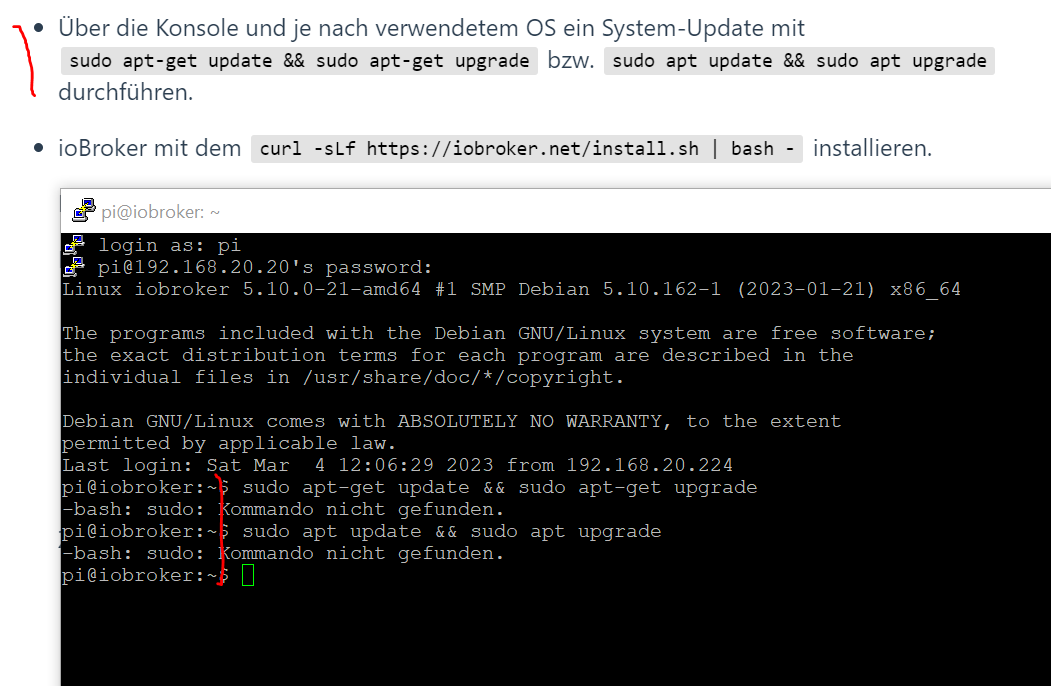
Zum Verzweifeln :-(

OK ich musste also sudo per "su" nachinstallieren. Warum ist sudo nicht installiert unter debian? Omg...
Und was will mir das System mit dem sagen? Strub...
@chrisprefect
Wenn unter Deinem Windows WSL zur Verfügung steht, wäre Docker eine Alternative."Any fool can write code that a computer can understand. Good programmers write code that humans can understand." (Martin Fowler, "Refactoring")
Proxmox 9.1.1 LXC|8 GB|Core i7-6700
HmIP|ZigBee|Tasmota|Unifi
Zabbix Certified Specialist
Konnte ich Dir helfen? Dann benutze bitte das Voting unten rechts im Beitrag -
@chrisprefect
Wenn unter Deinem Windows WSL zur Verfügung steht, wäre Docker eine Alternative.@codierknecht Ich glaube das wäre noch komplexer für mich...
Ich kann nicht mal auf einem regulären Debian sudo ausführen. Warum wird das absichtlich so extrem schwierig gemacht?
usermod hat keinen Effekt. Der user pi ist noch immer nicht in der Sudoers-Liste.
anscheinend geht "su" nicht richtig und man muss auf einmal "su -" nehmen? Das ist doch verwirrend.
Warum war Curl nicht installiert?
pi@iobroker:~$ su
Passwort:
root@iobroker:/home/pi# usermod -aG sudo pi
bash: usermod: Kommando nicht gefunden.
root@iobroker:/home/pi# /usr/sbin/usermod -aG sudo pi
root@iobroker:/home/pi# exit
exit
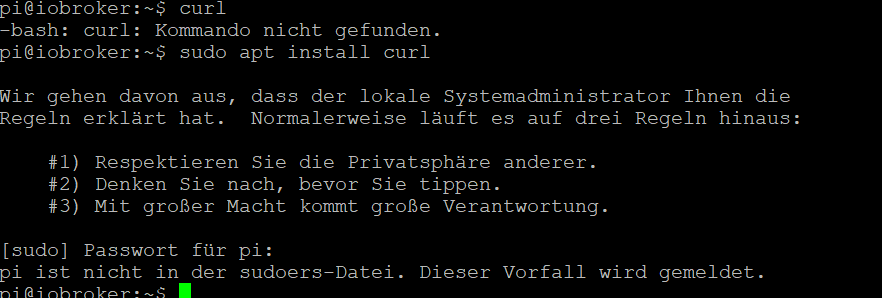
pi@iobroker:~$ sudo apt install curl
[sudo] Passwort für pi:
pi ist nicht in der sudoers-Datei. Dieser Vorfall wird gemeldet.
pi@iobroker:~$ su
Passwort:
root@iobroker:/home/pi# /usr/sbin/usermod -aG sudo pi
root@iobroker:/home/pi# exit
exit
pi@iobroker:~$ su -
Passwort:
root@iobroker:~# /usr/sbin/usermod -aG sudo pi
root@iobroker:~# exit
Abgemeldet
pi@iobroker:~$ sudo apt install curl
[sudo] Passwort für pi:
pi ist nicht in der sudoers-Datei. Dieser Vorfall wird gemeldet.
pi@iobroker:~$
Was? Dabei ist der user in der sudo-gruppe! Ich verzweifle an Linux! :-(
pi@iobroker:~$ sudo apt install curl [sudo] Passwort für pi: pi ist nicht in der sudoers-Datei. Dieser Vorfall wird gemeldet. pi@iobroker:~$ id pi uid=1000(pi) gid=1000(pi) Gruppen=1000(pi),24(cdrom),25(floppy),27(sudo),29(audio),30(dip),44(video),46(plugdev),108(netdev) -
@codierknecht sagte in Failed to lock DB file nach Festplatte voll.:
Wenn die Platte rappelvoll ist, läuft auch ein Windows nicht mehr.
Doch, Windows läuft noch einigermassen weiter. Und sobald man einige Files löscht läuft es wieder. Mein ioBroker-System läuft jetzt gar nicht mehr. Das ist schon sehr komisch...
Kann man Debian nicht einfach upgraden, so wie jedes andere Betriebssystem auch?
Klar, muss man aber regelmäßig machen.Wie? apt-update und apt-upgrade? Dann ist man aber noch immer nicht automatisch auf Bullseye, oder?
Stromstecker ziehen. Macht Windows nix aus
quod erat demonstrandum - der Krug geht so lange zum Brunnen bis er bricht.
Sowas macht man niemals!Eben: Es zeigt, dass anderen Systemen das nix ausmacht. Nur mit Linux hatte ich immer wieder das Problem. Windows kann ich täglich abwürgen und es passiert nix.
Bei ioBroker passiert das ja nicht absichtlich. Wir hatten schon 2-3 Mal einen Stromausfall, z.B. weil ein Elektriker den Strom kurz abgedreht hatte. Oder Windows wollte neustarten und hat die VMs zu gemacht. Oder ich habe die VM geschlossen und vergessen, dass ich mich erst in die VM einloggen und den ioBroker stoppen muss. Das ist schon ein sehr spezielles Problem, das andere Betriebssysteme so nicht haben.
@chrisprefect sagte in Failed to lock DB file nach Festplatte voll.:
Wie? apt-update und apt-upgrade? Dann ist man aber noch immer nicht automatisch auf Bullseye, oder?
innerhalb einer major version update/upgrade, wenn node oder OS angehoben werden soll, muss man entsprechend die Listen anpassen
@chrisprefect sagte in Failed to lock DB file nach Festplatte voll.:
Oder ich habe die VM geschlossen und vergessen, dass ich mich erst in die VM einloggen und den ioBroker stoppen muss.
in Proxmox z.B wäre es der Qemu-Guest-Agent, der dafür zuständig ist, das beim Beenden der VM alles richtig beendet wird.
@chrisprefect sagte in Failed to lock DB file nach Festplatte voll.:
Backups machen kann
kannst du so oder so machen
@chrisprefect sagte in Failed to lock DB file nach Festplatte voll.:
Das darf eigentlich nichts machen mit NTFS. Der Zustand des Dateisystems ist ja immer definiert, egal an welchem Punkt das System hart abgeschaltet wird
Wenn man der Computer plötzlich ausschaltet, wird jede Operation, die in einem Prozess war, auf halbem Weg unterbrochen.
@chrisprefect sagte in Failed to lock DB file nach Festplatte voll.:
OK ich musste also sudo per "su" nachinstallieren. Warum ist sudo nicht installiert unter debian? Omg...
Und was will mir das System mit dem sagen? Strub...weil das ein minimal system ist, da müssen sudo, curl erst nachinstalliert werden
-
@codierknecht Ich glaube das wäre noch komplexer für mich...
Ich kann nicht mal auf einem regulären Debian sudo ausführen. Warum wird das absichtlich so extrem schwierig gemacht?
usermod hat keinen Effekt. Der user pi ist noch immer nicht in der Sudoers-Liste.
anscheinend geht "su" nicht richtig und man muss auf einmal "su -" nehmen? Das ist doch verwirrend.
Warum war Curl nicht installiert?
pi@iobroker:~$ su
Passwort:
root@iobroker:/home/pi# usermod -aG sudo pi
bash: usermod: Kommando nicht gefunden.
root@iobroker:/home/pi# /usr/sbin/usermod -aG sudo pi
root@iobroker:/home/pi# exit
exit
pi@iobroker:~$ sudo apt install curl
[sudo] Passwort für pi:
pi ist nicht in der sudoers-Datei. Dieser Vorfall wird gemeldet.
pi@iobroker:~$ su
Passwort:
root@iobroker:/home/pi# /usr/sbin/usermod -aG sudo pi
root@iobroker:/home/pi# exit
exit
pi@iobroker:~$ su -
Passwort:
root@iobroker:~# /usr/sbin/usermod -aG sudo pi
root@iobroker:~# exit
Abgemeldet
pi@iobroker:~$ sudo apt install curl
[sudo] Passwort für pi:
pi ist nicht in der sudoers-Datei. Dieser Vorfall wird gemeldet.
pi@iobroker:~$
Was? Dabei ist der user in der sudo-gruppe! Ich verzweifle an Linux! :-(
pi@iobroker:~$ sudo apt install curl [sudo] Passwort für pi: pi ist nicht in der sudoers-Datei. Dieser Vorfall wird gemeldet. pi@iobroker:~$ id pi uid=1000(pi) gid=1000(pi) Gruppen=1000(pi),24(cdrom),25(floppy),27(sudo),29(audio),30(dip),44(video),46(plugdev),108(netdev)@chrisprefect sagte in Failed to lock DB file nach Festplatte voll.:
Ich kann nicht mal auf einem regulären Debian sudo ausführen. Warum wird das absichtlich so extrem schwierig gemacht?
hast du beim Install ein root Passwort vergeben? das sollte man nicht, das lässt man leer, dadurch wird dein Benutzer und auch sudo automatisch richtig gestellt.
ist zwar proxmox, seh dir aber mal den Abschnitt Debian Install an
umgestiegen von Proxmox auf Unraid
-
@chrisprefect sagte in Failed to lock DB file nach Festplatte voll.:
Ich kann nicht mal auf einem regulären Debian sudo ausführen. Warum wird das absichtlich so extrem schwierig gemacht?
hast du beim Install ein root Passwort vergeben? das sollte man nicht, das lässt man leer, dadurch wird dein Benutzer und auch sudo automatisch richtig gestellt.
ist zwar proxmox, seh dir aber mal den Abschnitt Debian Install an
@crunchip sagte in Failed to lock DB file nach Festplatte voll.:
hast du beim Install ein root Passwort vergeben? das sollte man nicht, das lässt man leer, dadurch wird dein Benutzer und auch sudo automatisch richtig gestellt.
Das sagt einem halt wirklich niemand

So viele Dinge sind da einfach irgendwie "implizit" und wenn man nicht weiss, was hinter den Kulissen abgeht, hat man keine Chance es zu verstehen.
Wie komme ich nun zu einem "vollständigen" System? Was muss ich alles nachinstallieren?
Ich habe den user "pi" nun manuell in das Textfile der sudoers reingeschrieben. Anscheinend klappt es jetzt. Warum es vorher nicht ging, obwohl pi in der Gruppe sudoers war, weiss ich nicht.
Wenn man der Computer plötzlich ausschaltet, wird jede Operation, die in einem Prozess war, auf halbem Weg unterbrochen.
Ja, aber das ist bei Journaling Filesystemen egal. Es werden nur atomare Aktionen geschrieben. Entweder ganz oder gar nicht. Wenn in der Mitte unterbrochen wird, dann wird das Journal beim nächsten Start zurückgerollt und es herrscht wieder ein definierter Zustand. So kann es nie zu korrupten Dateien kommen, egal wann der Strom ausgeschaltet wird. Bei Windows klappt das absolut zuverlässig. Auch bei einem vollen Datenträger kann es so keine Probleme geben. Das Debian ist nun leider zerschossen :-(
-
Anscheinend hat backitup schon am 17.2. gestoppt, Backups zu machen. Natürlich komplett ohne irgendeine Nachricht an mich zu schicken. Warum gibt es da kein System, welches solche kritischen Informationen per Mail oder Telegram verschickt? Ich schaue ja nicht jede Woche ins Admin-Interface vom ioBroker.
Ausserdem wird mit dem Backup influxdb und Grafana nicht wiederhergestellt. Mist! Und ich finde keine saubere und aktuelle Anleitung, wie ich ich das wieder installieren kann.
Jetzt bin ich wieder seit 7 Stunden an einer Aktion, die ja eigentlich maximal eine halbe Stunde hätte dauern sollen...
Backitup sagte, dass das Backup erfolgreich widerhergestellt wurde. Aber alle Adapter sind gestoppt und starten auch nicht mehr. Lügt Backitup?
Jeder einzelne Schritt unter Linux führt zu neuen Problemen. Das ist so anstrengend

pi@iobroker:~$ sudo apt-get update && sudo apt-get install influxdb2 [sudo] Passwort für pi: OK:1 http://deb.debian.org/debian bullseye InRelease OK:2 http://deb.debian.org/debian bullseye-updates InRelease OK:3 http://security.debian.org/debian-security bullseye-security InRelease OK:4 https://deb.nodesource.com/node_16.x bullseye InRelease Paketlisten werden gelesen… Fertig Paketlisten werden gelesen… Fertig Abhängigkeitsbaum wird aufgebaut… Fertig Statusinformationen werden eingelesen… Fertig E: Paket influxdb2 kann nicht gefunden werden. -
Nach dem die Festplatte vollgelaufen ist, kann ich den ioBroker nicht mehr starten:
pi@ioBrokerVM:/opt/iobroker$ node node_modules/iobroker.js-controller/controller.js --logs
2023-03-04 09:57:15.583  - info: host.ioBrokerVM iobroker.js-controller version 4.0.24 js-controller starting
2023-03-04 09:57:15.589  - info: host.ioBrokerVM Copyright (c) 2014-2022 bluefox, 2014 hobbyquaker
2023-03-04 09:57:15.590  - info: host.ioBrokerVM hostname: ioBrokerVM, node: v14.19.3
2023-03-04 09:57:15.590  - info: host.ioBrokerVM ip addresses: 192.168.20.20 fe80::a00:27ff:fe73:7859
2023-03-04 09:57:17.691  - error: host.ioBrokerVM-Server Cannot start inMem-objects on port 9001: Failed to lock DB file "/opt/iobroker/iobroker-data/objects.jsonl"!
Ich habe bereits die Backup-States und -Objects wiederhergestellt, das hat aber nichts geholfen:
-rw-rwxrw-+  1 iobroker iobroker  351377 Mär  2 20:54 2023-03-02_20-54_states.jsonl.gz
-rw-rwxrw-+  1 iobroker iobroker 3093058 Mär  2 22:54 2023-03-02_22-54_objects.jsonl.gz
-rw-rwxrw-+  1 iobroker iobroker  350637 Mär  2 22:54 2023-03-02_22-54_states.jsonl.gz
-rw-rwxrw-+  1 iobroker iobroker 3092490 Mär  3 00:54 2023-03-03_00-54_objects.jsonl.gz
-rw-rwxrw-+  1 iobroker iobroker  350688 Mär  3 00:54 2023-03-03_00-54_states.jsonl.gz
-rw-rwxrw-+  1 iobroker iobroker 3092984 Mär  3 02:54 2023-03-03_02-54_objects.jsonl.gz
-rw-rwxrw-+  1 iobroker iobroker  350673 Mär  3 02:54 2023-03-03_02-54_states.jsonl.gz
-rw-rwxrw-+  1 iobroker iobroker 3092818 Mär  3 04:54 2023-03-03_04-54_objects.jsonl.gz
-rw-rwxrw-+  1 iobroker iobroker  350887 Mär  3 04:54 2023-03-03_04-54_states.jsonl.gz
-rw-rwxrw-+  1 iobroker iobroker 3092699 Mär  3 06:54 2023-03-03_06-54_objects.jsonl.gz
-rw-rwxrw-+  1 iobroker iobroker  350714 Mär  3 06:54 2023-03-03_06-54_states.jsonl.gz
-rw-rwxrw-+  1 iobroker iobroker 3092787 Mär  3 08:54 2023-03-03_08-54_objects.jsonl.gz
-rw-rwxrw-+  1 iobroker iobroker  351063 Mär  3 08:54 2023-03-03_08-54_states.jsonl.gz
-rw-rwxrw-+  1 iobroker iobroker 3092986 Mär  3 10:54 2023-03-03_10-54_objects.jsonl.gz
-rw-rwxrw-+  1 iobroker iobroker  350923 Mär  3 10:54 2023-03-03_10-54_states.jsonl.gz
-rw-rwxrw-+  1 iobroker iobroker 3093271 Mär  3 12:54 2023-03-03_12-54_objects.jsonl.gz
-rw-rwxrw-+  1 iobroker iobroker  350752 Mär  3 12:54 2023-03-03_12-54_states.jsonl.gz
-rw-rwxrw-+  1 iobroker iobroker 3093112 Mär  3 14:54 2023-03-03_14-54_objects.jsonl.gz
-rw-rwxrw-+  1 iobroker iobroker  351187 Mär  3 14:54 2023-03-03_14-54_states.jsonl.gz
-rw-rwxrw-+  1 iobroker iobroker 3093104 Mär  3 16:54 2023-03-03_16-54_objects.jsonl.gz
-rw-rwxrw-+  1 iobroker iobroker  350992 Mär  3 16:54 2023-03-03_16-54_states.jsonl.gz
-rw-rwxrw-+  1 iobroker iobroker 3093138 Mär  3 18:54 2023-03-03_18-54_objects.jsonl.gz
-rw-rwxrw-+  1 iobroker iobroker  350598 Mär  3 18:54 2023-03-03_18-54_states.jsonl.gz
-rw-rwxrw-+  1 iobroker iobroker 3092969 Mär  3 20:54 2023-03-03_20-54_objects.jsonl.gz
-rw-rwxrw-+  1 iobroker iobroker  350794 Mär  3 20:54 2023-03-03_20-54_states.jsonl.gz
-rw-rwxrw-+  1 iobroker iobroker 3092968 Mär  3 22:54 2023-03-03_22-54_objects.jsonl.gz
-rw-rwxrw-+  1 iobroker iobroker  350486 Mär  3 22:54 2023-03-03_22-54_states.jsonl.gz
-rw-rwxrw-+  1 iobroker iobroker 3093542 Mär  4 00:54 2023-03-04_00-54_objects.jsonl.gz
-rw-rwxrw-+  1 iobroker iobroker  350223 Mär  4 00:54 2023-03-04_00-54_states.jsonl.gz
pi@ioBrokerVM:/opt/iobroker/iobroker-data/backup-objects$ gunzip -ck /opt/iobroker/iobroker-data/backup-objects/2023-03-03_00-54_objects.jsonl.gz > /opt/iobroker/iobroker-data/objects.json
pi@ioBrokerVM:/opt/iobroker/iobroker-data/backup-objects$ gunzip -ck /opt/iobroker/iobroker-data/backup-objects/2023-03-03_00-54_states.jsonl.gz > /opt/iobroker/iobroker-data/states.json
Das Fix.sh-Skript habe ich bereits laufen lassen.
Danke für die Hilfe!
iob diag:
Skript v.2023-01-02 *** BASE SYSTEM *** Architecture: x86_64 Docker: false Virtualization: oracle Distributor ID: Debian Description: Debian GNU/Linux 9.13 (stretch) Release: 9.13 Codename: stretch PRETTY_NAME="Debian GNU/Linux 9 (stretch)" NAME="Debian GNU/Linux" VERSION_ID="9" VERSION="9 (stretch)" VERSION_CODENAME=stretch ID=debian HOME_URL="https://www.debian.org/" SUPPORT_URL="https://www.debian.org/support" BUG_REPORT_URL="https://bugs.debian.org/" Systemuptime and Load: 10:00:14 up 17 min, 1 user, load average: 0.29, 0.16, 0.11 CPU threads: 12 *** Time and Time Zones *** Sat Mar 4 09:00:14 UTC 2023 Sat Mar 4 10:00:14 CET 2023 CET +0100 Europe/Zurich *** User and Groups *** pi /home/pi pi cdrom floppy sudo audio dip video plugdev netdev iobroker *** X-Server-Setup *** X-Server: false Desktop: Terminal: Boot Target: graphical.target *** MEMORY *** total used free shared buff/cache available Mem: 9.9G 575M 8.1G 8.7M 1.2G 9.0G Swap: 4.2G 0B 4.2G Total: 14G 575M 12G 9633 M total memory 562 M used memory 558 M active memory 691 M inactive memory 7907 M free memory 303 M buffer memory 860 M swap cache 4092 M total swap 0 M used swap 4092 M free swap *** FILESYSTEM *** Filesystem Type Size Used Avail Use% Mounted on udev devtmpfs 4.7G 0 4.7G 0% /dev tmpfs tmpfs 964M 8.5M 955M 1% /run /dev/sda1 ext4 94G 22G 68G 25% / tmpfs tmpfs 4.8G 0 4.8G 0% /dev/shm tmpfs tmpfs 5.0M 0 5.0M 0% /run/lock tmpfs tmpfs 4.8G 0 4.8G 0% /sys/fs/cgroup tmpfs tmpfs 964M 0 964M 0% /run/user/1000 Messages in dmesg: [Sat Mar 4 09:42:54 2023] EXT4-fs (sda1): mounted filesystem with ordered data mode. Opts: (null) [Sat Mar 4 09:42:54 2023] EXT4-fs (sda1): re-mounted. Opts: errors=remount-ro Show mounted filesystems (real ones only): findmnt: unrecognized option '--real' Usage: findmnt [options] findmnt [options] <device> | <mountpoint> findmnt [options] <device> <mountpoint> findmnt [options] [--source <device>] [--target <path> | --mountpoint <dir>] Find a (mounted) filesystem. Options: -s, --fstab search in static table of filesystems -m, --mtab search in table of mounted filesystems -k, --kernel search in kernel table of mounted filesystems (default) -p, --poll[=<list>] monitor changes in table of mounted filesystems -w, --timeout <num> upper limit in milliseconds that --poll will block -A, --all disable all built-in filters, print all filesystems -a, --ascii use ASCII chars for tree formatting -b, --bytes print sizes in bytes rather than in human readable format -C, --nocanonicalize don't canonicalize when comparing paths -c, --canonicalize canonicalize printed paths -D, --df imitate the output of df(1) -d, --direction <word> direction of search, 'forward' or 'backward' -e, --evaluate convert tags (LABEL,UUID,PARTUUID,PARTLABEL) to device names -F, --tab-file <path> alternative file for -s, -m or -k options -f, --first-only print the first found filesystem only -i, --invert invert the sense of matching -J, --json use JSON output format -l, --list use list format output -N, --task <tid> use alternative namespace (/proc/<tid>/mountinfo file) -n, --noheadings don't print column headings -O, --options <list> limit the set of filesystems by mount options -o, --output <list> the output columns to be shown -P, --pairs use key="value" output format -R, --submounts print all submounts for the matching filesystems -r, --raw use raw output format -S, --source <string> the device to mount (by name, maj:min, LABEL=, UUID=, PARTUUID=, PARTLABEL=) -T, --target <path> the path to the filesystem to use -M, --mountpoint <dir> the mountpoint directory -t, --types <list> limit the set of filesystems by FS types -U, --uniq ignore filesystems with duplicate target -u, --notruncate don't truncate text in columns -v, --nofsroot don't print [/dir] for bind or btrfs mounts -x, --verify verify mount table content (default is fstab) --verbose print more details -h, --help display this help and exit -V, --version output version information and exit Available columns: SOURCE source device TARGET mountpoint FSTYPE filesystem type OPTIONS all mount options VFS-OPTIONS VFS specific mount options FS-OPTIONS FS specific mount options LABEL filesystem label UUID filesystem UUID PARTLABEL partition label PARTUUID partition UUID MAJ:MIN major:minor device number ACTION action detected by --poll OLD-TARGET old mountpoint saved by --poll OLD-OPTIONS old mount options saved by --poll SIZE filesystem size AVAIL filesystem size available USED filesystem size used USE% filesystem use percentage FSROOT filesystem root TID task ID ID mount ID OPT-FIELDS optional mount fields PROPAGATION VFS propagation flags FREQ dump(8) period in days [fstab only] PASSNO pass number on parallel fsck(8) [fstab only] For more details see findmnt(8). Files in neuralgic directories: /var: 3.1G /var/ 1.5G /var/lib 1.3G /var/lib/influxdb/data 1.3G /var/lib/influxdb 1.2G /var/lib/influxdb/data/iobroker/autogen /opt/iobroker/backups: 2.1G /opt/iobroker/backups/ 16K /opt/iobroker/backups/grafana_tmp 4.0K /opt/iobroker/backups/grafana_tmp/datasource 4.0K /opt/iobroker/backups/grafana_tmp/dashboards_manually_restore 4.0K /opt/iobroker/backups/grafana_tmp/dashboards /opt/iobroker/iobroker-data: 4.0G /opt/iobroker/iobroker-data/ 3.0G /opt/iobroker/iobroker-data/history 797M /opt/iobroker/iobroker-data/files 168M /opt/iobroker/iobroker-data/files/scenes.admin/static/js 168M /opt/iobroker/iobroker-data/files/scenes.admin/static The five largest files in iobroker-data are: 41M /opt/iobroker/iobroker-data/files/material/static/js/main.c5478f66.js.map 24M /opt/iobroker/iobroker-data/objects.json 23M /opt/iobroker/iobroker-data/files/echarts/static/js/main.a5779c98.js.map 23M /opt/iobroker/iobroker-data/files/echarts.admin/chart/static/js/main.a5779c98.js.map 22M /opt/iobroker/iobroker-data/files/echarts.admin/static/js/main.073332eb.js.map *** NodeJS-Installation *** /usr/bin/nodejs v14.19.3 /usr/bin/node v14.19.3 /usr/bin/npm 6.14.17 /usr/bin/npx 6.14.17 nodejs: Installed: 14.19.3-1nodesource1 Candidate: 14.21.3-1nodesource1 Version table: 14.21.3-1nodesource1 500 500 https://deb.nodesource.com/node_14.x stretch/main amd64 Packages *** 14.19.3-1nodesource1 100 100 /var/lib/dpkg/status 4.8.2~dfsg-1 500 500 http://ftp.ch.debian.org/debian stretch/main amd64 Packages Temp directories causing npm8 problem: 0 *** ioBroker-Installation *** ioBroker Status Cannot read system.config: null (OK when migrating or restoring) iobroker is running on this host. Objects type: jsonl States type: jsonl Core adapters versions js-controller: 4.0.24 admin: 6.3.6 javascript: 7.0.1 npm ERR! extraneous: @node-red/editor-api@0.20.5 /opt/iobroker/node_modules/@node-red/editor-api npm ERR! extraneous: @node-red/nodes@0.20.5 /opt/iobroker/node_modules/@node-red/nodes npm ERR! extraneous: @node-red/runtime@0.20.5 /opt/iobroker/node_modules/@node-red/runtime npm ERR! extraneous: alexa-remote2@2.3.3 /opt/iobroker/node_modules/alexa-remote2 npm ERR! extraneous: async-mutex@0.2.6 /opt/iobroker/node_modules/async-mutex npm ERR! extraneous: cron@1.7.1 /opt/iobroker/node_modules/cron npm ERR! extraneous: dropbox-v2-api@2.1.22 /opt/iobroker/node_modules/dropbox-v2-api npm ERR! extraneous: express-fileupload@0.4.1 /opt/iobroker/node_modules/express-fileupload npm ERR! extraneous: googleapis@40.0.1 /opt/iobroker/node_modules/googleapis npm ERR! extraneous: hap-nodejs@0.4.48 /opt/iobroker/node_modules/hap-nodejs npm ERR! extraneous: hap-nodejs-community-types@0.2.1 /opt/iobroker/node_modules/hap-nodejs-community-types npm ERR! extraneous: http-proxy-middleware@0.18.0 /opt/iobroker/node_modules/http-proxy-middleware npm ERR! extraneous: iobroker.type-detector@0.1.0 /opt/iobroker/node_modules/iobroker.type-detector npm ERR! extraneous: js2xmlparser@3.0.0 /opt/iobroker/node_modules/js2xmlparser npm ERR! extraneous: linkify-it@2.1.0 /opt/iobroker/node_modules/linkify-it npm ERR! extraneous: mailparser-mit@1.0.0 /opt/iobroker/node_modules/mailparser-mit npm ERR! extraneous: mailsplit@4.4.1 /opt/iobroker/node_modules/mailsplit npm ERR! extraneous: mongodb@3.1.13 /opt/iobroker/node_modules/mongodb npm ERR! extraneous: node-hikvision-api@0.0.1 /opt/iobroker/node_modules/node-hikvision-api npm ERR! extraneous: node-red@0.19.6 /opt/iobroker/node_modules/node-red npm ERR! extraneous: node-red-contrib-polymer@0.0.21 /opt/iobroker/node_modules/node-red-contrib-polymer npm ERR! extraneous: node-red-dashboard@2.14.0 /opt/iobroker/node_modules/node-red-dashboard npm ERR! extraneous: node-red-node-sentiment@0.1.3 /opt/iobroker/node_modules/node-red-node-sentiment npm ERR! extraneous: node-red-node-tail@0.0.2 /opt/iobroker/node_modules/node-red-node-tail npm ERR! extraneous: node-telegram-bot-api@0.30.0 /opt/iobroker/node_modules/node-telegram-bot-api npm ERR! extraneous: node-tradfri-client@1.5.0 /opt/iobroker/node_modules/node-tradfri-client npm ERR! extraneous: nodemailer@6.3.0 /opt/iobroker/node_modules/nodemailer npm ERR! extraneous: shelly-iot@1.0.2 /opt/iobroker/node_modules/shelly-iot npm ERR! extraneous: util@0.10.4 /opt/iobroker/node_modules/util npm ERR! extraneous: virtual-device-sdk@1.5.16 /opt/iobroker/node_modules/virtual-device-sdk npm ERR! extraneous: zigbee-herdsman@0.1.17 /opt/iobroker/node_modules/zigbee-herdsman npm ERR! extraneous: zigbee-shepherd-converters@7.0.25 /opt/iobroker/node_modules/zigbee-shepherd-converters npm ERR! peer dep missing: buffer@>=6.0.3, required by crc@4.1.1 npm ERR! extraneous: libmime@5.0.0 /opt/iobroker/node_modules/iobroker.node-red/node_modules/node-red-node-email/node_modules/libmime npm ERR! peer dep missing: tough-cookie@^4.0.0, required by http-cookie-agent@4.0.2 Adapters from github: 13 Adapter State Cannot read system.config: null (OK when migrating or restoring) + instance is alive Enabled adapters with bindings ioBroker-Repositories Cannot read system.config: null (OK when migrating or restoring) List is empty Installed ioBroker-Instances Cannot read system.config: null (OK when migrating or restoring) Error: Object "system.config" not found Objects and States Please stand by - This may take a while Objects: 33 States: 20079 *** OS-Repositories and Updates *** W: GPG error: https://packages.grafana.com/oss/deb stable InRelease: The following signatures couldn't be verified because the public key is not available: NO_PUBKEY 9E439B102CF3C0C6 W: The repository 'https://packages.grafana.com/oss/deb stable InRelease' is not signed. W: An error occurred during the signature verification. The repository is not updated and the previous index files will be used. GPG error: https://repos.influxdata.com/debian stretch InRelease: The following signatures couldn't be verified because the public key is not available: NO_PUBKEY D8FF8E1F7DF8B07E W: GPG error: https://archive.raspbian.org/raspbian buster InRelease: The following signatures couldn't be verified because the public key is not available: NO_PUBKEY 9165938D90FDDD2E W: The repository 'https://archive.raspbian.org/raspbian buster InRelease' is not signed. W: Failed to fetch https://repos.influxdata.com/debian/dists/stretch/InRelease The following signatures couldn't be verified because the public key is not available: NO_PUBKEY D8FF8E1F7DF8B07E W: Some index files failed to download. They have been ignored, or old ones used instead. Ign:1 http://ftp.ch.debian.org/debian stretch InRelease Hit:2 http://ftp.ch.debian.org/debian stretch-updates InRelease Hit:3 http://security.debian.org/debian-security stretch/updates InRelease Hit:4 http://ftp.ch.debian.org/debian stretch Release Get:5 https://repos.influxdata.com/debian stretch InRelease [7021 B] Hit:6 https://deb.nodesource.com/node_14.x stretch InRelease Get:7 https://packages.grafana.com/oss/deb stable InRelease [5983 B] Get:8 https://archive.raspbian.org/raspbian buster InRelease [15.0 kB] Err:5 https://repos.influxdata.com/debian stretch InRelease The following signatures couldn't be verified because the public key is not available: NO_PUBKEY D8FF8E1F7DF8B07E Ign:7 https://packages.grafana.com/oss/deb stable InRelease Ign:8 https://archive.raspbian.org/raspbian buster InRelease Fetched 28.0 kB in 1s (23.6 kB/s) Reading package lists... W: An error occurred during the signature verification. The repository is not updated and the previous index files will be used. GPG error: https://repos.influxdata.com/debian stretch InRelease: The following signatures couldn't be verified because the public key is not available: NO_PUBKEY D8FF8E1F7DF8B07E W: GPG error: https://packages.grafana.com/oss/deb stable InRelease: The following signatures couldn't be verified because the public key is not available: NO_PUBKEY 9E439B102CF3C0C6 W: The repository 'https://packages.grafana.com/oss/deb stable InRelease' is not signed. W: GPG error: https://archive.raspbian.org/raspbian buster InRelease: The following signatures couldn't be verified because the public key is not available: NO_PUBKEY 9165938D90FDDD2E W: The repository 'https://archive.raspbian.org/raspbian buster InRelease' is not signed. W: Failed to fetch https://repos.influxdata.com/debian/dists/stretch/InRelease The following signatures couldn't be verified because the public key is not available: NO_PUBKEY D8FF8E1F7DF8B07E W: Some index files failed to download. They have been ignored, or old ones used instead. Pending Updates: 2 *** Listening Ports *** Active Internet connections (only servers) Proto Recv-Q Send-Q Local Address Foreign Address State User Inode PID/Program name tcp 0 0 0.0.0.0:9000 0.0.0.0:* LISTEN 1001 9986 1691/iobroker.js-co tcp 0 0 0.0.0.0:9001 0.0.0.0:* LISTEN 1001 9979 1691/iobroker.js-co tcp 0 0 127.0.0.1:6379 0.0.0.0:* LISTEN 108 1381 569/redis-server 12 tcp 0 0 0.0.0.0:22 0.0.0.0:* LISTEN 0 1375 516/sshd tcp 0 0 127.0.0.1:8088 0.0.0.0:* LISTEN 998 18753 489/influxd tcp6 0 0 :::8086 :::* LISTEN 998 11394 489/influxd tcp6 0 0 :::22 :::* LISTEN 0 1377 516/sshd tcp6 0 0 :::3000 :::* LISTEN 109 18084 469/grafana-server udp 0 0 0.0.0.0:68 0.0.0.0:* 0 16728 451/dhclient udp 0 0 0.0.0.0:53600 0.0.0.0:* 107 11360 468/avahi-daemon: r udp 0 0 0.0.0.0:5353 0.0.0.0:* 107 11358 468/avahi-daemon: r udp6 0 0 :::5353 :::* 107 11359 468/avahi-daemon: r udp6 0 0 :::46863 :::* 107 11361 468/avahi-daemon: r *** Log File - Last 25 Lines *** 2023-03-04 09:56:54.309 - info: host.ioBrokerVM ip addresses: 192.168.20.20 fe80::a00:27ff:fe73:7859 2023-03-04 09:56:54.468 - error: host.ioBrokerVM Cannot read system.config: null (OK when migrating or restoring) 2023-03-04 09:56:54.532 - error: host.ioBrokerVM Cannot find view "system" for search "host" 2023-03-04 09:56:55.029 - info: host.ioBrokerVM connected to Objects and States 2023-03-04 09:56:55.132 - info: host.ioBrokerVM added notifications configuration of host 2023-03-04 09:56:55.139 - error: host.ioBrokerVM Cannot find view "system" for search "instance" 2023-03-04 09:56:55.140 - error: host.ioBrokerVM Could not add notifications config of this host: Could not get notifications setup from instances: Cannot find view "system" 2023-03-04 09:56:55.157 - info: host.ioBrokerVM Plugin sentry Sentry Plugin disabled for this process because sending of statistic data is disabled for the system 2023-03-04 09:56:55.408 - warn: host.ioBrokerVM logger system.adapter.admin.0.logging was deleted 2023-03-04 09:56:55.408 - warn: host.ioBrokerVM logger system.adapter.javascript.0.logging was deleted 2023-03-04 09:56:55.409 - warn: host.ioBrokerVM logger system.adapter.jarvis.0.logging was deleted 2023-03-04 09:56:55.409 - warn: host.ioBrokerVM logger system.adapter.iot.0.logging was deleted 2023-03-04 09:56:55.419 - error: host.ioBrokerVM Cannot find view "system" for search "host" 2023-03-04 09:56:55.427 - error: host.ioBrokerVM Cannot find view "system" for search "state" 2023-03-04 09:56:55.427 - error: host.ioBrokerVM Cannot find view "system" for search "instance" 2023-03-04 09:56:55.428 - error: host.ioBrokerVM Could not collect system.host.ioBrokerVM states to check for obsolete states: Error: Cannot find view "system" 2023-03-04 09:56:55.429 - error: host.ioBrokerVM _design/system missing - call node iobroker.js setup 2023-03-04 09:56:55.429 - info: host.ioBrokerVM no instances found 2023-03-04 09:56:55.429 - info: host.ioBrokerVM no instances found 2023-03-04 09:56:55.658 - info: host.ioBrokerVM Created UUID: 5e587ae6-2d2c-c2ff-0f87-5bd33a35a917 2023-03-04 09:57:15.583 - info: host.ioBrokerVM iobroker.js-controller version 4.0.24 js-controller starting 2023-03-04 09:57:15.589 - info: host.ioBrokerVM Copyright (c) 2014-2022 bluefox, 2014 hobbyquaker 2023-03-04 09:57:15.590 - info: host.ioBrokerVM hostname: ioBrokerVM, node: v14.19.3 2023-03-04 09:57:15.590 - info: host.ioBrokerVM ip addresses: 192.168.20.20 fe80::a00:27ff:fe73:7859 2023-03-04 09:57:17.691 - error: host.ioBrokerVM-Server Cannot start inMem-objects on port 9001: Failed to lock DB file "/opt/iobroker/iobroker-data/objects.jsonl"! -
@crunchip sagte in Failed to lock DB file nach Festplatte voll.:
na dein Platz war voll und konnte nix mehr geschrieben werden
Ja, aber da darf doch nix kaputtgehen. Bei Windows passiert auch nichts, wenn die Festplatte vollläuft. Oder wenn man die Maschine einfach ausschaltet. Warum ist Linux so fragil? Schade :-(
Kann man Debian nicht einfach upgraden, so wie jedes andere Betriebssystem auch? Ich bin etwas gefrustet, weil alle paar Monate irgendwas mit ioBroker bzw. dem Linux darunter ist und ich das Wochenende opfern muss (und auf Hilfe von netten Menschen wie dir angewiesen bin).
Debian ist nun installiert auf der Virtualbox-VM. Aber ich weiss nicht, welche IP es hat. Nicht mal ifconfig ist vorinstalliert. Die Guest-Additions sind nicht installiert, deshalb kann ich keine Befehle kopieren und muss jeden Befehl abtippen. Und die Unify DreamMachine Pro will gerade keine Clients-Liste anzeigen. Also wieder nix mit "nur eine halbe Stunde" :-D
@chrisprefect sagte in Failed to lock DB file nach Festplatte voll.:
Warum ist Linux so fragil? Schade
Kann man Debian nicht einfach upgraden, so wie jedes andere Betriebssystem auch? Ich bin etwas gefrustet, weil alle paar Monate irgendwas mit ioBroker bzw. dem Linux darunter istKomisch, meine Systeme laufen einfach.
Wie jedes andere Betriebssystem auch, wenn man es richtig anpackt und nicht gewaltsam die Installation umsäbelt. Mag Windows im übrigen auch nicht:
'Windows wurde nicht ordnungsgemäß heruntergefahren und es wird eine Systemwiederherstellung versucht. Bitte warten.' -
Anscheinend hat backitup schon am 17.2. gestoppt, Backups zu machen. Natürlich komplett ohne irgendeine Nachricht an mich zu schicken. Warum gibt es da kein System, welches solche kritischen Informationen per Mail oder Telegram verschickt? Ich schaue ja nicht jede Woche ins Admin-Interface vom ioBroker.
Ausserdem wird mit dem Backup influxdb und Grafana nicht wiederhergestellt. Mist! Und ich finde keine saubere und aktuelle Anleitung, wie ich ich das wieder installieren kann.
Jetzt bin ich wieder seit 7 Stunden an einer Aktion, die ja eigentlich maximal eine halbe Stunde hätte dauern sollen...
Backitup sagte, dass das Backup erfolgreich widerhergestellt wurde. Aber alle Adapter sind gestoppt und starten auch nicht mehr. Lügt Backitup?
Jeder einzelne Schritt unter Linux führt zu neuen Problemen. Das ist so anstrengend
pi@iobroker:~$ sudo apt-get update && sudo apt-get install influxdb2 [sudo] Passwort für pi: OK:1 http://deb.debian.org/debian bullseye InRelease OK:2 http://deb.debian.org/debian bullseye-updates InRelease OK:3 http://security.debian.org/debian-security bullseye-security InRelease OK:4 https://deb.nodesource.com/node_16.x bullseye InRelease Paketlisten werden gelesen… Fertig Paketlisten werden gelesen… Fertig Abhängigkeitsbaum wird aufgebaut… Fertig Statusinformationen werden eingelesen… Fertig E: Paket influxdb2 kann nicht gefunden werden.@chrisprefect sagte in Failed to lock DB file nach Festplatte voll.:
Natürlich komplett ohne irgendeine Nachricht an mich zu schicken. Warum gibt es da kein System, welches solche kritischen Informationen per Mail oder Telegram verschickt? Ich schaue ja nicht jede Woche ins Admin-Interface vom ioBroker.
Kann man im Backitup-Adapter einstellen. Musst du nur tun.
-
Anscheinend hat backitup schon am 17.2. gestoppt, Backups zu machen. Natürlich komplett ohne irgendeine Nachricht an mich zu schicken. Warum gibt es da kein System, welches solche kritischen Informationen per Mail oder Telegram verschickt? Ich schaue ja nicht jede Woche ins Admin-Interface vom ioBroker.
Ausserdem wird mit dem Backup influxdb und Grafana nicht wiederhergestellt. Mist! Und ich finde keine saubere und aktuelle Anleitung, wie ich ich das wieder installieren kann.
Jetzt bin ich wieder seit 7 Stunden an einer Aktion, die ja eigentlich maximal eine halbe Stunde hätte dauern sollen...
Backitup sagte, dass das Backup erfolgreich widerhergestellt wurde. Aber alle Adapter sind gestoppt und starten auch nicht mehr. Lügt Backitup?
Jeder einzelne Schritt unter Linux führt zu neuen Problemen. Das ist so anstrengend
pi@iobroker:~$ sudo apt-get update && sudo apt-get install influxdb2 [sudo] Passwort für pi: OK:1 http://deb.debian.org/debian bullseye InRelease OK:2 http://deb.debian.org/debian bullseye-updates InRelease OK:3 http://security.debian.org/debian-security bullseye-security InRelease OK:4 https://deb.nodesource.com/node_16.x bullseye InRelease Paketlisten werden gelesen… Fertig Paketlisten werden gelesen… Fertig Abhängigkeitsbaum wird aufgebaut… Fertig Statusinformationen werden eingelesen… Fertig E: Paket influxdb2 kann nicht gefunden werden.@chrisprefect sagte in Failed to lock DB file nach Festplatte voll.:
Aber alle Adapter sind gestoppt und starten auch nicht mehr. Lügt Backitup?
Nein, die Wiederherstellung dauert nur.
Den Fortgang kann man im LogFile beobachten:iobroker logs --watch | uniqanschauen.
-
@chrisprefect sagte in Failed to lock DB file nach Festplatte voll.:
Aber alle Adapter sind gestoppt und starten auch nicht mehr. Lügt Backitup?
Nein, die Wiederherstellung dauert nur.
Den Fortgang kann man im LogFile beobachten:iobroker logs --watch | uniqanschauen.
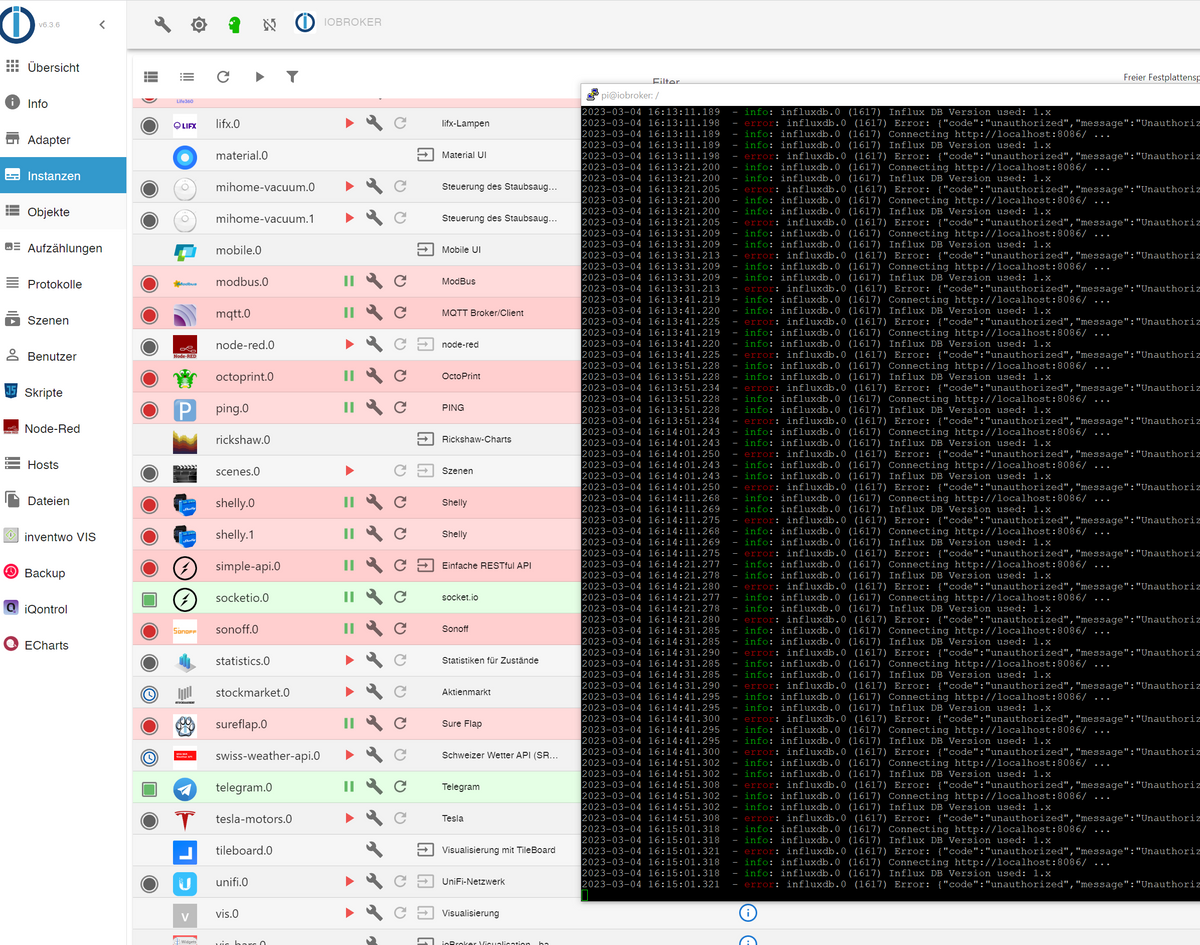
@thomas-braun Da scheint sich nichts mehr zu tun?
-
@thomas-braun Da scheint sich nichts mehr zu tun?
Screenshots kann ich nicht lesen.
-
Screenshots kann ich nicht lesen.
@thomas-braun Warum das nicht? Wie soll ich dir sonst das Backend mit den Instanzen zeigen?
-
@crunchip sagte in Failed to lock DB file nach Festplatte voll.:
hast du beim Install ein root Passwort vergeben? das sollte man nicht, das lässt man leer, dadurch wird dein Benutzer und auch sudo automatisch richtig gestellt.
Das sagt einem halt wirklich niemand
So viele Dinge sind da einfach irgendwie "implizit" und wenn man nicht weiss, was hinter den Kulissen abgeht, hat man keine Chance es zu verstehen.
Wie komme ich nun zu einem "vollständigen" System? Was muss ich alles nachinstallieren?
Ich habe den user "pi" nun manuell in das Textfile der sudoers reingeschrieben. Anscheinend klappt es jetzt. Warum es vorher nicht ging, obwohl pi in der Gruppe sudoers war, weiss ich nicht.
Wenn man der Computer plötzlich ausschaltet, wird jede Operation, die in einem Prozess war, auf halbem Weg unterbrochen.
Ja, aber das ist bei Journaling Filesystemen egal. Es werden nur atomare Aktionen geschrieben. Entweder ganz oder gar nicht. Wenn in der Mitte unterbrochen wird, dann wird das Journal beim nächsten Start zurückgerollt und es herrscht wieder ein definierter Zustand. So kann es nie zu korrupten Dateien kommen, egal wann der Strom ausgeschaltet wird. Bei Windows klappt das absolut zuverlässig. Auch bei einem vollen Datenträger kann es so keine Probleme geben. Das Debian ist nun leider zerschossen :-(
@chrisprefect sagte in Failed to lock DB file nach Festplatte voll.:
Bei Windows klappt das absolut zuverlässig
wenn gerade in die Registry geschrieben wird, während der Strom weg geht, überrascht die dein Bildschirm unter Umständen auch mit einem leuchtenden blauen Bildschirm.
@chrisprefect sagte in Failed to lock DB file nach Festplatte voll.:
Das sagt einem halt wirklich niemand
das steht doch geschrieben, bei Ubuntu ist das erst gar nicht anders möglich
@chrisprefect sagte in Failed to lock DB file nach Festplatte voll.:
Warum gibt es da kein System, welches solche kritischen Informationen per Mail oder Telegram verschickt?
das musst du konfigurieren
@chrisprefect sagte in Failed to lock DB file nach Festplatte voll.:
Aber alle Adapter sind gestoppt und starten auch nicht mehr
wenn das backup zurückgespielt wurde, dauert es anschließend eine ganze Weile bis alles neu "gebaut" und geladen wurde
umgestiegen von Proxmox auf Unraid
-
@thomas-braun Warum das nicht? Wie soll ich dir sonst das Backend mit den Instanzen zeigen?
@chrisprefect sagte in Failed to lock DB file nach Festplatte voll.:
Warum das nicht?
Weil ich das nicht lesen kann.
-
@chrisprefect sagte in Failed to lock DB file nach Festplatte voll.:
Warum das nicht?
Weil ich das nicht lesen kann.
@thomas-braun Verstehe nicht, was du mir sagen willst, sorry.
-
@thomas-braun Verstehe nicht, was du mir sagen willst, sorry.
Mit Screenshots von Text kann keiner was anfangen. Am Handy schon gerade gar nicht.
-
@thomas-braun Verstehe nicht, was du mir sagen willst, sorry.
@chrisprefect die Adapter werden nach und nach grün, z.b browser refresh
dein screen vom log ist so nicht les und zitierbar, daher in code tags </> setzen
-
@chrisprefect sagte in Failed to lock DB file nach Festplatte voll.:
Bei Windows klappt das absolut zuverlässig
wenn gerade in die Registry geschrieben wird, während der Strom weg geht, überrascht die dein Bildschirm unter Umständen auch mit einem leuchtenden blauen Bildschirm.
@chrisprefect sagte in Failed to lock DB file nach Festplatte voll.:
Das sagt einem halt wirklich niemand
das steht doch geschrieben, bei Ubuntu ist das erst gar nicht anders möglich
@chrisprefect sagte in Failed to lock DB file nach Festplatte voll.:
Warum gibt es da kein System, welches solche kritischen Informationen per Mail oder Telegram verschickt?
das musst du konfigurieren
@chrisprefect sagte in Failed to lock DB file nach Festplatte voll.:
Aber alle Adapter sind gestoppt und starten auch nicht mehr
wenn das backup zurückgespielt wurde, dauert es anschließend eine ganze Weile bis alles neu "gebaut" und geladen wurde
@crunchip OK es ist jetzt bald zwei Stunden her und die meisten Adapter sind noch immer rot und im Log tut sich nichts.
Bei der Vis kommt z.B. nur
File edit.html not found: {}wenn ich sie im Browser aufrufe.
Ein paar wenige sind grün, aber es scheint jetzt seit längerer Zeit zu hängen.
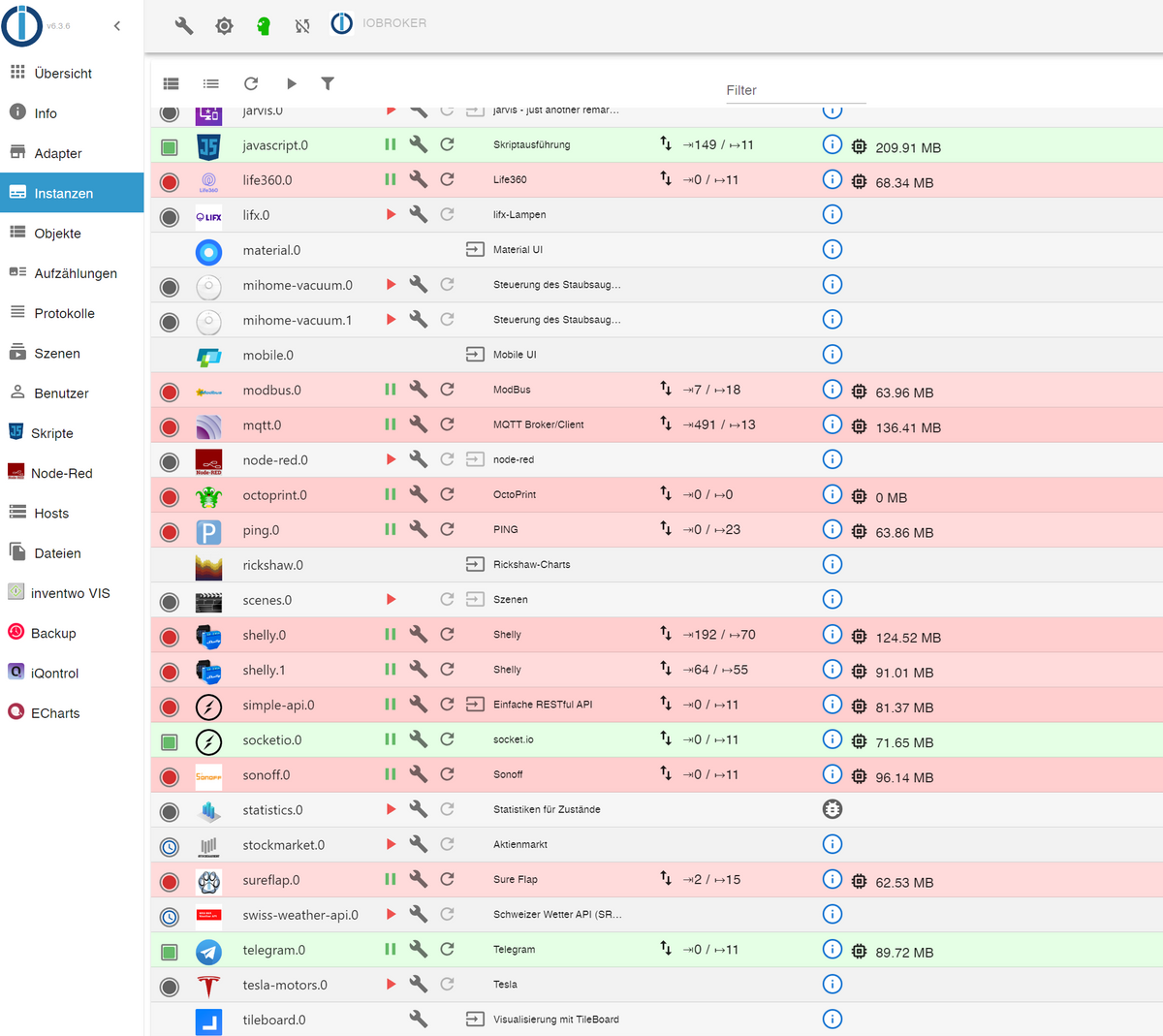
Für influxdb finde ich keine Anleitungen mehr, die aktuell sind. Gibt es da irgendeine, die für influxdb2 passt?
Bei dieser ist der Client nicht mehr gleich und das Config-File ist leer und ich kann keinen Admin-User anlegen, es kommt immer, dass ich keine Rechte hätte. https://www.smarthome-tricks.de/software-iobroker/1-2-grafana-installation-von-influxdb-und-integration-in-iobroker/
-
@crunchip OK es ist jetzt bald zwei Stunden her und die meisten Adapter sind noch immer rot und im Log tut sich nichts.
Bei der Vis kommt z.B. nur
File edit.html not found: {}wenn ich sie im Browser aufrufe.
Ein paar wenige sind grün, aber es scheint jetzt seit längerer Zeit zu hängen.
Für influxdb finde ich keine Anleitungen mehr, die aktuell sind. Gibt es da irgendeine, die für influxdb2 passt?
Bei dieser ist der Client nicht mehr gleich und das Config-File ist leer und ich kann keinen Admin-User anlegen, es kommt immer, dass ich keine Rechte hätte. https://www.smarthome-tricks.de/software-iobroker/1-2-grafana-installation-von-influxdb-und-integration-in-iobroker/
@chrisprefect sagte in Failed to lock DB file nach Festplatte voll.:
Bei der Vis kommt z.B. nur
weil, aus aktuellem Bug vis/web vor dem Backup zurück spielen installiert sein muss, nachträglich geht auch, dann musst du manuell eine ältere Version 1.4.0 installieren, dann geht es wieder und kannst anschliessen wieder auf die aktuelle
@chrisprefect sagte in Failed to lock DB file nach Festplatte voll.:
die meisten Adapter sind noch immer rot
sind die IP bezogenen Adapter (shelly, mqtt, sonoff...) auf die IP angepasst, denn ich denke dein neuer Host hat jetzt einen andere IP als der alte, oder?
umgestiegen von Proxmox auf Unraid




Hey! Du scheinst an dieser Unterhaltung interessiert zu sein, hast aber noch kein Konto.
Hast du es satt, bei jedem Besuch durch die gleichen Beiträge zu scrollen? Wenn du dich für ein Konto anmeldest, kommst du immer genau dorthin zurück, wo du zuvor warst, und kannst dich über neue Antworten benachrichtigen lassen (entweder per E-Mail oder Push-Benachrichtigung). Du kannst auch Lesezeichen speichern und Beiträge positiv bewerten, um anderen Community-Mitgliedern deine Wertschätzung zu zeigen.
Mit deinem Input könnte dieser Beitrag noch besser werden 💗
Registrieren Anmelden437
Online33.0k
Benutzer83.5k
Themen1.3m
Beiträge