




[gelöst] Fehler VIS & Javascript in pro
-
Hallo,
habe iobroker testweise neu aufgesetzt und bekomme über iobroker.pro keine Verbindung zu VIS bzw. den Scripts hin.
Versionen:
web -> 2.1.9
js-controller -> 1.2.3
javascript -> 3.5.1
admin -> 2.0.9
cloud -> 2.1.1
node -> 6.12.2
npm -> 3.10.10
Konfiguration:


Adapter web und cloud sind auf grün und ich komme in die Adminoberfläche. Nur VIS und Bearbeitung der Skripte funktioniert nicht.Skript-Bearbeitung:

! ````
"Default ACL": {"en": "Default ACL", "de": "Default ACL", "ru": "Default ACL"},
translate.js:24 "Access control list": {"en": "Access control list", "de": "Access control list", "ru": "Access control list"},
translate.js:24 "File rights": {"en": "File rights", "de": "File rights", "ru": "File rights"},
translate.js:24 "Default ACL": {"en": "Default ACL", "de": "Default ACL", "ru": "Default ACL"},
translate.js:24 "Access control list": {"en": "Access control list", "de": "Access control list", "ru": "Access control list"},
translate.js:24 "File rights": {"en": "File rights", "de": "File rights", "ru": "File rights"},
js/translate.js:24 "Login timeout(sec):": {"en": "Login timeout(sec):", "de": "Login timeout(sec):", "ru": "Login timeout(sec):"},
js/translate.js:24 "Enabled:": {"en": "Enabled:", "de": "Enabled:", "ru": "Enabled:"},
js/translate.js:24 "IP": {"en": "IP", "de": "IP", "ru": "IP"},
js/translate.js:24 "Use system settings:": {"en": "Use system settings:", "de": "Use system settings:", "ru": "Use system settings:"},
tab.html:10 GET https://iobroker.pro/css/admin.css net::ERR_ABORTED
tab.html:13 GET https://iobroker.pro/lib/js/jquery-ui.min.js 404 (Not Found)
tab.html:21 GET https://iobroker.pro/lib/js/colResizable-1.6.min.js net::ERR_ABORTED
jquery-1.11.2.min.js:2 Uncaught Error: Fancytree assertion failed: Fancytree requires jQuery UI (http://jqueryui.com)
at Function.error (jquery-1.11.2.min.js:2)
at e (jquery.fancytree-all.min.js:12)
at jquery.fancytree-all.min.js:12
at jquery.fancytree-all.min.js:13
at jquery.fancytree-all.min.js:8
at jquery.fancytree-all.min.js:10
error @ jquery-1.11.2.min.js:2
e @ jquery.fancytree-all.min.js:12
(anonymous) @ jquery.fancytree-all.min.js:12
(anonymous) @ jquery.fancytree-all.min.js:13
(anonymous) @ jquery.fancytree-all.min.js:8
(anonymous) @ jquery.fancytree-all.min.js:10
tab.html:21 GET https://iobroker.pro/lib/js/colResizable-1.6.min.js 404 (Not Found)
tab.js:2938 Uncaught TypeError: $dialogMessage.dialog is not a function
at n. <anonymous>(tab.js:2938)
at n.onack (universalModuleDefinition:3)
at n.onpacket (universalModuleDefinition:3)
at n. <anonymous>(universalModuleDefinition:3)
at n.emit (universalModuleDefinition:2)
at n.ondecoded (universalModuleDefinition:1)
at s. <anonymous>(universalModuleDefinition:3)
at s.r.emit (universalModuleDefinition:1)
at s.add (universalModuleDefinition:1)
at n.ondata (universalModuleDefinition:1)
(anonymous) @ tab.js:2938
n.onack @ universalModuleDefinition:3
n.onpacket @ universalModuleDefinition:3
(anonymous) @ universalModuleDefinition:3
n.emit @ universalModuleDefinition:2
n.ondecoded @ universalModuleDefinition:1
(anonymous) @ universalModuleDefinition:3
r.emit @ universalModuleDefinition:1
s.add @ universalModuleDefinition:1
n.ondata @ universalModuleDefinition:1
(anonymous) @ universalModuleDefinition:3
n.emit @ universalModuleDefinition:2
n.onPacket @ universalModuleDefinition:2
(anonymous) @ universalModuleDefinition:2
n.emit @ universalModuleDefinition:2
n.onPacket @ universalModuleDefinition:2
r @ universalModuleDefinition:2
(anonymous) @ universalModuleDefinition:2
e.decodePayloadAsBinary @ universalModuleDefinition:2
e.decodePayload @ universalModuleDefinition:2
n.onData @ universalModuleDefinition:2
(anonymous) @ universalModuleDefinition:2
n.emit @ universalModuleDefinition:2
i.onData @ universalModuleDefinition:2
i.onLoad @ universalModuleDefinition:2
hasXDR.r.onreadystatechange @ universalModuleDefinition:2
XMLHttpRequest.send (async)
i.create @ universalModuleDefinition:2
i @ universalModuleDefinition:2
o.request @ universalModuleDefinition:2
o.doPoll @ universalModuleDefinition:2
n.poll @ universalModuleDefinition:2
n.onData @ universalModuleDefinition:2
(anonymous) @ universalModuleDefinition:2
n.emit @ universalModuleDefinition:2
i.onData @ universalModuleDefinition:2
i.onLoad @ universalModuleDefinition:2
hasXDR.r.onreadystatechange @ universalModuleDefinition:2
XMLHttpRequest.send (async)
i.create @ universalModuleDefinition:2
i @ universalModuleDefinition:2
o.request @ universalModuleDefinition:2
o.doPoll @ universalModuleDefinition:2
n.poll @ universalModuleDefinition:2
n.onData @ universalModuleDefinition:2
(anonymous) @ universalModuleDefinition:2
n.emit @ universalModuleDefinition:2
i.onData @ universalModuleDefinition:2
i.onLoad @ universalModuleDefinition:2
hasXDR.r.onreadystatechange @ universalModuleDefinition:2
XMLHttpRequest.send (async)
i.create @ universalModuleDefinition:2
i @ universalModuleDefinition:2
o.request @ universalModuleDefinition:2
o.doPoll @ universalModuleDefinition:2
n.poll @ universalModuleDefinition:2
n.onData @ universalModuleDefinition:2
(anonymous) @ universalModuleDefinition:2
n.emit @ universalModuleDefinition:2
i.onData @ universalModuleDefinition:2
i.onLoad @ universalModuleDefinition:2
hasXDR.r.onreadystatechange @ universalModuleDefinition:2
XMLHttpRequest.send (async)
i.create @ universalModuleDefinition:2
i @ universalModuleDefinition:2
o.request @ universalModuleDefinition:2
o.doPoll @ universalModuleDefinition:2
n.poll @ universalModuleDefinition:2
n.doOpen @ universalModuleDefinition:2
n.open @ universalModuleDefinition:2
n.open @ universalModuleDefinition:2
n @ universalModuleDefinition:2
n @ universalModuleDefinition:1
n.open.n.connect @ universalModuleDefinition:1
n @ universalModuleDefinition:1
n @ universalModuleDefinition:1
n @ universalModuleDefinition:1
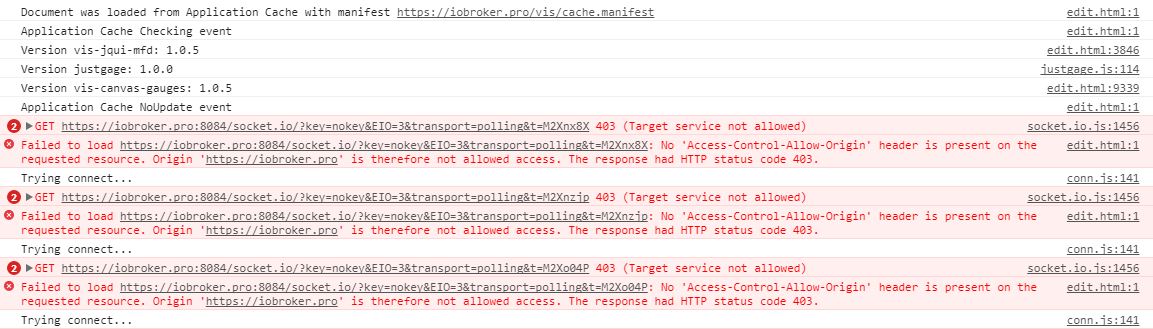
(anonymous) @ tab.js:2675</anonymous></anonymous></anonymous>****Anzeige VIS:****  >! ```` Document was loaded from Application Cache with manifest https://iobroker.pro/vis/cache.manifest edit.html:1 Application Cache Checking event edit.html:3846 Version vis-jqui-mfd: 1.0.5 justgage.js:114 Version justgage: 1.0.0 edit.html:9339 Version vis-canvas-gauges: 1.0.5 edit.html:1 Application Cache NoUpdate event 2socket.io.js:1456 GET https://iobroker.pro:8084/socket.io/?key=nokey&EIO=3&transport=polling&t=M2Xnx8X 403 (Target service not allowed) Request.create @ socket.io.js:1456 Request @ socket.io.js:1369 XHR.request @ socket.io.js:1297 XHR.doPoll @ socket.io.js:1327 Polling.poll @ socket.io.js:1740 Polling.doOpen @ socket.io.js:1684 Transport.open @ socket.io.js:827 Socket.open @ socket.io.js:248 Socket @ socket.io.js:129 Socket @ socket.io.js:55 Manager.open.Manager.connect @ socket.io.js:4549 Manager @ socket.io.js:4403 Manager @ socket.io.js:4372 lookup @ socket.io.js:4301 init @ conn.js:234 main @ vis.js:3556 (anonymous) @ vis.js:3818 j @ jquery-1.11.2.min.js:2 fireWith @ jquery-1.11.2.min.js:2 ready @ jquery-1.11.2.min.js:2 J @ jquery-1.11.2.min.js:2 edit.html:1 Failed to load https://iobroker.pro:8084/socket.io/?key=nokey&EIO=3&transport=polling&t=M2Xnx8X: No 'Access-Control-Allow-Origin' header is present on the requested resource. Origin 'https://iobroker.pro' is therefore not allowed access. The response had HTTP status code 403. conn.js:141 Trying connect... 2socket.io.js:1456 GET https://iobroker.pro:8084/socket.io/?key=nokey&EIO=3&transport=polling&t=M2Xnzjp 403 (Target service not allowed) Request.create @ socket.io.js:1456 Request @ socket.io.js:1369 XHR.request @ socket.io.js:1297 XHR.doPoll @ socket.io.js:1327 Polling.poll @ socket.io.js:1740 Polling.doOpen @ socket.io.js:1684 Transport.open @ socket.io.js:827 Socket.open @ socket.io.js:248 Socket @ socket.io.js:129 Socket @ socket.io.js:55 Manager.open.Manager.connect @ socket.io.js:4549 Socket.open.Socket.connect @ socket.io.js:5022 (anonymous) @ conn.js:142 setInterval (async) reconnect @ conn.js:140 (anonymous) @ conn.js:323 Emitter.emit @ socket.io.js:5657 Socket.emit @ socket.io.js:5053 Manager.emitAll @ socket.io.js:4416 (anonymous) @ socket.io.js:4566 Emitter.emit @ socket.io.js:2556 Socket.onError @ socket.io.js:688 (anonymous) @ socket.io.js:279 Emitter.emit @ socket.io.js:2556 Transport.onError @ socket.io.js:814 (anonymous) @ socket.io.js:1333 Emitter.emit @ socket.io.js:2556 Request.onError @ socket.io.js:1502 (anonymous) @ socket.io.js:1449 setTimeout (async) xhr.onreadystatechange @ socket.io.js:1448 XMLHttpRequest.send (async) Request.create @ socket.io.js:1456 Request @ socket.io.js:1369 XHR.request @ socket.io.js:1297 XHR.doPoll @ socket.io.js:1327 Polling.poll @ socket.io.js:1740 Polling.doOpen @ socket.io.js:1684 Transport.open @ socket.io.js:827 Socket.open @ socket.io.js:248 Socket @ socket.io.js:129 Socket @ socket.io.js:55 Manager.open.Manager.connect @ socket.io.js:4549 Manager @ socket.io.js:4403 Manager @ socket.io.js:4372 lookup @ socket.io.js:4301 init @ conn.js:234 main @ vis.js:3556 (anonymous) @ vis.js:3818 j @ jquery-1.11.2.min.js:2 fireWith @ jquery-1.11.2.min.js:2 ready @ jquery-1.11.2.min.js:2 J @ jquery-1.11.2.min.js:2 edit.html:1 Failed to load https://iobroker.pro:8084/socket.io/?key=nokey&EIO=3&transport=polling&t=M2Xnzjp: No 'Access-Control-Allow-Origin' header is present on the requested resource. Origin 'https://iobroker.pro' is therefore not allowed access. The response had HTTP status code 403. conn.js:141 Trying connect...Was mich stutzig macht, ist dass im Log steht das socketio auf 8082 gestartet wird aber er auf 8084 nachschaut.
web.0 2017-12-29 10:11:31.289 info http server listening on port 8082
web.0 2017-12-29 10:11:31.282 info socket.io server listening on port 8082
web.0 2017-12-29 10:11:30.844 info Allow states only when user is owner: false
web.0 2017-12-29 10:11:30.840 info simpleAPI server listening on port 8082
web.0 2017-12-29 10:11:30.594 info starting. Version 2.1.9 in /opt/iobroker/node_modules/iobroker.web, node: v6.12.2
Auch die Installation vom Adapter socket.io und Anpassung der Einstellungen brachte keine Verbesserung.
Habt Ihr vielleicht eine Idee woran das liegt? Wie habt Ihr das eingestellt? Als Browser habe ich Chrome/FF/IE ausprobiert, nutze aber hauptsächlich Chrome.
vg
Falk
-
Keine Unterstützung/Reaktion. So was kenne ich doch so nicht vom Forum :( :( :(
Ist das Problem überhaupt vakant? Ist es zu wenig dokumentiert? Woran scheitern eventuelle Hilfestellungen? Sollte ich woanders melden bei Problemen mit iobroker.pro?
vg
Falk
-
Hallo schittl,
ich habe zur Zeit auch viel zu Kämpfen mit VIS und der cloud.pro.
Deine Probleme hatte ich so jedoch noch nicht.
In den meisten Fällen hat bei mir ein löschen aller möglichen Caches geholfen.
Welchen Browser nutzt du? Chrome ist bei mir leider am anfälligsten.
Gruß
-
In den letzten Tagen wurde viel an den Servern geschraubt um diverse Probleme, die auch nicht immer nachvollziehbar waren zu vermeiden.
Ist dein Problem aktuell noch existent?
Gruß
Rainer
-
Hallo,
habe iobroker testweise neu aufgesetzt und bekomme über iobroker.pro keine Verbindung zu VIS bzw. den Scripts hin.
Versionen:
web -> 2.1.9
js-controller -> 1.2.3
javascript -> 3.5.1
admin -> 2.0.9
cloud -> 2.1.1
node -> 6.12.2
npm -> 3.10.10
Konfiguration:
web.JPG
cloud.JPG
js.JPG
Adapter web und cloud sind auf grün und ich komme in die Adminoberfläche. Nur VIS und Bearbeitung der Skripte funktioniert nicht.
Skript-Bearbeitung:
error_js.JPG
! ````
"Default ACL": {"en": "Default ACL", "de": "Default ACL", "ru": "Default ACL"},
translate.js:24 "Access control list": {"en": "Access control list", "de": "Access control list", "ru": "Access control list"},
translate.js:24 "File rights": {"en": "File rights", "de": "File rights", "ru": "File rights"},
translate.js:24 "Default ACL": {"en": "Default ACL", "de": "Default ACL", "ru": "Default ACL"},
translate.js:24 "Access control list": {"en": "Access control list", "de": "Access control list", "ru": "Access control list"},
translate.js:24 "File rights": {"en": "File rights", "de": "File rights", "ru": "File rights"},
js/translate.js:24 "Login timeout(sec):": {"en": "Login timeout(sec):", "de": "Login timeout(sec):", "ru": "Login timeout(sec):"},
js/translate.js:24 "Enabled:": {"en": "Enabled:", "de": "Enabled:", "ru": "Enabled:"},
js/translate.js:24 "IP": {"en": "IP", "de": "IP", "ru": "IP"},
js/translate.js:24 "Use system settings:": {"en": "Use system settings:", "de": "Use system settings:", "ru": "Use system settings:"},
tab.html:10 GET https://iobroker.pro/css/admin.css net::ERR_ABORTED
tab.html:13 GET https://iobroker.pro/lib/js/jquery-ui.min.js 404 (Not Found)
tab.html:21 GET https://iobroker.pro/lib/js/colResizable-1.6.min.js net::ERR_ABORTED
jquery-1.11.2.min.js:2 Uncaught Error: Fancytree assertion failed: Fancytree requires jQuery UI (http://jqueryui.com)
at Function.error (jquery-1.11.2.min.js:2)
at e (jquery.fancytree-all.min.js:12)
at jquery.fancytree-all.min.js:12
at jquery.fancytree-all.min.js:13
at jquery.fancytree-all.min.js:8
at jquery.fancytree-all.min.js:10
error @ jquery-1.11.2.min.js:2
e @ jquery.fancytree-all.min.js:12
(anonymous) @ jquery.fancytree-all.min.js:12
(anonymous) @ jquery.fancytree-all.min.js:13
(anonymous) @ jquery.fancytree-all.min.js:8
(anonymous) @ jquery.fancytree-all.min.js:10
tab.html:21 GET https://iobroker.pro/lib/js/colResizable-1.6.min.js 404 (Not Found)
tab.js:2938 Uncaught TypeError: $dialogMessage.dialog is not a function
at n. <anonymous>(tab.js:2938)
at n.onack (universalModuleDefinition:3)
at n.onpacket (universalModuleDefinition:3)
at n. <anonymous>(universalModuleDefinition:3)
at n.emit (universalModuleDefinition:2)
at n.ondecoded (universalModuleDefinition:1)
at s. <anonymous>(universalModuleDefinition:3)
at s.r.emit (universalModuleDefinition:1)
at s.add (universalModuleDefinition:1)
at n.ondata (universalModuleDefinition:1)
(anonymous) @ tab.js:2938
n.onack @ universalModuleDefinition:3
n.onpacket @ universalModuleDefinition:3
(anonymous) @ universalModuleDefinition:3
n.emit @ universalModuleDefinition:2
n.ondecoded @ universalModuleDefinition:1
(anonymous) @ universalModuleDefinition:3
r.emit @ universalModuleDefinition:1
s.add @ universalModuleDefinition:1
n.ondata @ universalModuleDefinition:1
(anonymous) @ universalModuleDefinition:3
n.emit @ universalModuleDefinition:2
n.onPacket @ universalModuleDefinition:2
(anonymous) @ universalModuleDefinition:2
n.emit @ universalModuleDefinition:2
n.onPacket @ universalModuleDefinition:2
r @ universalModuleDefinition:2
(anonymous) @ universalModuleDefinition:2
e.decodePayloadAsBinary @ universalModuleDefinition:2
e.decodePayload @ universalModuleDefinition:2
n.onData @ universalModuleDefinition:2
(anonymous) @ universalModuleDefinition:2
n.emit @ universalModuleDefinition:2
i.onData @ universalModuleDefinition:2
i.onLoad @ universalModuleDefinition:2
hasXDR.r.onreadystatechange @ universalModuleDefinition:2
XMLHttpRequest.send (async)
i.create @ universalModuleDefinition:2
i @ universalModuleDefinition:2
o.request @ universalModuleDefinition:2
o.doPoll @ universalModuleDefinition:2
n.poll @ universalModuleDefinition:2
n.onData @ universalModuleDefinition:2
(anonymous) @ universalModuleDefinition:2
n.emit @ universalModuleDefinition:2
i.onData @ universalModuleDefinition:2
i.onLoad @ universalModuleDefinition:2
hasXDR.r.onreadystatechange @ universalModuleDefinition:2
XMLHttpRequest.send (async)
i.create @ universalModuleDefinition:2
i @ universalModuleDefinition:2
o.request @ universalModuleDefinition:2
o.doPoll @ universalModuleDefinition:2
n.poll @ universalModuleDefinition:2
n.onData @ universalModuleDefinition:2
(anonymous) @ universalModuleDefinition:2
n.emit @ universalModuleDefinition:2
i.onData @ universalModuleDefinition:2
i.onLoad @ universalModuleDefinition:2
hasXDR.r.onreadystatechange @ universalModuleDefinition:2
XMLHttpRequest.send (async)
i.create @ universalModuleDefinition:2
i @ universalModuleDefinition:2
o.request @ universalModuleDefinition:2
o.doPoll @ universalModuleDefinition:2
n.poll @ universalModuleDefinition:2
n.onData @ universalModuleDefinition:2
(anonymous) @ universalModuleDefinition:2
n.emit @ universalModuleDefinition:2
i.onData @ universalModuleDefinition:2
i.onLoad @ universalModuleDefinition:2
hasXDR.r.onreadystatechange @ universalModuleDefinition:2
XMLHttpRequest.send (async)
i.create @ universalModuleDefinition:2
i @ universalModuleDefinition:2
o.request @ universalModuleDefinition:2
o.doPoll @ universalModuleDefinition:2
n.poll @ universalModuleDefinition:2
n.doOpen @ universalModuleDefinition:2
n.open @ universalModuleDefinition:2
n.open @ universalModuleDefinition:2
n @ universalModuleDefinition:2
n @ universalModuleDefinition:1
n.open.n.connect @ universalModuleDefinition:1
n @ universalModuleDefinition:1
n @ universalModuleDefinition:1
n @ universalModuleDefinition:1
(anonymous) @ tab.js:2675</anonymous></anonymous></anonymous>****Anzeige VIS:**** error_vis.JPG >! ```` Document was loaded from Application Cache with manifest https://iobroker.pro/vis/cache.manifest edit.html:1 Application Cache Checking event edit.html:3846 Version vis-jqui-mfd: 1.0.5 justgage.js:114 Version justgage: 1.0.0 edit.html:9339 Version vis-canvas-gauges: 1.0.5 edit.html:1 Application Cache NoUpdate event 2socket.io.js:1456 GET https://iobroker.pro:8084/socket.io/?key=nokey&EIO=3&transport=polling&t=M2Xnx8X 403 (Target service not allowed) Request.create @ socket.io.js:1456 Request @ socket.io.js:1369 XHR.request @ socket.io.js:1297 XHR.doPoll @ socket.io.js:1327 Polling.poll @ socket.io.js:1740 Polling.doOpen @ socket.io.js:1684 Transport.open @ socket.io.js:827 Socket.open @ socket.io.js:248 Socket @ socket.io.js:129 Socket @ socket.io.js:55 Manager.open.Manager.connect @ socket.io.js:4549 Manager @ socket.io.js:4403 Manager @ socket.io.js:4372 lookup @ socket.io.js:4301 init @ conn.js:234 main @ vis.js:3556 (anonymous) @ vis.js:3818 j @ jquery-1.11.2.min.js:2 fireWith @ jquery-1.11.2.min.js:2 ready @ jquery-1.11.2.min.js:2 J @ jquery-1.11.2.min.js:2 edit.html:1 Failed to load https://iobroker.pro:8084/socket.io/?key=nokey&EIO=3&transport=polling&t=M2Xnx8X: No 'Access-Control-Allow-Origin' header is present on the requested resource. Origin 'https://iobroker.pro' is therefore not allowed access. The response had HTTP status code 403. conn.js:141 Trying connect... 2socket.io.js:1456 GET https://iobroker.pro:8084/socket.io/?key=nokey&EIO=3&transport=polling&t=M2Xnzjp 403 (Target service not allowed) Request.create @ socket.io.js:1456 Request @ socket.io.js:1369 XHR.request @ socket.io.js:1297 XHR.doPoll @ socket.io.js:1327 Polling.poll @ socket.io.js:1740 Polling.doOpen @ socket.io.js:1684 Transport.open @ socket.io.js:827 Socket.open @ socket.io.js:248 Socket @ socket.io.js:129 Socket @ socket.io.js:55 Manager.open.Manager.connect @ socket.io.js:4549 Socket.open.Socket.connect @ socket.io.js:5022 (anonymous) @ conn.js:142 setInterval (async) reconnect @ conn.js:140 (anonymous) @ conn.js:323 Emitter.emit @ socket.io.js:5657 Socket.emit @ socket.io.js:5053 Manager.emitAll @ socket.io.js:4416 (anonymous) @ socket.io.js:4566 Emitter.emit @ socket.io.js:2556 Socket.onError @ socket.io.js:688 (anonymous) @ socket.io.js:279 Emitter.emit @ socket.io.js:2556 Transport.onError @ socket.io.js:814 (anonymous) @ socket.io.js:1333 Emitter.emit @ socket.io.js:2556 Request.onError @ socket.io.js:1502 (anonymous) @ socket.io.js:1449 setTimeout (async) xhr.onreadystatechange @ socket.io.js:1448 XMLHttpRequest.send (async) Request.create @ socket.io.js:1456 Request @ socket.io.js:1369 XHR.request @ socket.io.js:1297 XHR.doPoll @ socket.io.js:1327 Polling.poll @ socket.io.js:1740 Polling.doOpen @ socket.io.js:1684 Transport.open @ socket.io.js:827 Socket.open @ socket.io.js:248 Socket @ socket.io.js:129 Socket @ socket.io.js:55 Manager.open.Manager.connect @ socket.io.js:4549 Manager @ socket.io.js:4403 Manager @ socket.io.js:4372 lookup @ socket.io.js:4301 init @ conn.js:234 main @ vis.js:3556 (anonymous) @ vis.js:3818 j @ jquery-1.11.2.min.js:2 fireWith @ jquery-1.11.2.min.js:2 ready @ jquery-1.11.2.min.js:2 J @ jquery-1.11.2.min.js:2 edit.html:1 Failed to load https://iobroker.pro:8084/socket.io/?key=nokey&EIO=3&transport=polling&t=M2Xnzjp: No 'Access-Control-Allow-Origin' header is present on the requested resource. Origin 'https://iobroker.pro' is therefore not allowed access. The response had HTTP status code 403. conn.js:141 Trying connect...Was mich stutzig macht, ist dass im Log steht das socketio auf 8082 gestartet wird aber er auf 8084 nachschaut.
web.0 2017-12-29 10:11:31.289 info http server listening on port 8082
web.0 2017-12-29 10:11:31.282 info socket.io server listening on port 8082
web.0 2017-12-29 10:11:30.844 info Allow states only when user is owner: false
web.0 2017-12-29 10:11:30.840 info simpleAPI server listening on port 8082
web.0 2017-12-29 10:11:30.594 info starting. Version 2.1.9 in /opt/iobroker/node_modules/iobroker.web, node: v6.12.2
Auch die Installation vom Adapter socket.io und Anpassung der Einstellungen brachte keine Verbesserung.
Habt Ihr vielleicht eine Idee woran das liegt? Wie habt Ihr das eingestellt? Als Browser habe ich Chrome/FF/IE ausprobiert, nutze aber hauptsächlich Chrome.
vg
Falk `
8082 und 8084 sind falsch. So sieht es bei mir aus:https://iobroker.pro/socket.io/?key=nokey&EIO=3&transport=pollingKannst du eingebaute Socket.io Ausprobieren?
48_2018-01-08_19_18_55-iobroker.admin.png -
Ist dein Problem aktuell noch existent? ` Das Problem besteht leider immer noch.
@Bluefox:Kannst du eingebaute Socket.io Ausprobieren? ` lt. 1. Screenshot nutze ich diesen doch schon…
@nisio:Welchen Browser nutzt du? Chrome ist bei mir leider am anfälligsten. ` Habe mehrere versucht (FF,Chrome,IE)
Danke für Eure Anmerkungen.
Vg Falk
-
Wie sieht bei dir die erste Konfig-Seite für cloud? Welche web Instanz? `
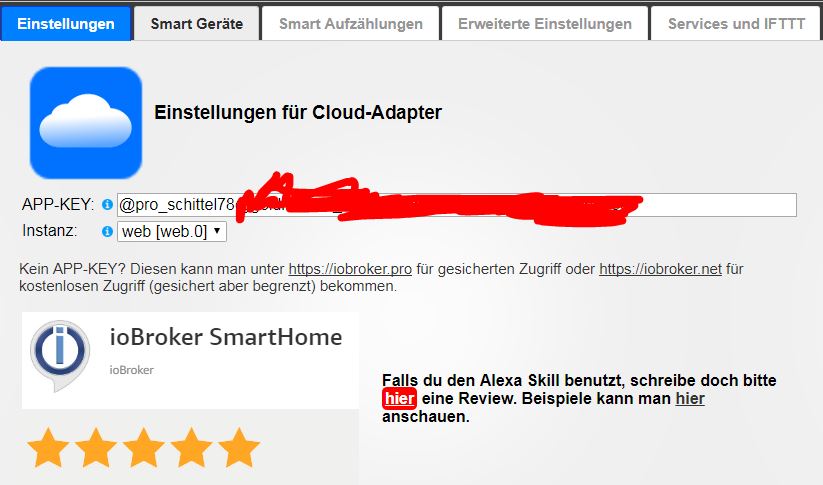
Habt Ihr irgendetwas verändert? Ich jedenfalls nicht. VIS funktioniert auf einmal aber js funktioniert immer noch nicht heul. Hier der Fehler: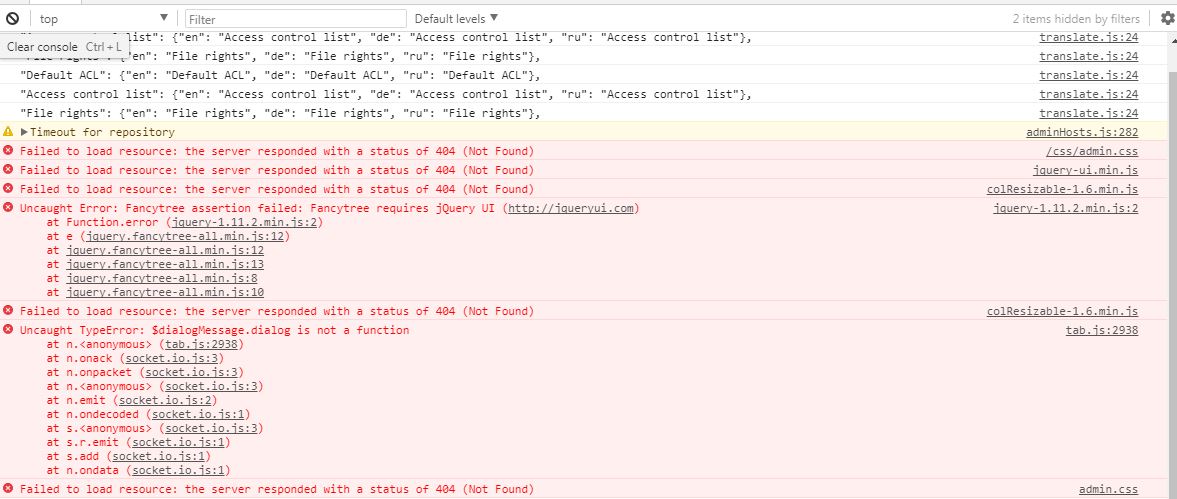
! ` > "Default ACL": {"en": "Default ACL", "de": "Default ACL", "ru": "Default ACL"},
translate.js:24 "Access control list": {"en": "Access control list", "de": "Access control list", "ru": "Access control list"},
translate.js:24 "File rights": {"en": "File rights", "de": "File rights", "ru": "File rights"},
translate.js:24 "Default ACL": {"en": "Default ACL", "de": "Default ACL", "ru": "Default ACL"},
translate.js:24 "Access control list": {"en": "Access control list", "de": "Access control list", "ru": "Access control list"},
translate.js:24 "File rights": {"en": "File rights", "de": "File rights", "ru": "File rights"},
adminHosts.js:282 Timeout for repository
(anonymous) @ adminHosts.js:282
admin.css Failed to load resource: the server responded with a status of 404 (Not Found)
jquery-ui.min.js Failed to load resource: the server responded with a status of 404 (Not Found)
colResizable-1.6.min.js Failed to load resource: the server responded with a status of 404 (Not Found)
jquery-1.11.2.min.js:2 Uncaught Error: Fancytree assertion failed: Fancytree requires jQuery UI (http://jqueryui.com)
at Function.error (jquery-1.11.2.min.js:2)
at e (jquery.fancytree-all.min.js:12)
at jquery.fancytree-all.min.js:12
at jquery.fancytree-all.min.js:13
at jquery.fancytree-all.min.js:8
at jquery.fancytree-all.min.js:10
colResizable-1.6.min.js Failed to load resource: the server responded with a status of 404 (Not Found)
tab.js:2938 Uncaught TypeError: $dialogMessage.dialog is not a function
at n. <anonymous>(tab.js:2938)
at n.onack (socket.io.js:3)
at n.onpacket (socket.io.js:3)
at n. <anonymous>(socket.io.js:3)
at n.emit (socket.io.js:2)
at n.ondecoded (socket.io.js:1)
at s. <anonymous>(socket.io.js:3)
at s.r.emit (socket.io.js:1)
at s.add (socket.io.js:1)
at n.ondata (socket.io.js:1)
admin.css Failed to load resource: the server responded with a status of 404 (Not Found)
js/translate.js:24 "Login timeout(sec):": {"en": "Login timeout(sec):", "de": "Login timeout(sec):", "ru": "Login timeout(sec):"},
js/translate.js:24 "Enabled:": {"en": "Enabled:", "de": "Enabled:", "ru": "Enabled:"},
js/translate.js:24 "IP": {"en": "IP", "de": "IP", "ru": "IP"},</anonymous></anonymous></anonymous> `
Danke für Eure Mühen. Aber sehr seltsam das wenigstens VIS nun wie von Geisterhand funktioniert.
-
Downgrade bitte JavaScript auf stable version ` Auf 3.4.0? Falls ja wie mache ich das am besten/einfachsten? Habe ein Downgrade leider noch nicht durchgeführt…
vg
Oder experten Modus einschalten und dann über Adapters-Seite Downgraden
-
Nach einem Browser-Cache leeren funktioniert es nun wieder. :D Vielen Dank für Eure Mühen.
Kleine Zusatzfrage:
Kann mir jemand erklären was die Einstellung zum JavaScript Adapter "Nicht auf alle Zustände beim Start abonnieren" genau bedeutet? Ich glaube in 3.4. hatte ich diese gesetzt aber in 3.5.1 musste ich diese deaktivieren, damit überhaupt eins meiner Scripte funktionierte.
vg
Falk
-
Nach einem Browser-Cache leeren funktioniert es nun wieder. :D Vielen Dank für Eure Mühen.
Kleine Zusatzfrage:
Kann mir jemand erklären was die Einstellung zum JavaScript Adapter "Nicht auf alle Zustände beim Start abonnieren" genau bedeutet? Ich glaube in 3.4. hatte ich diese gesetzt aber in 3.5.1 musste ich diese deaktivieren, damit überhaupt eins meiner Scripte funktionierte.
vg
Falk `
Das ist für die advanced Anwender.Defaultmäßig abonniert JS alle States (auch 100.000) und falls das System sehr dynamisch ist, dass kann JS zum Abstürz bringen und unnötig das System mit Updates (die keine braucht) belasten.
Um das Problem zu Lösen, kann man sagen, dass nur die States, die wirklich benutzt werden abonniert werden müssen.
Es gibt aber kleines Nachteil, dass man getState nicht synchron benutzen darf, sondern immer asynchron wie:
getState('stateId', function (err, state) {
	console('Value: ' + state.val);
});
Damit wird das System drastisch entlastet, dass nicht alle States noch im JS adapter dupliziert werden müssen.
Dafür existiert: "Nicht auf alle Zustände beim Start abonnieren"
-
Es hat zwischenzeitlich funktioniert, aber aktuell funktioniert VIS (1.0.4) über iobroker.pro nicht mehr. Veränderungen wurden nicht vorgenommen. Es wurde lediglich hqwidgets(1.1.1) installiert. Es erscheint folgender Fehler:
Uncaught ReferenceError: getUsedObjectIDs is not defined
at Object.getUsedObjectIDs (vis.js:316)
at vis.js:1725
at conn.js:521
Folgendes habe ich schon ausprobiert, aber leider ohne Erfolg:
-
- iobroker upload all bzw. iobroker upload vis
- Neustart iobrokerWas könnte die Ursache sein? Danke im voraus.
vg
Falk
-
-
Hallo,
probiere mal die hqwidgets wieder zu löschen.
Ich hatte glaube ich Mal die gleiche Meldung und der Grund waren unsauber installierte Widgets.
-
Wollte nun heute von extern anfangen meine VIS zu modifizieren, aber der Fehler erscheint nun wieder :oops: . Am Wochenende funktionierte es. Kann es sein, dass es am Browser/OS/NW liegt?
Am WE mit Safari am IPad im Heimnetzwerk (wo ich auch direkt ohne Cloud Zugriff habe) funktionierte es und nun mit Chrome/FF in Windows ohne direkten Zugriff (Hotspot) funktioniert es nicht.
Browser-Cache wurde natürlich mehrmals gelöscht…
Von extern hat es aber schon mal funktioniert. Ich glaube aber da war iobroker noch auf RPi3(Stretch). Es ist nun umgezogen auf einen Rock64 mit Armbian.
vg
Falk
-
Wollte nun heute von extern anfangen meine VIS zu modifizieren, aber der Fehler erscheint nun wieder :oops: . Am Wochenende funktionierte es. Kann es sein, dass es am Browser/OS/NW liegt?
Am WE mit Safari am IPad im Heimnetzwerk (wo ich auch direkt ohne Cloud Zugriff habe) funktionierte es und nun mit Chrome/FF in Windows ohne direkten Zugriff (Hotspot) funktioniert es nicht.
Browser-Cache wurde natürlich mehrmals gelöscht…
Von extern hat es aber schon mal funktioniert. Ich glaube aber da war iobroker noch auf RPi3(Stretch). Es ist nun umgezogen auf einen Rock64 mit Armbian.
vg
Falk `
Es liegt an dem Browsecache. Bitte löschen.

Hey! Du scheinst an dieser Unterhaltung interessiert zu sein, hast aber noch kein Konto.
Hast du es satt, bei jedem Besuch durch die gleichen Beiträge zu scrollen? Wenn du dich für ein Konto anmeldest, kommst du immer genau dorthin zurück, wo du zuvor warst, und kannst dich über neue Antworten benachrichtigen lassen (entweder per E-Mail oder Push-Benachrichtigung). Du kannst auch Lesezeichen speichern und Beiträge positiv bewerten, um anderen Community-Mitgliedern deine Wertschätzung zu zeigen.
Mit deinem Input könnte dieser Beitrag noch besser werden 💗
Registrieren AnmeldenSupport us
271
Online33.0k
Benutzende83.7k
Themen1.3m
Beiträge