




Backup Zugriffsproblem influxDB2.5
-
cd ~ apt policy influx*@thomas-braun Sorry:
pi@raspberry64:/etc/influxdb $ cd ~ pi@raspberry64:~ $ apt policy influx* influxdb2-cli: Installed: 2.5.0 Candidate: 2.5.0 Version table: *** 2.5.0 500 500 https://repos.influxdata.com/debian bullseye/stable arm64 Packages 100 /var/lib/dpkg/status 2.4.0 500 500 https://repos.influxdata.com/debian bullseye/stable arm64 Packages 2.3.0 500 500 https://repos.influxdata.com/debian bullseye/stable arm64 Packages influxdb-client: Installed: (none) Candidate: 1.6.7~rc0-1+b5 Version table: 1.6.7~rc0-1+b5 500 500 http://deb.debian.org/debian bullseye/main arm64 Packages influxdb-dev: Installed: (none) Candidate: (none) Version table: influxdb: Installed: (none) Candidate: 1.8.10-1 Version table: 1.8.10-1 500 500 https://repos.influxdata.com/debian bullseye/stable arm64 Packages 1.6.7~rc0-1+b5 500 500 http://deb.debian.org/debian bullseye/main arm64 Packages influxdb2: Installed: 2.5.1-1 Candidate: 2.5.1-1 Version table: *** 2.5.1-1 500 500 https://repos.influxdata.com/debian bullseye/stable arm64 Packages 100 /var/lib/dpkg/status 2.4.0-1 500 500 https://repos.influxdata.com/debian bullseye/stable arm64 Packages 2.3.0-1 500 500 https://repos.influxdata.com/debian bullseye/stable arm64 Packages 2.2.0 500 500 https://repos.influxdata.com/debian bullseye/stable arm64 Packages pi@raspberry64:~ $ -
@thomas-braun Sorry:
pi@raspberry64:/etc/influxdb $ cd ~ pi@raspberry64:~ $ apt policy influx* influxdb2-cli: Installed: 2.5.0 Candidate: 2.5.0 Version table: *** 2.5.0 500 500 https://repos.influxdata.com/debian bullseye/stable arm64 Packages 100 /var/lib/dpkg/status 2.4.0 500 500 https://repos.influxdata.com/debian bullseye/stable arm64 Packages 2.3.0 500 500 https://repos.influxdata.com/debian bullseye/stable arm64 Packages influxdb-client: Installed: (none) Candidate: 1.6.7~rc0-1+b5 Version table: 1.6.7~rc0-1+b5 500 500 http://deb.debian.org/debian bullseye/main arm64 Packages influxdb-dev: Installed: (none) Candidate: (none) Version table: influxdb: Installed: (none) Candidate: 1.8.10-1 Version table: 1.8.10-1 500 500 https://repos.influxdata.com/debian bullseye/stable arm64 Packages 1.6.7~rc0-1+b5 500 500 http://deb.debian.org/debian bullseye/main arm64 Packages influxdb2: Installed: 2.5.1-1 Candidate: 2.5.1-1 Version table: *** 2.5.1-1 500 500 https://repos.influxdata.com/debian bullseye/stable arm64 Packages 100 /var/lib/dpkg/status 2.4.0-1 500 500 https://repos.influxdata.com/debian bullseye/stable arm64 Packages 2.3.0-1 500 500 https://repos.influxdata.com/debian bullseye/stable arm64 Packages 2.2.0 500 500 https://repos.influxdata.com/debian bullseye/stable arm64 Packages pi@raspberry64:~ $@gib64 & @Thomas-Braun
Gibt es hier schon eine Lösung ? ich habe den cli installiert aber stosse auf gleichen Fehler !Gruß Dirk
Intel Proxmox Cluster (3x NUC) mit Debian & Proxmox / IoB als VM unter Debian / 60+ Adapter installiert -
@gib64 & @Thomas-Braun
Gibt es hier schon eine Lösung ? ich habe den cli installiert aber stosse auf gleichen Fehler ! -
@gib64 & @Thomas-Braun
Gibt es hier schon eine Lösung ? ich habe den cli installiert aber stosse auf gleichen Fehler !@segway said in Backup Zugriffsproblem influxDB2.5:
@gib64 & @Thomas-Braun
Gibt es hier schon eine Lösung ? ich habe den cli installiert aber stosse auf gleichen Fehler !Leider noch keine Lösung gefunden. Ich habe Influx erst einmal aus der Sicherung genommen damit wenigstens der Rest gesichert wird. Für neue Ansätze bin ich auch dankbar!
-
@segway said in Backup Zugriffsproblem influxDB2.5:
@gib64 & @Thomas-Braun
Gibt es hier schon eine Lösung ? ich habe den cli installiert aber stosse auf gleichen Fehler !Leider noch keine Lösung gefunden. Ich habe Influx erst einmal aus der Sicherung genommen damit wenigstens der Rest gesichert wird. Für neue Ansätze bin ich auch dankbar!
-
@segway said in Backup Zugriffsproblem influxDB2.5:
@gib64 & @Thomas-Braun
Gibt es hier schon eine Lösung ? ich habe den cli installiert aber stosse auf gleichen Fehler !Leider noch keine Lösung gefunden. Ich habe Influx erst einmal aus der Sicherung genommen damit wenigstens der Rest gesichert wird. Für neue Ansätze bin ich auch dankbar!
@gib64
Das Backup geht nur mit dem am Anfang Original erstellten Admin Token.
Falls der nicht mehr vorhanden ist kann man den über die shell aufrufen.Also:
Nur der tatsächlich nur der initial erstellte access token zum Backup erstellen funktioniert.
Also ganz WICHTIG: DIESEN NICHT LÖSCHEN. Ich wusste den Token nicht, deshalb hab ich ihn gelöscht und einfach einen neuen generiert, aber das hat nicht funktioniert.
Falls jemand auch nicht weiß wie er an den initialen token kommt. Einfach einen 2ten all access token erstellen und mit diesem bekannten in der shell folgendes aufrufen:
Code:
influx auth list -t <neu erstellert token>Das sollte das "401 Unauthorized: unauthorized access" Problem lösen.
Damit komme ich aber nun ein stück weiter aber zu einem neuen Problem:
[ERROR] [influxDB] - Error: Command failed: influx backup --bucket iobroker -token "/opt/iobroker/backups/influxDB_2023_01_11-18_11_50_backupiobroker"
-
@gib64
Das Backup geht nur mit dem am Anfang Original erstellten Admin Token.
Falls der nicht mehr vorhanden ist kann man den über die shell aufrufen.Also:
Nur der tatsächlich nur der initial erstellte access token zum Backup erstellen funktioniert.
Also ganz WICHTIG: DIESEN NICHT LÖSCHEN. Ich wusste den Token nicht, deshalb hab ich ihn gelöscht und einfach einen neuen generiert, aber das hat nicht funktioniert.
Falls jemand auch nicht weiß wie er an den initialen token kommt. Einfach einen 2ten all access token erstellen und mit diesem bekannten in der shell folgendes aufrufen:
Code:
influx auth list -t <neu erstellert token>Das sollte das "401 Unauthorized: unauthorized access" Problem lösen.
Damit komme ich aber nun ein stück weiter aber zu einem neuen Problem:
[ERROR] [influxDB] - Error: Command failed: influx backup --bucket iobroker -token "/opt/iobroker/backups/influxDB_2023_01_11-18_11_50_backupiobroker"
@solardach da steht aber kein Token drin, oder hast du den rausgelöscht? An besten versuchst du mal in der shell den Befehl abzusetzen.
-
@solardach da steht aber kein Token drin, oder hast du den rausgelöscht? An besten versuchst du mal in der shell den Befehl abzusetzen.
-
Im Original ist der token vorhanden.
Den Token habe ich ersetzt durch das Wort "token"@solardach und was schmeisst die shell als Fehler raus, wenn du den Befehl einfach so absetzt? evtl die Ausgabe nach /dev/null oder /tmp statt ins iobroker Verzeichnis.
-
@solardach und was schmeisst die shell als Fehler raus, wenn du den Befehl einfach so absetzt? evtl die Ausgabe nach /dev/null oder /tmp statt ins iobroker Verzeichnis.
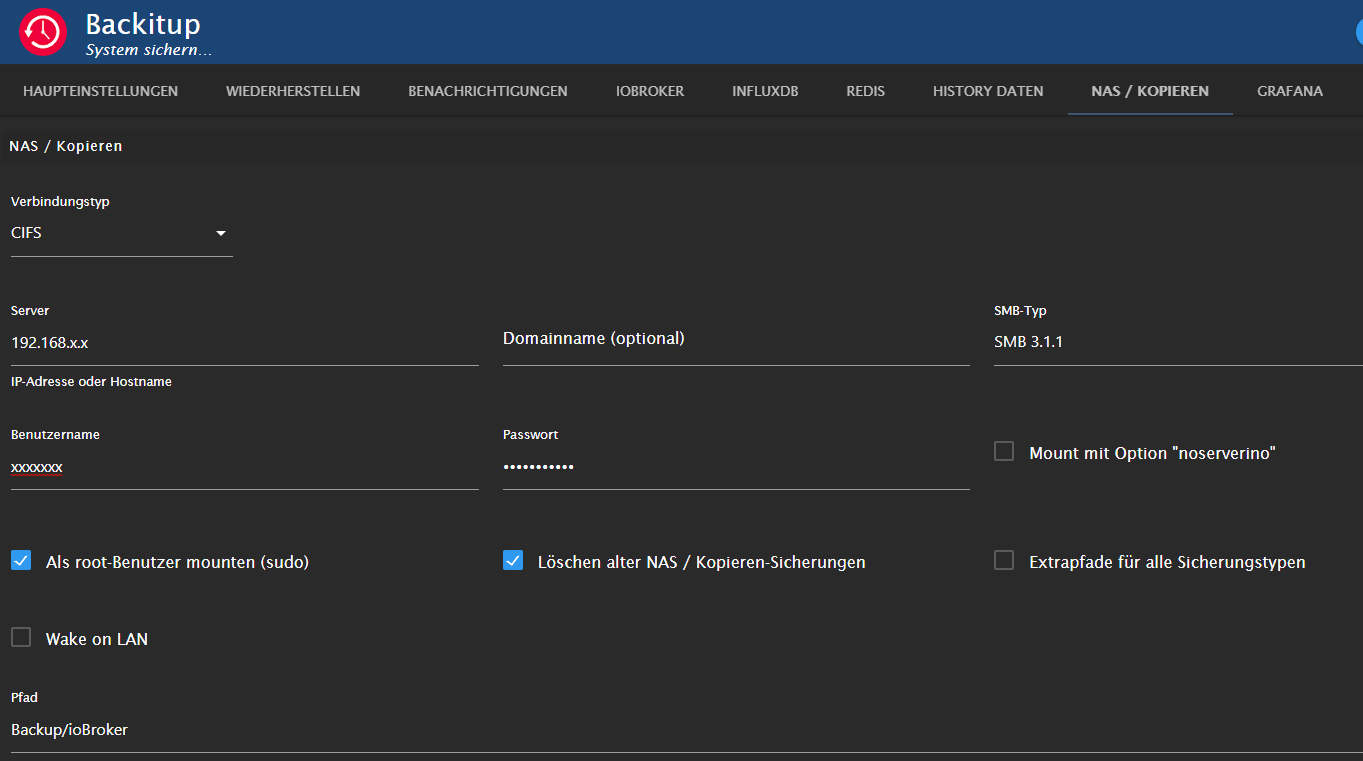
Also Lokales Backup funktioniert.
Nach umstellen des SMB-Typ von SMB 3.0 auf SMB3.1.1 geht es nun auch auf die Synology NAS.Nun läuft alles.
-
Also Lokales Backup funktioniert.
Nach umstellen des SMB-Typ von SMB 3.0 auf SMB3.1.1 geht es nun auch auf die Synology NAS.Nun läuft alles.
Ich habe mit influxdb auch Probleme. Jedoch beim Backup unter Proxmox. Passt jetzt hier nicht unbedingt zu da es scheinbar ums Backup unter ioBroker geht. Aber vielleicht hat ja jemand schon was dazu gehört.
Habe Influx mit grafana unter Proxmox in einem LXC Container. auf Proxmox mache ich nachts immer Backups von allen Container. wärend die backups laufen spuckt mir der influx adapter immer Fehler ausinfluxdb.0 2023-01-11 02:14:17.141 warn Error on writePoint("{"value":19.4,"time":"2023-01-11T01:13:41.926Z","from":"system.adapter.javascript.0","q":0,"ack":true}): HttpError: unexpected error writing points to database: timeout / "unexpected error writing points to database: timeout"" influxdb.0 2023-01-11 02:14:17.141 warn Point could not be written to database: iobroker influxdb.0 2023-01-11 02:14:17.136 warn Error on writePoint("{"value":4,"time":"2023-01-11T01:13:41.926Z","from":"system.adapter.javascript.0","q":0,"ack":true}): HttpError: unexpected error writing points to database: timeout / "unexpected error writing points to database: timeout"" influxdb.0 2023-01-11 02:14:17.135 warn Point could not be written to database: iobroker influxdb.0 2023-01-11 02:14:17.132 warn Error on writePoint("{"value":29.6,"time":"2023-01-11T01:13:41.926Z","from":"system.adapter.javascript.0","q":0,"ack":true}): HttpError: unexpected error writing points to database: timeout / "unexpected error writing points to database: timeout"" influxdb.0 2023-01-11 02:14:17.132 warn Point could not be written to database: iobrokerund zwar jede Menge. Hatte vor Influx alles via SQL laufen. dort gab es die Fehler nicht.
Grüße
PS: ich habe gerade festgestellt, dass ich die root disk für den LXC Container auch auf dem eingebundenen NAS angelegt habe auf dem auch die Backups gespeichert werden. Ich vermute das er Netzwerkmäßig während der Backups überfordert ist. Habs jetzt mal umgestellt auf ein locales Laufwerk und werde es mal beobachten
PS2: Also für alle die es interessiert, es lag tatsächlich daran.
Also Fall abgeschlossen :-) -
Hi,
ich kämpfe mich gerade mit influxDB2.5 und Grafana rum. Soweit läuft jetzt auch alles und ich kann Daten in influx und auch in Grafana visualisieren. Soweit alles gut. Nur das Backup hat Zugriffsprobleme:[ERROR] [influxDB] - Error: Command failed: influx backup --bucket iobroker --host http://192.168.1.19:8086 -t WKK3ZJlx7Kl8v2Nh7wmGps6KRwvrbqvtw2oJLoVvPCaRSFDJPQdDGoZFevYDfokoX_4LmOjvObID3cFe61LWpQ== "/opt/iobroker/backups/influxDB_2022_12_03-16_30_07_GiB_backupiobroker" 2022/12/03 16:30:07 INFO: Downloading metadata snapshot Error: failed to backup metadata: failed to download metadata snapshot: 401 Unauthorized: unauthorized accessDebug:
backitup.0
224234	2022-12-03 17:38:59.314	error	[iobroker] Error: Command failed: influx backup --bucket iobroker --host http://192.168.1.19:8086 -t WKK3ZJlx7Kl8v2Nh7wmGps6KRwvrbqvtw2oJLoVvPCaRSFDJPQdDGoZFevYDfokoX_4LmOjvObID3cFe61LWpQ== "/opt/iobroker/backups/influxDB_2022_12_03-17_38_59_GiB_backupiobroker"2022/12/03 17:38:59 INFO: Downloading metadata snapshotError: failed to backup metadata: failed to download metadata snapshot: 401 Unauthorized: unauthorized access

backitup.0
224234	2022-12-03 17:38:59.314	error	[iobroker/influxDB] Error: failed to backup metadata: failed to download metadata snapshot: 401 Unauthorized: unauthorized access

backitup.0
224234	2022-12-03 17:38:59.314	error	[iobroker/influxDB] 2022/12/03 17:38:59 INFO: Downloading metadata snapshot

backitup.0
224234	2022-12-03 17:38:59.313	error	[iobroker/influxDB] Error: Command failed: influx backup --bucket iobroker --host http://192.168.1.19:8086 -t WKK3ZJlx7Kl8v2Nh7wmGps6KRwvrbqvtw2oJLoVvPCaRSFDJPQdDGoZFevYDfokoX_4LmOjvObID3cFe61LWpQ== "/opt/iobroker/backups/influxDB_2022_12_03-17_38_59_GiB_backupiobroker"

backitup.0
224234	2022-12-03 17:38:59.313	debug	[iobroker/influxDB] InfluxDB tmp directory was successfully deleted

backitup.0
224234	2022-12-03 17:38:59.311	debug	[iobroker/influxDB] Try deleting the InfluxDB tmp directory

backitup.0
224234	2022-12-03 17:38:59.271	debug	[iobroker/influxDB] InfluxDB Backup tmp directory created

backitup.0
224234	2022-12-03 17:38:59.260	debug	[iobroker/influxDB] Start InfluxDB Backup ...

backitup.0
224234	2022-12-03 17:38:59.259	debug	[iobroker/influxDB] InfluxDB-Backup started ...
Komischer Weise bekomme ich auch beim Config abfragen auf den Console den Fehler:
pi@raspberry64:/etc/influxdb $ influx server-config --token WKK3ZJlx7Kl8v2Nh7wmGps6KRwvrbqvtw2oJLoVvPCaRSFDJPQdDGoZFevYDfokoX_4LmOjvObID3cFe61LWpQ==
Error: failed to retrieve config: 401 Unauthorized: unauthorized access
Dann habe ich was gelesen das eine config erstellt werden muss:
pi@raspberry64:~ $ influx config create --config-name influxdb.conf --host-url http://192.168.1.19:8086 --org 234d2b039f23fbd3 --token WKK3ZJlx7Kl8v2Nh7wmGps6KRwvrbqvtw2oJLoVvPCaRSFDJPQdDGoZFevYDfokoX_4LmOjvObID3cFe61LWpQ== --active
Active  Name            URL                             Org
*       influxdb.conf   http://192.168.1.19:8086        234d2b039f23fbd3
Aber das alles hat leider nicht geholfen. Für mich als totaler Anfänger sieht alles gut aus, bis auf den Backup Zugriff. Hat jemand noch eine Idee?
VG GiB
Edit: Ich habe auch schon ein neues API Token erstellt aber bekomme komischer Weise genau das selbe.. Mit diesem Token klappt auch der Grafan Zugriff. Sollte also passen!
Edit2: Am Rande fand ich komisch das wenn ich den API Key in der Backupconfig eintrage, er überhaupt nicht angezeigt werden kann um copy&paste Fehler gleich zu sehen, er im log aber jedes Mal in Klarschrift über den Schirm läuft....

Edit3: Und ja, den Key kann ruhig jeder sehen, ist nur lokal...
@gib64 sagte in Backup Zugriffsproblem influxDB2.5:
Unauthorized: unauthorized access
Ich gehe mal davon aus, dass hier irgendwas mit deinem Token nicht passt.
Ist das der Admintoken? Prüfe den noch einmal.Des weiteren schaue mal bitte, welchen Pfad die influx-cli hat
which influxHabe es gerade mit der aktuellen influx-cli 2.5.0 durchgespielt. Das Backup funktioniert damit problemlos.
Läuft die InfluxDB auf dem gleichen System wie dein iobroker? Falls ja, stelle bitte in den Einstellungen von Backitup die Influxdb Sicherung auf lokal
Am Rande fand ich komisch das wenn ich den API Key in der Backupconfig eintrage, er überhaupt nicht angezeigt werden kann um copy&paste Fehler gleich zu sehen
Der Token wird in den Backitup Settings verschlüsselt gespeichert
-
@gib64
Das Backup geht nur mit dem am Anfang Original erstellten Admin Token.
Falls der nicht mehr vorhanden ist kann man den über die shell aufrufen.Also:
Nur der tatsächlich nur der initial erstellte access token zum Backup erstellen funktioniert.
Also ganz WICHTIG: DIESEN NICHT LÖSCHEN. Ich wusste den Token nicht, deshalb hab ich ihn gelöscht und einfach einen neuen generiert, aber das hat nicht funktioniert.
Falls jemand auch nicht weiß wie er an den initialen token kommt. Einfach einen 2ten all access token erstellen und mit diesem bekannten in der shell folgendes aufrufen:
Code:
influx auth list -t <neu erstellert token>Das sollte das "401 Unauthorized: unauthorized access" Problem lösen.
Damit komme ich aber nun ein stück weiter aber zu einem neuen Problem:
[ERROR] [influxDB] - Error: Command failed: influx backup --bucket iobroker -token "/opt/iobroker/backups/influxDB_2023_01_11-18_11_50_backupiobroker"
@solardach sagte in Backup Zugriffsproblem influxDB2.5:
[ERROR] [influxDB] - Error: Command failed: influx backup --bucket iobroker -token "/opt/iobroker/backups/influxDB_2023_01_11-18_11_50_backupiobroker"
Schaue mal, wo die influx-cli im Dateisystem liegt und trage den Pfad direkt in der Config von Backitup ein
which influx -
Hallo, leider funktioniert mein Influxdb2(7) Backup nicht mehr. Bin aber mit dem beschrieben Punkten zu keiner Lösung gekommen.
backitup.0 Zeit debug Nachricht backitup.0 2023-04-09 08:00:28.312 error [iobroker] Error: Command failed: "/usr/bin/influx" backup --bucket iobroker -t 866nCegDJG1u4sfO6TvfiIit-aQOZ1Wq1ukvR5SIl9ldn5stgoK33pGF3bQq_aNKc0TMbc9Pe3EQ-ZbAwzvCug== "/opt/iobroker/backups/influxDB_2023_04_09-08_00_28_backupiobroker" 2023/04/09 08:00:28 INFO: Downloading metadata snapshot Error: failed to backup metadata: failed to download metadata snapshot: 401 Unauthorized: read:authorizations is unauthorized backitup.0 2023-04-09 08:00:28.312 error [iobroker/influxDB] Error: failed to backup metadata: failed to download metadata snapshot: 401 Unauthorized: read:authorizations is unauthorized backitup.0 2023-04-09 08:00:28.312 error [iobroker/influxDB] 2023/04/09 08:00:28 INFO: Downloading metadata snapshot backitup.0 2023-04-09 08:00:28.312 error [iobroker/influxDB] Error: Command failed: "/usr/bin/influx" backup --bucket iobroker -t 866nCegDJG1u4sfO6TvfiIit-aQOZ1Wq1ukvR5SIl9ldn5stgoK33pGF3bQq_aNKc0TMbc9Pe3EQ-ZbAwzvCug== "/opt/iobroker/backups/influxDB_2023_04_09-08_00_28_backupiobroker" backitup.0 2023-04-09 08:00:28.310 debug [iobroker/influxDB] InfluxDB tmp directory "/opt/iobroker/backups/influxDB_2023_04_09-08_00_28_backupiobroker" successfully deleted backitup.0 2023-04-09 08:00:28.309 debug [iobroker/influxDB] Try deleting the InfluxDB tmp directory: "/opt/iobroker/backups/influxDB_2023_04_09-08_00_28_backupiobroker" backitup.0 2023-04-09 08:00:28.292 debug [iobroker/influxDB] InfluxDB Backup tmp directory created backitup.0 2023-04-09 08:00:28.291 debug [iobroker/influxDB] Start InfluxDB Backup ... backitup.0 2023-04-09 08:00:28.290 debug [iobroker/influxDB] InfluxDB-Backup started ... backitup.0 2023-04-09 08:00:28.140 debug [iobroker/iobroker] done backitup.0 2023-04-09 08:00:27.082 debug [iobroker/iobroker] Backup created: /opt/iobroker/backups/iobroker_2023_04_09-08_00_21_backupiobroker.tar.gz backitup.0 2023-04-09 08:00:23.895 debug [iobroker/iobroker] host.iobroker 26002 objects saved backitup.0 2023-04-09 08:00:23.541 debug [iobroker/iobroker] host.iobroker 20366 states saved backitup.0 2023-04-09 08:00:21.018 debug [iobroker/mount] done backitup.0 2023-04-09 08:00:21.017 debug [iobroker/mount] mount successfully completed backitup.0 2023-04-09 08:00:20.968 debug [iobroker/mount] nfs-mount command: "sudo mount Hometank:/volume1/Backup/iobroker /opt/iobroker/backups" backitup.0 2023-04-09 08:00:11.037 debug [iobroker/mount] umount successfully completed backitup.0 2023-04-09 08:00:10.971 debug [iobroker/mount] mount activ... umount is started before mount!! backitup.0 2023-04-09 08:00:10.967 debug Backup has started ... backitup.0 2023-04-09 08:00:10.957 debug The local storage check was completed successfully. On the host "iobroker" are currently 47416 MB free space available! backitup.0 2023-04-09 08:00:08.571 debug The local storage check was completed successfully. On the host "iobroker" are currently 47416 MB free space available! -
Hallo, leider funktioniert mein Influxdb2(7) Backup nicht mehr. Bin aber mit dem beschrieben Punkten zu keiner Lösung gekommen.
backitup.0 Zeit debug Nachricht backitup.0 2023-04-09 08:00:28.312 error [iobroker] Error: Command failed: "/usr/bin/influx" backup --bucket iobroker -t 866nCegDJG1u4sfO6TvfiIit-aQOZ1Wq1ukvR5SIl9ldn5stgoK33pGF3bQq_aNKc0TMbc9Pe3EQ-ZbAwzvCug== "/opt/iobroker/backups/influxDB_2023_04_09-08_00_28_backupiobroker" 2023/04/09 08:00:28 INFO: Downloading metadata snapshot Error: failed to backup metadata: failed to download metadata snapshot: 401 Unauthorized: read:authorizations is unauthorized backitup.0 2023-04-09 08:00:28.312 error [iobroker/influxDB] Error: failed to backup metadata: failed to download metadata snapshot: 401 Unauthorized: read:authorizations is unauthorized backitup.0 2023-04-09 08:00:28.312 error [iobroker/influxDB] 2023/04/09 08:00:28 INFO: Downloading metadata snapshot backitup.0 2023-04-09 08:00:28.312 error [iobroker/influxDB] Error: Command failed: "/usr/bin/influx" backup --bucket iobroker -t 866nCegDJG1u4sfO6TvfiIit-aQOZ1Wq1ukvR5SIl9ldn5stgoK33pGF3bQq_aNKc0TMbc9Pe3EQ-ZbAwzvCug== "/opt/iobroker/backups/influxDB_2023_04_09-08_00_28_backupiobroker" backitup.0 2023-04-09 08:00:28.310 debug [iobroker/influxDB] InfluxDB tmp directory "/opt/iobroker/backups/influxDB_2023_04_09-08_00_28_backupiobroker" successfully deleted backitup.0 2023-04-09 08:00:28.309 debug [iobroker/influxDB] Try deleting the InfluxDB tmp directory: "/opt/iobroker/backups/influxDB_2023_04_09-08_00_28_backupiobroker" backitup.0 2023-04-09 08:00:28.292 debug [iobroker/influxDB] InfluxDB Backup tmp directory created backitup.0 2023-04-09 08:00:28.291 debug [iobroker/influxDB] Start InfluxDB Backup ... backitup.0 2023-04-09 08:00:28.290 debug [iobroker/influxDB] InfluxDB-Backup started ... backitup.0 2023-04-09 08:00:28.140 debug [iobroker/iobroker] done backitup.0 2023-04-09 08:00:27.082 debug [iobroker/iobroker] Backup created: /opt/iobroker/backups/iobroker_2023_04_09-08_00_21_backupiobroker.tar.gz backitup.0 2023-04-09 08:00:23.895 debug [iobroker/iobroker] host.iobroker 26002 objects saved backitup.0 2023-04-09 08:00:23.541 debug [iobroker/iobroker] host.iobroker 20366 states saved backitup.0 2023-04-09 08:00:21.018 debug [iobroker/mount] done backitup.0 2023-04-09 08:00:21.017 debug [iobroker/mount] mount successfully completed backitup.0 2023-04-09 08:00:20.968 debug [iobroker/mount] nfs-mount command: "sudo mount Hometank:/volume1/Backup/iobroker /opt/iobroker/backups" backitup.0 2023-04-09 08:00:11.037 debug [iobroker/mount] umount successfully completed backitup.0 2023-04-09 08:00:10.971 debug [iobroker/mount] mount activ... umount is started before mount!! backitup.0 2023-04-09 08:00:10.967 debug Backup has started ... backitup.0 2023-04-09 08:00:10.957 debug The local storage check was completed successfully. On the host "iobroker" are currently 47416 MB free space available! backitup.0 2023-04-09 08:00:08.571 debug The local storage check was completed successfully. On the host "iobroker" are currently 47416 MB free space available!Debian GNU/Linux comes with ABSOLUTELY NO WARRANTY, to the extent permitted by applicable law. Last login: Sun Apr 9 07:56:27 CEST 2023 on tty1 keksn@iobroker:~$ which influx /usr/bin/influx keksn@iobroker:~$ cd ~ apt policy influx* influxdb2-cli: Installed: 2.7.1-2 Candidate: 2.7.1-2 Version table: *** 2.7.1-2 500 500 https://repos.influxdata.com/debian stable/main amd64 Packages 100 /var/lib/dpkg/status 2.6.1 500 500 https://repos.influxdata.com/debian stable/main amd64 Packages 2.6.0 500 500 https://repos.influxdata.com/debian stable/main amd64 Packages 2.5.0 500 500 https://repos.influxdata.com/debian stable/main amd64 Packages 2.4.0 500 500 https://repos.influxdata.com/debian stable/main amd64 Packages 2.3.0 500 500 https://repos.influxdata.com/debian stable/main amd64 Packages influxdb-client: Installed: (none) Candidate: 1.6.7~rc0-1+b5 Version table: 1.6.7~rc0-1+b5 500 500 http://ftp.debian.org/debian bullseye/main amd64 Packages influxdb-dev: Installed: (none) Candidate: (none) Version table: influxdb2-client: Installed: (none) Candidate: 2.7.1-1 Version table: 2.7.1-1 500 500 https://repos.influxdata.com/debian stable/main amd64 Packages influxdb: Installed: (none) Candidate: 1.8.10-1 Version table: 1.8.10-1 500 500 https://repos.influxdata.com/debian stable/main amd64 Packages 100 /var/lib/dpkg/status 1.6.7~rc0-1+b5 500 500 http://ftp.debian.org/debian bullseye/main amd64 Packages influxdb2: Installed: 2.7.0-1 Candidate: 2.7.0-1 Version table: *** 2.7.0-1 500 500 https://repos.influxdata.com/debian stable/main amd64 Packages 100 /var/lib/dpkg/status 2.6.1-1 500 500 https://repos.influxdata.com/debian stable/main amd64 Packages 2.6.0-1 500 500 https://repos.influxdata.com/debian stable/main amd64 Packages 2.5.1-1 500 500 https://repos.influxdata.com/debian stable/main amd64 Packages 2.4.0-1 500 500 https://repos.influxdata.com/debian stable/main amd64 Packages 2.3.0-1 500 500 https://repos.influxdata.com/debian stable/main amd64 Packages 2.2.0 500 500 https://repos.influxdata.com/debian stable/main amd64 Packages -
Hallo, leider funktioniert mein Influxdb2(7) Backup nicht mehr. Bin aber mit dem beschrieben Punkten zu keiner Lösung gekommen.
backitup.0 Zeit debug Nachricht backitup.0 2023-04-09 08:00:28.312 error [iobroker] Error: Command failed: "/usr/bin/influx" backup --bucket iobroker -t 866nCegDJG1u4sfO6TvfiIit-aQOZ1Wq1ukvR5SIl9ldn5stgoK33pGF3bQq_aNKc0TMbc9Pe3EQ-ZbAwzvCug== "/opt/iobroker/backups/influxDB_2023_04_09-08_00_28_backupiobroker" 2023/04/09 08:00:28 INFO: Downloading metadata snapshot Error: failed to backup metadata: failed to download metadata snapshot: 401 Unauthorized: read:authorizations is unauthorized backitup.0 2023-04-09 08:00:28.312 error [iobroker/influxDB] Error: failed to backup metadata: failed to download metadata snapshot: 401 Unauthorized: read:authorizations is unauthorized backitup.0 2023-04-09 08:00:28.312 error [iobroker/influxDB] 2023/04/09 08:00:28 INFO: Downloading metadata snapshot backitup.0 2023-04-09 08:00:28.312 error [iobroker/influxDB] Error: Command failed: "/usr/bin/influx" backup --bucket iobroker -t 866nCegDJG1u4sfO6TvfiIit-aQOZ1Wq1ukvR5SIl9ldn5stgoK33pGF3bQq_aNKc0TMbc9Pe3EQ-ZbAwzvCug== "/opt/iobroker/backups/influxDB_2023_04_09-08_00_28_backupiobroker" backitup.0 2023-04-09 08:00:28.310 debug [iobroker/influxDB] InfluxDB tmp directory "/opt/iobroker/backups/influxDB_2023_04_09-08_00_28_backupiobroker" successfully deleted backitup.0 2023-04-09 08:00:28.309 debug [iobroker/influxDB] Try deleting the InfluxDB tmp directory: "/opt/iobroker/backups/influxDB_2023_04_09-08_00_28_backupiobroker" backitup.0 2023-04-09 08:00:28.292 debug [iobroker/influxDB] InfluxDB Backup tmp directory created backitup.0 2023-04-09 08:00:28.291 debug [iobroker/influxDB] Start InfluxDB Backup ... backitup.0 2023-04-09 08:00:28.290 debug [iobroker/influxDB] InfluxDB-Backup started ... backitup.0 2023-04-09 08:00:28.140 debug [iobroker/iobroker] done backitup.0 2023-04-09 08:00:27.082 debug [iobroker/iobroker] Backup created: /opt/iobroker/backups/iobroker_2023_04_09-08_00_21_backupiobroker.tar.gz backitup.0 2023-04-09 08:00:23.895 debug [iobroker/iobroker] host.iobroker 26002 objects saved backitup.0 2023-04-09 08:00:23.541 debug [iobroker/iobroker] host.iobroker 20366 states saved backitup.0 2023-04-09 08:00:21.018 debug [iobroker/mount] done backitup.0 2023-04-09 08:00:21.017 debug [iobroker/mount] mount successfully completed backitup.0 2023-04-09 08:00:20.968 debug [iobroker/mount] nfs-mount command: "sudo mount Hometank:/volume1/Backup/iobroker /opt/iobroker/backups" backitup.0 2023-04-09 08:00:11.037 debug [iobroker/mount] umount successfully completed backitup.0 2023-04-09 08:00:10.971 debug [iobroker/mount] mount activ... umount is started before mount!! backitup.0 2023-04-09 08:00:10.967 debug Backup has started ... backitup.0 2023-04-09 08:00:10.957 debug The local storage check was completed successfully. On the host "iobroker" are currently 47416 MB free space available! backitup.0 2023-04-09 08:00:08.571 debug The local storage check was completed successfully. On the host "iobroker" are currently 47416 MB free space available!Steht doch im Log …
401 Unauthorized -
Steht doch im Log …
401 Unauthorized -
das habe ich alles schon mehrmals gemacht. Es hat ja auch schon funktioniert. Ich habe aber jetzt erst gesehen das das letzte Backup am 17.02 erstellt wurde.
@keksn
Dann musst du es nochmal nach dieser Anleitung machen.
Dein Token ist nicht für ein Backup gültig. -
@keksn
Dann musst du es nochmal nach dieser Anleitung machen.
Dein Token ist nicht für ein Backup gültig.Operator token steht bei mir da nirgends. Ich habe den obersten in der Liste genommen. jetzt kommt das
2023-04-09 11:17:45.061 error [iobroker] Error: Command failed: "/usr/bin/influx" backup --bucket iobroker -t MJ-dVc5yNCpLtCN22GP_mrXrbJQR3mZxhy9bAOMUnzFGL2xs5T3FwZJxFG2P_QNZvlNYzV6RVd3pvZkFJ7koow==" "/opt/iobroker/backups/influxDB_2023_04_09-11_17_45_backupiobroker" /bin/sh: 1: Syntax error: Unterminated quoted string backitup.0 2023-04-09 11:17:45.061 error [iobroker/influxDB] /bin/sh: 1: Syntax error: Unterminated quoted string backitup.0 2023-04-09 11:17:45.061 error [iobroker/influxDB] Error: Command failed: "/usr/bin/influx" backup --bucket iobroker -t MJ-dVc5yNCpLtCN22GP_mrXrbJQR3mZxhy9bAOMUnzFGL2xs5T3FwZJxFG2P_QNZvlNYzV6RVd3pvZkFJ7koow==" "/opt/iobroker/backups/influxDB_2023_04_09-11_17_45_backupiobroker" -
@keksn
Dann musst du es nochmal nach dieser Anleitung machen.
Dein Token ist nicht für ein Backup gültig.wenn ich in der Konsole eingebe
influx backup --bucket iobroker --host http://192.168.1.166:8086 -t jDzlHe-luNvFjk_8XXDUoDfyLMt9MSQuVflszTB53x2g-JQkOAmP7B1JGpjW__7sZaXeBRACUyKs95uP-K7QWQ== "/tmp/influx-test"kommt das
keksn@iobroker:~$ influx backup --bucket iobroker --host http://192.168.1.166:8086 -t jDzlHe-luNvFjk_8XXDUoDfyLMt9MSQuVflszTB53x2g-JQkOAmP7B1JGpjW__7sZaXeBRACUyKs95uP-K7QWQ== "/tmp/influx-test"
2023/04/09 11:22:39 INFO: Downloading metadata snapshot
Error: failed to backup metadata: failed to download metadata snapshot: 401 Unauthorized: read:authorizations is unauthorized
keksn@iobroker:~$






Hey! Du scheinst an dieser Unterhaltung interessiert zu sein, hast aber noch kein Konto.
Hast du es satt, bei jedem Besuch durch die gleichen Beiträge zu scrollen? Wenn du dich für ein Konto anmeldest, kommst du immer genau dorthin zurück, wo du zuvor warst, und kannst dich über neue Antworten benachrichtigen lassen (entweder per E-Mail oder Push-Benachrichtigung). Du kannst auch Lesezeichen speichern und Beiträge positiv bewerten, um anderen Community-Mitgliedern deine Wertschätzung zu zeigen.
Mit deinem Input könnte dieser Beitrag noch besser werden 💗
Registrieren AnmeldenSupport us
403
Online33.0k
Benutzer83.5k
Themen1.3m
Beiträge