




2 Fragen zu Grafana
-
@dr-pie
Dann schau mal mit
topwas da alles läuft.
Und stell sicher, dass da nicht unnötiges wie ein Desktop usw läuft. Kannst du dir mit 2GB RAM nicht leisten.who -ranschauen.
-
Leider kann ich nur ein Screenshot liefern.
Das Fenster wir zu schnell aktualisiert ... und bevor ich die Zeilen kopiert habe wurde es wieder aktualisiert.

login as: pi pi@192.168.178.23's password: Linux raspberrypi 5.15.76-v7l+ #1597 SMP Fri Nov 4 12:14:58 GMT 2022 armv7l The programs included with the Debian GNU/Linux system are free software; the exact distribution terms for each program are described in the individual files in /usr/share/doc/*/copyright. Debian GNU/Linux comes with ABSOLUTELY NO WARRANTY, to the extent permitted by applicable law. Last login: Sun Dec 11 14:19:34 2022 from 192.168.178.21 pi@raspberrypi:~ $ who -r Runlevel 5 2022-12-11 13:25 pi@raspberrypi:~ $ -
login as: pi pi@192.168.178.23's password: Linux raspberrypi 5.15.76-v7l+ #1597 SMP Fri Nov 4 12:14:58 GMT 2022 armv7l The programs included with the Debian GNU/Linux system are free software; the exact distribution terms for each program are described in the individual files in /usr/share/doc/*/copyright. Debian GNU/Linux comes with ABSOLUTELY NO WARRANTY, to the extent permitted by applicable law. Last login: Sun Dec 11 14:19:34 2022 from 192.168.178.21 pi@raspberrypi:~ $ who -r Runlevel 5 2022-12-11 13:25 pi@raspberrypi:~ $@dr-pie
Damn stell das schon Mal auf Run Level 3 um.
Geht in
sudo raspi-configDa in den Boot Optionen 'CLI with Login' umstellen.
-
@dr-pie
Damn stell das schon Mal auf Run Level 3 um.
Geht in
sudo raspi-configDa in den Boot Optionen 'CLI with Login' umstellen.
Raspberry Pi Software Configuration Tool (raspi-config) ├──────────┐
│                                                                              │
│       1 System Options       Configure system settings                       │
│       2 Display Options      Configure display settings                      │
│       3 Interface Options    Configure connections to peripherals            │
│       4 Performance Options  Configure performance settings                  │
│       5 Localisation Options Configure language and regional settings        │
│       6 Advanced Options     Configure advanced settings                     │
│       8 Update               Update this tool to the latest version          │
│       9 About raspi-config   Information about this configuration tool       │
│                                                                              │
│                                                                              │
│                                                                              │
│                                                                              │
│                                                                              │
│                     <Select>                     <Finish>                    │
│                                                                              │
Diese Option scheint es nicht zu geben
-
Raspberry Pi Software Configuration Tool (raspi-config) ├──────────┐
│                                                                              │
│       1 System Options       Configure system settings                       │
│       2 Display Options      Configure display settings                      │
│       3 Interface Options    Configure connections to peripherals            │
│       4 Performance Options  Configure performance settings                  │
│       5 Localisation Options Configure language and regional settings        │
│       6 Advanced Options     Configure advanced settings                     │
│       8 Update               Update this tool to the latest version          │
│       9 About raspi-config   Information about this configuration tool       │
│                                                                              │
│                                                                              │
│                                                                              │
│                                                                              │
│                                                                              │
│                     <Select>                     <Finish>                    │
│                                                                              │
Diese Option scheint es nicht zu geben
@dr-pie
Ist in einem Menü drin. Ich glaube 'System'
-
@dr-pie
Ist in einem Menü drin. Ich glaube 'System'
@thomas-braun hmmmm... irgendwie kann ich den Eintrag nicht finden
-
@dr-pie
System
Boot
Console -
@dr-pie
System
Boot
Console -
@thomas-braun
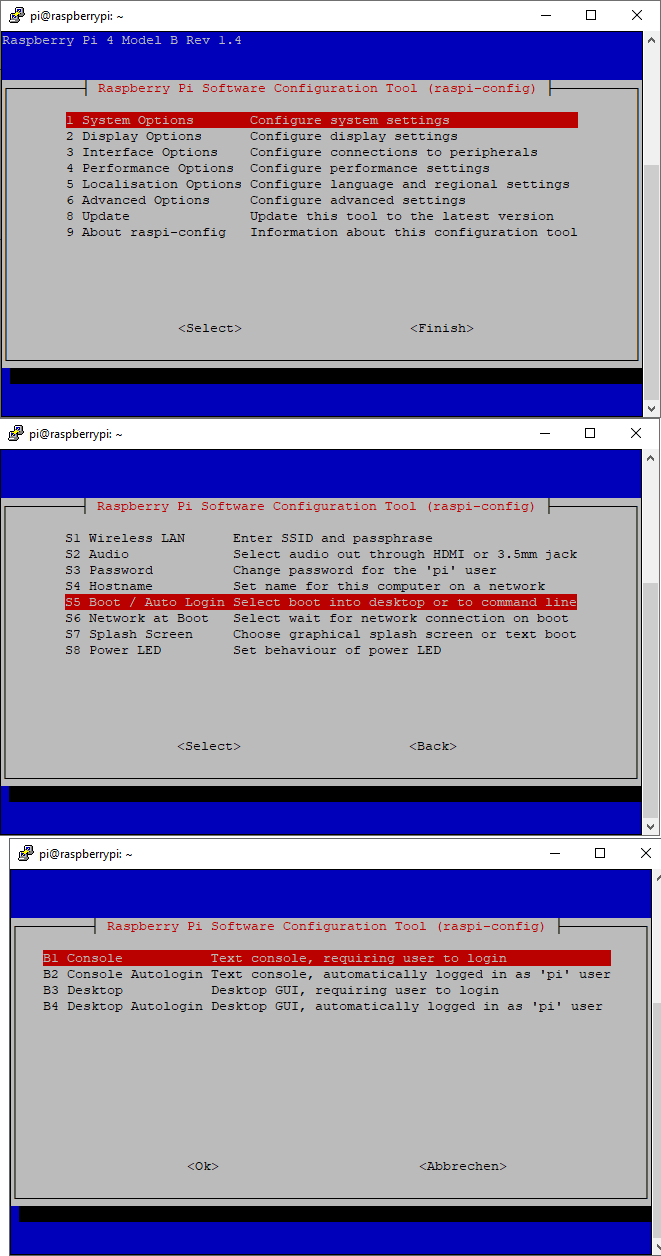
Mit einem klick auf 1 startet das Menu neu... -
@dr-pie
Was für ein Klick?
Das ist Kommandozeile, da wird mit der Tastatur gearbeitet, nix geklickt.Wenn das gesetzt wurde raspi-config verlassen, dann wird das System neu starten und
who -rliefert RunLevel 3 zurück.
-
@dr-pie
Was für ein Klick?
Das ist Kommandozeile, da wird mit der Tastatur gearbeitet, nix geklickt.Wenn das gesetzt wurde raspi-config verlassen, dann wird das System neu starten und
who -rliefert RunLevel 3 zurück.
@thomas-braun Genau so ist es passiert.
Mit "klick" meinte ich ein drücken auf Enter ...login as: pi pi@192.168.178.23's password: Linux raspberrypi 5.15.76-v7l+ #1597 SMP Fri Nov 4 12:14:58 GMT 2022 armv7l The programs included with the Debian GNU/Linux system are free software; the exact distribution terms for each program are described in the individual files in /usr/share/doc/*/copyright. Debian GNU/Linux comes with ABSOLUTELY NO WARRANTY, to the extent permitted by applicable law. Last login: Sun Dec 11 16:00:13 2022 from 192.168.178.21 pi@raspberrypi:~ $ who -r Runlevel 3 2022-12-11 16:01 pi@raspberrypi:~ $ -
@thomas-braun Genau so ist es passiert.
Mit "klick" meinte ich ein drücken auf Enter ...login as: pi pi@192.168.178.23's password: Linux raspberrypi 5.15.76-v7l+ #1597 SMP Fri Nov 4 12:14:58 GMT 2022 armv7l The programs included with the Debian GNU/Linux system are free software; the exact distribution terms for each program are described in the individual files in /usr/share/doc/*/copyright. Debian GNU/Linux comes with ABSOLUTELY NO WARRANTY, to the extent permitted by applicable law. Last login: Sun Dec 11 16:00:13 2022 from 192.168.178.21 pi@raspberrypi:~ $ who -r Runlevel 3 2022-12-11 16:01 pi@raspberrypi:~ $@dr-pie
Dann bist du ja jetzt angekommen.
-
@dr-pie
Dann bist du ja jetzt angekommen.
@thomas-braun zumindest was die Aktualisierung betrifft...
Das war schon ne Hausnummer für mich.
Aber dank Dir alles gut verlaufen ... hoffe ich zumindest
Nun geht's wohl erst richtig los mit dem Ursprünglichen Problem.



Hey! Du scheinst an dieser Unterhaltung interessiert zu sein, hast aber noch kein Konto.
Hast du es satt, bei jedem Besuch durch die gleichen Beiträge zu scrollen? Wenn du dich für ein Konto anmeldest, kommst du immer genau dorthin zurück, wo du zuvor warst, und kannst dich über neue Antworten benachrichtigen lassen (entweder per E-Mail oder Push-Benachrichtigung). Du kannst auch Lesezeichen speichern und Beiträge positiv bewerten, um anderen Community-Mitgliedern deine Wertschätzung zu zeigen.
Mit deinem Input könnte dieser Beitrag noch besser werden 💗
Registrieren AnmeldenSupport us
491
Online33.0k
Benutzer83.6k
Themen1.3m
Beiträge