Skip to content
  • Home
  • Aktuell
  • Tags
  • 0 Ungelesen 0
  • Kategorien
  • Unreplied
  • Beliebt
  • GitHub
  • Docu
  • Hilfe
Skins
  • Light
  • Brite
  • Cerulean
  • Cosmo
  • Flatly
  • Journal
  • Litera
  • Lumen
  • Lux
  • Materia
  • Minty
  • Morph
  • Pulse
  • Sandstone
  • Simplex
  • Sketchy
  • Spacelab
  • United
  • Yeti
  • Zephyr
  • Dark
  • Cyborg
  • Darkly
  • Quartz
  • Slate
  • Solar
  • Superhero
  • Vapor

  • Standard: (Kein Skin)
  • Kein Skin
Einklappen
ioBroker Logo

Community Forum

donate donate
  1. ioBroker Community Home
  2. Deutsch
  3. Off Topic
  4. Grafana
  5. 2 Fragen zu Grafana

NEWS

  • UPDATE 31.10.: Amazon Alexa - ioBroker Skill läuft aus ?
    apollon77A
    apollon77
    48
    3
    8.7k

  • Monatsrückblick – September 2025
    BluefoxB
    Bluefox
    13
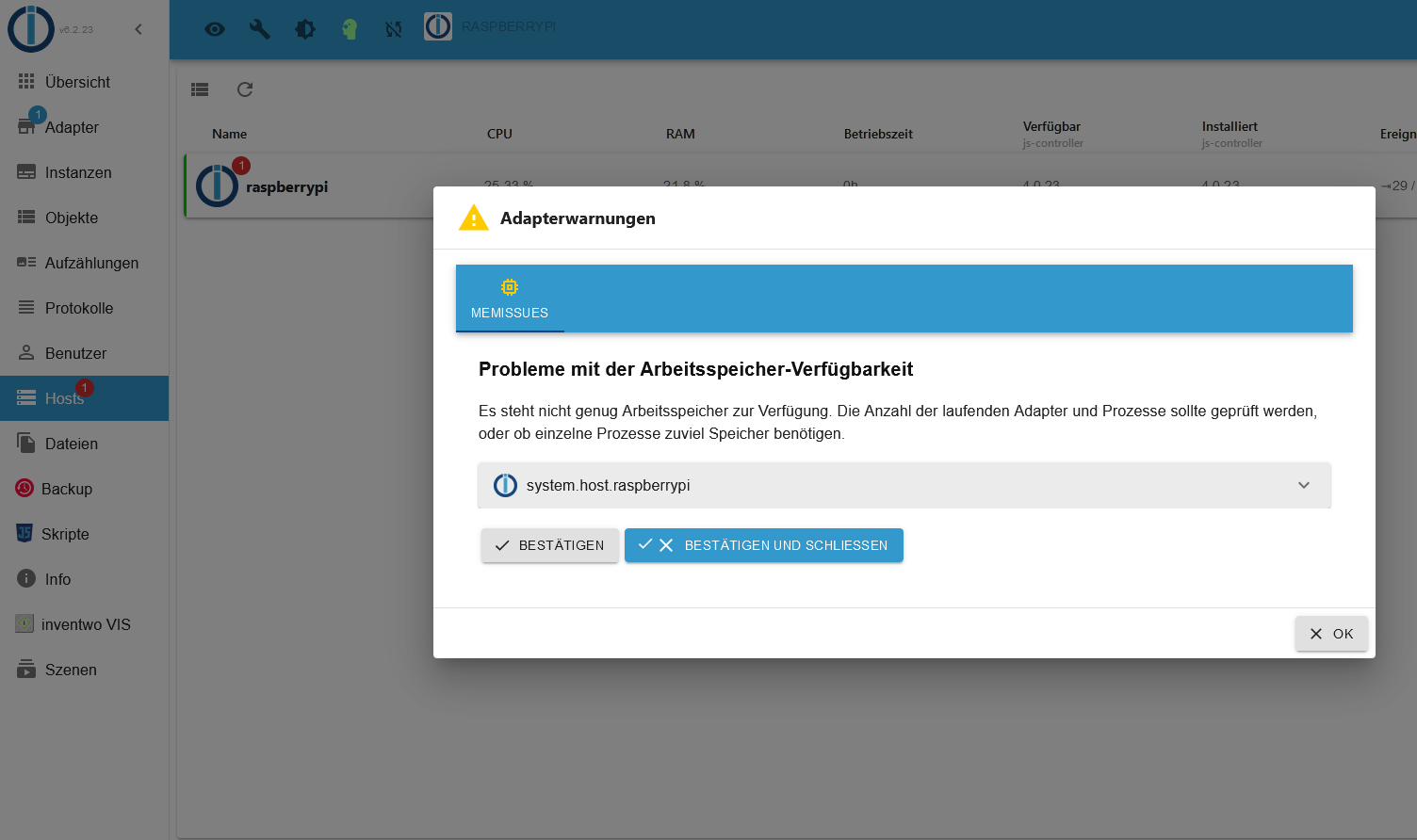
    1
    2.2k

  • Neues Video "KI im Smart Home" - ioBroker plus n8n
    BluefoxB
    Bluefox
    16
    1
    3.2k

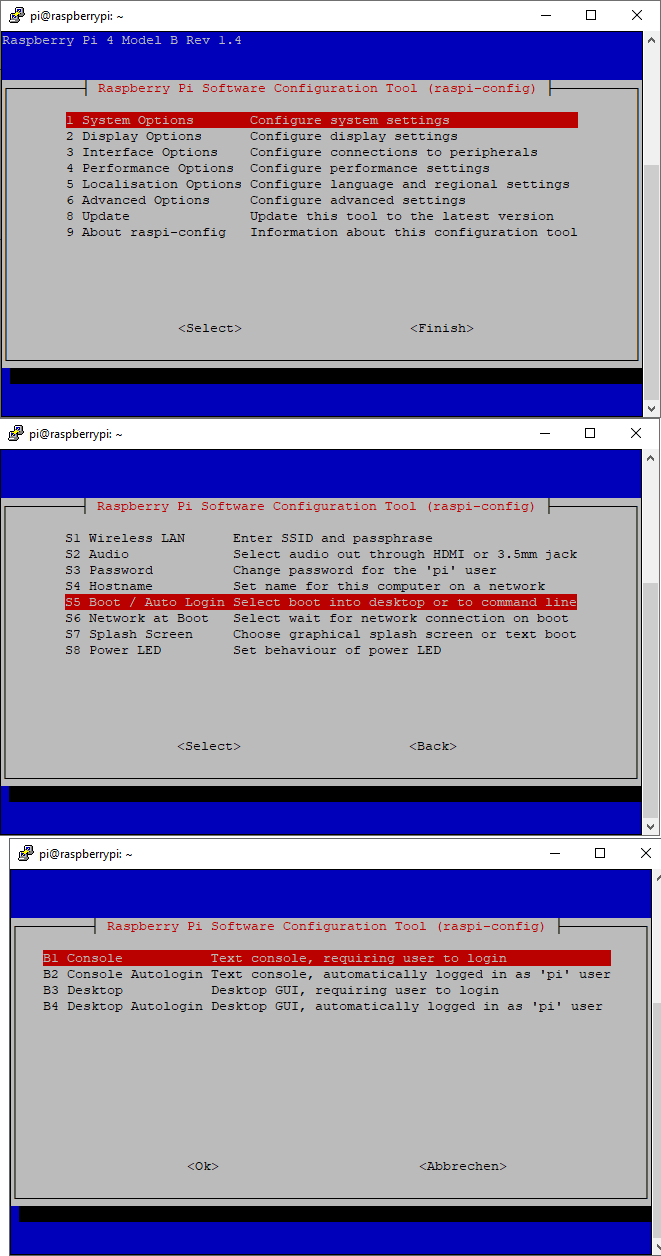
2 Fragen zu Grafana

Geplant Angeheftet Gesperrt Verschoben Grafana
80 Beiträge 6 Kommentatoren 2.7k Aufrufe 7 Watching
  • Älteste zuerst
  • Neuste zuerst
  • Meiste Stimmen
Antworten
  • In einem neuen Thema antworten
Anmelden zum Antworten
Dieses Thema wurde gelöscht. Nur Nutzer mit entsprechenden Rechten können es sehen.
  • Dr.PieD Dr.Pie

    @thomas-braun sagte in 2 Fragen zu Grafana:

    Bin dabei ...

    Fertig. Das war jetzt aber auch nur ein Exkurs, dein Excel-Influx-'Problem' ist natürlich noch nicht angegangen.

    Konnte ich mir schon denken ...

    Ich hoffe nur das nach dem ganzen, mein System noch läuft...

    Thomas BraunT Online
    Thomas BraunT Online
    Thomas Braun
    Most Active
    schrieb am zuletzt editiert von
    #58

    @dr-pie
    Nach dem reboot sagt:

    sudo ln -s /usr/bin/node /usr/bin/nodejs &> /dev/null
    uname -m && test -f /opt/scripts/.docker_config/.thisisdocker && echo "Docker-Installation" || echo "Kein Docker" && type -P nodejs node npm && nodejs -v && node -v && npm -v && iob -v && whoami && groups && echo $XDG_SESSION_TYPE && echo $DESKTOP_SESSION && pwd && sudo apt update &> /dev/null && sudo apt update && apt policy nodejs
    

    Linux-Werkzeugkasten:
    https://forum.iobroker.net/topic/42952/der-kleine-iobroker-linux-werkzeugkasten
    NodeJS Fixer Skript:
    https://forum.iobroker.net/topic/68035/iob-node-fix-skript
    iob_diag: curl -sLf -o diag.sh https://iobroker.net/diag.sh && bash diag.sh

    Dr.PieD 1 Antwort Letzte Antwort
    0
    • Thomas BraunT Thomas Braun

      @dr-pie
      Nach dem reboot sagt:

      sudo ln -s /usr/bin/node /usr/bin/nodejs &> /dev/null
      uname -m && test -f /opt/scripts/.docker_config/.thisisdocker && echo "Docker-Installation" || echo "Kein Docker" && type -P nodejs node npm && nodejs -v && node -v && npm -v && iob -v && whoami && groups && echo $XDG_SESSION_TYPE && echo $DESKTOP_SESSION && pwd && sudo apt update &> /dev/null && sudo apt update && apt policy nodejs
      
      Dr.PieD Online
      Dr.PieD Online
      Dr.Pie
      schrieb am zuletzt editiert von
      #59
      armv7l
      Kein Docker
      /usr/bin/nodejs
      /usr/bin/node
      /usr/bin/npm
      v16.18.1
      v16.18.1
      8.19.2
      4.0.23
      pi
      pi adm dialout cdrom sudo audio video plugdev games users input netdev lpadmin g                                       pio i2c spi iobroker
      tty
      
      /home/pi
      OK:1 http://archive.raspberrypi.org/debian bullseye InRelease
      OK:2 http://raspbian.raspberrypi.org/raspbian bullseye InRelease
      OK:3 https://repos.influxdata.com/debian bullseye InRelease
      OK:4 https://packages.grafana.com/oss/deb stable InRelease
      OK:5 https://deb.nodesource.com/node_16.x bullseye InRelease
      Paketlisten werden gelesen… Fertig
      Abhängigkeitsbaum wird aufgebaut… Fertig
      Statusinformationen werden eingelesen… Fertig
      Alle Pakete sind aktuell.
      nodejs:
        Installiert:           16.18.1-deb-1nodesource1
        Installationskandidat: 16.18.1-deb-1nodesource1
        Versionstabelle:
       *** 16.18.1-deb-1nodesource1 500
              500 https://deb.nodesource.com/node_16.x bullseye/main armhf Packages
              100 /var/lib/dpkg/status
           12.22.12~dfsg-1~deb11u1 500
              500 http://raspbian.raspberrypi.org/raspbian bullseye/main armhf Packages
      pi@raspberrypi:~ $
      
      
      Thomas BraunT 1 Antwort Letzte Antwort
      0
      • Dr.PieD Dr.Pie
        armv7l
        Kein Docker
        /usr/bin/nodejs
        /usr/bin/node
        /usr/bin/npm
        v16.18.1
        v16.18.1
        8.19.2
        4.0.23
        pi
        pi adm dialout cdrom sudo audio video plugdev games users input netdev lpadmin g                                       pio i2c spi iobroker
        tty
        
        /home/pi
        OK:1 http://archive.raspberrypi.org/debian bullseye InRelease
        OK:2 http://raspbian.raspberrypi.org/raspbian bullseye InRelease
        OK:3 https://repos.influxdata.com/debian bullseye InRelease
        OK:4 https://packages.grafana.com/oss/deb stable InRelease
        OK:5 https://deb.nodesource.com/node_16.x bullseye InRelease
        Paketlisten werden gelesen… Fertig
        Abhängigkeitsbaum wird aufgebaut… Fertig
        Statusinformationen werden eingelesen… Fertig
        Alle Pakete sind aktuell.
        nodejs:
          Installiert:           16.18.1-deb-1nodesource1
          Installationskandidat: 16.18.1-deb-1nodesource1
          Versionstabelle:
         *** 16.18.1-deb-1nodesource1 500
                500 https://deb.nodesource.com/node_16.x bullseye/main armhf Packages
                100 /var/lib/dpkg/status
             12.22.12~dfsg-1~deb11u1 500
                500 http://raspbian.raspberrypi.org/raspbian bullseye/main armhf Packages
        pi@raspberrypi:~ $
        
        
        Thomas BraunT Online
        Thomas BraunT Online
        Thomas Braun
        Most Active
        schrieb am zuletzt editiert von
        #60

        @dr-pie

        Jo, passt.

        Linux-Werkzeugkasten:
        https://forum.iobroker.net/topic/42952/der-kleine-iobroker-linux-werkzeugkasten
        NodeJS Fixer Skript:
        https://forum.iobroker.net/topic/68035/iob-node-fix-skript
        iob_diag: curl -sLf -o diag.sh https://iobroker.net/diag.sh && bash diag.sh

        Dr.PieD 1 Antwort Letzte Antwort
        0
        • Thomas BraunT Thomas Braun

          @dr-pie

          Jo, passt.

          Dr.PieD Online
          Dr.PieD Online
          Dr.Pie
          schrieb am zuletzt editiert von
          #61

          @thomas-braun

          Alter Schwede ...

          Dr.PieD 1 Antwort Letzte Antwort
          0
          • Dr.PieD Dr.Pie

            @thomas-braun

            Alter Schwede ...

            Dr.PieD Online
            Dr.PieD Online
            Dr.Pie
            schrieb am zuletzt editiert von
            #62

            Nun bekomme ich eine Meldung
            host4.png

            Ich bin mir nicht sicher ob das an den Änderungen liegt ...

            Thomas BraunT 1 Antwort Letzte Antwort
            0
            • Dr.PieD Dr.Pie

              Nun bekomme ich eine Meldung
              host4.png

              Ich bin mir nicht sicher ob das an den Änderungen liegt ...

              Thomas BraunT Online
              Thomas BraunT Online
              Thomas Braun
              Most Active
              schrieb am zuletzt editiert von
              #63

              @dr-pie

              Wie bist du denn da ausgestattet?

              free -ht
              

              Linux-Werkzeugkasten:
              https://forum.iobroker.net/topic/42952/der-kleine-iobroker-linux-werkzeugkasten
              NodeJS Fixer Skript:
              https://forum.iobroker.net/topic/68035/iob-node-fix-skript
              iob_diag: curl -sLf -o diag.sh https://iobroker.net/diag.sh && bash diag.sh

              Dr.PieD 1 Antwort Letzte Antwort
              0
              • Thomas BraunT Thomas Braun

                @dr-pie

                Wie bist du denn da ausgestattet?

                free -ht
                
                Dr.PieD Online
                Dr.PieD Online
                Dr.Pie
                schrieb am zuletzt editiert von
                #64
                pi@raspberrypi:~ $ free -ht
                              gesamt       benutzt     frei      gemns.  Puffer/Cache verfügbar
                Speicher:      1,8Gi       1,4Gi        66Mi        67Mi       343Mi       366Mi
                Swap:           99Mi        98Mi       1,0Mi
                Gesamt:        1,9Gi       1,5Gi        68Mi
                pi@raspberrypi:~ $
                
                
                Thomas BraunT 1 Antwort Letzte Antwort
                0
                • Dr.PieD Dr.Pie
                  pi@raspberrypi:~ $ free -ht
                                gesamt       benutzt     frei      gemns.  Puffer/Cache verfügbar
                  Speicher:      1,8Gi       1,4Gi        66Mi        67Mi       343Mi       366Mi
                  Swap:           99Mi        98Mi       1,0Mi
                  Gesamt:        1,9Gi       1,5Gi        68Mi
                  pi@raspberrypi:~ $
                  
                  
                  Thomas BraunT Online
                  Thomas BraunT Online
                  Thomas Braun
                  Most Active
                  schrieb am zuletzt editiert von
                  #65

                  @dr-pie

                  2GB ist jetzt nicht üppig.

                  Linux-Werkzeugkasten:
                  https://forum.iobroker.net/topic/42952/der-kleine-iobroker-linux-werkzeugkasten
                  NodeJS Fixer Skript:
                  https://forum.iobroker.net/topic/68035/iob-node-fix-skript
                  iob_diag: curl -sLf -o diag.sh https://iobroker.net/diag.sh && bash diag.sh

                  Dr.PieD 1 Antwort Letzte Antwort
                  0
                  • Thomas BraunT Thomas Braun

                    @dr-pie

                    2GB ist jetzt nicht üppig.

                    Dr.PieD Online
                    Dr.PieD Online
                    Dr.Pie
                    schrieb am zuletzt editiert von
                    #66

                    @thomas-braun Den Raspi hatte ich schon länger.
                    Und da meine Synology mir zu viel Strom zog, hatte ich beschlossen das alles auf dem Raspi zu installieren ... nun hab ich den Salat :blush:

                    Thomas BraunT 1 Antwort Letzte Antwort
                    0
                    • Dr.PieD Dr.Pie

                      @thomas-braun Den Raspi hatte ich schon länger.
                      Und da meine Synology mir zu viel Strom zog, hatte ich beschlossen das alles auf dem Raspi zu installieren ... nun hab ich den Salat :blush:

                      Thomas BraunT Online
                      Thomas BraunT Online
                      Thomas Braun
                      Most Active
                      schrieb am zuletzt editiert von Thomas Braun
                      #67

                      @dr-pie

                      Dann schau mal mit

                      top
                      

                      was da alles läuft.
                      Und stell sicher, dass da nicht unnötiges wie ein Desktop usw läuft. Kannst du dir mit 2GB RAM nicht leisten.

                      who -r
                      

                      anschauen.

                      Linux-Werkzeugkasten:
                      https://forum.iobroker.net/topic/42952/der-kleine-iobroker-linux-werkzeugkasten
                      NodeJS Fixer Skript:
                      https://forum.iobroker.net/topic/68035/iob-node-fix-skript
                      iob_diag: curl -sLf -o diag.sh https://iobroker.net/diag.sh && bash diag.sh

                      Dr.PieD 1 Antwort Letzte Antwort
                      0
                      • Thomas BraunT Thomas Braun

                        @dr-pie

                        Dann schau mal mit

                        top
                        

                        was da alles läuft.
                        Und stell sicher, dass da nicht unnötiges wie ein Desktop usw läuft. Kannst du dir mit 2GB RAM nicht leisten.

                        who -r
                        

                        anschauen.

                        Dr.PieD Online
                        Dr.PieD Online
                        Dr.Pie
                        schrieb am zuletzt editiert von
                        #68

                        Leider kann ich nur ein Screenshot liefern.
                        Das Fenster wir zu schnell aktualisiert ... und bevor ich die Zeilen kopiert habe wurde es wieder aktualisiert.
                        host5.png

                        Dr.PieD 1 Antwort Letzte Antwort
                        0
                        • Dr.PieD Dr.Pie

                          Leider kann ich nur ein Screenshot liefern.
                          Das Fenster wir zu schnell aktualisiert ... und bevor ich die Zeilen kopiert habe wurde es wieder aktualisiert.
                          host5.png

                          Dr.PieD Online
                          Dr.PieD Online
                          Dr.Pie
                          schrieb am zuletzt editiert von
                          #69
                          login as: pi
                          pi@192.168.178.23's password:
                          Linux raspberrypi 5.15.76-v7l+ #1597 SMP Fri Nov 4 12:14:58 GMT 2022 armv7l
                          
                          The programs included with the Debian GNU/Linux system are free software;
                          the exact distribution terms for each program are described in the
                          individual files in /usr/share/doc/*/copyright.
                          
                          Debian GNU/Linux comes with ABSOLUTELY NO WARRANTY, to the extent
                          permitted by applicable law.
                          Last login: Sun Dec 11 14:19:34 2022 from 192.168.178.21
                          pi@raspberrypi:~ $ who -r
                                   Runlevel 5   2022-12-11 13:25
                          pi@raspberrypi:~ $
                          
                          
                          Thomas BraunT 1 Antwort Letzte Antwort
                          0
                          • Dr.PieD Dr.Pie
                            login as: pi
                            pi@192.168.178.23's password:
                            Linux raspberrypi 5.15.76-v7l+ #1597 SMP Fri Nov 4 12:14:58 GMT 2022 armv7l
                            
                            The programs included with the Debian GNU/Linux system are free software;
                            the exact distribution terms for each program are described in the
                            individual files in /usr/share/doc/*/copyright.
                            
                            Debian GNU/Linux comes with ABSOLUTELY NO WARRANTY, to the extent
                            permitted by applicable law.
                            Last login: Sun Dec 11 14:19:34 2022 from 192.168.178.21
                            pi@raspberrypi:~ $ who -r
                                     Runlevel 5   2022-12-11 13:25
                            pi@raspberrypi:~ $
                            
                            
                            Thomas BraunT Online
                            Thomas BraunT Online
                            Thomas Braun
                            Most Active
                            schrieb am zuletzt editiert von
                            #70

                            @dr-pie

                            Damn stell das schon Mal auf Run Level 3 um.

                            Geht in

                            sudo raspi-config
                            

                            Da in den Boot Optionen 'CLI with Login' umstellen.

                            Linux-Werkzeugkasten:
                            https://forum.iobroker.net/topic/42952/der-kleine-iobroker-linux-werkzeugkasten
                            NodeJS Fixer Skript:
                            https://forum.iobroker.net/topic/68035/iob-node-fix-skript
                            iob_diag: curl -sLf -o diag.sh https://iobroker.net/diag.sh && bash diag.sh

                            Dr.PieD 1 Antwort Letzte Antwort
                            0
                            • Thomas BraunT Thomas Braun

                              @dr-pie

                              Damn stell das schon Mal auf Run Level 3 um.

                              Geht in

                              sudo raspi-config
                              

                              Da in den Boot Optionen 'CLI with Login' umstellen.

                              Dr.PieD Online
                              Dr.PieD Online
                              Dr.Pie
                              schrieb am zuletzt editiert von
                              #71

                              @thomas-braun

                              Raspberry Pi Software Configuration Tool (raspi-config) ├──────────┐
                              │                                                                              │
                              │       1 System Options       Configure system settings                       │
                              │       2 Display Options      Configure display settings                      │
                              │       3 Interface Options    Configure connections to peripherals            │
                              │       4 Performance Options  Configure performance settings                  │
                              │       5 Localisation Options Configure language and regional settings        │
                              │       6 Advanced Options     Configure advanced settings                     │
                              │       8 Update               Update this tool to the latest version          │
                              │       9 About raspi-config   Information about this configuration tool       │
                              │                                                                              │
                              │                                                                              │
                              │                                                                              │
                              │                                                                              │
                              │                                                                              │
                              │                     <Select>                     <Finish>                    │
                              │                                                                              │
                              

                              Diese Option scheint es nicht zu geben

                              Thomas BraunT 1 Antwort Letzte Antwort
                              0
                              • Dr.PieD Dr.Pie

                                @thomas-braun

                                Raspberry Pi Software Configuration Tool (raspi-config) ├──────────┐
                                │                                                                              │
                                │       1 System Options       Configure system settings                       │
                                │       2 Display Options      Configure display settings                      │
                                │       3 Interface Options    Configure connections to peripherals            │
                                │       4 Performance Options  Configure performance settings                  │
                                │       5 Localisation Options Configure language and regional settings        │
                                │       6 Advanced Options     Configure advanced settings                     │
                                │       8 Update               Update this tool to the latest version          │
                                │       9 About raspi-config   Information about this configuration tool       │
                                │                                                                              │
                                │                                                                              │
                                │                                                                              │
                                │                                                                              │
                                │                                                                              │
                                │                     <Select>                     <Finish>                    │
                                │                                                                              │
                                

                                Diese Option scheint es nicht zu geben

                                Thomas BraunT Online
                                Thomas BraunT Online
                                Thomas Braun
                                Most Active
                                schrieb am zuletzt editiert von
                                #72

                                @dr-pie

                                Ist in einem Menü drin. Ich glaube 'System'

                                Linux-Werkzeugkasten:
                                https://forum.iobroker.net/topic/42952/der-kleine-iobroker-linux-werkzeugkasten
                                NodeJS Fixer Skript:
                                https://forum.iobroker.net/topic/68035/iob-node-fix-skript
                                iob_diag: curl -sLf -o diag.sh https://iobroker.net/diag.sh && bash diag.sh

                                Dr.PieD 1 Antwort Letzte Antwort
                                0
                                • Thomas BraunT Thomas Braun

                                  @dr-pie

                                  Ist in einem Menü drin. Ich glaube 'System'

                                  Dr.PieD Online
                                  Dr.PieD Online
                                  Dr.Pie
                                  schrieb am zuletzt editiert von
                                  #73

                                  @thomas-braun hmmmm... irgendwie kann ich den Eintrag nicht finden

                                  1 Antwort Letzte Antwort
                                  0
                                  • Thomas BraunT Online
                                    Thomas BraunT Online
                                    Thomas Braun
                                    Most Active
                                    schrieb am zuletzt editiert von
                                    #74

                                    @dr-pie

                                    System
                                    Boot
                                    Console

                                    Linux-Werkzeugkasten:
                                    https://forum.iobroker.net/topic/42952/der-kleine-iobroker-linux-werkzeugkasten
                                    NodeJS Fixer Skript:
                                    https://forum.iobroker.net/topic/68035/iob-node-fix-skript
                                    iob_diag: curl -sLf -o diag.sh https://iobroker.net/diag.sh && bash diag.sh

                                    Dr.PieD 1 Antwort Letzte Antwort
                                    0
                                    • Thomas BraunT Thomas Braun

                                      @dr-pie

                                      System
                                      Boot
                                      Console

                                      Dr.PieD Online
                                      Dr.PieD Online
                                      Dr.Pie
                                      schrieb am zuletzt editiert von
                                      #75

                                      @thomas-braun host6.png
                                      Mit einem klick auf 1 startet das Menu neu...

                                      DJMarc75D 1 Antwort Letzte Antwort
                                      0
                                      • Dr.PieD Dr.Pie

                                        @thomas-braun host6.png
                                        Mit einem klick auf 1 startet das Menu neu...

                                        DJMarc75D Online
                                        DJMarc75D Online
                                        DJMarc75
                                        schrieb am zuletzt editiert von
                                        #76

                                        @dr-pie ja, dann auf Finish und System neu starten.

                                        Lehrling seit 1975 !!!
                                        Beitrag geholfen ? dann gerne ein upvote rechts unten im Beitrag klicken ;)
                                        https://forum.iobroker.net/topic/51555/hinweise-f%C3%BCr-gute-forenbeitr%C3%A4ge

                                        1 Antwort Letzte Antwort
                                        0
                                        • Thomas BraunT Online
                                          Thomas BraunT Online
                                          Thomas Braun
                                          Most Active
                                          schrieb am zuletzt editiert von Thomas Braun
                                          #77

                                          @dr-pie

                                          Was für ein Klick?
                                          Das ist Kommandozeile, da wird mit der Tastatur gearbeitet, nix geklickt.

                                          Wenn das gesetzt wurde raspi-config verlassen, dann wird das System neu starten und

                                          who -r
                                          

                                          liefert RunLevel 3 zurück.

                                          Linux-Werkzeugkasten:
                                          https://forum.iobroker.net/topic/42952/der-kleine-iobroker-linux-werkzeugkasten
                                          NodeJS Fixer Skript:
                                          https://forum.iobroker.net/topic/68035/iob-node-fix-skript
                                          iob_diag: curl -sLf -o diag.sh https://iobroker.net/diag.sh && bash diag.sh

                                          Dr.PieD 1 Antwort Letzte Antwort
                                          0
                                          Antworten
                                          • In einem neuen Thema antworten
                                          Anmelden zum Antworten
                                          • Älteste zuerst
                                          • Neuste zuerst
                                          • Meiste Stimmen


                                          Support us

                                          ioBroker
                                          Community Adapters
                                          Donate

                                          836

                                          Online

                                          32.4k

                                          Benutzer

                                          81.5k

                                          Themen

                                          1.3m

                                          Beiträge
                                          Community
                                          Impressum | Datenschutz-Bestimmungen | Nutzungsbedingungen | Einwilligungseinstellungen
                                          ioBroker Community 2014-2025
                                          logo
                                          • Anmelden

                                          • Du hast noch kein Konto? Registrieren

                                          • Anmelden oder registrieren, um zu suchen
                                          • Erster Beitrag
                                            Letzter Beitrag
                                          0
                                          • Home
                                          • Aktuell
                                          • Tags
                                          • Ungelesen 0
                                          • Kategorien
                                          • Unreplied
                                          • Beliebt
                                          • GitHub
                                          • Docu
                                          • Hilfe