




Update auf neue Nodejs klappt nicht
-
So, habe jetzt ein backup erstellt und es wieder aufgespielt. Leider kann ich die das Interface nun nicht mehr öffnen.
Das Backup hatte ich auf Google Drive hochgeladen. Keine Ahnung ob die MB Größe passt, oder ob da schon beim Backup erstellen etwas schief gelaufen ist:

Bevor ich das Backup eingespielt hatte, hatte ich die Ersteinrichtung des ioB durchgeführt. Danach ein Neustart des Dockers und der ioB ist ganz normal gestartet und ich konnte aufs Interface zugreifen. Jetzt nach dem Backup leider nicht mehr:
Im Protokoll wird folgendes angezeigt:
--------------------------------------------------------------------------------
-------------------------     2022-12-05 11:54:33      -------------------------
--------------------------------------------------------------------------------
-----                                                                      -----
----- ██╗  ██████╗  ██████╗  ██████╗   ██████╗  ██╗  ██╗ ███████╗ ██████╗  -----
----- ██║ ██╔═══██╗ ██╔══██╗ ██╔══██╗ ██╔═══██╗ ██║ ██╔╝ ██╔════╝ ██╔══██╗ -----
----- ██║ ██║   ██║ ██████╔╝ ██████╔╝ ██║   ██║ █████╔╝  █████╗   ██████╔╝ -----
----- ██║ ██║   ██║ ██╔══██╗ ██╔══██╗ ██║   ██║ ██╔═██╗  ██╔══╝   ██╔══██╗ -----
----- ██║ ╚██████╔╝ ██████╔╝ ██║  ██║ ╚██████╔╝ ██║  ██╗ ███████╗ ██║  ██║ -----
----- ╚═╝  ╚═════╝  ╚═════╝  ╚═╝  ╚═╝  ╚═════╝  ╚═╝  ╚═╝ ╚══════╝ ╚═╝  ╚═╝ -----
-----                                                                      -----
-----              Welcome to your ioBroker Docker container!              -----
-----                    Startupscript is now running!                     -----
-----                          Please be patient!                          -----
--------------------------------------------------------------------------------

--------------------------------------------------------------------------------
-----                          System Information                          -----
-----                    arch:                x86_64                       -----
-----                    hostname:            buanet-iobroker2             -----
-----                                                                      -----
-----                          Version Information                         -----
-----                    image:               v7.1.2                       -----
-----                    build:               2022-11-12T20:56:04+00:00    -----
-----                    node:                v16.18.1                     -----
-----                    npm:                 8.19.2                       -----
-----                                                                      -----
-----                        Environment Variables                         -----
-----                    SETGID:              1000                         -----
-----                    SETUID:              1000                         -----
--------------------------------------------------------------------------------

--------------------------------------------------------------------------------
-----                  Step 1 of 5: Preparing container                   -----
--------------------------------------------------------------------------------
This is not the first run of this container. Skipping first run preparation.

--------------------------------------------------------------------------------
-----             Step 2 of 5: Detecting ioBroker installation             -----
--------------------------------------------------------------------------------
Existing installation of ioBroker detected in "/opt/iobroker".

--------------------------------------------------------------------------------
-----             Step 3 of 5: Checking ioBroker installation              -----
--------------------------------------------------------------------------------
(Re)setting permissions (This might take a while! Please be patient!)... Done.
Fixing "sudo-bug" by replacing sudo with gosu... Done.
Hostname in ioBroker matches the hostname of this container.
No action required.

--------------------------------------------------------------------------------
-----                Step 4 of 5: Applying special settings                -----
--------------------------------------------------------------------------------
Some adapters have special requirements/ settings which can be activated by the use of environment variables.
For more information see ioBroker Docker Image Docs (https://docs.buanet.de/iobroker-docker-image/docs/).
--------------------------------------------------------------------------------
-----                    Step 5 of 5: ioBroker startup                     -----
-------------------------------------------------------------------------------
Starting ioBroker...

##### #### ### ## # iobroker.js-controller log output # ## ### #### #####
================================== > LOG REDIRECT system.adapter.admin.0 => true [starting]
================================== > LOG REDIRECT system.adapter.jarvis.0 => true [starting]
host.buanet-iobroker1 check instance "system.adapter.admin.0" for host "buanet-iobroker2"
host.buanet-iobroker1 check instance "system.adapter.javascript.0" for host "buanet-iobroker2"
host.buanet-iobroker1 check instance "system.adapter.scenes.0" for host "buanet-iobroker2"
host.buanet-iobroker1 check instance "system.adapter.tr-064.0" for host "buanet-iobroker2"
host.buanet-iobroker1 check instance "system.adapter.sonos.0" for host "buanet-iobroker2"
host.buanet-iobroker1 check instance "system.adapter.hue.0" for host "buanet-iobroker2"
host.buanet-iobroker1 check instance "system.adapter.synology.0" for host "buanet-iobroker2"
host.buanet-iobroker1 check instance "system.adapter.mihome-vacuum.0" for host "buanet-iobroker2"
host.buanet-iobroker1 check instance "system.adapter.alexa2.0" for host "buanet-iobroker2"
host.buanet-iobroker1 check instance "system.adapter.hmip.0" for host "buanet-iobroker2"
host.buanet-iobroker1 check instance "system.adapter.ical.0" for host "buanet-iobroker2"
host.buanet-iobroker1 check instance "system.adapter.ical.1" for host "buanet-iobroker2"
host.buanet-iobroker1 check instance "system.adapter.ical.2" for host "buanet-iobroker2"
host.buanet-iobroker1 check instance "system.adapter.discovery.0" for host "buanet-iobroker2"
host.buanet-iobroker1 check instance "system.adapter.backitup.0" for host "buanet-iobroker2"
host.buanet-iobroker1 check instance "system.adapter.emby.0" for host "buanet-iobroker2"
host.buanet-iobroker1 check instance "system.adapter.web.0" for host "buanet-iobroker2"
host.buanet-iobroker1 check instance "system.adapter.vis.0" for host "buanet-iobroker2"
host.buanet-iobroker1 check instance "system.adapter.jarvis.0" for host "buanet-iobroker2"
host.buanet-iobroker1 check instance "system.adapter.blueconnect.0" for host "buanet-iobroker2"
host.buanet-iobroker1 check instance "system.adapter.countdown.0" for host "buanet-iobroker2"
host.buanet-iobroker1 check instance "system.adapter.daswetter.0" for host "buanet-iobroker2"
host.buanet-iobroker1 check instance "system.adapter.dwd.0" for host "buanet-iobroker2"
host.buanet-iobroker1 check instance "system.adapter.fb-checkpresence.0" for host "buanet-iobroker2"
host.buanet-iobroker1 check instance "system.adapter.hs100.0" for host "buanet-iobroker2"
host.buanet-iobroker1 check instance "system.adapter.info.0" for host "buanet-iobroker2"
host.buanet-iobroker1 check instance "system.adapter.iot.0" for host "buanet-iobroker2"
host.buanet-iobroker1 check instance "system.adapter.simple-api.0" for host "buanet-iobroker2"
host.buanet-iobroker1 check instance "system.adapter.systeminfo.0" for host "buanet-iobroker2"
host.buanet-iobroker1 check instance "system.adapter.tankerkoenig.0" for host "buanet-iobroker2"
host.buanet-iobroker1 check instance "system.adapter.trashschedule.0" for host "buanet-iobroker2"
host.buanet-iobroker1 check instance "system.adapter.upnp.0" for host "buanet-iobroker2"
host.buanet-iobroker1 check instance "system.adapter.vis-colorpicker.0" for host "buanet-iobroker2"
host.buanet-iobroker1 check instance "system.adapter.vis-inventwo.0" for host "buanet-iobroker2"
host.buanet-iobroker1 check instance "system.adapter.vis-jqui-mfd.0" for host "buanet-iobroker2"
host.buanet-iobroker1 check instance "system.adapter.vis-material.0" for host "buanet-iobroker2"
host.buanet-iobroker1 check instance "system.adapter.vis-metro.0" for host "buanet-iobroker2"
host.buanet-iobroker1 check instance "system.adapter.vis-timeandweather.0" for host "buanet-iobroker2"
host.buanet-iobroker1 check instance "system.adapter.vodafone-speedtest.0" for host "buanet-iobroker2"
host.buanet-iobroker1 check instance "system.adapter.vw-connect.0" for host "buanet-iobroker2"
host.buanet-iobroker1 check instance "system.adapter.web-speedy.0" for host "buanet-iobroker2"
host.buanet-iobroker1 check instance "system.adapter.yahka.0" for host "buanet-iobroker2"
Mir ist aufegfallen, dass "nur" 2 Prozesse laufen?!

Jemand ne Idee?
iobroker status iobroker list instances -
iobroker status iobroker list instances@thomas-braun said in Update auf neue Nodejs klappt nicht:
Ich habe die beiden Befehle im Terminal eingegeben, richtig?!
iobroker status:
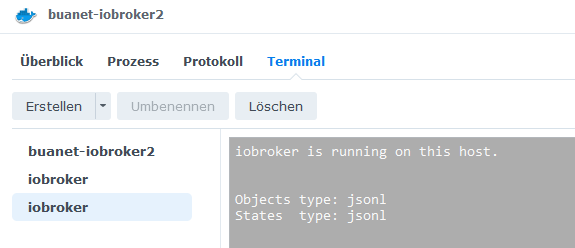
iobroker list instances:
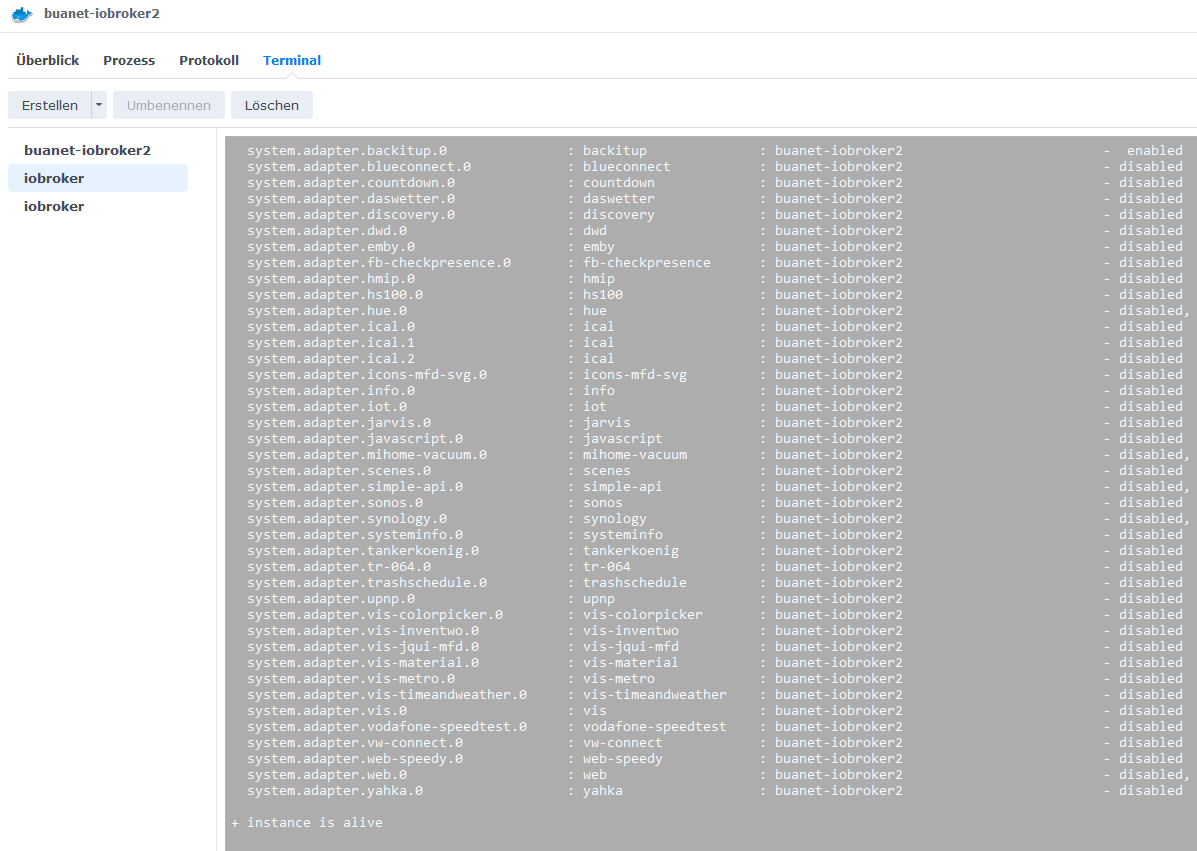
-
@thomas-braun said in Update auf neue Nodejs klappt nicht:
Ich habe die beiden Befehle im Terminal eingegeben, richtig?!
iobroker status:
iobroker list instances:
Bitte keine Screenshots, Text in CodeTags eingebettet hier rein.
-
Bitte keine Screenshots, Text in CodeTags eingebettet hier rein.
@thomas-braun das Feld ist grau hinterlegt, da kann ich den Text nicht kopieren?!
-
So, habe jetzt ein backup erstellt und es wieder aufgespielt. Leider kann ich die das Interface nun nicht mehr öffnen.
Das Backup hatte ich auf Google Drive hochgeladen. Keine Ahnung ob die MB Größe passt, oder ob da schon beim Backup erstellen etwas schief gelaufen ist:
Bevor ich das Backup eingespielt hatte, hatte ich die Ersteinrichtung des ioB durchgeführt. Danach ein Neustart des Dockers und der ioB ist ganz normal gestartet und ich konnte aufs Interface zugreifen. Jetzt nach dem Backup leider nicht mehr:
Im Protokoll wird folgendes angezeigt:
--------------------------------------------------------------------------------
-------------------------     2022-12-05 11:54:33      -------------------------
--------------------------------------------------------------------------------
-----                                                                      -----
----- ██╗  ██████╗  ██████╗  ██████╗   ██████╗  ██╗  ██╗ ███████╗ ██████╗  -----
----- ██║ ██╔═══██╗ ██╔══██╗ ██╔══██╗ ██╔═══██╗ ██║ ██╔╝ ██╔════╝ ██╔══██╗ -----
----- ██║ ██║   ██║ ██████╔╝ ██████╔╝ ██║   ██║ █████╔╝  █████╗   ██████╔╝ -----
----- ██║ ██║   ██║ ██╔══██╗ ██╔══██╗ ██║   ██║ ██╔═██╗  ██╔══╝   ██╔══██╗ -----
----- ██║ ╚██████╔╝ ██████╔╝ ██║  ██║ ╚██████╔╝ ██║  ██╗ ███████╗ ██║  ██║ -----
----- ╚═╝  ╚═════╝  ╚═════╝  ╚═╝  ╚═╝  ╚═════╝  ╚═╝  ╚═╝ ╚══════╝ ╚═╝  ╚═╝ -----
-----                                                                      -----
-----              Welcome to your ioBroker Docker container!              -----
-----                    Startupscript is now running!                     -----
-----                          Please be patient!                          -----
--------------------------------------------------------------------------------

--------------------------------------------------------------------------------
-----                          System Information                          -----
-----                    arch:                x86_64                       -----
-----                    hostname:            buanet-iobroker2             -----
-----                                                                      -----
-----                          Version Information                         -----
-----                    image:               v7.1.2                       -----
-----                    build:               2022-11-12T20:56:04+00:00    -----
-----                    node:                v16.18.1                     -----
-----                    npm:                 8.19.2                       -----
-----                                                                      -----
-----                        Environment Variables                         -----
-----                    SETGID:              1000                         -----
-----                    SETUID:              1000                         -----
--------------------------------------------------------------------------------

--------------------------------------------------------------------------------
-----                  Step 1 of 5: Preparing container                   -----
--------------------------------------------------------------------------------
This is not the first run of this container. Skipping first run preparation.

--------------------------------------------------------------------------------
-----             Step 2 of 5: Detecting ioBroker installation             -----
--------------------------------------------------------------------------------
Existing installation of ioBroker detected in "/opt/iobroker".

--------------------------------------------------------------------------------
-----             Step 3 of 5: Checking ioBroker installation              -----
--------------------------------------------------------------------------------
(Re)setting permissions (This might take a while! Please be patient!)... Done.
Fixing "sudo-bug" by replacing sudo with gosu... Done.
Hostname in ioBroker matches the hostname of this container.
No action required.

--------------------------------------------------------------------------------
-----                Step 4 of 5: Applying special settings                -----
--------------------------------------------------------------------------------
Some adapters have special requirements/ settings which can be activated by the use of environment variables.
For more information see ioBroker Docker Image Docs (https://docs.buanet.de/iobroker-docker-image/docs/).
--------------------------------------------------------------------------------
-----                    Step 5 of 5: ioBroker startup                     -----
-------------------------------------------------------------------------------
Starting ioBroker...

##### #### ### ## # iobroker.js-controller log output # ## ### #### #####
================================== > LOG REDIRECT system.adapter.admin.0 => true [starting]
================================== > LOG REDIRECT system.adapter.jarvis.0 => true [starting]
host.buanet-iobroker1 check instance "system.adapter.admin.0" for host "buanet-iobroker2"
host.buanet-iobroker1 check instance "system.adapter.javascript.0" for host "buanet-iobroker2"
host.buanet-iobroker1 check instance "system.adapter.scenes.0" for host "buanet-iobroker2"
host.buanet-iobroker1 check instance "system.adapter.tr-064.0" for host "buanet-iobroker2"
host.buanet-iobroker1 check instance "system.adapter.sonos.0" for host "buanet-iobroker2"
host.buanet-iobroker1 check instance "system.adapter.hue.0" for host "buanet-iobroker2"
host.buanet-iobroker1 check instance "system.adapter.synology.0" for host "buanet-iobroker2"
host.buanet-iobroker1 check instance "system.adapter.mihome-vacuum.0" for host "buanet-iobroker2"
host.buanet-iobroker1 check instance "system.adapter.alexa2.0" for host "buanet-iobroker2"
host.buanet-iobroker1 check instance "system.adapter.hmip.0" for host "buanet-iobroker2"
host.buanet-iobroker1 check instance "system.adapter.ical.0" for host "buanet-iobroker2"
host.buanet-iobroker1 check instance "system.adapter.ical.1" for host "buanet-iobroker2"
host.buanet-iobroker1 check instance "system.adapter.ical.2" for host "buanet-iobroker2"
host.buanet-iobroker1 check instance "system.adapter.discovery.0" for host "buanet-iobroker2"
host.buanet-iobroker1 check instance "system.adapter.backitup.0" for host "buanet-iobroker2"
host.buanet-iobroker1 check instance "system.adapter.emby.0" for host "buanet-iobroker2"
host.buanet-iobroker1 check instance "system.adapter.web.0" for host "buanet-iobroker2"
host.buanet-iobroker1 check instance "system.adapter.vis.0" for host "buanet-iobroker2"
host.buanet-iobroker1 check instance "system.adapter.jarvis.0" for host "buanet-iobroker2"
host.buanet-iobroker1 check instance "system.adapter.blueconnect.0" for host "buanet-iobroker2"
host.buanet-iobroker1 check instance "system.adapter.countdown.0" for host "buanet-iobroker2"
host.buanet-iobroker1 check instance "system.adapter.daswetter.0" for host "buanet-iobroker2"
host.buanet-iobroker1 check instance "system.adapter.dwd.0" for host "buanet-iobroker2"
host.buanet-iobroker1 check instance "system.adapter.fb-checkpresence.0" for host "buanet-iobroker2"
host.buanet-iobroker1 check instance "system.adapter.hs100.0" for host "buanet-iobroker2"
host.buanet-iobroker1 check instance "system.adapter.info.0" for host "buanet-iobroker2"
host.buanet-iobroker1 check instance "system.adapter.iot.0" for host "buanet-iobroker2"
host.buanet-iobroker1 check instance "system.adapter.simple-api.0" for host "buanet-iobroker2"
host.buanet-iobroker1 check instance "system.adapter.systeminfo.0" for host "buanet-iobroker2"
host.buanet-iobroker1 check instance "system.adapter.tankerkoenig.0" for host "buanet-iobroker2"
host.buanet-iobroker1 check instance "system.adapter.trashschedule.0" for host "buanet-iobroker2"
host.buanet-iobroker1 check instance "system.adapter.upnp.0" for host "buanet-iobroker2"
host.buanet-iobroker1 check instance "system.adapter.vis-colorpicker.0" for host "buanet-iobroker2"
host.buanet-iobroker1 check instance "system.adapter.vis-inventwo.0" for host "buanet-iobroker2"
host.buanet-iobroker1 check instance "system.adapter.vis-jqui-mfd.0" for host "buanet-iobroker2"
host.buanet-iobroker1 check instance "system.adapter.vis-material.0" for host "buanet-iobroker2"
host.buanet-iobroker1 check instance "system.adapter.vis-metro.0" for host "buanet-iobroker2"
host.buanet-iobroker1 check instance "system.adapter.vis-timeandweather.0" for host "buanet-iobroker2"
host.buanet-iobroker1 check instance "system.adapter.vodafone-speedtest.0" for host "buanet-iobroker2"
host.buanet-iobroker1 check instance "system.adapter.vw-connect.0" for host "buanet-iobroker2"
host.buanet-iobroker1 check instance "system.adapter.web-speedy.0" for host "buanet-iobroker2"
host.buanet-iobroker1 check instance "system.adapter.yahka.0" for host "buanet-iobroker2"
Mir ist aufegfallen, dass "nur" 2 Prozesse laufen?!
Jemand ne Idee?
@bergi_37 sagte in Update auf neue Nodejs klappt nicht:
Jetzt nach dem Backup leider nicht mehr:
@bergi_37 sagte in Update auf neue Nodejs klappt nicht:
host.buanet-iobroker1 check instance "system.adapter.admin.0" for host "buanet-iobroker2 "
pkill -u iobroker

iobroker host this
Container danach neu starten
-
@thomas-braun das Feld ist grau hinterlegt, da kann ich den Text nicht kopieren?!
@bergi_37
Starte im Terminal eine Konsole.
Dazu statt den von @Thomas-Braun angegebenen Befehlen mit dem Befehl "bash" erstellen.
Dann landest Du in der Standard-Shell von UNIX und kannst die gezeigten Befehle aufrufen ... und auch die Ausgabe kopieren, -
So, habe jetzt alles wieder am Luafen so weit. Erstmal DANKE an alle bis hierhin!
Habe jetzt nur noch ein kleines Problem mit meinem "alten" VIS. Wenn ich die Visualisierung aufrufe, dann habe ich dort meine "VIS" Projekte. Das Standard Start VIS, ein Beispiel Projekt VIS und meine 2 eigens erstellten.
Das letzte VIS was ich gebastelt und gebaut hatte, lässt ich zwar beabrieten, ich kann es mir aber nicht mit Hilfe der Runtime im Explorer anzeigen lassen. Wenn ich das VIS unter Setup - Projekte auswähle, bekomme ich auch nach kurzer Zeit oben rechts eine Warunung in rot angezeigt, das keine Verbindung besteht.
Die anderen 3 VIS kann ich mir problemlos anzeigen lassen.
Womit kann das zusammen hängen?
-
So, habe jetzt alles wieder am Luafen so weit. Erstmal DANKE an alle bis hierhin!
Habe jetzt nur noch ein kleines Problem mit meinem "alten" VIS. Wenn ich die Visualisierung aufrufe, dann habe ich dort meine "VIS" Projekte. Das Standard Start VIS, ein Beispiel Projekt VIS und meine 2 eigens erstellten.
Das letzte VIS was ich gebastelt und gebaut hatte, lässt ich zwar beabrieten, ich kann es mir aber nicht mit Hilfe der Runtime im Explorer anzeigen lassen. Wenn ich das VIS unter Setup - Projekte auswähle, bekomme ich auch nach kurzer Zeit oben rechts eine Warunung in rot angezeigt, das keine Verbindung besteht.
Die anderen 3 VIS kann ich mir problemlos anzeigen lassen.
Womit kann das zusammen hängen?
So, habe jetzt alles wieder am Luafen so weit. Erstmal DANKE an alle bis hierhin!
Und wie hast du es jetzt gelöst !?
kurzer Zeit oben rechts eine Warunung in rot angezeigt, das keine Verbindung besteht.
In der Suche .... Beispiel
https://forum.iobroker.net/search?term=verbindungsfehler&in=titlesposts
-
@glasfaser said in Update auf neue Nodejs klappt nicht:
Und wie hast du es jetzt gelöst !?
Mit deinen beiden Befehlen hat es funktioniert!



Hey! Du scheinst an dieser Unterhaltung interessiert zu sein, hast aber noch kein Konto.
Hast du es satt, bei jedem Besuch durch die gleichen Beiträge zu scrollen? Wenn du dich für ein Konto anmeldest, kommst du immer genau dorthin zurück, wo du zuvor warst, und kannst dich über neue Antworten benachrichtigen lassen (entweder per E-Mail oder Push-Benachrichtigung). Du kannst auch Lesezeichen speichern und Beiträge positiv bewerten, um anderen Community-Mitgliedern deine Wertschätzung zu zeigen.
Mit deinem Input könnte dieser Beitrag noch besser werden 💗
Registrieren Anmelden388
Online33.0k
Benutzer83.5k
Themen1.3m
Beiträge