Skip to content
  • Home
  • Aktuell
  • Tags
  • 0 Ungelesen 0
  • Kategorien
  • Unreplied
  • Beliebt
  • GitHub
  • Docu
  • Hilfe
Skins
  • Light
  • Brite
  • Cerulean
  • Cosmo
  • Flatly
  • Journal
  • Litera
  • Lumen
  • Lux
  • Materia
  • Minty
  • Morph
  • Pulse
  • Sandstone
  • Simplex
  • Sketchy
  • Spacelab
  • United
  • Yeti
  • Zephyr
  • Dark
  • Cyborg
  • Darkly
  • Quartz
  • Slate
  • Solar
  • Superhero
  • Vapor

  • Standard: (Kein Skin)
  • Kein Skin
Einklappen
ioBroker Logo

Community Forum

donate donate
  1. ioBroker Community Home
  2. Deutsch
  3. Off Topic
  4. Ip Kameras in Motioneye
NEWS

  • UPDATE 31.10.: Amazon Alexa - ioBroker Skill läuft aus ?
    apollon77A
    apollon77
    48
    3
    8.7k

  • Monatsrückblick – September 2025
    BluefoxB
    Bluefox
    13
    1
    2.2k

  • Neues Video "KI im Smart Home" - ioBroker plus n8n
    BluefoxB
    Bluefox
    16
    1
    3.1k

Ip Kameras in Motioneye

Geplant Angeheftet Gesperrt Verschoben Off Topic
21 Beiträge 4 Kommentatoren 3.0k Aufrufe 4 Watching
  • Älteste zuerst
  • Neuste zuerst
  • Meiste Stimmen
Antworten
  • In einem neuen Thema antworten
Anmelden zum Antworten
Dieses Thema wurde gelöscht. Nur Nutzer mit entsprechenden Rechten können es sehen.
  • T Tobi68

    @ralla66

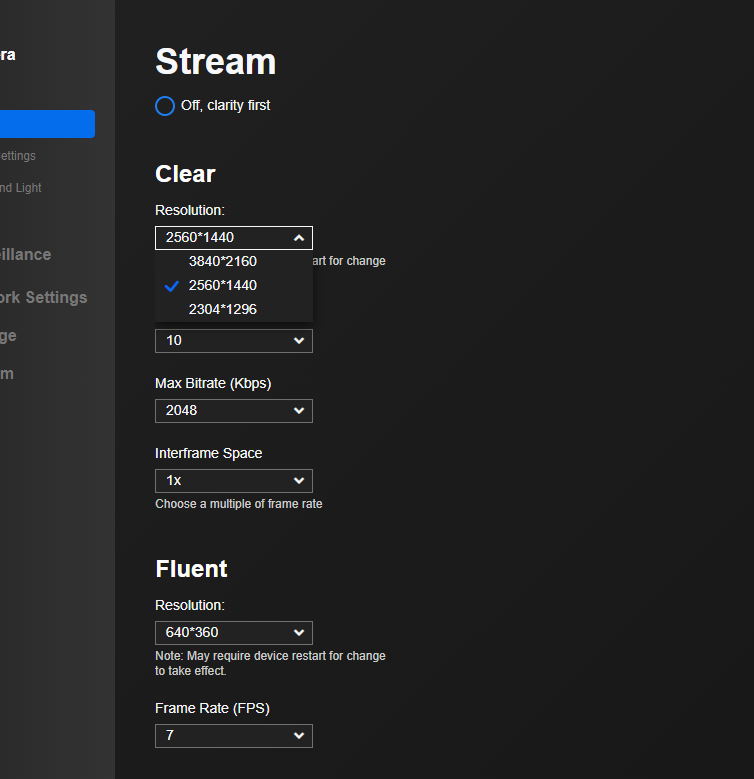
    ich hab da nicht die riesen Auswahl
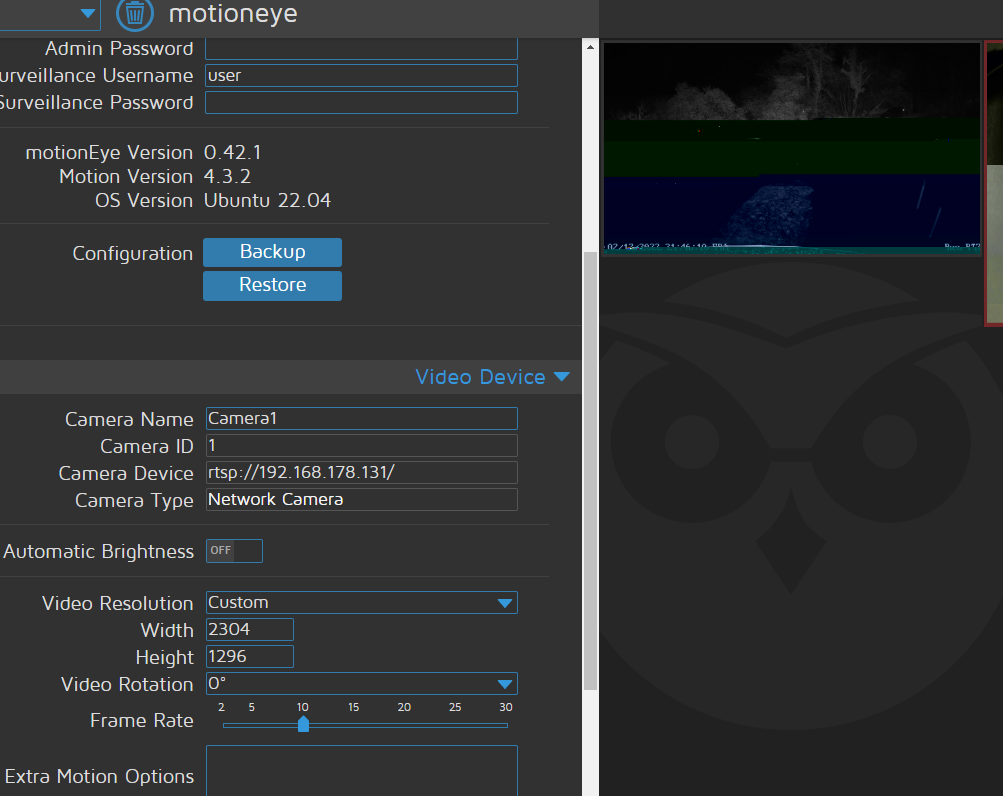
    entweder 2304x1296 oder ein anderer Stream, wo ich nicht sicher bin wie ich dran komme..

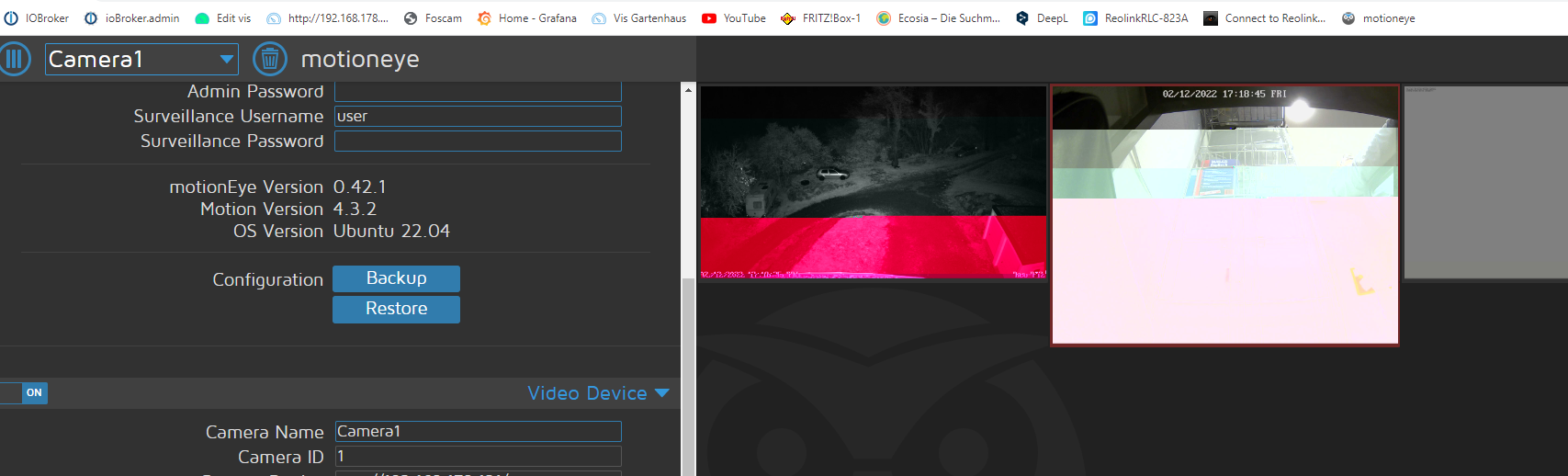
    Flackern ist aber jetzt schlimmer geworden
    7dec6afa-82d3-4d07-84cc-1332a6f9b21b-image.png
    05125f48-a39b-4e07-813d-4ab66ca464c6-image.png

    Ralla66R Offline
    Ralla66R Offline
    Ralla66
    Most Active
    schrieb am zuletzt editiert von Ralla66
    #8

    @tobi68

    Rechts der blaue Pfeil bei Custom, geht da was zu ändern ?

    URL Adressen Reolink

    danach sollte deine RLC-520 auch mit rtsp:// deine IP /videoSub laufen.

    T 1 Antwort Letzte Antwort
    0
    • Ralla66R Ralla66

      @tobi68

      Rechts der blaue Pfeil bei Custom, geht da was zu ändern ?

      URL Adressen Reolink

      danach sollte deine RLC-520 auch mit rtsp:// deine IP /videoSub laufen.

      T Offline
      T Offline
      Tobi68
      schrieb am zuletzt editiert von
      #9

      @ralla66 sagte in Ip Kameras in Motioneye:

      rtsp:// deine IP /videoSub

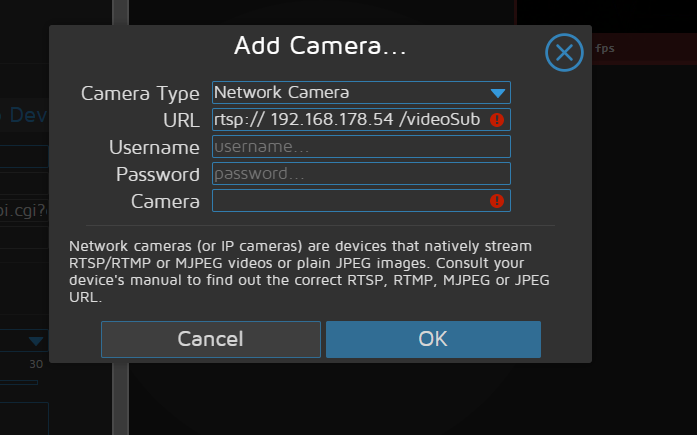
      ja klar, da kann ich was ändern..

      Das hier schluckt Motion eye aber nicht..
      0063169d-f2f3-4640-9787-656431144a6a-image.png

      Ralla66R 1 Antwort Letzte Antwort
      0
      • T Tobi68

        @ralla66 sagte in Ip Kameras in Motioneye:

        rtsp:// deine IP /videoSub

        ja klar, da kann ich was ändern..

        Das hier schluckt Motion eye aber nicht..

        0063169d-f2f3-4640-9787-656431144a6a-image.png

        Ralla66R Offline
        Ralla66R Offline
        Ralla66
        Most Active
        schrieb am zuletzt editiert von Ralla66
        #10

        @tobi68

        Leerzeichen zu viel zwischen
        // 192
        und 54 /
        ?
        Teste im VLC gegen.
        Custom geht zu ändern ?

        T 1 Antwort Letzte Antwort
        0
        • Ralla66R Ralla66

          @tobi68

          Leerzeichen zu viel zwischen
          // 192
          und 54 /
          ?
          Teste im VLC gegen.
          Custom geht zu ändern ?

          T Offline
          T Offline
          Tobi68
          schrieb am zuletzt editiert von Tobi68
          #11

          @ralla66 sagte in Ip Kameras in Motioneye:

          @tobi68

          Leerzeichen zu viel zwischen
          // 192
          und 54 /
          ?

          Eigentlich nicht

          Custom geht zu ändern ?

          Ja geht

          Ich verstehe das alles nicht.. ich wollte jetzt auch mal die Cams löschen..
          kommt ne Fehlermeldung..
          Einfach ne neu cam einrichten geht auch nicht..

          Ralla66R 1 Antwort Letzte Antwort
          0
          • T Tobi68

            @ralla66 sagte in Ip Kameras in Motioneye:

            @tobi68

            Leerzeichen zu viel zwischen
            // 192
            und 54 /
            ?

            Eigentlich nicht

            Custom geht zu ändern ?

            Ja geht

            Ich verstehe das alles nicht.. ich wollte jetzt auch mal die Cams löschen..
            kommt ne Fehlermeldung..
            Einfach ne neu cam einrichten geht auch nicht..

            Ralla66R Offline
            Ralla66R Offline
            Ralla66
            Most Active
            schrieb am zuletzt editiert von Ralla66
            #12

            @tobi68

            dann Motion Eye neu starten.
            Wo läuft Motion Eye drauf ?
            Video Resultion viel tiefer setzen.

            T 2 Antworten Letzte Antwort
            0
            • Ralla66R Ralla66

              @tobi68

              dann Motion Eye neu starten.
              Wo läuft Motion Eye drauf ?
              Video Resultion viel tiefer setzen.

              T Offline
              T Offline
              Tobi68
              schrieb am zuletzt editiert von
              #13

              @ralla66
              Auf nem I5, 2.9GHz mit 8Gb Ram mit ubuntu 22 server

              Keine Ahnung, wie wird Motioneye neu gestartet?
              bin nicht so der freund vom Stecker ziehen..

              Warum die Auflösung tiefer setzten?

              Ralla66R crunchipC 2 Antworten Letzte Antwort
              0
              • Ralla66R Ralla66

                @tobi68

                dann Motion Eye neu starten.
                Wo läuft Motion Eye drauf ?
                Video Resultion viel tiefer setzen.

                T Offline
                T Offline
                Tobi68
                schrieb am zuletzt editiert von
                #14

                @ralla66
                die 520 ist als http eingerichtet da kann ich nichts an der Auflösung im Motioneye ändern

                1 Antwort Letzte Antwort
                0
                • T Tobi68

                  @ralla66
                  Auf nem I5, 2.9GHz mit 8Gb Ram mit ubuntu 22 server

                  Keine Ahnung, wie wird Motioneye neu gestartet?
                  bin nicht so der freund vom Stecker ziehen..

                  Warum die Auflösung tiefer setzten?

                  Ralla66R Offline
                  Ralla66R Offline
                  Ralla66
                  Most Active
                  schrieb am zuletzt editiert von Ralla66
                  #15

                  @tobi68

                  weil hohe Video Resolution viel Rechenleistung / Leistung braucht.
                  Netzwerklast auch ein Thema.
                  Zum testen halt runter setzen.

                  1 Antwort Letzte Antwort
                  0
                  • T Tobi68

                    @ralla66
                    Auf nem I5, 2.9GHz mit 8Gb Ram mit ubuntu 22 server

                    Keine Ahnung, wie wird Motioneye neu gestartet?
                    bin nicht so der freund vom Stecker ziehen..

                    Warum die Auflösung tiefer setzten?

                    crunchipC Abwesend
                    crunchipC Abwesend
                    crunchip
                    Forum Testing Most Active
                    schrieb am zuletzt editiert von
                    #16

                    @tobi68 sagte in Ip Kameras in Motioneye:

                    wie wird Motioneye neu gestartet

                    systemctl restart motioneye
                    

                    umgestiegen von Proxmox auf Unraid

                    T 1 Antwort Letzte Antwort
                    0
                    • crunchipC crunchip

                      @tobi68 sagte in Ip Kameras in Motioneye:

                      wie wird Motioneye neu gestartet

                      systemctl restart motioneye
                      
                      T Offline
                      T Offline
                      Tobi68
                      schrieb am zuletzt editiert von
                      #17

                      @crunchip sagte in Ip Kameras in Motioneye:

                      systemctl restart motioneye

                      Seltsam, ich schaue am Sonntag wieder nach.. hat eigentlich gar nichts geklappt..

                      iss da sonst noch wes faul?
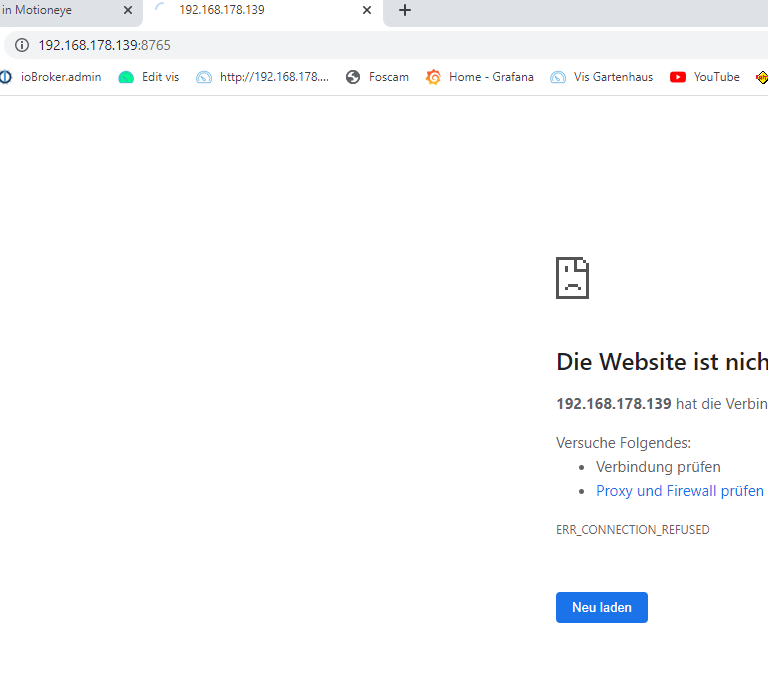
                      2459e0c3-4f0d-4267-b141-61b80fd57760-image.png

                      login as: motion
                      motion@192.168.178.139's password:
                      Welcome to Ubuntu 22.04.1 LTS (GNU/Linux 5.15.0-53-generic x86_64)
                      
                       * Documentation:  https://help.ubuntu.com
                       * Management:     https://landscape.canonical.com
                       * Support:        https://ubuntu.com/advantage
                      
                        System information as of Fr 2. Dez 22:10:39 UTC 2022
                      
                        System load:           0.0
                        Usage of /:            100.0% of 97.87GB
                        Memory usage:          3%
                        Swap usage:            0%
                        Temperature:           41.0 C
                        Processes:             128
                        Users logged in:       0
                        IPv4 address for eno1: 192.168.178.139
                        IPv6 address for eno1: 2a02:6d40:21d4:4e01:223:24ff:fe55:b381
                      
                        => / is using 100.0% of 97.87GB
                      
                      
                      10 updates can be applied immediately.
                      To see these additional updates run: apt list --upgradable
                      
                      
                      Last login: Fri Dec  2 21:46:35 2022 from 192.168.178.103
                      motion@motioneye:~$ start motioneye
                      Command 'start' not found, did you mean:
                        command 'stars' from snap stars (2.7jrc3)
                        command 'kstart' from deb kde-cli-tools (4:5.24.4-0ubuntu1)
                        command 'tart' from deb tart (3.10-1build1)
                        command 'stat' from deb coreutils (8.32-4.1ubuntu1)
                        command 'rstart' from deb x11-session-utils (7.7+4build2)
                        command 'startx' from deb xinit (1.4.1-0ubuntu4)
                      See 'snap info <snapname>' for additional versions.
                      motion@motioneye:~$ sudo motioneye
                      [sudo] password for motion:
                      sudo: motioneye: command not found
                      motion@motioneye:~$ restart motioneye
                      Command 'restart' not found, did you mean:
                        command 'rstart' from deb x11-session-utils (7.7+4build2)
                        command 'restartd' from deb restartd (0.2.3-1.1)
                      Try: sudo apt install <deb name>
                      motion@motioneye:~$ sudo restart motioneye
                      sudo: restart: command not found
                      motion@motioneye:~$ systemctl restart motioneye
                      ==== AUTHENTICATING FOR org.freedesktop.systemd1.manage-units ===
                      Authentication is required to restart 'motioneye.service'.
                      Authenticating as: Thomas (motion)
                      Password:
                      ==== AUTHENTICATION COMPLETE ===
                      motion@motioneye:~$ login as: motion
                      motion@192.168.178.139's password:
                      Welcome to Ubuntu 22.04.1 LTS (GNU/Linux 5.15.0-53-generic x86_64)
                      
                       * Documentation:  https://help.ubuntu.com
                       * Management:     https://landscape.canonical.com
                       * Support:        https://ubuntu.com/advantage
                      
                        System information as of Fr 2. Dez 22:10:39 UTC 2022
                      
                        System load:           0.0
                        Usage of /:            100.0% of 97.87GB
                        Memory usage:          3%
                        Swap usage:            0%
                        Temperature:           41.0 C
                        Processes:             128
                        Users logged in:       0
                        IPv4 address for eno1: 192.168.178.139
                        IPv6 address for eno1: 2a02:6d40:21d4:4e01:223:24ff:fe55:b381
                      
                        => / is using 100.0% of 97.87GB
                      
                      
                      10 updates can be applied immediately.
                      To see these additional updates run: apt list --upgradable
                      
                      
                      Last login: Fri Dec  2 21:46:35 2022 from 192.168.178.103
                      motion@motioneye:~$ start motioneye
                      Command 'start' not found, did you mean:
                        command 'stars' from snap stars (2.7jrc3)
                        command 'kstart' from deb kde-cli-tools (4:5.24.4-0ubuntu1)
                        command 'tart' from deb tart (3.10-1build1)
                        command 'stat' from deb coreutils (8.32-4.1ubuntu1)
                        command 'rstart' from deb x11-session-utils (7.7+4build2)
                        command 'startx' from deb xinit (1.4.1-0ubuntu4)
                      See 'snap info <snapname>' for additional versions.
                      motion@motioneye:~$ sudo motioneye
                      [sudo] password for motion:
                      sudo: motioneye: command not found
                      motion@motioneye:~$ restart motioneye
                      Command 'restart' not found, did you mean:
                        command 'rstart' from deb x11-session-utils (7.7+4build2)
                        command 'restartd' from deb restartd (0.2.3-1.1)
                      Try: sudo apt install <deb name>
                      motion@motioneye:~$ sudo restart motioneye
                      sudo: restart: command not found
                      motion@motioneye:~$ systemctl restart motioneye
                      ==== AUTHENTICATING FOR org.freedesktop.systemd1.manage-units ===
                      Authentication is required to restart 'motioneye.service'.
                      Authenticating as: Thomas (motion)
                      Password:
                      ==== AUTHENTICATION COMPLETE ===
                      motion@motioneye:~$
                      login as: motion
                      motion@192.168.178.139's password:
                      Welcome to Ubuntu 22.04.1 LTS (GNU/Linux 5.15.0-53-generic x86_64)
                      
                       * Documentation:  https://help.ubuntu.com
                       * Management:     https://landscape.canonical.com
                       * Support:        https://ubuntu.com/advantage
                      
                      motion@motioneye:~$ COMPLETE ===n)art 'motioneye.service'.its ===
                      
                      
                      crunchipC 1 Antwort Letzte Antwort
                      0
                      • T Tobi68

                        @crunchip sagte in Ip Kameras in Motioneye:

                        systemctl restart motioneye

                        Seltsam, ich schaue am Sonntag wieder nach.. hat eigentlich gar nichts geklappt..

                        iss da sonst noch wes faul?

                        2459e0c3-4f0d-4267-b141-61b80fd57760-image.png

                        login as: motion
                        motion@192.168.178.139's password:
                        Welcome to Ubuntu 22.04.1 LTS (GNU/Linux 5.15.0-53-generic x86_64)
                        
                         * Documentation:  https://help.ubuntu.com
                         * Management:     https://landscape.canonical.com
                         * Support:        https://ubuntu.com/advantage
                        
                          System information as of Fr 2. Dez 22:10:39 UTC 2022
                        
                          System load:           0.0
                          Usage of /:            100.0% of 97.87GB
                          Memory usage:          3%
                          Swap usage:            0%
                          Temperature:           41.0 C
                          Processes:             128
                          Users logged in:       0
                          IPv4 address for eno1: 192.168.178.139
                          IPv6 address for eno1: 2a02:6d40:21d4:4e01:223:24ff:fe55:b381
                        
                          => / is using 100.0% of 97.87GB
                        
                        
                        10 updates can be applied immediately.
                        To see these additional updates run: apt list --upgradable
                        
                        
                        Last login: Fri Dec  2 21:46:35 2022 from 192.168.178.103
                        motion@motioneye:~$ start motioneye
                        Command 'start' not found, did you mean:
                          command 'stars' from snap stars (2.7jrc3)
                          command 'kstart' from deb kde-cli-tools (4:5.24.4-0ubuntu1)
                          command 'tart' from deb tart (3.10-1build1)
                          command 'stat' from deb coreutils (8.32-4.1ubuntu1)
                          command 'rstart' from deb x11-session-utils (7.7+4build2)
                          command 'startx' from deb xinit (1.4.1-0ubuntu4)
                        See 'snap info <snapname>' for additional versions.
                        motion@motioneye:~$ sudo motioneye
                        [sudo] password for motion:
                        sudo: motioneye: command not found
                        motion@motioneye:~$ restart motioneye
                        Command 'restart' not found, did you mean:
                          command 'rstart' from deb x11-session-utils (7.7+4build2)
                          command 'restartd' from deb restartd (0.2.3-1.1)
                        Try: sudo apt install <deb name>
                        motion@motioneye:~$ sudo restart motioneye
                        sudo: restart: command not found
                        motion@motioneye:~$ systemctl restart motioneye
                        ==== AUTHENTICATING FOR org.freedesktop.systemd1.manage-units ===
                        Authentication is required to restart 'motioneye.service'.
                        Authenticating as: Thomas (motion)
                        Password:
                        ==== AUTHENTICATION COMPLETE ===
                        motion@motioneye:~$ login as: motion
                        motion@192.168.178.139's password:
                        Welcome to Ubuntu 22.04.1 LTS (GNU/Linux 5.15.0-53-generic x86_64)
                        
                         * Documentation:  https://help.ubuntu.com
                         * Management:     https://landscape.canonical.com
                         * Support:        https://ubuntu.com/advantage
                        
                          System information as of Fr 2. Dez 22:10:39 UTC 2022
                        
                          System load:           0.0
                          Usage of /:            100.0% of 97.87GB
                          Memory usage:          3%
                          Swap usage:            0%
                          Temperature:           41.0 C
                          Processes:             128
                          Users logged in:       0
                          IPv4 address for eno1: 192.168.178.139
                          IPv6 address for eno1: 2a02:6d40:21d4:4e01:223:24ff:fe55:b381
                        
                          => / is using 100.0% of 97.87GB
                        
                        
                        10 updates can be applied immediately.
                        To see these additional updates run: apt list --upgradable
                        
                        
                        Last login: Fri Dec  2 21:46:35 2022 from 192.168.178.103
                        motion@motioneye:~$ start motioneye
                        Command 'start' not found, did you mean:
                          command 'stars' from snap stars (2.7jrc3)
                          command 'kstart' from deb kde-cli-tools (4:5.24.4-0ubuntu1)
                          command 'tart' from deb tart (3.10-1build1)
                          command 'stat' from deb coreutils (8.32-4.1ubuntu1)
                          command 'rstart' from deb x11-session-utils (7.7+4build2)
                          command 'startx' from deb xinit (1.4.1-0ubuntu4)
                        See 'snap info <snapname>' for additional versions.
                        motion@motioneye:~$ sudo motioneye
                        [sudo] password for motion:
                        sudo: motioneye: command not found
                        motion@motioneye:~$ restart motioneye
                        Command 'restart' not found, did you mean:
                          command 'rstart' from deb x11-session-utils (7.7+4build2)
                          command 'restartd' from deb restartd (0.2.3-1.1)
                        Try: sudo apt install <deb name>
                        motion@motioneye:~$ sudo restart motioneye
                        sudo: restart: command not found
                        motion@motioneye:~$ systemctl restart motioneye
                        ==== AUTHENTICATING FOR org.freedesktop.systemd1.manage-units ===
                        Authentication is required to restart 'motioneye.service'.
                        Authenticating as: Thomas (motion)
                        Password:
                        ==== AUTHENTICATION COMPLETE ===
                        motion@motioneye:~$
                        login as: motion
                        motion@192.168.178.139's password:
                        Welcome to Ubuntu 22.04.1 LTS (GNU/Linux 5.15.0-53-generic x86_64)
                        
                         * Documentation:  https://help.ubuntu.com
                         * Management:     https://landscape.canonical.com
                         * Support:        https://ubuntu.com/advantage
                        
                        motion@motioneye:~$ COMPLETE ===n)art 'motioneye.service'.its ===
                        
                        
                        crunchipC Abwesend
                        crunchipC Abwesend
                        crunchip
                        Forum Testing Most Active
                        schrieb am zuletzt editiert von
                        #18

                        @tobi68 https://github.com/motioneye-project/motioneye/wiki/(Install-On-Ubuntu-(20.04-or-Newer)

                        @tobi68 sagte in Ip Kameras in Motioneye:

                        iss da sonst noch wes faul

                        @tobi68 sagte in Ip Kameras in Motioneye:

                        Usage of /: 100.0% of 97.87GB

                        @tobi68 sagte in Ip Kameras in Motioneye:

                        sudo: restart: command not found

                        dein Benutzer ist nicht in der sudo Gruppe

                        umgestiegen von Proxmox auf Unraid

                        T 1 Antwort Letzte Antwort
                        0
                        • crunchipC crunchip

                          @tobi68 https://github.com/motioneye-project/motioneye/wiki/(Install-On-Ubuntu-(20.04-or-Newer)

                          @tobi68 sagte in Ip Kameras in Motioneye:

                          iss da sonst noch wes faul

                          @tobi68 sagte in Ip Kameras in Motioneye:

                          Usage of /: 100.0% of 97.87GB

                          @tobi68 sagte in Ip Kameras in Motioneye:

                          sudo: restart: command not found

                          dein Benutzer ist nicht in der sudo Gruppe

                          T Offline
                          T Offline
                          Tobi68
                          schrieb am zuletzt editiert von
                          #19

                          @crunchip
                          Danke,
                          ist erst vor 5 Tagen installiert worden wer denkt denn an sowas..

                          Mir ist eben aufgefallen das der PC Geräusche macht die er Anfangs nicht machte.. als er noch bei mir auf dem Schreibtisch stand..
                          Ich stell Ihn mal am Sonntag wieder ins Büro und schaue danach.
                          Hab heute keine Zeit.

                          Ich konnte eben auf MotionEye auch nicht mehr zugreifen..

                          1 Antwort Letzte Antwort
                          0
                          • Marco LaserM Offline
                            Marco LaserM Offline
                            Marco Laser
                            schrieb am zuletzt editiert von
                            #20

                            Moin, ich hatte bis gerade eben das gleiche Problem. Hatte MotionEye einige Jahre am laufen aber seit dem Umzug auf ein neues System ging nichts mehr. Bei mir lag es an ubuntu 22, hab jetzt 20 installiert und da läuft es mit den gleichen Einstellungen ohne flackern. Vielleicht hilft dir das ja auch.

                            T 1 Antwort Letzte Antwort
                            1
                            • Marco LaserM Marco Laser

                              Moin, ich hatte bis gerade eben das gleiche Problem. Hatte MotionEye einige Jahre am laufen aber seit dem Umzug auf ein neues System ging nichts mehr. Bei mir lag es an ubuntu 22, hab jetzt 20 installiert und da läuft es mit den gleichen Einstellungen ohne flackern. Vielleicht hilft dir das ja auch.

                              T Offline
                              T Offline
                              Tobi68
                              schrieb am zuletzt editiert von
                              #21

                              @marco-laser sagte in Ip Kameras in Motioneye:

                              Moin, ich hatte bis gerade eben das gleiche Problem. Hatte MotionEye einige Jahre am laufen aber seit dem Umzug auf ein neues System ging nichts mehr. Bei mir lag es an ubuntu 22, hab jetzt 20 installiert und da läuft es mit den gleichen Einstellungen ohne flackern. Vielleicht hilft dir das ja auch.

                              Jupp danke das wars, mit 20 läuft Motioneye problemlos ohne flackern, hab jetzt mal Reolinks eingebunden unter Volllast gestreamt.
                              Musste jetzt den PC erst mal ausschalten, ist etwas warm/laut geworden :-)
                              Erst mal mit den Auflösungen, FPS usw. usw. spielen.

                              1 Antwort Letzte Antwort
                              1
                              Antworten
                              • In einem neuen Thema antworten
                              Anmelden zum Antworten
                              • Älteste zuerst
                              • Neuste zuerst
                              • Meiste Stimmen


                              Support us

                              ioBroker
                              Community Adapters
                              Donate

                              454

                              Online

                              32.4k

                              Benutzer

                              81.5k

                              Themen

                              1.3m

                              Beiträge
                              Community
                              Impressum | Datenschutz-Bestimmungen | Nutzungsbedingungen | Einwilligungseinstellungen
                              ioBroker Community 2014-2025
                              logo
                              • Anmelden

                              • Du hast noch kein Konto? Registrieren

                              • Anmelden oder registrieren, um zu suchen
                              • Erster Beitrag
                                Letzter Beitrag
                              0
                              • Home
                              • Aktuell
                              • Tags
                              • Ungelesen 0
                              • Kategorien
                              • Unreplied
                              • Beliebt
                              • GitHub
                              • Docu
                              • Hilfe