




Bullseye Neuinstallation von IoBroker nach ....
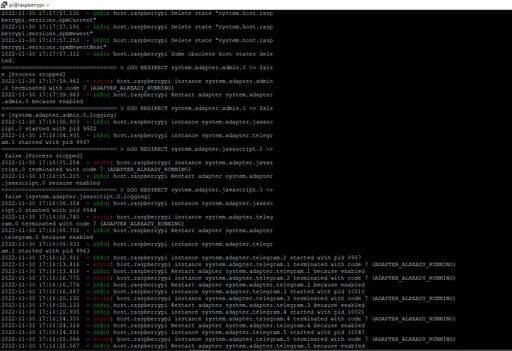
-
@snupy Karte voll!
@snupy sagte in Bullseye Neuinstallation von IoBroker nach ....:
/dev/root ext4 59G 57G 0 100% /
@homoran said in Bullseye Neuinstallation von IoBroker nach ....:
@snupy Karte voll!
@snupy sagte in Bullseye Neuinstallation von IoBroker nach ....:
/dev/root ext4 59G 57G 0 100% /
Karte voll ???? ist ne 64Gb ... Image erstellt mit Rasperry Imager
-
@homoran said in Bullseye Neuinstallation von IoBroker nach ....:
@snupy Karte voll!
@snupy sagte in Bullseye Neuinstallation von IoBroker nach ....:
/dev/root ext4 59G 57G 0 100% /
Karte voll ???? ist ne 64Gb ... Image erstellt mit Rasperry Imager
@snupy Hast du das Dateisystem auch expandiert?
-
@snupy Hast du das Dateisystem auch expandiert?
@einstein67 hat er! sind 57GB belegt.
Womit auch immer -
@snupy Hast du das Dateisystem auch expandiert?
Ich habe die mit Raspery Imager (oder wie das Ding heißt) erstellt ... und ab damit in den Raspberry (ich hatte mich aber schon gewundert als ich mir die im Partitionsmanger angesehen habe)
-
Ich habe die mit Raspery Imager (oder wie das Ding heißt) erstellt ... und ab damit in den Raspberry (ich hatte mich aber schon gewundert als ich mir die im Partitionsmanger angesehen habe)
-
hmm ... um den Admin habe ich mich ehrlich gesagt nicht gekümmert, ging davon aus das wird wieder mit hergestellt ...
das Ergebniss des Skripts
Skript v.0.0.7 *** BASE SYSTEM *** Architecture: armv7l Docker: false Virtualization: none Distributor ID: Raspbian Description: Raspbian GNU/Linux 11 (bullseye) Release: 11 Codename: bullseye PRETTY_NAME="Raspbian GNU/Linux 11 (bullseye)" NAME="Raspbian GNU/Linux" VERSION_ID="11" VERSION="11 (bullseye)" VERSION_CODENAME=bullseye ID=raspbian ID_LIKE=debian HOME_URL="http://www.raspbian.org/" SUPPORT_URL="http://www.raspbian.org/RaspbianForums" BUG_REPORT_URL="http://www.raspbian.org/RaspbianBugs" Systemuptime and Load: 17:56:18 up 6:06, 3 users, load average: 1.19, 1.48, 1.90 CPU threads: 4 *** Time and Time Zones *** Wed Nov 30 16:56:18 UTC 2022 Wed Nov 30 17:56:18 CET 2022 CET +0100 Europe/Berlin *** User and Groups *** root /root root lpadmin *** X-Server-Setup *** X-Server: true Desktop: Terminal: *** MEMORY *** total used free shared buff/cache available Mem: 3.8G 365M 1.6G 34M 1.9G 3.3G Swap: 99M 99M 0.0K Total: 3.9G 464M 1.6G 3838 M total memory 365 M used memory 279 M active memory 1771 M inactive memory 1554 M free memory 46 M buffer memory 1872 M swap cache 99 M total swap 99 M used swap 0 M free swap *** FILESYSTEM *** Filesystem Type Size Used Avail Use% Mounted on /dev/root ext4 59G 57G 0 100% / devtmpfs devtmpfs 1.8G 0 1.8G 0% /dev tmpfs tmpfs 1.9G 16K 1.9G 1% /dev/shm tmpfs tmpfs 768M 1.2M 767M 1% /run tmpfs tmpfs 5.0M 4.0K 5.0M 1% /run/lock /dev/mmcblk0p1 vfat 255M 50M 206M 20% /boot tmpfs tmpfs 384M 20K 384M 1% /run/user/1000 /dev/sda2 ext4 29G 7.5G 21G 28% /media/pi/rootfs /dev/sda1 vfat 253M 49M 204M 20% /media/pi/boot Show mounted filesystems (real ones only): TARGET SOURCE FSTYPE OPTIONS / /dev/mmcblk0p2 ext4 rw,noatime |-/boot /dev/mmcblk0p1 vfat rw,relatime,fmask=0022,dmask=0022,codepage=437,iocharset=ascii,shortname=mixed,errors=remount-ro |-/media/pi/rootfs /dev/sda2 ext4 rw,nosuid,nodev,relatime,errors=remount-ro `-/media/pi/boot /dev/sda1 vfat rw,nosuid,nodev,relatime,uid=1000,gid=1000,fmask=0022,dmask=0022,codepage=437,iocharset=ascii,shortname=mixed,showexec,utf8,fl Files in neuralgic directories: /var: 53G /var/ 52G /var/log 473M /var/log/journal/2a3c09b134cf4ebdbf6f8d8059f6b422 473M /var/log/journal 359M /var/cache /opt/iobroker/backups: 13M /opt/iobroker/backups/ /opt/iobroker/iobroker-data: 187M /opt/iobroker/iobroker-data/ 144M /opt/iobroker/iobroker-data/files 32M /opt/iobroker/iobroker-data/files/javascript.admin 23M /opt/iobroker/iobroker-data/files/echarts.admin 17M /opt/iobroker/iobroker-data/files/javascript.admin/static/js The five largest files in iobroker-data are: 28M /opt/iobroker/iobroker-data/objects.jsonl 12M /opt/iobroker/iobroker-data/files/javascript.admin/static/js/2.b7bbd921.chunk.js.map 9.8M /opt/iobroker/iobroker-data/states.jsonl 9.1M /opt/iobroker/iobroker-data/files/echarts.admin/static/js/2.bbf74d5f.chunk.js.map 8.9M /opt/iobroker/iobroker-data/files/echarts/static/js/2.3d2d025f.chunk.js.map *** NodeJS-Installation *** /usr/bin/nodejs v16.18.1 /usr/bin/node v16.18.1 /usr/bin/npm 8.19.2 nodejs: Installed: 16.18.1-deb-1nodesource1 Candidate: 16.18.1-deb-1nodesource1 Version table: *** 16.18.1-deb-1nodesource1 500 500 https://deb.nodesource.com/node_16.x bullseye/main armhf Packages 100 /var/lib/dpkg/status 12.22.12~dfsg-1~deb11u1 500 500 http://raspbian.raspberrypi.org/raspbian bullseye/main armhf Packages Calling 'npm doctor' for you. Please be patient! npm ERR! code ENOSPC npm ERR! syscall write npm ERR! errno -28 npm ERR! nospc ENOSPC: no space left on device, write npm ERR! nospc There appears to be insufficient space on your system to finish. npm ERR! nospc Clear up some disk space and try again. npm ERR! A complete log of this run can be found in: npm ERR! /home/iobroker/.npm/_logs/2022-11-30T16_56_23_331Z-debug-0.log The recommended versions for ioBroker are nodeJS v16 / npm v8! Don't trust the doctor if he recommends different versions! Temp directories causing npm8 problem: 0 *** ioBroker-Installation *** ioBroker Status Server Cannot start inMem-objects on port 9001: Failed to lock DB file "/opt/iobroker/iobroker-data/objects.jsonl"! Core adapters versions js-controller: 4.0.23 admin: 6.2.23 Adapters from github: 3 Enabled adapters with bindings ioBroker-Repositories Server Cannot start inMem-objects on port 9001: Failed to lock DB file "/opt/iobroker/iobroker-data/objects.jsonl"! ioBroker-Instances Server Cannot start inMem-objects on port 9001: Failed to lock DB file "/opt/iobroker/iobroker-data/objects.jsonl"! Objects and States Please stand by - This may take a while Objects: 1 States: 1 *** OS-Repositories and Updates *** W: An error occurred during the signature verification. The repository is not updated and the previous index files will be used. GPG error: http://raspbian.raspberrypi.org/raspbian bullseye InRelease: Splitting up /var/lib/apt/lists/raspbian.raspberrypi.org_raspbian_dists_bullseye_InRelease into data and signature failed W: An error occurred during the signature verification. The repository is not updated and the previous index files will be used. GPG error: https://deb.nodesource.com/node_16.x bullseye InRelease: Splitting up /var/lib/apt/lists/deb.nodesource.com_node%5f16.x_dists_bullseye_InRelease into data and signature failed W: Failed to fetch http://raspbian.raspberrypi.org/raspbian/dists/bullseye/InRelease Splitting up /var/lib/apt/lists/raspbian.raspberrypi.org_raspbian_dists_bullseye_InRelease into data and signature failed W: Failed to fetch https://deb.nodesource.com/node_16.x/dists/bullseye/InRelease Splitting up /var/lib/apt/lists/deb.nodesource.com_node%5f16.x_dists_bullseye_InRelease into data and signature failed W: Failed to fetch http://archive.raspberrypi.org/debian/dists/bullseye/InRelease Error writing to file - write (28: No space left on device) [IP: 2a00:1098:84:1e0::1 80] W: Some index files failed to download. They have been ignored, or old ones used instead. Hit:1 http://raspbian.raspberrypi.org/raspbian bullseye InRelease Get:2 http://archive.raspberrypi.org/debian bullseye InRelease [23.6 kB] Err:2 http://archive.raspberrypi.org/debian bullseye InRelease Error writing to file - write (28: No space left on device) [IP: 2a00:1098:84:1e0::1 80] Err:1 http://raspbian.raspberrypi.org/raspbian bullseye InRelease Splitting up /var/lib/apt/lists/raspbian.raspberrypi.org_raspbian_dists_bullseye_InRelease into data and signature failed Hit:3 https://deb.nodesource.com/node_16.x bullseye InRelease Err:3 https://deb.nodesource.com/node_16.x bullseye InRelease Splitting up /var/lib/apt/lists/deb.nodesource.com_node%5f16.x_dists_bullseye_InRelease into data and signature failed Reading package lists... Done W: An error occurred during the signature verification. The repository is not updated and the previous index files will be used. GPG error: http://raspbian.raspberrypi.org/raspbian bullseye InRelease: Splitting up /var/lib/apt/lists/raspbian.raspberrypi.org_raspbian_dists_bullseye_InRelease into data and signature failed W: An error occurred during the signature verification. The repository is not updated and the previous index files will be used. GPG error: https://deb.nodesource.com/node_16.x bullseye InRelease: Splitting up /var/lib/apt/lists/deb.nodesource.com_node%5f16.x_dists_bullseye_InRelease into data and signature failed W: Failed to fetch http://raspbian.raspberrypi.org/raspbian/dists/bullseye/InRelease Splitting up /var/lib/apt/lists/raspbian.raspberrypi.org_raspbian_dists_bullseye_InRelease into data and signature failed W: Failed to fetch https://deb.nodesource.com/node_16.x/dists/bullseye/InRelease Splitting up /var/lib/apt/lists/deb.nodesource.com_node%5f16.x_dists_bullseye_InRelease into data and signature failed W: Failed to fetch http://archive.raspberrypi.org/debian/dists/bullseye/InRelease Error writing to file - write (28: No space left on device) [IP: 2a00:1098:84:1e0::1 80] W: Some index files failed to download. They have been ignored, or old ones used instead. Pending Updates: 1 *** Listening Ports *** Active Internet connections (only servers) Proto Recv-Q Send-Q Local Address Foreign Address State User Inode PID/Program name tcp 0 0 127.0.0.1:7999 0.0.0.0:* LISTEN 0 14553 620/motion tcp 0 0 0.0.0.0:4531 0.0.0.0:* LISTEN 0 14548 620/motion tcp 0 0 0.0.0.0:4530 0.0.0.0:* LISTEN 0 14547 620/motion tcp 0 0 0.0.0.0:4535 0.0.0.0:* LISTEN 0 14552 620/motion tcp 0 0 0.0.0.0:4534 0.0.0.0:* LISTEN 0 14551 620/motion tcp 0 0 0.0.0.0:4533 0.0.0.0:* LISTEN 0 14550 620/motion tcp 0 0 0.0.0.0:4532 0.0.0.0:* LISTEN 0 14549 620/motion tcp 0 0 0.0.0.0:8765 0.0.0.0:* LISTEN 0 17483 429/python2 tcp 0 0 127.0.0.1:631 0.0.0.0:* LISTEN 0 16359 1467/cupsd tcp 0 0 0.0.0.0:22 0.0.0.0:* LISTEN 0 14027 555/sshd: /usr/sbin tcp6 0 0 ::1:631 :::* LISTEN 0 16358 1467/cupsd tcp6 0 0 :::22 :::* LISTEN 0 14029 555/sshd: /usr/sbin udp 0 0 0.0.0.0:39610 0.0.0.0:* 108 11152 380/avahi-daemon: r udp 0 0 0.0.0.0:5353 0.0.0.0:* 108 11150 380/avahi-daemon: r udp 0 0 0.0.0.0:68 0.0.0.0:* 0 15646 548/dhcpcd udp 0 0 0.0.0.0:631 0.0.0.0:* 0 16379 1469/cups-browsed udp6 0 0 :::48258 :::* 108 11153 380/avahi-daemon: r udp6 0 0 :::5353 :::* 108 11151 380/avahi-daemon: r udp6 0 0 :::546 :::* 0 15723 548/dhcpcd@snupy sagte in Bullseye Neuinstallation von IoBroker nach ....:
Files in neuralgic directories:
/var:
53G     /var/
52G     /var/log
da schreit aber was um Hilfe
-
@snupy sagte in Bullseye Neuinstallation von IoBroker nach ....:
Files in neuralgic directories:
/var:
53G     /var/
52G     /var/log
da schreit aber was um Hilfe
-
Der hat die FAT ... dann gerade so groß gemacht das Bullseye drauf gepasst hat ... :(
gut muß ich sehen wie ich die Partition größer bekomme
@snupy sagte in Bullseye Neuinstallation von IoBroker nach ....:
gut muß ich sehen wie ich die Partition größer bekomme
da gibt es nix zu vergrößern. Die ist bereits maximal!
allerdings rappelvoll mit irgendwelchen Systemlogs
-
@snupy Also grundsätzlich wird die SD mit einer minimal notwendigen Partitionsgröße beschrieben. Die wird entweder manuell oder automatisch bei ersten Systemstart auf die maximale Größe (der SD-Karte) erweitert.
Dass das nicht passiert ist war mein falscher Verdacht.
Bei dir ist das /var/log Verzeichnis voll(gemüllt)
-
@snupy sagte in Bullseye Neuinstallation von IoBroker nach ....:
gut muß ich sehen wie ich die Partition größer bekomme
da gibt es nix zu vergrößern. Die ist bereits maximal!
allerdings rappelvoll mit irgendwelchen Systemlogs
-
-
probier ich dann gleich
habe jetzt erstmal gelöscht ... 25Gb System.log 25GB kernel.log
warum und wer ... legt diese logs an ? bzw. wie verhindere ich das ?
-
probier ich dann gleich
habe jetzt erstmal gelöscht ... 25Gb System.log 25GB kernel.log
warum und wer ... legt diese logs an ? bzw. wie verhindere ich das ?
@snupy said in Bullseye Neuinstallation von IoBroker nach ....:
warum und wer ... legt diese logs an ? bzw. wie verhindere ich das ?
Vor dem löschen hättest du ja mal reinsehen können/sollen was da drinnen steht ....
-
probier ich dann gleich
habe jetzt erstmal gelöscht ... 25Gb System.log 25GB kernel.log
warum und wer ... legt diese logs an ? bzw. wie verhindere ich das ?
@snupy sagte in Bullseye Neuinstallation von IoBroker nach ....:
habe jetzt erstmal gelöscht ... 25Gb System.log 25GB kernel.log
 warum???
was stand denn drin??@snupy sagte in Bullseye Neuinstallation von IoBroker nach ....:
wer ... legt diese logs an ?
@homoran sagte in Bullseye Neuinstallation von IoBroker nach ....:
Systemlogs
@snupy sagte in Bullseye Neuinstallation von IoBroker nach ....:
wie verhindere ich das ?
indem man die darin genannten Ursachen ausschaltet
-
@snupy sagte in Bullseye Neuinstallation von IoBroker nach ....:
habe jetzt erstmal gelöscht ... 25Gb System.log 25GB kernel.log
warum???
was stand denn drin??@snupy sagte in Bullseye Neuinstallation von IoBroker nach ....:
wer ... legt diese logs an ?
@homoran sagte in Bullseye Neuinstallation von IoBroker nach ....:
Systemlogs
@snupy sagte in Bullseye Neuinstallation von IoBroker nach ....:
wie verhindere ich das ?
indem man die darin genannten Ursachen ausschaltet
-
da war ich wohl zu schnell

dann werde ich jetzt mal ein Backup des Images auf die SD machen und mich dann morgen wieder melden ;) sorry für meine dummheit@snupy sagte in Bullseye Neuinstallation von IoBroker nach ....:
dann werde ich jetzt mal ein Backup des Images auf die SD machen
warum??
@snupy sagte in Bullseye Neuinstallation von IoBroker nach ....:
mich dann morgen wieder melde
dann dürfte sowieso wieder was im log stehen.
@snupy sagte in Bullseye Neuinstallation von IoBroker nach ....:
sorry für meine dummheit
einfach nur machen was wir sagen!
https://forum.iobroker.net/topic/51555/hinweise-für-gute-forenbeiträge/1
hier jetzt insbes. Teil 2! -
da war ich wohl zu schnell
dann werde ich jetzt mal ein Backup des Images auf die SD machen und mich dann morgen wieder melden ;) sorry für meine dummheit@snupy sagte in Bullseye Neuinstallation von IoBroker nach ....:
und mich dann morgen wieder melden
Am besten mit einem von Grund auf gescheit aufgesetzen System.
root login musst du dir freigebuddelt haben, das ist in einer Standardinstallation gar nicht vorgesehen. Dann nimmt man für einen Server immer die 'Lite'-Version ohne graphische Oberfläche.
Und systemlogs löscht man auch nicht so rabiat, man schreibt da allenfalls aus /dev/null was rein. Aber auch erst, nachdem man mal reingeschaut hat was da überhaupt Phase ist. -
@snupy sagte in Bullseye Neuinstallation von IoBroker nach ....:
und mich dann morgen wieder melden
Am besten mit einem von Grund auf gescheit aufgesetzen System.
root login musst du dir freigebuddelt haben, das ist in einer Standardinstallation gar nicht vorgesehen. Dann nimmt man für einen Server immer die 'Lite'-Version ohne graphische Oberfläche.
Und systemlogs löscht man auch nicht so rabiat, man schreibt da allenfalls aus /dev/null was rein. Aber auch erst, nachdem man mal reingeschaut hat was da überhaupt Phase ist.Auslöser des Problems ist der mihome-vaccum adapter für meinen Roborock 7.
Sobald der Adapter getartet wird und der Saugroboter losfährt beginnen sich die Logdateien unter
/var/log/syslog und /var/log/kern.log zu füllen und das extrem schnell.Der Adapter ist dabei nicht immer grün (weiß nicht ob das was damit zu tun hat).
Ich habe auch noch nicht probiert ob das auch passiert, wenn er er keinen zugriff mehr auf
/mihome-vacuum.admin/actualMap_0.png hat.
Wenn man den mihome-vacuum Adapter wieder stoppt ändert das nichts an der rasanten vergößerung der beiden log Dateien.
Die Auslastung des System ist während dessen so hoch das auch ein "iobroker stop" ewig braucht um ausgeführt zu werden.Auch ein erneutes einloggen mittels Putty auf dem Rasperry ist aufgrund der hohen Auslastung nicht oder nur schwer möglich.
Erst ein Neustart des Raspberry bringt wieder ruhe ins System (solange der mihome Adapter aus ist)dann habe ich hier noch eine warn Meldung im protokoll das ioBrokers ....

Die beiden Log Dateien würde ich gern noch "hochladen/einbinden" allerdings sind die jetzt schon wieder bei jeweils 3,5Gb ...
-
Auslöser des Problems ist der mihome-vaccum adapter für meinen Roborock 7.
Sobald der Adapter getartet wird und der Saugroboter losfährt beginnen sich die Logdateien unter
/var/log/syslog und /var/log/kern.log zu füllen und das extrem schnell.Der Adapter ist dabei nicht immer grün (weiß nicht ob das was damit zu tun hat).
Ich habe auch noch nicht probiert ob das auch passiert, wenn er er keinen zugriff mehr auf
/mihome-vacuum.admin/actualMap_0.png hat.Wenn man den mihome-vacuum Adapter wieder stoppt ändert das nichts an der rasanten vergößerung der beiden log Dateien.
Die Auslastung des System ist während dessen so hoch das auch ein "iobroker stop" ewig braucht um ausgeführt zu werden.Auch ein erneutes einloggen mittels Putty auf dem Rasperry ist aufgrund der hohen Auslastung nicht oder nur schwer möglich.
Erst ein Neustart des Raspberry bringt wieder ruhe ins System (solange der mihome Adapter aus ist)dann habe ich hier noch eine warn Meldung im protokoll das ioBrokers ....
Die beiden Log Dateien würde ich gern noch "hochladen/einbinden" allerdings sind die jetzt schon wieder bei jeweils 3,5Gb ...
so ... Moin
ich habe dann letztens Buster in der Light Version neu aufgesetzt ... Backup eingespielt und siehe da, es ging ... bis heute ... wäre ja auch zu einfach gewesen.
Ich schicke den Sauger los und in Windeseile füllen sich /var/log/syslog und /var/log/kern.log
So schnell kann man gar nicht gucken hatten die beide 80Mb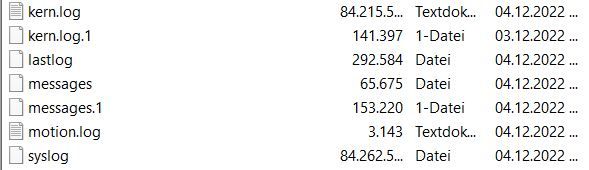
die syslog
Dec  4 22:54:08 raspberrypi kernel: [ 9215.970709] Unhandled prefetch abort: breakpoint debug exception (0x222) at 0x00000000
Dec  4 22:54:08 raspberrypi kernel: [ 9215.970747] Unhandled prefetch abort: breakpoint debug exception (0x222) at 0x00000000
Dec  4 22:54:08 raspberrypi kernel: [ 9215.970785] Unhandled prefetch abort: breakpoint debug exception (0x222) at 0x00000000
Dec  4 22:54:08 raspberrypi kernel: [ 9215.970823] Unhandled prefetch abort: breakpoint debug exception (0x222) at 0x00000000
Dec  4 22:54:08 raspberrypi kernel: [ 9215.970860] Unhandled prefetch abort: breakpoint debug exception (0x222) at 0x00000000
Dec  4 22:54:08 raspberrypi kernel: [ 9215.970898] Unhandled prefetch abort: breakpoint debug exception (0x222) at 0x00000000
Dec  4 22:54:08 raspberrypi kernel: [ 9215.970936] Unhandled prefetch abort: breakpoint debug exception (0x222) at 0x00000000
Dec  4 22:54:08 raspberrypi kernel: [ 9215.970974] Unhandled prefetch abort: breakpoint debug exception (0x222) at 0x00000000
Dec  4 22:54:08 raspberrypi kernel: [ 9215.971012] Unhandled prefetch abort: breakpoint debug exception (0x222) at 0x00000000
Dec  4 22:54:08 raspberrypi kernel: [ 9215.971050] Unhandled prefetch abort: breakpoint debug exception (0x222) at 0x00000000
Dec  4 22:54:08 raspberrypi kernel: [ 9215.971087] Unhandled prefetch abort: breakpoint debug exception (0x222) at 0x00000000
Dec  4 22:54:08 raspberrypi kernel: [ 9215.971125] Unhandled prefetch abort: breakpoint debug exception (0x222) at 0x00000000
Dec  4 22:54:08 raspberrypi kernel: [ 9215.971163] Unhandled prefetch abort: breakpoint debug exception (0x222) at 0x00000000
Dec  4 22:54:08 raspberrypi kernel: [ 9215.971201] Unhandled prefetch abort: breakpoint debug exception (0x222) at 0x00000000
Dec  4 22:54:08 raspberrypi kernel: [ 9215.971238] Unhandled prefetch abort: breakpoint debug exception (0x222) at 0x00000000
Dec  4 22:54:08 raspberrypi kernel: [ 9215.971276] Unhandled prefetch abort: breakpoint debug exception (0x222) at 0x00000000
Dec  4 22:54:08 raspberrypi kernel: [ 9215.971314] Unhandled prefetch abort: breakpoint debug exception (0x222) at 0x00000000
Dec  4 22:54:08 raspberrypi kernel: [ 9215.971351] Unhandled prefetch abort: breakpoint debug exception (0x222) at 0x00000000
Dec  4 22:54:08 raspberrypi kernel: [ 9215.971389] Unhandled prefetch abort: breakpoint debug exception (0x222) at 0x00000000
Dec  4 22:54:08 raspberrypi kernel: [ 9215.971427] Unhandled prefetch abort: breakpoint debug exception (0x222) at 0x00000000
Dec  4 22:54:08 raspberrypi kernel: [ 9215.971465] Unhandled prefetch abort: breakpoint debug exception (0x222) at 0x00000000
Dec  4 22:54:08 raspberrypi kernel: [ 9215.971503] Unhandled prefetch abort: breakpoint debug exception (0x222) at 0x00000000
Dec  4 22:54:08 raspberrypi kernel: [ 9215.971541] Unhandled prefetch abort: breakpoint debug exception (0x222) at 0x00000000
Dec  4 22:54:08 raspberrypi kernel: [ 9215.971579] Unhandled prefetch abort: breakpoint debug exception (0x222) at 0x00000000
Dec  4 22:54:08 raspberrypi kernel: [ 9215.971617] Unhandled prefetch abort: breakpoint debug exception (0x222) at 0x00000000
Dec  4 22:54:08 raspberrypi kernel: [ 9215.971654] Unhandled prefetch abort: breakpoint debug exception (0x222) at 0x00000000
die kern.log
Dec 4 22:54:00 raspberrypi kernel: [ 9208.669981] Unhandled prefetch abort: breakpoint debug exception (0x222) at 0x00000000 Dec 4 22:54:00 raspberrypi kernel: [ 9208.670069] Unhandled prefetch abort: breakpoint debug exception (0x222) at 0x00000000 Dec 4 22:54:00 raspberrypi kernel: [ 9208.670115] Unhandled prefetch abort: breakpoint debug exception (0x222) at 0x00000000 Dec 4 22:54:00 raspberrypi kernel: [ 9208.670158] Unhandled prefetch abort: breakpoint debug exception (0x222) at 0x00000000 Dec 4 22:54:00 raspberrypi kernel: [ 9208.670199] Unhandled prefetch abort: breakpoint debug exception (0x222) at 0x00000000 Dec 4 22:54:00 raspberrypi kernel: [ 9208.670242] Unhandled prefetch abort: breakpoint debug exception (0x222) at 0x00000000 Dec 4 22:54:00 raspberrypi kernel: [ 9208.670284] Unhandled prefetch abort: breakpoint debug exception (0x222) at 0x00000000 Dec 4 22:54:00 raspberrypi kernel: [ 9208.670325] Unhandled prefetch abort: breakpoint debug exception (0x222) at 0x00000000 Dec 4 22:54:00 raspberrypi kernel: [ 9208.670365] Unhandled prefetch abort: breakpoint debug exception (0x222) at 0x00000000 Dec 4 22:54:00 raspberrypi kernel: [ 9208.670407] Unhandled prefetch abort: breakpoint debug exception (0x222) at 0x00000000 Dec 4 22:54:00 raspberrypi kernel: [ 9208.670449] Unhandled prefetch abort: breakpoint debug exception (0x222) at 0x00000000 Dec 4 22:54:00 raspberrypi kernel: [ 9208.670490] Unhandled prefetch abort: breakpoint debug exception (0x222) at 0x00000000 Dec 4 22:54:00 raspberrypi kernel: [ 9208.670531] Unhandled prefetch abort: breakpoint debug exception (0x222) at 0x00000000 Dec 4 22:54:00 raspberrypi kernel: [ 9208.670572] Unhandled prefetch abort: breakpoint debug exception (0x222) at 0x00000000 Dec 4 22:54:00 raspberrypi kernel: [ 9208.670612] Unhandled prefetch abort: breakpoint debug exception (0x222) at 0x00000000 Dec 4 22:54:00 raspberrypi kernel: [ 9208.670652] Unhandled prefetch abort: breakpoint debug exception (0x222) at 0x00000000 Dec 4 22:54:00 raspberrypi kernel: [ 9208.670694] Unhandled prefetch abort: breakpoint debug exception (0x222) at 0x00000000 Dec 4 22:54:00 raspberrypi kernel: [ 9208.670735] Unhandled prefetch abort: breakpoint debug exception (0x222) at 0x00000000 Dec 4 22:54:00 raspberrypi kernel: [ 9208.670775] Unhandled prefetch abort: breakpoint debug exception (0x222) at 0x00000000 Dec 4 22:54:00 raspberrypi kernel: [ 9208.670815] Unhandled prefetch abort: breakpoint debug exception (0x222) at 0x00000000 Dec 4 22:54:00 raspberrypi kernel: [ 9208.670855] Unhandled prefetch abort: breakpoint debug exception (0x222) at 0x00000000 Dec 4 22:54:00 raspberrypi kernel: [ 9208.670895] Unhandled prefetch abort: breakpoint debug exception (0x222) at 0x00000000 Dec 4 22:54:00 raspberrypi kernel: [ 9208.670935] Unhandled prefetch abort: breakpoint debug exception (0x222) at 0x00000000 Dec 4 22:54:00 raspberrypi kernel: [ 9208.670976] Unhandled prefetch abort: breakpoint debug exception (0x222) at 0x00000000 Dec 4 22:54:00 raspberrypi kernel: [ 9208.671017] Unhandled prefetch abort: breakpoint debug exception (0x222) at 0x00000000 Dec 4 22:54:00 raspberrypi kernel: [ 9208.671057] Unhandled prefetch abort: breakpoint debug exception (0x222) at 0x00000000 Dec 4 22:54:00 raspberrypi kernel: [ 9208.671096] Unhandled prefetch abort: breakpoint debug exception (0x222) at 0x00000000 Dec 4 22:54:00 raspberrypi kernel: [ 9208.671136] Unhandled prefetch abort: breakpoint debug exception (0x222) at 0x00000000 Dec 4 22:54:00 raspberrypi kernel: [ 9208.671176] Unhandled prefetch abort: breakpoint debug exception (0x222) at 0x00000000 Dec 4 22:54:00 raspberrypi kernel: [ 9208.671217] Unhandled prefetch abort: breakpoint debug exception (0x222) at 0x00000000 Dec 4 22:54:00 raspberrypi kernel: [ 9208.671258] Unhandled prefetch abort: breakpoint debug exception (0x222) at 0x00000000 Dec 4 22:54:00 raspberrypi kernel: [ 9208.671299] Unhandled prefetch abort: breakpoint debug exception (0x222) at 0x00000000 Dec 4 22:54:00 raspberrypi kernel: [ 9208.671340] Unhandled prefetch abort: breakpoint debug exception (0x222) at 0x00000000 -
so ... Moin
ich habe dann letztens Buster in der Light Version neu aufgesetzt ... Backup eingespielt und siehe da, es ging ... bis heute ... wäre ja auch zu einfach gewesen.
Ich schicke den Sauger los und in Windeseile füllen sich /var/log/syslog und /var/log/kern.log
So schnell kann man gar nicht gucken hatten die beide 80Mbdie syslog
Dec  4 22:54:08 raspberrypi kernel: [ 9215.970709] Unhandled prefetch abort: breakpoint debug exception (0x222) at 0x00000000
Dec  4 22:54:08 raspberrypi kernel: [ 9215.970747] Unhandled prefetch abort: breakpoint debug exception (0x222) at 0x00000000
Dec  4 22:54:08 raspberrypi kernel: [ 9215.970785] Unhandled prefetch abort: breakpoint debug exception (0x222) at 0x00000000
Dec  4 22:54:08 raspberrypi kernel: [ 9215.970823] Unhandled prefetch abort: breakpoint debug exception (0x222) at 0x00000000
Dec  4 22:54:08 raspberrypi kernel: [ 9215.970860] Unhandled prefetch abort: breakpoint debug exception (0x222) at 0x00000000
Dec  4 22:54:08 raspberrypi kernel: [ 9215.970898] Unhandled prefetch abort: breakpoint debug exception (0x222) at 0x00000000
Dec  4 22:54:08 raspberrypi kernel: [ 9215.970936] Unhandled prefetch abort: breakpoint debug exception (0x222) at 0x00000000
Dec  4 22:54:08 raspberrypi kernel: [ 9215.970974] Unhandled prefetch abort: breakpoint debug exception (0x222) at 0x00000000
Dec  4 22:54:08 raspberrypi kernel: [ 9215.971012] Unhandled prefetch abort: breakpoint debug exception (0x222) at 0x00000000
Dec  4 22:54:08 raspberrypi kernel: [ 9215.971050] Unhandled prefetch abort: breakpoint debug exception (0x222) at 0x00000000
Dec  4 22:54:08 raspberrypi kernel: [ 9215.971087] Unhandled prefetch abort: breakpoint debug exception (0x222) at 0x00000000
Dec  4 22:54:08 raspberrypi kernel: [ 9215.971125] Unhandled prefetch abort: breakpoint debug exception (0x222) at 0x00000000
Dec  4 22:54:08 raspberrypi kernel: [ 9215.971163] Unhandled prefetch abort: breakpoint debug exception (0x222) at 0x00000000
Dec  4 22:54:08 raspberrypi kernel: [ 9215.971201] Unhandled prefetch abort: breakpoint debug exception (0x222) at 0x00000000
Dec  4 22:54:08 raspberrypi kernel: [ 9215.971238] Unhandled prefetch abort: breakpoint debug exception (0x222) at 0x00000000
Dec  4 22:54:08 raspberrypi kernel: [ 9215.971276] Unhandled prefetch abort: breakpoint debug exception (0x222) at 0x00000000
Dec  4 22:54:08 raspberrypi kernel: [ 9215.971314] Unhandled prefetch abort: breakpoint debug exception (0x222) at 0x00000000
Dec  4 22:54:08 raspberrypi kernel: [ 9215.971351] Unhandled prefetch abort: breakpoint debug exception (0x222) at 0x00000000
Dec  4 22:54:08 raspberrypi kernel: [ 9215.971389] Unhandled prefetch abort: breakpoint debug exception (0x222) at 0x00000000
Dec  4 22:54:08 raspberrypi kernel: [ 9215.971427] Unhandled prefetch abort: breakpoint debug exception (0x222) at 0x00000000
Dec  4 22:54:08 raspberrypi kernel: [ 9215.971465] Unhandled prefetch abort: breakpoint debug exception (0x222) at 0x00000000
Dec  4 22:54:08 raspberrypi kernel: [ 9215.971503] Unhandled prefetch abort: breakpoint debug exception (0x222) at 0x00000000
Dec  4 22:54:08 raspberrypi kernel: [ 9215.971541] Unhandled prefetch abort: breakpoint debug exception (0x222) at 0x00000000
Dec  4 22:54:08 raspberrypi kernel: [ 9215.971579] Unhandled prefetch abort: breakpoint debug exception (0x222) at 0x00000000
Dec  4 22:54:08 raspberrypi kernel: [ 9215.971617] Unhandled prefetch abort: breakpoint debug exception (0x222) at 0x00000000
Dec  4 22:54:08 raspberrypi kernel: [ 9215.971654] Unhandled prefetch abort: breakpoint debug exception (0x222) at 0x00000000
die kern.log
Dec 4 22:54:00 raspberrypi kernel: [ 9208.669981] Unhandled prefetch abort: breakpoint debug exception (0x222) at 0x00000000 Dec 4 22:54:00 raspberrypi kernel: [ 9208.670069] Unhandled prefetch abort: breakpoint debug exception (0x222) at 0x00000000 Dec 4 22:54:00 raspberrypi kernel: [ 9208.670115] Unhandled prefetch abort: breakpoint debug exception (0x222) at 0x00000000 Dec 4 22:54:00 raspberrypi kernel: [ 9208.670158] Unhandled prefetch abort: breakpoint debug exception (0x222) at 0x00000000 Dec 4 22:54:00 raspberrypi kernel: [ 9208.670199] Unhandled prefetch abort: breakpoint debug exception (0x222) at 0x00000000 Dec 4 22:54:00 raspberrypi kernel: [ 9208.670242] Unhandled prefetch abort: breakpoint debug exception (0x222) at 0x00000000 Dec 4 22:54:00 raspberrypi kernel: [ 9208.670284] Unhandled prefetch abort: breakpoint debug exception (0x222) at 0x00000000 Dec 4 22:54:00 raspberrypi kernel: [ 9208.670325] Unhandled prefetch abort: breakpoint debug exception (0x222) at 0x00000000 Dec 4 22:54:00 raspberrypi kernel: [ 9208.670365] Unhandled prefetch abort: breakpoint debug exception (0x222) at 0x00000000 Dec 4 22:54:00 raspberrypi kernel: [ 9208.670407] Unhandled prefetch abort: breakpoint debug exception (0x222) at 0x00000000 Dec 4 22:54:00 raspberrypi kernel: [ 9208.670449] Unhandled prefetch abort: breakpoint debug exception (0x222) at 0x00000000 Dec 4 22:54:00 raspberrypi kernel: [ 9208.670490] Unhandled prefetch abort: breakpoint debug exception (0x222) at 0x00000000 Dec 4 22:54:00 raspberrypi kernel: [ 9208.670531] Unhandled prefetch abort: breakpoint debug exception (0x222) at 0x00000000 Dec 4 22:54:00 raspberrypi kernel: [ 9208.670572] Unhandled prefetch abort: breakpoint debug exception (0x222) at 0x00000000 Dec 4 22:54:00 raspberrypi kernel: [ 9208.670612] Unhandled prefetch abort: breakpoint debug exception (0x222) at 0x00000000 Dec 4 22:54:00 raspberrypi kernel: [ 9208.670652] Unhandled prefetch abort: breakpoint debug exception (0x222) at 0x00000000 Dec 4 22:54:00 raspberrypi kernel: [ 9208.670694] Unhandled prefetch abort: breakpoint debug exception (0x222) at 0x00000000 Dec 4 22:54:00 raspberrypi kernel: [ 9208.670735] Unhandled prefetch abort: breakpoint debug exception (0x222) at 0x00000000 Dec 4 22:54:00 raspberrypi kernel: [ 9208.670775] Unhandled prefetch abort: breakpoint debug exception (0x222) at 0x00000000 Dec 4 22:54:00 raspberrypi kernel: [ 9208.670815] Unhandled prefetch abort: breakpoint debug exception (0x222) at 0x00000000 Dec 4 22:54:00 raspberrypi kernel: [ 9208.670855] Unhandled prefetch abort: breakpoint debug exception (0x222) at 0x00000000 Dec 4 22:54:00 raspberrypi kernel: [ 9208.670895] Unhandled prefetch abort: breakpoint debug exception (0x222) at 0x00000000 Dec 4 22:54:00 raspberrypi kernel: [ 9208.670935] Unhandled prefetch abort: breakpoint debug exception (0x222) at 0x00000000 Dec 4 22:54:00 raspberrypi kernel: [ 9208.670976] Unhandled prefetch abort: breakpoint debug exception (0x222) at 0x00000000 Dec 4 22:54:00 raspberrypi kernel: [ 9208.671017] Unhandled prefetch abort: breakpoint debug exception (0x222) at 0x00000000 Dec 4 22:54:00 raspberrypi kernel: [ 9208.671057] Unhandled prefetch abort: breakpoint debug exception (0x222) at 0x00000000 Dec 4 22:54:00 raspberrypi kernel: [ 9208.671096] Unhandled prefetch abort: breakpoint debug exception (0x222) at 0x00000000 Dec 4 22:54:00 raspberrypi kernel: [ 9208.671136] Unhandled prefetch abort: breakpoint debug exception (0x222) at 0x00000000 Dec 4 22:54:00 raspberrypi kernel: [ 9208.671176] Unhandled prefetch abort: breakpoint debug exception (0x222) at 0x00000000 Dec 4 22:54:00 raspberrypi kernel: [ 9208.671217] Unhandled prefetch abort: breakpoint debug exception (0x222) at 0x00000000 Dec 4 22:54:00 raspberrypi kernel: [ 9208.671258] Unhandled prefetch abort: breakpoint debug exception (0x222) at 0x00000000 Dec 4 22:54:00 raspberrypi kernel: [ 9208.671299] Unhandled prefetch abort: breakpoint debug exception (0x222) at 0x00000000 Dec 4 22:54:00 raspberrypi kernel: [ 9208.671340] Unhandled prefetch abort: breakpoint debug exception (0x222) at 0x00000000@snupy sagte in Bullseye Neuinstallation von IoBroker nach ....:
ich habe dann letztens Buster in der Light Version neu aufgesetzt
Warum eine abgekündigte Version? Buster hat im September sein End of Life erreicht.

Hey! Du scheinst an dieser Unterhaltung interessiert zu sein, hast aber noch kein Konto.
Hast du es satt, bei jedem Besuch durch die gleichen Beiträge zu scrollen? Wenn du dich für ein Konto anmeldest, kommst du immer genau dorthin zurück, wo du zuvor warst, und kannst dich über neue Antworten benachrichtigen lassen (entweder per E-Mail oder Push-Benachrichtigung). Du kannst auch Lesezeichen speichern und Beiträge positiv bewerten, um anderen Community-Mitgliedern deine Wertschätzung zu zeigen.
Mit deinem Input könnte dieser Beitrag noch besser werden 💗
Registrieren Anmelden402
Online33.0k
Benutzer83.5k
Themen1.3m
Beiträge