




(GELÖST) zigbee-herdsmann-converters / wie manuell updaten?
-
cd /opt/iobroker && npm lses läuft wieder alles.
hatte noch einen external converter drin stehen, hab jetzt den Pfad entfernt, weil er mir bei der installation der github version die .js gelöscht hat.
pi4b@pi4b:~$ cd /opt/iobroker && npm ls iobroker.inst@3.0.0 /opt/iobroker ├── iobroker.admin@6.2.23 ├── iobroker.alexa2@3.21.0 ├── iobroker.alias-manager@1.2.6 ├── iobroker.backitup@2.5.6 ├── iobroker.device-reminder@1.2.9 (git+ssh://git@github.com/xenon-s/ioBroker.device-reminder.git#4162ebc0a96605f103df23e277abcf1b673065dd) ├── iobroker.device-watcher@2.0.2 ├── iobroker.discovery@3.1.0 ├── iobroker.dwd@2.8.3 ├── iobroker.ecovacs-deebot@1.4.8 ├── iobroker.fritzdect@2.2.6 ├── iobroker.fronius-solarweb@0.0.3 (git+ssh://git@github.com/TA2k/ioBroker.fronius-solarweb.git#cf94c61b368f7ffb99b6d3411d65d4e377f9ef28) ├── iobroker.fronius@1.1.6 (git+ssh://git@github.com/iobroker-community-adapters/ioBroker.fronius.git#c644a95d480403a1ef277e822df6232ffc66daf5) ├── iobroker.ical@1.13.2 ├── iobroker.icons-mfd-svg@1.1.0 ├── iobroker.influxdb@3.2.0 ├── iobroker.info@1.9.21 ├── iobroker.intex@0.0.7 ├── iobroker.javascript@6.1.3 ├── iobroker.js-controller@4.0.23 ├── iobroker.net-tools@0.2.0 ├── iobroker.oilfox@4.1.2 ├── iobroker.ping@1.5.3 ├── iobroker.rpi2@1.3.2 ├── iobroker.shelly@6.2.4 ├── iobroker.socketio@6.2.0 ├── iobroker.synology@2.1.13 ├── iobroker.tr-064@4.2.17 ├── iobroker.trashschedule@2.0.3 ├── iobroker.vis@1.4.15 ├── iobroker.web@5.2.10 ├── iobroker.whatsapp-cmb@0.2.3 ├── iobroker.ws@2.2.1 └── iobroker.zigbee@1.7.6 (git+ssh://git@github.com/ioBroker/ioBroker.zigbee.git#84c9eb7accca10de87143e20c4494413a5a16873) -
es läuft wieder alles.
hatte noch einen external converter drin stehen, hab jetzt den Pfad entfernt, weil er mir bei der installation der github version die .js gelöscht hat.pi4b@pi4b:~$ cd /opt/iobroker && npm ls iobroker.inst@3.0.0 /opt/iobroker ├── iobroker.admin@6.2.23 ├── iobroker.alexa2@3.21.0 ├── iobroker.alias-manager@1.2.6 ├── iobroker.backitup@2.5.6 ├── iobroker.device-reminder@1.2.9 (git+ssh://git@github.com/xenon-s/ioBroker.device-reminder.git#4162ebc0a96605f103df23e277abcf1b673065dd) ├── iobroker.device-watcher@2.0.2 ├── iobroker.discovery@3.1.0 ├── iobroker.dwd@2.8.3 ├── iobroker.ecovacs-deebot@1.4.8 ├── iobroker.fritzdect@2.2.6 ├── iobroker.fronius-solarweb@0.0.3 (git+ssh://git@github.com/TA2k/ioBroker.fronius-solarweb.git#cf94c61b368f7ffb99b6d3411d65d4e377f9ef28) ├── iobroker.fronius@1.1.6 (git+ssh://git@github.com/iobroker-community-adapters/ioBroker.fronius.git#c644a95d480403a1ef277e822df6232ffc66daf5) ├── iobroker.ical@1.13.2 ├── iobroker.icons-mfd-svg@1.1.0 ├── iobroker.influxdb@3.2.0 ├── iobroker.info@1.9.21 ├── iobroker.intex@0.0.7 ├── iobroker.javascript@6.1.3 ├── iobroker.js-controller@4.0.23 ├── iobroker.net-tools@0.2.0 ├── iobroker.oilfox@4.1.2 ├── iobroker.ping@1.5.3 ├── iobroker.rpi2@1.3.2 ├── iobroker.shelly@6.2.4 ├── iobroker.socketio@6.2.0 ├── iobroker.synology@2.1.13 ├── iobroker.tr-064@4.2.17 ├── iobroker.trashschedule@2.0.3 ├── iobroker.vis@1.4.15 ├── iobroker.web@5.2.10 ├── iobroker.whatsapp-cmb@0.2.3 ├── iobroker.ws@2.2.1 └── iobroker.zigbee@1.7.6 (git+ssh://git@github.com/ioBroker/ioBroker.zigbee.git#84c9eb7accca10de87143e20c4494413a5a16873)Das ist nicht die vollständige Ausgabe.
-
Das ist nicht die vollständige Ausgabe.
habs grad gemerkt, habs oben ausgebessert!
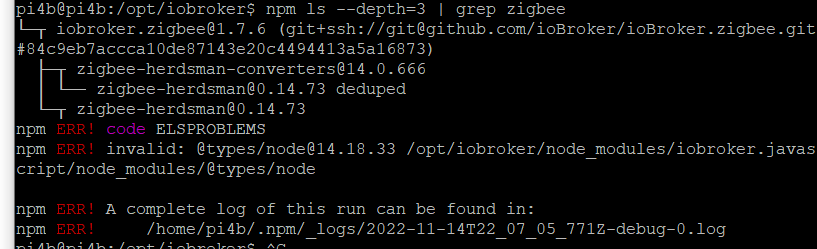
aber trotzdem noch was schiefpi4b@pi4b:/opt/iobroker$ npm ls --depth=3 | grep zigbee └─┬ iobroker.zigbee@1.7.6 (git+ssh://git@github.com/ioBroker/ioBroker.zigbee.git#84c9eb7accca10de87143e20c4494413a5a16873) ├─┬ zigbee-herdsman-converters@14.0.666 │ └── zigbee-herdsman@0.14.73 deduped └─┬ zigbee-herdsman@0.14.73 npm ERR! code ELSPROBLEMS npm ERR! invalid: @types/node@14.18.33 /opt/iobroker/node_modules/iobroker.javascript/node_modules/@types/node npm ERR! A complete log of this run can be found in: npm ERR! /home/pi4b/.npm/_logs/2022-11-14T22_07_05_771Z-debug-0.log -
habs grad gemerkt, habs oben ausgebessert!
aber trotzdem noch was schiefpi4b@pi4b:/opt/iobroker$ npm ls --depth=3 | grep zigbee └─┬ iobroker.zigbee@1.7.6 (git+ssh://git@github.com/ioBroker/ioBroker.zigbee.git#84c9eb7accca10de87143e20c4494413a5a16873) ├─┬ zigbee-herdsman-converters@14.0.666 │ └── zigbee-herdsman@0.14.73 deduped └─┬ zigbee-herdsman@0.14.73 npm ERR! code ELSPROBLEMS npm ERR! invalid: @types/node@14.18.33 /opt/iobroker/node_modules/iobroker.javascript/node_modules/@types/node npm ERR! A complete log of this run can be found in: npm ERR! /home/pi4b/.npm/_logs/2022-11-14T22_07_05_771Z-debug-0.logKannste überlesen. Ist harmlos, soweit ich das sehe.
-
Kannste überlesen. Ist harmlos, soweit ich das sehe.
-
Bei
cd /opt/iobroker && npm lskommen keine Fehlermeldungen? Die tieferen Ebenen sind nicht so wichtig, da ist immer etwas Chaos...
-
Bei
cd /opt/iobroker && npm lskommen keine Fehlermeldungen? Die tieferen Ebenen sind nicht so wichtig, da ist immer etwas Chaos...
bei der Ausgabe kommen keine Fehler!
Danke dir! -
bei der Ausgabe kommen keine Fehler!
Danke dir!Und das Gerät ist auch drin?
-
Und das Gerät ist auch drin?
-
-
Hallo Thomas,
hab das mal reinkopiert aber dann startet der zigbee adapter nicht mehr :-/
2022-11-15 21:15:17.734 - error: host.pi4b Caught by controller[0]: /opt/iobroker/node_modules/zigbee-herdsman-converters/devices/saswell.js:52 2022-11-15 21:15:17.734 - error: host.pi4b Caught by controller[0]: .withAwayMode()], 2022-11-15 21:15:17.735 - error: host.pi4b Caught by controller[0]: ^ 2022-11-15 21:15:17.735 - error: host.pi4b Caught by controller[0]: TypeError: exposes.climate(...).withSetpoint(...).withLocalTemperature(...).withSystemMode(...).withLocalTemperatureCalibration(...).withAwayMode is not a function 2022-11-15 21:15:17.735 - error: host.pi4b Caught by controller[0]: at Object. (/opt/iobroker/node_modules/zigbee-herdsman-converters/devices/saswell.js:52:18) 2022-11-15 21:15:17.735 - error: host.pi4b Caught by controller[0]: at Module._compile (node:internal/modules/cjs/loader:1155:14) 2022-11-15 21:15:17.735 - error: host.pi4b Caught by controller[0]: at Object.Module._extensions..js (node:internal/modules/cjs/loader:1209:10) 2022-11-15 21:15:17.735 - error: host.pi4b Caught by controller[0]: at Module.load (node:internal/modules/cjs/loader:1033:32) 2022-11-15 21:15:17.735 - error: host.pi4b Caught by controller[0]: at Function.Module._load (node:internal/modules/cjs/loader:868:12) 2022-11-15 21:15:17.735 - error: host.pi4b Caught by controller[0]: at Module.require (node:internal/modules/cjs/loader:1057:19) 2022-11-15 21:15:17.735 - error: host.pi4b Caught by controller[0]: at require (node:internal/modules/cjs/helpers:103:18) 2022-11-15 21:15:17.736 - error: host.pi4b Caught by controller[0]: at Object. (/opt/iobroker/node_modules/zigbee-herdsman-converters/index.js:118:30) 2022-11-15 21:15:17.736 - error: host.pi4b Caught by controller[0]: at Module._compile (node:internal/modules/cjs/loader:1155:14) 2022-11-15 21:15:17.736 - error: host.pi4b Caught by controller[0]: at Object.Module._extensions..js (node:internal/modules/cjs/loader:1209:10) 2022-11-15 21:15:17.736 - error: host.pi4b instance system.adapter.zigbee.0 terminated with code 1 (JS_CONTROLLER_STOPPED) -
Hallo Thomas,
hab das mal reinkopiert aber dann startet der zigbee adapter nicht mehr :-/
2022-11-15 21:15:17.734 - error: host.pi4b Caught by controller[0]: /opt/iobroker/node_modules/zigbee-herdsman-converters/devices/saswell.js:52 2022-11-15 21:15:17.734 - error: host.pi4b Caught by controller[0]: .withAwayMode()], 2022-11-15 21:15:17.735 - error: host.pi4b Caught by controller[0]: ^ 2022-11-15 21:15:17.735 - error: host.pi4b Caught by controller[0]: TypeError: exposes.climate(...).withSetpoint(...).withLocalTemperature(...).withSystemMode(...).withLocalTemperatureCalibration(...).withAwayMode is not a function 2022-11-15 21:15:17.735 - error: host.pi4b Caught by controller[0]: at Object. (/opt/iobroker/node_modules/zigbee-herdsman-converters/devices/saswell.js:52:18) 2022-11-15 21:15:17.735 - error: host.pi4b Caught by controller[0]: at Module._compile (node:internal/modules/cjs/loader:1155:14) 2022-11-15 21:15:17.735 - error: host.pi4b Caught by controller[0]: at Object.Module._extensions..js (node:internal/modules/cjs/loader:1209:10) 2022-11-15 21:15:17.735 - error: host.pi4b Caught by controller[0]: at Module.load (node:internal/modules/cjs/loader:1033:32) 2022-11-15 21:15:17.735 - error: host.pi4b Caught by controller[0]: at Function.Module._load (node:internal/modules/cjs/loader:868:12) 2022-11-15 21:15:17.735 - error: host.pi4b Caught by controller[0]: at Module.require (node:internal/modules/cjs/loader:1057:19) 2022-11-15 21:15:17.735 - error: host.pi4b Caught by controller[0]: at require (node:internal/modules/cjs/helpers:103:18) 2022-11-15 21:15:17.736 - error: host.pi4b Caught by controller[0]: at Object. (/opt/iobroker/node_modules/zigbee-herdsman-converters/index.js:118:30) 2022-11-15 21:15:17.736 - error: host.pi4b Caught by controller[0]: at Module._compile (node:internal/modules/cjs/loader:1155:14) 2022-11-15 21:15:17.736 - error: host.pi4b Caught by controller[0]: at Object.Module._extensions..js (node:internal/modules/cjs/loader:1209:10) 2022-11-15 21:15:17.736 - error: host.pi4b instance system.adapter.zigbee.0 terminated with code 1 (JS_CONTROLLER_STOPPED)@diamand2k22 sagte in (GELÖST) zigbee-herdsmann-converters / wie manuell updaten?:
hab das mal reinkopiert
Was wo reinkopiert?
-
@diamand2k22 sagte in (GELÖST) zigbee-herdsmann-converters / wie manuell updaten?:
hab das mal reinkopiert
Was wo reinkopiert?
@david-jung said in Hama Smartes Heizkörper-Thermostat:
@david-jung
so, ich habe folgendes gemacht:die Datei: /opt/iobroker/node_modules/zigbee-herdsman-converters/devices/saswell.js
etwas erweitert, jetzt kann ich die Ist-Temperatur ablesen, so wie die Soll-Temperatur setzen/lesen.
Den Modus (heizen/auto/aus) lesen, setzen.
Ventil Status ablesen.
Und Offset für Temperatur setzen/lesen./opt/iobroker/node_modules/zigbee-herdsman-converters/devices/saswell.js
const exposes = require('../lib/exposes');
const fz = {...require('../converters/fromZigbee'), legacy: require('../lib/legacy').fromZigbee};
const tz = require('../converters/toZigbee');
const tuya = require('../lib/tuya');
const reporting = require('../lib/reporting');
const e = exposes.presets;
const ea = exposes.access;

module.exports = [
    {
        fingerprint: [{modelID: 'GbxAXL2\u0000', manufacturerName: '_TYST11_KGbxAXL2'},
            {modelID: 'uhszj9s\u0000', manufacturerName: '_TYST11_zuhszj9s'},
            {modelID: '88teujp\u0000', manufacturerName: '_TYST11_c88teujp'},
            {modelID: 'w7cahqs\u0000', manufacturerName: '_TYST11_yw7cahqs'},
            {modelID: 'w7cahqs', manufacturerName: '_TYST11_yw7cahqs'},
            {modelID: 'TS0601', manufacturerName: '_TZE200_c88teujp'},
            {modelID: 'TS0601', manufacturerName: '_TZE200_yw7cahqs'},
            {modelID: 'TS0601', manufacturerName: '_TZE200_azqp6ssj'},
            {modelID: 'TS0601', manufacturerName: '_TZE200_bvu2wnxz'},
            {modelID: 'TS0601', manufacturerName: '_TZE200_zuhszj9s'},
            {modelID: 'TS0601', manufacturerName: '_TZE200_9gvruqf5'},
            {modelID: 'TS0601', manufacturerName: '_TZE200_zr9c0day'},
        ],
        model: 'SEA801-Zigbee/SEA802-Zigbee',
        vendor: 'Saswell',
        description: 'Thermostatic radiator valve',
        whiteLabel: [{vendor: 'HiHome', model: 'WZB-TRVL'}, {vendor: 'Hama', model: '00176592'},
            {vendor: 'RTX', model: 'ZB-RT1'}],
        fromZigbee: [fz.saswell_thermostat, fz.ignore_tuya_set_time, fz.ignore_basic_report, fz.legacy.tuya_thermostat_weekly_schedule],
        toZigbee: [tz.saswell_thermostat_current_heating_setpoint, tz.saswell_thermostat_mode, tz.saswell_thermostat_away,
            tz.saswell_thermostat_child_lock, tz.saswell_thermostat_window_detection, tz.saswell_thermostat_frost_detection,
            tz.saswell_thermostat_calibration, tz.saswell_thermostat_anti_scaling, tz.tuya_thermostat_weekly_schedule],
        onEvent: tuya.onEventSetTime,
        meta: {
            thermostat: {
                weeklyScheduleMaxTransitions: 4,
                weeklyScheduleSupportedModes: [1], // bits: 0-heat present, 1-cool present (dec: 1-heat,2-cool,3-heat+cool)
                weeklyScheduleConversion: 'saswell',
            },
        },
        configure: async (device, coordinatorEndpoint, logger) => {
            const endpoint = device.getEndpoint(1);
            await reporting.bind(endpoint, coordinatorEndpoint, ['genBasic']);
        },
        exposes: [e.battery_low(), e.window_detection(), e.child_lock(),
            exposes.binary('heating', ea.STATE, 'ON', 'OFF').withDescription('Device valve is open or closed (heating or not)'),
            exposes.climate()
                .withSetpoint('current_heating_setpoint', 5, 30, 0.5, ea.STATE_SET).withLocalTemperature(ea.STATE)
                .withSystemMode(['off', 'heat', 'auto'], ea.STATE_SET)
                // Range is -6 - 6 and step 1: https://github.com/Koenkk/zigbee2mqtt/issues/11777
                .withLocalTemperatureCalibration(-6, 6, 1, ea.STATE_SET)
                .withAwayMode()],
    },
	{
		/*added by djung 10.11.2022*/
	fingerprint: [{modelID: 'TS0601', manufacturerName: '_TZE200_h4cgnbzg'}],
        model: 'HZ',
        vendor: 'HAMA',
        description: 'Thermostatic radiator valve',
        whiteLabel: [{vendor: 'Hama', model: 'XXXxxxXXX'},],
        fromZigbee: [fz.saswell_thermostat],
        toZigbee: [tz.saswell_thermostat_current_heating_setpoint, tz.saswell_thermostat_mode,
            tz.saswell_thermostat_calibration],
        onEvent: tuya.onEventSetTime,
        configure: async (device, coordinatorEndpoint, logger) => {
            const endpoint = device.getEndpoint(1);
            await reporting.bind(endpoint, coordinatorEndpoint, ['genBasic']);
        },
        exposes: [
			e.battery_low(),
			/*e.switch(),*/
			/*e.lock(),*/
			exposes.binary('heating', ea.STATE, 'ON', 'OFF').withDescription('Device valve is open or closed (heating or not)'),

            exposes.climate()
                .withSetpoint('current_heating_setpoint', 5, 30, 0.5, ea.STATE_SET).withLocalTemperature(ea.STATE)
                .withSystemMode(['off', 'heat', 'auto'], ea.STATE_SET)
                // Range is -6 - 6 and step 1: https://github.com/Koenkk/zigbee2mqtt/issues/11777
                .withLocalTemperatureCalibration(-6, 6, 1, ea.STATE_SET)
                ],
    },
];
soll man das irgendwo auf github oder so noch posten? Wenn ja, bitte zeigen wo =)
Grüße.
David. -
@david-jung said in Hama Smartes Heizkörper-Thermostat:
@david-jung
so, ich habe folgendes gemacht:die Datei: /opt/iobroker/node_modules/zigbee-herdsman-converters/devices/saswell.js
etwas erweitert, jetzt kann ich die Ist-Temperatur ablesen, so wie die Soll-Temperatur setzen/lesen.
Den Modus (heizen/auto/aus) lesen, setzen.
Ventil Status ablesen.
Und Offset für Temperatur setzen/lesen./opt/iobroker/node_modules/zigbee-herdsman-converters/devices/saswell.js
const exposes = require('../lib/exposes');
const fz = {...require('../converters/fromZigbee'), legacy: require('../lib/legacy').fromZigbee};
const tz = require('../converters/toZigbee');
const tuya = require('../lib/tuya');
const reporting = require('../lib/reporting');
const e = exposes.presets;
const ea = exposes.access;

module.exports = [
    {
        fingerprint: [{modelID: 'GbxAXL2\u0000', manufacturerName: '_TYST11_KGbxAXL2'},
            {modelID: 'uhszj9s\u0000', manufacturerName: '_TYST11_zuhszj9s'},
            {modelID: '88teujp\u0000', manufacturerName: '_TYST11_c88teujp'},
            {modelID: 'w7cahqs\u0000', manufacturerName: '_TYST11_yw7cahqs'},
            {modelID: 'w7cahqs', manufacturerName: '_TYST11_yw7cahqs'},
            {modelID: 'TS0601', manufacturerName: '_TZE200_c88teujp'},
            {modelID: 'TS0601', manufacturerName: '_TZE200_yw7cahqs'},
            {modelID: 'TS0601', manufacturerName: '_TZE200_azqp6ssj'},
            {modelID: 'TS0601', manufacturerName: '_TZE200_bvu2wnxz'},
            {modelID: 'TS0601', manufacturerName: '_TZE200_zuhszj9s'},
            {modelID: 'TS0601', manufacturerName: '_TZE200_9gvruqf5'},
            {modelID: 'TS0601', manufacturerName: '_TZE200_zr9c0day'},
        ],
        model: 'SEA801-Zigbee/SEA802-Zigbee',
        vendor: 'Saswell',
        description: 'Thermostatic radiator valve',
        whiteLabel: [{vendor: 'HiHome', model: 'WZB-TRVL'}, {vendor: 'Hama', model: '00176592'},
            {vendor: 'RTX', model: 'ZB-RT1'}],
        fromZigbee: [fz.saswell_thermostat, fz.ignore_tuya_set_time, fz.ignore_basic_report, fz.legacy.tuya_thermostat_weekly_schedule],
        toZigbee: [tz.saswell_thermostat_current_heating_setpoint, tz.saswell_thermostat_mode, tz.saswell_thermostat_away,
            tz.saswell_thermostat_child_lock, tz.saswell_thermostat_window_detection, tz.saswell_thermostat_frost_detection,
            tz.saswell_thermostat_calibration, tz.saswell_thermostat_anti_scaling, tz.tuya_thermostat_weekly_schedule],
        onEvent: tuya.onEventSetTime,
        meta: {
            thermostat: {
                weeklyScheduleMaxTransitions: 4,
                weeklyScheduleSupportedModes: [1], // bits: 0-heat present, 1-cool present (dec: 1-heat,2-cool,3-heat+cool)
                weeklyScheduleConversion: 'saswell',
            },
        },
        configure: async (device, coordinatorEndpoint, logger) => {
            const endpoint = device.getEndpoint(1);
            await reporting.bind(endpoint, coordinatorEndpoint, ['genBasic']);
        },
        exposes: [e.battery_low(), e.window_detection(), e.child_lock(),
            exposes.binary('heating', ea.STATE, 'ON', 'OFF').withDescription('Device valve is open or closed (heating or not)'),
            exposes.climate()
                .withSetpoint('current_heating_setpoint', 5, 30, 0.5, ea.STATE_SET).withLocalTemperature(ea.STATE)
                .withSystemMode(['off', 'heat', 'auto'], ea.STATE_SET)
                // Range is -6 - 6 and step 1: https://github.com/Koenkk/zigbee2mqtt/issues/11777
                .withLocalTemperatureCalibration(-6, 6, 1, ea.STATE_SET)
                .withAwayMode()],
    },
	{
		/*added by djung 10.11.2022*/
	fingerprint: [{modelID: 'TS0601', manufacturerName: '_TZE200_h4cgnbzg'}],
        model: 'HZ',
        vendor: 'HAMA',
        description: 'Thermostatic radiator valve',
        whiteLabel: [{vendor: 'Hama', model: 'XXXxxxXXX'},],
        fromZigbee: [fz.saswell_thermostat],
        toZigbee: [tz.saswell_thermostat_current_heating_setpoint, tz.saswell_thermostat_mode,
            tz.saswell_thermostat_calibration],
        onEvent: tuya.onEventSetTime,
        configure: async (device, coordinatorEndpoint, logger) => {
            const endpoint = device.getEndpoint(1);
            await reporting.bind(endpoint, coordinatorEndpoint, ['genBasic']);
        },
        exposes: [
			e.battery_low(),
			/*e.switch(),*/
			/*e.lock(),*/
			exposes.binary('heating', ea.STATE, 'ON', 'OFF').withDescription('Device valve is open or closed (heating or not)'),

            exposes.climate()
                .withSetpoint('current_heating_setpoint', 5, 30, 0.5, ea.STATE_SET).withLocalTemperature(ea.STATE)
                .withSystemMode(['off', 'heat', 'auto'], ea.STATE_SET)
                // Range is -6 - 6 and step 1: https://github.com/Koenkk/zigbee2mqtt/issues/11777
                .withLocalTemperatureCalibration(-6, 6, 1, ea.STATE_SET)
                ],
    },
];
soll man das irgendwo auf github oder so noch posten? Wenn ja, bitte zeigen wo =)
Grüße.
David.Alles? Das war nur als Denkansatz für dich gedacht.
Ich hätte da erstmal nur die Manufacturer-ID hinzugefügt. Sind ja schon ein paar Varianten von dem Thermostat mit der Modellbezeichnung TS0601 vorhanden. -
Alles? Das war nur als Denkansatz für dich gedacht.
Ich hätte da erstmal nur die Manufacturer-ID hinzugefügt. Sind ja schon ein paar Varianten von dem Thermostat mit der Modellbezeichnung TS0601 vorhanden.hab die manufactor id eingefügt, jetzt erkennt er das thermostat, liefert aber keine werte!
2022-11-15 21:35:02.182 - warn: zigbee.0 (92569) zigbee-herdsman-converters:SaswellThermostat: Unrecognized DP #2 with data {"dp":2,"datatype":4,"data":{"type":"Buffer","data":[2]}}
2022-11-15 21:35:02.434 - warn: zigbee.0 (92569) zigbee-herdsman-converters:SaswellThermostat: Unrecognized DP #4 with data {"dp":4,"datatype":2,"data":{"type":"Buffer","data":[0,0,0,50]}}
2022-11-15 21:35:02.551 - info: dwd.0 (92835) starting. Version 2.8.3 in /opt/iobroker/node_modules/iobroker.dwd, node: v16.18.1, js-controller: 4.0.23
2022-11-15 21:35:02.555 - warn: zigbee.0 (92569) zigbee-herdsman-converters:SaswellThermostat: Unrecognized DP #5 with data {"dp":5,"datatype":2,"data":{"type":"Buffer","data":[0,0,0,200]}}
2022-11-15 21:35:02.704 - warn: zigbee.0 (92569) zigbee-herdsman-converters:SaswellThermostat: Unrecognized DP #7 with data {"dp":7,"datatype":1,"data":{"type":"Buffer","data":[0]}}
2022-11-15 21:35:02.789 - warn: zigbee.0 (92569) zigbee-herdsman-converters:SaswellThermostat: Unrecognized DP #28 with data {"dp":28,"datatype":0,"data":{"type":"Buffer","data":[1,6,0,0,120,8,0,0,160,18,0,0,220,20,0,0,200]}}
2022-11-15 21:35:02.906 - warn: zigbee.0 (92569) zigbee-herdsman-converters:SaswellThermostat: Unrecognized DP #29 with data {"dp":29,"datatype":0,"data":{"type":"Buffer","data":[2,6,0,0,120,8,0,0,160,18,0,0,220,20,0,0,200]}}
2022-11-15 21:35:03.032 - warn: zigbee.0 (92569) zigbee-herdsman-converters:SaswellThermostat: Unrecognized DP #30 with data {"dp":30,"datatype":0,"data":{"type":"Buffer","data":[3,6,0,0,120,8,0,0,160,18,0,0,220,20,0,0,200]}}
2022-11-15 21:35:03.144 - warn: zigbee.0 (92569) zigbee-herdsman-converters:SaswellThermostat: Unrecognized DP #31 with data {"dp":31,"datatype":0,"data":{"type":"Buffer","data":[4,6,0,0,120,8,0,0,160,18,0,0,220,20,0,0,200]}}
2022-11-15 21:35:03.264 - warn: zigbee.0 (92569) zigbee-herdsman-converters:SaswellThermostat: Unrecognized DP #32 with data {"dp":32,"datatype":0,"data":{"type":"Buffer","data":[5,6,0,0,120,8,0,0,160,18,0,0,220,20,0,0,200]}}
2022-11-15 21:35:03.380 - warn: zigbee.0 (92569) zigbee-herdsman-converters:SaswellThermostat: Unrecognized DP #33 with data {"dp":33,"datatype":0,"data":{"type":"Buffer","data":[6,6,0,0,120,8,0,0,160,18,0,0,220,20,0,0,200]}}
2022-11-15 21:35:03.502 - warn: zigbee.0 (92569) zigbee-herdsman-converters:SaswellThermostat: Unrecognized DP #34 with data {"dp":34,"datatype":0,"data":{"type":"Buffer","data":[7,6,0,0,120,8,0,0,160,18,0,0,220,20,0,0,200]}}
2022-11-15 21:35:03.615 - warn: zigbee.0 (92569) zigbee-herdsman-converters:SaswellThermostat: Unrecognized DP #35 with data {"dp":35,"datatype":5,"data":{"type":"Buffer","data":[0]}}
2022-11-15 21:35:03.731 - warn: zigbee.0 (92569) zigbee-herdsman-converters:SaswellThermostat: Unrecognized DP #36 with data {"dp":36,"datatype":1,"data":{"type":"Buffer","data":[0]}}
2022-11-15 21:35:03.848 - warn: zigbee.0 (92569) zigbee-herdsman-converters:SaswellThermostat: Unrecognized DP #39 with data {"dp":39,"datatype":1,"data":{"type":"Buffer","data":[0]}}
2022-11-15 21:35:03.968 - warn: zigbee.0 (92569) zigbee-herdsman-converters:SaswellThermostat: Unrecognized DP #47 with data {"dp":47,"datatype":2,"data":{"type":"Buffer","data":[0,0,0,0]}}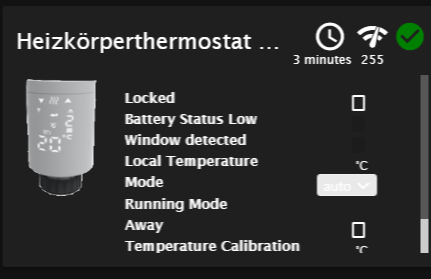
-
hab die manufactor id eingefügt, jetzt erkennt er das thermostat, liefert aber keine werte!
2022-11-15 21:35:02.182 - warn: zigbee.0 (92569) zigbee-herdsman-converters:SaswellThermostat: Unrecognized DP #2 with data {"dp":2,"datatype":4,"data":{"type":"Buffer","data":[2]}} 2022-11-15 21:35:02.434 - warn: zigbee.0 (92569) zigbee-herdsman-converters:SaswellThermostat: Unrecognized DP #4 with data {"dp":4,"datatype":2,"data":{"type":"Buffer","data":[0,0,0,50]}} 2022-11-15 21:35:02.551 - info: dwd.0 (92835) starting. Version 2.8.3 in /opt/iobroker/node_modules/iobroker.dwd, node: v16.18.1, js-controller: 4.0.23 2022-11-15 21:35:02.555 - warn: zigbee.0 (92569) zigbee-herdsman-converters:SaswellThermostat: Unrecognized DP #5 with data {"dp":5,"datatype":2,"data":{"type":"Buffer","data":[0,0,0,200]}} 2022-11-15 21:35:02.704 - warn: zigbee.0 (92569) zigbee-herdsman-converters:SaswellThermostat: Unrecognized DP #7 with data {"dp":7,"datatype":1,"data":{"type":"Buffer","data":[0]}} 2022-11-15 21:35:02.789 - warn: zigbee.0 (92569) zigbee-herdsman-converters:SaswellThermostat: Unrecognized DP #28 with data {"dp":28,"datatype":0,"data":{"type":"Buffer","data":[1,6,0,0,120,8,0,0,160,18,0,0,220,20,0,0,200]}} 2022-11-15 21:35:02.906 - warn: zigbee.0 (92569) zigbee-herdsman-converters:SaswellThermostat: Unrecognized DP #29 with data {"dp":29,"datatype":0,"data":{"type":"Buffer","data":[2,6,0,0,120,8,0,0,160,18,0,0,220,20,0,0,200]}} 2022-11-15 21:35:03.032 - warn: zigbee.0 (92569) zigbee-herdsman-converters:SaswellThermostat: Unrecognized DP #30 with data {"dp":30,"datatype":0,"data":{"type":"Buffer","data":[3,6,0,0,120,8,0,0,160,18,0,0,220,20,0,0,200]}} 2022-11-15 21:35:03.144 - warn: zigbee.0 (92569) zigbee-herdsman-converters:SaswellThermostat: Unrecognized DP #31 with data {"dp":31,"datatype":0,"data":{"type":"Buffer","data":[4,6,0,0,120,8,0,0,160,18,0,0,220,20,0,0,200]}} 2022-11-15 21:35:03.264 - warn: zigbee.0 (92569) zigbee-herdsman-converters:SaswellThermostat: Unrecognized DP #32 with data {"dp":32,"datatype":0,"data":{"type":"Buffer","data":[5,6,0,0,120,8,0,0,160,18,0,0,220,20,0,0,200]}} 2022-11-15 21:35:03.380 - warn: zigbee.0 (92569) zigbee-herdsman-converters:SaswellThermostat: Unrecognized DP #33 with data {"dp":33,"datatype":0,"data":{"type":"Buffer","data":[6,6,0,0,120,8,0,0,160,18,0,0,220,20,0,0,200]}} 2022-11-15 21:35:03.502 - warn: zigbee.0 (92569) zigbee-herdsman-converters:SaswellThermostat: Unrecognized DP #34 with data {"dp":34,"datatype":0,"data":{"type":"Buffer","data":[7,6,0,0,120,8,0,0,160,18,0,0,220,20,0,0,200]}} 2022-11-15 21:35:03.615 - warn: zigbee.0 (92569) zigbee-herdsman-converters:SaswellThermostat: Unrecognized DP #35 with data {"dp":35,"datatype":5,"data":{"type":"Buffer","data":[0]}} 2022-11-15 21:35:03.731 - warn: zigbee.0 (92569) zigbee-herdsman-converters:SaswellThermostat: Unrecognized DP #36 with data {"dp":36,"datatype":1,"data":{"type":"Buffer","data":[0]}} 2022-11-15 21:35:03.848 - warn: zigbee.0 (92569) zigbee-herdsman-converters:SaswellThermostat: Unrecognized DP #39 with data {"dp":39,"datatype":1,"data":{"type":"Buffer","data":[0]}} 2022-11-15 21:35:03.968 - warn: zigbee.0 (92569) zigbee-herdsman-converters:SaswellThermostat: Unrecognized DP #47 with data {"dp":47,"datatype":2,"data":{"type":"Buffer","data":[0,0,0,0]}}Ich kann dir da nicht weiterhelfen.
Vielleicht weiß @david-jung ja noch was dazu. -
kann es sein, dass mit den Rechten was nicht stimmt?`
$ iobroker url ioBroker/ioBroker.zigbee --host pi4b --debug install ioBroker/ioBroker.zigbee NPM version: 8.19.2 Installing ioBroker/ioBroker.zigbee... (System call) npm WARN cleanup Failed to remove some directories [npm WARN cleanup [ npm WARN cleanup '/opt/iobroker/node_modules/.zigbee-herdsman-converters-DzgWyYTV',npm WARN cleanup [Error: EACCES: permission denied, scandir '/opt/iobroker/node_modules/.zigbee-herdsman-converters-DzgWyYTV/devices'] {npm WARN cleanup errno: -13,npm WARN cleanup code: 'EACCES',npm WARN cleanup syscall: 'scandir',npm WARN cleanup path: '/opt/iobroker/node_modules/.zigbee-herdsman-converters-DzgWyYTV/devices'npm WARN cleanup }npm WARN cleanup ]npm WARN cleanup -
kann es sein, dass mit den Rechten was nicht stimmt?`
$ iobroker url ioBroker/ioBroker.zigbee --host pi4b --debug install ioBroker/ioBroker.zigbee NPM version: 8.19.2 Installing ioBroker/ioBroker.zigbee... (System call) npm WARN cleanup Failed to remove some directories [npm WARN cleanup [ npm WARN cleanup '/opt/iobroker/node_modules/.zigbee-herdsman-converters-DzgWyYTV',npm WARN cleanup [Error: EACCES: permission denied, scandir '/opt/iobroker/node_modules/.zigbee-herdsman-converters-DzgWyYTV/devices'] {npm WARN cleanup errno: -13,npm WARN cleanup code: 'EACCES',npm WARN cleanup syscall: 'scandir',npm WARN cleanup path: '/opt/iobroker/node_modules/.zigbee-herdsman-converters-DzgWyYTV/devices'npm WARN cleanup }npm WARN cleanup ]npm WARN cleanup@diamand2k22 sagte in (GELÖST) zigbee-herdsmann-converters / wie manuell updaten?:
dass mit den Rechten was nicht stimmt?`
iob stop iob fix iob start -
@diamand2k22 sagte in (GELÖST) zigbee-herdsmann-converters / wie manuell updaten?:
dass mit den Rechten was nicht stimmt?`
iob stop iob fix iob start -
@diamand2k22 sagte in (GELÖST) zigbee-herdsmann-converters / wie manuell updaten?:
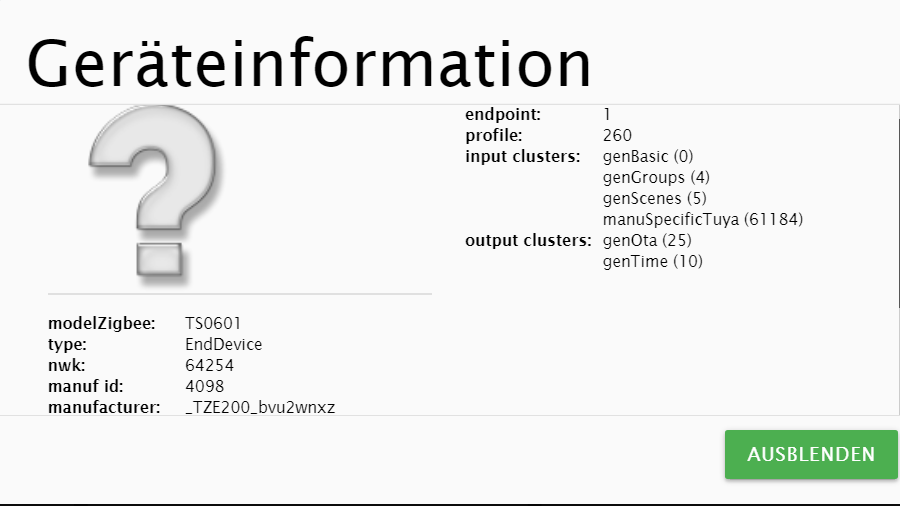
Hab's dann doch selber hinbekommen!
Und des Rätsels Lösung war ?
Vll hilft das auch anderen Mitlesenden !



Hey! Du scheinst an dieser Unterhaltung interessiert zu sein, hast aber noch kein Konto.
Hast du es satt, bei jedem Besuch durch die gleichen Beiträge zu scrollen? Wenn du dich für ein Konto anmeldest, kommst du immer genau dorthin zurück, wo du zuvor warst, und kannst dich über neue Antworten benachrichtigen lassen (entweder per E-Mail oder Push-Benachrichtigung). Du kannst auch Lesezeichen speichern und Beiträge positiv bewerten, um anderen Community-Mitgliedern deine Wertschätzung zu zeigen.
Mit deinem Input könnte dieser Beitrag noch besser werden 💗
Registrieren AnmeldenSupport us
215
Online33.0k
Benutzer83.6k
Themen1.3m
Beiträge