




iob diag - Skript
-
WIP: Übersetzung auf Deutsch in Arbeit. Wird aber nur teilweise möglich sein.
Skript einfach mal mit der Option '--de' starten. Also./iob_diag.sh --deTEST-Version:
curl  https://raw.githubusercontent.com/Grothesk242/ioBroker/refs/heads/master/diag.sh > iob_diag.sh
chmod 744 iob_diag.sh
./iob_diag.sh

Weitere Optionen:
./iob_diag.sh --unmask           <--- Zeigt maskierte Ausgaben im Klartext
./iob_diag.sh --de               <--- Ausgabe tw. auf deutsch
./iob_diag.sh --de --unmask      <--- Kombination aus deutsch und Klartext
Mit Ausgabe in eine Logdatei namens
iob_diag.logsähe der Aufruf so aus:./iob_diag.sh | tee iob_diag.logVielleicht mag ja jemand mit Docker oder LXC das mal ausführen und den Output zeigen?
Hier werden die üblichen Dinge relativ kompakt aufgelistet, die immer wieder bei Anfragen im Forum vermisst werden.
Hier mal als ersten Einblick, vielleicht fällt ja noch etwas ein, was auch interessant zu wissen wäre, bevor man im Nebel stochert:
*** ioBroker Diagnose ***

Bitte das Fenster von puTTY breit ziehen oder auf Vollbild setzen
Den nachfolgenden Output 1:1 in das ioBroker-Forum unter
https://forum.iobroker.net
vollständig posten ,inkl der jeweils drei Steuerzeichen ``` am Anfang und Ende:

===========Ab hier kopieren =========

*** BASISSYSTEM ***
CPU-Architektur: aarch64
Docker: Nein
No LSB modules are available.
Distributor ID: Debian
Description:    Debian GNU/Linux 11 (bullseye)
Release:        11
Codename:       bullseye

*** Zeit und Zeitzonen ***
               Local time: Tue 2022-11-01 16:53:39 CET
           Universal time: Tue 2022-11-01 15:53:39 UTC
                 RTC time: n/a
                Time zone: Europe/Berlin (CET, +0100)
System clock synchronized: yes
              NTP service: active
          RTC in local TZ: no

*** ARBEITSSPEICHER ***
               total        used        free      shared  buff/cache   available
Mem:           7.7Gi       2.3Gi       3.2Gi       0.0Ki       2.2Gi       5.2Gi
Swap:           99Mi          0B        99Mi
Total:         7.8Gi       2.3Gi       3.3Gi

*** Nodejs-Installation ***
/usr/bin/nodejs         v18.12.0
/usr/bin/node           v18.12.0
/usr/bin/npm            8.19.2

*** ioBroker-Installation ***
js-controller:  4.0.23
Updates + Repos:
Used repository: beta

*** User und Gruppen ***
echad
/home/echad
echad adm dialout cdrom sudo audio video plugdev games users input render netdev gpio i2c spi iobroker

*** Server-Setup ***
Konsole: tty
Desktop:

*** Repositories und OS-Updates ***
Hit:1 http://deb.debian.org/debian bullseye InRelease
Hit:2 http://deb.debian.org/debian bullseye-updates InRelease
Hit:3 http://security.debian.org/debian-security bullseye-security InRelease
Hit:4 http://phoscon.de/apt/deconz bullseye InRelease
Hit:5 http://deb.debian.org/debian bullseye-backports InRelease
Hit:6 http://archive.raspberrypi.org/debian bullseye InRelease
Hit:7 http://packages.azlux.fr/debian bullseye InRelease
Hit:8 https://packages.grafana.com/oss/deb stable InRelease
Hit:9 https://deb.nodesource.com/node_10.x bullseye InRelease
Hit:10 https://repos.influxdata.com/debian bullseye InRelease
Hit:11 https://deb.nodesource.com/node_12.x bullseye InRelease
Hit:12 https://deb.nodesource.com/node_14.x bullseye InRelease
Hit:13 https://deb.nodesource.com/node_16.x bullseye InRelease
Hit:14 https://packages.redis.io/deb bullseye InRelease
Hit:15 https://deb.volian.org/volian scar InRelease
Hit:16 https://deb.nodesource.com/node_18.x bullseye InRelease
Hit:18 https://deb.nodesource.com/node_19.x bullseye InRelease
Get:19 https://pkgs.tailscale.com/stable/debian bullseye InRelease
Hit:17 https://packagecloud.io/ookla/speedtest-cli/debian bullseye InRelease
Fetched 5,545 B in 3s (1,694 B/s)
Reading package lists... Done
Building dependency tree... Done
Reading state information... Done
All packages are up to date.
nodejs:
  Installed: 18.12.0-deb-1nodesource1
  Candidate: 18.12.0-deb-1nodesource1
  Version table:
     19.0.0-deb-1nodesource1 500
        500 https://deb.nodesource.com/node_19.x bullseye/main arm64 Packages
 *** 18.12.0-deb-1nodesource1 501
        500 https://deb.nodesource.com/node_18.x bullseye/main arm64 Packages
        100 /var/lib/dpkg/status
     16.18.0-deb-1nodesource1 500
        500 https://deb.nodesource.com/node_16.x bullseye/main arm64 Packages
     14.20.1-deb-1nodesource1 500
        500 https://deb.nodesource.com/node_14.x bullseye/main arm64 Packages
     12.22.12-deb-1nodesource1 500
        500 https://deb.nodesource.com/node_12.x bullseye/main arm64 Packages
     12.22.12~dfsg-1~deb11u1 500
        500 http://security.debian.org/debian-security bullseye-security/main arm64 Packages
     12.22.5~dfsg-2~11u1 500
        500 http://deb.debian.org/debian bullseye/main arm64 Packages
     10.24.1-deb-1nodesource1 500
        500 https://deb.nodesource.com/node_10.x bullseye/main arm64 Packages

========== Bis hier kopieren ===========

iob diag wurde beendet.
Bitte nicht über den wilden Zoo an Repos wundern, das ist mein Test/Frickel-System, das soll so! :-D
======================= SUMMARY =======================
                        v.0.0.6


Operatingsystem:        Raspbian GNU/Linux 10 (buster)
Installation:           Native
Timezone:               Europe/Berlin
User-ID:                1000
X-Server:               false

Pending OS-Updates:     194

Nodejs-Installation:    /usr/bin/nodejs         v16.15.1
                        /usr/bin/node           v16.15.1
                        /usr/bin/npm            8.11.0

ioBroker Core:          js-controller           4.0.23
                        admin                   6.2.22

Pending iob updates:    4

Active repo(s): stable

Objects:                11255
States:                 9171

Size of iob-Database:

33M     /opt/iobroker/iobroker-data/objects.jsonl
12M     /opt/iobroker/iobroker-data/objects.json.migrated
12M     /opt/iobroker/iobroker-data/objects.json.bak.migrated
15M     /opt/iobroker/iobroker-data/states.jsonl
2.4M    /opt/iobroker/iobroker-data/states.json.migrated
2.4M    /opt/iobroker/iobroker-data/states.json.bak.migrated
0       /opt/iobroker/iobroker-data/states.json.broken


====================== END OF SUMMARY ==================
Mein IOBroker läuft nach einem Versuch der Wiederherstellung nicht mehr...
-
======================= SUMMARY =======================
                        v.0.0.6


Operatingsystem:        Raspbian GNU/Linux 10 (buster)
Installation:           Native
Timezone:               Europe/Berlin
User-ID:                1000
X-Server:               false

Pending OS-Updates:     194

Nodejs-Installation:    /usr/bin/nodejs         v16.15.1
                        /usr/bin/node           v16.15.1
                        /usr/bin/npm            8.11.0

ioBroker Core:          js-controller           4.0.23
                        admin                   6.2.22

Pending iob updates:    4

Active repo(s): stable

Objects:                11255
States:                 9171

Size of iob-Database:

33M     /opt/iobroker/iobroker-data/objects.jsonl
12M     /opt/iobroker/iobroker-data/objects.json.migrated
12M     /opt/iobroker/iobroker-data/objects.json.bak.migrated
15M     /opt/iobroker/iobroker-data/states.jsonl
2.4M    /opt/iobroker/iobroker-data/states.json.migrated
2.4M    /opt/iobroker/iobroker-data/states.json.bak.migrated
0       /opt/iobroker/iobroker-data/states.json.broken


====================== END OF SUMMARY ==================
Mein IOBroker läuft nach einem Versuch der Wiederherstellung nicht mehr...
Zeig mal die Langfassung. Am besten aber in einem eigenen Thread.
Linux-Werkzeugkasten:
https://forum.iobroker.net/topic/42952/der-kleine-iobroker-linux-werkzeugkasten
NodeJS Fixer Skript:
https://forum.iobroker.net/topic/68035/iob-node-fix-skript
iob_diag: curl -sLf -o diag.sh https://iobroker.net/diag.sh && bash diag.sh -
Zeig mal die Langfassung. Am besten aber in einem eigenen Thread.
bumped:
Update iob_diag
Included check for directories that potentially may cause issues with npm@8.
Linux-Werkzeugkasten:
https://forum.iobroker.net/topic/42952/der-kleine-iobroker-linux-werkzeugkasten
NodeJS Fixer Skript:
https://forum.iobroker.net/topic/68035/iob-node-fix-skript
iob_diag: curl -sLf -o diag.sh https://iobroker.net/diag.sh && bash diag.sh -
bumped:
Update iob_diag
Included check for directories that potentially may cause issues with npm@8.
@thomas-braun
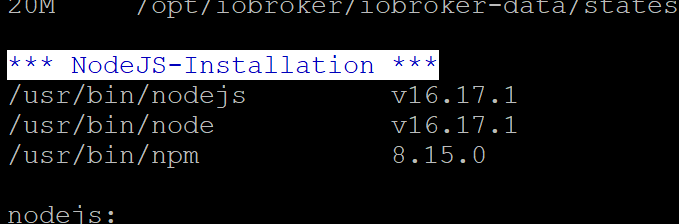
Ausgabe kommt*** NodeJS-Installation *** /usr/bin/nodejs v16.17.1 /usr/bin/node v16.17.1 /usr/bin/npm 8.15.0 nodejs: Installed: 16.17.1-deb-1nodesource1 Candidate: 16.18.1-deb-1nodesource1 Version table: 16.18.1-deb-1nodesource1 500 500 https://deb.nodesource.com/node_16.x focal/main amd64 Packages *** 16.17.1-deb-1nodesource1 100 100 /var/lib/dpkg/status 14.21.1-deb-1nodesource1 500 500 https://deb.nodesource.com/node_14.x focal/main amd64 Packages 10.19.0~dfsg-3ubuntu1 500 500 http://archive.ubuntu.com/ubuntu focal/universe amd64 Packages Temp directories causing npm8 problem: 0Ich persönlich find die Schwarze Schrift in putty mit dem weißem Hintergrund schwer zu lesen. Vielleicht geht es auch nur mir so. Sieht hier im Screenshot deutlich besser aus als bei mir auf der Konsole. Der grüne Text liest sich sehr angenehm.
-
@thomas-braun
Ausgabe kommt*** NodeJS-Installation *** /usr/bin/nodejs v16.17.1 /usr/bin/node v16.17.1 /usr/bin/npm 8.15.0 nodejs: Installed: 16.17.1-deb-1nodesource1 Candidate: 16.18.1-deb-1nodesource1 Version table: 16.18.1-deb-1nodesource1 500 500 https://deb.nodesource.com/node_16.x focal/main amd64 Packages *** 16.17.1-deb-1nodesource1 100 100 /var/lib/dpkg/status 14.21.1-deb-1nodesource1 500 500 https://deb.nodesource.com/node_14.x focal/main amd64 Packages 10.19.0~dfsg-3ubuntu1 500 500 http://archive.ubuntu.com/ubuntu focal/universe amd64 Packages Temp directories causing npm8 problem: 0Ich persönlich find die Schwarze Schrift in putty mit dem weißem Hintergrund schwer zu lesen. Vielleicht geht es auch nur mir so. Sieht hier im Screenshot deutlich besser aus als bei mir auf der Konsole. Der grüne Text liest sich sehr angenehm.
@feuersturm sagte in iob diag - Skript:
Sieht hier im Screenshot deutlich besser aus als bei mir auf der Konsole.
Das ist aber ein Thema in puTTY, da kann ich nicht viel dran machen.
Die Schrift sollte eigentlich blau auf weiß sein in den Überschriften.Linux-Werkzeugkasten:
https://forum.iobroker.net/topic/42952/der-kleine-iobroker-linux-werkzeugkasten
NodeJS Fixer Skript:
https://forum.iobroker.net/topic/68035/iob-node-fix-skript
iob_diag: curl -sLf -o diag.sh https://iobroker.net/diag.sh && bash diag.sh -
bumped:
Update iob_diag
Included check for directories that potentially may cause issues with npm@8.
@thomas-braun sagte in iob diag - Skript:
Update iob_diag
funktioniert
*** BASE SYSTEM *** Architecture: x86_64 Docker: false Virtualization: lxc Distributor ID: Ubuntu Description: Ubuntu 20.04.5 LTS Release: 20.04 Codename: focal NAME="Ubuntu" VERSION="20.04.5 LTS (Focal Fossa)" ID=ubuntu ID_LIKE=debian PRETTY_NAME="Ubuntu 20.04.5 LTS" VERSION_ID="20.04" HOME_URL="https://www.ubuntu.com/" SUPPORT_URL="https://help.ubuntu.com/" BUG_REPORT_URL="https://bugs.launchpad.net/ubuntu/" PRIVACY_POLICY_URL="https://www.ubuntu.com/legal/terms-and-policies/privacy-policy" VERSION_CODENAME=focal UBUNTU_CODENAME=focal Systemuptime and Load: 20:53:57 up 61 days, 9:11, 1 user, load average: 0.99, 1.34, 1.66 CPU threads: 4 *** Time and Time Zones *** Tue Nov 8 19:53:57 UTC 2022 Tue Nov 8 20:53:57 CET 2022 CET +0100 Europe/Vienna *** User and Groups *** nega /home/nega nega adm dialout sudo users iobroker *** X-Server-Setup *** X-Server: false Desktop: Konsole: tty *** MEMORY *** total used free shared buff/cache available Mem: 6.1G 4.9G 640M 0.0K 650M 1.3G Swap: 2.0G 1.8G 272M Total: 8.2G 6.6G 913M 6144 M total memory 4852 M used memory 4022 M active memory 1079 M inactive memory 641 M free memory 0 M buffer memory 650 M swap cache 2048 M total swap 1775 M used swap 272 M free swap *** FILESYSTEM *** Filesystem Type Size Used Avail Use% Mounted on /dev/mapper/pve-vm--100--disk--0 ext4 20G 14G 5.0G 74% / 10.0.1.21:/volume1/Backups nfs4 14T 7.6T 6.5T 55% /opt/iobroker/backups none tmpfs 492K 4.0K 488K 1% /dev udev devtmpfs 7.8G 0 7.8G 0% /dev/tty tmpfs tmpfs 7.8G 0 7.8G 0% /dev/shm tmpfs tmpfs 1.6G 136K 1.6G 1% /run tmpfs tmpfs 5.0M 0 5.0M 0% /run/lock tmpfs tmpfs 1.6G 0 1.6G 0% /run/user/1001 Files in neuralgic directories: /var: [sudo] password for nega: 2.5G /var/ 2.0G /var/log/journal/b354c482f7cc342776f020ee5ea440c3 2.0G /var/log/journal 2.0G /var/log 294M /var/lib /opt/iobroker/backups: 4.3G /opt/iobroker/backups/ /opt/iobroker/iobroker-data: 4.0G /opt/iobroker/iobroker-data/ 2.5G /opt/iobroker/iobroker-data/history 1014M /opt/iobroker/iobroker-data/files 341M /opt/iobroker/iobroker-data/files/vis.0 314M /opt/iobroker/iobroker-data/backup-objects The five largest files in iobroker-data are: 160M /opt/iobroker/iobroker-data/states.jsonl 46M /opt/iobroker/iobroker-data/objects.jsonl 33M /opt/iobroker/iobroker-data/files/devices.admin/static/js/main.4f0a34b4.js.map 32M /opt/iobroker/iobroker-data/files/vis.0/VIS/Background/Starfield 7.mp4 30M /opt/iobroker/iobroker-data/files/vis.0/VIS/Background/Starfield 4.mp4 *** NodeJS-Installation *** /usr/bin/nodejs v16.18.1 /usr/bin/node v16.18.1 /usr/bin/npm 8.19.2 nodejs: Installed: 16.18.1-deb-1nodesource1 Candidate: 16.18.1-deb-1nodesource1 Version table: *** 16.18.1-deb-1nodesource1 500 500 https://deb.nodesource.com/node_16.x focal/main amd64 Packages 100 /var/lib/dpkg/status 10.19.0~dfsg-3ubuntu1 500 500 http://archive.ubuntu.com/ubuntu focal/universe amd64 Packages Temp directories causing npm8 problem: 0 *** ioBroker-Installation *** Core adapters versions js-controller: 4.0.23 admin: 6.2.23 Enabled adapters with bindings + system.adapter.admin.0 : admin : ioBroker - enabled, port: 8081, bind: 0.0.0.0 (SSL), run as: admin + system.adapter.hm-rpc.0 : hm-rpc : ioBroker - enabled, port: 0 + system.adapter.hm-rpc.1 : hm-rpc : ioBroker - enabled, port: 0 + system.adapter.hm-rpc.2 : hm-rpc : ioBroker - enabled, port: 0 + system.adapter.hue.0 : hue : ioBroker - enabled, port: 80 + system.adapter.influxdb.0 : influxdb : ioBroker - enabled, port: 32543 + system.adapter.mihome.0 : mihome : ioBroker - enabled, port: 9898, bind: 0.0.0.0 + system.adapter.proxmox.0 : proxmox : ioBroker - enabled, port: 8006 + system.adapter.rest-api.0 : rest-api : ioBroker - enabled, port: 8093, bind: 0.0.0.0 (SSL), run as: rest + system.adapter.seq.0 : seq : ioBroker - enabled, port: 443 + system.adapter.shelly.0 : shelly : ioBroker - enabled, port: 1882, bind: 0.0.0.0 + system.adapter.simple-api.0 : simple-api : ioBroker - enabled, port: 8087, bind: 0.0.0.0, run as: admin + system.adapter.socketio.0 : socketio : ioBroker - enabled, port: 8084, bind: 0.0.0.0, run as: admin + system.adapter.synology.0 : synology : ioBroker - enabled, port: 5001 + system.adapter.telegram.0 : telegram : ioBroker - enabled, port: 8443, bind: 0.0.0.0 + system.adapter.web.0 : web : ioBroker - enabled, port: 8082, bind: 0.0.0.0, run as: admin ioBroker-Repositories Stable (default): http://download.iobroker.net/sources-dist.json Beta (latest) : http://download.iobroker.net/sources-dist-latest.json Active repo(s): Beta (latest) ioBroker-Instances Used repository: Beta (latest) Adapter "admin" : 6.2.23 , installed 6.2.23 Adapter "alexa-timer-vis": 0.1.14 , installed 0.1.14 Adapter "alexa2" : 3.21.0 , installed 3.21.0 Adapter "alias-manager": 1.2.6 , installed 1.2.6 Adapter "backitup" : 2.5.4 , installed 2.5.4 Adapter "birthdays" : 2.1.0 , installed 2.1.0 Adapter "bring" : 1.8.1 , installed 1.8.1 Adapter "cloud" : 4.3.0 , installed 4.3.0 Adapter "daswetter" : 3.1.4 , installed 3.1.4 Adapter "denon" : 1.13.4 , installed 1.13.4 Adapter "device-watcher": 2.0.1 , installed 2.0.1 Adapter "devices" : 1.1.1 , installed 1.1.1 Adapter "discovery" : 3.1.0 , installed 3.1.0 Adapter "doorbird" : 0.1.5 , installed 0.1.5 Adapter "dwd" : 2.8.3 , installed 2.8.3 Adapter "email" : 1.1.4 , installed 1.1.4 Adapter "eventlist" : 1.1.1 , installed 1.1.1 Adapter "feiertage" : 1.1.0 , installed 1.1.0 Adapter "flot" : 1.11.0 , installed 1.11.0 Adapter "fronius" : 1.1.3 , installed 1.1.6 Adapter "fronius-solarweb": 0.0.3 , installed 0.0.3 Adapter "fuelpricemonitor": 0.3.1 , installed 0.3.1 Adapter "harmony" : 1.2.2 , installed 1.2.2 Adapter "history" : 2.2.4 , installed 2.2.4 Adapter "hm-rega" : 3.0.43 , installed 3.0.43 Adapter "hm-rpc" : 1.15.15 , installed 1.15.15 Adapter "hs100" : 2.1.2 , installed 2.1.2 Adapter "hue" : 3.7.1 , installed 3.7.1 Adapter "ical" : 1.13.2 , installed 1.13.2 Adapter "icons-addictive-flavour-png": 0.1.0, installed 0.1.0 Adapter "icons-fatcow-hosting": 0.1.0, installed 0.1.0 Adapter "icons-icons8" : 0.0.1 , installed 0.0.1 Adapter "icons-material-png": 0.1.0, installed 0.1.0 Adapter "icons-material-svg": 0.1.0, installed 0.1.0 Adapter "icons-mfd-png": 1.1.0 , installed 1.1.0 Adapter "icons-mfd-svg": 1.1.0 , installed 1.1.0 Adapter "icons-open-icon-library-png": 0.1.2, installed 0.1.2 Adapter "icons-ultimate-png": 1.0.1, installed 1.0.1 Adapter "influxdb" : 3.2.0 , installed 3.2.0 Adapter "info" : 1.9.21 , installed 1.9.21 Adapter "iot" : 1.12.4 , installed 1.12.4 Adapter "iqontrol" : 2.0.1 , installed 2.0.1 Adapter "jarvis" : 3.0.15 , installed 3.1.0-alpha.23 Adapter "javascript" : 6.1.3 , installed 6.1.3 Controller "js-controller": 4.0.23 , installed 4.0.23 Adapter "linkeddevices": 1.5.5 , installed 1.5.5 Adapter "linux-control": 1.1.5 , installed 1.1.5 Adapter "logparser" : 1.1.0 , installed 1.1.0 Adapter "meteoalarm" : 2.3.1 , installed 2.3.1 Adapter "mihome" : 1.4.0 , installed 1.4.0 Adapter "mytime" : 0.7.12 , installed 0.7.12 Adapter "nina" : 0.0.25 , installed 0.0.25 Adapter "nut" : 1.5.1 , installed 1.5.1 Adapter "octoprint" : 4.0.1 , installed 4.0.1 Adapter "parser" : 1.2.1 , installed 1.2.1 Adapter "pegelalarm" : 1.2.9 , installed 1.2.9 Adapter "pi-hole" : 1.3.4 , installed 1.3.4 Adapter "ping" : 1.5.3 , installed 1.5.3 Adapter "plex" : 0.9.1 , installed 0.9.1 Adapter "pollenflug" : 1.0.6 , installed 1.0.6 Adapter "proxmox" : 1.3.5 , installed 1.3.5 Adapter "proxy" : 1.3.2 , installed 1.3.2 Adapter "puppeteer" : 0.2.6 , installed 0.2.6 Adapter "rest-api" : 1.0.4 , installed 1.0.4 Adapter "seq" : 0.2.10 , installed 0.2.10 Adapter "shelly" : 6.2.4 , installed 6.2.4 Adapter "shuttercontrol": 1.4.18 , installed 1.4.18 Adapter "simple-api" : 2.7.2 , installed 2.7.2 Adapter "snmp" : 2.2.1 , installed 2.2.1 Adapter "socketio" : 6.1.10 , installed 6.1.10 Adapter "sourceanalytix": 0.4.14 , installed 0.4.14 Adapter "synology" : 2.1.13 , installed 2.1.13 Adapter "telegram" : 1.15.2 , installed 1.15.2 Adapter "trashschedule": 2.0.3 , installed 2.0.3 Adapter "unifi" : 0.6.3 , installed 0.6.3 Adapter "vis" : 1.4.15 , installed 1.4.15 Adapter "vis-bars" : 0.1.4 , installed 0.1.4 Adapter "vis-canvas-gauges": 1.0.1, installed 1.0.1 Adapter "vis-colorpicker": 1.2.0 , installed 1.2.0 Adapter "vis-fancyswitch": 1.1.0 , installed 1.1.0 Adapter "vis-google-fonts": 1.0.4 , installed 1.0.4 Adapter "vis-history" : 1.0.0 , installed 1.0.0 Adapter "vis-hqwidgets": 1.3.0 , installed 1.3.0 Adapter "vis-icontwo" : 0.90.0 , installed 0.90.0 Adapter "vis-inventwo" : 3.3.3 , installed 3.3.3 Adapter "vis-jqui-mfd" : 1.0.12 , installed 1.0.12 Adapter "vis-justgage" : 1.0.2 , installed 1.0.2 Adapter "vis-map" : 1.0.4 , installed 1.0.4 Adapter "vis-material" : 0.1.3 , installed 0.1.3 Adapter "vis-materialdesign": 0.5.9, installed 0.5.5 [Updatable] Adapter "vis-metro" : 1.2.0 , installed 1.2.0 Adapter "vis-players" : 0.1.6 , installed 0.1.6 Adapter "vis-rgraph" : 0.0.2 , installed 0.0.2 Adapter "vis-timeandweather": 1.2.2, installed 1.2.2 Adapter "vis-weather" : 2.5.6 , installed 2.5.6 Adapter "weatherunderground": 3.4.2, installed 3.4.2 Adapter "web" : 5.2.10 , installed 5.2.10 Adapter "web-speedy" : 0.2.0 , installed 0.2.0 Adapter "wireguard" : 1.4.1 , installed 1.4.1 Adapter "ws" : 2.1.5 , installed 2.1.5 Adapter "xbox" : 1.0.1 , installed 1.0.1 Objects and States Please stand by - This may take a while Objects: 36660 States: 35160 *** OS-Repositories and Updates *** Hit:1 https://deb.nodesource.com/node_16.x focal InRelease Hit:2 http://archive.ubuntu.com/ubuntu focal InRelease Hit:3 http://archive.ubuntu.com/ubuntu focal-updates InRelease Hit:4 http://archive.ubuntu.com/ubuntu focal-security InRelease Hit:5 https://packagecloud.io/ookla/speedtest-cli/ubuntu focal InRelease Reading package lists... Done Pending Updates: 5 *** Listening Ports *** Active Internet connections (only servers) Proto Recv-Q Send-Q Local Address Foreign Address State User Inode PID/Program name tcp 0 0 0.0.0.0:22 0.0.0.0:* LISTEN 0 459304853 2031740/sshd: /usr/ tcp 0 0 0.0.0.0:111 0.0.0.0:* LISTEN 0 31745 1/systemd tcp 0 0 0.0.0.0:49541 0.0.0.0:* LISTEN 1000 44973986 199443/wput tcp 0 0 0.0.0.0:33179 0.0.0.0:* LISTEN 1000 44724275 198404/wput tcp 0 0 0.0.0.0:41371 0.0.0.0:* LISTEN 1000 43004499 191228/wput tcp 0 0 0.0.0.0:33251 0.0.0.0:* LISTEN 1000 44643010 198128/wput tcp 0 0 0.0.0.0:8701 0.0.0.0:* LISTEN 1000 40089 770/io.hm-rpc.2 tcp 0 0 0.0.0.0:57615 0.0.0.0:* LISTEN 1000 43167669 192281/wput tcp 0 0 0.0.0.0:49771 0.0.0.0:* LISTEN 1000 44518133 197607/wput tcp 0 0 0.0.0.0:50049 0.0.0.0:* LISTEN 1000 44392437 197031/wput tcp 0 0 0.0.0.0:9000 0.0.0.0:* LISTEN 1000 32287 120/iobroker.js-con tcp 0 0 0.0.0.0:9001 0.0.0.0:* LISTEN 1000 34067 120/iobroker.js-con tcp 0 0 0.0.0.0:34003 0.0.0.0:* LISTEN 1000 43824216 194549/wput tcp 0 0 0.0.0.0:50219 0.0.0.0:* LISTEN 1000 43682667 193926/wput tcp 0 0 0.0.0.0:50595 0.0.0.0:* LISTEN 1000 44224282 196358/wput tcp 0 0 127.0.0.1:6010 0.0.0.0:* LISTEN 1001 476899676 2116011/sshd: nega@ tcp 0 0 0.0.0.0:34351 0.0.0.0:* LISTEN 1000 44100092 195644/wput tcp 0 0 0.0.0.0:2001 0.0.0.0:* LISTEN 1000 264468026 1162298/io.hm-rpc.1 tcp 0 0 0.0.0.0:2010 0.0.0.0:* LISTEN 1000 264468032 1162305/io.hm-rpc.0 tcp 0 0 0.0.0.0:59225 0.0.0.0:* LISTEN 1000 43961951 195082/wput tcp 0 0 127.0.0.1:39533 0.0.0.0:* LISTEN 1000 75833 2444/chrome tcp 0 0 0.0.0.0:43455 0.0.0.0:* LISTEN 1000 43006388 191447/wput tcp 0 0 0.0.0.0:35221 0.0.0.0:* LISTEN 1000 43003855 191402/wput tcp 0 0 0.0.0.0:35075 0.0.0.0:* LISTEN 1000 44974560 199032/wput tcp 0 0 0.0.0.0:51879 0.0.0.0:* LISTEN 1000 44972794 199121/wput tcp 0 0 0.0.0.0:43891 0.0.0.0:* LISTEN 1000 44271852 196521/wput tcp 0 0 0.0.0.0:60251 0.0.0.0:* LISTEN 1000 44627799 198053/wput tcp 0 0 0.0.0.0:52405 0.0.0.0:* LISTEN 1000 44054142 195482/wput tcp 0 0 10.0.1.202:8100 0.0.0.0:* LISTEN 1000 51625 1182/io.doorbird.0 tcp 0 0 0.0.0.0:44075 0.0.0.0:* LISTEN 1000 43358491 192556/wput tcp 0 0 127.0.0.53:53 0.0.0.0:* LISTEN 106 459305571 2031837/systemd-res tcp 0 0 0.0.0.0:52609 0.0.0.0:* LISTEN 1000 44238554 196384/wput tcp 0 0 0.0.0.0:37085 0.0.0.0:* LISTEN 1000 43005160 191286/wput tcp 0 0 0.0.0.0:45139 0.0.0.0:* LISTEN 1000 44485383 197472/wput tcp 0 0 0.0.0.0:37335 0.0.0.0:* LISTEN 1000 43106212 192002/wput tcp 0 0 127.0.0.1:25 0.0.0.0:* LISTEN 0 33238 296/master tcp 0 0 0.0.0.0:53881 0.0.0.0:* LISTEN 1000 43093131 191976/wput tcp 0 0 0.0.0.0:46065 0.0.0.0:* LISTEN 1000 45025654 199681/wput tcp 0 0 0.0.0.0:54035 0.0.0.0:* LISTEN 1000 44970604 199166/wput tcp 0 0 0.0.0.0:54677 0.0.0.0:* LISTEN 1000 43004848 191522/wput tcp 0 0 0.0.0.0:55605 0.0.0.0:* LISTEN 1000 44348045 196856/wput tcp 0 0 0.0.0.0:55641 0.0.0.0:* LISTEN 1000 44972791 199371/wput tcp 0 0 0.0.0.0:55973 0.0.0.0:* LISTEN 1000 44365268 196933/wput tcp 0 0 0.0.0.0:39571 0.0.0.0:* LISTEN 1000 43340786 192452/wput tcp 0 0 0.0.0.0:55901 0.0.0.0:* LISTEN 1000 44975404 199328/wput tcp 0 0 0.0.0.0:39817 0.0.0.0:* LISTEN 1000 43777455 194268/wput tcp 0 0 0.0.0.0:47885 0.0.0.0:* LISTEN 1000 44286400 196625/wput tcp 0 0 0.0.0.0:47903 0.0.0.0:* LISTEN 1000 44301836 196685/wput tcp 0 0 0.0.0.0:56143 0.0.0.0:* LISTEN 1000 43005597 191328/wput tcp 0 0 0.0.0.0:40105 0.0.0.0:* LISTEN 1000 43154688 192203/wput tcp 0 0 0.0.0.0:56613 0.0.0.0:* LISTEN 1000 44207006 196223/wput tcp 0 0 0.0.0.0:40239 0.0.0.0:* LISTEN 1000 44675322 198247/wput tcp 0 0 0.0.0.0:40943 0.0.0.0:* LISTEN 1000 44972788 199269/wput tcp 0 0 0.0.0.0:57187 0.0.0.0:* LISTEN 1000 44533340 197681/wput tcp6 0 0 :::22 :::* LISTEN 0 459304855 2031740/sshd: /usr/ tcp6 0 0 :::111 :::* LISTEN 0 31747 1/systemd tcp6 0 0 ::1:6010 :::* LISTEN 1001 476899675 2116011/sshd: nega@ tcp6 0 0 :::61991 :::* LISTEN 1000 31264400 140098/io.harmony.1 tcp6 0 0 ::1:25 :::* LISTEN 0 33239 296/master tcp6 0 0 :::8082 :::* LISTEN 1000 256495404 1127044/io.web.0 tcp6 0 0 :::8081 :::* LISTEN 1000 279040541 1226006/io.admin.0 tcp6 0 0 :::8087 :::* LISTEN 1000 241264278 1059609/io.simple-a tcp6 0 0 :::8084 :::* LISTEN 1000 64858 2100/io.socketio.0 tcp6 0 0 :::8093 :::* LISTEN 1000 66370 2381/io.rest-api.0 udp 0 0 0.0.0.0:58265 0.0.0.0:* 1000 476906420 1877717/io.xbox.0 udp 0 0 0.0.0.0:9898 0.0.0.0:* 1000 439148881 848/io.mihome.0 udp 0 0 0.0.0.0:59620 0.0.0.0:* 1000 318977549 1401696/io.snmp.0 udp 0 0 0.0.0.0:59889 0.0.0.0:* 1000 318977550 1401696/io.snmp.0 udp 0 0 0.0.0.0:61991 0.0.0.0:* 1000 31264401 140098/io.harmony.1 udp 0 0 0.0.0.0:5683 0.0.0.0:* 1000 352740191 1551038/io.shelly.0 udp 0 0 127.0.0.53:53 0.0.0.0:* 106 459305570 2031837/systemd-res udp 0 0 10.0.1.202:68 0.0.0.0:* 105 475215547 2031831/systemd-net udp 0 0 0.0.0.0:111 0.0.0.0:* 0 31746 1/systemd udp6 0 0 :::111 :::* 0 31748 1/systemd======================= SUMMARY ======================= v.0.0.6 Operatingsystem: Ubuntu 20.04.5 LTS Installation: lxc Timezone: Europe/Vienna User-ID: 1001 X-Server: false Pending OS-Updates: 5 Nodejs-Installation: /usr/bin/nodejs v16.18.1 /usr/bin/node v16.18.1 /usr/bin/npm 8.19.2 ioBroker Core: js-controller 4.0.23 admin 6.2.23 Pending iob updates: 1 Active repo(s): Beta (latest) Objects: 36660 States: 35160 Size of iob-Database: 46M /opt/iobroker/iobroker-data/objects.jsonl 29M /opt/iobroker/iobroker-data/objects.json.migrated 29M /opt/iobroker/iobroker-data/objects.json.bak.migrated 0 /opt/iobroker/iobroker-data/objects.json.broken 164M /opt/iobroker/iobroker-data/states.jsonl 9.4M /opt/iobroker/iobroker-data/states.json.migrated 9.4M /opt/iobroker/iobroker-data/states.json.bak.migrated 0 /opt/iobroker/iobroker-data/states.json.broken ====================== END OF SUMMARY ================== -
@feuersturm sagte in iob diag - Skript:
Sieht hier im Screenshot deutlich besser aus als bei mir auf der Konsole.
Das ist aber ein Thema in puTTY, da kann ich nicht viel dran machen.
Die Schrift sollte eigentlich blau auf weiß sein in den Überschriften.@thomas-braun Bei genauem hinsehen ist es das auch :-)
Ist ein kosmetisches Thema. Vielleicht auch einfach ungünstig auf meinem 15" Laptop Bildschirm. -
@thomas-braun Bei genauem hinsehen ist es das auch :-)
Ist ein kosmetisches Thema. Vielleicht auch einfach ungünstig auf meinem 15" Laptop Bildschirm. -
@thomas-braun Bei genauem hinsehen ist es das auch :-)
Ist ein kosmetisches Thema. Vielleicht auch einfach ungünstig auf meinem 15" Laptop Bildschirm.Putz den Nikotin-Film mal runter!

Linux-Werkzeugkasten:
https://forum.iobroker.net/topic/42952/der-kleine-iobroker-linux-werkzeugkasten
NodeJS Fixer Skript:
https://forum.iobroker.net/topic/68035/iob-node-fix-skript
iob_diag: curl -sLf -o diag.sh https://iobroker.net/diag.sh && bash diag.sh -
Putz den Nikotin-Film mal runter!
@thomas-braun @Homoran

 Ahhh und ich dachte es liegt an der Auflösung von 3200x1800
 -
@thomas-braun @Homoran
Ahhh und ich dachte es liegt an der Auflösung von 3200x1800@mickym
Hier ist der Kram zum iob_diag besser aufgehoben als in dem anderen Thread...Also eigentlich sollte das so aussehen:
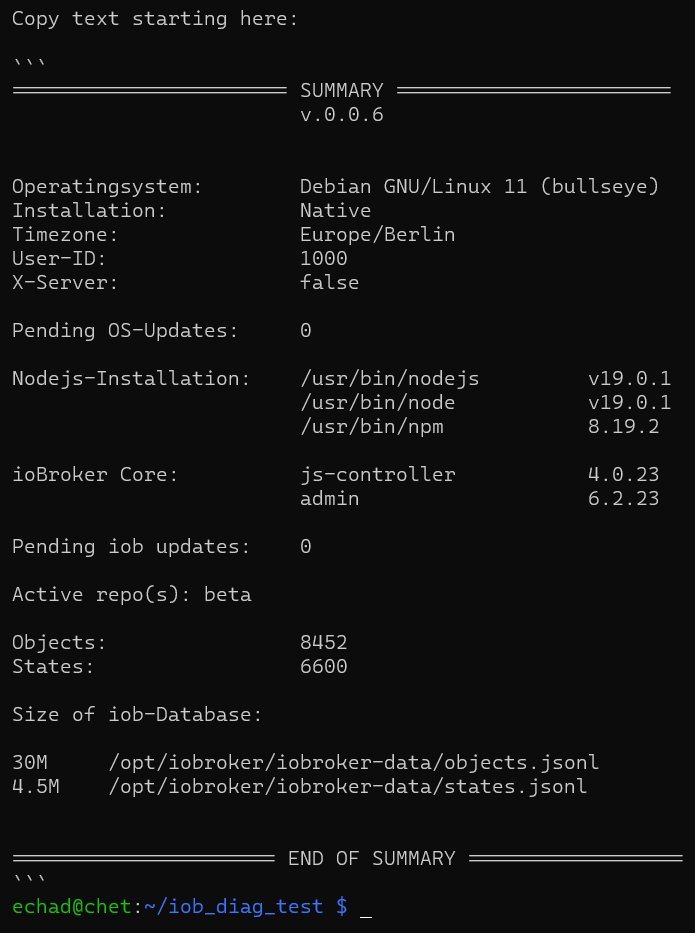
Bzw. in CodeTags dann so:
======================= SUMMARY =======================
                        v.0.0.6


Operatingsystem:        Debian GNU/Linux 11 (bullseye)
Installation:           Native
Timezone:               Europe/Berlin
User-ID:                1000
X-Server:               false

Pending OS-Updates:     0

Nodejs-Installation:    /usr/bin/nodejs         v19.0.1
                        /usr/bin/node           v19.0.1
                        /usr/bin/npm            8.19.2

ioBroker Core:          js-controller           4.0.23
                        admin                   6.2.23

Pending iob updates:    0

Active repo(s): beta

Objects:                8452
States:                 6600

Size of iob-Database:

30M     /opt/iobroker/iobroker-data/objects.jsonl
4.5M    /opt/iobroker/iobroker-data/states.jsonl


====================== END OF SUMMARY ==================
Linux-Werkzeugkasten:
https://forum.iobroker.net/topic/42952/der-kleine-iobroker-linux-werkzeugkasten
NodeJS Fixer Skript:
https://forum.iobroker.net/topic/68035/iob-node-fix-skript
iob_diag: curl -sLf -o diag.sh https://iobroker.net/diag.sh && bash diag.sh -
@mickym
Hier ist der Kram zum iob_diag besser aufgehoben als in dem anderen Thread...Also eigentlich sollte das so aussehen:
Bzw. in CodeTags dann so:
======================= SUMMARY ======================= v.0.0.6 Operatingsystem: Debian GNU/Linux 11 (bullseye) Installation: Native Timezone: Europe/Berlin User-ID: 1000 X-Server: false Pending OS-Updates: 0 Nodejs-Installation: /usr/bin/nodejs v19.0.1 /usr/bin/node v19.0.1 /usr/bin/npm 8.19.2 ioBroker Core: js-controller 4.0.23 admin 6.2.23 Pending iob updates: 0 Active repo(s): beta Objects: 8452 States: 6600 Size of iob-Database: 30M /opt/iobroker/iobroker-data/objects.jsonl 4.5M /opt/iobroker/iobroker-data/states.jsonl ====================== END OF SUMMARY ==================OK Lag an mir.
Ich hab den chmod für das Skript nicht eingegeben.
Macht nun genau, was Du sagst. - Also mein Fehler:
======================= SUMMARY =======================
                        v.0.0.6


Operatingsystem:        Debian GNU/Linux 11 (bullseye)
Installation:           Native
Timezone:               Europe/Berlin
User-ID:                1000
X-Server:               true

Pending OS-Updates:     0

Nodejs-Installation:    /usr/bin/nodejs         v16.18.1
                        /usr/bin/node           v16.18.1
                        /usr/bin/npm            8.19.2

ioBroker Core:          js-controller           4.0.23
                        admin                   6.2.23

Pending iob updates:    0

Active repo(s): Stable (default)

Objects:                10078
States:                 9705

Size of iob-Database:

19M     /opt/iobroker/iobroker-data/objects.jsonl
8.0M    /opt/iobroker/iobroker-data/states.jsonl


====================== END OF SUMMARY ==================
Sorry, sorry. Aber ich hatte den Thread gar nicht auf dem Schirm.
Das mit dem Link kommt nun auch raus:
Show mounted filesystems (real ones only):
TARGET  SOURCE         FSTYPE OPTIONS
/       /dev/mmcblk0p2 ext4   rw,noatime
|-/boot /dev/mmcblk0p1 vfat   rw,relatime,fmask=0022,dmask=0022,codepage=437,iocharset=ascii,shortname=mixed,flush,errors=remount-ro
`-/data /dev/sda       ext4   rw,relatime

backups directory is linked to a different directory
kommt grafisch schöner raus - wollte nur nicht die ganze Ausgabe posten.
auch im Windows- Terminal ;)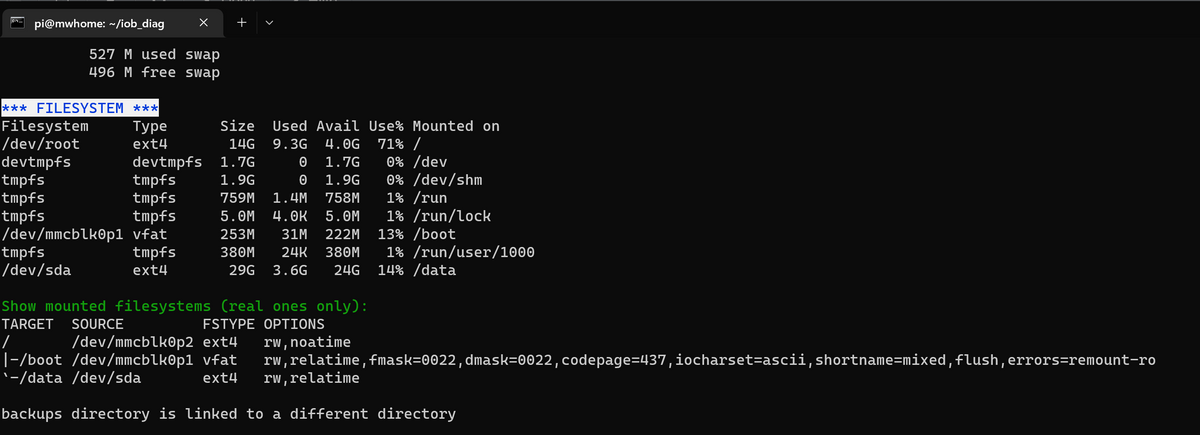
Also tut mir leid, wenn ich da einen Schreck verursacht habe.
Jeder Flow bzw. jedes Script, das ich hier poste implementiert jeder auf eigene Gefahr. Flows und Scripts können Fehler aufweisen und weder der Seitenbetreiber noch ich persönlich können hierfür haftbar gemacht werden. Das gleiche gilt für Empfehlungen aller Art.
-
OK Lag an mir.
Ich hab den chmod für das Skript nicht eingegeben.
Macht nun genau, was Du sagst. - Also mein Fehler:
======================= SUMMARY =======================
                        v.0.0.6


Operatingsystem:        Debian GNU/Linux 11 (bullseye)
Installation:           Native
Timezone:               Europe/Berlin
User-ID:                1000
X-Server:               true

Pending OS-Updates:     0

Nodejs-Installation:    /usr/bin/nodejs         v16.18.1
                        /usr/bin/node           v16.18.1
                        /usr/bin/npm            8.19.2

ioBroker Core:          js-controller           4.0.23
                        admin                   6.2.23

Pending iob updates:    0

Active repo(s): Stable (default)

Objects:                10078
States:                 9705

Size of iob-Database:

19M     /opt/iobroker/iobroker-data/objects.jsonl
8.0M    /opt/iobroker/iobroker-data/states.jsonl


====================== END OF SUMMARY ==================
Sorry, sorry. Aber ich hatte den Thread gar nicht auf dem Schirm.
Das mit dem Link kommt nun auch raus:
Show mounted filesystems (real ones only):
TARGET  SOURCE         FSTYPE OPTIONS
/       /dev/mmcblk0p2 ext4   rw,noatime
|-/boot /dev/mmcblk0p1 vfat   rw,relatime,fmask=0022,dmask=0022,codepage=437,iocharset=ascii,shortname=mixed,flush,errors=remount-ro
`-/data /dev/sda       ext4   rw,relatime

backups directory is linked to a different directory
kommt grafisch schöner raus - wollte nur nicht die ganze Ausgabe posten.
auch im Windows- Terminal ;)Also tut mir leid, wenn ich da einen Schreck verursacht habe.
@mickym sagte in iob diag - Skript:
Also tut mir leid, wenn ich da einen Schreck verursacht habe.
Mach sowas NIE NIE NIE WIEDER!!! :-D
Linux-Werkzeugkasten:
https://forum.iobroker.net/topic/42952/der-kleine-iobroker-linux-werkzeugkasten
NodeJS Fixer Skript:
https://forum.iobroker.net/topic/68035/iob-node-fix-skript
iob_diag: curl -sLf -o diag.sh https://iobroker.net/diag.sh && bash diag.sh -
OK Lag an mir.
Ich hab den chmod für das Skript nicht eingegeben.
Macht nun genau, was Du sagst. - Also mein Fehler:
======================= SUMMARY =======================
                        v.0.0.6


Operatingsystem:        Debian GNU/Linux 11 (bullseye)
Installation:           Native
Timezone:               Europe/Berlin
User-ID:                1000
X-Server:               true

Pending OS-Updates:     0

Nodejs-Installation:    /usr/bin/nodejs         v16.18.1
                        /usr/bin/node           v16.18.1
                        /usr/bin/npm            8.19.2

ioBroker Core:          js-controller           4.0.23
                        admin                   6.2.23

Pending iob updates:    0

Active repo(s): Stable (default)

Objects:                10078
States:                 9705

Size of iob-Database:

19M     /opt/iobroker/iobroker-data/objects.jsonl
8.0M    /opt/iobroker/iobroker-data/states.jsonl


====================== END OF SUMMARY ==================
Sorry, sorry. Aber ich hatte den Thread gar nicht auf dem Schirm.
Das mit dem Link kommt nun auch raus:
Show mounted filesystems (real ones only):
TARGET  SOURCE         FSTYPE OPTIONS
/       /dev/mmcblk0p2 ext4   rw,noatime
|-/boot /dev/mmcblk0p1 vfat   rw,relatime,fmask=0022,dmask=0022,codepage=437,iocharset=ascii,shortname=mixed,flush,errors=remount-ro
`-/data /dev/sda       ext4   rw,relatime

backups directory is linked to a different directory
kommt grafisch schöner raus - wollte nur nicht die ganze Ausgabe posten.
auch im Windows- Terminal ;)Also tut mir leid, wenn ich da einen Schreck verursacht habe.
Und jetzt kannste auch @simatec fragen, ob man so eine Abfrage nach dem Dateityp nicht auch in JavaScript machen kann und dich der BAckitup-Adapter dann nicht mehr 'nervt' mit dem Hinweis auf lokales Speichern. g
Linux-Werkzeugkasten:
https://forum.iobroker.net/topic/42952/der-kleine-iobroker-linux-werkzeugkasten
NodeJS Fixer Skript:
https://forum.iobroker.net/topic/68035/iob-node-fix-skript
iob_diag: curl -sLf -o diag.sh https://iobroker.net/diag.sh && bash diag.sh -
@mickym sagte in iob diag - Skript:
Also tut mir leid, wenn ich da einen Schreck verursacht habe.
Mach sowas NIE NIE NIE WIEDER!!! :-D
@thomas-braun Das Problem - was passiert war, dass ich den chmod nicht ausgeführt hatte und deshalb natürlich, das Skript nicht direkt ausführbar war.
Ich hatte das Skript (also mit eigener Shell aufgerufen) also so aufgerufen:
sh ./iob_diagdann scheint das wohl mit den Steuerbefehlen nicht mehr zu funktionieren. Du kannst das sicher besser erklären. ;) Formatierte Ausgabe funzt auch im Terminalfenster des Debian Desktops.
Jeder Flow bzw. jedes Script, das ich hier poste implementiert jeder auf eigene Gefahr. Flows und Scripts können Fehler aufweisen und weder der Seitenbetreiber noch ich persönlich können hierfür haftbar gemacht werden. Das gleiche gilt für Empfehlungen aller Art.
-
@thomas-braun sagte in iob diag - Skript:
Und jetzt kannste auch @simatec fragen, ob man so eine Abfrage nach dem Dateityp nicht auch in JavaScript machen kann und dich der BAckitup-Adapter dann nicht mehr 'nervt' mit dem Hinweis auf lokales Speichern. g
Na ja so schlimm ist das ja nicht - und solange man sowas wegdrücken kann und sich nicht verunsichern lässt, weil man auch nicht alles für bare Münze nimmt, was ein Programm ausspuckt ...
@simatec hätte in meinen Augen mehr am Backup von NodeRed zu tun. Das Issue ist mE viel wichtiger. ;)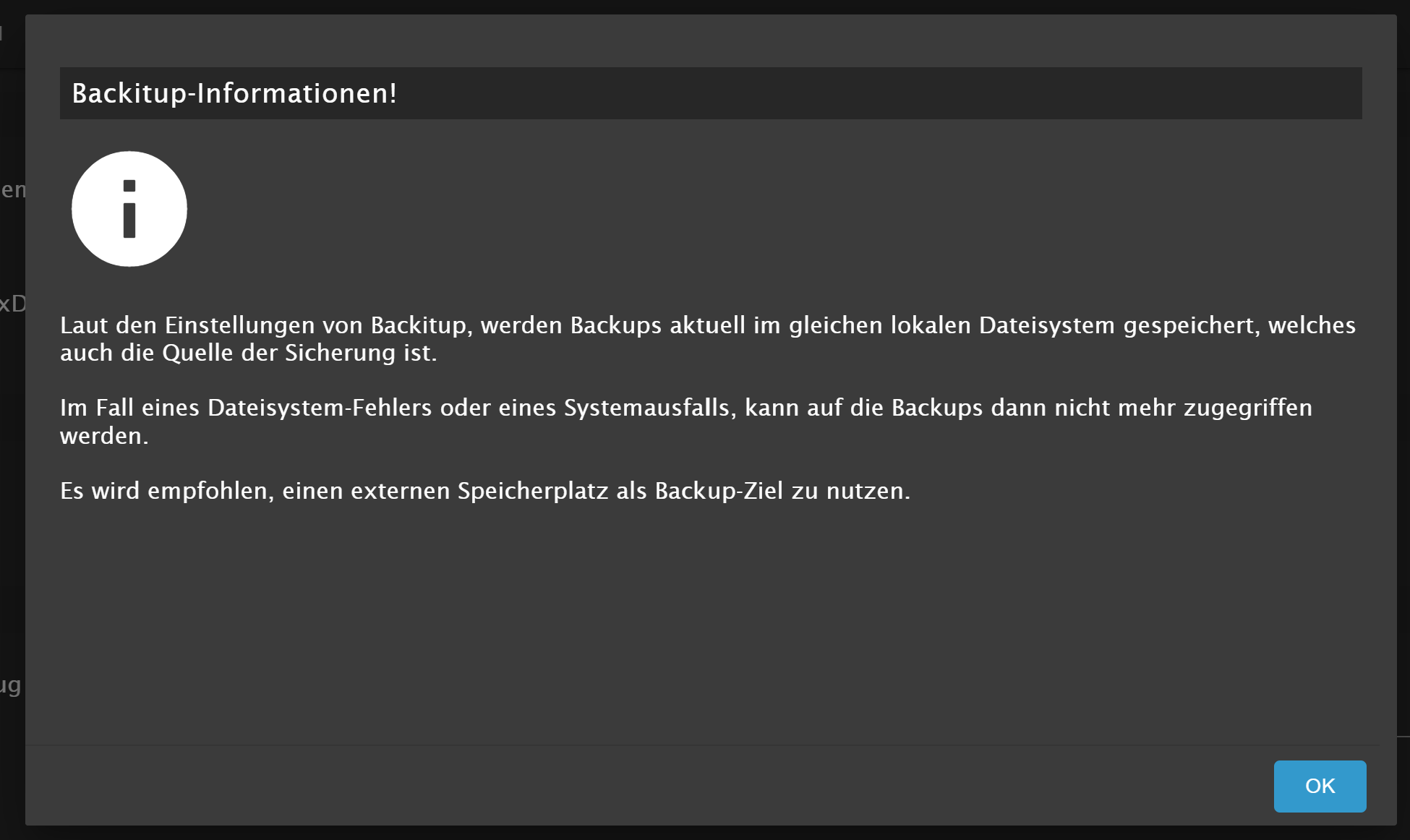
Jeder Flow bzw. jedes Script, das ich hier poste implementiert jeder auf eigene Gefahr. Flows und Scripts können Fehler aufweisen und weder der Seitenbetreiber noch ich persönlich können hierfür haftbar gemacht werden. Das gleiche gilt für Empfehlungen aller Art.
-
@thomas-braun Das Problem - was passiert war, dass ich den chmod nicht ausgeführt hatte und deshalb natürlich, das Skript nicht direkt ausführbar war.
Ich hatte das Skript (also mit eigener Shell aufgerufen) also so aufgerufen:
sh ./iob_diagdann scheint das wohl mit den Steuerbefehlen nicht mehr zu funktionieren. Du kannst das sicher besser erklären. ;) Formatierte Ausgabe funzt auch im Terminalfenster des Debian Desktops.
Das ist klar... Das ist ja bei mir ein Skript für die sog. 'bash'
Bash (auch BASH oder bash), die Bourne-again shell
die ist etwas 'mächtiger' als die 'sh' shell (die originale Bourne shell).
Wenn mein skript einfach nur ausgeführt wird, dann sorgt die allererste Zeile, die sog. 'shebang' dafür, dass das skript in die richtige shell gekippt wird:
#!/bin/bashschüttet den Code also in /bin/bash rein. Wenn du aber explizit sagst, liebe 'sh' shell, führ mal den folgenden Code aus, dann kann die arme kleine Oma da nicht immer was mit anfangen, mit dem neumodischen Zeug und versucht ihr Bestes...
Und dann kommt da sowas rudimentäres wie bei deinem ersten Aufruf ums Eck.Linux-Werkzeugkasten:
https://forum.iobroker.net/topic/42952/der-kleine-iobroker-linux-werkzeugkasten
NodeJS Fixer Skript:
https://forum.iobroker.net/topic/68035/iob-node-fix-skript
iob_diag: curl -sLf -o diag.sh https://iobroker.net/diag.sh && bash diag.sh -
@thomas-braun sagte in iob diag - Skript:
Und jetzt kannste auch @simatec fragen, ob man so eine Abfrage nach dem Dateityp nicht auch in JavaScript machen kann und dich der BAckitup-Adapter dann nicht mehr 'nervt' mit dem Hinweis auf lokales Speichern. g
Na ja so schlimm ist das ja nicht - und solange man sowas wegdrücken kann und sich nicht verunsichern lässt, weil man auch nicht alles für bare Münze nimmt, was ein Programm ausspuckt ...
@simatec hätte in meinen Augen mehr am Backup von NodeRed zu tun. Das Issue ist mE viel wichtiger. ;)@mickym Wobei die Aussage bzgl. des lokalen Dateisystems auch bei einem symlink weiterhin richtig ist. Wenn da der Stromausfällt, während die Backup-Datei gerade beackert wird kann die auch über den Jordan gehen. Die Gefahr ist allerdings geringer als bei direktem schreiben in das backups-Verzeichnis.
Linux-Werkzeugkasten:
https://forum.iobroker.net/topic/42952/der-kleine-iobroker-linux-werkzeugkasten
NodeJS Fixer Skript:
https://forum.iobroker.net/topic/68035/iob-node-fix-skript
iob_diag: curl -sLf -o diag.sh https://iobroker.net/diag.sh && bash diag.sh -
Das ist klar... Das ist ja bei mir ein Skript für die sog. 'bash'
Bash (auch BASH oder bash), die Bourne-again shell
die ist etwas 'mächtiger' als die 'sh' shell (die originale Bourne shell).
Wenn mein skript einfach nur ausgeführt wird, dann sorgt die allererste Zeile, die sog. 'shebang' dafür, dass das skript in die richtige shell gekippt wird:
#!/bin/bashschüttet den Code also in /bin/bash rein. Wenn du aber explizit sagst, liebe 'sh' shell, führ mal den folgenden Code aus, dann kann die arme kleine Oma da nicht immer was mit anfangen, mit dem neumodischen Zeug und versucht ihr Bestes...
Und dann kommt da sowas rudimentäres wie bei deinem ersten Aufruf ums Eck.@thomas-braun Ja das habe ich schon mal gehört, dass man die Shell in der 1. Zeile des Skripts angibt. Aber da habe ich natürlich nicht dran gedacht, dass ich das damit außer Kraft gesetzt habe. Aber vielleicht hilft es ja, wenn mancher in Zukunft, der Dein Skript ausführt, den gleichen Fehler wie ich macht. ;)
-
@mickym Wobei die Aussage bzgl. des lokalen Dateisystems auch bei einem symlink weiterhin richtig ist. Wenn da der Stromausfällt, während die Backup-Datei gerade beackert wird kann die auch über den Jordan gehen. Die Gefahr ist allerdings geringer als bei direktem schreiben in das backups-Verzeichnis.
@thomas-braun sagte in iob diag - Skript:
@mickym Wobei die Aussage bzgl. des lokalen Dateisystems auch bei einem symlink weiterhin richtig ist. Wenn da der Stromausfällt, während die Backup-Datei gerade beackert wird kann die auch über den Jordan gehen. Die Gefahr ist allerdings geringer als bei direktem schreiben in das backups-Verzeichnis.
Der Vorteil ist halt auch, wenn ich die SD-karten wechsle (Ich arbeite ja mit Images) - dann habe ich trotzdem immer die aktuellen Backups zur Verfügung. ;) Und die Gefahr, dass es gerade in den 10 Minuten des backups kaputt geht, ist eher unwahrscheinlich. Allerdings hat der Stick schon manchmal Dateisystemfehler, aber das checke ich halt hin und wieder.
Im Prinzip ist das Backup doch immer kaputt, wenn der Strom während des Backups ausfällt - deswegen geht aber nicht gleich das Dateisystem kaputt.
Wichtig ist doch, dass selbst wenn ich ein neues System aufbauen müsste, dass ich mit einem Link/Mount sofort wieder Zugriff auf die Backups habe.Jeder Flow bzw. jedes Script, das ich hier poste implementiert jeder auf eigene Gefahr. Flows und Scripts können Fehler aufweisen und weder der Seitenbetreiber noch ich persönlich können hierfür haftbar gemacht werden. Das gleiche gilt für Empfehlungen aller Art.





Hey! Du scheinst an dieser Unterhaltung interessiert zu sein, hast aber noch kein Konto.
Hast du es satt, bei jedem Besuch durch die gleichen Beiträge zu scrollen? Wenn du dich für ein Konto anmeldest, kommst du immer genau dorthin zurück, wo du zuvor warst, und kannst dich über neue Antworten benachrichtigen lassen (entweder per E-Mail oder Push-Benachrichtigung). Du kannst auch Lesezeichen speichern und Beiträge positiv bewerten, um anderen Community-Mitgliedern deine Wertschätzung zu zeigen.
Mit deinem Input könnte dieser Beitrag noch besser werden 💗
Registrieren Anmelden383
Online33.1k
Benutzende83.7k
Themen1.3m
Beiträge