




Backitup - Grafana - https - self-signed certificate
-
@ravenmaster887 Wenn Du Grafana per Browser aufrufst musst Du dann jedesmal das Zertifikat bestätigen ?
@djmarc75 Klar, ich muss bei jeden Start eines Browsers das Zertifikat einmalig für diese Browsersitzung bestätigen. Ist ja normal bei selbst erstellten Zertifikaten. Prinzipiell gehe ich auch davon aus, dass wenn ich Grafana ein offizielles gültiges Zertifikat verpasse, dass das Backup dann normal durchlaufen würde.
Die Frage ist, ob ein selbst erstelltes Zertifikat und dessen Begleiterscheinungen es grundsätzlich verhindert, das Backitup ein Backup per https von Grafana machen kann?
-
@djmarc75 Klar, ich muss bei jeden Start eines Browsers das Zertifikat einmalig für diese Browsersitzung bestätigen. Ist ja normal bei selbst erstellten Zertifikaten. Prinzipiell gehe ich auch davon aus, dass wenn ich Grafana ein offizielles gültiges Zertifikat verpasse, dass das Backup dann normal durchlaufen würde.
Die Frage ist, ob ein selbst erstelltes Zertifikat und dessen Begleiterscheinungen es grundsätzlich verhindert, das Backitup ein Backup per https von Grafana machen kann?
@ravenmaster887 sagte in Backitup - Grafana - https - self-signed certificate:
einmalig für diese Browsersitzung bestätigen
Ja, das ist klar - ziehe die Frage zurück

@ravenmaster887 sagte in Backitup - Grafana - https - self-signed certificate:
und dessen Begleiterscheinungen es grundsätzlich verhindert
das hat wohl den Anschein.
Zwar soll ja in der Version 2.1.15 die Auswahl hinzugekommen sein aber anscheinend keine automatische Zertifikatsbestätigung stattfinden. Bin da auch überfragt.
Ich empfehle direkt ein neues Issue auf GIT zu machen vll mit dem Hinweis auf das Issue von Deinem Startpost und dem LOG Eintrag. -
@ravenmaster887 sagte in Backitup - Grafana - https - self-signed certificate:
einmalig für diese Browsersitzung bestätigen
Ja, das ist klar - ziehe die Frage zurück
@ravenmaster887 sagte in Backitup - Grafana - https - self-signed certificate:
und dessen Begleiterscheinungen es grundsätzlich verhindert
das hat wohl den Anschein.
Zwar soll ja in der Version 2.1.15 die Auswahl hinzugekommen sein aber anscheinend keine automatische Zertifikatsbestätigung stattfinden. Bin da auch überfragt.
Ich empfehle direkt ein neues Issue auf GIT zu machen vll mit dem Hinweis auf das Issue von Deinem Startpost und dem LOG Eintrag.@djmarc75 Habe grad auf Github https://github.com/simatec/ioBroker.backitup gesehen, dass es Backitup in noch mehreren neueren Versionen gibt. In den Adaptern im ioBroker werden mir die neueren Versionen > 2.4.12 vermutlich "noch" nicht angezeigt.
Speziell im Changelog der Version 2.4.13 steh was von Grafana fix:
2.4.13 (2022-09-28)
(simatec) dependencies updated
(simatec) Fix Grafana Backup
(simatec) Appveyor testing removed
(simatec) Fix Test & ReleaseIch versuche mal den Adapter per Console auf die neuste Version zu bekommen und teste nochmal.
-
@djmarc75 Habe grad auf Github https://github.com/simatec/ioBroker.backitup gesehen, dass es Backitup in noch mehreren neueren Versionen gibt. In den Adaptern im ioBroker werden mir die neueren Versionen > 2.4.12 vermutlich "noch" nicht angezeigt.
Speziell im Changelog der Version 2.4.13 steh was von Grafana fix:
2.4.13 (2022-09-28)
(simatec) dependencies updated
(simatec) Fix Grafana Backup
(simatec) Appveyor testing removed
(simatec) Fix Test & ReleaseIch versuche mal den Adapter per Console auf die neuste Version zu bekommen und teste nochmal.
@ravenmaster887 sagte in Backitup - Grafana - https - self-signed certificate:
Ich versuche mal den Adapter per Console auf die neuste Version zu bekommen und teste nochmal.
geh doch kurz auf beta repo und installier darüber.. danach halt wieder auf stable repo
-
@ravenmaster887 sagte in Backitup - Grafana - https - self-signed certificate:
Ich versuche mal den Adapter per Console auf die neuste Version zu bekommen und teste nochmal.
geh doch kurz auf beta repo und installier darüber.. danach halt wieder auf stable repo
@djmarc75 Auch eine Idee. Bin noch nicht so firm in der ioBroker Umgebung. Habe es aber gefunden und jetzt die Version 2.4.16 des backitup Adapters installiert.
Leider weiterhin mit dem gleichen Ergebnis.[DEBUG] [grafana] - Start Grafana Backup ...
[DEBUG] [grafana] - Created grafana_tmp directory: "/opt/iobroker/backups/grafana_tmp"
[DEBUG] [grafana] - Created dashboard directory
[DEBUG] [grafana] - Created dashboards_manually_restore directory
[DEBUG] [grafana] - Created datasource directory
[DEBUG] [grafana] - start Grafana request ...
[DEBUG] [grafana] - Grafana is not available: Error: self signed certificate
[DEBUG] [grafana] - Grafana is not available!
[DEBUG] [grafana] - Try deleting the Grafana tmp directory: "/opt/iobroker/backups/grafana_tmp"
[DEBUG] [grafana] - Grafana tmp directory "/opt/iobroker/backups/grafana_tmp" successfully deleted
[DEBUG] [grafana] - Grafana Backup cannot created ...
[DEBUG] [grafana] - doneEine neue Option in den Einstellungen habe ich auch nicht gefunden.
Soweit ich das sehen kann, ist der Entwickler @simatec ja auch hier im Forum aktiv. Wäre die Frage, ob ich zu dem Thread hier ein Issue auf Guthub erstellen soll?
-
@djmarc75 Auch eine Idee. Bin noch nicht so firm in der ioBroker Umgebung. Habe es aber gefunden und jetzt die Version 2.4.16 des backitup Adapters installiert.
Leider weiterhin mit dem gleichen Ergebnis.[DEBUG] [grafana] - Start Grafana Backup ...
[DEBUG] [grafana] - Created grafana_tmp directory: "/opt/iobroker/backups/grafana_tmp"
[DEBUG] [grafana] - Created dashboard directory
[DEBUG] [grafana] - Created dashboards_manually_restore directory
[DEBUG] [grafana] - Created datasource directory
[DEBUG] [grafana] - start Grafana request ...
[DEBUG] [grafana] - Grafana is not available: Error: self signed certificate
[DEBUG] [grafana] - Grafana is not available!
[DEBUG] [grafana] - Try deleting the Grafana tmp directory: "/opt/iobroker/backups/grafana_tmp"
[DEBUG] [grafana] - Grafana tmp directory "/opt/iobroker/backups/grafana_tmp" successfully deleted
[DEBUG] [grafana] - Grafana Backup cannot created ...
[DEBUG] [grafana] - doneEine neue Option in den Einstellungen habe ich auch nicht gefunden.
Soweit ich das sehen kann, ist der Entwickler @simatec ja auch hier im Forum aktiv. Wäre die Frage, ob ich zu dem Thread hier ein Issue auf Guthub erstellen soll?
@ravenmaster887 sagte in Backitup - Grafana - https - self-signed certificate:
Wäre die Frage, ob ich zu dem Thread hier ein Issue auf Guthub erstellen soll?
Wenn Du wirklich alle Einstellungen seitens Grafana, Grafana.ini und im BackitupAdapter korrekt vorgenommen hast dann wäre das nicht verkehrt. Aber warte noch ob sich @simatec hierzu meldet.
EDIT: oder vll meldet sich ja jemand bei dem/der es so erfolgreich läuft.
-
Hallo zusammen,
ich bräuchte mal euren Rat.
Ich habe den ioBroker incl. Grafana auf einem Raspberry Pi installiert und Backups mit Backitup eingerichtet. Diese sind auch normal gelaufen.
Nach dem ich Grafana mittel selbst erstelltem Zertifikat auf https umgestellt hatte, bekomme ich beim Backup mittels Backitup folgende Fehlermeldung und es wird von Grafana kein Backup mehr erzeugt. In den Einstellungen des Backitup Adapters habe ich das Protokoll für die Verbindung aber auf https umgestellt:
Started iobroker ...
[DEBUG] [mount] - noserverino option: false
[DEBUG] [mount] - cifs-mount command: "sudo mount -t cifs -o username=ioBroker-Backup,password=****,rw,file_mode=0777,dir_mode=0777,vers=3.0 //ravennas/iobroker/Backup /opt/iobroker/backups"
[DEBUG] [mount] - mount successfully completed
[DEBUG] [mount] - done
[DEBUG] [iobroker] - host.iobroker-pi 993 states saved

[DEBUG] [iobroker] - host.iobroker-pi 2757 objects saved

[DEBUG] [iobroker] - Backup created: /opt/iobroker/backups/iobroker_2022_10_13-12_01_53_backupiobroker.tar.gz

[DEBUG] [iobroker] - done
[DEBUG] [grafana] - Start Grafana Backup ...
[DEBUG] [grafana] - Created grafana_tmp directory: "/opt/iobroker/backups/grafana_tmp"
[DEBUG] [grafana] - Created dashboard directory
[DEBUG] [grafana] - Created dashboards_manually_restore directory
[DEBUG] [grafana] - Created datasource directory
[DEBUG] [grafana] - start Grafana request ...
**[DEBUG] [grafana] - Grafana is not available: Error: self signed certificate**
[DEBUG] [grafana] - Grafana is not available!
[DEBUG] [grafana] - Try deleting the Grafana tmp directory: "/opt/iobroker/backups/grafana_tmp"
[DEBUG] [grafana] - Grafana tmp directory "/opt/iobroker/backups/grafana_tmp" successfully deleted
[DEBUG] [grafana] - Grafana Backup cannot created ...
[DEBUG] [grafana] - done
[DEBUG] [cifs] - used copy path: /iobroker/Backup
[DEBUG] [cifs] - done
[DEBUG] [clean] - done
[DEBUG] [historyHTML] - new history html values created
[DEBUG] [historyHTML] - done
[DEBUG] [historyJSON] - new history json values created
[DEBUG] [historyJSON] - done
[DEBUG] [umount] - mount activ, umount is started ...
[DEBUG] [umount] - umount successfully completed
[DEBUG] [umount] - done
[EXIT] 0
Auf Github habe ich unter diesem Link https://github.com/simatec/ioBroker.backitup/issues/483 vermutlich genau die Situation gefunden.
In Grafana scheint sich der Umgang mit API Keys anscheinend auch etwas geändert zu haben. Dort habe ich einen neuen Service Account mit der Rolle Viewer als Admin erstellt und ein Token erzeugt und diesen in Backitup hinterlegt. Leider alles ohne Erfolg, ich verstehe aktuell nicht, wo mein Fehler ist.Hier noch ein paar Detail zu den eingesetzen Versionen:
ioBroker-Admin: 6.2.12
Backitup: 2.4.12
Grafana: 9.1.6Habt Ihr einen Tipp für mich?
Danke euch.
@ravenmaster887 sagte in Backitup - Grafana - https - self-signed certificate:
Dort habe ich einen neuen Service Account mit der Rolle Viewer als Admin erstellt und ein Token erzeugt
Rolle bitte immer Admin mit vollen Rechten... dann läuft das Backup durch.
Du willst ja auch ggfs. einen Restore durchführen. Viewer ist hier falsch. -
@ravenmaster887 sagte in Backitup - Grafana - https - self-signed certificate:
Dort habe ich einen neuen Service Account mit der Rolle Viewer als Admin erstellt und ein Token erzeugt
Rolle bitte immer Admin mit vollen Rechten... dann läuft das Backup durch.
Du willst ja auch ggfs. einen Restore durchführen. Viewer ist hier falsch.@simatec Ich bin nochmal die Einstellungen in den Service accounts in Grafana durchgegangen und habe sie nochmal neu gesetzt.
Wären diese Einstellungen so richtig?
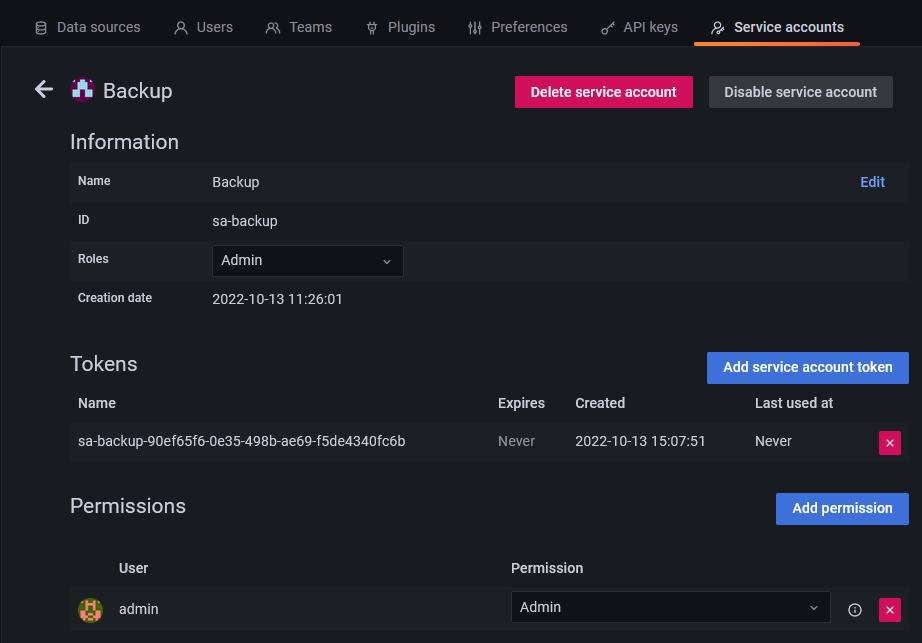
Bei dem anschließendem Test kam leider das gleiche Ergebnis heraus.
[DEBUG] [grafana] - Start Grafana Backup ...
[DEBUG] [grafana] - Created grafana_tmp directory: "/opt/iobroker/backups/grafana_tmp"
[DEBUG] [grafana] - Created dashboard directory
[DEBUG] [grafana] - Created dashboards_manually_restore directory
[DEBUG] [grafana] - Created datasource directory
[DEBUG] [grafana] - start Grafana request ...
[DEBUG] [grafana] - Grafana is not available: Error: self signed certificate
[DEBUG] [grafana] - Grafana is not available!
[DEBUG] [grafana] - Try deleting the Grafana tmp directory: "/opt/iobroker/backups/grafana_tmp"
[DEBUG] [grafana] - Grafana tmp directory "/opt/iobroker/backups/grafana_tmp" successfully deleted
[DEBUG] [grafana] - Grafana Backup cannot created ...
[DEBUG] [grafana] - done -
@simatec Ich bin nochmal die Einstellungen in den Service accounts in Grafana durchgegangen und habe sie nochmal neu gesetzt.
Wären diese Einstellungen so richtig?
Bei dem anschließendem Test kam leider das gleiche Ergebnis heraus.
[DEBUG] [grafana] - Start Grafana Backup ...
[DEBUG] [grafana] - Created grafana_tmp directory: "/opt/iobroker/backups/grafana_tmp"
[DEBUG] [grafana] - Created dashboard directory
[DEBUG] [grafana] - Created dashboards_manually_restore directory
[DEBUG] [grafana] - Created datasource directory
[DEBUG] [grafana] - start Grafana request ...
[DEBUG] [grafana] - Grafana is not available: Error: self signed certificate
[DEBUG] [grafana] - Grafana is not available!
[DEBUG] [grafana] - Try deleting the Grafana tmp directory: "/opt/iobroker/backups/grafana_tmp"
[DEBUG] [grafana] - Grafana tmp directory "/opt/iobroker/backups/grafana_tmp" successfully deleted
[DEBUG] [grafana] - Grafana Backup cannot created ...
[DEBUG] [grafana] - done@ravenmaster887 Da bist du völlig falsch.
Du musst einen API-Key erzeugen und diesen in Backitup eintragen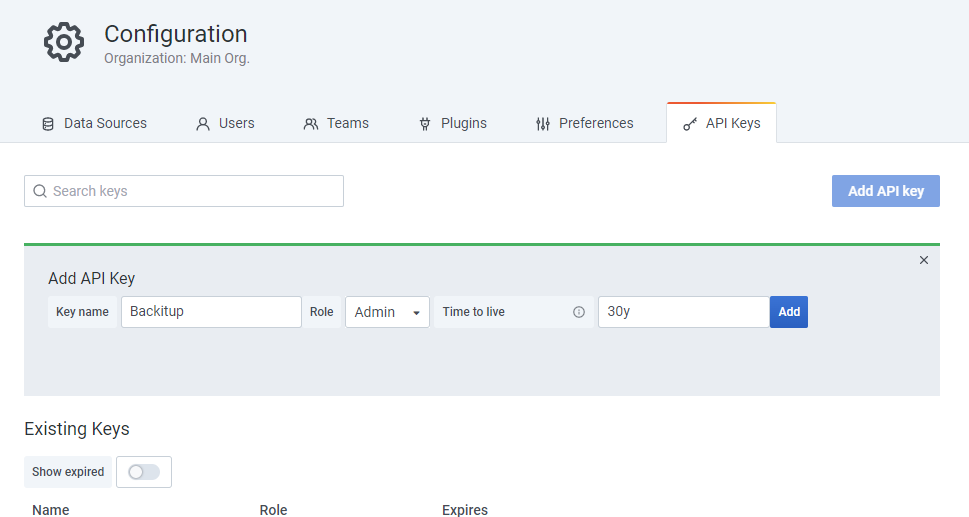
-
@ravenmaster887 Da bist du völlig falsch.
Du musst einen API-Key erzeugen und diesen in Backitup eintragen@simatec Hab nochmal einen API-Key in Grafana erstellt und den Key im Backitup-Adapter eingefügt:
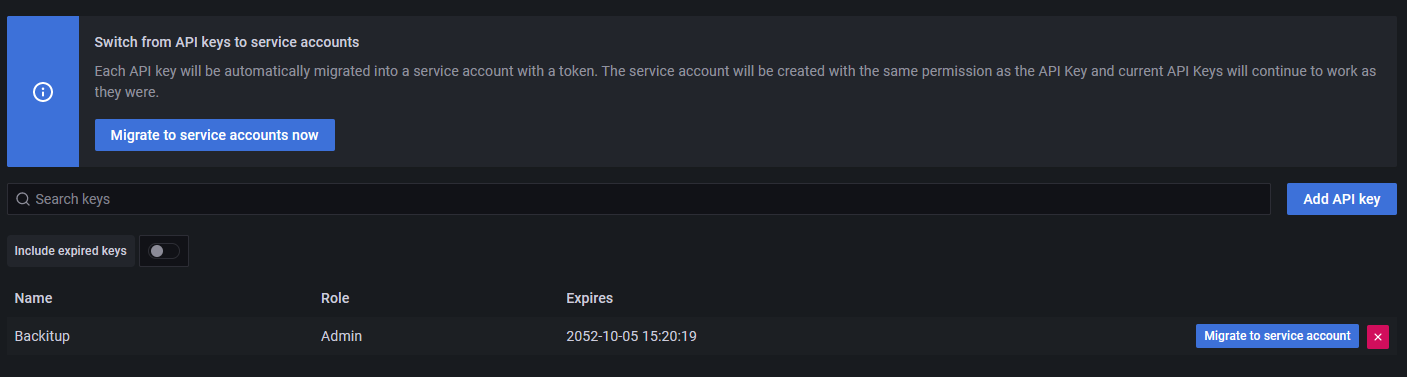
Leider trotzdem mit gleichem Ergebnis:
[DEBUG] [grafana] - Start Grafana Backup ...
[DEBUG] [grafana] - Created grafana_tmp directory: "/opt/iobroker/backups/grafana_tmp"
[DEBUG] [grafana] - Created dashboard directory
[DEBUG] [grafana] - Created dashboards_manually_restore directory
[DEBUG] [grafana] - Created datasource directory
[DEBUG] [grafana] - start Grafana request ...
[DEBUG] [grafana] - Grafana is not available: Error: self signed certificate
[DEBUG] [grafana] - Grafana is not available!
[DEBUG] [grafana] - Try deleting the Grafana tmp directory: "/opt/iobroker/backups/grafana_tmp"
[DEBUG] [grafana] - Grafana tmp directory "/opt/iobroker/backups/grafana_tmp" successfully deleted
[DEBUG] [grafana] - Grafana Backup cannot created ...
[DEBUG] [grafana] - doneMich stört an der Stelle die Fehlermeldung, die Ja explizit sagt, Grafana is not available: Error: self signed certificate.
-
@ravenmaster887 Da bist du völlig falsch.
Du musst einen API-Key erzeugen und diesen in Backitup eintragen@simatec sagte in Backitup - Grafana - https - self-signed certificate:
Da bist du völlig falsch.
Das ist nicht ganz korrekt.
Seit Grafana 9.1.x (welche genaue Version ist mir nicht bekannt) gibt es einen Button in der API-Keys Sektion mit welcher man API-Keys zu Service-Accounts migrieren kann. Einmal angeklickt ist das nicht mehr rückgängig zu machen.
Hat aber erstmal bei normalem Backup per HTTP keinen Einfluss.
Anscheinend aber per HTTPS ?!
Nutze selbst nur HTTP.
@ravenmaster887 stell doch einfach nochmal um auf HTTP und teste es nochmals damit.EDIT: sehe gerade dass er wohl doch noch nicht migriert hat
 sorry
sorry -
Nach Umstellung auf http funktioniert das Backup normal:
[DEBUG] [iobroker] - done [DEBUG] [grafana] - Start Grafana Backup ... [DEBUG] [grafana] - Created grafana_tmp directory: "/opt/iobroker/backups/grafana_tmp" [DEBUG] [grafana] - Created dashboard directory [DEBUG] [grafana] - Created dashboards_manually_restore directory [DEBUG] [grafana] - Created datasource directory [DEBUG] [grafana] - start Grafana request ... [DEBUG] [grafana] - Grafana is available ... Status: 200 [DEBUG] [grafana] - found Dashboard: general-alerting [DEBUG] [grafana] - found Dashboard: heizungseinstellungen [DEBUG] [grafana] - found Dashboard: dasi [DEBUG] [grafana] - found Dashboard: ubersicht-strom [DEBUG] [grafana] - found Dashboard: verbraucher-1-jahr [DEBUG] [grafana] - found Dashboard: dashboard-rpi-dasi [DEBUG] [grafana] - found Dashboard: dashboard-rpi [DEBUG] [grafana] - start Grafana backup compress ... [DEBUG] [grafana] - Backup created: /opt/iobroker/backups/grafana_2022_10_13-15_44_42_backupiobroker.tar.gz [DEBUG] [grafana] - Try deleting the Grafana tmp directory: "/opt/iobroker/backups/grafana_tmp" [DEBUG] [grafana] - Grafana tmp directory "/opt/iobroker/backups/grafana_tmp" successfully deleted [DEBUG] [grafana] - done -
Nach Umstellung auf http funktioniert das Backup normal:
[DEBUG] [iobroker] - done [DEBUG] [grafana] - Start Grafana Backup ... [DEBUG] [grafana] - Created grafana_tmp directory: "/opt/iobroker/backups/grafana_tmp" [DEBUG] [grafana] - Created dashboard directory [DEBUG] [grafana] - Created dashboards_manually_restore directory [DEBUG] [grafana] - Created datasource directory [DEBUG] [grafana] - start Grafana request ... [DEBUG] [grafana] - Grafana is available ... Status: 200 [DEBUG] [grafana] - found Dashboard: general-alerting [DEBUG] [grafana] - found Dashboard: heizungseinstellungen [DEBUG] [grafana] - found Dashboard: dasi [DEBUG] [grafana] - found Dashboard: ubersicht-strom [DEBUG] [grafana] - found Dashboard: verbraucher-1-jahr [DEBUG] [grafana] - found Dashboard: dashboard-rpi-dasi [DEBUG] [grafana] - found Dashboard: dashboard-rpi [DEBUG] [grafana] - start Grafana backup compress ... [DEBUG] [grafana] - Backup created: /opt/iobroker/backups/grafana_2022_10_13-15_44_42_backupiobroker.tar.gz [DEBUG] [grafana] - Try deleting the Grafana tmp directory: "/opt/iobroker/backups/grafana_tmp" [DEBUG] [grafana] - Grafana tmp directory "/opt/iobroker/backups/grafana_tmp" successfully deleted [DEBUG] [grafana] - done@ravenmaster887 Mach mal bitte ein Issue auf, damit ich mir das anschauen kann.
Denke es liegt am selbstsignierten Zertifkat -
@ravenmaster887 Mach mal bitte ein Issue auf, damit ich mir das anschauen kann.
Denke es liegt am selbstsignierten Zertifkat -
@simatec Issue ist erstellt. Danke fürs anschauen. :)
@ravenmaster887 ups, da fällt mir grad im Issue auf dass Dein System ja auch nicht unbedingt lebendig ist...
ob das u.U. auch damit zu tun hat ?
Jedenfalls ist es dringend ratsam das auf neusten Stand zu bringen ! -
Bitte testet mal die Version 2.5.4 und passt die Grafana Einstellungen dementsprechend an.
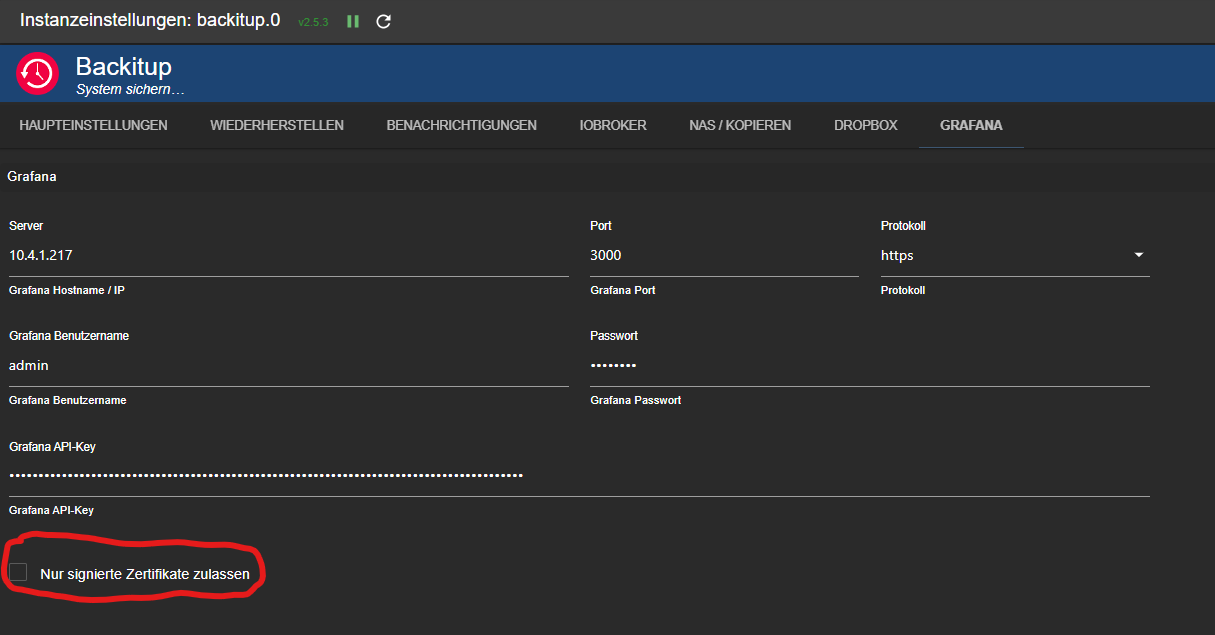
@simatec Nach dem Update auf 2.5.4 funktioniert das Backup jetzt auch mit dem selbst erstellten Zertifikat. Perfekt, Danke. :)
-
@simatec Nach dem Update auf 2.5.4 funktioniert das Backup jetzt auch mit dem selbst erstellten Zertifikat. Perfekt, Danke. :)
Du warst jetzt aber bei dem API Key Modus geblieben?
Ich habe dummerweise auf Migrate to ServiceAccount geklickt und habe jetzt auch nur noch das entsprechende Menü im Grafana und kann gar keine alten API Keys mehr generieren oder sehen.Ich hatte dazu auch einen issue im Git angelegt und @simatec hatte mich nach hier verwiesen. DANKE


Hey! Du scheinst an dieser Unterhaltung interessiert zu sein, hast aber noch kein Konto.
Hast du es satt, bei jedem Besuch durch die gleichen Beiträge zu scrollen? Wenn du dich für ein Konto anmeldest, kommst du immer genau dorthin zurück, wo du zuvor warst, und kannst dich über neue Antworten benachrichtigen lassen (entweder per E-Mail oder Push-Benachrichtigung). Du kannst auch Lesezeichen speichern und Beiträge positiv bewerten, um anderen Community-Mitgliedern deine Wertschätzung zu zeigen.
Mit deinem Input könnte dieser Beitrag noch besser werden 💗
Registrieren AnmeldenSupport us
270
Online33.0k
Benutzer83.6k
Themen1.3m
Beiträge