




Kann keine Adapter aktualisieren
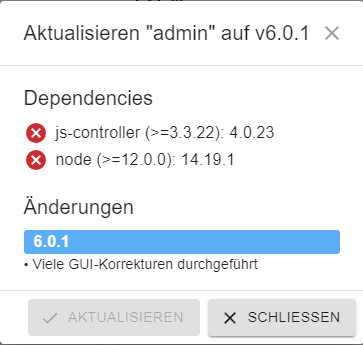
-
Ich weiß es nicht genau. Die package-lock wird soweit ich weiß mit gesichert.
@thomas-braun
das Löschen kann nicht der richtige Weg sein:Habe über
find /opt/iobroker/node_modules/ -name .*-* -printalle Dateien mit kryptischen Endungen herausgesucht und gelöscht (bestimmt 100 Stück)
sudo -H -u iobroker npm install iobroker.js-controllerlief dann auch durch. Es wurden aber sehr viele Warnungen zu veralteten Versionen angezeigt.
Ich habe dann einsudo apt update && sudo apt upgradedurchgeführt. Danach sind alle gerade gelöschten Dateien/Ordner wieder da!?
Erneutes
sudo -H -u iobroker npm install iobroker.js-controllerliefert die erste Fehlermeldung aus dem Versuch des Historie-Updates:
@iobrokerVM:/opt/iobroker$ sudo -H -u iobroker npm install iobroker.js-controller
npm ERR! code ENOTEMPTY
npm ERR! syscall rename
npm ERR! path /opt/iobroker/node_modules/abbrev
npm ERR! dest /opt/iobroker/node_modules/.abbrev-5eNud0FY
npm ERR! errno -39
npm ERR! ENOTEMPTY: directory not empty, rename '/opt/iobroker/node_modules/abbrev' -> '/opt/iobroker/node_modules/.abbrev-5eNud0FY'

npm ERR! A complete log of this run can be found in:
npm ERR!     /home/iobroker/.npm/_logs/2022-07-22T15_45_08_712Z-debug-0.log
Ich bin etwas ratlos?
-
@thomas-braun
Ich habe bei mir mitcd /opt/iobroker/node_modules mkdir bak mv ./.* bak mv bak/.bin . mv @*/.??* bakalle beanstandeten Verzeichnisse entfernt. Danach lief das Update los, es kamen einige "normale" Updatemeldungen und dann eine Unmenge an Fehlermeldungen; größtenteils npm ERR! Ich habe mal das Logfile angehängt; es lohnt sich aber nicht, das weiter zu verfolgen: putty.log Da muß wohl noch etwas anderes kaputt sein :-( Ich werde das System neu aufsetzen und dann den letzten Backup einspielen.
Trotzdem herzlichen Dank für Deine Hilfe!!!
Bei dir scheitert der Versuch sharp bzw. die libvips zu bauen.
Das ist bekanntermaßen etwas tricky.npm ERR! command sh -c (node install/libvips && node install/dll-copy && prebuild-install) || (node-gyp rebuild && node install/dll-copy) npm ERR! make: Entering directory '/opt/iobroker/node_modules/sharp/build' -
@thomas-braun
das Löschen kann nicht der richtige Weg sein:Habe über
find /opt/iobroker/node_modules/ -name .*-* -printalle Dateien mit kryptischen Endungen herausgesucht und gelöscht (bestimmt 100 Stück)
sudo -H -u iobroker npm install iobroker.js-controllerlief dann auch durch. Es wurden aber sehr viele Warnungen zu veralteten Versionen angezeigt.
Ich habe dann einsudo apt update && sudo apt upgradedurchgeführt. Danach sind alle gerade gelöschten Dateien/Ordner wieder da!?
Erneutes
sudo -H -u iobroker npm install iobroker.js-controllerliefert die erste Fehlermeldung aus dem Versuch des Historie-Updates:
@iobrokerVM:/opt/iobroker$ sudo -H -u iobroker npm install iobroker.js-controller
npm ERR! code ENOTEMPTY
npm ERR! syscall rename
npm ERR! path /opt/iobroker/node_modules/abbrev
npm ERR! dest /opt/iobroker/node_modules/.abbrev-5eNud0FY
npm ERR! errno -39
npm ERR! ENOTEMPTY: directory not empty, rename '/opt/iobroker/node_modules/abbrev' -> '/opt/iobroker/node_modules/.abbrev-5eNud0FY'

npm ERR! A complete log of this run can be found in:
npm ERR!     /home/iobroker/.npm/_logs/2022-07-22T15_45_08_712Z-debug-0.log
Ich bin etwas ratlos?
@frank_y sagte in Kann keine Adapter aktualisieren:
das Löschen kann nicht der richtige Weg sein:
Bei anderen Fällen war es das.
Dann mach die Roßkur à la @crunchip
-
Bei dir scheitert der Versuch sharp bzw. die libvips zu bauen.
Das ist bekanntermaßen etwas tricky.npm ERR! command sh -c (node install/libvips && node install/dll-copy && prebuild-install) || (node-gyp rebuild && node install/dll-copy) npm ERR! make: Entering directory '/opt/iobroker/node_modules/sharp/build'@thomas-braun Geht das wieder, wenn ich nur ioBroker neu installiere?
-
Könnte ich das mit https://forum.iobroker.net/topic/32147/update-js-controller-und-node-js/74?_=1658508688254 beheben?
-
@thomas-braun Geht das wieder, wenn ich nur ioBroker neu installiere?
@grrfield sagte in Kann keine Adapter aktualisieren:
Geht das wieder, wenn ich nur ioBroker neu installiere?
sharp/libvips? Nee, das hat mit dem ioBroker nicht direkt zu tun. Da fehlen vielleicht devel-Pakete für die ganzen anderen libs die damit zusammenhängen. Ich meine aber, die würden mittlerweile alle 'auf Verdacht' schon vom
iobroker fixauf das System gespült. Hatten in der Vergangenheit zu viel Ärger damit, aber ich hab da schon länger nicht mehr aus der Ecke gesehen. Bis du mit deinem log ankommst... :-)
-
6 Zeilen unter Dir ist das gleiche Problem.
Warum nutzt du nicht den Thread?Bitte zusammenführen
https://forum.iobroker.net/topic/55518/kann-keine-adapter-aktualisieren
-
Vielleicht ist das noch zur Lösungsfindung hilfreich:
Bei mir zumindest funktionieren die Adapterupdates im Admin mit dem Button wo alle Adapter mit Updates auf einmal aktualisiert werden können.
Nur bei den einzelnen Updates gibt es Probleme mit der Versionsüberprüfung.
-
Ich möchte nur nochmal Rückmeldung geben, falls andere das auch haben: Mein Problem war wohl ein defektes Dateisystem auf der eMMC in Folge eines von mir vor einiger Zeit verursachten Stromausfalls. Es gingen dann auch andre Standard-LINUX-Befehle nicht mehr. Nach Neuaufsetzen eines Linux-Images, Installation von ioBroker und Einspielen eines Backups läuft alles wieder.
@thomas-braun Nochmals vielen Dank für die Hilfe! -
Bei mir hat sich das Thema von selbst erledigt.
Nachdem ich einige male Updates mit der Variante aus meinem letzten Post eingespielt hatte, unter anderem auch mehrere Updates vom Admin-Adapter, ist der Fehler nun weg und die Versionsprüfung bei den einzelnen Adaptern funktioniert wieder einwandfrei.
Auch ein Update einzelner Adapter ist nun wieder möglich.Danke jedenfalls bis dahin für die Hilfe.
-
Meine Adapter lassen sich nicht mehr aktualisieren.
pi@nas:~ $ iobroker update
Used repository: stable
Adapter    "admin"        : 6.10.1   , installed 6.3.5  [Updatable]
Adapter    "backitup"     : 2.8.1    , installed 2.6.19 [Updatable]
Adapter    "ble"          : 0.13.4   , installed 0.13.0 [Updatable]
Adapter    "daswetter"    : 3.1.10   , installed 3.1.8  [Updatable]
Adapter    "discovery"    : 3.1.0    , installed 3.0.5  [Updatable]
Adapter    "info"         : 2.0.0    , installed 1.9.19 [Updatable]
Adapter    "javascript"   : 7.1.4    , installed 6.1.4  [Updatable]
Controller "js-controller": 5.0.12   , installed 4.0.24 [Updatable]
Adapter    "lgtv"         : 2.1.1    , installed 1.1.10 [Updatable]
Adapter    "octoprint"    : 4.0.0    , installed 4.0.0
Adapter    "ring"         : 3.2.2    , installed 3.4.1
Adapter    "simple-api"   : 2.7.2    , installed 2.7.0  [Updatable]
Adapter    "socketio"     : 6.5.5    , installed 4.2.0  [Updatable]
Adapter    "telegram"     : 1.16.0   , installed 1.15.6 [Updatable]
Adapter    "terminal"     : 1.0.0    , installed 1.0.0
Adapter    "web"          : 6.1.2    , installed 4.3.0  [Updatable]
Adapter    "ws"           : 2.5.5    , installed 1.3.0  [Updatable]
Adapter    "yahka"        : 1.0.3    , installed 0.17.0 [Updatable]
Adapter    "zigbee"       : 1.8.23   , installed 1.8.23
Update/Upgrade:
pi@nas:~ $ iobroker upgrade daswetter --debug

This upgrade of "daswetter" will at least introduce the following changes:
==========================================================================
-> 3.1.10:
dependencies updated
==========================================================================

Would you like to upgrade daswetter from @3.1.8 to @3.1.10 now? [(y)es, (n)o]: y
Update daswetter from @3.1.8 to @3.1.10
host.nas Adapter "system.adapter.daswetter.0" is stopped.
NPM version: 9.8.1
Installing iobroker.daswetter@3.1.10... (System call)
npm WARN deprecated dgram@1.0.1: npm is holding this package for security reasons. As it's a core Node module, we will not transfer it over to other users. You may safely remove the package from your dependencies.
npm WARN deprecated har-validator@5.1.5: this library is no longer supported
npm WARN deprecated request-promise@4.2.6: request-promise has been deprecated because it extends the now deprecated request package, see https://github.com/request/request/issues/3142
npm WARN deprecated node-inspect@2.0.0: This module is part of Node.js core and does not need to be installed separately. It is now unmaintained.
npm WARN deprecated debug@4.1.1: Debug versions >=3.2.0 <3.2.7 || >=4 <4.3.1 have a low-severity ReDos regression when used in a Node.js environment. It is recommended you upgrade to 3.2.7 or 4.3.1. (https://github.com/visionmedia/debug/issues/797)
npm WARN deprecated debug@4.1.1: Debug versions >=3.2.0 <3.2.7 || >=4 <4.3.1 have a low-severity ReDos regression when used in a Node.js environment. It is recommended you upgrade to 3.2.7 or 4.3.1. (https://github.com/visionmedia/debug/issues/797)
npm WARN deprecated debug@4.1.1: Debug versions >=3.2.0 <3.2.7 || >=4 <4.3.1 have a low-severity ReDos regression when used in a Node.js environment. It is recommended you upgrade to 3.2.7 or 4.3.1. (https://github.com/visionmedia/debug/issues/797)
npm WARN deprecated uuid@3.4.0: Please upgrade  to version 7 or higher.  Older versions may use Math.random() in certain circumstances, which is known to be problematic.  See https://v8.dev/blog/math-random for details.
npm WARN deprecated request@2.88.2: request has been deprecated, see https://github.com/request/request/issues/3142
npm ERR! code 1
npm ERR! git dep preparation failed
npm ERR! command /usr/local/bin/node /usr/local/lib/node_modules/npm/bin/npm-cli.js install --force --cache=/home/iobroker/.npm --prefer-offline=false --prefer-online=false --offline=false --no-progress --no-save --no-audit --include=dev --include=peer --include=optional --no-package-lock-only --no-dry-run
npm ERR! npm WARN using --force Recommended protections disabled.
npm ERR! npm WARN deprecated source-map-url@0.4.1: See https://github.com/lydell/source-map-url#deprecated
npm ERR! npm WARN deprecated urix@0.1.0: Please see https://github.com/lydell/urix#deprecated
npm ERR! npm WARN deprecated resolve-url@0.2.1: https://github.com/lydell/resolve-url#deprecated
npm ERR! npm WARN deprecated source-map-resolve@0.5.3: See https://github.com/lydell/source-map-resolve#deprecated
npm ERR! npm WARN deprecated chokidar@2.1.8: Chokidar 2 does not receive security updates since 2019. Upgrade to chokidar 3 with 15x fewer dependencies
npm ERR! npm ERR! code 1
npm ERR! npm ERR! path /home/iobroker/.npm/_cacache/tmp/git-cloneUOuQIc/node_modules/sharp
npm ERR! npm ERR! command failed
npm ERR! npm ERR! command sh -c (node install/libvips && node install/dll-copy && prebuild-install) || (node install/can-compile && node-gyp rebuild && node install/dll-copy)
npm ERR! npm ERR! sharp: Using cached /home/iobroker/.npm/_libvips/libvips-8.14.5-linux-armv7.tar.br
npm ERR! npm ERR! sharp: Integrity check passed for linux-armv7
npm ERR! npm ERR! make: Verzeichnis �/home/iobroker/.npm/_cacache/tmp/git-cloneUOuQIc/node_modules/sharp/build� wird betreten
npm ERR! npm ERR!   CC(target) Release/obj.target/nothing/../node-addon-api/nothing.o
npm ERR! npm ERR! rm -f Release/obj.target/../node-addon-api/nothing.a Release/obj.target/../node-addon-api/nothing.a.ar-file-list; mkdir -p `dirname Release/obj.target/../node-addon-api/nothing.a`
npm ERR! npm ERR! ar crs Release/obj.target/../node-addon-api/nothing.a @Release/obj.target/../node-addon-api/nothing.a.ar-file-list
npm ERR! npm ERR!   COPY Release/nothing.a
npm ERR! npm ERR!   TOUCH Release/obj.target/libvips-cpp.stamp
npm ERR! npm ERR!   CXX(target) Release/obj.target/sharp-linux-armv7/src/common.o
npm ERR! npm ERR! make: Verzeichnis �/home/iobroker/.npm/_cacache/tmp/git-cloneUOuQIc/node_modules/sharp/build� wird verlassen
npm ERR! npm ERR! prebuild-install warn install No prebuilt binaries found (target=7 runtime=napi arch=arm libc= platform=linux)
npm ERR! npm ERR! gyp info it worked if it ends with ok
npm ERR! npm ERR! gyp info using node-gyp@9.4.0
npm ERR! npm ERR! gyp info using node@18.18.2 | linux | arm
npm ERR! npm ERR! gyp info find Python using Python version 3.7.3 found at "/usr/bin/python3"
npm ERR! npm ERR! gyp info spawn /usr/bin/python3
npm ERR! npm ERR! gyp info spawn args [
npm ERR! npm ERR! gyp info spawn args   '/usr/local/lib/node_modules/npm/node_modules/node-gyp/gyp/gyp_main.py',
npm ERR! npm ERR! gyp info spawn args   'binding.gyp',
npm ERR! npm ERR! gyp info spawn args   '-f',
npm ERR! npm ERR! gyp info spawn args   'make',
npm ERR! npm ERR! gyp info spawn args   '-I',
npm ERR! npm ERR! gyp info spawn args   '/home/iobroker/.npm/_cacache/tmp/git-cloneUOuQIc/node_modules/sharp/build/config.gypi',
npm ERR! npm ERR! gyp info spawn args   '-I',
npm ERR! npm ERR! gyp info spawn args   '/usr/local/lib/node_modules/npm/node_modules/node-gyp/addon.gypi',
npm ERR! npm ERR! gyp info spawn args   '-I',
npm ERR! npm ERR! gyp info spawn args   '/home/iobroker/.cache/node-gyp/18.18.2/include/node/common.gypi',
npm ERR! npm ERR! gyp info spawn args   '-Dlibrary=shared_library',
npm ERR! npm ERR! gyp info spawn args   '-Dvisibility=default',
npm ERR! npm ERR! gyp info spawn args   '-Dnode_root_dir=/home/iobroker/.cache/node-gyp/18.18.2',
npm ERR! npm ERR! gyp info spawn args   '-Dnode_gyp_dir=/usr/local/lib/node_modules/npm/node_modules/node-gyp',
npm ERR! npm ERR! gyp info spawn args   '-Dnode_lib_file=/home/iobroker/.cache/node-gyp/18.18.2/<(target_arch)/node.lib',
npm ERR! npm ERR! gyp info spawn args   '-Dmodule_root_dir=/home/iobroker/.npm/_cacache/tmp/git-cloneUOuQIc/node_modules/sharp',
npm ERR! npm ERR! gyp info spawn args   '-Dnode_engine=v8',
npm ERR! npm ERR! gyp info spawn args   '--depth=.',
npm ERR! npm ERR! gyp info spawn args   '--no-parallel',
npm ERR! npm ERR! gyp info spawn args   '--generator-output',
npm ERR! npm ERR! gyp info spawn args   'build',
npm ERR! npm ERR! gyp info spawn args   '-Goutput_dir=.'
npm ERR! npm ERR! gyp info spawn args ]
npm ERR! npm ERR! gyp info spawn make
npm ERR! npm ERR! gyp info spawn args [ 'BUILDTYPE=Release', '-C', 'build' ]
npm ERR! npm ERR! g++: error: unrecognized command line option '-std=gnu++17'
npm ERR! npm ERR! make: *** [sharp-linux-armv7.target.mk:142: Release/obj.target/sharp-linux-armv7/src/common.o] Fehler 1
npm ERR! npm ERR! gyp ERR! build error
npm ERR! npm ERR! gyp ERR! stack Error: `make` failed with exit code: 2
npm ERR! npm ERR! gyp ERR! stack     at ChildProcess.onExit (/usr/local/lib/node_modules/npm/node_modules/node-gyp/lib/build.js:203:23)
npm ERR! npm ERR! gyp ERR! stack     at ChildProcess.emit (node:events:517:28)
npm ERR! npm ERR! gyp ERR! stack     at ChildProcess._handle.onexit (node:internal/child_process:292:12)
npm ERR! npm ERR! gyp ERR! System Linux 5.10.103-v7l+
npm ERR! npm ERR! gyp ERR! command "/usr/local/bin/node" "/usr/local/lib/node_modules/npm/node_modules/node-gyp/bin/node-gyp.js" "rebuild"
npm ERR! npm ERR! gyp ERR! cwd /home/iobroker/.npm/_cacache/tmp/git-cloneUOuQIc/node_modules/sharp
npm ERR! npm ERR! gyp ERR! node -v v18.18.2
npm ERR! npm ERR! gyp ERR! node-gyp -v v9.4.0
npm ERR! npm ERR! gyp ERR! not ok
npm ERR!
npm ERR! npm ERR! A complete log of this run can be found in: /home/iobroker/.npm/_logs/2023-10-19T06_39_00_484Z-debug-0.log

npm ERR! A complete log of this run can be found in: /home/iobroker/.npm/_logs/2023-10-19T06_36_08_244Z-debug-0.log
Update "system.adapter.daswetter.0"
Unabhängig vom Adapter sieht es eigentlich immer wie gezeigt aus. Hat jemand eine Idee wie ich das Ding retten kann?
-
Meine Adapter lassen sich nicht mehr aktualisieren.
pi@nas:~ $ iobroker update
Used repository: stable
Adapter    "admin"        : 6.10.1   , installed 6.3.5  [Updatable]
Adapter    "backitup"     : 2.8.1    , installed 2.6.19 [Updatable]
Adapter    "ble"          : 0.13.4   , installed 0.13.0 [Updatable]
Adapter    "daswetter"    : 3.1.10   , installed 3.1.8  [Updatable]
Adapter    "discovery"    : 3.1.0    , installed 3.0.5  [Updatable]
Adapter    "info"         : 2.0.0    , installed 1.9.19 [Updatable]
Adapter    "javascript"   : 7.1.4    , installed 6.1.4  [Updatable]
Controller "js-controller": 5.0.12   , installed 4.0.24 [Updatable]
Adapter    "lgtv"         : 2.1.1    , installed 1.1.10 [Updatable]
Adapter    "octoprint"    : 4.0.0    , installed 4.0.0
Adapter    "ring"         : 3.2.2    , installed 3.4.1
Adapter    "simple-api"   : 2.7.2    , installed 2.7.0  [Updatable]
Adapter    "socketio"     : 6.5.5    , installed 4.2.0  [Updatable]
Adapter    "telegram"     : 1.16.0   , installed 1.15.6 [Updatable]
Adapter    "terminal"     : 1.0.0    , installed 1.0.0
Adapter    "web"          : 6.1.2    , installed 4.3.0  [Updatable]
Adapter    "ws"           : 2.5.5    , installed 1.3.0  [Updatable]
Adapter    "yahka"        : 1.0.3    , installed 0.17.0 [Updatable]
Adapter    "zigbee"       : 1.8.23   , installed 1.8.23
Update/Upgrade:
pi@nas:~ $ iobroker upgrade daswetter --debug

This upgrade of "daswetter" will at least introduce the following changes:
==========================================================================
-> 3.1.10:
dependencies updated
==========================================================================

Would you like to upgrade daswetter from @3.1.8 to @3.1.10 now? [(y)es, (n)o]: y
Update daswetter from @3.1.8 to @3.1.10
host.nas Adapter "system.adapter.daswetter.0" is stopped.
NPM version: 9.8.1
Installing iobroker.daswetter@3.1.10... (System call)
npm WARN deprecated dgram@1.0.1: npm is holding this package for security reasons. As it's a core Node module, we will not transfer it over to other users. You may safely remove the package from your dependencies.
npm WARN deprecated har-validator@5.1.5: this library is no longer supported
npm WARN deprecated request-promise@4.2.6: request-promise has been deprecated because it extends the now deprecated request package, see https://github.com/request/request/issues/3142
npm WARN deprecated node-inspect@2.0.0: This module is part of Node.js core and does not need to be installed separately. It is now unmaintained.
npm WARN deprecated debug@4.1.1: Debug versions >=3.2.0 <3.2.7 || >=4 <4.3.1 have a low-severity ReDos regression when used in a Node.js environment. It is recommended you upgrade to 3.2.7 or 4.3.1. (https://github.com/visionmedia/debug/issues/797)
npm WARN deprecated debug@4.1.1: Debug versions >=3.2.0 <3.2.7 || >=4 <4.3.1 have a low-severity ReDos regression when used in a Node.js environment. It is recommended you upgrade to 3.2.7 or 4.3.1. (https://github.com/visionmedia/debug/issues/797)
npm WARN deprecated debug@4.1.1: Debug versions >=3.2.0 <3.2.7 || >=4 <4.3.1 have a low-severity ReDos regression when used in a Node.js environment. It is recommended you upgrade to 3.2.7 or 4.3.1. (https://github.com/visionmedia/debug/issues/797)
npm WARN deprecated uuid@3.4.0: Please upgrade  to version 7 or higher.  Older versions may use Math.random() in certain circumstances, which is known to be problematic.  See https://v8.dev/blog/math-random for details.
npm WARN deprecated request@2.88.2: request has been deprecated, see https://github.com/request/request/issues/3142
npm ERR! code 1
npm ERR! git dep preparation failed
npm ERR! command /usr/local/bin/node /usr/local/lib/node_modules/npm/bin/npm-cli.js install --force --cache=/home/iobroker/.npm --prefer-offline=false --prefer-online=false --offline=false --no-progress --no-save --no-audit --include=dev --include=peer --include=optional --no-package-lock-only --no-dry-run
npm ERR! npm WARN using --force Recommended protections disabled.
npm ERR! npm WARN deprecated source-map-url@0.4.1: See https://github.com/lydell/source-map-url#deprecated
npm ERR! npm WARN deprecated urix@0.1.0: Please see https://github.com/lydell/urix#deprecated
npm ERR! npm WARN deprecated resolve-url@0.2.1: https://github.com/lydell/resolve-url#deprecated
npm ERR! npm WARN deprecated source-map-resolve@0.5.3: See https://github.com/lydell/source-map-resolve#deprecated
npm ERR! npm WARN deprecated chokidar@2.1.8: Chokidar 2 does not receive security updates since 2019. Upgrade to chokidar 3 with 15x fewer dependencies
npm ERR! npm ERR! code 1
npm ERR! npm ERR! path /home/iobroker/.npm/_cacache/tmp/git-cloneUOuQIc/node_modules/sharp
npm ERR! npm ERR! command failed
npm ERR! npm ERR! command sh -c (node install/libvips && node install/dll-copy && prebuild-install) || (node install/can-compile && node-gyp rebuild && node install/dll-copy)
npm ERR! npm ERR! sharp: Using cached /home/iobroker/.npm/_libvips/libvips-8.14.5-linux-armv7.tar.br
npm ERR! npm ERR! sharp: Integrity check passed for linux-armv7
npm ERR! npm ERR! make: Verzeichnis �/home/iobroker/.npm/_cacache/tmp/git-cloneUOuQIc/node_modules/sharp/build� wird betreten
npm ERR! npm ERR!   CC(target) Release/obj.target/nothing/../node-addon-api/nothing.o
npm ERR! npm ERR! rm -f Release/obj.target/../node-addon-api/nothing.a Release/obj.target/../node-addon-api/nothing.a.ar-file-list; mkdir -p `dirname Release/obj.target/../node-addon-api/nothing.a`
npm ERR! npm ERR! ar crs Release/obj.target/../node-addon-api/nothing.a @Release/obj.target/../node-addon-api/nothing.a.ar-file-list
npm ERR! npm ERR!   COPY Release/nothing.a
npm ERR! npm ERR!   TOUCH Release/obj.target/libvips-cpp.stamp
npm ERR! npm ERR!   CXX(target) Release/obj.target/sharp-linux-armv7/src/common.o
npm ERR! npm ERR! make: Verzeichnis �/home/iobroker/.npm/_cacache/tmp/git-cloneUOuQIc/node_modules/sharp/build� wird verlassen
npm ERR! npm ERR! prebuild-install warn install No prebuilt binaries found (target=7 runtime=napi arch=arm libc= platform=linux)
npm ERR! npm ERR! gyp info it worked if it ends with ok
npm ERR! npm ERR! gyp info using node-gyp@9.4.0
npm ERR! npm ERR! gyp info using node@18.18.2 | linux | arm
npm ERR! npm ERR! gyp info find Python using Python version 3.7.3 found at "/usr/bin/python3"
npm ERR! npm ERR! gyp info spawn /usr/bin/python3
npm ERR! npm ERR! gyp info spawn args [
npm ERR! npm ERR! gyp info spawn args   '/usr/local/lib/node_modules/npm/node_modules/node-gyp/gyp/gyp_main.py',
npm ERR! npm ERR! gyp info spawn args   'binding.gyp',
npm ERR! npm ERR! gyp info spawn args   '-f',
npm ERR! npm ERR! gyp info spawn args   'make',
npm ERR! npm ERR! gyp info spawn args   '-I',
npm ERR! npm ERR! gyp info spawn args   '/home/iobroker/.npm/_cacache/tmp/git-cloneUOuQIc/node_modules/sharp/build/config.gypi',
npm ERR! npm ERR! gyp info spawn args   '-I',
npm ERR! npm ERR! gyp info spawn args   '/usr/local/lib/node_modules/npm/node_modules/node-gyp/addon.gypi',
npm ERR! npm ERR! gyp info spawn args   '-I',
npm ERR! npm ERR! gyp info spawn args   '/home/iobroker/.cache/node-gyp/18.18.2/include/node/common.gypi',
npm ERR! npm ERR! gyp info spawn args   '-Dlibrary=shared_library',
npm ERR! npm ERR! gyp info spawn args   '-Dvisibility=default',
npm ERR! npm ERR! gyp info spawn args   '-Dnode_root_dir=/home/iobroker/.cache/node-gyp/18.18.2',
npm ERR! npm ERR! gyp info spawn args   '-Dnode_gyp_dir=/usr/local/lib/node_modules/npm/node_modules/node-gyp',
npm ERR! npm ERR! gyp info spawn args   '-Dnode_lib_file=/home/iobroker/.cache/node-gyp/18.18.2/<(target_arch)/node.lib',
npm ERR! npm ERR! gyp info spawn args   '-Dmodule_root_dir=/home/iobroker/.npm/_cacache/tmp/git-cloneUOuQIc/node_modules/sharp',
npm ERR! npm ERR! gyp info spawn args   '-Dnode_engine=v8',
npm ERR! npm ERR! gyp info spawn args   '--depth=.',
npm ERR! npm ERR! gyp info spawn args   '--no-parallel',
npm ERR! npm ERR! gyp info spawn args   '--generator-output',
npm ERR! npm ERR! gyp info spawn args   'build',
npm ERR! npm ERR! gyp info spawn args   '-Goutput_dir=.'
npm ERR! npm ERR! gyp info spawn args ]
npm ERR! npm ERR! gyp info spawn make
npm ERR! npm ERR! gyp info spawn args [ 'BUILDTYPE=Release', '-C', 'build' ]
npm ERR! npm ERR! g++: error: unrecognized command line option '-std=gnu++17'
npm ERR! npm ERR! make: *** [sharp-linux-armv7.target.mk:142: Release/obj.target/sharp-linux-armv7/src/common.o] Fehler 1
npm ERR! npm ERR! gyp ERR! build error
npm ERR! npm ERR! gyp ERR! stack Error: `make` failed with exit code: 2
npm ERR! npm ERR! gyp ERR! stack     at ChildProcess.onExit (/usr/local/lib/node_modules/npm/node_modules/node-gyp/lib/build.js:203:23)
npm ERR! npm ERR! gyp ERR! stack     at ChildProcess.emit (node:events:517:28)
npm ERR! npm ERR! gyp ERR! stack     at ChildProcess._handle.onexit (node:internal/child_process:292:12)
npm ERR! npm ERR! gyp ERR! System Linux 5.10.103-v7l+
npm ERR! npm ERR! gyp ERR! command "/usr/local/bin/node" "/usr/local/lib/node_modules/npm/node_modules/node-gyp/bin/node-gyp.js" "rebuild"
npm ERR! npm ERR! gyp ERR! cwd /home/iobroker/.npm/_cacache/tmp/git-cloneUOuQIc/node_modules/sharp
npm ERR! npm ERR! gyp ERR! node -v v18.18.2
npm ERR! npm ERR! gyp ERR! node-gyp -v v9.4.0
npm ERR! npm ERR! gyp ERR! not ok
npm ERR!
npm ERR! npm ERR! A complete log of this run can be found in: /home/iobroker/.npm/_logs/2023-10-19T06_39_00_484Z-debug-0.log

npm ERR! A complete log of this run can be found in: /home/iobroker/.npm/_logs/2023-10-19T06_36_08_244Z-debug-0.log
Update "system.adapter.daswetter.0"
Unabhängig vom Adapter sieht es eigentlich immer wie gezeigt aus. Hat jemand eine Idee wie ich das Ding retten kann?
@k-k-2 sagte in Kann keine Adapter aktualisieren:
usr/local/bin/node
Nodejs falsch installiert. Mit
iob nodejs-updategerade biegen.
https://forum.iobroker.net/topic/69068/neuer-befehl-iob-nodejs-update
-
@k-k-2 sagte in Kann keine Adapter aktualisieren:
usr/local/bin/node
Nodejs falsch installiert. Mit
iob nodejs-updategerade biegen.
https://forum.iobroker.net/topic/69068/neuer-befehl-iob-nodejs-update
@thomas-braun danke für die schnelle Antwort. ich habe es ausgeführt, aber leider ohne Erfolg
iob diag
======================= SUMMARY =======================
                        v.2023-10-10


   Static hostname: nas
         Icon name: computer
  Operating System: Raspbian GNU/Linux 10 (buster)
            Kernel: Linux 5.10.103-v7l+
      Architecture: arm

Installation:           native
Kernel:                 armv7l
Userland:               armhf
Timezone:               Europe/Berlin (CEST, +0200)
User-ID:                1000
X-Server:               true
Boot Target:            graphical.target

Pending OS-Updates:     0
Pending iob updates:    15

Nodejs-Installation:    /usr/bin/nodejs         v18.18.2
                        /usr/bin/node           v18.18.2
                        /usr/bin/npm            9.8.1
                        /usr/bin/npx            9.8.1
                        /usr/bin/corepack       0.19.0

Recommended versions are nodejs  and npm 8.19.4
Your nodejs installation is correct

MEMORY:
              total        used        free      shared  buff/cache   available
Mem:           3.8G        897M        1.7G         31M        1.3G        2.7G
Swap:           99M        9.0M         90M
Total:         3.9G        906M        1.8G

Active iob-Instances:   14
Active repo(s): stable

ioBroker Core:          js-controller           4.0.24
                        admin                   6.3.5

ioBroker Status:        iobroker is running on this host.


Objects type: jsonl
States  type: jsonl

Status admin and web instance:
+ system.adapter.admin.0                  : admin                 : nas                                      -  enabled, port: 8081, bind: 0.0.0.0, run as: admin
+ system.adapter.web.0                    : web                   : nas                                      -  enabled, port: 8082, bind: 0.0.0.0, run as: admin

Objects:                5484
States:                 4978

Size of iob-Database:

7.9M    /opt/iobroker/iobroker-data/objects.jsonl
5.6M    /opt/iobroker/iobroker-data/objects.json.migrated
5.6M    /opt/iobroker/iobroker-data/objects.json.bak.migrated
7.5M    /opt/iobroker/iobroker-data/states.jsonl
1.2M    /opt/iobroker/iobroker-data/states.json.migrated
1.2M    /opt/iobroker/iobroker-data/states.json.bak.migrated


=================== END OF SUMMARY ====================
pi@nas:~ $ iobroker upgrade ble --debug This upgrade of "ble" will introduce the following changes: ========================================================================== -> 0.13.4: Very experimental support for scanning on a remote host (#793) Another attempt at updating `noble`. Hopefully this version works now... -> 0.13.3: Updated `noble` again. This should fix the automatic rebuild after Node.js upgrades and the previous performance issues. -> 0.13.2: Downgraded the `noble` dependency again because of performance issues -> 0.13.1: Updated the `noble` dependency. This should fix the automatic rebuild after Node.js upgrades. ========================================================================== Would you like to upgrade ble from @0.13.0 to @0.13.4 now? [(y)es, (n)o]: y Update ble from @0.13.0 to @0.13.4 NPM version: 9.8.1 Installing iobroker.ble@0.13.4... (System call) npm WARN deprecated dgram@1.0.1: npm is holding this package for security reasons. As it's a core Node module, we will not transfer it over to other users. You may safely remove the package from your dependencies. npm WARN deprecated har-validator@5.1.5: this library is no longer supported npm WARN deprecated request-promise@4.2.6: request-promise has been deprecated because it extends the now deprecated request package, see https://github.com/request/request/issues/3142 npm WARN deprecated node-inspect@2.0.0: This module is part of Node.js core and does not need to be installed separately. It is now unmaintained. npm WARN deprecated debug@4.1.1: Debug versions >=3.2.0 <3.2.7 || >=4 <4.3.1 have a low-severity ReDos regression when used in a Node.js environment. It is recommended you upgrade to 3.2.7 or 4.3.1. (https://github.com/visionmedia/debug/issues/797) npm WARN deprecated debug@4.1.1: Debug versions >=3.2.0 <3.2.7 || >=4 <4.3.1 have a low-severity ReDos regression when used in a Node.js environment. It is recommended you upgrade to 3.2.7 or 4.3.1. (https://github.com/visionmedia/debug/issues/797) npm WARN deprecated debug@4.1.1: Debug versions >=3.2.0 <3.2.7 || >=4 <4.3.1 have a low-severity ReDos regression when used in a Node.js environment. It is recommended you upgrade to 3.2.7 or 4.3.1. (https://github.com/visionmedia/debug/issues/797) npm WARN deprecated uuid@3.4.0: Please upgrade to version 7 or higher. Older versions may use Math.random() in certain circumstances, which is known to be problematic. See https://v8.dev/blog/math-random for details. npm WARN deprecated request@2.88.2: request has been deprecated, see https://github.com/request/request/issues/3142 npm ERR! code 1 npm ERR! git dep preparation failed npm ERR! command /usr/bin/node /usr/lib/node_modules/npm/bin/npm-cli.js install --force --cache=/home/iobroker/.npm --prefer-offline=false --prefer-online=false --offline=false --no-progress --no-save --no-audit --include=dev --include=peer --include=optional --no-package-lock-only --no-dry-run npm ERR! npm WARN using --force Recommended protections disabled. npm ERR! npm WARN deprecated source-map-url@0.4.1: See https://github.com/lydell/source-map-url#deprecated npm ERR! npm WARN deprecated urix@0.1.0: Please see https://github.com/lydell/urix#deprecated npm ERR! npm WARN deprecated resolve-url@0.2.1: https://github.com/lydell/resolve-url#deprecated npm ERR! npm WARN deprecated source-map-resolve@0.5.3: See https://github.com/lydell/source-map-resolve#deprecated npm ERR! npm WARN deprecated chokidar@2.1.8: Chokidar 2 does not receive security updates since 2019. Upgrade to chokidar 3 with 15x fewer dependencies npm ERR! npm ERR! code 1 npm ERR! npm ERR! path /home/iobroker/.npm/_cacache/tmp/git-cloner8Vyuj/node_modules/sharp npm ERR! npm ERR! command failed npm ERR! npm ERR! command sh -c (node install/libvips && node install/dll-copy && prebuild-install) || (node install/can-compile && node-gyp rebuild && node install/dll-copy) npm ERR! npm ERR! sharp: Using cached /home/iobroker/.npm/_libvips/libvips-8.14.5-linux-armv7.tar.br npm ERR! npm ERR! sharp: Integrity check passed for linux-armv7 npm ERR! npm ERR! make: Verzeichnis �/home/iobroker/.npm/_cacache/tmp/git-cloner8Vyuj/node_modules/sharp/build� wird betreten npm ERR! npm ERR! CC(target) Release/obj.target/nothing/../node-addon-api/nothing.o npm ERR! npm ERR! rm -f Release/obj.target/../node-addon-api/nothing.a Release/obj.target/../node-addon-api/nothing.a.ar-file-list; mkdir -p `dirname Release/obj.target/../node-addon-api/nothing.a` npm ERR! npm ERR! ar crs Release/obj.target/../node-addon-api/nothing.a @Release/obj.target/../node-addon-api/nothing.a.ar-file-list npm ERR! npm ERR! COPY Release/nothing.a npm ERR! npm ERR! TOUCH Release/obj.target/libvips-cpp.stamp npm ERR! npm ERR! CXX(target) Release/obj.target/sharp-linux-armv7/src/common.o npm ERR! npm ERR! make: Verzeichnis �/home/iobroker/.npm/_cacache/tmp/git-cloner8Vyuj/node_modules/sharp/build� wird verlassen npm ERR! npm ERR! prebuild-install warn install No prebuilt binaries found (target=7 runtime=napi arch=arm libc= platform=linux) npm ERR! npm ERR! gyp info it worked if it ends with ok npm ERR! npm ERR! gyp info using node-gyp@9.4.0 npm ERR! npm ERR! gyp info using node@18.18.2 | linux | arm npm ERR! npm ERR! gyp info find Python using Python version 3.7.3 found at "/usr/bin/python3" npm ERR! npm ERR! gyp info spawn /usr/bin/python3 npm ERR! npm ERR! gyp info spawn args [ npm ERR! npm ERR! gyp info spawn args '/usr/lib/node_modules/npm/node_modules/node-gyp/gyp/gyp_main.py', npm ERR! npm ERR! gyp info spawn args 'binding.gyp', npm ERR! npm ERR! gyp info spawn args '-f', npm ERR! npm ERR! gyp info spawn args 'make', npm ERR! npm ERR! gyp info spawn args '-I', npm ERR! npm ERR! gyp info spawn args '/home/iobroker/.npm/_cacache/tmp/git-cloner8Vyuj/node_modules/sharp/build/config.gypi', npm ERR! npm ERR! gyp info spawn args '-I', npm ERR! npm ERR! gyp info spawn args '/usr/lib/node_modules/npm/node_modules/node-gyp/addon.gypi', npm ERR! npm ERR! gyp info spawn args '-I', npm ERR! npm ERR! gyp info spawn args '/home/iobroker/.cache/node-gyp/18.18.2/include/node/common.gypi', npm ERR! npm ERR! gyp info spawn args '-Dlibrary=shared_library', npm ERR! npm ERR! gyp info spawn args '-Dvisibility=default', npm ERR! npm ERR! gyp info spawn args '-Dnode_root_dir=/home/iobroker/.cache/node-gyp/18.18.2', npm ERR! npm ERR! gyp info spawn args '-Dnode_gyp_dir=/usr/lib/node_modules/npm/node_modules/node-gyp', npm ERR! npm ERR! gyp info spawn args '-Dnode_lib_file=/home/iobroker/.cache/node-gyp/18.18.2/<(target_arch)/node.lib', npm ERR! npm ERR! gyp info spawn args '-Dmodule_root_dir=/home/iobroker/.npm/_cacache/tmp/git-cloner8Vyuj/node_modules/sharp', npm ERR! npm ERR! gyp info spawn args '-Dnode_engine=v8', npm ERR! npm ERR! gyp info spawn args '--depth=.', npm ERR! npm ERR! gyp info spawn args '--no-parallel', npm ERR! npm ERR! gyp info spawn args '--generator-output', npm ERR! npm ERR! gyp info spawn args 'build', npm ERR! npm ERR! gyp info spawn args '-Goutput_dir=.' npm ERR! npm ERR! gyp info spawn args ] npm ERR! npm ERR! gyp info spawn make npm ERR! npm ERR! gyp info spawn args [ 'BUILDTYPE=Release', '-C', 'build' ] npm ERR! npm ERR! g++: error: unrecognized command line option '-std=gnu++17' npm ERR! npm ERR! make: *** [sharp-linux-armv7.target.mk:142: Release/obj.target/sharp-linux-armv7/src/common.o] Fehler 1 npm ERR! npm ERR! gyp ERR! build error npm ERR! npm ERR! gyp ERR! stack Error: `make` failed with exit code: 2 npm ERR! npm ERR! gyp ERR! stack at ChildProcess.onExit (/usr/lib/node_modules/npm/node_modules/node-gyp/lib/build.js:203:23) npm ERR! npm ERR! gyp ERR! stack at ChildProcess.emit (node:events:517:28) npm ERR! npm ERR! gyp ERR! stack at ChildProcess._handle.onexit (node:internal/child_process:292:12) npm ERR! npm ERR! gyp ERR! System Linux 5.10.103-v7l+ npm ERR! npm ERR! gyp ERR! command "/usr/bin/node" "/usr/lib/node_modules/npm/node_modules/node-gyp/bin/node-gyp.js" "rebuild" npm ERR! npm ERR! gyp ERR! cwd /home/iobroker/.npm/_cacache/tmp/git-cloner8Vyuj/node_modules/sharp npm ERR! npm ERR! gyp ERR! node -v v18.18.2 npm ERR! npm ERR! gyp ERR! node-gyp -v v9.4.0 npm ERR! npm ERR! gyp ERR! not ok npm ERR! npm ERR! npm ERR! A complete log of this run can be found in: /home/iobroker/.npm/_logs/2023-10-19T08_50_52_112Z-debug-0.log npm ERR! A complete log of this run can be found in: /home/iobroker/.npm/_logs/2023-10-19T08_48_23_921Z-debug-0.log upload [5] ble.admin /opt/iobroker/node_modules/iobroker.ble/admin/.eslintrc.js .eslintrc.js application/javascript upload [4] ble.admin /opt/iobroker/node_modules/iobroker.ble/admin/ble.png ble.png image/png upload [3] ble.admin /opt/iobroker/node_modules/iobroker.ble/admin/build/index.js build/index.js application/javascript upload [2] ble.admin /opt/iobroker/node_modules/iobroker.ble/admin/build/index.js.map build/index.js.map application/json upload [1] ble.admin /opt/iobroker/node_modules/iobroker.ble/admin/index_m.html index_m.html text/html upload [0] ble.admin /opt/iobroker/node_modules/iobroker.ble/admin/style.css style.css text/css -
@thomas-braun danke für die schnelle Antwort. ich habe es ausgeführt, aber leider ohne Erfolg
iob diag
======================= SUMMARY =======================
                        v.2023-10-10


   Static hostname: nas
         Icon name: computer
  Operating System: Raspbian GNU/Linux 10 (buster)
            Kernel: Linux 5.10.103-v7l+
      Architecture: arm

Installation:           native
Kernel:                 armv7l
Userland:               armhf
Timezone:               Europe/Berlin (CEST, +0200)
User-ID:                1000
X-Server:               true
Boot Target:            graphical.target

Pending OS-Updates:     0
Pending iob updates:    15

Nodejs-Installation:    /usr/bin/nodejs         v18.18.2
                        /usr/bin/node           v18.18.2
                        /usr/bin/npm            9.8.1
                        /usr/bin/npx            9.8.1
                        /usr/bin/corepack       0.19.0

Recommended versions are nodejs  and npm 8.19.4
Your nodejs installation is correct

MEMORY:
              total        used        free      shared  buff/cache   available
Mem:           3.8G        897M        1.7G         31M        1.3G        2.7G
Swap:           99M        9.0M         90M
Total:         3.9G        906M        1.8G

Active iob-Instances:   14
Active repo(s): stable

ioBroker Core:          js-controller           4.0.24
                        admin                   6.3.5

ioBroker Status:        iobroker is running on this host.


Objects type: jsonl
States  type: jsonl

Status admin and web instance:
+ system.adapter.admin.0                  : admin                 : nas                                      -  enabled, port: 8081, bind: 0.0.0.0, run as: admin
+ system.adapter.web.0                    : web                   : nas                                      -  enabled, port: 8082, bind: 0.0.0.0, run as: admin

Objects:                5484
States:                 4978

Size of iob-Database:

7.9M    /opt/iobroker/iobroker-data/objects.jsonl
5.6M    /opt/iobroker/iobroker-data/objects.json.migrated
5.6M    /opt/iobroker/iobroker-data/objects.json.bak.migrated
7.5M    /opt/iobroker/iobroker-data/states.jsonl
1.2M    /opt/iobroker/iobroker-data/states.json.migrated
1.2M    /opt/iobroker/iobroker-data/states.json.bak.migrated


=================== END OF SUMMARY ====================
pi@nas:~ $ iobroker upgrade ble --debug This upgrade of "ble" will introduce the following changes: ========================================================================== -> 0.13.4: Very experimental support for scanning on a remote host (#793) Another attempt at updating `noble`. Hopefully this version works now... -> 0.13.3: Updated `noble` again. This should fix the automatic rebuild after Node.js upgrades and the previous performance issues. -> 0.13.2: Downgraded the `noble` dependency again because of performance issues -> 0.13.1: Updated the `noble` dependency. This should fix the automatic rebuild after Node.js upgrades. ========================================================================== Would you like to upgrade ble from @0.13.0 to @0.13.4 now? [(y)es, (n)o]: y Update ble from @0.13.0 to @0.13.4 NPM version: 9.8.1 Installing iobroker.ble@0.13.4... (System call) npm WARN deprecated dgram@1.0.1: npm is holding this package for security reasons. As it's a core Node module, we will not transfer it over to other users. You may safely remove the package from your dependencies. npm WARN deprecated har-validator@5.1.5: this library is no longer supported npm WARN deprecated request-promise@4.2.6: request-promise has been deprecated because it extends the now deprecated request package, see https://github.com/request/request/issues/3142 npm WARN deprecated node-inspect@2.0.0: This module is part of Node.js core and does not need to be installed separately. It is now unmaintained. npm WARN deprecated debug@4.1.1: Debug versions >=3.2.0 <3.2.7 || >=4 <4.3.1 have a low-severity ReDos regression when used in a Node.js environment. It is recommended you upgrade to 3.2.7 or 4.3.1. (https://github.com/visionmedia/debug/issues/797) npm WARN deprecated debug@4.1.1: Debug versions >=3.2.0 <3.2.7 || >=4 <4.3.1 have a low-severity ReDos regression when used in a Node.js environment. It is recommended you upgrade to 3.2.7 or 4.3.1. (https://github.com/visionmedia/debug/issues/797) npm WARN deprecated debug@4.1.1: Debug versions >=3.2.0 <3.2.7 || >=4 <4.3.1 have a low-severity ReDos regression when used in a Node.js environment. It is recommended you upgrade to 3.2.7 or 4.3.1. (https://github.com/visionmedia/debug/issues/797) npm WARN deprecated uuid@3.4.0: Please upgrade to version 7 or higher. Older versions may use Math.random() in certain circumstances, which is known to be problematic. See https://v8.dev/blog/math-random for details. npm WARN deprecated request@2.88.2: request has been deprecated, see https://github.com/request/request/issues/3142 npm ERR! code 1 npm ERR! git dep preparation failed npm ERR! command /usr/bin/node /usr/lib/node_modules/npm/bin/npm-cli.js install --force --cache=/home/iobroker/.npm --prefer-offline=false --prefer-online=false --offline=false --no-progress --no-save --no-audit --include=dev --include=peer --include=optional --no-package-lock-only --no-dry-run npm ERR! npm WARN using --force Recommended protections disabled. npm ERR! npm WARN deprecated source-map-url@0.4.1: See https://github.com/lydell/source-map-url#deprecated npm ERR! npm WARN deprecated urix@0.1.0: Please see https://github.com/lydell/urix#deprecated npm ERR! npm WARN deprecated resolve-url@0.2.1: https://github.com/lydell/resolve-url#deprecated npm ERR! npm WARN deprecated source-map-resolve@0.5.3: See https://github.com/lydell/source-map-resolve#deprecated npm ERR! npm WARN deprecated chokidar@2.1.8: Chokidar 2 does not receive security updates since 2019. Upgrade to chokidar 3 with 15x fewer dependencies npm ERR! npm ERR! code 1 npm ERR! npm ERR! path /home/iobroker/.npm/_cacache/tmp/git-cloner8Vyuj/node_modules/sharp npm ERR! npm ERR! command failed npm ERR! npm ERR! command sh -c (node install/libvips && node install/dll-copy && prebuild-install) || (node install/can-compile && node-gyp rebuild && node install/dll-copy) npm ERR! npm ERR! sharp: Using cached /home/iobroker/.npm/_libvips/libvips-8.14.5-linux-armv7.tar.br npm ERR! npm ERR! sharp: Integrity check passed for linux-armv7 npm ERR! npm ERR! make: Verzeichnis �/home/iobroker/.npm/_cacache/tmp/git-cloner8Vyuj/node_modules/sharp/build� wird betreten npm ERR! npm ERR! CC(target) Release/obj.target/nothing/../node-addon-api/nothing.o npm ERR! npm ERR! rm -f Release/obj.target/../node-addon-api/nothing.a Release/obj.target/../node-addon-api/nothing.a.ar-file-list; mkdir -p `dirname Release/obj.target/../node-addon-api/nothing.a` npm ERR! npm ERR! ar crs Release/obj.target/../node-addon-api/nothing.a @Release/obj.target/../node-addon-api/nothing.a.ar-file-list npm ERR! npm ERR! COPY Release/nothing.a npm ERR! npm ERR! TOUCH Release/obj.target/libvips-cpp.stamp npm ERR! npm ERR! CXX(target) Release/obj.target/sharp-linux-armv7/src/common.o npm ERR! npm ERR! make: Verzeichnis �/home/iobroker/.npm/_cacache/tmp/git-cloner8Vyuj/node_modules/sharp/build� wird verlassen npm ERR! npm ERR! prebuild-install warn install No prebuilt binaries found (target=7 runtime=napi arch=arm libc= platform=linux) npm ERR! npm ERR! gyp info it worked if it ends with ok npm ERR! npm ERR! gyp info using node-gyp@9.4.0 npm ERR! npm ERR! gyp info using node@18.18.2 | linux | arm npm ERR! npm ERR! gyp info find Python using Python version 3.7.3 found at "/usr/bin/python3" npm ERR! npm ERR! gyp info spawn /usr/bin/python3 npm ERR! npm ERR! gyp info spawn args [ npm ERR! npm ERR! gyp info spawn args '/usr/lib/node_modules/npm/node_modules/node-gyp/gyp/gyp_main.py', npm ERR! npm ERR! gyp info spawn args 'binding.gyp', npm ERR! npm ERR! gyp info spawn args '-f', npm ERR! npm ERR! gyp info spawn args 'make', npm ERR! npm ERR! gyp info spawn args '-I', npm ERR! npm ERR! gyp info spawn args '/home/iobroker/.npm/_cacache/tmp/git-cloner8Vyuj/node_modules/sharp/build/config.gypi', npm ERR! npm ERR! gyp info spawn args '-I', npm ERR! npm ERR! gyp info spawn args '/usr/lib/node_modules/npm/node_modules/node-gyp/addon.gypi', npm ERR! npm ERR! gyp info spawn args '-I', npm ERR! npm ERR! gyp info spawn args '/home/iobroker/.cache/node-gyp/18.18.2/include/node/common.gypi', npm ERR! npm ERR! gyp info spawn args '-Dlibrary=shared_library', npm ERR! npm ERR! gyp info spawn args '-Dvisibility=default', npm ERR! npm ERR! gyp info spawn args '-Dnode_root_dir=/home/iobroker/.cache/node-gyp/18.18.2', npm ERR! npm ERR! gyp info spawn args '-Dnode_gyp_dir=/usr/lib/node_modules/npm/node_modules/node-gyp', npm ERR! npm ERR! gyp info spawn args '-Dnode_lib_file=/home/iobroker/.cache/node-gyp/18.18.2/<(target_arch)/node.lib', npm ERR! npm ERR! gyp info spawn args '-Dmodule_root_dir=/home/iobroker/.npm/_cacache/tmp/git-cloner8Vyuj/node_modules/sharp', npm ERR! npm ERR! gyp info spawn args '-Dnode_engine=v8', npm ERR! npm ERR! gyp info spawn args '--depth=.', npm ERR! npm ERR! gyp info spawn args '--no-parallel', npm ERR! npm ERR! gyp info spawn args '--generator-output', npm ERR! npm ERR! gyp info spawn args 'build', npm ERR! npm ERR! gyp info spawn args '-Goutput_dir=.' npm ERR! npm ERR! gyp info spawn args ] npm ERR! npm ERR! gyp info spawn make npm ERR! npm ERR! gyp info spawn args [ 'BUILDTYPE=Release', '-C', 'build' ] npm ERR! npm ERR! g++: error: unrecognized command line option '-std=gnu++17' npm ERR! npm ERR! make: *** [sharp-linux-armv7.target.mk:142: Release/obj.target/sharp-linux-armv7/src/common.o] Fehler 1 npm ERR! npm ERR! gyp ERR! build error npm ERR! npm ERR! gyp ERR! stack Error: `make` failed with exit code: 2 npm ERR! npm ERR! gyp ERR! stack at ChildProcess.onExit (/usr/lib/node_modules/npm/node_modules/node-gyp/lib/build.js:203:23) npm ERR! npm ERR! gyp ERR! stack at ChildProcess.emit (node:events:517:28) npm ERR! npm ERR! gyp ERR! stack at ChildProcess._handle.onexit (node:internal/child_process:292:12) npm ERR! npm ERR! gyp ERR! System Linux 5.10.103-v7l+ npm ERR! npm ERR! gyp ERR! command "/usr/bin/node" "/usr/lib/node_modules/npm/node_modules/node-gyp/bin/node-gyp.js" "rebuild" npm ERR! npm ERR! gyp ERR! cwd /home/iobroker/.npm/_cacache/tmp/git-cloner8Vyuj/node_modules/sharp npm ERR! npm ERR! gyp ERR! node -v v18.18.2 npm ERR! npm ERR! gyp ERR! node-gyp -v v9.4.0 npm ERR! npm ERR! gyp ERR! not ok npm ERR! npm ERR! npm ERR! A complete log of this run can be found in: /home/iobroker/.npm/_logs/2023-10-19T08_50_52_112Z-debug-0.log npm ERR! A complete log of this run can be found in: /home/iobroker/.npm/_logs/2023-10-19T08_48_23_921Z-debug-0.log upload [5] ble.admin /opt/iobroker/node_modules/iobroker.ble/admin/.eslintrc.js .eslintrc.js application/javascript upload [4] ble.admin /opt/iobroker/node_modules/iobroker.ble/admin/ble.png ble.png image/png upload [3] ble.admin /opt/iobroker/node_modules/iobroker.ble/admin/build/index.js build/index.js application/javascript upload [2] ble.admin /opt/iobroker/node_modules/iobroker.ble/admin/build/index.js.map build/index.js.map application/json upload [1] ble.admin /opt/iobroker/node_modules/iobroker.ble/admin/index_m.html index_m.html text/html upload [0] ble.admin /opt/iobroker/node_modules/iobroker.ble/admin/style.css style.css text/cssSchalt den Desktop aus.
Und lösche den npm Cachesudo -H -u iobrokee nom cache clear --force[Edit:]
Ach, sehe ich ja gerade erst: buster
Ist tot und muss ersetzt werden. Dann funktioniert vermutlich auch dein gcc wieder.
Nawah tschaindsch ä runnink süstem...
Mal wieder. Leute, haltet die Kisten auf einem aktuellen Stand!! -
Schalt den Desktop aus.
Und lösche den npm Cachesudo -H -u iobrokee nom cache clear --force[Edit:]
Ach, sehe ich ja gerade erst: buster
Ist tot und muss ersetzt werden. Dann funktioniert vermutlich auch dein gcc wieder.
Nawah tschaindsch ä runnink süstem...
Mal wieder. Leute, haltet die Kisten auf einem aktuellen Stand!!@thomas-braun danke wieder für die schnelle Antwort, aber leider auch diesmal ohne Erfolg.
per Raspi-config auf Console und den pi neugestartet, anschließen das npm clear.
pi@nas:~ $ iobroker upgrade ble --debug This upgrade of "ble" will introduce the following changes: ========================================================================== -> 0.13.4: Very experimental support for scanning on a remote host (#793) Another attempt at updating `noble`. Hopefully this version works now... -> 0.13.3: Updated `noble` again. This should fix the automatic rebuild after Node.js upgrades and the previous performance issues. -> 0.13.2: Downgraded the `noble` dependency again because of performance issues -> 0.13.1: Updated the `noble` dependency. This should fix the automatic rebuild after Node.js upgrades. ========================================================================== Would you like to upgrade ble from @0.13.0 to @0.13.4 now? [(y)es, (n)o]: y Update ble from @0.13.0 to @0.13.4 NPM version: 9.8.1 Installing iobroker.ble@0.13.4... (System call) npm WARN deprecated request-promise@4.2.6: request-promise has been deprecated because it extends the now deprecated request package, see https://github.com/request/request/issues/3142 npm WARN deprecated node-inspect@2.0.0: This module is part of Node.js core and does not need to be installed separately. It is now unmaintained. npm WARN deprecated har-validator@5.1.5: this library is no longer supported npm WARN deprecated dgram@1.0.1: npm is holding this package for security reasons. As it's a core Node module, we will not transfer it over to other users. You may safely remove the package from your dependencies. npm WARN deprecated request@2.88.2: request has been deprecated, see https://github.com/request/request/issues/3142 npm WARN deprecated debug@4.1.1: Debug versions >=3.2.0 <3.2.7 || >=4 <4.3.1 have a low-severity ReDos regression when used in a Node.js environment. It is recommended you upgrade to 3.2.7 or 4.3.1. (https://github.com/visionmedia/debug/issues/797) npm WARN deprecated debug@4.1.1: Debug versions >=3.2.0 <3.2.7 || >=4 <4.3.1 have a low-severity ReDos regression when used in a Node.js environment. It is recommended you upgrade to 3.2.7 or 4.3.1. (https://github.com/visionmedia/debug/issues/797) npm WARN deprecated debug@4.1.1: Debug versions >=3.2.0 <3.2.7 || >=4 <4.3.1 have a low-severity ReDos regression when used in a Node.js environment. It is recommended you upgrade to 3.2.7 or 4.3.1. (https://github.com/visionmedia/debug/issues/797) npm WARN deprecated uuid@3.4.0: Please upgrade to version 7 or higher. Older versions may use Math.random() in certain circumstances, which is known to be problematic. See https://v8.dev/blog/math-random for details. npm ERR! code 1 npm ERR! git dep preparation failed npm ERR! command /usr/bin/node /usr/lib/node_modules/npm/bin/npm-cli.js install --force --cache=/home/iobroker/.npm --prefer-offline=false --prefer-online=false --offline=false --no-progress --no-save --no-audit --include=dev --include=peer --include=optional --no-package-lock-only --no-dry-run npm ERR! npm WARN using --force Recommended protections disabled. npm ERR! npm WARN deprecated urix@0.1.0: Please see https://github.com/lydell/urix#deprecated npm ERR! npm WARN deprecated source-map-url@0.4.1: See https://github.com/lydell/source-map-url#deprecated npm ERR! npm WARN deprecated source-map-resolve@0.5.3: See https://github.com/lydell/source-map-resolve#deprecated npm ERR! npm WARN deprecated resolve-url@0.2.1: https://github.com/lydell/resolve-url#deprecated npm ERR! npm WARN deprecated chokidar@2.1.8: Chokidar 2 does not receive security updates since 2019. Upgrade to chokidar 3 with 15x fewer dependencies npm ERR! npm ERR! code 1 npm ERR! npm ERR! path /home/iobroker/.npm/_cacache/tmp/git-cloneDEg5tT/node_modules/sharp npm ERR! npm ERR! command failed npm ERR! npm ERR! command sh -c (node install/libvips && node install/dll-copy && prebuild-install) || (node install/can-compile && node-gyp rebuild && node install/dll-copy) npm ERR! npm ERR! sharp: Using cached /home/iobroker/.npm/_libvips/libvips-8.14.5-linux-armv7.tar.br npm ERR! npm ERR! sharp: Integrity check passed for linux-armv7 npm ERR! npm ERR! make: Verzeichnis �/home/iobroker/.npm/_cacache/tmp/git-cloneDEg5tT/node_modules/sharp/build� wird betreten npm ERR! npm ERR! CC(target) Release/obj.target/nothing/../node-addon-api/nothing.o npm ERR! npm ERR! rm -f Release/obj.target/../node-addon-api/nothing.a Release/obj.target/../node-addon-api/nothing.a.ar-file-list; mkdir -p `dirname Release/obj.target/../node-addon-api/nothing.a` npm ERR! npm ERR! ar crs Release/obj.target/../node-addon-api/nothing.a @Release/obj.target/../node-addon-api/nothing.a.ar-file-list npm ERR! npm ERR! COPY Release/nothing.a npm ERR! npm ERR! TOUCH Release/obj.target/libvips-cpp.stamp npm ERR! npm ERR! CXX(target) Release/obj.target/sharp-linux-armv7/src/common.o npm ERR! npm ERR! make: Verzeichnis �/home/iobroker/.npm/_cacache/tmp/git-cloneDEg5tT/node_modules/sharp/build� wird verlassen npm ERR! npm ERR! prebuild-install warn install No prebuilt binaries found (target=7 runtime=napi arch=arm libc= platform=linux) npm ERR! npm ERR! gyp info it worked if it ends with ok npm ERR! npm ERR! gyp info using node-gyp@9.4.0 npm ERR! npm ERR! gyp info using node@18.18.2 | linux | arm npm ERR! npm ERR! gyp info find Python using Python version 3.7.3 found at "/usr/bin/python3" npm ERR! npm ERR! gyp info spawn /usr/bin/python3 npm ERR! npm ERR! gyp info spawn args [ npm ERR! npm ERR! gyp info spawn args '/usr/lib/node_modules/npm/node_modules/node-gyp/gyp/gyp_main.py', npm ERR! npm ERR! gyp info spawn args 'binding.gyp', npm ERR! npm ERR! gyp info spawn args '-f', npm ERR! npm ERR! gyp info spawn args 'make', npm ERR! npm ERR! gyp info spawn args '-I', npm ERR! npm ERR! gyp info spawn args '/home/iobroker/.npm/_cacache/tmp/git-cloneDEg5tT/node_modules/sharp/build/config.gypi', npm ERR! npm ERR! gyp info spawn args '-I', npm ERR! npm ERR! gyp info spawn args '/usr/lib/node_modules/npm/node_modules/node-gyp/addon.gypi', npm ERR! npm ERR! gyp info spawn args '-I', npm ERR! npm ERR! gyp info spawn args '/home/iobroker/.cache/node-gyp/18.18.2/include/node/common.gypi', npm ERR! npm ERR! gyp info spawn args '-Dlibrary=shared_library', npm ERR! npm ERR! gyp info spawn args '-Dvisibility=default', npm ERR! npm ERR! gyp info spawn args '-Dnode_root_dir=/home/iobroker/.cache/node-gyp/18.18.2', npm ERR! npm ERR! gyp info spawn args '-Dnode_gyp_dir=/usr/lib/node_modules/npm/node_modules/node-gyp', npm ERR! npm ERR! gyp info spawn args '-Dnode_lib_file=/home/iobroker/.cache/node-gyp/18.18.2/<(target_arch)/node.lib', npm ERR! npm ERR! gyp info spawn args '-Dmodule_root_dir=/home/iobroker/.npm/_cacache/tmp/git-cloneDEg5tT/node_modules/sharp', npm ERR! npm ERR! gyp info spawn args '-Dnode_engine=v8', npm ERR! npm ERR! gyp info spawn args '--depth=.', npm ERR! npm ERR! gyp info spawn args '--no-parallel', npm ERR! npm ERR! gyp info spawn args '--generator-output', npm ERR! npm ERR! gyp info spawn args 'build', npm ERR! npm ERR! gyp info spawn args '-Goutput_dir=.' npm ERR! npm ERR! gyp info spawn args ] npm ERR! npm ERR! gyp info spawn make npm ERR! npm ERR! gyp info spawn args [ 'BUILDTYPE=Release', '-C', 'build' ] npm ERR! npm ERR! g++: error: unrecognized command line option '-std=gnu++17' npm ERR! npm ERR! make: *** [sharp-linux-armv7.target.mk:142: Release/obj.target/sharp-linux-armv7/src/common.o] Fehler 1 npm ERR! npm ERR! gyp ERR! build error npm ERR! npm ERR! gyp ERR! stack Error: `make` failed with exit code: 2 npm ERR! npm ERR! gyp ERR! stack at ChildProcess.onExit (/usr/lib/node_modules/npm/node_modules/node-gyp/lib/build.js:203:23) npm ERR! npm ERR! gyp ERR! stack at ChildProcess.emit (node:events:517:28) npm ERR! npm ERR! gyp ERR! stack at ChildProcess._handle.onexit (node:internal/child_process:292:12) npm ERR! npm ERR! gyp ERR! System Linux 5.10.103-v7l+ npm ERR! npm ERR! gyp ERR! command "/usr/bin/node" "/usr/lib/node_modules/npm/node_modules/node-gyp/bin/node-gyp.js" "rebuild" npm ERR! npm ERR! gyp ERR! cwd /home/iobroker/.npm/_cacache/tmp/git-cloneDEg5tT/node_modules/sharp npm ERR! npm ERR! gyp ERR! node -v v18.18.2 npm ERR! npm ERR! gyp ERR! node-gyp -v v9.4.0 npm ERR! npm ERR! gyp ERR! not ok npm ERR! npm ERR! npm ERR! A complete log of this run can be found in: /home/iobroker/.npm/_logs/2023-10-19T09_45_21_571Z-debug-0.log npm ERR! A complete log of this run can be found in: /home/iobroker/.npm/_logs/2023-10-19T09_42_41_438Z-debug-0.log upload [5] ble.admin /opt/iobroker/node_modules/iobroker.ble/admin/.eslintrc.js .eslintrc.js application/javascript upload [4] ble.admin /opt/iobroker/node_modules/iobroker.ble/admin/ble.png ble.png image/png upload [3] ble.admin /opt/iobroker/node_modules/iobroker.ble/admin/build/index.js build/index.js application/javascript upload [2] ble.admin /opt/iobroker/node_modules/iobroker.ble/admin/build/index.js.map build/index.js.map application/json upload [1] ble.admin /opt/iobroker/node_modules/iobroker.ble/admin/index_m.html index_m.html text/html upload [0] ble.admin /opt/iobroker/node_modules/iobroker.ble/admin/style.css style.css text/css -
@thomas-braun danke wieder für die schnelle Antwort, aber leider auch diesmal ohne Erfolg.
per Raspi-config auf Console und den pi neugestartet, anschließen das npm clear.
pi@nas:~ $ iobroker upgrade ble --debug This upgrade of "ble" will introduce the following changes: ========================================================================== -> 0.13.4: Very experimental support for scanning on a remote host (#793) Another attempt at updating `noble`. Hopefully this version works now... -> 0.13.3: Updated `noble` again. This should fix the automatic rebuild after Node.js upgrades and the previous performance issues. -> 0.13.2: Downgraded the `noble` dependency again because of performance issues -> 0.13.1: Updated the `noble` dependency. This should fix the automatic rebuild after Node.js upgrades. ========================================================================== Would you like to upgrade ble from @0.13.0 to @0.13.4 now? [(y)es, (n)o]: y Update ble from @0.13.0 to @0.13.4 NPM version: 9.8.1 Installing iobroker.ble@0.13.4... (System call) npm WARN deprecated request-promise@4.2.6: request-promise has been deprecated because it extends the now deprecated request package, see https://github.com/request/request/issues/3142 npm WARN deprecated node-inspect@2.0.0: This module is part of Node.js core and does not need to be installed separately. It is now unmaintained. npm WARN deprecated har-validator@5.1.5: this library is no longer supported npm WARN deprecated dgram@1.0.1: npm is holding this package for security reasons. As it's a core Node module, we will not transfer it over to other users. You may safely remove the package from your dependencies. npm WARN deprecated request@2.88.2: request has been deprecated, see https://github.com/request/request/issues/3142 npm WARN deprecated debug@4.1.1: Debug versions >=3.2.0 <3.2.7 || >=4 <4.3.1 have a low-severity ReDos regression when used in a Node.js environment. It is recommended you upgrade to 3.2.7 or 4.3.1. (https://github.com/visionmedia/debug/issues/797) npm WARN deprecated debug@4.1.1: Debug versions >=3.2.0 <3.2.7 || >=4 <4.3.1 have a low-severity ReDos regression when used in a Node.js environment. It is recommended you upgrade to 3.2.7 or 4.3.1. (https://github.com/visionmedia/debug/issues/797) npm WARN deprecated debug@4.1.1: Debug versions >=3.2.0 <3.2.7 || >=4 <4.3.1 have a low-severity ReDos regression when used in a Node.js environment. It is recommended you upgrade to 3.2.7 or 4.3.1. (https://github.com/visionmedia/debug/issues/797) npm WARN deprecated uuid@3.4.0: Please upgrade to version 7 or higher. Older versions may use Math.random() in certain circumstances, which is known to be problematic. See https://v8.dev/blog/math-random for details. npm ERR! code 1 npm ERR! git dep preparation failed npm ERR! command /usr/bin/node /usr/lib/node_modules/npm/bin/npm-cli.js install --force --cache=/home/iobroker/.npm --prefer-offline=false --prefer-online=false --offline=false --no-progress --no-save --no-audit --include=dev --include=peer --include=optional --no-package-lock-only --no-dry-run npm ERR! npm WARN using --force Recommended protections disabled. npm ERR! npm WARN deprecated urix@0.1.0: Please see https://github.com/lydell/urix#deprecated npm ERR! npm WARN deprecated source-map-url@0.4.1: See https://github.com/lydell/source-map-url#deprecated npm ERR! npm WARN deprecated source-map-resolve@0.5.3: See https://github.com/lydell/source-map-resolve#deprecated npm ERR! npm WARN deprecated resolve-url@0.2.1: https://github.com/lydell/resolve-url#deprecated npm ERR! npm WARN deprecated chokidar@2.1.8: Chokidar 2 does not receive security updates since 2019. Upgrade to chokidar 3 with 15x fewer dependencies npm ERR! npm ERR! code 1 npm ERR! npm ERR! path /home/iobroker/.npm/_cacache/tmp/git-cloneDEg5tT/node_modules/sharp npm ERR! npm ERR! command failed npm ERR! npm ERR! command sh -c (node install/libvips && node install/dll-copy && prebuild-install) || (node install/can-compile && node-gyp rebuild && node install/dll-copy) npm ERR! npm ERR! sharp: Using cached /home/iobroker/.npm/_libvips/libvips-8.14.5-linux-armv7.tar.br npm ERR! npm ERR! sharp: Integrity check passed for linux-armv7 npm ERR! npm ERR! make: Verzeichnis �/home/iobroker/.npm/_cacache/tmp/git-cloneDEg5tT/node_modules/sharp/build� wird betreten npm ERR! npm ERR! CC(target) Release/obj.target/nothing/../node-addon-api/nothing.o npm ERR! npm ERR! rm -f Release/obj.target/../node-addon-api/nothing.a Release/obj.target/../node-addon-api/nothing.a.ar-file-list; mkdir -p `dirname Release/obj.target/../node-addon-api/nothing.a` npm ERR! npm ERR! ar crs Release/obj.target/../node-addon-api/nothing.a @Release/obj.target/../node-addon-api/nothing.a.ar-file-list npm ERR! npm ERR! COPY Release/nothing.a npm ERR! npm ERR! TOUCH Release/obj.target/libvips-cpp.stamp npm ERR! npm ERR! CXX(target) Release/obj.target/sharp-linux-armv7/src/common.o npm ERR! npm ERR! make: Verzeichnis �/home/iobroker/.npm/_cacache/tmp/git-cloneDEg5tT/node_modules/sharp/build� wird verlassen npm ERR! npm ERR! prebuild-install warn install No prebuilt binaries found (target=7 runtime=napi arch=arm libc= platform=linux) npm ERR! npm ERR! gyp info it worked if it ends with ok npm ERR! npm ERR! gyp info using node-gyp@9.4.0 npm ERR! npm ERR! gyp info using node@18.18.2 | linux | arm npm ERR! npm ERR! gyp info find Python using Python version 3.7.3 found at "/usr/bin/python3" npm ERR! npm ERR! gyp info spawn /usr/bin/python3 npm ERR! npm ERR! gyp info spawn args [ npm ERR! npm ERR! gyp info spawn args '/usr/lib/node_modules/npm/node_modules/node-gyp/gyp/gyp_main.py', npm ERR! npm ERR! gyp info spawn args 'binding.gyp', npm ERR! npm ERR! gyp info spawn args '-f', npm ERR! npm ERR! gyp info spawn args 'make', npm ERR! npm ERR! gyp info spawn args '-I', npm ERR! npm ERR! gyp info spawn args '/home/iobroker/.npm/_cacache/tmp/git-cloneDEg5tT/node_modules/sharp/build/config.gypi', npm ERR! npm ERR! gyp info spawn args '-I', npm ERR! npm ERR! gyp info spawn args '/usr/lib/node_modules/npm/node_modules/node-gyp/addon.gypi', npm ERR! npm ERR! gyp info spawn args '-I', npm ERR! npm ERR! gyp info spawn args '/home/iobroker/.cache/node-gyp/18.18.2/include/node/common.gypi', npm ERR! npm ERR! gyp info spawn args '-Dlibrary=shared_library', npm ERR! npm ERR! gyp info spawn args '-Dvisibility=default', npm ERR! npm ERR! gyp info spawn args '-Dnode_root_dir=/home/iobroker/.cache/node-gyp/18.18.2', npm ERR! npm ERR! gyp info spawn args '-Dnode_gyp_dir=/usr/lib/node_modules/npm/node_modules/node-gyp', npm ERR! npm ERR! gyp info spawn args '-Dnode_lib_file=/home/iobroker/.cache/node-gyp/18.18.2/<(target_arch)/node.lib', npm ERR! npm ERR! gyp info spawn args '-Dmodule_root_dir=/home/iobroker/.npm/_cacache/tmp/git-cloneDEg5tT/node_modules/sharp', npm ERR! npm ERR! gyp info spawn args '-Dnode_engine=v8', npm ERR! npm ERR! gyp info spawn args '--depth=.', npm ERR! npm ERR! gyp info spawn args '--no-parallel', npm ERR! npm ERR! gyp info spawn args '--generator-output', npm ERR! npm ERR! gyp info spawn args 'build', npm ERR! npm ERR! gyp info spawn args '-Goutput_dir=.' npm ERR! npm ERR! gyp info spawn args ] npm ERR! npm ERR! gyp info spawn make npm ERR! npm ERR! gyp info spawn args [ 'BUILDTYPE=Release', '-C', 'build' ] npm ERR! npm ERR! g++: error: unrecognized command line option '-std=gnu++17' npm ERR! npm ERR! make: *** [sharp-linux-armv7.target.mk:142: Release/obj.target/sharp-linux-armv7/src/common.o] Fehler 1 npm ERR! npm ERR! gyp ERR! build error npm ERR! npm ERR! gyp ERR! stack Error: `make` failed with exit code: 2 npm ERR! npm ERR! gyp ERR! stack at ChildProcess.onExit (/usr/lib/node_modules/npm/node_modules/node-gyp/lib/build.js:203:23) npm ERR! npm ERR! gyp ERR! stack at ChildProcess.emit (node:events:517:28) npm ERR! npm ERR! gyp ERR! stack at ChildProcess._handle.onexit (node:internal/child_process:292:12) npm ERR! npm ERR! gyp ERR! System Linux 5.10.103-v7l+ npm ERR! npm ERR! gyp ERR! command "/usr/bin/node" "/usr/lib/node_modules/npm/node_modules/node-gyp/bin/node-gyp.js" "rebuild" npm ERR! npm ERR! gyp ERR! cwd /home/iobroker/.npm/_cacache/tmp/git-cloneDEg5tT/node_modules/sharp npm ERR! npm ERR! gyp ERR! node -v v18.18.2 npm ERR! npm ERR! gyp ERR! node-gyp -v v9.4.0 npm ERR! npm ERR! gyp ERR! not ok npm ERR! npm ERR! npm ERR! A complete log of this run can be found in: /home/iobroker/.npm/_logs/2023-10-19T09_45_21_571Z-debug-0.log npm ERR! A complete log of this run can be found in: /home/iobroker/.npm/_logs/2023-10-19T09_42_41_438Z-debug-0.log upload [5] ble.admin /opt/iobroker/node_modules/iobroker.ble/admin/.eslintrc.js .eslintrc.js application/javascript upload [4] ble.admin /opt/iobroker/node_modules/iobroker.ble/admin/ble.png ble.png image/png upload [3] ble.admin /opt/iobroker/node_modules/iobroker.ble/admin/build/index.js build/index.js application/javascript upload [2] ble.admin /opt/iobroker/node_modules/iobroker.ble/admin/build/index.js.map build/index.js.map application/json upload [1] ble.admin /opt/iobroker/node_modules/iobroker.ble/admin/index_m.html index_m.html text/html upload [0] ble.admin /opt/iobroker/node_modules/iobroker.ble/admin/style.css style.css text/cssSiehe Edit oben. Die Kiste ist zu alt. Aktualisieren, am besten gleich mit Bookworm neuaufsetzen. Ohne Desktop.
-
Siehe Edit oben. Die Kiste ist zu alt. Aktualisieren, am besten gleich mit Bookworm neuaufsetzen. Ohne Desktop.
-
@thomas-braun ok danke, hab ein schnelles upgrade auf bullseye gemacht und iobroker re-installiert, sowie backup übernommen. Jetzt sieht es gut aus.
Ich sag ja: Zu alt. Ich wäre allerdings bis Bookworm gegangen. 'Bullseye' läuft ja auch schon wieder aus, im Sommer '24 ist da auch Schicht.
-
Ich sag ja: Zu alt. Ich wäre allerdings bis Bookworm gegangen. 'Bullseye' läuft ja auch schon wieder aus, im Sommer '24 ist da auch Schicht.
-
@thomas-braun ein schritt nach den anderen. so kann ich davon jetzt erstmal ein image ziehen und dann weiter machen
Hello,
ich hab kürzlich aufgrund eines Zigbee Themas das Beta repo benutzt. Nach der Rückstellung auf stable sehe ich keine Adapter Updates mehr.
Ich nutze Ubuntu LTS 20.04, v20.19.0Was ist hier die richtige Maßnahme? einen iobroker fix?
Was erwartet ihr wenn ich Ubuntu auf 22.04. update um das System zu pflegen? juckt das iobroker in irgendeiner Abhängigkeit? Ich möchte nicht 2 Fehler gleichzeitig konstruieren, aber laut diesem Thread hier könnte das ein Thema sein. Ich tippe aber, dass bei der Beta Umstellung was hängen geblieben ist. Nen Stromausfall (siehe Thread hier) gab es zwischendurch auch :/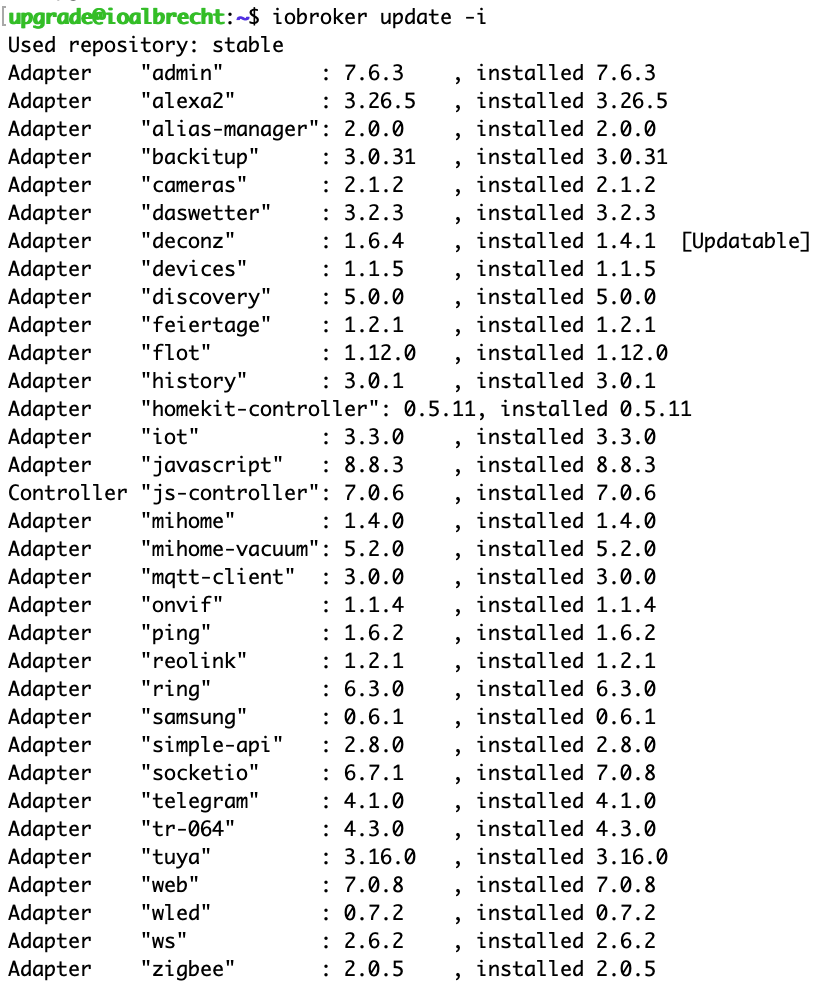
nuc i3, Proxmox, raspimatic (PI3), 15 shellies, shelly 4pro/25/RGB, wled sonoff, 7x xiaomi sensoren, 4xEchos, 4 Tasmota Steckdosen, motionEye, nspanel, Ring, hoymiles usw






Hey! Du scheinst an dieser Unterhaltung interessiert zu sein, hast aber noch kein Konto.
Hast du es satt, bei jedem Besuch durch die gleichen Beiträge zu scrollen? Wenn du dich für ein Konto anmeldest, kommst du immer genau dorthin zurück, wo du zuvor warst, und kannst dich über neue Antworten benachrichtigen lassen (entweder per E-Mail oder Push-Benachrichtigung). Du kannst auch Lesezeichen speichern und Beiträge positiv bewerten, um anderen Community-Mitgliedern deine Wertschätzung zu zeigen.
Mit deinem Input könnte dieser Beitrag noch besser werden 💗
Registrieren Anmelden471
Online33.0k
Benutzer83.6k
Themen1.3m
Beiträge