



Skip to content
  • Home
  • Aktuell
  • Tags
  • 0 Ungelesen 0
  • Kategorien
  • Unreplied
  • Beliebt
  • GitHub
  • Docu
  • Hilfe
Skins
  • Light
  • Brite
  • Cerulean
  • Cosmo
  • Flatly
  • Journal
  • Litera
  • Lumen
  • Lux
  • Materia
  • Minty
  • Morph
  • Pulse
  • Sandstone
  • Simplex
  • Sketchy
  • Spacelab
  • United
  • Yeti
  • Zephyr
  • Dark
  • Cyborg
  • Darkly
  • Quartz
  • Slate
  • Solar
  • Superhero
  • Vapor

  • Standard: (Kein Skin)
  • Kein Skin
Einklappen
ioBroker Logo

Community Forum

donate donate
  1. ioBroker Community Home
  2. Deutsch
  3. ioBroker Allgemein
  4. Backitup kein JavaScript Restore möglich!

NEWS

  • Neuer Blogbeitrag: Monatsrückblick - Dezember 2025 🎄
    BluefoxB
    Bluefox
    11
    1
    358

  • Weihnachtsangebot 2025! 🎄
    BluefoxB
    Bluefox
    24
    1
    1.6k

  • UPDATE 31.10.: Amazon Alexa - ioBroker Skill läuft aus ?
    apollon77A
    apollon77
    48
    3
    9.5k

Backitup kein JavaScript Restore möglich!

Geplant Angeheftet Gesperrt Verschoben ioBroker Allgemein
103 Beiträge 7 Kommentatoren 7.1k Aufrufe 7 Watching
  • Älteste zuerst
  • Neuste zuerst
  • Meiste Stimmen
Antworten
  • In einem neuen Thema antworten
Anmelden zum Antworten
Dieses Thema wurde gelöscht. Nur Nutzer mit entsprechenden Rechten können es sehen.
  • Thomas BraunT Thomas Braun

    @benjamincz

    Das gleiche Spiel...

    mount | sort
    
    B Offline
    B Offline
    BenjaminCz
    schrieb am zuletzt editiert von
    #46

    @thomas-braun

    pi@raspberrypi:~ $ mount | sort
    //192.168.178.58/IOBroker-Backup/IOBroker on /opt/iobroker/backups type cifs (rw,relatime,vers=2.0,cache=strict,username=iobroker,uid=0,noforceuid,gid=0,noforcegid,addr=192.168.178.58,file_mode=0777,dir_mode=0777,soft,nounix,mapposix,rsize=65536,wsize=65536,bsize=1048576,echo_interval=60,actimeo=1)
    //192.168.178.58/IOBroker-Backup/IOBroker on /opt/iobroker/backups type cifs (rw,relatime,vers=2.0,cache=strict,username=iobroker,uid=0,noforceuid,gid=0,noforcegid,addr=192.168.178.58,file_mode=0777,dir_mode=0777,soft,nounix,serverino,mapposix,rsize=65536,wsize=65536,bsize=1048576,echo_interval=60,actimeo=1)
    //192.168.178.58/IOBroker-Backup/IOBroker on /opt/iobroker/backups type cifs (rw,relatime,vers=3.1.1,cache=strict,username=iobroker,uid=0,noforceuid,gid=0,noforcegid,addr=192.168.178.58,file_mode=0777,dir_mode=0777,soft,nounix,mapposix,rsize=4194304,wsize=4194304,bsize=1048576,echo_interval=60,actimeo=1)
    //192.168.178.58/IOBroker-Backup/IOBroker on /opt/iobroker/backups type cifs (rw,relatime,vers=3.1.1,cache=strict,username=iobroker,uid=0,noforceuid,gid=0,noforcegid,addr=192.168.178.58,file_mode=0777,dir_mode=0777,soft,nounix,serverino,mapposix,rsize=4194304,wsize=4194304,bsize=1048576,echo_interval=60,actimeo=1)
    bpf on /sys/fs/bpf type bpf (rw,nosuid,nodev,noexec,relatime,mode=700)
    cgroup2 on /sys/fs/cgroup type cgroup2 (rw,nosuid,nodev,noexec,relatime,nsdelegate,memory_recursiveprot)
    configfs on /sys/kernel/config type configfs (rw,nosuid,nodev,noexec,relatime)
    debugfs on /sys/kernel/debug type debugfs (rw,nosuid,nodev,noexec,relatime)
    /dev/mmcblk0p1 on /boot type vfat (rw,relatime,fmask=0022,dmask=0022,codepage=437,iocharset=ascii,shortname=mixed,flush,errors=remount-ro)
    /dev/mmcblk0p2 on / type ext4 (rw,noatime)
    devpts on /dev/pts type devpts (rw,nosuid,noexec,relatime,gid=5,mode=620,ptmxmode=000)
    devtmpfs on /dev type devtmpfs (rw,relatime,size=1800664k,nr_inodes=84204,mode=755)
    fusectl on /sys/fs/fuse/connections type fusectl (rw,nosuid,nodev,noexec,relatime)
    mqueue on /dev/mqueue type mqueue (rw,nosuid,nodev,noexec,relatime)
    proc on /proc type proc (rw,relatime)
    securityfs on /sys/kernel/security type securityfs (rw,nosuid,nodev,noexec,relatime)
    sunrpc on /run/rpc_pipefs type rpc_pipefs (rw,relatime)
    sysfs on /sys type sysfs (rw,nosuid,nodev,noexec,relatime)
    systemd-1 on /proc/sys/fs/binfmt_misc type autofs (rw,relatime,fd=30,pgrp=1,timeout=0,minproto=5,maxproto=5,direct)
    tmpfs on /dev/shm type tmpfs (rw,nosuid,nodev)
    tmpfs on /run/lock type tmpfs (rw,nosuid,nodev,noexec,relatime,size=5120k)
    tmpfs on /run type tmpfs (rw,nosuid,nodev,size=786212k,nr_inodes=819200,mode=755)
    tmpfs on /run/user/1000 type tmpfs (rw,nosuid,nodev,relatime,size=393104k,nr_inodes=98276,mode=700,uid=1000,gid=1000)
    tracefs on /sys/kernel/tracing type tracefs (rw,nosuid,nodev,noexec,relatime)
    pi@raspberrypi:~ $


    Danke für eure gedult!

    Thomas BraunT 1 Antwort Letzte Antwort
    0
    • B BenjaminCz

      @thomas-braun

      pi@raspberrypi:~ $ mount | sort
      //192.168.178.58/IOBroker-Backup/IOBroker on /opt/iobroker/backups type cifs (rw,relatime,vers=2.0,cache=strict,username=iobroker,uid=0,noforceuid,gid=0,noforcegid,addr=192.168.178.58,file_mode=0777,dir_mode=0777,soft,nounix,mapposix,rsize=65536,wsize=65536,bsize=1048576,echo_interval=60,actimeo=1)
      //192.168.178.58/IOBroker-Backup/IOBroker on /opt/iobroker/backups type cifs (rw,relatime,vers=2.0,cache=strict,username=iobroker,uid=0,noforceuid,gid=0,noforcegid,addr=192.168.178.58,file_mode=0777,dir_mode=0777,soft,nounix,serverino,mapposix,rsize=65536,wsize=65536,bsize=1048576,echo_interval=60,actimeo=1)
      //192.168.178.58/IOBroker-Backup/IOBroker on /opt/iobroker/backups type cifs (rw,relatime,vers=3.1.1,cache=strict,username=iobroker,uid=0,noforceuid,gid=0,noforcegid,addr=192.168.178.58,file_mode=0777,dir_mode=0777,soft,nounix,mapposix,rsize=4194304,wsize=4194304,bsize=1048576,echo_interval=60,actimeo=1)
      //192.168.178.58/IOBroker-Backup/IOBroker on /opt/iobroker/backups type cifs (rw,relatime,vers=3.1.1,cache=strict,username=iobroker,uid=0,noforceuid,gid=0,noforcegid,addr=192.168.178.58,file_mode=0777,dir_mode=0777,soft,nounix,serverino,mapposix,rsize=4194304,wsize=4194304,bsize=1048576,echo_interval=60,actimeo=1)
      bpf on /sys/fs/bpf type bpf (rw,nosuid,nodev,noexec,relatime,mode=700)
      cgroup2 on /sys/fs/cgroup type cgroup2 (rw,nosuid,nodev,noexec,relatime,nsdelegate,memory_recursiveprot)
      configfs on /sys/kernel/config type configfs (rw,nosuid,nodev,noexec,relatime)
      debugfs on /sys/kernel/debug type debugfs (rw,nosuid,nodev,noexec,relatime)
      /dev/mmcblk0p1 on /boot type vfat (rw,relatime,fmask=0022,dmask=0022,codepage=437,iocharset=ascii,shortname=mixed,flush,errors=remount-ro)
      /dev/mmcblk0p2 on / type ext4 (rw,noatime)
      devpts on /dev/pts type devpts (rw,nosuid,noexec,relatime,gid=5,mode=620,ptmxmode=000)
      devtmpfs on /dev type devtmpfs (rw,relatime,size=1800664k,nr_inodes=84204,mode=755)
      fusectl on /sys/fs/fuse/connections type fusectl (rw,nosuid,nodev,noexec,relatime)
      mqueue on /dev/mqueue type mqueue (rw,nosuid,nodev,noexec,relatime)
      proc on /proc type proc (rw,relatime)
      securityfs on /sys/kernel/security type securityfs (rw,nosuid,nodev,noexec,relatime)
      sunrpc on /run/rpc_pipefs type rpc_pipefs (rw,relatime)
      sysfs on /sys type sysfs (rw,nosuid,nodev,noexec,relatime)
      systemd-1 on /proc/sys/fs/binfmt_misc type autofs (rw,relatime,fd=30,pgrp=1,timeout=0,minproto=5,maxproto=5,direct)
      tmpfs on /dev/shm type tmpfs (rw,nosuid,nodev)
      tmpfs on /run/lock type tmpfs (rw,nosuid,nodev,noexec,relatime,size=5120k)
      tmpfs on /run type tmpfs (rw,nosuid,nodev,size=786212k,nr_inodes=819200,mode=755)
      tmpfs on /run/user/1000 type tmpfs (rw,nosuid,nodev,relatime,size=393104k,nr_inodes=98276,mode=700,uid=1000,gid=1000)
      tracefs on /sys/kernel/tracing type tracefs (rw,nosuid,nodev,noexec,relatime)
      pi@raspberrypi:~ $


      Danke für eure gedult!

      Thomas BraunT Online
      Thomas BraunT Online
      Thomas Braun
      Most Active
      schrieb am zuletzt editiert von
      #47

      @benjamincz

      Da ist noch der komische CIFS/SMB Kram aktiv.

      Linux-Werkzeugkasten:
      https://forum.iobroker.net/topic/42952/der-kleine-iobroker-linux-werkzeugkasten
      NodeJS Fixer Skript:
      https://forum.iobroker.net/topic/68035/iob-node-fix-skript
      iob_diag: curl -sLf -o diag.sh https://iobroker.net/diag.sh && bash diag.sh

      B 1 Antwort Letzte Antwort
      0
      • Thomas BraunT Thomas Braun

        @benjamincz

        Da ist noch der komische CIFS/SMB Kram aktiv.

        B Offline
        B Offline
        BenjaminCz
        schrieb am zuletzt editiert von
        #48

        @thomas-braun wie bekomme ich den weg. EInfach IOBRoker neustarten ?

        Thomas BraunT 1 Antwort Letzte Antwort
        0
        • B BenjaminCz

          @thomas-braun wie bekomme ich den weg. EInfach IOBRoker neustarten ?

          Thomas BraunT Online
          Thomas BraunT Online
          Thomas Braun
          Most Active
          schrieb am zuletzt editiert von
          #49

          @benjamincz

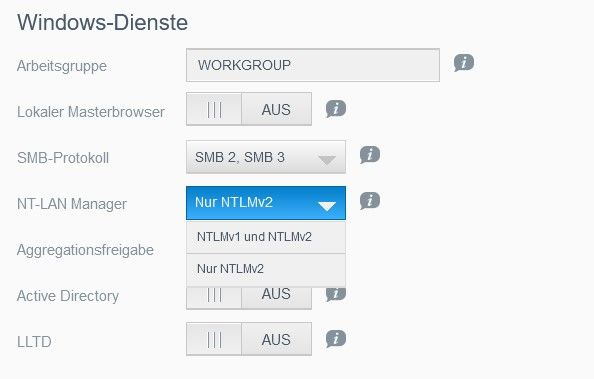
          Die 'Windows-Dienste' von NT-LAN Manager bis einschließlich LLTD ausstellen.

          Linux-Werkzeugkasten:
          https://forum.iobroker.net/topic/42952/der-kleine-iobroker-linux-werkzeugkasten
          NodeJS Fixer Skript:
          https://forum.iobroker.net/topic/68035/iob-node-fix-skript
          iob_diag: curl -sLf -o diag.sh https://iobroker.net/diag.sh && bash diag.sh

          B 1 Antwort Letzte Antwort
          0
          • Thomas BraunT Thomas Braun

            @benjamincz

            Die 'Windows-Dienste' von NT-LAN Manager bis einschließlich LLTD ausstellen.

            B Offline
            B Offline
            BenjaminCz
            schrieb am zuletzt editiert von
            #50

            @thomas-braun
            Ist alles Aus außer den Lan Manager Aus gibts da nicht nur andere Option...
            1.jpg

            Thomas BraunT 1 Antwort Letzte Antwort
            0
            • B BenjaminCz

              @thomas-braun
              Ist alles Aus außer den Lan Manager Aus gibts da nicht nur andere Option...
              1.jpg

              Thomas BraunT Online
              Thomas BraunT Online
              Thomas Braun
              Most Active
              schrieb am zuletzt editiert von
              #51

              @benjamincz

              Ich hasse GUIs...

              Waren die immer aus? Und oben war das DropDown-Menü von smb nur drüber gelegt?

              Linux-Werkzeugkasten:
              https://forum.iobroker.net/topic/42952/der-kleine-iobroker-linux-werkzeugkasten
              NodeJS Fixer Skript:
              https://forum.iobroker.net/topic/68035/iob-node-fix-skript
              iob_diag: curl -sLf -o diag.sh https://iobroker.net/diag.sh && bash diag.sh

              B 1 Antwort Letzte Antwort
              0
              • Thomas BraunT Thomas Braun

                @benjamincz

                Ich hasse GUIs...

                Waren die immer aus? Und oben war das DropDown-Menü von smb nur drüber gelegt?

                B Offline
                B Offline
                BenjaminCz
                schrieb am zuletzt editiert von
                #52

                @thomas-braun
                So sieht es normal aus ohne Dropdown.
                1.jpg

                Thomas BraunT 1 Antwort Letzte Antwort
                0
                • B BenjaminCz

                  @thomas-braun
                  So sieht es normal aus ohne Dropdown.
                  1.jpg

                  Thomas BraunT Online
                  Thomas BraunT Online
                  Thomas Braun
                  Most Active
                  schrieb am zuletzt editiert von
                  #53

                  @benjamincz

                  Stell mal das SMB Protokoll auf 'Nur 3'.
                  Und auf dem Pi:

                  sudo umount /opt/iobroker/backups
                  

                  solange bis die Freigabe nicht mehr in

                  mount | sort
                  

                  auftaucht.

                  Linux-Werkzeugkasten:
                  https://forum.iobroker.net/topic/42952/der-kleine-iobroker-linux-werkzeugkasten
                  NodeJS Fixer Skript:
                  https://forum.iobroker.net/topic/68035/iob-node-fix-skript
                  iob_diag: curl -sLf -o diag.sh https://iobroker.net/diag.sh && bash diag.sh

                  B 1 Antwort Letzte Antwort
                  0
                  • Thomas BraunT Thomas Braun

                    @benjamincz

                    Stell mal das SMB Protokoll auf 'Nur 3'.
                    Und auf dem Pi:

                    sudo umount /opt/iobroker/backups
                    

                    solange bis die Freigabe nicht mehr in

                    mount | sort
                    

                    auftaucht.

                    B Offline
                    B Offline
                    BenjaminCz
                    schrieb am zuletzt editiert von BenjaminCz
                    #54

                    @thomas-braun said in Backitup kein JavaScript Restore möglich!:

                    mount | sort

                    pi@raspberrypi:~ $ mount | sort
                    bpf on /sys/fs/bpf type bpf (rw,nosuid,nodev,noexec,relatime,mode=700)
                    cgroup2 on /sys/fs/cgroup type cgroup2 (rw,nosuid,nodev,noexec,relatime,nsdelegate,memory_recursiveprot)
                    configfs on /sys/kernel/config type configfs (rw,nosuid,nodev,noexec,relatime)
                    debugfs on /sys/kernel/debug type debugfs (rw,nosuid,nodev,noexec,relatime)
                    /dev/mmcblk0p1 on /boot type vfat (rw,relatime,fmask=0022,dmask=0022,codepage=437,iocharset=ascii,shortname=mixed,flush,errors=remount-ro)
                    /dev/mmcblk0p2 on / type ext4 (rw,noatime)
                    devpts on /dev/pts type devpts (rw,nosuid,noexec,relatime,gid=5,mode=620,ptmxmode=000)
                    devtmpfs on /dev type devtmpfs (rw,relatime,size=1800664k,nr_inodes=84204,mode=755)
                    fusectl on /sys/fs/fuse/connections type fusectl (rw,nosuid,nodev,noexec,relatime)
                    mqueue on /dev/mqueue type mqueue (rw,nosuid,nodev,noexec,relatime)
                    proc on /proc type proc (rw,relatime)
                    securityfs on /sys/kernel/security type securityfs (rw,nosuid,nodev,noexec,relatime)
                    sunrpc on /run/rpc_pipefs type rpc_pipefs (rw,relatime)
                    sysfs on /sys type sysfs (rw,nosuid,nodev,noexec,relatime)
                    systemd-1 on /proc/sys/fs/binfmt_misc type autofs (rw,relatime,fd=30,pgrp=1,timeout=0,minproto=5,maxproto=5,direct)
                    tmpfs on /dev/shm type tmpfs (rw,nosuid,nodev)
                    tmpfs on /run/lock type tmpfs (rw,nosuid,nodev,noexec,relatime,size=5120k)
                    tmpfs on /run type tmpfs (rw,nosuid,nodev,size=786212k,nr_inodes=819200,mode=755)
                    tmpfs on /run/user/1000 type tmpfs (rw,nosuid,nodev,relatime,size=393104k,nr_inodes=98276,mode=700,uid=1000,gid=1000)
                    tracefs on /sys/kernel/tracing type tracefs (rw,nosuid,nodev,noexec,relatime)


                    Thomas BraunT 1 Antwort Letzte Antwort
                    0
                    • B BenjaminCz

                      @thomas-braun said in Backitup kein JavaScript Restore möglich!:

                      mount | sort

                      pi@raspberrypi:~ $ mount | sort
                      bpf on /sys/fs/bpf type bpf (rw,nosuid,nodev,noexec,relatime,mode=700)
                      cgroup2 on /sys/fs/cgroup type cgroup2 (rw,nosuid,nodev,noexec,relatime,nsdelegate,memory_recursiveprot)
                      configfs on /sys/kernel/config type configfs (rw,nosuid,nodev,noexec,relatime)
                      debugfs on /sys/kernel/debug type debugfs (rw,nosuid,nodev,noexec,relatime)
                      /dev/mmcblk0p1 on /boot type vfat (rw,relatime,fmask=0022,dmask=0022,codepage=437,iocharset=ascii,shortname=mixed,flush,errors=remount-ro)
                      /dev/mmcblk0p2 on / type ext4 (rw,noatime)
                      devpts on /dev/pts type devpts (rw,nosuid,noexec,relatime,gid=5,mode=620,ptmxmode=000)
                      devtmpfs on /dev type devtmpfs (rw,relatime,size=1800664k,nr_inodes=84204,mode=755)
                      fusectl on /sys/fs/fuse/connections type fusectl (rw,nosuid,nodev,noexec,relatime)
                      mqueue on /dev/mqueue type mqueue (rw,nosuid,nodev,noexec,relatime)
                      proc on /proc type proc (rw,relatime)
                      securityfs on /sys/kernel/security type securityfs (rw,nosuid,nodev,noexec,relatime)
                      sunrpc on /run/rpc_pipefs type rpc_pipefs (rw,relatime)
                      sysfs on /sys type sysfs (rw,nosuid,nodev,noexec,relatime)
                      systemd-1 on /proc/sys/fs/binfmt_misc type autofs (rw,relatime,fd=30,pgrp=1,timeout=0,minproto=5,maxproto=5,direct)
                      tmpfs on /dev/shm type tmpfs (rw,nosuid,nodev)
                      tmpfs on /run/lock type tmpfs (rw,nosuid,nodev,noexec,relatime,size=5120k)
                      tmpfs on /run type tmpfs (rw,nosuid,nodev,size=786212k,nr_inodes=819200,mode=755)
                      tmpfs on /run/user/1000 type tmpfs (rw,nosuid,nodev,relatime,size=393104k,nr_inodes=98276,mode=700,uid=1000,gid=1000)
                      tracefs on /sys/kernel/tracing type tracefs (rw,nosuid,nodev,noexec,relatime)


                      Thomas BraunT Online
                      Thomas BraunT Online
                      Thomas Braun
                      Most Active
                      schrieb am zuletzt editiert von
                      #55

                      @benjamincz

                      Weiter umounten. Bis das alles weg ist.

                      Linux-Werkzeugkasten:
                      https://forum.iobroker.net/topic/42952/der-kleine-iobroker-linux-werkzeugkasten
                      NodeJS Fixer Skript:
                      https://forum.iobroker.net/topic/68035/iob-node-fix-skript
                      iob_diag: curl -sLf -o diag.sh https://iobroker.net/diag.sh && bash diag.sh

                      B 1 Antwort Letzte Antwort
                      0
                      • Thomas BraunT Thomas Braun

                        @benjamincz

                        Weiter umounten. Bis das alles weg ist.

                        B Offline
                        B Offline
                        BenjaminCz
                        schrieb am zuletzt editiert von
                        #56

                        @thomas-braun erledigt
                        siehe oben

                        Thomas BraunT 1 Antwort Letzte Antwort
                        0
                        • B BenjaminCz

                          @thomas-braun erledigt
                          siehe oben

                          Thomas BraunT Online
                          Thomas BraunT Online
                          Thomas Braun
                          Most Active
                          schrieb am zuletzt editiert von
                          #57

                          @benjamincz

                          Jetzt mal ein stinknormales Backitup-Backup manuell ausführen.
                          Währenddessen nochmal in

                          mount | sort
                          

                          schauen was da wohin gemountet wird.

                          Linux-Werkzeugkasten:
                          https://forum.iobroker.net/topic/42952/der-kleine-iobroker-linux-werkzeugkasten
                          NodeJS Fixer Skript:
                          https://forum.iobroker.net/topic/68035/iob-node-fix-skript
                          iob_diag: curl -sLf -o diag.sh https://iobroker.net/diag.sh && bash diag.sh

                          B 1 Antwort Letzte Antwort
                          0
                          • Thomas BraunT Thomas Braun

                            @benjamincz

                            Jetzt mal ein stinknormales Backitup-Backup manuell ausführen.
                            Währenddessen nochmal in

                            mount | sort
                            

                            schauen was da wohin gemountet wird.

                            B Offline
                            B Offline
                            BenjaminCz
                            schrieb am zuletzt editiert von
                            #58

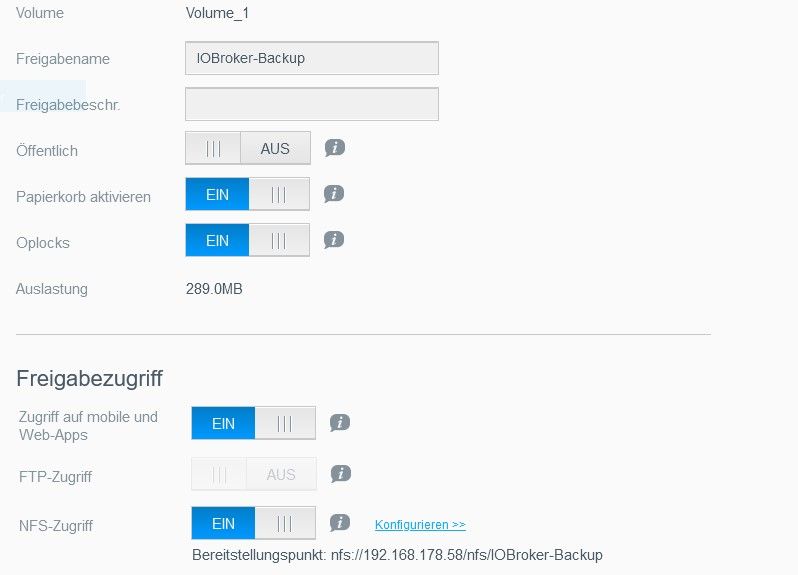
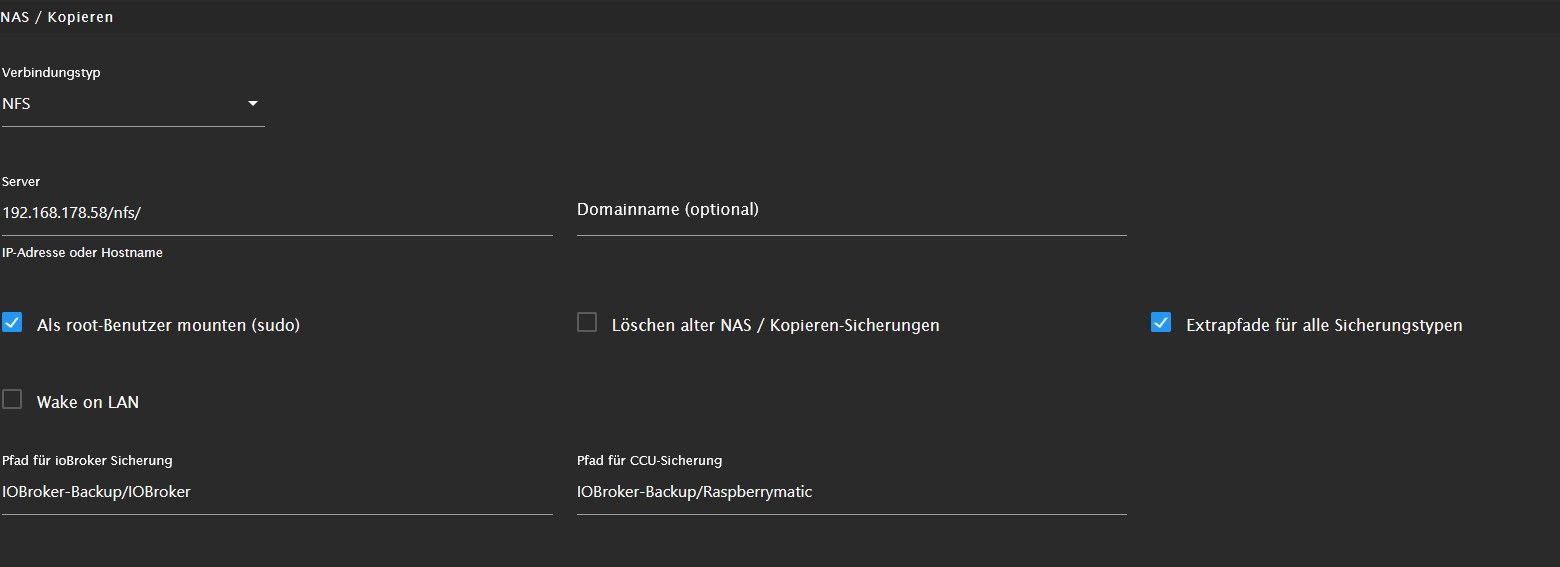
                            @thomas-braun
                            bin noch beschäftigt es auszu Probieren da leider error kommt beim mounten. (NFS)
                            1.jpg 2.jpg

                            B Thomas BraunT 2 Antworten Letzte Antwort
                            0
                            • B BenjaminCz

                              @thomas-braun
                              bin noch beschäftigt es auszu Probieren da leider error kommt beim mounten. (NFS)
                              1.jpg 2.jpg

                              B Offline
                              B Offline
                              BenjaminCz
                              schrieb am zuletzt editiert von
                              #59

                              @benjamincz
                              Started iobroker ...
                              [DEBUG] [mount] - nfs-mount command: "sudo mount 192.168.178.58/:/IOBroker-Backup/IOBroker /opt/iobroker/backups"
                              [ERROR] [mount] - [undefined mount.nfs: Failed to resolve server 192.168.178.58/: Name or service not known

                              [ERROR] [mount] - Error: Command failed: sudo mount 192.168.178.58/:/IOBroker-Backup/IOBroker /opt/iobroker/backups
                              mount.nfs: Failed to resolve server 192.168.178.58/: Name or service not known

                              Thomas BraunT 1 Antwort Letzte Antwort
                              0
                              • B BenjaminCz

                                @thomas-braun
                                bin noch beschäftigt es auszu Probieren da leider error kommt beim mounten. (NFS)
                                1.jpg 2.jpg

                                Thomas BraunT Online
                                Thomas BraunT Online
                                Thomas Braun
                                Most Active
                                schrieb am zuletzt editiert von
                                #60

                                @benjamincz

                                Jetzt NFS?
                                Der Freigabepfad ist falsch.
                                Muss
                                IOBroker-Backup
                                lauten. Im Übrigen ist Groß/Kleinschreibung nur ein zusätzlicher Stolperstein. Schreib Verzeichnisnamen durchweg klein.

                                Linux-Werkzeugkasten:
                                https://forum.iobroker.net/topic/42952/der-kleine-iobroker-linux-werkzeugkasten
                                NodeJS Fixer Skript:
                                https://forum.iobroker.net/topic/68035/iob-node-fix-skript
                                iob_diag: curl -sLf -o diag.sh https://iobroker.net/diag.sh && bash diag.sh

                                1 Antwort Letzte Antwort
                                0
                                • B BenjaminCz

                                  @benjamincz
                                  Started iobroker ...
                                  [DEBUG] [mount] - nfs-mount command: "sudo mount 192.168.178.58/:/IOBroker-Backup/IOBroker /opt/iobroker/backups"
                                  [ERROR] [mount] - [undefined mount.nfs: Failed to resolve server 192.168.178.58/: Name or service not known

                                  [ERROR] [mount] - Error: Command failed: sudo mount 192.168.178.58/:/IOBroker-Backup/IOBroker /opt/iobroker/backups
                                  mount.nfs: Failed to resolve server 192.168.178.58/: Name or service not known

                                  Thomas BraunT Online
                                  Thomas BraunT Online
                                  Thomas Braun
                                  Most Active
                                  schrieb am zuletzt editiert von
                                  #61

                                  @benjamincz sagte in Backitup kein JavaScript Restore möglich!:

                                  192.168.178.58/:/IOBroker-Backup

                                  Das muss wohl

                                  192.168.178.58:/IOBroker-Backup
                                  

                                  lauten.

                                  Linux-Werkzeugkasten:
                                  https://forum.iobroker.net/topic/42952/der-kleine-iobroker-linux-werkzeugkasten
                                  NodeJS Fixer Skript:
                                  https://forum.iobroker.net/topic/68035/iob-node-fix-skript
                                  iob_diag: curl -sLf -o diag.sh https://iobroker.net/diag.sh && bash diag.sh

                                  B 1 Antwort Letzte Antwort
                                  0
                                  • Thomas BraunT Thomas Braun

                                    @benjamincz sagte in Backitup kein JavaScript Restore möglich!:

                                    192.168.178.58/:/IOBroker-Backup

                                    Das muss wohl

                                    192.168.178.58:/IOBroker-Backup
                                    

                                    lauten.

                                    B Offline
                                    B Offline
                                    BenjaminCz
                                    schrieb am zuletzt editiert von
                                    #62

                                    @thomas-braun
                                    jetzt kommt der Fehler:

                                    Started iobroker ...
                                    [DEBUG] [mount] - nfs-mount command: "sudo mount 192.168.178.58:/IOBroker-Backup :/IOBroker-Backup\IOBroker /opt/iobroker/backups"
                                    [ERROR] [mount] - [undefined mount: bad usage
                                    Try 'mount --help' for more information.

                                    [ERROR] [mount] - Error: Command failed: sudo mount 192.168.178.58:/IOBroker-Backup :/IOBroker-Backup\IOBroker /opt/iobroker/backups
                                    mount: bad usage
                                    Try 'mount --help' for more information.

                                    simatecS 1 Antwort Letzte Antwort
                                    0
                                    • B BenjaminCz

                                      @thomas-braun
                                      jetzt kommt der Fehler:

                                      Started iobroker ...
                                      [DEBUG] [mount] - nfs-mount command: "sudo mount 192.168.178.58:/IOBroker-Backup :/IOBroker-Backup\IOBroker /opt/iobroker/backups"
                                      [ERROR] [mount] - [undefined mount: bad usage
                                      Try 'mount --help' for more information.

                                      [ERROR] [mount] - Error: Command failed: sudo mount 192.168.178.58:/IOBroker-Backup :/IOBroker-Backup\IOBroker /opt/iobroker/backups
                                      mount: bad usage
                                      Try 'mount --help' for more information.

                                      simatecS Offline
                                      simatecS Offline
                                      simatec
                                      Developer Most Active
                                      schrieb am zuletzt editiert von simatec
                                      #63

                                      @benjamincz
                                      Installiere mal die nfs-common

                                      sudo apt install nfs-common
                                      
                                      • Besuche meine Github Seite
                                      • Beitrag hat geholfen oder willst du mich unterstützen
                                      • HowTo Restore ioBroker
                                      B 1 Antwort Letzte Antwort
                                      0
                                      • simatecS simatec

                                        @benjamincz
                                        Installiere mal die nfs-common

                                        sudo apt install nfs-common
                                        
                                        B Offline
                                        B Offline
                                        BenjaminCz
                                        schrieb am zuletzt editiert von BenjaminCz
                                        #64

                                        @simatec said in Backitup kein JavaScript Restore möglich!:

                                        sudo apt install nfs-commons

                                        pi@raspberrypi:~ $ pi@raspberrypi:~ $ sudo apt install nfs-commons
                                        Reading package lists... Done
                                        Building dependency tree... Done
                                        Reading state information... Done
                                        E: Unable to locate package nfs-commons
                                        pi@raspberrypi:~ $
                                        sudo apt install nfs-common
                                        -bash: pi@raspberrypi:~: command not found
                                        -bash: Reading: command not found
                                        -bash: Building: command not found
                                        -bash: Reading: command not found
                                        -bash: E:: command not found
                                        -bash: pi@raspberrypi:~: command not found
                                        Reading package lists... Done
                                        Building dependency tree... Done
                                        Reading state information... Done
                                        nfs-common is already the newest version (1:1.3.4-6).
                                        0 upgraded, 0 newly installed, 0 to remove and 0 not upgraded.
                                        pi@raspberrypi:~ $
                                        
                                        
                                        simatecS Thomas BraunT 2 Antworten Letzte Antwort
                                        0
                                        • B BenjaminCz

                                          @simatec said in Backitup kein JavaScript Restore möglich!:

                                          sudo apt install nfs-commons

                                          pi@raspberrypi:~ $ pi@raspberrypi:~ $ sudo apt install nfs-commons
                                          Reading package lists... Done
                                          Building dependency tree... Done
                                          Reading state information... Done
                                          E: Unable to locate package nfs-commons
                                          pi@raspberrypi:~ $
                                          sudo apt install nfs-common
                                          -bash: pi@raspberrypi:~: command not found
                                          -bash: Reading: command not found
                                          -bash: Building: command not found
                                          -bash: Reading: command not found
                                          -bash: E:: command not found
                                          -bash: pi@raspberrypi:~: command not found
                                          Reading package lists... Done
                                          Building dependency tree... Done
                                          Reading state information... Done
                                          nfs-common is already the newest version (1:1.3.4-6).
                                          0 upgraded, 0 newly installed, 0 to remove and 0 not upgraded.
                                          pi@raspberrypi:~ $

                                          
                                          
                                          simatecS Offline
                                          simatecS Offline
                                          simatec
                                          Developer Most Active
                                          schrieb am zuletzt editiert von
                                          #65

                                          @benjamincz

                                          Sorry verschrieben

                                          nfs-common

                                          • Besuche meine Github Seite
                                          • Beitrag hat geholfen oder willst du mich unterstützen
                                          • HowTo Restore ioBroker
                                          1 Antwort Letzte Antwort
                                          0
                                          Antworten
                                          • In einem neuen Thema antworten
                                          Anmelden zum Antworten
                                          • Älteste zuerst
                                          • Neuste zuerst
                                          • Meiste Stimmen


                                          Support us

                                          ioBroker
                                          Community Adapters
                                          Donate
                                          FAQ Cloud / IOT
                                          HowTo: Node.js-Update
                                          HowTo: Backup/Restore
                                          Downloads
                                          BLOG

                                          640

                                          Online

                                          32.5k

                                          Benutzer

                                          81.8k

                                          Themen

                                          1.3m

                                          Beiträge
                                          Community
                                          Impressum | Datenschutz-Bestimmungen | Nutzungsbedingungen | Einwilligungseinstellungen
                                          ioBroker Community 2014-2025
                                          logo
                                          • Anmelden

                                          • Du hast noch kein Konto? Registrieren

                                          • Anmelden oder registrieren, um zu suchen
                                          • Erster Beitrag
                                            Letzter Beitrag
                                          0
                                          • Home
                                          • Aktuell
                                          • Tags
                                          • Ungelesen 0
                                          • Kategorien
                                          • Unreplied
                                          • Beliebt
                                          • GitHub
                                          • Docu
                                          • Hilfe