



Skip to content
  • Home
  • Aktuell
  • Tags
  • 0 Ungelesen 0
  • Kategorien
  • Unreplied
  • Beliebt
  • GitHub
  • Docu
  • Hilfe
Skins
  • Light
  • Brite
  • Cerulean
  • Cosmo
  • Flatly
  • Journal
  • Litera
  • Lumen
  • Lux
  • Materia
  • Minty
  • Morph
  • Pulse
  • Sandstone
  • Simplex
  • Sketchy
  • Spacelab
  • United
  • Yeti
  • Zephyr
  • Dark
  • Cyborg
  • Darkly
  • Quartz
  • Slate
  • Solar
  • Superhero
  • Vapor

  • Standard: (Kein Skin)
  • Kein Skin
Einklappen
ioBroker Logo

Community Forum

donate donate
  1. ioBroker Community Home
  2. Deutsch
  3. ioBroker Allgemein
  4. ERROR: Process exited with code 25

NEWS

  • Jahresrückblick 2025 – unser neuer Blogbeitrag ist online! ✨
    BluefoxB
    Bluefox
    15
    1
    626

  • Neuer Blogbeitrag: Monatsrückblick - Dezember 2025 🎄
    BluefoxB
    Bluefox
    13
    1
    628

  • Weihnachtsangebot 2025! 🎄
    BluefoxB
    Bluefox
    25
    1
    1.9k

ERROR: Process exited with code 25

Geplant Angeheftet Gesperrt Verschoben ioBroker Allgemein
15 Beiträge 4 Kommentatoren 1.8k Aufrufe 4 Watching
  • Älteste zuerst
  • Neuste zuerst
  • Meiste Stimmen
Antworten
  • In einem neuen Thema antworten
Anmelden zum Antworten
Dieses Thema wurde gelöscht. Nur Nutzer mit entsprechenden Rechten können es sehen.
  • A Atticus

    Hallo,
    hab das wieder mal ein kleines Problem.
    Und zwar wie oben geschrieben, enden die Update der updatefähigen Adapter mit dem Errorcode 25.
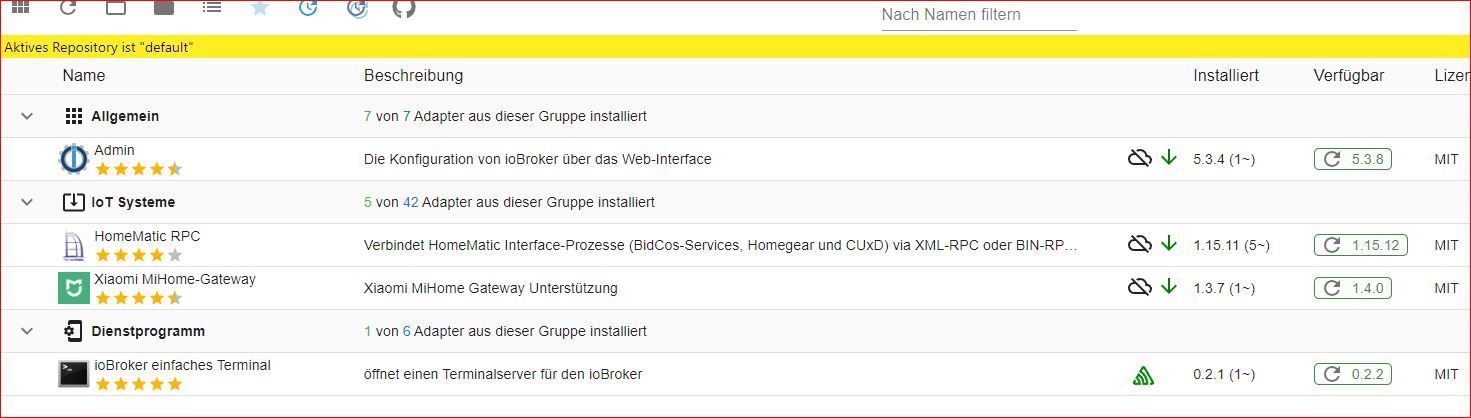
    Error25_001.JPG

    Wenn ich den Admin updaten will, hängt sich die Installation auf, der Admin ist nicht mehr zu erreichen, es hilft (glücklicher weise) nur noch ein reboot.

    pi@ioBroker482:~ $ iob repo list
    default       : http://download.iobroker.net/sources-dist.json
    latest        : http://download.iobroker.net/sources-dist-latest.json
    test          : http://download.iobroker.net/sources-dist-latest.json
    
    Active repo(s): default
    pi@ioBroker482:~ $
    
    
    ERROR: Process exited with code 25
    $ iobroker upgrade terminal@0.2.2
    Update terminal from @0.2.1 to @0.2.2
    NPM version: 8.6.0
    Installing iobroker.terminal@0.2.2... (System call)
    host.ioBroker482 Cannot install iobroker.terminal@0.2.2: 217
    ERROR: Process exited with code 25
    

    Wo liegt das Problem, wie kann ich es beheben?

    Danke

    crunchipC Abwesend
    crunchipC Abwesend
    crunchip
    Forum Testing Most Active
    schrieb am zuletzt editiert von
    #2

    @atticus sagte in ERROR: Process exited with code 25:

    Wo liegt das Problem

    wahrscheinlich an

    @atticus sagte in ERROR: Process exited with code 25:

    NPM version: 8.6.0

    umgestiegen von Proxmox auf Unraid

    A 1 Antwort Letzte Antwort
    1
    • crunchipC crunchip

      @atticus sagte in ERROR: Process exited with code 25:

      Wo liegt das Problem

      wahrscheinlich an

      @atticus sagte in ERROR: Process exited with code 25:

      NPM version: 8.6.0

      A Offline
      A Offline
      Atticus
      schrieb am zuletzt editiert von
      #3

      @crunchip sagte in ERROR: Process exited with code 25:

      @atticus sagte in ERROR: Process exited with code 25:

      NPM version: 8.6.0

      Das soll heissen, das ich npm updaten muss? Welche Version sollte ich dann verwenden?

      arteckA 1 Antwort Letzte Antwort
      0
      • A Atticus

        @crunchip sagte in ERROR: Process exited with code 25:

        @atticus sagte in ERROR: Process exited with code 25:

        NPM version: 8.6.0

        Das soll heissen, das ich npm updaten muss? Welche Version sollte ich dann verwenden?

        arteckA Offline
        arteckA Offline
        arteck
        Developer Most Active
        schrieb am zuletzt editiert von
        #4

        @atticus sagte in ERROR: Process exited with code 25:

        Welche Version sollte ich dann verwenden?

        6.x

        und nicht update sondern downgrade

        zigbee hab ich, zwave auch, nuc's genauso und HA auch

        A 1 Antwort Letzte Antwort
        1
        • arteckA arteck

          @atticus sagte in ERROR: Process exited with code 25:

          Welche Version sollte ich dann verwenden?

          6.x

          und nicht update sondern downgrade

          A Offline
          A Offline
          Atticus
          schrieb am zuletzt editiert von
          #5

          @arteck sagte in ERROR: Process exited with code 25:

          6.x
          und nicht update sondern downgrade

          Funktioniert das gefahrlos ??

          Thomas BraunT 1 Antwort Letzte Antwort
          0
          • A Atticus

            @arteck sagte in ERROR: Process exited with code 25:

            6.x
            und nicht update sondern downgrade

            Funktioniert das gefahrlos ??

            Thomas BraunT Online
            Thomas BraunT Online
            Thomas Braun
            Most Active
            schrieb am zuletzt editiert von
            #6

            @atticus

            Ja. Wenn man es richtig macht.
            Steht in meiner Signatur, wie es unter Debian und Konsorten geht.

            Linux-Werkzeugkasten:
            https://forum.iobroker.net/topic/42952/der-kleine-iobroker-linux-werkzeugkasten
            NodeJS Fixer Skript:
            https://forum.iobroker.net/topic/68035/iob-node-fix-skript
            iob_diag: curl -sLf -o diag.sh https://iobroker.net/diag.sh && bash diag.sh

            A 1 Antwort Letzte Antwort
            1
            • Thomas BraunT Thomas Braun

              @atticus

              Ja. Wenn man es richtig macht.
              Steht in meiner Signatur, wie es unter Debian und Konsorten geht.

              A Offline
              A Offline
              Atticus
              schrieb am zuletzt editiert von
              #7

              @thomas-braun ist Version 6.14.16 ok?

              Thomas BraunT 1 Antwort Letzte Antwort
              0
              • A Atticus

                @thomas-braun ist Version 6.14.16 ok?

                Thomas BraunT Online
                Thomas BraunT Online
                Thomas Braun
                Most Active
                schrieb am zuletzt editiert von
                #8

                @atticus

                Die Version ist okay, die mit dem nodejs Paket zu node14 daher kommt.
                npm wird nicht am System vorbei installiert.

                Linux-Werkzeugkasten:
                https://forum.iobroker.net/topic/42952/der-kleine-iobroker-linux-werkzeugkasten
                NodeJS Fixer Skript:
                https://forum.iobroker.net/topic/68035/iob-node-fix-skript
                iob_diag: curl -sLf -o diag.sh https://iobroker.net/diag.sh && bash diag.sh

                A 1 Antwort Letzte Antwort
                1
                • Thomas BraunT Thomas Braun

                  @atticus

                  Die Version ist okay, die mit dem nodejs Paket zu node14 daher kommt.
                  npm wird nicht am System vorbei installiert.

                  A Offline
                  A Offline
                  Atticus
                  schrieb am zuletzt editiert von
                  #9

                  @thomas-braun und wie sehe ich, welche version dem nodejs Paket zu node14 kommt?
                  Den iobroker hab ich mit

                  curl -sLf https://iobroker.net/install.sh | bash -
                  

                  installiert und habe bewußt kein Update des npm-Paketes vorgenommen.

                  crunchipC 1 Antwort Letzte Antwort
                  0
                  • A Atticus

                    @thomas-braun und wie sehe ich, welche version dem nodejs Paket zu node14 kommt?
                    Den iobroker hab ich mit

                    curl -sLf https://iobroker.net/install.sh | bash -
                    

                    installiert und habe bewußt kein Update des npm-Paketes vorgenommen.

                    crunchipC Abwesend
                    crunchipC Abwesend
                    crunchip
                    Forum Testing Most Active
                    schrieb am zuletzt editiert von crunchip
                    #10

                    @atticus sagte in ERROR: Process exited with code 25:

                    installiert und habe bewußt kein Update des npm-Paketes vorgenommen

                    dann stellt sich die allerdings die Frage wie du zu npm v8.x kommst

                    schau da rein und zeig mal die Ausgabe
                    https://forum.iobroker.net/post/460727

                    umgestiegen von Proxmox auf Unraid

                    A 1 Antwort Letzte Antwort
                    0
                    • crunchipC crunchip

                      @atticus sagte in ERROR: Process exited with code 25:

                      installiert und habe bewußt kein Update des npm-Paketes vorgenommen

                      dann stellt sich die allerdings die Frage wie du zu npm v8.x kommst

                      schau da rein und zeig mal die Ausgabe
                      https://forum.iobroker.net/post/460727

                      A Offline
                      A Offline
                      Atticus
                      schrieb am zuletzt editiert von
                      #11

                      @crunchip

                      
                      deb https://deb.nodesource.com/node_14.x buster main
                      deb-src https://deb.nodesource.com/node_14.x buster main


                      A 1 Antwort Letzte Antwort
                      0
                      • A Atticus

                        @crunchip

                        
                        deb https://deb.nodesource.com/node_14.x buster main
                        deb-src https://deb.nodesource.com/node_14.x buster main


                        A Offline
                        A Offline
                        Atticus
                        schrieb am zuletzt editiert von
                        #12
                        pi@ioBroker482:~ $ apt policy nodejs
                        nodejs:
                          Installiert:           14.19.1-deb-1nodesource1
                          Installationskandidat: 14.19.1-deb-1nodesource1
                          Versionstabelle:
                         *** 14.19.1-deb-1nodesource1 500
                                500 https://deb.nodesource.com/node_14.x buster/main armhf Packages
                                100 /var/lib/dpkg/status
                             10.24.0~dfsg-1~deb10u1 500
                                500 http://raspbian.raspberrypi.org/raspbian buster/main armhf Packages
                        pi@ioBroker482:~ $


                        A 1 Antwort Letzte Antwort
                        0
                        • A Atticus
                          pi@ioBroker482:~ $ apt policy nodejs
                          nodejs:
                            Installiert:           14.19.1-deb-1nodesource1
                            Installationskandidat: 14.19.1-deb-1nodesource1
                            Versionstabelle:
                           *** 14.19.1-deb-1nodesource1 500
                                  500 https://deb.nodesource.com/node_14.x buster/main armhf Packages
                                  100 /var/lib/dpkg/status
                               10.24.0~dfsg-1~deb10u1 500
                                  500 http://raspbian.raspberrypi.org/raspbian buster/main armhf Packages
                          pi@ioBroker482:~ $


                          A Offline
                          A Offline
                          Atticus
                          schrieb am zuletzt editiert von
                          #13
                          pi@ioBroker482:~ $ which nodejs node npm && nodejs -v && node -v && npm -v && whoami && pwd && sudo apt update &> /dev/null && sudo apt update && apt policy nodejs
                          /usr/bin/nodejs
                          /usr/bin/node
                          /usr/bin/npm
                          v14.19.1
                          v14.19.1
                          8.6.0
                          pi
                          /home/pi
                          OK:1 http://archive.raspberrypi.org/debian buster InRelease
                          OK:2 http://raspbian.raspberrypi.org/raspbian buster InRelease
                          OK:3 https://deb.nodesource.com/node_14.x buster InRelease
                          Paketlisten werden gelesen... Fertig
                          Abhängigkeitsbaum wird aufgebaut.
                          Statusinformationen werden eingelesen.... Fertig
                          Alle Pakete sind aktuell.
                          nodejs:
                            Installiert:           14.19.1-deb-1nodesource1
                            Installationskandidat: 14.19.1-deb-1nodesource1
                            Versionstabelle:
                           *** 14.19.1-deb-1nodesource1 500
                                  500 https://deb.nodesource.com/node_14.x buster/main armhf Packages
                                  100 /var/lib/dpkg/status
                               10.24.0~dfsg-1~deb10u1 500
                                  500 http://raspbian.raspberrypi.org/raspbian buster/main armhf Packages
                          pi@ioBroker482:~ $
                          
                          
                          Thomas BraunT 1 Antwort Letzte Antwort
                          0
                          • A Atticus
                            pi@ioBroker482:~ $ which nodejs node npm && nodejs -v && node -v && npm -v && whoami && pwd && sudo apt update &> /dev/null && sudo apt update && apt policy nodejs
                            /usr/bin/nodejs
                            /usr/bin/node
                            /usr/bin/npm
                            v14.19.1
                            v14.19.1
                            8.6.0
                            pi
                            /home/pi
                            OK:1 http://archive.raspberrypi.org/debian buster InRelease
                            OK:2 http://raspbian.raspberrypi.org/raspbian buster InRelease
                            OK:3 https://deb.nodesource.com/node_14.x buster InRelease
                            Paketlisten werden gelesen... Fertig
                            Abhängigkeitsbaum wird aufgebaut.
                            Statusinformationen werden eingelesen.... Fertig
                            Alle Pakete sind aktuell.
                            nodejs:
                              Installiert:           14.19.1-deb-1nodesource1
                              Installationskandidat: 14.19.1-deb-1nodesource1
                              Versionstabelle:
                             *** 14.19.1-deb-1nodesource1 500
                                    500 https://deb.nodesource.com/node_14.x buster/main armhf Packages
                                    100 /var/lib/dpkg/status
                                 10.24.0~dfsg-1~deb10u1 500
                                    500 http://raspbian.raspberrypi.org/raspbian buster/main armhf Packages
                            pi@ioBroker482:~ $
                            
                            
                            Thomas BraunT Online
                            Thomas BraunT Online
                            Thomas Braun
                            Most Active
                            schrieb am zuletzt editiert von
                            #14

                            @atticus

                            Bei der Konstellation musst du npm mal global mit sich selber installiert haben. Und zwar kürzlich, die 8.6.0 ist nicht so alt.

                            iobroker stop
                            sudo apt install --reinstall nodejs
                            iobroker start
                            

                            biegt das wieder gerade.

                            Linux-Werkzeugkasten:
                            https://forum.iobroker.net/topic/42952/der-kleine-iobroker-linux-werkzeugkasten
                            NodeJS Fixer Skript:
                            https://forum.iobroker.net/topic/68035/iob-node-fix-skript
                            iob_diag: curl -sLf -o diag.sh https://iobroker.net/diag.sh && bash diag.sh

                            A 1 Antwort Letzte Antwort
                            1
                            • Thomas BraunT Thomas Braun

                              @atticus

                              Bei der Konstellation musst du npm mal global mit sich selber installiert haben. Und zwar kürzlich, die 8.6.0 ist nicht so alt.

                              iobroker stop
                              sudo apt install --reinstall nodejs
                              iobroker start
                              

                              biegt das wieder gerade.

                              A Offline
                              A Offline
                              Atticus
                              schrieb am zuletzt editiert von
                              #15

                              @thomas-braun Vielen dank für Deine Hilfe. Das hat super funktioniert!

                              pi@ioBroker482:~ $ node -v
                              v14.19.1
                              pi@ioBroker482:~ $ nodejs -v
                              v14.19.1
                              pi@ioBroker482:~ $ npm -v
                              6.14.16
                              pi@ioBroker482:~ $

                              
                              
                              1 Antwort Letzte Antwort
                              0
                              Antworten
                              • In einem neuen Thema antworten
                              Anmelden zum Antworten
                              • Älteste zuerst
                              • Neuste zuerst
                              • Meiste Stimmen


                              Support us

                              ioBroker
                              Community Adapters
                              Donate
                              FAQ Cloud / IOT
                              HowTo: Node.js-Update
                              HowTo: Backup/Restore
                              Downloads
                              BLOG

                              543

                              Online

                              32.6k

                              Benutzer

                              81.9k

                              Themen

                              1.3m

                              Beiträge
                              Community
                              Impressum | Datenschutz-Bestimmungen | Nutzungsbedingungen | Einwilligungseinstellungen
                              ioBroker Community 2014-2025
                              logo
                              • Anmelden

                              • Du hast noch kein Konto? Registrieren

                              • Anmelden oder registrieren, um zu suchen
                              • Erster Beitrag
                                Letzter Beitrag
                              0
                              • Home
                              • Aktuell
                              • Tags
                              • Ungelesen 0
                              • Kategorien
                              • Unreplied
                              • Beliebt
                              • GitHub
                              • Docu
                              • Hilfe
