




js-controller Update schlägt immer fehl
-
@crunchip Der aktuelle Stand ist, das gar nichts mehr funktioniert. Nach der Neuinstallation möchte ich das Backup zurückspielen. Dazu installiere ich den History und Javascript Adapter und konfiguriere den Backitup Adapter. Danach starte ich das Restore. Es startet und danach sehe ich nur einen drehenden bunten Kreis für Stunden. Admin ist nicht erreichbar.
Gibt es überhaupt eine Möglichkeit, nach einer Neuinstallation mit neuer js-controller und admin-version eine Backup zurückzuspielen mit einer niedrigeren admin und js-controller version?
@pjo123456 sagte in js-controller Update schlägt immer fehl:
Dazu installiere ich den
HistoryundJavascript Adapterund konfiguriere den Backitup AdapterEs wird nur der backup Adapter eingerichtet, nichts anderes.
Wie schon geschrieben, wenn denn Versionen nicht passen. Mach es schritt für schritt und poste die Meldungen, sonst kann man nicht helfen -
Und dazu: Der Restore Prozess hat sich mit js-controller 4.0 geändert und kann nun VIEEL LÄÄNGER dauern. Zuerst werden alle adapter deinstalliert und richtet der erste Start das alles wieder ein wie es sein muss... Aber sind alles nur annahmen weil Unklar ist wo und bei was es hier genau hängt
-
Und dazu: Der Restore Prozess hat sich mit js-controller 4.0 geändert und kann nun VIEEL LÄÄNGER dauern. Zuerst werden alle adapter deinstalliert und richtet der erste Start das alles wieder ein wie es sein muss... Aber sind alles nur annahmen weil Unklar ist wo und bei was es hier genau hängt
OK, beim nächsten Update werde ich alle logs speichern.
Da ja nun alles wieder hergestellt ist, taucht natürlich das Problem vom Anfang wieder auf. Diese komischen Einträge ("dataDir": "f"). Kann ich die iobroker.json mit dem nano Editor bearbeiten? Die Zeilen einfach löschen?
Moin aus dem Norden…
-
OK, beim nächsten Update werde ich alle logs speichern.
Da ja nun alles wieder hergestellt ist, taucht natürlich das Problem vom Anfang wieder auf. Diese komischen Einträge ("dataDir": "f"). Kann ich die iobroker.json mit dem nano Editor bearbeiten? Die Zeilen einfach löschen?
@pjo123456 ja einfach editieren mit Texteditor
-
@pjo123456 ja einfach editieren mit Texteditor
Habe die iobroker.json geändert. Der iobroker läuft noch.
 Aber irgendwie scheint sich ein Fehler eingeschlichen zu haben, denn jetzt geht Flot und Vis nicht mehr. Es erscheint dann nur eine weiße Seite mit "File edit.html not found: {}". Nehme ich meine gesicherte iobroker.json wieder ist alles ok.
Kann sich jemand mal die iobroker.json ansehen? Und eventuell den Fehler finden?die originale Datei ist weiter oben zu sehen. Und so habe ich sie jetzt geändert.
{
  "system": {
    "memoryLimitMB": 0,
    "hostname": "",
    "statisticsInterval": 15000,
    "checkDiskInterval": 300000
  },
  "multihostService": {
    "enabled": false,
    "secure": true,
    "password": "$/aes-192-cbc:28a379506c10d56d6f67db5c2290f15d:37ee00d646c76cc95210975ac782ff1d",
    "persist": false
  },
  "network": {
    "IPv4": true,
    "IPv6": true,
    "bindAddress": null,
    "useSystemNpm": true
  },
  "objects": {
    "type": "jsonl",
    "typeComment": "Possible values: 'file' - [port 9001], redis - [port 6379], couch - [port 5984].",
    "host": "0.0.0.0",
    "port": 9001,
    "user": "",
    "pass": "",
    "noFileCache": false,
    "connectTimeout": 2000,
    "options": {
      "auth_pass": null,
      "enableReadyCheck": true,
      "host": "0.0.0.0",
      "port": 9001,
      "db": 0,
      "family": 0,
      "password": null,
      "autoResubscribe": false,
      "connectionName": "host.iobroker-master",
      "retry_max_delay": 5000
    },
    "maxQueue": 1000
  },
  "states": {
    "type": "jsonl",
    "typeComment": "Possible values: 'file' - [port 9000], 'redis' - [port 6379].",
    "host": "0.0.0.0",
    "port": 9000,
    "maxQueue": 1000,
    "options": {
      "auth_pass": null,
      "enableReadyCheck": true,
      "host": "0.0.0.0",
      "port": 9000,
      "db": 0,
      "family": 0,
      "password": null,
      "autoResubscribe": false,
      "connectionName": "host.iobroker-master",
      "retry_max_delay": 5000
    }
  },
  "log": {
    "level": "info",
    "maxDays": 7,
    "noStdout": true,
    "transport": {
      "file1": {
        "type": "file",
        "enabled": true,
        "filename": "log/iobroker",
        "fileext": ".log",
        "maxsize": null,
        "maxFiles": null
      },
      "syslog1": {
        "type": "syslog",
        "enabled": false,
        "host": "localhost",
        "host_comment": "The host running syslogd, defaults to localhost.",
        "port_comment": "The port on the host that syslog is running on, defaults to syslogd's default port(514/UDP).",
        "protocol": "udp4",
        "protocol_comment": "The network protocol to log over (e.g. tcp4, udp4, unix, unix-connect, etc).",
        "path_comment": "The path to the syslog dgram socket (i.e. /dev/log or /var/run/syslog for OS X).",
        "facility_comment": "Syslog facility to use (Default: local0).",
        "localhost": "iobroker",
        "localhost_comment": "Host to indicate that log messages are coming from (Default: localhost).",
        "sysLogType_comment": "The type of the syslog protocol to use (Default: BSD).",
        "app_name_comment": "The name of the application (Default: process.title).",
        "eol_comment": "The end of line character to be added to the end of the message (Default: Message without modifications)."
      }
    }
  },
  "dataDirComment": "Always relative to iobroker.js-controller/",
  "dataDir": "../../iobroker-data/"
}
Aber wie gesagt, es muss noch etwas falsch sein. Ich hoffe, jemand kann das finden oder meine Orginaldatei im dritten Post entsprechend ändern. Danke!
mfg pjo123456
Moin aus dem Norden…
-
Habe die iobroker.json geändert. Der iobroker läuft noch.
Aber irgendwie scheint sich ein Fehler eingeschlichen zu haben, denn jetzt geht Flot und Vis nicht mehr. Es erscheint dann nur eine weiße Seite mit "File edit.html not found: {}". Nehme ich meine gesicherte iobroker.json wieder ist alles ok.
Kann sich jemand mal die iobroker.json ansehen? Und eventuell den Fehler finden?die originale Datei ist weiter oben zu sehen. Und so habe ich sie jetzt geändert.
{
  "system": {
    "memoryLimitMB": 0,
    "hostname": "",
    "statisticsInterval": 15000,
    "checkDiskInterval": 300000
  },
  "multihostService": {
    "enabled": false,
    "secure": true,
    "password": "$/aes-192-cbc:28a379506c10d56d6f67db5c2290f15d:37ee00d646c76cc95210975ac782ff1d",
    "persist": false
  },
  "network": {
    "IPv4": true,
    "IPv6": true,
    "bindAddress": null,
    "useSystemNpm": true
  },
  "objects": {
    "type": "jsonl",
    "typeComment": "Possible values: 'file' - [port 9001], redis - [port 6379], couch - [port 5984].",
    "host": "0.0.0.0",
    "port": 9001,
    "user": "",
    "pass": "",
    "noFileCache": false,
    "connectTimeout": 2000,
    "options": {
      "auth_pass": null,
      "enableReadyCheck": true,
      "host": "0.0.0.0",
      "port": 9001,
      "db": 0,
      "family": 0,
      "password": null,
      "autoResubscribe": false,
      "connectionName": "host.iobroker-master",
      "retry_max_delay": 5000
    },
    "maxQueue": 1000
  },
  "states": {
    "type": "jsonl",
    "typeComment": "Possible values: 'file' - [port 9000], 'redis' - [port 6379].",
    "host": "0.0.0.0",
    "port": 9000,
    "maxQueue": 1000,
    "options": {
      "auth_pass": null,
      "enableReadyCheck": true,
      "host": "0.0.0.0",
      "port": 9000,
      "db": 0,
      "family": 0,
      "password": null,
      "autoResubscribe": false,
      "connectionName": "host.iobroker-master",
      "retry_max_delay": 5000
    }
  },
  "log": {
    "level": "info",
    "maxDays": 7,
    "noStdout": true,
    "transport": {
      "file1": {
        "type": "file",
        "enabled": true,
        "filename": "log/iobroker",
        "fileext": ".log",
        "maxsize": null,
        "maxFiles": null
      },
      "syslog1": {
        "type": "syslog",
        "enabled": false,
        "host": "localhost",
        "host_comment": "The host running syslogd, defaults to localhost.",
        "port_comment": "The port on the host that syslog is running on, defaults to syslogd's default port(514/UDP).",
        "protocol": "udp4",
        "protocol_comment": "The network protocol to log over (e.g. tcp4, udp4, unix, unix-connect, etc).",
        "path_comment": "The path to the syslog dgram socket (i.e. /dev/log or /var/run/syslog for OS X).",
        "facility_comment": "Syslog facility to use (Default: local0).",
        "localhost": "iobroker",
        "localhost_comment": "Host to indicate that log messages are coming from (Default: localhost).",
        "sysLogType_comment": "The type of the syslog protocol to use (Default: BSD).",
        "app_name_comment": "The name of the application (Default: process.title).",
        "eol_comment": "The end of line character to be added to the end of the message (Default: Message without modifications)."
      }
    }
  },
  "dataDirComment": "Always relative to iobroker.js-controller/",
  "dataDir": "../../iobroker-data/"
}
Aber wie gesagt, es muss noch etwas falsch sein. Ich hoffe, jemand kann das finden oder meine Orginaldatei im dritten Post entsprechend ändern. Danke!
mfg pjo123456
@pjo123456 bin grad nur am handy, aber fehlen da nicht ein paar Zeilen?
Eigentlich sind es dich nur 3 Zeilen zum entfernen.
29, 62 und 106 -
@pjo123456 bin grad nur am handy, aber fehlen da nicht ein paar Zeilen?
Eigentlich sind es dich nur 3 Zeilen zum entfernen.
29, 62 und 106Ich glaube im Post mit der iobroker.json ist beim Kopieren etwas schiefgelaufen. Da ist ein Teil doppelt. Habe jetzt noch einmal die Sicherungskopie genommen.
Wenn ich einfach nur die Zeilen mit "dataDir": "f", lösche kann ich die Admin Oberfläche nicht mehr erreichen.
Hier noch einmal die Originaldatei:{ "system": { "memoryLimitMB": 0, "hostname": "", "statisticsInterval": 15000, "checkDiskInterval": 300000 }, "multihostService": { "enabled": false, "secure": true, "password": "$/aes-192-cbc:28a379506c10d56d6f67db5c2290f15d:37ee00d646c76cc95210975ac782ff1d", "persist": false }, "network": { "IPv4": true, "IPv6": true, "bindAddress": null, "useSystemNpm": true }, "objects": { "type": "jsonl", "typeComment": "Possible values: 'file' - [port 9001], redis - [port 6379], couch - [port 5984].", "host": "0.0.0.0", "port": 9001, "user": "", "pass": "", "noFileCache": false, "connectTimeout": 2000, "dataDir": "f", "options": { "auth_pass": null, "enableReadyCheck": true, "host": "0.0.0.0", "port": 9001, "db": 0, "family": 0, "password": null, "autoResubscribe": false, "connectionName": "host.iobroker-master", "retry_max_delay": 5000 }, "maxQueue": 1000 }, "states": { "type": "jsonl", "typeComment": "Possible values: 'file' - [port 9000], 'redis' - [port 6379].", "host": "0.0.0.0", "port": 9000, "maxQueue": 1000, "options": { "auth_pass": null, "enableReadyCheck": true, "host": "0.0.0.0", "port": 9000, "db": 0, "family": 0, "password": null, "autoResubscribe": false, "connectionName": "host.iobroker-master", "retry_max_delay": 5000 }, "dataDir": "f" }, "log": { "level": "info", "maxDays": 7, "noStdout": true, "transport": { "file1": { "type": "file", "enabled": true, "filename": "log/iobroker", "fileext": ".log", "maxsize": null, "maxFiles": null }, "syslog1": { "type": "syslog", "enabled": false, "host": "localhost", "host_comment": "The host running syslogd, defaults to localhost.", "port_comment": "The port on the host that syslog is running on, defaults to syslogd's default port(514/UDP).", "protocol": "udp4", "protocol_comment": "The network protocol to log over (e.g. tcp4, udp4, unix, unix-connect, etc).", "path_comment": "The path to the syslog dgram socket (i.e. /dev/log or /var/run/syslog for OS X).", "facility_comment": "Syslog facility to use (Default: local0).", "localhost": "iobroker", "localhost_comment": "Host to indicate that log messages are coming from (Default: localhost).", "sysLogType_comment": "The type of the syslog protocol to use (Default: BSD).", "app_name_comment": "The name of the application (Default: process.title).", "eol_comment": "The end of line character to be added to the end of the message (Default: Message without modifications)." } } }, "dataDirComment": "Always relative to iobroker.js-controller/", "dataDir": "../../iobroker-data/" }Und hier meine Änderungen:
{
  "system": {
    "memoryLimitMB": 0,
    "hostname": "",
    "statisticsInterval": 15000,
    "checkDiskInterval": 300000
  },
  "multihostService": {
    "enabled": false,
    "secure": true,
    "password": "$/aes-192-cbc:28a379506c10d56d6f67db5c2290f15d:37ee00d646c76cc95210975ac782ff1d",
    "persist": false
  },
  "network": {
    "IPv4": true,
    "IPv6": true,
    "bindAddress": null,
    "useSystemNpm": true
  },
  "objects": {
    "type": "jsonl",
    "typeComment": "Possible values: 'file' - [port 9001], redis - [port 6379], couch - [port 5984].",
    "host": "0.0.0.0",
    "port": 9001,
    "user": "",
    "pass": "",
    "noFileCache": false,
    "connectTimeout": 2000,

    "options": {
      "auth_pass": null,
      "enableReadyCheck": true,
      "host": "0.0.0.0",
      "port": 9001,
      "db": 0,
      "family": 0,
      "password": null,
      "autoResubscribe": false,
      "connectionName": "host.iobroker-master",
      "retry_max_delay": 5000
    },
    "maxQueue": 1000
  },
  "states": {
    "type": "jsonl",
    "typeComment": "Possible values: 'file' - [port 9000], 'redis' - [port 6379].",
    "host": "0.0.0.0",
    "port": 9000,
    "maxQueue": 1000,
    "options": {
      "auth_pass": null,
      "enableReadyCheck": true,
      "host": "0.0.0.0",
      "port": 9000,
      "db": 0,
      "family": 0,
      "password": null,
      "autoResubscribe": false,
      "connectionName": "host.iobroker-master",
      "retry_max_delay": 5000
    },

  },
  "log": {
    "level": "info",
    "maxDays": 7,
    "noStdout": true,
    "transport": {
      "file1": {
        "type": "file",
        "enabled": true,
        "filename": "log/iobroker",
        "fileext": ".log",
        "maxsize": null,
        "maxFiles": null
      },
      "syslog1": {
        "type": "syslog",
        "enabled": false,
        "host": "localhost",
        "host_comment": "The host running syslogd, defaults to localhost.",
        "port_comment": "The port on the host that syslog is running on, defaults to syslogd's default port(514/UDP).",
        "protocol": "udp4",
        "protocol_comment": "The network protocol to log over (e.g. tcp4, udp4, unix, unix-connect, etc).",
        "path_comment": "The path to the syslog dgram socket (i.e. /dev/log or /var/run/syslog for OS X).",
        "facility_comment": "Syslog facility to use (Default: local0).",
        "localhost": "iobroker",
        "localhost_comment": "Host to indicate that log messages are coming from (Default: localhost).",
        "sysLogType_comment": "The type of the syslog protocol to use (Default: BSD).",
        "app_name_comment": "The name of the application (Default: process.title).",
        "eol_comment": "The end of line character to be added to the end of the message (Default: Message without modifications)."
      }
    }
  },
  "dataDirComment": "Always relative to iobroker.js-controller/",
  "dataDir": "../../iobroker-data/"
}
Moin aus dem Norden…
-
Ich glaube im Post mit der iobroker.json ist beim Kopieren etwas schiefgelaufen. Da ist ein Teil doppelt. Habe jetzt noch einmal die Sicherungskopie genommen.
Wenn ich einfach nur die Zeilen mit "dataDir": "f", lösche kann ich die Admin Oberfläche nicht mehr erreichen.
Hier noch einmal die Originaldatei:{ "system": { "memoryLimitMB": 0, "hostname": "", "statisticsInterval": 15000, "checkDiskInterval": 300000 }, "multihostService": { "enabled": false, "secure": true, "password": "$/aes-192-cbc:28a379506c10d56d6f67db5c2290f15d:37ee00d646c76cc95210975ac782ff1d", "persist": false }, "network": { "IPv4": true, "IPv6": true, "bindAddress": null, "useSystemNpm": true }, "objects": { "type": "jsonl", "typeComment": "Possible values: 'file' - [port 9001], redis - [port 6379], couch - [port 5984].", "host": "0.0.0.0", "port": 9001, "user": "", "pass": "", "noFileCache": false, "connectTimeout": 2000, "dataDir": "f", "options": { "auth_pass": null, "enableReadyCheck": true, "host": "0.0.0.0", "port": 9001, "db": 0, "family": 0, "password": null, "autoResubscribe": false, "connectionName": "host.iobroker-master", "retry_max_delay": 5000 }, "maxQueue": 1000 }, "states": { "type": "jsonl", "typeComment": "Possible values: 'file' - [port 9000], 'redis' - [port 6379].", "host": "0.0.0.0", "port": 9000, "maxQueue": 1000, "options": { "auth_pass": null, "enableReadyCheck": true, "host": "0.0.0.0", "port": 9000, "db": 0, "family": 0, "password": null, "autoResubscribe": false, "connectionName": "host.iobroker-master", "retry_max_delay": 5000 }, "dataDir": "f" }, "log": { "level": "info", "maxDays": 7, "noStdout": true, "transport": { "file1": { "type": "file", "enabled": true, "filename": "log/iobroker", "fileext": ".log", "maxsize": null, "maxFiles": null }, "syslog1": { "type": "syslog", "enabled": false, "host": "localhost", "host_comment": "The host running syslogd, defaults to localhost.", "port_comment": "The port on the host that syslog is running on, defaults to syslogd's default port(514/UDP).", "protocol": "udp4", "protocol_comment": "The network protocol to log over (e.g. tcp4, udp4, unix, unix-connect, etc).", "path_comment": "The path to the syslog dgram socket (i.e. /dev/log or /var/run/syslog for OS X).", "facility_comment": "Syslog facility to use (Default: local0).", "localhost": "iobroker", "localhost_comment": "Host to indicate that log messages are coming from (Default: localhost).", "sysLogType_comment": "The type of the syslog protocol to use (Default: BSD).", "app_name_comment": "The name of the application (Default: process.title).", "eol_comment": "The end of line character to be added to the end of the message (Default: Message without modifications)." } } }, "dataDirComment": "Always relative to iobroker.js-controller/", "dataDir": "../../iobroker-data/" }Und hier meine Änderungen:
{ "system": { "memoryLimitMB": 0, "hostname": "", "statisticsInterval": 15000, "checkDiskInterval": 300000 }, "multihostService": { "enabled": false, "secure": true, "password": "$/aes-192-cbc:28a379506c10d56d6f67db5c2290f15d:37ee00d646c76cc95210975ac782ff1d", "persist": false }, "network": { "IPv4": true, "IPv6": true, "bindAddress": null, "useSystemNpm": true }, "objects": { "type": "jsonl", "typeComment": "Possible values: 'file' - [port 9001], redis - [port 6379], couch - [port 5984].", "host": "0.0.0.0", "port": 9001, "user": "", "pass": "", "noFileCache": false, "connectTimeout": 2000, "options": { "auth_pass": null, "enableReadyCheck": true, "host": "0.0.0.0", "port": 9001, "db": 0, "family": 0, "password": null, "autoResubscribe": false, "connectionName": "host.iobroker-master", "retry_max_delay": 5000 }, "maxQueue": 1000 }, "states": { "type": "jsonl", "typeComment": "Possible values: 'file' - [port 9000], 'redis' - [port 6379].", "host": "0.0.0.0", "port": 9000, "maxQueue": 1000, "options": { "auth_pass": null, "enableReadyCheck": true, "host": "0.0.0.0", "port": 9000, "db": 0, "family": 0, "password": null, "autoResubscribe": false, "connectionName": "host.iobroker-master", "retry_max_delay": 5000 }, }, "log": { "level": "info", "maxDays": 7, "noStdout": true, "transport": { "file1": { "type": "file", "enabled": true, "filename": "log/iobroker", "fileext": ".log", "maxsize": null, "maxFiles": null }, "syslog1": { "type": "syslog", "enabled": false, "host": "localhost", "host_comment": "The host running syslogd, defaults to localhost.", "port_comment": "The port on the host that syslog is running on, defaults to syslogd's default port(514/UDP).", "protocol": "udp4", "protocol_comment": "The network protocol to log over (e.g. tcp4, udp4, unix, unix-connect, etc).", "path_comment": "The path to the syslog dgram socket (i.e. /dev/log or /var/run/syslog for OS X).", "facility_comment": "Syslog facility to use (Default: local0).", "localhost": "iobroker", "localhost_comment": "Host to indicate that log messages are coming from (Default: localhost).", "sysLogType_comment": "The type of the syslog protocol to use (Default: BSD).", "app_name_comment": "The name of the application (Default: process.title).", "eol_comment": "The end of line character to be added to the end of the message (Default: Message without modifications)." } } }, "dataDirComment": "Always relative to iobroker.js-controller/", "dataDir": "../../iobroker-data/" }@pjo123456 zeile 61 ist ein Komma zu viel
-
@pjo123456 zeile 61 ist ein Komma zu viel
-
@crunchip OK, das Komma habe ich entfernt. Admin ist wieder erreichbar aber Flot und Vis nicht mehr.
@pjo123456 ich kann bei mir gerade nicht nachsehen wie es aussehen müsste. Bin nur am Handy.
Daher kann ich da nicht weiterhelfen -
naja Du hast mit dem modifizierten DataDir dir ggf ein blödes EI gelegt weil DU jetzt Meta Daten an zwei verschiedenen stellen hast
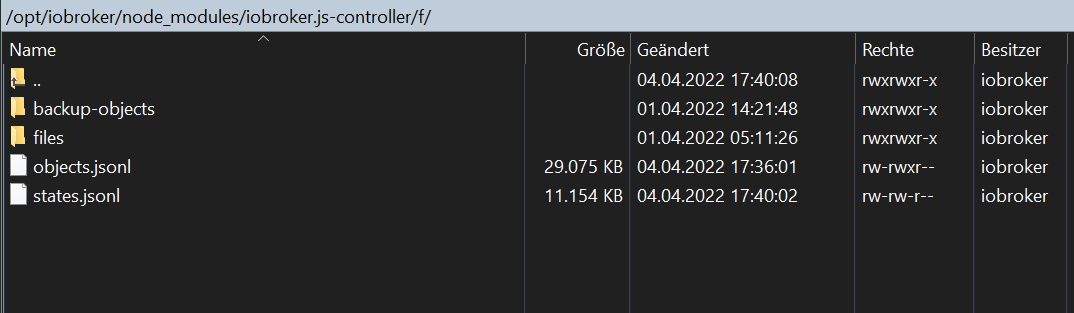
Daher: Schau mal ob unter /opt/iobroker/node_modules/iobroker.js-controller/f/iobroker-data Daten liegen und welche
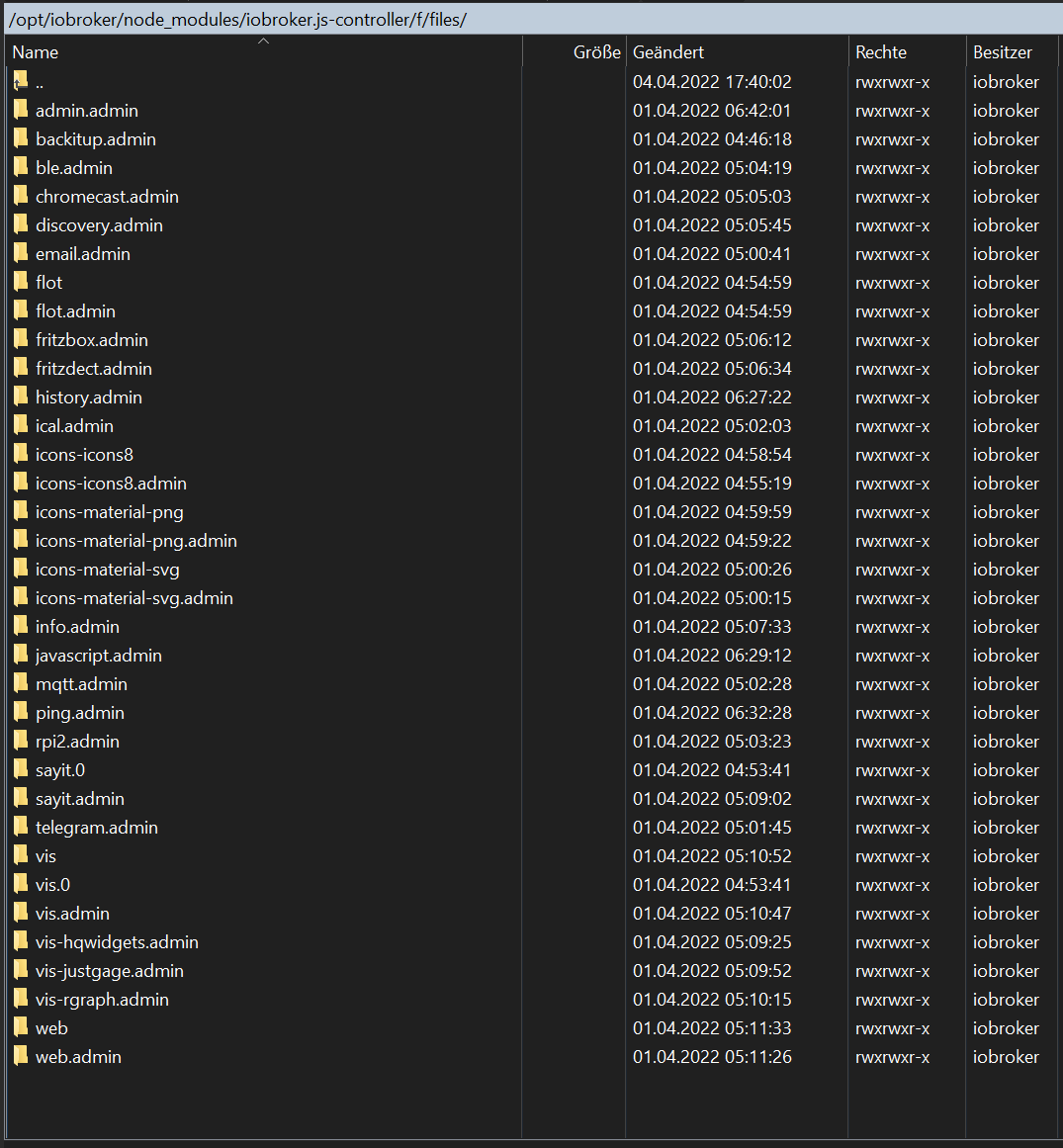
Schau auch ob in /opt/iobroker/node_modules/iobroker.js-controller/f/iobroker-data/files Daten liegen - da könnten jetzt deine Vis Files liegen. Das musst DU jetzt anschauen und irgendwie zusammenführen.
Kannst versuchen ein backup /opt/iobroker/iobroker-data/* zu machen zur sicherheit und dann kannst du versuchen /opt/iobroker/node_modules/iobroker.js-controller/f/iobrokee-data/files/* mal in /opt/iobroker/iobroker-data/files/ reinzukopieren.
Danach am besten noch ein "iob upload all" ausführen.Die Frage ist halt wie lange das bei Dir so lief.
Wenn du aber pech hast ist unter /opt/iobroker/node_modules/iobroker.js-controller/f/ nichts mehr weil du durch den js.controller update ein neues npm Paket installiert hast und der das alles was "Zuviel" war weggeräumt hat. Dann kannst Du nur schauen ob Du aus der Zeit wo es falsch war ein Backup hast was du mal wegkopiert hast und was Du ggf nutzen kannst.
Wenn das alles nicht ist dann habe ich leider Bad news: Dann musst Du von vorne anfangen.
EIn "iob upload all" sollte dazu führen das alle Adapter tun. Ein pot angelegtes Vis wäre dann aber weg.
-
naja Du hast mit dem modifizierten DataDir dir ggf ein blödes EI gelegt weil DU jetzt Meta Daten an zwei verschiedenen stellen hast
Daher: Schau mal ob unter /opt/iobroker/node_modules/iobroker.js-controller/f/iobroker-data Daten liegen und welche
Schau auch ob in /opt/iobroker/node_modules/iobroker.js-controller/f/iobroker-data/files Daten liegen - da könnten jetzt deine Vis Files liegen. Das musst DU jetzt anschauen und irgendwie zusammenführen.
Kannst versuchen ein backup /opt/iobroker/iobroker-data/* zu machen zur sicherheit und dann kannst du versuchen /opt/iobroker/node_modules/iobroker.js-controller/f/iobrokee-data/files/* mal in /opt/iobroker/iobroker-data/files/ reinzukopieren.
Danach am besten noch ein "iob upload all" ausführen.Die Frage ist halt wie lange das bei Dir so lief.
Wenn du aber pech hast ist unter /opt/iobroker/node_modules/iobroker.js-controller/f/ nichts mehr weil du durch den js.controller update ein neues npm Paket installiert hast und der das alles was "Zuviel" war weggeräumt hat. Dann kannst Du nur schauen ob Du aus der Zeit wo es falsch war ein Backup hast was du mal wegkopiert hast und was Du ggf nutzen kannst.
Wenn das alles nicht ist dann habe ich leider Bad news: Dann musst Du von vorne anfangen.
EIn "iob upload all" sollte dazu führen das alle Adapter tun. Ein pot angelegtes Vis wäre dann aber weg.


Hey! Du scheinst an dieser Unterhaltung interessiert zu sein, hast aber noch kein Konto.
Hast du es satt, bei jedem Besuch durch die gleichen Beiträge zu scrollen? Wenn du dich für ein Konto anmeldest, kommst du immer genau dorthin zurück, wo du zuvor warst, und kannst dich über neue Antworten benachrichtigen lassen (entweder per E-Mail oder Push-Benachrichtigung). Du kannst auch Lesezeichen speichern und Beiträge positiv bewerten, um anderen Community-Mitgliedern deine Wertschätzung zu zeigen.
Mit deinem Input könnte dieser Beitrag noch besser werden 💗
Registrieren Anmelden439
Online33.0k
Benutzer83.6k
Themen1.3m
Beiträge