
NEWS




ioBroker hat keine Berechtigungen mehr
-
@homoran
ok, danke für den TippUpdate js-controller from @3.3.22 to @4.0.21 NPM version: 8.5.1 npm install iobroker.js-controller@4.0.21 --loglevel error --unsafe-perm --prefix "/opt/iobroker" (System call) npm ERR! code 126 npm ERR! path /opt/iobroker/node_modules/@serialport/bindings-cpp npm ERR! command failed npm ERR! command sh -c node-gyp-build npm ERR! sh: 1: node-gyp-build: Permission denied npm ERR! A complete log of this run can be found in: npm ERR! /home/iobroker/.npm/_logs/2022-03-26T16_15_26_105Z-debug-0.log host.smarti Cannot install iobroker.js-controller@4.0.21: 126@Thomas-Braun
ich bin die ganzen Lösungsvorschläge durchgegangen.
Wie gesagt, ich bin schon ein paar Tage auf der Suche und dann führt man auch mal Befehle, „ohne nachzudenken“ aus.
Mein ioBroker läuft eigentlich schon seit 1,5-2 Jahre ohne größere Probleme.Gruß Frank
-
@homoran
ok, danke für den TippUpdate js-controller from @3.3.22 to @4.0.21 NPM version: 8.5.1 npm install iobroker.js-controller@4.0.21 --loglevel error --unsafe-perm --prefix "/opt/iobroker" (System call) npm ERR! code 126 npm ERR! path /opt/iobroker/node_modules/@serialport/bindings-cpp npm ERR! command failed npm ERR! command sh -c node-gyp-build npm ERR! sh: 1: node-gyp-build: Permission denied npm ERR! A complete log of this run can be found in: npm ERR! /home/iobroker/.npm/_logs/2022-03-26T16_15_26_105Z-debug-0.log host.smarti Cannot install iobroker.js-controller@4.0.21: 126@Thomas-Braun
ich bin die ganzen Lösungsvorschläge durchgegangen.
Wie gesagt, ich bin schon ein paar Tage auf der Suche und dann führt man auch mal Befehle, „ohne nachzudenken“ aus.
Mein ioBroker läuft eigentlich schon seit 1,5-2 Jahre ohne größere Probleme.Gruß Frank
@limbi80 sagte in ioBroker hat keine Berechtigungen mehr:
Mein ioBroker läuft eigentlich schon seit 1,5-2 Jahre ohne größere Probleme.
Und jetzt halt nicht mehr. Sagt genau was aus?
Die nodeJS-Installation sieht wie aus? Siehe oben.
-
@thomas-braun sagte in ioBroker hat keine Berechtigungen mehr:
which nodejs node npm && nodejs -v && node -v && npm -v && whoami && pwd && sudo apt update &> /dev/null && sudo apt update && apt policy nodejs
leider erfolgslos..
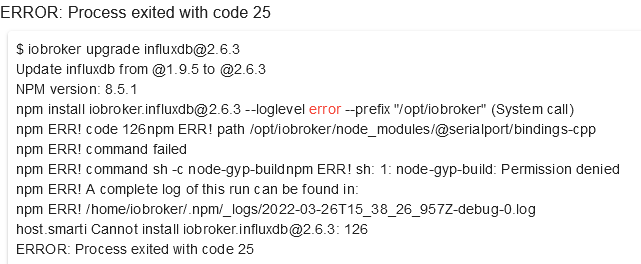
$ iobroker upgrade influxdb@2.6.3

Update influxdb from @1.9.5 to @2.6.3

NPM version: 8.5.1npm install iobroker.influxdb@2.6.3 --loglevel error --prefix "/opt/iobroker" (System call)

npm ERR! code 126

npm ERR! path /opt/iobroker/node_modules/@serialport/bindings-cpp

npm ERR! command failednpm ERR! command sh -c node-gyp-buildnpm ERR! sh: 1: node-gyp-build: Permission denied

npm ERR! A complete log of this run can be found in:npm ERR! /home/iobroker/.npm/_logs/2022-03-26T20_00_23_339Z-debug-0.log

host.smarti Cannot install iobroker.influxdb@2.6.3: 126

ERROR: Process exited with code 25
Oder sollte ich danach noch einmal ein fix machen?
curl -sL https://iobroker.net/fix.sh | bash -@homoran sagte in ioBroker hat keine Berechtigungen mehr:
du hast z.B. npm8
welches npm sollte man installieren?
-
@thomas-braun sagte in ioBroker hat keine Berechtigungen mehr:
which nodejs node npm && nodejs -v && node -v && npm -v && whoami && pwd && sudo apt update &> /dev/null && sudo apt update && apt policy nodejs
leider erfolgslos..
$ iobroker upgrade influxdb@2.6.3

Update influxdb from @1.9.5 to @2.6.3

NPM version: 8.5.1npm install iobroker.influxdb@2.6.3 --loglevel error --prefix "/opt/iobroker" (System call)

npm ERR! code 126

npm ERR! path /opt/iobroker/node_modules/@serialport/bindings-cpp

npm ERR! command failednpm ERR! command sh -c node-gyp-buildnpm ERR! sh: 1: node-gyp-build: Permission denied

npm ERR! A complete log of this run can be found in:npm ERR! /home/iobroker/.npm/_logs/2022-03-26T20_00_23_339Z-debug-0.log

host.smarti Cannot install iobroker.influxdb@2.6.3: 126

ERROR: Process exited with code 25
Oder sollte ich danach noch einmal ein fix machen?
curl -sL https://iobroker.net/fix.sh | bash -@homoran sagte in ioBroker hat keine Berechtigungen mehr:
du hast z.B. npm8
welches npm sollte man installieren?
@limbi80 sagte in ioBroker hat keine Berechtigungen mehr:
leider erfolgslos..
Was soll das heißen? Das soll auch keinen Erfolg bringen, das soll uns nur zeigen was du da jetzt wie im System hängen hast.
Ausgaben der Befehlskette hier posten.
-
@limbi80 sagte in ioBroker hat keine Berechtigungen mehr:
leider erfolgslos..
Was soll das heißen? Das soll auch keinen Erfolg bringen, das soll uns nur zeigen was du da jetzt wie im System hängen hast.
Ausgaben der Befehlskette hier posten.
@thomas-braun sagte in ioBroker hat keine Berechtigungen mehr:
frank@smarti:~$ which nodejs node npm && nodejs -v && node -v && npm -v && whoami && pwd && sudo apt update &> /dev/null && sudo apt update && apt policy nodejs /usr/bin/nodejs /usr/bin/node /usr/bin/npm v12.22.8 v12.22.8 8.5.1 frank /home/frank Hit:1 http://ppa.launchpad.net/jean-francois-dockes/upnpp1/ubuntu focal InRelease Hit:2 https://repos.influxdata.com/ubuntu focal InRelease Hit:3 http://de.archive.ubuntu.com/ubuntu focal InRelease Hit:4 https://deb.nodesource.com/node_10.x focal InRelease Hit:5 http://de.archive.ubuntu.com/ubuntu focal-updates InRelease Get:6 http://de.archive.ubuntu.com/ubuntu focal-backports InRelease [108 kB] Get:7 http://de.archive.ubuntu.com/ubuntu focal-security InRelease [114 kB] Fetched 222 kB in 1s (372 kB/s) Reading package lists... Done Building dependency tree Reading state information... Done All packages are up to date. nodejs: Installed: 12.22.8-deb-1nodesource1 Candidate: 12.22.8-deb-1nodesource1 Version table: *** 12.22.8-deb-1nodesource1 100 100 /var/lib/dpkg/status 10.24.1-deb-1nodesource1 500 500 https://deb.nodesource.com/node_10.x focal/main amd64 Packages 10.19.0~dfsg-3ubuntu1 500 500 http://de.archive.ubuntu.com/ubuntu focal/universe amd64 Packages -
@thomas-braun sagte in ioBroker hat keine Berechtigungen mehr:
frank@smarti:~$ which nodejs node npm && nodejs -v && node -v && npm -v && whoami && pwd && sudo apt update &> /dev/null && sudo apt update && apt policy nodejs /usr/bin/nodejs /usr/bin/node /usr/bin/npm v12.22.8 v12.22.8 8.5.1 frank /home/frank Hit:1 http://ppa.launchpad.net/jean-francois-dockes/upnpp1/ubuntu focal InRelease Hit:2 https://repos.influxdata.com/ubuntu focal InRelease Hit:3 http://de.archive.ubuntu.com/ubuntu focal InRelease Hit:4 https://deb.nodesource.com/node_10.x focal InRelease Hit:5 http://de.archive.ubuntu.com/ubuntu focal-updates InRelease Get:6 http://de.archive.ubuntu.com/ubuntu focal-backports InRelease [108 kB] Get:7 http://de.archive.ubuntu.com/ubuntu focal-security InRelease [114 kB] Fetched 222 kB in 1s (372 kB/s) Reading package lists... Done Building dependency tree Reading state information... Done All packages are up to date. nodejs: Installed: 12.22.8-deb-1nodesource1 Candidate: 12.22.8-deb-1nodesource1 Version table: *** 12.22.8-deb-1nodesource1 100 100 /var/lib/dpkg/status 10.24.1-deb-1nodesource1 500 500 https://deb.nodesource.com/node_10.x focal/main amd64 Packages 10.19.0~dfsg-3ubuntu1 500 500 http://de.archive.ubuntu.com/ubuntu focal/universe amd64 PackagesDann richtest du jetzt zuerst mal nodeJS@14 sauber mit Repository-Anbindung ein. Wie das geht steht in meiner Signatur.
Und Server werden ohne Desktop betrieben...
In dem ppa von Jean-Francois Dockes liegen Programme für die GUI. -
Dann richtest du jetzt zuerst mal nodeJS@14 sauber mit Repository-Anbindung ein. Wie das geht steht in meiner Signatur.
Und Server werden ohne Desktop betrieben...
In dem ppa von Jean-Francois Dockes liegen Programme für die GUI.@thomas-braun
nodeJS@14 ist eingerichtet und die Updates laufen wieder durch.frank@smarti:~$ which nodejs node npm && nodejs -v && node -v && npm -v && whoami && pwd && sudo apt update &> /dev/null && sudo apt update && apt policy nodejs /usr/bin/nodejs /usr/bin/node /usr/bin/npm v14.19.1 v14.19.1 6.14.16 frank /home/frank Hit:1 http://ppa.launchpad.net/jean-francois-dockes/upnpp1/ubuntu focal InRelease Hit:2 http://de.archive.ubuntu.com/ubuntu focal InRelease Hit:3 https://repos.influxdata.com/ubuntu focal InRelease Hit:4 http://de.archive.ubuntu.com/ubuntu focal-updates InRelease Hit:5 https://deb.nodesource.com/node_14.x focal InRelease Get:6 http://de.archive.ubuntu.com/ubuntu focal-backports InRelease [108 kB] Get:7 http://de.archive.ubuntu.com/ubuntu focal-security InRelease [114 kB] Fetched 222 kB in 1s (361 kB/s) Reading package lists... Done Building dependency tree Reading state information... Done All packages are up to date. nodejs: Installed: 14.19.1-deb-1nodesource1 Candidate: 14.19.1-deb-1nodesource1 Version table: *** 14.19.1-deb-1nodesource1 500 500 https://deb.nodesource.com/node_14.x focal/main amd64 Packages 100 /var/lib/dpkg/status 10.19.0~dfsg-3ubuntu1 500 500 http://de.archive.ubuntu.com/ubuntu focal/universe amd64 Packages@thomas-braun sagte in ioBroker hat keine Berechtigungen mehr:
In dem ppa von Jean-Francois Dockes liegen Programme für die GUI.
Das hatte ich für mein Multiroom installiert.
-
@thomas-braun
nodeJS@14 ist eingerichtet und die Updates laufen wieder durch.frank@smarti:~$ which nodejs node npm && nodejs -v && node -v && npm -v && whoami && pwd && sudo apt update &> /dev/null && sudo apt update && apt policy nodejs /usr/bin/nodejs /usr/bin/node /usr/bin/npm v14.19.1 v14.19.1 6.14.16 frank /home/frank Hit:1 http://ppa.launchpad.net/jean-francois-dockes/upnpp1/ubuntu focal InRelease Hit:2 http://de.archive.ubuntu.com/ubuntu focal InRelease Hit:3 https://repos.influxdata.com/ubuntu focal InRelease Hit:4 http://de.archive.ubuntu.com/ubuntu focal-updates InRelease Hit:5 https://deb.nodesource.com/node_14.x focal InRelease Get:6 http://de.archive.ubuntu.com/ubuntu focal-backports InRelease [108 kB] Get:7 http://de.archive.ubuntu.com/ubuntu focal-security InRelease [114 kB] Fetched 222 kB in 1s (361 kB/s) Reading package lists... Done Building dependency tree Reading state information... Done All packages are up to date. nodejs: Installed: 14.19.1-deb-1nodesource1 Candidate: 14.19.1-deb-1nodesource1 Version table: *** 14.19.1-deb-1nodesource1 500 500 https://deb.nodesource.com/node_14.x focal/main amd64 Packages 100 /var/lib/dpkg/status 10.19.0~dfsg-3ubuntu1 500 500 http://de.archive.ubuntu.com/ubuntu focal/universe amd64 Packages@thomas-braun sagte in ioBroker hat keine Berechtigungen mehr:
In dem ppa von Jean-Francois Dockes liegen Programme für die GUI.
Das hatte ich für mein Multiroom installiert.
iobroker stop iobroker fix iobroker update -u iobroker start -
Dann richtest du jetzt zuerst mal nodeJS@14 sauber mit Repository-Anbindung ein. Wie das geht steht in meiner Signatur.
Und Server werden ohne Desktop betrieben...
In dem ppa von Jean-Francois Dockes liegen Programme für die GUI.@thomas-braun sagte in ioBroker hat keine Berechtigungen mehr:
nodeJS@14
sieht so weit wieder gut aus.
Dann hoffe ich mal, dass der statistics.adapter auch wieder richtig funktioniert.
Jetzt ziehe ich meinen Raspi-slave mal mit nodeJS@14 nach.Vielen Dank!
-
@thomas-braun sagte in ioBroker hat keine Berechtigungen mehr:
nodeJS@14
sieht so weit wieder gut aus.
Dann hoffe ich mal, dass der statistics.adapter auch wieder richtig funktioniert.
Jetzt ziehe ich meinen Raspi-slave mal mit nodeJS@14 nach.Vielen Dank!
Bitte Ausgaben zeigen.
-
@thomas-braun sagte in ioBroker hat keine Berechtigungen mehr:
nodeJS@14
sieht so weit wieder gut aus.
Dann hoffe ich mal, dass der statistics.adapter auch wieder richtig funktioniert.
Jetzt ziehe ich meinen Raspi-slave mal mit nodeJS@14 nach.Vielen Dank!
@limbi80
deine Antwort hat sich überschnitten.
Hier die Ausgabefrank@smarti:~$ iobroker update -u Used repository: Stable (default) hash changed or no sources cached => force download of new sources update done Adapter "bshb" : 0.1.18 , installed 0.1.16 [Updateable] Controller "js-controller" : 4.0.21 , installed 3.3.22 [Updateable] Adapter "knx" : 2.0.13 , installed 1.0.45 [Updateable] Adapter "statistics" : 1.0.10 , installed 1.0.6 [Updateable]frank@smarti:~$ iobroker fix library: loaded Library version=2022-02-10 ========================================================================== Welcome to the ioBroker installation fixer! Script version: 2022-02-13 You might need to enter your password a couple of times. ========================================================================== ========================================================================== Installing prerequisites (1/3) ========================================================================== Hit:1 https://repos.influxdata.com/ubuntu focal InRelease Hit:2 http://de.archive.ubuntu.com/ubuntu focal InRelease Hit:3 https://deb.nodesource.com/node_14.x focal InRelease Get:4 http://de.archive.ubuntu.com/ubuntu focal-updates InRelease [114 kB] Get:5 http://de.archive.ubuntu.com/ubuntu focal-backports InRelease [108 kB] Get:6 http://de.archive.ubuntu.com/ubuntu focal-security InRelease [114 kB] Fetched 336 kB in 1s (513 kB/s) Reading package lists... Done Installed gcc-c++ Installed python-dev ========================================================================== Checking ioBroker user and directory permissions (2/3) ========================================================================== Created /etc/sudoers.d/iobroker Fixing directory permissions... ========================================================================== Checking autostart (3/3) ========================================================================== Enabling autostart... Autostart enabled! ========================================================================== Your installation was fixed successfully Run iobroker start to start ioBroker again! ========================================================================== -
@limbi80
deine Antwort hat sich überschnitten.
Hier die Ausgabefrank@smarti:~$ iobroker update -u Used repository: Stable (default) hash changed or no sources cached => force download of new sources update done Adapter "bshb" : 0.1.18 , installed 0.1.16 [Updateable] Controller "js-controller" : 4.0.21 , installed 3.3.22 [Updateable] Adapter "knx" : 2.0.13 , installed 1.0.45 [Updateable] Adapter "statistics" : 1.0.10 , installed 1.0.6 [Updateable]frank@smarti:~$ iobroker fix library: loaded Library version=2022-02-10 ========================================================================== Welcome to the ioBroker installation fixer! Script version: 2022-02-13 You might need to enter your password a couple of times. ========================================================================== ========================================================================== Installing prerequisites (1/3) ========================================================================== Hit:1 https://repos.influxdata.com/ubuntu focal InRelease Hit:2 http://de.archive.ubuntu.com/ubuntu focal InRelease Hit:3 https://deb.nodesource.com/node_14.x focal InRelease Get:4 http://de.archive.ubuntu.com/ubuntu focal-updates InRelease [114 kB] Get:5 http://de.archive.ubuntu.com/ubuntu focal-backports InRelease [108 kB] Get:6 http://de.archive.ubuntu.com/ubuntu focal-security InRelease [114 kB] Fetched 336 kB in 1s (513 kB/s) Reading package lists... Done Installed gcc-c++ Installed python-dev ========================================================================== Checking ioBroker user and directory permissions (2/3) ========================================================================== Created /etc/sudoers.d/iobroker Fixing directory permissions... ========================================================================== Checking autostart (3/3) ========================================================================== Enabling autostart... Autostart enabled! ========================================================================== Your installation was fixed successfully Run iobroker start to start ioBroker again! ==========================================================================@limbi80 sagte in ioBroker hat keine Berechtigungen mehr:
[Updateable]
Dann weißt du jetzt was zu tun ist.
-
@thomas-braun
erledigt!Danke noch einmal für deine Hilfe!
-
@thomas-braun
nodeJS@14 ist eingerichtet und die Updates laufen wieder durch.frank@smarti:~$ which nodejs node npm && nodejs -v && node -v && npm -v && whoami && pwd && sudo apt update &> /dev/null && sudo apt update && apt policy nodejs /usr/bin/nodejs /usr/bin/node /usr/bin/npm v14.19.1 v14.19.1 6.14.16 frank /home/frank Hit:1 http://ppa.launchpad.net/jean-francois-dockes/upnpp1/ubuntu focal InRelease Hit:2 http://de.archive.ubuntu.com/ubuntu focal InRelease Hit:3 https://repos.influxdata.com/ubuntu focal InRelease Hit:4 http://de.archive.ubuntu.com/ubuntu focal-updates InRelease Hit:5 https://deb.nodesource.com/node_14.x focal InRelease Get:6 http://de.archive.ubuntu.com/ubuntu focal-backports InRelease [108 kB] Get:7 http://de.archive.ubuntu.com/ubuntu focal-security InRelease [114 kB] Fetched 222 kB in 1s (361 kB/s) Reading package lists... Done Building dependency tree Reading state information... Done All packages are up to date. nodejs: Installed: 14.19.1-deb-1nodesource1 Candidate: 14.19.1-deb-1nodesource1 Version table: *** 14.19.1-deb-1nodesource1 500 500 https://deb.nodesource.com/node_14.x focal/main amd64 Packages 100 /var/lib/dpkg/status 10.19.0~dfsg-3ubuntu1 500 500 http://de.archive.ubuntu.com/ubuntu focal/universe amd64 Packages@thomas-braun sagte in ioBroker hat keine Berechtigungen mehr:
In dem ppa von Jean-Francois Dockes liegen Programme für die GUI.
Das hatte ich für mein Multiroom installiert.

Hey! Du scheinst an dieser Unterhaltung interessiert zu sein, hast aber noch kein Konto.
Hast du es satt, bei jedem Besuch durch die gleichen Beiträge zu scrollen? Wenn du dich für ein Konto anmeldest, kommst du immer genau dorthin zurück, wo du zuvor warst, und kannst dich über neue Antworten benachrichtigen lassen (entweder per E-Mail oder Push-Benachrichtigung). Du kannst auch Lesezeichen speichern und Beiträge positiv bewerten, um anderen Community-Mitgliedern deine Wertschätzung zu zeigen.
Mit deinem Input könnte dieser Beitrag noch besser werden 💗
Registrieren AnmeldenSupport us
204
Online33.1k
Benutzende83.7k
Themen1.3m
Beiträge