




[erledigt] Backup Fehler
-
gerade nochmals alles neu aufgesetzt, nur Iobroker restore vom 18.03, keine Datenbanken usw..
Fehler kommt weiterhin:Started iobroker ... [DEBUG] [iobroker] - host.iobroker 176758 states saved [DEBUG] [iobroker] - host.iobroker 218049 objects saved [ERROR] [iobroker] - <--- Last few GCs ---> [14743:0x35bb3ad0] 269837 ms: Mark-sweep (reduce) 2049.2 (2050.5) -> 2049.2 (2052.5) MB, 929.5 / 0.1 ms (average mu = 0.362, current mu = 0.017) allocation failure scavenge might not succeed <--- JS stacktrace ---> FATAL ERROR: MarkCompactCollector: young object promotion failed Allocation failed - JavaScript heap out of memory [ERROR] [iobroker] - 1: 0xa2f1a8 node::Abort() [/usr/bin/node] [ERROR] [iobroker] - 2: 0x975a58 node::FatalError(char const*, char const*) [/usr/bin/node] [ERROR] [iobroker] - 3: 0xb947e0 v8::Utils::ReportOOMFailure(v8::internal::Isolate*, char const*, bool) [/usr/bin/node] [ERROR] [iobroker] - 4: 0xb9496c v8::internal::V8::FatalProcessOutOfMemory(v8::internal::Isolate*, char const*, bool) [/usr/bin/node] [ERROR] [iobroker] - 5: 0xd3d088 v8::internal::Heap::EnsureFromSpaceIsCommitted() [/usr/bin/node] 6: 0xd6aae0 v8::internal::EvacuateNewSpaceVisitor::Visit(v8::internal::HeapObject, int) [/usr/bin/node] [ERROR] [iobroker] - 7: 0xd758fc v8::internal::FullEvacuator::RawEvacuatePage(v8::internal::MemoryChunk*, long*) [/usr/bin/node] [ERROR] [iobroker] - 8: 0xd63688 v8::internal::Evacuator::EvacuatePage(v8::internal::MemoryChunk*) [/usr/bin/node] 9: 0xd63920 v8::internal::PageEvacuationTask::RunInParallel(v8::internal::ItemParallelJob::Task::Runner) [/usr/bin/node] 10: 0xd56fc0 v8::internal::ItemParallelJob::Run() [/usr/bin/node] [ERROR] [iobroker] - 11: 0xd773a8 void v8::internal::MarkCompactCollectorBase::CreateAndExecuteEvacuationTasks<v8::internal::FullEvacuator, v8::internal::MarkCompactCollector>(v8::internal::MarkCompactCollector*, v8::internal::ItemParallelJob*, v8::internal::MigrationObserver*, long) [/usr/bin/node] 12: 0xd77b20 v8::internal::MarkCompactCollector::EvacuatePagesInParallel() [/usr/bin/node] [ERROR] [iobroker] - 13: 0xd77cb4 v8::internal::MarkCompactCollector::Evacuate() [/usr/bin/node] 14: 0xd88a28 v8::internal::MarkCompactCollector::CollectGarbage() [/usr/bin/node] [ERROR] [iobroker] - 15: 0xd4a80c v8::internal::Heap::MarkCompact() [/usr/bin/node] 16: 0xd4bd88 v8::internal::Heap::CollectGarbage(v8::internal::AllocationSpace, v8::internal::GarbageCollectionReason, v8::GCCallbackFlags) [/usr/bin/node] [ERROR] [iobroker] - 17: 0xd4ec84 v8::internal::Heap::AllocateRawWithRetryOrFailSlowPath(int, v8::internal::AllocationType, v8::internal::AllocationOrigin, v8::internal::AllocationAlignment) [/usr/bin/node] [ERROR] [iobroker] - 18: 0xd22098 v8::internal::Factory::AllocateRawWithAllocationSite(v8::internal::Handle<v8::internal::Map>, v8::internal::AllocationType, v8::internal::Handle<v8::internal::AllocationSite>) [/usr/bin/node] 19: 0xd22154 v8::internal::Factory::NewJSObjectFromMap(v8::internal::Handle<v8::internal::Map>, v8::internal::AllocationType, v8::internal::Handle<v8::internal::AllocationSite>) [/usr/bin/node] [ERROR] [iobroker] - 20: 0xe2522c v8::internal::JsonParser<unsigned short>::BuildJsonObject(v8::internal::JsonParser<unsigned short>::JsonContinuation const&, std::vector<v8::internal::JsonProperty, std::allocator<v8::internal::JsonProperty> > const&, v8::internal::Handle<v8::internal::Map>) [/usr/bin/node] 21: 0xe26428 v8::internal::JsonParser<unsigned short>::ParseJsonValue() [/usr/bin/node] [ERROR] [iobroker] - 22: 0xe26a8c v8::internal::JsonParser<unsigned short>::ParseJson() [/usr/bin/node] 23: 0xc38c64 [/usr/bin/node] 24: 0xc392b8 v8::internal::Builtin_JsonParse(int, unsigned long*, v8::internal::Isolate*) [/usr/bin/node] [ERROR] [iobroker] - 25: 0x139eacc [/usr/bin/node] [DEBUG] [iobroker] - done [DEBUG] [influxDB] - InfluxDB-Backup started ... [DEBUG] [influxDB] - Start InfluxDB Backup ... [DEBUG] [influxDB] - InfluxDB Backup tmp directory created [DEBUG] [influxDB] - Backup created: /opt/iobroker/backups/influxDB_2022_03_20-16_40_08_backupiobroker.tar.gz [DEBUG] [influxDB] - Try deleting the InfluxDB tmp directory [DEBUG] [influxDB] - InfluxDB tmp directory was successfully deleted [DEBUG] [influxDB] - InfluxDB-Backup for is finish [DEBUG] [influxDB] - done [DEBUG] [historyDB] - compress from historyDB started ... [DEBUG] [historyDB] - Packed 12MB so far... [DEBUG] [historyDB] - Packed 35MB so far... [DEBUG] [historyDB] - Packed 60MB so far... [DEBUG] [historyDB] - Backup created: /opt/iobroker/backups/historyDB_2022_03_20-16_40_15_backupiobroker.tar.gz [DEBUG] [historyDB] - done [DEBUG] [zigbee] - found zigbee database: zigbee.0 [DEBUG] [zigbee] - done [DEBUG] [grafana] - Start Grafana Backup ... [DEBUG] [grafana] - Created grafana_tmp directory: "/opt/iobroker/backups/grafana_tmp" [DEBUG] [grafana] - Created dashboard directory [DEBUG] [grafana] - Created dashboards_manually_restore directory [DEBUG] [grafana] - Created datasource directory [DEBUG] [grafana] - start Grafana request ... [DEBUG] [grafana] - Grafana is available ... Status: 200 [DEBUG] [grafana] - found Dashboard: verbraucher [DEBUG] [grafana] - found Dashboard: energie-1 [DEBUG] [grafana] - start Grafana backup compress ... [DEBUG] [grafana] - Backup created: /opt/iobroker/backups/grafana_2022_03_20-16_40_50_backupiobroker.tar.gz [DEBUG] [grafana] - Try deleting the Grafana tmp directory: "/opt/iobroker/backups/grafana_tmp" [DEBUG] [grafana] - Grafana tmp directory "/opt/iobroker/backups/grafana_tmp" successfully deleted [DEBUG] [grafana] - done [DEBUG] [javascripts] - Created javascript_tmp directory: "/opt/iobroker/backups/tmpScripts" [DEBUG] [javascripts] - found Script: Strom_Steckdosen [DEBUG] [javascripts] - found Script: Stromverbrauch [DEBUG] [javascripts] - found Script: Uptime [DEBUG] [javascripts] - found Script: Wohnzimmer_Stehlampe [DEBUG] [javascripts] - found Script: Batterie [DEBUG] [javascripts] - found Script: Energie_Bezug [DEBUG] [javascripts] - found Script: Energie_Einspeisung [DEBUG] [javascripts] - found Script: IP_Device [DEBUG] [javascripts] - found Script: Lampe_Flur [DEBUG] [javascripts] - found Script: Onlinestatus [DEBUG] [javascripts] - found Script: Opnewb_temp [DEBUG] [javascripts] - found Script: PV_Anlage [DEBUG] [javascripts] - found Script: Raspi_2_VZ_Temp [DEBUG] [javascripts] - found Script: Raspi_4_allg__Temp [DEBUG] [javascripts] - found Script: SolarWebTabelle [DEBUG] [javascripts] - found Script: Steckdose_Lampe_WZ [DEBUG] [javascripts] - found Script: Stromverbrauch_gesamt [DEBUG] [javascripts] - found Script: Test_für_IPDevices [DEBUG] [javascripts] - found Script: Wasser [DEBUG] [javascripts] - found Script: Wasser_History [DEBUG] [javascripts] - found Script: FB_Abfrage [DEBUG] [javascripts] - Try deleting the Javascript tmp directory: "/opt/iobroker/backups/tmpScripts" [DEBUG] [javascripts] - Javascript tmp directory "/opt/iobroker/backups/tmpScripts" successfully deleted [DEBUG] [javascripts] - Backup created: /opt/iobroker/backups/javascripts_2022_03_20-16_40_56_backupiobroker.tar.gz [DEBUG] [javascripts] - done [DEBUG] [cifs] - Copy iobroker_2022_03_20-16_35_37_backupiobroker.tar.gz... [ERROR] [cifs] - Error: ENOENT: no such file or directory, open '/opt/iobroker/backups/iobroker_2022_03_20-16_35_37_backupiobroker.tar.gz' [DEBUG] [cifs] - Copy influxDB_2022_03_20-16_40_08_backupiobroker.tar.gz... [DEBUG] [cifs] - Copy historyDB_2022_03_20-16_40_15_backupiobroker.tar.gz... [DEBUG] [cifs] - Copy zigbee.0_2022_03_20-16_40_47_backupiobroker.tar.gz... [DEBUG] [cifs] - Copy grafana_2022_03_20-16_40_50_backupiobroker.tar.gz... [DEBUG] [cifs] - Copy javascripts_2022_03_20-16_40_56_backupiobroker.tar.gz... [DEBUG] [cifs] - done [ERROR] [clean] - Backup files not deleted from /opt/iobroker/backups because some errors. [DEBUG] [clean] - done [DEBUG] [historyHTML] - new history html values created [DEBUG] [historyHTML] - done [DEBUG] [historyJSON] - new history json values created [DEBUG] [historyJSON] - done [EXIT] 0@hm_krause sagte in Backitup Fehler:
FATAL ERROR: MarkCompactCollector: young object promotion failed Allocation failed - JavaScript heap out of memory
du hast ein Speicherproblem
@hm_krause sagte in Backitup Fehler:
alles neu aufgesetzt,
wie, genau?
@hm_krause sagte in Backitup Fehler:
nur Iobroker restore vom 18.03
wie groß ist das?
Vor dem restore-versuch keine Probleme?@hm_krause sagte in Backitup Fehler:
[DEBUG] [influxDB] - InfluxDB-Backup started ...
wie passt das zu
@hm_krause sagte in Backitup Fehler:
keine Datenbanken usw
kein Support per PN! - Fragen im Forum stellen - Benutzt das Voting rechts unten im Beitrag wenn er euch geholfen hat.
Das Forum freut sich über eine Spende. Benutzt dazu den Spendenbutton oben rechts. Danke!
der Installationsfixer: curl -fsL https://iobroker.net/fix.sh | bash - -
@hm_krause sagte in Backitup Fehler:
FATAL ERROR: MarkCompactCollector: young object promotion failed Allocation failed - JavaScript heap out of memory
du hast ein Speicherproblem
@hm_krause sagte in Backitup Fehler:
alles neu aufgesetzt,
wie, genau?
@hm_krause sagte in Backitup Fehler:
nur Iobroker restore vom 18.03
wie groß ist das?
Vor dem restore-versuch keine Probleme?@hm_krause sagte in Backitup Fehler:
[DEBUG] [influxDB] - InfluxDB-Backup started ...
wie passt das zu
@hm_krause sagte in Backitup Fehler:
keine Datenbanken usw
@homoran sagte in Backitup Fehler:
du hast ein Speicherproblem
Genauer ein Problem mit dem Heap. Der ist soweit ich weiß für nodejs auf 2GB gedeckelt.
190162 Status und 234950 Objekte ist wohl etwas viel...
[DEBUG] [iobroker] - host.iobroker 190162 states saved [DEBUG] [iobroker] - host.iobroker 234950 objects saved@hm_krause Wo kommt der ganze Kram her?
-
@hm_krause sagte in Backitup Fehler:
FATAL ERROR: MarkCompactCollector: young object promotion failed Allocation failed - JavaScript heap out of memory
du hast ein Speicherproblem
@hm_krause sagte in Backitup Fehler:
alles neu aufgesetzt,
wie, genau?
@hm_krause sagte in Backitup Fehler:
nur Iobroker restore vom 18.03
wie groß ist das?
Vor dem restore-versuch keine Probleme?@hm_krause sagte in Backitup Fehler:
[DEBUG] [influxDB] - InfluxDB-Backup started ...
wie passt das zu
@hm_krause sagte in Backitup Fehler:
keine Datenbanken usw
@homoran
--wie, genau?
Iobroker mit "curl -sLf https://iobroker.net/install.sh | bash -" installiert
dann Backup vom Iobroker vom 18.03 eingespielt (Größe 23095 kb)
Backup von Grafana, Influxdb, History, Javascipt und Zigbee nicht eingespielt.
Versuch Backup zu erstellen :-( gescheitert -
@homoran sagte in Backitup Fehler:
du hast ein Speicherproblem
Genauer ein Problem mit dem Heap. Der ist soweit ich weiß für nodejs auf 2GB gedeckelt.
190162 Status und 234950 Objekte ist wohl etwas viel...
[DEBUG] [iobroker] - host.iobroker 190162 states saved [DEBUG] [iobroker] - host.iobroker 234950 objects saved@hm_krause Wo kommt der ganze Kram her?
@thomas-braun
...das ist installiert:pi@iobroker:~ $ iob list instances + system.adapter.admin.0 : admin : iobroker - enabled, port: 8081, bind: 0.0.0.0, run as: admin + system.adapter.alexa2.0 : alexa2 : iobroker - enabled + system.adapter.backitup.0 : backitup : iobroker - enabled + system.adapter.discovery.0 : discovery : iobroker - enabled + system.adapter.fb-checkpresence.0 : fb-checkpresence : iobroker - enabled + system.adapter.fronius-solarweb.0 : fronius-solarweb : iobroker - enabled + system.adapter.fronius.0 : fronius : iobroker - enabled + system.adapter.heizoel.0 : heizoel : iobroker - enabled system.adapter.ical.0 : ical : iobroker - enabled system.adapter.icons-material-svg.0 : icons-material-svg : iobroker - disabled system.adapter.icons-mfd-png.0 : icons-mfd-png : iobroker - disabled system.adapter.icons-mfd-svg.0 : icons-mfd-svg : iobroker - disabled + system.adapter.influxdb.0 : influxdb : iobroker - enabled, port: 8086 + system.adapter.info.0 : info : iobroker - enabled + system.adapter.javascript.0 : javascript : iobroker - enabled + system.adapter.mqtt.0 : mqtt : iobroker - enabled, port: 1883, bind: 0.0.0.0 + system.adapter.mqtt.1 : mqtt : iobroker - enabled, port: 1883, bind: 0.0.0.0 system.adapter.openweathermap.0 : openweathermap : iobroker - enabled + system.adapter.rpi2.0 : rpi2 : iobroker - enabled + system.adapter.shuttercontrol.0 : shuttercontrol : iobroker - enabled + system.adapter.simple-api.0 : simple-api : iobroker - enabled, port: 8087, bind: 0.0.0.0, run as: admin system.adapter.smartmeter.0 : smartmeter : iobroker - disabled system.adapter.smartmeter.1 : smartmeter : iobroker - disabled + system.adapter.sourceanalytix.0 : sourceanalytix : iobroker - enabled + system.adapter.tankerkoenig.0 : tankerkoenig : iobroker - enabled system.adapter.telegram.0 : telegram : iobroker - disabled, port: 8443, bind: 0.0.0.0 + system.adapter.tr-064.0 : tr-064 : iobroker - enabled + system.adapter.trashschedule.0 : trashschedule : iobroker - enabled + system.adapter.upnp.0 : upnp : iobroker - enabled system.adapter.vis-bars.0 : vis-bars : iobroker - disabled system.adapter.vis-canvas-gauges.0 : vis-canvas-gauges : iobroker - disabled system.adapter.vis-history.0 : vis-history : iobroker - disabled system.adapter.vis-hqwidgets.0 : vis-hqwidgets : iobroker - disabled system.adapter.vis-icontwo.0 : vis-icontwo : iobroker - disabled system.adapter.vis-justgage.0 : vis-justgage : iobroker - disabled system.adapter.vis-material-advanced.0 : vis-material-advanced : iobroker - disabled system.adapter.vis-materialdesign.0 : vis-materialdesign : iobroker - disabled system.adapter.vis-metro.0 : vis-metro : iobroker - disabled system.adapter.vis-plumb.0 : vis-plumb : iobroker - disabled system.adapter.vis-timeandweather.0 : vis-timeandweather : iobroker - disabled system.adapter.vis-weather.0 : vis-weather : iobroker - disabled system.adapter.vis.0 : vis : iobroker - enabled + system.adapter.web.0 : web : iobroker - enabled, port: 8082, bind: 0.0.0.0, run as: admin + system.adapter.zigbee.0 : zigbee : iobroker - enabled, port: /dev/ttyACM0 + instance is alive -
Haaalloooo :-)
Also ja zwei Themen sehe ich hier:
1.) backup geht nicht weil nicht genug RAM frei ist ... Was sagt denn "free -m" so? Und wie sieht die Ausgabe von "top" aus?
Mal versucht ob Backup tut wenn du ioBroker stoppst? Also manuelles "iob backup" kommando ohne Backitup?2.)
[DEBUG] [iobroker] - host.iobroker 190162 states saved
[DEBUG] [iobroker] - host.iobroker 234950 objects savedIst ne menge ... Wo kommen die denn her? Der übliche verdächtige "Ble" ist bei Dir ja nicht an Board.
-
Haaalloooo :-)
Also ja zwei Themen sehe ich hier:
1.) backup geht nicht weil nicht genug RAM frei ist ... Was sagt denn "free -m" so? Und wie sieht die Ausgabe von "top" aus?
Mal versucht ob Backup tut wenn du ioBroker stoppst? Also manuelles "iob backup" kommando ohne Backitup?2.)
[DEBUG] [iobroker] - host.iobroker 190162 states saved
[DEBUG] [iobroker] - host.iobroker 234950 objects savedIst ne menge ... Wo kommen die denn her? Der übliche verdächtige "Ble" ist bei Dir ja nicht an Board.
pi@iobroker:~ $ free -m
              gesamt       benutzt     frei      gemns.  Puffer/Cache verfügbar
Speicher:       7812        3082         647           0        4082        4693
Swap:             99           1          98
pi@iobroker:~ $ top top - 17:08:56 up 2:44, 1 user, load average: 1,45, 1,16, 1,16 Tasks: 173 total, 3 running, 170 sleeping, 0 stopped, 0 zombie %CPU(s): 26,2 us, 3,6 sy, 0,0 ni, 69,9 id, 0,0 wa, 0,0 hi, 0,3 si, 0,0 st MiB Spch: 7812,0 total, 451,4 free, 3275,7 used, 4084,9 buff/cache MiB Swap: 100,0 total, 98,7 free, 1,3 used. 4500,5 avail Spch PID USER PR NI VIRT RES SHR S %CPU %MEM ZEIT+ BEFEHL 7065 iobroker 20 0 1858920 1,0g 35412 R 87,7 13,2 114:52.91 iobroker.js-con 16670 iobroker 20 0 662596 69940 29424 R 11,9 0,9 0:02.09 node 8035 iobroker 20 0 934068 79012 35420 S 3,6 1,0 1:29.85 io.tr-064.0 10538 iobroker 20 0 957780 108868 31660 S 3,0 1,4 5:03.46 io.zigbee.0 7093 iobroker 20 0 1233196 372344 35684 S 2,6 4,7 3:33.51 io.admin.0 8528 iobroker 20 0 1377640 536396 35668 S 2,6 6,7 16:37.12 io.javascript.0 12193 iobroker 20 0 1102200 254640 30656 S 1,3 3,2 4:32.46 io.web.0 15321 iobroker 20 0 1008648 149564 30180 S 1,3 1,9 0:56.23 io.influxdb.0 8546 iobroker 20 0 942320 83736 30036 S 1,0 1,0 1:16.32 io.mqtt.1 12575 root 20 0 0 0 0 I 0,7 0,0 0:03.18 kworker/u8:1-ext4-rsv-conversion 12 root 20 0 0 0 0 S 0,3 0,0 0:02.76 ksoftirqd/0 90 root -51 0 0 0 0 S 0,3 0,0 0:20.79 irq/51-mmc0 8539 iobroker 20 0 664520 67952 30052 S 0,3 0,8 0:17.42 io.mqtt.0 10147 iobroker 20 0 675720 83352 34888 S 0,3 1,0 1:19.42 io.upnp.0 10181 iobroker 20 0 742020 87568 30040 S 0,3 1,1 3:02.73 io.sourceanalyt 11595 iobroker 20 0 661816 66412 34744 S 0,3 0,8 0:11.96 io.shuttercontr 15780 root 20 0 0 0 0 I 0,3 0,0 0:03.53 kworker/1:1-events_power_efficient 16607 iobroker 20 0 733696 67384 30548 S 0,3 0,8 0:02.69 io.vis.0 16681 pi 20 0 10080 3560 2816 R 0,3 0,0 0:00.03 top 1 root 20 0 166100 10164 7184 S 0,0 0,1 0:05.64 systemd 2 root 20 0 0 0 0 S 0,0 0,0 0:00.03 kthreadd 3 root 0 -20 0 0 0 I 0,0 0,0 0:00.00 rcu_gp 4 root 0 -20 0 0 0 I 0,0 0,0 0:00.00 rcu_par_gp 6 root 0 -20 0 0 0 I 0,0 0,0 0:00.00 kworker/0:0H-events_highpri 8 root 0 -20 0 0 0 I 0,0 0,0 0:00.00 mm_percpu_wq 9 root 20 0 0 0 0 S 0,0 0,0 0:00.00 rcu_tasks_kthre 10 root 20 0 0 0 0 S 0,0 0,0 0:00.00 rcu_tasks_rude_ 11 root 20 0 0 0 0 S 0,0 0,0 0:00.00 rcu_tasks_trace 13 root 20 0 0 0 0 I 0,0 0,0 0:09.92 rcu_preempt 14 root rt 0 0 0 0 S 0,0 0,0 0:00.01 migration/0 15 root 20 0 0 0 0 S 0,0 0,0 0:00.00 cpuhp/0 16 root 20 0 0 0 0 S 0,0 0,0 0:00.00 cpuhp/1 17 root rt 0 0 0 0 S 0,0 0,0 0:00.00 migration/1 18 root 20 0 0 0 0 S 0,0 0,0 0:00.40 ksoftirqd/1 20 root 0 -20 0 0 0 I 0,0 0,0 0:00.00 kworker/1:0H-kblockd 21 root 20 0 0 0 0 S 0,0 0,0 0:00.00 cpuhp/2 22 root rt 0 0 0 0 S 0,0 0,0 0:00.01 migration/2Mal versucht ob Backup tut wenn du ioBroker stoppst? Also manuelles "iob backup" kommando ohne Backitup?
....werde ich machen.. -
Haaalloooo :-)
Also ja zwei Themen sehe ich hier:
1.) backup geht nicht weil nicht genug RAM frei ist ... Was sagt denn "free -m" so? Und wie sieht die Ausgabe von "top" aus?
Mal versucht ob Backup tut wenn du ioBroker stoppst? Also manuelles "iob backup" kommando ohne Backitup?2.)
[DEBUG] [iobroker] - host.iobroker 190162 states saved
[DEBUG] [iobroker] - host.iobroker 234950 objects savedIst ne menge ... Wo kommen die denn her? Der übliche verdächtige "Ble" ist bei Dir ja nicht an Board.
@apollon77
...wird nixpi@iobroker:/ $ sudo systemctl stop iobroker pi@iobroker:/ $ iobroker backup No connection to databases possible ... pi@iobroker:/ $ cd /opt/iobroker pi@iobroker:/opt/iobroker $ iobroker backup No connection to databases possible ... pi@iobroker:/opt/iobroker $ -
....und jetzt ????
pi@iobroker:/ $ sudo systemctl start iobroker pi@iobroker:/ $ sudo systemctl status iobroker ● iobroker.service - ioBroker Server Loaded: loaded (/lib/systemd/system/iobroker.service; enabled; vendor preset: enabled) Active: active (running) since Sun 2022-03-20 17:47:32 CET; 10s ago Docs: http://iobroker.net Main PID: 18644 (iobroker.js-con) Tasks: 11 (limit: 8986) CPU: 14.866s CGroup: /system.slice/iobroker.service └─18644 iobroker.js-controller Mär 20 17:47:32 iobroker systemd[1]: Started ioBroker Server. pi@iobroker:/ $ iob list instances Objects database error: connect ECONNREFUSED 0.0.0.0:9001 Objects database error: connect ECONNREFUSED 0.0.0.0:9001 Objects database error: connect ECONNREFUSED 0.0.0.0:9001 No connection to databases possible ... pi@iobroker:/ $ -
...wird schlimmer:
pi@iobroker:/ $ iob list instances Cannot read system.config: undefined (OK when migrating or restoring) /opt/iobroker/node_modules/standard-as-callback/built/index.js:6 throw e; ^ Error: Connection is closed. at Redis.sendCommand (/opt/iobroker/node_modules/ioredis/built/redis/index.js:636:24) at Redis.scan (/opt/iobroker/node_modules/ioredis/built/commander.js:122:25) at ScanStream._read (/opt/iobroker/node_modules/ioredis/built/ScanStream.js:36:41) at ScanStream.Readable.read (internal/streams/readable.js:465:10) at resume_ (internal/streams/readable.js:963:12) at processTicksAndRejections (internal/process/task_queues.js:82:21) Emitted 'error' event on ScanStream instance at: at /opt/iobroker/node_modules/ioredis/built/ScanStream.js:38:22 at tryCatcher (/opt/iobroker/node_modules/standard-as-callback/built/utils.js:12:23) at /opt/iobroker/node_modules/standard-as-callback/built/index.js:33:51 at processTicksAndRejections (internal/process/task_queues.js:95:5) -
...wird schlimmer:
pi@iobroker:/ $ iob list instances Cannot read system.config: undefined (OK when migrating or restoring) /opt/iobroker/node_modules/standard-as-callback/built/index.js:6 throw e; ^ Error: Connection is closed. at Redis.sendCommand (/opt/iobroker/node_modules/ioredis/built/redis/index.js:636:24) at Redis.scan (/opt/iobroker/node_modules/ioredis/built/commander.js:122:25) at ScanStream._read (/opt/iobroker/node_modules/ioredis/built/ScanStream.js:36:41) at ScanStream.Readable.read (internal/streams/readable.js:465:10) at resume_ (internal/streams/readable.js:963:12) at processTicksAndRejections (internal/process/task_queues.js:82:21) Emitted 'error' event on ScanStream instance at: at /opt/iobroker/node_modules/ioredis/built/ScanStream.js:38:22 at tryCatcher (/opt/iobroker/node_modules/standard-as-callback/built/utils.js:12:23) at /opt/iobroker/node_modules/standard-as-callback/built/index.js:33:51 at processTicksAndRejections (internal/process/task_queues.js:95:5)@hm_krause
Warum hantierst du da mit sudo?
Hier mal die Standard Befehle, um iobroker zu steuerniob stop iob start iob restart -
@apollon77
...wird nixpi@iobroker:/ $ sudo systemctl stop iobroker pi@iobroker:/ $ iobroker backup No connection to databases possible ... pi@iobroker:/ $ cd /opt/iobroker pi@iobroker:/opt/iobroker $ iobroker backup No connection to databases possible ... pi@iobroker:/opt/iobroker $@hm_krause naja mal langsam ... alles gut. Dein System hat sehr viele Daten ... wo auchimmer die herkommen (das hattest Du noch nicht gesagt).
Also tweaken wir mal bissl:
In /opt/iobroker/iobroker-data liegen eine states.jsonl und eine objects.jsonl ... WIe groß sind die?
in /opt/iobroker/iobroker-data/iobroker.json in den Abschnitten zu "states" und "object" gibts jeweils ein "connectTimeout" ... schreib da mal 60000 als Wert rein.
Gehts dann wieder?
Beitrag hat geholfen? Votet rechts unten im Beitrag :-) https://paypal.me/Apollon77 / https://github.com/sponsors/Apollon77
- Debug-Log für Instanz einschalten? Admin -> Instanzen -> Expertenmodus -> Instanz aufklappen - Loglevel ändern
- Logfiles auf Platte /opt/iobroker/log/… nutzen, Admin schneidet Zeilen ab
-
@hm_krause naja mal langsam ... alles gut. Dein System hat sehr viele Daten ... wo auchimmer die herkommen (das hattest Du noch nicht gesagt).
Also tweaken wir mal bissl:
In /opt/iobroker/iobroker-data liegen eine states.jsonl und eine objects.jsonl ... WIe groß sind die?
in /opt/iobroker/iobroker-data/iobroker.json in den Abschnitten zu "states" und "object" gibts jeweils ein "connectTimeout" ... schreib da mal 60000 als Wert rein.
Gehts dann wieder?
@apollon77 sagte in Backitup Fehler:
das hattest Du noch nicht gesagt
aber gezeigt
https://forum.iobroker.net/post/780181@apollon77 sagte in Backitup Fehler:
wo auchimmer die herkommen
zumindest sind die Adapter überschaubar und schon mal kein ble dabei, (OT: das war mit der alten Adminoberfläche sehr hilfreich, sofort seine Werte zu sehen)
-
@hm_krause nee ... weil da sieht man nicht wo diese massen an objekten und states herkommen :-(
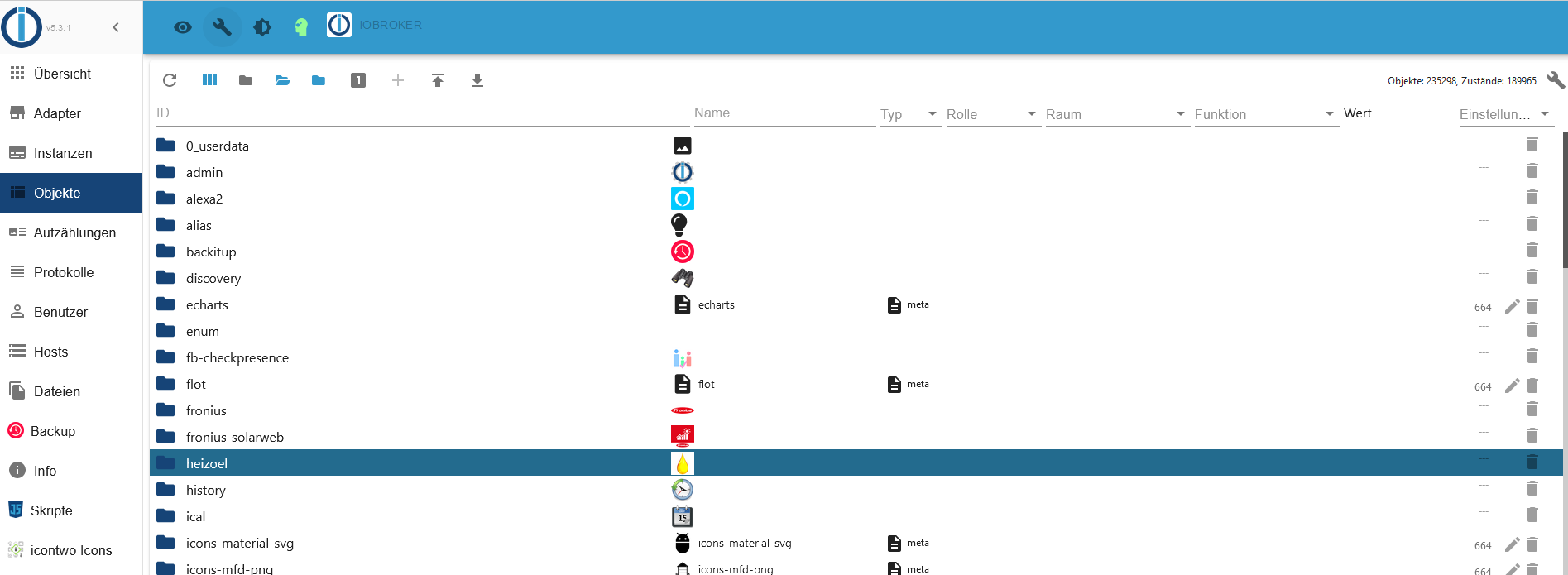
Mirr fällt aber ausser Admin auf die Admin4 "alte ui" umzuschalten gerade keine idee ein weil da wurde das im Admin angezeigt
Wobei an sich wäre mqtt mit den zwei Instanzen ein Kandidat, je nachdem wie "gross" die Struktur ist ... Also wenn ioBroker noch startet mal da reinschauen. Auch bitte schauen ob da was komisch ist. Die neuesten mqtt Versionen (weis snicht ob Du Beta oder Stable nutzt) legen Folder strukturen an... das könnte ggf paar Objekte adden - aber du hattest ja auch sehr viele States
-
Habe ein altes Backup eingespielt, alles aktualisiert und jetzt hier nur noch
"Objekte: 67196, Zustände: 56335", passt so.
Danke für Eure Hilfe
@hm_krause Naja Aber ich sag mal so: Ohne zu wissen wo die Objektmassen herkommen ist das für mich keine Echhte Lösung weil es dir morgen wieder passieren kann.
Eine frage: Welche mqtt Version nutzt du? Beta oder Stable?
Kannst Du jetzt wo alles wieder an ist ggf mal schauen ob es wieder mehr Objekte werden/geworden sind? Zeigt dir Admin oben rechts an unter "Objekte"
-
@hm_krause Naja Aber ich sag mal so: Ohne zu wissen wo die Objektmassen herkommen ist das für mich keine Echhte Lösung weil es dir morgen wieder passieren kann.
Eine frage: Welche mqtt Version nutzt du? Beta oder Stable?
Kannst Du jetzt wo alles wieder an ist ggf mal schauen ob es wieder mehr Objekte werden/geworden sind? Zeigt dir Admin oben rechts an unter "Objekte"
@apollon77
mqtt und alles andere ist "Stable"
Objekte: 67668, Zustände: 56711 -
@apollon77
mqtt und alles andere ist "Stable"
Objekte: 67668, Zustände: 56711@hm_krause also Tendenz steigend.
Vllt werden auch durch den radar2 neu gefundene Geräte angelegt,(wechselnte mac adressen), seh mal den durch
Wobei das auch nicht so viele sein dürften.Am einfachsten ist es wirklich die alte Admin Oberfläche zu aktivieren, so das man im Verzeichnis die einzelne Anzahl erkennt, woher es kommt.
-
@apollon77
mqtt und alles andere ist "Stable"
Objekte: 67668, Zustände: 56711@hm_krause Finde raus was da dazukommt, sonst endest Du bald wieder dort.
-
@hm_krause also Tendenz steigend.
Vllt werden auch durch den radar2 neu gefundene Geräte angelegt,(wechselnte mac adressen), seh mal den durch
Wobei das auch nicht so viele sein dürften.Am einfachsten ist es wirklich die alte Admin Oberfläche zu aktivieren, so das man im Verzeichnis die einzelne Anzahl erkennt, woher es kommt.
-
"Am einfachsten ist es wirklich die alte Admin Oberfläche zu aktivieren"
Wie mache ich das richtig?
@hm_krause Öffne Admin Instanzkonfiguration ... da ist ein Haken wie "alte Oberflächet/UI" oder so ... Falls Admin nicht mehr geht das es dann such ich den CLI Kommando raus
Beitrag hat geholfen? Votet rechts unten im Beitrag :-) https://paypal.me/Apollon77 / https://github.com/sponsors/Apollon77
- Debug-Log für Instanz einschalten? Admin -> Instanzen -> Expertenmodus -> Instanz aufklappen - Loglevel ändern
- Logfiles auf Platte /opt/iobroker/log/… nutzen, Admin schneidet Zeilen ab





Hey! Du scheinst an dieser Unterhaltung interessiert zu sein, hast aber noch kein Konto.
Hast du es satt, bei jedem Besuch durch die gleichen Beiträge zu scrollen? Wenn du dich für ein Konto anmeldest, kommst du immer genau dorthin zurück, wo du zuvor warst, und kannst dich über neue Antworten benachrichtigen lassen (entweder per E-Mail oder Push-Benachrichtigung). Du kannst auch Lesezeichen speichern und Beiträge positiv bewerten, um anderen Community-Mitgliedern deine Wertschätzung zu zeigen.
Mit deinem Input könnte dieser Beitrag noch besser werden 💗
Registrieren AnmeldenSupport us
336
Online33.0k
Benutzer83.6k
Themen1.3m
Beiträge