




SBFspot funktioniert nicht - Communication Error
-
@uweklatt Heißt das du hast das Update mal an dem gleichen (alten) Modell gemacht ?
Ich hab heute bei SMA angerufen und war extrem enttäuscht von der fehlenden Fachkompetenz des technischen Hotline Menschen. Zuerst hat er gesagt, der WR hätte überhaupt keine Schnittstellen nach außen, als ich dann gesagt habe, er hat Bluetooth und eine Art Vorbereitung für RS485 (was aber eine Zusatzkomponente braucht, die ich nicht habe) hat er gemeint, das Update ginge über Bluetooth. Man solle das doch ruhig machen, die neue Firmware ist irgendwo auf der Homepage...
Also das ist mir definitiv zu schwammig - ich glaube es ist eh schwierig die ganzen Gerätegenerationen auseinanderzuhalten... 5000TL ESS (so heißt meiner), 5000TL-20, 5000TL-21...
Für mich steht jetzt fest, dass ich am WR und der Anlage, die brav seit Juni 2008 läuft nichts ändere. Ich schau mal ob ich mich iterativ ranarbeiten kann und versuchen kann, das Bluetooth Protokoll ein wenig zu verstehen. Vielleicht mal mit Wireshark protokollieren, was Sunny Explorer auf dem Windows PC mit dem WR redet. Dies habe ich ja am Laufen.Zum Thema alte Version hab ich auch gesucht, finde aber keine Historie, die länger als 2014 zurück geht. Ich denke fast, SBFspot wurde erst in neuerer Zeit entwickelt. Es gab da ja einen
Vorläufer SMAspot...Keine Ahnung, vielleicht ist das Projekt ja auch zum Scheitern verurteilt - dann hab ich halt unnötig 6 EUR für den USB BT Stick ausgegeben.
Wenn noch jemand Ideen hat ?
Gruß
ThommyTheKid@thommythekid sagte in SBFspot funktioniert nicht - Communication Error:
5000TL ESS
Ist das die komplette vollständige Bezeichnung?
-
@uweklatt Heißt das du hast das Update mal an dem gleichen (alten) Modell gemacht ?
Ich hab heute bei SMA angerufen und war extrem enttäuscht von der fehlenden Fachkompetenz des technischen Hotline Menschen. Zuerst hat er gesagt, der WR hätte überhaupt keine Schnittstellen nach außen, als ich dann gesagt habe, er hat Bluetooth und eine Art Vorbereitung für RS485 (was aber eine Zusatzkomponente braucht, die ich nicht habe) hat er gemeint, das Update ginge über Bluetooth. Man solle das doch ruhig machen, die neue Firmware ist irgendwo auf der Homepage...
Also das ist mir definitiv zu schwammig - ich glaube es ist eh schwierig die ganzen Gerätegenerationen auseinanderzuhalten... 5000TL ESS (so heißt meiner), 5000TL-20, 5000TL-21...
Für mich steht jetzt fest, dass ich am WR und der Anlage, die brav seit Juni 2008 läuft nichts ändere. Ich schau mal ob ich mich iterativ ranarbeiten kann und versuchen kann, das Bluetooth Protokoll ein wenig zu verstehen. Vielleicht mal mit Wireshark protokollieren, was Sunny Explorer auf dem Windows PC mit dem WR redet. Dies habe ich ja am Laufen.Zum Thema alte Version hab ich auch gesucht, finde aber keine Historie, die länger als 2014 zurück geht. Ich denke fast, SBFspot wurde erst in neuerer Zeit entwickelt. Es gab da ja einen
Vorläufer SMAspot...Keine Ahnung, vielleicht ist das Projekt ja auch zum Scheitern verurteilt - dann hab ich halt unnötig 6 EUR für den USB BT Stick ausgegeben.
Wenn noch jemand Ideen hat ?
Gruß
ThommyTheKid@thommythekid
Das ist ja wirklich Schwach von SMA.
Das Update mit SD-Karte sollte kein Problem sein.
Der WR sollte dazu tagsüber Einspeisen.Das Protokoll ist "closed source". SBFspot und auch der von mir entwickelte Datenlogger ist damals 2009 per Reverse Engineering entstanden. (siehe sun-watch.net)
Tschau
Uwe -
Du könntest dich auch mal hier umschauen:
-
@uweklatt Heißt das du hast das Update mal an dem gleichen (alten) Modell gemacht ?
Ich hab heute bei SMA angerufen und war extrem enttäuscht von der fehlenden Fachkompetenz des technischen Hotline Menschen. Zuerst hat er gesagt, der WR hätte überhaupt keine Schnittstellen nach außen, als ich dann gesagt habe, er hat Bluetooth und eine Art Vorbereitung für RS485 (was aber eine Zusatzkomponente braucht, die ich nicht habe) hat er gemeint, das Update ginge über Bluetooth. Man solle das doch ruhig machen, die neue Firmware ist irgendwo auf der Homepage...
Also das ist mir definitiv zu schwammig - ich glaube es ist eh schwierig die ganzen Gerätegenerationen auseinanderzuhalten... 5000TL ESS (so heißt meiner), 5000TL-20, 5000TL-21...
Für mich steht jetzt fest, dass ich am WR und der Anlage, die brav seit Juni 2008 läuft nichts ändere. Ich schau mal ob ich mich iterativ ranarbeiten kann und versuchen kann, das Bluetooth Protokoll ein wenig zu verstehen. Vielleicht mal mit Wireshark protokollieren, was Sunny Explorer auf dem Windows PC mit dem WR redet. Dies habe ich ja am Laufen.Zum Thema alte Version hab ich auch gesucht, finde aber keine Historie, die länger als 2014 zurück geht. Ich denke fast, SBFspot wurde erst in neuerer Zeit entwickelt. Es gab da ja einen
Vorläufer SMAspot...Keine Ahnung, vielleicht ist das Projekt ja auch zum Scheitern verurteilt - dann hab ich halt unnötig 6 EUR für den USB BT Stick ausgegeben.
Wenn noch jemand Ideen hat ?
Gruß
ThommyTheKid@thommythekid
Zeig mal das Typenschild des WR als Foto...
(Sollte an der rechten Seite sein)Tschau
Uwe -
Hallo zusammen,
ich bin mir nicht sicher, ob ich hier richtig bin. Ich möchte mit einem Raspberry PI (uralt, MODEL B aus 2014, 512 KB) und einem Bluetooth Stick meinen SMA Wechselrichter SunnyBoy 5000 (von 2008) auslesen.
Dazu habe ich hier auch diverse Problemmeldungen gefunden, daher hoffe ich, dass mit ggf. hier jemand weiterhelfen kann. Ich habe den Bluetooth Stick am Laufen und sudo hcitool scan findet auch den Wechselrichter.
Wenn ich nun sudo /usr/local/bin/sbfspot.3/SBFspot -finq -nosql -nocsv -d5 -v5 (also mit Debug Ausgabe) aufrufe erhalte ich :
SBFspot V3.9.2
Yet another tool to read power production of SMA solar inverters
(c) 2012-2021, SBF (https://github.com/SBFspot/SBFspot)
Compiled for Linux (LE) 32 bit with SQLite support
Commandline Args: -finq -nosql -nocsv -d5 -v5
Reading config '/usr/local/bin/sbfspot.3/SBFspot.cfg'
Configuration settings:
BTAddress=00:80:25:XX:XX:XX
Password=<undisclosed>
MIS_Enabled=1
Plantname=MyPlant
OutputPath=/home/pi/smadata/%Y
OutputPathEvents=/home/pi/smadata/%Y/Events
Latitude=52.52
Longitude=13.4
Timezone=Europe/Berlin
CalculateMissingSpotValues=0
DateTimeFormat=%d/%m/%Y %H:%M:%S
DateFormat=%d/%m/%Y
TimeFormat=%H:%M:%S
SynchTime=7
SynchTimeLow=60
SynchTimeHigh=3600
SunRSOffset=900
DecimalPoint=comma
CSV_Delimiter=semicolon
Precision=3
CSV_Export=0
CSV_ExtendedHeader=1
CSV_Header=1
CSV_SaveZeroPower=1
CSV_Spot_TimeSource=0
CSV_Spot_WebboxHeader=0
Locale=en-US
BTConnectRetries=10
SQL_Database=/home/pi/smadata/SBFspot.db
### End of Config ###
Mon Feb 21 18:24:21 2022: INFO: Starting...
sunrise: 07:11
sunset : 17:28
Connecting to 00:80:25:08:58:26 (1/10)
Initializing...
SUSyID: 125 - SessionID: 938752662 (0x37F43A96)
--------: 00 01 02 03 04 05 06 07 08 09
00000000: 7E 17 00 69 00 00 00 00 00 00
00000010: 01 00 00 00 00 00 01 02 76 65
00000020: 72 0D 0A
23 Bytes sent
getPacket(2)
MAX_CommBuf is now 18 bytes
Received 18 bytes
Received 9 bytes
--------: 00 01 02 03 04 05 06 07 08 09
00000000: 7E 1B 00 65 26 58 08 25 80 00
00000010: 00 00 00 00 00 00 02 00 00 03
00000020: 70 00 01 01 00 00 00
cmd=2
<<<====== Content of pcktBuf =======>>>
--------: 00 01 02 03 04 05 06 07 08 09
00000000: 7E 1B 00 65 26 58 08 25 80 00
00000010: 00 00 00 00 00 00 02 00 00 03
00000020: 70 00 01 01 00 00 00
<<<=================================>>>
MAX_pcktBuf is now 27 bytes
SMA netID=01
--------: 00 01 02 03 04 05 06 07 08 09
00000000: 7E 1F 00 61 00 00 00 00 00 00
00000010: 26 58 08 25 80 00 02 00 00 04
00000020: 70 00 01 00 00 00 00 01 00 00
00000030: 00
31 Bytes sent
getPacket(10)
Received 18 bytes
Received 9 bytes
--------: 00 01 02 03 04 05 06 07 08 09
00000000: 7E 1B 00 65 26 58 08 25 80 00
00000010: 00 00 00 00 00 00 07 00 08 00
00000020: 03 01 00 00 00 00 00
cmd=7
Received 18 bytes
Received 13 bytes
--------: 00 01 02 03 04 05 06 07 08 09
00000000: 7E 1F 00 61 26 58 08 25 80 00
00000010: 00 00 00 00 00 00 0A 00 26 58
00000020: 08 25 80 00 01 05 71 DA 7D 1A
00000030: 00
cmd=10
<<<====== Content of pcktBuf =======>>>
--------: 00 01 02 03 04 05 06 07 08 09
00000000: 7E 1F 00 61 26 58 08 25 80 00
00000010: 00 00 00 00 00 00 0A 00 26 58
00000020: 08 25 80 00 01 05 71 DA 7D 1A
00000030: 00
<<<=================================>>>
MAX_pcktBuf is now 31 bytes
Root device address: 00:80:25:08:58:26
Local BT address: 00:1A:7D:DA:71:05
getPacket(5)
Received 18 bytes
Received 16 bytes
--------: 00 01 02 03 04 05 06 07 08 09
00000000: 7E 22 00 5C 26 58 08 25 80 00
00000010: 00 00 00 00 00 00 05 00 26 58
00000020: 08 25 80 00 01 01 05 71 DA 7D
00000030: 1A 00 02 01
cmd=5
<<<====== Content of pcktBuf =======>>>
--------: 00 01 02 03 04 05 06 07 08 09
00000000: 7E 22 00 5C 26 58 08 25 80 00
00000010: 00 00 00 00 00 00 05 00 26 58
00000020: 08 25 80 00 01 01 05 71 DA 7D
00000030: 1A 00 02 01
<<<=================================>>>
MAX_pcktBuf is now 34 bytes
Device 0: 00:80:25:08:58:26 -> Inverter
Device 1: 00:1A:7D:DA:71:05 -> Local BT Address
--------: 00 01 02 03 04 05 06 07 08 09
00000000: 7E 3F 00 41 05 71 DA 7D 1A 00
00000010: FF FF FF FF FF FF 01 00 7E FF
00000020: 03 60 65 09 A0 FF FF FF FF FF
00000030: FF 00 00 7D 5D 00 96 3A F4 37
00000040: 00 00 00 00 00 00 02 80 00 02
00000050: 00 00 00 00 00 00 00 00 00 00
00000060: 26 2D 7E
63 Bytes sent
getPacket(1)
Received 18 bytes
Received 5 bytes
--------: 00 01 02 03 04 05 06 07 08 09
00000000: 7E 17 00 69 26 58 08 25 80 00
00000010: 00 00 00 00 00 00 01 00 7E FF
00000020: 03 60 65
cmd=1
PacketLength=23
<<<====== Content of pcktBuf =======>>>
--------: 00 01 02 03 04 05 06 07 08 09
00000000: 7E FF 03 60 65
<<<=================================>>>
Invalid chk 0xFF00 - Found 0x6003
Mon Feb 21 18:24:23 2022: CRITICAL: Failed to initialize communication with inverter.
Mon Feb 21 18:24:23 2022: INFO: Done.
Aus meiner Sicht kommt irgendwann in der Kommunikation etwas unerwartetes vom WR und SBFsport kann es nicht sinnvoll interpretieren.
Die 0x6003 in der Zeile 00000000: 7E FF 03 60 65Ich habe auch ähnliche Problembeschreibungen mit diesem Problem gefunden (auch hier im Forum), allerdings nie mit einer Lösung die ich verstehe und anwenden könnte. Irgendwie sind
die Diskussionen immer abgedriftet und haben mich nicht weiter gebracht. Ich möchte eine Plain Bluetooth Kommunikation des Raspi mit dem WR und lediglich den aktuellen Ertragswert over all abgreifen.Hat jemand eine Idee, was man da machen kann. Der WR ist seit Juni 2008 in Betrieb und es wurde nie ein Software Update o.ä. eingespielt, was ich auch gerne so belassen würde.
viele Grüße
ThommyTheKidMOD EDIT: LOG in Code Tags gesetzt
@thommythekid Sorry for my answer in English - Mein Deutsch ist nicht so gut :-)
My experience with Raspberry Pi and Bluetooth is that it's a complicated relationship. That said, it's not sure your LogiLink BT-0015 adapter still works flawlessly with newer versions of Raspberry Pi OS (Raspbian)
So, if you can borrow another BT adapter from someone, it is possible SBFspot works correctly. That is the easiest thing to test.
An fimware update might help but is rather drastic. BTW, I doubt if there is still one available for your model.
As a last resort (and I really want to help here) you can sniff the BT traffic between sunny explorer and the inverter (USBlyzer is great for that) If you can provide me the communication data, I might get a solution to make it work. But remember: your setup of sunnyexplorer on windows and SBFspot on raspbian is totally different with different BT hard- and software. Your first test should be another BT adapter on the RPi -
@thommythekid sagte in SBFspot funktioniert nicht - Communication Error:
5000TL ESS
Ist das die komplette vollständige Bezeichnung?
@wendy2702 said in SBFspot funktioniert nicht - Communication Error:
@thommythekid sagte in SBFspot funktioniert nicht - Communication Error:
5000TL ESS
Ist das die komplette vollständige Bezeichnung?
Ah sorry - das ist die Bezeichnung, die ich in meinen Unterlagen gefunden habe.
Tatsächlich - auf dem Typenschild steht SB 5000TL-20 - also hab ich das falsch interpretiert
mit der Gerätsbezeichnung - nur weil ich zu faul war in den Keller zu gehen und zu schauen,
ob am WR selbst eine Bezeichnung steht... -
@wendy2702 said in SBFspot funktioniert nicht - Communication Error:
@thommythekid sagte in SBFspot funktioniert nicht - Communication Error:
5000TL ESS
Ist das die komplette vollständige Bezeichnung?
Ah sorry - das ist die Bezeichnung, die ich in meinen Unterlagen gefunden habe.
Tatsächlich - auf dem Typenschild steht SB 5000TL-20 - also hab ich das falsch interpretiert
mit der Gerätsbezeichnung - nur weil ich zu faul war in den Keller zu gehen und zu schauen,
ob am WR selbst eine Bezeichnung steht...@thommythekid sagte in SBFspot funktioniert nicht - Communication Error:
SB 5000TL-20
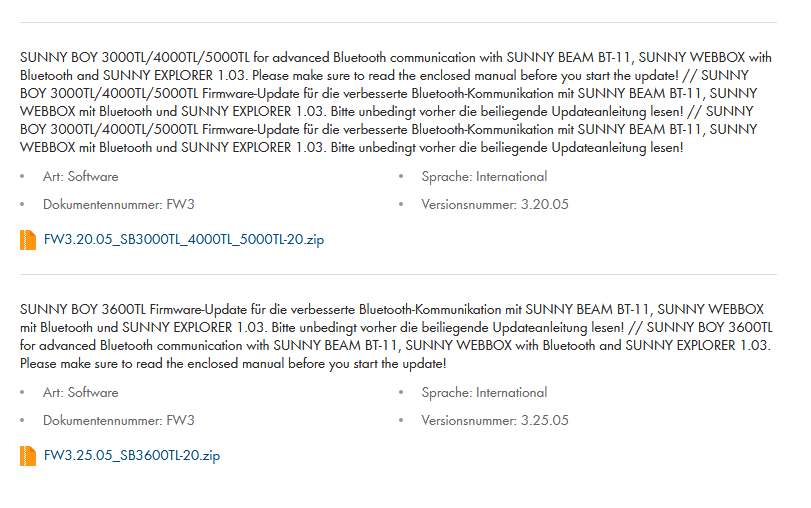
Beide Versionen mit Verbesserter Bluetooth Kommunikation. Was sonst noch im ReadMe steht habe ich allerdings nicht gelesen
-
@thommythekid Sorry for my answer in English - Mein Deutsch ist nicht so gut :-)
My experience with Raspberry Pi and Bluetooth is that it's a complicated relationship. That said, it's not sure your LogiLink BT-0015 adapter still works flawlessly with newer versions of Raspberry Pi OS (Raspbian)
So, if you can borrow another BT adapter from someone, it is possible SBFspot works correctly. That is the easiest thing to test.
An fimware update might help but is rather drastic. BTW, I doubt if there is still one available for your model.
As a last resort (and I really want to help here) you can sniff the BT traffic between sunny explorer and the inverter (USBlyzer is great for that) If you can provide me the communication data, I might get a solution to make it work. But remember: your setup of sunnyexplorer on windows and SBFspot on raspbian is totally different with different BT hard- and software. Your first test should be another BT adapter on the RPi@sbf said in SBFspot funktioniert nicht - Communication Error:
But remember: your setup of sunnyexplorer on windows and SBFspot on raspbian is totally different with different BT hard- and software. Your first test should be another BT adapter on the RPi
I have another BT Adapter in my setup with windows and SunnyExplorer. So I tried this adapter (Longshine - recommended by SMA in the 2008 time period). HCItool scan also finds the inverter
but SBFspot results in exactly the same error.kind regards
ThommyTheKid -
@sbf said in SBFspot funktioniert nicht - Communication Error:
But remember: your setup of sunnyexplorer on windows and SBFspot on raspbian is totally different with different BT hard- and software. Your first test should be another BT adapter on the RPi
I have another BT Adapter in my setup with windows and SunnyExplorer. So I tried this adapter (Longshine - recommended by SMA in the 2008 time period). HCItool scan also finds the inverter
but SBFspot results in exactly the same error.kind regards
ThommyTheKidNoch eine allgemeine Info - ich kapier gar nichts mehr ...
Also: nachdem ich ja wie im letzten Post in Englisch beschrieben den BT Adapter, der seit 2008 an meinem alten Windows95 PC mit dem SunnyExplorer von damals zuverlässig läuft mal in meinen Raspi gesteckt habe und der hcitool scan genauso funktioniert und der SBFspot Aufruf genauso gescheitert ist, habe ich den alten Stick mal mit dem neuen Sunny Explorer an einem Windows 10 PC versucht.
Ergebnis war, dass er jedes Mal nach dem Start von Sunny Explorer fordert, USER und INST Password zu ändern, es aber scheinbar nicht zum WR überträgt, denn wenn man Sunny Explorer erneut startet fordert er einem wieder auf die PWs zu ändern.
Dann: Links ausgewählt: Sunny Explorer - Tab Momentanwerte - Bei Status steht Zustand OK, Bei Anlagenkommunikation steht Verbindungsqualität 100%, NetID FF, Status verbunden.
Soweit so gut. Aber wenn man links Übertragungsversuch zu SN21xxxxxxxxxxx auswählt:
kommt in der Übersicht "Zu dem gewählten Gerät besteht momentan keine Verbindung".
Und unten rechts bei Tages / Monats / Jahresleistung sehe ich immer nur einen sich drehenden Refreshpfeil mit der Aussage: "Die Daten werden gerade geladen..." es kommen aber keine Daten.Kann es sein, dass selbst das gerade diese Woche runtergeladene Sunny Explorer mit Windows 10 nicht mehr mit meinem WR aus 2008 zurecht kommt ?
P.S. In Sunny Explorer finde ich tatsächlich unter Extra die Option Geräte-Update...
aber ich glaube ich trau mich das nicht, da was zu versuchen...Gruß
ThommyTheKid -
Noch eine allgemeine Info - ich kapier gar nichts mehr ...
Also: nachdem ich ja wie im letzten Post in Englisch beschrieben den BT Adapter, der seit 2008 an meinem alten Windows95 PC mit dem SunnyExplorer von damals zuverlässig läuft mal in meinen Raspi gesteckt habe und der hcitool scan genauso funktioniert und der SBFspot Aufruf genauso gescheitert ist, habe ich den alten Stick mal mit dem neuen Sunny Explorer an einem Windows 10 PC versucht.
Ergebnis war, dass er jedes Mal nach dem Start von Sunny Explorer fordert, USER und INST Password zu ändern, es aber scheinbar nicht zum WR überträgt, denn wenn man Sunny Explorer erneut startet fordert er einem wieder auf die PWs zu ändern.
Dann: Links ausgewählt: Sunny Explorer - Tab Momentanwerte - Bei Status steht Zustand OK, Bei Anlagenkommunikation steht Verbindungsqualität 100%, NetID FF, Status verbunden.
Soweit so gut. Aber wenn man links Übertragungsversuch zu SN21xxxxxxxxxxx auswählt:
kommt in der Übersicht "Zu dem gewählten Gerät besteht momentan keine Verbindung".
Und unten rechts bei Tages / Monats / Jahresleistung sehe ich immer nur einen sich drehenden Refreshpfeil mit der Aussage: "Die Daten werden gerade geladen..." es kommen aber keine Daten.Kann es sein, dass selbst das gerade diese Woche runtergeladene Sunny Explorer mit Windows 10 nicht mehr mit meinem WR aus 2008 zurecht kommt ?
P.S. In Sunny Explorer finde ich tatsächlich unter Extra die Option Geräte-Update...
aber ich glaube ich trau mich das nicht, da was zu versuchen...Gruß
ThommyTheKidUpdate sollte aber Problemlos sein da Sunny Explorer nur beginnt wenn wirklich Verbindung besteht.
Mit dem Laden der Daten kann es schonmal bisschen dauern. Auch bei mir, beide WR per Kabel angebunden dreht der Kreis mal mehr oder weniger lang.
-
Noch eine allgemeine Info - ich kapier gar nichts mehr ...
Also: nachdem ich ja wie im letzten Post in Englisch beschrieben den BT Adapter, der seit 2008 an meinem alten Windows95 PC mit dem SunnyExplorer von damals zuverlässig läuft mal in meinen Raspi gesteckt habe und der hcitool scan genauso funktioniert und der SBFspot Aufruf genauso gescheitert ist, habe ich den alten Stick mal mit dem neuen Sunny Explorer an einem Windows 10 PC versucht.
Ergebnis war, dass er jedes Mal nach dem Start von Sunny Explorer fordert, USER und INST Password zu ändern, es aber scheinbar nicht zum WR überträgt, denn wenn man Sunny Explorer erneut startet fordert er einem wieder auf die PWs zu ändern.
Dann: Links ausgewählt: Sunny Explorer - Tab Momentanwerte - Bei Status steht Zustand OK, Bei Anlagenkommunikation steht Verbindungsqualität 100%, NetID FF, Status verbunden.
Soweit so gut. Aber wenn man links Übertragungsversuch zu SN21xxxxxxxxxxx auswählt:
kommt in der Übersicht "Zu dem gewählten Gerät besteht momentan keine Verbindung".
Und unten rechts bei Tages / Monats / Jahresleistung sehe ich immer nur einen sich drehenden Refreshpfeil mit der Aussage: "Die Daten werden gerade geladen..." es kommen aber keine Daten.Kann es sein, dass selbst das gerade diese Woche runtergeladene Sunny Explorer mit Windows 10 nicht mehr mit meinem WR aus 2008 zurecht kommt ?
P.S. In Sunny Explorer finde ich tatsächlich unter Extra die Option Geräte-Update...
aber ich glaube ich trau mich das nicht, da was zu versuchen...Gruß
ThommyTheKid@thommythekid
Der aktuelle SunnyExplorer erzwingt ein "besseres" Passwort!
Die Standardpasswörter 0000 bzw. 1111 können damit nicht mehr verwendet werden.
Nur mit einem alten SunnyExplorer ist die Verwendung von 0000 als Userpasswort noch möglich.Die Net-ID sollte 1 für eine Punkt zu Punkt Verbindung und > 1 für ein SMA Mesh Netzwerk sein.
Bei Bedarf kann ich einen "alten" SunnyExplorer bereitstellen.
Ich bin mir ziemlich sicher, dass Deine Probleme nach einem Firmwareupdate (mit SD-Karte!) gelöst sind.
ACHTUNG!
Wenn die aktuelle Firmware < 1.71 ist, erst auf Firmware 1.71 und in einem zweiten Schritt auf 3.20 Updaten. Beide Versionen sind im ZIP enthalten.P.S. Ich habe keinen Bluetooth SunnyBoy, nur einen SB 3300 TL-HC, habe mich aber in der Vergangenheit intensiv mit SMA Bluetooth befasst.
Tschau
Uwe -
@thommythekid
Der aktuelle SunnyExplorer erzwingt ein "besseres" Passwort!
Die Standardpasswörter 0000 bzw. 1111 können damit nicht mehr verwendet werden.
Nur mit einem alten SunnyExplorer ist die Verwendung von 0000 als Userpasswort noch möglich.Die Net-ID sollte 1 für eine Punkt zu Punkt Verbindung und > 1 für ein SMA Mesh Netzwerk sein.
Bei Bedarf kann ich einen "alten" SunnyExplorer bereitstellen.
Ich bin mir ziemlich sicher, dass Deine Probleme nach einem Firmwareupdate (mit SD-Karte!) gelöst sind.
ACHTUNG!
Wenn die aktuelle Firmware < 1.71 ist, erst auf Firmware 1.71 und in einem zweiten Schritt auf 3.20 Updaten. Beide Versionen sind im ZIP enthalten.P.S. Ich habe keinen Bluetooth SunnyBoy, nur einen SB 3300 TL-HC, habe mich aber in der Vergangenheit intensiv mit SMA Bluetooth befasst.
Tschau
Uwe@uweklatt Das mit den Standardpasswörtern hab ich ja verstanden, aber ich habe ja nun
schon X-fach ein neues konformes PW vergeben, für USER und INST - nur es hat nichts bewirkt (Wahrscheinlich weil er das neue PW nicht erfolgreich in den WR übertragen kann - kommt aber auch keine Fehlermeldung). Er geht einfach in den Hauptbildschirm über und sagt nichts.
Wenn ich den Sunny Data Explorer dann schließe und wieder öffne, soll ich erneut die Passwörter ändern... Und die angezeigte NetID FF hab nicht ich mir ausgesucht - die wird einfach so angezeigt.Noch etwas, was vielleicht eine gewisse Logik reinbringt (Erklärung wären unterschiedliche Bluetooth Protokolle). Ich hab den Longshine Bluetooth Adapter wieder an den alten Windows95 PC gehängt und testen wollen ob alles noch funktioniert. Dabei habe ich festgestellt, dass die Software, die ich damals installiert habe und die ich noch immer verwende Sunny Data Control 4.0 - nicht Sunny Explorer heißt !!
Ich denke, so kann das Ganze evtl. dann doch wieder Sinn machen. Sunny Data Control (wie es aussieht nur bis Windows7) - kompatibel mit dem alten Bluetooth Protokoll des WR und Sunny Explorer (mit Windows 10) - kompatibel mit dem neuen Bluetooth Protokoll und damit nicht fähig mit meinem WR mit dem aktuellen FW Stand vernünftig zu kommunizieren...
Wäre dann aber schon schwach, wenn SMA keine Abwärtskompatibilität in Sunny Explorer eingebaut hat.
Hätte jemand mal einen vernünftigen Link auf eine Anleitung wie nun der Software Update des WR vonstatten gehen soll. Und einen Link auf die Firmware des WR Sunny Boy 5000TL-20 ?
Ich finde auf der SMA Seite nichts ! Nur Kraut und Rüben ...viele Grüße
ThommyTheKid -
@uweklatt Das mit den Standardpasswörtern hab ich ja verstanden, aber ich habe ja nun
schon X-fach ein neues konformes PW vergeben, für USER und INST - nur es hat nichts bewirkt (Wahrscheinlich weil er das neue PW nicht erfolgreich in den WR übertragen kann - kommt aber auch keine Fehlermeldung). Er geht einfach in den Hauptbildschirm über und sagt nichts.
Wenn ich den Sunny Data Explorer dann schließe und wieder öffne, soll ich erneut die Passwörter ändern... Und die angezeigte NetID FF hab nicht ich mir ausgesucht - die wird einfach so angezeigt.Noch etwas, was vielleicht eine gewisse Logik reinbringt (Erklärung wären unterschiedliche Bluetooth Protokolle). Ich hab den Longshine Bluetooth Adapter wieder an den alten Windows95 PC gehängt und testen wollen ob alles noch funktioniert. Dabei habe ich festgestellt, dass die Software, die ich damals installiert habe und die ich noch immer verwende Sunny Data Control 4.0 - nicht Sunny Explorer heißt !!
Ich denke, so kann das Ganze evtl. dann doch wieder Sinn machen. Sunny Data Control (wie es aussieht nur bis Windows7) - kompatibel mit dem alten Bluetooth Protokoll des WR und Sunny Explorer (mit Windows 10) - kompatibel mit dem neuen Bluetooth Protokoll und damit nicht fähig mit meinem WR mit dem aktuellen FW Stand vernünftig zu kommunizieren...
Wäre dann aber schon schwach, wenn SMA keine Abwärtskompatibilität in Sunny Explorer eingebaut hat.
Hätte jemand mal einen vernünftigen Link auf eine Anleitung wie nun der Software Update des WR vonstatten gehen soll. Und einen Link auf die Firmware des WR Sunny Boy 5000TL-20 ?
Ich finde auf der SMA Seite nichts ! Nur Kraut und Rüben ...viele Grüße
ThommyTheKid@thommythekid said in SBFspot funktioniert nicht - Communication Error:
Hätte jemand mal einen vernünftigen Link auf eine Anleitung wie nun der Software Update des WR vonstatten gehen soll. Und einen Link auf die Firmware des WR Sunny Boy 5000TL-20 ?
Ich finde auf der SMA Seite nichts ! Nur Kraut und Rüben ...https://www.sma.de/en/service/downloads.html
Select "Archive" -
@thommythekid said in SBFspot funktioniert nicht - Communication Error:
Hätte jemand mal einen vernünftigen Link auf eine Anleitung wie nun der Software Update des WR vonstatten gehen soll. Und einen Link auf die Firmware des WR Sunny Boy 5000TL-20 ?
Ich finde auf der SMA Seite nichts ! Nur Kraut und Rüben ...https://www.sma.de/en/service/downloads.html
Select "Archive"@sbf We are coming closer...
Thank you very much for this link - I was able to Download Sunny Data Control 4.0, which I have searched for a long time before without success. Next I installed it without any problems on my Windows 10 machine. And finally I was able to Connect the inverter with my new stick LogiLink BT-0015 and it worked out of the box ! So special driver needed ! All the information I found before on the internet seems to be rubbish !Well, at least I have a working solution on a more current Windows which makes it easier to try to sniff the BT network traffic.
But to be able to then change SBFspot accordingly (this might be some try and error approaches) I need to get this thing compiled on my Raspi. And I am not able to do so right now ! @sbf: do you probably also have a link to a documentation how to build (not only install) SBFspot on Raspi ?
After copying the git sources from the SBFspot directory I tried:
pi@raspberrypi:~/tom_sbf $ make
test -d  || mkdir -p
test -d sqlite/bin/ || mkdir -p sqlite/bin/
g++  -s -o sqlite/bin/SBFspot -Wl,-Bdynamic -lpthread -lbluetooth -lboost_date_time -lboost_system
/usr/bin/ld: cannot find -lboost_date_time
/usr/bin/ld: cannot find -lboost_system
collect2: error: ld returned 1 exit status
make: *** [makefile:119: sqlite/bin/SBFspot] Error 1
also this call fails with a fully different error message:
pi@raspberrypi:~/tom_sbf $ make nosql
test -d nosql/obj/ || mkdir -p nosql/obj/
test -d nosql/bin/ || mkdir -p nosql/bin/
g++ boost_ext.cpp -c -Wall -O2 -Wno-unused-local-typedefs -Wno-psabi -std=c++11 -o nosql/obj/boost_ext.o
In file included from boost_ext.cpp:35:
boost_ext.h:47:10: fatal error: boost/version.hpp: No such file or directory
 #include <boost/version.hpp>
          ^~~~~~~~~~~~~~~~~~~
compilation terminated.
make: *** [makefile:116: nosql/obj/boost_ext.o] Error 1
What I would need is a full description how to build SBFspot on Raspi from scratch !
kind regards
ThommyTheKid -
@sbf We are coming closer...
Thank you very much for this link - I was able to Download Sunny Data Control 4.0, which I have searched for a long time before without success. Next I installed it without any problems on my Windows 10 machine. And finally I was able to Connect the inverter with my new stick LogiLink BT-0015 and it worked out of the box ! So special driver needed ! All the information I found before on the internet seems to be rubbish !Well, at least I have a working solution on a more current Windows which makes it easier to try to sniff the BT network traffic.
But to be able to then change SBFspot accordingly (this might be some try and error approaches) I need to get this thing compiled on my Raspi. And I am not able to do so right now ! @sbf: do you probably also have a link to a documentation how to build (not only install) SBFspot on Raspi ?
After copying the git sources from the SBFspot directory I tried:
pi@raspberrypi:~/tom_sbf $ make
test -d  || mkdir -p
test -d sqlite/bin/ || mkdir -p sqlite/bin/
g++  -s -o sqlite/bin/SBFspot -Wl,-Bdynamic -lpthread -lbluetooth -lboost_date_time -lboost_system
/usr/bin/ld: cannot find -lboost_date_time
/usr/bin/ld: cannot find -lboost_system
collect2: error: ld returned 1 exit status
make: *** [makefile:119: sqlite/bin/SBFspot] Error 1
also this call fails with a fully different error message:
pi@raspberrypi:~/tom_sbf $ make nosql
test -d nosql/obj/ || mkdir -p nosql/obj/
test -d nosql/bin/ || mkdir -p nosql/bin/
g++ boost_ext.cpp -c -Wall -O2 -Wno-unused-local-typedefs -Wno-psabi -std=c++11 -o nosql/obj/boost_ext.o
In file included from boost_ext.cpp:35:
boost_ext.h:47:10: fatal error: boost/version.hpp: No such file or directory
 #include <boost/version.hpp>
          ^~~~~~~~~~~~~~~~~~~
compilation terminated.
make: *** [makefile:116: nosql/obj/boost_ext.o] Error 1
What I would need is a full description how to build SBFspot on Raspi from scratch !
kind regards
ThommyTheKid@thommythekid it´s all in the wiki ;-)
https://github.com/SBFspot/SBFspot/wiki/Installation-Linux-SQLite -
@thommythekid it´s all in the wiki ;-)
https://github.com/SBFspot/SBFspot/wiki/Installation-Linux-SQLite@sbf GREAT THANKS !! I have the make running, after performing the steps described in the Wiki from the beginning... But the executable does still not work - still aborts with the message: "CRITICAL: Failed to initialize communication with inverter"
But I am able to build the executable now which is great. Let's see if I get get further here.
Do you know if there is also a kind of documentation of the Bluetooth protocol somewhere within the SBFspot project ?If I do not make progress I am considering the sniffing approach. Let's see.
kind regards
ThommyTheKid -
@sbf GREAT THANKS !! I have the make running, after performing the steps described in the Wiki from the beginning... But the executable does still not work - still aborts with the message: "CRITICAL: Failed to initialize communication with inverter"
But I am able to build the executable now which is great. Let's see if I get get further here.
Do you know if there is also a kind of documentation of the Bluetooth protocol somewhere within the SBFspot project ?If I do not make progress I am considering the sniffing approach. Let's see.
kind regards
ThommyTheKid@thommythekid said in SBFspot funktioniert nicht - Communication Error:
Still not choosing the path of FW upgrade? V3+ has shadow management (in case you suffer from shadow of course)Do you know if there is also a kind of documentation of the Bluetooth protocol somewhere within the SBFspot project ?
No, I had some notes on paper but I can't find the anymore (started with SMAspot 10y ago - had to rename it to SBFspot because I used the name SMA. In fact, SMAspot was exactly the name SMA had choosen for their direct marketing stuff: https://www.sma-spot.de/ they even copied my logo
 )
)
There are some brief comments in the code, that's all. Moreover, I was forced to move the project a few times (Google code -> Codeplex -> Github) so a lot of info got lost (discussions and issue tracker)I had the time to compare the start of the communication of your inverter (SB5000 TL-20) and mine of the same family (SB4000 TL-20) and I see the first response is already different:
SB4000:
Initializing...
SUSyID: 125 - SessionID: 935089161 (0x37BC5409)
--------: 00 01 02 03 04 05 06 07 08 09
00000000: 7E 17 00 69 00 00 00 00 00 00
00000010: 01 00 00 00 00 00 01 02 76 65
00000020: 72 0D 0A
23 Bytes sent
getPacket(2)
MAX_CommBuf is now 18 bytes
Received 18 bytes
Received 13 bytes
--------: 00 01 02 03 04 05 06 07 08 09
00000000: 7E 1F 00 61 E7 D3 15 25 80 00
00000010: 00 00 00 00 00 00 02 00 00 04
00000020: 70 00 01 00 00 00 00 01 00 00
00000030: 00
cmd=2
<<<====== Content of pcktBuf =======>>>
--------: 00 01 02 03 04 05 06 07 08 09
00000000: 7E 1F 00 61 E7 D3 15 25 80 00
00000010: 00 00 00 00 00 00 02 00 00 04
00000020: 70 00 01 00 00 00 00 01 00 00
00000030: 00
<<<=================================>>>
MAX_pcktBuf is now 31 bytes
SMA netID=01
SB5000:
Initializing...
SUSyID: 125 - SessionID: 938752662 (0x37F43A96)
--------: 00 01 02 03 04 05 06 07 08 09
00000000: 7E 17 00 69 00 00 00 00 00 00
00000010: 01 00 00 00 00 00 01 02 76 65
00000020: 72 0D 0A
23 Bytes sent
getPacket(2)
MAX_CommBuf is now 18 bytes
Received 18 bytes
Received 9 bytes
--------: 00 01 02 03 04 05 06 07 08 09
00000000: 7E 1B 00 65 26 58 08 25 80 00
00000010: 00 00 00 00 00 00 02 00 00 03
00000020: 70 00 01 01 00 00 00
cmd=2
<<<====== Content of pcktBuf =======>>>
--------: 00 01 02 03 04 05 06 07 08 09
00000000: 7E 1B 00 65 26 58 08 25 80 00
00000010: 00 00 00 00 00 00 02 00 00 03
00000020: 70 00 01 01 00 00 00
<<<=================================>>>
MAX_pcktBuf is now 27 bytes
SMA netID=01
When you look inside the "Content of pcktBuf" the two look pretty much the same:
Start byte 7E, #bytes, checksum and MAC address
All the rest is unknown, except for NetID (= 1) at pos 22
At pos 19 we might have some kind of versioning: 3 vs 4 for newer FWBelow the response of another SB5000 TL-20:
--------: 00 01 02 03 04 05 06 07 08 09
00000000: 7E 1F 00 61 D0 0A 0A 25 80 00
00000010: 00 00 00 00 00 00 02 00 00 04
00000020: 70 00 01 00 00 00 00 01 00 00
00000030: 00
Probably this is the way to differenciate between FW versions.
-
@sbf GREAT THANKS !! I have the make running, after performing the steps described in the Wiki from the beginning... But the executable does still not work - still aborts with the message: "CRITICAL: Failed to initialize communication with inverter"
But I am able to build the executable now which is great. Let's see if I get get further here.
Do you know if there is also a kind of documentation of the Bluetooth protocol somewhere within the SBFspot project ?If I do not make progress I am considering the sniffing approach. Let's see.
kind regards
ThommyTheKidI found a very old issue with the exact same problem and the solution (spoiler: FW upgrade)
https://github.com/SBFspot/SBFspot/issues/37 -
I found a very old issue with the exact same problem and the solution (spoiler: FW upgrade)
https://github.com/SBFspot/SBFspot/issues/37@sbf Hi again,
well I really fear that something goes wrong when I try a software update since this is a very old system that is running for almost 14 years now and I would prefer not to touch it. I have read about cases where folks have bricked the inverters and the only answer from SMA was an expensive hardware replacement of the whole inverter.But I took a closer look to the data and have some questions: In the output it looks like
each block occurs twice (when calling with -d5).Received 18 bytes Received 9 bytes --------: 00 01 02 03 04 05 06 07 08 09 00000000: 7E 1B 00 65 26 58 08 25 80 00 00000010: 00 00 00 00 00 00 02 00 00 03 00000020: 70 00 01 01 00 00 00 cmd=2 <<<====== Content of pcktBuf =======>>> --------: 00 01 02 03 04 05 06 07 08 09 00000000: 7E 1B 00 65 26 58 08 25 80 00 00000010: 00 00 00 00 00 00 02 00 00 03 00000020: 70 00 01 01 00 00 00 <<<=================================>>>I think I have understood that it always starts with 7E followed by the length (1B in my case - so 27 decimal) - right ? You also mentioned NetID is pos 22 (decimal) - ok - it is 1 in my case.
What does getPacket(2) or getPacket(5) mean ?
To me it looks like byte 16 is the command - right ?
The commands occur in the sequence cmd = 2, cmd =10, cmd =5 !
But what does this command mean ? Can you tell me ?kind regards
ThommyTheKid -
I found a very old issue with the exact same problem and the solution (spoiler: FW upgrade)
https://github.com/SBFspot/SBFspot/issues/37@sbf said in SBFspot funktioniert nicht - Communication Error:
I've never heard of bricked inverters.
Now that I have more info I doubt if we have to spent more time to make SBFspot compatible with this old version of the protocol. If I have a trace log I can see if it possible in a short time frame.But I took a closer look to the data and have some questions: In the output it looks like
each block occurs twice (when calling with -d5).The first block is the raw data, the second is the unescaped version: when the data contains 0x7E it is converted to 0x7D + ...
0x7E is start/stop byte of packet (BT only)What does getPacket(2) or getPacket(5) mean ?
To me it looks like byte 16 is the command - right ?
But what does this command mean ?cmd is indeed at pos 16. If the meaning is known it is commented in the source code. The SMADATA2+ protocol is reverse engineered and a lot of its data is unknown.


Hey! Du scheinst an dieser Unterhaltung interessiert zu sein, hast aber noch kein Konto.
Hast du es satt, bei jedem Besuch durch die gleichen Beiträge zu scrollen? Wenn du dich für ein Konto anmeldest, kommst du immer genau dorthin zurück, wo du zuvor warst, und kannst dich über neue Antworten benachrichtigen lassen (entweder per E-Mail oder Push-Benachrichtigung). Du kannst auch Lesezeichen speichern und Beiträge positiv bewerten, um anderen Community-Mitgliedern deine Wertschätzung zu zeigen.
Mit deinem Input könnte dieser Beitrag noch besser werden 💗
Registrieren AnmeldenSupport us
524
Online33.1k
Benutzende83.7k
Themen1.3m
Beiträge