



Skip to content
  • Home
  • Aktuell
  • Tags
  • 0 Ungelesen 0
  • Kategorien
  • Unreplied
  • Beliebt
  • GitHub
  • Docu
  • Hilfe
Skins
  • Light
  • Brite
  • Cerulean
  • Cosmo
  • Flatly
  • Journal
  • Litera
  • Lumen
  • Lux
  • Materia
  • Minty
  • Morph
  • Pulse
  • Sandstone
  • Simplex
  • Sketchy
  • Spacelab
  • United
  • Yeti
  • Zephyr
  • Dark
  • Cyborg
  • Darkly
  • Quartz
  • Slate
  • Solar
  • Superhero
  • Vapor

  • Standard: (Kein Skin)
  • Kein Skin
Einklappen
ioBroker Logo

Community Forum

donate donate
  1. ioBroker Community Home
  2. Deutsch
  3. Error/Bug
  4. iot instance löscht sich selber
NEWS

  • Monatsrückblick Januar/Februar 2026 ist online!
    BluefoxB
    Bluefox
    17
    1
    455

  • Jahresrückblick 2025 – unser neuer Blogbeitrag ist online! ✨
    BluefoxB
    Bluefox
    17
    1
    5.1k

  • Neuer Blogbeitrag: Monatsrückblick - Dezember 2025 🎄
    BluefoxB
    Bluefox
    13
    1
    1.4k

iot instance löscht sich selber

Geplant Angeheftet Gesperrt Verschoben Error/Bug
23 Beiträge 5 Kommentatoren 1.9k Aufrufe 5 Watching
  • Älteste zuerst
  • Neuste zuerst
  • Meiste Stimmen
Antworten
  • In einem neuen Thema antworten
Anmelden zum Antworten
Dieses Thema wurde gelöscht. Nur Nutzer mit entsprechenden Rechten können es sehen.
  • B Barca

    @crunchip
    habe nix gemacht kamm vor einer woche vor bleit etwa 24 stunden dann ist die iot instance weg

    crunchipC Abwesend
    crunchipC Abwesend
    crunchip
    Forum Testing Most Active
    schrieb am zuletzt editiert von crunchip
    #6

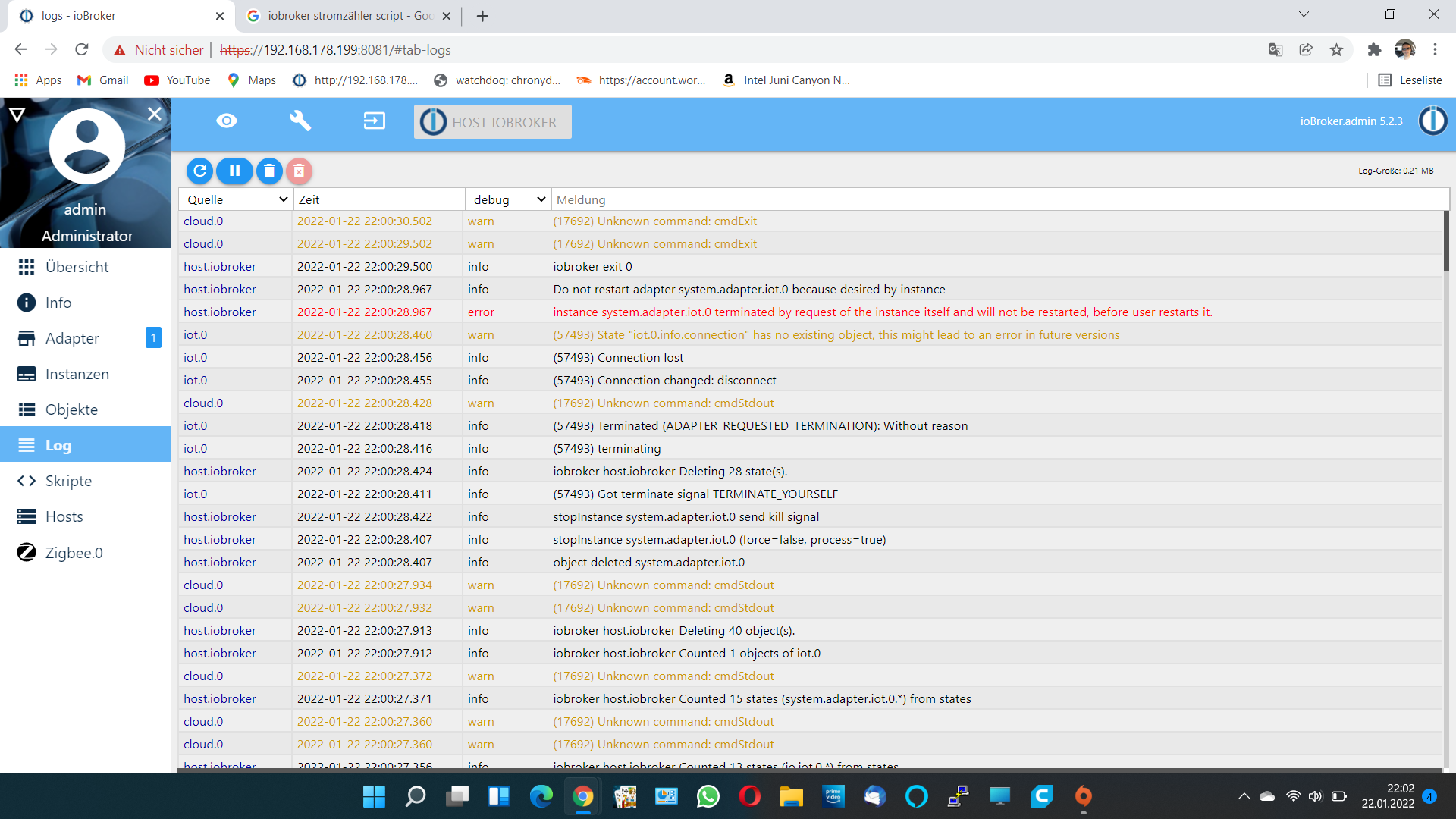
    @barca starte mal den iot neu und zeig mal das log und bitte kein
    Forum-logs - IoBroker – Opera.png

    was läuft da mit dem cloud Adapter?
    hab zwar bezüglich des cloud Adapters ein issue gefunden aber ohne Lösung, welche Version läuft da?

    umgestiegen von Proxmox auf Unraid

    B 1 Antwort Letzte Antwort
    0
    • crunchipC crunchip

      @barca starte mal den iot neu und zeig mal das log und bitte kein
      Forum-logs - IoBroker – Opera.png

      was läuft da mit dem cloud Adapter?
      hab zwar bezüglich des cloud Adapters ein issue gefunden aber ohne Lösung, welche Version läuft da?

      B Offline
      B Offline
      Barca
      schrieb am zuletzt editiert von
      #7

      @crunchip Screenshot (19).png
      meist das?

      crunchipC 1 Antwort Letzte Antwort
      0
      • B Barca

        @crunchip Screenshot (19).png
        meist das?

        crunchipC Abwesend
        crunchipC Abwesend
        crunchip
        Forum Testing Most Active
        schrieb am zuletzt editiert von crunchip
        #8

        @barca hast du dir die verlinkte Seite angesehen, da steht

        Alles was als Text vorliegt sollte auch als Text gepostet werden.
        Diesen Text unbedingt in code-Tags einbinden, da sonst ggf. Formatierungen verloren gehen. Dazu auf das Code-Icon </> (5. Icon über dem Eingabefeld) klicken und den kopierten Text anstelle der Worte Code text einfügen.
        

        daher der wink mit meinem Screen :stuck_out_tongue_winking_eye:

        allerdings hab ich mir deinen ersten screen nochmal angesehen, das ist ja die alte Admin Oberfläche?? und da gibts auch keinen "log herunterladen" Button

        was hast du denn angelegt im iot, bzw cloud?

        umgestiegen von Proxmox auf Unraid

        B 1 Antwort Letzte Antwort
        0
        • crunchipC crunchip

          @barca hast du dir die verlinkte Seite angesehen, da steht

          Alles was als Text vorliegt sollte auch als Text gepostet werden.
          Diesen Text unbedingt in code-Tags einbinden, da sonst ggf. Formatierungen verloren gehen. Dazu auf das Code-Icon </> (5. Icon über dem Eingabefeld) klicken und den kopierten Text anstelle der Worte Code text einfügen.
          

          daher der wink mit meinem Screen :stuck_out_tongue_winking_eye:

          allerdings hab ich mir deinen ersten screen nochmal angesehen, das ist ja die alte Admin Oberfläche?? und da gibts auch keinen "log herunterladen" Button

          was hast du denn angelegt im iot, bzw cloud?

          B Offline
          B Offline
          Barca
          schrieb am zuletzt editiert von
          #9

          @crunchip Alexa habe die Geräte eingbunden zum steueren

          crunchipC 1 Antwort Letzte Antwort
          0
          • B Barca

            @crunchip Alexa habe die Geräte eingbunden zum steueren

            crunchipC Abwesend
            crunchipC Abwesend
            crunchip
            Forum Testing Most Active
            schrieb am zuletzt editiert von
            #10

            @barca wo, was, wie, welche Geräte? du nutzt iot und cloud?

            sorry aber wenn man dir alles aus der Nase ziehen muss, kann man leider nicht helfen.

            umgestiegen von Proxmox auf Unraid

            B 1 Antwort Letzte Antwort
            0
            • crunchipC crunchip

              @barca wo, was, wie, welche Geräte? du nutzt iot und cloud?

              sorry aber wenn man dir alles aus der Nase ziehen muss, kann man leider nicht helfen.

              B Offline
              B Offline
              Barca
              schrieb am zuletzt editiert von
              #11

              @crunchip ja nutze cloud und iot gräte sind shelly und homematic

              crunchipC 1 Antwort Letzte Antwort
              0
              • B Barca

                @crunchip ja nutze cloud und iot gräte sind shelly und homematic

                crunchipC Abwesend
                crunchipC Abwesend
                crunchip
                Forum Testing Most Active
                schrieb am zuletzt editiert von
                #12

                @barca dann mal von vorne, da du auf die Wichtigen Dinge nicht eingehst.

                zeig mal die Ausgaben in Code tags</> von

                which nodejs node npm && nodejs -v && node -v && npm -v && whoami && pwd && sudo apt update &> /dev/null && sudo apt update && apt policy nodejs
                
                iob update -i
                
                iob list instances
                

                ansonsten beschreib dein Problem mal etwas genauer,

                • was genau funktioniert nicht,
                • wann tritt es auf
                • welche Meldungen gibt es im Log

                umgestiegen von Proxmox auf Unraid

                B 1 Antwort Letzte Antwort
                0
                • crunchipC crunchip

                  @barca dann mal von vorne, da du auf die Wichtigen Dinge nicht eingehst.

                  zeig mal die Ausgaben in Code tags</> von

                  which nodejs node npm && nodejs -v && node -v && npm -v && whoami && pwd && sudo apt update &> /dev/null && sudo apt update && apt policy nodejs
                  
                  iob update -i
                  
                  iob list instances
                  

                  ansonsten beschreib dein Problem mal etwas genauer,

                  • was genau funktioniert nicht,
                  • wann tritt es auf
                  • welche Meldungen gibt es im Log
                  B Offline
                  B Offline
                  Barca
                  schrieb am zuletzt editiert von Barca
                  #13

                  Installiert: 14.18.3-deb-1nodesource1
                  Installationskandidat: 14.18.3-deb-1nodesource1
                  Versionstabelle:
                  *** 14.18.3-deb-1nodesource1 500
                  500 https://deb.nodesource.com/node_14.x bullseye/main amd64 Packages
                  100 /var/lib/dpkg/status
                  12.22.5~dfsg-2~11u1 500
                  500 http://deb.debian.org/debian bullseye/main amd64 Packages
                  500 http://security.debian.org/debian-security bullseye-security/main am
                  meist du das?

                  Thomas BraunT 1 Antwort Letzte Antwort
                  0
                  • B Barca

                    Installiert: 14.18.3-deb-1nodesource1
                    Installationskandidat: 14.18.3-deb-1nodesource1
                    Versionstabelle:
                    *** 14.18.3-deb-1nodesource1 500
                    500 https://deb.nodesource.com/node_14.x bullseye/main amd64 Packages
                    100 /var/lib/dpkg/status
                    12.22.5~dfsg-2~11u1 500
                    500 http://deb.debian.org/debian bullseye/main amd64 Packages
                    500 http://security.debian.org/debian-security bullseye-security/main am
                    meist du das?

                    Thomas BraunT Online
                    Thomas BraunT Online
                    Thomas Braun
                    Most Active
                    schrieb am zuletzt editiert von
                    #14

                    @barca

                    Das ist nicht die vollständige Ausgabe und auch nicht in CodeTags gepostet.

                    Linux-Werkzeugkasten:
                    https://forum.iobroker.net/topic/42952/der-kleine-iobroker-linux-werkzeugkasten
                    NodeJS Fixer Skript:
                    https://forum.iobroker.net/topic/68035/iob-node-fix-skript
                    iob_diag: curl -sLf -o diag.sh https://iobroker.net/diag.sh && bash diag.sh

                    frana120500F 1 Antwort Letzte Antwort
                    0
                    • Thomas BraunT Thomas Braun

                      @barca

                      Das ist nicht die vollständige Ausgabe und auch nicht in CodeTags gepostet.

                      frana120500F Offline
                      frana120500F Offline
                      frana120500
                      schrieb am zuletzt editiert von
                      #15

                      vielleicht sagt ihm mal jemand was code-tags sind :-)

                      @Barca wenn du Code posten möchtest, dann findest du oben in der Formatierungsleiste (nenne ich jetzt mal so) das Symbol </>

                      Am besten deinen Code einfügen, dann nochmal markieren und dann auf das </> Symbol klicken. Dann wird es für alle lesbarer.

                      crunchipC B 2 Antworten Letzte Antwort
                      0
                      • frana120500F frana120500

                        vielleicht sagt ihm mal jemand was code-tags sind :-)

                        @Barca wenn du Code posten möchtest, dann findest du oben in der Formatierungsleiste (nenne ich jetzt mal so) das Symbol </>

                        Am besten deinen Code einfügen, dann nochmal markieren und dann auf das </> Symbol klicken. Dann wird es für alle lesbarer.

                        crunchipC Abwesend
                        crunchipC Abwesend
                        crunchip
                        Forum Testing Most Active
                        schrieb am zuletzt editiert von
                        #16

                        @frana120500 sagte in iot instance löscht sich selber:

                        vielleicht sagt ihm mal jemand was code-tags sind

                        @cvidal sagte in iot instance löscht sich selber:

                        Schau mal hier

                        @crunchip sagte in iot instance löscht sich selber:

                        hast du dir die verlinkte Seite angesehen, da steht

                        Alles was als Text vorliegt sollte auch als Text gepostet werden.
                        
                        Diesen Text unbedingt in code-Tags einbinden, da sonst ggf. Formatierungen verloren gehen. Dazu auf das Code-Icon </> (5. Icon über dem Eingabefeld) klicken und den kopierten Text anstelle der Worte Code text einfügen.
                        

                        umgestiegen von Proxmox auf Unraid

                        1 Antwort Letzte Antwort
                        0
                        • frana120500F frana120500

                          vielleicht sagt ihm mal jemand was code-tags sind :-)

                          @Barca wenn du Code posten möchtest, dann findest du oben in der Formatierungsleiste (nenne ich jetzt mal so) das Symbol </>

                          Am besten deinen Code einfügen, dann nochmal markieren und dann auf das </> Symbol klicken. Dann wird es für alle lesbarer.

                          B Offline
                          B Offline
                          Barca
                          schrieb am zuletzt editiert von
                          #17
                          iobroker@iobroker:~$ which nodejs node npm && nodejs -v && node -v && npm -v && whoami && pwd && sudo apt update &> /dev/null && sudo apt update && apt policy nodejs
                          /usr/bin/node
                          /usr/bin/npm
                          
                          
                          Thomas BraunT 1 Antwort Letzte Antwort
                          0
                          • B Barca
                            iobroker@iobroker:~$ which nodejs node npm && nodejs -v && node -v && npm -v && whoami && pwd && sudo apt update &> /dev/null && sudo apt update && apt policy nodejs
                            /usr/bin/node
                            /usr/bin/npm
                            
                            
                            Thomas BraunT Online
                            Thomas BraunT Online
                            Thomas Braun
                            Most Active
                            schrieb am zuletzt editiert von
                            #18

                            @barca

                            Zuvor

                            sudo ln -s /usr/bin/node /usr/bin/nodejs
                            

                            dann nochmal

                            which nodejs node npm && nodejs -v && node -v && npm -v && whoami && pwd && sudo apt update &> /dev/null && sudo apt update && apt policy nodejs
                            

                            Linux-Werkzeugkasten:
                            https://forum.iobroker.net/topic/42952/der-kleine-iobroker-linux-werkzeugkasten
                            NodeJS Fixer Skript:
                            https://forum.iobroker.net/topic/68035/iob-node-fix-skript
                            iob_diag: curl -sLf -o diag.sh https://iobroker.net/diag.sh && bash diag.sh

                            1 Antwort Letzte Antwort
                            0
                            • B Offline
                              B Offline
                              Barca
                              schrieb am zuletzt editiert von
                              #19
                              iobroker@iobroker:~$ iob update -i
                              Used repository: live-beta2
                              hash unchanged, use cached sources
                              update done
                              Adapter    "admin"         : 5.2.3    , installed 5.2.3
                              Adapter    "alexa2"        : 3.12.0   , installed 3.12.0
                              Adapter    "backitup"      : 2.2.3    , installed 2.2.3
                              Adapter    "birthdays"     : 0.2.0    , installed 0.2.0
                              Adapter    "broadlink2"    : 2.1.5    , installed 2.1.5
                              Adapter    "cameras"       : 0.1.4    , installed 0.1.4
                              Adapter    "cloud"         : 4.1.0    , installed 4.1.0
                              Adapter    "daswetter"     : 3.0.9    , installed 3.0.9
                              Adapter    "discovery"     : 2.7.5    , installed 2.7.5
                              Adapter    "doorio"        : 2.1.3    , installed 2.1.0 [Updateable]
                              Adapter    "followthesun"  : 0.3.8    , installed 0.3.8
                              Adapter    "fullybrowser"  : 2.0.12   , installed 2.0.12
                              Adapter    "hass"          : 1.0.1    , installed 1.0.1
                              Adapter    "hass-mqtt"     : 0.0.7    , installed 0.0.7
                              Adapter    "hm-rega"       : 3.0.34   , installed 3.0.34
                              Adapter    "hm-rpc"        : 1.15.0   , installed 1.15.0
                              Adapter    "hmip"          : 1.15.3   , installed 1.15.3
                              Adapter    "ical"          : 1.11.6   , installed 1.11.6
                              Adapter    "icons-addictive-flavour-png": 0.1.0   , installed 0.1.0
                              Adapter    "icons-fatcow-hosting": 0.1.0   , installed 0.1.0
                              Adapter    "icons-icons8"  : 0.0.1    , installed 0.0.1
                              Adapter    "icons-material-png": 0.1.0   , installed 0.1.0
                              Adapter    "icons-material-svg": 0.1.0   , installed 0.1.0
                              Adapter    "icons-mfd-png" : 1.0.2    , installed 1.0.2
                              Adapter    "icons-mfd-svg" : 1.0.2    , installed 1.0.2
                              Adapter    "icons-open-icon-library-png": 0.1.2   , installed 0.1.2
                              Adapter    "icons-ultimate-png": 1.0.1   , installed 1.0.1
                              Adapter    "influxdb"      : 2.4.0    , installed 2.4.0
                              Adapter    "info"          : 1.9.16   , installed 1.9.16
                              Adapter    "iot"           : 1.9.1    , installed 1.9.1
                              Adapter    "javascript"    : 5.2.21   , installed 5.2.21
                              Controller "js-controller" : 3.3.22   , installed 3.3.22
                              Adapter    "mihome"        : 1.3.7    , installed 1.3.8
                              Adapter    "mqtt"          : 2.4.1    , installed 2.4.1
                              Adapter    "proxmox"       : 1.3.4    , installed 1.3.4
                              Adapter    "samsung"       : 0.2.9    , installed 0.5.0
                              Adapter    "shelly"        : 5.1.0    , installed 5.1.0
                              Adapter    "shuttercontrol": 1.4.10   , installed 1.4.10
                              Adapter    "simple-api"    : 2.6.2    , installed 2.6.2
                              Adapter    "smartthings"   : 0.0.3    , installed 0.0.3
                              Adapter    "socketio"      : 3.1.5    , installed 3.1.5
                              Adapter    "sourceanalytix": 0.4.12   , installed 0.4.12
                              Adapter    "tankerkoenig"  : 2.1.1    , installed 2.1.1
                              Adapter    "telegram"      : 1.10.0   , installed 1.10.0
                              Adapter    "trashschedule" : 1.4.1    , installed 1.4.1
                              Adapter    "tuya"          : 3.6.15   , installed 3.6.15
                              Adapter    "vis"           : 1.4.6    , installed 1.4.7
                              Adapter    "vis-colorpicker": 1.2.0   , installed 1.2.0
                              Adapter    "vis-fancyswitch": 1.1.0   , installed 1.1.0
                              Adapter    "vis-hqwidgets" : 1.1.9    , installed 1.1.9
                              Adapter    "vis-icontwo"   : 0.85.0   , installed 0.85.0
                              Adapter    "vis-inventwo"  : 3.2.5    , installed 3.2.5
                              Adapter    "vis-jqui-mfd"  : 1.0.12   , installed 1.0.12
                              Adapter    "vis-materialdesign": 0.5.9   , installed 0.5.9
                              Adapter    "vis-timeandweather": 1.1.7   , installed 1.1.7
                              Adapter    "web"           : 3.4.16   , installed 3.4.16
                              Adapter    "wiobrowser"    : 0.2.7    , installed 0.2.2 [Updateable]
                              Adapter    "withings"      : 0.0.3    , installed 0.0.3
                              Adapter    "worx"          : 1.5.5    , installed 1.5.5
                              Adapter    "xiaomi-gateway3": 0.3.1   , installed 0.3.1
                              Adapter    "zigbee"        : 1.6.14   , installed 1.6.14
                              iobroker@iobroker:~$
                              
                              
                              1 Antwort Letzte Antwort
                              0
                              • B Offline
                                B Offline
                                Barca
                                schrieb am zuletzt editiert von
                                #20
                                iobroker@iobroker:~$ which nodejs node npm && nodejs -v && node -v && npm -v && whoami && pwd && sudo apt update &> /dev/null && sudo apt update && apt policy nodejs
                                /usr/bin/nodejs
                                /usr/bin/node
                                /usr/bin/npm
                                v14.18.3
                                v14.18.3
                                6.14.15
                                iobroker
                                /home/iobroker
                                OK:1 http://deb.debian.org/debian bullseye InRelease
                                OK:2 http://deb.debian.org/debian bullseye-updates InRelease
                                OK:3 http://security.debian.org/debian-security bullseye-security InRelease
                                OK:4 https://deb.nodesource.com/node_14.x bullseye InRelease
                                OK:5 https://repos.influxdata.com/debian bullseye InRelease
                                Paketlisten werden gelesen… Fertig
                                Abhängigkeitsbaum wird aufgebaut… Fertig
                                Statusinformationen werden eingelesen… Fertig
                                Aktualisierung für 16 Pakete verfügbar. Führen Sie »apt list --upgradable« aus, um sie anzuzeigen.
                                nodejs:
                                  Installiert:           14.18.3-deb-1nodesource1
                                  Installationskandidat: 14.18.3-deb-1nodesource1
                                  Versionstabelle:
                                 *** 14.18.3-deb-1nodesource1 500
                                        500 https://deb.nodesource.com/node_14.x bullseye/main amd64 Packages
                                        100 /var/lib/dpkg/status
                                     12.22.5~dfsg-2~11u1 500
                                        500 http://deb.debian.org/debian bullseye/main amd64 Packages
                                        500 http://security.debian.org/debian-security bullseye-security/main amd64 Packages
                                iobroker@iobroker:~$
                                
                                
                                B 1 Antwort Letzte Antwort
                                0
                                • B Barca
                                  iobroker@iobroker:~$ which nodejs node npm && nodejs -v && node -v && npm -v && whoami && pwd && sudo apt update &> /dev/null && sudo apt update && apt policy nodejs
                                  /usr/bin/nodejs
                                  /usr/bin/node
                                  /usr/bin/npm
                                  v14.18.3
                                  v14.18.3
                                  6.14.15
                                  iobroker
                                  /home/iobroker
                                  OK:1 http://deb.debian.org/debian bullseye InRelease
                                  OK:2 http://deb.debian.org/debian bullseye-updates InRelease
                                  OK:3 http://security.debian.org/debian-security bullseye-security InRelease
                                  OK:4 https://deb.nodesource.com/node_14.x bullseye InRelease
                                  OK:5 https://repos.influxdata.com/debian bullseye InRelease
                                  Paketlisten werden gelesen… Fertig
                                  Abhängigkeitsbaum wird aufgebaut… Fertig
                                  Statusinformationen werden eingelesen… Fertig
                                  Aktualisierung für 16 Pakete verfügbar. Führen Sie »apt list --upgradable« aus, um sie anzuzeigen.
                                  nodejs:
                                    Installiert:           14.18.3-deb-1nodesource1
                                    Installationskandidat: 14.18.3-deb-1nodesource1
                                    Versionstabelle:
                                   *** 14.18.3-deb-1nodesource1 500
                                          500 https://deb.nodesource.com/node_14.x bullseye/main amd64 Packages
                                          100 /var/lib/dpkg/status
                                       12.22.5~dfsg-2~11u1 500
                                          500 http://deb.debian.org/debian bullseye/main amd64 Packages
                                          500 http://security.debian.org/debian-security bullseye-security/main amd64 Packages
                                  iobroker@iobroker:~$
                                  
                                  
                                  B Offline
                                  B Offline
                                  Barca
                                  schrieb am zuletzt editiert von
                                  #21

                                  @barca ich hoffe das das jetzt so richtig ist

                                  Thomas BraunT 1 Antwort Letzte Antwort
                                  0
                                  • B Barca

                                    @barca ich hoffe das das jetzt so richtig ist

                                    Thomas BraunT Online
                                    Thomas BraunT Online
                                    Thomas Braun
                                    Most Active
                                    schrieb am zuletzt editiert von
                                    #22

                                    @barca

                                    Ja, nodeJS passt.
                                    Ich würde die 16 Updates noch ins System schaufeln:

                                    iobroker stop
                                    sudo apt full-upgrade
                                    sudo reboot
                                    

                                    Linux-Werkzeugkasten:
                                    https://forum.iobroker.net/topic/42952/der-kleine-iobroker-linux-werkzeugkasten
                                    NodeJS Fixer Skript:
                                    https://forum.iobroker.net/topic/68035/iob-node-fix-skript
                                    iob_diag: curl -sLf -o diag.sh https://iobroker.net/diag.sh && bash diag.sh

                                    B 1 Antwort Letzte Antwort
                                    0
                                    • Thomas BraunT Thomas Braun

                                      @barca

                                      Ja, nodeJS passt.
                                      Ich würde die 16 Updates noch ins System schaufeln:

                                      iobroker stop
                                      sudo apt full-upgrade
                                      sudo reboot
                                      
                                      B Offline
                                      B Offline
                                      Barca
                                      schrieb am zuletzt editiert von Barca
                                      #23

                                      @thomas-braun ok
                                      bin dann mal gespannt das iot instance sich nicht mehr löscht

                                      1 Antwort Letzte Antwort
                                      0
                                      Antworten
                                      • In einem neuen Thema antworten
                                      Anmelden zum Antworten
                                      • Älteste zuerst
                                      • Neuste zuerst
                                      • Meiste Stimmen


                                      Support us

                                      ioBroker
                                      Community Adapters
                                      Donate

                                      637

                                      Online

                                      32.7k

                                      Benutzer

                                      82.5k

                                      Themen

                                      1.3m

                                      Beiträge
                                      Community
                                      Impressum | Datenschutz-Bestimmungen | Nutzungsbedingungen | Einwilligungseinstellungen
                                      ioBroker Community 2014-2025
                                      logo
                                      • Anmelden

                                      • Du hast noch kein Konto? Registrieren

                                      • Anmelden oder registrieren, um zu suchen
                                      • Erster Beitrag
                                        Letzter Beitrag
                                      0
                                      • Home
                                      • Aktuell
                                      • Tags
                                      • Ungelesen 0
                                      • Kategorien
                                      • Unreplied
                                      • Beliebt
                                      • GitHub
                                      • Docu
                                      • Hilfe

