Skip to content
  • Home
  • Aktuell
  • Tags
  • 0 Ungelesen 0
  • Kategorien
  • Unreplied
  • Beliebt
  • GitHub
  • Docu
  • Hilfe
Skins
  • Light
  • Brite
  • Cerulean
  • Cosmo
  • Flatly
  • Journal
  • Litera
  • Lumen
  • Lux
  • Materia
  • Minty
  • Morph
  • Pulse
  • Sandstone
  • Simplex
  • Sketchy
  • Spacelab
  • United
  • Yeti
  • Zephyr
  • Dark
  • Cyborg
  • Darkly
  • Quartz
  • Slate
  • Solar
  • Superhero
  • Vapor

  • Standard: (Kein Skin)
  • Kein Skin
Einklappen
ioBroker Logo

Community Forum

donate donate
  1. ioBroker Community Home
  2. Deutsch
  3. Error/Bug
  4. Backitup speichert unterschiedliches lokal und online

NEWS

  • Monatsrückblick Januar/Februar 2026 ist online!
    BluefoxB
    Bluefox
    17
    1
    499

  • Jahresrückblick 2025 – unser neuer Blogbeitrag ist online! ✨
    BluefoxB
    Bluefox
    17
    1
    5.2k

  • Neuer Blogbeitrag: Monatsrückblick - Dezember 2025 🎄
    BluefoxB
    Bluefox
    13
    1
    1.4k

Backitup speichert unterschiedliches lokal und online

Geplant Angeheftet Gesperrt Verschoben Error/Bug
31 Beiträge 4 Kommentatoren 1.0k Aufrufe 4 Watching
  • Älteste zuerst
  • Neuste zuerst
  • Meiste Stimmen
Antworten
  • In einem neuen Thema antworten
Anmelden zum Antworten
Dieses Thema wurde gelöscht. Nur Nutzer mit entsprechenden Rechten können es sehen.
  • B Blackbox

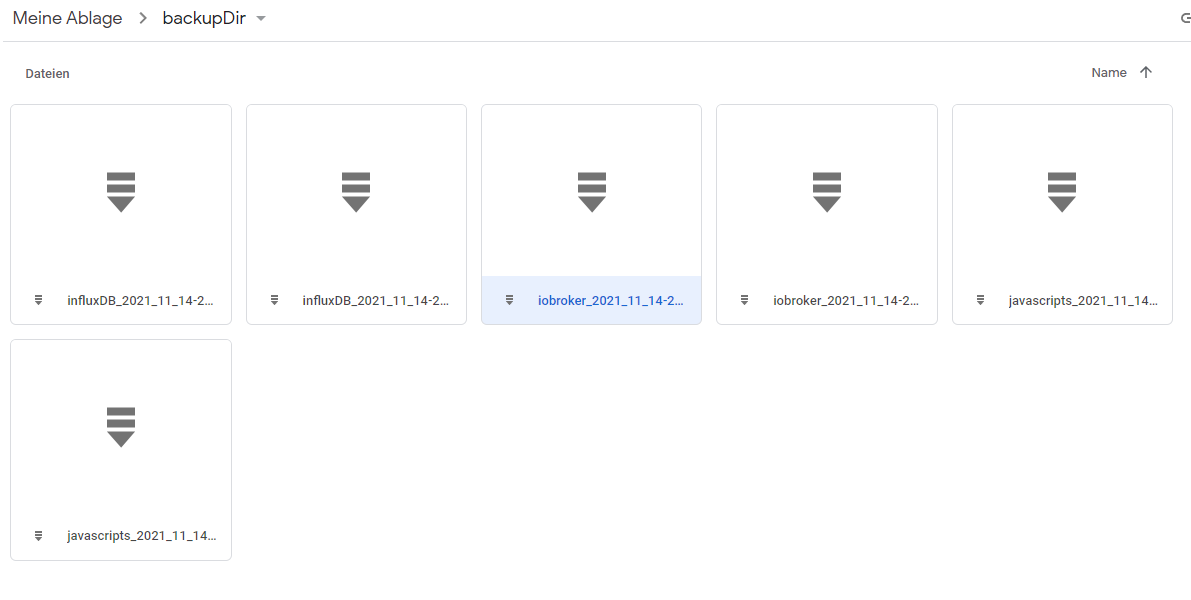
    Ich habe gerade Backitup eingerichtet. Als speicherort dienen USB stick an Fritzbox und googledrive.
    Mittlerweile funktioniert es auch, allerdings habe ich unterschiedliche dateien an den speicherorten.
    Lokal, kein influxdb:
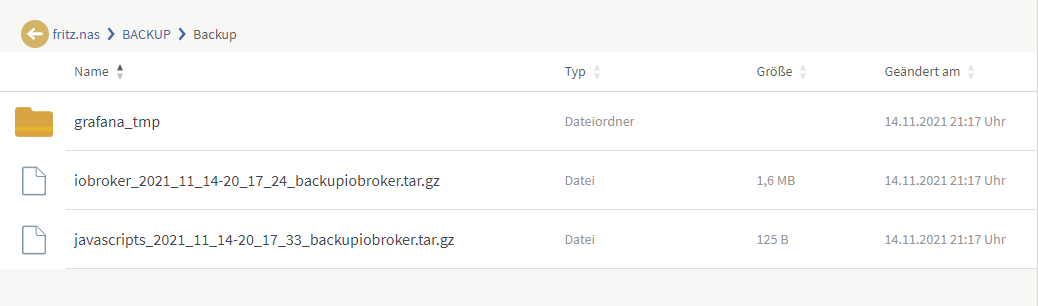
    NAS.png
    googledrive kein grafana:
    drive.png

    Übersehe ich etwas? Ist das normal?

    Das spuckt der adapter aus:
    Started iobroker ...

    [DEBUG] [mount] - noserverino option: false
    [DEBUG] [mount] - cifs-mount command: "sudo mount -t cifs -o username=Backup,password=****,domain=WORKGROUP,rw,file_mode=0777,dir_mode=0777,vers=1.0 //192.168.178.1/FRITZ.NAS/BACKUP/Backup /opt/iobroker/backups"
    [DEBUG] [mount] - mount successfully completed
    [DEBUG] [mount] - done
    [DEBUG] [iobroker] - host.raspberrypi 756 states saved
    
    [DEBUG] [iobroker] - host.raspberrypi 961 objects saved
    
    [DEBUG] [iobroker] - Backup created: /opt/iobroker/backups/iobroker_2021_11_14-20_33_06_backupiobroker.tar.gz
    
    [DEBUG] [iobroker] - done
    [DEBUG] [influxDB] - InfluxDB-Backup started ...
    [DEBUG] [influxDB] - Start InfluxDB Backup ...
    [DEBUG] [influxDB] - InfluxDB Backup tmp directory created 
    [DEBUG] [influxDB] - Try deleting the InfluxDB tmp directory
    [DEBUG] [influxDB] - InfluxDB tmp directory was successfully deleted
    [ERROR] [influxDB] - [IGNORED] Error: Command failed: influxd backup -portable -database iobroker "/opt/iobroker/backups/influxDB_2021_11_14-20_33_11_backupiobroker"
    backup: copy: read /opt/iobroker/backups/influxDB_2021_11_14-20_33_11_backupiobroker/meta.00: input/output error
    
    [DEBUG] [grafana] - Start Grafana Backup ...
    [DEBUG] [grafana] - Try deleting the old grafana_tmp directory: "/opt/iobroker/backups/grafana_tmp"
    [DEBUG] [grafana] - old grafana_tmp directory "/opt/iobroker/backups/grafana_tmp" successfully deleted
    [DEBUG] [grafana] - Created grafana_tmp directory
    [DEBUG] [grafana] - Created dashboard directory
    [DEBUG] [grafana] - Created dashboards_manually_restore directory
    [DEBUG] [grafana] - Created datasource directory
    [DEBUG] [grafana] - start Grafana request ...
    [DEBUG] [grafana] - Grafana is available ... Status: 200
    [DEBUG] [grafana] - Error on Grafana Datasource Request
    [DEBUG] [grafana] - found Dashboard: 1
    [DEBUG] [grafana] - start Grafana backup compress ...
    [DEBUG] [grafana] - Try deleting the Grafana tmp directory: "/opt/iobroker/backups/grafana_tmp"
    [DEBUG] [grafana] - Grafana tmp directory "/opt/iobroker/backups/grafana_tmp" cannot deleted ... Error: EACCES: permission denied, unlink '/opt/iobroker/backups/grafana_tmp/dashboards/1.json'
    [DEBUG] [grafana] - cannot found Grafana Backup files
    [DEBUG] [grafana] - done
    [DEBUG] [javascripts] - Created javascript_tmp directory: "/opt/iobroker/backups/tmpScripts"
    [DEBUG] [javascripts] - Try deleting the Javascript tmp directory: "/opt/iobroker/backups/tmpScripts"
    [DEBUG] [javascripts] - Javascript tmp directory "/opt/iobroker/backups/tmpScripts" successfully deleted
    [DEBUG] [javascripts] - Backup created: /opt/iobroker/backups/javascripts_2021_11_14-20_33_16_backupiobroker.tar.gz
    [DEBUG] [javascripts] - done
    [DEBUG] [cifs] - done
    [DEBUG] [googledrive] - Google Drive: Copy iobroker_2021_11_14-20_33_06_backupiobroker.tar.gz...
    [ERROR] [googledrive] - Google Drive: Error: EIO: i/o error, read
    [ERROR] [googledrive] - Google Drive: Error: <!DOCTYPE html>
    <html lang=en>
      <meta charset=utf-8>
      <meta name=viewport content="initial-scale=1, minimum-scale=1, width=device-width">
      <title>Error 408 (Request Timeout)!!1</title>
      <style>
        *{margin:0;padding:0}html,code{font:15px/22px arial,sans-serif}html{background:#fff;color:#222;padding:15px}body{margin:7% auto 0;max-width:390px;min-height:180px;padding:30px 0 15px}* > body{background:url(//www.google.com/images/errors/robot.png) 100% 5px no-repeat;padding-right:205px}p{margin:11px 0 22px;overflow:hidden}ins{color:#777;text-decoration:none}a img{border:0}@media screen and (max-width:772px){body{background:none;margin-top:0;max-width:none;padding-right:0}}#logo{background:url(//www.google.com/images/branding/googlelogo/1x/googlelogo_color_150x54dp.png) no-repeat;margin-left:-5px}@media only screen and (min-resolution:192dpi){#logo{background:url(//www.google.com/images/branding/googlelogo/2x/googlelogo_color_150x54dp.png) no-repeat 0% 0%/100% 100%;-moz-border-image:url(//www.google.com/images/branding/googlelogo/2x/googlelogo_color_150x54dp.png) 0}}@media only screen and (-webkit-min-device-pixel-ratio:2){#logo{background:url(//www.google.com/images/branding/googlelogo/2x/googlelogo_color_150x54dp.png) no-repeat;-webkit-background-size:100% 100%}}#logo{display:inline-block;height:54px;width:150px}
      </style>
      <a href=//www.google.com/><span id=logo aria-label=Google></span></a>
      <p><b>408.</b> <ins>That’s an error.</ins>
      <p>Your client has taken too long to issue its request.  <ins>That’s all we know.</ins>
    
    [ERROR] [googledrive] - Google Drive: File "/opt/iobroker/backups/influxDB_2021_11_14-20_33_11_backupiobroker.tar.gz" not found
    [DEBUG] [googledrive] - Google Drive: Copy javascripts_2021_11_14-20_33_16_backupiobroker.tar.gz...
    [ERROR] [googledrive] - Google Drive: Error: EIO: i/o error, read
    [ERROR] [googledrive] - Google Drive: Error: <!DOCTYPE html>
    <html lang=en>
      <meta charset=utf-8>
      <meta name=viewport content="initial-scale=1, minimum-scale=1, width=device-width">
      <title>Error 408 (Request Timeout)!!1</title>
      <style>
        *{margin:0;padding:0}html,code{font:15px/22px arial,sans-serif}html{background:#fff;color:#222;padding:15px}body{margin:7% auto 0;max-width:390px;min-height:180px;padding:30px 0 15px}* > body{background:url(//www.google.com/images/errors/robot.png) 100% 5px no-repeat;padding-right:205px}p{margin:11px 0 22px;overflow:hidden}ins{color:#777;text-decoration:none}a img{border:0}@media screen and (max-width:772px){body{background:none;margin-top:0;max-width:none;padding-right:0}}#logo{background:url(//www.google.com/images/branding/googlelogo/1x/googlelogo_color_150x54dp.png) no-repeat;margin-left:-5px}@media only screen and (min-resolution:192dpi){#logo{background:url(//www.google.com/images/branding/googlelogo/2x/googlelogo_color_150x54dp.png) no-repeat 0% 0%/100% 100%;-moz-border-image:url(//www.google.com/images/branding/googlelogo/2x/googlelogo_color_150x54dp.png) 0}}@media only screen and (-webkit-min-device-pixel-ratio:2){#logo{background:url(//www.google.com/images/branding/googlelogo/2x/googlelogo_color_150x54dp.png) no-repeat;-webkit-background-size:100% 100%}}#logo{display:inline-block;height:54px;width:150px}
      </style>
      <a href=//www.google.com/><span id=logo aria-label=Google></span></a>
      <p><b>408.</b> <ins>That’s an error.</ins>
      <p>Your client has taken too long to issue its request.  <ins>That’s all we know.</ins>
    
    [DEBUG] [googledrive] - done
    [ERROR] [clean] - Backup files not deleted from /opt/iobroker/backups because some errors.
    [DEBUG] [clean] - done
    [DEBUG] [historyHTML] - new history html values created
    [DEBUG] [historyHTML] - done
    [DEBUG] [historyJSON] - new history json values created
    [DEBUG] [historyJSON] - done
    [DEBUG] [umount] - mount activ, umount is started ...
    [DEBUG] [umount] - umount successfully completed
    [DEBUG] [umount] - done
    [EXIT] 0
    
    Thomas BraunT Online
    Thomas BraunT Online
    Thomas Braun
    Most Active
    schrieb am zuletzt editiert von
    #2

    @blackbox sagte in Backitup speichert unterschiedliches lokal und online:

    noserverino option: false

    Auf true setzen.
    Weiter wollte ich nicht lesen, setz den Konsolenoutput in CodeTags.

    Linux-Werkzeugkasten:
    https://forum.iobroker.net/topic/42952/der-kleine-iobroker-linux-werkzeugkasten
    NodeJS Fixer Skript:
    https://forum.iobroker.net/topic/68035/iob-node-fix-skript
    iob_diag: curl -sLf -o diag.sh https://iobroker.net/diag.sh && bash diag.sh

    B 1 Antwort Letzte Antwort
    0
    • Thomas BraunT Thomas Braun

      @blackbox sagte in Backitup speichert unterschiedliches lokal und online:

      noserverino option: false

      Auf true setzen.
      Weiter wollte ich nicht lesen, setz den Konsolenoutput in CodeTags.

      B Offline
      B Offline
      Blackbox
      schrieb am zuletzt editiert von
      #3

      @thomas-braun

      Codetags gesetzt, danke für den tip.

      Wie setze ich "noserverino" auf true?

      Sollte vielleicht erwähnen das ich anfänger bin.

      Thomas BraunT 1 Antwort Letzte Antwort
      0
      • B Blackbox

        @thomas-braun

        Codetags gesetzt, danke für den tip.

        Wie setze ich "noserverino" auf true?

        Sollte vielleicht erwähnen das ich anfänger bin.

        Thomas BraunT Online
        Thomas BraunT Online
        Thomas Braun
        Most Active
        schrieb am zuletzt editiert von
        #4

        @blackbox
        In den Einstellungen der Instanz des Backitup-Adapters.
        Da kannst du gleich auch Mal die smb-Version auf 3.1.1 setzen. (Aktuelle Firmware >7.20 der Fritzbox vorausgesetzt)

        Linux-Werkzeugkasten:
        https://forum.iobroker.net/topic/42952/der-kleine-iobroker-linux-werkzeugkasten
        NodeJS Fixer Skript:
        https://forum.iobroker.net/topic/68035/iob-node-fix-skript
        iob_diag: curl -sLf -o diag.sh https://iobroker.net/diag.sh && bash diag.sh

        B 1 Antwort Letzte Antwort
        0
        • Thomas BraunT Thomas Braun

          @blackbox
          In den Einstellungen der Instanz des Backitup-Adapters.
          Da kannst du gleich auch Mal die smb-Version auf 3.1.1 setzen. (Aktuelle Firmware >7.20 der Fritzbox vorausgesetzt)

          B Offline
          B Offline
          Blackbox
          schrieb am zuletzt editiert von Blackbox
          #5

          @thomas-braun said in Backitup speichert unterschiedliches lokal und online:

          smb-Version auf 3.1.1

          Done.

          Jetzt verschwindet der grafana ordner auf der fritzbox. Allerdings bleibt kein backup. Weder fritz noch googledrive.

          [DEBUG] [grafana] - Start Grafana Backup ...
          [DEBUG] [grafana] - Try deleting the old grafana_tmp directory: "/opt/iobroker/backups/grafana_tmp"
          [DEBUG] [grafana] - old grafana_tmp directory "/opt/iobroker/backups/grafana_tmp" successfully deleted
          [DEBUG] [grafana] - Created grafana_tmp directory
          [DEBUG] [grafana] - Created dashboard directory
          [DEBUG] [grafana] - Created dashboards_manually_restore directory
          [DEBUG] [grafana] - Created datasource directory
          [DEBUG] [grafana] - start Grafana request ...
          [DEBUG] [grafana] - Grafana is available ... Status: 200
          [DEBUG] [grafana] - Error on Grafana Datasource Request
          [DEBUG] [grafana] - found Dashboard: 1
          [DEBUG] [grafana] - start Grafana backup compress ...
          [DEBUG] [grafana] - Try deleting the Grafana tmp directory: "/opt/iobroker/backups/grafana_tmp"
          [DEBUG] [grafana] - Grafana tmp directory "/opt/iobroker/backups/grafana_tmp" successfully deleted
          [DEBUG] [grafana] - cannot found Grafana Backup files
          [DEBUG] [grafana] - done
          

          Hab mal den api key neu gemacht. Editor sollte richtig sein? funktioniert immer noch nicht. Admin api auch getestet.

          Thomas BraunT 1 Antwort Letzte Antwort
          0
          • B Blackbox

            @thomas-braun said in Backitup speichert unterschiedliches lokal und online:

            smb-Version auf 3.1.1

            Done.

            Jetzt verschwindet der grafana ordner auf der fritzbox. Allerdings bleibt kein backup. Weder fritz noch googledrive.

            [DEBUG] [grafana] - Start Grafana Backup ...
            [DEBUG] [grafana] - Try deleting the old grafana_tmp directory: "/opt/iobroker/backups/grafana_tmp"
            [DEBUG] [grafana] - old grafana_tmp directory "/opt/iobroker/backups/grafana_tmp" successfully deleted
            [DEBUG] [grafana] - Created grafana_tmp directory
            [DEBUG] [grafana] - Created dashboard directory
            [DEBUG] [grafana] - Created dashboards_manually_restore directory
            [DEBUG] [grafana] - Created datasource directory
            [DEBUG] [grafana] - start Grafana request ...
            [DEBUG] [grafana] - Grafana is available ... Status: 200
            [DEBUG] [grafana] - Error on Grafana Datasource Request
            [DEBUG] [grafana] - found Dashboard: 1
            [DEBUG] [grafana] - start Grafana backup compress ...
            [DEBUG] [grafana] - Try deleting the Grafana tmp directory: "/opt/iobroker/backups/grafana_tmp"
            [DEBUG] [grafana] - Grafana tmp directory "/opt/iobroker/backups/grafana_tmp" successfully deleted
            [DEBUG] [grafana] - cannot found Grafana Backup files
            [DEBUG] [grafana] - done
            

            Hab mal den api key neu gemacht. Editor sollte richtig sein? funktioniert immer noch nicht. Admin api auch getestet.

            Thomas BraunT Online
            Thomas BraunT Online
            Thomas Braun
            Most Active
            schrieb am zuletzt editiert von Thomas Braun
            #6

            @blackbox
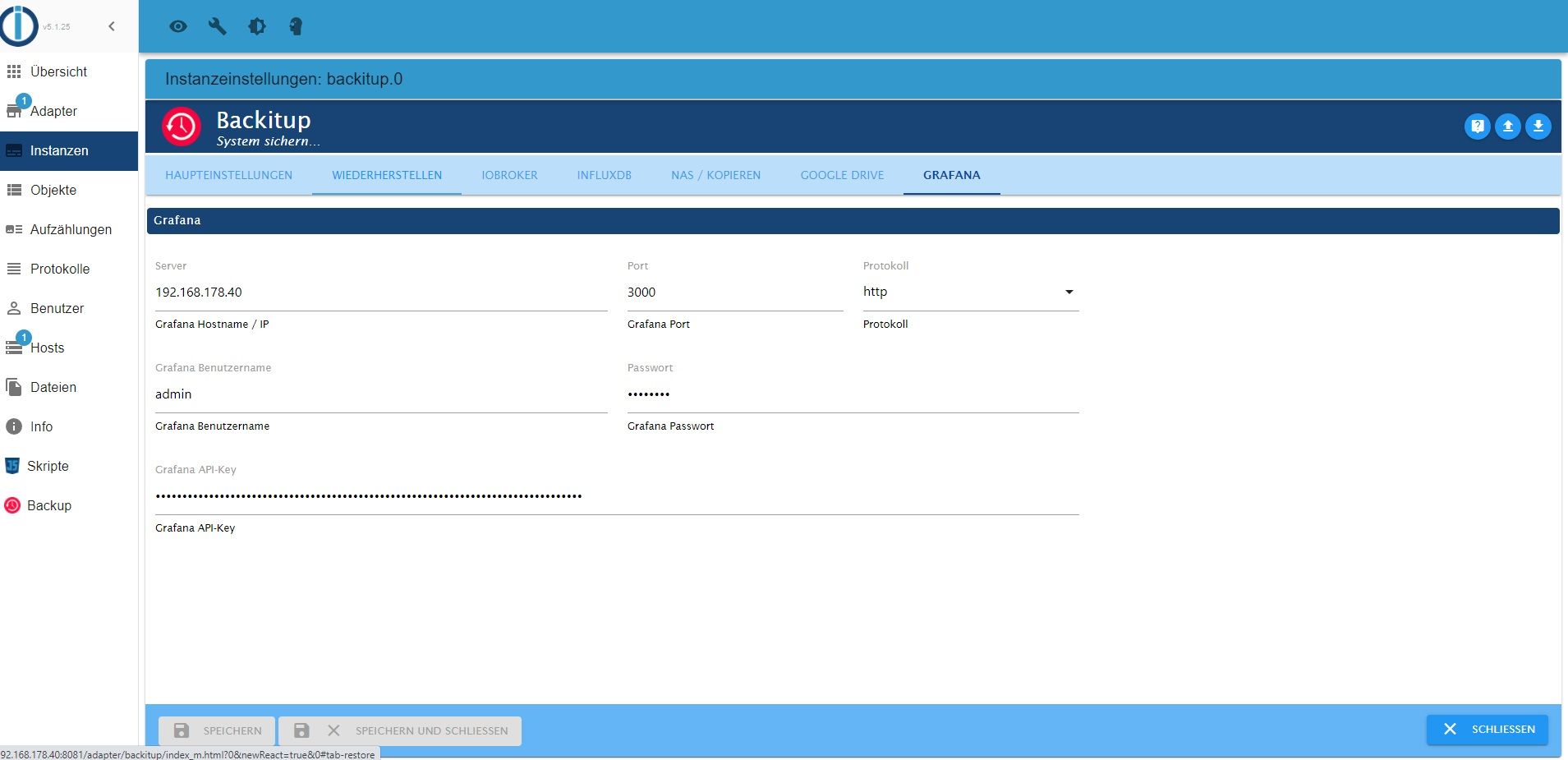
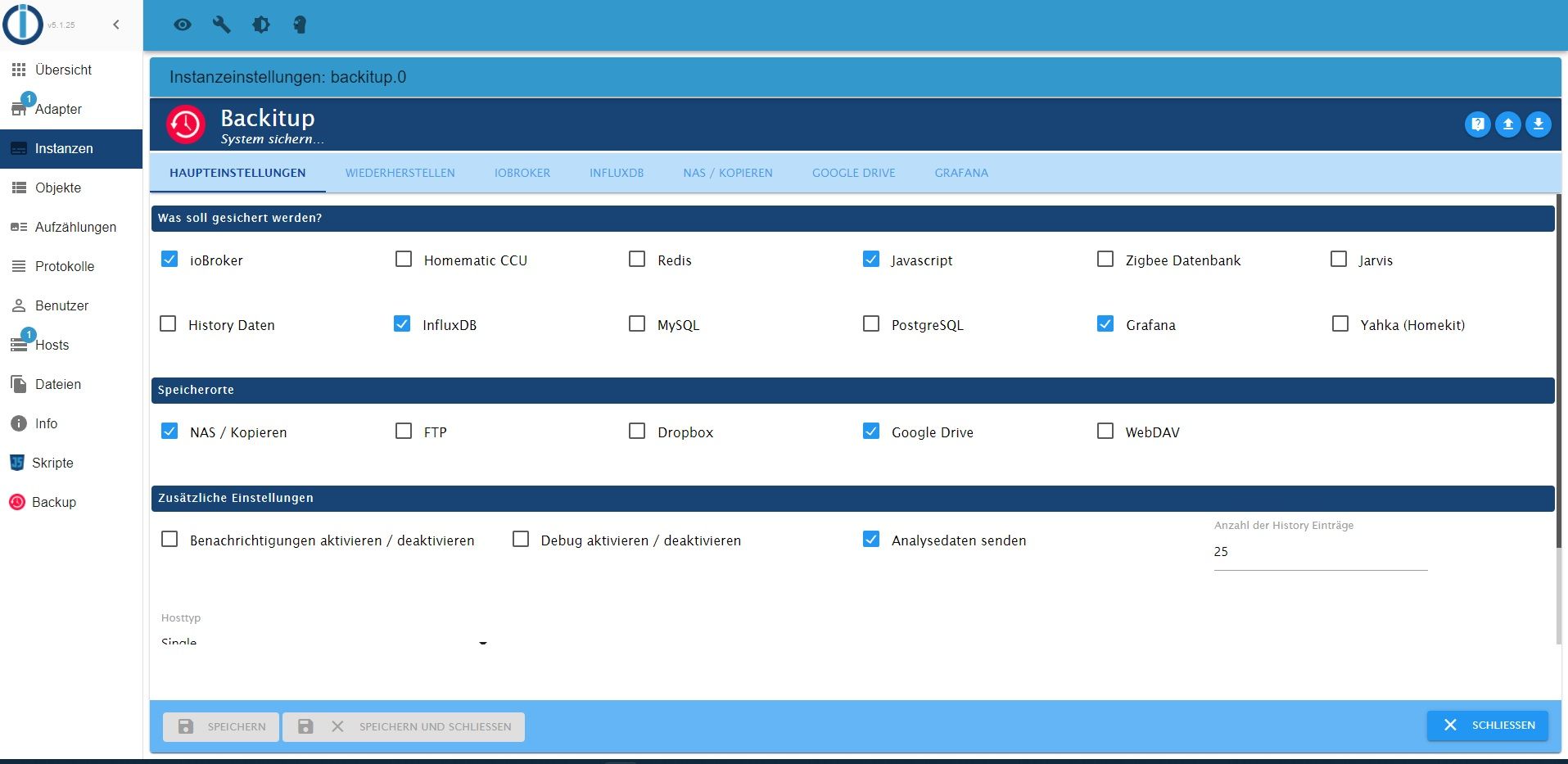
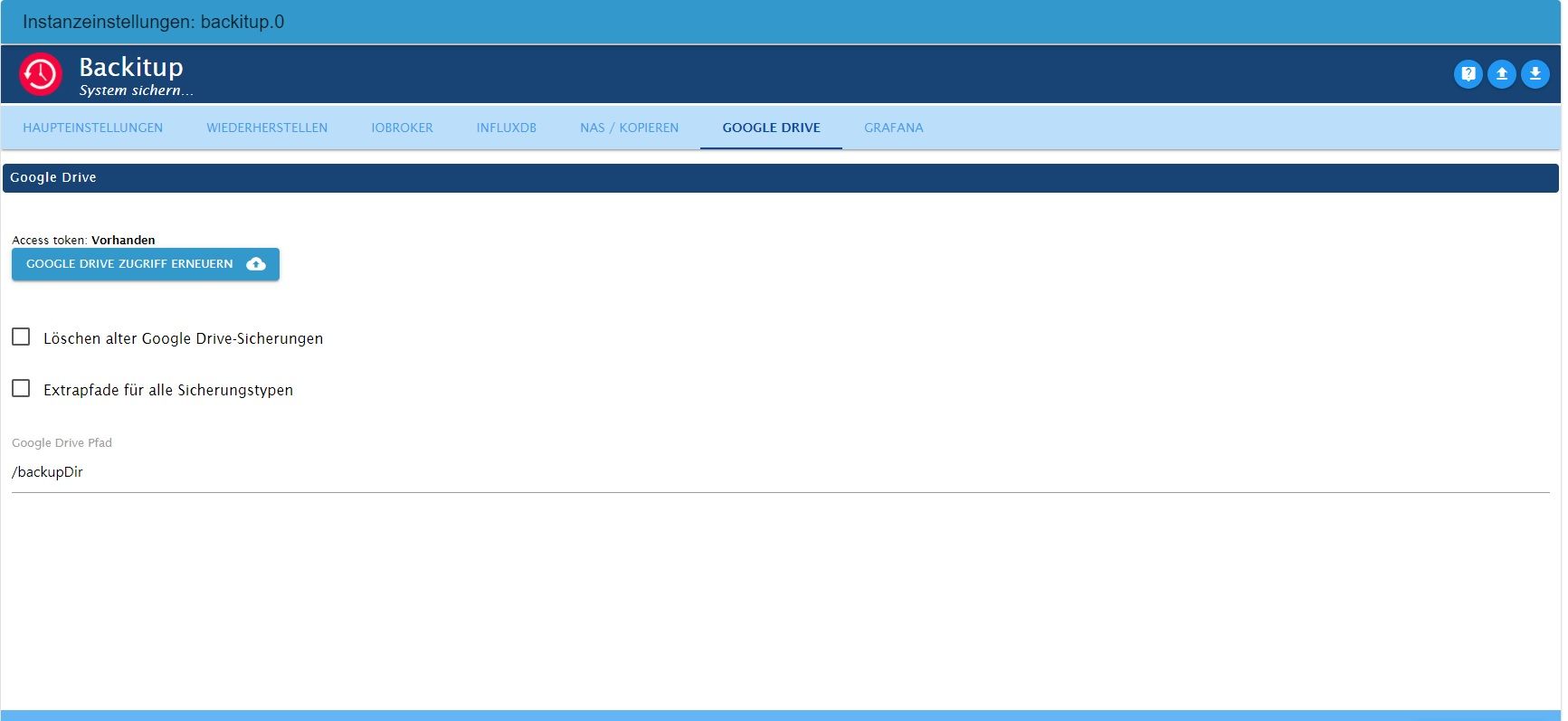
            Zeig mal die Einstellungen der einzelnen Backup-Verfahren.

            Und der Mountpunkt /opt/iobroker/backups ist auch leer, wenn die Freigabe nicht gemountet ist?

            Linux-Werkzeugkasten:
            https://forum.iobroker.net/topic/42952/der-kleine-iobroker-linux-werkzeugkasten
            NodeJS Fixer Skript:
            https://forum.iobroker.net/topic/68035/iob-node-fix-skript
            iob_diag: curl -sLf -o diag.sh https://iobroker.net/diag.sh && bash diag.sh

            B 1 Antwort Letzte Antwort
            0
            • Thomas BraunT Thomas Braun

              @blackbox
              Zeig mal die Einstellungen der einzelnen Backup-Verfahren.

              Und der Mountpunkt /opt/iobroker/backups ist auch leer, wenn die Freigabe nicht gemountet ist?

              B Offline
              B Offline
              Blackbox
              schrieb am zuletzt editiert von
              #7

              Hat ein bischen länger gedauert, leider viel los hier in der familie.

              @thomas-braun said in Backitup speichert unterschiedliches lokal und online:

              Und der Mountpunkt /opt/iobroker/backups ist auch leer, wenn die Freigabe nicht gemountet ist?

              ?? Hier verstehe ich nur bahnhof

              Einstellungen:
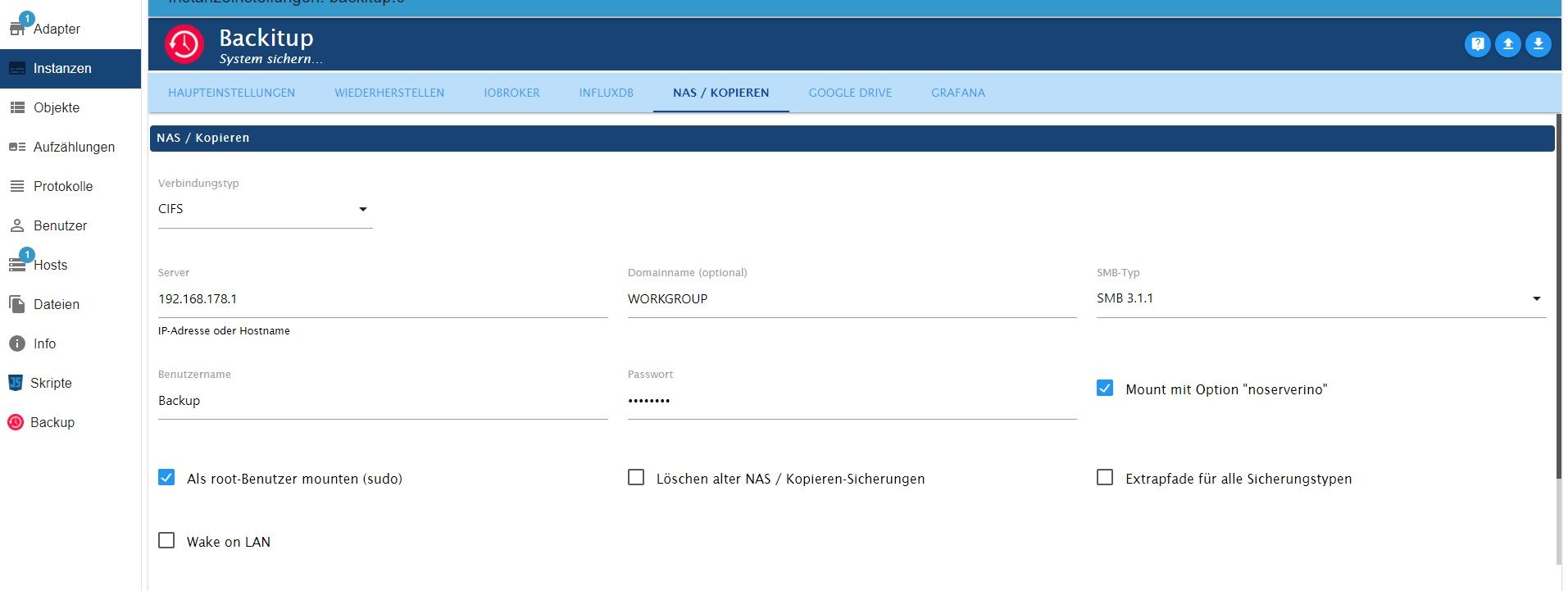
              5.jpg 4.jpg 3.jpg 2.jpg 1.jpg

              crunchipC Thomas BraunT 2 Antworten Letzte Antwort
              0
              • B Blackbox

                Hat ein bischen länger gedauert, leider viel los hier in der familie.

                @thomas-braun said in Backitup speichert unterschiedliches lokal und online:

                Und der Mountpunkt /opt/iobroker/backups ist auch leer, wenn die Freigabe nicht gemountet ist?

                ?? Hier verstehe ich nur bahnhof

                Einstellungen:
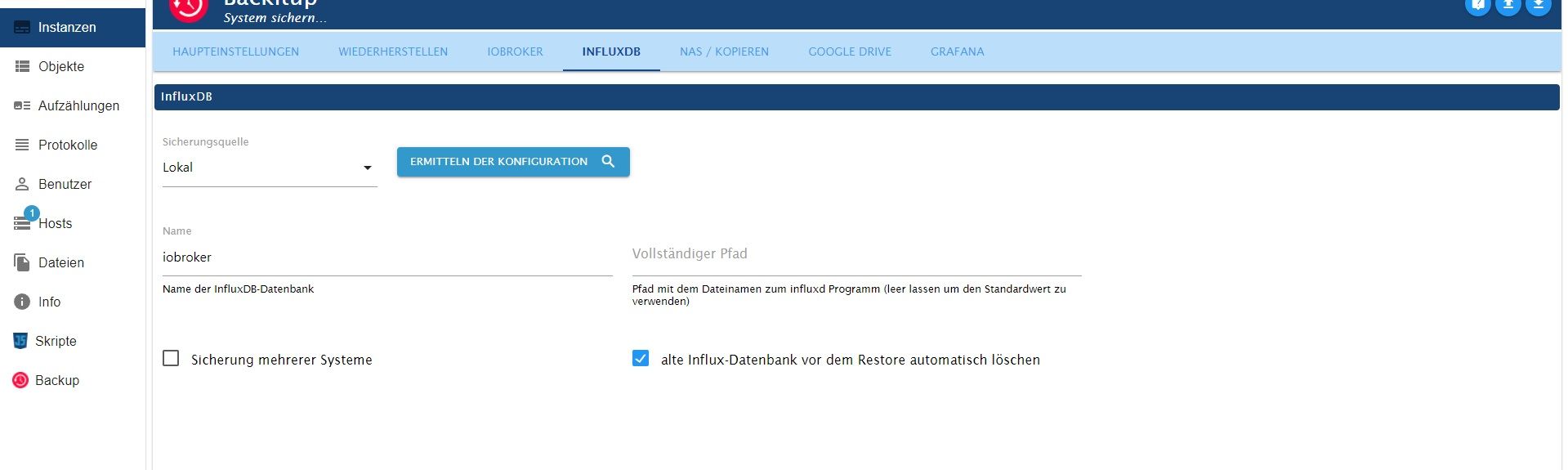
                5.jpg 4.jpg 3.jpg 2.jpg 1.jpg

                crunchipC Abwesend
                crunchipC Abwesend
                crunchip
                Forum Testing Most Active
                schrieb am zuletzt editiert von crunchip
                #8

                @blackbox im ersten bild sieht man deinen Pfad nicht
                ansonsten, gibt es doch so einen schöne Beschreibung

                @thomas-braun sagte in Backitup speichert unterschiedliches lokal und online:

                bist du 'Lokal' unterwegs.

                wäre ja richtig, wenn influx auf dem selben Server läuft

                umgestiegen von Proxmox auf Unraid

                B 1 Antwort Letzte Antwort
                0
                • B Blackbox

                  Hat ein bischen länger gedauert, leider viel los hier in der familie.

                  @thomas-braun said in Backitup speichert unterschiedliches lokal und online:

                  Und der Mountpunkt /opt/iobroker/backups ist auch leer, wenn die Freigabe nicht gemountet ist?

                  ?? Hier verstehe ich nur bahnhof

                  Einstellungen:
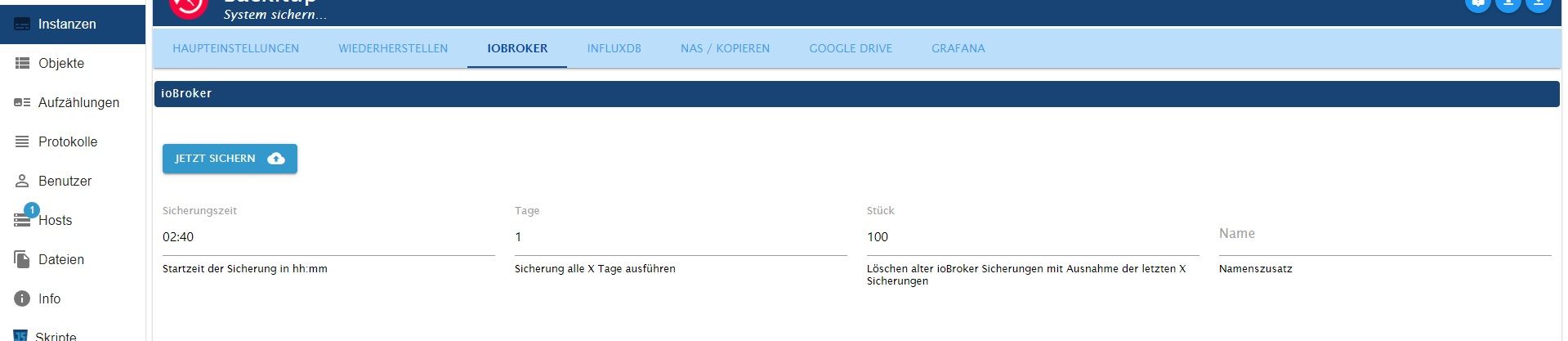
                  5.jpg 4.jpg 3.jpg 2.jpg 1.jpg

                  Thomas BraunT Online
                  Thomas BraunT Online
                  Thomas Braun
                  Most Active
                  schrieb am zuletzt editiert von
                  #9

                  @blackbox
                  Im zweiten Bild bist du 'Lokal' unterwegs.

                  Linux-Werkzeugkasten:
                  https://forum.iobroker.net/topic/42952/der-kleine-iobroker-linux-werkzeugkasten
                  NodeJS Fixer Skript:
                  https://forum.iobroker.net/topic/68035/iob-node-fix-skript
                  iob_diag: curl -sLf -o diag.sh https://iobroker.net/diag.sh && bash diag.sh

                  B 1 Antwort Letzte Antwort
                  0
                  • crunchipC crunchip

                    @blackbox im ersten bild sieht man deinen Pfad nicht
                    ansonsten, gibt es doch so einen schöne Beschreibung

                    @thomas-braun sagte in Backitup speichert unterschiedliches lokal und online:

                    bist du 'Lokal' unterwegs.

                    wäre ja richtig, wenn influx auf dem selben Server läuft

                    B Offline
                    B Offline
                    Blackbox
                    schrieb am zuletzt editiert von
                    #10

                    @crunchip
                    Funtioniert auch alles, außer grafana backup.

                    1 Antwort Letzte Antwort
                    0
                    • Thomas BraunT Thomas Braun

                      @blackbox
                      Im zweiten Bild bist du 'Lokal' unterwegs.

                      B Offline
                      B Offline
                      Blackbox
                      schrieb am zuletzt editiert von
                      #11

                      @thomas-braun
                      ist das ein problem? Die datenbank wird ja gesichert.

                      Thomas BraunT 1 Antwort Letzte Antwort
                      0
                      • B Blackbox

                        @thomas-braun
                        ist das ein problem? Die datenbank wird ja gesichert.

                        Thomas BraunT Online
                        Thomas BraunT Online
                        Thomas Braun
                        Most Active
                        schrieb am zuletzt editiert von
                        #12

                        @blackbox

                        Aber du willst doch das Backup extern haben. Und auch von extern wieder einspielen.

                        Linux-Werkzeugkasten:
                        https://forum.iobroker.net/topic/42952/der-kleine-iobroker-linux-werkzeugkasten
                        NodeJS Fixer Skript:
                        https://forum.iobroker.net/topic/68035/iob-node-fix-skript
                        iob_diag: curl -sLf -o diag.sh https://iobroker.net/diag.sh && bash diag.sh

                        B 1 Antwort Letzte Antwort
                        0
                        • Thomas BraunT Thomas Braun

                          @blackbox

                          Aber du willst doch das Backup extern haben. Und auch von extern wieder einspielen.

                          B Offline
                          B Offline
                          Blackbox
                          schrieb am zuletzt editiert von Blackbox
                          #13

                          @thomas-braun
                          ist doch die quellenangabe nicht der ort an dem gesichert wird?
                          Also ich verstehe das so das hier angegeben wird wo sich das zu sichernde objekt befindet.
                          Die Datenbank wird ja auch problemlos gesichert.

                          Thomas BraunT 1 Antwort Letzte Antwort
                          0
                          • B Blackbox

                            @thomas-braun
                            ist doch die quellenangabe nicht der ort an dem gesichert wird?
                            Also ich verstehe das so das hier angegeben wird wo sich das zu sichernde objekt befindet.
                            Die Datenbank wird ja auch problemlos gesichert.

                            Thomas BraunT Online
                            Thomas BraunT Online
                            Thomas Braun
                            Most Active
                            schrieb am zuletzt editiert von
                            #14

                            @blackbox

                            Richtig, auf dem ersten Bild agierst du aber nicht lokal sondern auf einer smb-Freigabe.

                            Linux-Werkzeugkasten:
                            https://forum.iobroker.net/topic/42952/der-kleine-iobroker-linux-werkzeugkasten
                            NodeJS Fixer Skript:
                            https://forum.iobroker.net/topic/68035/iob-node-fix-skript
                            iob_diag: curl -sLf -o diag.sh https://iobroker.net/diag.sh && bash diag.sh

                            B 1 Antwort Letzte Antwort
                            0
                            • Thomas BraunT Thomas Braun

                              @blackbox

                              Richtig, auf dem ersten Bild agierst du aber nicht lokal sondern auf einer smb-Freigabe.

                              B Offline
                              B Offline
                              Blackbox
                              schrieb am zuletzt editiert von Blackbox
                              #15

                              @thomas-braun
                              Wow, bist du schnell. Hab meinen letzten post angepasst.

                              erstes bild ist ja auch ziel der sicherung.

                              B 1 Antwort Letzte Antwort
                              0
                              • B Blackbox

                                @thomas-braun
                                Wow, bist du schnell. Hab meinen letzten post angepasst.

                                erstes bild ist ja auch ziel der sicherung.

                                B Offline
                                B Offline
                                Blackbox
                                schrieb am zuletzt editiert von
                                #16

                                @blackbox
                                Kann natürlich auch sein das ich etwas fundamental missverstehe. Bin absoluter laie.

                                B 1 Antwort Letzte Antwort
                                0
                                • B Blackbox

                                  @blackbox
                                  Kann natürlich auch sein das ich etwas fundamental missverstehe. Bin absoluter laie.

                                  B Offline
                                  B Offline
                                  Blackbox
                                  schrieb am zuletzt editiert von
                                  #17

                                  @blackbox
                                  Gebe ich bei grafana lokal an, findet er die instanz nicht. Gebe ich die ip an, bekomme ich diesen output.
                                  Er findet also die instanz, versucht ein backup, aber danach sind keine files da. ??

                                  [DEBUG] [grafana] - Start Grafana Backup ...
                                  [DEBUG] [grafana] - Created grafana_tmp directory: "/opt/iobroker/backups/grafana_tmp"
                                  [DEBUG] [grafana] - Created dashboard directory
                                  [DEBUG] [grafana] - Created dashboards_manually_restore directory
                                  [DEBUG] [grafana] - Created datasource directory
                                  [DEBUG] [grafana] - start Grafana request ...
                                  [DEBUG] [grafana] - Grafana is available ... Status: 200
                                  [DEBUG] [grafana] - Error on Grafana Datasource Request
                                  [DEBUG] [grafana] - found Dashboard: pc-verbrauch-and-pi-temperatur
                                  [DEBUG] [grafana] - found Dashboard: waschmaschine-and-trockner-verbrauch
                                  [DEBUG] [grafana] - start Grafana backup compress ...
                                  [DEBUG] [grafana] - Try deleting the Grafana tmp directory: "/opt/iobroker/backups/grafana_tmp"
                                  [DEBUG] [grafana] - Grafana tmp directory "/opt/iobroker/backups/grafana_tmp" successfully deleted
                                  [DEBUG] [grafana] - cannot found Grafana Backup files
                                  [DEBUG] [grafana] - done
                                  
                                  B 1 Antwort Letzte Antwort
                                  0
                                  • B Blackbox

                                    @blackbox
                                    Gebe ich bei grafana lokal an, findet er die instanz nicht. Gebe ich die ip an, bekomme ich diesen output.
                                    Er findet also die instanz, versucht ein backup, aber danach sind keine files da. ??

                                    [DEBUG] [grafana] - Start Grafana Backup ...
                                    [DEBUG] [grafana] - Created grafana_tmp directory: "/opt/iobroker/backups/grafana_tmp"
                                    [DEBUG] [grafana] - Created dashboard directory
                                    [DEBUG] [grafana] - Created dashboards_manually_restore directory
                                    [DEBUG] [grafana] - Created datasource directory
                                    [DEBUG] [grafana] - start Grafana request ...
                                    [DEBUG] [grafana] - Grafana is available ... Status: 200
                                    [DEBUG] [grafana] - Error on Grafana Datasource Request
                                    [DEBUG] [grafana] - found Dashboard: pc-verbrauch-and-pi-temperatur
                                    [DEBUG] [grafana] - found Dashboard: waschmaschine-and-trockner-verbrauch
                                    [DEBUG] [grafana] - start Grafana backup compress ...
                                    [DEBUG] [grafana] - Try deleting the Grafana tmp directory: "/opt/iobroker/backups/grafana_tmp"
                                    [DEBUG] [grafana] - Grafana tmp directory "/opt/iobroker/backups/grafana_tmp" successfully deleted
                                    [DEBUG] [grafana] - cannot found Grafana Backup files
                                    [DEBUG] [grafana] - done
                                    
                                    B Offline
                                    B Offline
                                    Blackbox
                                    schrieb am zuletzt editiert von
                                    #18

                                    @blackbox said in Backitup speichert unterschiedliches lokal und online:

                                    [DEBUG] [grafana] - Error on Grafana Datasource Request

                                    Warum?

                                    Thomas BraunT 1 Antwort Letzte Antwort
                                    0
                                    • B Blackbox

                                      @blackbox said in Backitup speichert unterschiedliches lokal und online:

                                      [DEBUG] [grafana] - Error on Grafana Datasource Request

                                      Warum?

                                      Thomas BraunT Online
                                      Thomas BraunT Online
                                      Thomas Braun
                                      Most Active
                                      schrieb am zuletzt editiert von Thomas Braun
                                      #19

                                      @blackbox

                                      Ich habe zwar weder grafana noch influx im Einsatz, aber grundsätzlich sollte das so ablaufen:

                                      Das Dateisystem auf der Fritzbox wird in /opt/iobroker/backups
                                      eingehängt/gemountet. Dazu sollte der Ordner zuvor leer sein. Dann werden die Backups dort zusammengeschraubt und dann wird der Kram ins Google Drive geschoben. Abschließend wird das Dateisystem der Fritzbox wieder rausgerollt und zurück bleibt der leere Mountpunkt. Da sollte also keine Diskrepanz zwischen der Fritzbox und Google Drive und Lokal entstehen können.

                                      Linux-Werkzeugkasten:
                                      https://forum.iobroker.net/topic/42952/der-kleine-iobroker-linux-werkzeugkasten
                                      NodeJS Fixer Skript:
                                      https://forum.iobroker.net/topic/68035/iob-node-fix-skript
                                      iob_diag: curl -sLf -o diag.sh https://iobroker.net/diag.sh && bash diag.sh

                                      B 1 Antwort Letzte Antwort
                                      0
                                      • Thomas BraunT Thomas Braun

                                        @blackbox

                                        Ich habe zwar weder grafana noch influx im Einsatz, aber grundsätzlich sollte das so ablaufen:

                                        Das Dateisystem auf der Fritzbox wird in /opt/iobroker/backups
                                        eingehängt/gemountet. Dazu sollte der Ordner zuvor leer sein. Dann werden die Backups dort zusammengeschraubt und dann wird der Kram ins Google Drive geschoben. Abschließend wird das Dateisystem der Fritzbox wieder rausgerollt und zurück bleibt der leere Mountpunkt. Da sollte also keine Diskrepanz zwischen der Fritzbox und Google Drive und Lokal entstehen können.

                                        B Offline
                                        B Offline
                                        Blackbox
                                        schrieb am zuletzt editiert von
                                        #20

                                        @thomas-braun
                                        Diese einstellung scheint doch unter NAS
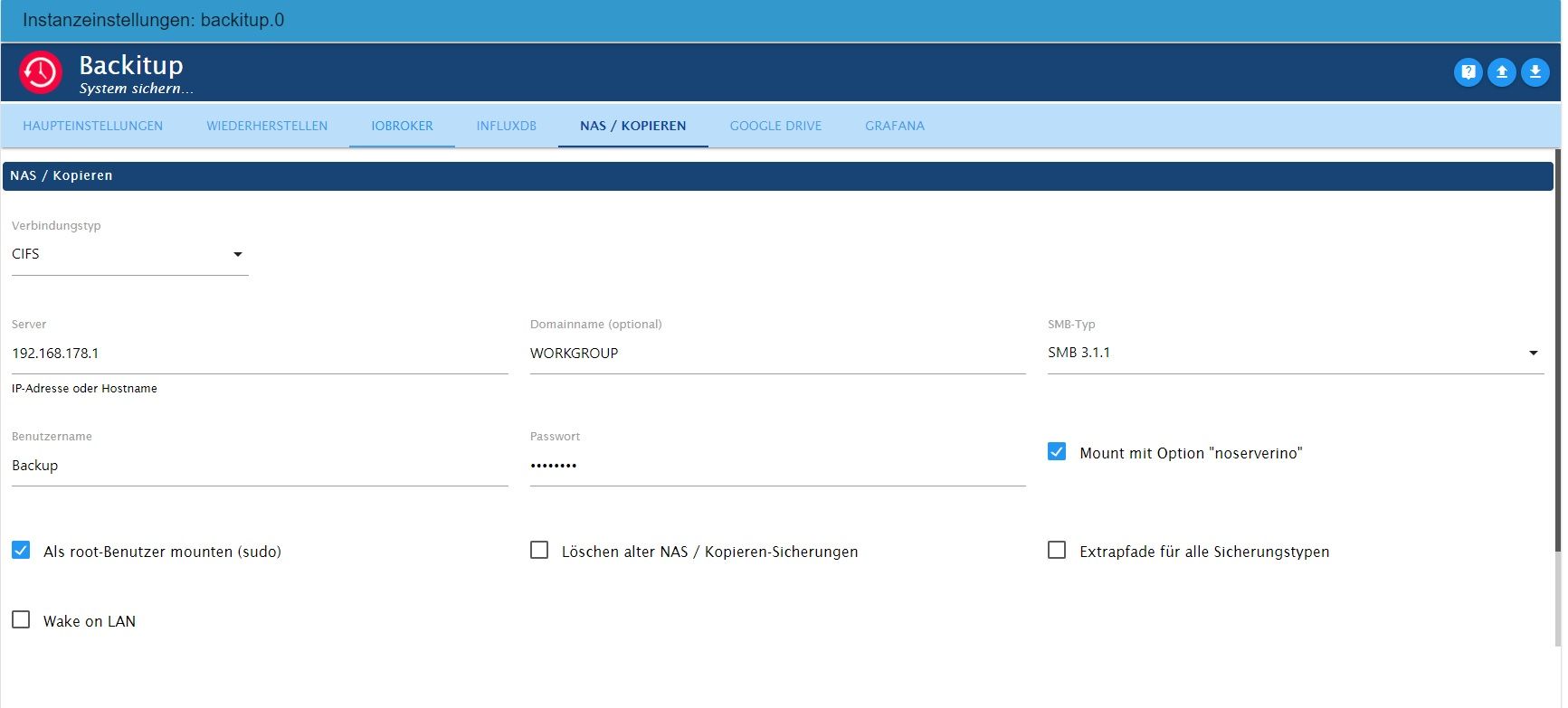
                                        Nas.jpg
                                        und Google Drive
                                        GD.jpg
                                        auch zu passen. Alles andere als Grafana wird ja auch gespeichert.

                                        crunchipC simatecS 2 Antworten Letzte Antwort
                                        0
                                        • B Blackbox

                                          @thomas-braun
                                          Diese einstellung scheint doch unter NAS
                                          Nas.jpg
                                          und Google Drive
                                          GD.jpg
                                          auch zu passen. Alles andere als Grafana wird ja auch gespeichert.

                                          crunchipC Abwesend
                                          crunchipC Abwesend
                                          crunchip
                                          Forum Testing Most Active
                                          schrieb am zuletzt editiert von
                                          #21

                                          @blackbox welche backitup version und welche grafana Version läuft da?

                                          umgestiegen von Proxmox auf Unraid

                                          B 1 Antwort Letzte Antwort
                                          0
                                          Antworten
                                          • In einem neuen Thema antworten
                                          Anmelden zum Antworten
                                          • Älteste zuerst
                                          • Neuste zuerst
                                          • Meiste Stimmen


                                          Support us

                                          ioBroker
                                          Community Adapters
                                          Donate

                                          472

                                          Online

                                          32.7k

                                          Benutzer

                                          82.5k

                                          Themen

                                          1.3m

                                          Beiträge
                                          Community
                                          Impressum | Datenschutz-Bestimmungen | Nutzungsbedingungen | Einwilligungseinstellungen
                                          ioBroker Community 2014-2025
                                          logo
                                          • Anmelden

                                          • Du hast noch kein Konto? Registrieren

                                          • Anmelden oder registrieren, um zu suchen
                                          • Erster Beitrag
                                            Letzter Beitrag
                                          0
                                          • Home
                                          • Aktuell
                                          • Tags
                                          • Ungelesen 0
                                          • Kategorien
                                          • Unreplied
                                          • Beliebt
                                          • GitHub
                                          • Docu
                                          • Hilfe