




Iobroker backitup error.. Wo liegt das problem
-
@humidor sagte in Iobroker backitup error.. Wo liegt das problem:
Device or resource busy
So wie es ausschaut ist bereits ein mount gesetztsudo umount /opt/iobroker/backups@simatec sagte in Iobroker backitup error.. Wo liegt das problem:
sudo umount /opt/iobroker/backups
ioBroker fix habe ich gemacht inkl. alles was sonst noch an update usw. zu tun ist
den unmount habe ich gerade gemacht
ein gerader gestarteter manueller Backup startet nicht (Fenster bleibt leer)log von heute - files wurden am NAS angelegt, Fehlermeldung wurde versandt.
2021-03-31 06:15:10.291 - error: backitup.0 (32188) [iobroker] Backup folder not created: Error: EPERM: operation not permitted, chmod '/opt/iobroker/backups'Please reinstall backitup and run "iobroker fix"!! 2021-03-31 06:15:10.300 - debug: backitup.0 (32188) Backup has started ... 2021-03-31 06:15:21.081 - debug: backitup.0 (32188) [iobroker/mount] first mount attempt with smb option failed. try next mount attempt without smb option ... 2021-03-31 06:15:21.161 - debug: backitup.0 (32188) [iobroker/mount] [undefined Error: Command failed: sudo mount -t cifs -o username=iobackup,password=****,domain=NAS,rw,file_mode=0777,dir_mode=0777 //192.168.0.10/backup/iobroker /opt/iobroker/backups 2021-03-31 06:15:21.163 - debug: backitup.0 (32188) [iobroker/mount] mount error(16): Device or resource busy 2021-03-31 06:15:21.164 - debug: backitup.0 (32188) [iobroker/mount] Refer to the mount.cifs(8) manual page (e.g. man mount.cifs) 2021-03-31 06:15:21.165 - debug: backitup.0 (32188) [iobroker/mount] [IGNORED] Error: Command failed: sudo mount -t cifs -o username=iobackup,password=****,domain=NAS,rw,file_mode=0777,dir_mode=0777 //192.168.0.10/backup/iobroker /opt/iobroker/backups 2021-03-31 06:15:21.166 - debug: backitup.0 (32188) [iobroker/mount] mount error(16): Device or resource busy 2021-03-31 06:15:21.166 - debug: backitup.0 (32188) [iobroker/mount] Refer to the mount.cifs(8) manual page (e.g. man mount.cifs) 2021-03-31 06:15:23.856 - debug: backitup.0 (32188) [iobroker/iobroker] host.raspi4iobrokerpv 2149 states saved 2021-03-31 06:15:23.889 - debug: backitup.0 (32188) [iobroker/iobroker] host.raspi4iobrokerpv 2595 objects saved 2021-03-31 06:15:27.198 - debug: backitup.0 (32188) [iobroker/iobroker] Backup created: /opt/iobroker/backups/iobroker_2021_03_31-06_15_21_ioBrokerPV_backupiobroker.tar.gz 2021-03-31 06:15:28.251 - debug: backitup.0 (32188) [iobroker/iobroker] done 2021-03-31 06:15:29.089 - debug: backitup.0 (32188) [iobroker/historyDB] The following files were found for the backup: 20210202,20210203,20210204,20210205,20210206,20210207,20210208,20210209,20210210,20210211,20210212,20210213,20210214,20210215,20210216,20210217,20210218,20210219,20210220,20210221,20210222,20210223,20210224,20210225,20210226,20210227,20210228,20210301,20210302,20210303,20210304,20210305,20210306,20210307,20210308,20210309,20210310,20210311,20210312,20210313,20210314,20210315,20210316,20210317,20210318,20210319,20210320,20210321,20210322,20210323,20210324,20210325,20210326,20210327,20210328,20210329,20210330,20210331 2021-03-31 06:15:39.048 - debug: backitup.0 (32188) [iobroker/historyDB] Packed 11MB so far... 2021-03-31 06:15:49.042 - debug: backitup.0 (32188) [iobroker/historyDB] Packed 21MB so far... 2021-03-31 06:15:57.276 - debug: backitup.0 (32188) [iobroker/historyDB] Backup created: /opt/iobroker/backups/historyDB_2021_03_31-06_15_29_backupiobroker.tar.gz 2021-03-31 06:15:57.278 - debug: backitup.0 (32188) [iobroker/historyDB] done 2021-03-31 06:15:58.336 - debug: backitup.0 (32188) [iobroker/cifs] done 2021-03-31 06:15:58.942 - debug: backitup.0 (32188) [iobroker/clean] Backup files not deleted from /opt/iobroker/backups because some errors. 2021-03-31 06:15:58.944 - debug: backitup.0 (32188) [iobroker/clean] done 2021-03-31 06:15:59.413 - debug: backitup.0 (32188) [iobroker/telegram] [iobroker] used Telegram-Instance: telegram.0 2021-03-31 06:15:59.425 - debug: backitup.0 (32188) sendTo "send" to system.adapter.telegram.0 from system.adapter.backitup.0 2021-03-31 06:15:59.428 - debug: backitup.0 (32188) [iobroker/telegram] done 2021-03-31 06:15:59.734 - debug: backitup.0 (32188) [iobroker/historyHTML] new history html values created 2021-03-31 06:15:59.736 - debug: backitup.0 (32188) [iobroker/historyHTML] done 2021-03-31 06:15:59.894 - debug: backitup.0 (32188) [iobroker/historyJSON] new history json values created 2021-03-31 06:15:59.895 - debug: backitup.0 (32188) [iobroker/historyJSON] done -
@humidor sagte in Iobroker backitup error.. Wo liegt das problem:
Device or resource busy
So wie es ausschaut ist bereits ein mount gesetztsudo umount /opt/iobroker/backupsgerade gemacht:
iobroker stop
sudo apt-get update
sudo apt-get upgrade
iobroker fix
curl -fsL https://iobroker.net/fix.sh | bash -
iobroker start... gewartet bis wieder alle Adapter online sind....
manuelles Backup gestartet
Adapter 2.0.4 - schaut gut aus, file ohne Fehler angelegt.2021-03-31 08:08:07.487 - debug: backitup.0 (24853) Redis Objects: Use Redis connection: 127.0.0.1:9001 2021-03-31 08:08:07.527 - debug: backitup.0 (24853) Objects client ready ... initialize now 2021-03-31 08:08:07.530 - debug: backitup.0 (24853) Objects create System PubSub Client 2021-03-31 08:08:07.531 - debug: backitup.0 (24853) Objects create User PubSub Client 2021-03-31 08:08:07.532 - debug: backitup.0 (24853) Objects client initialize lua scripts 2021-03-31 08:08:07.545 - debug: backitup.0 (24853) Objects connected to redis: 127.0.0.1:9001 2021-03-31 08:08:07.554 - debug: backitup.0 (24853) objectDB connected 2021-03-31 08:08:07.557 - debug: backitup.0 (24853) Redis States: Use Redis connection: 127.0.0.1:9000 2021-03-31 08:08:07.565 - debug: backitup.0 (24853) States create System PubSub Client 2021-03-31 08:08:07.566 - debug: backitup.0 (24853) States create User PubSub Client 2021-03-31 08:08:07.574 - debug: backitup.0 (24853) States connected to redis: 127.0.0.1:9000 2021-03-31 08:08:07.575 - debug: backitup.0 (24853) statesDB connected 2021-03-31 08:08:08.090 - debug: backitup.0 (24853) Plugin sentry Initialize Plugin (enabled=true) 2021-03-31 08:08:08.348 - info: backitup.0 (24853) starting. Version 2.0.4 in /opt/iobroker/node_modules/iobroker.backitup, node: v12.22.0, js-controller: 3.2.16 2021-03-31 08:08:08.446 - info: backitup.0 (24853) [iobroker] backup was activated at 06:15 every 1 day(s) 2021-03-31 08:08:08.485 - debug: backitup.0 (24853) [iobroker] 10 15 06 */1 * * 2021-03-31 08:08:09.122 - debug: backitup.0 (24853) mount successfully completed 2021-03-31 08:08:11.097 - info: host.raspi4iobrokerpv instance system.adapter.vis.0 terminated while should be started once 2021-03-31 08:08:11.205 - debug: backitup.0 (24853) detect backup file 1 from cifs: iobroker_2021_03_25-06_15_24_ioBrokerPV_backupiobroker.tar.gz 2021-03-31 08:08:11.206 - debug: backitup.0 (24853) detect backup file 2 from cifs: iobroker_2021_03_26-06_10_22_backupiobroker.tar.gz 2021-03-31 08:08:11.207 - debug: backitup.0 (24853) detect backup file 3 from cifs: iobroker_2021_03_26-06_15_22_ioBrokerPV_backupiobroker.tar.gz 2021-03-31 08:08:11.207 - debug: backitup.0 (24853) detect backup file 4 from cifs: iobroker_2021_03_27-06_10_22_backupiobroker.tar.gz 2021-03-31 08:08:11.208 - debug: backitup.0 (24853) detect backup file 5 from cifs: iobroker_2021_03_27-06_15_23_ioBrokerPV_backupiobroker.tar.gz 2021-03-31 08:08:11.208 - debug: backitup.0 (24853) detect backup file 6 from cifs: iobroker_2021_03_28-10_57_31_ioBrokerPV_backupiobroker.tar.gz 2021-03-31 08:08:11.209 - debug: backitup.0 (24853) detect backup file 7 from cifs: iobroker_2021_03_28-11_27_22_ioBrokerPV_backupiobroker.tar.gz 2021-03-31 08:08:11.210 - debug: backitup.0 (24853) detect backup file 8 from cifs: iobroker_2021_03_28-11_31_14_ioBrokerPV_backupiobroker.tar.gz 2021-03-31 08:08:11.210 - debug: backitup.0 (24853) detect backup file 9 from cifs: iobroker_2021_03_28-18_01_59_ioBrokerPV_backupiobroker.tar.gz 2021-03-31 08:08:11.211 - debug: backitup.0 (24853) detect backup file 10 from cifs: iobroker_2021_03_29-06_15_21_ioBrokerPV_backupiobroker.tar.gz 2021-03-31 08:08:11.211 - debug: backitup.0 (24853) detect backup file 11 from cifs: iobroker_2021_03_30-06_15_21_ioBrokerPV_backupiobroker.tar.gz 2021-03-31 08:08:11.212 - debug: backitup.0 (24853) detect backup file 12 from cifs: iobroker_2021_03_30-07_26_27_ioBrokerPV_backupiobroker.tar.gz 2021-03-31 08:08:11.213 - debug: backitup.0 (24853) detect backup file 13 from cifs: iobroker_2021_03_31-06_15_21_ioBrokerPV_backupiobroker.tar.gz 2021-03-31 08:08:11.215 - debug: backitup.0 (24853) detect last backup file: iobroker_2021_03_31-06_15_21_ioBrokerPV_backupiobroker.tar.gz 2021-03-31 08:08:11.851 - info: host.raspi4iobrokerpv instance system.adapter.shelly.0 started with pid 24897 2021-03-31 08:08:15.998 - info: host.raspi4iobrokerpv instance system.adapter.influxdb.0 started with pid 24912 2021-03-31 08:08:18.174 - info: influxdb.0 (24912) starting. Version 1.9.4 in /opt/iobroker/node_modules/iobroker.influxdb, node: v12.22.0, js-controller: 3.2.16 2021-03-31 08:08:18.223 - info: influxdb.0 (24912) No stored data from last exit found 2021-03-31 08:08:18.225 - info: influxdb.0 (24912) Connecting http://localhost:8086 ... 2021-03-31 08:08:18.324 - info: influxdb.0 (24912) enabled logging of kecontact.0.pf, Alias=false, 1 points now activated 2021-03-31 08:08:18.325 - info: influxdb.0 (24912) enabled logging of kecontact.0.p, Alias=false, 2 points now activated 2021-03-31 08:08:18.326 - info: influxdb.0 (24912) enabled logging of kecontact.0.i3, Alias=false, 3 points now activated 2021-03-31 08:08:18.327 - info: influxdb.0 (24912) enabled logging of kecontact.0.i2, Alias=false, 4 points now activated 2021-03-31 08:08:18.328 - info: influxdb.0 (24912) enabled logging of kecontact.0.i1, Alias=false, 5 points now activated 2021-03-31 08:08:18.329 - info: influxdb.0 (24912) enabled logging of kecontact.0.u3, Alias=false, 6 points now activated 2021-03-31 08:08:18.330 - info: influxdb.0 (24912) enabled logging of kecontact.0.u2, Alias=false, 7 points now activated 2021-03-31 08:08:18.331 - info: influxdb.0 (24912) enabled logging of kecontact.0.u1, Alias=false, 8 points now activated 2021-03-31 08:08:18.332 - info: influxdb.0 (24912) enabled logging of kecontact.0.currentUser, Alias=false, 9 points now activated 2021-03-31 08:08:18.333 - info: influxdb.0 (24912) enabled logging of kecontact.0.enableUser, Alias=false, 10 points now activated 2021-03-31 08:08:18.334 - info: influxdb.0 (24912) enabled logging of 0_userdata.0.AMIS.170, Alias=false, 11 points now activated 2021-03-31 08:08:18.335 - info: influxdb.0 (24912) enabled logging of 0_userdata.0.AMIS.270, Alias=false, 12 points now activated 2021-03-31 08:08:18.336 - info: influxdb.0 (24912) enabled logging of shelly.0.SHPLG-S#EED8F9#1.Relay0.Switch, Alias=false, 13 points now activated 2021-03-31 08:08:18.337 - info: influxdb.0 (24912) enabled logging of shelly.0.SHPLG-S#EED8F9#1.Relay0.Power, Alias=false, 14 points now activated 2021-03-31 08:08:18.338 - info: influxdb.0 (24912) enabled logging of 0_userdata.0.AMIS.Power, Alias=false, 15 points now activated 2021-03-31 08:08:18.339 - info: influxdb.0 (24912) enabled logging of modbus.0.inputRegisters.30537_Tagesertrag_kWh, Alias=false, 16 points now activated 2021-03-31 08:08:18.340 - info: influxdb.0 (24912) enabled logging of modbus.0.inputRegisters.30775_PVLeistung, Alias=false, 17 points now activated 2021-03-31 08:08:18.341 - info: influxdb.0 (24912) enabled logging of javascript.0.Solar.Wechselrichter.PVLeistungAktuell, Alias=false, 18 points now activated 2021-03-31 08:08:18.342 - info: influxdb.0 (24912) enabled logging of modbus.1.holdingRegisters.40083_I_AC_Leistung, Alias=false, 19 points now activated 2021-03-31 08:08:18.343 - info: influxdb.0 (24912) enabled logging of modbus.1.holdingRegisters.40093_I_AC_Energie_WH, Alias=false, 20 points now activated 2021-03-31 08:08:18.353 - info: influxdb.0 (24912) enabled logging of 0_userdata.0.AMIS.PVPower, Alias=false, 21 points now activated 2021-03-31 08:08:18.354 - info: influxdb.0 (24912) enabled logging of 0_userdata.0.AMIS.PVÜberschuss, Alias=false, 22 points now activated 2021-03-31 08:08:18.355 - info: influxdb.0 (24912) enabled logging of javascript.0.Solar.Wechselrichter.PVLeistungAktuellSMA, Alias=false, 23 points now activated 2021-03-31 08:08:18.356 - info: influxdb.0 (24912) enabled logging of fuelpricemonitor.0.zuHome_Diesel.0.prices.0.amount, Alias=false, 24 points now activated 2021-03-31 08:08:18.357 - info: influxdb.0 (24912) enabled logging of virtualpowermeter.0.group_grid.VPM_170_Actual, Alias=false, 25 points now activated 2021-03-31 08:08:18.358 - info: influxdb.0 (24912) enabled logging of virtualpowermeter.0.group_grid.VPM_270_Actual, Alias=false, 26 points now activated 2021-03-31 08:08:18.359 - info: influxdb.0 (24912) enabled logging of virtualpowermeter.0.group_PowerBank.Virtual_Energy_Power_Powerbank, Alias=false, 27 points now activated 2021-03-31 08:08:18.360 - info: influxdb.0 (24912) enabled logging of virtualpowermeter.0.group_PowerBank.Virtual_Energy_Total_Powerbank, Alias=false, 28 points now activated 2021-03-31 08:08:18.394 - info: influxdb.0 (24912) Connected! 2021-03-31 08:08:18.443 - debug: backitup.0 (24853) mount activ... umount in 2 Seconds!! 2021-03-31 08:08:19.844 - info: host.raspi4iobrokerpv instance system.adapter.vis-inventwo.0 started with pid 24951 2021-03-31 08:08:20.507 - debug: backitup.0 (24853) umount successfully completed 2021-03-31 08:08:23.918 - info: host.raspi4iobrokerpv instance system.adapter.modbus.0 started with pid 24970 2021-03-31 08:08:27.916 - info: host.raspi4iobrokerpv instance system.adapter.modbus.1 started with pid 24991 2021-03-31 08:08:31.809 - info: host.raspi4iobrokerpv instance scheduled system.adapter.zoe2.0 */10 * * * * 2021-03-31 08:08:35.850 - info: host.raspi4iobrokerpv instance system.adapter.info.0 started with pid 25021 2021-03-31 08:08:39.889 - info: host.raspi4iobrokerpv instance system.adapter.life360.0 started with pid 25130 2021-03-31 08:08:43.905 - info: host.raspi4iobrokerpv instance system.adapter.fritzdect.0 started with pid 25517 2021-03-31 08:08:47.741 - debug: backitup.0 (24853) system.adapter.admin.0: logging false 2021-03-31 08:08:47.862 - info: host.raspi4iobrokerpv instance scheduled system.adapter.fuelpricemonitor.0 25 */20 * * * * 2021-03-31 08:08:47.887 - info: host.raspi4iobrokerpv instance system.adapter.fuelpricemonitor.0 started with pid 25539 2021-03-31 08:08:50.014 - info: fuelpricemonitor.0 (25539) starting. Version 0.2.2 in /opt/iobroker/node_modules/iobroker.fuelpricemonitor, node: v12.22.0, js-controller: 3.2.16 2021-03-31 08:08:51.962 - info: host.raspi4iobrokerpv instance system.adapter.virtualpowermeter.0 started with pid 25568 2021-03-31 08:08:54.142 - info: virtualpowermeter.0 (25568) starting. Version 1.4.2 in /opt/iobroker/node_modules/iobroker.virtualpowermeter, node: v12.22.0, js-controller: 3.2.16 2021-03-31 08:08:54.214 - info: virtualpowermeter.0 (25568) inital all Objects 2021-03-31 08:08:54.394 - info: virtualpowermeter.0 (25568) initial 0_userdata.0.AMIS.170 2021-03-31 08:08:54.506 - info: virtualpowermeter.0 (25568) initial done 0_userdata.0.AMIS.170 Destination Power: virtualpowermeter.0.group_grid.Virtual_Energy_Power_170 Destination EnergyTotal: virtualpowermeter.0.group_grid.Virtual_Energy_Total_170 Destination Group: virtualpowermeter.0.group_grid. 2021-03-31 08:08:54.507 - info: virtualpowermeter.0 (25568) initial 0_userdata.0.AMIS.270 2021-03-31 08:08:54.551 - info: virtualpowermeter.0 (25568) initial done 0_userdata.0.AMIS.270 Destination Power: virtualpowermeter.0.group_grid.Virtual_Energy_Power_270 Destination EnergyTotal: virtualpowermeter.0.group_grid.Virtual_Energy_Total_270 Destination Group: virtualpowermeter.0.group_grid. 2021-03-31 08:08:54.556 - info: virtualpowermeter.0 (25568) initial fritzdect.0.DECT_116300118701.power 2021-03-31 08:08:54.580 - info: virtualpowermeter.0 (25568) initial done fritzdect.0.DECT_116300118701.power Destination Power: virtualpowermeter.0.group_PowerBank.Virtual_Energy_Power_Powerbank Destination EnergyTotal: virtualpowermeter.0.group_PowerBank.Virtual_Energy_Total_Powerbank Destination Group: virtualpowermeter.0.group_PowerBank. 2021-03-31 08:08:54.672 - info: virtualpowermeter.0 (25568) initial completed 2021-03-31 08:08:54.882 - info: fuelpricemonitor.0 (25539) Terminated (NO_ERROR): Without reason 2021-03-31 08:08:55.400 - info: fuelpricemonitor.0 (25539) cleaned everything up... 2021-03-31 08:08:55.460 - info: host.raspi4iobrokerpv instance system.adapter.fuelpricemonitor.0 terminated with code 0 (NO_ERROR) 2021-03-31 08:09:05.222 - debug: backitup.0 (24853) telegram-instance: telegram.0 2021-03-31 08:09:05.227 - debug: backitup.0 (24853) sendTo "getTelegramUser" to system.adapter.admin.0 from system.adapter.backitup.0: {"858269950":{"firstName":"Richard"}} 2021-03-31 08:09:09.554 - debug: backitup.0 (24853) Backup has started ... 2021-03-31 08:09:20.003 - debug: backitup.0 (24853) [iobroker/mount] mount successfully completed 2021-03-31 08:09:20.007 - debug: backitup.0 (24853) [iobroker/mount] done 2021-03-31 08:09:22.797 - debug: backitup.0 (24853) [iobroker/iobroker] host.raspi4iobrokerpv 2160 states saved 2021-03-31 08:09:22.820 - debug: backitup.0 (24853) [iobroker/iobroker] host.raspi4iobrokerpv 2595 objects saved 2021-03-31 08:09:26.163 - debug: backitup.0 (24853) [iobroker/iobroker] Backup created: /opt/iobroker/backups/iobroker_2021_03_31-08_09_20_ioBrokerPV_backupiobroker.tar.gz 2021-03-31 08:09:27.265 - debug: backitup.0 (24853) [iobroker/iobroker] done 2021-03-31 08:09:28.134 - debug: backitup.0 (24853) [iobroker/historyDB] The following files were found for the backup: 20210202,20210203,20210204,20210205,20210206,20210207,20210208,20210209,20210210,20210211,20210212,20210213,20210214,20210215,20210216,20210217,20210218,20210219,20210220,20210221,20210222,20210223,20210224,20210225,20210226,20210227,20210228,20210301,20210302,20210303,20210304,20210305,20210306,20210307,20210308,20210309,20210310,20210311,20210312,20210313,20210314,20210315,20210316,20210317,20210318,20210319,20210320,20210321,20210322,20210323,20210324,20210325,20210326,20210327,20210328,20210329,20210330,20210331 2021-03-31 08:09:38.090 - debug: backitup.0 (24853) [iobroker/historyDB] Packed 11MB so far... 2021-03-31 08:09:48.187 - debug: backitup.0 (24853) [iobroker/historyDB] Packed 21MB so far... 2021-03-31 08:09:48.507 - debug: backitup.0 (24853) system.adapter.admin.0: logging true 2021-03-31 08:09:56.738 - debug: backitup.0 (24853) [iobroker/historyDB] Backup created: /opt/iobroker/backups/historyDB_2021_03_31-08_09_28_backupiobroker.tar.gz 2021-03-31 08:09:56.750 - debug: backitup.0 (24853) [iobroker/historyDB] done 2021-03-31 08:09:57.815 - debug: backitup.0 (24853) [iobroker/cifs] done 2021-03-31 08:09:58.417 - debug: backitup.0 (24853) [iobroker/clean] done 2021-03-31 08:09:58.878 - debug: backitup.0 (24853) [iobroker/telegram] [iobroker] used Telegram-Instance: telegram.0 2021-03-31 08:09:58.886 - debug: backitup.0 (24853) [iobroker/telegram] done 2021-03-31 08:09:59.198 - debug: backitup.0 (24853) [iobroker/historyHTML] new history html values created 2021-03-31 08:09:59.201 - debug: backitup.0 (24853) [iobroker/historyHTML] done 2021-03-31 08:09:59.367 - debug: backitup.0 (24853) [iobroker/historyJSON] new history json values created 2021-03-31 08:09:59.369 - debug: backitup.0 (24853) [iobroker/historyJSON] done 2021-03-31 08:09:59.565 - debug: backitup.0 (24853) [iobroker/umount] mount activ, umount is started ... 2021-03-31 08:10:00.114 - info: host.raspi4iobrokerpv instance system.adapter.zoe2.0 started with pid 25752 2021-03-31 08:10:04.622 - debug: backitup.0 (24853) [iobroker/umount] umount successfully completed 2021-03-31 08:10:04.623 - debug: backitup.0 (24853) [iobroker/umount] done 2021-03-31 08:10:04.775 - debug: backitup.0 (24853) [iobroker] exec: done -
Habe meinen Pi komplett neu aufgesetzt und wollte jetzt influxDB und Grafana aus dem Backup wiederherstellen. Bekomme jedoch nur folgende Fehlermeldung. Weiß jmd wie ich das Problem löse.
ckitup.0 2021-11-26 10:56:12.941 error [influxDB] infuxDB Restore not completed backitup.0 2021-11-26 10:56:12.939 error [influxDB] Error: EPERM: operation not permitted, utime '/opt/iobroker/backups/influxDBtmp/' backitup.0 2021-11-26 10:49:31.947 error [grafana] Error: EPERM: operation not permitted, utime '/opt/iobroker/backups/grafana_tmp/' backitup.0 2021-11-26 10:49:31.945 error [grafana] Grafana restore not completed backitup.0 2021-11-26 10:49:20.599 error Error: Command failed: sudo mount -t cifs -o username=Arne,password=****,rw,file_mode=0777,dir_mode=0777 //192.168.178.10/homes/Backup_ioBroker /opt/iobroker/backupsmount error(16): Device or resource busyRefer to the mount.cifs(8) manual page (e.g. man mount.cifs) and kernel log messages (dmesg) backitup.0 2021-11-26 10:49:09.218 error [influxDB] infuxDB Restore not completed backitup.0 2021-11-26 10:49:09.211 error [influxDB] Error: EPERM: operation not permitted, utime '/opt/iobroker/backups/influxDBtmp/' -
Habe meinen Pi komplett neu aufgesetzt und wollte jetzt influxDB und Grafana aus dem Backup wiederherstellen. Bekomme jedoch nur folgende Fehlermeldung. Weiß jmd wie ich das Problem löse.
ckitup.0 2021-11-26 10:56:12.941 error [influxDB] infuxDB Restore not completed backitup.0 2021-11-26 10:56:12.939 error [influxDB] Error: EPERM: operation not permitted, utime '/opt/iobroker/backups/influxDBtmp/' backitup.0 2021-11-26 10:49:31.947 error [grafana] Error: EPERM: operation not permitted, utime '/opt/iobroker/backups/grafana_tmp/' backitup.0 2021-11-26 10:49:31.945 error [grafana] Grafana restore not completed backitup.0 2021-11-26 10:49:20.599 error Error: Command failed: sudo mount -t cifs -o username=Arne,password=****,rw,file_mode=0777,dir_mode=0777 //192.168.178.10/homes/Backup_ioBroker /opt/iobroker/backupsmount error(16): Device or resource busyRefer to the mount.cifs(8) manual page (e.g. man mount.cifs) and kernel log messages (dmesg) backitup.0 2021-11-26 10:49:09.218 error [influxDB] infuxDB Restore not completed backitup.0 2021-11-26 10:49:09.211 error [influxDB] Error: EPERM: operation not permitted, utime '/opt/iobroker/backups/influxDBtmp/'@arne007 sagte in Iobroker backitup error.. Wo liegt das problem:
Error: EPERM: operation not permitted
Du hast keine Schreibrechte. Wo liegt das Backup? Versuchst du den restore lokal oder über NAS oder der Gleichen herzustellen?
-
@arne007 sagte in Iobroker backitup error.. Wo liegt das problem:
Error: EPERM: operation not permitted
Du hast keine Schreibrechte. Wo liegt das Backup? Versuchst du den restore lokal oder über NAS oder der Gleichen herzustellen?
-
@simatec said in Iobroker backitup error.. Wo liegt das problem:
über NAS oder der Gleichen herzustellen?
über NAS. Welche Schreibrechte muss ich wie / wo ändern?
@arne007 Mit den Angaben von dir kann ich dir das nicht beantworten.
cifs-utils installiert?
NAS konfiguriert?NAS Config und Backitup Config?
-
@arne007 Mit den Angaben von dir kann ich dir das nicht beantworten.
cifs-utils installiert?
NAS konfiguriert?NAS Config und Backitup Config?
@simatec Mhm... ich habe das selbe Problem. Backups werden auf dem NAS angelegt, CIFS-utils sind installiert, die Backups werden auch auf dem NAS gefunden und angezeigt, nur wiederherstellen möchte Backitup nicht:
eError: {"errno":-1,"code":"EPERM","syscall":"utime","path":"/opt/iobroker/backups/tmpScripts/"}Synology DS920+ VM, S7-315 PN mit ET200S
-
@simatec Mhm... ich habe das selbe Problem. Backups werden auf dem NAS angelegt, CIFS-utils sind installiert, die Backups werden auch auf dem NAS gefunden und angezeigt, nur wiederherstellen möchte Backitup nicht:
eError: {"errno":-1,"code":"EPERM","syscall":"utime","path":"/opt/iobroker/backups/tmpScripts/"}@fu_zhou Bitte poste den vollständigen Debuglog und deine Config. Was nutzt du für ein NAS und was hast du dort für Einstellungen?
-
@fu_zhou Bitte poste den vollständigen Debuglog und deine Config. Was nutzt du für ein NAS und was hast du dort für Einstellungen?
@simatec Das ist ein älterer Synology Diskstation DS411j.
Der in Backitup eingetragene Nutzer hat volle Rechte auf die Ordner, es ist SMB, FTP aktiviert, AFP, NFS, rsync sind nicht aktiviert.
Config sieht so aus:
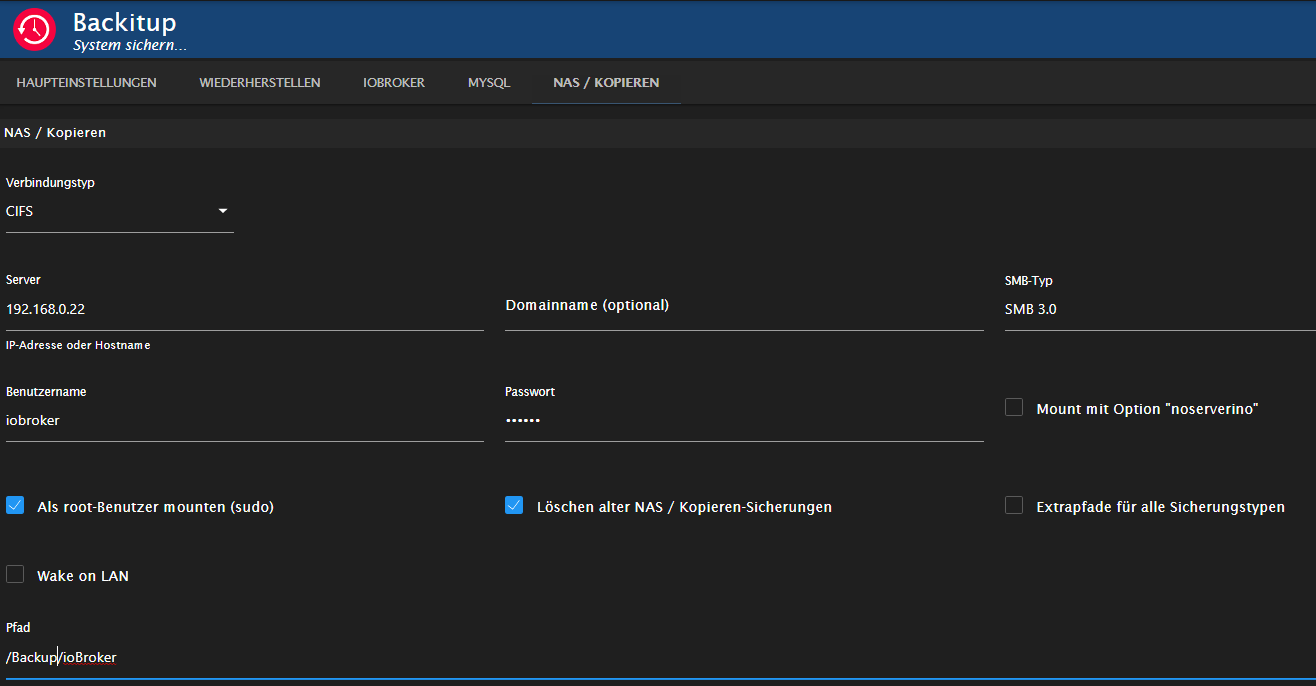
Beim SMB Typ habe ich mal auf Verdacht SMB3.0 eingetragen, im NAS kann man SMB3 einstellen, nicht 3.0.2 oder 3.1.1Wie gesagt, die Backups werden auf dem NAS gemacht.
Debuglog kommt morgen noch.
Danke schon mal!
Synology DS920+ VM, S7-315 PN mit ET200S
-
@simatec Das ist ein älterer Synology Diskstation DS411j.
Der in Backitup eingetragene Nutzer hat volle Rechte auf die Ordner, es ist SMB, FTP aktiviert, AFP, NFS, rsync sind nicht aktiviert.
Config sieht so aus:
Beim SMB Typ habe ich mal auf Verdacht SMB3.0 eingetragen, im NAS kann man SMB3 einstellen, nicht 3.0.2 oder 3.1.1Wie gesagt, die Backups werden auf dem NAS gemacht.
Debuglog kommt morgen noch.
Danke schon mal!
-
@humidor Hat nichts geholfen, ich glaube, es liegt an den Rechten (gibt schon einen Thread dazu unter dem Stichwort "utime"). Muss ich mich mal mit beschäftigen, wie das mit den Rechten auf dem NAS ist. Wenn der NAS-Ordner gemountet wird (in /opt/iobroker/backups) gehört der Ordner "backups" root root, kann ich auch nicht ändern mit chown oder so.
-
Ich bin vom Raspberry Pi zu Proxmos auf einem LCX Container gewechselt. Hier arbeite ich direkt mit dem User root. Mein Backup liegt auf einem NAS. Leider kann ich mein InfluxDB Backup nicht einspielen. Hier ist die Log:
2021-12-05 09:58:45.783 - debug: backitup.0 (5245) nfs-mount command: "sudo mount stony-nas:volume1/public/Sicherungen/ioBroker /opt/iobroker/backups"
2021-12-05 09:58:45.805 - debug: backitup.0 (5245) device is busy... wait 2 Minutes!!
2021-12-05 09:58:45.856 - debug: backitup.0 (5245) mount successfully completed
2021-12-05 09:58:47.898 - debug: backitup.0 (5245) detect backup file 1 from cifs: iobroker_2021_10_10-02_00_20_backupiobroker.tar.gz
2021-12-05 09:58:47.898 - debug: backitup.0 (5245) detect backup file 2 from cifs: iobroker_2021_10_13-02_00_20_backupiobroker.tar.gz
2021-12-05 09:58:47.898 - debug: backitup.0 (5245) detect backup file 3 from cifs: iobroker_2021_10_16-02_00_20_backupiobroker.tar.gz
2021-12-05 09:58:47.898 - debug: backitup.0 (5245) detect backup file 4 from cifs: iobroker_2021_10_19-02_00_20_backupiobroker.tar.gz
2021-12-05 09:58:47.899 - debug: backitup.0 (5245) detect backup file 5 from cifs: iobroker_2021_10_22-02_00_20_backupiobroker.tar.gz
2021-12-05 09:58:47.899 - debug: backitup.0 (5245) detect backup file 6 from cifs: iobroker_2021_10_25-02_00_20_backupiobroker.tar.gz
2021-12-05 09:58:47.899 - debug: backitup.0 (5245) detect backup file 7 from cifs: iobroker_2021_10_28-02_00_20_backupiobroker.tar.gz
2021-12-05 09:58:47.899 - debug: backitup.0 (5245) detect backup file 8 from cifs: iobroker_2021_10_31-02_00_20_backupiobroker.tar.gz
2021-12-05 09:58:47.899 - debug: backitup.0 (5245) detect backup file 9 from cifs: iobroker_2021_11_01-02_00_20_backupiobroker.tar.gz
2021-12-05 09:58:47.899 - debug: backitup.0 (5245) detect backup file 10 from cifs: iobroker_2021_11_04-02_00_20_backupiobroker.tar.gz
2021-12-05 09:58:47.899 - debug: backitup.0 (5245) detect backup file 11 from cifs: iobroker_2021_11_07-02_00_20_backupiobroker.tar.gz
2021-12-05 09:58:47.899 - debug: backitup.0 (5245) detect backup file 12 from cifs: iobroker_2021_11_10-02_00_20_backupiobroker.tar.gz
2021-12-05 09:58:47.899 - debug: backitup.0 (5245) detect backup file 13 from cifs: iobroker_2021_11_13-02_00_20_backupiobroker.tar.gz
2021-12-05 09:58:47.900 - debug: backitup.0 (5245) detect backup file 14 from cifs: iobroker_2021_11_16-02_00_20_backupiobroker.tar.gz
2021-12-05 09:58:47.900 - debug: backitup.0 (5245) detect backup file 15 from cifs: iobroker_2021_11_19-02_00_20_backupiobroker.tar.gz
2021-12-05 09:58:47.900 - debug: backitup.0 (5245) detect backup file 16 from cifs: iobroker_2021_11_22-02_00_20_backupiobroker.tar.gz
2021-12-05 09:58:47.900 - debug: backitup.0 (5245) detect backup file 17 from cifs: iobroker_2021_11_25-02_00_20_backupiobroker.tar.gz
2021-12-05 09:58:47.900 - debug: backitup.0 (5245) detect backup file 18 from cifs: iobroker_2021_11_28-02_00_20_backupiobroker.tar.gz
2021-12-05 09:58:47.900 - debug: backitup.0 (5245) detect backup file 19 from cifs: iobroker_2021_12_01-02_00_20_backupiobroker.tar.gz
2021-12-05 09:58:47.900 - debug: backitup.0 (5245) detect backup file 20 from cifs: iobroker_2021_12_04-02_00_20_backupiobroker.tar.gz
2021-12-05 09:58:47.900 - debug: backitup.0 (5245) detect backup file 21 from cifs: iobroker_2021_12_04-22_32_23_backupiobroker.tar.gz
2021-12-05 09:58:47.900 - debug: backitup.0 (5245) detect backup file 22 from cifs: iobroker_2021_12_05-09_43_18_backupiobroker.tar.gz
2021-12-05 09:58:47.901 - debug: backitup.0 (5245) detect last backup file: iobroker_2021_12_05-09_43_18_backupiobroker.tar.gz
2021-12-05 09:58:49.723 - debug: backitup.0 (5245) sendTo "getSystemInfo" to system.adapter.admin.0 from system.adapter.backitup.0: linux
2021-12-05 09:58:51.268 - debug: backitup.0 (5245) nfs-mount command: "sudo mount stony-nas:volume1/public/Sicherungen/ioBroker /opt/iobroker/backups"
2021-12-05 09:58:51.271 - debug: backitup.0 (5245) Backup list be read ...
2021-12-05 09:58:51.284 - debug: backitup.0 (5245) device is busy... wait 2 Minutes!!
2021-12-05 09:58:51.331 - debug: backitup.0 (5245) mount successfully completed
2021-12-05 09:58:53.335 - debug: backitup.0 (5245) sendTo "list" to system.adapter.admin.0 from system.adapter.backitup.0
2021-12-05 09:58:55.755 - debug: backitup.0 (5245) mount activ... umount in 2 Seconds!!
2021-12-05 09:58:57.092 - debug: backitup.0 (5245) [influxDB] Try deleting the old InfluxDB tmp directory
2021-12-05 09:58:57.094 - debug: backitup.0 (5245) [influxDB] Created tmp directory
2021-12-05 09:58:57.095 - debug: backitup.0 (5245) [influxDB] Start infuxDB Restore ...
2021-12-05 09:58:57.125 - error: backitup.0 (5245) [influxDB] Error: EACCES: permission denied, utime '/opt/iobroker/backups/influxDBtmp/'
2021-12-05 09:58:57.125 - error: backitup.0 (5245) [influxDB] infuxDB Restore not completed
Der NAS Zugriff funztioniert. Auch konnte ich über den Adapter das, auf dem NAS befindliche, ioBroker Backup wieder einspielen. Der user iobroker hat auf den Ordner auch Rechte:
root@iobroker:~# ls -la /opt/iobroker/backups
total 8
drwxrwxrwx+ 2 iobroker iobroker 4096 Dec  4 21:32 .
drwxrwxr-x+ 6 iobroker iobroker 4096 Dec  5 09:55 ..
Könnt ihr mir helfen?
-
Ich bin vom Raspberry Pi zu Proxmos auf einem LCX Container gewechselt. Hier arbeite ich direkt mit dem User root. Mein Backup liegt auf einem NAS. Leider kann ich mein InfluxDB Backup nicht einspielen. Hier ist die Log:
2021-12-05 09:58:45.783 - debug: backitup.0 (5245) nfs-mount command: "sudo mount stony-nas:volume1/public/Sicherungen/ioBroker /opt/iobroker/backups"
2021-12-05 09:58:45.805 - debug: backitup.0 (5245) device is busy... wait 2 Minutes!!
2021-12-05 09:58:45.856 - debug: backitup.0 (5245) mount successfully completed
2021-12-05 09:58:47.898 - debug: backitup.0 (5245) detect backup file 1 from cifs: iobroker_2021_10_10-02_00_20_backupiobroker.tar.gz
2021-12-05 09:58:47.898 - debug: backitup.0 (5245) detect backup file 2 from cifs: iobroker_2021_10_13-02_00_20_backupiobroker.tar.gz
2021-12-05 09:58:47.898 - debug: backitup.0 (5245) detect backup file 3 from cifs: iobroker_2021_10_16-02_00_20_backupiobroker.tar.gz
2021-12-05 09:58:47.898 - debug: backitup.0 (5245) detect backup file 4 from cifs: iobroker_2021_10_19-02_00_20_backupiobroker.tar.gz
2021-12-05 09:58:47.899 - debug: backitup.0 (5245) detect backup file 5 from cifs: iobroker_2021_10_22-02_00_20_backupiobroker.tar.gz
2021-12-05 09:58:47.899 - debug: backitup.0 (5245) detect backup file 6 from cifs: iobroker_2021_10_25-02_00_20_backupiobroker.tar.gz
2021-12-05 09:58:47.899 - debug: backitup.0 (5245) detect backup file 7 from cifs: iobroker_2021_10_28-02_00_20_backupiobroker.tar.gz
2021-12-05 09:58:47.899 - debug: backitup.0 (5245) detect backup file 8 from cifs: iobroker_2021_10_31-02_00_20_backupiobroker.tar.gz
2021-12-05 09:58:47.899 - debug: backitup.0 (5245) detect backup file 9 from cifs: iobroker_2021_11_01-02_00_20_backupiobroker.tar.gz
2021-12-05 09:58:47.899 - debug: backitup.0 (5245) detect backup file 10 from cifs: iobroker_2021_11_04-02_00_20_backupiobroker.tar.gz
2021-12-05 09:58:47.899 - debug: backitup.0 (5245) detect backup file 11 from cifs: iobroker_2021_11_07-02_00_20_backupiobroker.tar.gz
2021-12-05 09:58:47.899 - debug: backitup.0 (5245) detect backup file 12 from cifs: iobroker_2021_11_10-02_00_20_backupiobroker.tar.gz
2021-12-05 09:58:47.899 - debug: backitup.0 (5245) detect backup file 13 from cifs: iobroker_2021_11_13-02_00_20_backupiobroker.tar.gz
2021-12-05 09:58:47.900 - debug: backitup.0 (5245) detect backup file 14 from cifs: iobroker_2021_11_16-02_00_20_backupiobroker.tar.gz
2021-12-05 09:58:47.900 - debug: backitup.0 (5245) detect backup file 15 from cifs: iobroker_2021_11_19-02_00_20_backupiobroker.tar.gz
2021-12-05 09:58:47.900 - debug: backitup.0 (5245) detect backup file 16 from cifs: iobroker_2021_11_22-02_00_20_backupiobroker.tar.gz
2021-12-05 09:58:47.900 - debug: backitup.0 (5245) detect backup file 17 from cifs: iobroker_2021_11_25-02_00_20_backupiobroker.tar.gz
2021-12-05 09:58:47.900 - debug: backitup.0 (5245) detect backup file 18 from cifs: iobroker_2021_11_28-02_00_20_backupiobroker.tar.gz
2021-12-05 09:58:47.900 - debug: backitup.0 (5245) detect backup file 19 from cifs: iobroker_2021_12_01-02_00_20_backupiobroker.tar.gz
2021-12-05 09:58:47.900 - debug: backitup.0 (5245) detect backup file 20 from cifs: iobroker_2021_12_04-02_00_20_backupiobroker.tar.gz
2021-12-05 09:58:47.900 - debug: backitup.0 (5245) detect backup file 21 from cifs: iobroker_2021_12_04-22_32_23_backupiobroker.tar.gz
2021-12-05 09:58:47.900 - debug: backitup.0 (5245) detect backup file 22 from cifs: iobroker_2021_12_05-09_43_18_backupiobroker.tar.gz
2021-12-05 09:58:47.901 - debug: backitup.0 (5245) detect last backup file: iobroker_2021_12_05-09_43_18_backupiobroker.tar.gz
2021-12-05 09:58:49.723 - debug: backitup.0 (5245) sendTo "getSystemInfo" to system.adapter.admin.0 from system.adapter.backitup.0: linux
2021-12-05 09:58:51.268 - debug: backitup.0 (5245) nfs-mount command: "sudo mount stony-nas:volume1/public/Sicherungen/ioBroker /opt/iobroker/backups"
2021-12-05 09:58:51.271 - debug: backitup.0 (5245) Backup list be read ...
2021-12-05 09:58:51.284 - debug: backitup.0 (5245) device is busy... wait 2 Minutes!!
2021-12-05 09:58:51.331 - debug: backitup.0 (5245) mount successfully completed
2021-12-05 09:58:53.335 - debug: backitup.0 (5245) sendTo "list" to system.adapter.admin.0 from system.adapter.backitup.0
2021-12-05 09:58:55.755 - debug: backitup.0 (5245) mount activ... umount in 2 Seconds!!
2021-12-05 09:58:57.092 - debug: backitup.0 (5245) [influxDB] Try deleting the old InfluxDB tmp directory
2021-12-05 09:58:57.094 - debug: backitup.0 (5245) [influxDB] Created tmp directory
2021-12-05 09:58:57.095 - debug: backitup.0 (5245) [influxDB] Start infuxDB Restore ...
2021-12-05 09:58:57.125 - error: backitup.0 (5245) [influxDB] Error: EACCES: permission denied, utime '/opt/iobroker/backups/influxDBtmp/'
2021-12-05 09:58:57.125 - error: backitup.0 (5245) [influxDB] infuxDB Restore not completed
Der NAS Zugriff funztioniert. Auch konnte ich über den Adapter das, auf dem NAS befindliche, ioBroker Backup wieder einspielen. Der user iobroker hat auf den Ordner auch Rechte:
root@iobroker:~# ls -la /opt/iobroker/backups
total 8
drwxrwxrwx+ 2 iobroker iobroker 4096 Dec  4 21:32 .
drwxrwxr-x+ 6 iobroker iobroker 4096 Dec  5 09:55 ..
Könnt ihr mir helfen?
-
Ich bin vom Raspberry Pi zu Proxmos auf einem LCX Container gewechselt. Hier arbeite ich direkt mit dem User root. Mein Backup liegt auf einem NAS. Leider kann ich mein InfluxDB Backup nicht einspielen. Hier ist die Log:
2021-12-05 09:58:45.783 - debug: backitup.0 (5245) nfs-mount command: "sudo mount stony-nas:volume1/public/Sicherungen/ioBroker /opt/iobroker/backups"
2021-12-05 09:58:45.805 - debug: backitup.0 (5245) device is busy... wait 2 Minutes!!
2021-12-05 09:58:45.856 - debug: backitup.0 (5245) mount successfully completed
2021-12-05 09:58:47.898 - debug: backitup.0 (5245) detect backup file 1 from cifs: iobroker_2021_10_10-02_00_20_backupiobroker.tar.gz
2021-12-05 09:58:47.898 - debug: backitup.0 (5245) detect backup file 2 from cifs: iobroker_2021_10_13-02_00_20_backupiobroker.tar.gz
2021-12-05 09:58:47.898 - debug: backitup.0 (5245) detect backup file 3 from cifs: iobroker_2021_10_16-02_00_20_backupiobroker.tar.gz
2021-12-05 09:58:47.898 - debug: backitup.0 (5245) detect backup file 4 from cifs: iobroker_2021_10_19-02_00_20_backupiobroker.tar.gz
2021-12-05 09:58:47.899 - debug: backitup.0 (5245) detect backup file 5 from cifs: iobroker_2021_10_22-02_00_20_backupiobroker.tar.gz
2021-12-05 09:58:47.899 - debug: backitup.0 (5245) detect backup file 6 from cifs: iobroker_2021_10_25-02_00_20_backupiobroker.tar.gz
2021-12-05 09:58:47.899 - debug: backitup.0 (5245) detect backup file 7 from cifs: iobroker_2021_10_28-02_00_20_backupiobroker.tar.gz
2021-12-05 09:58:47.899 - debug: backitup.0 (5245) detect backup file 8 from cifs: iobroker_2021_10_31-02_00_20_backupiobroker.tar.gz
2021-12-05 09:58:47.899 - debug: backitup.0 (5245) detect backup file 9 from cifs: iobroker_2021_11_01-02_00_20_backupiobroker.tar.gz
2021-12-05 09:58:47.899 - debug: backitup.0 (5245) detect backup file 10 from cifs: iobroker_2021_11_04-02_00_20_backupiobroker.tar.gz
2021-12-05 09:58:47.899 - debug: backitup.0 (5245) detect backup file 11 from cifs: iobroker_2021_11_07-02_00_20_backupiobroker.tar.gz
2021-12-05 09:58:47.899 - debug: backitup.0 (5245) detect backup file 12 from cifs: iobroker_2021_11_10-02_00_20_backupiobroker.tar.gz
2021-12-05 09:58:47.899 - debug: backitup.0 (5245) detect backup file 13 from cifs: iobroker_2021_11_13-02_00_20_backupiobroker.tar.gz
2021-12-05 09:58:47.900 - debug: backitup.0 (5245) detect backup file 14 from cifs: iobroker_2021_11_16-02_00_20_backupiobroker.tar.gz
2021-12-05 09:58:47.900 - debug: backitup.0 (5245) detect backup file 15 from cifs: iobroker_2021_11_19-02_00_20_backupiobroker.tar.gz
2021-12-05 09:58:47.900 - debug: backitup.0 (5245) detect backup file 16 from cifs: iobroker_2021_11_22-02_00_20_backupiobroker.tar.gz
2021-12-05 09:58:47.900 - debug: backitup.0 (5245) detect backup file 17 from cifs: iobroker_2021_11_25-02_00_20_backupiobroker.tar.gz
2021-12-05 09:58:47.900 - debug: backitup.0 (5245) detect backup file 18 from cifs: iobroker_2021_11_28-02_00_20_backupiobroker.tar.gz
2021-12-05 09:58:47.900 - debug: backitup.0 (5245) detect backup file 19 from cifs: iobroker_2021_12_01-02_00_20_backupiobroker.tar.gz
2021-12-05 09:58:47.900 - debug: backitup.0 (5245) detect backup file 20 from cifs: iobroker_2021_12_04-02_00_20_backupiobroker.tar.gz
2021-12-05 09:58:47.900 - debug: backitup.0 (5245) detect backup file 21 from cifs: iobroker_2021_12_04-22_32_23_backupiobroker.tar.gz
2021-12-05 09:58:47.900 - debug: backitup.0 (5245) detect backup file 22 from cifs: iobroker_2021_12_05-09_43_18_backupiobroker.tar.gz
2021-12-05 09:58:47.901 - debug: backitup.0 (5245) detect last backup file: iobroker_2021_12_05-09_43_18_backupiobroker.tar.gz
2021-12-05 09:58:49.723 - debug: backitup.0 (5245) sendTo "getSystemInfo" to system.adapter.admin.0 from system.adapter.backitup.0: linux
2021-12-05 09:58:51.268 - debug: backitup.0 (5245) nfs-mount command: "sudo mount stony-nas:volume1/public/Sicherungen/ioBroker /opt/iobroker/backups"
2021-12-05 09:58:51.271 - debug: backitup.0 (5245) Backup list be read ...
2021-12-05 09:58:51.284 - debug: backitup.0 (5245) device is busy... wait 2 Minutes!!
2021-12-05 09:58:51.331 - debug: backitup.0 (5245) mount successfully completed
2021-12-05 09:58:53.335 - debug: backitup.0 (5245) sendTo "list" to system.adapter.admin.0 from system.adapter.backitup.0
2021-12-05 09:58:55.755 - debug: backitup.0 (5245) mount activ... umount in 2 Seconds!!
2021-12-05 09:58:57.092 - debug: backitup.0 (5245) [influxDB] Try deleting the old InfluxDB tmp directory
2021-12-05 09:58:57.094 - debug: backitup.0 (5245) [influxDB] Created tmp directory
2021-12-05 09:58:57.095 - debug: backitup.0 (5245) [influxDB] Start infuxDB Restore ...
2021-12-05 09:58:57.125 - error: backitup.0 (5245) [influxDB] Error: EACCES: permission denied, utime '/opt/iobroker/backups/influxDBtmp/'
2021-12-05 09:58:57.125 - error: backitup.0 (5245) [influxDB] infuxDB Restore not completed
Der NAS Zugriff funztioniert. Auch konnte ich über den Adapter das, auf dem NAS befindliche, ioBroker Backup wieder einspielen. Der user iobroker hat auf den Ordner auch Rechte:
root@iobroker:~# ls -la /opt/iobroker/backups
total 8
drwxrwxrwx+ 2 iobroker iobroker 4096 Dec  4 21:32 .
drwxrwxr-x+ 6 iobroker iobroker 4096 Dec  5 09:55 ..
Könnt ihr mir helfen?
@stony2k sagte in Iobroker backitup error.. Wo liegt das problem:
Hier arbeite ich direkt mit dem User root.
Warum? Das macht man nicht.
-
@stony2k sagte in Iobroker backitup error.. Wo liegt das problem:
Hier arbeite ich direkt mit dem User root.
Warum? Das macht man nicht.
@thomas-braun Weil das der Standardnutzer im Container war. Aber ich gebe dir recht. Aktuell probiere ich aus, wie sich das in einer virtuellen Maschine verhält, außerhalb von einem Container. Hier werde ich auch mit einem nicht-root User arbeiten.
-
@thomas-braun Weil das der Standardnutzer im Container war. Aber ich gebe dir recht. Aktuell probiere ich aus, wie sich das in einer virtuellen Maschine verhält, außerhalb von einem Container. Hier werde ich auch mit einem nicht-root User arbeiten.
@stony2k sagte in Iobroker backitup error.. Wo liegt das problem:
Weil das der Standardnutzer im Container war.
Es sollte genauso Standard und erste Aktion im Container sein sich einen User anzulegen.
-
@stony2k sagte in Iobroker backitup error.. Wo liegt das problem:
Weil das der Standardnutzer im Container war.
Es sollte genauso Standard und erste Aktion im Container sein sich einen User anzulegen.
Update: Ich habe eine VM, anstatt eines Containers mit debian aufgesetzt, den ioBroker installiert und wie @thomas-braun vorgeschlagen (danke dir) einen normalen Benutzer erstellt.
Jetzt hat der Restore der InfluxDB ohne Probleme geklappt.
-
Hallo
Ich habe das Problem nun auch.
Mein Problem fing an das der ioBroker nicht mehr startet. ich habe Fix ausprobiert. Alles ohne erfolg. Ich hatte ein Funktionierendes Backup auf dem NAS.
Also ioBroker neu aufgesetzt Den BackitUp Adapter eingerichtet. ein neues Backup im gleichen Verzeichnis auf dem NAS erstellt und dann wieder hergestellt von einem alten Backup.
Seit dem macht er kein ioBroker Backup. Fehler 6-Fachtaster VIS. ????
Zigbee und JavaScript gehen.Ich bin echt ein Looser im Terminal. Ich weiss was ihr hier so alles macht. Kann mir jemand verständlich
 erklären was das soll und wie ich es kann?
Also was ich gut kann ist copy und Paste ins Terminal. ;-)
Mehr geht wirklich nicht.....Hier ist mal ein Log. File. vielleicht kann ja damit ein Profi was anfangen.
Started iobroker ...
[DEBUG] [mount] - mount activ... umount is started before mount!!
[DEBUG] [mount] - umount successfully completed
[DEBUG] [mount] - noserverino option: true
[DEBUG] [mount] - cifs-mount command: "sudo mount -t cifs -o username=ElmoS04,password=****,noserverino,rw,file_mode=0777,dir_mode=0777,vers=1.0 //192.168.2.31/home/ioBrokerVis /opt/iobroker/backups"
[DEBUG] [mount] - mount successfully completed
[DEBUG] [mount] - done
[DEBUG] [iobroker] - host.raspberrypi 8760 states saved

[DEBUG] [iobroker] - host.raspberrypi 10657 objects saved

[ERROR] [iobroker] - host.raspberrypi Backup not created: Error: host.raspberrypi /opt/iobroker/node_modules/iobroker.js-controller/tmp/backup/files/vis.0/Tech/6_Fach_Taster_1_Büro_licht.json is not a valid json file

[DEBUG] [iobroker] - done
[DEBUG] [zigbee] - found zigbee database: zigbee.0
[DEBUG] [zigbee] - done
[DEBUG] [javascripts] - Created javascript_tmp directory: "/opt/iobroker/backups/tmpScripts"
[DEBUG] [javascripts] - found Script: Garagentor_Status
[DEBUG] [javascripts] - found Script: Taster_6Fach
[DEBUG] [javascripts] - found Script: Terrassen_Alexa_mit_Terrassentür
[DEBUG] [javascripts] - found Script: Alarmanlage_Alexa_Terrasse_ein_und_aus
[DEBUG] [javascripts] - found Script: Bewegung_UV_Durchsage
[DEBUG] [javascripts] - found Script: Licht_Tür_UV_Vorraum_und_Eingang
[DEBUG] [javascripts] - found Script: Gast_Wlan
[DEBUG] [javascripts] - found Script: Durchsage_Scharf_unscharf
[DEBUG] [javascripts] - found Script: Durchsage_Ender6_%
[DEBUG] [javascripts] - found Script: Durchsage_FLsun_%
[DEBUG] [javascripts] - found Script: Überwachung_Temp
[DEBUG] [javascripts] - found Script: Rauchmelder
[DEBUG] [javascripts] - found Script: Autoverbindung_Octopi
[DEBUG] [javascripts] - found Script: Xiaomi_Taster
[DEBUG] [javascripts] - found Script: Fenster_mit_WZ_Steckdoesn
[DEBUG] [javascripts] - found Script: Ikea_Taster_
[DEBUG] [javascripts] - found Script: Alarmmeldung_wird_abgeschaltet
[DEBUG] [javascripts] - found Script: Einbruch_laut_melden
[DEBUG] [javascripts] - found Script: Duty_Cycle
[DEBUG] [javascripts] - found Script: Alarmmeldung_verhindern
[DEBUG] [javascripts] - found Script: Einbruch_erkannt
[DEBUG] [javascripts] - Try deleting the Javascript tmp directory: "/opt/iobroker/backups/tmpScripts"
[DEBUG] [javascripts] - Javascript tmp directory "/opt/iobroker/backups/tmpScripts" successfully deleted
[DEBUG] [javascripts] - Backup created: /opt/iobroker/backups/javascripts_2022_02_13-11_17_12_ioBroker_backupiobroker.tar.gz
[DEBUG] [javascripts] - done
[ERROR] [ftp] - [IGNORED] Error: Login incorrect.
[DEBUG] [cifs] - done
[ERROR] [clean] - Backup files not deleted from /opt/iobroker/backups because some errors.
[DEBUG] [clean] - done
[DEBUG] [historyHTML] - new history html values created
[DEBUG] [historyHTML] - done
[DEBUG] [historyJSON] - new history json values created
[DEBUG] [historyJSON] - done
[DEBUG] [umount] - mount activ, umount is started ...
[DEBUG] [umount] - umount successfully completed
[DEBUG] [umount] - done
[EXIT] 26


t.raspberrypi
2022-02-13 11:15:04.177	info	instance system.adapter.coronavirus-statistics.0 started with pid 30238

dwd.0
2022-02-13 11:15:03.830	info	Terminated (ADAPTER_REQUESTED_TERMINATION): Without reason

dwd.0
2022-02-13 11:15:02.108	info	starting. Version 2.7.7 in /opt/iobroker/node_modules/iobroker.dwd, node: v14.19.0, js-controller: 3.3.22
host.raspberrypi
2022-02-13 11:15:00.142	info	instance system.adapter.dwd.0 started with pid 30212

backitup.0
2022-02-13 11:13:06.852	error	Error: Login incorrect.

backitup.0
2022-02-13 11:13:00.248	info	[iobroker] backup was activated at 02:40 every 1 day(s)

backitup.0
2022-02-13 11:12:59.755	info	starting. Version 2.2.3 in /opt/iobroker/node_modules/iobroker.backitup, node: v14.19.0, js-controller: 3.3.22
host.raspberrypi
2022-02-13 11:12:57.946	info	instance system.adapter.backitup.0 started with pid 29900
host.raspberrypi
2022-02-13 11:12:55.461	info	instance system.adapter.backitup.0 terminated with code 11 (ADAPTER_REQUESTED_TERMINATION)

backitup.0
2022-02-13 11:12:54.879	info	Terminated (ADAPTER_REQUESTED_TERMINATION): Without reason

backitup.0
2022-02-13 11:12:54.877	info	terminating

backitup.0
2022-02-13 11:12:54.875	info	cleaned everything up...

backitup.0
2022-02-13 11:12:54.872	info	Got terminate signal TERMINATE_YOURSELF
host.raspberrypi
2022-02-13 11:12:54.872	info	stopInstance system.adapter.backitup.0 send kill signal
host.raspberrypi
2022-02-13 11:12:54.824	info	stopInstance system.adapter.backitup.0 (force=false, process=true)

backitup.0
2022-02-13 11:12:47.687	error	Error: Login incorrect.

backitup.0
2022-02-13 11:12:41.398	info	[iobroker] backup was activated at 02:40 every 1 day(s)

backitup.0
2022-02-13 11:12:40.898	info	starting. Version 2.2.3 in /opt/iobroker/node_modules/iobroker.backitup, node: v14.19.0, js-controller: 3.3.22
host.raspberrypi
2022-02-13 11:12:39.119	info	instance system.adapter.backitup.0 started with pid 29755
host.raspberrypi
2022-02-13 11:12:36.652	info	instance system.adapter.backitup.0 terminated with code 11 (ADAPTER_REQUESTED_TERMINATION)

backitup.0
2022-02-13 11:12:36.043	info	Terminated (ADAPTER_REQUESTED_TERMINATION): Without reason

backitup.0
2022-02-13 11:12:36.041	info	terminating

backitup.0
2022-02-13 11:12:36.040	info	cleaned everything up...
host.raspberrypi
2022-02-13 11:
MOD-Edit: Code in code-tags gesetzt!
Ich währe euch sehr dankbar. ich sitze hier schon seit Tagen dran alles wieder einzustellen. Ein Backup ist echt wichtig.
-
Hallo
Ich habe das Problem nun auch.
Mein Problem fing an das der ioBroker nicht mehr startet. ich habe Fix ausprobiert. Alles ohne erfolg. Ich hatte ein Funktionierendes Backup auf dem NAS.
Also ioBroker neu aufgesetzt Den BackitUp Adapter eingerichtet. ein neues Backup im gleichen Verzeichnis auf dem NAS erstellt und dann wieder hergestellt von einem alten Backup.
Seit dem macht er kein ioBroker Backup. Fehler 6-Fachtaster VIS. ????
Zigbee und JavaScript gehen.Ich bin echt ein Looser im Terminal. Ich weiss was ihr hier so alles macht. Kann mir jemand verständlich
erklären was das soll und wie ich es kann?
Also was ich gut kann ist copy und Paste ins Terminal. ;-)
Mehr geht wirklich nicht.....Hier ist mal ein Log. File. vielleicht kann ja damit ein Profi was anfangen.
Started iobroker ...
[DEBUG] [mount] - mount activ... umount is started before mount!!
[DEBUG] [mount] - umount successfully completed
[DEBUG] [mount] - noserverino option: true
[DEBUG] [mount] - cifs-mount command: "sudo mount -t cifs -o username=ElmoS04,password=****,noserverino,rw,file_mode=0777,dir_mode=0777,vers=1.0 //192.168.2.31/home/ioBrokerVis /opt/iobroker/backups"
[DEBUG] [mount] - mount successfully completed
[DEBUG] [mount] - done
[DEBUG] [iobroker] - host.raspberrypi 8760 states saved

[DEBUG] [iobroker] - host.raspberrypi 10657 objects saved

[ERROR] [iobroker] - host.raspberrypi Backup not created: Error: host.raspberrypi /opt/iobroker/node_modules/iobroker.js-controller/tmp/backup/files/vis.0/Tech/6_Fach_Taster_1_Büro_licht.json is not a valid json file

[DEBUG] [iobroker] - done
[DEBUG] [zigbee] - found zigbee database: zigbee.0
[DEBUG] [zigbee] - done
[DEBUG] [javascripts] - Created javascript_tmp directory: "/opt/iobroker/backups/tmpScripts"
[DEBUG] [javascripts] - found Script: Garagentor_Status
[DEBUG] [javascripts] - found Script: Taster_6Fach
[DEBUG] [javascripts] - found Script: Terrassen_Alexa_mit_Terrassentür
[DEBUG] [javascripts] - found Script: Alarmanlage_Alexa_Terrasse_ein_und_aus
[DEBUG] [javascripts] - found Script: Bewegung_UV_Durchsage
[DEBUG] [javascripts] - found Script: Licht_Tür_UV_Vorraum_und_Eingang
[DEBUG] [javascripts] - found Script: Gast_Wlan
[DEBUG] [javascripts] - found Script: Durchsage_Scharf_unscharf
[DEBUG] [javascripts] - found Script: Durchsage_Ender6_%
[DEBUG] [javascripts] - found Script: Durchsage_FLsun_%
[DEBUG] [javascripts] - found Script: Überwachung_Temp
[DEBUG] [javascripts] - found Script: Rauchmelder
[DEBUG] [javascripts] - found Script: Autoverbindung_Octopi
[DEBUG] [javascripts] - found Script: Xiaomi_Taster
[DEBUG] [javascripts] - found Script: Fenster_mit_WZ_Steckdoesn
[DEBUG] [javascripts] - found Script: Ikea_Taster_
[DEBUG] [javascripts] - found Script: Alarmmeldung_wird_abgeschaltet
[DEBUG] [javascripts] - found Script: Einbruch_laut_melden
[DEBUG] [javascripts] - found Script: Duty_Cycle
[DEBUG] [javascripts] - found Script: Alarmmeldung_verhindern
[DEBUG] [javascripts] - found Script: Einbruch_erkannt
[DEBUG] [javascripts] - Try deleting the Javascript tmp directory: "/opt/iobroker/backups/tmpScripts"
[DEBUG] [javascripts] - Javascript tmp directory "/opt/iobroker/backups/tmpScripts" successfully deleted
[DEBUG] [javascripts] - Backup created: /opt/iobroker/backups/javascripts_2022_02_13-11_17_12_ioBroker_backupiobroker.tar.gz
[DEBUG] [javascripts] - done
[ERROR] [ftp] - [IGNORED] Error: Login incorrect.
[DEBUG] [cifs] - done
[ERROR] [clean] - Backup files not deleted from /opt/iobroker/backups because some errors.
[DEBUG] [clean] - done
[DEBUG] [historyHTML] - new history html values created
[DEBUG] [historyHTML] - done
[DEBUG] [historyJSON] - new history json values created
[DEBUG] [historyJSON] - done
[DEBUG] [umount] - mount activ, umount is started ...
[DEBUG] [umount] - umount successfully completed
[DEBUG] [umount] - done
[EXIT] 26


t.raspberrypi
2022-02-13 11:15:04.177	info	instance system.adapter.coronavirus-statistics.0 started with pid 30238

dwd.0
2022-02-13 11:15:03.830	info	Terminated (ADAPTER_REQUESTED_TERMINATION): Without reason

dwd.0
2022-02-13 11:15:02.108	info	starting. Version 2.7.7 in /opt/iobroker/node_modules/iobroker.dwd, node: v14.19.0, js-controller: 3.3.22
host.raspberrypi
2022-02-13 11:15:00.142	info	instance system.adapter.dwd.0 started with pid 30212

backitup.0
2022-02-13 11:13:06.852	error	Error: Login incorrect.

backitup.0
2022-02-13 11:13:00.248	info	[iobroker] backup was activated at 02:40 every 1 day(s)

backitup.0
2022-02-13 11:12:59.755	info	starting. Version 2.2.3 in /opt/iobroker/node_modules/iobroker.backitup, node: v14.19.0, js-controller: 3.3.22
host.raspberrypi
2022-02-13 11:12:57.946	info	instance system.adapter.backitup.0 started with pid 29900
host.raspberrypi
2022-02-13 11:12:55.461	info	instance system.adapter.backitup.0 terminated with code 11 (ADAPTER_REQUESTED_TERMINATION)

backitup.0
2022-02-13 11:12:54.879	info	Terminated (ADAPTER_REQUESTED_TERMINATION): Without reason

backitup.0
2022-02-13 11:12:54.877	info	terminating

backitup.0
2022-02-13 11:12:54.875	info	cleaned everything up...

backitup.0
2022-02-13 11:12:54.872	info	Got terminate signal TERMINATE_YOURSELF
host.raspberrypi
2022-02-13 11:12:54.872	info	stopInstance system.adapter.backitup.0 send kill signal
host.raspberrypi
2022-02-13 11:12:54.824	info	stopInstance system.adapter.backitup.0 (force=false, process=true)

backitup.0
2022-02-13 11:12:47.687	error	Error: Login incorrect.

backitup.0
2022-02-13 11:12:41.398	info	[iobroker] backup was activated at 02:40 every 1 day(s)

backitup.0
2022-02-13 11:12:40.898	info	starting. Version 2.2.3 in /opt/iobroker/node_modules/iobroker.backitup, node: v14.19.0, js-controller: 3.3.22
host.raspberrypi
2022-02-13 11:12:39.119	info	instance system.adapter.backitup.0 started with pid 29755
host.raspberrypi
2022-02-13 11:12:36.652	info	instance system.adapter.backitup.0 terminated with code 11 (ADAPTER_REQUESTED_TERMINATION)

backitup.0
2022-02-13 11:12:36.043	info	Terminated (ADAPTER_REQUESTED_TERMINATION): Without reason

backitup.0
2022-02-13 11:12:36.041	info	terminating

backitup.0
2022-02-13 11:12:36.040	info	cleaned everything up...
host.raspberrypi
2022-02-13 11:
MOD-Edit: Code in code-tags gesetzt!
Ich währe euch sehr dankbar. ich sitze hier schon seit Tagen dran alles wieder einzustellen. Ein Backup ist echt wichtig.
Was du auch nicht gut kannst: CodeTags verwenden.




Hey! Du scheinst an dieser Unterhaltung interessiert zu sein, hast aber noch kein Konto.
Hast du es satt, bei jedem Besuch durch die gleichen Beiträge zu scrollen? Wenn du dich für ein Konto anmeldest, kommst du immer genau dorthin zurück, wo du zuvor warst, und kannst dich über neue Antworten benachrichtigen lassen (entweder per E-Mail oder Push-Benachrichtigung). Du kannst auch Lesezeichen speichern und Beiträge positiv bewerten, um anderen Community-Mitgliedern deine Wertschätzung zu zeigen.
Mit deinem Input könnte dieser Beitrag noch besser werden 💗
Registrieren Anmelden473
Online33.0k
Benutzer83.6k
Themen1.3m
Beiträge