Skip to content
  • Home
  • Aktuell
  • Tags
  • 0 Ungelesen 0
  • Kategorien
  • Unreplied
  • Beliebt
  • GitHub
  • Docu
  • Hilfe
Skins
  • Light
  • Brite
  • Cerulean
  • Cosmo
  • Flatly
  • Journal
  • Litera
  • Lumen
  • Lux
  • Materia
  • Minty
  • Morph
  • Pulse
  • Sandstone
  • Simplex
  • Sketchy
  • Spacelab
  • United
  • Yeti
  • Zephyr
  • Dark
  • Cyborg
  • Darkly
  • Quartz
  • Slate
  • Solar
  • Superhero
  • Vapor

  • Standard: (Kein Skin)
  • Kein Skin
Einklappen
ioBroker Logo

Community Forum

donate donate
  1. ioBroker Community Home
  2. Deutsch
  3. ioBroker Allgemein
  4. (gelöst)zigbee Adapter kann ich nicht installieren

NEWS

  • Jahresrückblick 2025 – unser neuer Blogbeitrag ist online! ✨
    BluefoxB
    Bluefox
    17
    1
    2.8k

  • Neuer Blogbeitrag: Monatsrückblick - Dezember 2025 🎄
    BluefoxB
    Bluefox
    13
    1
    1.1k

  • Weihnachtsangebot 2025! 🎄
    BluefoxB
    Bluefox
    25
    1
    2.4k

(gelöst)zigbee Adapter kann ich nicht installieren

Geplant Angeheftet Gesperrt Verschoben ioBroker Allgemein
22 Beiträge 3 Kommentatoren 1.8k Aufrufe 1 Watching
  • Älteste zuerst
  • Neuste zuerst
  • Meiste Stimmen
Antworten
  • In einem neuen Thema antworten
Anmelden zum Antworten
Dieses Thema wurde gelöscht. Nur Nutzer mit entsprechenden Rechten können es sehen.
  • Thomas BraunT Thomas Braun

    @arnold
    Wie installierst du das neu?
    Und ist nodeJS richtig installiert? Welche Versionen?
    npm cache Mal gelöscht?
    Und warum stimmt deine Uhrzeit nicht?

    A Offline
    A Offline
    arnold
    schrieb am zuletzt editiert von
    #3

    @thomas-braun
    Verfügbare Version:1.5.6 installiere ich über
    83dd32f4-d0c4-4cbd-b293-0755d89c84f1-image.png

    pi@raspberrypi4-iob:~ $ which nodejs node npm && nodejs -v && node -v && npm -v                                                                                                  && sudo apt update && sudo apt update && apt policy nodejs
    /usr/bin/nodejs
    /usr/bin/node
    /usr/bin/npm
    v12.22.7
    v12.22.7
    6.14.15
    OK:1 http://archive.raspberrypi.org/debian buster InRelease
    OK:2 http://raspbian.raspberrypi.org/raspbian buster InRelease
    OK:3 https://repos.influxdata.com/debian buster InRelease
    OK:4 https://deb.nodesource.com/node_12.x buster InRelease
    Paketlisten werden gelesen... Fertig
    Abhängigkeitsbaum wird aufgebaut.
    Statusinformationen werden eingelesen.... Fertig
    Alle Pakete sind aktuell.
    OK:1 http://archive.raspberrypi.org/debian buster InRelease
    OK:2 http://raspbian.raspberrypi.org/raspbian buster InRelease
    OK:3 https://repos.influxdata.com/debian buster InRelease
    OK:4 https://deb.nodesource.com/node_12.x buster InRelease
    Paketlisten werden gelesen... Fertig
    Abhängigkeitsbaum wird aufgebaut.
    Statusinformationen werden eingelesen.... Fertig
    Alle Pakete sind aktuell.
    nodejs:
      Installiert:           12.22.7-deb-1nodesource1
      Installationskandidat: 12.22.7-deb-1nodesource1
      Versionstabelle:
     *** 12.22.7-deb-1nodesource1 500
            500 https://deb.nodesource.com/node_12.x buster/main armhf Packages
            100 /var/lib/dpkg/status
         10.24.0~dfsg-1~deb10u1 500
            500 http://raspbian.raspberrypi.org/raspbian buster/main armhf Packages


    Habe neu installiert nodejs und iobroker fix , mindestens Uhrzeit stimmt schon wieder.
    Zigbee kann ich nicht installieren gleiche Fehler

    Thomas BraunT 1 Antwort Letzte Antwort
    0
    • A arnold

      @thomas-braun
      Verfügbare Version:1.5.6 installiere ich über
      83dd32f4-d0c4-4cbd-b293-0755d89c84f1-image.png

      pi@raspberrypi4-iob:~ $ which nodejs node npm && nodejs -v && node -v && npm -v                                                                                                  && sudo apt update && sudo apt update && apt policy nodejs
      /usr/bin/nodejs
      /usr/bin/node
      /usr/bin/npm
      v12.22.7
      v12.22.7
      6.14.15
      OK:1 http://archive.raspberrypi.org/debian buster InRelease
      OK:2 http://raspbian.raspberrypi.org/raspbian buster InRelease
      OK:3 https://repos.influxdata.com/debian buster InRelease
      OK:4 https://deb.nodesource.com/node_12.x buster InRelease
      Paketlisten werden gelesen... Fertig
      Abhängigkeitsbaum wird aufgebaut.
      Statusinformationen werden eingelesen.... Fertig
      Alle Pakete sind aktuell.
      OK:1 http://archive.raspberrypi.org/debian buster InRelease
      OK:2 http://raspbian.raspberrypi.org/raspbian buster InRelease
      OK:3 https://repos.influxdata.com/debian buster InRelease
      OK:4 https://deb.nodesource.com/node_12.x buster InRelease
      Paketlisten werden gelesen... Fertig
      Abhängigkeitsbaum wird aufgebaut.
      Statusinformationen werden eingelesen.... Fertig
      Alle Pakete sind aktuell.
      nodejs:
        Installiert:           12.22.7-deb-1nodesource1
        Installationskandidat: 12.22.7-deb-1nodesource1
        Versionstabelle:
       *** 12.22.7-deb-1nodesource1 500
              500 https://deb.nodesource.com/node_12.x buster/main armhf Packages
              100 /var/lib/dpkg/status
           10.24.0~dfsg-1~deb10u1 500
              500 http://raspbian.raspberrypi.org/raspbian buster/main armhf Packages


      Habe neu installiert nodejs und iobroker fix , mindestens Uhrzeit stimmt schon wieder.
      Zigbee kann ich nicht installieren gleiche Fehler

      Thomas BraunT Online
      Thomas BraunT Online
      Thomas Braun
      Most Active
      schrieb am zuletzt editiert von Thomas Braun
      #4

      @arnold

      iobroker update -i
      cd /opt/iobroker
      sudo -u iobroker npm cache clear --force
      

      Linux-Werkzeugkasten:
      https://forum.iobroker.net/topic/42952/der-kleine-iobroker-linux-werkzeugkasten
      NodeJS Fixer Skript:
      https://forum.iobroker.net/topic/68035/iob-node-fix-skript
      iob_diag: curl -sLf -o diag.sh https://iobroker.net/diag.sh && bash diag.sh

      A 1 Antwort Letzte Antwort
      0
      • Thomas BraunT Thomas Braun

        @arnold

        iobroker update -i
        cd /opt/iobroker
        sudo -u iobroker npm cache clear --force
        
        A Offline
        A Offline
        arnold
        schrieb am zuletzt editiert von Homoran
        #5

        @thomas-braun said in zigbee Adapter kann ich nicht installieren:

        sudo -u iobroker npm cache clear --force

        gemacht , leider kommt bei Installation noch

        iobroker Uncaught Rejection: TypeError: Cannot read property 'common' of undefined at Install.installAdapter (/opt/iobroker/node_modules/iobroker.js-controller/lib/setup/setupInstall.js:745:25) at Immediate.<anonymous> 
        (/opt/iobroker/node_modules/iobroker.js-controller/lib/setup/setupInstall.js:859:29) at processImmediate (internal/timers.js:463:21)
        
        iobroker host.raspberrypi4-iob error: reading io-package.json SyntaxError: /opt/iobroker/node_modules/iobroker.zigbee/io-package.json: Unexpected token } in JSON at position 167
        

        MOD-EDIT: Code in code-tags gesetzt!

        Thomas BraunT 1 Antwort Letzte Antwort
        0
        • A arnold

          @thomas-braun said in zigbee Adapter kann ich nicht installieren:

          sudo -u iobroker npm cache clear --force

          gemacht , leider kommt bei Installation noch

          iobroker Uncaught Rejection: TypeError: Cannot read property 'common' of undefined at Install.installAdapter (/opt/iobroker/node_modules/iobroker.js-controller/lib/setup/setupInstall.js:745:25) at Immediate.<anonymous> 
          (/opt/iobroker/node_modules/iobroker.js-controller/lib/setup/setupInstall.js:859:29) at processImmediate (internal/timers.js:463:21)
          
          iobroker host.raspberrypi4-iob error: reading io-package.json SyntaxError: /opt/iobroker/node_modules/iobroker.zigbee/io-package.json: Unexpected token } in JSON at position 167
          

          MOD-EDIT: Code in code-tags gesetzt!

          Thomas BraunT Online
          Thomas BraunT Online
          Thomas Braun
          Most Active
          schrieb am zuletzt editiert von
          #6

          @arnold

          Bitte keine Screenshots von Texten. Kann und will ich nicht entziffern.

          Linux-Werkzeugkasten:
          https://forum.iobroker.net/topic/42952/der-kleine-iobroker-linux-werkzeugkasten
          NodeJS Fixer Skript:
          https://forum.iobroker.net/topic/68035/iob-node-fix-skript
          iob_diag: curl -sLf -o diag.sh https://iobroker.net/diag.sh && bash diag.sh

          A 1 Antwort Letzte Antwort
          0
          • Thomas BraunT Thomas Braun

            @arnold

            Bitte keine Screenshots von Texten. Kann und will ich nicht entziffern.

            A Offline
            A Offline
            arnold
            schrieb am zuletzt editiert von
            #7

            @thomas-braun
            ich habe ausgeführt

            iobroker update -i
            cd /opt/iobroker
            sudo -u iobroker npm cache clear --force

            dann Adapter installiert

            kommt Fehler

            $ iobroker add zigbee --host raspberrypi4-iob

            host.raspberrypi4-iob install adapter zigbee

            host.raspberrypi4-iob error: reading io-package.json SyntaxError: /opt/iobroker/node_modules/iobroker.zigbee/io-package.json: Unexpected token } in JSON at position 167

            Uncaught Rejection: TypeError: Cannot read property 'common' of undefined at Install.installAdapter (/opt/iobroker/node_modules/iobroker.js-controller/lib/setup/setupInstall.js:745:25) at Immediate.<anonymous> (/opt/iobroker/node_modules/iobroker.js-controller/lib/setup/setupInstall.js:859:29) at processImmediate (internal/timers.js:463:21)

            ERROR: Process exited with code 27

            Andi19851985A 1 Antwort Letzte Antwort
            0
            • A arnold

              @thomas-braun
              ich habe ausgeführt

              iobroker update -i
              cd /opt/iobroker
              sudo -u iobroker npm cache clear --force

              dann Adapter installiert

              kommt Fehler

              $ iobroker add zigbee --host raspberrypi4-iob

              host.raspberrypi4-iob install adapter zigbee

              host.raspberrypi4-iob error: reading io-package.json SyntaxError: /opt/iobroker/node_modules/iobroker.zigbee/io-package.json: Unexpected token } in JSON at position 167

              Uncaught Rejection: TypeError: Cannot read property 'common' of undefined at Install.installAdapter (/opt/iobroker/node_modules/iobroker.js-controller/lib/setup/setupInstall.js:745:25) at Immediate.<anonymous> (/opt/iobroker/node_modules/iobroker.js-controller/lib/setup/setupInstall.js:859:29) at processImmediate (internal/timers.js:463:21)

              ERROR: Process exited with code 27

              Andi19851985A Offline
              Andi19851985A Offline
              Andi19851985
              schrieb am zuletzt editiert von
              #8

              @arnold Problem gelöst?

              Falls nicht dann versuche mal über die Katze folgenden link
              https://github.com/ioBroker/ioBroker.zigbee
              zu installieren und dann eine Instanz hinzuzufügen.

              Gruß
              Andreas

              A 1 Antwort Letzte Antwort
              0
              • Andi19851985A Andi19851985

                @arnold Problem gelöst?

                Falls nicht dann versuche mal über die Katze folgenden link
                https://github.com/ioBroker/ioBroker.zigbee
                zu installieren und dann eine Instanz hinzuzufügen.

                Gruß
                Andreas

                A Offline
                A Offline
                arnold
                schrieb am zuletzt editiert von arnold
                #9

                @andi19851985 said in zigbee Adapter kann ich nicht installieren:

                https://github.com/ioBroker/ioBroker.zigbee

                hallo

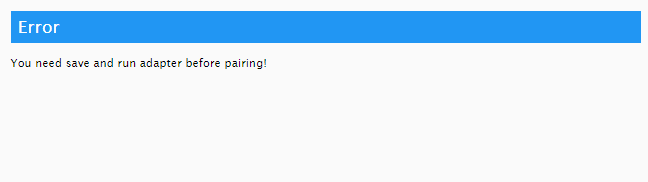
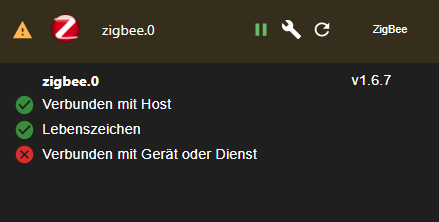
                habe über Katze installiert jetzt ist zigbee Adapter gelb.
                bei pairing
                b7afd25c-38cf-4d22-beb6-8a8e052454cc-image.png

                Einstellung in com steht
                /dev/serial/by-id/usb-Texas_Instruments_TI_CC2531_USB_CDC___0X00124B001936DCEE-if00

                pi@raspberrypi4-iob:~ $ lsusb
                Bus 002 Device 001: ID 1d6b:0003 Linux Foundation 3.0 root hub
                Bus 001 Device 003: ID 0451:16a8 Texas Instruments, Inc.
                Bus 001 Device 002: ID 2109:3431 VIA Labs, Inc. Hub
                Bus 001 Device 001: ID 1d6b:0002 Linux Foundation 2.0 root hub


                31227233-bf37-453a-962c-c407887c7061-image.png
                error Error herdsman start

                error Failed to start Zigbee

                error Starting zigbee-herdsman problem : "Error while opening serialport 'Error: Error Resource temporarily unavailable Cannot lock port'"

                error Error herdsman start

                error Failed to start Zigbee

                error Starting zigbee-herdsman problem : "Failed to connect to the adapter (Error: SRSP - SYS - ping after 6000ms)"
                host.raspberrypi4-iob
                error instance system.adapter.zigbee.0 terminated by request of the instance itself and will not be restarted, before user restarts it.

                error getGroups: caught error: TypeError: Cannot read property 'getGroups' of undefined
                host.raspberrypi4-iob
                error instance system.adapter.zigbee.0 terminated with code 7 (ADAPTER_ALREADY_RUNNING)

                error zigbee.0 already running

                2021-11-27 19:57:43.540 error getGroups: caught error: TypeError: Cannot read property 'getGroups' of undefined

                2error getGroups: caught error: TypeError: Cannot read property 'getGroups' of undefined

                error Error herdsman start

                error Failed to start Zigbee

                error Starting zigbee-herdsman problem : "Error while opening serialport 'Error: Error Resource temporarily unavailable Cannot lock port'"

                error Error herdsman start

                error Failed to start Zigbee

                error Starting zigbee-herdsman problem : "Failed to connect to the adapter (Error: SRSP - SYS - ping after 6000ms)"
                host.raspberrypi4-iob
                error instance system.adapter.zigbee.0 terminated by request of the instance itself and will not be restarted, before user restarts it.
                host.raspberrypi4-iob
                error instance system.adapter.zigbee.0 terminated with code 7 (ADAPTER_ALREADY_RUNNING)

                pi@raspberrypi4-iob:~ $ iobroker stop
                pi@raspberrypi4-iob:~ $ cd /opt/iobroker/node_modules/iobroker.zigbee
                pi@raspberrypi4-iob:/opt/iobroker/node_modules/iobroker.zigbee $ sudo npm rebuil                                                                                                 d --unsafe-perm
                @iobroker/adapter-core@2.5.1 /opt/iobroker/node_modules/iobroker.zigbee/node_mod                                                                                                 ules/@iobroker/adapter-core
                @types/iobroker@3.3.4 /opt/iobroker/node_modules/iobroker.zigbee/node_modules/@t                                                                                                 ypes/iobroker
                pi@raspberrypi4-iob:/opt/iobroker/node_modules/iobroker.zigbee $ cd
                pi@raspberrypi4-iob:~ $ iobroker start
                
                
                Thomas BraunT 1 Antwort Letzte Antwort
                0
                • A arnold

                  @andi19851985 said in zigbee Adapter kann ich nicht installieren:

                  https://github.com/ioBroker/ioBroker.zigbee

                  hallo

                  habe über Katze installiert jetzt ist zigbee Adapter gelb.
                  bei pairing
                  b7afd25c-38cf-4d22-beb6-8a8e052454cc-image.png

                  Einstellung in com steht
                  /dev/serial/by-id/usb-Texas_Instruments_TI_CC2531_USB_CDC___0X00124B001936DCEE-if00

                  pi@raspberrypi4-iob:~ $ lsusb
                  Bus 002 Device 001: ID 1d6b:0003 Linux Foundation 3.0 root hub
                  Bus 001 Device 003: ID 0451:16a8 Texas Instruments, Inc.
                  Bus 001 Device 002: ID 2109:3431 VIA Labs, Inc. Hub
                  Bus 001 Device 001: ID 1d6b:0002 Linux Foundation 2.0 root hub


                  31227233-bf37-453a-962c-c407887c7061-image.png
                  error Error herdsman start

                  error Failed to start Zigbee

                  error Starting zigbee-herdsman problem : "Error while opening serialport 'Error: Error Resource temporarily unavailable Cannot lock port'"

                  error Error herdsman start

                  error Failed to start Zigbee

                  error Starting zigbee-herdsman problem : "Failed to connect to the adapter (Error: SRSP - SYS - ping after 6000ms)"
                  host.raspberrypi4-iob
                  error instance system.adapter.zigbee.0 terminated by request of the instance itself and will not be restarted, before user restarts it.

                  error getGroups: caught error: TypeError: Cannot read property 'getGroups' of undefined
                  host.raspberrypi4-iob
                  error instance system.adapter.zigbee.0 terminated with code 7 (ADAPTER_ALREADY_RUNNING)

                  error zigbee.0 already running

                  2021-11-27 19:57:43.540 error getGroups: caught error: TypeError: Cannot read property 'getGroups' of undefined

                  2error getGroups: caught error: TypeError: Cannot read property 'getGroups' of undefined

                  error Error herdsman start

                  error Failed to start Zigbee

                  error Starting zigbee-herdsman problem : "Error while opening serialport 'Error: Error Resource temporarily unavailable Cannot lock port'"

                  error Error herdsman start

                  error Failed to start Zigbee

                  error Starting zigbee-herdsman problem : "Failed to connect to the adapter (Error: SRSP - SYS - ping after 6000ms)"
                  host.raspberrypi4-iob
                  error instance system.adapter.zigbee.0 terminated by request of the instance itself and will not be restarted, before user restarts it.
                  host.raspberrypi4-iob
                  error instance system.adapter.zigbee.0 terminated with code 7 (ADAPTER_ALREADY_RUNNING)

                  pi@raspberrypi4-iob:~ $ iobroker stop
                  pi@raspberrypi4-iob:~ $ cd /opt/iobroker/node_modules/iobroker.zigbee
                  pi@raspberrypi4-iob:/opt/iobroker/node_modules/iobroker.zigbee $ sudo npm rebuil                                                                                                 d --unsafe-perm
                  @iobroker/adapter-core@2.5.1 /opt/iobroker/node_modules/iobroker.zigbee/node_mod                                                                                                 ules/@iobroker/adapter-core
                  @types/iobroker@3.3.4 /opt/iobroker/node_modules/iobroker.zigbee/node_modules/@t                                                                                                 ypes/iobroker
                  pi@raspberrypi4-iob:/opt/iobroker/node_modules/iobroker.zigbee $ cd
                  pi@raspberrypi4-iob:~ $ iobroker start
                  
                  
                  Thomas BraunT Online
                  Thomas BraunT Online
                  Thomas Braun
                  Most Active
                  schrieb am zuletzt editiert von
                  #10

                  @arnold sagte in zigbee Adapter kann ich nicht installieren:

                  sudo npm

                  Nicht mit sudo rummurksen...

                  Linux-Werkzeugkasten:
                  https://forum.iobroker.net/topic/42952/der-kleine-iobroker-linux-werkzeugkasten
                  NodeJS Fixer Skript:
                  https://forum.iobroker.net/topic/68035/iob-node-fix-skript
                  iob_diag: curl -sLf -o diag.sh https://iobroker.net/diag.sh && bash diag.sh

                  A 1 Antwort Letzte Antwort
                  0
                  • Thomas BraunT Thomas Braun

                    @arnold sagte in zigbee Adapter kann ich nicht installieren:

                    sudo npm

                    Nicht mit sudo rummurksen...

                    A Offline
                    A Offline
                    arnold
                    schrieb am zuletzt editiert von
                    #11

                    @thomas-braun
                    habe jetzt ohne sudo gemacht

                    pi@raspberrypi4-iob:~ $ iobroker stop
                    pi@raspberrypi4-iob:~ $ cd /opt/iobroker/node_modules/iobroker.zigbee
                    pi@raspberrypi4-iob:/opt/iobroker/node_modules/iobroker.zigbee $ npm rebuild --u                                                                                                 nsafe-perm
                    @iobroker/adapter-core@2.5.1 /opt/iobroker/node_modules/iobroker.zigbee/node_mod                                                                                                 ules/@iobroker/adapter-core
                    @types/iobroker@3.3.4 /opt/iobroker/node_modules/iobroker.zigbee/node_modules/@t                                                                                                 ypes/iobroker
                    pi@raspberrypi4-iob:/opt/iobroker/node_modules/iobroker.zigbee $ cd
                    pi@raspberrypi4-iob:~ $ iobroker start
                    

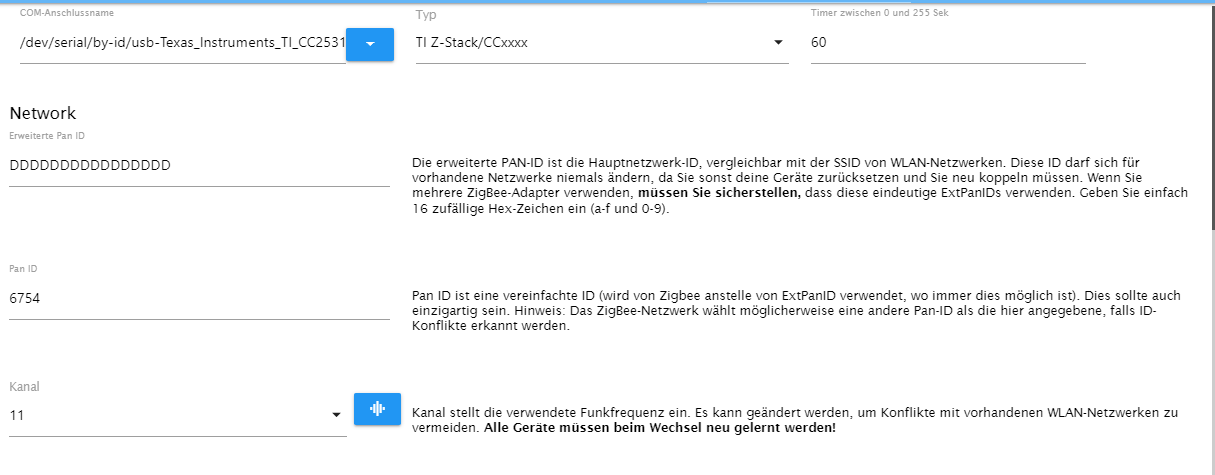
                    19339825-9b45-4f9a-86e6-05955ab0a50b-image.png

                    cc2531 wird gefunden

                    pi@raspberrypi4-iob:~ $ ls -la /dev/serial/by-id
                    insgesamt 0
                    drwxr-xr-x 2 root root 60 Nov 27 20:36 .
                    drwxr-xr-x 4 root root 80 Nov 27 20:36 ..
                    lrwxrwxrwx 1 root root 13 Nov 27 20:36 usb-Texas_Instruments_TI_CC2531_USB_CDC___0X00124B001936DCEE-if00 -> ../../ttyACM0
                    
                    Thomas BraunT 1 Antwort Letzte Antwort
                    0
                    • A arnold

                      @thomas-braun
                      habe jetzt ohne sudo gemacht

                      pi@raspberrypi4-iob:~ $ iobroker stop
                      pi@raspberrypi4-iob:~ $ cd /opt/iobroker/node_modules/iobroker.zigbee
                      pi@raspberrypi4-iob:/opt/iobroker/node_modules/iobroker.zigbee $ npm rebuild --u                                                                                                 nsafe-perm
                      @iobroker/adapter-core@2.5.1 /opt/iobroker/node_modules/iobroker.zigbee/node_mod                                                                                                 ules/@iobroker/adapter-core
                      @types/iobroker@3.3.4 /opt/iobroker/node_modules/iobroker.zigbee/node_modules/@t                                                                                                 ypes/iobroker
                      pi@raspberrypi4-iob:/opt/iobroker/node_modules/iobroker.zigbee $ cd
                      pi@raspberrypi4-iob:~ $ iobroker start
                      

                      19339825-9b45-4f9a-86e6-05955ab0a50b-image.png

                      cc2531 wird gefunden

                      pi@raspberrypi4-iob:~ $ ls -la /dev/serial/by-id
                      insgesamt 0
                      drwxr-xr-x 2 root root 60 Nov 27 20:36 .
                      drwxr-xr-x 4 root root 80 Nov 27 20:36 ..
                      lrwxrwxrwx 1 root root 13 Nov 27 20:36 usb-Texas_Instruments_TI_CC2531_USB_CDC___0X00124B001936DCEE-if00 -> ../../ttyACM0
                      
                      Thomas BraunT Online
                      Thomas BraunT Online
                      Thomas Braun
                      Most Active
                      schrieb am zuletzt editiert von
                      #12

                      @arnold

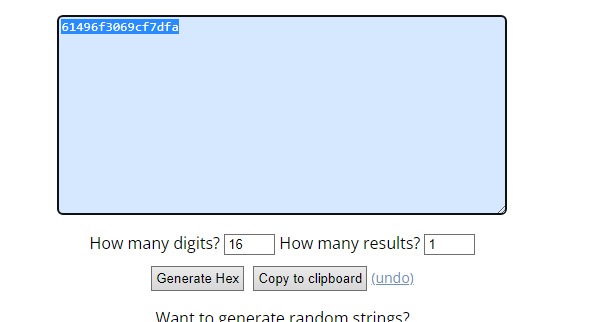
                      Die Extended PAN-Id auf eine 16stellige HEX-Zahl ändern.

                      Ein Neustart des Adapters sieht jetzt wie aus?

                      Linux-Werkzeugkasten:
                      https://forum.iobroker.net/topic/42952/der-kleine-iobroker-linux-werkzeugkasten
                      NodeJS Fixer Skript:
                      https://forum.iobroker.net/topic/68035/iob-node-fix-skript
                      iob_diag: curl -sLf -o diag.sh https://iobroker.net/diag.sh && bash diag.sh

                      A 1 Antwort Letzte Antwort
                      0
                      • Thomas BraunT Thomas Braun

                        @arnold

                        Die Extended PAN-Id auf eine 16stellige HEX-Zahl ändern.

                        Ein Neustart des Adapters sieht jetzt wie aus?

                        A Offline
                        A Offline
                        arnold
                        schrieb am zuletzt editiert von
                        #13

                        @thomas-braun said in zigbee Adapter kann ich nicht installieren:

                        Die Extended PAN-Id auf eine 16stellige HEX-Zahl ändern

                        kannst du mir ein Beispiel machen 16stellige HEX-Zahl

                        Thomas BraunT 1 Antwort Letzte Antwort
                        0
                        • A arnold

                          @thomas-braun said in zigbee Adapter kann ich nicht installieren:

                          Die Extended PAN-Id auf eine 16stellige HEX-Zahl ändern

                          kannst du mir ein Beispiel machen 16stellige HEX-Zahl

                          Thomas BraunT Online
                          Thomas BraunT Online
                          Thomas Braun
                          Most Active
                          schrieb am zuletzt editiert von
                          #14

                          @arnold

                          Mach selber:

                          https://www.browserling.com/tools/random-hex

                          Linux-Werkzeugkasten:
                          https://forum.iobroker.net/topic/42952/der-kleine-iobroker-linux-werkzeugkasten
                          NodeJS Fixer Skript:
                          https://forum.iobroker.net/topic/68035/iob-node-fix-skript
                          iob_diag: curl -sLf -o diag.sh https://iobroker.net/diag.sh && bash diag.sh

                          A 1 Antwort Letzte Antwort
                          0
                          • Thomas BraunT Thomas Braun

                            @arnold

                            Mach selber:

                            https://www.browserling.com/tools/random-hex

                            A Offline
                            A Offline
                            arnold
                            schrieb am zuletzt editiert von
                            #15

                            @thomas-braun
                            8dfca37b-f519-4049-aee8-21050821e805-image.png

                            4220249f-af6f-4549-a5a3-ac22022eadc7-image.png

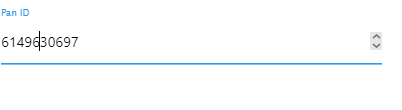
                            bekomme nicht 16 rein

                            Thomas BraunT 1 Antwort Letzte Antwort
                            0
                            • A arnold

                              @thomas-braun
                              8dfca37b-f519-4049-aee8-21050821e805-image.png

                              4220249f-af6f-4549-a5a3-ac22022eadc7-image.png

                              bekomme nicht 16 rein

                              Thomas BraunT Online
                              Thomas BraunT Online
                              Thomas Braun
                              Most Active
                              schrieb am zuletzt editiert von Thomas Braun
                              #16

                              @arnold

                              PAN-Id ist auch nicht die Extended PAN-Id / Erweiterte PAN-Id

                              Linux-Werkzeugkasten:
                              https://forum.iobroker.net/topic/42952/der-kleine-iobroker-linux-werkzeugkasten
                              NodeJS Fixer Skript:
                              https://forum.iobroker.net/topic/68035/iob-node-fix-skript
                              iob_diag: curl -sLf -o diag.sh https://iobroker.net/diag.sh && bash diag.sh

                              A 1 Antwort Letzte Antwort
                              0
                              • Thomas BraunT Thomas Braun

                                @arnold

                                PAN-Id ist auch nicht die Extended PAN-Id / Erweiterte PAN-Id

                                A Offline
                                A Offline
                                arnold
                                schrieb am zuletzt editiert von
                                #17

                                @thomas-braun
                                Extended PAN-Id keine Ahnung ist mir zu hoch .
                                CC2531 vielleicht Kaputt ,Diode geht aber an .
                                kann ich das prüfen ?

                                Thomas BraunT 1 Antwort Letzte Antwort
                                0
                                • A arnold

                                  @thomas-braun
                                  Extended PAN-Id keine Ahnung ist mir zu hoch .
                                  CC2531 vielleicht Kaputt ,Diode geht aber an .
                                  kann ich das prüfen ?

                                  Thomas BraunT Online
                                  Thomas BraunT Online
                                  Thomas Braun
                                  Most Active
                                  schrieb am zuletzt editiert von Thomas Braun
                                  #18

                                  @arnold sagte in zigbee Adapter kann ich nicht installieren:

                                  Extended PAN-Id keine Ahnung ist mir zu hoch .

                                  Was ist denn da zu hoch? Das ist zwei Dinge:
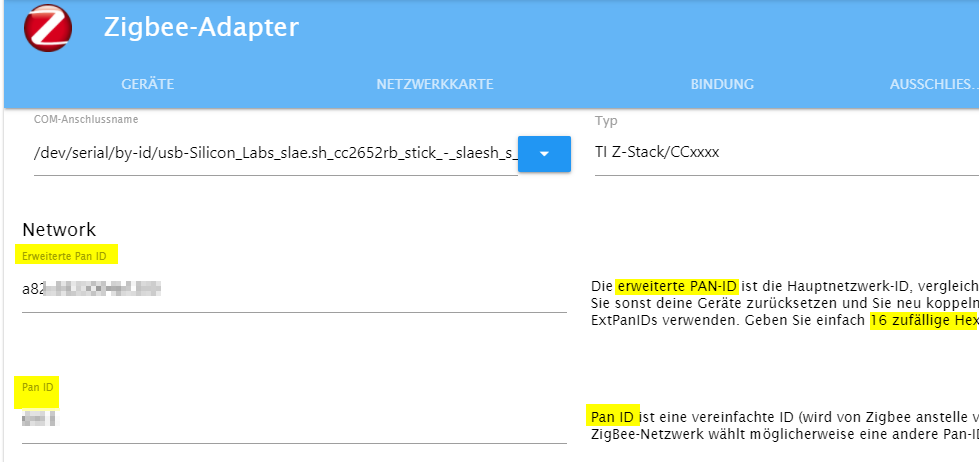
                                  4b157a99-9f85-4cec-bd87-c2a9522865f3-image.png

                                  Wenns an Englisch hapert: Extended = Erweitert

                                  CC2531 vielleicht Kaputt

                                  Ja, die Dinger sind 'defective by design'.

                                  Linux-Werkzeugkasten:
                                  https://forum.iobroker.net/topic/42952/der-kleine-iobroker-linux-werkzeugkasten
                                  NodeJS Fixer Skript:
                                  https://forum.iobroker.net/topic/68035/iob-node-fix-skript
                                  iob_diag: curl -sLf -o diag.sh https://iobroker.net/diag.sh && bash diag.sh

                                  A 1 Antwort Letzte Antwort
                                  0
                                  • Thomas BraunT Thomas Braun

                                    @arnold sagte in zigbee Adapter kann ich nicht installieren:

                                    Extended PAN-Id keine Ahnung ist mir zu hoch .

                                    Was ist denn da zu hoch? Das ist zwei Dinge:

                                    4b157a99-9f85-4cec-bd87-c2a9522865f3-image.png

                                    Wenns an Englisch hapert: Extended = Erweitert

                                    CC2531 vielleicht Kaputt

                                    Ja, die Dinger sind 'defective by design'.

                                    A Offline
                                    A Offline
                                    arnold
                                    schrieb am zuletzt editiert von arnold
                                    #19

                                    @thomas-braun
                                    Extended PAN-Id geändert .
                                    jetzt im log

                                    2021-11-27 23:28:47.997  - warn: zigbee.0 (5429) Failed to stop zigbee during st                                                                                                 artup
                                    2021-11-27 23:28:47.998  - info: zigbee.0 (5429) terminating
                                    2021-11-27 23:28:48.000  - info: zigbee.0 (5429) Terminated (ADAPTER_REQUESTED_T                                                                                                 ERMINATION): Without reason
                                    2021-11-27 23:28:48.858  - info: host.raspberrypi4-iob stopInstance system.adapt                                                                                                 er.zigbee.0 killing pid 5429
                                    2021-11-27 23:28:49.237  - warn: mihome-vacuum.0 (1181) State value to set for "                                                                                                 mihome-vacuum.0.control.fan_power" has value "90" less than min "101"
                                    2021-11-27 23:28:49.586  - info: host.raspberrypi4-iob "system.adapter.zigbee.0"                                                                                                  enabled
                                    2021-11-27 23:28:49.628  - info: host.raspberrypi4-iob instance system.adapter.z                                                                                                 igbee.0 started with pid 28076
                                    2021-11-27 23:28:52.552  - error: zigbee.0 (28076) zigbee.0 already running
                                    2021-11-27 23:28:52.555  - warn: zigbee.0 (28076) Terminated (ADAPTER_ALREADY_RU                                                                                                 NNING): Without reason
                                    2021-11-27 23:28:53.461  - error: host.raspberrypi4-iob instance system.adapter.                                                                                                 zigbee.0 terminated with code 7 (ADAPTER_ALREADY_RUNNING)
                                    2021-11-27 23:28:53.462  - info: host.raspberrypi4-iob Restart adapter system.ad                                                                                                 apter.zigbee.0 because enabled
                                    2021-11-27 23:29:09.274  - warn: mihome-vacuum.0 (1181) State value to set for "mihome-vacuum.0.control.fan_power" has value "90" less than min "101"
                                    2021-11-27 23:29:23.553  - info: host.raspberrypi4-iob instance system.adapter.zigbee.0 started with pid 28961
                                    2021-11-27 23:29:24.550  - error: host.raspberrypi4-iob instance system.adapter.zigbee.0 terminated by request of the instance itself and will not be restarted, before user restarts it.
                                    2021-11-27 23:29:24.553  - info: host.raspberrypi4-iob Do not restart adapter system.adapter.zigbee.0 because desired by instance
                                    2021-11-27 23:29:27.076  - info: zigbee.0 (28961) starting. Version 1.6.7 in /opt/iobroker/node_modules/iobroker.zigbee, node: v12.22.7, js-controller: 3.3.20
                                    2021-11-27 23:29:27.183  - info: zigbee.0 (28961) Starting Zigbee  npm ...
                                    2021-11-27 23:29:27.658  - info: zigbee.0 (28961) Installed Version: ioBroker/ioBroker.zigbee#ca9442058258080026170f14d74d1c4d56b47338


                                    Adapter noch gelb

                                    Thomas BraunT 1 Antwort Letzte Antwort
                                    0
                                    • A arnold

                                      @thomas-braun
                                      Extended PAN-Id geändert .
                                      jetzt im log

                                      2021-11-27 23:28:47.997  - warn: zigbee.0 (5429) Failed to stop zigbee during st                                                                                                 artup
                                      2021-11-27 23:28:47.998  - info: zigbee.0 (5429) terminating
                                      2021-11-27 23:28:48.000  - info: zigbee.0 (5429) Terminated (ADAPTER_REQUESTED_T                                                                                                 ERMINATION): Without reason
                                      2021-11-27 23:28:48.858  - info: host.raspberrypi4-iob stopInstance system.adapt                                                                                                 er.zigbee.0 killing pid 5429
                                      2021-11-27 23:28:49.237  - warn: mihome-vacuum.0 (1181) State value to set for "                                                                                                 mihome-vacuum.0.control.fan_power" has value "90" less than min "101"
                                      2021-11-27 23:28:49.586  - info: host.raspberrypi4-iob "system.adapter.zigbee.0"                                                                                                  enabled
                                      2021-11-27 23:28:49.628  - info: host.raspberrypi4-iob instance system.adapter.z                                                                                                 igbee.0 started with pid 28076
                                      2021-11-27 23:28:52.552  - error: zigbee.0 (28076) zigbee.0 already running
                                      2021-11-27 23:28:52.555  - warn: zigbee.0 (28076) Terminated (ADAPTER_ALREADY_RU                                                                                                 NNING): Without reason
                                      2021-11-27 23:28:53.461  - error: host.raspberrypi4-iob instance system.adapter.                                                                                                 zigbee.0 terminated with code 7 (ADAPTER_ALREADY_RUNNING)
                                      2021-11-27 23:28:53.462  - info: host.raspberrypi4-iob Restart adapter system.ad                                                                                                 apter.zigbee.0 because enabled
                                      2021-11-27 23:29:09.274  - warn: mihome-vacuum.0 (1181) State value to set for "mihome-vacuum.0.control.fan_power" has value "90" less than min "101"
                                      2021-11-27 23:29:23.553  - info: host.raspberrypi4-iob instance system.adapter.zigbee.0 started with pid 28961
                                      2021-11-27 23:29:24.550  - error: host.raspberrypi4-iob instance system.adapter.zigbee.0 terminated by request of the instance itself and will not be restarted, before user restarts it.
                                      2021-11-27 23:29:24.553  - info: host.raspberrypi4-iob Do not restart adapter system.adapter.zigbee.0 because desired by instance
                                      2021-11-27 23:29:27.076  - info: zigbee.0 (28961) starting. Version 1.6.7 in /opt/iobroker/node_modules/iobroker.zigbee, node: v12.22.7, js-controller: 3.3.20
                                      2021-11-27 23:29:27.183  - info: zigbee.0 (28961) Starting Zigbee  npm ...
                                      2021-11-27 23:29:27.658  - info: zigbee.0 (28961) Installed Version: ioBroker/ioBroker.zigbee#ca9442058258080026170f14d74d1c4d56b47338


                                      Adapter noch gelb

                                      Thomas BraunT Online
                                      Thomas BraunT Online
                                      Thomas Braun
                                      Most Active
                                      schrieb am zuletzt editiert von
                                      #20

                                      @arnold

                                      iobroker restart
                                      

                                      Linux-Werkzeugkasten:
                                      https://forum.iobroker.net/topic/42952/der-kleine-iobroker-linux-werkzeugkasten
                                      NodeJS Fixer Skript:
                                      https://forum.iobroker.net/topic/68035/iob-node-fix-skript
                                      iob_diag: curl -sLf -o diag.sh https://iobroker.net/diag.sh && bash diag.sh

                                      A 1 Antwort Letzte Antwort
                                      0
                                      • Thomas BraunT Thomas Braun

                                        @arnold

                                        iobroker restart
                                        
                                        A Offline
                                        A Offline
                                        arnold
                                        schrieb am zuletzt editiert von
                                        #21

                                        @thomas-braun
                                        ich mache immer
                                        sudo shutdown -h 0
                                        und Strom ziehen. oder reboot

                                        A 1 Antwort Letzte Antwort
                                        0
                                        • A arnold

                                          @thomas-braun
                                          ich mache immer
                                          sudo shutdown -h 0
                                          und Strom ziehen. oder reboot

                                          A Offline
                                          A Offline
                                          arnold
                                          schrieb am zuletzt editiert von
                                          #22

                                          @arnold
                                          habe jetzt ZIGBEE 3.0 USB DONGLE PLUS im Einsatz ,bessere Reichweite als CC2531.

                                          (es hat erst mit CC2531 erst funktioniert nach neu flashen)

                                          1 Antwort Letzte Antwort
                                          0
                                          Antworten
                                          • In einem neuen Thema antworten
                                          Anmelden zum Antworten
                                          • Älteste zuerst
                                          • Neuste zuerst
                                          • Meiste Stimmen


                                          Support us

                                          ioBroker
                                          Community Adapters
                                          Donate
                                          FAQ Cloud / IOT
                                          HowTo: Node.js-Update
                                          HowTo: Backup/Restore
                                          Downloads
                                          BLOG

                                          295

                                          Online

                                          32.6k

                                          Benutzer

                                          82.3k

                                          Themen

                                          1.3m

                                          Beiträge
                                          Community
                                          Impressum | Datenschutz-Bestimmungen | Nutzungsbedingungen | Einwilligungseinstellungen
                                          ioBroker Community 2014-2025
                                          logo
                                          • Anmelden

                                          • Du hast noch kein Konto? Registrieren

                                          • Anmelden oder registrieren, um zu suchen
                                          • Erster Beitrag
                                            Letzter Beitrag
                                          0
                                          • Home
                                          • Aktuell
                                          • Tags
                                          • Ungelesen 0
                                          • Kategorien
                                          • Unreplied
                                          • Beliebt
                                          • GitHub
                                          • Docu
                                          • Hilfe