




iobroker Neuinstallation auf Tinkerboard
-
@homoran sagte in iobroker Neuinstallation auf Tinkerboard:
Wahrscheinlich hätte da nur ein reboot gemacht werden müssen
Hatte ich schon alles gemacht - keine Auswirkung ...
@meicker sagte in iobroker Neuinstallation auf Tinkerboard:
Hatte ich schon alles gemacht - keine Auswirkung ...
Direkt nach dem Reboot war die RAM-Disk wieder/noch voll?
Dann ist das entweder keine RAM-Disk (die müsste leer sein) oder da ist was anderes schiefgelaufen.Hast du jetzt auch die RAM-Disk im Dateisystem?
-
@meicker sagte in iobroker Neuinstallation auf Tinkerboard:
Hatte ich schon alles gemacht - keine Auswirkung ...
Direkt nach dem Reboot war die RAM-Disk wieder/noch voll?
Dann ist das entweder keine RAM-Disk (die müsste leer sein) oder da ist was anderes schiefgelaufen.Hast du jetzt auch die RAM-Disk im Dateisystem?
Filesystem      Size  Used Avail Use% Mounted on
udev            989M     0  989M   0% /dev
tmpfs           201M  828K  200M   1% /run
/dev/mmcblk0p1   15G  2.8G   12G  20% /
tmpfs          1001M     0 1001M   0% /dev/shm
tmpfs           5.0M  4.0K  5.0M   1% /run/lock
tmpfs          1001M     0 1001M   0% /tmp
/dev/zram1       49M   20M   26M  44% /var/log
tmpfs           201M     0  201M   0% /run/user/0
Und es füllt sich langsam wieder ... war eben noch bei 13 MB - Die Adapter installieren noch immer, der Restore Vorgang ist noch nicht durch.
-
Filesystem      Size  Used Avail Use% Mounted on
udev            989M     0  989M   0% /dev
tmpfs           201M  828K  200M   1% /run
/dev/mmcblk0p1   15G  2.8G   12G  20% /
tmpfs          1001M     0 1001M   0% /dev/shm
tmpfs           5.0M  4.0K  5.0M   1% /run/lock
tmpfs          1001M     0 1001M   0% /tmp
/dev/zram1       49M   20M   26M  44% /var/log
tmpfs           201M     0  201M   0% /run/user/0
Und es füllt sich langsam wieder ... war eben noch bei 13 MB - Die Adapter installieren noch immer, der Restore Vorgang ist noch nicht durch.
@meicker sagte in iobroker Neuinstallation auf Tinkerboard:
Die Adapter installieren noch immer, der Restore Vorgang ist noch nicht durch.
Da ist noch immer das Backitup Fenster auf, der Balken läuft und started restore .... steht da.

Ich denke mal das Fenster gibt etwas aus wenn der Restore fertig ist, oder ? Ich will nicht zu früh abbrechen ...
-
@meicker sagte in iobroker Neuinstallation auf Tinkerboard:
Die Adapter installieren noch immer, der Restore Vorgang ist noch nicht durch.
Da ist noch immer das Backitup Fenster auf, der Balken läuft und started restore .... steht da.
Ich denke mal das Fenster gibt etwas aus wenn der Restore fertig ist, oder ? Ich will nicht zu früh abbrechen ...
Schau in der Konsole, ob da noch was passiert:
iobroker logs --watchEin Restore kann Stunden dauern.
-
Schau in der Konsole, ob da noch was passiert:
iobroker logs --watchEin Restore kann Stunden dauern.
@thomas-braun sagte in iobroker Neuinstallation auf Tinkerboard:
logs --watch
seit 13:19 nichts mehr.
-
@thomas-braun sagte in iobroker Neuinstallation auf Tinkerboard:
logs --watch
seit 13:19 nichts mehr.
@meicker Dann lade mal die Seite im Browser mit (STRG-)F5 neu
-
@homoran
sieht gut aus ... Ich muss jetzt erstmal weg und mache später mit pivccu weiter. Die Instanzen wurden nicht gestartet, hatte ich aber eigentlich angegeben ... Aber wenn ich später zurück bin und keine weiteren Adapter aufgetaucht sind mache ich einen Neustart und installiere dann pivccu.Vielen Dank soweit :-) Istz immer wieder lehrreich wenn man nach fast 2 Jahren ins Wasser geschmissen wird :-)
vg
Marc -
ich hab pivccu wieder istalliert. Da kamen aber schon wieder diese Meldungen mit dem Speicherplatz. der hat sich aber wieder bruhigt ... Ich habe gerade nur ein kleines Problem mit den Geräten von Homematic. Die Sicherung der CCU bezieht sich sicherlich nur auf den ioBroker, oder ? Auf Homematic Seite muss ich alle Geräte neu einlesen wenn ich die wieder haben möchte ? Ich habe dort glaube ich keine Sicherung angelegt. Oder kann sich Homematic die aus dem ioBroker holen ?
-
ich hab pivccu wieder istalliert. Da kamen aber schon wieder diese Meldungen mit dem Speicherplatz. der hat sich aber wieder bruhigt ... Ich habe gerade nur ein kleines Problem mit den Geräten von Homematic. Die Sicherung der CCU bezieht sich sicherlich nur auf den ioBroker, oder ? Auf Homematic Seite muss ich alle Geräte neu einlesen wenn ich die wieder haben möchte ? Ich habe dort glaube ich keine Sicherung angelegt. Oder kann sich Homematic die aus dem ioBroker holen ?
@meicker sagte in iobroker Neuinstallation auf Tinkerboard:
Die Sicherung der CCU bezieht sich sicherlich nur auf den ioBroker, oder ?
oder!
das ist ein ccu Backup
ich hab es noch nie probiert, müsste aber in der piVCCU eingespielt werden -
@meicker sagte in iobroker Neuinstallation auf Tinkerboard:
Die Sicherung der CCU bezieht sich sicherlich nur auf den ioBroker, oder ?
oder!
das ist ein ccu Backup
ich hab es noch nie probiert, müsste aber in der piVCCU eingespielt werdenda ich das Backup VOR der pivccu eingespielt hatte müsste ich versuchen das jetzt noch einmal laufen zu lassen. Vielleicht spielt er dann alles zurück ... oder was denkst Du ? Ein Versuch ist es ja wert. Ist eh nur ein Testsystem - Ich brauche ja ein neues Tinker, der eMMC ist ja platt ...
Oder gibt es mittlerweile was besseres mit eMMC ? Hab mich schon lange nicht mehr kümmern müssen ...
-
@meicker sagte in iobroker Neuinstallation auf Tinkerboard:
da ich das Backup VOR der pivccu eingespielt hatte müsste ich versuchen das jetzt noch einmal laufen zu lassen.
???
du musst das ccu Backup in der pivccu einlesen
das hat nichts mit dem iobroker Backup zu tun -
da ich das Backup VOR der pivccu eingespielt hatte müsste ich versuchen das jetzt noch einmal laufen zu lassen. Vielleicht spielt er dann alles zurück ... oder was denkst Du ? Ein Versuch ist es ja wert. Ist eh nur ein Testsystem - Ich brauche ja ein neues Tinker, der eMMC ist ja platt ...
Oder gibt es mittlerweile was besseres mit eMMC ? Hab mich schon lange nicht mehr kümmern müssen ...
@meicker sagte in iobroker Neuinstallation auf Tinkerboard:
Ich brauche ja ein neues Tinker, der eMMC ist ja platt ...
Oder gibt es mittlerweile was besseres mit eMMCwieso brauchst du deswegen ein neues Tinkerboard?
ich habe das Tinkerboard ohne S. die laufen seit Jahren auf SD Karte.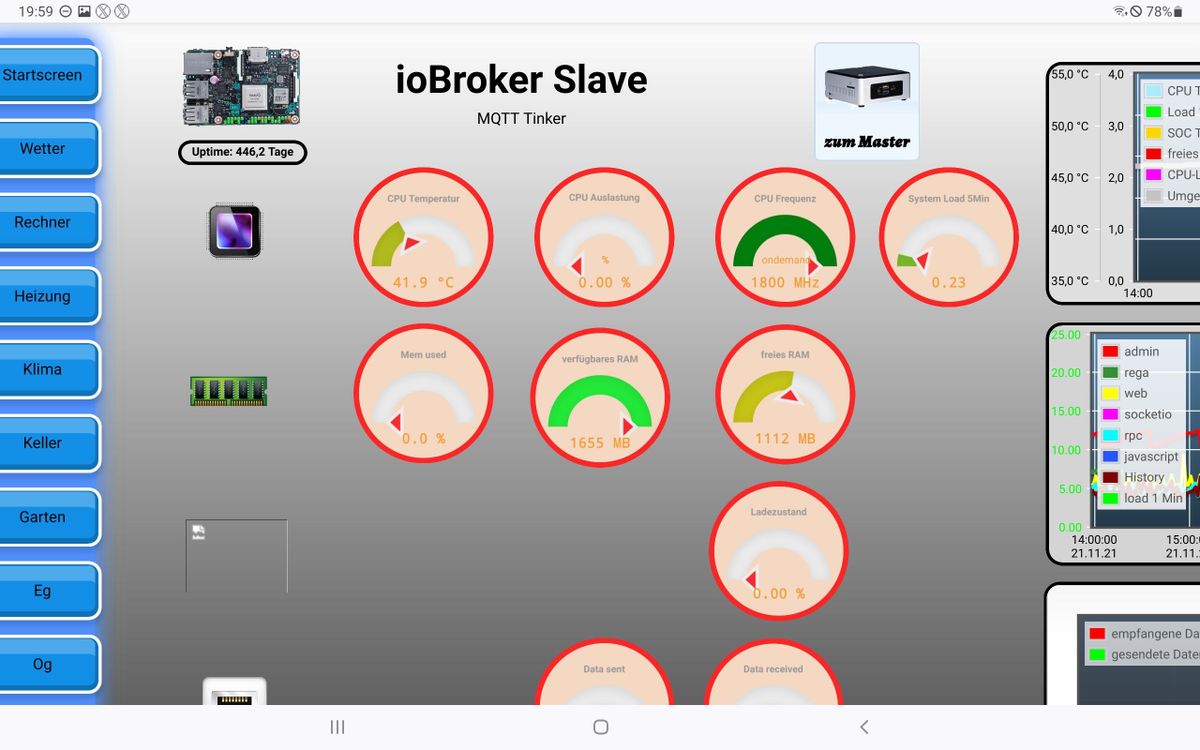
Das Tinkerboard ist IMHO immer noch das Beste, was es gibt.
Dual channel DDR4 RAM und drr schnellste Cardreader. -
@meicker sagte in iobroker Neuinstallation auf Tinkerboard:
da ich das Backup VOR der pivccu eingespielt hatte müsste ich versuchen das jetzt noch einmal laufen zu lassen.
???
du musst das ccu Backup in der pivccu einlesen
das hat nichts mit dem iobroker Backup zu tun -
@meicker sagte in iobroker Neuinstallation auf Tinkerboard:
Ich brauche ja ein neues Tinker, der eMMC ist ja platt ...
Oder gibt es mittlerweile was besseres mit eMMCwieso brauchst du deswegen ein neues Tinkerboard?
ich habe das Tinkerboard ohne S. die laufen seit Jahren auf SD Karte.Das Tinkerboard ist IMHO immer noch das Beste, was es gibt.
Dual channel DDR4 RAM und drr schnellste Cardreader. -
@homoran
hast recht - wollte nur weg von den SD Karten weil die so empfindlich sind. Aber mein eMMC hat auch nicht wirklich lange gehalten ...@meicker sagte in iobroker Neuinstallation auf Tinkerboard:
weg von den SD Karten weil die so empfindlich sind.
Hier läuft eine SD-Karte seit 'ewig' in einem Pi.
Man muss halt die Kiste immer sauber herunterfahren, das ist aber auch schon der einzige Punkt, wo man etwas aufpassen muss. -
@homoran
hast recht - wollte nur weg von den SD Karten weil die so empfindlich sind. Aber mein eMMC hat auch nicht wirklich lange gehalten ...@meicker sagte in iobroker Neuinstallation auf Tinkerboard:
weil die so empfindlich sind.
wer sagt das?
Bei mir ist noch nie eine SD kaputt gegangen.ein eMMC ist nichts anderes.
siehe screenshot
seit fast 1 1/2 Jahren am Stück, und davor auch noch mal -
@meicker sagte in iobroker Neuinstallation auf Tinkerboard:
weil die so empfindlich sind.
wer sagt das?
Bei mir ist noch nie eine SD kaputt gegangen.ein eMMC ist nichts anderes.
siehe screenshot
seit fast 1 1/2 Jahren am Stück, und davor auch noch mal@homoran
@Thomas-Braun
Dann lasse ich das jetzt erstmal so. Einspielen hat alles wunderbar geklappt und pivccu läuft auch obwohl ich hier bei der Installation Fehler gesehen habe. Vielleicht sagt euch das ja was. Ist auf jeden Fall erst bei pivccu aufgetreten. Bis dahin war der zvram1 auch nie voll ...sudo apt install pivccu3 Reading package lists... Done Building dependency tree... Done Reading state information... Done The following additional packages will be installed: detect-radio-module dnsmasq-base liblxc1 lxc wait-sysfs-notify Suggested packages: lvm2 python3-lxc Recommended packages: dns-root-data apparmor debootstrap libpam-cgfs lxcfs lxc-templates uidmap The following NEW packages will be installed: detect-radio-module dnsmasq-base liblxc1 lxc pivccu3 wait-sysfs-notify 0 upgraded, 6 newly installed, 0 to remove and 0 not upgraded. Need to get 122 MB of archives. After this operation, 15.9 MB of additional disk space will be used. Do you want to continue? [Y/n] Y Get:1 http://deb.debian.org/debian bullseye/main armhf liblxc1 armhf 1:4.0.6-2 [294 kB] Get:2 http://deb.debian.org/debian bullseye/main armhf dnsmasq-base armhf 2.85-1 [431 kB] Get:3 http://deb.debian.org/debian bullseye/main armhf lxc armhf 1:4.0.6-2 [1,671 kB] Get:4 https://www.pivccu.de/piVCCU stable/main armhf detect-radio-module armhf 1.0-5 [270 kB] Get:5 https://www.pivccu.de/piVCCU stable/main armhf wait-sysfs-notify armhf 1.0-2 [3,436 B] Get:6 https://www.pivccu.de/piVCCU stable/main armhf pivccu3 armhf 3.59.6-59 [119 MB] Fetched 122 MB in 21s (5,742 kB/s) Preconfiguring packages ... Selecting previously unselected package detect-radio-module. (Reading database ... 78960 files and directories currently installed.) Preparing to unpack .../detect-radio-module_1.0-5_armhf.deb ... Unpacking detect-radio-module (1.0-5) ... Selecting previously unselected package wait-sysfs-notify. Preparing to unpack .../wait-sysfs-notify_1.0-2_armhf.deb ... Unpacking wait-sysfs-notify (1.0-2) ... Selecting previously unselected package liblxc1:armhf. Preparing to unpack .../liblxc1_1%3a4.0.6-2_armhf.deb ... Unpacking liblxc1:armhf (1:4.0.6-2) ... Selecting previously unselected package dnsmasq-base. Preparing to unpack .../dnsmasq-base_2.85-1_armhf.deb ... Unpacking dnsmasq-base (2.85-1) ... Selecting previously unselected package lxc. Preparing to unpack .../lxc_1%3a4.0.6-2_armhf.deb ... Unpacking lxc (1:4.0.6-2) ... Setting up detect-radio-module (1.0-5) ... dpkg: cannot write to log file '/var/log/dpkg.log': No space left on device dpkg: cannot write to log file '/var/log/dpkg.log': No space left on device Setting up wait-sysfs-notify (1.0-2) ... dpkg: cannot write to log file '/var/log/dpkg.log': No space left on device dpkg: cannot write to log file '/var/log/dpkg.log': No space left on device dpkg: cannot write to log file '/var/log/dpkg.log': No space left on device dpkg: cannot write to log file '/var/log/dpkg.log': No space left on device Setting up liblxc1:armhf (1:4.0.6-2) ... dpkg: cannot write to log file '/var/log/dpkg.log': No space left on device dpkg: cannot write to log file '/var/log/dpkg.log': No space left on device dpkg: cannot write to log file '/var/log/dpkg.log': No space left on device dpkg: cannot write to log file '/var/log/dpkg.log': No space left on device Setting up dnsmasq-base (2.85-1) ... dpkg: cannot write to log file '/var/log/dpkg.log': No space left on device dpkg: cannot write to log file '/var/log/dpkg.log': No space left on device dpkg: cannot write to log file '/var/log/dpkg.log': No space left on device dpkg: cannot write to log file '/var/log/dpkg.log': No space left on device Setting up lxc (1:4.0.6-2) ... dpkg: cannot write to log file '/var/log/dpkg.log': No space left on device dpkg: cannot write to log file '/var/log/dpkg.log': No space left on device dpkg: cannot write to log file '/var/log/dpkg.log': No space left on device Created symlink /etc/systemd/system/multi-user.target.wants/lxc-net.service → /lib/systemd/system/lxc-net.service. Created symlink /etc/systemd/system/multi-user.target.wants/lxc.service → /lib/systemd/system/lxc.service. dpkg: cannot write to log file '/var/log/dpkg.log': No space left on device dpkg: cannot write to log file '/var/log/dpkg.log': No space left on device Selecting previously unselected package pivccu3. (Reading database ... 79216 files and directories currently installed.) Preparing to unpack .../pivccu3_3.59.6-59_armhf.deb ... dpkg: cannot write to log file '/var/log/dpkg.log': No space left on device dpkg: cannot write to log file '/var/log/dpkg.log': No space left on device Unpacking pivccu3 (3.59.6-59) ... dpkg: cannot write to log file '/var/log/dpkg.log': No space left on device dpkg: cannot write to log file '/var/log/dpkg.log': No space left on device Setting up pivccu3 (3.59.6-59) ... dpkg: cannot write to log file '/var/log/dpkg.log': No space left on device dpkg: cannot write to log file '/var/log/dpkg.log': No space left on device dpkg: cannot write to log file '/var/log/dpkg.log': No space left on device Created symlink /etc/systemd/system/multi-user.target.wants/pivccu.service → /lib/systemd/system/pivccu.service. Created symlink /etc/systemd/system/pivccu.service.wants/monitor-hb-rf-eth.service → /lib/systemd/system/monitor-hb-rf-eth.service. dpkg: cannot write to log file '/var/log/dpkg.log': No space left on device Processing triggers for man-db (2.9.4-2) ... dpkg: cannot write to log file '/var/log/dpkg.log': No space left on device dpkg: cannot write to log file '/var/log/dpkg.log': No space left on device dpkg: cannot write to log file '/var/log/dpkg.log': No space left on device Processing triggers for dbus (1.12.20-2) ... dpkg: cannot write to log file '/var/log/dpkg.log': No space left on device dpkg: cannot write to log file '/var/log/dpkg.log': No space left on device dpkg: cannot write to log file '/var/log/dpkg.log': No space left on device Processing triggers for libc-bin (2.31-13+deb11u2) ... dpkg: cannot write to log file '/var/log/dpkg.log': No space left on device dpkg: cannot write to log file '/var/log/dpkg.log': No space left on device dpkg: cannot write to log file '/var/log/dpkg.log': No space left on device piVCCU: DTB rk3288-tinker.dtb was already patched piVCCU: DTB rk3288-tinker-s.dtb was already patched E: Write error - ~LZMAFILE (28: No space left on device)Da ist wieder dieser Write error mit LZMAFILE - Danach war zram1 voll
# df -h
Filesystem      Size  Used Avail Use% Mounted on
udev            989M     0  989M   0% /dev
tmpfs           201M   16M  185M   8% /run
/dev/mmcblk0p1   15G  3.6G   11G  25% /
tmpfs          1001M     0 1001M   0% /dev/shm
tmpfs           5.0M  4.0K  5.0M   1% /run/lock
tmpfs          1001M  216K 1001M   1% /tmp
/dev/zram1       49M   48M     0 100% /var/log
tmpfs           201M     0  201M   0% /run/user/0
Aber hier sieht alles gut aus:
sudo pivccu-info
piVCCU version: 3.59.6-59
Kernel modules: Available
Raw UART dev:   Available
HMRF Hardware:  RPI-RF-MOD
 Connected via: GPIO (/dev/raw-uart)
 Board serial:  58A992FB3B
 Radio MAC:     0xFFFB3B
HMIP Hardware:  RPI-RF-MOD
 SGTIN:         3014F711A0001xxxxxxxxxx
 Radio MAC:     0xB3D162
State:          RUNNING
PID:            4581
IP:             192.168.1.19
Link:           vethpivccu
 TX bytes:      3.65 MiB
 RX bytes:      604.76 KiB
 Total bytes:   4.24 MiB
Und zram1 hat sich auch beruhigt:
Filesystem      Size  Used Avail Use% Mounted on
udev            989M     0  989M   0% /dev
tmpfs           201M  8.4M  192M   5% /run
/dev/mmcblk0p1   15G  3.7G   11G  26% /
tmpfs          1001M     0 1001M   0% /dev/shm
tmpfs           5.0M  4.0K  5.0M   1% /run/lock
tmpfs          1001M  476K 1000M   1% /tmp
/dev/zram1       49M  7.9M   38M  18% /var/log
tmpfs           201M     0  201M   0% /run/user/0
Ich hab das ganze noch im Homematic-Forum gepostet aber noch kein Feedback ...
Wenn ihr dazu noch was habt, dann gerne, ansonsten vielen Dank für die Geduld mit mir

vg Marc
-
@homoran
@Thomas-Braun
Dann lasse ich das jetzt erstmal so. Einspielen hat alles wunderbar geklappt und pivccu läuft auch obwohl ich hier bei der Installation Fehler gesehen habe. Vielleicht sagt euch das ja was. Ist auf jeden Fall erst bei pivccu aufgetreten. Bis dahin war der zvram1 auch nie voll ...sudo apt install pivccu3 Reading package lists... Done Building dependency tree... Done Reading state information... Done The following additional packages will be installed: detect-radio-module dnsmasq-base liblxc1 lxc wait-sysfs-notify Suggested packages: lvm2 python3-lxc Recommended packages: dns-root-data apparmor debootstrap libpam-cgfs lxcfs lxc-templates uidmap The following NEW packages will be installed: detect-radio-module dnsmasq-base liblxc1 lxc pivccu3 wait-sysfs-notify 0 upgraded, 6 newly installed, 0 to remove and 0 not upgraded. Need to get 122 MB of archives. After this operation, 15.9 MB of additional disk space will be used. Do you want to continue? [Y/n] Y Get:1 http://deb.debian.org/debian bullseye/main armhf liblxc1 armhf 1:4.0.6-2 [294 kB] Get:2 http://deb.debian.org/debian bullseye/main armhf dnsmasq-base armhf 2.85-1 [431 kB] Get:3 http://deb.debian.org/debian bullseye/main armhf lxc armhf 1:4.0.6-2 [1,671 kB] Get:4 https://www.pivccu.de/piVCCU stable/main armhf detect-radio-module armhf 1.0-5 [270 kB] Get:5 https://www.pivccu.de/piVCCU stable/main armhf wait-sysfs-notify armhf 1.0-2 [3,436 B] Get:6 https://www.pivccu.de/piVCCU stable/main armhf pivccu3 armhf 3.59.6-59 [119 MB] Fetched 122 MB in 21s (5,742 kB/s) Preconfiguring packages ... Selecting previously unselected package detect-radio-module. (Reading database ... 78960 files and directories currently installed.) Preparing to unpack .../detect-radio-module_1.0-5_armhf.deb ... Unpacking detect-radio-module (1.0-5) ... Selecting previously unselected package wait-sysfs-notify. Preparing to unpack .../wait-sysfs-notify_1.0-2_armhf.deb ... Unpacking wait-sysfs-notify (1.0-2) ... Selecting previously unselected package liblxc1:armhf. Preparing to unpack .../liblxc1_1%3a4.0.6-2_armhf.deb ... Unpacking liblxc1:armhf (1:4.0.6-2) ... Selecting previously unselected package dnsmasq-base. Preparing to unpack .../dnsmasq-base_2.85-1_armhf.deb ... Unpacking dnsmasq-base (2.85-1) ... Selecting previously unselected package lxc. Preparing to unpack .../lxc_1%3a4.0.6-2_armhf.deb ... Unpacking lxc (1:4.0.6-2) ... Setting up detect-radio-module (1.0-5) ... dpkg: cannot write to log file '/var/log/dpkg.log': No space left on device dpkg: cannot write to log file '/var/log/dpkg.log': No space left on device Setting up wait-sysfs-notify (1.0-2) ... dpkg: cannot write to log file '/var/log/dpkg.log': No space left on device dpkg: cannot write to log file '/var/log/dpkg.log': No space left on device dpkg: cannot write to log file '/var/log/dpkg.log': No space left on device dpkg: cannot write to log file '/var/log/dpkg.log': No space left on device Setting up liblxc1:armhf (1:4.0.6-2) ... dpkg: cannot write to log file '/var/log/dpkg.log': No space left on device dpkg: cannot write to log file '/var/log/dpkg.log': No space left on device dpkg: cannot write to log file '/var/log/dpkg.log': No space left on device dpkg: cannot write to log file '/var/log/dpkg.log': No space left on device Setting up dnsmasq-base (2.85-1) ... dpkg: cannot write to log file '/var/log/dpkg.log': No space left on device dpkg: cannot write to log file '/var/log/dpkg.log': No space left on device dpkg: cannot write to log file '/var/log/dpkg.log': No space left on device dpkg: cannot write to log file '/var/log/dpkg.log': No space left on device Setting up lxc (1:4.0.6-2) ... dpkg: cannot write to log file '/var/log/dpkg.log': No space left on device dpkg: cannot write to log file '/var/log/dpkg.log': No space left on device dpkg: cannot write to log file '/var/log/dpkg.log': No space left on device Created symlink /etc/systemd/system/multi-user.target.wants/lxc-net.service → /lib/systemd/system/lxc-net.service. Created symlink /etc/systemd/system/multi-user.target.wants/lxc.service → /lib/systemd/system/lxc.service. dpkg: cannot write to log file '/var/log/dpkg.log': No space left on device dpkg: cannot write to log file '/var/log/dpkg.log': No space left on device Selecting previously unselected package pivccu3. (Reading database ... 79216 files and directories currently installed.) Preparing to unpack .../pivccu3_3.59.6-59_armhf.deb ... dpkg: cannot write to log file '/var/log/dpkg.log': No space left on device dpkg: cannot write to log file '/var/log/dpkg.log': No space left on device Unpacking pivccu3 (3.59.6-59) ... dpkg: cannot write to log file '/var/log/dpkg.log': No space left on device dpkg: cannot write to log file '/var/log/dpkg.log': No space left on device Setting up pivccu3 (3.59.6-59) ... dpkg: cannot write to log file '/var/log/dpkg.log': No space left on device dpkg: cannot write to log file '/var/log/dpkg.log': No space left on device dpkg: cannot write to log file '/var/log/dpkg.log': No space left on device Created symlink /etc/systemd/system/multi-user.target.wants/pivccu.service → /lib/systemd/system/pivccu.service. Created symlink /etc/systemd/system/pivccu.service.wants/monitor-hb-rf-eth.service → /lib/systemd/system/monitor-hb-rf-eth.service. dpkg: cannot write to log file '/var/log/dpkg.log': No space left on device Processing triggers for man-db (2.9.4-2) ... dpkg: cannot write to log file '/var/log/dpkg.log': No space left on device dpkg: cannot write to log file '/var/log/dpkg.log': No space left on device dpkg: cannot write to log file '/var/log/dpkg.log': No space left on device Processing triggers for dbus (1.12.20-2) ... dpkg: cannot write to log file '/var/log/dpkg.log': No space left on device dpkg: cannot write to log file '/var/log/dpkg.log': No space left on device dpkg: cannot write to log file '/var/log/dpkg.log': No space left on device Processing triggers for libc-bin (2.31-13+deb11u2) ... dpkg: cannot write to log file '/var/log/dpkg.log': No space left on device dpkg: cannot write to log file '/var/log/dpkg.log': No space left on device dpkg: cannot write to log file '/var/log/dpkg.log': No space left on device piVCCU: DTB rk3288-tinker.dtb was already patched piVCCU: DTB rk3288-tinker-s.dtb was already patched E: Write error - ~LZMAFILE (28: No space left on device)Da ist wieder dieser Write error mit LZMAFILE - Danach war zram1 voll
# df -h
Filesystem      Size  Used Avail Use% Mounted on
udev            989M     0  989M   0% /dev
tmpfs           201M   16M  185M   8% /run
/dev/mmcblk0p1   15G  3.6G   11G  25% /
tmpfs          1001M     0 1001M   0% /dev/shm
tmpfs           5.0M  4.0K  5.0M   1% /run/lock
tmpfs          1001M  216K 1001M   1% /tmp
/dev/zram1       49M   48M     0 100% /var/log
tmpfs           201M     0  201M   0% /run/user/0
Aber hier sieht alles gut aus:
sudo pivccu-info
piVCCU version: 3.59.6-59
Kernel modules: Available
Raw UART dev:   Available
HMRF Hardware:  RPI-RF-MOD
 Connected via: GPIO (/dev/raw-uart)
 Board serial:  58A992FB3B
 Radio MAC:     0xFFFB3B
HMIP Hardware:  RPI-RF-MOD
 SGTIN:         3014F711A0001xxxxxxxxxx
 Radio MAC:     0xB3D162
State:          RUNNING
PID:            4581
IP:             192.168.1.19
Link:           vethpivccu
 TX bytes:      3.65 MiB
 RX bytes:      604.76 KiB
 Total bytes:   4.24 MiB
Und zram1 hat sich auch beruhigt:
Filesystem      Size  Used Avail Use% Mounted on
udev            989M     0  989M   0% /dev
tmpfs           201M  8.4M  192M   5% /run
/dev/mmcblk0p1   15G  3.7G   11G  26% /
tmpfs          1001M     0 1001M   0% /dev/shm
tmpfs           5.0M  4.0K  5.0M   1% /run/lock
tmpfs          1001M  476K 1000M   1% /tmp
/dev/zram1       49M  7.9M   38M  18% /var/log
tmpfs           201M     0  201M   0% /run/user/0
Ich hab das ganze noch im Homematic-Forum gepostet aber noch kein Feedback ...
Wenn ihr dazu noch was habt, dann gerne, ansonsten vielen Dank für die Geduld mit mir
vg Marc
@meicker sagte in iobroker Neuinstallation auf Tinkerboard:
Ich hab das ganze noch im Homematic-Forum gepostet aber noch kein Feedback ...
das wäre wohl eher ein Fall für das Armbian Forum
Die Verzeichnisstruktur kommt ja wohl von dort.
und im ZRAM scheint ja das syslog zu liegen.ggf. spuckt auch das defekte eMMC in die Suppe, dass deswegen das log überläuft.
Hast du mal nachgesehen was da drin steht?
-
@homoran
/dev/zram1 ist mounted on /var/log - heißt doch, dass in var/log der Inhalt von zram1 steht ... oder ? Wenn dem so ist, dann ist das der Inhalt: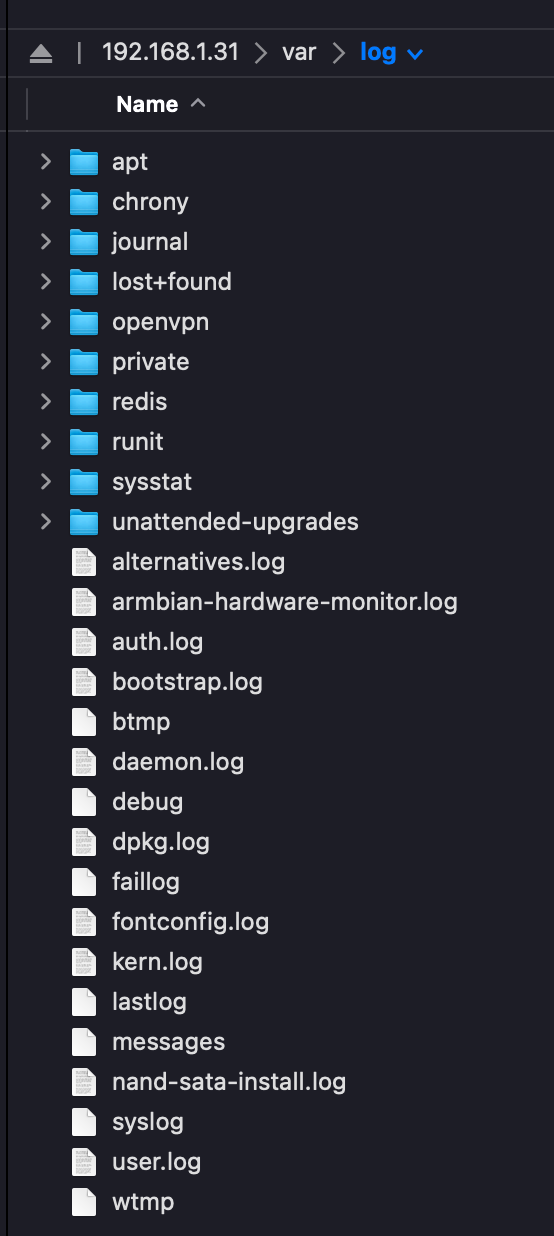
und es sieht auch entspannt aus:
Filesystem     1K-blocks    Used Available Use% Mounted on
udev             1011848       0   1011848   0% /dev
tmpfs             204852    8572    196280   5% /run
/dev/mmcblk0p1  15011432 4210708  10616224  29% /
tmpfs            1024252       0   1024252   0% /dev/shm
tmpfs               5120       4      5116   1% /run/lock
tmpfs            1024252    1172   1023080   1% /tmp
/dev/zram1         49560    8596     37380  19% /var/log
tmpfs             204848       0    204848   0% /run/user/0
Mal weiter beobachten, aber es sieht alles gut aus ...
-
@homoran
/dev/zram1 ist mounted on /var/log - heißt doch, dass in var/log der Inhalt von zram1 steht ... oder ? Wenn dem so ist, dann ist das der Inhalt:und es sieht auch entspannt aus:
Filesystem     1K-blocks    Used Available Use% Mounted on
udev             1011848       0   1011848   0% /dev
tmpfs             204852    8572    196280   5% /run
/dev/mmcblk0p1  15011432 4210708  10616224  29% /
tmpfs            1024252       0   1024252   0% /dev/shm
tmpfs               5120       4      5116   1% /run/lock
tmpfs            1024252    1172   1023080   1% /tmp
/dev/zram1         49560    8596     37380  19% /var/log
tmpfs             204848       0    204848   0% /run/user/0
Mal weiter beobachten, aber es sieht alles gut aus ...
@meicker
zram dürfte allerdings flüchtig sein. Damit wären alle Logs nach einem reboot weg.

Hey! Du scheinst an dieser Unterhaltung interessiert zu sein, hast aber noch kein Konto.
Hast du es satt, bei jedem Besuch durch die gleichen Beiträge zu scrollen? Wenn du dich für ein Konto anmeldest, kommst du immer genau dorthin zurück, wo du zuvor warst, und kannst dich über neue Antworten benachrichtigen lassen (entweder per E-Mail oder Push-Benachrichtigung). Du kannst auch Lesezeichen speichern und Beiträge positiv bewerten, um anderen Community-Mitgliedern deine Wertschätzung zu zeigen.
Mit deinem Input könnte dieser Beitrag noch besser werden 💗
Registrieren Anmelden460
Online33.0k
Benutzer83.6k
Themen1.3m
Beiträge