




[gelöst] synology adapter gelb

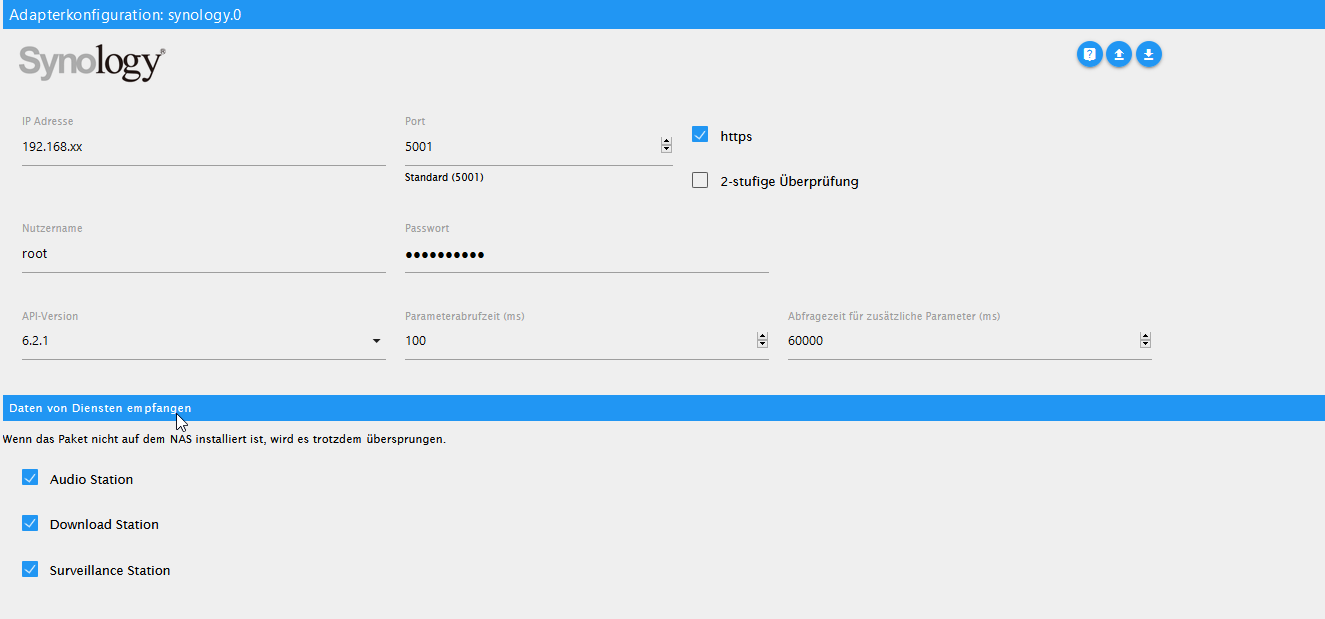
-
@Glasfaser
das wollte ich auch gerade fragen -
Die Error Meldung ist aber neu ... hat nichts mit deiner anderen Meldung zu tun .
Was hast du denn verändert .@Glasfaser
Fehler gefunden für die falsche IP.
hier das neue Log.synology.0 2021-01-06 10:37:20.785 debug (10931) * Get info from (firstPoll) api: DSM method: getPollingData params: {} synology.0 2021-01-06 10:37:20.784 debug (10931) * sendPolling. namePolling = firstPoll | iteration = 0 | typeof poll = object | poll = {"api":"dsm","method":"getPollingData","params":{}} synology.0 2021-01-06 10:37:20.784 debug (10931) ----------------------------------------------------------------------------------------------------- synology.0 2021-01-06 10:37:20.783 error (10931) *** ERROR : src: sendPolling syno[dsm][getPollingData] To use the adapter, the user must be in the Administrators group! code: 400 message: No such account or incorrect password synology.0 2021-01-06 10:37:20.783 debug (10931) * No response, read next. synology.0 2021-01-06 10:37:19.552 debug (10931) * Get info from (firstPoll) api: DSM method: getPollingData params: {} synology.0 2021-01-06 10:37:19.552 debug (10931) * sendPolling. namePolling = firstPoll | iteration = 0 | typeof poll = object | poll = {"api":"dsm","method":"getPollingData","params":{}} synology.0 2021-01-06 10:37:19.552 debug (10931) ----------------------------------------------------------------------------------------------------- synology.0 2021-01-06 10:37:19.551 error (10931) *** ERROR : src: sendPolling syno[dsm][getPollingData] To use the adapter, the user must be in the Administrators group! code: 400 message: No such account or incorrect password synology.0 2021-01-06 10:37:19.550 debug (10931) * No response, read next. synology.0 2021-01-06 10:37:18.424 debug (10931) * Get info from (firstPoll) api: DSM method: getPollingData params: {} synology.0 2021-01-06 10:37:18.423 debug (10931) * sendPolling. namePolling = firstPoll | iteration = 0 | typeof poll = object | poll = {"api":"dsm","method":"getPollingData","params":{}} synology.0 2021-01-06 10:37:18.423 debug (10931) ----------------------------------------------------------------------------------------------------- synology.0 2021-01-06 10:37:18.422 error (10931) *** ERROR : src: sendPolling syno[dsm][getPollingData] To use the adapter, the user must be in the Administrators group! code: 400 message: No such account or incorrect password synology.0 2021-01-06 10:37:18.421 debug (10931) * No response, read next. synology.0 2021-01-06 10:37:16.976 silly (10931) States system redis pmessage system.adapter.synology.0.logLevel/system.adapter.synology.0.logLevel:{"val":"silly","ack":true,"ts":1609925836970,"q":0,"from":"system.adapter.synology.0","lc":1 synology.0 2021-01-06 10:37:16.955 debug (10931) * Get info from (firstPoll) api: DSM method: getPollingData params: {} synology.0 2021-01-06 10:37:16.955 debug (10931) * sendPolling. namePolling = firstPoll | iteration = 0 | typeof poll = object | poll = {"api":"dsm","method":"getPollingData","params":{}} synology.0 2021-01-06 10:37:16.955 debug (10931) ----------------------------------------------------------------------------------------------------- synology.0 2021-01-06 10:37:16.458 info (10931) starting. Version 0.1.18 in /opt/iobroker/node_modules/iobroker.synology, node: v10.20.1 synology.0 2021-01-06 10:37:16.280 debug (10931) statesDB connected synology.0 2021-01-06 10:37:16.279 debug (10931) States connected to redis: 127.0.0.1:9000 synology.0 2021-01-06 10:37:16.275 debug (10931) States create System PubSub Client synology.0 2021-01-06 10:37:16.274 debug (10931) States create User PubSub Client synology.0 2021-01-06 10:37:16.271 debug (10931) Redis States: Use Redis connection: 127.0.0.1:9000 synology.0 2021-01-06 10:37:16.271 debug (10931) objectDB connected synology.0 2021-01-06 10:37:16.269 debug (10931) Objects connected to redis: 127.0.0.1:9001 synology.0 2021-01-06 10:37:16.263 debug (10931) Objects client initialize lua scripts synology.0 2021-01-06 10:37:16.263 debug (10931) Objects create User PubSub Client synology.0 2021-01-06 10:37:16.262 debug (10931) Objects create System PubSub Client synology.0 2021-01-06 10:37:16.261 debug (10931) Objects client ready ... initialize now synology.0 2021-01-06 10:37:16.249 debug (10931) Redis Objects: Use Redis connection: 127.0.0.1:9001 host.iobroker 2021-01-06 10:37:15.898 info instance system.adapter.synology.0 started with pid 10931 synology.0 2021-01-06 10:37:16.976 silly (10931) States system redis pmessage system.adapter.synology.0.logLevel/system.adapter.synology.0.logLevel:{"val":"silly","ack":true,"ts":1609925836970,"q":0,"from":"system.adapter.synology.0","lc":16 synology.0 2021-01-06 10:37:16.955 debug (10931) * Get info from (firstPoll) api: DSM method: getPollingData params: {} synology.0 2021-01-06 10:37:16.955 debug (10931) * sendPolling. namePolling = firstPoll | iteration = 0 | typeof poll = object | poll = {"api":"dsm","method":"getPollingData","params":{}} synology.0 2021-01-06 10:37:16.955 debug (10931) ----------------------------------------------------------------------------------------------------- synology.0 2021-01-06 10:37:16.458 info (10931) starting. Version 0.1.18 in /opt/iobroker/node_modules/iobroker.synology, node: v10.20.1 -
@Glasfaser
Fehler gefunden für die falsche IP.
hier das neue Log.synology.0 2021-01-06 10:37:20.785 debug (10931) * Get info from (firstPoll) api: DSM method: getPollingData params: {} synology.0 2021-01-06 10:37:20.784 debug (10931) * sendPolling. namePolling = firstPoll | iteration = 0 | typeof poll = object | poll = {"api":"dsm","method":"getPollingData","params":{}} synology.0 2021-01-06 10:37:20.784 debug (10931) ----------------------------------------------------------------------------------------------------- synology.0 2021-01-06 10:37:20.783 error (10931) *** ERROR : src: sendPolling syno[dsm][getPollingData] To use the adapter, the user must be in the Administrators group! code: 400 message: No such account or incorrect password synology.0 2021-01-06 10:37:20.783 debug (10931) * No response, read next. synology.0 2021-01-06 10:37:19.552 debug (10931) * Get info from (firstPoll) api: DSM method: getPollingData params: {} synology.0 2021-01-06 10:37:19.552 debug (10931) * sendPolling. namePolling = firstPoll | iteration = 0 | typeof poll = object | poll = {"api":"dsm","method":"getPollingData","params":{}} synology.0 2021-01-06 10:37:19.552 debug (10931) ----------------------------------------------------------------------------------------------------- synology.0 2021-01-06 10:37:19.551 error (10931) *** ERROR : src: sendPolling syno[dsm][getPollingData] To use the adapter, the user must be in the Administrators group! code: 400 message: No such account or incorrect password synology.0 2021-01-06 10:37:19.550 debug (10931) * No response, read next. synology.0 2021-01-06 10:37:18.424 debug (10931) * Get info from (firstPoll) api: DSM method: getPollingData params: {} synology.0 2021-01-06 10:37:18.423 debug (10931) * sendPolling. namePolling = firstPoll | iteration = 0 | typeof poll = object | poll = {"api":"dsm","method":"getPollingData","params":{}} synology.0 2021-01-06 10:37:18.423 debug (10931) ----------------------------------------------------------------------------------------------------- synology.0 2021-01-06 10:37:18.422 error (10931) *** ERROR : src: sendPolling syno[dsm][getPollingData] To use the adapter, the user must be in the Administrators group! code: 400 message: No such account or incorrect password synology.0 2021-01-06 10:37:18.421 debug (10931) * No response, read next. synology.0 2021-01-06 10:37:16.976 silly (10931) States system redis pmessage system.adapter.synology.0.logLevel/system.adapter.synology.0.logLevel:{"val":"silly","ack":true,"ts":1609925836970,"q":0,"from":"system.adapter.synology.0","lc":1 synology.0 2021-01-06 10:37:16.955 debug (10931) * Get info from (firstPoll) api: DSM method: getPollingData params: {} synology.0 2021-01-06 10:37:16.955 debug (10931) * sendPolling. namePolling = firstPoll | iteration = 0 | typeof poll = object | poll = {"api":"dsm","method":"getPollingData","params":{}} synology.0 2021-01-06 10:37:16.955 debug (10931) ----------------------------------------------------------------------------------------------------- synology.0 2021-01-06 10:37:16.458 info (10931) starting. Version 0.1.18 in /opt/iobroker/node_modules/iobroker.synology, node: v10.20.1 synology.0 2021-01-06 10:37:16.280 debug (10931) statesDB connected synology.0 2021-01-06 10:37:16.279 debug (10931) States connected to redis: 127.0.0.1:9000 synology.0 2021-01-06 10:37:16.275 debug (10931) States create System PubSub Client synology.0 2021-01-06 10:37:16.274 debug (10931) States create User PubSub Client synology.0 2021-01-06 10:37:16.271 debug (10931) Redis States: Use Redis connection: 127.0.0.1:9000 synology.0 2021-01-06 10:37:16.271 debug (10931) objectDB connected synology.0 2021-01-06 10:37:16.269 debug (10931) Objects connected to redis: 127.0.0.1:9001 synology.0 2021-01-06 10:37:16.263 debug (10931) Objects client initialize lua scripts synology.0 2021-01-06 10:37:16.263 debug (10931) Objects create User PubSub Client synology.0 2021-01-06 10:37:16.262 debug (10931) Objects create System PubSub Client synology.0 2021-01-06 10:37:16.261 debug (10931) Objects client ready ... initialize now synology.0 2021-01-06 10:37:16.249 debug (10931) Redis Objects: Use Redis connection: 127.0.0.1:9001 host.iobroker 2021-01-06 10:37:15.898 info instance system.adapter.synology.0 started with pid 10931 synology.0 2021-01-06 10:37:16.976 silly (10931) States system redis pmessage system.adapter.synology.0.logLevel/system.adapter.synology.0.logLevel:{"val":"silly","ack":true,"ts":1609925836970,"q":0,"from":"system.adapter.synology.0","lc":16 synology.0 2021-01-06 10:37:16.955 debug (10931) * Get info from (firstPoll) api: DSM method: getPollingData params: {} synology.0 2021-01-06 10:37:16.955 debug (10931) * sendPolling. namePolling = firstPoll | iteration = 0 | typeof poll = object | poll = {"api":"dsm","method":"getPollingData","params":{}} synology.0 2021-01-06 10:37:16.955 debug (10931) ----------------------------------------------------------------------------------------------------- synology.0 2021-01-06 10:37:16.458 info (10931) starting. Version 0.1.18 in /opt/iobroker/node_modules/iobroker.synology, node: v10.20.1 -
@Alero sagte in synology adapter gelb:
code: 400
Was mich wundert ist der Code 400 , der sonst nicht dabei ist wenn die Administrators group nicht eingehalten wird.
hier noch die EInstellungen meiner syno

und der gruppe
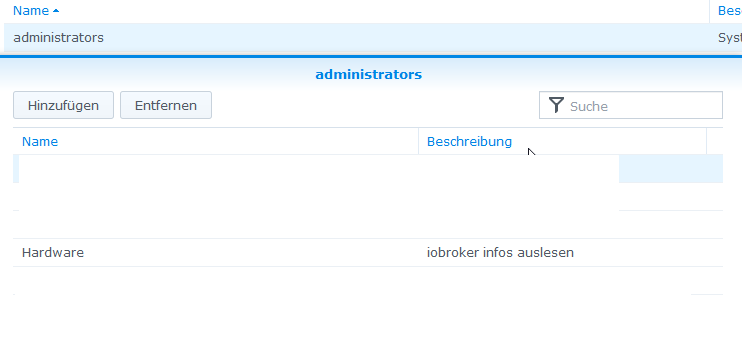
Sowohl User als auch pw wurden in den Adapter kopiert um Schreibfehler zu vermeiden.Alero
-
hier noch die EInstellungen meiner syno
und der gruppe
Sowohl User als auch pw wurden in den Adapter kopiert um Schreibfehler zu vermeiden.Alero
@Alero
Bei den retuschierten Screenshots kann man nicht viel erkennen .Ich habe gerade im main.js vom Adapter geschaut , die Meldungen sind neu eingepflegt .
Ich würde dann auch auf die Meldung HTTP 400 Error (Bad Request) tippen das es dann so gemeint ist
-
@Alero
Bei den retuschierten Screenshots kann man nicht viel erkennen .Ich habe gerade im main.js vom Adapter geschaut , die Meldungen sind neu eingepflegt .
Ich würde dann auch auf die Meldung HTTP 400 Error (Bad Request) tippen das es dann so gemeint ist
@Glasfaser
die letzten Bilder sollten nur dokumentieren das der User "Hardware" heist und in der Administrators Gruppe vorhanden ist.
Dan ist es ein Zugrtiffsproblem?Alero
-
@haselchen
Hi,
scheinbar doch ein falscher user oder pw. Habe es mit dem Admin account meiner synology versucht. gleiches Ergebnis.To use the adapter, the user must be in the Administrators group! code: 400 message: No such account or incorrect passwordIch muss doch den User und das PW des Synology account mit adminrechten dort eintragen, oder?
AleroGelöscht
-
hier noch die EInstellungen meiner syno
und der gruppe
Sowohl User als auch pw wurden in den Adapter kopiert um Schreibfehler zu vermeiden.Alero
@Alero said in synology adapter gelb:
Sowohl User als auch pw wurden in den Adapter kopiert um Schreibfehler zu vermeiden.
und genau da kann passieren, daß am ende ein leerzeichen mitgenommen wird.
-
@Alero
Bei den retuschierten Screenshots kann man nicht viel erkennen .Ich habe gerade im main.js vom Adapter geschaut , die Meldungen sind neu eingepflegt .
Ich würde dann auch auf die Meldung HTTP 400 Error (Bad Request) tippen das es dann so gemeint ist
hi,
vielen Dank noch einmal an alle für die tolle Hilfe.
Habe den Fehler gefunden. Habe noch einmal den tread von Glasfaser empfohlen durchgelesen.
Der Fehler lag an meiner Syno.
"Automatische Blockierung und Kontoschutz aktivieren"
Habe jetzt den Aktualisierungswert im Adapter hoch gesetzt. Jetzt geht es.Gruß
Alero -
hi,
vielen Dank noch einmal an alle für die tolle Hilfe.
Habe den Fehler gefunden. Habe noch einmal den tread von Glasfaser empfohlen durchgelesen.
Der Fehler lag an meiner Syno.
"Automatische Blockierung und Kontoschutz aktivieren"
Habe jetzt den Aktualisierungswert im Adapter hoch gesetzt. Jetzt geht es.Gruß
Alero@Alero sagte in [gelöst] synology adapter gelb:
Habe den Fehler gefunden. Habe noch einmal den tread von Glasfaser empfohlen durchgelesen.
..... und deshalb der Hinweis von mir .........
@Glasfaser sagte in [gelöst] synology adapter gelb:
@Aleroalso ... innerhalb von 5 Minuten den Thread durchlesen ist Sportlich ....
hast du alles beachtet ...
;)
-
@Alero sagte in [gelöst] synology adapter gelb:
Habe den Fehler gefunden. Habe noch einmal den tread von Glasfaser empfohlen durchgelesen.
..... und deshalb der Hinweis von mir .........
@Glasfaser sagte in [gelöst] synology adapter gelb:
@Aleroalso ... innerhalb von 5 Minuten den Thread durchlesen ist Sportlich ....
hast du alles beachtet ...
;)
-
@Glasfaser
Hast ja recht.Alero




Hey! Du scheinst an dieser Unterhaltung interessiert zu sein, hast aber noch kein Konto.
Hast du es satt, bei jedem Besuch durch die gleichen Beiträge zu scrollen? Wenn du dich für ein Konto anmeldest, kommst du immer genau dorthin zurück, wo du zuvor warst, und kannst dich über neue Antworten benachrichtigen lassen (entweder per E-Mail oder Push-Benachrichtigung). Du kannst auch Lesezeichen speichern und Beiträge positiv bewerten, um anderen Community-Mitgliedern deine Wertschätzung zu zeigen.
Mit deinem Input könnte dieser Beitrag noch besser werden 💗
Registrieren Anmelden198
Online33.0k
Benutzer83.5k
Themen1.3m
Beiträge