



Weiter zum Inhalt
  • Home
  • Aktuell
  • Tags
  • 0 Ungelesen 0
  • Kategorien
  • Unreplied
  • Beliebt
  • GitHub
  • Docu
  • Hilfe
Skins
  • Hell
  • Brite
  • Cerulean
  • Cosmo
  • Flatly
  • Journal
  • Litera
  • Lumen
  • Lux
  • Materia
  • Minty
  • Morph
  • Pulse
  • Sandstone
  • Simplex
  • Sketchy
  • Spacelab
  • United
  • Yeti
  • Zephyr
  • Dunkel
  • Cyborg
  • Darkly
  • Quartz
  • Slate
  • Solar
  • Superhero
  • Vapor

  • Standard: (Kein Skin)
  • Kein Skin
Einklappen
ioBroker Logo

Community Forum

donate donate
  1. ioBroker Community Home
  2. Deutsch
  3. ioBroker Allgemein
  4. Gelöst: Adapter Updates können nicht installiert werden
NEWS

  • Neuer ioBroker-Blog online: Monatsrückblick März/April 2026
    BluefoxB
    Bluefox
    8
    1
    709

  • Verwendung von KI bitte immer deutlich kennzeichnen
    HomoranH
    Homoran
    10
    1
    547

  • Monatsrückblick Januar/Februar 2026 ist online!
    BluefoxB
    Bluefox
    18
    1
    1.1k

Gelöst: Adapter Updates können nicht installiert werden
Geplant Angeheftet Gesperrt Verschoben ioBroker Allgemein
update adapter
156 Beiträge 10 Kommentatoren 16.1k Aufrufe 7 Beobachtet
  • Älteste zuerst
  • Neuste zuerst
  • Meiste Stimmen
Antworten
  • In einem neuen Thema antworten
Anmelden zum Antworten
Dieses Thema wurde gelöscht. Nur Nutzer mit entsprechenden Rechten können es sehen.
  • wendy2702W Online
    wendy2702W Online
    wendy2702
    schrieb am zuletzt editiert von
    #56

    Konsole:

    iobroker status
    iobroker -v
    

    Bitte keine Fragen per PN, die gehören ins Forum!

    Benutzt das Voting rechts unten im Beitrag wenn er euch geholfen hat.

    1 Antwort Letzte Antwort
    0
    • W Offline
      W Offline
      WalterKA
      schrieb am zuletzt editiert von
      #57

      @wendy2702 sagte in Adapter Updates können nicht installiert werden:

      iobroker -v

      pi@ioBrokerWS:~ $ iobroker status
      internal/modules/cjs/loader.js:960
        throw err;
        ^
      
      Error: Cannot find module '/opt/iobroker/node_modules/iobroker.js-controller/iobroker.js'
          at Function.Module._resolveFilename (internal/modules/cjs/loader.js:957:15)
          at Function.Module._load (internal/modules/cjs/loader.js:840:27)
          at Function.executeUserEntryPoint [as runMain] (internal/modules/run_main.js:74:12)
          at internal/main/run_main_module.js:18:47 {
        code: 'MODULE_NOT_FOUND',
        requireStack: []
      }
      pi@ioBrokerWS:~ $ iobroker -v
      internal/modules/cjs/loader.js:960
        throw err;
        ^
      
      Error: Cannot find module '/opt/iobroker/node_modules/iobroker.js-controller/iobroker.js'
          at Function.Module._resolveFilename (internal/modules/cjs/loader.js:957:15)
          at Function.Module._load (internal/modules/cjs/loader.js:840:27)
          at Function.executeUserEntryPoint [as runMain] (internal/modules/run_main.js:74:12)
          at internal/main/run_main_module.js:18:47 {
        code: 'MODULE_NOT_FOUND',
        requireStack: []
      }
      pi@ioBrokerWS:~ $


      Ubuntu auf Intel NUC PC
      Node.js v14.18.1
      NPM 6.14.15

      wendy2702W 1 Antwort Letzte Antwort
      0
      • W WalterKA

        @Jan1 sagte in Adapter Updates können nicht installiert werden:

        sudo apt autoremove

        Using username "pi".
        Linux ioBrokerWS 4.19.97-v7+ #1294 SMP Thu Jan 30 13:15:58 GMT 2020 armv7l
        
        The programs included with the Debian GNU/Linux system are free software;
        the exact distribution terms for each program are described in the
        individual files in /usr/share/doc/*/copyright.
        
        Debian GNU/Linux comes with ABSOLUTELY NO WARRANTY, to the extent
        permitted by applicable law.
        Last login: Mon May  4 21:12:30 2020
        pi@ioBrokerWS:~ $ sudo apt autoremove
        Paketlisten werden gelesen... Fertig
        Abhängigkeitsbaum wird aufgebaut.
        Statusinformationen werden eingelesen.... Fertig
        Die folgenden Pakete werden ENTFERNT:
          libmicrodns0
        0 aktualisiert, 0 neu installiert, 1 zu entfernen und 0 nicht aktualisiert.
        Nach dieser Operation werden 30,7 kB Plattenplatz freigegeben.
        Möchten Sie fortfahren? [J/n] j
        (Lese Datenbank ... 99722 Dateien und Verzeichnisse sind derzeit installiert.)
        Entfernen von libmicrodns0:armhf (0.0.10-1) ...
        Trigger für libc-bin (2.28-10+rpi1) werden verarbeitet ...
        pi@ioBrokerWS:~ $


        J Offline
        J Offline
        Jan1
        schrieb am zuletzt editiert von
        #58

        @WalterKA
        Das war für @Thomas-Braun gedacht, halte Dich an das was er schreibt, er weiß was er tut.

        1 Antwort Letzte Antwort
        0
        • W WalterKA

          @wendy2702 sagte in Adapter Updates können nicht installiert werden:

          iobroker -v

          pi@ioBrokerWS:~ $ iobroker status
          internal/modules/cjs/loader.js:960
            throw err;
            ^
          
          Error: Cannot find module '/opt/iobroker/node_modules/iobroker.js-controller/iobroker.js'
              at Function.Module._resolveFilename (internal/modules/cjs/loader.js:957:15)
              at Function.Module._load (internal/modules/cjs/loader.js:840:27)
              at Function.executeUserEntryPoint [as runMain] (internal/modules/run_main.js:74:12)
              at internal/main/run_main_module.js:18:47 {
            code: 'MODULE_NOT_FOUND',
            requireStack: []
          }
          pi@ioBrokerWS:~ $ iobroker -v
          internal/modules/cjs/loader.js:960
            throw err;
            ^
          
          Error: Cannot find module '/opt/iobroker/node_modules/iobroker.js-controller/iobroker.js'
              at Function.Module._resolveFilename (internal/modules/cjs/loader.js:957:15)
              at Function.Module._load (internal/modules/cjs/loader.js:840:27)
              at Function.executeUserEntryPoint [as runMain] (internal/modules/run_main.js:74:12)
              at internal/main/run_main_module.js:18:47 {
            code: 'MODULE_NOT_FOUND',
            requireStack: []
          }
          pi@ioBrokerWS:~ $


          wendy2702W Online
          wendy2702W Online
          wendy2702
          schrieb am zuletzt editiert von
          #59

          @WalterKA

          
          cd /opt/iobroker
          npm install iobroker.js-controller
          iobroker start


          Bitte die Ausgaben danach posten

          Bitte keine Fragen per PN, die gehören ins Forum!

          Benutzt das Voting rechts unten im Beitrag wenn er euch geholfen hat.

          W 1 Antwort Letzte Antwort
          0
          • wendy2702W wendy2702

            @WalterKA

            
            cd /opt/iobroker
            npm install iobroker.js-controller
            iobroker start


            Bitte die Ausgaben danach posten

            W Offline
            W Offline
            WalterKA
            schrieb am zuletzt editiert von
            #60

            @wendy2702 sagte in Adapter Updates können nicht installiert werden:

            @WalterKA

            
            cd /opt/iobroker
            npm install iobroker.js-controller
            iobroker start


            Bitte die Ausgaben danach posten

            Kann man den Code alles auf einmal per Copy&Paste kopieren, einfügen und dann ausführen lassen oder soll ich Zeile für Zeile machen?

            Ubuntu auf Intel NUC PC
            Node.js v14.18.1
            NPM 6.14.15

            Thomas BraunT 1 Antwort Letzte Antwort
            0
            • J Jan1

              @Thomas-Braun
              und

              sudo apt autoremove
              

              Ist ein PI, da zählt jede kB ;-)

              Thomas BraunT Online
              Thomas BraunT Online
              Thomas Braun
              Most Active
              schrieb am zuletzt editiert von
              #61

              @Jan1 said in Adapter Updates können nicht installiert werden:

              Ist ein PI, da zählt jede kB

              Du bist ein kB-Fuchser...
              Diese kB machen aber nur die SD-Karte fett...

              wendy2702 legt ja auch los. Dann kann ich mich ja zurücklehnen...

              Linux-Werkzeugkasten:
              https://forum.iobroker.net/topic/42952/der-kleine-iobroker-linux-werkzeugkasten
              NodeJS Fixer Skript:
              https://forum.iobroker.net/topic/68035/iob-node-fix-skript
              iob_diag: curl -sLf -o diag.sh https://iobroker.net/diag.sh && bash diag.sh

              wendy2702W 1 Antwort Letzte Antwort
              0
              • wendy2702W Online
                wendy2702W Online
                wendy2702
                schrieb am zuletzt editiert von
                #62

                Zeile für Zeile

                Bitte keine Fragen per PN, die gehören ins Forum!

                Benutzt das Voting rechts unten im Beitrag wenn er euch geholfen hat.

                1 Antwort Letzte Antwort
                0
                • W WalterKA

                  @wendy2702 sagte in Adapter Updates können nicht installiert werden:

                  @WalterKA

                  
                  cd /opt/iobroker
                  npm install iobroker.js-controller
                  iobroker start


                  Bitte die Ausgaben danach posten

                  Kann man den Code alles auf einmal per Copy&Paste kopieren, einfügen und dann ausführen lassen oder soll ich Zeile für Zeile machen?

                  Thomas BraunT Online
                  Thomas BraunT Online
                  Thomas Braun
                  Most Active
                  schrieb am zuletzt editiert von
                  #63

                  @WalterKA Zeilenweise.

                  Linux-Werkzeugkasten:
                  https://forum.iobroker.net/topic/42952/der-kleine-iobroker-linux-werkzeugkasten
                  NodeJS Fixer Skript:
                  https://forum.iobroker.net/topic/68035/iob-node-fix-skript
                  iob_diag: curl -sLf -o diag.sh https://iobroker.net/diag.sh && bash diag.sh

                  1 Antwort Letzte Antwort
                  0
                  • Thomas BraunT Thomas Braun

                    @Jan1 said in Adapter Updates können nicht installiert werden:

                    Ist ein PI, da zählt jede kB

                    Du bist ein kB-Fuchser...
                    Diese kB machen aber nur die SD-Karte fett...

                    wendy2702 legt ja auch los. Dann kann ich mich ja zurücklehnen...

                    wendy2702W Online
                    wendy2702W Online
                    wendy2702
                    schrieb am zuletzt editiert von
                    #64

                    @Thomas-Braun sagte in Adapter Updates können nicht installiert werden:

                    wendy2702 legt ja auch los. Dann kann ich mich ja zurücklehnen..

                    Ne, lass mal...

                    Nur noch 18% Akku dann ist Schicht.

                    Außerdem verderben schließlich viele Köche den Brei :-)

                    Bitte keine Fragen per PN, die gehören ins Forum!

                    Benutzt das Voting rechts unten im Beitrag wenn er euch geholfen hat.

                    Thomas BraunT 1 Antwort Letzte Antwort
                    0
                    • W Offline
                      W Offline
                      WalterKA
                      schrieb am zuletzt editiert von
                      #65

                      @wendy2702 sagte in Adapter Updates können nicht installiert werden:

                      iobroker start

                      Ich habe es Zeilenweise gemacht

                      Läuft noch, sind aber ein paar Errormeldunegn beim durchlaufen zu sehen

                      Ubuntu auf Intel NUC PC
                      Node.js v14.18.1
                      NPM 6.14.15

                      Thomas BraunT 1 Antwort Letzte Antwort
                      0
                      • W WalterKA

                        @wendy2702 sagte in Adapter Updates können nicht installiert werden:

                        iobroker start

                        Ich habe es Zeilenweise gemacht

                        Läuft noch, sind aber ein paar Errormeldunegn beim durchlaufen zu sehen

                        Thomas BraunT Online
                        Thomas BraunT Online
                        Thomas Braun
                        Most Active
                        schrieb am zuletzt editiert von
                        #66

                        @WalterKA Die interessieren uns brennend.

                        Linux-Werkzeugkasten:
                        https://forum.iobroker.net/topic/42952/der-kleine-iobroker-linux-werkzeugkasten
                        NodeJS Fixer Skript:
                        https://forum.iobroker.net/topic/68035/iob-node-fix-skript
                        iob_diag: curl -sLf -o diag.sh https://iobroker.net/diag.sh && bash diag.sh

                        1 Antwort Letzte Antwort
                        0
                        • W Offline
                          W Offline
                          WalterKA
                          schrieb am zuletzt editiert von
                          #67

                          Ergebnis:

                          i@ioBrokerWS:~ $
                          pi@ioBrokerWS:~ $ cd /opt/iobroker
                          pi@ioBrokerWS:/opt/iobroker $ npm install iobroker.js-controller
                          
                          > iobroker.js-controller@2.2.9 preinstall /opt/iobroker/node_modules/iobroker.js-controller
                          > node lib/preinstallCheck.js
                          
                          NPM version: 6.14.4
                          
                          > node-bluetooth@1.2.6 install /opt/iobroker/node_modules/node-bluetooth
                          > node-gyp configure build
                          
                          make: Verzeichnis „/opt/iobroker/node_modules/node-bluetooth/build“ wird betreten
                            CXX(target) Release/obj.target/BluetoothSerialPort/src/linux/BluetoothSerialPort.o
                          In file included from ../src/DeviceINQ.h:17,
                                           from ../src/linux/BluetoothSerialPort.cc:13:
                          ../node_modules/nan/nan.h: In function ‘void Nan::AsyncQueueWorker(Nan::AsyncWorker*)’:
                          ../node_modules/nan/nan.h:2298:62: warning: cast between incompatible function types from ‘void (*)(uv_work_t*)’ {aka ‘void (*)(uv_work_s*)’} to ‘uv_after_work_cb’ {aka ‘void (*)(uv_work_s*, int)’} [-Wcast-function-type]
                               , reinterpret_cast<uv_after_work_cb>(AsyncExecuteComplete)
                                                                                        ^
                          ../src/linux/BluetoothSerialPort.cc: At global scope:
                          ../src/linux/BluetoothSerialPort.cc:18:14: error: variable or field ‘InitAll’ declared void
                           void InitAll(Handle<Object> exports) {
                                        ^~~~~~
                          ../src/linux/BluetoothSerialPort.cc:18:14: error: ‘Handle’ was not declared in this scope
                          ../src/linux/BluetoothSerialPort.cc:18:14: note: suggested alternative: ‘rand_r’
                           void InitAll(Handle<Object> exports) {
                                        ^~~~~~
                                        rand_r
                          ../src/linux/BluetoothSerialPort.cc:18:27: error: expected primary-expression before ‘>’ token
                           void InitAll(Handle<Object> exports) {
                                                     ^
                          ../src/linux/BluetoothSerialPort.cc:18:29: error: ‘exports’ was not declared in this scope
                           void InitAll(Handle<Object> exports) {
                                                       ^~~~~~~
                          In file included from ../src/linux/BluetoothSerialPort.cc:12:
                          ../src/linux/BluetoothSerialPort.cc:23:34: error: ‘InitAll’ was not declared in this scope
                           NODE_MODULE(BluetoothSerialPort, InitAll)
                                                            ^~~~~~~
                          /home/iobroker/.cache/node-gyp/12.16.3/include/node/node.h:608:36: note: in definition of macro ‘NODE_MODULE_X’
                                 (node::addon_register_func) (regfunc),                          \
                                                              ^~~~~~~
                          ../src/linux/BluetoothSerialPort.cc:23:1: note: in expansion of macro ‘NODE_MODULE’
                           NODE_MODULE(BluetoothSerialPort, InitAll)
                           ^~~~~~~~~~~
                          make: *** [BluetoothSerialPort.target.mk:115: Release/obj.target/BluetoothSerialPort/src/linux/BluetoothSerialPort.o] Fehler 1
                          make: Verzeichnis „/opt/iobroker/node_modules/node-bluetooth/build“ wird verlassen
                          gyp ERR! build error
                          gyp ERR! stack Error: `make` failed with exit code: 2
                          gyp ERR! stack     at ChildProcess.onExit (/usr/lib/node_modules/npm/node_modules/node-gyp/lib/build.js:194:23)
                          gyp ERR! stack     at ChildProcess.emit (events.js:310:20)
                          gyp ERR! stack     at Process.ChildProcess._handle.onexit (internal/child_process.js:275:12)
                          gyp ERR! System Linux 4.19.97-v7+
                          gyp ERR! command "/usr/bin/node" "/usr/lib/node_modules/npm/node_modules/node-gyp/bin/node-gyp.js" "configure" "build"
                          gyp ERR! cwd /opt/iobroker/node_modules/node-bluetooth
                          gyp ERR! node -v v12.16.3
                          gyp ERR! node-gyp -v v5.1.0
                          gyp ERR! not ok
                          
                          > unix-dgram@2.0.3 install /opt/iobroker/node_modules/unix-dgram
                          > node-gyp rebuild
                          
                          make: Verzeichnis „/opt/iobroker/node_modules/unix-dgram/build“ wird betreten
                            CXX(target) Release/obj.target/unix_dgram/src/unix_dgram.o
                          In file included from ../src/unix_dgram.cc:5:
                          ../../nan/nan.h: In function ‘void Nan::AsyncQueueWorker(Nan::AsyncWorker*)’:
                          ../../nan/nan.h:2298:62: warning: cast between incompatible function types from ‘void (*)(uv_work_t*)’ {aka ‘void (*)(uv_work_s*)’} to ‘uv_after_work_cb’ {aka ‘void (*)(uv_work_s*, int)’} [-Wcast-function-type]
                               , reinterpret_cast<uv_after_work_cb>(AsyncExecuteComplete)
                                                                                        ^
                          In file included from ../../nan/nan.h:54,
                                           from ../src/unix_dgram.cc:5:
                          ../src/unix_dgram.cc: At global scope:
                          /home/iobroker/.cache/node-gyp/12.16.3/include/node/node.h:608:43: warning: cast between incompatible function types from ‘void (*)(v8::Local<v8::Object>)’ to ‘node::addon_register_func’ {aka ‘void (*)(v8::Local<v8::Object>, v8::Local<v8::Value>, void*)’} [-Wcast-function-type]
                                 (node::addon_register_func) (regfunc),                          \
                                                                     ^
                          /home/iobroker/.cache/node-gyp/12.16.3/include/node/node.h:642:3: note: in expansion of macro ‘NODE_MODULE_X’
                             NODE_MODULE_X(modname, regfunc, NULL, 0)  // NOLINT (readability/null_usage)
                             ^~~~~~~~~~~~~
                          ../src/unix_dgram.cc:404:1: note: in expansion of macro ‘NODE_MODULE’
                           NODE_MODULE(unix_dgram, Initialize)
                           ^~~~~~~~~~~
                            SOLINK_MODULE(target) Release/obj.target/unix_dgram.node
                            COPY Release/unix_dgram.node
                          make: Verzeichnis „/opt/iobroker/node_modules/unix-dgram/build“ wird verlassen
                          
                          > ursa-optional@0.9.10 install /opt/iobroker/node_modules/ursa-optional
                          > node rebuild.js
                          
                          ursaNative bindings compilation fail. This is not an issue. Modules that depend on it will use fallbacks.
                          
                          > diskusage@1.1.3 install /opt/iobroker/node_modules/diskusage
                          > node-gyp rebuild
                          
                          make: Verzeichnis „/opt/iobroker/node_modules/diskusage/build“ wird betreten
                            CXX(target) Release/obj.target/diskusage/src/main.o
                          In file included from ../src/main.cpp:3:
                          ../../nan/nan.h: In function ‘void Nan::AsyncQueueWorker(Nan::AsyncWorker*)’:
                          ../../nan/nan.h:2298:62: warning: cast between incompatible function types from ‘void (*)(uv_work_t*)’ {aka ‘void (*)(uv_work_s*)’} to ‘uv_after_work_cb’ {aka ‘void (*)(uv_work_s*, int)’} [-Wcast-function-type]
                               , reinterpret_cast<uv_after_work_cb>(AsyncExecuteComplete)
                                                                                        ^
                          In file included from ../../nan/nan.h:54,
                                           from ../src/main.cpp:3:
                          ../src/main.cpp: At global scope:
                          /home/iobroker/.cache/node-gyp/12.16.3/include/node/node.h:608:43: warning: cast between incompatible function types from ‘void (*)(v8::Local<v8::Object>)’ to ‘node::addon_register_func’ {aka ‘void (*)(v8::Local<v8::Object>, v8::Local<v8::Value>, void*)’} [-Wcast-function-type]
                                 (node::addon_register_func) (regfunc),                          \
                                                                     ^
                          /home/iobroker/.cache/node-gyp/12.16.3/include/node/node.h:642:3: note: in expansion of macro ‘NODE_MODULE_X’
                             NODE_MODULE_X(modname, regfunc, NULL, 0)  // NOLINT (readability/null_usage)
                             ^~~~~~~~~~~~~
                          ../src/main.cpp:42:1: note: in expansion of macro ‘NODE_MODULE’
                           NODE_MODULE(diskusage, Init)
                           ^~~~~~~~~~~
                            CXX(target) Release/obj.target/diskusage/src/diskusage_posix.o
                            SOLINK_MODULE(target) Release/obj.target/diskusage.node
                            COPY Release/diskusage.node
                          make: Verzeichnis „/opt/iobroker/node_modules/diskusage/build“ wird verlassen
                          
                          > iobroker.js-controller@2.2.9 install /opt/iobroker/node_modules/iobroker.js-controller
                          > node iobroker.js setup first
                          
                          
                          The following notifications happened during sync:
                          - Ignoring Directory "ical.admin" because officially not created as meta object. Please remove directory!
                          
                          
                          > acme-v2@1.8.6 postinstall /opt/iobroker/node_modules/acme-v2
                          > node scripts/postinstall
                          
                          
                          Greenlock and ACME.js v3 are on the way!
                          Watch for updates at https://indiegogo.com/at/greenlock
                          
                          npm WARN optional SKIPPING OPTIONAL DEPENDENCY: fsevents@~2.1.2 (node_modules/chokidar/node_modules/fsevents):
                          npm WARN notsup SKIPPING OPTIONAL DEPENDENCY: Unsupported platform for fsevents@2.1.3: wanted {"os":"darwin","arch":"any"} (current: {"os":"linux","arch":"arm"})
                          npm WARN optional SKIPPING OPTIONAL DEPENDENCY: osx-temperature-sensor@1.0.5 (node_modules/osx-temperature-sensor):
                          npm WARN notsup SKIPPING OPTIONAL DEPENDENCY: Unsupported platform for osx-temperature-sensor@1.0.5: wanted {"os":"darwin","arch":"any"} (current: {"os":"linux","arch":"arm"})
                          npm WARN optional SKIPPING OPTIONAL DEPENDENCY: node-bluetooth@1.2.6 (node_modules/node-bluetooth):
                          npm WARN optional SKIPPING OPTIONAL DEPENDENCY: node-bluetooth@1.2.6 install: `node-gyp configure build`
                          npm WARN optional SKIPPING OPTIONAL DEPENDENCY: Exit status 1
                          
                          + iobroker.js-controller@2.2.9
                          added 178 packages from 199 contributors in 95.143s
                          
                          9 packages are looking for funding
                            run `npm fund` for details
                          
                          pi@ioBrokerWS:/opt/iobroker $


                          Ubuntu auf Intel NUC PC
                          Node.js v14.18.1
                          NPM 6.14.15

                          wendy2702W 1 Antwort Letzte Antwort
                          0
                          • wendy2702W wendy2702

                            @Thomas-Braun sagte in Adapter Updates können nicht installiert werden:

                            wendy2702 legt ja auch los. Dann kann ich mich ja zurücklehnen..

                            Ne, lass mal...

                            Nur noch 18% Akku dann ist Schicht.

                            Außerdem verderben schließlich viele Köche den Brei :-)

                            Thomas BraunT Online
                            Thomas BraunT Online
                            Thomas Braun
                            Most Active
                            schrieb am zuletzt editiert von
                            #68

                            @wendy2702 said in Adapter Updates können nicht installiert werden:

                            Außerdem verderben schließlich viele Köche den Brei

                            Bislang kochen wir den gleichen Brei.

                            Linux-Werkzeugkasten:
                            https://forum.iobroker.net/topic/42952/der-kleine-iobroker-linux-werkzeugkasten
                            NodeJS Fixer Skript:
                            https://forum.iobroker.net/topic/68035/iob-node-fix-skript
                            iob_diag: curl -sLf -o diag.sh https://iobroker.net/diag.sh && bash diag.sh

                            1 Antwort Letzte Antwort
                            0
                            • W WalterKA

                              Ergebnis:

                              i@ioBrokerWS:~ $
                              pi@ioBrokerWS:~ $ cd /opt/iobroker
                              pi@ioBrokerWS:/opt/iobroker $ npm install iobroker.js-controller
                              
                              > iobroker.js-controller@2.2.9 preinstall /opt/iobroker/node_modules/iobroker.js-controller
                              > node lib/preinstallCheck.js
                              
                              NPM version: 6.14.4
                              
                              > node-bluetooth@1.2.6 install /opt/iobroker/node_modules/node-bluetooth
                              > node-gyp configure build
                              
                              make: Verzeichnis „/opt/iobroker/node_modules/node-bluetooth/build“ wird betreten
                                CXX(target) Release/obj.target/BluetoothSerialPort/src/linux/BluetoothSerialPort.o
                              In file included from ../src/DeviceINQ.h:17,
                                               from ../src/linux/BluetoothSerialPort.cc:13:
                              ../node_modules/nan/nan.h: In function ‘void Nan::AsyncQueueWorker(Nan::AsyncWorker*)’:
                              ../node_modules/nan/nan.h:2298:62: warning: cast between incompatible function types from ‘void (*)(uv_work_t*)’ {aka ‘void (*)(uv_work_s*)’} to ‘uv_after_work_cb’ {aka ‘void (*)(uv_work_s*, int)’} [-Wcast-function-type]
                                   , reinterpret_cast<uv_after_work_cb>(AsyncExecuteComplete)
                                                                                            ^
                              ../src/linux/BluetoothSerialPort.cc: At global scope:
                              ../src/linux/BluetoothSerialPort.cc:18:14: error: variable or field ‘InitAll’ declared void
                               void InitAll(Handle<Object> exports) {
                                            ^~~~~~
                              ../src/linux/BluetoothSerialPort.cc:18:14: error: ‘Handle’ was not declared in this scope
                              ../src/linux/BluetoothSerialPort.cc:18:14: note: suggested alternative: ‘rand_r’
                               void InitAll(Handle<Object> exports) {
                                            ^~~~~~
                                            rand_r
                              ../src/linux/BluetoothSerialPort.cc:18:27: error: expected primary-expression before ‘>’ token
                               void InitAll(Handle<Object> exports) {
                                                         ^
                              ../src/linux/BluetoothSerialPort.cc:18:29: error: ‘exports’ was not declared in this scope
                               void InitAll(Handle<Object> exports) {
                                                           ^~~~~~~
                              In file included from ../src/linux/BluetoothSerialPort.cc:12:
                              ../src/linux/BluetoothSerialPort.cc:23:34: error: ‘InitAll’ was not declared in this scope
                               NODE_MODULE(BluetoothSerialPort, InitAll)
                                                                ^~~~~~~
                              /home/iobroker/.cache/node-gyp/12.16.3/include/node/node.h:608:36: note: in definition of macro ‘NODE_MODULE_X’
                                     (node::addon_register_func) (regfunc),                          \
                                                                  ^~~~~~~
                              ../src/linux/BluetoothSerialPort.cc:23:1: note: in expansion of macro ‘NODE_MODULE’
                               NODE_MODULE(BluetoothSerialPort, InitAll)
                               ^~~~~~~~~~~
                              make: *** [BluetoothSerialPort.target.mk:115: Release/obj.target/BluetoothSerialPort/src/linux/BluetoothSerialPort.o] Fehler 1
                              make: Verzeichnis „/opt/iobroker/node_modules/node-bluetooth/build“ wird verlassen
                              gyp ERR! build error
                              gyp ERR! stack Error: `make` failed with exit code: 2
                              gyp ERR! stack     at ChildProcess.onExit (/usr/lib/node_modules/npm/node_modules/node-gyp/lib/build.js:194:23)
                              gyp ERR! stack     at ChildProcess.emit (events.js:310:20)
                              gyp ERR! stack     at Process.ChildProcess._handle.onexit (internal/child_process.js:275:12)
                              gyp ERR! System Linux 4.19.97-v7+
                              gyp ERR! command "/usr/bin/node" "/usr/lib/node_modules/npm/node_modules/node-gyp/bin/node-gyp.js" "configure" "build"
                              gyp ERR! cwd /opt/iobroker/node_modules/node-bluetooth
                              gyp ERR! node -v v12.16.3
                              gyp ERR! node-gyp -v v5.1.0
                              gyp ERR! not ok
                              
                              > unix-dgram@2.0.3 install /opt/iobroker/node_modules/unix-dgram
                              > node-gyp rebuild
                              
                              make: Verzeichnis „/opt/iobroker/node_modules/unix-dgram/build“ wird betreten
                                CXX(target) Release/obj.target/unix_dgram/src/unix_dgram.o
                              In file included from ../src/unix_dgram.cc:5:
                              ../../nan/nan.h: In function ‘void Nan::AsyncQueueWorker(Nan::AsyncWorker*)’:
                              ../../nan/nan.h:2298:62: warning: cast between incompatible function types from ‘void (*)(uv_work_t*)’ {aka ‘void (*)(uv_work_s*)’} to ‘uv_after_work_cb’ {aka ‘void (*)(uv_work_s*, int)’} [-Wcast-function-type]
                                   , reinterpret_cast<uv_after_work_cb>(AsyncExecuteComplete)
                                                                                            ^
                              In file included from ../../nan/nan.h:54,
                                               from ../src/unix_dgram.cc:5:
                              ../src/unix_dgram.cc: At global scope:
                              /home/iobroker/.cache/node-gyp/12.16.3/include/node/node.h:608:43: warning: cast between incompatible function types from ‘void (*)(v8::Local<v8::Object>)’ to ‘node::addon_register_func’ {aka ‘void (*)(v8::Local<v8::Object>, v8::Local<v8::Value>, void*)’} [-Wcast-function-type]
                                     (node::addon_register_func) (regfunc),                          \
                                                                         ^
                              /home/iobroker/.cache/node-gyp/12.16.3/include/node/node.h:642:3: note: in expansion of macro ‘NODE_MODULE_X’
                                 NODE_MODULE_X(modname, regfunc, NULL, 0)  // NOLINT (readability/null_usage)
                                 ^~~~~~~~~~~~~
                              ../src/unix_dgram.cc:404:1: note: in expansion of macro ‘NODE_MODULE’
                               NODE_MODULE(unix_dgram, Initialize)
                               ^~~~~~~~~~~
                                SOLINK_MODULE(target) Release/obj.target/unix_dgram.node
                                COPY Release/unix_dgram.node
                              make: Verzeichnis „/opt/iobroker/node_modules/unix-dgram/build“ wird verlassen
                              
                              > ursa-optional@0.9.10 install /opt/iobroker/node_modules/ursa-optional
                              > node rebuild.js
                              
                              ursaNative bindings compilation fail. This is not an issue. Modules that depend on it will use fallbacks.
                              
                              > diskusage@1.1.3 install /opt/iobroker/node_modules/diskusage
                              > node-gyp rebuild
                              
                              make: Verzeichnis „/opt/iobroker/node_modules/diskusage/build“ wird betreten
                                CXX(target) Release/obj.target/diskusage/src/main.o
                              In file included from ../src/main.cpp:3:
                              ../../nan/nan.h: In function ‘void Nan::AsyncQueueWorker(Nan::AsyncWorker*)’:
                              ../../nan/nan.h:2298:62: warning: cast between incompatible function types from ‘void (*)(uv_work_t*)’ {aka ‘void (*)(uv_work_s*)’} to ‘uv_after_work_cb’ {aka ‘void (*)(uv_work_s*, int)’} [-Wcast-function-type]
                                   , reinterpret_cast<uv_after_work_cb>(AsyncExecuteComplete)
                                                                                            ^
                              In file included from ../../nan/nan.h:54,
                                               from ../src/main.cpp:3:
                              ../src/main.cpp: At global scope:
                              /home/iobroker/.cache/node-gyp/12.16.3/include/node/node.h:608:43: warning: cast between incompatible function types from ‘void (*)(v8::Local<v8::Object>)’ to ‘node::addon_register_func’ {aka ‘void (*)(v8::Local<v8::Object>, v8::Local<v8::Value>, void*)’} [-Wcast-function-type]
                                     (node::addon_register_func) (regfunc),                          \
                                                                         ^
                              /home/iobroker/.cache/node-gyp/12.16.3/include/node/node.h:642:3: note: in expansion of macro ‘NODE_MODULE_X’
                                 NODE_MODULE_X(modname, regfunc, NULL, 0)  // NOLINT (readability/null_usage)
                                 ^~~~~~~~~~~~~
                              ../src/main.cpp:42:1: note: in expansion of macro ‘NODE_MODULE’
                               NODE_MODULE(diskusage, Init)
                               ^~~~~~~~~~~
                                CXX(target) Release/obj.target/diskusage/src/diskusage_posix.o
                                SOLINK_MODULE(target) Release/obj.target/diskusage.node
                                COPY Release/diskusage.node
                              make: Verzeichnis „/opt/iobroker/node_modules/diskusage/build“ wird verlassen
                              
                              > iobroker.js-controller@2.2.9 install /opt/iobroker/node_modules/iobroker.js-controller
                              > node iobroker.js setup first
                              
                              
                              The following notifications happened during sync:
                              - Ignoring Directory "ical.admin" because officially not created as meta object. Please remove directory!
                              
                              
                              > acme-v2@1.8.6 postinstall /opt/iobroker/node_modules/acme-v2
                              > node scripts/postinstall
                              
                              
                              Greenlock and ACME.js v3 are on the way!
                              Watch for updates at https://indiegogo.com/at/greenlock
                              
                              npm WARN optional SKIPPING OPTIONAL DEPENDENCY: fsevents@~2.1.2 (node_modules/chokidar/node_modules/fsevents):
                              npm WARN notsup SKIPPING OPTIONAL DEPENDENCY: Unsupported platform for fsevents@2.1.3: wanted {"os":"darwin","arch":"any"} (current: {"os":"linux","arch":"arm"})
                              npm WARN optional SKIPPING OPTIONAL DEPENDENCY: osx-temperature-sensor@1.0.5 (node_modules/osx-temperature-sensor):
                              npm WARN notsup SKIPPING OPTIONAL DEPENDENCY: Unsupported platform for osx-temperature-sensor@1.0.5: wanted {"os":"darwin","arch":"any"} (current: {"os":"linux","arch":"arm"})
                              npm WARN optional SKIPPING OPTIONAL DEPENDENCY: node-bluetooth@1.2.6 (node_modules/node-bluetooth):
                              npm WARN optional SKIPPING OPTIONAL DEPENDENCY: node-bluetooth@1.2.6 install: `node-gyp configure build`
                              npm WARN optional SKIPPING OPTIONAL DEPENDENCY: Exit status 1
                              
                              + iobroker.js-controller@2.2.9
                              added 178 packages from 199 contributors in 95.143s
                              
                              9 packages are looking for funding
                                run `npm fund` for details
                              
                              pi@ioBrokerWS:/opt/iobroker $
                              
                              
                              wendy2702W Online
                              wendy2702W Online
                              wendy2702
                              schrieb am zuletzt editiert von
                              #69

                              @WalterKA jetzt mal

                              iobroker start
                              

                              Bitte keine Fragen per PN, die gehören ins Forum!

                              Benutzt das Voting rechts unten im Beitrag wenn er euch geholfen hat.

                              W 1 Antwort Letzte Antwort
                              0
                              • wendy2702W wendy2702

                                @WalterKA jetzt mal

                                iobroker start
                                
                                W Offline
                                W Offline
                                WalterKA
                                schrieb am zuletzt editiert von
                                #70

                                @wendy2702

                                hatte ich auch gerade gemerkt dass das noch fehlte, hatte es gleich nachgeholt und Hurra! Webseite wieder da.

                                Ubuntu auf Intel NUC PC
                                Node.js v14.18.1
                                NPM 6.14.15

                                Thomas BraunT 1 Antwort Letzte Antwort
                                0
                                • wendy2702W Online
                                  wendy2702W Online
                                  wendy2702
                                  schrieb am zuletzt editiert von
                                  #71

                                  Sehr gut.

                                  Und was willst du jetzt updaten?

                                  Bitte keine Fragen per PN, die gehören ins Forum!

                                  Benutzt das Voting rechts unten im Beitrag wenn er euch geholfen hat.

                                  W 1 Antwort Letzte Antwort
                                  0
                                  • W WalterKA

                                    @wendy2702

                                    hatte ich auch gerade gemerkt dass das noch fehlte, hatte es gleich nachgeholt und Hurra! Webseite wieder da.

                                    Thomas BraunT Online
                                    Thomas BraunT Online
                                    Thomas Braun
                                    Most Active
                                    schrieb am zuletzt editiert von
                                    #72

                                    @WalterKA Dann kannst du ja jetzt in der Konsole weitermachen:

                                    iobroker list adapters
                                    

                                    Linux-Werkzeugkasten:
                                    https://forum.iobroker.net/topic/42952/der-kleine-iobroker-linux-werkzeugkasten
                                    NodeJS Fixer Skript:
                                    https://forum.iobroker.net/topic/68035/iob-node-fix-skript
                                    iob_diag: curl -sLf -o diag.sh https://iobroker.net/diag.sh && bash diag.sh

                                    W 1 Antwort Letzte Antwort
                                    0
                                    • wendy2702W wendy2702

                                      Sehr gut.

                                      Und was willst du jetzt updaten?

                                      W Offline
                                      W Offline
                                      WalterKA
                                      schrieb am zuletzt editiert von
                                      #73

                                      @wendy2702

                                      dauert das jetzt noch länger oder ist die Installation hinüber? Jetzt sind unter Adapter keinerlei Einträge mehr zu sehen.

                                      Ich hatte vorhin auf Anraten alle Instanzen bis auf admin deaktiviert vor dem Updateversuch. Die habe ich nun gestartet. Es geht nur noch hue.0 und info.0
                                      Alle anderen Instanzen starten scheinbar nicht

                                      Ubuntu auf Intel NUC PC
                                      Node.js v14.18.1
                                      NPM 6.14.15

                                      1 Antwort Letzte Antwort
                                      0
                                      • Thomas BraunT Thomas Braun

                                        @WalterKA Dann kannst du ja jetzt in der Konsole weitermachen:

                                        iobroker list adapters
                                        
                                        W Offline
                                        W Offline
                                        WalterKA
                                        schrieb am zuletzt editiert von
                                        #74

                                        @Thomas-Braun sagte in Adapter Updates können nicht installiert werden:

                                        iobroker list adapters

                                        pi@ioBrokerWS:/opt/iobroker $ iobroker start
                                        pi@ioBrokerWS:/opt/iobroker $ iobroker list adapters
                                        system.adapter.admin                   : admin          - v4.0.9
                                        system.adapter.alexa2                  : alexa2         - v3.0.5
                                        system.adapter.backitup                : backitup       - v1.4.5
                                        system.adapter.cloud                   : cloud          - v3.0.2
                                        system.adapter.deconz                  : deconz         - v1.2.6
                                        system.adapter.discovery               : discovery      - v2.2.2
                                        system.adapter.email                   : email          - v1.0.6
                                        system.adapter.fb-checkpresence        : fb-checkpresence - v0.3.0
                                        system.adapter.fritzbox                : fritzbox       - v0.2.1
                                        system.adapter.hue                     : hue            - v3.2.3
                                        system.adapter.icons-mfd-png           : icons-mfd-png  - v1.0.2
                                        system.adapter.icons-ultimate-png      : icons-ultimate-png - v1.0.1
                                        system.adapter.info                    : info           - v1.5.6
                                        system.adapter.iot                     : iot            - v1.1.8
                                        system.adapter.javascript              : javascript     - v4.3.4
                                        system.adapter.scenes                  : scenes         - v1.1.0
                                        system.adapter.shelly                  : shelly         - v3.1.6
                                        system.adapter.sonoff                  : sonoff         - v2.3.3
                                        system.adapter.tahoma                  : tahoma         - v0.3.2
                                        system.adapter.telegram                : telegram       - v1.4.3
                                        system.adapter.text2command            : text2command   - v1.3.0
                                        system.adapter.tr-064                  : tr-064         - v3.2.0
                                        system.adapter.vis                     : vis            - v1.2.4
                                        system.adapter.vis-hqwidgets           : vis-hqwidgets  - v1.1.3
                                        system.adapter.vis-jqui-mfd            : vis-jqui-mfd   - v1.0.12
                                        system.adapter.vis-metro               : vis-metro      - v1.1.2
                                        system.adapter.vis-timeandweather      : vis-timeandweather - v1.1.7
                                        system.adapter.web                     : web            - v2.4.1
                                        

                                        Ubuntu auf Intel NUC PC
                                        Node.js v14.18.1
                                        NPM 6.14.15

                                        Thomas BraunT 1 Antwort Letzte Antwort
                                        0
                                        • W Offline
                                          W Offline
                                          WalterKA
                                          schrieb am zuletzt editiert von
                                          #75

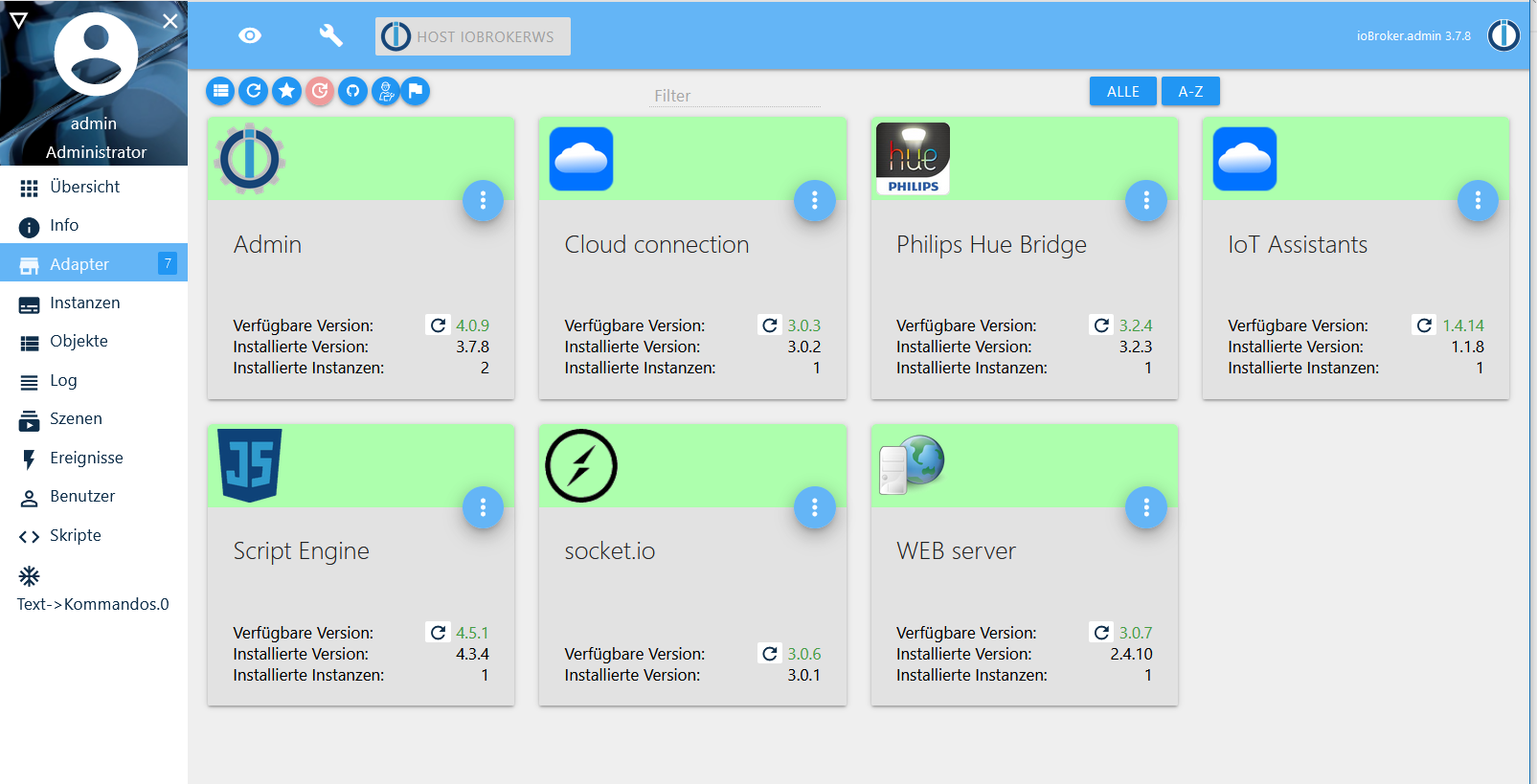
                                          Die Adapter sind wieder da! Ich hatte da noch den Knopf gedrückt der nur Adapter mit aktualisierungen anzeigt.
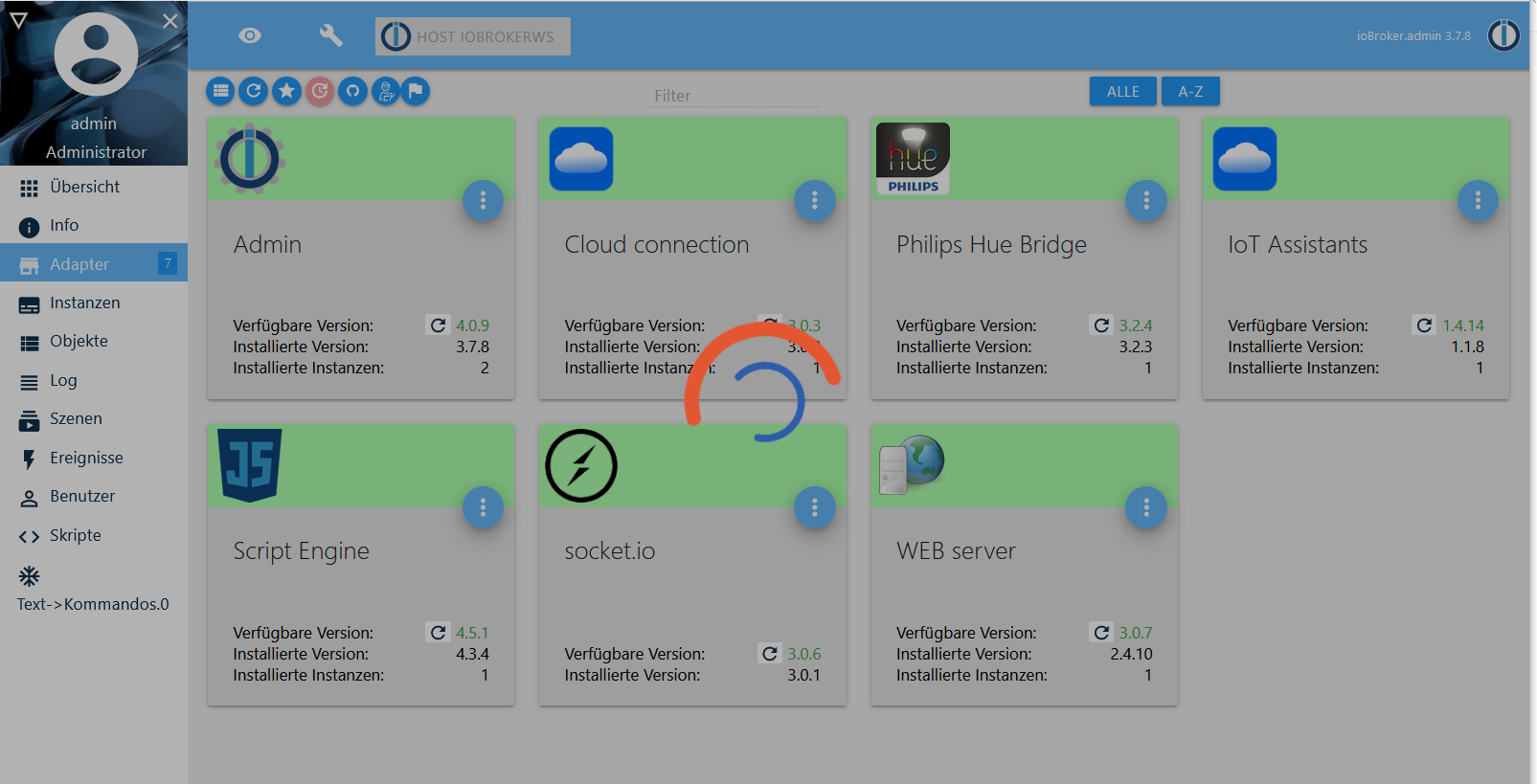
                                          Als ich den deaktivierte kam die Liste, inklusive des CloudConnection, der ein Update haben will

                                          Ubuntu auf Intel NUC PC
                                          Node.js v14.18.1
                                          NPM 6.14.15

                                          1 Antwort Letzte Antwort
                                          0

                                          Hey! Du scheinst an dieser Unterhaltung interessiert zu sein, hast aber noch kein Konto.

                                          Hast du es satt, bei jedem Besuch durch die gleichen Beiträge zu scrollen? Wenn du dich für ein Konto anmeldest, kommst du immer genau dorthin zurück, wo du zuvor warst, und kannst dich über neue Antworten benachrichtigen lassen (entweder per E-Mail oder Push-Benachrichtigung). Du kannst auch Lesezeichen speichern und Beiträge positiv bewerten, um anderen Community-Mitgliedern deine Wertschätzung zu zeigen.

                                          Mit deinem Input könnte dieser Beitrag noch besser werden 💗

                                          Registrieren Anmelden
                                          Antworten
                                          • In einem neuen Thema antworten
                                          Anmelden zum Antworten
                                          • Älteste zuerst
                                          • Neuste zuerst
                                          • Meiste Stimmen


                                          Support us

                                          ioBroker
                                          Community Adapters
                                          Donate
                                          FAQ Cloud / IOT
                                          HowTo: Node.js-Update
                                          HowTo: Backup/Restore
                                          Downloads
                                          BLOG

                                          331

                                          Online

                                          32.8k

                                          Benutzer

                                          82.9k

                                          Themen

                                          1.3m

                                          Beiträge
                                          Community
                                          Impressum | Datenschutz-Bestimmungen | Nutzungsbedingungen | Einwilligungseinstellungen
                                          ioBroker Community 2014-2025
                                          logo
                                          • Anmelden

                                          • Du hast noch kein Konto? Registrieren

                                          • Anmelden oder registrieren, um zu suchen
                                          • Erster Beitrag
                                            Letzter Beitrag
                                          0
                                          • Home
                                          • Aktuell
                                          • Tags
                                          • Ungelesen 0
                                          • Kategorien
                                          • Unreplied
                                          • Beliebt
                                          • GitHub
                                          • Docu
                                          • Hilfe