




js-controller 2.0 ab sofort im Latest Repo

-
Hallo, beim Updaten auf js-controller 2.2.9 kommen diverse Fehlermeldungen. Nach dem Update funktioniert alles soweit, ausser dass beim Updaten von Adaptern der selbe Fehler ebenso kommt. Danke für Hinweise, was unternommen werden kann.
root@ioBroker2:~# iobroker upgrade self
Update js-controller from @1.5.3 to @2.2.9
NPM version: 4.6.1
npm install iobroker.js-controller@2.2.9 --unsafe-perm --production --save --prefix "/opt/iobroker" (System call)
../authenticate_pam.cc:30:31: fatal error: security/pam_appl.h: Datei oder Verzeichnis nicht gefunden
 #include <security/pam_appl.h>
                               ^
compilation terminated.
make: *** [Release/obj.target/authenticate_pam/authenticate_pam.o] Fehler 1
gyp ERR! build error
gyp ERR! stack Error: `make` failed with exit code: 2
gyp ERR! stack     at ChildProcess.onExit (/root/.nvm/versions/node/v8.11.3/lib/node_modules/npm/node_modules/node-gyp/lib/build.js:285:23)
gyp ERR! stack     at emitTwo (events.js:126:13)
gyp ERR! stack     at ChildProcess.emit (events.js:214:7)
gyp ERR! stack     at Process.ChildProcess._handle.onexit (internal/child_process.js:198:12)
gyp ERR! System Linux 4.9.0-8-amd64
gyp ERR! command "/root/.nvm/versions/node/v8.11.3/bin/node" "/root/.nvm/versions/node/v8.11.3/lib/node_modules/npm/node_modules/node-gyp/bin/node-gyp.js" "rebuild"
gyp ERR! cwd /opt/iobroker/node_modules/authenticate-pam
gyp ERR! node -v v8.11.3
gyp ERR! node-gyp -v v3.6.0
gyp ERR! not ok
npm WARN optional SKIPPING OPTIONAL DEPENDENCY: fsevents@~2.1.2 (node_modules/chokidar/node_modules/fsevents):
npm WARN notsup SKIPPING OPTIONAL DEPENDENCY: Unsupported platform for fsevents@2.1.3: wanted {"os":"darwin","arch":"any"} (current: {"os":"linux","arch":"x64"})
npm WARN ws@7.2.3 requires a peer of bufferutil@^4.0.1 but none was installed.
npm WARN ws@7.2.3 requires a peer of utf-8-validate@^5.0.2 but none was installed.
npm WARN optional SKIPPING OPTIONAL DEPENDENCY: authenticate-pam@1.0.2 (node_modules/authenticate-pam):
npm WARN optional SKIPPING OPTIONAL DEPENDENCY: authenticate-pam@1.0.2 install: `node-gyp rebuild`
npm WARN optional SKIPPING OPTIONAL DEPENDENCY: Exit status 1
Host "ioBroker2" (linux) updated
Execute: chmod -R 777 /opt/iobroker
Chmod finished. Restart controller
Starting node restart.js
Update von Adapter:
$ ./iobroker upgrade cloud Update cloud from @3.0.2 to @3.0.3 NPM version: 4.6.1 npm install iobroker.cloud@3.0.3 --unsafe-perm --loglevel error --prefix "/opt/iobroker" (System call) ../authenticate_pam.cc:30:31: fatal error: security/pam_appl.h: Datei oder Verzeichnis nicht gefunden #include <security/pam_appl.h> ^compilation terminated. make: *** [Release/obj.target/authenticate_pam/authenticate_pam.o] Fehler 1 gyp ERR! build error gyp ERR! stack Error: `make` failed with exit code: 2gyp ERR! stack at ChildProcess.onExit (/root/.nvm/versions/node/v8.11.3/lib/node_modules/npm/node_modules/node-gyp/lib/build.js:285:23)gyp ERR! stack at emitTwo (events.js:126:13)gyp ERR! stack at ChildProcess.emit (events.js:214:7)gyp ERR! stack at Process.ChildProcess._handle.onexit (internal/child_process.js:198:12)gyp ERR! System Linux 4.9.0-8-amd64gyp ERR! command "/root/.nvm/versions/node/v8.11.3/bin/node" "/root/.nvm/versions/node/v8.11.3/lib/node_modules/npm/node_modules/node-gyp/bin/node-gyp.js" "rebuild"gyp ERR! cwd /opt/iobroker/node_modules/authenticate-pamgyp ERR! node -v v8.11.3gyp ERR! node-gyp -v v3.6.0gyp ERR! not ok upload [6] cloud.admin /opt/iobroker/node_modules/iobroker.cloud/admin/words.js words.js application/javascript Update "system.adapter.cloud.0" upload [5] cloud.admin /opt/iobroker/node_modules/iobroker.cloud/admin/index_m.html index_m.html text/html upload [4] cloud.admin /opt/iobroker/node_modules/iobroker.cloud/admin/index.html index.html text/html upload [3] cloud.admin /opt/iobroker/node_modules/iobroker.cloud/admin/cloud.png cloud.png image/png upload [2] cloud.admin /opt/iobroker/node_modules/iobroker.cloud/admin/blockly.js blockly.js application/javascript upload [1] cloud.admin /opt/iobroker/node_modules/iobroker.cloud/admin/alexalogo.png alexalogo.png image/png upload [0] cloud.admin /opt/iobroker/node_modules/iobroker.cloud/admin/actions.js actions.js application/javascript Adapter "cloud" updated process exited with code 0 -
Hallo, beim Updaten auf js-controller 2.2.9 kommen diverse Fehlermeldungen. Nach dem Update funktioniert alles soweit, ausser dass beim Updaten von Adaptern der selbe Fehler ebenso kommt. Danke für Hinweise, was unternommen werden kann.
root@ioBroker2:~# iobroker upgrade self
Update js-controller from @1.5.3 to @2.2.9
NPM version: 4.6.1
npm install iobroker.js-controller@2.2.9 --unsafe-perm --production --save --prefix "/opt/iobroker" (System call)
../authenticate_pam.cc:30:31: fatal error: security/pam_appl.h: Datei oder Verzeichnis nicht gefunden
 #include <security/pam_appl.h>
                               ^
compilation terminated.
make: *** [Release/obj.target/authenticate_pam/authenticate_pam.o] Fehler 1
gyp ERR! build error
gyp ERR! stack Error: `make` failed with exit code: 2
gyp ERR! stack     at ChildProcess.onExit (/root/.nvm/versions/node/v8.11.3/lib/node_modules/npm/node_modules/node-gyp/lib/build.js:285:23)
gyp ERR! stack     at emitTwo (events.js:126:13)
gyp ERR! stack     at ChildProcess.emit (events.js:214:7)
gyp ERR! stack     at Process.ChildProcess._handle.onexit (internal/child_process.js:198:12)
gyp ERR! System Linux 4.9.0-8-amd64
gyp ERR! command "/root/.nvm/versions/node/v8.11.3/bin/node" "/root/.nvm/versions/node/v8.11.3/lib/node_modules/npm/node_modules/node-gyp/bin/node-gyp.js" "rebuild"
gyp ERR! cwd /opt/iobroker/node_modules/authenticate-pam
gyp ERR! node -v v8.11.3
gyp ERR! node-gyp -v v3.6.0
gyp ERR! not ok
npm WARN optional SKIPPING OPTIONAL DEPENDENCY: fsevents@~2.1.2 (node_modules/chokidar/node_modules/fsevents):
npm WARN notsup SKIPPING OPTIONAL DEPENDENCY: Unsupported platform for fsevents@2.1.3: wanted {"os":"darwin","arch":"any"} (current: {"os":"linux","arch":"x64"})
npm WARN ws@7.2.3 requires a peer of bufferutil@^4.0.1 but none was installed.
npm WARN ws@7.2.3 requires a peer of utf-8-validate@^5.0.2 but none was installed.
npm WARN optional SKIPPING OPTIONAL DEPENDENCY: authenticate-pam@1.0.2 (node_modules/authenticate-pam):
npm WARN optional SKIPPING OPTIONAL DEPENDENCY: authenticate-pam@1.0.2 install: `node-gyp rebuild`
npm WARN optional SKIPPING OPTIONAL DEPENDENCY: Exit status 1
Host "ioBroker2" (linux) updated
Execute: chmod -R 777 /opt/iobroker
Chmod finished. Restart controller
Starting node restart.js
Update von Adapter:
$ ./iobroker upgrade cloud Update cloud from @3.0.2 to @3.0.3 NPM version: 4.6.1 npm install iobroker.cloud@3.0.3 --unsafe-perm --loglevel error --prefix "/opt/iobroker" (System call) ../authenticate_pam.cc:30:31: fatal error: security/pam_appl.h: Datei oder Verzeichnis nicht gefunden #include <security/pam_appl.h> ^compilation terminated. make: *** [Release/obj.target/authenticate_pam/authenticate_pam.o] Fehler 1 gyp ERR! build error gyp ERR! stack Error: `make` failed with exit code: 2gyp ERR! stack at ChildProcess.onExit (/root/.nvm/versions/node/v8.11.3/lib/node_modules/npm/node_modules/node-gyp/lib/build.js:285:23)gyp ERR! stack at emitTwo (events.js:126:13)gyp ERR! stack at ChildProcess.emit (events.js:214:7)gyp ERR! stack at Process.ChildProcess._handle.onexit (internal/child_process.js:198:12)gyp ERR! System Linux 4.9.0-8-amd64gyp ERR! command "/root/.nvm/versions/node/v8.11.3/bin/node" "/root/.nvm/versions/node/v8.11.3/lib/node_modules/npm/node_modules/node-gyp/bin/node-gyp.js" "rebuild"gyp ERR! cwd /opt/iobroker/node_modules/authenticate-pamgyp ERR! node -v v8.11.3gyp ERR! node-gyp -v v3.6.0gyp ERR! not ok upload [6] cloud.admin /opt/iobroker/node_modules/iobroker.cloud/admin/words.js words.js application/javascript Update "system.adapter.cloud.0" upload [5] cloud.admin /opt/iobroker/node_modules/iobroker.cloud/admin/index_m.html index_m.html text/html upload [4] cloud.admin /opt/iobroker/node_modules/iobroker.cloud/admin/index.html index.html text/html upload [3] cloud.admin /opt/iobroker/node_modules/iobroker.cloud/admin/cloud.png cloud.png image/png upload [2] cloud.admin /opt/iobroker/node_modules/iobroker.cloud/admin/blockly.js blockly.js application/javascript upload [1] cloud.admin /opt/iobroker/node_modules/iobroker.cloud/admin/alexalogo.png alexalogo.png image/png upload [0] cloud.admin /opt/iobroker/node_modules/iobroker.cloud/admin/actions.js actions.js application/javascript Adapter "cloud" updated process exited with code 0@Nightly Da versuchst du aber einen Sprung...
nodejs -v
node -v
Und wenn du da auf einem Debian unterwegs bist: Ich bin kein Freund von root-shells...
lsb_release -a -
@Nightly Da versuchst du aber einen Sprung...
nodejs -v
node -v
Und wenn du da auf einem Debian unterwegs bist: Ich bin kein Freund von root-shells...
lsb_release -aroot@ioBroker2:~# nodejs -v v8.12.0 root@ioBroker2:~# node -v v8.11.3 root@ioBroker2:~# lsb_release -a No LSB modules are available. Distributor ID: Debian Description: Debian GNU/Linux 9.5 (stretch) Release: 9.5 Codename: stretch -
root@ioBroker2:~# nodejs -v v8.12.0 root@ioBroker2:~# node -v v8.11.3 root@ioBroker2:~# lsb_release -a No LSB modules are available. Distributor ID: Debian Description: Debian GNU/Linux 9.5 (stretch) Release: 9.5 Codename: stretch@Nightly node falsch installiert (und in einer zu niedrigen Version für iobroker 2.2.9, denke ich) .
Und melde dich als root ab! Das wird als normaler user ausgeführt. (Es sei denn, das läuft im Docker ab...)
-
Hallo, beim Updaten auf js-controller 2.2.9 kommen diverse Fehlermeldungen. Nach dem Update funktioniert alles soweit, ausser dass beim Updaten von Adaptern der selbe Fehler ebenso kommt. Danke für Hinweise, was unternommen werden kann.
root@ioBroker2:~# iobroker upgrade self
Update js-controller from @1.5.3 to @2.2.9
NPM version: 4.6.1
npm install iobroker.js-controller@2.2.9 --unsafe-perm --production --save --prefix "/opt/iobroker" (System call)
../authenticate_pam.cc:30:31: fatal error: security/pam_appl.h: Datei oder Verzeichnis nicht gefunden
 #include <security/pam_appl.h>
                               ^
compilation terminated.
make: *** [Release/obj.target/authenticate_pam/authenticate_pam.o] Fehler 1
gyp ERR! build error
gyp ERR! stack Error: `make` failed with exit code: 2
gyp ERR! stack     at ChildProcess.onExit (/root/.nvm/versions/node/v8.11.3/lib/node_modules/npm/node_modules/node-gyp/lib/build.js:285:23)
gyp ERR! stack     at emitTwo (events.js:126:13)
gyp ERR! stack     at ChildProcess.emit (events.js:214:7)
gyp ERR! stack     at Process.ChildProcess._handle.onexit (internal/child_process.js:198:12)
gyp ERR! System Linux 4.9.0-8-amd64
gyp ERR! command "/root/.nvm/versions/node/v8.11.3/bin/node" "/root/.nvm/versions/node/v8.11.3/lib/node_modules/npm/node_modules/node-gyp/bin/node-gyp.js" "rebuild"
gyp ERR! cwd /opt/iobroker/node_modules/authenticate-pam
gyp ERR! node -v v8.11.3
gyp ERR! node-gyp -v v3.6.0
gyp ERR! not ok
npm WARN optional SKIPPING OPTIONAL DEPENDENCY: fsevents@~2.1.2 (node_modules/chokidar/node_modules/fsevents):
npm WARN notsup SKIPPING OPTIONAL DEPENDENCY: Unsupported platform for fsevents@2.1.3: wanted {"os":"darwin","arch":"any"} (current: {"os":"linux","arch":"x64"})
npm WARN ws@7.2.3 requires a peer of bufferutil@^4.0.1 but none was installed.
npm WARN ws@7.2.3 requires a peer of utf-8-validate@^5.0.2 but none was installed.
npm WARN optional SKIPPING OPTIONAL DEPENDENCY: authenticate-pam@1.0.2 (node_modules/authenticate-pam):
npm WARN optional SKIPPING OPTIONAL DEPENDENCY: authenticate-pam@1.0.2 install: `node-gyp rebuild`
npm WARN optional SKIPPING OPTIONAL DEPENDENCY: Exit status 1
Host "ioBroker2" (linux) updated
Execute: chmod -R 777 /opt/iobroker
Chmod finished. Restart controller
Starting node restart.js
Update von Adapter:
$ ./iobroker upgrade cloud Update cloud from @3.0.2 to @3.0.3 NPM version: 4.6.1 npm install iobroker.cloud@3.0.3 --unsafe-perm --loglevel error --prefix "/opt/iobroker" (System call) ../authenticate_pam.cc:30:31: fatal error: security/pam_appl.h: Datei oder Verzeichnis nicht gefunden #include <security/pam_appl.h> ^compilation terminated. make: *** [Release/obj.target/authenticate_pam/authenticate_pam.o] Fehler 1 gyp ERR! build error gyp ERR! stack Error: `make` failed with exit code: 2gyp ERR! stack at ChildProcess.onExit (/root/.nvm/versions/node/v8.11.3/lib/node_modules/npm/node_modules/node-gyp/lib/build.js:285:23)gyp ERR! stack at emitTwo (events.js:126:13)gyp ERR! stack at ChildProcess.emit (events.js:214:7)gyp ERR! stack at Process.ChildProcess._handle.onexit (internal/child_process.js:198:12)gyp ERR! System Linux 4.9.0-8-amd64gyp ERR! command "/root/.nvm/versions/node/v8.11.3/bin/node" "/root/.nvm/versions/node/v8.11.3/lib/node_modules/npm/node_modules/node-gyp/bin/node-gyp.js" "rebuild"gyp ERR! cwd /opt/iobroker/node_modules/authenticate-pamgyp ERR! node -v v8.11.3gyp ERR! node-gyp -v v3.6.0gyp ERR! not ok upload [6] cloud.admin /opt/iobroker/node_modules/iobroker.cloud/admin/words.js words.js application/javascript Update "system.adapter.cloud.0" upload [5] cloud.admin /opt/iobroker/node_modules/iobroker.cloud/admin/index_m.html index_m.html text/html upload [4] cloud.admin /opt/iobroker/node_modules/iobroker.cloud/admin/index.html index.html text/html upload [3] cloud.admin /opt/iobroker/node_modules/iobroker.cloud/admin/cloud.png cloud.png image/png upload [2] cloud.admin /opt/iobroker/node_modules/iobroker.cloud/admin/blockly.js blockly.js application/javascript upload [1] cloud.admin /opt/iobroker/node_modules/iobroker.cloud/admin/alexalogo.png alexalogo.png image/png upload [0] cloud.admin /opt/iobroker/node_modules/iobroker.cloud/admin/actions.js actions.js application/javascript Adapter "cloud" updated process exited with code 0 -
@paul53 said in js-controller 2.0 ab sofort im Latest Repo:
Die Version ist sehr alt.
Nicht nur alt, sondern auch schief installiert.
-
@Nightly node falsch installiert (und in einer zu niedrigen Version für iobroker 2.2.9, denke ich) .
Und melde dich als root ab! Das wird als normaler user ausgeführt. (Es sei denn, das läuft im Docker ab...)
@Thomas-Braun Was meinst du mit "falsch"/"schief" installiert? Unterschiedliche Versionen von nodejs und node? Hatte da vor einiger Zeit Probleme mit yahka Adapter, als ich zu aktuell war, und musste da mühsam zurück. Seit dann habe ich's gelassen ;)
Bezüglich root schaue ich mir an.
-
@Thomas-Braun Was meinst du mit "falsch"/"schief" installiert? Unterschiedliche Versionen von nodejs und node? Hatte da vor einiger Zeit Probleme mit yahka Adapter, als ich zu aktuell war, und musste da mühsam zurück. Seit dann habe ich's gelassen ;)
Bezüglich root schaue ich mir an.
@Nightly said in js-controller 2.0 ab sofort im Latest Repo:
Seit dann habe ich's gelassen
Das sieht man. Die Baustelle ist zugemüllt.
Bezüglich root schaue ich mir an.
Was gibt es dann da 'anzuschauen?
-
@Nightly said in js-controller 2.0 ab sofort im Latest Repo:
Seit dann habe ich's gelassen
Das sieht man. Die Baustelle ist zugemüllt.
Bezüglich root schaue ich mir an.
Was gibt es dann da 'anzuschauen?
-
@Thomas-Braun Willst du mir helfen, oder nur rummeckern? Die Frage was du mit falsch/schief meinst hast du nicht beantwortet. Das würde weiter helfen. Dankeschön.
@Nightly Du kannst Hilfe bekommen:
Die Versionen von node und nodejs müssen übereinstimmen. Soweit zu falsch.
Schief ist das, weil die abweichende Version 'irgendwie' händisch in das System geknüppelt wurde.
Und dann ist die Version 8 zu alt für den js-controller 2.2.9.
Wir können das Problem angehen, dann aber auf einem 'sauberen' Grundsystem. Mit korrektem user login und nicht als 'root' eingeloggt.Vermutlich kommt die schiefe Installation nämlich dadurch erst zustande.
-
@Nightly Du kannst Hilfe bekommen:
Die Versionen von node und nodejs müssen übereinstimmen. Soweit zu falsch.
Schief ist das, weil die abweichende Version 'irgendwie' händisch in das System geknüppelt wurde.
Und dann ist die Version 8 zu alt für den js-controller 2.2.9.
Wir können das Problem angehen, dann aber auf einem 'sauberen' Grundsystem. Mit korrektem user login und nicht als 'root' eingeloggt.Vermutlich kommt die schiefe Installation nämlich dadurch erst zustande.
@Thomas-Braun Vielen Dank für die Klärung. Wie erwähnt musste ich da mit nodejs und node Verseionen hin und her probieren, bis yahka wieder lief. Ich schaue mir das die nächsten Tage an, wie ich in meinem Clone vorgehe, um alles geordnet upzudaten, und dass dann alles noch funktioniert.
Aber Version 8 ist nicht zu alt für js-controller 2x (siehe hier) :
-
Ab der Version 2.0 des js-controllers (das Freigabedatum ist noch nicht bekannt) sind die Anpassungen so tiefgreifend, dass die Node.js-Versionen 4 und 6 nicht mehr unterstützt werden können.
-
Ab Version 3.0 vom Controller, der gerade (Stand 24.4.2020) im Latest Repository ist, wird Nodejs 10.x Minimum sein.
-
-
@Thomas-Braun Vielen Dank für die Klärung. Wie erwähnt musste ich da mit nodejs und node Verseionen hin und her probieren, bis yahka wieder lief. Ich schaue mir das die nächsten Tage an, wie ich in meinem Clone vorgehe, um alles geordnet upzudaten, und dass dann alles noch funktioniert.
Aber Version 8 ist nicht zu alt für js-controller 2x (siehe hier) :
-
Ab der Version 2.0 des js-controllers (das Freigabedatum ist noch nicht bekannt) sind die Anpassungen so tiefgreifend, dass die Node.js-Versionen 4 und 6 nicht mehr unterstützt werden können.
-
Ab Version 3.0 vom Controller, der gerade (Stand 24.4.2020) im Latest Repository ist, wird Nodejs 10.x Minimum sein.
@Nightly Nur ist node8 schon längst obsolet. Wird nicht mehr supportet.
Der Eintrag von Stabilostick ist auch vom 1 Jun 2019, 02:46
Also mindestens 10 ist da heute angesagt. -
-
@Nightly Nur ist node8 schon längst obsolet. Wird nicht mehr supportet.
Der Eintrag von Stabilostick ist auch vom 1 Jun 2019, 02:46
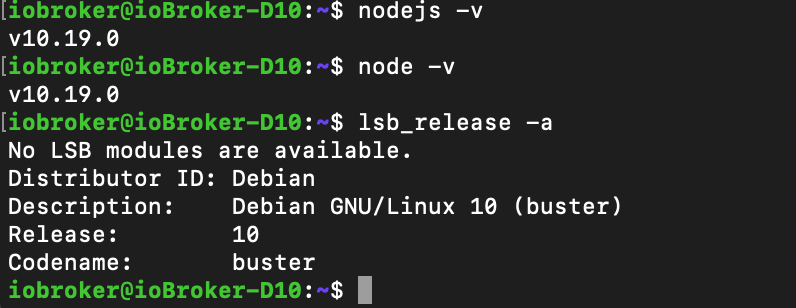
Also mindestens 10 ist da heute angesagt.@Thomas-Braun So, habe ne aktuelle buster Disti installiert und den ioBroker migriert. Ein ganzes Stück Arbeit. Insbesondere musste das gesamte Homekit auf dem Phone neu verbunden und neu konfiguriert werden, da mit den bestehender Einstellung auf dem Phone nicht zu yahka verbunden werden konnte. Werde wohl oder übel wieder einige Zeit auf diesem Stand bleiben, bis das nächste grosse Update gezwungenermassen ansteht. Danke für den Hint bez. nodejs/node Versionen. Und läuft jetzt auch im Userkontext.
-
@Thomas-Braun So, habe ne aktuelle buster Disti installiert und den ioBroker migriert. Ein ganzes Stück Arbeit. Insbesondere musste das gesamte Homekit auf dem Phone neu verbunden und neu konfiguriert werden, da mit den bestehender Einstellung auf dem Phone nicht zu yahka verbunden werden konnte. Werde wohl oder übel wieder einige Zeit auf diesem Stand bleiben, bis das nächste grosse Update gezwungenermassen ansteht. Danke für den Hint bez. nodejs/node Versionen. Und läuft jetzt auch im Userkontext.
@Nightly Das schaut doch schon mal ganz ordentlich aus.
Richtig schön wäre, wenn du dich auch nicht als iobroker einloggen würdest. Das ist ein system user. -
Ich dachte, diese Version wäre schon Asbach Uralt?
Es gibt doch schon die Version 3.x oder irre ich?
https://forum.iobroker.net/topic/32481/js-controller-3-0-jetzt-im-latestIObroker auf dem NUC als VM.
Da ich noch keine Aktoren habe, wird momentan via Radar nur der AB der Fritzbox ein- und ausgeschaltet.
Welches Smarthome-System es letztendlich wird, weiß ich noch nicht. Vielleicht kommen auch nur Zigbee-Geräte ins Haus. -
Ich dachte, diese Version wäre schon Asbach Uralt?
Es gibt doch schon die Version 3.x oder irre ich?
https://forum.iobroker.net/topic/32481/js-controller-3-0-jetzt-im-latest





Hey! Du scheinst an dieser Unterhaltung interessiert zu sein, hast aber noch kein Konto.
Hast du es satt, bei jedem Besuch durch die gleichen Beiträge zu scrollen? Wenn du dich für ein Konto anmeldest, kommst du immer genau dorthin zurück, wo du zuvor warst, und kannst dich über neue Antworten benachrichtigen lassen (entweder per E-Mail oder Push-Benachrichtigung). Du kannst auch Lesezeichen speichern und Beiträge positiv bewerten, um anderen Community-Mitgliedern deine Wertschätzung zu zeigen.
Mit deinem Input könnte dieser Beitrag noch besser werden 💗
Registrieren Anmelden455
Online33.0k
Benutzer83.6k
Themen1.3m
Beiträge