



Skip to content
  • Home
  • Aktuell
  • Tags
  • 0 Ungelesen 0
  • Kategorien
  • Unreplied
  • Beliebt
  • GitHub
  • Docu
  • Hilfe
Skins
  • Light
  • Brite
  • Cerulean
  • Cosmo
  • Flatly
  • Journal
  • Litera
  • Lumen
  • Lux
  • Materia
  • Minty
  • Morph
  • Pulse
  • Sandstone
  • Simplex
  • Sketchy
  • Spacelab
  • United
  • Yeti
  • Zephyr
  • Dark
  • Cyborg
  • Darkly
  • Quartz
  • Slate
  • Solar
  • Superhero
  • Vapor

  • Standard: (Kein Skin)
  • Kein Skin
Einklappen
ioBroker Logo

Community Forum

donate donate
  1. ioBroker Community Home
  2. Русский
  3. ioBroker
  4. ioBroker драйвера
  5. Onkyo

NEWS

  • UPDATE 31.10.: Amazon Alexa - ioBroker Skill läuft aus ?
    apollon77A
    apollon77
    48
    3
    8.9k

  • Monatsrückblick – September 2025
    BluefoxB
    Bluefox
    13
    1
    2.3k

  • Neues Video "KI im Smart Home" - ioBroker plus n8n
    BluefoxB
    Bluefox
    16
    1
    3.5k

Onkyo

Geplant Angeheftet Gesperrt Verschoben ioBroker драйвера
120 Beiträge 4 Kommentatoren 22.6k Aufrufe
  • Älteste zuerst
  • Neuste zuerst
  • Meiste Stimmen
Antworten
  • In einem neuen Thema antworten
Anmelden zum Antworten
Dieses Thema wurde gelöscht. Nur Nutzer mit entsprechenden Rechten können es sehen.
  • I Offline
    I Offline
    instalator
    schrieb am zuletzt editiert von
    #88

    Вчера появился system-power)

    Видимо с версиями глюк, а вот громкость так и работает криво, регулировать невозможно. Похоже что после изменения уровня не правильно отрабатывает запрос на текущее значение.

    Высокий уровень Децибел вреден для здоровья!

    http://blog.instalator.ru/

    1 Antwort Letzte Antwort
    0
    • I Offline
      I Offline
      instalator
      schrieb am zuletzt editiert von
      #89

      system-power появился и теперь на power ругается

      onkyo-0 2016-03-11 18:19:13 error Error: ERROR (cmd_not_exist) Command power does not exist in zone main

      Высокий уровень Децибел вреден для здоровья!

      http://blog.instalator.ru/

      1 Antwort Letzte Antwort
      0
      • I Offline
        I Offline
        instalator
        schrieb am zuletzt editiert von
        #90

        BlueFox давай разберемся с драйвером, уже поднадоел он, громкостью управлять невозможно.

        Может попробуем его подключить к тебе? я порты проброшу у себя.

        ДОБАВЛЕНО!

        Вспомнил, что я когда то вроде правил файл eiscp-commands.json и добавлял туда свой ресивер. Но так как у меня полетел бекап и пришлось IoB ставить с нуля я соответственно файлик не подложил.

        В итоге сейчас добавил корректно свою модель в данный файл и вроде как все заработало. Все файлы с командами добавил в первый пост данного топика

        Высокий уровень Децибел вреден для здоровья!

        http://blog.instalator.ru/

        1 Antwort Letzte Antwort
        0
        • EisbaeeerE Offline
          EisbaeeerE Offline
          Eisbaeeer
          Developer
          schrieb am zuletzt editiert von
          #91

          Hi Guys

          I can not speak russian. So I don´t know about your discuss here. I have added some code to the onkyo adapter to control with VIS. Eventually you have the same thematic!?

          After installing the "new test version" through npm you can use buttons to power on|off zone1 and zone2, muting and other things.

          If you will thest this and report to me (I will do a pull request and need feedback from you) you can do the following:

          1. Delete onkyo instance

          2. Delete onkyo adapter

          3. Delete all onkyo objects

          4. Connect wiht SSH in the folder /opt/iobroker

          5. npm install https://github.com/Eisbaeeer/ioBroker.o … ll/master/

          The adapter appears in admin.

          6. Install instance

          7. configure (check box!)

          8. Start adapter

          Your feedback is welcome!

          Kein support per PM. Bitte im Forum Fragen stellen!

          1 Antwort Letzte Antwort
          0
          • I Offline
            I Offline
            instalator
            schrieb am zuletzt editiert von
            #92

            @Eisbaeeer:

            Hi Guys

            I can not speak russian. So I don´t know about your discuss here. I have added some code to the onkyo adapter to control with VIS. Eventually you have the same thematic!?

            After installing the "new test version" through npm you can use buttons to power on|off zone1 and zone2, muting and other things.

            If you will thest this and report to me (I will do a pull request and need feedback from you) you can do the following:

            1. Delete onkyo instance

            2. Delete onkyo adapter

            3. Delete all onkyo objects

            4. Connect wiht SSH in the folder /opt/iobroker

            5. npm install https://github.com/Eisbaeeer/ioBroker.o … ll/master/

            The adapter appears in admin.

            6. Install instance

            7. configure (check box!)

            8. Start adapter

            Your feedback is welcome! `
            A strange development, why do we need a new driver for the VIS widget?

            ! ````
            [{"tpl":"tplMetroTileToggle","data":{"visibility-cond":"==","visibility-val":1,"hover":"true","transform":"true",
            "bg_class_false":"bg-gray","bg_class_true":"bg-teal","icon_class_false":"icon-arrow-up-2","icon_class_true":"icon-arrow-up-2",
            "icon_badge_false":"","icon_badge_true":"","badge_bg_class_false":"","badge_bg_class_true":"","brand_bg_class_false":"",
            "brand_bg_class_true":"","visibility-oid":"","oid":"","label_false":"Закрыто","label_true":"Закрыто","icon_false":"","icon_true":"",
            "oidTrue":"onkyo.0.command","oidFalse":"onkyo.0.command","select_on_true":false,"oidTrueValue":"ZMT00",
            "oidFalseValue":"ZMT01","badge_top":"0","badge_left":"0","gestures-offsetX":0,"gestures-offsetY":0,
            "gestures-swiping-value":"","gestures-rotating-value":"","gestures-pinching-value":"","gestures-swipeRight-value":"",
            "gestures-swipeLeft-value":"","gestures-swipeUp-value":"","gestures-swipeDown-value":"","gestures-rotateLeft-value":"",
            "gestures-rotateRight-value":"","gestures-pinchIn-value":"","gestures-pinchOut-value":""},
            "style":{"left":"246px","top":"30px","width":"88px","height":"91px","z-index":"9999","opacity":"1"},"widgetSet":"metro"}]

            Высокий уровень Децибел вреден для здоровья!

            http://blog.instalator.ru/

            1 Antwort Letzte Antwort
            0
            • EisbaeeerE Offline
              EisbaeeerE Offline
              Eisbaeeer
              Developer
              schrieb am zuletzt editiert von
              #93

              @instalator:

              A strange development, why do we need a new driver for the VIS widget? `

              Hi Instalator

              We asked some times in forum, how to use the onkyo with VIS. Nobody tell us, how to use the onkyo adapter.

              Can you explain us how to use the adapter in VIS. Perhaps you realized a much better surface.

              There are some more users who want to use the adapter with VIS. It would be great if you tell us how we can put on/off the zones and the other tools.

              Perhaps you can provide some screenshots?

              I used this strange way for 2nd driver because I don´t know how we should use it and I don´t want to change anything of your code. If the adapter works with VIS, let me say, hey, I learned verry much by programming in this adapter. There is no reaoson to use the code, if the adapter works with VIS. ;-)

              Greetings Eisbaeeer

              Kein support per PM. Bitte im Forum Fragen stellen!

              1 Antwort Letzte Antwort
              0
              • I Offline
                I Offline
                instalator
                schrieb am zuletzt editiert von
                #94

                @Eisbaeeer:

                @instalator:

                A strange development, why do we need a new driver for the VIS widget? `

                Hi Instalator

                We asked some times in forum, how to use the onkyo with VIS. Nobody tell us, how to use the onkyo adapter.

                Can you explain us how to use the adapter in VIS. Perhaps you realized a much better surface.

                There are some more users who want to use the adapter with VIS. It would be great if you tell us how we can put on/off the zones and the other tools.

                Perhaps you can provide some screenshots?

                I used this strange way for 2nd driver because I don´t know how we should use it and I don´t want to change anything of your code. If the adapter works with VIS, let me say, hey, I learned verry much by programming in this adapter. There is no reaoson to use the code, if the adapter works with VIS. ;-)

                Greetings Eisbaeeer `

                All objects in IoB work with VIS.

                I looked at your driver and understand your idea. Make better pullreqest the https://github.com/ioBroker/ioBroker.onkyo drivers and will test together. I think that BlueFox would not mind.

                Высокий уровень Децибел вреден для здоровья!

                http://blog.instalator.ru/

                1 Antwort Letzte Antwort
                0
                • I Offline
                  I Offline
                  instalator
                  schrieb am zuletzt editiert von
                  #95

                  BlueFox! объкты для второй, третьей зоны не создаются по причине отсутствия имени команды в файле команд?

                  Получается для основной зоны имена прописаны:

                  "PWR":{
                  "name":"system-power","description":"System Power Command","values":{
                  "00":{
                  "name":"standby","description":"sets System Standby","models":"set1"},
                  "01":{
                  "name":"on","description":"sets System On","models":"set1"},
                  "QSTN":{
                  "name":"query","description":"gets the System Power Status","models":"set1"}}},
                  

                  А для остальных зон нет:

                  "zone2":{
                  "ZPW":{
                  "standby":{
                  "value":"00","models":"set139"},
                  "on":{
                  "value":"01","models":"set139"},
                  "query":{
                  "value":"QSTN","models":"set139"}},


                  Если переименовать так? они создадутся? или почему тогда создаются не все объекты для команд?

                  "ZPW":{
                  "name":"zone2-power","description":"System Power Command","values":{
                  "00":{
                  "name":"standby","description":"sets System Standby","models":"set139"},
                  "01":{
                  "name":"on","description":"sets System On","models":"set139"},
                  "QSTN":{
                  "name":"query","description":"gets the System Power Status","models":"set139"}}},
                  

                  Высокий уровень Децибел вреден для здоровья!

                  http://blog.instalator.ru/

                  1 Antwort Letzte Antwort
                  0
                  • I Offline
                    I Offline
                    instalator
                    schrieb am zuletzt editiert von
                    #96

                    Нашел косячек в файле команд.

                    Там для PWZ имя стоит power как и для основной зоны.

                    исправил на

                    "zone2":{
                    "Zone2.power":"ZPW",
                    

                    И Zone2.power появился в списке объектов.

                    Так что не русско говорящий товарищь зря пилил свой код)

                    Добавлено! Создал пулреквест, получается мы создаем объекты только для зоны main и имена в разных зонах пересекаются.

                    Высокий уровень Децибел вреден для здоровья!

                    http://blog.instalator.ru/

                    1 Antwort Letzte Antwort
                    0
                    • EisbaeeerE Offline
                      EisbaeeerE Offline
                      Eisbaeeer
                      Developer
                      schrieb am zuletzt editiert von
                      #97

                      ` > All objects in IoB work with VIS.

                      I looked at your driver and understand your idea. . `

                      OK, can you shortly explain, wich button do you use to power on/off and the corrosponding objekt?

                      I don't get running it with only one button.

                      Eisbaeeer

                      Gesendet von meinem SM-G920F mit Tapatalk

                      Kein support per PM. Bitte im Forum Fragen stellen!

                      1 Antwort Letzte Antwort
                      0
                      • EisbaeeerE Offline
                        EisbaeeerE Offline
                        Eisbaeeer
                        Developer
                        schrieb am zuletzt editiert von
                        #98

                        ` > All objects in IoB work with VIS.

                        I looked at your driver and understand your idea. . `

                        OK, can you shortly explain, wich button do you use to power on/off and the corrosponding objekt?

                        I don't get running it with only one button.

                        Eisbaeeer

                        Kein support per PM. Bitte im Forum Fragen stellen!

                        1 Antwort Letzte Antwort
                        0
                        • BluefoxB Offline
                          BluefoxB Offline
                          Bluefox
                          schrieb am zuletzt editiert von
                          #99

                          Hello Installator,

                          i am on vacation till next week, so only then I can help you.

                          greetings,

                          bluefox

                          1 Antwort Letzte Antwort
                          0
                          • I Offline
                            I Offline
                            instalator
                            schrieb am zuletzt editiert von
                            #100

                            @Eisbaeeer:

                            ` > All objects in IoB work with VIS.

                            I looked at your driver and understand your idea. . `

                            OK, can you shortly explain, wich button do you use to power on/off and the corrosponding objekt?

                            I don't get running it with only one button.

                            Eisbaeeer `
                            You wrote a little wrong code.

                            I have made changes that allow you to automatically create objects, but check when BlueFox will return from vacation.

                            https://github.com/GermanBluefox/node-e … 9fac6dca4d

                            https://github.com/ioBroker/ioBroker.on ... 1532dd5799

                            https://github.com/ioBroker/ioBroker.on ... ca6105cb19

                            Change at these files, delete all the objects in Onkio driver and restart the IOB.

                            Высокий уровень Децибел вреден для здоровья!

                            http://blog.instalator.ru/

                            1 Antwort Letzte Antwort
                            0
                            • I Offline
                              I Offline
                              instalator
                              schrieb am zuletzt editiert von
                              #101

                              @Eisbaeeer:

                              ` > All objects in IoB work with VIS.

                              I looked at your driver and understand your idea. . `

                              OK, can you shortly explain, wich button do you use to power on/off and the corrosponding objekt?

                              I don't get running it with only one button.

                              Eisbaeeer `
                              I changed the driver. Objects are created automatically. Replace folder with the drivers, and delete all the objects in Onkio driver and restart the IOB.
                              266_iobroker.onkyo.rar

                              Высокий уровень Децибел вреден для здоровья!

                              http://blog.instalator.ru/

                              1 Antwort Letzte Antwort
                              0
                              • I Offline
                                I Offline
                                instalator
                                schrieb am zuletzt editiert von
                                #102

                                @instalator:

                                I changed the driver. Objects are created automatically. Replace folder with the drivers, and delete all the objects in Onkio driver and restart the IOB.
                                filename="iobroker.onkyo.rar" index="0">~~ `
                                What result?

                                Высокий уровень Децибел вреден для здоровья!

                                http://blog.instalator.ru/

                                1 Antwort Letzte Antwort
                                0
                                • EisbaeeerE Offline
                                  EisbaeeerE Offline
                                  Eisbaeeer
                                  Developer
                                  schrieb am zuletzt editiert von
                                  #103

                                  @instalator:

                                  @instalator:

                                  I changed the driver. Objects are created automatically. Replace folder with the drivers, and delete all the objects in Onkio driver and restart the IOB.
                                  filename="iobroker.onkyo.rar" index="0">~~ What result?

                                  Hi,

                                  I tested with the main power button. Result is, that the button doesn´t change the colour, because the status in iobroker is NOT "true" or "false" or "1" or "0". And this can not be working. Only this 4 states are allowed in iobroker. The object get´s the state (value) "standby".

                                  I have attached a screenshot of my test. The buttons left of the marked are my working buttons who changes the logo by selecting a picture for the value "false" and an other for the value "true".

                                  I tested the "Mute" button, too. This is working how it should !!!

                                  So it seems, that only the feedback of power button is wrong. Can you change that from "standby" to "false" and if the receiver is on to "true"?

                                  At the moment we get:

                                  Receiver off = "standby"

                                  Receiver on = "1"

                                  Correct feedbacks will be:

                                  Receiver off = "false"

                                  Receiver on = "true"
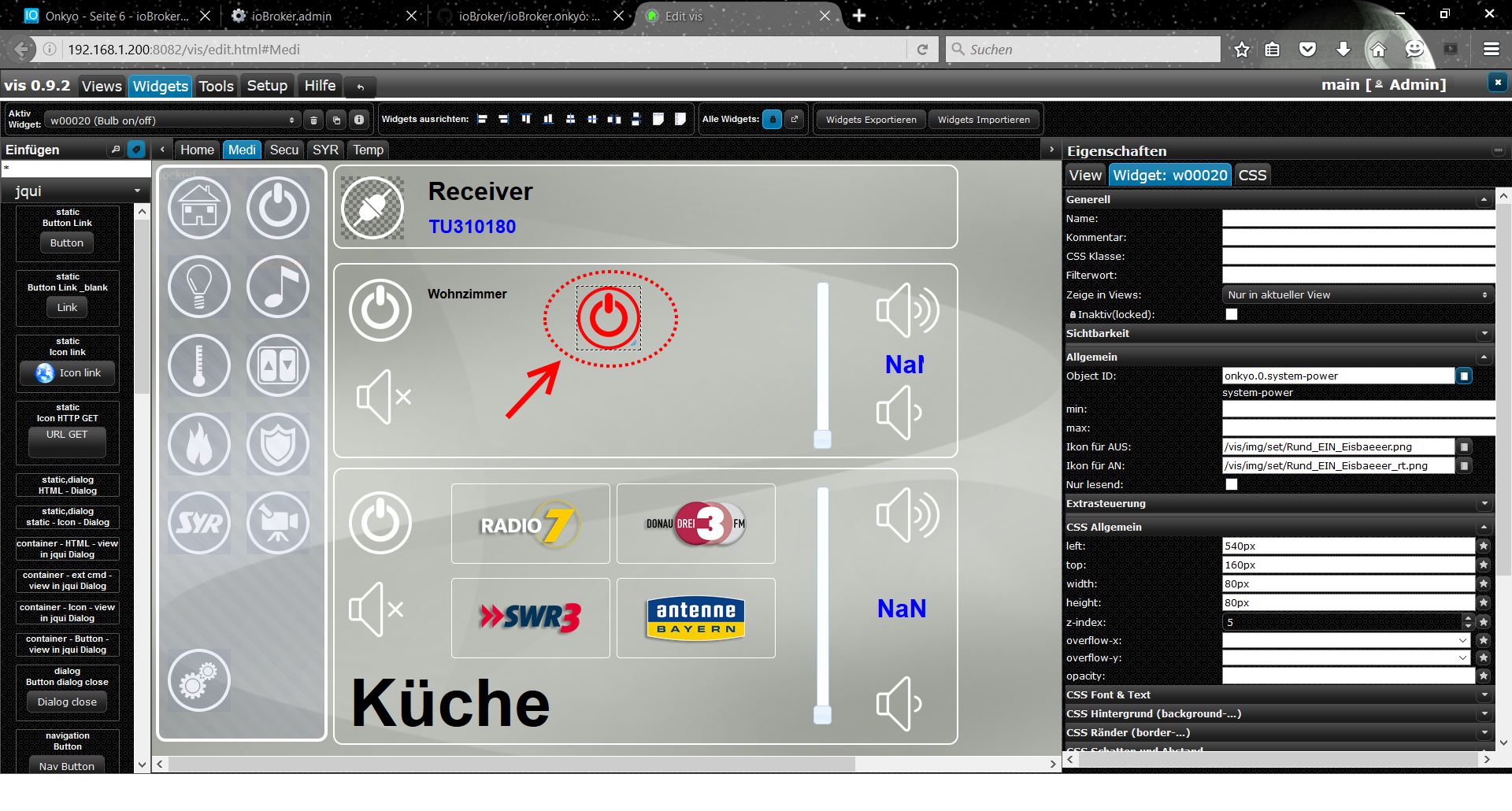
                                  139_screenshot.png

                                  Eisbaeeer

                                  Kein support per PM. Bitte im Forum Fragen stellen!

                                  1 Antwort Letzte Antwort
                                  0
                                  • EisbaeeerE Offline
                                    EisbaeeerE Offline
                                    Eisbaeeer
                                    Developer
                                    schrieb am zuletzt editiert von
                                    #104

                                    Hi

                                    I changed my vis to test further. In zone 1 there is no "radio preset" available. The radio preset in zone2 doesn´t working. If I try to set the preset to "2" for preset memory 2, the receiver doesn´t recognize that. It doesn´t matter, what you type in, no reaction.

                                    The other "net-usb" things are not tested at the moment.

                                    Greetings Eisbaeeer

                                    Kein support per PM. Bitte im Forum Fragen stellen!

                                    1 Antwort Letzte Antwort
                                    0
                                    • I Offline
                                      I Offline
                                      instalator
                                      schrieb am zuletzt editiert von
                                      #105

                                      @Eisbaeeer:

                                      Hi

                                      I changed my vis to test further. In zone 1 there is no "radio preset" available. The radio preset in zone2 doesn´t working. If I try to set the preset to "2" for preset memory 2, the receiver doesn´t recognize that. It doesn´t matter, what you type in, no reaction.

                                      The other "net-usb" things are not tested at the moment.

                                      Greetings Eisbaeeer `
                                      Hallo!

                                      Zuletzt hatte ich den Hörer nachließ. Ich nahm es für eine kostenlose Ersatzkarte hdmi zur Reparatur. Ich kann den Fahrer nur 2 Wochen überprüfen.

                                      Высокий уровень Децибел вреден для здоровья!

                                      http://blog.instalator.ru/

                                      1 Antwort Letzte Antwort
                                      0
                                      • EisbaeeerE Offline
                                        EisbaeeerE Offline
                                        Eisbaeeer
                                        Developer
                                        schrieb am zuletzt editiert von
                                        #106

                                        Hi Installator

                                        The translation does not make sense. I think it´s better to write in english.

                                        I changed the "eiscp-commands.json" to get the status working in onkyo adapter. I changed the both "standby" to "false" states in zone1 and zone2.

                                        You can compare the file with yours:

                                        Now I get the correct feedback and my power buttons are working. Can you change this in your code?

                                        My opinion is, that the adapter has too much overhead for the target function. It is not clear, why we need so much alias for the commands?

                                        Who needs this and for wich function?

                                        My main feature is to control the onkyo through VIS.

                                        Can someone explain how do you use the adapter and the other functions?

                                        My first adapter was created without an extra "node_module" for eiscp. I realized all in RAW mode wihtout too much overhead.

                                        The other issue is, that I get now zone3, zone4 …., but I don´t have this zones!

                                        For me the adapter now doing that what he should. So all is fine and I am happy. I can use it as it is.

                                        Eisbaeeer
                                        139_eiscp-commands.json.txt

                                        Kein support per PM. Bitte im Forum Fragen stellen!

                                        1 Antwort Letzte Antwort
                                        0
                                        • I Offline
                                          I Offline
                                          instalator
                                          schrieb am zuletzt editiert von
                                          #107

                                          @Eisbaeeer:

                                          Hi Installator

                                          The translation does not make sense. I think it´s better to write in english.

                                          I changed the "eiscp-commands.json" to get the status working in onkyo adapter. I changed the both "standby" to "false" states in zone1 and zone2.

                                          You can compare the file with yours:

                                          Now I get the correct feedback and my power buttons are working. Can you change this in your code?

                                          My opinion is, that the adapter has too much overhead for the target function. It is not clear, why we need so much alias for the commands?

                                          Who needs this and for wich function?

                                          My main feature is to control the onkyo through VIS.

                                          Can someone explain how do you use the adapter and the other functions?

                                          My first adapter was created without an extra "node_module" for eiscp. I realized all in RAW mode wihtout too much overhead.

                                          The other issue is, that I get now zone3, zone4 …., but I don´t have this zones!

                                          For me the adapter now doing that what he should. So all is fine and I am happy. I can use it as it is.

                                          Eisbaeeer `
                                          Hello! I can not yet test the driver. I gave my ressiver in the replacement motherboard repair hdmi

                                          Высокий уровень Децибел вреден для здоровья!

                                          http://blog.instalator.ru/

                                          1 Antwort Letzte Antwort
                                          0
                                          Antworten
                                          • In einem neuen Thema antworten
                                          Anmelden zum Antworten
                                          • Älteste zuerst
                                          • Neuste zuerst
                                          • Meiste Stimmen


                                          Support us

                                          ioBroker
                                          Community Adapters
                                          Donate

                                          479

                                          Online

                                          32.5k

                                          Benutzer

                                          81.6k

                                          Themen

                                          1.3m

                                          Beiträge
                                          Community
                                          Impressum | Datenschutz-Bestimmungen | Nutzungsbedingungen | Einwilligungseinstellungen
                                          ioBroker Community 2014-2025
                                          logo
                                          • Anmelden

                                          • Du hast noch kein Konto? Registrieren

                                          • Anmelden oder registrieren, um zu suchen
                                          • Erster Beitrag
                                            Letzter Beitrag
                                          0
                                          • Home
                                          • Aktuell
                                          • Tags
                                          • Ungelesen 0
                                          • Kategorien
                                          • Unreplied
                                          • Beliebt
                                          • GitHub
                                          • Docu
                                          • Hilfe