Skip to content
  • Home
  • Aktuell
  • Tags
  • 0 Ungelesen 0
  • Kategorien
  • Unreplied
  • Beliebt
  • GitHub
  • Docu
  • Hilfe
Skins
  • Light
  • Brite
  • Cerulean
  • Cosmo
  • Flatly
  • Journal
  • Litera
  • Lumen
  • Lux
  • Materia
  • Minty
  • Morph
  • Pulse
  • Sandstone
  • Simplex
  • Sketchy
  • Spacelab
  • United
  • Yeti
  • Zephyr
  • Dark
  • Cyborg
  • Darkly
  • Quartz
  • Slate
  • Solar
  • Superhero
  • Vapor

  • Standard: (Kein Skin)
  • Kein Skin
Einklappen
ioBroker Logo

Community Forum

donate donate
  1. ioBroker Community Home
  2. Deutsch
  3. Skripten / Logik
  4. Blockly
  5. [Frage BLOCKLY ] Klingel Bild per Telegram versenden / Snapshot von Cam per Telegram versenden
NEWS

  • Weihnachtsangebot 2025! 🎄
    BluefoxB
    Bluefox
    18
    1
    677

  • UPDATE 31.10.: Amazon Alexa - ioBroker Skill läuft aus ?
    apollon77A
    apollon77
    48
    3
    9.0k

  • Monatsrückblick – September 2025
    BluefoxB
    Bluefox
    13
    1
    2.3k

[Frage BLOCKLY ] Klingel Bild per Telegram versenden / Snapshot von Cam per Telegram versenden

Geplant Angeheftet Gesperrt Verschoben Blockly
157 Beiträge 36 Kommentatoren 47.0k Aufrufe 31 Watching
  • Älteste zuerst
  • Neuste zuerst
  • Meiste Stimmen
Antworten
  • In einem neuen Thema antworten
Anmelden zum Antworten
Dieses Thema wurde gelöscht. Nur Nutzer mit entsprechenden Rechten können es sehen.
  • KnallochseK Knallochse

    Ich habe mich jetzt mal in die Problematik mit dem Speichern von Bildern reingelesen.
    Eigentlich sollte das speichern in den Vis.0 Ordner ja noch funktionieren.
    Ich habe aber keine Programmierkenntnisse, deshalb die Bitte ob mir bitte jemand bei dem Umschreiben des Scriptes von @Uhula helfen könnte.

    // -------------------------------------------------------------------------
    // Dieses Script überwaht den Zustand eines Bewegungsmelders und speichert bei
    // Aktivierung ein Bild einer Überwachnungskamera in einem Vereichnis und sendet
    // dieses via Telegram.0-Adapter. Nach 10 Sek wird ein weiteres Bild erstellt und
    // gesendet.
    // Die Speicherung der Bilder erfolgt als "Stack", d.h. das aktuellste Bild bekommt
    // immer den Suffix "0" und es werden n Bilder mit den Suffixen 1..n-1 vorgehalten
    // Uhula 2017.11
    // -------------------------------------------------------------------------
    // -------------------------------------------------------------------------
    // Konfiguration
    // -------------------------------------------------------------------------
       // Objekt-ID des Bewegungsmelders
    const oidLichtBewmelderTuer = "shelly.0.SHSW-1#2C6E3A#1.Relay0.Switch";
       // URL zur Kamera umn ein Image (jpg) zu erhalten
    const cam_url = "http://admin:XXXXXXXX@192.168.178.51:80/tmpfs/auto.jpg";
       // Pfadangabe für die Speicherung der Bilder, der Pfad muss existieren
    const dest_path = '/opt/iobroker/iobroker-data/files/vis.0/Kameras/ParkplatzStrasse/';
       // Anzahl der Bilder, die vorgehalten werden sollen
    const imageCountMax = 8;                
       // Prefix für die Bildnamen
    const imageNamePre = "ParkplatzStrasse_"; 
    // -------------------------------------------------------------------------
    // Scriptteil
    // -------------------------------------------------------------------------
    var request = require('request');
    var fs      = require('fs');
    // Bild an telegram schicken 
    //function sendImage (path) { 
        //try {
            //var stats = fs.statSync(path);
            //var msg = formatDate(stats.birthtime,"DD.MM.YYYY hh:mm:ss") + " " + path.substring(path.lastIndexOf('/')+1);
            //sendTo('telegram.0', {
                //text:                   path,
                //caption:                msg, 
                //disable_notification:   true
            //});
        //}
        //catch(err) { if (err.code != "ENOENT") log(err); }     
    //}
    // löscht eine Datei synchron (wartet auf das Ergebnis)
    function fsUnlinkSync(path) {
        try {
            var stats = fs.statSync(path);
            try { fs.unlinkSync(path); }
            catch(err) { if (err.code != "ENOENT") log(err); }     
        }
        catch(err) { if (err.code != "ENOENT") log(err); }
    }
    // benennt eine Datei synchron um (wartet auf das Ergebnis)
    function fsRenameSync(oldPath, newPath) {
        try {
            var stats = fs.statSync(oldPath);
            try { fs.renameSync(oldPath, newPath); }
            catch(err) { if (err.code != "ENOENT") log(err); }     
        }
        catch(err) { if (err.code != "ENOENT") log(err); }
    }
    // Bild speichern und senden
    function saveImage() {
        // Bild imageCountMax-1 löschen
        fsUnlinkSync( dest_path + imageNamePre + (imageCountMax-1) + ".jpg" );
        // Bilder 0..imageCountMax-2 umbenennen
        for (var i=imageCountMax-2; i >= 0; i-- ) { 
            fsRenameSync(dest_path + imageNamePre + i + ".jpg", dest_path + imageNamePre + (i+1) + ".jpg"); 
        }
        // Bild 0 löschen
        var fname = imageNamePre + "0.jpg";
        fsUnlinkSync( fname );
        // Bild holen und speichern
        request.get({url: cam_url, encoding: 'binary'}, function (err, response, body) {
            fs.writeFile(dest_path + fname, body, 'binary', function(err) {
                if (err) {
                    log('Fehler beim Bild speichern: ' + err, 'warn');
                } else {
                    // dem Filesystem 2 Sek Zeit zum Speichern lassen
                    //setTimeout(function() { sendImage(dest_path + fname); }, 2000); 
                }
            }); 
        });
    }
    // sofort ein Bild senden und nach 8 Sek erneut
    function onEvent() {
        saveImage();
        setTimeout(function() { saveImage(); }, 8 * 1000); 
    }
    // Ereignisroutine
    on({id: oidLichtBewmelderTuer, val: true}, function (obj) {
        onEvent( obj );
    });
    // manuelle Ausführung (Test)
    onEvent();
    
    
    GlasfaserG Offline
    GlasfaserG Offline
    Glasfaser
    schrieb am zuletzt editiert von
    #57

    @Knallochse

    Ich habe das hier so bei mir angepasst (Vorlage von Chaot) :

    Es werde 4 Screenshot´s erstellt , per Telegramm versendet und in vis.0/klingelbild zur weiteren Verwendung hinterlegt .

    Datenpunkt in const idklingel und die vier URL anpassen .

    const idklingel = ["hm-rpc.2.00145709AED72D.8.PRESS_SHORT", "hm-rpc.2.00145709AED72D.8.PRESS_LONG", "ID5", "ID4"];
    
    var sperre = false;  //verhindert das doppeltes Drücken das Script stoppt
    
    var timeout1, timeout2, timeout3, timeout4, timeout5, timeout6, timeout7, timeout8, timeout9, timeout10, timeout11;
    
    var fs = require('fs');


    on({id: idklingel, change: "any"}, function (obj) {
    
     if(!sperre) {
    
       sperre = true;


        // Speichert das erste Bild bei Klingeln
    
       exec('wget --output-document /tmp/haustuer1.jpg \'http://user:passwort@192.168.178.53/streaming/channels/101/picture\'');
    
       
        // Nach dem ersten Bild wird nach 2000ms das nächste Bild gespeichert
       timeout1 = setTimeout(function () {
    
         exec('wget --output-document /tmp/haustuer2.jpg \'http://user:passwort@192.168.178.53/streaming/channels/101/picture\''); 
    
       }, 2000);
    
       
        // Nach dem zweiten Bild wird nach 2000ms das nächste Bild gespeichert
       timeout2 = setTimeout(function () {
    
         exec('wget --output-document /tmp/haustuer3.jpg \'http://user:passwort@192.168.178.53/streaming/channels/101/picture\'');
    
       }, 4000);
    
      
        // Nach dem dritten Bild wird nach 2000ms das nächste Bild gespeichert
       timeout3 = setTimeout(function () {
    
         exec('wget --output-document /tmp/haustuer4.jpg \'http://user:passwort@192.168.178.53/streaming/channels/101/picture\'');
    
       }, 6000);
    
    
        // Telegram versenden
       timeout4 = setTimeout(function(){
    
           sendTo('telegram.0', {text: '/tmp/haustuer1.jpg', caption: 'Jemand klingelt an der Haustür !!!'});
    
                   //log ('__ Klingel-Bild wurde versendet __');
    
       }, 8000); 
       timeout5 = setTimeout(function(){
    
           sendTo('telegram.0', {text: '/tmp/haustuer2.jpg', caption: 'Jemand klingelt an der Haustür !!!'});
    
                   //log ('__ Klingel-Bild wurde versendet __');
    
       }, 9000); 
    
    
       }
              
    
       timeout6 = setTimeout(function() {
    
          sperre = false;
    
       }, 5000); //Zeit für Klingelsperre 1.Zeile
    
    
        // Bilder werden nach vis gespeichert
       timeout7 = setTimeout(function () {
    
            const bild1 = fs.readFileSync('/tmp/haustuer1.jpg');
    
            writeFile('vis.0','/klingelbild/haustuer1.jpg', bild1);
    
            const bild2 = fs.readFileSync('/tmp/haustuer2.jpg');
    
            writeFile('vis.0','/klingelbild/haustuer2.jpg', bild2);
    
            const bild3 = fs.readFileSync('/tmp/haustuer3.jpg');
    
            writeFile('vis.0','/klingelbild/haustuer3.jpg', bild3);
    
            const bild4 = fs.readFileSync('/tmp/haustuer4.jpg');
    
            writeFile('vis.0','/klingelbild/haustuer4.jpg', bild4);
    
       }, 20000); 
    
    });


    Synology 918+ 16GB - ioBroker in Docker v9 , VISO auf Trekstor Primebook C13 13,3" , Hikvision Domkameras mit Surveillance Station .. CCU RaspberryMatic in Synology VM .. Zigbee CC2538+CC2592 .. Sonoff .. KNX .. Modbus ..

    KnallochseK 1 Antwort Letzte Antwort
    1
    • GlasfaserG Glasfaser

      @Knallochse

      Ich habe das hier so bei mir angepasst (Vorlage von Chaot) :

      Es werde 4 Screenshot´s erstellt , per Telegramm versendet und in vis.0/klingelbild zur weiteren Verwendung hinterlegt .

      Datenpunkt in const idklingel und die vier URL anpassen .

      const idklingel = ["hm-rpc.2.00145709AED72D.8.PRESS_SHORT", "hm-rpc.2.00145709AED72D.8.PRESS_LONG", "ID5", "ID4"];
      
      var sperre = false;  //verhindert das doppeltes Drücken das Script stoppt
      
      var timeout1, timeout2, timeout3, timeout4, timeout5, timeout6, timeout7, timeout8, timeout9, timeout10, timeout11;
      
      var fs = require('fs');


      on({id: idklingel, change: "any"}, function (obj) {
      
       if(!sperre) {
      
         sperre = true;


          // Speichert das erste Bild bei Klingeln
      
         exec('wget --output-document /tmp/haustuer1.jpg \'http://user:passwort@192.168.178.53/streaming/channels/101/picture\'');
      
         
          // Nach dem ersten Bild wird nach 2000ms das nächste Bild gespeichert
         timeout1 = setTimeout(function () {
      
           exec('wget --output-document /tmp/haustuer2.jpg \'http://user:passwort@192.168.178.53/streaming/channels/101/picture\''); 
      
         }, 2000);
      
         
          // Nach dem zweiten Bild wird nach 2000ms das nächste Bild gespeichert
         timeout2 = setTimeout(function () {
      
           exec('wget --output-document /tmp/haustuer3.jpg \'http://user:passwort@192.168.178.53/streaming/channels/101/picture\'');
      
         }, 4000);
      
        
          // Nach dem dritten Bild wird nach 2000ms das nächste Bild gespeichert
         timeout3 = setTimeout(function () {
      
           exec('wget --output-document /tmp/haustuer4.jpg \'http://user:passwort@192.168.178.53/streaming/channels/101/picture\'');
      
         }, 6000);
      
      
          // Telegram versenden
         timeout4 = setTimeout(function(){
      
             sendTo('telegram.0', {text: '/tmp/haustuer1.jpg', caption: 'Jemand klingelt an der Haustür !!!'});
      
                     //log ('__ Klingel-Bild wurde versendet __');
      
         }, 8000); 
         timeout5 = setTimeout(function(){
      
             sendTo('telegram.0', {text: '/tmp/haustuer2.jpg', caption: 'Jemand klingelt an der Haustür !!!'});
      
                     //log ('__ Klingel-Bild wurde versendet __');
      
         }, 9000); 
      
      
         }
                
      
         timeout6 = setTimeout(function() {
      
            sperre = false;
      
         }, 5000); //Zeit für Klingelsperre 1.Zeile
      
      
          // Bilder werden nach vis gespeichert
         timeout7 = setTimeout(function () {
      
              const bild1 = fs.readFileSync('/tmp/haustuer1.jpg');
      
              writeFile('vis.0','/klingelbild/haustuer1.jpg', bild1);
      
              const bild2 = fs.readFileSync('/tmp/haustuer2.jpg');
      
              writeFile('vis.0','/klingelbild/haustuer2.jpg', bild2);
      
              const bild3 = fs.readFileSync('/tmp/haustuer3.jpg');
      
              writeFile('vis.0','/klingelbild/haustuer3.jpg', bild3);
      
              const bild4 = fs.readFileSync('/tmp/haustuer4.jpg');
      
              writeFile('vis.0','/klingelbild/haustuer4.jpg', bild4);
      
         }, 20000); 
      
      });


      KnallochseK Offline
      KnallochseK Offline
      Knallochse
      schrieb am zuletzt editiert von
      #58

      @Glasfaser Erstmal danke für dein Script.
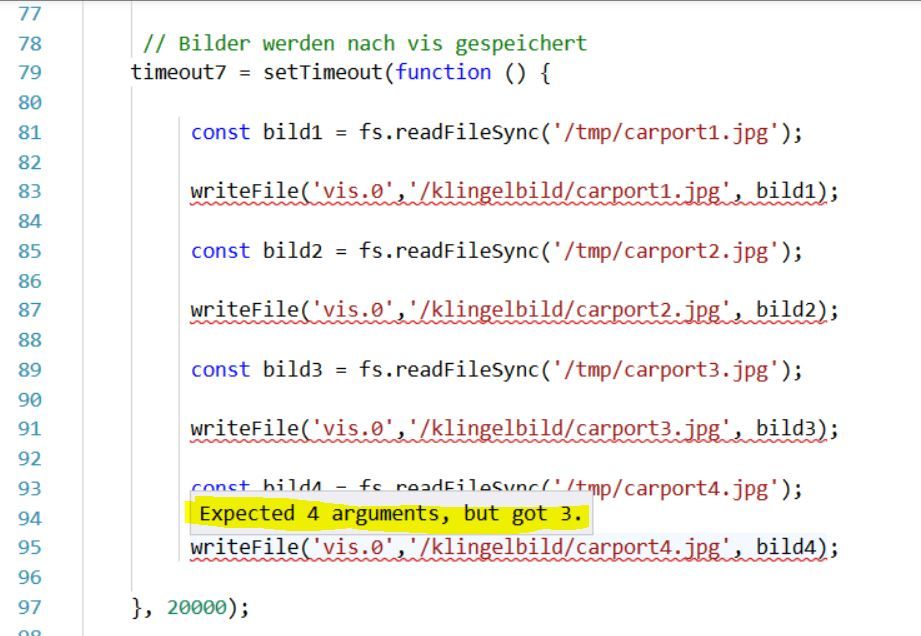
      Wenn ich dieses in Javascript importiere (ohne jegliche Änderung) wird ein Fehler bei den 4 Zeilen angezeigt

      writeFile('vis.0','/klingelbild/haustuer1.jpg', bild1);
      

      Expected 4 arguments, but got 3.

      HM&HMIP über 100 Geräte + IoBroker auf DS918+ uvm.

      GlasfaserG 1 Antwort Letzte Antwort
      0
      • KnallochseK Knallochse

        @Glasfaser Erstmal danke für dein Script.
        Wenn ich dieses in Javascript importiere (ohne jegliche Änderung) wird ein Fehler bei den 4 Zeilen angezeigt

        writeFile('vis.0','/klingelbild/haustuer1.jpg', bild1);
        

        Expected 4 arguments, but got 3.

        GlasfaserG Offline
        GlasfaserG Offline
        Glasfaser
        schrieb am zuletzt editiert von Glasfaser
        #59

        @Knallochse

        Nicht beachten … das Skript funktioniert !

        Du meinst das hier :

        1.JPG

        Synology 918+ 16GB - ioBroker in Docker v9 , VISO auf Trekstor Primebook C13 13,3" , Hikvision Domkameras mit Surveillance Station .. CCU RaspberryMatic in Synology VM .. Zigbee CC2538+CC2592 .. Sonoff .. KNX .. Modbus ..

        KnallochseK 1 Antwort Letzte Antwort
        0
        • GlasfaserG Glasfaser

          @Knallochse

          Nicht beachten … das Skript funktioniert !

          Du meinst das hier :

          1.JPG

          KnallochseK Offline
          KnallochseK Offline
          Knallochse
          schrieb am zuletzt editiert von
          #60

          @Glasfaser Nochmals vielen Dank. Ich werde es nächste Woche mal probieren.
          Den Rest des Wochenendes wurde Familienaktivitäten eingefordert 😀

          HM&HMIP über 100 Geräte + IoBroker auf DS918+ uvm.

          1 Antwort Letzte Antwort
          1
          • NegaleinN Offline
            NegaleinN Offline
            Negalein
            Global Moderator
            schrieb am zuletzt editiert von Negalein
            #61

            Hallo

            Ich habe das Script hier aus dem Thread angepasst.

            Es wird kein Bild unter dem angegebenen Pfad gespeichert.

            Könnte bitte jemand drüberschaun?

            // -------------------------------------------------------------------------
            // Dieses Script überwaht den Zustand eines Bewegungsmelders und speichert bei
            // Aktivierung ein Bild einer Überwachnungskamera in einem Vereichnis und sendet
            // dieses via Telegram.0-Adapter. Nach 10 Sek wird ein weiteres Bild erstellt und
            // gesendet.
            // Die Speicherung der Bilder erfolgt als "Stack", d.h. das aktuellste Bild bekommt
            // immer den Suffix "0" und es werden n Bilder mit den Suffixen 1..n-1 vorgehalten
            // Uhula 2017.11
            // -------------------------------------------------------------------------
            // -------------------------------------------------------------------------
            // Konfiguration
            // -------------------------------------------------------------------------
               // Objekt-ID des Bewegungsmelders
            const oidLichtBewmelderTuer = "doorbird.0.Motion.trigger";
               // URL zur Kamera umn ein Image (jpg) zu erhalten
            const cam_url = "http://user:password@10.0.1.84/bha-api/image.cgi";
               // Pfadangabe für die Speicherung der Bilder, der Pfad muss existieren
            const dest_path = '/opt/iobroker/iobroker-data/files/vis.0/Camsnapshot';
               // Anzahl der Bilder, die vorgehalten werden sollen
            const imageCountMax = 8;                
               // Prefix für die Bildnamen
            const imageNamePre = "sprechanlage_"; 
            // -------------------------------------------------------------------------
            // Scriptteil
            // -------------------------------------------------------------------------
            var request = require('request');
            var fs      = require('fs');
            // Bild an telegram schicken 
            //function sendImage (path) { 
                //try {
                    //var stats = fs.statSync(path);
                    //var msg = formatDate(stats.birthtime,"DD.MM.YYYY hh:mm:ss") + " " + path.substring(path.lastIndexOf('/')+1);
                    //sendTo('telegram.0', {
                        //text:                   path,
                        //caption:                msg, 
                        //disable_notification:   true
                    //});
                //}
                //catch(err) { if (err.code != "ENOENT") log(err); }     
            //}
            // löscht eine Datei synchron (wartet auf das Ergebnis)
            function fsUnlinkSync(path) {
                try {
                    var stats = fs.statSync(path);
                    try { fs.unlinkSync(path); }
                    catch(err) { if (err.code != "ENOENT") log(err); }     
                }
                catch(err) { if (err.code != "ENOENT") log(err); }
            }
            // benennt eine Datei synchron um (wartet auf das Ergebnis)
            function fsRenameSync(oldPath, newPath) {
                try {
                    var stats = fs.statSync(oldPath);
                    try { fs.renameSync(oldPath, newPath); }
                    catch(err) { if (err.code != "ENOENT") log(err); }     
                }
                catch(err) { if (err.code != "ENOENT") log(err); }
            }
            // Bild speichern und senden
            function saveImage() {
                // Bild imageCountMax-1 löschen
                fsUnlinkSync( dest_path + imageNamePre + (imageCountMax-1) + ".jpg" );
                // Bilder 0..imageCountMax-2 umbenennen
                for (var i=imageCountMax-2; i >= 0; i-- ) { 
                    fsRenameSync(dest_path + imageNamePre + i + ".jpg", dest_path + imageNamePre + (i+1) + ".jpg"); 
                }
                // Bild 0 löschen
                var fname = imageNamePre + "0.jpg";
                fsUnlinkSync( fname );
                // Bild holen und speichern
                request.get({url: cam_url, encoding: 'binary'}, function (err, response, body) {
                    fs.writeFile(dest_path + fname, body, 'binary', function(err) {
                        if (err) {
                            log('Fehler beim Bild speichern: ' + err, 'warn');
                        } else {
                            // dem Filesystem 2 Sek Zeit zum Speichern lassen
                            //setTimeout(function() { sendImage(dest_path + fname); }, 2000); 
                        }
                    }); 
                });
            }
            // sofort ein Bild senden und nach 8 Sek erneut
            function onEvent() {
                saveImage();
                setTimeout(function() { saveImage(); }, 8 * 1000); 
            }
            // Ereignisroutine
            on({id: oidLichtBewmelderTuer, val: true}, function (obj) {
                onEvent( obj );
            });
            // manuelle Ausführung (Test)
            onEvent();
            

            ° Node.js: 20.17.0 NPM: 10.8.2
            ° Proxmox, Ubuntu 22.04.3 LTS
            ° Fixer ---> iob fix

            K 1 Antwort Letzte Antwort
            0
            • chucky666C Online
              chucky666C Online
              chucky666
              schrieb am zuletzt editiert von chucky666
              #62

              Hallo zusammen,
              ich benutze dieses Script schon sehr lange , es funktioniert super.
              was muss ich ändern um mehr Bilder zu bekommen ? zb 3

              // -------------------------------------------------------------------------
              // Dieses Script überwaht den Zustand eines Bewegungsmelders und speichert bei
              // Aktivierung ein Bild einer Überwachnungskamera in einem Vereichnis und sendet
              // dieses via Telegram.0-Adapter. Nach 10 Sek wird ein weiteres Bild erstellt und
              // gesendet.
              // Die Speicherung der Bilder erfolgt als "Stack", d.h. das aktuellste Bild bekommt
              // immer den Suffix "0" und es werden n Bilder mit den Suffixen 1..n-1 vorgehalten
              // Uhula 2017.11
              // -------------------------------------------------------------------------
              
              // -------------------------------------------------------------------------
              // Konfiguration
              // -------------------------------------------------------------------------
                    // Objekt-ID des Bewegungsmelders
              const oidLichtBewmelderTuer = "deconz.0.Sensors.54.open";
                    // URL zur Kamera umn ein Image (jpg) zu erhalten
              const cam_url = "http://192.168.178.88/tmpfs/auto.jpg?usr=";
                    // Pfadangabe für die Speicherung der Bilder, der Pfad muss existieren
              const dest_path = '/home/test/';
                    // Anzahl der Bilder, die vorgehalten werden sollen
              const imageCountMax = 4;                
                    // Prefix für die Bildnamen
              const imageNamePre = "test_"; 
              
              // -------------------------------------------------------------------------
              // Scriptteil
              // -------------------------------------------------------------------------
              var request = require('request');
              var fs      = require('fs');
              
              // Bild an telegram schicken 
              function sendImage (path) { 
                  try {
                      var stats = fs.statSync(path);
                      var msg = formatDate(stats.birthtime,"DD.MM.YYYY hh:mm:ss") + " " + path.substring(path.lastIndexOf('/')+1);
                      sendTo('telegram.0', {
                          text:                   path,
                          caption:                msg, 
                          disable_notification:   true
                      });
                  }
                  catch(err) { if (err.code != "ENOENT") log(err); }     
              }
              
              // löscht eine Datei synchron (wartet auf das Ergebnis)
              function fsUnlinkSync(path) {
                  try {
                      var stats = fs.statSync(path);
                      try { fs.unlinkSync(path); }
                      catch(err) { if (err.code != "ENOENT") log(err); }     
                  }
                  catch(err) { if (err.code != "ENOENT") log(err); }
              }
              
              // benennt eine Datei synchron um (wartet auf das Ergebnis)
              function fsRenameSync(oldPath, newPath) {
                  try {
                      var stats = fs.statSync(oldPath);
                      try { fs.renameSync(oldPath, newPath); }
                      catch(err) { if (err.code != "ENOENT") log(err); }     
                  }
                  catch(err) { if (err.code != "ENOENT") log(err); }
              }
              
              // Bild speichern und senden
              function saveImage() {
                  // Bild imageCountMax-1 löschen
                  fsUnlinkSync( dest_path + imageNamePre + (imageCountMax-1) + ".jpg" );
                  // Bilder 0..imageCountMax-2 umbenennen
                  for (var i=imageCountMax-2; i >= 0; i-- ) { 
                      fsRenameSync(dest_path + imageNamePre + i + ".jpg", dest_path + imageNamePre + (i+1) + ".jpg"); 
                  }
                  // Bild 0 löschen
                  var fname = imageNamePre + "0.jpg";
                  fsUnlinkSync( fname );
                  // Bild holen und speichern
                  request.get({url: cam_url, encoding: 'binary'}, function (err, response, body) {
                      fs.writeFile(dest_path + fname, body, 'binary', function(err) {
                          if (err) {
                              log('Fehler beim Bild speichern: ' + err, 'warn');
                          } else {
                              // dem Filesystem 2 Sek Zeit zum Speichern lassen
                              setTimeout(function() { sendImage(dest_path + fname); }, 1000); 
                          }
                      }); 
                  });
              }
              
              // sofort ein Bild senden und nach 10 Sek erneut
              function onEvent() {
                  saveImage();
                  setTimeout(function() { saveImage(); }, 2 * 1000); 
              }
              
              // Ereignisroutine
              on({id: oidLichtBewmelderTuer, val: true}, function (obj) {
                  onEvent( obj );
              });
              
              // manuelle Ausführung (Test)
              onEvent();
              
              S K 2 Antworten Letzte Antwort
              0
              • chucky666C chucky666

                Hallo zusammen,
                ich benutze dieses Script schon sehr lange , es funktioniert super.
                was muss ich ändern um mehr Bilder zu bekommen ? zb 3

                // -------------------------------------------------------------------------
                // Dieses Script überwaht den Zustand eines Bewegungsmelders und speichert bei
                // Aktivierung ein Bild einer Überwachnungskamera in einem Vereichnis und sendet
                // dieses via Telegram.0-Adapter. Nach 10 Sek wird ein weiteres Bild erstellt und
                // gesendet.
                // Die Speicherung der Bilder erfolgt als "Stack", d.h. das aktuellste Bild bekommt
                // immer den Suffix "0" und es werden n Bilder mit den Suffixen 1..n-1 vorgehalten
                // Uhula 2017.11
                // -------------------------------------------------------------------------
                
                // -------------------------------------------------------------------------
                // Konfiguration
                // -------------------------------------------------------------------------
                      // Objekt-ID des Bewegungsmelders
                const oidLichtBewmelderTuer = "deconz.0.Sensors.54.open";
                      // URL zur Kamera umn ein Image (jpg) zu erhalten
                const cam_url = "http://192.168.178.88/tmpfs/auto.jpg?usr=";
                      // Pfadangabe für die Speicherung der Bilder, der Pfad muss existieren
                const dest_path = '/home/test/';
                      // Anzahl der Bilder, die vorgehalten werden sollen
                const imageCountMax = 4;                
                      // Prefix für die Bildnamen
                const imageNamePre = "test_"; 
                
                // -------------------------------------------------------------------------
                // Scriptteil
                // -------------------------------------------------------------------------
                var request = require('request');
                var fs      = require('fs');
                
                // Bild an telegram schicken 
                function sendImage (path) { 
                    try {
                        var stats = fs.statSync(path);
                        var msg = formatDate(stats.birthtime,"DD.MM.YYYY hh:mm:ss") + " " + path.substring(path.lastIndexOf('/')+1);
                        sendTo('telegram.0', {
                            text:                   path,
                            caption:                msg, 
                            disable_notification:   true
                        });
                    }
                    catch(err) { if (err.code != "ENOENT") log(err); }     
                }
                
                // löscht eine Datei synchron (wartet auf das Ergebnis)
                function fsUnlinkSync(path) {
                    try {
                        var stats = fs.statSync(path);
                        try { fs.unlinkSync(path); }
                        catch(err) { if (err.code != "ENOENT") log(err); }     
                    }
                    catch(err) { if (err.code != "ENOENT") log(err); }
                }
                
                // benennt eine Datei synchron um (wartet auf das Ergebnis)
                function fsRenameSync(oldPath, newPath) {
                    try {
                        var stats = fs.statSync(oldPath);
                        try { fs.renameSync(oldPath, newPath); }
                        catch(err) { if (err.code != "ENOENT") log(err); }     
                    }
                    catch(err) { if (err.code != "ENOENT") log(err); }
                }
                
                // Bild speichern und senden
                function saveImage() {
                    // Bild imageCountMax-1 löschen
                    fsUnlinkSync( dest_path + imageNamePre + (imageCountMax-1) + ".jpg" );
                    // Bilder 0..imageCountMax-2 umbenennen
                    for (var i=imageCountMax-2; i >= 0; i-- ) { 
                        fsRenameSync(dest_path + imageNamePre + i + ".jpg", dest_path + imageNamePre + (i+1) + ".jpg"); 
                    }
                    // Bild 0 löschen
                    var fname = imageNamePre + "0.jpg";
                    fsUnlinkSync( fname );
                    // Bild holen und speichern
                    request.get({url: cam_url, encoding: 'binary'}, function (err, response, body) {
                        fs.writeFile(dest_path + fname, body, 'binary', function(err) {
                            if (err) {
                                log('Fehler beim Bild speichern: ' + err, 'warn');
                            } else {
                                // dem Filesystem 2 Sek Zeit zum Speichern lassen
                                setTimeout(function() { sendImage(dest_path + fname); }, 1000); 
                            }
                        }); 
                    });
                }
                
                // sofort ein Bild senden und nach 10 Sek erneut
                function onEvent() {
                    saveImage();
                    setTimeout(function() { saveImage(); }, 2 * 1000); 
                }
                
                // Ereignisroutine
                on({id: oidLichtBewmelderTuer, val: true}, function (obj) {
                    onEvent( obj );
                });
                
                // manuelle Ausführung (Test)
                onEvent();
                
                S Offline
                S Offline
                Stoni
                schrieb am zuletzt editiert von
                #63

                @chucky666 Kann Dir leider keine Antwort auf Deine Frage geben, aber vielleicht kannst Du mir helfen. Wollte Dein Script auch mal testen, aber ich glaube, es fehlt mir an Berechtigungen.

                Folgende Fehlermeldung kommt:

                javascript.0
                2020-02-01 15:54:22.135
                warn
                (793) script.js.common.Telegram_Bilder: Fehler beim Bild speichern: Error: EACCES: permission denied, open '/home/test_0.jpg
                

                Ich konnte unter /Home/ auch keinen neuen Ordner erstellen, wo die Bilder temporär gespeichert werden sollen. Irgendwie muss ich die Berechtigung erlangen über root oder ähnliches. Wie geht das?

                Viele Grüße

                1 Antwort Letzte Antwort
                0
                • chucky666C Online
                  chucky666C Online
                  chucky666
                  schrieb am zuletzt editiert von
                  #64

                  Den Ordner habe ich mit Root erstellt und eine 775 Berechtigung .

                  S 1 Antwort Letzte Antwort
                  0
                  • chucky666C chucky666

                    Den Ordner habe ich mit Root erstellt und eine 775 Berechtigung .

                    S Offline
                    S Offline
                    Stoni
                    schrieb am zuletzt editiert von
                    #65

                    @chucky666 sagte in [Frage BLOCKLY ] Klingel Bild per Telegram versenden / Snapshot von Cam per Telegram versenden:

                    Den Ordner habe ich mit Root erstellt und eine 775 Berechtigung .

                    Wie hast du das gemacht?

                    1 Antwort Letzte Antwort
                    0
                    • chucky666C chucky666

                      Hallo zusammen,
                      ich benutze dieses Script schon sehr lange , es funktioniert super.
                      was muss ich ändern um mehr Bilder zu bekommen ? zb 3

                      // -------------------------------------------------------------------------
                      // Dieses Script überwaht den Zustand eines Bewegungsmelders und speichert bei
                      // Aktivierung ein Bild einer Überwachnungskamera in einem Vereichnis und sendet
                      // dieses via Telegram.0-Adapter. Nach 10 Sek wird ein weiteres Bild erstellt und
                      // gesendet.
                      // Die Speicherung der Bilder erfolgt als "Stack", d.h. das aktuellste Bild bekommt
                      // immer den Suffix "0" und es werden n Bilder mit den Suffixen 1..n-1 vorgehalten
                      // Uhula 2017.11
                      // -------------------------------------------------------------------------
                      
                      // -------------------------------------------------------------------------
                      // Konfiguration
                      // -------------------------------------------------------------------------
                            // Objekt-ID des Bewegungsmelders
                      const oidLichtBewmelderTuer = "deconz.0.Sensors.54.open";
                            // URL zur Kamera umn ein Image (jpg) zu erhalten
                      const cam_url = "http://192.168.178.88/tmpfs/auto.jpg?usr=";
                            // Pfadangabe für die Speicherung der Bilder, der Pfad muss existieren
                      const dest_path = '/home/test/';
                            // Anzahl der Bilder, die vorgehalten werden sollen
                      const imageCountMax = 4;                
                            // Prefix für die Bildnamen
                      const imageNamePre = "test_"; 
                      
                      // -------------------------------------------------------------------------
                      // Scriptteil
                      // -------------------------------------------------------------------------
                      var request = require('request');
                      var fs      = require('fs');
                      
                      // Bild an telegram schicken 
                      function sendImage (path) { 
                          try {
                              var stats = fs.statSync(path);
                              var msg = formatDate(stats.birthtime,"DD.MM.YYYY hh:mm:ss") + " " + path.substring(path.lastIndexOf('/')+1);
                              sendTo('telegram.0', {
                                  text:                   path,
                                  caption:                msg, 
                                  disable_notification:   true
                              });
                          }
                          catch(err) { if (err.code != "ENOENT") log(err); }     
                      }
                      
                      // löscht eine Datei synchron (wartet auf das Ergebnis)
                      function fsUnlinkSync(path) {
                          try {
                              var stats = fs.statSync(path);
                              try { fs.unlinkSync(path); }
                              catch(err) { if (err.code != "ENOENT") log(err); }     
                          }
                          catch(err) { if (err.code != "ENOENT") log(err); }
                      }
                      
                      // benennt eine Datei synchron um (wartet auf das Ergebnis)
                      function fsRenameSync(oldPath, newPath) {
                          try {
                              var stats = fs.statSync(oldPath);
                              try { fs.renameSync(oldPath, newPath); }
                              catch(err) { if (err.code != "ENOENT") log(err); }     
                          }
                          catch(err) { if (err.code != "ENOENT") log(err); }
                      }
                      
                      // Bild speichern und senden
                      function saveImage() {
                          // Bild imageCountMax-1 löschen
                          fsUnlinkSync( dest_path + imageNamePre + (imageCountMax-1) + ".jpg" );
                          // Bilder 0..imageCountMax-2 umbenennen
                          for (var i=imageCountMax-2; i >= 0; i-- ) { 
                              fsRenameSync(dest_path + imageNamePre + i + ".jpg", dest_path + imageNamePre + (i+1) + ".jpg"); 
                          }
                          // Bild 0 löschen
                          var fname = imageNamePre + "0.jpg";
                          fsUnlinkSync( fname );
                          // Bild holen und speichern
                          request.get({url: cam_url, encoding: 'binary'}, function (err, response, body) {
                              fs.writeFile(dest_path + fname, body, 'binary', function(err) {
                                  if (err) {
                                      log('Fehler beim Bild speichern: ' + err, 'warn');
                                  } else {
                                      // dem Filesystem 2 Sek Zeit zum Speichern lassen
                                      setTimeout(function() { sendImage(dest_path + fname); }, 1000); 
                                  }
                              }); 
                          });
                      }
                      
                      // sofort ein Bild senden und nach 10 Sek erneut
                      function onEvent() {
                          saveImage();
                          setTimeout(function() { saveImage(); }, 2 * 1000); 
                      }
                      
                      // Ereignisroutine
                      on({id: oidLichtBewmelderTuer, val: true}, function (obj) {
                          onEvent( obj );
                      });
                      
                      // manuelle Ausführung (Test)
                      onEvent();
                      
                      K Offline
                      K Offline
                      klaus88
                      schrieb am zuletzt editiert von klaus88
                      #66

                      @chucky666 : Du musst im Abschnitt:

                      // sofort ein Bild senden und nach 10 Sek erneut
                      function onEvent() {
                          saveImage();
                          setTimeout(function() { saveImage(); }, 2 * 1000); 
                      }
                      

                      neue Zeiten eintragen !
                      ich habe z.B. folgendes eingetragen:

                      function onEvent() {
                          saveImage();
                          setTimeout(function() { saveImage(); }, 10 * 1000);
                      	setTimeout(function() { saveImage(); }, 15 * 1000);
                      	setTimeout(function() { saveImage(); }, 20 * 1000);
                      	setTimeout(function() { saveImage(); }, 40 * 1000); 	
                      }
                      

                      damit bekomme ich sofort und in 10, 15, 20 und 40 sek ein Bild.
                      Hoffentlich gelingt es
                      lg
                      Klaus

                      1 Antwort Letzte Antwort
                      0
                      • NegaleinN Negalein

                        Hallo

                        Ich habe das Script hier aus dem Thread angepasst.

                        Es wird kein Bild unter dem angegebenen Pfad gespeichert.

                        Könnte bitte jemand drüberschaun?

                        // -------------------------------------------------------------------------
                        // Dieses Script überwaht den Zustand eines Bewegungsmelders und speichert bei
                        // Aktivierung ein Bild einer Überwachnungskamera in einem Vereichnis und sendet
                        // dieses via Telegram.0-Adapter. Nach 10 Sek wird ein weiteres Bild erstellt und
                        // gesendet.
                        // Die Speicherung der Bilder erfolgt als "Stack", d.h. das aktuellste Bild bekommt
                        // immer den Suffix "0" und es werden n Bilder mit den Suffixen 1..n-1 vorgehalten
                        // Uhula 2017.11
                        // -------------------------------------------------------------------------
                        // -------------------------------------------------------------------------
                        // Konfiguration
                        // -------------------------------------------------------------------------
                           // Objekt-ID des Bewegungsmelders
                        const oidLichtBewmelderTuer = "doorbird.0.Motion.trigger";
                           // URL zur Kamera umn ein Image (jpg) zu erhalten
                        const cam_url = "http://user:password@10.0.1.84/bha-api/image.cgi";
                           // Pfadangabe für die Speicherung der Bilder, der Pfad muss existieren
                        const dest_path = '/opt/iobroker/iobroker-data/files/vis.0/Camsnapshot';
                           // Anzahl der Bilder, die vorgehalten werden sollen
                        const imageCountMax = 8;                
                           // Prefix für die Bildnamen
                        const imageNamePre = "sprechanlage_"; 
                        // -------------------------------------------------------------------------
                        // Scriptteil
                        // -------------------------------------------------------------------------
                        var request = require('request');
                        var fs      = require('fs');
                        // Bild an telegram schicken 
                        //function sendImage (path) { 
                            //try {
                                //var stats = fs.statSync(path);
                                //var msg = formatDate(stats.birthtime,"DD.MM.YYYY hh:mm:ss") + " " + path.substring(path.lastIndexOf('/')+1);
                                //sendTo('telegram.0', {
                                    //text:                   path,
                                    //caption:                msg, 
                                    //disable_notification:   true
                                //});
                            //}
                            //catch(err) { if (err.code != "ENOENT") log(err); }     
                        //}
                        // löscht eine Datei synchron (wartet auf das Ergebnis)
                        function fsUnlinkSync(path) {
                            try {
                                var stats = fs.statSync(path);
                                try { fs.unlinkSync(path); }
                                catch(err) { if (err.code != "ENOENT") log(err); }     
                            }
                            catch(err) { if (err.code != "ENOENT") log(err); }
                        }
                        // benennt eine Datei synchron um (wartet auf das Ergebnis)
                        function fsRenameSync(oldPath, newPath) {
                            try {
                                var stats = fs.statSync(oldPath);
                                try { fs.renameSync(oldPath, newPath); }
                                catch(err) { if (err.code != "ENOENT") log(err); }     
                            }
                            catch(err) { if (err.code != "ENOENT") log(err); }
                        }
                        // Bild speichern und senden
                        function saveImage() {
                            // Bild imageCountMax-1 löschen
                            fsUnlinkSync( dest_path + imageNamePre + (imageCountMax-1) + ".jpg" );
                            // Bilder 0..imageCountMax-2 umbenennen
                            for (var i=imageCountMax-2; i >= 0; i-- ) { 
                                fsRenameSync(dest_path + imageNamePre + i + ".jpg", dest_path + imageNamePre + (i+1) + ".jpg"); 
                            }
                            // Bild 0 löschen
                            var fname = imageNamePre + "0.jpg";
                            fsUnlinkSync( fname );
                            // Bild holen und speichern
                            request.get({url: cam_url, encoding: 'binary'}, function (err, response, body) {
                                fs.writeFile(dest_path + fname, body, 'binary', function(err) {
                                    if (err) {
                                        log('Fehler beim Bild speichern: ' + err, 'warn');
                                    } else {
                                        // dem Filesystem 2 Sek Zeit zum Speichern lassen
                                        //setTimeout(function() { sendImage(dest_path + fname); }, 2000); 
                                    }
                                }); 
                            });
                        }
                        // sofort ein Bild senden und nach 8 Sek erneut
                        function onEvent() {
                            saveImage();
                            setTimeout(function() { saveImage(); }, 8 * 1000); 
                        }
                        // Ereignisroutine
                        on({id: oidLichtBewmelderTuer, val: true}, function (obj) {
                            onEvent( obj );
                        });
                        // manuelle Ausführung (Test)
                        onEvent();
                        
                        K Offline
                        K Offline
                        klaus88
                        schrieb am zuletzt editiert von klaus88
                        #67

                        @Negalein : Hallo!
                        Hast du das Problem noch?
                        Falls ja: Hast du Meldungen im iobroker Log zu diesem Script?

                        Was du auf die schnelle noch probieren kannst: Ändere den Pfad wo es hingespeichert wird. ich habe oft Probleme mit dem VIS.0 Pfad - nehme daher immer den /home/pi/ Pfad!
                        Schau mal unter: Link Text

                        lg
                        Klaus

                        1 Antwort Letzte Antwort
                        0
                        • Alex1808A Alex1808

                          Ich versende stamt Bild eine kleine mp4 Datei die als Gif bei Telegram ankommt.

                          einfach ffmpeg installieren und Befehl mit Blockly schicken.
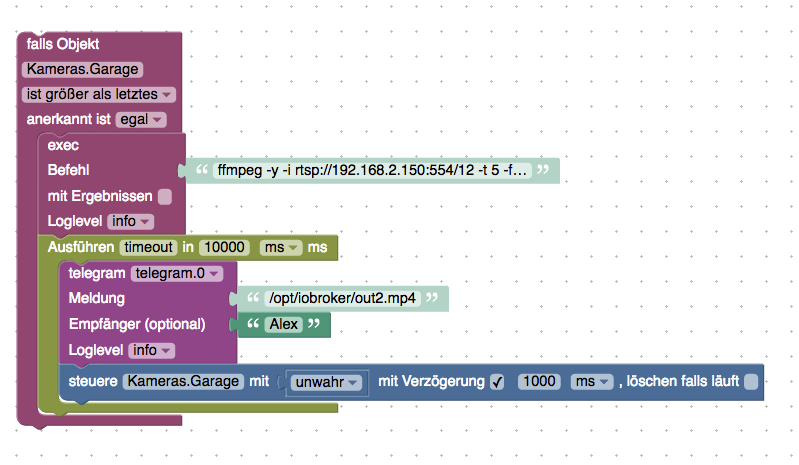
                          513_screenshot_at_juli_04_11-29-16.png

                          Befehl URL:

                          ffmpeg -y -i rtsp://kamera_ip:554/12 -t 5 -f mp4 -vcodec libx264 -pix_fmt yuv420p -an -vf scale=w=640:h=360:force_original_aspect_ratio=decrease -r 15 /opt/iobroker/out2.mp4
                          

                          (Muss zu eigene Kameras angepasst werden)

                          chucky666C Online
                          chucky666C Online
                          chucky666
                          schrieb am zuletzt editiert von Negalein
                          #68

                          @Alex1808 sagte in [Frage BLOCKLY ] Klingel Bild per Telegram versenden / Snapshot von Cam per Telegram versenden:

                          Ich versende stamt Bild eine kleine mp4 Datei die als Gif bei Telegram ankommt.

                          einfach ffmpeg installieren und Befehl mit Blockly schicken.

                          513_screenshot_at_juli_04_11-29-16.png

                          Befehl URL:

                          ffmpeg -y -i rtsp://kamera_ip:554/12 -t 5 -f mp4 -vcodec libx264 -pix_fmt yuv420p -an -vf scale=w=640:h=360:force_original_aspect_ratio=decrease -r 15 /opt/iobroker/out2.mp4
                          

                          (Muss zu eigene Kameras angepasst werden)

                          Hallo
                          Ich muss das hier mal etwas aufwärmen .
                          Muss das Passwort von der Kamera auch mit darein ? Wenn ja wohin ?

                          1 Antwort Letzte Antwort
                          0
                          • D Offline
                            D Offline
                            deAchte
                            schrieb am zuletzt editiert von
                            #69

                            Hallo,

                            bin schon seit einer Woche am Testen von diesem Skript.
                            Leider speichert das Skript kein Foto von der Klingelkamera (Dahua VTO2000A), mit einer anderen Kamera funktioniert alles.
                            Ich habe schon mehrere Möglichkeiten für den Login versucht:

                            1. Möglichkeit: http://IP/cgi-bin/snapshot.cgi?1&loginuse=Benutzer&loginpas=Passwort
                            2. Möglichkeit: http://Benutzer:Passwort@IP/cgi-bin/snapshot.cgi?1
                            3. Möglichkeit: http://Benutzer:Passwort@IP/cgi-bin/snapshot.cgi?1&loginuse=Benutzer&loginpas=Passwort

                            Mit Chrome bekomme ich direkt das Bild angezeigt, wenn ich die 3. Möglichkeit verwende.
                            Bei Möglichkeit 1 und 2 muss ich nochmal den Benutzernamen und das Passwort eingeben.

                            Mit dem alten Internet Explorer Bekomme ich bei der 2. und 3. Methode einen Fehler "Die Datei wurde nicht gefunden. Überprüfen Sie die Schreibweise.
                            Die erste Möglichkeit funktioniert, ich muss allerdings nochmal das Passwort und den Benutzernamen eingeben.

                            Hat vielleicht irgendjemand eine Lösung für das Problem?

                            M 1 Antwort Letzte Antwort
                            0
                            • D deAchte

                              Hallo,

                              bin schon seit einer Woche am Testen von diesem Skript.
                              Leider speichert das Skript kein Foto von der Klingelkamera (Dahua VTO2000A), mit einer anderen Kamera funktioniert alles.
                              Ich habe schon mehrere Möglichkeiten für den Login versucht:

                              1. Möglichkeit: http://IP/cgi-bin/snapshot.cgi?1&loginuse=Benutzer&loginpas=Passwort
                              2. Möglichkeit: http://Benutzer:Passwort@IP/cgi-bin/snapshot.cgi?1
                              3. Möglichkeit: http://Benutzer:Passwort@IP/cgi-bin/snapshot.cgi?1&loginuse=Benutzer&loginpas=Passwort

                              Mit Chrome bekomme ich direkt das Bild angezeigt, wenn ich die 3. Möglichkeit verwende.
                              Bei Möglichkeit 1 und 2 muss ich nochmal den Benutzernamen und das Passwort eingeben.

                              Mit dem alten Internet Explorer Bekomme ich bei der 2. und 3. Methode einen Fehler "Die Datei wurde nicht gefunden. Überprüfen Sie die Schreibweise.
                              Die erste Möglichkeit funktioniert, ich muss allerdings nochmal das Passwort und den Benutzernamen eingeben.

                              Hat vielleicht irgendjemand eine Lösung für das Problem?

                              M Offline
                              M Offline
                              maxpd
                              schrieb am zuletzt editiert von
                              #70

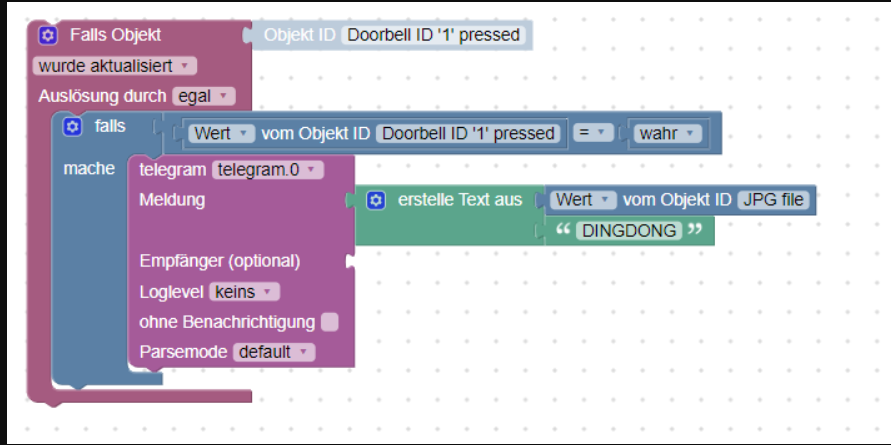
                              So wie ich den Thread hier https://forum.iobroker.net/topic/2272/frage-bild-per-telegram-verschicken verstanden habe, muss ich nur eine URL meines Raspis als Textnachricht über Telegram versenden? Also quasi sowas: http://192.123.178.109:1234/state/doorbird.1.Doorbell.2.snapshot
                              7f42bdc8-90eb-4f7b-98a2-7810116cc7b4-image.png

                              Ich bekomme dann nur eine Nachricht die heißt "undefinedDINGDONG"

                              Habe auch einen Timeout probiert, weil ich das Gefühl hatte, dass das Bild nicht schnell genug gespeichert wird, aber ohne Erfolg.

                              Gruß
                              maxpd

                              Raspi 4 8gb | iobroker + pivccu3 | 46 Adapter | 68 Scripte, 120 Devices

                              GlasfaserG 1 Antwort Letzte Antwort
                              0
                              • M maxpd

                                So wie ich den Thread hier https://forum.iobroker.net/topic/2272/frage-bild-per-telegram-verschicken verstanden habe, muss ich nur eine URL meines Raspis als Textnachricht über Telegram versenden? Also quasi sowas: http://192.123.178.109:1234/state/doorbird.1.Doorbell.2.snapshot

                                7f42bdc8-90eb-4f7b-98a2-7810116cc7b4-image.png

                                Ich bekomme dann nur eine Nachricht die heißt "undefinedDINGDONG"

                                Habe auch einen Timeout probiert, weil ich das Gefühl hatte, dass das Bild nicht schnell genug gespeichert wird, aber ohne Erfolg.

                                GlasfaserG Offline
                                GlasfaserG Offline
                                Glasfaser
                                schrieb am zuletzt editiert von Glasfaser
                                #71

                                @maxpd

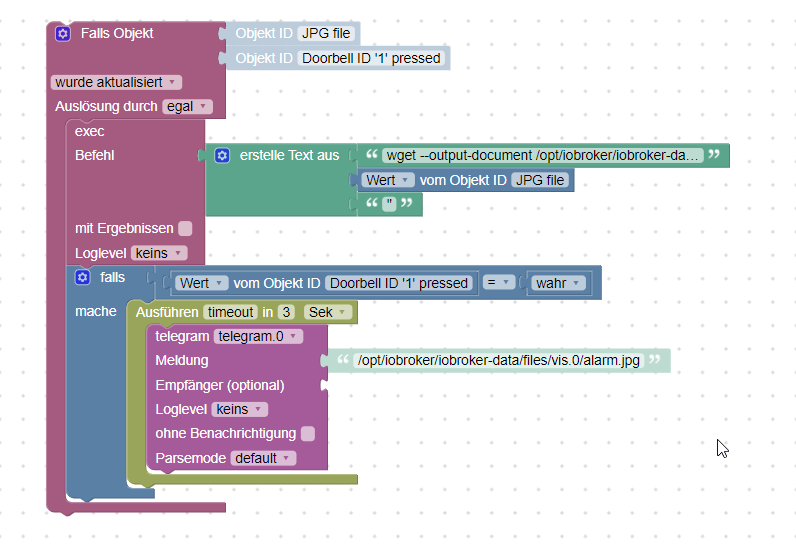
                                Beispiel :

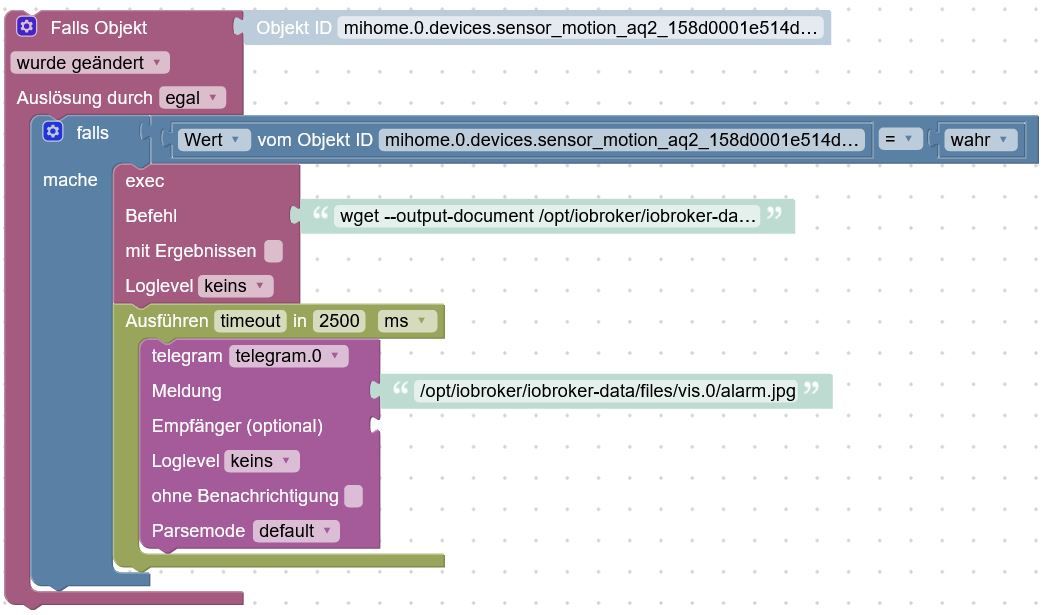
                                1.JPG

                                wget --output-document /opt/iobroker/iobroker-data/files/vis.0/alarm.jpg "http://user:passwort@192.168.1.1/streaming/channels/101/picture/"
                                
                                /opt/iobroker/iobroker-data/files/vis.0/alarm.jpg
                                

                                <xml xmlns="https://developers.google.com/blockly/xml">
                                 <variables>
                                   <variable type="timeout" id="timeout">timeout</variable>
                                 </variables>
                                 <block type="on_ext" id="jj8??y8iv{!Fb0^jZ!" x="-438" y="-262">
                                   <mutation xmlns="http://www.w3.org/1999/xhtml" items="1"></mutation>
                                   <field name="CONDITION">ne</field>
                                   <field name="ACK_CONDITION"></field>
                                   <value name="OID0">
                                     <shadow type="field_oid" id="XEKh|+XF~3OC@EHY5{8{">
                                       <field name="oid">mihome.0.devices.sensor_motion_aq2_158d0001e514d4.state</field>
                                     </shadow>
                                   </value>
                                   <statement name="STATEMENT">
                                     <block type="controls_if" id="xXlCTj)t?n*Gg:j44f#Y">
                                       <value name="IF0">
                                         <block type="logic_compare" id="pMPW|b)g/=L3!yP`vsW6">
                                           <field name="OP">EQ</field>
                                           <value name="A">
                                             <block type="get_value" id="5c7%aB|)K}(rNJ)#Jzd1">
                                               <field name="ATTR">val</field>
                                               <field name="OID">mihome.0.devices.sensor_motion_aq2_158d0001e514d4.state</field>
                                             </block>
                                           </value>
                                           <value name="B">
                                             <block type="logic_boolean" id="Lhj]yTw*W`/`leEqri.g">
                                               <field name="BOOL">TRUE</field>
                                             </block>
                                           </value>
                                         </block>
                                       </value>
                                       <statement name="DO0">
                                         <block type="exec" id="BEjD=u,#e-;T;d-e9D;r">
                                           <mutation xmlns="http://www.w3.org/1999/xhtml" with_statement="false"></mutation>
                                           <field name="WITH_STATEMENT">FALSE</field>
                                           <field name="LOG"></field>
                                           <value name="COMMAND">
                                             <shadow type="text" id="p+g^=?Sl15wP.0/4C~~B">
                                               <field name="TEXT">wget --output-document /opt/iobroker/iobroker-data/files/vis.0/alarm.jpg "http://user:passwort@192.168.1.1/streaming/channels/101/picture/"</field>
                                             </shadow>
                                           </value>
                                           <next>
                                             <block type="timeouts_settimeout" id="e=c#~E)j;S+#onaowS77">
                                               <field name="NAME">timeout</field>
                                               <field name="DELAY">2500</field>
                                               <field name="UNIT">ms</field>
                                               <statement name="STATEMENT">
                                                 <block type="telegram" id="FbkrL,IGK%]5xBi#Yj,=">
                                                   <field name="INSTANCE">.0</field>
                                                   <field name="LOG"></field>
                                                   <field name="SILENT">FALSE</field>
                                                   <field name="PARSEMODE">default</field>
                                                   <value name="MESSAGE">
                                                     <shadow type="text" id="wXLWD;.*8||`3_5J8(UB">
                                                       <field name="TEXT">/opt/iobroker/iobroker-data/files/vis.0/alarm.jpg</field>
                                                     </shadow>
                                                   </value>
                                                 </block>
                                               </statement>
                                             </block>
                                           </next>
                                         </block>
                                       </statement>
                                     </block>
                                   </statement>
                                 </block>
                                </xml>
                                

                                Synology 918+ 16GB - ioBroker in Docker v9 , VISO auf Trekstor Primebook C13 13,3" , Hikvision Domkameras mit Surveillance Station .. CCU RaspberryMatic in Synology VM .. Zigbee CC2538+CC2592 .. Sonoff .. KNX .. Modbus ..

                                M 1 Antwort Letzte Antwort
                                1
                                • GlasfaserG Glasfaser

                                  @maxpd

                                  Beispiel :

                                  1.JPG

                                  wget --output-document /opt/iobroker/iobroker-data/files/vis.0/alarm.jpg "http://user:passwort@192.168.1.1/streaming/channels/101/picture/"
                                  
                                  /opt/iobroker/iobroker-data/files/vis.0/alarm.jpg
                                  

                                  <xml xmlns="https://developers.google.com/blockly/xml">
                                   <variables>
                                     <variable type="timeout" id="timeout">timeout</variable>
                                   </variables>
                                   <block type="on_ext" id="jj8??y8iv{!Fb0^jZ!" x="-438" y="-262">
                                     <mutation xmlns="http://www.w3.org/1999/xhtml" items="1"></mutation>
                                     <field name="CONDITION">ne</field>
                                     <field name="ACK_CONDITION"></field>
                                     <value name="OID0">
                                       <shadow type="field_oid" id="XEKh|+XF~3OC@EHY5{8{">
                                         <field name="oid">mihome.0.devices.sensor_motion_aq2_158d0001e514d4.state</field>
                                       </shadow>
                                     </value>
                                     <statement name="STATEMENT">
                                       <block type="controls_if" id="xXlCTj)t?n*Gg:j44f#Y">
                                         <value name="IF0">
                                           <block type="logic_compare" id="pMPW|b)g/=L3!yP`vsW6">
                                             <field name="OP">EQ</field>
                                             <value name="A">
                                               <block type="get_value" id="5c7%aB|)K}(rNJ)#Jzd1">
                                                 <field name="ATTR">val</field>
                                                 <field name="OID">mihome.0.devices.sensor_motion_aq2_158d0001e514d4.state</field>
                                               </block>
                                             </value>
                                             <value name="B">
                                               <block type="logic_boolean" id="Lhj]yTw*W`/`leEqri.g">
                                                 <field name="BOOL">TRUE</field>
                                               </block>
                                             </value>
                                           </block>
                                         </value>
                                         <statement name="DO0">
                                           <block type="exec" id="BEjD=u,#e-;T;d-e9D;r">
                                             <mutation xmlns="http://www.w3.org/1999/xhtml" with_statement="false"></mutation>
                                             <field name="WITH_STATEMENT">FALSE</field>
                                             <field name="LOG"></field>
                                             <value name="COMMAND">
                                               <shadow type="text" id="p+g^=?Sl15wP.0/4C~~B">
                                                 <field name="TEXT">wget --output-document /opt/iobroker/iobroker-data/files/vis.0/alarm.jpg "http://user:passwort@192.168.1.1/streaming/channels/101/picture/"</field>
                                               </shadow>
                                             </value>
                                             <next>
                                               <block type="timeouts_settimeout" id="e=c#~E)j;S+#onaowS77">
                                                 <field name="NAME">timeout</field>
                                                 <field name="DELAY">2500</field>
                                                 <field name="UNIT">ms</field>
                                                 <statement name="STATEMENT">
                                                   <block type="telegram" id="FbkrL,IGK%]5xBi#Yj,=">
                                                     <field name="INSTANCE">.0</field>
                                                     <field name="LOG"></field>
                                                     <field name="SILENT">FALSE</field>
                                                     <field name="PARSEMODE">default</field>
                                                     <value name="MESSAGE">
                                                       <shadow type="text" id="wXLWD;.*8||`3_5J8(UB">
                                                         <field name="TEXT">/opt/iobroker/iobroker-data/files/vis.0/alarm.jpg</field>
                                                       </shadow>
                                                     </value>
                                                   </block>
                                                 </statement>
                                               </block>
                                             </next>
                                           </block>
                                         </statement>
                                       </block>
                                     </statement>
                                   </block>
                                  </xml>
                                  

                                  M Offline
                                  M Offline
                                  maxpd
                                  schrieb am zuletzt editiert von
                                  #72

                                  @glasfaser Danke.

                                  Er schickt mir alledings nur den Pfad an Telegram.

                                  Vielleicht funktioniert aber auch exec nicht so, wie ich es mir vorstelle. Ich muss mir den Pfad zusammenbauen, weil der Dateiname im originären Ablagepfad das Datum beinhaltet und immer anders ist:
                                  76214afb-dcbb-4be4-a87b-d1ddf86c784f-image.png

                                  on({id: new RegExp('doorbird\\.0\\.Doorbell\\.1\\.snapshot' + "$|" + 'doorbird\\.0\\.Doorbell\\.1\\.trigger' + "$"), change: "any"}, async function (obj) {
                                      exec((['wget --output-document /opt/iobroker/iobroker-data/files/vis.0/alarm.jpg "',getState("doorbird.0.Doorbell.1.snapshot").val,'"'].join('')));
                                    if (getState("doorbird.0.Doorbell.1.trigger").val == true) {
                                      timeout = setTimeout(async function () {
                                        sendTo("telegram.0", "send", {
                                            text: '/opt/iobroker/iobroker-data/files/vis.0/alarm.jpg'
                                        });
                                      }, 3000);
                                    }
                                  });
                                  
                                  //JTNDeG1sJTIweG1sbn
                                  

                                  Gruß
                                  maxpd

                                  Raspi 4 8gb | iobroker + pivccu3 | 46 Adapter | 68 Scripte, 120 Devices

                                  GlasfaserG 1 Antwort Letzte Antwort
                                  0
                                  • M maxpd

                                    @glasfaser Danke.

                                    Er schickt mir alledings nur den Pfad an Telegram.

                                    Vielleicht funktioniert aber auch exec nicht so, wie ich es mir vorstelle. Ich muss mir den Pfad zusammenbauen, weil der Dateiname im originären Ablagepfad das Datum beinhaltet und immer anders ist:

                                    76214afb-dcbb-4be4-a87b-d1ddf86c784f-image.png

                                    on({id: new RegExp('doorbird\\.0\\.Doorbell\\.1\\.snapshot' + "$|" + 'doorbird\\.0\\.Doorbell\\.1\\.trigger' + "$"), change: "any"}, async function (obj) {
                                        exec((['wget --output-document /opt/iobroker/iobroker-data/files/vis.0/alarm.jpg "',getState("doorbird.0.Doorbell.1.snapshot").val,'"'].join('')));
                                      if (getState("doorbird.0.Doorbell.1.trigger").val == true) {
                                        timeout = setTimeout(async function () {
                                          sendTo("telegram.0", "send", {
                                              text: '/opt/iobroker/iobroker-data/files/vis.0/alarm.jpg'
                                          });
                                        }, 3000);
                                      }
                                    });
                                    
                                    //JTNDeG1sJTIweG1sbn
                                    
                                    GlasfaserG Offline
                                    GlasfaserG Offline
                                    Glasfaser
                                    schrieb am zuletzt editiert von
                                    #73

                                    @maxpd

                                    Ist das eine Doorbird .

                                    Warum über Pfad zusammenbauen ?
                                    Ich bin jetzt nicht Zuhause muss nochmal nachschauen ........
                                    , aber über den Link + user+password , kannst du doch das Bild direkt holen ?

                                    http://<device-ip>/bha-api/image.cgi
                                    

                                    Synology 918+ 16GB - ioBroker in Docker v9 , VISO auf Trekstor Primebook C13 13,3" , Hikvision Domkameras mit Surveillance Station .. CCU RaspberryMatic in Synology VM .. Zigbee CC2538+CC2592 .. Sonoff .. KNX .. Modbus ..

                                    M 1 Antwort Letzte Antwort
                                    0
                                    • GlasfaserG Glasfaser

                                      @maxpd

                                      Ist das eine Doorbird .

                                      Warum über Pfad zusammenbauen ?
                                      Ich bin jetzt nicht Zuhause muss nochmal nachschauen ........
                                      , aber über den Link + user+password , kannst du doch das Bild direkt holen ?

                                      http://<device-ip>/bha-api/image.cgi
                                      
                                      M Offline
                                      M Offline
                                      maxpd
                                      schrieb am zuletzt editiert von
                                      #74

                                      @glasfaser Ja eine Doorbird.

                                      Das Attribut beinhaltet ja den direkten Pfad zum Bild, den man auch im Browser öffnen kann. Ich ging anfänglich davon aus, das reicht.

                                      Gruß
                                      maxpd

                                      Raspi 4 8gb | iobroker + pivccu3 | 46 Adapter | 68 Scripte, 120 Devices

                                      GlasfaserG 1 Antwort Letzte Antwort
                                      0
                                      • M maxpd

                                        @glasfaser Ja eine Doorbird.

                                        Das Attribut beinhaltet ja den direkten Pfad zum Bild, den man auch im Browser öffnen kann. Ich ging anfänglich davon aus, das reicht.

                                        GlasfaserG Offline
                                        GlasfaserG Offline
                                        Glasfaser
                                        schrieb am zuletzt editiert von
                                        #75

                                        @maxpd

                                        hier mein Script:

                                        const idklingel = ["0_userdata.0.DoorBird.Klingel", "hm-rpc.1.KEQ0023561.1.STATE", "ID3", "ID4"];
                                        
                                        var sperre = false;  //verhindert das doppeltes Drücken das Script stoppt
                                        var timeout1, timeout2, timeout3, timeout4, timeout5, timeout6, timeout7, timeout8, timeout9, timeout10, timeout11;
                                        var fs = require('fs');
                                         
                                        on({id: idklingel, change: "any"}, function (obj) {
                                        
                                          if(!sperre) {
                                        
                                            sperre = true;
                                        
                                            
                                             // Speichert das erste Bild bei Klingeln
                                            timeout4 = setTimeout(function(){
                                              exec('wget --output-document /tmp/DoorBird.jpg \'http://user:passwort@192.168.178.54/bha-api/image.cgi\'');
                                        
                                            }, 1000); 
                                            
                                        
                                             // Telegram versenden
                                            timeout4 = setTimeout(function(){
                                        
                                                sendTo('telegram.0', {text: '/tmp/DoorBird.jpg', caption: 'Jemand klingelt an der Haustür !!!', disable_notification: true});
                                        
                                                        //log ('__ Klingel-Bild wurde versendet __');
                                        
                                            }, 7000); 
                                            
                                            }
                                                   
                                            timeout6 = setTimeout(function() {
                                        
                                               sperre = false;
                                        
                                            }, 5000); //Zeit für Klingelsperre 1.Zeile
                                        
                                             // Bilder werden nach vis gespeichert
                                            timeout7 = setTimeout(function () {
                                        
                                                 const bild1 = fs.readFileSync('/tmp/DoorBird.jpg');
                                        
                                                 writeFile('vis.0','/klingelbild/DoorBird.jpg', bild1);
                                            
                                        
                                            }, 20000); 
                                        
                                        });


                                        oder als Mini Video , per ffmpeg:

                                        var timeout;
                                        
                                        
                                        //Installation  apt-get update dann apt-get install ffmpeg
                                        
                                        on({id: '0_userdata.0.DoorBird.Klingel', val: true}, async function (obj) {
                                          var value = obj.state.val;
                                          var oldValue = obj.oldState.val;
                                          exec('ffmpeg -y -i rtsp://user:passwort@192.168.178.54:8557/mpeg/media.amp -t 8 -f mp4 -vcodec libx264 -pix_fmt yuv420p -an -vf scale=w=1280:h=738:force_original_aspect_ratio=decrease -r 10 /tmp/doorbird-motion.mp4');
                                          console.log("exec: " + 'ffmpeg -y -i rtsp://user@passwort:8557/mpeg/media.amp -t 8 -f mp4 -vcodec libx264 -pix_fmt yuv420p -an -vf scale=w=1280:h=738:force_original_aspect_ratio=decrease -r 10 /tmp/doorbird-motion.mp4');
                                          timeout = setTimeout(async function () {
                                            sendTo("telegram.0", "send", {
                                                text: '/tmp/doorbird-motion.mp4',
                                                disable_notification: true
                                            });
                                            console.log("telegram: " + '/tmp/doorbird-motion.mp4');
                                          }, 15000);
                                        });
                                        

                                        Synology 918+ 16GB - ioBroker in Docker v9 , VISO auf Trekstor Primebook C13 13,3" , Hikvision Domkameras mit Surveillance Station .. CCU RaspberryMatic in Synology VM .. Zigbee CC2538+CC2592 .. Sonoff .. KNX .. Modbus ..

                                        1 Antwort Letzte Antwort
                                        1
                                        • M Offline
                                          M Offline
                                          maxpd
                                          schrieb am zuletzt editiert von
                                          #76

                                          @glasfaser Danke dir, muss ich mir mal Zeit holen um das zu bauen. Einfach als Blockly importieren hat nicht funktioniert.

                                          Hast du für Mini Video die Doorbird Cloud abonniert?

                                          Gruß
                                          maxpd

                                          Raspi 4 8gb | iobroker + pivccu3 | 46 Adapter | 68 Scripte, 120 Devices
                                          NegaleinN GlasfaserG 2 Antworten Letzte Antwort
                                          0
                                          Antworten
                                          • In einem neuen Thema antworten
                                          Anmelden zum Antworten
                                          • Älteste zuerst
                                          • Neuste zuerst
                                          • Meiste Stimmen


                                          Support us

                                          ioBroker
                                          Community Adapters
                                          Donate

                                          618

                                          Online

                                          32.5k

                                          Benutzer

                                          81.6k

                                          Themen

                                          1.3m

                                          Beiträge
                                          Community
                                          Impressum | Datenschutz-Bestimmungen | Nutzungsbedingungen | Einwilligungseinstellungen
                                          ioBroker Community 2014-2025
                                          logo
                                          • Anmelden

                                          • Du hast noch kein Konto? Registrieren

                                          • Anmelden oder registrieren, um zu suchen
                                          • Erster Beitrag
                                            Letzter Beitrag
                                          0
                                          • Home
                                          • Aktuell
                                          • Tags
                                          • Ungelesen 0
                                          • Kategorien
                                          • Unreplied
                                          • Beliebt
                                          • GitHub
                                          • Docu
                                          • Hilfe