




Homebridge-Adapter: Objekte werden nicht angezeigt
-
Hallo,
ich bin heute auf den ioBroker Homebridge accessories manager (von @apollon77) gestoßen und sehe damit eine Möglichkeit meine Vaillant Heizung, welche mit dem VR900 verbunden ist, in den ioBroker zu bekommen. Leider scheitere ich, aufgrund meines Unwissens.
Homebridge Vaillant Plugin: Link
Ich beschreibe mal was ich getan habe....
- "ioBroker Homebridge Adapter" installiert
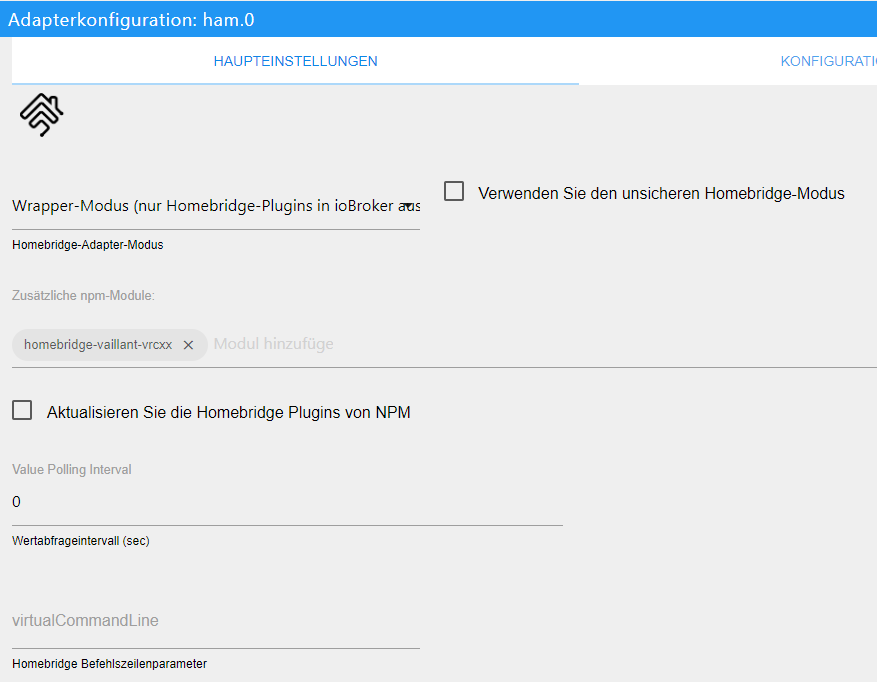
- "Wrapper-Modus" gewählt

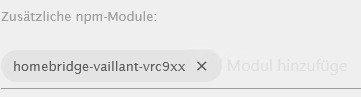
- npm-Modul "homebridge-vaillant-vrcxx" eingefügt. Wurde lt. Log auch ordnungsgemäß installiert.
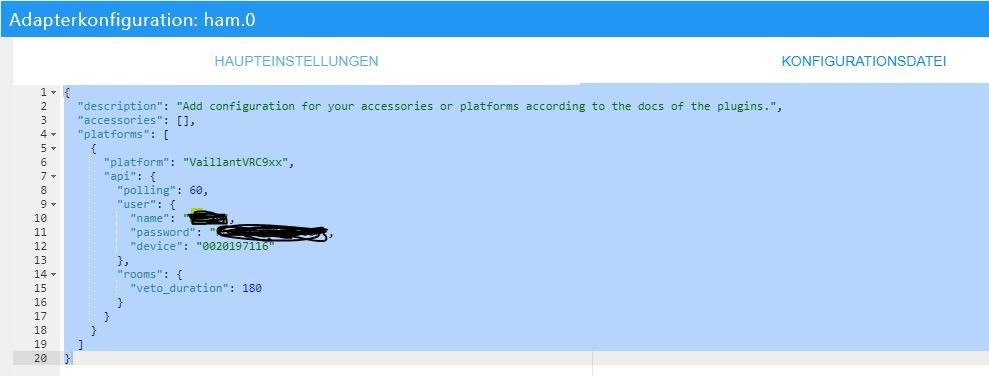
- Konfigurationsdatei angepasst
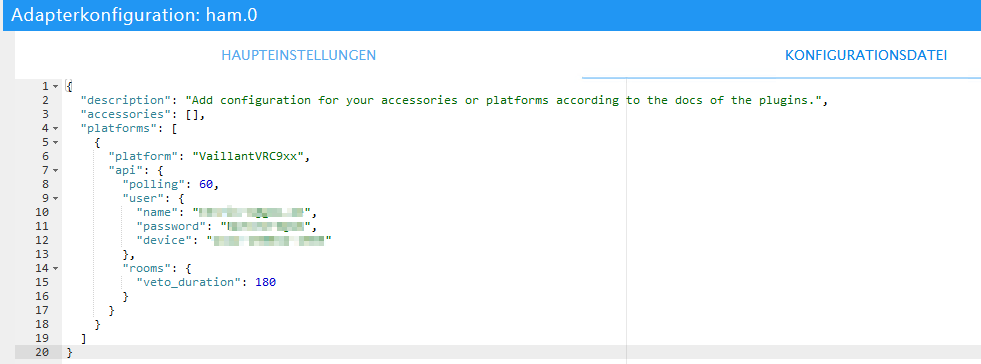
{ "description": "Add configuration for your accessories or platforms according to the docs of the plugins.", "accessories": [], "platforms": [ { "platform": "VaillantVRC9xx", "api": { "polling": 60, "user": { "name": "peter-lustig@abc.de", "password": "MyVaillantAppPassword", "device": "123-12345-1234" }, "rooms": { "veto_duration": 180 } } } ] }- Adapter gestartet

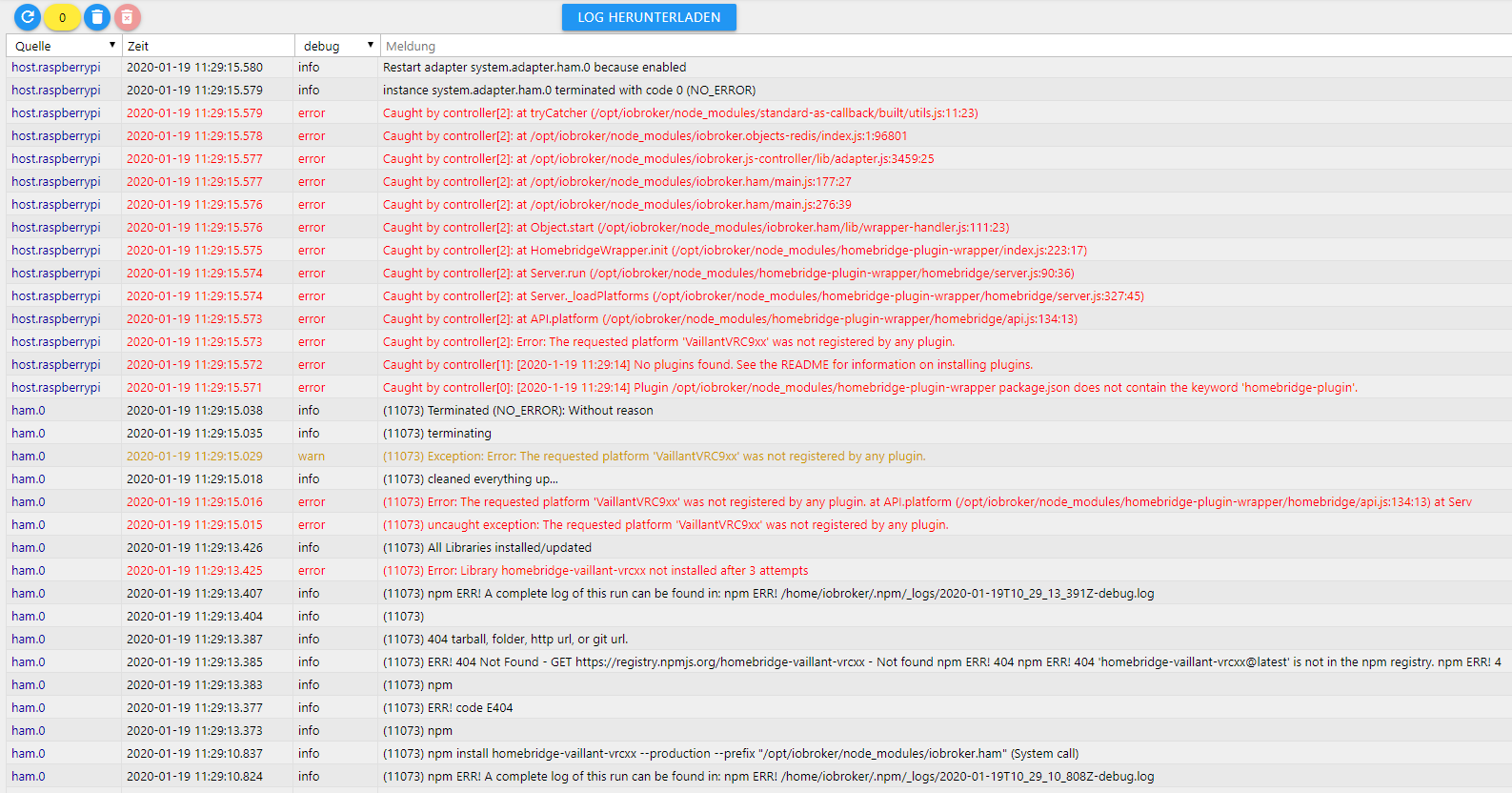
- Im Log steht dann folgendes und es werden keine Objekte angelegt.
ham.0	2020-01-07 09:58:56.649	debug	(1695) [2020-1-7 9:58:56 AM] [VaillantVRC9xx] Failed to get facilities list ... will retry in 30 seconds
ham.0	2020-01-07 09:58:56.648	debug	(1695) [2020-1-7 9:58:56 AM] [VaillantVRC9xx] TOO_MANY_RETRY - Too many retry -
ham.0	2020-01-07 09:58:56.646	debug	(1695) [2020-1-7 9:58:56 AM] [VaillantVRC9xx] > retry #3
ham.0	2020-01-07 09:58:50.642	debug	(1695) [2020-1-7 9:58:50 AM] [VaillantVRC9xx] > undefined - undefined - jars.flatMap is not a function
ham.0	2020-01-07 09:58:50.640	debug	(1695) [2020-1-7 9:58:50 AM] [VaillantVRC9xx] { error: true, status: undefined, body: 'jars.flatMap is not a function', response: TypeError: jars.flatMap is not a function at addValidF
ham.0	2020-01-07 09:58:50.637	debug	(1695) [2020-1-7 9:58:50 AM] [VaillantVRC9xx] > retry #2
ham.0	2020-01-07 09:58:46.633	debug	(1695) [2020-1-7 9:58:46 AM] [VaillantVRC9xx] > undefined - undefined - jars.flatMap is not a function
ham.0	2020-01-07 09:58:46.631	debug	retry: true }
ham.0	2020-01-07 09:58:46.631	debug	at HTTPClient.execute (/opt/iobroker/node_modules/iobroker.ham/node_modules/homebridge-vaillant-vrc9xx/src/api/HttpClient.mjs:61:38),
ham.0	2020-01-07 09:58:46.631	debug	at HTTPClient.fetch (/opt/iobroker/node_modules/iobroker.ham/node_modules/homebridge-vaillant-vrc9xx/src/api/HttpClient.mjs:25:36)
ham.0	2020-01-07 09:58:46.631	debug	at fetch (/opt/iobroker/node_modules/iobroker.ham/node_modules/node-fetch-cookies/src/index.mjs:23:13)
ham.0	2020-01-07 09:58:46.631	debug	at addValidFromJars (/opt/iobroker/node_modules/iobroker.ham/node_modules/node-fetch-cookies/src/index.mjs:11:14)
ham.0	2020-01-07 09:58:46.631	debug	TypeError: jars.flatMap is not a function
ham.0	2020-01-07 09:58:46.631	debug	response:
ham.0	2020-01-07 09:58:46.631	debug	body: 'jars.flatMap is not a function',
ham.0	2020-01-07 09:58:46.631	debug	status: undefined,
ham.0	2020-01-07 09:58:46.631	debug	(1695) [2020-1-7 9:58:46 AM] [VaillantVRC9xx] { error: true,
ham.0	2020-01-07 09:58:46.627	debug	(1695) [2020-1-7 9:58:46 AM] [VaillantVRC9xx] > retry #1
ham.0	2020-01-07 09:58:44.623	debug	(1695) [2020-1-7 9:58:44 AM] [VaillantVRC9xx] > undefined - undefined - jars.flatMap is not a function
ham.0	2020-01-07 09:58:44.621	debug	retry: true }
ham.0	2020-01-07 09:58:44.621	debug	at VaillantAPIPoller.start (/opt/iobroker/node_modules/iobroker.ham/node_modules/homebridge-vaillant-vrc9xx/src/api/VaillantAPIPoller.mjs:29:20),
ham.0	2020-01-07 09:58:44.621	debug	at VaillantAPIPoller.getAllFacilities (/opt/iobroker/node_modules/iobroker.ham/node_modules/homebridge-vaillant-vrc9xx/src/api/VaillantAPIPoller.mjs:73:45)
ham.0	2020-01-07 09:58:44.621	debug	at VRC9xxAPI.getFacilities (/opt/iobroker/node_modules/iobroker.ham/node_modules/homebridge-vaillant-vrc9xx/src/api/VaillantAPIClient.mjs:108:33)
ham.0	2020-01-07 09:58:44.621	debug	at VRC9xxAPI.query (/opt/iobroker/node_modules/iobroker.ham/node_modules/homebridge-vaillant-vrc9xx/src/api/VaillantAPIClient.mjs:60:24)
ham.0	2020-01-07 09:58:44.621	debug	at VRC9xxAPI.logIn (/opt/iobroker/node_modules/iobroker.ham/node_modules/homebridge-vaillant-vrc9xx/src/api/VaillantAPIClient.mjs:92:41)
ham.0	2020-01-07 09:58:44.621	debug	at VRC9xxAPI.query (/opt/iobroker/node_modules/iobroker.ham/node_modules/homebridge-vaillant-vrc9xx/src/api/VaillantAPIClient.mjs:64:48)
ham.0	2020-01-07 09:58:44.621	debug	at HTTPClient.execute (/opt/iobroker/node_modules/iobroker.ham/node_modules/homebridge-vaillant-vrc9xx/src/api/HttpClient.mjs:61:38)
ham.0	2020-01-07 09:58:44.621	debug	at HTTPClient.fetch (/opt/iobroker/node_modules/iobroker.ham/node_modules/homebridge-vaillant-vrc9xx/src/api/HttpClient.mjs:25:36)
ham.0	2020-01-07 09:58:44.621	debug	at fetch (/opt/iobroker/node_modules/iobroker.ham/node_modules/node-fetch-cookies/src/index.mjs:23:13)
ham.0	2020-01-07 09:58:44.621	debug	at addValidFromJars (/opt/iobroker/node_modules/iobroker.ham/node_modules/node-fetch-cookies/src/index.mjs:11:14)
ham.0	2020-01-07 09:58:44.621	debug	TypeError: jars.flatMap is not a function
ham.0	2020-01-07 09:58:44.621	debug	response:
ham.0	2020-01-07 09:58:44.621	debug	body: 'jars.flatMap is not a function',
ham.0	2020-01-07 09:58:44.621	debug	status: undefined,
ham.0	2020-01-07 09:58:44.621	debug	(1695) [2020-1-7 9:58:44 AM] [VaillantVRC9xx] { error: true,
ham.0	2020-01-07 09:58:44.619	debug	(1695) [2020-1-7 9:58:44 AM] [VaillantVRC9xx] Finished launching
ham.0	2020-01-07 09:58:44.614	debug	(1695) [2020-1-7 9:58:44 AM] [homebridge-vaillant-vrc9xx.VaillantVRC9xx] VaillantVRC9xx Platform loaded - version 0.5.0
ham.0	2020-01-07 09:58:44.613	debug	(1695) Load homebridge-vaillant-vrc9xx.VaillantVRC9xx
ham.0	2020-01-07 09:58:44.612	debug	(1695) [2020-1-7 9:58:44 AM] Loading 0 accessories...
ham.0	2020-01-07 09:58:44.608	debug	(1695) [2020-1-7 9:58:44 AM] [VaillantVRC9xx] [Login]
ham.0	2020-01-07 09:58:44.605	debug	(1695) [2020-1-7 9:58:44 AM] [VaillantVRC9xx] Get all facilities ...
ham.0	2020-01-07 09:58:44.604	debug	(1695) [2020-1-7 9:58:44 AM] [VaillantVRC9xx] Refreshing list of facilities
ham.0	2020-01-07 09:58:44.602	debug	(1695) [2020-1-7 9:58:44 AM] [VaillantVRC9xx] Starting poller ...
ham.0	2020-01-07 09:58:44.601	debug	(1695) [2020-1-7 9:58:44 AM] [VaillantVRC9xx] Start polling for data
ham.0	2020-01-07 09:58:44.600	debug	(1695) [2020-1-7 9:58:44 AM] [VaillantVRC9xx] Received callback
ham.0	2020-01-07 09:58:44.586	debug	(1695) [2020-1-7 9:58:44 AM] [VaillantVRC9xx] VaillantVRC9xx Platform loaded - version 0.5.0
ham.0	2020-01-07 09:58:44.585	debug	(1695) [2020-1-7 9:58:44 AM] [VaillantVRC9xx] Initializing VaillantVRC9xx platform...
ham.0	2020-01-07 09:58:44.582	debug	(1695) [2020-1-7 9:58:44 AM] Loading 1 platforms...
ham.0	2020-01-07 09:58:44.567	debug	(1695) [2020-1-7 9:58:44 AM] ---
ham.0	2020-01-07 09:58:44.566	debug	(1695) [2020-1-7 9:58:44 AM] Registering platform 'homebridge-vaillant-vrc9xx.VaillantVRC9xx'
ham.0	2020-01-07 09:58:44.562	debug	(1695) [2020-1-7 9:58:44 AM] Loaded plugin: homebridge-vaillant-vrc9xx
info.0	2020-01-07 09:58:37.280	info	(664) Popup news was read...
ham.0	2020-01-07 09:58:32.186	info	(1695) All Libraries installed/updated
ham.0	2020-01-07 09:58:32.185	info	(1695) Install/Update homebridge-vaillant-vrc9xx
ham.0	2020-01-07 09:58:32.183	info	(1695) Install/Update the following Libraries: homebridge-vaillant-vrc9xx
ham.0	2020-01-07 09:58:32.143	info	(1695) starting. Version 1.1.2 in /opt/iobroker/node_modules/iobroker.ham, node: v10.18.0
ham.0	2020-01-07 09:58:31.458	debug	(1695) States connected to redis: 127.0.0.1:9000
ham.0	2020-01-07 09:58:31.420	debug	(1695) statesDB connected
ham.0	2020-01-07 09:58:31.418	debug	(1695) States create PubSub Client
ham.0	2020-01-07 09:58:31.409	debug	(1695) Objects connected to redis: 127.0.0.1:9001
ham.0	2020-01-07 09:58:31.405	debug	(1695) Redis States: Use Redis connection: 127.0.0.1:9000
ham.0	2020-01-07 09:58:31.400	debug	(1695) objectDB connected
ham.0	2020-01-07 09:58:31.378	debug	(1695) Objects client initialize lua scripts
ham.0	2020-01-07 09:58:31.376	debug	(1695) Objects create PubSub Client
ham.0	2020-01-07 09:58:31.369	debug	(1695) Objects client ready ... initialize now
ham.0	2020-01-07 09:58:31.313	debug	(1695) Redis Objects: Use Redis connection: 127.0.0.1:9001
host.raspberrypi	2020-01-07 09:58:29.881	info	instance system.adapter.ham.0 started with pid 1695
Kann mir Jemand helfen?
Viele Grüße
-
Hallo,
ich bin heute auf den ioBroker Homebridge accessories manager (von @apollon77) gestoßen und sehe damit eine Möglichkeit meine Vaillant Heizung, welche mit dem VR900 verbunden ist, in den ioBroker zu bekommen. Leider scheitere ich, aufgrund meines Unwissens.
Homebridge Vaillant Plugin: Link
Ich beschreibe mal was ich getan habe....
- "ioBroker Homebridge Adapter" installiert
- "Wrapper-Modus" gewählt
- npm-Modul "homebridge-vaillant-vrcxx" eingefügt. Wurde lt. Log auch ordnungsgemäß installiert.
- Konfigurationsdatei angepasst
{ "description": "Add configuration for your accessories or platforms according to the docs of the plugins.", "accessories": [], "platforms": [ { "platform": "VaillantVRC9xx", "api": { "polling": 60, "user": { "name": "peter-lustig@abc.de", "password": "MyVaillantAppPassword", "device": "123-12345-1234" }, "rooms": { "veto_duration": 180 } } } ] }- Adapter gestartet
- Im Log steht dann folgendes und es werden keine Objekte angelegt.
ham.0	2020-01-07 09:58:56.649	debug	(1695) [2020-1-7 9:58:56 AM] [VaillantVRC9xx] Failed to get facilities list ... will retry in 30 seconds
ham.0	2020-01-07 09:58:56.648	debug	(1695) [2020-1-7 9:58:56 AM] [VaillantVRC9xx] TOO_MANY_RETRY - Too many retry -
ham.0	2020-01-07 09:58:56.646	debug	(1695) [2020-1-7 9:58:56 AM] [VaillantVRC9xx] > retry #3
ham.0	2020-01-07 09:58:50.642	debug	(1695) [2020-1-7 9:58:50 AM] [VaillantVRC9xx] > undefined - undefined - jars.flatMap is not a function
ham.0	2020-01-07 09:58:50.640	debug	(1695) [2020-1-7 9:58:50 AM] [VaillantVRC9xx] { error: true, status: undefined, body: 'jars.flatMap is not a function', response: TypeError: jars.flatMap is not a function at addValidF
ham.0	2020-01-07 09:58:50.637	debug	(1695) [2020-1-7 9:58:50 AM] [VaillantVRC9xx] > retry #2
ham.0	2020-01-07 09:58:46.633	debug	(1695) [2020-1-7 9:58:46 AM] [VaillantVRC9xx] > undefined - undefined - jars.flatMap is not a function
ham.0	2020-01-07 09:58:46.631	debug	retry: true }
ham.0	2020-01-07 09:58:46.631	debug	at HTTPClient.execute (/opt/iobroker/node_modules/iobroker.ham/node_modules/homebridge-vaillant-vrc9xx/src/api/HttpClient.mjs:61:38),
ham.0	2020-01-07 09:58:46.631	debug	at HTTPClient.fetch (/opt/iobroker/node_modules/iobroker.ham/node_modules/homebridge-vaillant-vrc9xx/src/api/HttpClient.mjs:25:36)
ham.0	2020-01-07 09:58:46.631	debug	at fetch (/opt/iobroker/node_modules/iobroker.ham/node_modules/node-fetch-cookies/src/index.mjs:23:13)
ham.0	2020-01-07 09:58:46.631	debug	at addValidFromJars (/opt/iobroker/node_modules/iobroker.ham/node_modules/node-fetch-cookies/src/index.mjs:11:14)
ham.0	2020-01-07 09:58:46.631	debug	TypeError: jars.flatMap is not a function
ham.0	2020-01-07 09:58:46.631	debug	response:
ham.0	2020-01-07 09:58:46.631	debug	body: 'jars.flatMap is not a function',
ham.0	2020-01-07 09:58:46.631	debug	status: undefined,
ham.0	2020-01-07 09:58:46.631	debug	(1695) [2020-1-7 9:58:46 AM] [VaillantVRC9xx] { error: true,
ham.0	2020-01-07 09:58:46.627	debug	(1695) [2020-1-7 9:58:46 AM] [VaillantVRC9xx] > retry #1
ham.0	2020-01-07 09:58:44.623	debug	(1695) [2020-1-7 9:58:44 AM] [VaillantVRC9xx] > undefined - undefined - jars.flatMap is not a function
ham.0	2020-01-07 09:58:44.621	debug	retry: true }
ham.0	2020-01-07 09:58:44.621	debug	at VaillantAPIPoller.start (/opt/iobroker/node_modules/iobroker.ham/node_modules/homebridge-vaillant-vrc9xx/src/api/VaillantAPIPoller.mjs:29:20),
ham.0	2020-01-07 09:58:44.621	debug	at VaillantAPIPoller.getAllFacilities (/opt/iobroker/node_modules/iobroker.ham/node_modules/homebridge-vaillant-vrc9xx/src/api/VaillantAPIPoller.mjs:73:45)
ham.0	2020-01-07 09:58:44.621	debug	at VRC9xxAPI.getFacilities (/opt/iobroker/node_modules/iobroker.ham/node_modules/homebridge-vaillant-vrc9xx/src/api/VaillantAPIClient.mjs:108:33)
ham.0	2020-01-07 09:58:44.621	debug	at VRC9xxAPI.query (/opt/iobroker/node_modules/iobroker.ham/node_modules/homebridge-vaillant-vrc9xx/src/api/VaillantAPIClient.mjs:60:24)
ham.0	2020-01-07 09:58:44.621	debug	at VRC9xxAPI.logIn (/opt/iobroker/node_modules/iobroker.ham/node_modules/homebridge-vaillant-vrc9xx/src/api/VaillantAPIClient.mjs:92:41)
ham.0	2020-01-07 09:58:44.621	debug	at VRC9xxAPI.query (/opt/iobroker/node_modules/iobroker.ham/node_modules/homebridge-vaillant-vrc9xx/src/api/VaillantAPIClient.mjs:64:48)
ham.0	2020-01-07 09:58:44.621	debug	at HTTPClient.execute (/opt/iobroker/node_modules/iobroker.ham/node_modules/homebridge-vaillant-vrc9xx/src/api/HttpClient.mjs:61:38)
ham.0	2020-01-07 09:58:44.621	debug	at HTTPClient.fetch (/opt/iobroker/node_modules/iobroker.ham/node_modules/homebridge-vaillant-vrc9xx/src/api/HttpClient.mjs:25:36)
ham.0	2020-01-07 09:58:44.621	debug	at fetch (/opt/iobroker/node_modules/iobroker.ham/node_modules/node-fetch-cookies/src/index.mjs:23:13)
ham.0	2020-01-07 09:58:44.621	debug	at addValidFromJars (/opt/iobroker/node_modules/iobroker.ham/node_modules/node-fetch-cookies/src/index.mjs:11:14)
ham.0	2020-01-07 09:58:44.621	debug	TypeError: jars.flatMap is not a function
ham.0	2020-01-07 09:58:44.621	debug	response:
ham.0	2020-01-07 09:58:44.621	debug	body: 'jars.flatMap is not a function',
ham.0	2020-01-07 09:58:44.621	debug	status: undefined,
ham.0	2020-01-07 09:58:44.621	debug	(1695) [2020-1-7 9:58:44 AM] [VaillantVRC9xx] { error: true,
ham.0	2020-01-07 09:58:44.619	debug	(1695) [2020-1-7 9:58:44 AM] [VaillantVRC9xx] Finished launching
ham.0	2020-01-07 09:58:44.614	debug	(1695) [2020-1-7 9:58:44 AM] [homebridge-vaillant-vrc9xx.VaillantVRC9xx] VaillantVRC9xx Platform loaded - version 0.5.0
ham.0	2020-01-07 09:58:44.613	debug	(1695) Load homebridge-vaillant-vrc9xx.VaillantVRC9xx
ham.0	2020-01-07 09:58:44.612	debug	(1695) [2020-1-7 9:58:44 AM] Loading 0 accessories...
ham.0	2020-01-07 09:58:44.608	debug	(1695) [2020-1-7 9:58:44 AM] [VaillantVRC9xx] [Login]
ham.0	2020-01-07 09:58:44.605	debug	(1695) [2020-1-7 9:58:44 AM] [VaillantVRC9xx] Get all facilities ...
ham.0	2020-01-07 09:58:44.604	debug	(1695) [2020-1-7 9:58:44 AM] [VaillantVRC9xx] Refreshing list of facilities
ham.0	2020-01-07 09:58:44.602	debug	(1695) [2020-1-7 9:58:44 AM] [VaillantVRC9xx] Starting poller ...
ham.0	2020-01-07 09:58:44.601	debug	(1695) [2020-1-7 9:58:44 AM] [VaillantVRC9xx] Start polling for data
ham.0	2020-01-07 09:58:44.600	debug	(1695) [2020-1-7 9:58:44 AM] [VaillantVRC9xx] Received callback
ham.0	2020-01-07 09:58:44.586	debug	(1695) [2020-1-7 9:58:44 AM] [VaillantVRC9xx] VaillantVRC9xx Platform loaded - version 0.5.0
ham.0	2020-01-07 09:58:44.585	debug	(1695) [2020-1-7 9:58:44 AM] [VaillantVRC9xx] Initializing VaillantVRC9xx platform...
ham.0	2020-01-07 09:58:44.582	debug	(1695) [2020-1-7 9:58:44 AM] Loading 1 platforms...
ham.0	2020-01-07 09:58:44.567	debug	(1695) [2020-1-7 9:58:44 AM] ---
ham.0	2020-01-07 09:58:44.566	debug	(1695) [2020-1-7 9:58:44 AM] Registering platform 'homebridge-vaillant-vrc9xx.VaillantVRC9xx'
ham.0	2020-01-07 09:58:44.562	debug	(1695) [2020-1-7 9:58:44 AM] Loaded plugin: homebridge-vaillant-vrc9xx
info.0	2020-01-07 09:58:37.280	info	(664) Popup news was read...
ham.0	2020-01-07 09:58:32.186	info	(1695) All Libraries installed/updated
ham.0	2020-01-07 09:58:32.185	info	(1695) Install/Update homebridge-vaillant-vrc9xx
ham.0	2020-01-07 09:58:32.183	info	(1695) Install/Update the following Libraries: homebridge-vaillant-vrc9xx
ham.0	2020-01-07 09:58:32.143	info	(1695) starting. Version 1.1.2 in /opt/iobroker/node_modules/iobroker.ham, node: v10.18.0
ham.0	2020-01-07 09:58:31.458	debug	(1695) States connected to redis: 127.0.0.1:9000
ham.0	2020-01-07 09:58:31.420	debug	(1695) statesDB connected
ham.0	2020-01-07 09:58:31.418	debug	(1695) States create PubSub Client
ham.0	2020-01-07 09:58:31.409	debug	(1695) Objects connected to redis: 127.0.0.1:9001
ham.0	2020-01-07 09:58:31.405	debug	(1695) Redis States: Use Redis connection: 127.0.0.1:9000
ham.0	2020-01-07 09:58:31.400	debug	(1695) objectDB connected
ham.0	2020-01-07 09:58:31.378	debug	(1695) Objects client initialize lua scripts
ham.0	2020-01-07 09:58:31.376	debug	(1695) Objects create PubSub Client
ham.0	2020-01-07 09:58:31.369	debug	(1695) Objects client ready ... initialize now
ham.0	2020-01-07 09:58:31.313	debug	(1695) Redis Objects: Use Redis connection: 127.0.0.1:9001
host.raspberrypi	2020-01-07 09:58:29.881	info	instance system.adapter.ham.0 started with pid 1695
Kann mir Jemand helfen?
Viele Grüße
@Sandmanyz Postd doch mal den Fehlerteil vom Log in ein Issue bei dem Plugin. Der Fehler kommt aus dem Plugin leider. Oder schau ggf mal closed oder offene Issues beim Plugin an die vllt so was als Fehler haben.
Bzw ... hast Du die Requirements von dem Plugin beachtet??
Node version 12 ??? -
@Sandmanyz Postd doch mal den Fehlerteil vom Log in ein Issue bei dem Plugin. Der Fehler kommt aus dem Plugin leider. Oder schau ggf mal closed oder offene Issues beim Plugin an die vllt so was als Fehler haben.
Bzw ... hast Du die Requirements von dem Plugin beachtet??
Node version 12 ???@apollon77 sagte in Homebridge-Adapter: Objekte werden nicht angezeigt:
Bzw ... hast Du die Requirements von dem Plugin beachtet??
Node version 12 ???Verflucht, das isses. Aber ioBroker und Node 12, geht das gut?
-
@apollon77 sagte in Homebridge-Adapter: Objekte werden nicht angezeigt:
Bzw ... hast Du die Requirements von dem Plugin beachtet??
Node version 12 ???Verflucht, das isses. Aber ioBroker und Node 12, geht das gut?
@Sandmanyz Generell ja, am Ende gibt es leider immer noch einzelne Adapter die wegen Abhängigkeiten nicht tun. Die Frage ist also welche Adapter Du nutzt die damit ggf Probleme haben
-
@Sandmanyz
Ich würde auch gern Homebridge-Vaillant.Plugin installieren.
Kannst Du bitte mal ein Screenshot Deiner Vaillant-Datenpunkte einstellen?
Mich interessiert insbesondere, ob auch Stromverbrauch und Umweltertrag geloggt werden. Welche Adapter machen den mit Node 12 Probleme? Bin noch auf Node 10 -
@Sandmanyz
Ich würde auch gern Homebridge-Vaillant.Plugin installieren.
Kannst Du bitte mal ein Screenshot Deiner Vaillant-Datenpunkte einstellen?
Mich interessiert insbesondere, ob auch Stromverbrauch und Umweltertrag geloggt werden. Welche Adapter machen den mit Node 12 Probleme? Bin noch auf Node 10@onkel-ede
Die Datenpunkte halten sich in Grenzen. Ist sehr überschaubar. Ich sehe weniger als in der App. Und der App ist’s schon arg wenig was man sehen/steuern kann. An der Therme sehe ich deutlich mehr Infos.Für Ertrag bsp. sehe ich keinen Datenpunkt.
Ich würde mir auch wünschen, dass man die Sonderbetriebsarten (Lüften, Abwesenheit, usw.) aktivieren kann. Geht aber nicht.Mit Node 12 gibts keine Probleme. Es laufen bei mir alle Adapter.
EDIT:
Ich sehe:- Temperatur Tag
- Temperatur Nacht
- Außentemperatur
- Luftfeuchtigkeit (wird bei mir 0% angezeigt)
- IST-emperatur im Warmwasserspeicher
- ZIEL-Temperatur im Warmwasserspeicher
-
@Sandmanyz
Schade! Und ich dachte ich habe ein schönes Wochenendprojekt vor mir.
Andererseits, du hast eine Therme und ohnehin keinen Stromverbrauch. -
@Sandmanyz
Schade! Und ich dachte ich habe ein schönes Wochenendprojekt vor mir.
Andererseits, du hast eine Therme und ohnehin keinen Stromverbrauch.@onkel-ede
Das stimmt. Aber ich hätte auch gerne den Ertrag der Kollektoren auf dem Dach. Direkt am Gerät wird mir schön viel angezeigt. In der App kommt davon leider nicht viel an und im Homebridge Adapter nochmal weniger. Mich würde interessieren was die API für Werte liefert. Kann ja sein, dass nicht alle Werte, welche über die API bereitgestellt werden, im Adapter umgesetzt werden. -
@Sandmanyz
Hast Du eine PV-Anlage von Vaillant?
Frag doch einfach mal den Entwickler, was die API prinzipiell hergibt und ob er bestimmte Sachen einbinden kann. Er hat doch um Anregungen gebeten:
https://github.com/lmelon/homebridge-vaillant-vrc9xx/issues -
@Sandmanyz
Woher hast Du die device-Nummer in der Konfigurationsdatei?
Der Aufkleber auf der Rückseite der VR900 hat eine andere Syntax. -
@Sandmanyz
Besten Dank, genau das war die Ursache (neben akuter Blindheit natürlich).
Die Datenpunkte sind in der Tat enttäuschend. Noch nicht mal die Vorlauftemperatur wird angezeigt.
Ich habe eine Wärmepumpe und gehofft, anhand des Temperaturverlaufs die Taktung visualisieren zu können. -
@Sandmanyz
Besten Dank, genau das war die Ursache (neben akuter Blindheit natürlich).
Die Datenpunkte sind in der Tat enttäuschend. Noch nicht mal die Vorlauftemperatur wird angezeigt.
Ich habe eine Wärmepumpe und gehofft, anhand des Temperaturverlaufs die Taktung visualisieren zu können.@onkel-ede Naja jetzt bedenkt mal wozu die Homebridge Plugins da sind im Normalfall? Da geht es um die Apple Home(kit) Nutzung und per Siri ...


Hey! Du scheinst an dieser Unterhaltung interessiert zu sein, hast aber noch kein Konto.
Hast du es satt, bei jedem Besuch durch die gleichen Beiträge zu scrollen? Wenn du dich für ein Konto anmeldest, kommst du immer genau dorthin zurück, wo du zuvor warst, und kannst dich über neue Antworten benachrichtigen lassen (entweder per E-Mail oder Push-Benachrichtigung). Du kannst auch Lesezeichen speichern und Beiträge positiv bewerten, um anderen Community-Mitgliedern deine Wertschätzung zu zeigen.
Mit deinem Input könnte dieser Beitrag noch besser werden 💗
Registrieren Anmelden466
Online33.0k
Benutzende83.7k
Themen1.3m
Beiträge