




BLE Adapter
-
Hallo
Mein BLE Adapter Instanz bleibt gelb.
Laut Doku https://github.com/noble/noble#running-without-rootsudo
soll ichsudo setcap cap_net_raw+eip $(eval readlink -f `which node`)ausführen.. leider bekomme ich
root@raspberrypi:/home/pi# setcap cap_net_raw+eip $(eval readlink -f `which node`)
Failed to set capabilities on file `/usr/bin/node' (Operation not supported)
The value of the capability argument is not permitted for a file. Or the file is not a regular (non-symlink) file
Was kann das sein?
root@raspberrypi:/home/pi# which node
/usr/bin/node
root@raspberrypi:/home/pi# ls -la /usr/bin/node
-rwxr-xr-x 1 root root 31515643 Feb 28 11:26 /usr/bin/node
Gruss -
-
Hallo
Okay - ich geb das Experiment auf; auch 2 Bekannte mit dedizierten Unixkenntnissen konnten mir nicht helfen. Der BLE Adapter scheint also nicht lauffähig zu sein, wenn man Netboot machen möchte. Schade - wäre meine Kombination gewesen - zugegebenerweise vermutlich recht selten.
Gruss -
-
Hallo, beim updaten bzw. instalieren von BLE-Adapter bekomme ich die Meldungen:
"
$ ./iobroker add ble --host raspberrypi
NPM version: 6.4.1
npm install iobroker.ble@0.7.2 --unsafe-perm --production --save --prefix "/opt/iobroker" (System call)
npm
notice created a lockfile as package-lock.json. You should commit this file.
../authenticate_pam.cc:30:31: fatal error: security/pam_appl.h: Datei oder Verzeichnis nicht gefunden #include <security/pam_appl.h>
^
compilation terminated.make: *** [Release/obj.target/authenticate_pam/authenticate_pam.o] Fehler 1
gypERR! build error
gyp
ERR!
stack
Error: make failed with exit code: 2gyp
ERR!
stack at ChildProcess.onExit (/usr/lib/node_modules/npm/node_modules/node-gyp/lib/build.js:262:23)gyp ERR! stack at emitTwo (events.js:126:13)
gyp ERR! stack at ChildProcess.emit (events.js:214:7)
gyp ERR! stack at Process.ChildProcess._handle.onexit (internal/child_process.js:198:12)
gyp ERR! System Linux 4.14.79-v7+
gyp ERR!
command "/usr/bin/node" "/usr/lib/node_modules/npm/node_modules/node-gyp/bin/node-gyp.js" "rebuild"gyp ERR! cwd /opt/iobroker/node_modules/authenticate-pam
gyp ERR! node -v v8.15.0
gyp ERR! node-gyp -v v3.8.0
gyp
ERR! not ok
node-pre-gyp
WARN Using request for node-pre-gyp https download
node-pre-gyp WARN Tried to download(404): https://github.com/tessel/node-usb/releases/download/1.5.0/usb_bindings-v1.5.0-node-v57-linux-arm.tar.gz node-pre-gyp WARN Pre-built binaries not found for usb@1.5.0 and node@8.15.0 (node-v57 ABI, glibc) (falling back to source compile with node-gyp)In file included from ../src/helpers.h:3:0, from ../src/node_usb.h:21,
from ../src/transfer.cc:1:
../src/transfer.cc: In function ‘Nan::NAN_METHOD_RETURN_TYPE Transfer_constructor(Nan::NAN_METHOD_ARGS_TYPE)’:
../src/transfer.cc:25:12: internal compiler error: Speicherzugriffsfehler
NAN_METHOD(Transfer_constructor) {
^
../../nan/nan.h:1413:33: note: in definition of macro ‘NAN_METHOD’
Nan::NAN_METHOD_RETURN_TYPE name(Nan::NAN_METHOD_ARGS_TYPE info)
^~~~Please submit a full bug report,with preprocessed source if appropriate.
See <file:///usr/share/doc/gcc-6/README.Bugs> for instructions.make: *** [Release/obj.target/usb_bindings/src/transfer.o] Fehler 1
gypERR! build error
gyp ERR! stack Error: make failed with exit code: 2gyp ERR! stack at ChildProcess.onExit (/usr/lib/node_modules/npm/node_modules/node-gyp/lib/build.js:262:23)
gyp ERR! stack
at emitTwo (events.js:126:13)gyp ERR! stack at ChildProcess.emit (events.js:214:7)
gyp ERR! stack at Process.ChildProcess._handle.onexit (internal/child_process.js:198:12)gyp ERR! System Linux 4.14.79-v7+gyp
ERR! command "/usr/bin/node" "/usr/lib/node_modules/npm/node_modules/node-gyp/bin/node-gyp.js" "build" "--fallback-to-build" "--module=/opt/iobroker/node_modules/usb/src/binding/usb_bindings.node" "--module_name=usb_bindings" "--module_path=/opt/iobroker/node_modules/usb/src/binding" "--napi_version=3" "--node_abi_napi=napi" "--napi_build_version=0" "--node_napi_label=node-v57"gyp ERR! cwd /opt/iobroker/node_modules/usb
gyp ERR! node -v v8.15.0
gyp ERR! node-gyp -v v3.8.0
gyp ERR! not oknode-pre-gyp ERR! build error node-pre-gyp ERR! stack Error: Failed to execute '/usr/bin/node /usr/lib/node_modules/npm/node_modules/node-gyp/bin/node-gyp.js build --fallback-to-build --module=/opt/iobroker/node_modules/usb/src/binding/usb_bindings.node --module_name=usb_bindings --module_path=/opt/iobroker/node_modules/usb/src/binding --napi_version=3 --node_abi_napi=napi --napi_build_version=0 --node_napi_label=node-v57' (1)
node-pre-gyp ERR! stack at ChildProcess.<anonymous> (/opt/iobroker/node_modules/usb/node_modules/node-pre-gyp/lib/util/compile.js:83:29)
node-pre-gyp ERR! stack at emitTwo (events.js:126:13)
node-pre-gyp ERR! stack at ChildProcess.emit (events.js:214:7)
node-pre-gyp ERR! stack at maybeClose (internal/child_process.js:915:16)
node-pre-gyp ERR! stack at Process.ChildProcess._handle.onexit (internal/child_process.js:209:5)
node-pre-gyp ERR! System Linux 4.14.79-v7+
node-pre-gyp ERR! command "/usr/bin/node" "/opt/iobroker/node_modules/usb/node_modules/.bin/node-pre-gyp" "install" "--fallback-to-build"
node-pre-gyp ERR! cwd /opt/iobroker/node_modules/usb
node-pre-gyp ERR! node -v v8.15.0
node-pre-gyp ERR! node-pre-gyp -v v0.11.0
node-pre-gyp ERR! not oknode-pre-gyp
WARN Using request for node-pre-gyp https download
node-pre-gyp WARN Tried to download(404): https://github.com/sandeepmistry/node-bluetooth-hci-socket/releases/download/0.5.3-1/binding-0.5.3-1-node-v57-linux-arm.tar.gz node-pre-gyp WARN Pre-built binaries not found for @abandonware/bluetooth-hci-socket@0.5.3-1 and node@8.15.0 (node-v57 ABI, glibc) (falling back to source compile with node-gyp)../src/BluetoothHciSocket.cpp: In member function ‘void BluetoothHciSocket::poll()’:../src/BluetoothHciSocket.cpp:252:95: warning: ‘v8::Localv8::Value Nan::MakeCallback(v8::Localv8::Object, v8::Localv8::String, int, v8::Localv8::Value*)’ is deprecated [-Wdeprecated-declarations]
Nan::MakeCallback(Nan::New<Object>(this->This), Nan::New("emit").ToLocalChecked(), 2, argv);
^
In file included from ../src/BluetoothHciSocket.cpp:8:0:
../node_modules/nan/nan.h:980:46: note: declared here
NAN_DEPRECATED inline v8::Localv8::Value MakeCallback(
^~~~~~~~~~~~../src/BluetoothHciSocket.cpp: In member function ‘void BluetoothHciSocket::emitErrnoError()’:../src/BluetoothHciSocket.cpp:283:93: warning: ‘v8::Localv8::Value Nan::MakeCallback(v8::Localv8::Object, v8::Localv8::String, int, v8::Localv8::Value*)’ is deprecated [-Wdeprecated-declarations]
Nan::MakeCallback(Nan::New<Object>(this->This), Nan::New("emit").ToLocalChecked(), 2, argv);
^
In file included from ../src/BluetoothHciSocket.cpp:8:0:
../node_modules/nan/nan.h:980:46: note: declared here
NAN_DEPRECATED inline v8::Localv8::Value MakeCallback(
^~~~~~~~~~~~../src/BluetoothHciSocket.cpp: In member function ‘void BluetoothHciSocket::bindControl()’:../src/BluetoothHciSocket.cpp:201:6: internal compiler error: Speicherzugriffsfehler
void BluetoothHciSocket::bindControl() {
^~~~~~~~~~~~~~~~~~Please submit a full bug report,with preprocessed source if appropriate.
See <file:///usr/share/doc/gcc-6/README.Bugs> for instructions.make: *** [Release/obj.target/binding/src/BluetoothHciSocket.o] Fehler 1
gypERR! build error
gyp ERR! stack Error: make failed with exit code: 2gyp ERR!
stack at ChildProcess.onExit (/usr/lib/node_modules/npm/node_modules/node-gyp/lib/build.js:262:23)gyp ERR! stack at emitTwo (events.js:126:13)
gyp ERR! stack at ChildProcess.emit (events.js:214:7)
gyp ERR!
stack at Process.ChildProcess._handle.onexit (internal/child_process.js:198:12)gyp
ERR! System Linux 4.14.79-v7+gyp ERR! command
"/usr/bin/node" "/usr/lib/node_modules/npm/node_modules/node-gyp/bin/node-gyp.js" "build" "--fallback-to-build" "--module=/opt/iobroker/node_modules/@abandonware/bluetooth-hci-socket/lib/binding/binding.node" "--module_name=binding" "--module_path=/opt/iobroker/node_modules/@abandonware/bluetooth-hci-socket/lib/binding" "--napi_version=3" "--node_abi_napi=napi" "--napi_build_version=0" "--node_napi_label=node-v57"gyp ERR! cwd /opt/iobroker/node_modules/@abandonware/bluetooth-hci-socket
gyp ERR! node -v v8.15.0
gyp
ERR! node-gyp -v v3.8.0gyp ERR! not oknode-pre-gyp ERR! build error node-pre-gyp ERR! stack Error: Failed to execute '/usr/bin/node /usr/lib/node_modules/npm/node_modules/node-gyp/bin/node-gyp.js build --fallback-to-build --module=/opt/iobroker/node_modules/@abandonware/bluetooth-hci-socket/lib/binding/binding.node --module_name=binding --module_path=/opt/iobroker/node_modules/@abandonware/bluetooth-hci-socket/lib/binding --napi_version=3 --node_abi_napi=napi --napi_build_version=0 --node_napi_label=node-v57' (1)
node-pre-gyp ERR! stack at ChildProcess.<anonymous> (/opt/iobroker/node_modules/@abandonware/bluetooth-hci-socket/node_modules/node-pre-gyp/lib/util/compile.js:83:29)
node-pre-gyp ERR! stack at emitTwo (events.js:126:13)
node-pre-gyp ERR! stack at ChildProcess.emit (events.js:214:7)
node-pre-gyp ERR! stack at maybeClose (internal/child_process.js:915:16)
node-pre-gyp ERR!
stack at Process.ChildProcess._handle.onexit (internal/child_process.js:209:5)node-pre-gyp ERR! System Linux 4.14.79-v7+
node-pre-gyp ERR! command "/usr/bin/node" "/opt/iobroker/node_modules/@abandonware/bluetooth-hci-socket/node_modules/.bin/node-pre-gyp" "install" "--fallback-to-build"
node-pre-gyp ERR! cwd /opt/iobroker/node_modules/@abandonware/bluetooth-hci-socket
node-pre-gyp ERR! node -v v8.15.0
node-pre-gyp ERR! node-pre-gyp -v v0.12.0
node-pre-gyp ERR! not oknpm WARN JSON.parse Failed to parse jsonnpm WARN JSON.parse Unexpected token
npm WARN JSON.parse in JSON at position 14 while parsing '{
npm WARN JSON.parse "_argsb: [
npm WARN JSON.parse [
npm WARN JSON.parse {
npm WARN JSON.parse $ "ra'npm WARN bl@0.7.0 requires a peer of stream-browserify@* but none is installed. You must install peer dependencies yourself.npm WARN bl@0.7.0 requires a peer of stream-browserify@* but none is installed. You must install peer dependencies yourself.
npm WARN optional SKIPPING OPTIONAL DEPENDENCY: xpc-connection@0.1.4 (node_modules/xpc-connection):
npm WARN notsup SKIPPING OPTIONAL DEPENDENCY: Unsupported platform for xpc-connection@0.1.4: wanted {"os":"darwin","arch":"any"} (current: {"os":"linux","arch":"arm"})
npm WARN optional SKIPPING OPTIONAL DEPENDENCY: authenticate-pam@1.0.2 (node_modules/authenticate-pam):
npm WARN optional SKIPPING OPTIONAL DEPENDENCY: authenticate-pam@1.0.2 install: node-gyp rebuild
npm WARN optional SKIPPING OPTIONAL DEPENDENCY: Exit status 1
npm WARN optional SKIPPING OPTIONAL DEPENDENCY: usb@1.5.0 (node_modules/usb):
npm WARN optional SKIPPING OPTIONAL DEPENDENCY: usb@1.5.0 install: node-pre-gyp install --fallback-to-build
npm WARN optional SKIPPING OPTIONAL DEPENDENCY: Exit status 1
npm WARN optional SKIPPING OPTIONAL DEPENDENCY: @abandonware/bluetooth-hci-socket@0.5.3-1 (node_modules/@abandonware/bluetooth-hci-socket):
npm WARN optional SKIPPING OPTIONAL DEPENDENCY: @abandonware/bluetooth-hci-socket@0.5.3-1 install: node-pre-gyp install --fallback-to-build
npm WARN optional SKIPPING OPTIONAL DEPENDENCY: Exit status 1host.raspberrypi install adapter ble
got /opt/iobroker/node_modules/iobroker.ble/admin
upload [7] ble.admin /opt/iobroker/node_modules/iobroker.ble/admin/words.js words.js application/javascript
upload [6] ble.admin /opt/iobroker/node_modules/iobroker.ble/admin/style.css style.css text/css
upload [5] ble.admin /opt/iobroker/node_modules/iobroker.ble/admin/index_m.html index_m.html text/html
upload [4] ble.admin /opt/iobroker/node_modules/iobroker.ble/admin/index.html index.html text/html
upload [3] ble.admin /opt/iobroker/node_modules/iobroker.ble/admin/build/index.map build/index.map application/json
upload [2] ble.admin /opt/iobroker/node_modules/iobroker.ble/admin/build/index.js.map build/index.js.map application/json
upload [1] ble.admin /opt/iobroker/node_modules/iobroker.ble/admin/build/index.js build/index.js application/javascript
upload [0] ble.admin /opt/iobroker/node_modules/iobroker.ble/admin/ble.png ble.png image/png
host.raspberrypi object system.adapter.ble created
host.raspberrypi create instance ble
host.raspberrypi object ble.0.options.allowNewDevices created
host.raspberrypi object ble.0.options created
host.raspberrypi object ble.0.info.driverState created
host.raspberrypi object ble.0.info.connection created
host.raspberrypi object ble.0.info created
host.raspberrypi object system.adapter.ble.0.outputCount created
host.raspberrypi object system.adapter.ble.0.inputCount created
host.raspberrypi object system.adapter.ble.0.uptime created
host.raspberrypi object system.adapter.ble.0.memRss created
host.raspberrypi object system.adapter.ble.0.memHeapTotal created
host.raspberrypi object system.adapter.ble.0.memHeapUsed created
host.raspberrypi object system.adapter.ble.0.cputime created
host.raspberrypi object system.adapter.ble.0.cpu created
host.raspberrypi object system.adapter.ble.0.connected created
host.raspberrypi object system.adapter.ble.0.alive created
host.raspberrypi object system.adapter.ble.0 created
process exited with code 0
"dannach bleib der Instanz rot.
In den Einstalungen habe ich:
-Gerät auswählen: 0 ( das interne Bluetooth ist aktiviert)RSSI Update-Intervall [ms]: 1000 -Aktive Plugins: xiaomiWas mach ich falsch?
Was fehlt noch?Hatte bis jetz die Version 0.5. irgendwas und es hat funktioniert
Gerne würde ich aud die Erfahrung der Profis zurückgreifen und für Tips und Hilfe bin ich sehr dankbar
Gruß
Leon
-
Hallo, beim updaten bzw. instalieren von BLE-Adapter bekomme ich die Meldungen:
"
$ ./iobroker add ble --host raspberrypi
NPM version: 6.4.1
npm install iobroker.ble@0.7.2 --unsafe-perm --production --save --prefix "/opt/iobroker" (System call)
npm
notice created a lockfile as package-lock.json. You should commit this file.
../authenticate_pam.cc:30:31: fatal error: security/pam_appl.h: Datei oder Verzeichnis nicht gefunden #include <security/pam_appl.h>
^
compilation terminated.make: *** [Release/obj.target/authenticate_pam/authenticate_pam.o] Fehler 1
gypERR! build error
gyp
ERR!
stack
Error: make failed with exit code: 2gyp
ERR!
stack at ChildProcess.onExit (/usr/lib/node_modules/npm/node_modules/node-gyp/lib/build.js:262:23)gyp ERR! stack at emitTwo (events.js:126:13)
gyp ERR! stack at ChildProcess.emit (events.js:214:7)
gyp ERR! stack at Process.ChildProcess._handle.onexit (internal/child_process.js:198:12)
gyp ERR! System Linux 4.14.79-v7+
gyp ERR!
command "/usr/bin/node" "/usr/lib/node_modules/npm/node_modules/node-gyp/bin/node-gyp.js" "rebuild"gyp ERR! cwd /opt/iobroker/node_modules/authenticate-pam
gyp ERR! node -v v8.15.0
gyp ERR! node-gyp -v v3.8.0
gyp
ERR! not ok
node-pre-gyp
WARN Using request for node-pre-gyp https download
node-pre-gyp WARN Tried to download(404): https://github.com/tessel/node-usb/releases/download/1.5.0/usb_bindings-v1.5.0-node-v57-linux-arm.tar.gz node-pre-gyp WARN Pre-built binaries not found for usb@1.5.0 and node@8.15.0 (node-v57 ABI, glibc) (falling back to source compile with node-gyp)In file included from ../src/helpers.h:3:0, from ../src/node_usb.h:21,
from ../src/transfer.cc:1:
../src/transfer.cc: In function ‘Nan::NAN_METHOD_RETURN_TYPE Transfer_constructor(Nan::NAN_METHOD_ARGS_TYPE)’:
../src/transfer.cc:25:12: internal compiler error: Speicherzugriffsfehler
NAN_METHOD(Transfer_constructor) {
^
../../nan/nan.h:1413:33: note: in definition of macro ‘NAN_METHOD’
Nan::NAN_METHOD_RETURN_TYPE name(Nan::NAN_METHOD_ARGS_TYPE info)
^~~~Please submit a full bug report,with preprocessed source if appropriate.
See <file:///usr/share/doc/gcc-6/README.Bugs> for instructions.make: *** [Release/obj.target/usb_bindings/src/transfer.o] Fehler 1
gypERR! build error
gyp ERR! stack Error: make failed with exit code: 2gyp ERR! stack at ChildProcess.onExit (/usr/lib/node_modules/npm/node_modules/node-gyp/lib/build.js:262:23)
gyp ERR! stack
at emitTwo (events.js:126:13)gyp ERR! stack at ChildProcess.emit (events.js:214:7)
gyp ERR! stack at Process.ChildProcess._handle.onexit (internal/child_process.js:198:12)gyp ERR! System Linux 4.14.79-v7+gyp
ERR! command "/usr/bin/node" "/usr/lib/node_modules/npm/node_modules/node-gyp/bin/node-gyp.js" "build" "--fallback-to-build" "--module=/opt/iobroker/node_modules/usb/src/binding/usb_bindings.node" "--module_name=usb_bindings" "--module_path=/opt/iobroker/node_modules/usb/src/binding" "--napi_version=3" "--node_abi_napi=napi" "--napi_build_version=0" "--node_napi_label=node-v57"gyp ERR! cwd /opt/iobroker/node_modules/usb
gyp ERR! node -v v8.15.0
gyp ERR! node-gyp -v v3.8.0
gyp ERR! not oknode-pre-gyp ERR! build error node-pre-gyp ERR! stack Error: Failed to execute '/usr/bin/node /usr/lib/node_modules/npm/node_modules/node-gyp/bin/node-gyp.js build --fallback-to-build --module=/opt/iobroker/node_modules/usb/src/binding/usb_bindings.node --module_name=usb_bindings --module_path=/opt/iobroker/node_modules/usb/src/binding --napi_version=3 --node_abi_napi=napi --napi_build_version=0 --node_napi_label=node-v57' (1)
node-pre-gyp ERR! stack at ChildProcess.<anonymous> (/opt/iobroker/node_modules/usb/node_modules/node-pre-gyp/lib/util/compile.js:83:29)
node-pre-gyp ERR! stack at emitTwo (events.js:126:13)
node-pre-gyp ERR! stack at ChildProcess.emit (events.js:214:7)
node-pre-gyp ERR! stack at maybeClose (internal/child_process.js:915:16)
node-pre-gyp ERR! stack at Process.ChildProcess._handle.onexit (internal/child_process.js:209:5)
node-pre-gyp ERR! System Linux 4.14.79-v7+
node-pre-gyp ERR! command "/usr/bin/node" "/opt/iobroker/node_modules/usb/node_modules/.bin/node-pre-gyp" "install" "--fallback-to-build"
node-pre-gyp ERR! cwd /opt/iobroker/node_modules/usb
node-pre-gyp ERR! node -v v8.15.0
node-pre-gyp ERR! node-pre-gyp -v v0.11.0
node-pre-gyp ERR! not oknode-pre-gyp
WARN Using request for node-pre-gyp https download
node-pre-gyp WARN Tried to download(404): https://github.com/sandeepmistry/node-bluetooth-hci-socket/releases/download/0.5.3-1/binding-0.5.3-1-node-v57-linux-arm.tar.gz node-pre-gyp WARN Pre-built binaries not found for @abandonware/bluetooth-hci-socket@0.5.3-1 and node@8.15.0 (node-v57 ABI, glibc) (falling back to source compile with node-gyp)../src/BluetoothHciSocket.cpp: In member function ‘void BluetoothHciSocket::poll()’:../src/BluetoothHciSocket.cpp:252:95: warning: ‘v8::Localv8::Value Nan::MakeCallback(v8::Localv8::Object, v8::Localv8::String, int, v8::Localv8::Value*)’ is deprecated [-Wdeprecated-declarations]
Nan::MakeCallback(Nan::New<Object>(this->This), Nan::New("emit").ToLocalChecked(), 2, argv);
^
In file included from ../src/BluetoothHciSocket.cpp:8:0:
../node_modules/nan/nan.h:980:46: note: declared here
NAN_DEPRECATED inline v8::Localv8::Value MakeCallback(
^~~~~~~~~~~~../src/BluetoothHciSocket.cpp: In member function ‘void BluetoothHciSocket::emitErrnoError()’:../src/BluetoothHciSocket.cpp:283:93: warning: ‘v8::Localv8::Value Nan::MakeCallback(v8::Localv8::Object, v8::Localv8::String, int, v8::Localv8::Value*)’ is deprecated [-Wdeprecated-declarations]
Nan::MakeCallback(Nan::New<Object>(this->This), Nan::New("emit").ToLocalChecked(), 2, argv);
^
In file included from ../src/BluetoothHciSocket.cpp:8:0:
../node_modules/nan/nan.h:980:46: note: declared here
NAN_DEPRECATED inline v8::Localv8::Value MakeCallback(
^~~~~~~~~~~~../src/BluetoothHciSocket.cpp: In member function ‘void BluetoothHciSocket::bindControl()’:../src/BluetoothHciSocket.cpp:201:6: internal compiler error: Speicherzugriffsfehler
void BluetoothHciSocket::bindControl() {
^~~~~~~~~~~~~~~~~~Please submit a full bug report,with preprocessed source if appropriate.
See <file:///usr/share/doc/gcc-6/README.Bugs> for instructions.make: *** [Release/obj.target/binding/src/BluetoothHciSocket.o] Fehler 1
gypERR! build error
gyp ERR! stack Error: make failed with exit code: 2gyp ERR!
stack at ChildProcess.onExit (/usr/lib/node_modules/npm/node_modules/node-gyp/lib/build.js:262:23)gyp ERR! stack at emitTwo (events.js:126:13)
gyp ERR! stack at ChildProcess.emit (events.js:214:7)
gyp ERR!
stack at Process.ChildProcess._handle.onexit (internal/child_process.js:198:12)gyp
ERR! System Linux 4.14.79-v7+gyp ERR! command
"/usr/bin/node" "/usr/lib/node_modules/npm/node_modules/node-gyp/bin/node-gyp.js" "build" "--fallback-to-build" "--module=/opt/iobroker/node_modules/@abandonware/bluetooth-hci-socket/lib/binding/binding.node" "--module_name=binding" "--module_path=/opt/iobroker/node_modules/@abandonware/bluetooth-hci-socket/lib/binding" "--napi_version=3" "--node_abi_napi=napi" "--napi_build_version=0" "--node_napi_label=node-v57"gyp ERR! cwd /opt/iobroker/node_modules/@abandonware/bluetooth-hci-socket
gyp ERR! node -v v8.15.0
gyp
ERR! node-gyp -v v3.8.0gyp ERR! not oknode-pre-gyp ERR! build error node-pre-gyp ERR! stack Error: Failed to execute '/usr/bin/node /usr/lib/node_modules/npm/node_modules/node-gyp/bin/node-gyp.js build --fallback-to-build --module=/opt/iobroker/node_modules/@abandonware/bluetooth-hci-socket/lib/binding/binding.node --module_name=binding --module_path=/opt/iobroker/node_modules/@abandonware/bluetooth-hci-socket/lib/binding --napi_version=3 --node_abi_napi=napi --napi_build_version=0 --node_napi_label=node-v57' (1)
node-pre-gyp ERR! stack at ChildProcess.<anonymous> (/opt/iobroker/node_modules/@abandonware/bluetooth-hci-socket/node_modules/node-pre-gyp/lib/util/compile.js:83:29)
node-pre-gyp ERR! stack at emitTwo (events.js:126:13)
node-pre-gyp ERR! stack at ChildProcess.emit (events.js:214:7)
node-pre-gyp ERR! stack at maybeClose (internal/child_process.js:915:16)
node-pre-gyp ERR!
stack at Process.ChildProcess._handle.onexit (internal/child_process.js:209:5)node-pre-gyp ERR! System Linux 4.14.79-v7+
node-pre-gyp ERR! command "/usr/bin/node" "/opt/iobroker/node_modules/@abandonware/bluetooth-hci-socket/node_modules/.bin/node-pre-gyp" "install" "--fallback-to-build"
node-pre-gyp ERR! cwd /opt/iobroker/node_modules/@abandonware/bluetooth-hci-socket
node-pre-gyp ERR! node -v v8.15.0
node-pre-gyp ERR! node-pre-gyp -v v0.12.0
node-pre-gyp ERR! not oknpm WARN JSON.parse Failed to parse jsonnpm WARN JSON.parse Unexpected token
npm WARN JSON.parse in JSON at position 14 while parsing '{
npm WARN JSON.parse "_argsb: [
npm WARN JSON.parse [
npm WARN JSON.parse {
npm WARN JSON.parse $ "ra'npm WARN bl@0.7.0 requires a peer of stream-browserify@* but none is installed. You must install peer dependencies yourself.npm WARN bl@0.7.0 requires a peer of stream-browserify@* but none is installed. You must install peer dependencies yourself.
npm WARN optional SKIPPING OPTIONAL DEPENDENCY: xpc-connection@0.1.4 (node_modules/xpc-connection):
npm WARN notsup SKIPPING OPTIONAL DEPENDENCY: Unsupported platform for xpc-connection@0.1.4: wanted {"os":"darwin","arch":"any"} (current: {"os":"linux","arch":"arm"})
npm WARN optional SKIPPING OPTIONAL DEPENDENCY: authenticate-pam@1.0.2 (node_modules/authenticate-pam):
npm WARN optional SKIPPING OPTIONAL DEPENDENCY: authenticate-pam@1.0.2 install: node-gyp rebuild
npm WARN optional SKIPPING OPTIONAL DEPENDENCY: Exit status 1
npm WARN optional SKIPPING OPTIONAL DEPENDENCY: usb@1.5.0 (node_modules/usb):
npm WARN optional SKIPPING OPTIONAL DEPENDENCY: usb@1.5.0 install: node-pre-gyp install --fallback-to-build
npm WARN optional SKIPPING OPTIONAL DEPENDENCY: Exit status 1
npm WARN optional SKIPPING OPTIONAL DEPENDENCY: @abandonware/bluetooth-hci-socket@0.5.3-1 (node_modules/@abandonware/bluetooth-hci-socket):
npm WARN optional SKIPPING OPTIONAL DEPENDENCY: @abandonware/bluetooth-hci-socket@0.5.3-1 install: node-pre-gyp install --fallback-to-build
npm WARN optional SKIPPING OPTIONAL DEPENDENCY: Exit status 1host.raspberrypi install adapter ble
got /opt/iobroker/node_modules/iobroker.ble/admin
upload [7] ble.admin /opt/iobroker/node_modules/iobroker.ble/admin/words.js words.js application/javascript
upload [6] ble.admin /opt/iobroker/node_modules/iobroker.ble/admin/style.css style.css text/css
upload [5] ble.admin /opt/iobroker/node_modules/iobroker.ble/admin/index_m.html index_m.html text/html
upload [4] ble.admin /opt/iobroker/node_modules/iobroker.ble/admin/index.html index.html text/html
upload [3] ble.admin /opt/iobroker/node_modules/iobroker.ble/admin/build/index.map build/index.map application/json
upload [2] ble.admin /opt/iobroker/node_modules/iobroker.ble/admin/build/index.js.map build/index.js.map application/json
upload [1] ble.admin /opt/iobroker/node_modules/iobroker.ble/admin/build/index.js build/index.js application/javascript
upload [0] ble.admin /opt/iobroker/node_modules/iobroker.ble/admin/ble.png ble.png image/png
host.raspberrypi object system.adapter.ble created
host.raspberrypi create instance ble
host.raspberrypi object ble.0.options.allowNewDevices created
host.raspberrypi object ble.0.options created
host.raspberrypi object ble.0.info.driverState created
host.raspberrypi object ble.0.info.connection created
host.raspberrypi object ble.0.info created
host.raspberrypi object system.adapter.ble.0.outputCount created
host.raspberrypi object system.adapter.ble.0.inputCount created
host.raspberrypi object system.adapter.ble.0.uptime created
host.raspberrypi object system.adapter.ble.0.memRss created
host.raspberrypi object system.adapter.ble.0.memHeapTotal created
host.raspberrypi object system.adapter.ble.0.memHeapUsed created
host.raspberrypi object system.adapter.ble.0.cputime created
host.raspberrypi object system.adapter.ble.0.cpu created
host.raspberrypi object system.adapter.ble.0.connected created
host.raspberrypi object system.adapter.ble.0.alive created
host.raspberrypi object system.adapter.ble.0 created
process exited with code 0
"dannach bleib der Instanz rot.
In den Einstalungen habe ich:
-Gerät auswählen: 0 ( das interne Bluetooth ist aktiviert)RSSI Update-Intervall [ms]: 1000 -Aktive Plugins: xiaomiWas mach ich falsch?
Was fehlt noch?Hatte bis jetz die Version 0.5. irgendwas und es hat funktioniert
Gerne würde ich aud die Erfahrung der Profis zurückgreifen und für Tips und Hilfe bin ich sehr dankbar
Gruß
Leon
Endlich mal jemand mit einem vollständigen Log der Installation, danke!
Es scheint als wirdbluetooth-hci-socketnicht installiert, obwohl das Modul zwingend notwendig ist. Hast du alle Abhängigkeiten vorher installiert?@Leon111 sagte in BLE Adapter:
dannach bleib der Instanz rot.
Und der Log hier wäre auch interessant, wobei ich vermute, dass
bluetooth-hci-socketnicht gefunden wird. -
Hallo, beim instalieren von den Bibliotheken kamm sowas raus:
root@raspberrypi:~# sudo apt-get install bluetooth bluez libbluetooth-dev libudev-dev libcap2-bin
Paketlisten werden gelesen... Fertig
Abhängigkeitsbaum wird aufgebaut.
Statusinformationen werden eingelesen.... Fertig
libcap2-bin ist schon die neueste Version (1:2.25-1).
libudev-dev ist schon die neueste Version (232-25+deb9u8).
bluetooth ist schon die neueste Version (5.43-2+rpt2+deb9u2).
bluez ist schon die neueste Version (5.43-2+rpt2+deb9u2).
libbluetooth-dev ist schon die neueste Version (5.43-2+rpt2+deb9u2).
0 aktualisiert, 0 neu installiert, 0 zu entfernen und 8 nicht aktualisiert.
1 nicht vollständig installiert oder entfernt.
Nach dieser Operation werden 0 B Plattenplatz zusätzlich benutzt.
Möchten Sie fortfahren? [J/n].....danach kamm eine liste mit allen instalierten Geräten mit IP-Nummer und dazugehörigen Adaptern:
ein kurzer Ausschnitt:
"stem.adapter.sonoff.0","lc":1540932395609,"expire":18509},"system.adapter.sonoff.0.connected":{"val":true,"ack":true,"ts":1541058948611,"q":0,"from":"system.adapter.sonoff.0","lc":1540932179195,"expire":23508},"system.adapter.sonoff.0.memRss":{"val":62.73,"ack":true,"ts":1541058948612,"q":0,"from":"system.adapter.sonoff.0","lc":1541058948612},"system.adapter.sonoff.0.memHeapTotal":{"val":25.03,"ack":true,"ts":1541058948618,"q":0,"from":"system.adapter.sonoff.0","lc":1541045056274},"system.adapter.sonoff.0.memHeapUsed":{"val":15.93,"ack":true,"ts":1541058948620,"q":0,"from":"system.adapter.sonoff.0","lc":1541058948620},"system.adapter.sonoff.0.uptime":{"val":485971,"ack":true,"ts":1541058948621,"q":0,"from":"system.adapter.sonoff.0","lc":1541058948621},"system.adapter.sonoff.0.inputCount":{"val":0,"ack":true,"ts":1541058948622,"q":0,"from":"system.adapter.sonoff.0","lc":1541058933614},"system.adapter.sonoff.0.outputCount":{"val":10,"ack":true,"ts":1541058948623,"q":0,"from":"system.adapter.sonoff.0","lc":1541058933614},"sonoff.0.info.connection":{"val":"Sonoff-Basic-2,Sonoff-Basic-4,Schlafzimmer-Licht,Küchenlicht,Sonoff-Basic-3,Sonoff-Basic-"
die war sehr lang.
danach kamm so eine meldung:
SyntaxError: EOF while scanning triple-quoted string literal
Sorry: ValueError: source code string cannot contain null bytes
Sorry: ValueError: source code string cannot contain null bytes
dpkg: Fehler beim Bearbeiten des Paketes python3.5 (--configure):
Unterprozess installiertes post-installation-Skript gab den Fehlerwert 1 zurück
Fehler traten auf beim Bearbeiten von:
python3.5
E: Sub-process /usr/bin/dpkg returned an error code (1)
W: Operation wurde unterbrochen, bevor sie beendet werden konnte.
root@raspberrypi:~#Es wurde also nichts instaliert und dem entsprechen ist der BLE-Adapter immer nochauf rot.
Eine Idee was ich da noch machen kann?
-
Hallo, beim instalieren von den Bibliotheken kamm sowas raus:
root@raspberrypi:~# sudo apt-get install bluetooth bluez libbluetooth-dev libudev-dev libcap2-bin
Paketlisten werden gelesen... Fertig
Abhängigkeitsbaum wird aufgebaut.
Statusinformationen werden eingelesen.... Fertig
libcap2-bin ist schon die neueste Version (1:2.25-1).
libudev-dev ist schon die neueste Version (232-25+deb9u8).
bluetooth ist schon die neueste Version (5.43-2+rpt2+deb9u2).
bluez ist schon die neueste Version (5.43-2+rpt2+deb9u2).
libbluetooth-dev ist schon die neueste Version (5.43-2+rpt2+deb9u2).
0 aktualisiert, 0 neu installiert, 0 zu entfernen und 8 nicht aktualisiert.
1 nicht vollständig installiert oder entfernt.
Nach dieser Operation werden 0 B Plattenplatz zusätzlich benutzt.
Möchten Sie fortfahren? [J/n].....danach kamm eine liste mit allen instalierten Geräten mit IP-Nummer und dazugehörigen Adaptern:
ein kurzer Ausschnitt:
"stem.adapter.sonoff.0","lc":1540932395609,"expire":18509},"system.adapter.sonoff.0.connected":{"val":true,"ack":true,"ts":1541058948611,"q":0,"from":"system.adapter.sonoff.0","lc":1540932179195,"expire":23508},"system.adapter.sonoff.0.memRss":{"val":62.73,"ack":true,"ts":1541058948612,"q":0,"from":"system.adapter.sonoff.0","lc":1541058948612},"system.adapter.sonoff.0.memHeapTotal":{"val":25.03,"ack":true,"ts":1541058948618,"q":0,"from":"system.adapter.sonoff.0","lc":1541045056274},"system.adapter.sonoff.0.memHeapUsed":{"val":15.93,"ack":true,"ts":1541058948620,"q":0,"from":"system.adapter.sonoff.0","lc":1541058948620},"system.adapter.sonoff.0.uptime":{"val":485971,"ack":true,"ts":1541058948621,"q":0,"from":"system.adapter.sonoff.0","lc":1541058948621},"system.adapter.sonoff.0.inputCount":{"val":0,"ack":true,"ts":1541058948622,"q":0,"from":"system.adapter.sonoff.0","lc":1541058933614},"system.adapter.sonoff.0.outputCount":{"val":10,"ack":true,"ts":1541058948623,"q":0,"from":"system.adapter.sonoff.0","lc":1541058933614},"sonoff.0.info.connection":{"val":"Sonoff-Basic-2,Sonoff-Basic-4,Schlafzimmer-Licht,Küchenlicht,Sonoff-Basic-3,Sonoff-Basic-"
die war sehr lang.
danach kamm so eine meldung:
SyntaxError: EOF while scanning triple-quoted string literal
Sorry: ValueError: source code string cannot contain null bytes
Sorry: ValueError: source code string cannot contain null bytes
dpkg: Fehler beim Bearbeiten des Paketes python3.5 (--configure):
Unterprozess installiertes post-installation-Skript gab den Fehlerwert 1 zurück
Fehler traten auf beim Bearbeiten von:
python3.5
E: Sub-process /usr/bin/dpkg returned an error code (1)
W: Operation wurde unterbrochen, bevor sie beendet werden konnte.
root@raspberrypi:~#Es wurde also nichts instaliert und dem entsprechen ist der BLE-Adapter immer nochauf rot.
Eine Idee was ich da noch machen kann?
@Leon111
Das Sonoff-Zeug hat mit BLE nix zu tun. Ich kann mir auch gerade nicht erklären, warum das ausgegeben werden sollte, wenn du auf der Konsole etwas mitapt-getinstallierst?!Wenn der BLE-Adapter rot ist, dann steht auch im ioBroker-Log etwas in rot mit Präfix
ble.0. Die Info bräuchte ich um zu helfen. -
scheinbar gibt es was neues von Xiaomi. Ist ein BT- Hygro/Temp/Uhr-Modul mit E-Ink Display.
Gefällt mir ausgesprochen gut, da jetzt auch mit Uhr.Hat den schon wer? Funktioniert der bereits mit dem Ble-Adapter?
-
scheinbar gibt es was neues von Xiaomi. Ist ein BT- Hygro/Temp/Uhr-Modul mit E-Ink Display.
Gefällt mir ausgesprochen gut, da jetzt auch mit Uhr.Hat den schon wer? Funktioniert der bereits mit dem Ble-Adapter?
@Lenny-CB sagte in BLE Adapter:
Funktioniert der bereits mit dem Ble-Adapter?
Ich vermute nicht, dazu brauche ich die Mac-Adress-Präfixe. Außer die sind unverändert.
Warum `sudo` böse ist: https://forum.iobroker.net/post/17109
-
@Lenny-CB sagte in BLE Adapter:
Funktioniert der bereits mit dem Ble-Adapter?
Ich vermute nicht, dazu brauche ich die Mac-Adress-Präfixe. Außer die sind unverändert.
@AlCalzone sagte in BLE Adapter:
Ich vermute nicht, dazu brauche ich die Mac-Adress-Präfixe. Außer die sind unverändert.
Einer ist grade auf dem Weg zu mir. Wenn er da ist, kann ich dir das benötigte schicken... :-)
-
@Lenny-CB sagte in BLE Adapter:
Funktioniert der bereits mit dem Ble-Adapter?
Ich vermute nicht, dazu brauche ich die Mac-Adress-Präfixe. Außer die sind unverändert.
@AlCalzone sagte in BLE Adapter:
Ich vermute nicht, dazu brauche ich die Mac-Adress-Präfixe. Außer die sind unverändert.
heut kam das gute Stück. @AlCalzone willst mal schauen ob du das intergrieren kannst?

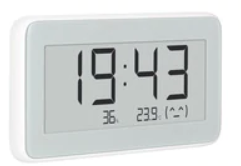
wenn ich beim ble-Adapter neue Devices erlaube kommt Folgendes:

value vom "fe95" ist "70205b04ba613081c8593f09041002d500"
die App nRF Connect habe ich auch, falls du da was brauchst.
-
@AlCalzone sagte in BLE Adapter:
Ich vermute nicht, dazu brauche ich die Mac-Adress-Präfixe. Außer die sind unverändert.
heut kam das gute Stück. @AlCalzone willst mal schauen ob du das intergrieren kannst?
wenn ich beim ble-Adapter neue Devices erlaube kommt Folgendes:
value vom "fe95" ist "70205b04ba613081c8593f09041002d500"
die App nRF Connect habe ich auch, falls du da was brauchst.
-
@AlCalzone vielen Dank schon mal!
schaut erst einmal gut aus.

Wie bekommt man raus was da noch alles kommt? Batterie und Uhr wäre gut. Uhr eigentlich nur zum stellen.im nRF Connect wird noch ne Menge mehr angezeigt, leider kann ich es nicht zuordnen.
Gibts ne Doku wie man sowas "entschlüsselt"? -
@AlCalzone vielen Dank schon mal!
schaut erst einmal gut aus.
Wie bekommt man raus was da noch alles kommt? Batterie und Uhr wäre gut. Uhr eigentlich nur zum stellen.im nRF Connect wird noch ne Menge mehr angezeigt, leider kann ich es nicht zuordnen.
Gibts ne Doku wie man sowas "entschlüsselt"?@Lenny-CB sagte in BLE Adapter:
im nRF Connect wird noch ne Menge mehr angezeigt, leider kann ich es nicht zuordnen.
Als Advertisement oder Characteristics? Letzteres benötigt eine aktive Verbindung, die der Adapter derzeit nicht unterstützt.
Screenshot vielleicht? ;)Warum `sudo` böse ist: https://forum.iobroker.net/post/17109
-
@Lenny-CB sagte in BLE Adapter:
im nRF Connect wird noch ne Menge mehr angezeigt, leider kann ich es nicht zuordnen.
Als Advertisement oder Characteristics? Letzteres benötigt eine aktive Verbindung, die der Adapter derzeit nicht unterstützt.
Screenshot vielleicht? ;)@AlCalzone
hatte ich schon geahnt, dass das nicht so einfach wird.
Sind jede Mengen Characteristics drin.Nur mal so, wie kann ich sehen was da übermittelt wird?
Sonst noch kurz zum Display:
- cooles Teil, schaut sehr wertig aus
- zeigt mit dem Adapter Temp/Hum/RSSI an
- Uhr kommt nur aus der APP (kann nicht gestellt werden - jedenfalls noch nicht raus bekommen wie)
- Gerät kann man nur bei Serverauswahl "China" hinzu fügen
- Uhr geht eine Stunde nach. Vermutlich wegen "China-Server"
-
@AlCalzone
hatte ich schon geahnt, dass das nicht so einfach wird.
Sind jede Mengen Characteristics drin.Nur mal so, wie kann ich sehen was da übermittelt wird?
Sonst noch kurz zum Display:
- cooles Teil, schaut sehr wertig aus
- zeigt mit dem Adapter Temp/Hum/RSSI an
- Uhr kommt nur aus der APP (kann nicht gestellt werden - jedenfalls noch nicht raus bekommen wie)
- Gerät kann man nur bei Serverauswahl "China" hinzu fügen
- Uhr geht eine Stunde nach. Vermutlich wegen "China-Server"
-
Hallo
Meine LED Panels scheinen mir auch BLE zu machen. Dump von nRF Connect unten.Gäbe es eine Möglichkeit die im BLE-Adapter auch bekannt zu machen?
Ich könnte dann ja erstmal nur lesen (wenn ich rausbekomme, wie die READ-Services zu dekodieren sind - ich denke dadrüber bekomme ich die RGB Werte sowie Helligkeitswerte) und später vielleicht durch ausprobieren auch die WRITE-Services (auch wenn der Adapter gerade noch garkein Write unterstützt).Gruss -
nRF Connect, 2019-05-04 telink_mesh1 (A4:C1:38:28:A4:0D) V 07:56:30.372 Connecting to A4:C1:38:28:A4:0D... D 07:56:30.373 gatt = device.connectGatt(autoConnect = false, TRANSPORT_LE) (hidden) D 07:56:30.765 [Callback] Connection state changed with status: 0 and new state: CONNECTED (2) I 07:56:30.766 Connected to A4:C1:38:28:A4:0D D 07:56:30.788 [Broadcast] Action received: android.bluetooth.device.action.ACL_CONNECTED V 07:56:30.834 Discovering services... D 07:56:30.834 gatt.discoverServices() D 07:56:31.613 [Callback] Services discovered with status: 0 I 07:56:31.613 Services discovered V 07:56:31.645 Generic Access (0x1800) - Device Name [R] (0x2A00) Characteristic User Description (0x2901) - Appearance [R] (0x2A01) Device Information (0x180A) - Firmware Revision String [R] (0x2A26) - Manufacturer Name String [R] (0x2A29) - Model Number String [R] (0x2A24) - Hardware Revision String [R] (0x2A27) Unknown Service (00010203-0405-0607-0809-0a0b0c0d1910) - Unknown Characteristic [N R W] (00010203-0405-0607-0809-0a0b0c0d1911) Characteristic User Description (0x2901) - Unknown Characteristic [R W WNR] (00010203-0405-0607-0809-0a0b0c0d1912) Characteristic User Description (0x2901) - Unknown Characteristic [R WNR] (00010203-0405-0607-0809-0a0b0c0d1913) Characteristic User Description (0x2901) - Unknown Characteristic [R W] (00010203-0405-0607-0809-0a0b0c0d1914) Characteristic User Description (0x2901) V 07:56:54.271 Beginning reliable write... D 07:56:54.271 gatt.beginReliableWrite() V 07:57:06.019 Reading remote RSSI... D 07:57:06.019 gatt.readRemoteRssi() I 07:57:06.042 Remote RSSI received: -69 dBm V 07:57:09.808 Reading all characteristics... V 07:57:09.809 Reading characteristic 00002a00-0000-1000-8000-00805f9b34fb D 07:57:09.809 gatt.readCharacteristic(00002a00-0000-1000-8000-00805f9b34fb) I 07:57:09.869 Read Response received from 00002a00-0000-1000-8000-00805f9b34fb, value: (0x) 54-65-6C-69-6E-6B-20-74-4C-69-67-68-74-00 A 07:57:09.869 "Telink tLight " received V 07:57:09.888 Reading characteristic 00002a01-0000-1000-8000-00805f9b34fb D 07:57:09.888 gatt.readCharacteristic(00002a01-0000-1000-8000-00805f9b34fb) I 07:57:09.953 Read Response received from 00002a01-0000-1000-8000-00805f9b34fb, value: (0x) 00-00 A 07:57:09.953 "[0] Unknown" received V 07:57:09.973 Reading characteristic 00002a26-0000-1000-8000-00805f9b34fb D 07:57:09.973 gatt.readCharacteristic(00002a26-0000-1000-8000-00805f9b34fb) I 07:57:10.143 Read Response received from 00002a26-0000-1000-8000-00805f9b34fb, value: (0x) 56-31-2E-36-00-00-00-00-00-00-00-00 A 07:57:10.143 "V1.6 " received V 07:57:10.160 Reading characteristic 00002a29-0000-1000-8000-00805f9b34fb D 07:57:10.160 gatt.readCharacteristic(00002a29-0000-1000-8000-00805f9b34fb) I 07:57:10.262 Read Response received from 00002a29-0000-1000-8000-00805f9b34fb, value: (0x) 74-65-6C-69-6E-6B-5F-6D-65-73-68-31-00 A 07:57:10.262 "telink_mesh1 " received V 07:57:10.275 Reading characteristic 00002a24-0000-1000-8000-00805f9b34fb D 07:57:10.275 gatt.readCharacteristic(00002a24-0000-1000-8000-00805f9b34fb) I 07:57:10.342 Read Response received from 00002a24-0000-1000-8000-00805f9b34fb, value: (0x) 6D-6F-64-65-6C-20-69-64-20-31-32-33-00 A 07:57:10.342 "model id 123 " received V 07:57:10.358 Reading characteristic 00002a27-0000-1000-8000-00805f9b34fb D 07:57:10.358 gatt.readCharacteristic(00002a27-0000-1000-8000-00805f9b34fb) I 07:57:10.422 Read Response received from 00002a27-0000-1000-8000-00805f9b34fb, value: (0x) 22-22-22-22, """""" A 07:57:10.422 """""" received V 07:57:10.435 Reading characteristic 00010203-0405-0607-0809-0a0b0c0d1911 D 07:57:10.435 gatt.readCharacteristic(00010203-0405-0607-0809-0a0b0c0d1911) I 07:57:10.544 Read Response received from 00010203-0405-0607-0809-0a0b0c0d1911, value: (0x) 00 A 07:57:10.544 "(0x) 00" received V 07:57:10.566 Reading characteristic 00010203-0405-0607-0809-0a0b0c0d1912 D 07:57:10.566 gatt.readCharacteristic(00010203-0405-0607-0809-0a0b0c0d1912) I 07:57:10.622 Read Response received from 00010203-0405-0607-0809-0a0b0c0d1912, value: (0x) 00-00-00-00-00-00-00-00-00-00-00-00-00-00-00-00 A 07:57:10.622 "(0x) 00-00-00-00-00-00-00-00-00-00-00-00-00-00-00-00" received V 07:57:10.648 Reading characteristic 00010203-0405-0607-0809-0a0b0c0d1913 D 07:57:10.648 gatt.readCharacteristic(00010203-0405-0607-0809-0a0b0c0d1913) I 07:57:10.743 Read Response received from 00010203-0405-0607-0809-0a0b0c0d1913, value: (0x) E0-00-00-00-00-00-00-00-00-00-00-00-00-00-00-00 A 07:57:10.743 "(0x) E0-00-00-00-00-00-00-00-00-00-00-00-00-00-00-00" received V 07:57:10.755 Reading characteristic 00010203-0405-0607-0809-0a0b0c0d1914 D 07:57:10.755 gatt.readCharacteristic(00010203-0405-0607-0809-0a0b0c0d1914) I 07:57:10.822 Read Response received from 00010203-0405-0607-0809-0a0b0c0d1914, value: (0x) 00-72-B4-14-60-83-FE-C3-5A-4D-A8-5D-CB-2D-1A-88-BF A 07:57:10.822 "(0x) 00-72-B4-14-60-83-FE-C3-5A-4D-A8-5D-CB-2D-1A-88-BF" received V 07:57:10.835 10 characteristics read D 07:58:43.455 [Callback] Connection state changed with status: 8 and new state: DISCONNECTED (0) E 07:58:43.460 Error 8 (0x8): GATT CONN TIMEOUT I 07:58:43.460 Disconnected D 07:58:43.650 [Broadcast] Action received: android.bluetooth.device.action.ACL_DISCONNECTED -
Hallo und Moin,
ich hadere schon länger mit dem BLE- Adapter, bzw. der Funktionalität.
Installiert ist BLE in der aktuellsten Version. Der Adapter ist grün, meldet 'Powered' und so weit alles OK.
Leider erkennt er mein Flower- Care nicht. Per App, bzw. mit nRF ist das Gerät sofort zu entdecken.
Um es ganz verrückt zu machen: Der Adapter hat das Gerät EINMALIG erkannt, die Objekte angelegt und mit Daten gefüllt. Seither ist schweigen im Walde, bzw. ich bekomme keine Daten mehr... -
Hallo und Moin,
ich hadere schon länger mit dem BLE- Adapter, bzw. der Funktionalität.
Installiert ist BLE in der aktuellsten Version. Der Adapter ist grün, meldet 'Powered' und so weit alles OK.
Leider erkennt er mein Flower- Care nicht. Per App, bzw. mit nRF ist das Gerät sofort zu entdecken.
Um es ganz verrückt zu machen: Der Adapter hat das Gerät EINMALIG erkannt, die Objekte angelegt und mit Daten gefüllt. Seither ist schweigen im Walde, bzw. ich bekomme keine Daten mehr...@Cliff
Auf was läuft Dein IOBroker? Bei mir kackt ab und an mal das BT Modul meines BeeLink ab und da hilft einmal runter fahren und spannungsfrei, danach ist das BT Modul wieder online und der BLE Adapter läuft. Die Sensoren dürfen auch nicht über BT mit der APP verbunden sein, sonst gibts auch Probleme. -
Hi,
hatte ich vergessen zu schreiben:Es läuft auf einem Rock64.
Andere Devices werden wie verrückt erkannt (Allerdings dann nur RSSI).
Habe schon mehrere Bluetooth Dongle probiert. Ohne Änderung.Wie schon geschrieben:
Der Adapter läuft grundsätzlich ohne Probleme (Grün und so...).In wie fern nicht mit der App verbunden?
ich verwende Flower Care. Der Sensor ist nicht mit dem Handy gekoppelt. Die App im Regelfall geschlossen.



Hey! Du scheinst an dieser Unterhaltung interessiert zu sein, hast aber noch kein Konto.
Hast du es satt, bei jedem Besuch durch die gleichen Beiträge zu scrollen? Wenn du dich für ein Konto anmeldest, kommst du immer genau dorthin zurück, wo du zuvor warst, und kannst dich über neue Antworten benachrichtigen lassen (entweder per E-Mail oder Push-Benachrichtigung). Du kannst auch Lesezeichen speichern und Beiträge positiv bewerten, um anderen Community-Mitgliedern deine Wertschätzung zu zeigen.
Mit deinem Input könnte dieser Beitrag noch besser werden 💗
Registrieren Anmelden399
Online33.0k
Benutzer83.7k
Themen1.3m
Beiträge