Skip to content
  • Home
  • Aktuell
  • Tags
  • 0 Ungelesen 0
  • Kategorien
  • Unreplied
  • Beliebt
  • GitHub
  • Docu
  • Hilfe
Skins
  • Light
  • Brite
  • Cerulean
  • Cosmo
  • Flatly
  • Journal
  • Litera
  • Lumen
  • Lux
  • Materia
  • Minty
  • Morph
  • Pulse
  • Sandstone
  • Simplex
  • Sketchy
  • Spacelab
  • United
  • Yeti
  • Zephyr
  • Dark
  • Cyborg
  • Darkly
  • Quartz
  • Slate
  • Solar
  • Superhero
  • Vapor

  • Standard: (Kein Skin)
  • Kein Skin
Einklappen
ioBroker Logo

Community Forum

donate donate
  1. ioBroker Community Home
  2. Deutsch
  3. Tester
  4. [Aufruf] Test Shelly Adapter

NEWS

  • Weihnachtsangebot 2025! 🎄
    BluefoxB
    Bluefox
    21
    1
    859

  • UPDATE 31.10.: Amazon Alexa - ioBroker Skill läuft aus ?
    apollon77A
    apollon77
    48
    3
    9.0k

  • Monatsrückblick – September 2025
    BluefoxB
    Bluefox
    13
    1
    2.4k

[Aufruf] Test Shelly Adapter

Geplant Angeheftet Gesperrt Verschoben Tester
shellyadapter
717 Beiträge 81 Kommentatoren 207.2k Aufrufe 30 Watching
  • Älteste zuerst
  • Neuste zuerst
  • Meiste Stimmen
Antworten
  • In einem neuen Thema antworten
Anmelden zum Antworten
Dieses Thema wurde gelöscht. Nur Nutzer mit entsprechenden Rechten können es sehen.
  • M Offline
    M Offline
    Merowinger
    schrieb am zuletzt editiert von Merowinger
    #304

    Eigentlich lief der Adapter bislang wunderbar.. Jetzt habe ich ein Problem. Ich kann nur noch selten ein Gerät steuern und der log sagt folgendes

    2019-02-24 07:40:26.569 - warn: shelly.0 Exception: TypeError: Cannot read property 'startsWith' of undefined
    2019-02-24 07:40:26.574 - error: host.iobroker instance system.adapter.shelly.0 terminated with code 0 (OK)
    2019-02-24 07:40:26.574 - info: host.iobroker Restart adapter system.adapter.shelly.0 because enabled
    2019-02-24 07:40:38.103 - info: web.0 <==Disconnect system.user.admin from ::ffff:192.168.178.70 vis.0
    2019-02-24 07:40:56.578 - info: host.iobroker instance system.adapter.shelly.0 started with pid 9005
    2019-02-24 07:40:56.945 - info: shelly.0 starting. Version 2.1.4 in /opt/iobroker/node_modules/iobroker.shelly, node: v8.15.0
    2019-02-24 07:40:56.964 - info: shelly.0 Starting shelly.0 in version 2.1.4
    2019-02-24 07:40:57.004 - info: shelly.0 Listening for Shelly packets in the network
    2019-02-24 07:40:58.697 - info: web.0 ==>Connected system.user.admin from ::ffff:192.168.178.70
    2019-02-24 07:41:11.765 - warn: shelly.0 Exception: TypeError: Cannot read property 'startsWith' of undefined
    2019-02-24 07:41:11.771 - error: host.iobroker instance system.adapter.shelly.0 terminated with code 0 (OK)
    2019-02-24 07:41:11.771 - info: host.iobroker Restart adapter system.adapter.shelly.0 because enabled
    2019-02-24 07:41:15.378 - info: web.0 <==Disconnect system.user.admin from ::ffff:192.168.178.70 vis.0
    2019-02-24 07:41:41.776 - info: host.iobroker instance system.adapter.shelly.0 started with pid 9015
    2019-02-24 07:41:42.104 - info: shelly.0 starting. Version 2.1.4 in /opt/iobroker/node_modules/iobroker.shelly, node: v8.15.0
    2019-02-24 07:41:42.117 - info: shelly.0 Starting shelly.0 in version 2.1.4
    2019-02-24 07:41:42.151 - info: shelly.0 Listening for Shelly packets in the network
    2019-02-24 07:41:56.951 - warn: shelly.0 Exception: TypeError: Cannot read property 'startsWith' of undefined
    2019-02-24 07:41:56.956 - error: host.iobroker instance system.adapter.shelly.0 terminated with code 0 (OK)
    2019-02-24 07:41:56.956 - info: host.iobroker Restart adapter system.adapter.shelly.0 because enabled
    2019-02-24 07:42:23.146 - info: host.iobroker object change system.adapter.shelly.0
    2019-02-24 07:42:23.146 - info: host.iobroker "system.adapter.shelly.0" disabled
    2019-02-24 07:42:27.277 - error: shelly.0 adapter disabled
    2019-02-24 07:42:27.290 - error: host.iobroker instance system.adapter.shelly.0 terminated with code 3 (Adapter disabled or invalid config)
    2019-02-24 07:42:27.296 - info: host.iobroker Do not restart adapter system.adapter.shelly.0 because disabled or deleted
    2019-02-24 07:42:34.606 - info: iobroker del shelly.0
    2019-02-24 07:42:34.816 - info: iobroker Delete adapter "shelly.0"
    2019-02-24 07:42:34.830 - info: iobroker host.iobroker Counted 1 instances of shelly
    2019-02-24 07:42:34.837 - info: iobroker host.iobroker Counted 14 devices of shelly.0
    2019-02-24 07:42:34.844 - info: iobroker host.iobroker Counted 31 channels of shelly.0
    2019-02-24 07:42:34.856 - info: iobroker host.iobroker Counted 173 states of shelly.0
    2019-02-24 07:42:34.935 - info: iobroker host.iobroker Counted 152 states (io.shelly.0.) from states
    2019-02-24 07:42:34.941 - info: iobroker host.iobroker Counted 8 states (system.adapter.shelly.0.
    ) from states
    2019-02-24 07:42:35.210 - info: iobroker host.iobroker Deleting 219 object(s).
    2019-02-24 07:42:35.262 - info: iobroker host.iobroker: Only 200 objects left to be deleted.
    2019-02-24 07:42:35.622 - info: host.iobroker object change system.adapter.shelly.0
    2019-02-24 07:42:35.622 - info: host.iobroker object deleted system.adapter.shelly.0
    2019-02-24 07:42:35.623 - info: iobroker host.iobroker Deleting 160 state(s).
    2019-02-24 07:42:35.843 - info: iobroker exit 0
    2019-02-24 07:42:46.325 - info: iobroker _restart
    2019-02-24 07:42:46.438 - info: iobroker Starting node restart.js
    2019-02-24 07:42:46.444 - info: iobroker exit 0
    2019-02-24 07:42:46.512 - info: host.iobroker received SIGTERM
    2019-02-24 07:42:51.518 - info: host.iobroker received SIGTERM
    2019-02-24 07:42:56.526 - info: host.iobroker force terminating
    2019-02-24 07:42:56.527 - info: Adapter admin still running
    2019-02-24 07:42:56.527 - info: Adapter discovery still running
    2019-02-24 07:42:56.527 - info: Adapter fritzbox still running
    2019-02-24 07:42:56.527 - info: Adapter tr-064 still running
    2019-02-24 07:42:56.527 - info: Adapter web still running
    2019-02-24 07:42:56.527 - info: Adapter javascript still running
    2019-02-24 07:42:56.527 - info: Adapter fritzdect still running
    2019-02-24 07:42:56.527 - info: Adapter scenes still running
    2019-02-24 07:42:56.527 - info: Adapter onvif still running
    2019-02-24 07:42:56.547 - info: host.iobroker received SIGTERM
    2019-02-24 07:43:01.856 - info: host.iobroker iobroker.js-controller version 1.4.2 js-controller starting
    2019-02-24 07:43:01.857 - info: host.iobroker Copyright (c) 2014-2018 bluefox, 2014 hobbyquaker
    2019-02-24 07:43:01.857 - info: host.iobroker hostname: iobroker, node: v8.15.0
    2019-02-24 07:43:01.858 - info: host.iobroker ip addresses: 192.168.178.138 fe80::b4f5:beff:fecc:dde4
    2019-02-24 07:43:01.879 - info: host.iobroker inMem-states listening on port 9000
    2019-02-24 07:43:01.916 - info: host.iobroker inMem-objects listening on port 9001
    2019-02-24 07:43:01.920 - info: host.iobroker InMemoryDB connected
    2019-02-24 07:43:01.924 - info: host.iobroker 31 instances found
    2019-02-24 07:43:01.928 - info: host.iobroker starting 22 instances
    2019-02-24 07:43:01.938 - info: host.iobroker instance system.adapter.admin.0 started with pid 9111
    2019-02-24 07:43:02.563 - error: admin.0 setObject id missing!!
    2019-02-24 07:43:02.567 - info: admin.0 starting. Version 3.5.10 in /opt/iobroker/node_modules/iobroker.admin, node: v8.15.0
    2019-02-24 07:43:02.573 - info: admin.0 requesting all states
    2019-02-24 07:43:02.573 - info: admin.0 requesting all objects
    2019-02-24 07:43:02.573 - info: admin.0 Request actual repository...
    2019-02-24 07:43:02.690 - info: admin.0 received all states
    2019-02-24 07:43:02.859 - info: admin.0 received all objects
    2019-02-24 07:43:02.921 - info: host.iobroker Update repository "default" under "http://download.iobroker.net/sources-dist.json"
    2019-02-24 07:43:02.880 - info: admin.0 http server listening on port 8081
    2019-02-24 07:43:02.880 - info: admin.0 Use link "http://localhost:8081" to configure.
    2019-02-24 07:43:04.558 - info: admin.0 Repository received successfully.
    2019-02-24 07:43:05.933 - info: host.iobroker instance system.adapter.discovery.0 started with pid 9128
    2019-02-24 07:43:06.227 - info: discovery.0 starting. Version 1.2.4 in /opt/iobroker/node_modules/iobroker.discovery, node: v8.15.0
    2019-02-24 07:43:09.936 - info: host.iobroker instance system.adapter.fritzbox.0 started with pid 9138
    2019-02-24 07:43:10.317 - info: fritzbox.0 starting. Version 0.2.1 in /opt/iobroker/node_modules/iobroker.fritzbox, node: v8.15.0
    2019-02-24 07:43:10.320 - info: fritzbox.0 try to connect: 192.168.178.1
    2019-02-24 07:43:10.334 - info: fritzbox.0 adapter connected to fritzbox: 192.168.178.1
    2019-02-24 07:43:13.933 - info: host.iobroker instance system.adapter.tr-064.0 started with pid 9148
    2019-02-24 07:43:14.341 - info: tr-064.0 starting. Version 0.4.18 in /opt/iobroker/node_modules/iobroker.tr-064, node: v8.15.0
    2019-02-24 07:43:17.933 - info: host.iobroker instance system.adapter.web.0 started with pid 9158
    2019-02-24 07:43:18.354 - info: web.0 starting. Version 2.4.1 in /opt/iobroker/node_modules/iobroker.web, node: v8.15.0
    2019-02-24 07:43:18.483 - info: web.0 socket.io server listening on port 8082
    2019-02-24 07:43:18.484 - info: web.0 http server listening on port 8082
    2019-02-24 07:43:22.243 - info: vis.0 starting. Version 1.1.7 in /opt/iobroker/node_modules/iobroker.vis, node: v8.15.0
    2019-02-24 07:43:22.317 - info: web.0 ==>Connected system.user.admin from ::ffff:192.168.178.70
    2019-02-24 07:43:22.664 - info: vis.0 vis license is OK.
    2019-02-24 07:43:23.591 - info: host.iobroker instance system.adapter.vis.0 terminated while should be started once
    2019-02-24 07:43:25.932 - info: host.iobroker instance system.adapter.javascript.0 started with pid 9178
    2019-02-24 07:43:26.585 - info: javascript.0 starting. Version 3.6.4 in /opt/iobroker/node_modules/iobroker.javascript, node: v8.15.0
    2019-02-24 07:43:26.588 - info: javascript.0 requesting all states
    2019-02-24 07:43:26.592 - info: javascript.0 requesting all objects
    2019-02-24 07:43:26.696 - info: javascript.0 received all states
    2019-02-24 07:43:26.860 - info: javascript.0 received all objects
    2019-02-24 07:43:26.900 - info: javascript.0 Start javascript script.js.common.Raff_runter
    2019-02-24 07:43:26.905 - info: javascript.0 script.js.common.Raff_runter: registered 1 subscription and 0 schedules
    2019-02-24 07:43:26.905 - info: javascript.0 Start javascript script.js.common.Raff_nauf
    2019-02-24 07:43:26.906 - info: javascript.0 script.js.common.Raff_nauf: registered 1 subscription and 0 schedules
    2019-02-24 07:43:35.670 - info: iobroker add shelly --host iobroker
    2019-02-24 07:43:35.916 - info: iobroker host.iobroker create instance shelly
    2019-02-24 07:43:35.923 - info: iobroker host.iobroker object shelly.0.info.connection created
    2019-02-24 07:43:35.955 - info: iobroker host.iobroker object shelly.0.info created
    2019-02-24 07:43:35.982 - info: iobroker host.iobroker object system.adapter.shelly.0.outputCount created
    2019-02-24 07:43:36.008 - info: iobroker host.iobroker object system.adapter.shelly.0.inputCount created
    2019-02-24 07:43:36.036 - info: iobroker host.iobroker object system.adapter.shelly.0.uptime created
    2019-02-24 07:43:36.063 - info: iobroker host.iobroker object system.adapter.shelly.0.memRss created
    2019-02-24 07:43:36.091 - info: iobroker host.iobroker object system.adapter.shelly.0.memHeapTotal created
    2019-02-24 07:43:36.118 - info: iobroker host.iobroker object system.adapter.shelly.0.memHeapUsed created
    2019-02-24 07:43:36.146 - info: iobroker host.iobroker object system.adapter.shelly.0.connected created
    2019-02-24 07:43:36.174 - info: iobroker host.iobroker object system.adapter.shelly.0.alive created
    2019-02-24 07:43:36.204 - info: host.iobroker object change system.adapter.shelly.0
    2019-02-24 07:43:36.208 - info: host.iobroker instance system.adapter.shelly.0 started with pid 9198
    2019-02-24 07:43:36.209 - info: iobroker host.iobroker object system.adapter.shelly.0 created
    2019-02-24 07:43:36.216 - info: iobroker exit 0
    2019-02-24 07:43:36.813 - info: shelly.0 starting. Version 2.1.4 in /opt/iobroker/node_modules/iobroker.shelly, node: v8.15.0
    2019-02-24 07:43:36.816 - info: shelly.0 Starting shelly.0 in version 2.1.4
    2019-02-24 07:43:36.869 - info: shelly.0 Listening for Shelly packets in the network
    2019-02-24 07:43:38.274 - info: vis-google-fonts.0 starting. Version 0.1.0 in /opt/iobroker/node_modules/iobroker.vis-google-fonts, node: v8.15.0
    2019-02-24 07:43:38.827 - info: host.iobroker instance system.adapter.vis-google-fonts.0 terminated while should be started once
    2019-02-24 07:43:45.933 - info: host.iobroker instance system.adapter.fritzdect.0 started with pid 9219
    2019-02-24 07:43:46.528 - info: fritzdect.0 starting. Version 0.1.4 in /opt/iobroker/node_modules/iobroker.fritzdect, node: v8.15.0
    2019-02-24 07:43:46.530 - info: fritzdect.0 entered ready
    2019-02-24 07:43:50.607 - info: fritzdect.0 Talking to FritzBox with firmware: 07.01
    2019-02-24 07:43:50.796 - info: fritzdect.0 create Devices 1
    2019-02-24 07:43:50.796 - info: fritzdect.0 setting up Repeater/DECT100 object FRITZ!DECT Repeater Küche
    2019-02-24 07:43:57.360 - warn: shelly.0 Exception: TypeError: Cannot read property 'startsWith' of undefined
    2019-02-24 07:43:57.366 - error: host.iobroker instance system.adapter.shelly.0 terminated with code 0 (OK)
    2019-02-24 07:43:57.367 - info: host.iobroker Restart adapter system.adapter.shelly.0 because enabled
    2019-02-24 07:44:09.931 - info: host.iobroker instance system.adapter.scenes.0 started with pid 9229
    2019-02-24 07:44:10.219 - info: scenes.0 starting. Version 1.1.0 in /opt/iobroker/node_modules/iobroker.scenes, node: v8.15.0
    2019-02-24 07:44:25.931 - info: host.iobroker instance system.adapter.onvif.0 started with pid 9239
    2019-02-24 07:44:26.347 - info: onvif.0 starting. Version 0.0.2 in /opt/iobroker/node_modules/iobroker.onvif, node: v8.15.0
    2019-02-24 07:44:27.370 - info: host.iobroker instance system.adapter.shelly.0 started with pid 9249
    2019-02-24 07:44:27.690 - info: shelly.0 starting. Version 2.1.4 in /opt/iobroker/node_modules/iobroker.shelly, node: v8.15.0
    2019-02-24 07:44:27.706 - info: shelly.0 Starting shelly.0 in version 2.1.4
    2019-02-24 07:44:27.741 - info: shelly.0 Listening for Shelly packets in the network
    2019-02-24 07:44:42.473 - warn: shelly.0 Exception: TypeError: Cannot read property 'startsWith' of undefined
    2019-02-24 07:44:42.479 - error: host.iobroker instance system.adapter.shelly.0 terminated with code 0 (OK)
    2019-02-24 07:44:42.479 - info: host.iobroker Restart adapter system.adapter.shelly.0 because enabled
    2019-02-24 07:45:12.483 - info: host.iobroker instance system.adapter.shelly.0 started with pid 9259
    2019-02-24 07:45:12.805 - info: shelly.0 starting. Version 2.1.4 in /opt/iobroker/node_modules/iobroker.shelly, node: v8.15.0
    2019-02-24 07:45:12.817 - info: shelly.0 Starting shelly.0 in version 2.1.4
    2019-02-24 07:45:12.856 - info: shelly.0 Listening for Shelly packets in the network
    2019-02-24 07:45:27.671 - warn: shelly.0 Exception: TypeError: Cannot read property 'startsWith' of undefined
    2019-02-24 07:45:27.675 - error: host.iobroker instance system.adapter.shelly.0 terminated with code 0 (OK)
    2019-02-24 07:45:27.676 - info: host.iobroker Restart adapter system.adapter.shelly.0 because enabled
    2019-02-24 07:45:57.678 - info: host.iobroker instance system.adapter.shelly.0 started with pid 9269
    2019-02-24 07:45:58.001 - info: shelly.0 starting. Version 2.1.4 in /opt/iobroker/node_modules/iobroker.shelly, node: v8.15.0
    2019-02-24 07:45:58.011 - info: shelly.0 Starting shelly.0 in version 2.1.4
    2019-02-24 07:45:58.045 - info: shelly.0 Listening for Shelly packets in the network
    2019-02-24 07:46:12.828 - warn: shelly.0 Exception: TypeError: Cannot read property 'startsWith' of undefined
    2019-02-24 07:46:12.834 - error: host.iobroker instance system.adapter.shelly.0 terminated with code 0 (OK)
    2019-02-24 07:46:12.835 - info: host.iobroker Restart adapter system.adapter.shelly.0 because enabled
    2019-02-24 07:46:39.279 - info: web.0 ==>Connected system.user.admin from ::ffff:192.168.178.70
    2019-02-24 07:46:42.839 - info: host.iobroker instance system.adapter.shelly.0 started with pid 9279
    2019-02-24 07:46:43.193 - info: shelly.0 starting. Version 2.1.4 in /opt/iobroker/node_modules/iobroker.shelly, node: v8.15.0
    2019-02-24 07:46:43.205 - info: shelly.0 Starting shelly.0 in version 2.1.4
    2019-02-24 07:46:43.248 - info: shelly.0 Listening for Shelly packets in the network
    2019-02-24 07:46:48.426 - info: web.0 <==Disconnect system.user.admin from ::ffff:192.168.178.70 vis.0
    2019-02-24 07:46:57.986 - warn: shelly.0 Exception: TypeError: Cannot read property 'startsWith' of undefined
    2019-02-24 07:46:57.992 - error: host.iobroker instance system.adapter.shelly.0 terminated with code 0 (OK)
    2019-02-24 07:46:57.993 - info: host.iobroker Restart adapter system.adapter.shelly.0 because enabled
    2019-02-24 07:47:27.997 - info: host.iobroker instance system.adapter.shelly.0 started with pid 9289
    2019-02-24 07:47:28.315 - info: shelly.0 starting. Version 2.1.4 in /opt/iobroker/node_modules/iobroker.shelly, node: v8.15.0
    2019-02-24 07:47:28.326 - info: shelly.0 Starting shelly.0 in version 2.1.4
    2019-02-24 07:47:28.360 - info: shelly.0 Listening for Shelly packets in the network
    2019-02-24 07:47:43.146 - warn: shelly.0 Exception: TypeError: Cannot read property 'startsWith' of undefined
    2019-02-24 07:47:43.151 - error: host.iobroker instance system.adapter.shelly.0 terminated with code 0 (OK)
    2019-02-24 07:47:43.152 - info: host.iobroker Restart adapter system.adapter.shelly.0 because enabled

    hmm jetzt beim Versuch zu löschen...

    iobroker 2019-02-24 07:52:14.833 info exit 0
    host.iobroker 2019-02-24 07:52:07.805 error Cannot write files: /opt/iobroker/node_modules/iobroker.js-controller/lib/objects/../../../../iobroker-data/files/shelly.admin/data.json: ENOENT: no such file or directory, open '/opt/iobroker/node
    iobroker 2019-02-24 07:52:07.001 info npm uninstall iobroker.shelly --silent --save --prefix "/opt/iobroker" (System call)
    iobroker 2019-02-24 07:52:06.811 info host.iobroker Deleting 1 state(s).
    iobroker 2019-02-24 07:52:06.807 info host.iobroker Deleting 2 object(s).
    iobroker 2019-02-24 07:52:06.800 info host.iobroker Counted 1 states (system.adapter.shelly.*) from states
    iobroker 2019-02-24 07:52:06.711 info host.iobroker Counted 1 states of shelly
    iobroker 2019-02-24 07:52:06.699 info host.iobroker Counted 1 adapters for shelly
    iobroker 2019-02-24 07:52:06.687 info host.iobroker no instances of adapter shelly found
    iobroker 2019-02-24 07:52:06.674 info Delete adapter "shelly"
    iobroker 2019-02-24 07:52:06.472 info del shelly
    host.iobroker 2019-02-24 07:51:58.907 error startInstance system.adapter.shelly.0: object not found!

    StuebiS 1 Antwort Letzte Antwort
    0
    • M Merowinger

      Eigentlich lief der Adapter bislang wunderbar.. Jetzt habe ich ein Problem. Ich kann nur noch selten ein Gerät steuern und der log sagt folgendes

      2019-02-24 07:40:26.569 - warn: shelly.0 Exception: TypeError: Cannot read property 'startsWith' of undefined
      2019-02-24 07:40:26.574 - error: host.iobroker instance system.adapter.shelly.0 terminated with code 0 (OK)
      2019-02-24 07:40:26.574 - info: host.iobroker Restart adapter system.adapter.shelly.0 because enabled
      2019-02-24 07:40:38.103 - info: web.0 <==Disconnect system.user.admin from ::ffff:192.168.178.70 vis.0
      2019-02-24 07:40:56.578 - info: host.iobroker instance system.adapter.shelly.0 started with pid 9005
      2019-02-24 07:40:56.945 - info: shelly.0 starting. Version 2.1.4 in /opt/iobroker/node_modules/iobroker.shelly, node: v8.15.0
      2019-02-24 07:40:56.964 - info: shelly.0 Starting shelly.0 in version 2.1.4
      2019-02-24 07:40:57.004 - info: shelly.0 Listening for Shelly packets in the network
      2019-02-24 07:40:58.697 - info: web.0 ==>Connected system.user.admin from ::ffff:192.168.178.70
      2019-02-24 07:41:11.765 - warn: shelly.0 Exception: TypeError: Cannot read property 'startsWith' of undefined
      2019-02-24 07:41:11.771 - error: host.iobroker instance system.adapter.shelly.0 terminated with code 0 (OK)
      2019-02-24 07:41:11.771 - info: host.iobroker Restart adapter system.adapter.shelly.0 because enabled
      2019-02-24 07:41:15.378 - info: web.0 <==Disconnect system.user.admin from ::ffff:192.168.178.70 vis.0
      2019-02-24 07:41:41.776 - info: host.iobroker instance system.adapter.shelly.0 started with pid 9015
      2019-02-24 07:41:42.104 - info: shelly.0 starting. Version 2.1.4 in /opt/iobroker/node_modules/iobroker.shelly, node: v8.15.0
      2019-02-24 07:41:42.117 - info: shelly.0 Starting shelly.0 in version 2.1.4
      2019-02-24 07:41:42.151 - info: shelly.0 Listening for Shelly packets in the network
      2019-02-24 07:41:56.951 - warn: shelly.0 Exception: TypeError: Cannot read property 'startsWith' of undefined
      2019-02-24 07:41:56.956 - error: host.iobroker instance system.adapter.shelly.0 terminated with code 0 (OK)
      2019-02-24 07:41:56.956 - info: host.iobroker Restart adapter system.adapter.shelly.0 because enabled
      2019-02-24 07:42:23.146 - info: host.iobroker object change system.adapter.shelly.0
      2019-02-24 07:42:23.146 - info: host.iobroker "system.adapter.shelly.0" disabled
      2019-02-24 07:42:27.277 - error: shelly.0 adapter disabled
      2019-02-24 07:42:27.290 - error: host.iobroker instance system.adapter.shelly.0 terminated with code 3 (Adapter disabled or invalid config)
      2019-02-24 07:42:27.296 - info: host.iobroker Do not restart adapter system.adapter.shelly.0 because disabled or deleted
      2019-02-24 07:42:34.606 - info: iobroker del shelly.0
      2019-02-24 07:42:34.816 - info: iobroker Delete adapter "shelly.0"
      2019-02-24 07:42:34.830 - info: iobroker host.iobroker Counted 1 instances of shelly
      2019-02-24 07:42:34.837 - info: iobroker host.iobroker Counted 14 devices of shelly.0
      2019-02-24 07:42:34.844 - info: iobroker host.iobroker Counted 31 channels of shelly.0
      2019-02-24 07:42:34.856 - info: iobroker host.iobroker Counted 173 states of shelly.0
      2019-02-24 07:42:34.935 - info: iobroker host.iobroker Counted 152 states (io.shelly.0.) from states
      2019-02-24 07:42:34.941 - info: iobroker host.iobroker Counted 8 states (system.adapter.shelly.0.
      ) from states
      2019-02-24 07:42:35.210 - info: iobroker host.iobroker Deleting 219 object(s).
      2019-02-24 07:42:35.262 - info: iobroker host.iobroker: Only 200 objects left to be deleted.
      2019-02-24 07:42:35.622 - info: host.iobroker object change system.adapter.shelly.0
      2019-02-24 07:42:35.622 - info: host.iobroker object deleted system.adapter.shelly.0
      2019-02-24 07:42:35.623 - info: iobroker host.iobroker Deleting 160 state(s).
      2019-02-24 07:42:35.843 - info: iobroker exit 0
      2019-02-24 07:42:46.325 - info: iobroker _restart
      2019-02-24 07:42:46.438 - info: iobroker Starting node restart.js
      2019-02-24 07:42:46.444 - info: iobroker exit 0
      2019-02-24 07:42:46.512 - info: host.iobroker received SIGTERM
      2019-02-24 07:42:51.518 - info: host.iobroker received SIGTERM
      2019-02-24 07:42:56.526 - info: host.iobroker force terminating
      2019-02-24 07:42:56.527 - info: Adapter admin still running
      2019-02-24 07:42:56.527 - info: Adapter discovery still running
      2019-02-24 07:42:56.527 - info: Adapter fritzbox still running
      2019-02-24 07:42:56.527 - info: Adapter tr-064 still running
      2019-02-24 07:42:56.527 - info: Adapter web still running
      2019-02-24 07:42:56.527 - info: Adapter javascript still running
      2019-02-24 07:42:56.527 - info: Adapter fritzdect still running
      2019-02-24 07:42:56.527 - info: Adapter scenes still running
      2019-02-24 07:42:56.527 - info: Adapter onvif still running
      2019-02-24 07:42:56.547 - info: host.iobroker received SIGTERM
      2019-02-24 07:43:01.856 - info: host.iobroker iobroker.js-controller version 1.4.2 js-controller starting
      2019-02-24 07:43:01.857 - info: host.iobroker Copyright (c) 2014-2018 bluefox, 2014 hobbyquaker
      2019-02-24 07:43:01.857 - info: host.iobroker hostname: iobroker, node: v8.15.0
      2019-02-24 07:43:01.858 - info: host.iobroker ip addresses: 192.168.178.138 fe80::b4f5:beff:fecc:dde4
      2019-02-24 07:43:01.879 - info: host.iobroker inMem-states listening on port 9000
      2019-02-24 07:43:01.916 - info: host.iobroker inMem-objects listening on port 9001
      2019-02-24 07:43:01.920 - info: host.iobroker InMemoryDB connected
      2019-02-24 07:43:01.924 - info: host.iobroker 31 instances found
      2019-02-24 07:43:01.928 - info: host.iobroker starting 22 instances
      2019-02-24 07:43:01.938 - info: host.iobroker instance system.adapter.admin.0 started with pid 9111
      2019-02-24 07:43:02.563 - error: admin.0 setObject id missing!!
      2019-02-24 07:43:02.567 - info: admin.0 starting. Version 3.5.10 in /opt/iobroker/node_modules/iobroker.admin, node: v8.15.0
      2019-02-24 07:43:02.573 - info: admin.0 requesting all states
      2019-02-24 07:43:02.573 - info: admin.0 requesting all objects
      2019-02-24 07:43:02.573 - info: admin.0 Request actual repository...
      2019-02-24 07:43:02.690 - info: admin.0 received all states
      2019-02-24 07:43:02.859 - info: admin.0 received all objects
      2019-02-24 07:43:02.921 - info: host.iobroker Update repository "default" under "http://download.iobroker.net/sources-dist.json"
      2019-02-24 07:43:02.880 - info: admin.0 http server listening on port 8081
      2019-02-24 07:43:02.880 - info: admin.0 Use link "http://localhost:8081" to configure.
      2019-02-24 07:43:04.558 - info: admin.0 Repository received successfully.
      2019-02-24 07:43:05.933 - info: host.iobroker instance system.adapter.discovery.0 started with pid 9128
      2019-02-24 07:43:06.227 - info: discovery.0 starting. Version 1.2.4 in /opt/iobroker/node_modules/iobroker.discovery, node: v8.15.0
      2019-02-24 07:43:09.936 - info: host.iobroker instance system.adapter.fritzbox.0 started with pid 9138
      2019-02-24 07:43:10.317 - info: fritzbox.0 starting. Version 0.2.1 in /opt/iobroker/node_modules/iobroker.fritzbox, node: v8.15.0
      2019-02-24 07:43:10.320 - info: fritzbox.0 try to connect: 192.168.178.1
      2019-02-24 07:43:10.334 - info: fritzbox.0 adapter connected to fritzbox: 192.168.178.1
      2019-02-24 07:43:13.933 - info: host.iobroker instance system.adapter.tr-064.0 started with pid 9148
      2019-02-24 07:43:14.341 - info: tr-064.0 starting. Version 0.4.18 in /opt/iobroker/node_modules/iobroker.tr-064, node: v8.15.0
      2019-02-24 07:43:17.933 - info: host.iobroker instance system.adapter.web.0 started with pid 9158
      2019-02-24 07:43:18.354 - info: web.0 starting. Version 2.4.1 in /opt/iobroker/node_modules/iobroker.web, node: v8.15.0
      2019-02-24 07:43:18.483 - info: web.0 socket.io server listening on port 8082
      2019-02-24 07:43:18.484 - info: web.0 http server listening on port 8082
      2019-02-24 07:43:22.243 - info: vis.0 starting. Version 1.1.7 in /opt/iobroker/node_modules/iobroker.vis, node: v8.15.0
      2019-02-24 07:43:22.317 - info: web.0 ==>Connected system.user.admin from ::ffff:192.168.178.70
      2019-02-24 07:43:22.664 - info: vis.0 vis license is OK.
      2019-02-24 07:43:23.591 - info: host.iobroker instance system.adapter.vis.0 terminated while should be started once
      2019-02-24 07:43:25.932 - info: host.iobroker instance system.adapter.javascript.0 started with pid 9178
      2019-02-24 07:43:26.585 - info: javascript.0 starting. Version 3.6.4 in /opt/iobroker/node_modules/iobroker.javascript, node: v8.15.0
      2019-02-24 07:43:26.588 - info: javascript.0 requesting all states
      2019-02-24 07:43:26.592 - info: javascript.0 requesting all objects
      2019-02-24 07:43:26.696 - info: javascript.0 received all states
      2019-02-24 07:43:26.860 - info: javascript.0 received all objects
      2019-02-24 07:43:26.900 - info: javascript.0 Start javascript script.js.common.Raff_runter
      2019-02-24 07:43:26.905 - info: javascript.0 script.js.common.Raff_runter: registered 1 subscription and 0 schedules
      2019-02-24 07:43:26.905 - info: javascript.0 Start javascript script.js.common.Raff_nauf
      2019-02-24 07:43:26.906 - info: javascript.0 script.js.common.Raff_nauf: registered 1 subscription and 0 schedules
      2019-02-24 07:43:35.670 - info: iobroker add shelly --host iobroker
      2019-02-24 07:43:35.916 - info: iobroker host.iobroker create instance shelly
      2019-02-24 07:43:35.923 - info: iobroker host.iobroker object shelly.0.info.connection created
      2019-02-24 07:43:35.955 - info: iobroker host.iobroker object shelly.0.info created
      2019-02-24 07:43:35.982 - info: iobroker host.iobroker object system.adapter.shelly.0.outputCount created
      2019-02-24 07:43:36.008 - info: iobroker host.iobroker object system.adapter.shelly.0.inputCount created
      2019-02-24 07:43:36.036 - info: iobroker host.iobroker object system.adapter.shelly.0.uptime created
      2019-02-24 07:43:36.063 - info: iobroker host.iobroker object system.adapter.shelly.0.memRss created
      2019-02-24 07:43:36.091 - info: iobroker host.iobroker object system.adapter.shelly.0.memHeapTotal created
      2019-02-24 07:43:36.118 - info: iobroker host.iobroker object system.adapter.shelly.0.memHeapUsed created
      2019-02-24 07:43:36.146 - info: iobroker host.iobroker object system.adapter.shelly.0.connected created
      2019-02-24 07:43:36.174 - info: iobroker host.iobroker object system.adapter.shelly.0.alive created
      2019-02-24 07:43:36.204 - info: host.iobroker object change system.adapter.shelly.0
      2019-02-24 07:43:36.208 - info: host.iobroker instance system.adapter.shelly.0 started with pid 9198
      2019-02-24 07:43:36.209 - info: iobroker host.iobroker object system.adapter.shelly.0 created
      2019-02-24 07:43:36.216 - info: iobroker exit 0
      2019-02-24 07:43:36.813 - info: shelly.0 starting. Version 2.1.4 in /opt/iobroker/node_modules/iobroker.shelly, node: v8.15.0
      2019-02-24 07:43:36.816 - info: shelly.0 Starting shelly.0 in version 2.1.4
      2019-02-24 07:43:36.869 - info: shelly.0 Listening for Shelly packets in the network
      2019-02-24 07:43:38.274 - info: vis-google-fonts.0 starting. Version 0.1.0 in /opt/iobroker/node_modules/iobroker.vis-google-fonts, node: v8.15.0
      2019-02-24 07:43:38.827 - info: host.iobroker instance system.adapter.vis-google-fonts.0 terminated while should be started once
      2019-02-24 07:43:45.933 - info: host.iobroker instance system.adapter.fritzdect.0 started with pid 9219
      2019-02-24 07:43:46.528 - info: fritzdect.0 starting. Version 0.1.4 in /opt/iobroker/node_modules/iobroker.fritzdect, node: v8.15.0
      2019-02-24 07:43:46.530 - info: fritzdect.0 entered ready
      2019-02-24 07:43:50.607 - info: fritzdect.0 Talking to FritzBox with firmware: 07.01
      2019-02-24 07:43:50.796 - info: fritzdect.0 create Devices 1
      2019-02-24 07:43:50.796 - info: fritzdect.0 setting up Repeater/DECT100 object FRITZ!DECT Repeater Küche
      2019-02-24 07:43:57.360 - warn: shelly.0 Exception: TypeError: Cannot read property 'startsWith' of undefined
      2019-02-24 07:43:57.366 - error: host.iobroker instance system.adapter.shelly.0 terminated with code 0 (OK)
      2019-02-24 07:43:57.367 - info: host.iobroker Restart adapter system.adapter.shelly.0 because enabled
      2019-02-24 07:44:09.931 - info: host.iobroker instance system.adapter.scenes.0 started with pid 9229
      2019-02-24 07:44:10.219 - info: scenes.0 starting. Version 1.1.0 in /opt/iobroker/node_modules/iobroker.scenes, node: v8.15.0
      2019-02-24 07:44:25.931 - info: host.iobroker instance system.adapter.onvif.0 started with pid 9239
      2019-02-24 07:44:26.347 - info: onvif.0 starting. Version 0.0.2 in /opt/iobroker/node_modules/iobroker.onvif, node: v8.15.0
      2019-02-24 07:44:27.370 - info: host.iobroker instance system.adapter.shelly.0 started with pid 9249
      2019-02-24 07:44:27.690 - info: shelly.0 starting. Version 2.1.4 in /opt/iobroker/node_modules/iobroker.shelly, node: v8.15.0
      2019-02-24 07:44:27.706 - info: shelly.0 Starting shelly.0 in version 2.1.4
      2019-02-24 07:44:27.741 - info: shelly.0 Listening for Shelly packets in the network
      2019-02-24 07:44:42.473 - warn: shelly.0 Exception: TypeError: Cannot read property 'startsWith' of undefined
      2019-02-24 07:44:42.479 - error: host.iobroker instance system.adapter.shelly.0 terminated with code 0 (OK)
      2019-02-24 07:44:42.479 - info: host.iobroker Restart adapter system.adapter.shelly.0 because enabled
      2019-02-24 07:45:12.483 - info: host.iobroker instance system.adapter.shelly.0 started with pid 9259
      2019-02-24 07:45:12.805 - info: shelly.0 starting. Version 2.1.4 in /opt/iobroker/node_modules/iobroker.shelly, node: v8.15.0
      2019-02-24 07:45:12.817 - info: shelly.0 Starting shelly.0 in version 2.1.4
      2019-02-24 07:45:12.856 - info: shelly.0 Listening for Shelly packets in the network
      2019-02-24 07:45:27.671 - warn: shelly.0 Exception: TypeError: Cannot read property 'startsWith' of undefined
      2019-02-24 07:45:27.675 - error: host.iobroker instance system.adapter.shelly.0 terminated with code 0 (OK)
      2019-02-24 07:45:27.676 - info: host.iobroker Restart adapter system.adapter.shelly.0 because enabled
      2019-02-24 07:45:57.678 - info: host.iobroker instance system.adapter.shelly.0 started with pid 9269
      2019-02-24 07:45:58.001 - info: shelly.0 starting. Version 2.1.4 in /opt/iobroker/node_modules/iobroker.shelly, node: v8.15.0
      2019-02-24 07:45:58.011 - info: shelly.0 Starting shelly.0 in version 2.1.4
      2019-02-24 07:45:58.045 - info: shelly.0 Listening for Shelly packets in the network
      2019-02-24 07:46:12.828 - warn: shelly.0 Exception: TypeError: Cannot read property 'startsWith' of undefined
      2019-02-24 07:46:12.834 - error: host.iobroker instance system.adapter.shelly.0 terminated with code 0 (OK)
      2019-02-24 07:46:12.835 - info: host.iobroker Restart adapter system.adapter.shelly.0 because enabled
      2019-02-24 07:46:39.279 - info: web.0 ==>Connected system.user.admin from ::ffff:192.168.178.70
      2019-02-24 07:46:42.839 - info: host.iobroker instance system.adapter.shelly.0 started with pid 9279
      2019-02-24 07:46:43.193 - info: shelly.0 starting. Version 2.1.4 in /opt/iobroker/node_modules/iobroker.shelly, node: v8.15.0
      2019-02-24 07:46:43.205 - info: shelly.0 Starting shelly.0 in version 2.1.4
      2019-02-24 07:46:43.248 - info: shelly.0 Listening for Shelly packets in the network
      2019-02-24 07:46:48.426 - info: web.0 <==Disconnect system.user.admin from ::ffff:192.168.178.70 vis.0
      2019-02-24 07:46:57.986 - warn: shelly.0 Exception: TypeError: Cannot read property 'startsWith' of undefined
      2019-02-24 07:46:57.992 - error: host.iobroker instance system.adapter.shelly.0 terminated with code 0 (OK)
      2019-02-24 07:46:57.993 - info: host.iobroker Restart adapter system.adapter.shelly.0 because enabled
      2019-02-24 07:47:27.997 - info: host.iobroker instance system.adapter.shelly.0 started with pid 9289
      2019-02-24 07:47:28.315 - info: shelly.0 starting. Version 2.1.4 in /opt/iobroker/node_modules/iobroker.shelly, node: v8.15.0
      2019-02-24 07:47:28.326 - info: shelly.0 Starting shelly.0 in version 2.1.4
      2019-02-24 07:47:28.360 - info: shelly.0 Listening for Shelly packets in the network
      2019-02-24 07:47:43.146 - warn: shelly.0 Exception: TypeError: Cannot read property 'startsWith' of undefined
      2019-02-24 07:47:43.151 - error: host.iobroker instance system.adapter.shelly.0 terminated with code 0 (OK)
      2019-02-24 07:47:43.152 - info: host.iobroker Restart adapter system.adapter.shelly.0 because enabled

      hmm jetzt beim Versuch zu löschen...

      iobroker 2019-02-24 07:52:14.833 info exit 0
      host.iobroker 2019-02-24 07:52:07.805 error Cannot write files: /opt/iobroker/node_modules/iobroker.js-controller/lib/objects/../../../../iobroker-data/files/shelly.admin/data.json: ENOENT: no such file or directory, open '/opt/iobroker/node
      iobroker 2019-02-24 07:52:07.001 info npm uninstall iobroker.shelly --silent --save --prefix "/opt/iobroker" (System call)
      iobroker 2019-02-24 07:52:06.811 info host.iobroker Deleting 1 state(s).
      iobroker 2019-02-24 07:52:06.807 info host.iobroker Deleting 2 object(s).
      iobroker 2019-02-24 07:52:06.800 info host.iobroker Counted 1 states (system.adapter.shelly.*) from states
      iobroker 2019-02-24 07:52:06.711 info host.iobroker Counted 1 states of shelly
      iobroker 2019-02-24 07:52:06.699 info host.iobroker Counted 1 adapters for shelly
      iobroker 2019-02-24 07:52:06.687 info host.iobroker no instances of adapter shelly found
      iobroker 2019-02-24 07:52:06.674 info Delete adapter "shelly"
      iobroker 2019-02-24 07:52:06.472 info del shelly
      host.iobroker 2019-02-24 07:51:58.907 error startInstance system.adapter.shelly.0: object not found!

      StuebiS Offline
      StuebiS Offline
      Stuebi
      schrieb am zuletzt editiert von
      #305

      @Merowinger , wie ich sehe willst Du den Adapter löschen und neue anlegen. Ist der Fehler immer noch da? Wenn ja, sage bitte bescheid. Ich habe eine Idee, woran es liegt und würde es gerne korrigieren und Dir die Version zum Testen geben.

      ioBroker auf Synology DS216+II im Docker Container

      1 Antwort Letzte Antwort
      0
      • M Offline
        M Offline
        Merowinger
        schrieb am zuletzt editiert von
        #306

        Wow fuck, das ging schnell.
        Jou habe gelöscht und neu installiert. Weiterhin startet er alle Minute neu... Aber ich kann mittlerweile wenigstens steuern...

        StuebiS 1 Antwort Letzte Antwort
        0
        • M Merowinger

          Wow fuck, das ging schnell.
          Jou habe gelöscht und neu installiert. Weiterhin startet er alle Minute neu... Aber ich kann mittlerweile wenigstens steuern...

          StuebiS Offline
          StuebiS Offline
          Stuebi
          schrieb am zuletzt editiert von Stuebi
          #307

          @Merowinger kannst Du bitte den Shelly Adapter einmal im Debug Modus starten (Auf Instanzen gehen, dort Experenmodus aktivieren und dann bei Shelly bei Log Stufe von Info auf Debug wechseln).
          Ich brauch das Logfile bist zum Fehler und ein paar Einträge danach.

          Wenn es geht, erstelle bitte auf Github ein Issue und stelle dort das Logfile zur Verfügung.

          https://github.com/schmupu/ioBroker.shelly/issues

          ioBroker auf Synology DS216+II im Docker Container

          1 Antwort Letzte Antwort
          0
          • M Offline
            M Offline
            Merowinger
            schrieb am zuletzt editiert von
            #308

            @Stuebi habe leider keinen GitHub Account.
            Seit umstellen auf loglevel-debug und wieder zurück auf info habe ich den Fehler nicht mehr gesehen :-(

            1 Antwort Letzte Antwort
            0
            • StuebiS Offline
              StuebiS Offline
              Stuebi
              schrieb am zuletzt editiert von
              #309

              Ab Version 2.1.5. (Latest) wird auch der Shelly Smoke unterstützt. Es werden die Objekte Smoke detected, Temperatur und Batterie Status angezeigt.

              Mehr Infos hier: https://github.com/schmupu/ioBroker.shelly

              VG
              Stübi

              ioBroker auf Synology DS216+II im Docker Container

              1 Antwort Letzte Antwort
              0
              • E Offline
                E Offline
                eMd
                schrieb am zuletzt editiert von eMd
                #310

                Was soll ich mit der Meldung anfangen?

                system.adapter.shelly.0 terminated by request of the instance itself and will not be restarted, before user restarts it
                

                Folgendes habe ich noch gefunden im log

                
                host.ioBroker-Tinker	2019-03-13 15:44:06.048	info	Do not restart adapter system.adapter.shelly.1 because desired by instance
                host.ioBroker-Tinker	2019-03-13 15:44:06.047	error	instance system.adapter.shelly.1 terminated by request of the instance itself and will not be restarted, before user restarts it.
                shelly.1	2019-03-13 15:44:06.005	warn	Exception: TypeError: Cannot read property 'startsWith' of undefined
                

                MfG
                eMd

                Master: Intel NUC 16GB/500GB
                Slave: Raspberry Pi 3 + Homematicmodul
                Shelly, Google Home, Zigbee Aqara, Sonoff

                Meine VIS: https://youtu.be/JMYr2KYlpME

                E 1 Antwort Letzte Antwort
                0
                • E eMd

                  Was soll ich mit der Meldung anfangen?

                  system.adapter.shelly.0 terminated by request of the instance itself and will not be restarted, before user restarts it
                  

                  Folgendes habe ich noch gefunden im log

                  
                  host.ioBroker-Tinker	2019-03-13 15:44:06.048	info	Do not restart adapter system.adapter.shelly.1 because desired by instance
                  host.ioBroker-Tinker	2019-03-13 15:44:06.047	error	instance system.adapter.shelly.1 terminated by request of the instance itself and will not be restarted, before user restarts it.
                  shelly.1	2019-03-13 15:44:06.005	warn	Exception: TypeError: Cannot read property 'startsWith' of undefined
                  

                  MfG
                  eMd

                  E Offline
                  E Offline
                  eMd
                  schrieb am zuletzt editiert von
                  #311

                  Erledigt, ein Fritz Box Neustart hat gereicht fragt mich nicht warum.... 😃

                  Master: Intel NUC 16GB/500GB
                  Slave: Raspberry Pi 3 + Homematicmodul
                  Shelly, Google Home, Zigbee Aqara, Sonoff

                  Meine VIS: https://youtu.be/JMYr2KYlpME

                  1 Antwort Letzte Antwort
                  0
                  • C Offline
                    C Offline
                    Crazy
                    schrieb am zuletzt editiert von
                    #312

                    Hatte heute ebenfalls einen roten Shelly Adapter mit folgender Log Message:

                    instance system.adapter.shelly.0 terminated by request of the instance itself and will not be restarted, before user restarts it.

                    Nach manuellem Adapter Restart läufts erstmal wieder.

                    1 Antwort Letzte Antwort
                    0
                    • StuebiS Stuebi

                      @klausiob , nein aber werde ich im Shelly Adapter berücksichtigen.

                      K Offline
                      K Offline
                      klausiob
                      schrieb am zuletzt editiert von
                      #313

                      @Stuebi Mein Shelly 2.5 ist nun unterwegs. Hast Du diesen im Adapter berücksichtigt? In der Info der V2.1.9 steht er nicht drin.

                      Pi4B, Pi3B+, Master-Slave, EchoPlus, 3xEchoDot, FireTVstick, Xiaomi Sensoren, Fritzbox, DECT200, HS100, ZBT-ExtendedColor (ALDI), Shelly 2.5, 2xZigBee-Router-Plugs, Sileno 500 smart, Somfy switch, IONIQ5, tibber
                      node.js: 22.21.0 - npm: 10.9.4 - linux: raspbian-trixie - admin 7.7.19 - vis 1.5.6 - js-controller: 7.0.7

                      StuebiS 1 Antwort Letzte Antwort
                      0
                      • K klausiob

                        @Stuebi Mein Shelly 2.5 ist nun unterwegs. Hast Du diesen im Adapter berücksichtigt? In der Info der V2.1.9 steht er nicht drin.

                        StuebiS Offline
                        StuebiS Offline
                        Stuebi
                        schrieb am zuletzt editiert von
                        #314

                        @klausiob , Shelly 2.5 und 1 PM ist unterwegs. Sobald ich diese habe, werden die unterstützt.

                        ioBroker auf Synology DS216+II im Docker Container

                        K 1 Antwort Letzte Antwort
                        1
                        • StuebiS Stuebi

                          @klausiob , Shelly 2.5 und 1 PM ist unterwegs. Sobald ich diese habe, werden die unterstützt.

                          K Offline
                          K Offline
                          klausiob
                          schrieb am zuletzt editiert von klausiob
                          #315

                          @Stuebi Mein Shelly 2.5 ist da und wurde im iobroker zunächst problemlos integriert.:relaxed:
                          Steuerung über Alexa funktioniert auch.

                          Pi4B, Pi3B+, Master-Slave, EchoPlus, 3xEchoDot, FireTVstick, Xiaomi Sensoren, Fritzbox, DECT200, HS100, ZBT-ExtendedColor (ALDI), Shelly 2.5, 2xZigBee-Router-Plugs, Sileno 500 smart, Somfy switch, IONIQ5, tibber
                          node.js: 22.21.0 - npm: 10.9.4 - linux: raspbian-trixie - admin 7.7.19 - vis 1.5.6 - js-controller: 7.0.7

                          StuebiS 1 Antwort Letzte Antwort
                          0
                          • K klausiob

                            @Stuebi Mein Shelly 2.5 ist da und wurde im iobroker zunächst problemlos integriert.:relaxed:
                            Steuerung über Alexa funktioniert auch.

                            StuebiS Offline
                            StuebiS Offline
                            Stuebi
                            schrieb am zuletzt editiert von
                            #316

                            @klausiob , das hört sich gut an. Soweit ich weiß, kann der Shelly 2.5 an jedem Kanal den Verbrauch messen. Da muss ich nochmals ran.

                            ioBroker auf Synology DS216+II im Docker Container

                            K 1 Antwort Letzte Antwort
                            0
                            • StuebiS Stuebi

                              @klausiob , das hört sich gut an. Soweit ich weiß, kann der Shelly 2.5 an jedem Kanal den Verbrauch messen. Da muss ich nochmals ran.

                              K Offline
                              K Offline
                              klausiob
                              schrieb am zuletzt editiert von
                              #317

                              @Stuebi Ein zweiter Shelly 2.5 läuft auch. Gibt es für die Gruppensteuerung aus der App auch eigene Datenpunkte oder muß man dass selber programmieren?

                              Pi4B, Pi3B+, Master-Slave, EchoPlus, 3xEchoDot, FireTVstick, Xiaomi Sensoren, Fritzbox, DECT200, HS100, ZBT-ExtendedColor (ALDI), Shelly 2.5, 2xZigBee-Router-Plugs, Sileno 500 smart, Somfy switch, IONIQ5, tibber
                              node.js: 22.21.0 - npm: 10.9.4 - linux: raspbian-trixie - admin 7.7.19 - vis 1.5.6 - js-controller: 7.0.7

                              StuebiS 1 Antwort Letzte Antwort
                              0
                              • K klausiob

                                @Stuebi Ein zweiter Shelly 2.5 läuft auch. Gibt es für die Gruppensteuerung aus der App auch eigene Datenpunkte oder muß man dass selber programmieren?

                                StuebiS Offline
                                StuebiS Offline
                                Stuebi
                                schrieb am zuletzt editiert von
                                #318

                                @klausiob sagte in [Aufruf] Test Shelly Adapter:

                                @Stuebi Ein zweiter Shelly 2.5 läuft auch. Gibt es für die Gruppensteuerung aus der App auch eigene Datenpunkte oder muß man dass selber programmieren?

                                Die Shelly Programmierung für den 2.5 steht morgen auf dem Plan.
                                Für die Gruppensteuerung stellt die Shelly API leider keine Datenpunkte zur Verfügung.

                                VG
                                Stübi

                                ioBroker auf Synology DS216+II im Docker Container

                                1 Antwort Letzte Antwort
                                0
                                • StuebiS Offline
                                  StuebiS Offline
                                  Stuebi
                                  schrieb am zuletzt editiert von
                                  #319

                                  In der Version 2.2.0 (Latest) am Montag werden folgende Geräte nun komplett mit Power Anzeige pro Kanal unterstützt.

                                  • Shelly 1 PM
                                  • Shelly 2.5

                                  Wer nicht bis Montag warten möchte, kann den Shelly Adapter schon jetzt in der Version 2.2.0 über Github laden. (Adapter -> Installieren über externe URL und dann Shelly auswählen).

                                  VG
                                  Stübi

                                  ioBroker auf Synology DS216+II im Docker Container

                                  1 Antwort Letzte Antwort
                                  2
                                  • D Offline
                                    D Offline
                                    dos1973
                                    schrieb am zuletzt editiert von
                                    #320

                                    Ich hoffe dass meine Lieferung am Montag versendet wird.
                                    Klasse dass es schon im Adapter verfügbar ist!

                                    1 Antwort Letzte Antwort
                                    0
                                    • C Offline
                                      C Offline
                                      Conquest
                                      schrieb am zuletzt editiert von
                                      #321

                                      Hallo,
                                      ich habe eine Problem mit dem Shelly-Adapter. Leider bekomme ich keine Verbindung er bleibt rot.
                                      Mein Server läuft in einer Virtuellen Maschine ist das vielleicht das Problem? Vielleicht kann mir ja jemand helfen. Log ist im Anhang.
                                      LG
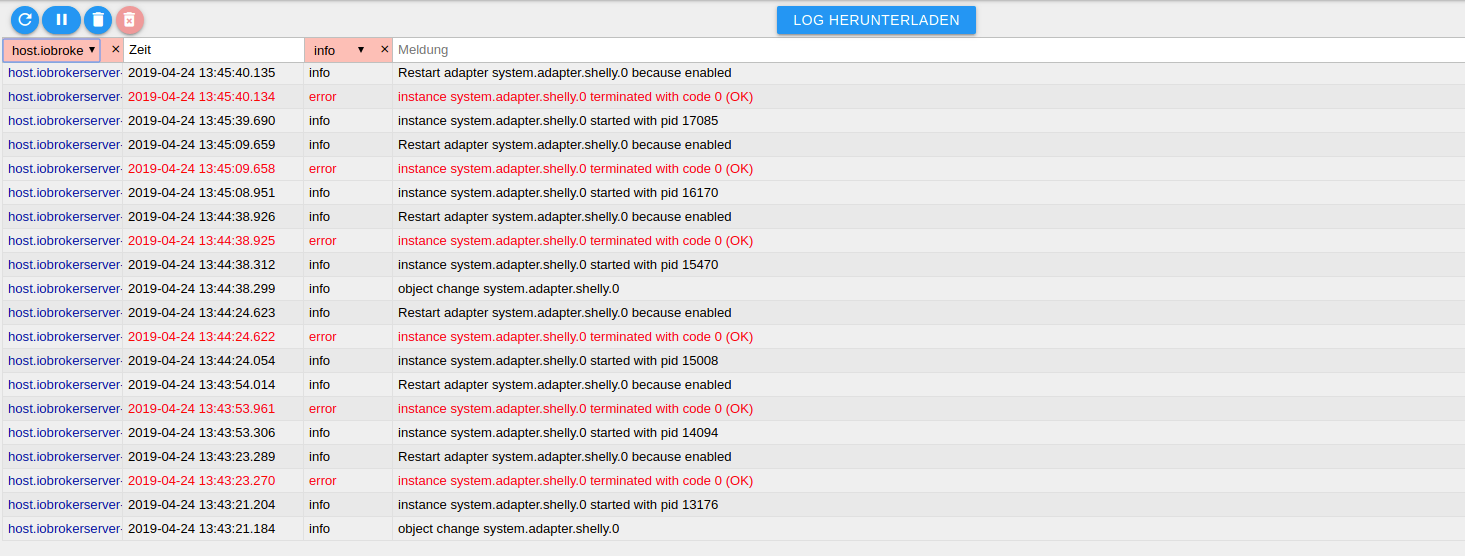
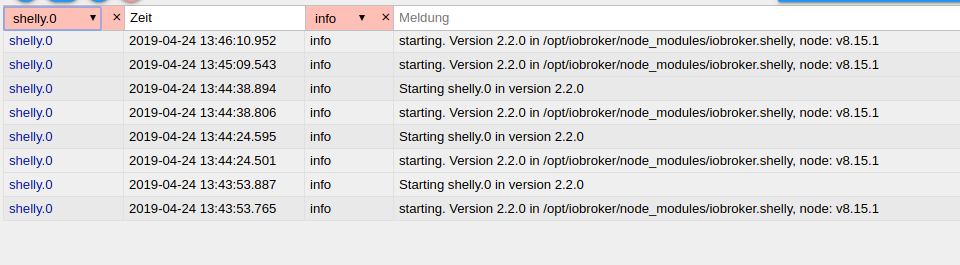
                                      screenshot-192.168.178.46-8081-2019.04.24-13-48-31.png

                                      screenshot-192.168.178.46-8081-2019.04.24-13-48-55.png

                                      Bildschirmfoto von 2019-04-24 14-25-46.png

                                      StuebiS 1 Antwort Letzte Antwort
                                      0
                                      • C Conquest

                                        Hallo,
                                        ich habe eine Problem mit dem Shelly-Adapter. Leider bekomme ich keine Verbindung er bleibt rot.
                                        Mein Server läuft in einer Virtuellen Maschine ist das vielleicht das Problem? Vielleicht kann mir ja jemand helfen. Log ist im Anhang.
                                        LG
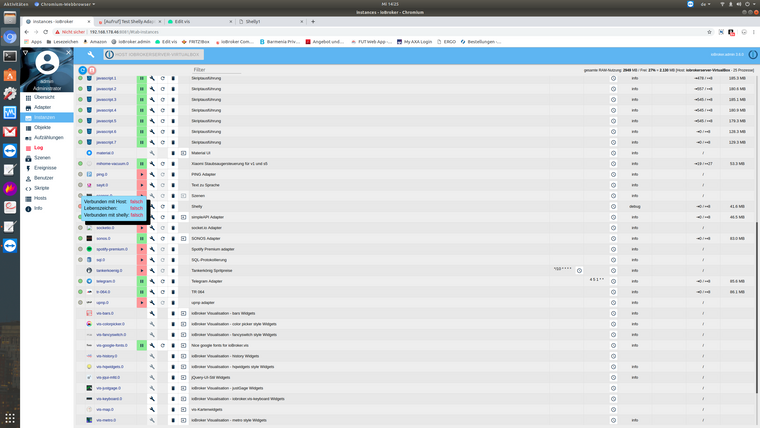
                                        screenshot-192.168.178.46-8081-2019.04.24-13-48-31.png

                                        screenshot-192.168.178.46-8081-2019.04.24-13-48-55.png

                                        Bildschirmfoto von 2019-04-24 14-25-46.png

                                        StuebiS Offline
                                        StuebiS Offline
                                        Stuebi
                                        schrieb am zuletzt editiert von
                                        #322

                                        @Conquest , ist Deine virtuelle Maschine im gleichem Subnetz wie die Shelly Geräte? Das ist Voraussetzung, damit es funktioniert.
                                        Du kannst unter dem Reiter 'Instanzen' den Experten Modus aktivieren und dann den Loglevel des Shelly Adapters auf Debug stellen.
                                        Wenn Du dann leere CoAP Nachrichten im Log siehst, liegt es am Netzwerk (UDP u. Multicasting).

                                        ioBroker auf Synology DS216+II im Docker Container

                                        C 1 Antwort Letzte Antwort
                                        0
                                        • StuebiS Stuebi

                                          @Conquest , ist Deine virtuelle Maschine im gleichem Subnetz wie die Shelly Geräte? Das ist Voraussetzung, damit es funktioniert.
                                          Du kannst unter dem Reiter 'Instanzen' den Experten Modus aktivieren und dann den Loglevel des Shelly Adapters auf Debug stellen.
                                          Wenn Du dann leere CoAP Nachrichten im Log siehst, liegt es am Netzwerk (UDP u. Multicasting).

                                          C Offline
                                          C Offline
                                          Conquest
                                          schrieb am zuletzt editiert von
                                          #323

                                          @Stuebi sagte in [Aufruf] Test Shelly Adapter:

                                          @Conquest , ist Deine virtuelle Maschine im gleichem Subnetz wie die Shelly Geräte? Das ist Voraussetzung, damit es funktioniert.
                                          Du kannst unter dem Reiter 'Instanzen' den Experten Modus aktivieren und dann den Loglevel des Shelly Adapters auf Debug stellen.
                                          Wenn Du dann leere CoAP Nachrichten im Log siehst, liegt es am Netzwerk (UDP u. Multicasting).

                                          Wo sehe ich ob ich im gleichen Subnetz bin?
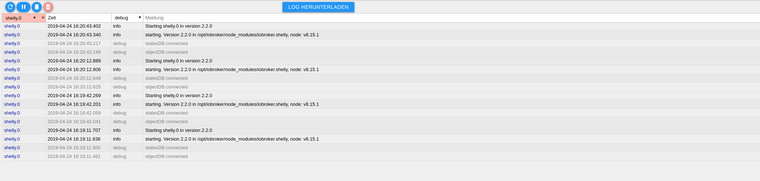
                                          screenshot-192.168.178.46-8081-2019.04.24-16-24-35.png

                                          StuebiS 1 Antwort Letzte Antwort
                                          0
                                          Antworten
                                          • In einem neuen Thema antworten
                                          Anmelden zum Antworten
                                          • Älteste zuerst
                                          • Neuste zuerst
                                          • Meiste Stimmen


                                          Support us

                                          ioBroker
                                          Community Adapters
                                          Donate

                                          568

                                          Online

                                          32.5k

                                          Benutzer

                                          81.6k

                                          Themen

                                          1.3m

                                          Beiträge
                                          Community
                                          Impressum | Datenschutz-Bestimmungen | Nutzungsbedingungen | Einwilligungseinstellungen
                                          ioBroker Community 2014-2025
                                          logo
                                          • Anmelden

                                          • Du hast noch kein Konto? Registrieren

                                          • Anmelden oder registrieren, um zu suchen
                                          • Erster Beitrag
                                            Letzter Beitrag
                                          0
                                          • Home
                                          • Aktuell
                                          • Tags
                                          • Ungelesen 0
                                          • Kategorien
                                          • Unreplied
                                          • Beliebt
                                          • GitHub
                                          • Docu
                                          • Hilfe