




Uninstall - install problem
-
danke an alle. git clone läuft irgendwie auch nicht, bzw. ich mach da wohl was falsch.
und das workaround läuft hier leider auch nicht durch. aber macht nichts, dann warten wir eben, bis der grosse Meister wieder zurück ist. er hat seinen Urlaub mehr als verdient … :D
-
Ich habe es erst auch nicht hinbekommen.
Aber wenn smiling-jack sagt, dass es geht…
Also:
Gemäß Anleitung deinstallieren
Dann npm cache clean
Dann npm install iobroker.js-controller@0.5.15
Jetzt kommen die alten Pfade wieder!
cd /opt/iobroker/node_modules/iobroker.js-controller.
Dann chmod +x iobroker
Zuletzt ./iobroker restart
Dann läuft es.
Aber ich halte es nur für ein Provisorium.
Ich weiss nicht ob der autostart implementiert ist. Auf jeden Fall ist der symlink auf iobroker in /opt/iobroker nicht vorhanden.
Ob das durch updates später korrigiert wird, wage ich zu bezweifeln.
Ich würde diese Installation nur nutzen wenn ich bereit bin sie wieder platt zu machen
Gruß
Rainer
PS ich hoffe, dass alles richtig getippt ist und die mini handytastatur da nicht mist daraus gemacht hat.
Gesendet von meinem Cynus T7 mit Tapatalk
-
Das solltest du (und alle anderen) dir auch verkneifen!
Es wird angeboten, läuft auch irgendwie, aber dann stürzt der Adapter admin andauernd ab.
Dann viel Spaß bei mqtt
Rainer
Gesendet von meinem Cynus T7 mit Tapatalk
-
Hallo zusammen,
nachdem nun bei mit einige Testinstallationen "zerschossen" sind habe ich eine neue VM aufgesetzt
nach der installation von nodejs
root@VMioBrokerMaster:~# node -v
v0.10.38
root@VMioBrokerMaster:~#
kommt
root@VMioBrokerMaster:~# npm install iobroker
/
> iobroker@0.5.1 install /root/node_modules/iobroker
> node lib/setup.js

npm install iobroker.js-controller --production --silent --prefix "/root/node_modules/iobroker/lib/../../../"

/root/node_modules/iobroker.js-controller/lib/tools.js:452
    if (adapter.substring(0, 'iobroker.'.length) == 'iobroker.') adapter = ada
                ^
TypeError: Cannot call method 'substring' of undefined
    at Object.getAdapterDir (/root/node_modules/iobroker.js-controller/lib/tools.js:452:17)
    at uploadAdapter (/root/node_modules/iobroker.js-controller/lib/setup.js:1615:28)
    at installAdapter (/root/node_modules/iobroker.js-controller/lib/setup.js:2054:9)
    at Socket. <anonymous>(/root/node_modules/iobroker.js-controller/lib/setup.js:2080:13)
    at Socket.onack (/root/node_modules/iobroker.js-controller/node_modules/socket.io-client/lib/socket.js:294:6)
    at Socket.onpacket (/root/node_modules/iobroker.js-controller/node_modules/socket.io-client/lib/socket.js:219:12)
    at Manager. <anonymous>(/root/node_modules/iobroker.js-controller/node_modules/socket.io-client/node_modules/component-bind/index.js:21:15)
    at Manager.Emitter.emit (/root/node_modules/iobroker.js-controller/node_modules/socket.io-client/node_modules/component-emitter/index.js:134:20)
    at Manager.ondecoded (/root/node_modules/iobroker.js-controller/node_modules/socket.io-client/lib/manager.js:274:8)
    at Decoder. <anonymous>(/root/node_modules/iobroker.js-controller/node_modules/socket.io-client/node_modules/component-bind/index.js:21:15)
npm install iobroker.admin --production --silent --prefix "/root/node_modules/iobroker/lib/../../../"
Write "./iobroker start" to start the ioBroker
Non-critical error: ENOENT, no such file or directory '/root/node_modules/iobroker/lib/../../iobroker.js-controller/iobroker'
iobroker@0.5.1 node_modules/iobroker
└── yargs@1.2.6 (minimist@0.1.0)
root@VMioBrokerMaster:~#</anonymous></anonymous></anonymous>
auch der beschriebene WorkAround klappt nicht ganz
der js.controller kann zwar gestartet werden
jedoch läuft io.admin nicht. somit auch keine Möglichkeit aid das UI zuzugreifen
root@VMioBrokerMaster:~# cd /opt/iobroker/node_modules/iobroker.js-controller
root@VMioBrokerMaster:/opt/iobroker/node_modules/iobroker.js-controller# ./iobroker restart
Stopping ioBroker controller daemon...
ioBroker controller daemon stopped.
Starting ioBroker controller daemon...
ioBroker controller daemon started. PID: 2686
root@VMioBrokerMaster:/opt/iobroker/node_modules/iobroker.js-controller# ps -A |grep io
     6 ?        00:00:00 migration/0
   191 ?        00:00:00 ext4-dio-unwrit
  1691 ?        00:00:00 rpciod
  1693 ?        00:00:00 nfsiod
  2686 ?        00:00:00 io.js-controlle
root@VMioBrokerMaster:/opt/iobroker/node_modules/iobroker.js-controller#
Also heist es nun wohl: Warten bis der Urlauber zurück ist
-
Hast du es so:
http://forum.iobroker.org/viewtopic.php?p=3933#p3933
Versucht?
Gesendet von meinem Cynus T7 mit Tapatalk
-
Hallo
ich habe die neue version vom js-controller zurückgezogen
Eine Installation sollte wieder ganz normal funktioniren. Wichtig ist ein
npm cache cleanvorweg zumachen.
Zur info es wird jetzt wieder Version 0.5.15 installiert
Gruß
Steffen
-
@smiling-Jack:Hallo
ich habe die neue version vom js-controller zurückgezogen
Eine Installation sollte wieder ganz normal funktioniren. Wichtig ist ein
npm cache cleanvorweg zumachen.
Zur info es wird jetzt wieder Version 0.5.15 installiert
Gruß
Steffen `
OK. Getestet
root@VMioBrokerMaster:/opt/iobroker# npm cache clean

root@VMioBrokerMaster:/opt/iobroker# npm install iobroker
npm ERR! not a package /tmp/npm-2534-cP-PEs+a/1427660539077-0.291726277442649/tmp.tgz
-\|/-\|/-\|/-\|/-\|/-\-\|/-\-\|/
> iobroker@0.5.1 install /opt/iobroker/node_modules/iobroker
> node lib/setup.js

npm install iobroker.js-controller --production --silent --prefix "/opt/iobroker/node_modules/iobroker/lib/../../../"
npm install iobroker.admin --production --silent --prefix "/opt/iobroker/node_modules/iobroker/lib/../../../"
Write "./iobroker start" to start the ioBroker
Auto-start was enabled. Write "update-rc.d -f iobroker.sh remove" to disable auto-start
iobroker is started. Go to "http://ip-addr:8081" to open the admin UI.
iobroker@0.5.1 node_modules/iobroker
 yargs@1.2.6 (minimist@0.1.0)
root@VMioBrokerMaster:/opt/iobroker#
root@VMioBrokerMaster:/opt/iobroker#
root@VMioBrokerMaster:/opt/iobroker#
root@VMioBrokerMaster:/opt/iobroker# ps -A |grep io
     6 ?        00:00:00 migration/0
   170 ?        00:00:00 ext4-dio-unwrit
  1679 ?        00:00:00 rpciod
  1681 ?        00:00:00 nfsiod
  2641 ?        00:00:00 io.js-controlle
root@VMioBrokerMaster:/opt/iobroker#
Leider wird admin nicht gestartet.
Manuell kann man auch nicht starten.
root@VMioBrokerMaster:/opt/iobroker# iobroker update
Cannot get version of "virtual".
Cannot get version of "geofency".
update done
Adapter    "zwave"         : 0.1.0
Adapter    "yr"            : 0.1.5
Adapter    "web"           : 0.2.6
Adapter    "vis"           : 0.2.11
Adapter    "virtual"
Adapter    "sonos"         : 0.1.6
Adapter    "rickshaw"      : 0.2.2
Adapter    "pushover"      : 0.1.0
Adapter    "onkyo"         : 0.1.0
Adapter    "telnet"        : 0.0.0
Adapter    "socketio"      : 0.2.3
Adapter    "simple-api"    : 0.0.4
Adapter    "sayit"         : 0.3.6
Adapter    "ping"          : 0.1.3
Adapter    "node-red"      : 0.1.9
Adapter    "mqtt"          : 0.1.7
Adapter    "mobile"        : 0.0.2
Adapter    "legacy"        : 0.1.12
Adapter    "knx"           : 0.0.1
Controller "js-controller" : 0.5.15   , installed 0.5.15
Adapter    "javascript"    : 0.3.0
Adapter    "ical"          : 0.1.0
Adapter    "hmm"           : 0.0.17
Adapter    "hue"           : 0.2.0
Adapter    "hm-rpc"        : 0.4.0
Adapter    "hm-rega"       : 0.2.1
Adapter    "history"       : 0.1.3
Adapter    "highcharts"    : 0.0.0
Adapter    "graphite"      : 0.1.0
Adapter    "geofency"
Adapter    "example"       : 0.1.1    , installed 0.1.1
Adapter    "email"         : 0.1.0
Adapter    "dwd"           : 0.1.7
Adapter    "cul"           : 0.0.2
Adapter    "b-control-em"  : 0.1.1
Adapter    "artnet"        : 0.0.3
Adapter    "admin"         : 0.3.26   , installed 0.3.26
root@VMioBrokerMaster:/opt/iobroker# root@VMioBrokerMaster:/opt/iobroker# iobroker start admin Please enter instance of adapter, e.g. "web.0" root@VMioBrokerMaster:/opt/iobroker# iobroker start admin.0 Adapter "admin.0 does not exist. root@VMioBrokerMaster:/opt/iobroker# -
Komish kannst du mal den web einzelt nachinstalliren (npm install iobroker.web )
1191_0.jpg
1191_1.jpg -
@smiling-Jack:Komish kannst du mal den web einzelt nachinstalliren (npm install iobroker.web ) `
keine Änderung
root@VMioBrokerMaster:/opt/iobroker# npm install iobroker.web npm WARN deprecated object-keys@0.2.0: Please update to the latest object-keys > ws@0.4.31 install /opt/iobroker/node_modules/iobroker.web/node_modules/iobroker.socketio/node_modules/socket.io/node_modules/engine.io/node_modules/ws > (node-gyp rebuild 2> builderror.log) || (exit 0) > ws@0.4.31 install /opt/iobroker/node_modules/iobroker.web/node_modules/iobroker.socketio/node_modules/socket.io/node_modules/socket.io-client/node_modules/engine.io-client/node_modules/ws > (node-gyp rebuild 2> builderror.log) || (exit 0) iobroker.web@0.2.6 node_modules/iobroker.web ├── connect-flash@0.1.1 ├── iobroker.simple-api@0.0.4 ├── passport-local@1.0.0 (passport-strategy@1.0.0) ├── cookie-parser@1.3.4 (cookie@0.1.2, cookie-signature@1.0.6) ├── passport@0.2.1 (pause@0.0.1, passport-strategy@1.0.0) ├── xtend@2.0.6 (is-object@0.1.2, object-keys@0.2.0) ├── body-parser@1.5.2 (qs@0.6.6, media-typer@0.2.0, bytes@1.0.0, raw-body@1.3.0, depd@0.4.4, type-is@1.3.2, iconv-lite@0.4.4) ├── express-session@1.7.6 (utils-merge@1.0.0, cookie@0.1.2, cookie-signature@1.0.4, on-headers@1.0.0, parseurl@1.3.0, buffer-crc32@0.2.3, depd@0.4.4, debug@1.0.4, uid-safe@1.0.1) ├── express@4.4.5 (parseurl@1.0.1, utils-merge@1.0.0, merge-descriptors@0.0.2, cookie@0.1.2, cookie-signature@1.0.4, escape-html@1.0.1, range-parser@1.0.0, fresh@0.2.2, vary@0.1.0, qs@0.6.6, methods@1.0.1, serve-static@1.2.3, buffer-crc32@0.2.3, path-to-regexp@0.1.2, debug@1.0.2, type-is@1.2.1, accepts@1.0.7, proxy-addr@1.0.1, send@0.4.3) ├── request@2.38.0 (json-stringify-safe@5.0.0, aws-sign2@0.5.0, forever-agent@0.5.2, oauth-sign@0.3.0, stringstream@0.0.4, tunnel-agent@0.4.0, qs@0.6.6, node-uuid@1.4.3, mime-types@1.0.2, tough-cookie@0.12.1, http-signature@0.10.1, form-data@0.1.4, hawk@1.1.1) └── iobroker.socketio@0.2.3 (request@2.51.0, socket.io@1.1.0) root@VMioBrokerMaster:/opt/iobroker# ps -A |grep io 6 ? 00:00:00 migration/0 204 ? 00:00:00 ext4-dio-unwrit 1711 ? 00:00:00 rpciod 1713 ? 00:00:00 nfsiod root@VMioBrokerMaster:/opt/iobroker# iobroker restart ioBroker controller daemon is not running Starting ioBroker controller daemon... ioBroker controller daemon started. PID: 2596 root@VMioBrokerMaster:/opt/iobroker# ps -A |grep io 6 ? 00:00:00 migration/0 204 ? 00:00:00 ext4-dio-unwrit 1711 ? 00:00:00 rpciod 1713 ? 00:00:00 nfsiod 2596 ? 00:00:00 io.js-controlle -
nur zur Info, der workaround funktioniert nun grösstenteils.
ausser hm-rega - lässt sich nicht als instanz installieren. auch nicht bei manueller neu-installation (npm install iobroker.hm-rega)
vielleicht wäre grundsätzlich eine npm-repo (heisst das hier auch so?) mit der Vor-Version nicht schlecht - oder sonst eine Möglichkeit, Vor-Versionen zu installieren.
Wie auch immer , habe mich auf warten eingestellt.
-
Also. Ich will immer noch nicht auf npm hoch legen, bis ich eine Bestätigung bekomme, dass es noch bei jemandem geht.
Es gibt aktuelle ioBroker.js-controller version 0.6.1. Die kann man mit
npm install https://github.com/ioBroker/ioBroker.js-controller/tarball/masterinstallieren.
Für die Neuinstallation, dann:
npm install iobroker
npm install https://github.com/ioBroker/ioBroker.js-controller/tarball/master
Kann jemand ausprobieren? Ich habe Windows, Debian und Ubuntu getestet. Update und Neuinstallation. Node.js 0.10.29/0.10.35/0.12.2
-
Habe eben mal schnell drüberinstalliert.
Keine Fehlermeldungen während des install.
Nach anschließendem reboot auch keine Fehlermeldungen im log beim Hochfahren!
RPi2 mit Raspian, nodejs 10.22.
Gruß
Rainer
-
Hallo Bluefox,
Ist doch wohl noch irgendetwas im Argen
Habe heute morgen auf dem PC den admin geöffnet:
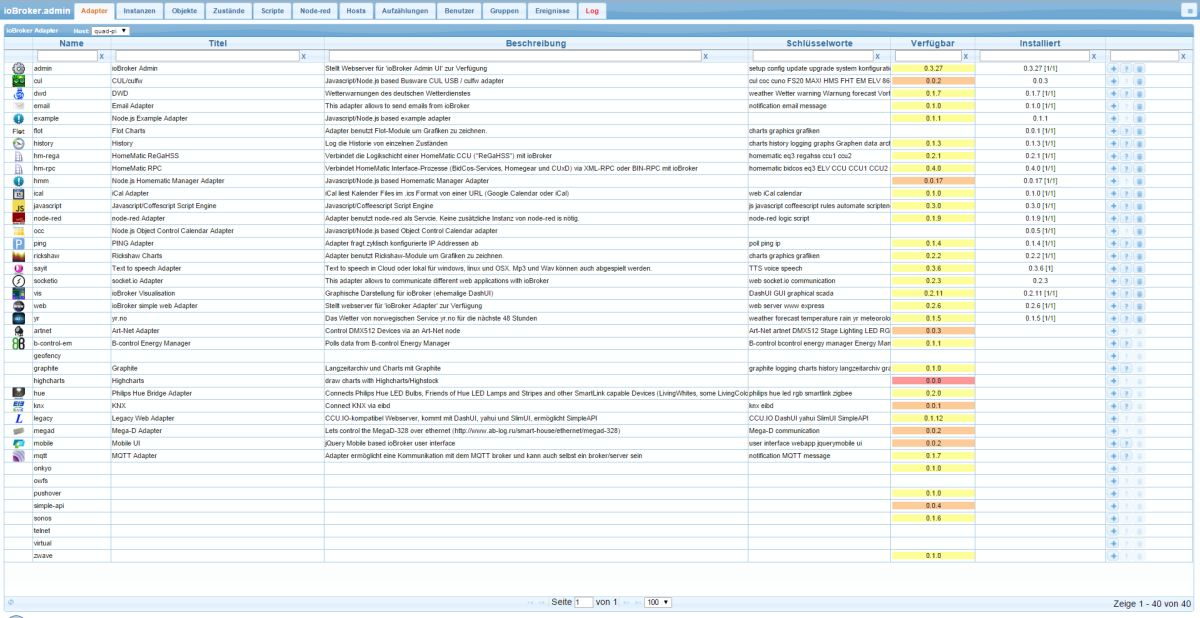
Habe es gestern nur vom Handy aus gemacht - habe da evtl. die unteren Zeilen nicht gesehen!
Weder ./iobroker restart noch reboot haben geholfen.
Auch ein erneutes
npm install https://github.com/ioBroker/ioBroker.js-controller/tarball/masterbrachte nichts, weder mit restart noch mit reboot
Jedoch keine Fehler während des Install oder nach dem reboot im log.
EDIT:
nach mehrmaligem reboot ist es jetzt auf einmal (ohne weiteren reboot) wieder ok !???
Im Vorfeld hatte ich Browsercache mehrfach gelöscht - ohne Änderungen ?!!???
Dafür fielen mir folgende Meldungen im log auf:
history-0	2015-04-15 10:43:02	info	moved 18 history datapoints from Redis history.hm-rpc.0.JEQ0267518.1.HUMIDITY to CouchDB history.hm-rpc.0.JEQ0267518.1.HUMIDITY.20150415
history-0	2015-04-15 10:43:02	info	moved 52 history datapoints from Redis history.hm-rpc.0.JEQ0267518.1.HUMIDITY to CouchDB history.hm-rpc.0.JEQ0267518.1.HUMIDITY.20150414
history-0	2015-04-15 10:43:02	info	18 remaining datapoints of history.hm-rpc.0.JEQ0267518.1.HUMIDITY
history-0	2015-04-15 10:43:02	info	moved 146 history datapoints from Redis history.hm-rpc.0.JEQ0267518.1.HUMIDITY to CouchDB history.hm-rpc.0.JEQ0267518.1.HUMIDITY.20150413
history-0	2015-04-15 10:43:02	info	52 remaining datapoints of history.hm-rpc.0.JEQ0267518.1.HUMIDITY
history-0	2015-04-15 10:43:02	info	moved 183 history datapoints from Redis history.hm-rpc.0.JEQ0267518.1.HUMIDITY to CouchDB history.hm-rpc.0.JEQ0267518.1.HUMIDITY.20150412
history-0	2015-04-15 10:43:02	info	146 remaining datapoints of history.hm-rpc.0.JEQ0267518.1.HUMIDITY
history-0	2015-04-15 10:43:02	info	moved 213 history datapoints from Redis history.hm-rpc.0.JEQ0267518.1.HUMIDITY to CouchDB history.hm-rpc.0.JEQ0267518.1.HUMIDITY.20150411
history-0	2015-04-15 10:43:02	info	183 remaining datapoints of history.hm-rpc.0.JEQ0267518.1.HUMIDITY
history-0	2015-04-15 10:43:02	info	moved 239 history datapoints from Redis history.hm-rpc.0.JEQ0267518.1.HUMIDITY to CouchDB history.hm-rpc.0.JEQ0267518.1.HUMIDITY.20150410
history-0	2015-04-15 10:43:02	info	213 remaining datapoints of history.hm-rpc.0.JEQ0267518.1.HUMIDITY
history-0	2015-04-15 10:43:02	info	moved 258 history datapoints from Redis history.hm-rpc.0.JEQ0267518.1.HUMIDITY to CouchDB history.hm-rpc.0.JEQ0267518.1.HUMIDITY.20150409
history-0	2015-04-15 10:43:02	info	239 remaining datapoints of history.hm-rpc.0.JEQ0267518.1.HUMIDITY
history-0	2015-04-15 10:43:02	info	moved 294 history datapoints from Redis history.hm-rpc.0.JEQ0267518.1.HUMIDITY to CouchDB history.hm-rpc.0.JEQ0267518.1.HUMIDITY.20150408
history-0	2015-04-15 10:43:02	info	258 remaining datapoints of history.hm-rpc.0.JEQ0267518.1.HUMIDITY
history-0	2015-04-15 10:43:02	info	moved 331 history datapoints from Redis history.hm-rpc.0.JEQ0267518.1.HUMIDITY to CouchDB history.hm-rpc.0.JEQ0267518.1.HUMIDITY.20150407
history-0	2015-04-15 10:43:02	info	294 remaining datapoints of history.hm-rpc.0.JEQ0267518.1.HUMIDITY
history-0	2015-04-15 10:43:02	info	moved 413 history datapoints from Redis history.hm-rpc.0.JEQ0267518.1.HUMIDITY to CouchDB history.hm-rpc.0.JEQ0267518.1.HUMIDITY.20150406
history-0	2015-04-15 10:43:02	info	331 remaining datapoints of history.hm-rpc.0.JEQ0267518.1.HUMIDITY
history-0	2015-04-15 10:43:02	info	[color]moved 445 history datapoints [b]from Redis[/b] history.hm-rpc.0.JEQ0267518.1.HUMIDITY [b]to CouchDB[/b][/color] history.hm-rpc.0.JEQ0267518.1.HUMIDITY.20150405
history-0	2015-04-15 10:43:02	info	413 remaining datapoints of history.hm-rpc.0.JEQ0267518.1.HUMIDITY
history-0	2015-04-15 10:43:02	info	moved 480 history datapoints from Redis history.hm-rpc.0.JEQ0267518.1.HUMIDITY to CouchDB history.hm-rpc.0.JEQ0267518.1.HUMIDITY.20150404
history-0	2015-04-15 10:43:02	info	445 remaining datapoints of history.hm-rpc.0.JEQ0267518.1.HUMIDITY
moved … datapoints from Redis history.hm-rpc.0.JEQ0267518.1.HUMIDITY to CouchDB
Gruß
Rainer
-
Bei mir kommt jetzt - nach längerer Laufzeit - alle paar minuten von hmm und node-red Adaptern:
quad-pi 2015-04-15 14:02:44 error host.quad-pi instance system.adapter.node-red.0 terminated with code 7 (Adapter already running)auch die folgende Meldung nach ./iobroker update über putty ist recht amüsant:
Controller "js-controller" : 0.5.15 , installed 0.6.1 [Updateable]Gruß
Rainer
-
Also. Ich will immer noch nicht auf npm hoch legen, bis ich eine Bestätigung bekomme, dass es noch bei jemandem geht.
Es gibt aktuelle ioBroker.js-controller version 0.6.1. Die kann man mit
npm install https://github.com/ioBroker/ioBroker.js-controller/tarball/masterinstallieren.
Für die Neuinstallation, dann:
npm install iobroker
npm install https://github.com/ioBroker/ioBroker.js-controller/tarball/master
Kann jemand ausprobieren? Ich habe Windows, Debian und Ubuntu getestet. Update und Neuinstallation. Node.js 0.10.29/0.10.35/0.12.2 `
Neuinstall auf einer VM
root@VMioBrokerMaster:~# cd /opt/iobroker/
root@VMioBrokerMaster:/opt/iobroker# npm install https://github.com/ioBroker/ioBroker.js-controller/tarball/master

> ws@0.5.0 install /opt/iobroker/node_modules/iobroker.js-controller/node_modules/socket.io/node_modules/engine.io/node_modules/ws
> (node-gyp rebuild 2> builderror.log) || (exit 0)

> ws@0.4.31 install /opt/iobroker/node_modules/iobroker.js-controller/node_modules/socket.io-client/node_modules/engine.io-client/node_modules/ws
> (node-gyp rebuild 2> builderror.log) || (exit 0)

\
> iobroker.js-controller@0.6.1 install /opt/iobroker/node_modules/iobroker.js-controller
> node lib/setup.js setup first

creating conf/iobroker.json
object system.certificates created
object system.repositories created
object system.config created
object enum.rooms created
object system.group.user created
object system.group.administrator created
object _design/system created
object system.user.admin created
object system.meta.uuid created
install adapter admin
got /opt/iobroker/node_modules/iobroker.js-controller/node_modules/iobroker.admin/admin
upload admin.admin /opt/iobroker/node_modules/iobroker.js-controller/node_modules/iobroker.admin/admin/index.html index.html text/html
upload admin.admin /opt/iobroker/node_modules/iobroker.js-controller/node_modules/iobroker.admin/admin/admin.png admin.png image/png
object system.adapter.admin created
create instance admin
object system.adapter.admin.0.uptime created
object system.adapter.admin.0.memRss created
object system.adapter.admin.0.memHeapTotal created
object system.adapter.admin.0.memHeapUsed created
object system.adapter.admin.0.connected created
object system.adapter.admin.0.alive created
object system.adapter.admin.0 created
iobroker.js-controller@0.6.1 node_modules/iobroker.js-controller
├── daemonize2@0.4.2
├── mime@1.3.4
├── node-schedule@0.1.13
├── ncp@2.0.0
├── adm-zip@0.4.7
├── node.extend@1.1.3 (is@2.1.0)
├── yargs@3.7.2 (camelcase@1.0.2, decamelize@1.0.0, window-size@0.1.0, wordwrap@0.0.2)
├── npm@2.7.6
├── winston@1.0.0 (cycle@1.0.3, stack-trace@0.0.9, eyes@0.1.8, isstream@0.1.2, pkginfo@0.3.0, async@0.9.0, colors@1.0.3)
├── socket.io@1.3.5 (debug@2.1.0, has-binary-data@0.1.3, socket.io-adapter@0.3.1, socket.io-parser@2.2.4, engine.io@1.5.1)
├── tar.gz@0.1.1 (commander@1.1.1, tar@0.1.20, fstream@0.1.31)
├── request@2.55.0 (caseless@0.9.0, json-stringify-safe@5.0.0, aws-sign2@0.5.0, forever-agent@0.6.1, stringstream@0.0.4, oauth-sign@0.6.0, tunnel-agent@0.4.0, isstream@0.1.2, node-uuid@1.4.3, qs@2.4.1, combined-stream@0.0.7, mime-types@2.0.10, form-data@0.2.0, http-signature@0.10.1, hawk@2.3.1, bl@0.9.4, tough-cookie@0.12.1, har-validator@1.6.1)
├── socket.io-client@1.3.5 (to-array@0.1.3, indexof@0.0.1, component-bind@1.0.0, debug@0.7.4, backo2@1.0.2, object-component@0.0.3, component-emitter@1.1.2, has-binary@0.1.6, socket.io-parser@2.2.4, parseuri@0.0.2, engine.io-client@1.5.1)
└── iobroker.admin@0.3.27 (connect-flash@0.1.1, xtend@4.0.0, passport-local@1.0.0, passport@0.2.1, cookie-parser@1.3.4, express-session@1.11.1, body-parser@1.12.2, express@4.12.3)
root@VMioBrokerMaster:/opt/iobroker#
root@VMioBrokerMaster:/opt/iobroker# npm install iobroker | > iobroker@0.5.1 install /opt/iobroker/node_modules/iobroker > node lib/setup.js npm install iobroker.js-controller --production --silent --prefix "/opt/iobroker/node_modules/iobroker/lib/../../../" npm install iobroker.admin --production --silent --prefix "/opt/iobroker/node_modules/iobroker/lib/../../../" Write "./iobroker start" to start the ioBroker Auto-start was enabled. Write "update-rc.d -f iobroker.sh remove" to disable auto-start iobroker is started. Go to "http://ip-addr:8081" to open the admin UI. iobroker@0.5.1 node_modules/iobroker └── yargs@1.2.6 (minimist@0.1.0) root@VMioBrokerMaster:/opt/iobroker#root@VMioBrokerMaster:/opt/iobroker# npm install https://github.com/ioBroker/ioBroker.js-controller/tarball/master > ws@0.5.0 install /opt/iobroker/node_modules/iobroker.js-controller/node_modules/socket.io/node_modules/engine.io/node_modules/ws > (node-gyp rebuild 2> builderror.log) || (exit 0) > ws@0.4.31 install /opt/iobroker/node_modules/iobroker.js-controller/node_modules/socket.io-client/node_modules/engine.io-client/node_modules/ws > (node-gyp rebuild 2> builderror.log) || (exit 0) \ > iobroker.js-controller@0.6.1 install /opt/iobroker/node_modules/iobroker.js-controller > node lib/setup.js setup first iobroker.js-controller@0.6.1 node_modules/iobroker.js-controller ├── mime@1.3.4 ├── daemonize2@0.4.2 ├── node-schedule@0.1.13 ├── ncp@2.0.0 ├── node.extend@1.1.3 (is@2.1.0) ├── adm-zip@0.4.7 ├── yargs@3.7.2 (decamelize@1.0.0, camelcase@1.0.2, window-size@0.1.0, wordwrap@0.0.2) ├── winston@1.0.0 (cycle@1.0.3, stack-trace@0.0.9, eyes@0.1.8, isstream@0.1.2, pkginfo@0.3.0, async@0.9.0, colors@1.0.3) ├── socket.io@1.3.5 (debug@2.1.0, has-binary-data@0.1.3, socket.io-adapter@0.3.1, engine.io@1.5.1, socket.io-parser@2.2.4) ├── tar.gz@0.1.1 (commander@1.1.1, tar@0.1.20, fstream@0.1.31) ├── request@2.55.0 (caseless@0.9.0, json-stringify-safe@5.0.0, aws-sign2@0.5.0, forever-agent@0.6.1, stringstream@0.0.4, oauth-sign@0.6.0, tunnel-agent@0.4.0, isstream@0.1.2, node-uuid@1.4.3, qs@2.4.1, combined-stream@0.0.7, form-data@0.2.0, mime-types@2.0.10, http-signature@0.10.1, bl@0.9.4, tough-cookie@0.12.1, hawk@2.3.1, har-validator@1.6.1) ├── socket.io-client@1.3.5 (to-array@0.1.3, indexof@0.0.1, component-bind@1.0.0, debug@0.7.4, backo2@1.0.2, object-component@0.0.3, component-emitter@1.1.2, has-binary@0.1.6, parseuri@0.0.2, socket.io-parser@2.2.4, engine.io-client@1.5.1) └── npm@2.7.6 root@VMioBrokerMaster:/opt/iobroker#controller = 0.6.1(Running: 0.5.15)
root@VMioBrokerMaster:/opt/iobroker# node -v
v0.10.38
Die Adapter wurden erst nach 2maligem Update angezeigt
Install VIS
iobroker	2015-04-15 18:25:27	info	Cannot download json from https://raw.githubusercontent.com/ioBroker/ioBroker.zwave/master/io-package.json. Error: Error: ETIMEDOUT
iobroker	2015-04-15 18:25:27	info	Cannot download json from https://raw.githubusercontent.com/ioBroker/ioBroker.yr/master/io-package.json. Error: Error: ETIMEDOUT
iobroker	2015-04-15 18:25:27	info	Cannot download json from https://raw.githubusercontent.com/ioBroker/ioBroker.onkyo/master/io-package.json. Error: Error: ETIMEDOUT
iobroker	2015-04-15 18:25:27	info	npm install iobroker.vis --production --prefix "/opt/iobroker" (System call)
iobroker	2015-04-15 18:25:22	info	add vis
nach der Installation von YR wurde auch vis noch mit installiert
VMioBrokerMaster	2015-04-15 18:27:55	info	iobroker object-keys@0.2.0: Please update to the latest object-keys
VMioBrokerMaster	2015-04-15 18:27:55	info	iobroker deprecated
VMioBrokerMaster	2015-04-15 18:27:55	info	iobroker
VMioBrokerMaster	2015-04-15 18:27:55	info	iobroker WARN
VMioBrokerMaster	2015-04-15 18:27:55	info	iobroker
VMioBrokerMaster	2015-04-15 18:27:55	info	iobroker npm
VMioBrokerMaster	2015-04-15 18:27:52	info	iobroker npm install iobroker.web --production --prefix "/opt/iobroker" (System call)
VMioBrokerMaster	2015-04-15 18:27:47	info	iobroker install adapter web
Anschließen konnte vis aufgerufen werden
Gruß
derAuge
(Man sieht sich Samstag ;) )
-
EDIT:
nach mehrmaligem reboot ist es jetzt auf einmal (ohne weiteren reboot) wieder ok !???
Im Vorfeld hatte ich Browsercache mehrfach gelöscht - ohne Änderungen ?!!??? `
Es liegt an Timeout beim Zugang zu npmjs.org. Vielleicht war der WebServer gestern überlastet. Trotzdem habe ich Timeout erhöht.



Hey! Du scheinst an dieser Unterhaltung interessiert zu sein, hast aber noch kein Konto.
Hast du es satt, bei jedem Besuch durch die gleichen Beiträge zu scrollen? Wenn du dich für ein Konto anmeldest, kommst du immer genau dorthin zurück, wo du zuvor warst, und kannst dich über neue Antworten benachrichtigen lassen (entweder per E-Mail oder Push-Benachrichtigung). Du kannst auch Lesezeichen speichern und Beiträge positiv bewerten, um anderen Community-Mitgliedern deine Wertschätzung zu zeigen.
Mit deinem Input könnte dieser Beitrag noch besser werden 💗
Registrieren AnmeldenSupport us
186
Online33.0k
Benutzende83.7k
Themen1.3m
Beiträge