



Skip to content
  • Home
  • Aktuell
  • Tags
  • 0 Ungelesen 0
  • Kategorien
  • Unreplied
  • Beliebt
  • GitHub
  • Docu
  • Hilfe
Skins
  • Light
  • Brite
  • Cerulean
  • Cosmo
  • Flatly
  • Journal
  • Litera
  • Lumen
  • Lux
  • Materia
  • Minty
  • Morph
  • Pulse
  • Sandstone
  • Simplex
  • Sketchy
  • Spacelab
  • United
  • Yeti
  • Zephyr
  • Dark
  • Cyborg
  • Darkly
  • Quartz
  • Slate
  • Solar
  • Superhero
  • Vapor

  • Standard: (Kein Skin)
  • Kein Skin
Einklappen
ioBroker Logo

Community Forum

donate donate
  1. ioBroker Community Home
  2. Deutsch
  3. ioBroker Allgemein
  4. [GELÖST] HILFE - Nach update js-controller nicht installierbar

NEWS

  • Neuer Blogbeitrag: Monatsrückblick - Dezember 2025 🎄
    BluefoxB
    Bluefox
    10
    1
    104

  • Weihnachtsangebot 2025! 🎄
    BluefoxB
    Bluefox
    24
    1
    1.4k

  • UPDATE 31.10.: Amazon Alexa - ioBroker Skill läuft aus ?
    apollon77A
    apollon77
    48
    3
    9.3k

[GELÖST] HILFE - Nach update js-controller nicht installierbar

Geplant Angeheftet Gesperrt Verschoben ioBroker Allgemein
22 Beiträge 5 Kommentatoren 5.3k Aufrufe 1 Watching
  • Älteste zuerst
  • Neuste zuerst
  • Meiste Stimmen
Antworten
  • In einem neuen Thema antworten
Anmelden zum Antworten
Dieses Thema wurde gelöscht. Nur Nutzer mit entsprechenden Rechten können es sehen.
  • H Offline
    H Offline
    Hans
    schrieb am zuletzt editiert von
    #1

    Hallo Zusammen,

    ich habe eben versucht meinen iobroker ein update zu geben, da ich noch die alte Ansicht hatte.

    Folgendes habe ich durchgeführt:

    cd /opt/iobroker
    sudo iobroker stop
    sudo iobroker update
    sudo iobroker upgrade self
    sudo iobroker start
    

    letzter Punkt funktioniert nicht mehr mit Fehlermeldung…

    pi@Raspberry:/opt/iobroker $ sudo iobroker start
    module.js:549
        throw err;
        ^
    
    Error: Cannot find module '/opt/iobroker/node_modules/iobroker.js-controller/iobroker.js'
        at Function.Module._resolveFilename (module.js:547:15)
        at Function.Module._load (module.js:474:25)
        at Function.Module.runMain (module.js:693:10)
        at startup (bootstrap_node.js:188:16)
        at bootstrap_node.js:609:3
    

    Danach habe ich hier im Forum gelesen, das man den admin und den js-controller aktualisieren muss.

    Das habe ich getan

    Ja, du musst den js-controller und admin mit aktualisieren.

    Im Terminal eingeben:

    CODE: ALLES AUSWÄHLEN
    
    cd /opt/iobroker
    sudo iobroker stop
    sudo npm install iobroker.admin --production
    sudo npm install iobroker.js-controller --production
    sudo iobroker start
    

    Hier noch die Info:

    pi@Raspberry:/opt/iobroker $ node -v
    v8.11.1
    pi@Raspberry:/opt/iobroker $ npm -v
    5.8.0
    

    Ich habe auch versucht die Rechte anzupassen und zu installieren; leider ohne Erfolg:

    pi@Raspberry:/opt/iobroker $ sudo chmod 777 * -R
    pi@Raspberry:/opt/iobroker $ sudo npm install iobroker.js-controller --production
    

    Danach kommt am Ende das:

    npm ERR! Failed at the iobroker.js-controller@1.4.2 install script.
    npm ERR! This is probably not a problem with npm. There is likely additional logging output above.
    

    Es gibt wohl die Möglichkeit, das Update "unsafe" durchzuführen, aber ist das der richtige Ansatz?

    Bitte um schnelle Hilfe !!!!

    Ich habe natürlich vorher ein backup erstellt, welches sich jetzt aber auch nicht mehr einspielen lässt :o

    Was kann ich jetzt machen?

    Danke, Hans

    Edit by eric2905, Logs & Co. bitte immer in Code- und ggf. Spoiler-Tags setzen

    1 Antwort Letzte Antwort
    0
    • HomoranH Nicht stören
      HomoranH Nicht stören
      Homoran
      Global Moderator Administrators
      schrieb am zuletzt editiert von
      #2

      bitte stoppen mit:

      sudo systemctl stop iobroker
      

      kein Support per PN! - Fragen im Forum stellen - es gibt fast nichts, was nicht auch für andere interessant ist.

      Benutzt das Voting rechts unten im Beitrag wenn er euch geholfen hat.

      der Installationsfixer: curl -fsL https://iobroker.net/fix.sh | bash -

      1 Antwort Letzte Antwort
      0
      • H Offline
        H Offline
        Hans
        schrieb am zuletzt editiert von
        #3

        @Homoran:

        bitte stoppen mit:

        sudo systemctl stop iobroker
        ```` `  
        

        OK, gemacht.. und nun?

        1 Antwort Letzte Antwort
        0
        • G Offline
          G Offline
          Georgius
          schrieb am zuletzt editiert von
          #4

          Vermutlich nochmalsalle nah iobroker stop durchführen.

          Muß mir endlichdas Startskript ansehnliche.

          1 Antwort Letzte Antwort
          0
          • H Offline
            H Offline
            Hans
            schrieb am zuletzt editiert von
            #5

            OK, aber was genau sollte ich jetzt machen?

            Ich möchte nicht noch mehr "kaputt" machen :roll:

            1 Antwort Letzte Antwort
            0
            • G Offline
              G Offline
              Georgius
              schrieb am zuletzt editiert von
              #6

              Würde mal

              sudo iobroker update
              sudo iobroker upgrade self
              sudo iobroker start
              

              machen.

              Ein fullapdate wird anders eingespielt. Wenn ich mich richtig erinnere nach /root/ kopieren und dann entpacken wenn ich mich nicht erinnere.

              Edit by eric2905, Logs & Co. bitte immer in Code- und ggf. Spoiler-Tags setzen

              1 Antwort Letzte Antwort
              0
              • H Offline
                H Offline
                Hans
                schrieb am zuletzt editiert von
                #7

                da bekomme ich gleich wieder die Fehlermeldung

                pi@Raspberry:/opt/iobroker $ sudo systemctl stop iobroker
                pi@Raspberry:/opt/iobroker $ sudo iobroker update
                module.js:549
                    throw err;
                    ^
                
                Error: Cannot find module '/opt/iobroker/node_modules/iobroker.js-controller/iobroker.js'
                    at Function.Module._resolveFilename (module.js:547:15)
                    at Function.Module._load (module.js:474:25)
                    at Function.Module.runMain (module.js:693:10)
                    at startup (bootstrap_node.js:188:16)
                    at bootstrap_node.js:609:3
                pi@Raspberry:/opt/iobroker $
                

                Edit by eric2905, Logs & Co. bitte immer in Code- und ggf. Spoiler-Tags setzen

                1 Antwort Letzte Antwort
                0
                • G Offline
                  G Offline
                  Georgius
                  schrieb am zuletzt editiert von
                  #8

                  Schau Dir mal die Rechte an von /opt/iobroker/node_modules/iobroker.js-controller/iobroker.js

                  Aber augenblicklich ist es irgendwie eine Krankheit mit den 2 Startarten. Einmal startet Linux den ioBroker über das neue System systemctl und das iobroker Start dürfte noch auf init.d beruhen. Sollte sich mal wer ansehen. Ich mich muß mal mit meinem ioBroker beschäftigen.

                  1 Antwort Letzte Antwort
                  0
                  • H Offline
                    H Offline
                    Hans
                    schrieb am zuletzt editiert von
                    #9

                    Hab ich gemacht.

                    Acheinend fehtl das Modul ansich. iobroker.js-controller fehlt.

                    Hier mal ein Auszug aus dem Ordner

                    pi@Raspberry:/opt/iobroker $ cd /opt/iobroker/node_modules/
                    pi@Raspberry:/opt/iobroker/node_modules $ ls -l
                    
                    drwxrwxrwx  2 root root  4096 Apr 19  2018 invert-kv
                    drwxrwxrwx  6 root root  4096 Dez 30 16:01 iobroker.admin
                    drwxrwxrwx  9 root root  4096 Apr 19  2018 iobroker.cloud
                    drwxrwxrwx  5 root root  4096 Apr 19  2018 iobroker.discovery
                    drwxrwxrwx  6 root root  4096 Apr 19  2018 iobroker.flot
                    drwxrwxrwx  6 root root  4096 Apr 19  2018 iobroker.history
                    drwxrwxrwx  6 root root  4096 Apr 19  2018 iobroker.hm-rega
                    drwxrwxrwx  6 root root  4096 Apr 19  2018 iobroker.hm-rpc
                    drwxrwxrwx  6 root root  4096 Nov 20 16:06 iobroker.hue
                    drwxrwxrwx  5 root root  4096 Apr 19  2018 iobroker.javascript
                    drwxrwxrwx  5 root root  4096 Mai 15  2018 iobroker.mihome
                    drwxrwxrwx  5 root root  4096 Apr 19  2018 iobroker.mobile
                    drwxrwxrwx  7 root root  4096 Mai 19  2018 iobroker.pushover
                    drwxrwxrwx  6 root root  4096 Apr 19  2018 iobroker.rpi2
                    drwxrwxrwx  5 root root  4096 Apr 19  2018 iobroker.simple-api
                    drwxrwxrwx  6 root root  4096 Apr 19  2018 iobroker.socketio
                    drwxrwxrwx  7 root root  4096 Apr 19  2018 iobroker.vis
                    drwxrwxrwx  4 root root  4096 Mai  3  2018 iobroker.vis-weather
                    drwxrwxrwx  5 root root  4096 Mai  4  2018 iobroker.weatherunderground
                    drwxrwxrwx  6 root root  4096 Apr 19  2018 iobroker.web
                    drwxrwxrwx  6 root root  4096 Okt 29 13:33 iobroker.yeelight
                    drwxrwxrwx  6 root root  4096 Okt 30 16:04 iobroker.yeelight-2
                    drwxrwxrwx  4 root root  4096 Apr 19  2018 ip
                    

                    Edit by eric2905, Logs & Co. bitte immer in Code- und ggf. Spoiler-Tags setzen

                    1 Antwort Letzte Antwort
                    0
                    • G Offline
                      G Offline
                      Georgius
                      schrieb am zuletzt editiert von
                      #10

                      Das muß jetzt noch nichts heißen. Als Pi hast Du vermutlich nur Standardrechte.

                      Probiere mal ob ein Sudo ls -l was hilft. Sonst wie oben geschrieben

                      sudo iobroker update
                      sudo iobroker upgrade self
                      sudo iobroker start


                      noch einmal durchführen.

                      Sicherheitshalber vorher nochmals````
                      sudo systemctl stop iobroker

                      1 Antwort Letzte Antwort
                      0
                      • H Offline
                        H Offline
                        Hans
                        schrieb am zuletzt editiert von
                        #11

                        leider kein Erfolg Georgius.

                        Hat jemand ansonsten noch eine Idee?

                        Ansonsten könnte ich auch den iobroker neu aufsetzten und das backup einspielen.

                        Könnte mir jemand sagen, wie das dann funktioniert?

                        Am liebsten würde ich natürlich diese Installation retten :?

                        1 Antwort Letzte Antwort
                        0
                        • G Offline
                          G Offline
                          Georgius
                          schrieb am zuletzt editiert von
                          #12

                          Anleitung von Github

                          https://github.com/simatec/ioBroker.bac … ackitup.md

                          1 Antwort Letzte Antwort
                          0
                          • H Offline
                            H Offline
                            Hans
                            schrieb am zuletzt editiert von
                            #13

                            Das Backup einspielen ansich ist nicht das Problem. Aber wie installiere ich iobroker auf dem Pi?

                            Ich hatte damals ein "All-In-One" Paket installiert.

                            Aber es muss doch trotzdem eine Möglichkeit geben, irgendwie mein Problem in den Griff zu bekommen?

                            1 Antwort Letzte Antwort
                            0
                            • H Offline
                              H Offline
                              Hans
                              schrieb am zuletzt editiert von
                              #14

                              Hilft das evtl. jemanden weiter? :idea:

                              ! ````
                              pi@Raspberry:/opt/iobroker $ systemctl status iobroker.service
                              ● iobroker.service - LSB: starts ioBroker
                              Loaded: loaded (/etc/init.d/iobroker.sh; generated; vendor preset: enabled)
                              Active: failed (Result: exit-code) since Mon 2018-12-31 16:53:58 CET; 47s ago
                              Docs: man:systemd-sysv-generator(8)
                              Process: 1318 ExecStart=/etc/init.d/iobroker.sh start (code=exited, status=1/FAILURE)
                              CPU: 296ms
                              ! Dez 31 16:53:58 Raspberry iobroker.sh[1318]: at Function.Module._resolveFilename (module
                              Dez 31 16:53:58 Raspberry iobroker.sh[1318]: at Function.Module._load (module.js:474:25)
                              Dez 31 16:53:58 Raspberry iobroker.sh[1318]: at Function.Module.runMain (module.js:693:1
                              Dez 31 16:53:58 Raspberry iobroker.sh[1318]: at startup (bootstrap_node.js:188:16)
                              Dez 31 16:53:58 Raspberry iobroker.sh[1318]: at bootstrap_node.js:609:3
                              Dez 31 16:53:58 Raspberry sudo[1319]: pam_unix(sudo:session): session closed for user root
                              Dez 31 16:53:58 Raspberry systemd[1]: iobroker.service: Control process exited, code=exited
                              Dez 31 16:53:58 Raspberry systemd[1]: Failed to start LSB: starts ioBroker.
                              Dez 31 16:53:58 Raspberry systemd[1]: iobroker.service: Unit entered failed state.
                              Dez 31 16:53:58 Raspberry systemd[1]: iobroker.service: Failed with result 'exit-code'.
                              lines 1-17/17 (END)
                              ! pi@Raspberry:/opt/iobroker $ journalctl -xe
                              --
                              -- Unit iobroker.service has begun starting up.
                              Dez 31 16:53:57 Raspberry sudo[1319]: root : TTY=unknown ; PWD=/ ; USER=root ; COMMAND=/
                              Dez 31 16:53:57 Raspberry sudo[1319]: pam_unix(sudo:session): session opened for user root b
                              Dez 31 16:53:58 Raspberry iobroker.sh[1318]: Starting ioBrokermodule.js:549
                              Dez 31 16:53:58 Raspberry iobroker.sh[1318]: throw err;
                              Dez 31 16:53:58 Raspberry iobroker.sh[1318]: ^
                              Dez 31 16:53:58 Raspberry iobroker.sh[1318]: Error: Cannot find module '/opt/iobroker/node_m
                              Dez 31 16:53:58 Raspberry iobroker.sh[1318]: at Function.Module._resolveFilename (module
                              Dez 31 16:53:58 Raspberry iobroker.sh[1318]: at Function.Module._load (module.js:474:25)
                              Dez 31 16:53:58 Raspberry iobroker.sh[1318]: at Function.Module.runMain (module.js:693:1
                              Dez 31 16:53:58 Raspberry iobroker.sh[1318]: at startup (bootstrap_node.js:188:16)
                              Dez 31 16:53:58 Raspberry iobroker.sh[1318]: at bootstrap_node.js:609:3
                              Dez 31 16:53:58 Raspberry sudo[1319]: pam_unix(sudo:session): session closed for user root
                              Dez 31 16:53:58 Raspberry sudo[1312]: pam_unix(sudo:session): session closed for user root
                              Dez 31 16:53:58 Raspberry systemd[1]: iobroker.service: Control process exited, code=exited
                              Dez 31 16:53:58 Raspberry systemd[1]: Failed to start LSB: starts ioBroker.
                              -- Subject: Unit iobroker.service has failed
                              -- Defined-By: systemd
                              -- Support: https://www.debian.org/support
                              --
                              -- Unit iobroker.service has failed.
                              --
                              -- The result is failed.
                              Dez 31 16:53:58 Raspberry systemd[1]: iobroker.service: Unit entered failed state.
                              Dez 31 16:53:58 Raspberry systemd[1]: iobroker.service: Failed with result 'exit-code'.
                              lines 1492-1517/1517 (END)

                              
                              Edit by eric2905, Logs & Co. bitte immer in Code- und ggf. Spoiler-Tags setzen
                              1 Antwort Letzte Antwort
                              0
                              • G Offline
                                G Offline
                                Georgius
                                schrieb am zuletzt editiert von
                                #15

                                Ich würde es neu machen. Gibt eh eine Anleitung im Forum.

                                Kostet mit einem Backup weniger Zeit als die Fehlersuche.

                                Hatte mit einem fertigen Image auch nur Probleme. Wenn alles funktioniert ist es super, aber wehe es spinnt.

                                1 Antwort Letzte Antwort
                                0
                                • H Offline
                                  H Offline
                                  Hans
                                  schrieb am zuletzt editiert von
                                  #16

                                  Danke Dir!

                                  Hast Du evtl den link zur Anleitung?

                                  Guten Rutsch!!!

                                  1 Antwort Letzte Antwort
                                  0
                                  • G Offline
                                    G Offline
                                    Georgius
                                    schrieb am zuletzt editiert von
                                    #17

                                    Ist in jedem Forum als 4. Thread angepinnt. viewtopic.php?f=8&t=19111

                                    Alte Weisheit: "Willst Du was verstecken pinne es an" ;)

                                    1 Antwort Letzte Antwort
                                    0
                                    • H Offline
                                      H Offline
                                      Hans
                                      schrieb am zuletzt editiert von
                                      #18

                                      Hallo zusammen und ein Frohes neues Jahr !!!

                                      Ich konnte den js-controller mit diesem Befehl wieder installieren und iobroker wieder zum laufen bringen :D

                                      sudo npm install iobroker.js-controller –unsafe-perm

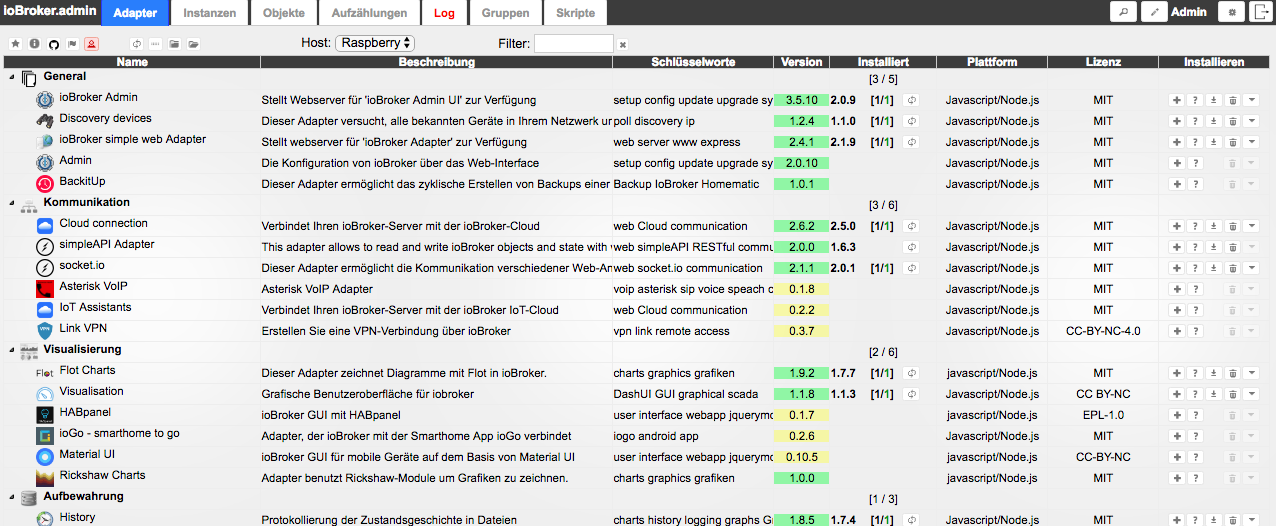
                                      Jetzt habe ich nur noch das Problem, dass ja mein eigentliches Ziel war, iobroker auf eine neuere Version zu updaten.

                                      Wo alles wieder funktioniert, habe ich leider immer noch die alter Ansicht, obwohl das update anscheinend funktioniert hat s.u.

                                      Kann man irgendwo die Ansicht umstellen?

                                      Nachher:

                                      pi@Raspberry:/opt/iobroker $ node -v

                                      v8.15.0

                                      pi@Raspberry:/opt/iobroker $ npm -v

                                      6.4.1

                                      Vorher:

                                      pi@Raspberry:/opt/iobroker $ node -v

                                      v8.11.1

                                      pi@Raspberry:/opt/iobroker $ npm -v

                                      5.8.0
                                      10144_bildschirmfoto_2019-01-01_um_11.56.16.png

                                      1 Antwort Letzte Antwort
                                      0
                                      • paul53P Offline
                                        paul53P Offline
                                        paul53
                                        schrieb am zuletzt editiert von
                                        #19

                                        @Hans:

                                        habe ich leider immer noch die alter Ansicht `
                                        Die Ansicht wird durch den Admin-Adapter bestimmt. Deiner hat noch Version 2.0.9.

                                        Bitte verzichtet auf Chat-Nachrichten, denn die Handhabung ist grauenhaft !
                                        Produktiv: RPi 2 mit S.USV, HM-MOD-RPI und SLC-USB-Stick mit root fs

                                        1 Antwort Letzte Antwort
                                        0
                                        • H Offline
                                          H Offline
                                          Hans
                                          schrieb am zuletzt editiert von
                                          #20

                                          Top, Danke! :D

                                          1 Antwort Letzte Antwort
                                          0
                                          Antworten
                                          • In einem neuen Thema antworten
                                          Anmelden zum Antworten
                                          • Älteste zuerst
                                          • Neuste zuerst
                                          • Meiste Stimmen


                                          Support us

                                          ioBroker
                                          Community Adapters
                                          Donate
                                          FAQ Cloud / IOT
                                          HowTo: Node.js-Update
                                          HowTo: Backup/Restore
                                          Downloads
                                          BLOG

                                          824

                                          Online

                                          32.5k

                                          Benutzer

                                          81.7k

                                          Themen

                                          1.3m

                                          Beiträge
                                          Community
                                          Impressum | Datenschutz-Bestimmungen | Nutzungsbedingungen | Einwilligungseinstellungen
                                          ioBroker Community 2014-2025
                                          logo
                                          • Anmelden

                                          • Du hast noch kein Konto? Registrieren

                                          • Anmelden oder registrieren, um zu suchen
                                          • Erster Beitrag
                                            Letzter Beitrag
                                          0
                                          • Home
                                          • Aktuell
                                          • Tags
                                          • Ungelesen 0
                                          • Kategorien
                                          • Unreplied
                                          • Beliebt
                                          • GitHub
                                          • Docu
                                          • Hilfe
